buttons AUDI A8 2018 User Guide
[x] Cancel search | Manufacturer: AUDI, Model Year: 2018, Model line: A8, Model: AUDI A8 2018Pages: 356, PDF Size: 54.71 MB
Page 140 of 356
Multi Media Interface
-Storing the radio station currently set: hold
your finger on a number (1 to 6) on the MMI
touch contro l pane l until you hear a signal
tone. The radio station will be stored on these
lected number in the list .
-Selecting a stored radio station: tap a number
(1 to 6) on the MMI touch control pad briefly.
The preset buttons (1-6) appear in the Infotain ment
display @¢ fig. 156 .
-Moving a stored radio station: move your fin
ger on the MMI touch control pad to the left/
right until the preset buttons (1-6) appear in
the Infotainment
d isplay @.
Browsing/selecting album covers
Requirement: the Media menu must be open and
a source must be
selected ¢ page 190.
-Browsing through album cove rs: move your
finger across the MMI touch contro l pad from
Letter/number speller
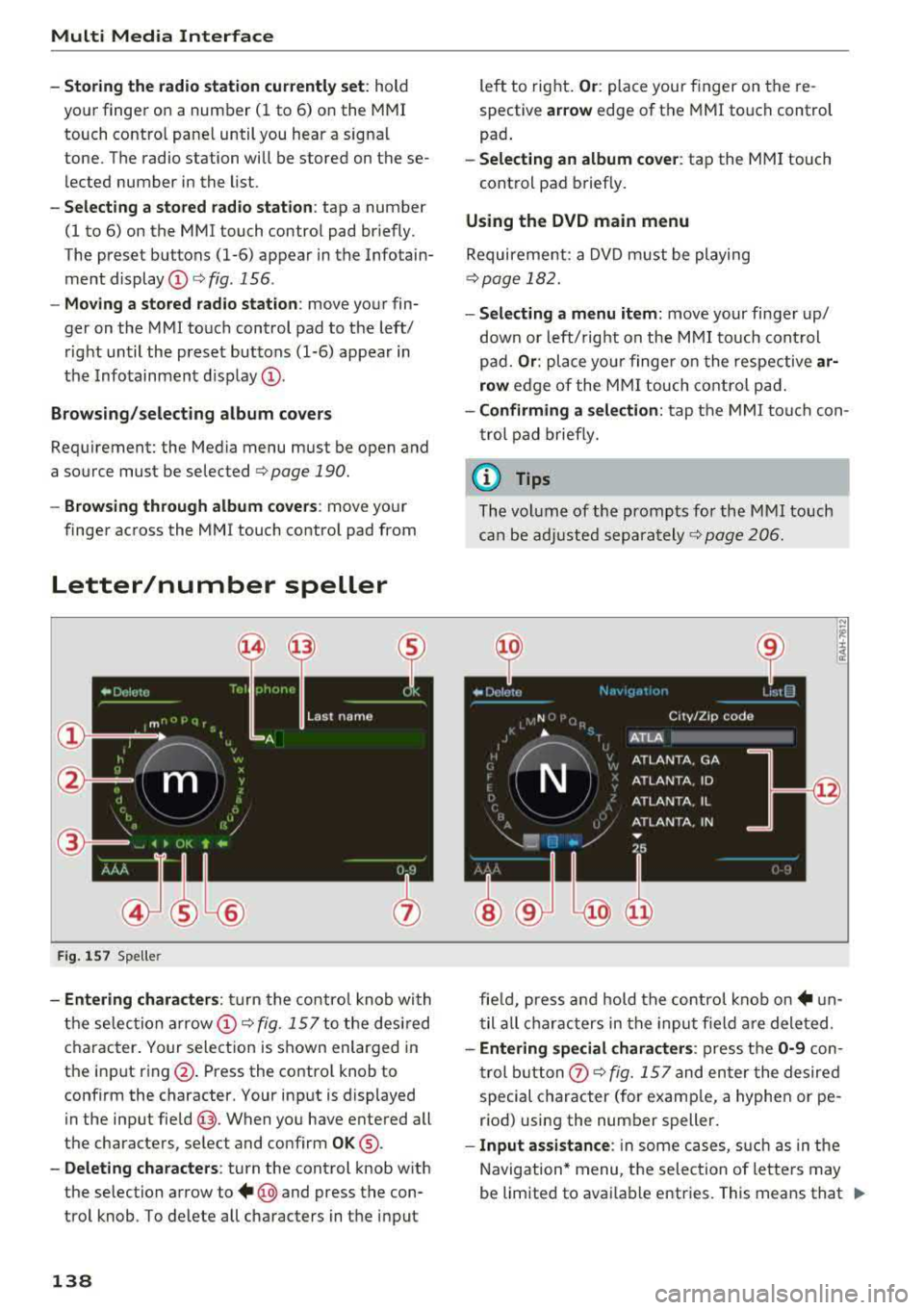
Fig. 157 Spe ller
-Entering characters : turn the control knob with
the selec tion
arrow @¢ fig. 157 to the desired
character. Your selection is shown enlarged in
the input ring @. Press the contro l knob to
confirm the character. Your input is displayed
in the input
field @. When you have entered all
the characters, select and confirm
OK ®·
-Deleting characters: turn the control knob with
the selection arrow to
+ @ and press the con
trol knob . To delete all characters in the input
138
left to right. Or: place your finger on the re
spective
ar row edge of the MMI touch control
pad .
-Selecting an album cover: tap the MMI touch
cont rol pad briefly.
Using the DVD main menu
Requirement: a DVD must be playing
¢page 182.
- Selecting a menu item: move your finger up/
down or left/ right on the MMI touch control
pad.
Or : place your finge r on the respective ar
row
edge of the MMI touch control pad.
-Confirming a selection: tap the MMI touch con
trol pad briefly.
(D Tips
The volume of the prompts for the M MI touch
can be adjusted
separately ¢ page 206.
fie ld, press and hold the control knob
on+ un
til all characters in the input f ield are deleted.
-Entering special characters : press the 0-9 con
trol button
0 ¢ fig. 157 and enter the desired
special character (for examp le, a hyphen or pe
riod) using the number speller.
- Input assistance : in some cases, such as in the
Navigation* menu, the selection of letters may
be limited to avai lable entries. This means that
.,..
Page 196 of 356
Rear Seat Entertainment
Rear Seat Entertainment
RSE components
overview
A pp lies to: ve hicles w ith Rea r Seat En te rtainment
The Rear Seat Entertainment, abbreviated RSE,
combines different entertainment systems . The
RSE control panel is located in the rear center
console .
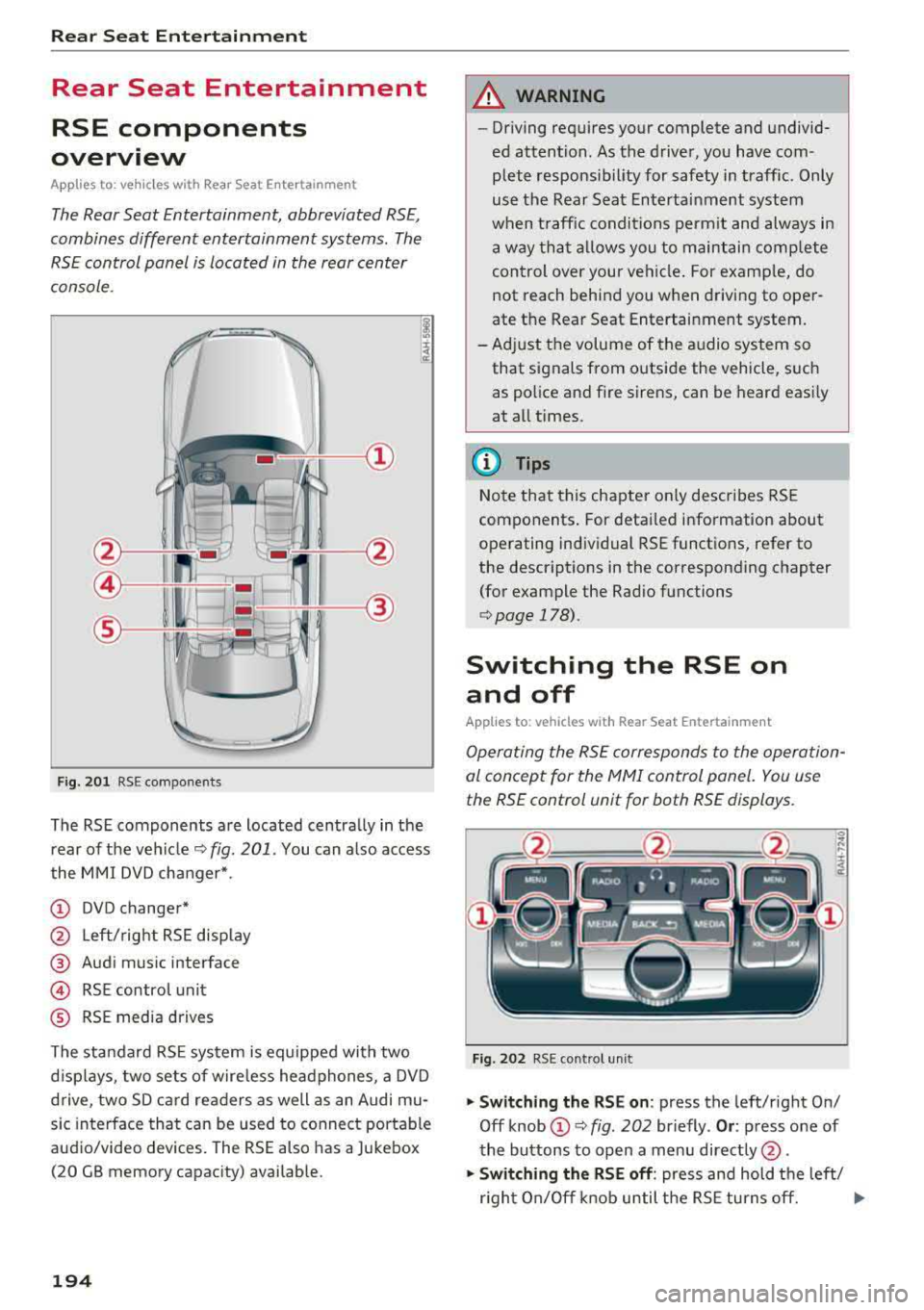
Fig. 201 RSE components
The RSE components are located centrally in the
rear of the vehicle
c:.> fig. 201 . You can also access
the MMI DVD changer*.
(D DVD changer*
@ Left/right RSE display
@ Audi music interface
@ RSE contro l unit
® RSE media drives
The standard RSE system is equipped with two
d isplays, two sets of wire less headphones, a DVD
drive, two SD card readers as well as an Audi mu
sic interface that can be used to connect portable
audio/video devices. The RSE also has a Jukebox
(20 GB memory capacity) availab le.
194
A WARNING
,-
- Driving requires your complete and undivid-
ed attention. As the driver, you have com
plete responsib ility for safety in traffic. Only
use the Rear Seat Entertainment system
when traffic conditions permit and always in
a way that allows you to maintain comp lete
control over your vehicle . For examp le, do
not reach behind you when driving to oper
ate the Rear Seat Entertainment system.
-Adjust the volume of the audio system so
that signals from outside the vehicle, such
as police and fire sirens, can be heard easily
at all times.
(D Tips
Note that this chapter on ly describes RSE
components . For detailed information about
operating individual RSE functions, refer to
the descriptions in the corresponding chapter
(for example the Rad io functions
r::.> page 178).
Switching the RSE on
and off
App lies to: vehicles with Rear Seat Entertainment
Operating the RSE corresponds to the operation
al concept for the
MMI control panel. You use
the RSE control unit for both RSE displays.
Fig. 202 RSE cont rol unit
.,. Switching the RSE on : press the left/right On/
Off knob
(D c:.> fig . 202 br iefly . Or: press one of
the buttons to open a menu directly @.
.,. Switching the RSE off: press and hold the left/
r ight On/Off knob until the RSE turns off.
.,..
Page 199 of 356
lL t:0 ....
"' ......
"' .... 0 0 :c -
(reset)
Applies to: vehicl es with Rea r Seat E nte rtainment
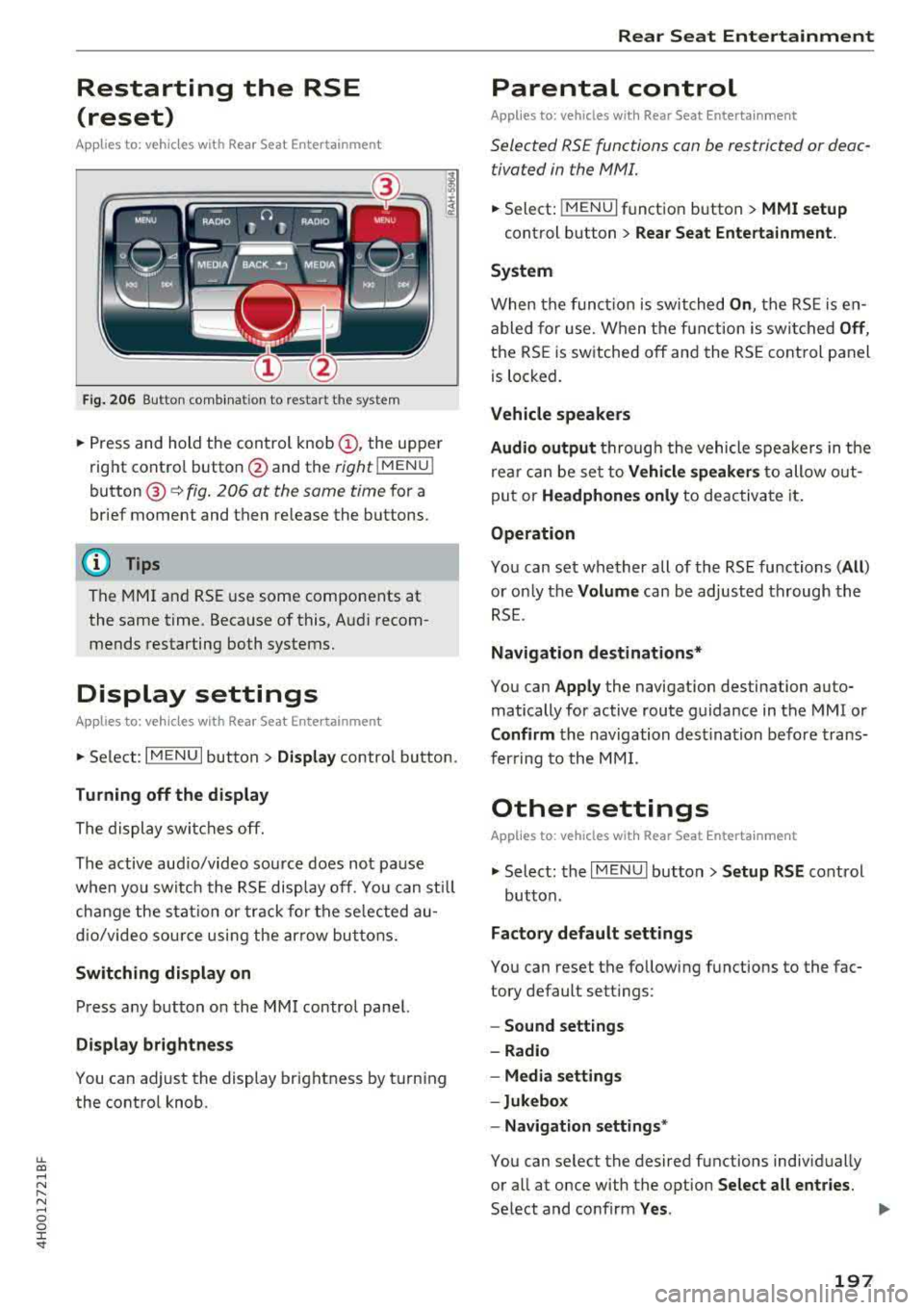
Fig. 206 Button comb inat ion to restart the system
• Press and hold the control knob (D, the upper
right control button @and the
right lMENU i
button @¢fig. 206 at the same time for a
brief moment and then release the buttons.
(D Tips
The MMI and RSE use some components at
the same time. Because of this, Audi recom
mends restarting both systems.
Display settings
Applies to: vehicles with Rea r Seat E nte rtainment
• Se lect : I MENU I button > Display control button.
Turning off the display
The display switches off.
The active aud io/video source does not pa use
when you switch the RSE display off. You can sti ll
change the stat io n or track for the selected au
dio/video source using the arrow buttons.
Switching display on
Press any button on the MMI control panel.
Display brightness
You can adjust the display brightness by turning
the control knob.
Rear Seat Entertainment
Parental control
Appl ies to: vehicles wit h Rear Seat Enterta inment
Selected RS£ functions can be restricted or deac
tivated in the
fv1fv11.
• Select: j MENUI f u nct ion button> MMI setup
control button > Rear Seat Entertainment.
System
When the function is switched On , the RSE is en
abled for use. When the function is switched
Off ,
the RSE is switched off and the RSE control panel
is locked.
Vehicle speakers
Audio output
thr ough the vehicle speakers in the
rear can be set to
Vehicle speakers to allow out
put or
Headphones only to deactivate it.
Operation
You can set whether all of the RSE functions (All )
or on ly the Volume can be adjusted through the
RSE .
Navigation destinations*
You can Apply the navigation destination auto
matically for active route guidance in the MMI or
Confirm the navigation destination before trans
ferring to the MMI.
Other settings
Applies to: vehicles with Rear Seat Entertainment
• Select: the I MENU I button> Setup RSE cont rol
button.
Factory default settings
You can reset the following functions to the fac
tory default settings:
- Sound settings
- Radio
- Media settings
-Jukebox
- Navigation
settings*
You can select the desired functions individually
or all at once with the option
Select all entries.
Select and confirm Yes . ..,
197
Page 265 of 356
lL t:0 ....
'"" " '"" .... 0 0 :c '
The lower anchorage positions are marked for
quick locating .
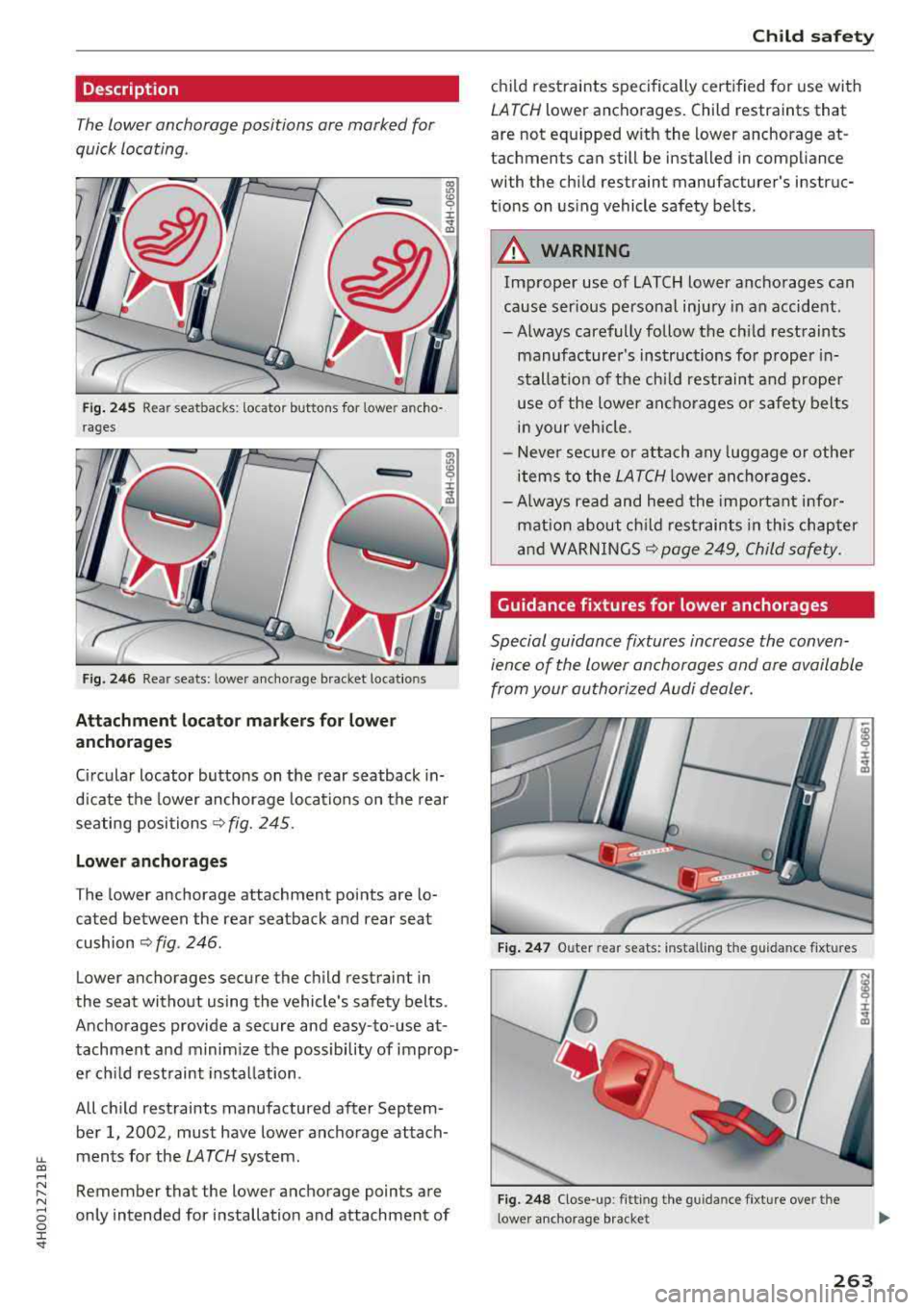
Fig. 2 4 5 Rear seatbacks: locator buttons for lower ancho
rages
i r
F ig. 2 46 Rear seats: lower a nchorage bracket locations
Attachment lo ca tor marker s for lower
a nchorages
Circular locator buttons on the rear seatback in
d icate the lower anchorage locations on the rear
seating positions
<> fig. 245.
Lowe r an chorages
The lower anchorage attachment points are lo
cated between the rear seatback and rear seat
cushion
~ fig . 246.
Lower anchorages secure the child restraint in
the seat without using the vehicle's safety belts.
Anchorages provide a secure and easy-to-use at
tachment and m inim ize the possibility of improp
er chi ld restraint insta llation.
All child restraints manufactured after Septem
ber
1, 2002, must have lower anchorage attach
ments for the
LATCH system .
Remember that the lower anchorage points are
only intended for installation and attachment of
Child s afe ty
child restraints specifically certified for use with
LATCH lower anchorages. Child restraints that
are not equ ipped w ith the lower anchorage at
tachments can still be installed in compliance
with the chi ld restraint manufacturer's instruc
t ions on us ing vehicle safety belts.
A WARNING
-
Improper use of LATCH lower anchorages can
cause ser ious personal inju ry in an accident.
- Always carefully follow the ch ild rest raints
manufacture r's instructions fo r proper in
stallat ion of t he chi ld restraint and proper
use of the lower ancho rages or safety belts
in your vehicle.
- Never secure or attach any luggage o r othe r
items to the
LATCH lower anchorages.
- Always read and heed the important info r
mat ion about ch ild rest raints in this chapter
and
WARNINGS~ page 249, Child safety.
Guidance fixtures for lower anchorages
Special guidance fixtures increase the conven
ience of the lower an chorages and are available
from your authorized Audi dealer.
Fig. 24 7 Outer rear seats: installing the guidance fixtures
F ig . 2 48 Close-up: fitting the guidance fixture over the
l ower anchorage bracket
263
Page 327 of 356
u. co .... N
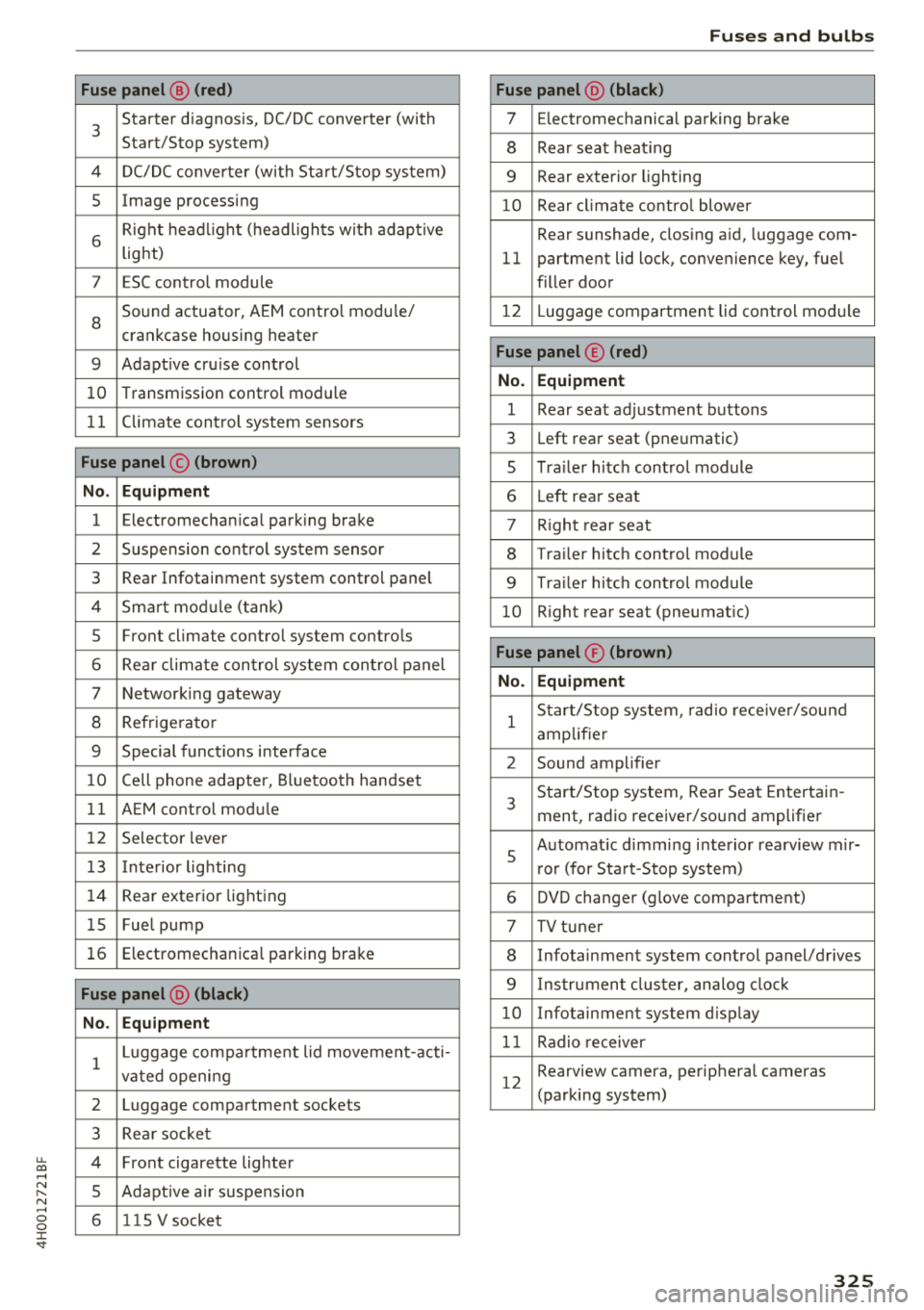
" N .... 0 0 :c '
3
Starter diagnosis, DC/DC converter (with
Start/Stop system)
4 DC/DC converter (with Start/Stop system)
5 Image processing
6
Right headlight (headlights with adaptive
light)
7 ESC control module
8
Sound actuator, AEM control module/
crankcase housing heater
9 Adapt ive cru ise control
10 Transmission control module
11 Climate control system sensors
Fuse panel © (brown)
No. Equipment
1 Electromechan ica l park ing brake
2 Suspension control system sensor
3 Rear Infotainment system control panel
4 Smart module ( tan k)
5 Front climate control system controls
6 Rea r climate control system control panel
7 Networking gateway
8 Refrigerator
9 Special functions interface
10 Cell phone adapter, Bluetooth handset
11 AEM control module
12 Selector lever
1 3 Inte rior lighting
14 Rear exterior lighting
15 Fue l pump
16 Electromechanica l parking brake
Fuse panel @ (black)
No. Equipment
1
Luggage compa rtment lid movement-acti-
vated opening
2 Luggage compartment sockets
3 Rear socket
4 Fro nt cigarette lighter
5 Adaptive air su spension
6 115 V socket
Fuses and bulbs
Fuse panel @ (black)
7 Electromechanical parking brake
8 Rear seat heat ing
9 Rear exterior lighting
10 Rear climate control blower
Rear sunshade, closing a id, luggage com-
11 partment lid lock, convenience key, fue l
filler door
12 L uggage compartment lid control module
Fuse panel © (red)
No. Equipment
1 Rear seat adjustment buttons
3 Left rear seat (pne umatic)
5 Tra iler hitch control module
6 Left rea r seat
7 Right rear seat
8 Trailer hitch control module
9 Trailer hitch control module
10 Right rear seat (pneumat ic)
Fuse panel ® (brown)
No. Equipment
1
Start/Stop system , radio receiver/sound
amplifier
2 Sound amplifier
3
Start/Stop system, Rear Seat Entertain -
ment, radio receiver/sound amplifier
5
Automat ic dimming interior rea rview mir-
r or (for Start-Stop system)
6 DVD changer (glove compartment)
7 TV tuner
8 Infotainment system control panel/drives
9 Instrument cluster, analog clock
10 Infotainment system d isp lay
11 Radio receiver
12
Rearview camera, perip heral cameras
(parking system)
325
Page 347 of 356
Full screen disp lay (DVD) . . . . . . . . . . . . . . . 191
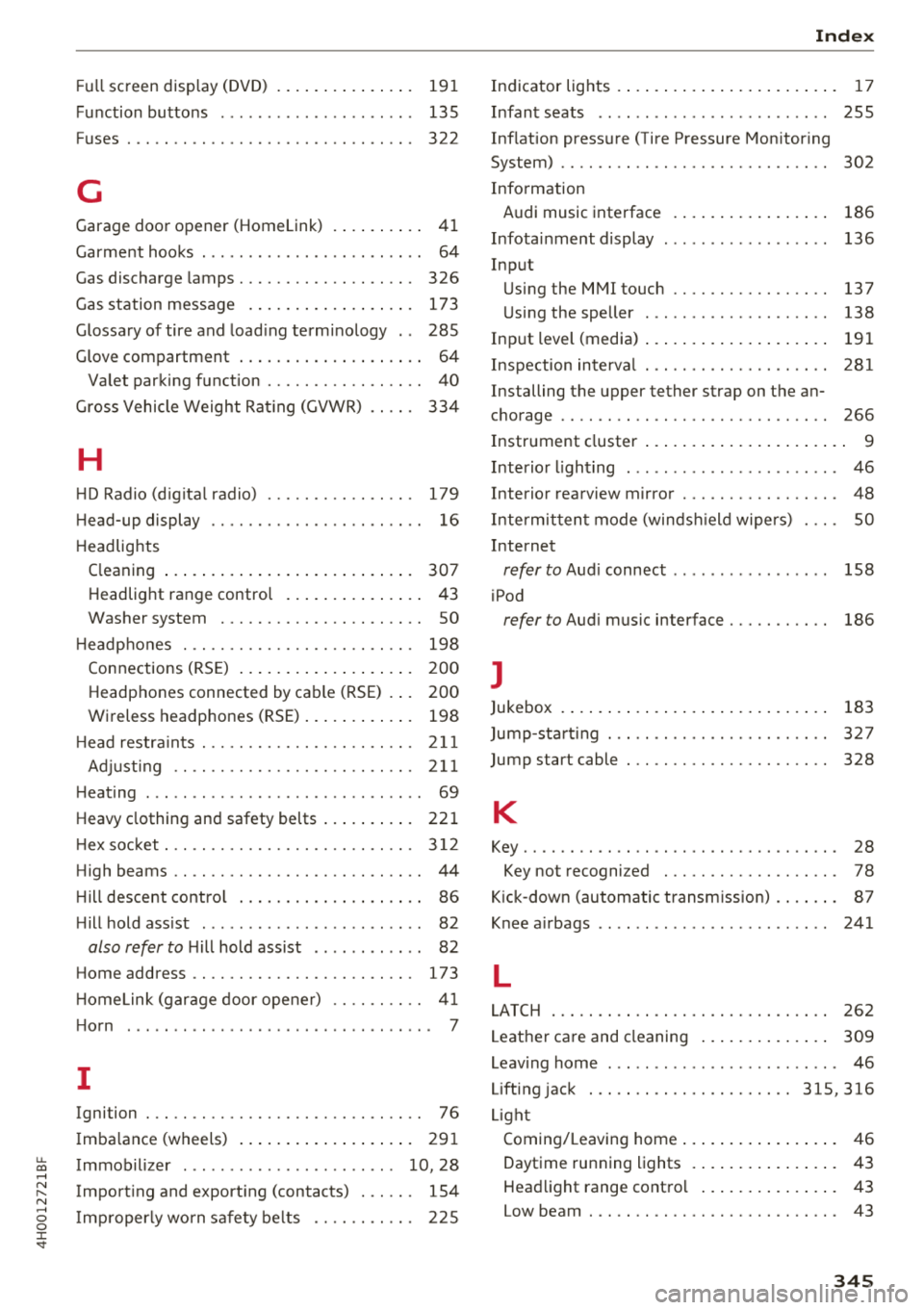
Function buttons . . . . . . . . . . . . . . . . . . . . . 135
Fuses . . . . . . . . . . . . . . . . . . . . . . . . . . . . . . . 322
G
Garage door opener (Homelink) . . . . . . . . . . 41
Garment hooks . . . . . . . . . . . . . . . . . . . . . . . . 64
Gas discharge lamps . . . . . . . . . . . . . . . . . . . 326
Gas station message . . . . . . . . . . . . . . . . . . 173
Glossary of tire and loading terminology . . 285
Glove compartment . . . . . . . . . . . . . . . . . . . . 64
Valet parking function . . . . . . . . . . . . . . . . . 40
Gross Vehicle Weight Rating (GVWR) . . . . . 334
H
HD Radio (digital radio) . . . . . . . . . . . . . . . . 179
Head-up display . . . . . . . . . . . . . . . . . . . . . . . 16
Headlights Cleaning . . . . . . . . . . . . . . . . . . . . . . . . . . . 307
Headlight range control . . . . . . . . . . . . . . . 43
Washer system . . . . . . . . . . . . . . . . . . . . . . 50
Headphones . . . . . . . . . . . . . . . . . . . . . . . . . 198
Connections (RSE) . . . . . . . . . . . . . . . . . . . 200
Headphones connected by cable (RSE) . . . 200
Wireless headphones (RSE) . . . . . . . . . . . . 198
H ead restra ints. ............... .. .. .. . 211
Adjusting . . . . . . . . . . . . . . . . . . . . . . . . . . 211
Heating . . . . . . . . . . . . . . . . . . . . . . . . . . . . . . 69
Heavy clothing and safety belts . . . . . . . . . . 221
H ex socket. .. .. ............. .. .. .. .. . 312
High beams . . . . . . . . . . . . . . . . . . . . . . . . . . . 44
H ill descent control . . . . . . . . . . . . . . . . . . . . 86
Hill hold assist . . . . . . . . . . . . . . . . . . . . . . . . 82
also refer to Hill hold assist . . . . . . . . . . . . 82
Home address .. ............... .. .. .. . 173
HomeLink (garage door opener) . . . . . . . . . . 41
Horn . . . . . . . . . . . . . . . . . . . . . . . . . . . . . . . . . 7
I
Ignition . . . . . . . . . . . . . . . . . . . . . . . . . . . . . . 76
Imbalance (wheels) . . . . . . . . . . . . . . . . . . . 291
~ Immobilizer . . . . . . . . . . . . . . . . . . . . . . . 10, 28 ....
~ Importing and exporting (contacts) . . . . . . 154 N .... g Improperly worn safety belts . . . . . . . . . . . 225
:c '
Indicator lights . . . . . . . . . . . . . . . . . . . . . . . . 17
Infant seats . . . . . . . . . . . . . . . . . . . . . . . . . 255
Inflation pressure (Tire Pressure Monitoring
System) . . . . . . . . . . . . . . . . . . . . . . . . . . . . . 302
Information Audi music interface . . . . . . . . . . . . . . . . . 186
Infotainment display . . . . . . . . . . . . . . . . . . 136
Input Using the MMI touch . . . . . . . . . . . . . . . . . 137
Using the speller . . . . . . . . . . . . . . . . . . . . 138
Input level (media) . . . . . . . . . . . . . . . . . . . . 191
Inspection interval . . . . . . . . . . . . . . . . . . . . 281
Installing the upper tether strap on the an-
chorage .... .. .. .. ................. .. 266
Instrument cluster . . . . . . . . . . . . . . . . . . . . . . 9
Interior lighting . . . . . . . . . . . . . . . . . . . . . . . 46
Interior rearview mirror . . . . . . . . . . . . . . . . . 48
Intermittent mode (windsh ield wipers) . . . . SO
Internet
refer to Audi connect . . . . . . . . . . . . . . . . . 158
iPod
refer to Audi music interface . . . . . . . . . . . 186
J
Jukebox 183
Jump-starting . . . . . . . . . . . . . . . . . . . . . . . . 327
Jump start cable . . . . . . . . . . . . . . . . . . . . . . 328
K
Key........ .. .. .. .. ............... .. . 28
Key not recognized . . . . . . . . . . . . . . . . . . . 78
Kick-down (automatic transmission) . . . . . . . 87
Knee airbags . . . . . . . . . . . . . . . . . . . . . . . . . 241
L
LATCH
262
Leather care and cleaning . . . . . . . . . . . . . . 309
Leaving home . . . . . . . . . . . . . . . . . . . . . . . . . 46
Lifting jack ... .. .. .. ............. 315, 316
Light Coming/Leaving home . . . . . . . . . . . . . . . . . 46
Daytime running lights . . . . . . . . . . . . . . . . 43
Headlight range control . . . . . . . . . . . . . . . 43
Low beam . .. .. .. .. ............... .. . 43
345