instrument cluster AUDI A8 2018 User Guide
[x] Cancel search | Manufacturer: AUDI, Model Year: 2018, Model line: A8, Model: AUDI A8 2018Pages: 356, PDF Size: 54.71 MB
Page 47 of 356
u. co .... N
" N .... 0 0 :c '
coming vehicles, the vehicle speed and other en
vironmenta l and traffic conditions.
Activating high beam assistant
Requirement: the light switch must be set to the
AUTO position and the high beam assistant must
be switched on in the Infotainment system
~ page 45 .
.,. To activate the high beam assistant , tap the
l ever forward @. T he
II ind icator light ap
pears in the instrument cluster display and the
high beam headlights are switched on/off auto
matically. The
ii indicator light also turns on if
the high beams are switched on.
Switching the high beams on/off manually
If the high beams did not switch on/off automat
ica lly as expected, you may switch them on or off
manually instead:
.,. To switch the high beams on manually, tap the
lever forward @. T he
ii indicator light turns
on .
.,. To switch the hig h beams off manua lly, pull the
lever
back @. The high beam assistant is deac
t ivated.
Operating the headlight flasher
.,. T o operate the headlight flasher when the high
beam assistant is activated and high beams are
switched off, pull the lever
back @. The high
beam assistant rema ins active.
Messages in the instrument cluster display
Headlight assist: System fault
Drive to an authorized Aud i dea ler or authorized
Audi Service Fac ility immediately to have the
malfunction corrected. You can still switch the
high beams on or off manually.
Headlight assist: Unavailable No camera view
The camera view is blocked, for example by a
sticker or debris .
The sensor is located between the interior rear
view mirror and the windshield. Do not place any
stickers in this area on the windshield.
Lights and Vision
A WARNING
--
High beam assistant is only intended to assist
the driver. The driver is still respons ible for
controlling the headlights and switching
them manually depend ing on light and visibil
it y conditions. It may be necessary to operate
them manually in situations such as:
- I n adverse weather conditions such as fog,
heavy rain, blowing snow or spraying water.
- On roads where oncom ing traffic may be
pa rtiall y obscured, such as expressways.
- When there are road users that do not have
sufficient lighting, such as b icyclers or
vehicles with dirty tail lamps.
- I n tight curves and on steep hills.
- In poorly lit areas.
- With strong reflectors, such as signs.
- If the area of the w indshield near the sensor
is fogged over, dirty, icy or covered with a
sticker .
Adjusting the exterior lighting
The functions are adjusted in the Infotainment
system.
.,. Select: I CAR ! function button > Car systems
control button > Vehicle settings > Exterior
lighting .
Automatic headlights
You can adjust the following sett ings in the Au
tomatic headlights
menu:
Headlights activation time -you can adjust if the
headlights switch on
Early, Medium or Late ac
cording to the sensitivity of the light sensor.
Auto-dimming high beams* -you can switch the
high beam assistant*
On and Off .
Daytime running lights*
USA models :
the daytime running lights can be
switched on/off. Select
On or Off.
Canada models:
this function cannot be switched
off. They activate automatically each time the ig -
nition is switched on .
IIJ>-
45
Page 74 of 356
Warm and cold
(D Note
To avoid damage to the heating elements in
the seats, do not kneel on the seats or place
heavy loads on a small area of the seat.
Basic settings
The climate control system basic settings ore ac
cessed in the Infotainment system.
,.. Select: the ICARI function button > Car systems
control button > AC.
Rear seat settings*
When this function is selected, all settings for
the rear can be adjusted through the climate con
trol system in the cockpit. The climate control
system settings cannot be adjusted in the rear
seat at the same time. This function switches off
after a certain period of time or when one of the
dials in the cockpit is pressed.
Auto recirculation*
The sensit ivity level of the automatic recircula
tion mode can be set at various levels from
Off to
Sensitive. When recirculation mode 1~ 1 is switch
ed on, the air recirculation is controlled automat
ically. If the windows fog up, press the
I ® FRONT I
button.
Footwell temperature
You can adjust the footwell temperature so that
it is cooler or warmer .
Solar roof*
Parking ventilation is controlled automatically in
the
Auto setting.
When the ignition is switched off, solar-powered
parking ventilation may switch on, as long as
- there is sufficient sunlight,
- the outside temperature is not too low,
- the sunroof is closed or tilted and
-Auto (Infotainment system) is set
72
Steering wheel heating
Applies to: vehicles with steering wheel heating
The steering wheel rim can be heated .
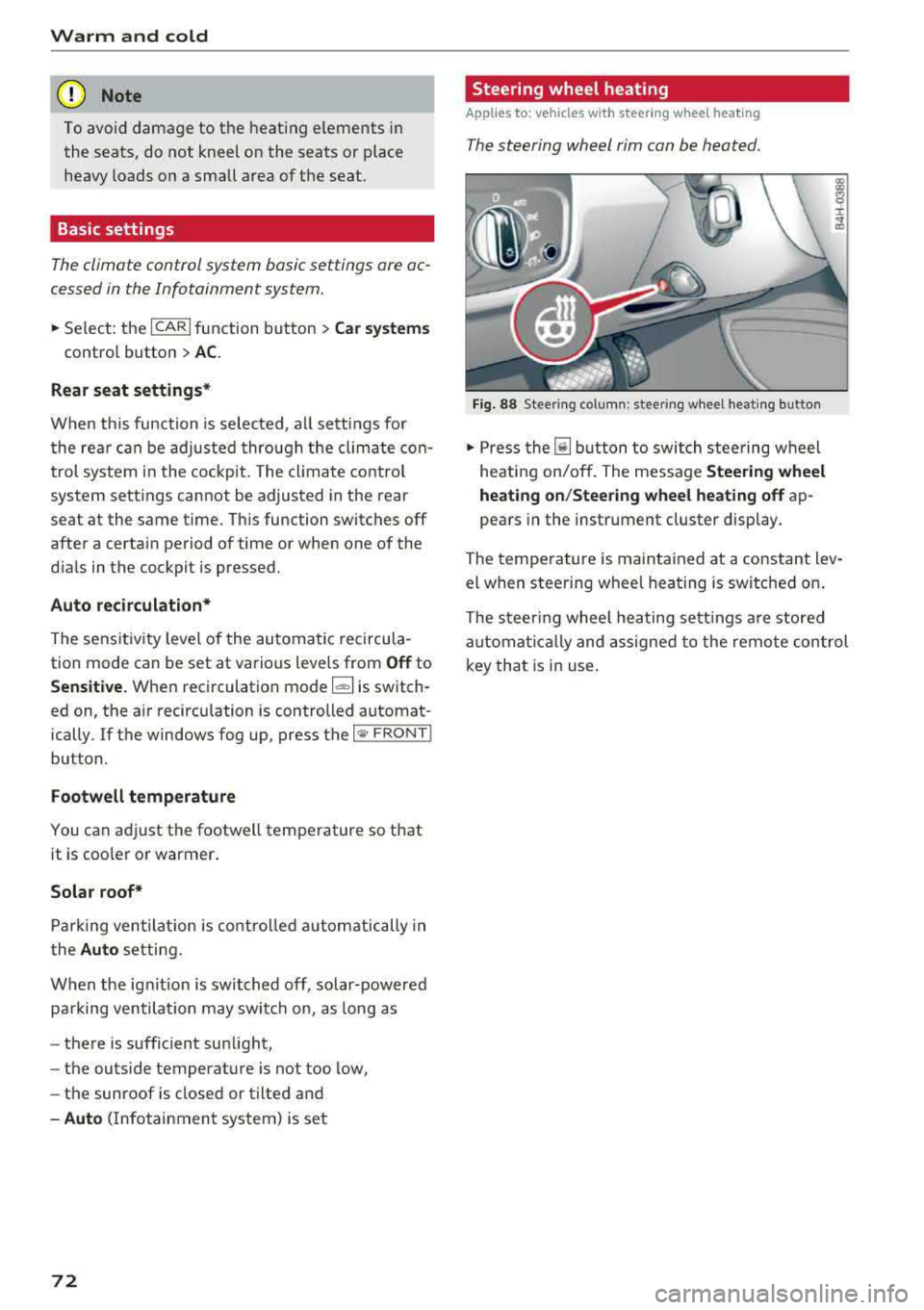
Fig. 88 Steering column: steering wheel heating button
,.. Press the [il button to switch steering wheel
heating on/off. The message
Steering wheel
heating on/Steering wheel heating off
ap
pears in the instrument cluster display.
The temperature is maintained at a constant lev
el when steering wheel heating is switched on.
The steering wheel heating settings are stored
automat ical ly and assigned to the remote control
key that is in use.
Page 79 of 356
u. co .... N
" N .... 0 0 :c '
-Some noise after starting the engine is nor
mal and is no cause for concern.
- If you leave the vehicle with the ignition
switched on, the ignition will switch off af
ter a certain amount of time. Make sure that
electrical equipment such as the exterior
lights are switched off.
Stopping the engine
.,. Bring the vehicle to a full stop.
.,. Select the P or N selector lever position .
.. Press the I START ENGI NE STOPI button
~ page 76, fig. 90.
Steering lock
The steering locks when you turn the engine off
using the lSTART
ENGINE STOPlbutton and
open the driver's door. The locked steering helps
prevent vehicle theft.
Emergency off function
If it is absolutely necessary, the engine can also
be turned off while driving in the
R, Dor S selec
tor lever position at speeds below 6 mph (10 km/
h). To stop the engine, press and hold the
I START ENGINE STOPI button and also press the
brake pedal.
& WARNING
-Never turn off the engine before the vehicle
has come to a complete stop. The full func
tion of the brake booster and the power
steering is not guaranteed. You must use
more force to turn or brake. Because you
cannot steer and brake as you usually
would, this could lead to accidents and seri
ous injuries .
-Always take the key with you whenever you
leave your vehicle. Otherwise, the engine
cou ld be started or electrical equipment
such as the power windows could be operat
ed. This can lead to serious injury.
-For safety reasons, always park the vehicle
with the selector lever in the P position .
Driving
Otherwise, there is the risk that the vehicle
could roll unintentionally.
@ Note
If the engine has been under heavy load for
an extended period of time, heat builds up in
the engine compartment after the engine is
switched off and there is a risk of damaging
the engine. For this reason, let the engine run
at idle for approximately two minutes before
shutting it off .
(D Tips
For up to 10 minutes after stopping the en
gine, the radiator fan may turn on again auto
matically or it may continue to run (even if
the ignition is switched off) for the following
reasons :
- The coolant temperature is increasing due
to trapped heat.
- If the engine is warm and the engine com
partment also heats up from strong sun
light.
Messages in the instrument cluster display
Turn off ignition before leaving car
This message appears and a warning tone sounds
if you open the driver's door when the ignition is
switched on.
Press brake pedal to start engine
This message appears when you press the
I START ENGINE STOP ! button to start the engine
and do not press the brake pedal while doing so.
The engine can only be started when the brake pedal is pressed .
Ill Is key in the vehicle?
This indicator light turns on and this message ap
pears if the ignition key was removed from the
vehicle when the engine was running. If the igni
tion key is no longer in the vehicle, you cannot
switch on the ignition or start the engine once
you stop it. You also cannot lock the vehicle from
the outside .
.,.
77
Page 81 of 356
lL t:0 ....
"' " "' .... 0 0 :c '
would, th is could lead to accidents and ser i
ous injuries .
- To reduce the risk of injuries, make sure that
the Start/Stop system is turned off when
working in the engine compartment
i=> page80 .
(D Note
Always switch the Start/Stop system off when
driving through water
i::> page 80.
Starting/stopping the engine
App lies to: ve hicles with Start/Stop system
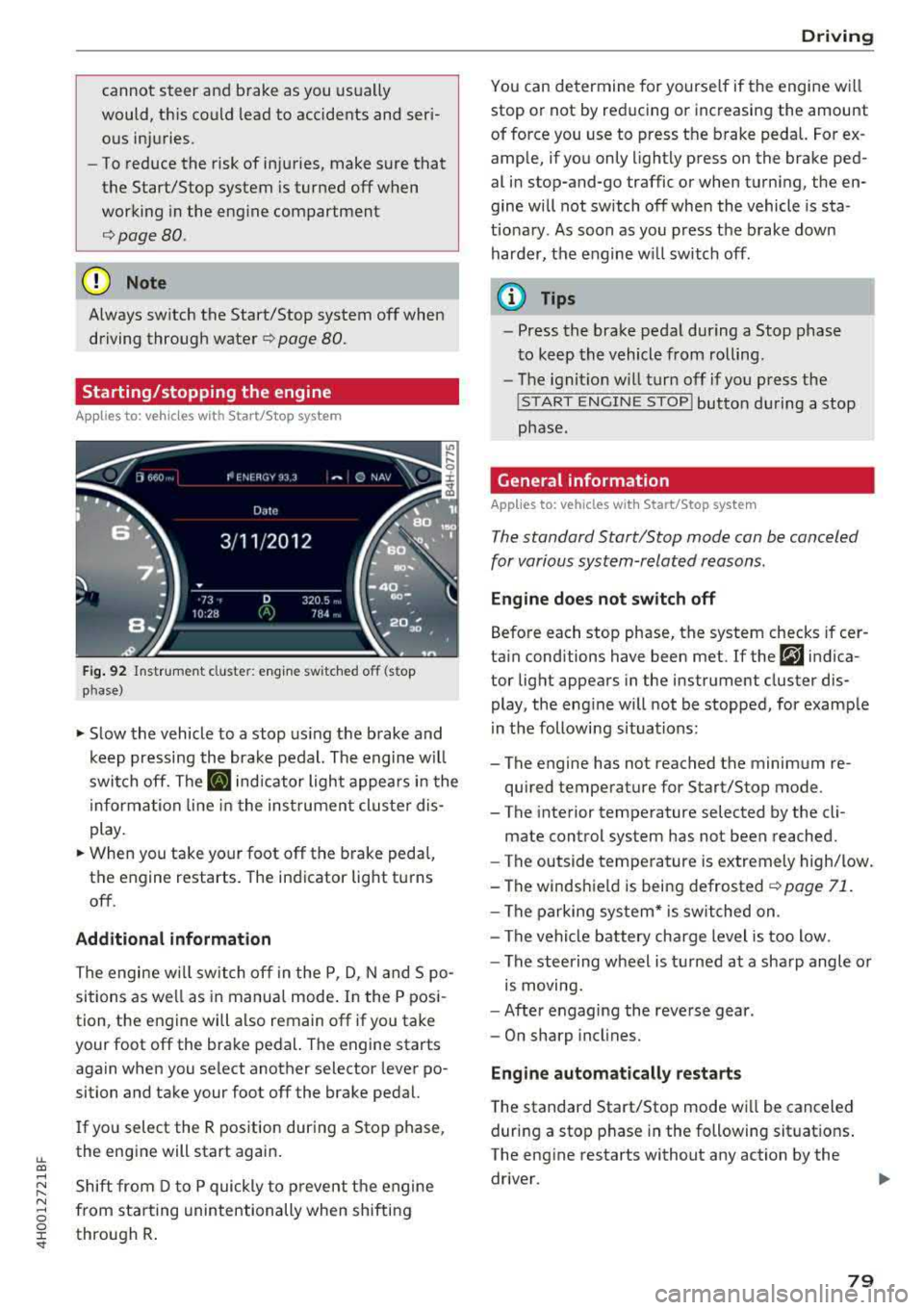
Fig. 92 Instrument cluste r: eng ine sw itched o ff (stop
p hase)
~ S low the vehicle to a stop us ing the brake and
keep pressing the brake pedal. The engine w il l
switch off. The
II indicator light appears in the
informa tion line in the instrument cluster dis
play.
~ When you take your foot off the brake peda l,
the engine restarts. The indicator lig ht turns
off .
Additional information
The engine w ill switch off in the P, D, N and S po
sitions as we ll as in manual mode . In the P posi
tion, the engine will also remain off if you take
your foot off the brake pedal. The engine starts
again when you se lect another selector lever po
sition and take your foot off the brake pedal.
I f you select the R pos ition during a Stop phase ,
the engine will start again.
Shift from D to P quickly to p revent the engine
from star ting unintentionally when shifting
through R .
Drivi ng
You can de termine for yourse lf if the engine w ill
stop or not by reducing or increasing the amount
of force you use to press the brake pedal. For ex
amp le, if you only lightly press on the brake ped
al in stop-and-go traffic or when turning, the en
gine will not switch off when the vehicle is sta
t io nary . As soon as you press the brake down
harder, the engine w ill switch off .
(D Tips
-Press the brake pedal during a Stop phase
t o keep the vehicle from rolling .
- The ignit ion w ill turn off if you press the
! S T ART ENGINE STOPI button du ring a stop
phase.
General information
Applies to: vehicles w ith Start/Stop system
The standard Start/Stop mode can be canceled
for various system-related reasons.
Eng ine doe s not switch off
Before each stop phase, the system checks if cer
tain conditions have been met . If the
r,J indica
tor light appears in the instrument cluster dis
play, the eng ine will not be stopped, for example
in the following situations:
- The engine has not reached the minimum re
quired temperature for Start/Stop mode.
- T he interior temperature selected by the cli-
mate control system has not been reached.
- The outside temperature is extremely high/low.
-The winds hie ld is being defrosted
~ page 71.
-The parking sys tem* is switched on .
- The vehicle battery cha rge level is too low .
- The steering wheel is tu rned at a sha rp angle or
is moving.
- After engaging the reve rse gear .
- On sharp incl ines.
Eng ine automatically restarts
T he standard Start/Stop mode wi ll be canceled
during a stop phase in the following situat ions .
The eng ine restarts without any action by the
driver .
79
Page 82 of 356
Driving
-The inter ior temperature differs from the tem
perature se lected in the A/C system.
-The windshield is being defrosted q page 71 .
-The brake pedal is pressed seve ral t imes in a
r ow.
-T he vehicle ba tte ry charge Leve l is too Low.
-Power consumption is high .
Ignition is switched off automatically
To prevent the veh icle battery from drain ing, the
ignit ion w ill switch off
automatically under the
following conditions:
-The vehicle has already been driven .
-The Start/Stop system has stopped the e ngine.
- T he driver's door is opened.
- T he dr iver's safety be lt is unb uckled.
- The brake pedal is not p ressed .
-The vehicle is stationary .
In this case, the activated low beam is replaced
by the parking Light. The parking Lights will
sw itch off after app roximately 30 minutes or
when you Lock the vehicle .
If the Start/Stop system has not turned off the
engine o r if you have sw itched the Start/Stop sys
tem off manually, the ignition will not be auto mat ically switched off and the engine w ill contin
ue to r un
q I!::::,. .
.&_ WARNING
To re duce the risk of poisoni ng, neve r allow
t he engine to r un in confined s paces.
(D Tips
If you select the D, N or S selector Lever posi
tion after shifting into reverse, the vehicle
m ust be driven faster than 6 mph (10 km/h)
in orde r for the engine to switch off again.
80
-
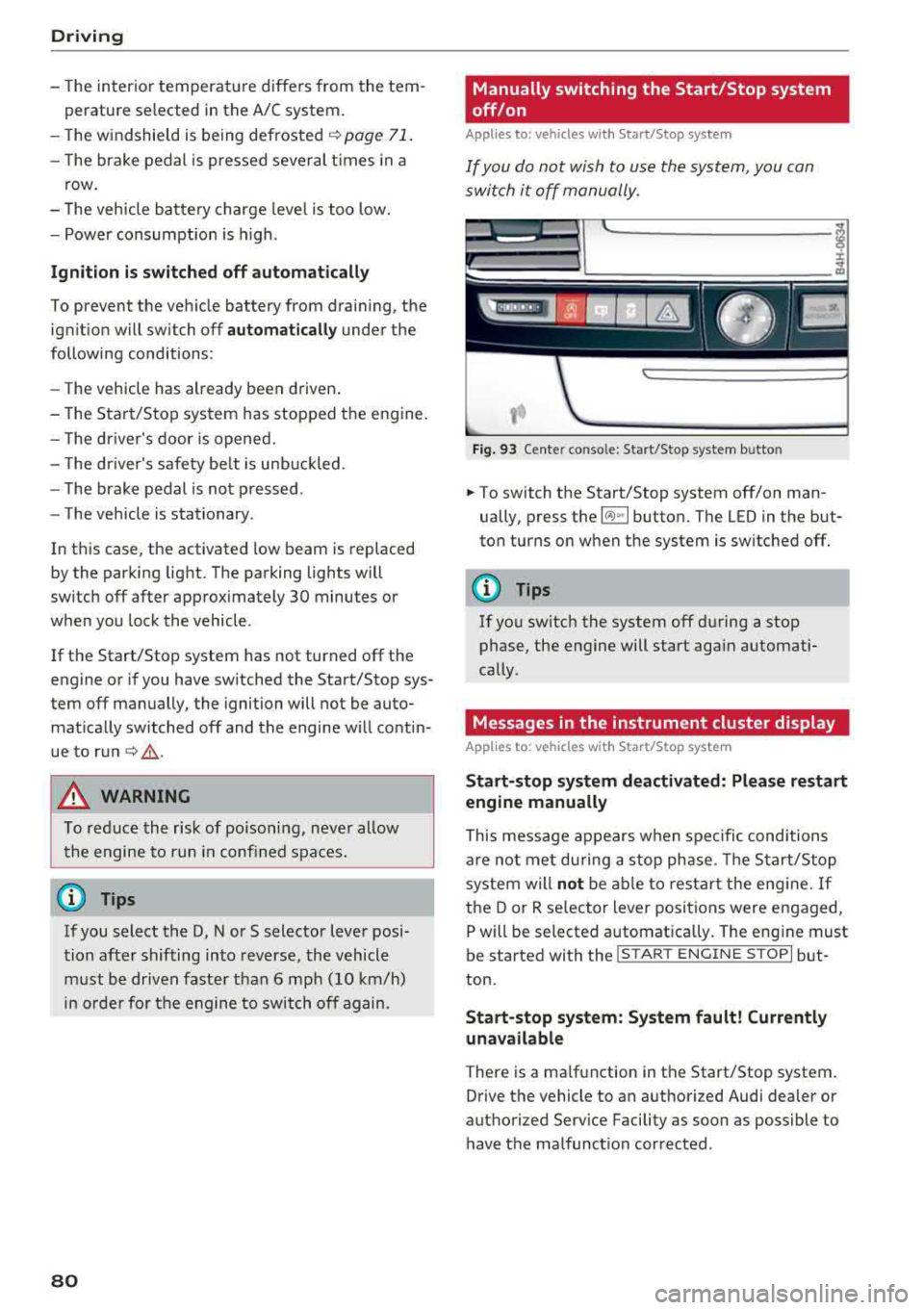
Manually switching the Start/Stop system
off/on
Appl ies to : vehicles wi th Start/Stop sys te m
If you do not wish to use th e system, you con
switch i t off manually.
------------ ~
:i:
~
Fig . 93 Ce nte r conso le: Start/Stop system b utto n
.. To switch the Start/Stop system off/on man
ually, press the
l (A) ~I button. The LED in the but
ton turns on when the system is switched off.
(D Tips
If you switch the system off d uring a stop
phase, the engine will start aga in automati
cally .
Messages in the instrument cluster display
Applies to: vehicles wit h Start/Stop syste m
Start-stop system deactivated: Please restart
engine manually
This message appears w hen spec ific conditions
are not me t du ring a stop phase. The S tart/S top
system will
not b e abl e to re st art the eng ine. If
the D or R se lector Lever positions were engaged,
P will be selected a utomat ically . The eng ine must
be started with the
I START ENGI NE STOPI but
ton.
Start -stop system: System fault! Currently
unavailable
There is a ma lfunction in the Start/Stop system.
Drive the vehicle to an authorized Audi dea ler or
authorized Serv ice Facility as soon as possible to
have t he malfunction corrected .
Page 83 of 356
lL t:0 ....
"' ......
"' .... 0 0 :c '
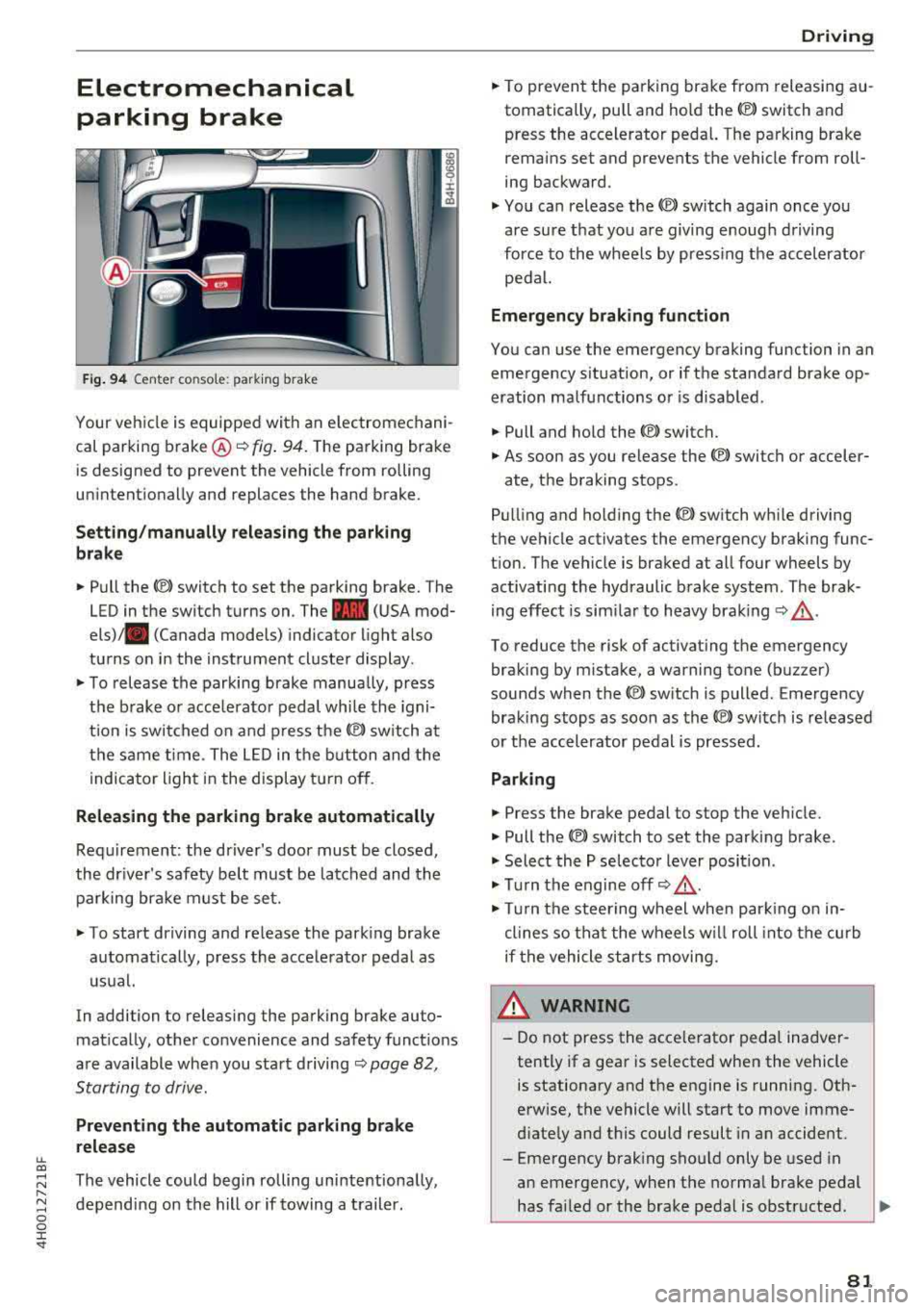
parking brake
Fig. 94 Center console: parking brake
Your vehicle is equipped with an electromechani
cal parking brake ®
i=)fig. 94. The parking brake
is designed to prevent the vehicle from rolling
unintentionally and replaces the hand brake.
Setting/manually releasing the parking
brake
.. Pull the C®> switch to set the parking brake. The
LED in the switch turns on. The
-(USA mod
els) . (Canada models) indicator light also
turns on in the instrument cluster display.
.. To release the parking brake manua lly, press
the brake or acce lerator pedal while the igni
t ion is switched on and press
the(®) switch at
the same time. The LED in the button and the
indicator light in the display turn off.
Releasing the parking brake automatically
Requirement: the driver's door must be closed,
the driver's safety belt must be latched and the parking brake must be set.
.. To start driving and release the parking brake
automatically, press the accelerator pedal as
usual.
In addition to releasing the parking brake auto
matically, other convenience and safety functions
are available when you start driving
i=)page 82,
Starting to drive.
Preventing the automatic parking brake
release
The vehicle could begin rolling unintentionally,
depending on the hill or if towing a trailer.
Driving
.. To prevent the parking brake from releasing au
tomatically, pull and hold the<®> switch and press the accelerator pedal. The parking brake
remains set and prevents the vehicle from roll
ing backward .
.,. You can release the<®> switch again once you
are sure that you are giving enough driving
force to the wheels by pressing the accelerator
pedal.
Emergency braking function
You can use the emergency braking function in an
emergency situation, or if the standard brake op
eration malfunctions or is disabled.
.. Pull and hold the<®> switch.
.. As soon as you release the <®> switch or acceler-
ate, the braking stops.
Pulling and ho lding
the(®) switch while driving
the vehicle activates the emergency braking func
tion. The vehicle is braked at all four wheels by activating the hydraulic brake system. The brak
ing effect is similar to heavy braking
i=) ,& .
To reduce the risk of activating the emergency
braking by mistake, a warning tone (buzzer)
sounds when the
<®l switch is pulled. Emergency
braking stops as soon as
the© switch is released
or the accelerator pedal is pressed.
Parking
.. Press the brake pedal to stop the vehicle.
.. Pull the<®> switch to set the parking brake .
.,. Select the P selector lever position .
.,. Turn the engine off i=) ,&.
.,. Turn the steering wheel when parking on in
clines so that the wheels w ill roll into the curb
if the vehicle starts moving.
8_ WARNING
-Do not press the acce lerator pedal inadver
tently if a gear is selected when the vehicle
is stationary and the engine is running. Oth
erwise, the vehicle will start to move imme
diately and this could result in an accident.
-Eme rgency braking should only be used in
an emergency, when the normal brake pedal
has failed or the brake pedal is obstructed .
.,.
81
Page 88 of 356
Driving
keep your foot on the brake in all selector
lever positions (except P and N) when the
engine is running.
- Do not inadvertently press the accelerator
pedal when the vehicle is stationary. Other
wise the vehicle will start to move immedi
ately, even if the parking brake is set. This
could result in a crash.
~ Note
-When stopping on an incline, do not try to
hold the vehicle in place by pressing the ac
celerator pedal while a driving gear is se lected . This can cause the transmission to
overheat and can damage it . Set the parking
brake or press the brake pedal to prevent
the vehicle from rolling.
- Allowing the vehicle to roll when the engine
is stopped will damage the transmission be
cause it is not lubricated.
(D Tips
For safety reasons, the parking brake is re
leased automatically only when the driver's
safety belt is fastened.
Hill descent control
The hill descent control system assists the driver
when driving down hills .
Hill descent control activates when the transmis
sion is in the Dor S position and you press the
brake pedal. The transmission automatically se
lects a gear that is suitable for the hill. Hill de
scent control tries to maintain the speed ach
ieved at the time of braking, within physical and
technical limitations. If may still be necessary to
adjust the speed with the brake pedal.
Hill descent control switches off once the hill lev
els out or you press the accelerator pedal.
When operating the cruise control system
c::> page 93, hill descent control is also activated
when the speed is set.
86
A WARNING
, -
Hill descent control cannot overcome physical
limitations, so it may not be able to maintain
a constant speed under all conditions. Always
be ready to apply the brakes .
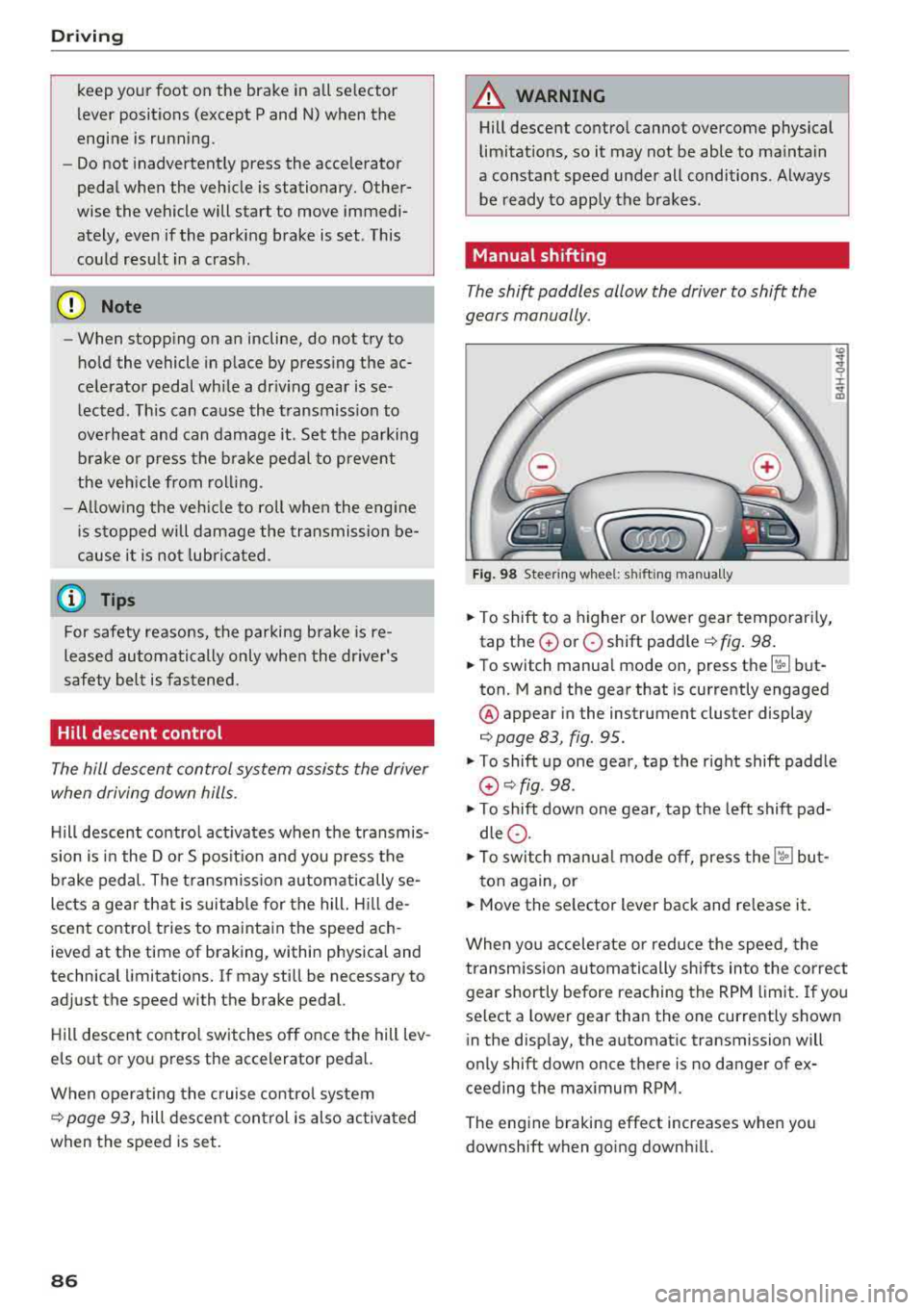
Manual shifting
The shi~ paddles allow the driver to shift the
gears manually.
Fig. 98 Steering whee l: shi fting manually
.. To shift to a higher or lower gear temporarily,
tap the
0 or 0 shift paddle <=:>fig. 98.
.. To switch manual mode on, press the ~ but
ton. Mand the gear that is currently engaged
@ appear in the instrument cluster display
c::> page 83, fig. 95 .
.,. To shift up one gear, tap the right shift paddle
G) c::>fig . 98.
.,. To shift down one gear, tap the left shift pad
dle
0 .
.,. To switch manual mode off, press the ['.fl but-
ton again, or
.. Move the selector lever back and release it.
When you accelerate or reduce the speed, the
transmission automatically shifts into the correct
gear shortly before reaching the RPM limit. If you
select a lower gear than the one currently shown
in the display, the automatic transmission will
only shift down once there is no danger of ex
ceeding the maximum RPM.
The engine braking effect increases when you
downshift when going downhill.
Page 90 of 356
Driving
-The park ing lock can no longer be engaged.
Drive to an authorized Audi dealer or author
ized Audi Service Facility immed iately to have
the malfunction corrected.
rm Transmission malfunction: Stop vehicle and
shift to park.
Do not continue driving. Select the P selec tor lev
er position and contact an authorized Audi dea ler
or authorized Audi Service Facility for assistance.
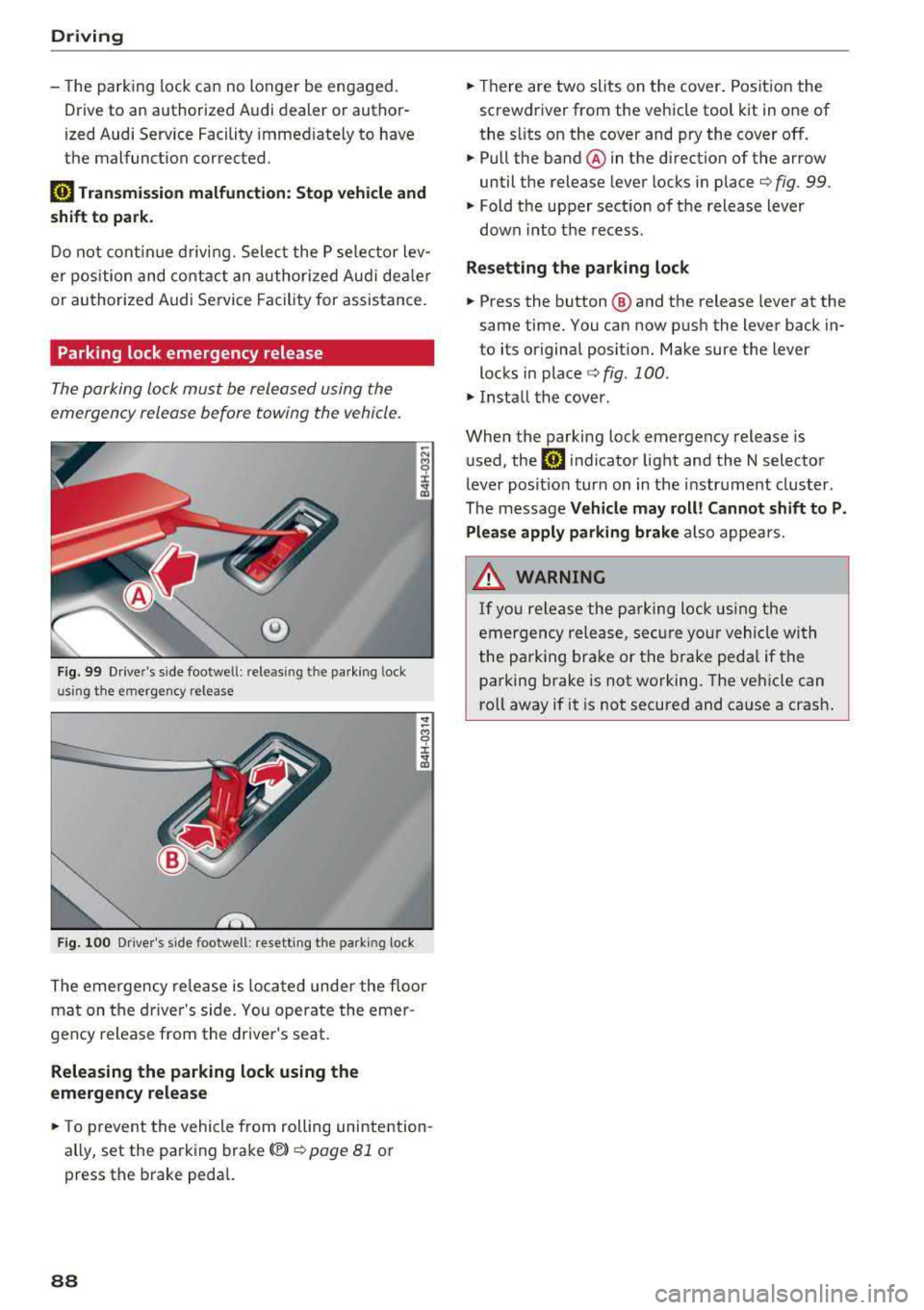
Parking lock emergency release
The parking lock must be released using the
emergency release before towing the vehicle.
®
Fig. 99 Drive r's side footwe ll: releasin g t he parking lock
u sin g th e emergency release
Fig . 100 Dr iver's s ide footwell: resett ing the park ing lock
The emergency re lease is located under the floor
mat on the driver 's side. You operate the emer
gency release from the driver's seat.
Releasing the parking lock using the
emergency release
.,. To prevent the vehicle from rolling unintention
ally, set the parking brake(®)
¢ page 81 or
press the brake pedal.
88
.,. Th ere are two slits on the cover. Position the
screwdriver from the vehicle tool kit in one of
the s lits on the cover and pry the cover off.
.,. Pull the band ® in the direction of the arrow
until the release lever locks in place
¢ fig. 99 .
.,. Fold the upper sect ion of the release lever
down into th e recess.
Resetting the parking lock
.,. Press the button @ and the release lever at the
same time. You can now push the lever back in
to its original posit ion. Make sure the lever
locks in
place ¢ fig. 100 .
.,. Install the cover .
When the parking lock emergency release is
used, the
rm indicator light and the N selector
lever posit ion turn on in the instrument cluster.
The message
Vehicle may roll! Cannot shift to P.
Please apply parking brake
also appears .
.&, WARNING
-
If you release the parking lock using the
emergency release, secure your vehicle with
the pa rking brake or the brake pedal if the
parking brake is not working. The vehicle can
ro ll away if it is not secured and cause a crash.
Page 95 of 356
lL t:0 ....
"' ......
"' .... 0 0 :c '
The speed warning system helps you to stay un
der a specified maximum speed.
The speed warning system warns you if you are
exceeding the maximum speed that you have set.
A warning tone will sound as soon as your speed
exceeds the stored value slightly.
The. (USA models)/ . (Canada models) indi
cator light and a message appear in the instru
ment cluster display at the same time. The
•
• indicator light and the message turn off if the
speed falls back below the stored maximum
speed.
Setting a threshold is recommended if you would like to be reminded when you reach a certain
maximum speed. Situations where you may want
to do so include driving in a country with a gener
al speed limit or if there is a specified maximum
speed for winter tires.
Setting the warning threshold
The warning threshold is set in the Infotainment
system.
.. Select: I CARI function button > Car systems
contro l button > Driver assistance > Speed
warning.
(D Tips
Regardless of the speed warning system, you
should always monitor your speed using the
speedometer and make sure you are following
the legal speed limit.
Assistance systems
Cruise control system
Switching on
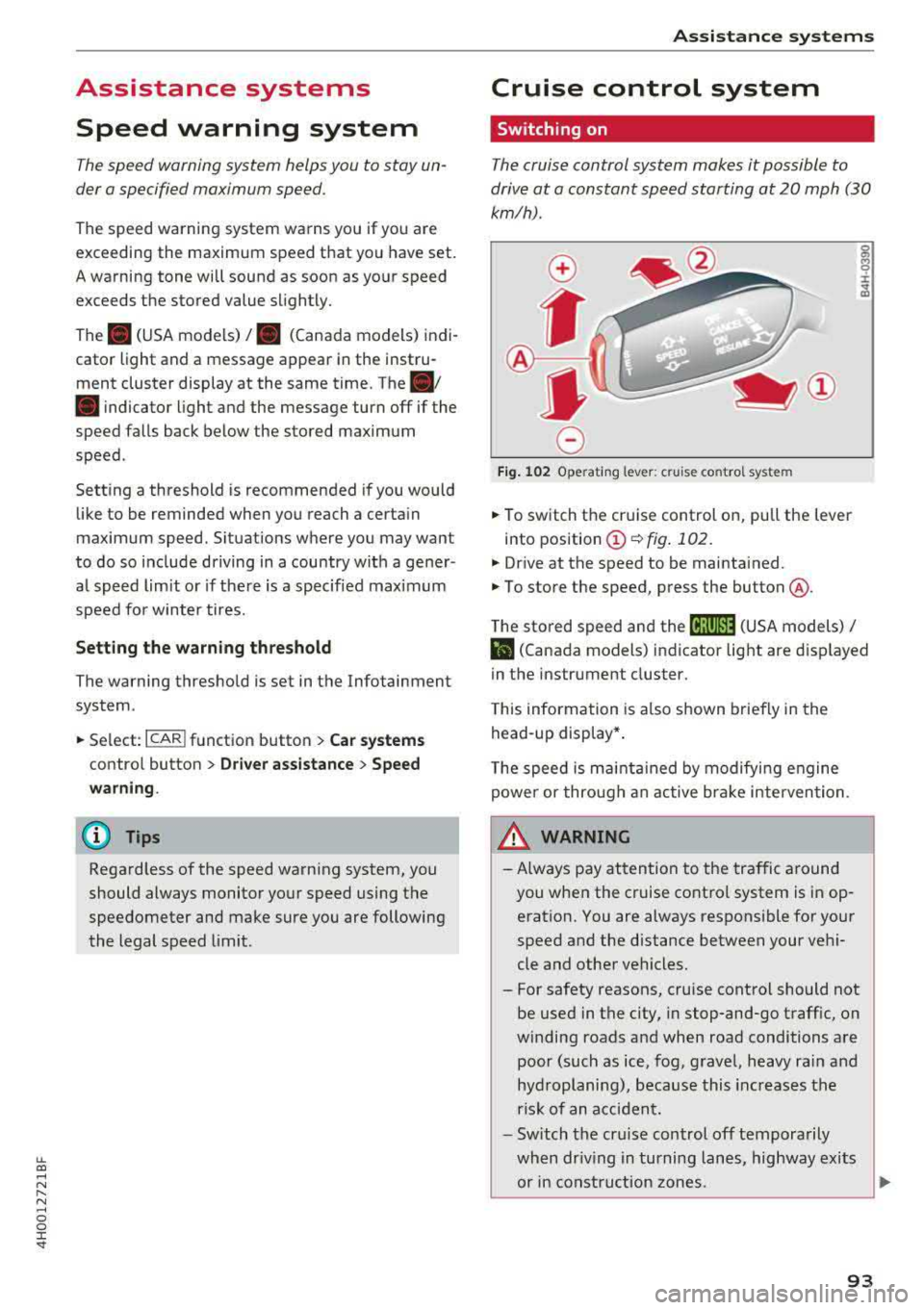
The cruise control system makes it possible to
drive at a constant speed starting at 20 mph (30
km/h).
0
f
®t
0
Fig. 102 Operating lever: cruise control system
g M 0 :i: ;A
.. To switch the cruise control on, pull the lever
into position
(D ¢ fig. 102.
.. Drive at the speed to be maintained.
.. To store the speed, press the button @.
The stored speed and the
(ij;ji)M~ (USA models) /
l'I (Canada models) indicator light are displayed
in the instrument cluster.
This information is also shown briefly in the
head-up display* .
The speed is maintained by modifying engine
power or through an active brake intervention.
_.&. WARNING
-
-Always pay attention to the traffic around
you when the cruise control system is in op
eration. You are always responsible for your
speed and the distance between your vehi
cle and other vehicles.
-For safety reasons, cruise control should not
be used in the city, in stop-and-go traffic, on
winding roads and when road conditions are poor (such as ice, fog, gravel, heavy rain and
hydroplaning), because this increases the
risk of an accident.
-Switch the cruise control off temporarily
when driving in turning lanes, highway exits or in construction zones.
~
93
Page 99 of 356
lL t:0 ....
"' ......
"' .... 0 0 :c '
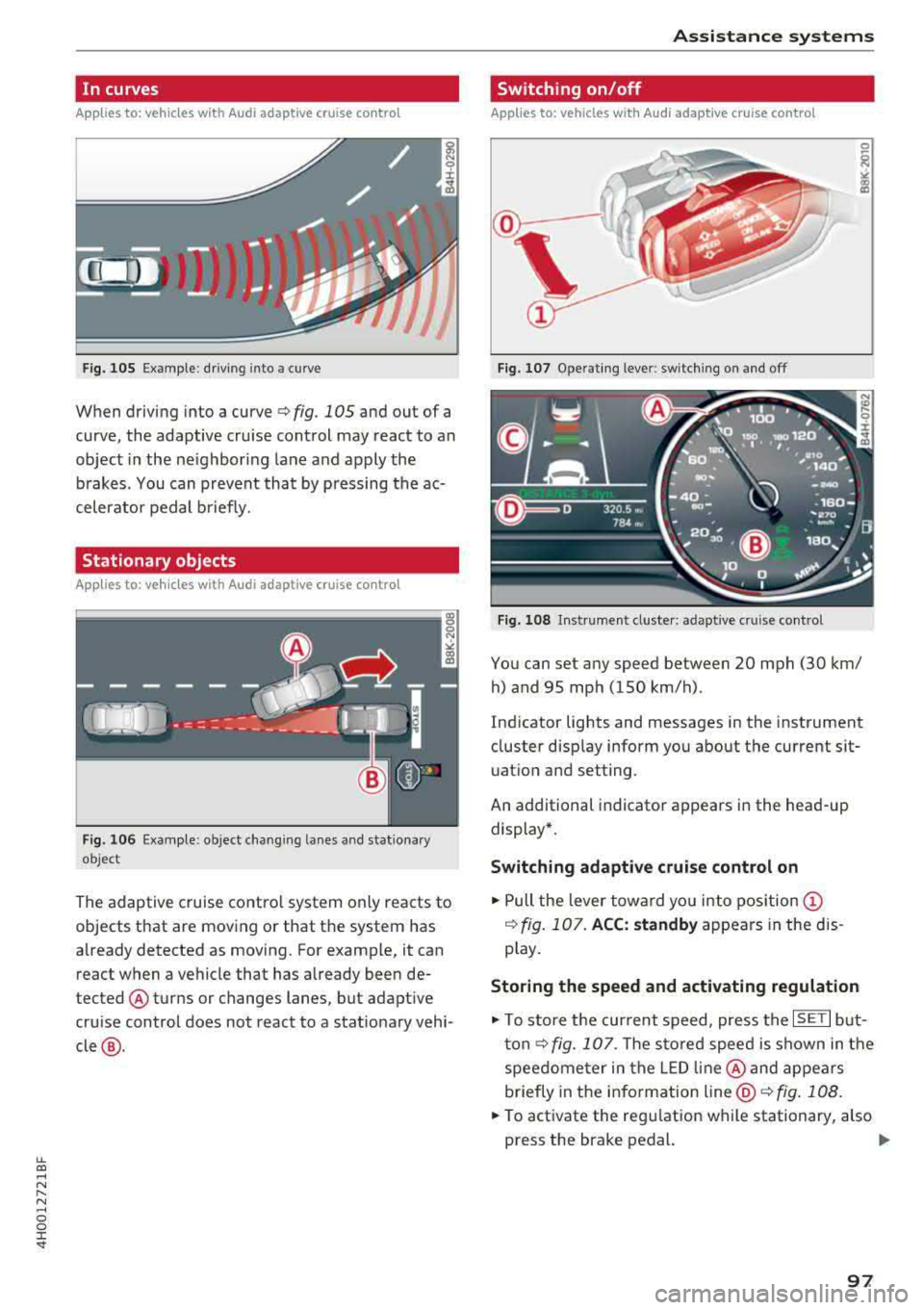
Applies to: ve hicles with Audi adaptive cruise co ntro l
Fig. 105 Examp le: d riving into a curve
When driving into a curve <=> fig. 105 and out of a
curve, the adaptive cru ise control may react to an
object in the ne ighboring lane and apply the
b rakes. You can prevent that by pressing the ac
celerator pedal b riefly.
Stationary objects
A pp lies to: ve hicles with Audi adaptive cruise contro l
Fig. 1 06 Examp le : object chang ing lanes a nd stat iona ry
object
The adaptive cruise contro l system only reacts to
objects that are mov ing or that t he system has
already detected as moving. For example, it can react when a vehicle that has already been de
tected @turns or changes lanes, but adapt ive
cru ise control does not react to a stat ionary vehi
cle @.
Assi st a nce systems
Switching on/off
App lies to : vehicles wit h Audi ada ptive cr uise control
Fi g. 107 Ope rat ing lever: switch ing on and off
Fig . 108 In strume nt clus te r: adaptive cru ise control
You can set any speed between 20 mph (30 km/
h) and 95 mp h (150 km/h) .
Ind icator lights and messages in the instrument
cluster disp lay inform you about the current sit
uatio n and setting.
An additional indicator appears in the head-up display*.
Switching adaptive crui se control on
.,. Pull the lever towa rd yo u into pos ition (!)
<=> fig. 107. ACC: standb y appears in the d is
p lay.
Storing the speed and activating regulat ion
.,. To store the current speed, press the ISET I but
ton<=> fig. 107. T he sto red speed is shown in t he
speedome ter in the LED line @and appears
briefly in the info rmation
line @<=> fig. 108 .
... To act ivate the regulation wh ile stationary, also
press the brake pedal.
.,.
97