interior lights AUDI A8 2018 User Guide
[x] Cancel search | Manufacturer: AUDI, Model Year: 2018, Model line: A8, Model: AUDI A8 2018Pages: 356, PDF Size: 54.71 MB
Page 327 of 356
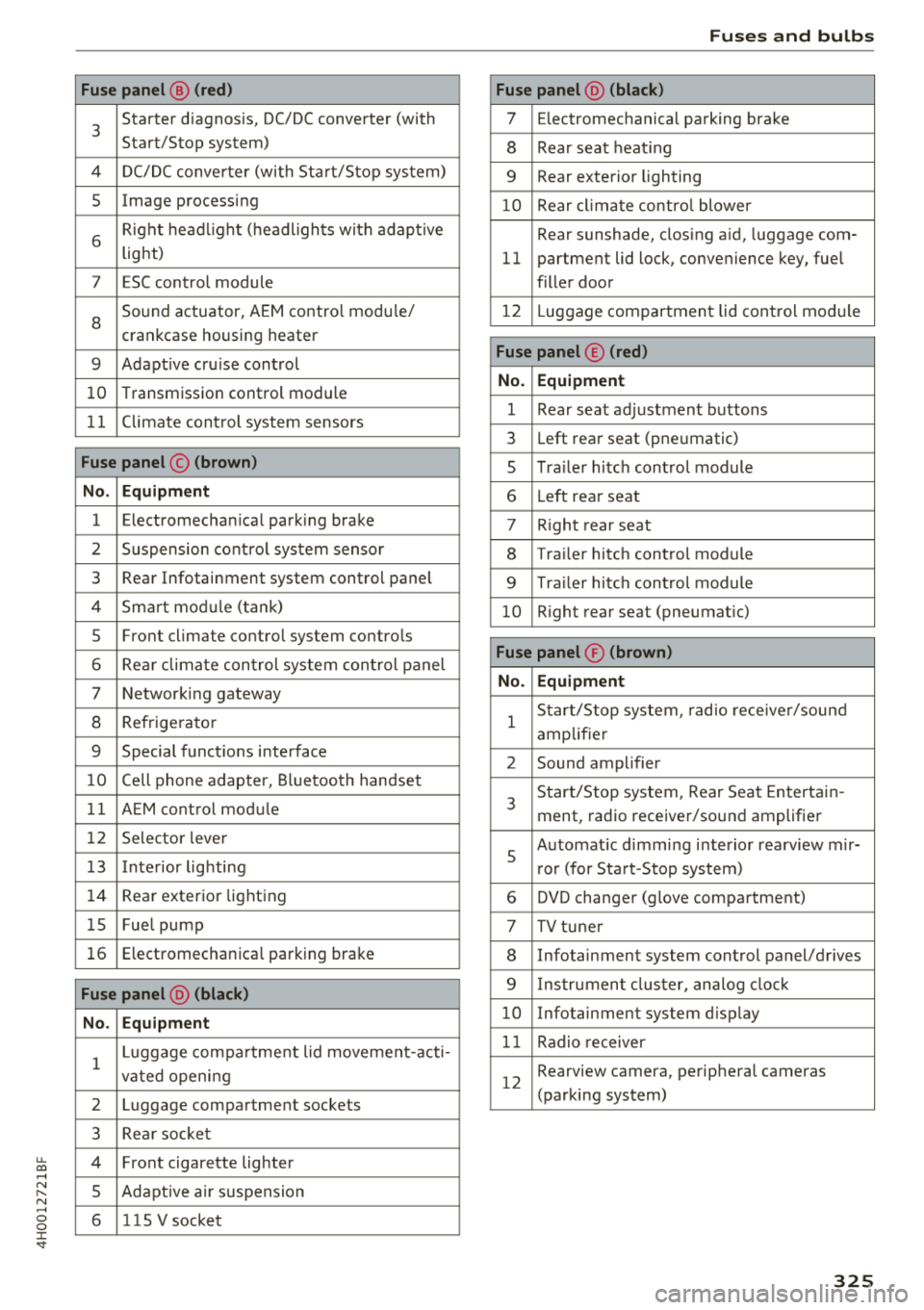
u. co .... N
" N .... 0 0 :c '
3
Starter diagnosis, DC/DC converter (with
Start/Stop system)
4 DC/DC converter (with Start/Stop system)
5 Image processing
6
Right headlight (headlights with adaptive
light)
7 ESC control module
8
Sound actuator, AEM control module/
crankcase housing heater
9 Adapt ive cru ise control
10 Transmission control module
11 Climate control system sensors
Fuse panel © (brown)
No. Equipment
1 Electromechan ica l park ing brake
2 Suspension control system sensor
3 Rear Infotainment system control panel
4 Smart module ( tan k)
5 Front climate control system controls
6 Rea r climate control system control panel
7 Networking gateway
8 Refrigerator
9 Special functions interface
10 Cell phone adapter, Bluetooth handset
11 AEM control module
12 Selector lever
1 3 Inte rior lighting
14 Rear exterior lighting
15 Fue l pump
16 Electromechanica l parking brake
Fuse panel @ (black)
No. Equipment
1
Luggage compa rtment lid movement-acti-
vated opening
2 Luggage compartment sockets
3 Rear socket
4 Fro nt cigarette lighter
5 Adaptive air su spension
6 115 V socket
Fuses and bulbs
Fuse panel @ (black)
7 Electromechanical parking brake
8 Rear seat heat ing
9 Rear exterior lighting
10 Rear climate control blower
Rear sunshade, closing a id, luggage com-
11 partment lid lock, convenience key, fue l
filler door
12 L uggage compartment lid control module
Fuse panel © (red)
No. Equipment
1 Rear seat adjustment buttons
3 Left rear seat (pne umatic)
5 Tra iler hitch control module
6 Left rea r seat
7 Right rear seat
8 Trailer hitch control module
9 Trailer hitch control module
10 Right rear seat (pneumat ic)
Fuse panel ® (brown)
No. Equipment
1
Start/Stop system , radio receiver/sound
amplifier
2 Sound amplifier
3
Start/Stop system, Rear Seat Entertain -
ment, radio receiver/sound amplifier
5
Automat ic dimming interior rea rview mir-
r or (for Start-Stop system)
6 DVD changer (glove compartment)
7 TV tuner
8 Infotainment system control panel/drives
9 Instrument cluster, analog clock
10 Infotainment system d isp lay
11 Radio receiver
12
Rearview camera, perip heral cameras
(parking system)
325
Page 330 of 356
Emergency situations
@ Tips
The discharged battery must be properly con
nected to the vehicle's electrical system .
When jump starting or charging the battery,
never connect the negative ground cable to
the battery negative post because the battery
manager system must be able to detect the
battery's state of charge. Always connect the
negat ive g round cable to the negative ground
post of the battery manager control unit.
Using the jump start
cable
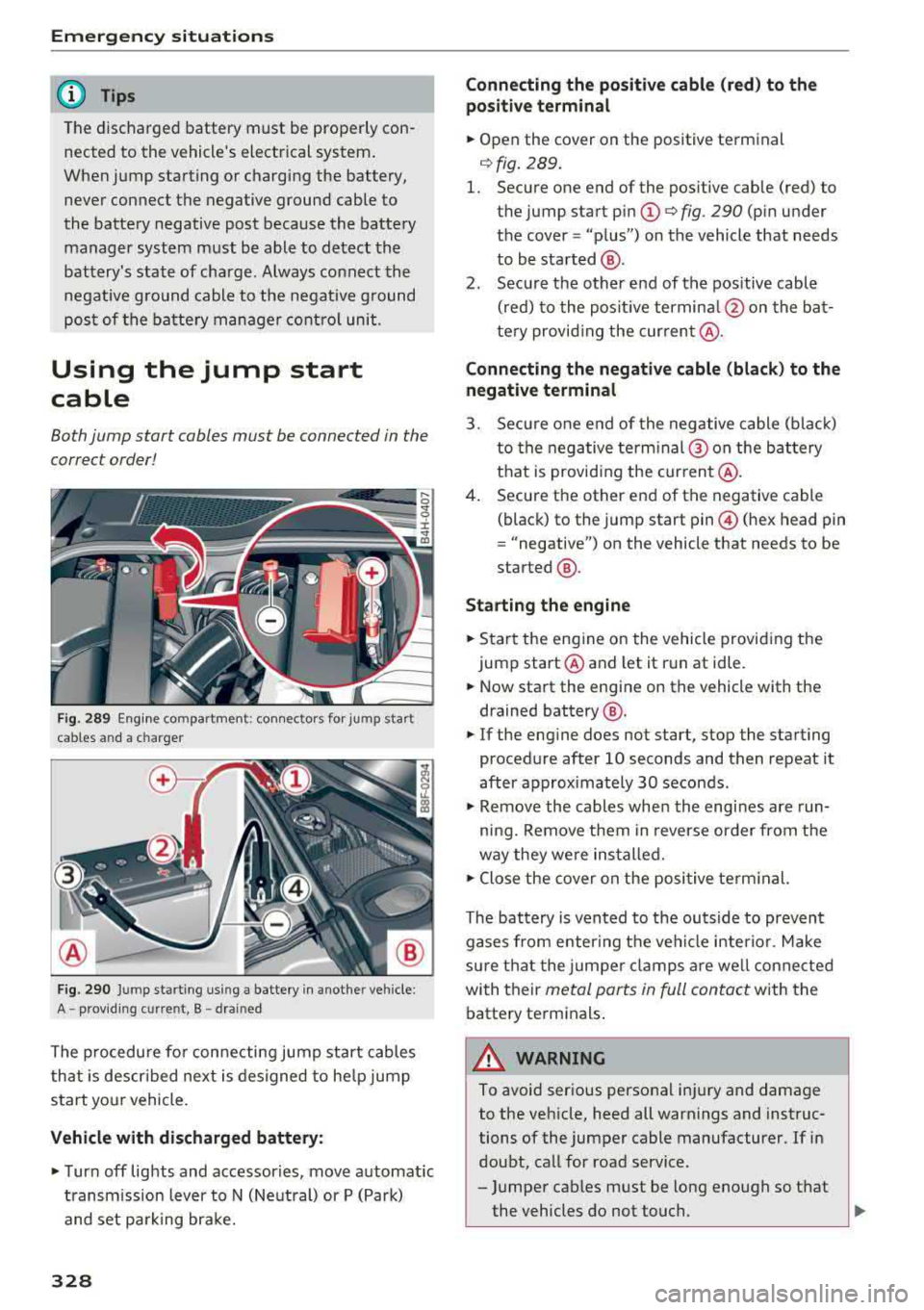
Both jump start cables must be connected in the
correct order!
Fig. 289 E ngin e compartme nt: co nn ectors for jump start
cables and a charger
Fig. 290 Jump starting using a battery in anot her vehicle:
A
-p rov id in g current, B -drai ned
The procedure for connecting jump start cables
that is descr ibed next is designed to help jump
start your vehicle.
Vehicle with discharged battery:
~ Turn off lights and accessories, move automatic
transmission lever to N (Neutral) or P (Park)
and set parking bra ke.
328
Connecting the positive cable (red) to the
positive terminal
~ Open the cover on the positive terminal
qfig . 289.
1. Secure one end of the pos itive cable (red) to
the jump start pin
(D q fig. 290 (pin under
the cover =
"plus") on the vehicle that needs
to be started @.
2. Secure the other end of the positive cable
(red) to the posit ive terminal @on the bat
tery provid ing the cur rent @.
Connecting the negative cable (black) to the
negative terminal
3. Secure one end of the negative cable (black)
to the negative terminal @ on the battery
that is providing the current @.
4. Secure the other end of the negative cable
(black) to the jump start
pin @ (hex head pin
= "negative") on the vehicle that needs to be
started @.
Starting the engine
~ Sta rt the eng ine on the vehicle providing the
jump start @and let it run at idle.
~ Now start the engine on the vehicle with the
drained battery @.
~ If the engine does not start, stop the starting
procedure after 10 seconds and then repeat it
after approx imately 30 seconds.
~ Remove the cables when the engi nes are run
ning. Remove them in reverse order from the
way they were installed.
~ Close the cover on the posi tive terminal.
The battery is vented to the outside to prevent
gases from enter ing the vehicle interior. Make
sure that the jumper clamps are well connected
with their
metal ports in full contact with the
battery terminals .
A WARNING
-To avoid serious personal injury and damage
to the vehicle, heed all warnings and instruc
tions of the jumper cable manufacturer. If in
doubt, call for road service.
-Jumper cables must be long enough so that
the vehicles do not touch.
..,.
Page 347 of 356
Full screen disp lay (DVD) . . . . . . . . . . . . . . . 191
Function buttons . . . . . . . . . . . . . . . . . . . . . 135
Fuses . . . . . . . . . . . . . . . . . . . . . . . . . . . . . . . 322
G
Garage door opener (Homelink) . . . . . . . . . . 41
Garment hooks . . . . . . . . . . . . . . . . . . . . . . . . 64
Gas discharge lamps . . . . . . . . . . . . . . . . . . . 326
Gas station message . . . . . . . . . . . . . . . . . . 173
Glossary of tire and loading terminology . . 285
Glove compartment . . . . . . . . . . . . . . . . . . . . 64
Valet parking function . . . . . . . . . . . . . . . . . 40
Gross Vehicle Weight Rating (GVWR) . . . . . 334
H
HD Radio (digital radio) . . . . . . . . . . . . . . . . 179
Head-up display . . . . . . . . . . . . . . . . . . . . . . . 16
Headlights Cleaning . . . . . . . . . . . . . . . . . . . . . . . . . . . 307
Headlight range control . . . . . . . . . . . . . . . 43
Washer system . . . . . . . . . . . . . . . . . . . . . . 50
Headphones . . . . . . . . . . . . . . . . . . . . . . . . . 198
Connections (RSE) . . . . . . . . . . . . . . . . . . . 200
Headphones connected by cable (RSE) . . . 200
Wireless headphones (RSE) . . . . . . . . . . . . 198
H ead restra ints. ............... .. .. .. . 211
Adjusting . . . . . . . . . . . . . . . . . . . . . . . . . . 211
Heating . . . . . . . . . . . . . . . . . . . . . . . . . . . . . . 69
Heavy clothing and safety belts . . . . . . . . . . 221
H ex socket. .. .. ............. .. .. .. .. . 312
High beams . . . . . . . . . . . . . . . . . . . . . . . . . . . 44
H ill descent control . . . . . . . . . . . . . . . . . . . . 86
Hill hold assist . . . . . . . . . . . . . . . . . . . . . . . . 82
also refer to Hill hold assist . . . . . . . . . . . . 82
Home address .. ............... .. .. .. . 173
HomeLink (garage door opener) . . . . . . . . . . 41
Horn . . . . . . . . . . . . . . . . . . . . . . . . . . . . . . . . . 7
I
Ignition . . . . . . . . . . . . . . . . . . . . . . . . . . . . . . 76
Imbalance (wheels) . . . . . . . . . . . . . . . . . . . 291
~ Immobilizer . . . . . . . . . . . . . . . . . . . . . . . 10, 28 ....
~ Importing and exporting (contacts) . . . . . . 154 N .... g Improperly worn safety belts . . . . . . . . . . . 225
:c '
Indicator lights . . . . . . . . . . . . . . . . . . . . . . . . 17
Infant seats . . . . . . . . . . . . . . . . . . . . . . . . . 255
Inflation pressure (Tire Pressure Monitoring
System) . . . . . . . . . . . . . . . . . . . . . . . . . . . . . 302
Information Audi music interface . . . . . . . . . . . . . . . . . 186
Infotainment display . . . . . . . . . . . . . . . . . . 136
Input Using the MMI touch . . . . . . . . . . . . . . . . . 137
Using the speller . . . . . . . . . . . . . . . . . . . . 138
Input level (media) . . . . . . . . . . . . . . . . . . . . 191
Inspection interval . . . . . . . . . . . . . . . . . . . . 281
Installing the upper tether strap on the an-
chorage .... .. .. .. ................. .. 266
Instrument cluster . . . . . . . . . . . . . . . . . . . . . . 9
Interior lighting . . . . . . . . . . . . . . . . . . . . . . . 46
Interior rearview mirror . . . . . . . . . . . . . . . . . 48
Intermittent mode (windsh ield wipers) . . . . SO
Internet
refer to Audi connect . . . . . . . . . . . . . . . . . 158
iPod
refer to Audi music interface . . . . . . . . . . . 186
J
Jukebox 183
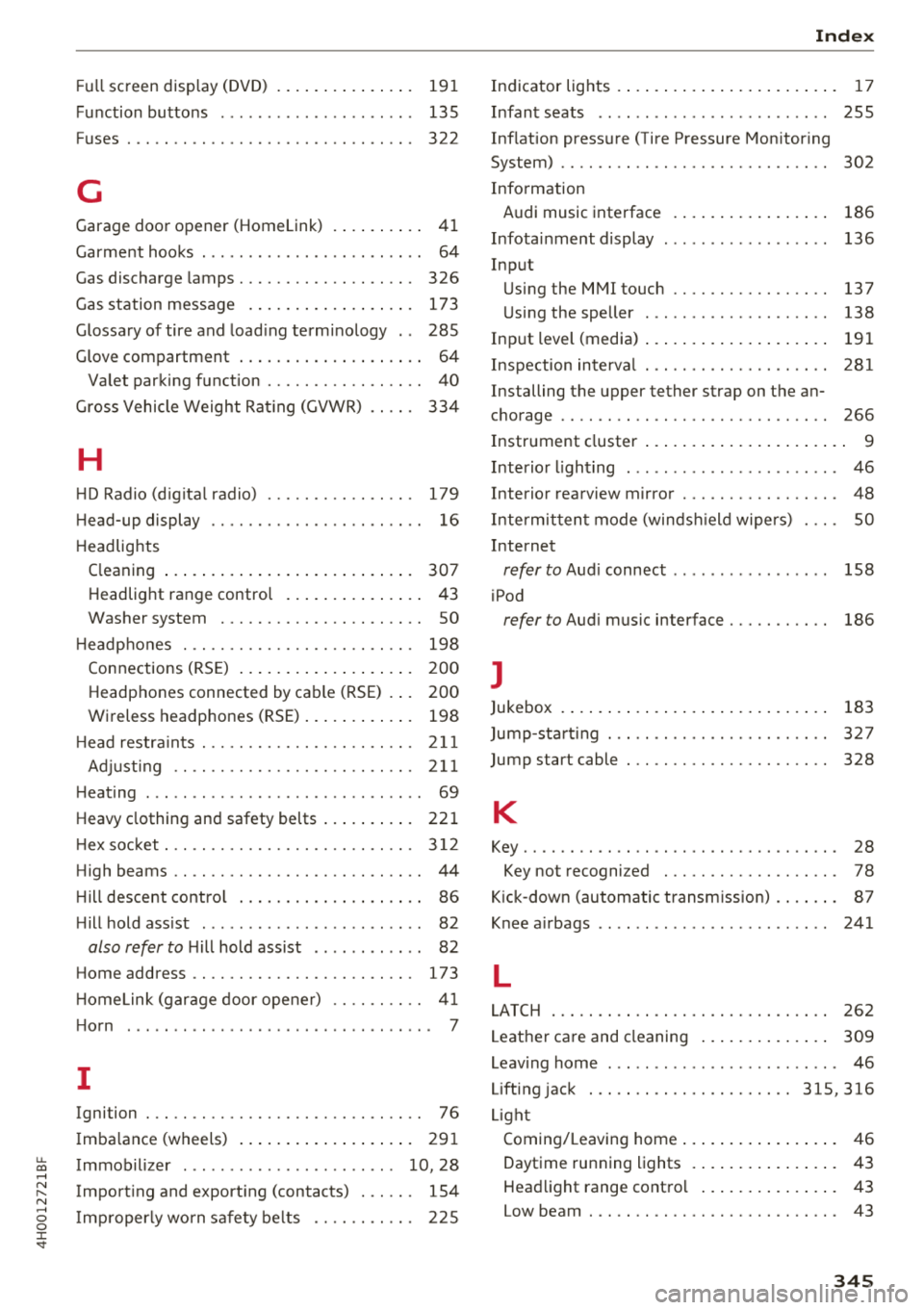
Jump-starting . . . . . . . . . . . . . . . . . . . . . . . . 327
Jump start cable . . . . . . . . . . . . . . . . . . . . . . 328
K
Key........ .. .. .. .. ............... .. . 28
Key not recognized . . . . . . . . . . . . . . . . . . . 78
Kick-down (automatic transmission) . . . . . . . 87
Knee airbags . . . . . . . . . . . . . . . . . . . . . . . . . 241
L
LATCH
262
Leather care and cleaning . . . . . . . . . . . . . . 309
Leaving home . . . . . . . . . . . . . . . . . . . . . . . . . 46
Lifting jack ... .. .. .. ............. 315, 316
Light Coming/Leaving home . . . . . . . . . . . . . . . . . 46
Daytime running lights . . . . . . . . . . . . . . . . 43
Headlight range control . . . . . . . . . . . . . . . 43
Low beam . .. .. .. .. ............... .. . 43
345
Page 348 of 356
Index
Rear fog lights . . . . . . . . . . . . . . . . . . . . . . . 43
Side marker lights . . . . . . . . . . . . . . . . . . . . 43
Light/rain sensor Headlights . . . . . . . . . . . . . . . . . . . . . . . . . . 43
I ntermittent mode (w indshie ld wipers) . . . SO
Lighting Exterior . . . . . . . . . . . . . . . . . . . . . . . . . . . . . 43
I nterior . . . . . . . . . . . . . . . . . . . . . . . . . . . . . 46
Lights Interior/reading lights . . . . . . . . . . . . . . . . 46
Interior lighting . . . . . . . . . . . . . . . . . . . . . . 46
Listening to music
refer to Media . . . . . . . . . . . . . . . . . . 181, 190
Listening to the radio MMI control panel . . . . . . . . . . . . . . . . . . . 178
RSE ............................... 202
L ocking/un locking . . . . . . . . . . . . . . . . . . . . . 30
Low-profile tires . . . . . . . . . . . . . . . . . . . . . . 299
L ow beams . . . . . . . . . . . . . . . . . . . . . . . . . . . 43
Luggage compartment . . . . . . . . . . . . . . . . . . 65
12 volt socket . . . . . . . . . . . . . . . . . . . . . . . . 61
Storing cargo correctly . . . . . . . . . . . . . . . 213
Stowing luggage . . . . . . . . . . . . . . . . . . . . 213
Valet parking function . . . . . . . . . . . . . . . . . 40
Luggage compartment lid . . . . . . . . . . . . 33, 36
Opening from the inside in an emergency . 36
Luggage rack . . . . . . . . . . . . . . . . . . . . . . . . . . 65
L umbar support . . . . . . . . . . . . . . . . . . . . . . . 56
M
Maintenance . . . . . . . . . . . . . . . . . . . . . . . . . 336
Maintenance intervals . . . . . . . . . . . . . . . . . 281
Making emergency call.......... .... .. . 151
Malfunction Indicator Lamp (MIL) . . . . . . . . 25
Map Online . . . . . . . . . . . . . . . . . . . . . . . . . . . . . 172
Operating . . . . . . . . . . . . . . . . . . . . . . . . . . 171
Set tings . . . . . . . . . . . . . . . . . . . . . . . . . . . 173
Massage function . . . . . . . . . . . . . . . . . . . 54, 56
Mechanical key . . . . . . . . . . . . . . . . . . . . . 28, 29
Mechanical key (replacement key) . . . . . . . . . 28
Media . . . . . . . . . . . . . . . . . . . . . . . . . . . . . . 190
Audi music interface . . . . . . . . . . . . . . . . . 186
Bluetooth audio player . . . . . . . . . . . . . . . 184
Drives (MMI) . . . . . . . . . . . . . . . . . . . . . . . 181
Format . . . . . . . . . . . . . . . . . . . . . . . . . . . . 187
346
Jukebox . . . . . . . . . . . . . . . . . . . . . . . . . . . . 183
Restrictions . . . . . . . . . . . . . . . . . . . . . . . . 181
RSE . . . . . . . . . . . . . . . . . . . . . . . . . . . . . . . 203
Supported formats . . . . . . . . . . . . . . . . . . 187
Wi-Fi media player . . . . . . . . . . . . . . . . . . . 185
Media drives
RSE . . . . . . . . . . . . . . . . . . . . . . . . . . . . . . . 201
Memory capacity
Directory ...... .. .. .. ........... 154, 155
Jukebox . . . . . . . . . . . . . . . . . . . . . . . . . . . . 183
Memory card
SD card reader . . . . . . . . . . . . . . . . . . . . . . 182
Memory function . . . . . . . . . . . . . . . . . . . . . . 59
MENU button . . . . . . . . . . . . . . . . . . . . . . . . 135
Menu language
refer to Setting the language . . . . . . . . . . 206
Mirror compass . . . . . . . . . . . . . . . . . . . . . . . . 52
Mirrors . . . . . . . . . . . . . . . . . . . . . . . . . . . . . . 47
MMI
refer to
Multi Media Interface . . . . . . . . . . 135
MMI control panel . . . . . . . . . . . . . . . . . . . . 139
MMI touch.. .... .. .. .. ............. .. 137
Monitoring the Advanced Airbag System . . 237
Multifunction steering wheel . . . . . . . . . . . . . 11
Multi Media Interface . . . . . . . . . . . . . . . . . . 135
Mute ...... .... .. .. .. ........... 135, 195
myAudi Finding a destination . . . . . . . . . . . . . . . . . 168
N
Name tag
Navigating .. .... .. .. .. ............. . .
MMI control panel .. .. .............. .
RSE ......... ... .. .. .............. .
Navigation Address input .. .. .. .. ............. . .
Map display ... .. .. .. ............. . . 155
166
166
201
166
171
Online destinations . . . . . . . . . . . . . . . . . . 168
Route plan . . . . . . . . . . . . . . . . . . . . . . . . . 175
Starting/canceling route guidance . . . . . . 171
also refer to Entering a destination . . . . . 166
also refer to Map . . . . . . . . . . . . . . . . . . . . 171
Network connection (Wi-Fi) . . . . . . . . . . . . . 161
Next/previous track
NHTSA 191
Contacting . . . . . . . . . . . . . . . . . . . . . . . . . 215