parking brake AUDI A8 2018 User Guide
[x] Cancel search | Manufacturer: AUDI, Model Year: 2018, Model line: A8, Model: AUDI A8 2018Pages: 356, PDF Size: 54.71 MB
Page 88 of 356
Driving
keep your foot on the brake in all selector
lever positions (except P and N) when the
engine is running.
- Do not inadvertently press the accelerator
pedal when the vehicle is stationary. Other
wise the vehicle will start to move immedi
ately, even if the parking brake is set. This
could result in a crash.
~ Note
-When stopping on an incline, do not try to
hold the vehicle in place by pressing the ac
celerator pedal while a driving gear is se lected . This can cause the transmission to
overheat and can damage it . Set the parking
brake or press the brake pedal to prevent
the vehicle from rolling.
- Allowing the vehicle to roll when the engine
is stopped will damage the transmission be
cause it is not lubricated.
(D Tips
For safety reasons, the parking brake is re
leased automatically only when the driver's
safety belt is fastened.
Hill descent control
The hill descent control system assists the driver
when driving down hills .
Hill descent control activates when the transmis
sion is in the Dor S position and you press the
brake pedal. The transmission automatically se
lects a gear that is suitable for the hill. Hill de
scent control tries to maintain the speed ach
ieved at the time of braking, within physical and
technical limitations. If may still be necessary to
adjust the speed with the brake pedal.
Hill descent control switches off once the hill lev
els out or you press the accelerator pedal.
When operating the cruise control system
c::> page 93, hill descent control is also activated
when the speed is set.
86
A WARNING
, -
Hill descent control cannot overcome physical
limitations, so it may not be able to maintain
a constant speed under all conditions. Always
be ready to apply the brakes .
Manual shifting
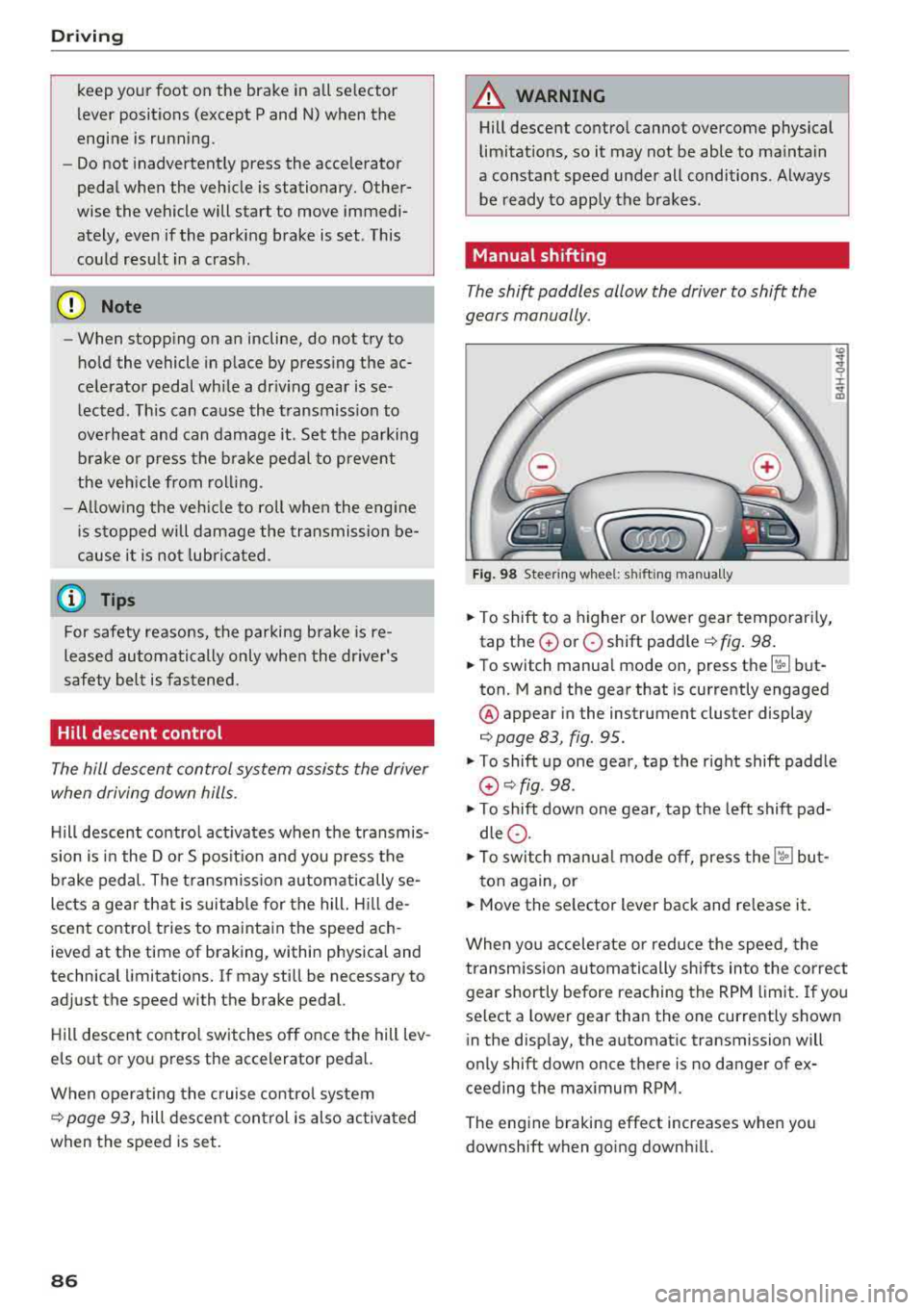
The shi~ paddles allow the driver to shift the
gears manually.
Fig. 98 Steering whee l: shi fting manually
.. To shift to a higher or lower gear temporarily,
tap the
0 or 0 shift paddle <=:>fig. 98.
.. To switch manual mode on, press the ~ but
ton. Mand the gear that is currently engaged
@ appear in the instrument cluster display
c::> page 83, fig. 95 .
.,. To shift up one gear, tap the right shift paddle
G) c::>fig . 98.
.,. To shift down one gear, tap the left shift pad
dle
0 .
.,. To switch manual mode off, press the ['.fl but-
ton again, or
.. Move the selector lever back and release it.
When you accelerate or reduce the speed, the
transmission automatically shifts into the correct
gear shortly before reaching the RPM limit. If you
select a lower gear than the one currently shown
in the display, the automatic transmission will
only shift down once there is no danger of ex
ceeding the maximum RPM.
The engine braking effect increases when you
downshift when going downhill.
Page 89 of 356
u. co .... N
" N .... 0 0 :c '
Kick-down enables maximum acceleration.
When you press the accelerator pedal down be
yond the resistance point, the automatic trans miss ion downshifts into a lower gear and the en
g ine utilizes its full power, depend ing on veh icle
speed and engine RPM . It shifts up into the next
h igher gea r once the maximum spec ified eng ine
RP M i s reached .
A WARNING
Please note tha t the wheels could sp in o n
slick or slippery roads when kick -down is ac
tive.
Overboost
Applies to: S8 plus
-
The maximum engine torque is temporarily in
creased in overboost. Overboost is activated
when nearing full throttle in the S position and
when the engine is at operat ing temperature .
A WARNING
Please note that the wheels could spin o n
slick or sl ippery roads when overboost is ac
t ive.
Transmission malfunction
Tran sm iss ion : selector l eve r in drive!
-
If the selector lever is not in the P position when
you open the driver's door, the vehicle could roll.
Select the P se lector lever position .
rm Transm issio n: Please p res s bra ke pedal and
s e lect ge ar aga in
Press the brake pedal and se lect the desired se
lector lever posit ion aga in. You can then continue
driving.
rm T ransmi ssion o verh ea ting : Ple ase d rive con
servat ively
The t ransm iss ion tempera ture h as increased s ig
nificantly due to the sporty driving manner. Drive
in a less sporty manner until the temperature re -
Driving
turns to the normal range and t he indicator light
switches of .
rm Transmi ssion malfunction : You can continue
driving
T here is a system malfu nction in the transmis
s io n. You may cont inue d riving. Dr ive to an au
thorized Aud i dea le r or a uthorized Audi Serv ice
F ac ility soon to have t he malfunct io n cor rected.
[O] liJ Transmission malfunc tion: You can con
tinu e driving in D un til engine i s off
There is a system malfunction in the transmis
s ion . The transm ission is switch ing to emergency
mode .
If you turn the engine off, you w ill not be
able to select any othe r se lector lever positions
after sta rting the engine ag ain. Drive to an a u
tho rized Aud i de aler or authorized Audi Serv ice
F acility immediate ly to have the ma lfunction cor
rected .
rm Transmi ssion malfunction : You can continue
driving with limited functionalit y
There is a system malfu nction in the transmis
s io n. The transm ission is switc hing to eme rge ncy
mode. This mode only sh ifts i nto ce rtain gears or
will no longer sh ift a t all. T he eng ine may sta ll.
Drive to an authorized A udi dealer or authorized
Audi Service Facility immediate ly to have the
malfunction corrected.
[O] liJ Tran smi ssio n malfunction : No rev ers e
g ear. You can c ontinue dri ving
T he re is a system malfu nction in t he transmis
s io n. The transm ission is switc hing to eme rge ncy
mode. This mode only sh ifts into ce rtain gears or
will no longer shift at a ll. The engine may sta ll.
You cannot engage the reverse gear . Drive to an
authorized Audi dea ler or authorized Audi Service
Facility immed iate ly to have the malfunction cor
rected .
[O] Vehicle ma y roll! Cannot sh ift to P. Please
appl y par king brake
-The parking loc k was released using the emer -
gency
re lease ¢ page 88 . Or ..,.
87
Page 90 of 356
Driving
-The park ing lock can no longer be engaged.
Drive to an authorized Audi dealer or author
ized Audi Service Facility immed iately to have
the malfunction corrected.
rm Transmission malfunction: Stop vehicle and
shift to park.
Do not continue driving. Select the P selec tor lev
er position and contact an authorized Audi dea ler
or authorized Audi Service Facility for assistance.
Parking lock emergency release
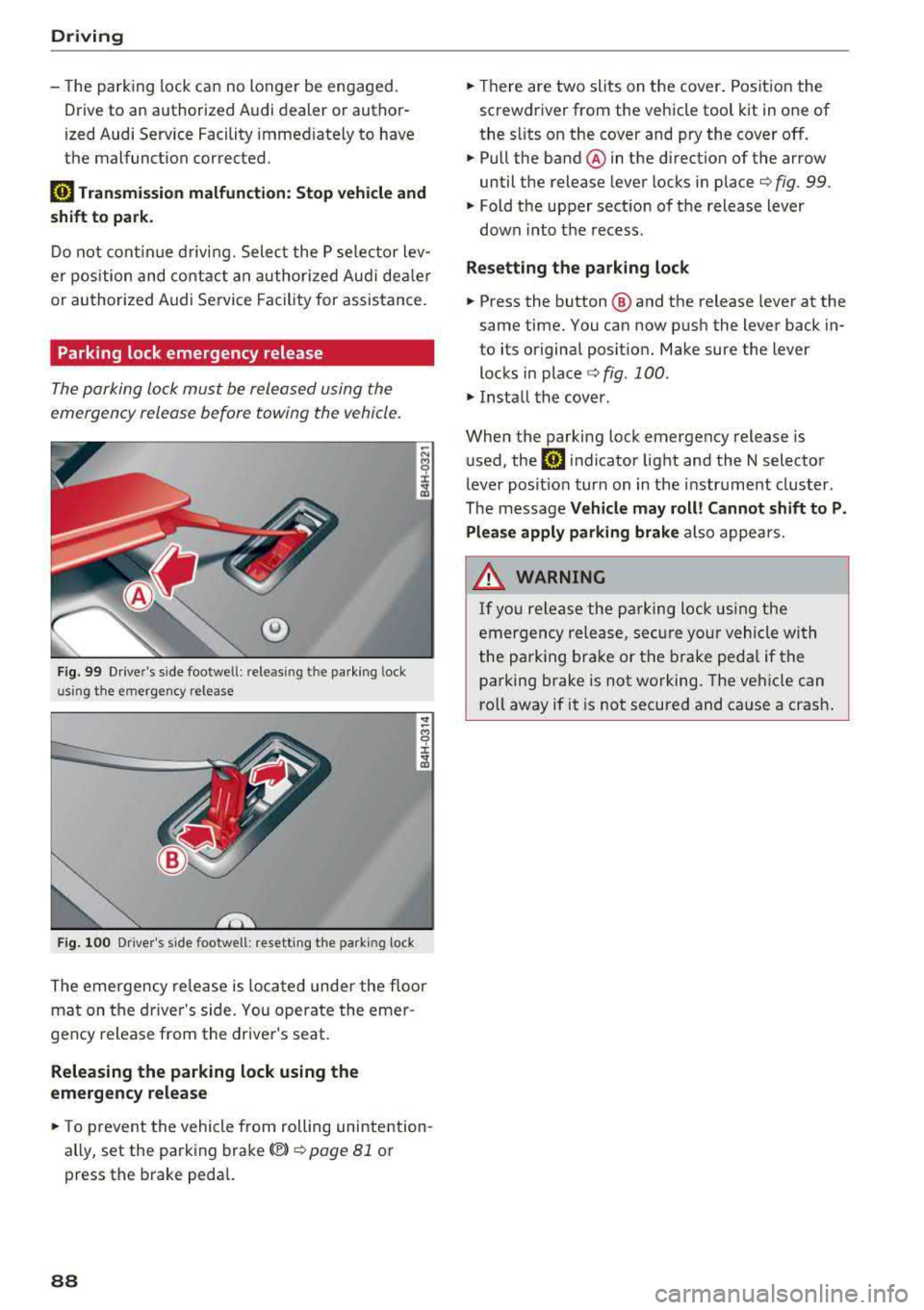
The parking lock must be released using the
emergency release before towing the vehicle.
®
Fig. 99 Drive r's side footwe ll: releasin g t he parking lock
u sin g th e emergency release
Fig . 100 Dr iver's s ide footwell: resett ing the park ing lock
The emergency re lease is located under the floor
mat on the driver 's side. You operate the emer
gency release from the driver's seat.
Releasing the parking lock using the
emergency release
.,. To prevent the vehicle from rolling unintention
ally, set the parking brake(®)
¢ page 81 or
press the brake pedal.
88
.,. Th ere are two slits on the cover. Position the
screwdriver from the vehicle tool kit in one of
the s lits on the cover and pry the cover off.
.,. Pull the band ® in the direction of the arrow
until the release lever locks in place
¢ fig. 99 .
.,. Fold the upper sect ion of the release lever
down into th e recess.
Resetting the parking lock
.,. Press the button @ and the release lever at the
same time. You can now push the lever back in
to its original posit ion. Make sure the lever
locks in
place ¢ fig. 100 .
.,. Install the cover .
When the parking lock emergency release is
used, the
rm indicator light and the N selector
lever posit ion turn on in the instrument cluster.
The message
Vehicle may roll! Cannot shift to P.
Please apply parking brake
also appears .
.&, WARNING
-
If you release the parking lock using the
emergency release, secure your vehicle with
the pa rking brake or the brake pedal if the
parking brake is not working. The vehicle can
ro ll away if it is not secured and cause a crash.
Page 93 of 356
u. co .... N
" N .... 0 0 :c '
When driv ing with a trailer, activate the trailer
mode of the air suspension. Switch the air sus
pension trailer mode on when you are towing a
trailer . This will limit the regulation by the air
suspension while driving. Select in the MMI:
ICARI function button> (Car)* systems control
button >
Vehicle settings > Air susp.: towing >
On.
Coolant temperature
The coolant temperature gauge ¢ page 9 must
be observed carefully . The coolant temperature
can increase if you dr ive on long inclines in a low
gear at h igh engine speeds . Reduce your speed
i mmed iately if the LEDs in the top part of the dis
p lay turn on.
For more information about ind icator lights, re
fer
to . ¢ page 20.
A WARNING
Anyone not properly restrained in a moving
veh icle is at a much greater risk in an acci
de nt. Never let anyone ride in you r car who is
not properly wearing the restraints p rovided
by Audi.
Trailer towing
information
Important to know
-
Your ve hicle handles different ly when towing a
tra ile r because of the additiona l we ight and dif
ferent weight distribution . Safety, performance
and economy wi ll greatly depend on how careful
l y you load your trailer and operate your rig.
Before you actually tow your trailer, practice
turning, stopping and backing up in an area away
from traffic . Keep practicing until you have be
come comp letely familiar with the way your vehi
cle-trailer combination behaves and responds.
Backing up is difficult and requires practice .
Backing up with a trailer generally requires steer
ing action opposite to that when backing up your
vehicle without a trailer.
Trailer towing
Maintain a greater distance between your vehicle
and the one in front of you . You will need more
room to stop . To compensate for the trailer, you
will need a larger than normal turning radius.
When passing, remember that you cannot accel
erate as fast as you normally wou ld because of
the added load. Make sure you have enough room
to pass. After passing, allow p lenty of room for
your trailer before changing lanes again.
Avoid jerky starts, sharp turns or rapid lane
c h anges.
(D Tips
-Do not tow a trailer during the break-in peri
od of your ve hicle.
-If you tow a trailer, your Audi may require
more frequent maintenance due to the ex
tra load
¢ page 336 .
Parking on a slope
Do not park on a slope with a trailer. If it cannot
be avoided, do so only after doing the following:
When parking:
.,. App ly the foot brake.
.,. Have someone place chocks under both the ve
hicle and the trailer wheels .
.,. With chocks in place, slowly release the brakes
until the wheel chocks absorb the load .
.,. Tur n the whee ls towards the curb .
.,. Apply the parking brake .
.,. Select the P selector lever posit ion.
When restarting after parking:
.. App ly the foot brake .
.. Start the engine .
.,. Select the D selector lever position.
.,. Release the parking brake and slowly pull out
and away from the wheel chocks.
.,. Stop and have someone retrieve the wheel
chocks .
(D Tips
If you move the selector lever of the automat
i c transmission to P befo re applying the park-
in g brake and before blocking the wheels, you
.,_
91
Page 104 of 356

Ass is tanc e system s
- Keep in mind that braking guard can brake
unexpected ly. Always secure any cargo or
objects that you are transport ing to reduce
the r isk of damage or in jury.
Settings in the Infotainment system
Applies to: vehicles with Audi adaptive cruise control
.,. Select : the ICARI function button > Ca r sy stems
control button > Dri ver a ssistan ce > Audi bra k
ing guard .
Sy stem
-switches the brak ing guard On /Off .
When you switch the ignition on, the message
Braking guard: Off appears if the system is
sw itched off .
Early warning -the distance and approach warn
ings in the display can be sw itched
On /Off .
(D Tips
- Your settings are automatically stored and
assigned to the remote control key being used.
- If you restrict or sw itch off the ESC, the
braking guard also switches itse lf off
c> page 128.
-Switch braking guard off when you are load
i ng the veh icle onto a vehicle carr ier, train,
sh ip or other type of transportation . This
can prevent undesired warnings from the braking gua rd system.
Messages
Applies to: vehicles with Audi adaptive cruise control
Braking guard : Off
This message appears if the system is sw itc hed
off throug h the Infota inment system . Otherwise ,
if the system is tur ned off, the information ap
pea rs every time shortly after the start of t he
trip .
The message also appears if the system is not
ava ilable d ue to a ma lfunct ion or if the ESC is
sw itched
off ¢ page 128 . If this is the case, the
system wi ll not provide warnings about a possi
b le co llision.
Braking guard : engaged
102
This message appears if a sharp brake pressure
was applied due to an acute warning .
ACC: Unavailable!
ACC and Audi braking guard: Una vailable
The system cannot guarantee that it will detect
objects correctly and is sw itched off. The sensors
have been moved or are faulty . The pre sense
funct ions may also be affected . Drive to an au
t h orized Aud i dea ler or authorized Audi Se rvice
Fac il ity immed iate ly to have the ma lfunction cor
r ec ted .
ACC : Currently unavailable . No sen sor vis ion
AC C and Audi braking gua rd: Curr entl y una vail
able. No sensor vision
This message appears if the sensor view is ob
structed, for examp le by leaves, snow, heavy
spray or dirt. Clean the
sensors ¢ page 95,
fig. 104.
ACC : Cu rrently un avail able . G radient too steep
The road exceeds the maxim um poss ible a ngle
fo r safe adaptive cruise co ntro l opera tion. Ada pa
tive cru ise con trol is switched off.
ACC : Only available in D , Sor M
Se lect the D, Sor M selector lever position .
ACC: Cu rrently un available . Parking br ake ap
plied
The adaptive cru ise con trol system sw itches o ff
automatica lly if the parking brake is set .
ACC: Currently unavailabl e. Stability contr ol
( ES C) inpu t.
This message appears if the electron ic stabiliza
tion cont rol ( ESC) is tak ing action to stabilize the
vehicle. In t his case, adaptive c ruise cont ro l
swi tches off autom atically.
ACC off: Manual control!
This message appears when adaptive cruise con
trol cannot set the parking brake. Press the brake
pedal to prevent the vehicle from rolling .
... ~
Page 314 of 356
Emergency assistance
Emergency assistance
General information
.,. Park the vehicle as far as possible from moving
traffic in the event of a breakdown. In the event
of a flat tire, park the vehicle on a level surface .
It you are on a steep hill, be especially careful.
.,. Set the parking brake .
.,. Switch the emergency flashers on .
.,. Set up the warning triangle r=;,page 312 .
.,. Have the passengers exit the vehicle . They
should move to a safe place, for example be
hind a guard rail.
A WARNING
Follow the steps given above. This is for your
protection and the for the safety of other driv
ers.
Equipment
Warning triangle
Applies to: vehicles with warning triangle
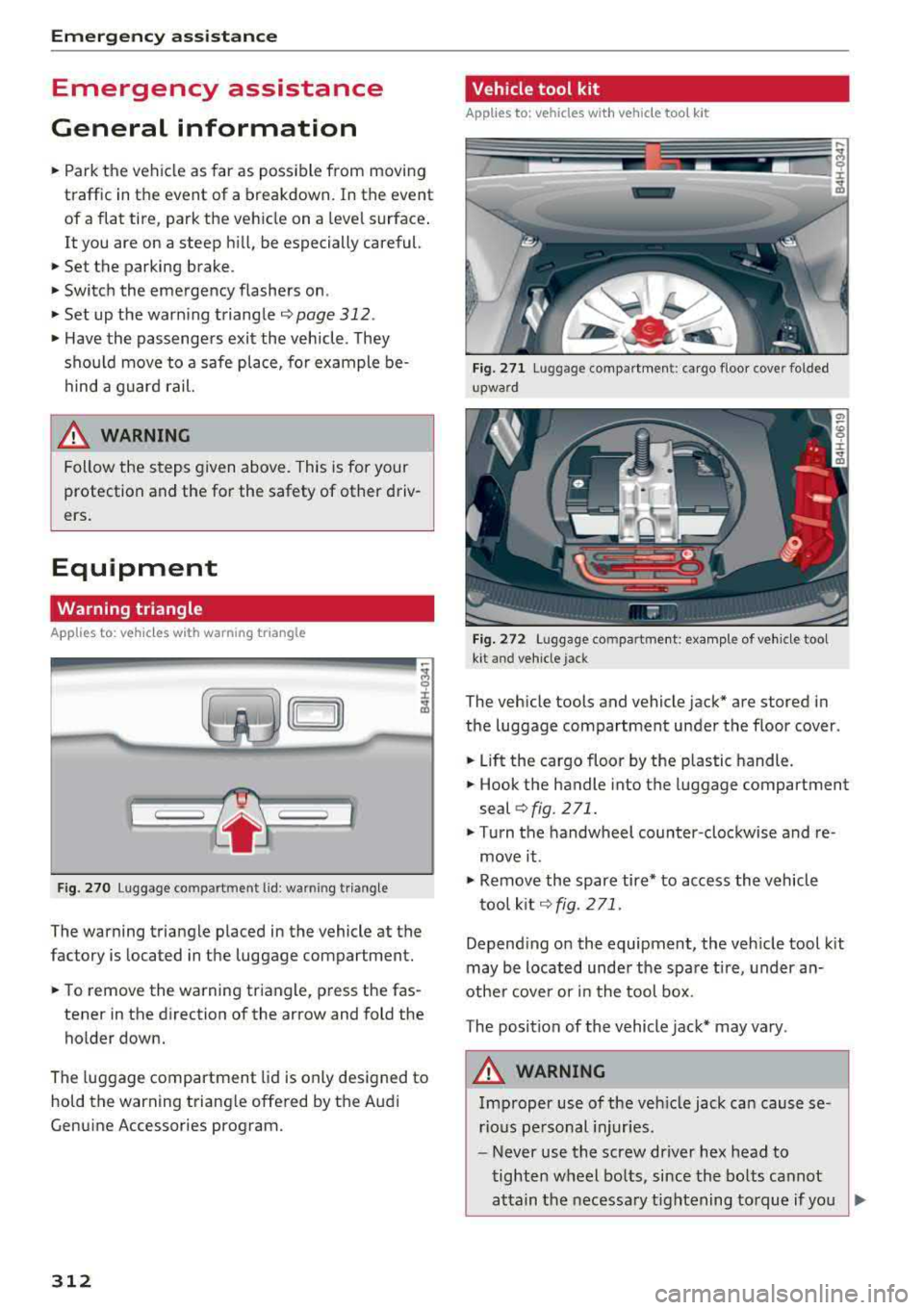
Fig. 270 L uggage co mpartm ent lid : w arnin g triangle
The warning triangle placed in the vehicle at the
factory is located in the luggage compartment.
.,. To remove the warning triangle, press the fas-
tener in the direction of the arrow and fold the
holder down.
The luggage compartment lid is only designed to
hold the warning triangle offered by the Audi
Genuine Accessories program.
312
Vehicle tool kit
Applies to: vehicles with vehicle toot kit
Fig. 271 Lu gg age compartment : cargo floor cove r folded
upward
Fig. 272 Luggage compartment: examp le of vehicle toot
kit and vehicle j ack
The vehicle tools and vehicle jack* are stored in
the luggage compartment under the floor cover .
.,. Lift the cargo floor by the plastic handle .
.,. Hook the handle into the luggage compartment
seal
r:;, fig. 2 71 .
.,. Turn the handwheel counter-clockwise and re
move it .
.,. Remove the spare tire* to access the vehicle
tool kit
~ fig. 271 .
Depending on the equipment , the veh icle tool kit
may be located under the spare tire, under an
other cover or in the tool box.
The position of the vehicle jack* may vary .
A WARNING
Improper use of the veh icle jack can cause se
rious personal injuries.
-Never use the screw driver hex head to
tighten wheel bolts, since the bolts cannot
attain the necessary tightening torque if you
..,.
Page 315 of 356
u. co .... N
" N .... 0 0 :c '
c ident.
- The factory-supplied jack is intended on ly
for your vehicle m odel. Under no circum
stances should it be used to lift heavy
vehicles or other loads; you r isk injuring
yourself .
- Never start the en gine when the vehicle is
ra ised, which could cause an accident .
- Support the veh icle secure ly w ith appropr i
ate stands if work is to be performed under
neath the vehicle; otherwise, there is a po
tent ial risk for in ju ry .
- Never use the jack supplied with your Audi
on another vehicle, particularly on a heav ier
one . The jack is only suitable for use on the
vehicle it came w it h .
(D Tips
The vehicle jack* in your vehicle is mainte
na nee -free .
Replacing wheels
Before changing a wheel
Observe the following precautions for your own
and your passenger's safety when changing a
wheel.
.,. After yo u experience a tire fail ure, pull the car
we ll away from moving t raffic and t ry to rea ch
level g round before you s top ¢&, .
.,. All passengers sho uld lea ve the ca r and move
to a saf e location (for instance, be hind t he
guardrai l) ¢ &, .
.,. Engage the parking brake to prevent you r vehi
cle from rol ling
unintentionally ¢ A_.
.,. Move selector lever to position P ¢ A_.
.,. If you a re towing a trailer, unh itch the trailer
from your ve hicle.
.,. Take the jack and the spare tire ou t of the lug
gage compa rtment
¢ page 312.
A WARNING
You or your passengers cou ld be inju red wh ile
chang ing a wheel if you do not follow these
safety precautions :
Emergenc y ass is tanc e
-If you have a flat tire, move a safe distance
off the road. Turn off the eng ine, turn the
emergency flashers on and use other warn ing dev ices to alert other motorists .
- Make sure that passengers wait in a safe
p lace away from the vehicle and well away
from the road and traff ic .
- To help prevent the veh icle from moving
suddenly and possib ly slipping off the jack ,
always fu lly set the par king brake and block
the front and back of the wheel diagonally
opposite the wheel being changed. W hen
one front w heel is li fted off the gro und,
p lacing the Au tom atic Transmi ssion in P
(Park) will
not p revent the vehicle from
mov ing.
- Before you change a wheel, be sure the
g ro u nd is leve l and firm. If necessary, use a
sturdy board under the jack .
- Always s tore the vehicle tool ki t, the jack
an d the replaced tire in the luggage com
pa rtment ¢
page 213 .
(D Tips
Befo re c hangin g the wheel, you mus t activ ate
the jacking mode, so that the a utomat ic con
tro ls for the Adaptive Air Suspension do not
make it more di fficult to lift the vehicle with
the jack
¢ page 315 .
Changing a wheel
When you change a wheel , follow the sequence
described below step -by-step and in exactly that
order .
1. Activate the vehicle jack mode ¢ page 315 .
2. Remove the de corative wheel cover *. For
more detai ls see
a lso ¢ page 314, Decora
tive wheel covers
or ¢ page 314, Wheels
with wheel bolt caps .
3. Loosen the wheel bolts ¢ page 315 .
4. Loca te t he p roper mount ing point for the
jac k and alig n the jack be low that po int
¢page 315 or ¢ page 316.
S. Rai se the ca r wi th the jack ¢ page 315 or
¢page 316 .
313
Page 317 of 356
lL t:0 ....
"' ......
"' .... 0 0 :c '
clean.
Loosening and tightening the wheel bolts
Th e whe el bolts must be loos en e d b efor e raising
the vehicle .
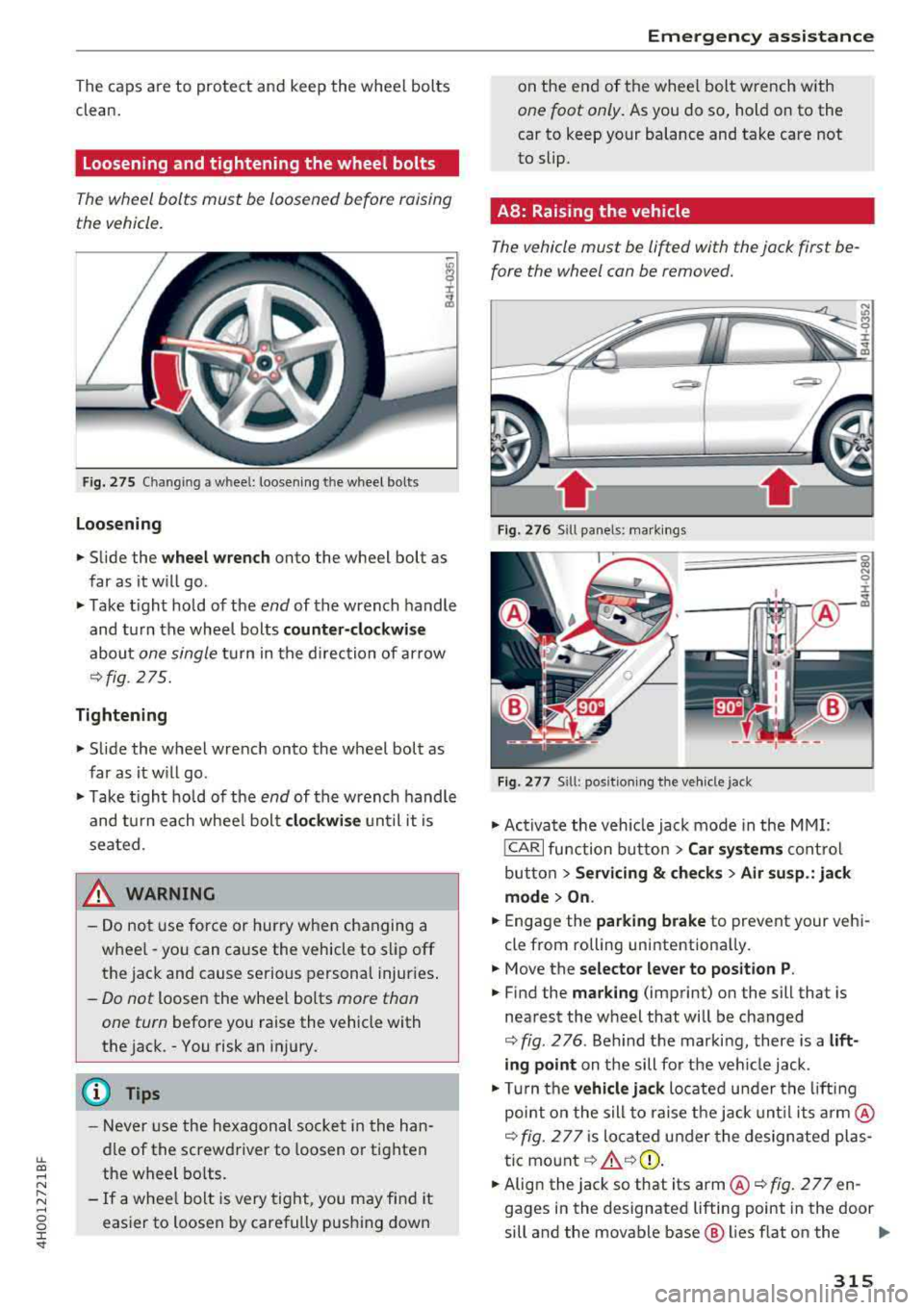
Fig. 275 C han gin g a w hee l: l oose ning t he wheel bo lt s
Loo sening
.. Slide the w heel wr enc h onto the wheel bolt as
far as it will go .
.. Take tight hold of the end of the wrench handle
and turn the wheel bolts
c o unter -clock wise
about one single tu rn in the d irection of ar row
¢ fig. 275.
Tightening
.. Slide the wheel wrench onto the wheel bolt as
far as it w ill go.
.. T ake t ight hold of the end of the wrench handle
and tu rn each whee l bolt
cl ockwi se until it is
seated.
& WARNING
- Do not use force or hurry when changing a
wheel
-you can cause the vehicle to slip off
the jack and cause serious personal injuries .
-Do not loosen the wheel bolts more than
one turn
before you raise the vehicle with
the jack. - You risk an injury.
(D Tips
- Never use the hexagonal socket in the han
dle of the screwdriver to loosen or tighten
the wheel bo lts .
- If a whee l bolt is very tight, you may find it
easier to loosen by carefully push ing down
Em ergen cy as sis tanc e
on the end of the whee l bolt wrench with
one foot only . As you do so, hold on to the
car to keep your balance and take care not
to slip .
AB: Raising the vehicle
The vehicle must b e lifted with the jack first be
fore the wheel can be removed.
Fi g. 276 Sill panels: ma rk in gs
F ig. 277 S ill: posit ion ing t he veh icle jac k
.. Act iva te the veh icle jack mode in the MMI :
!CARI function button> Car system s control
button >
Servi cing & ch ecks > Air su sp. : jack
mode > On .
.. Engage the parking brake to prevent your vehi
cl e from rolling unintentiona lly.
.. Move the s elector le ver to p osition P .
.. Find the mark ing (imprint) on the sill that is
nearest the wheel that will be changed
¢ fig . 2 76 . Beh ind the marki ng, there is a lift
ing point on the sill for the veh icle jack .
.. Turn the ve hicl e ja ck located u nder the lift ing
point on the sill to raise the jack unt il its
a rm @
¢ fig. 277 is located under the design ated plas
tic mo unt ¢
_A ¢(D .
.. Align the jack so that its arm @¢ fig. 2 77 en
gages in the designated lifting point in the door
sill and the movable base @ lies flat on the
""
315
Page 318 of 356
Emergency assistance
ground. The base @ must be vertical under the
lifting point@.
"'"Wind the jack up further until the flat tire
comes off the ground
c::> &, .
Position the vehicle jack only under the designat
ed lifting points on the sill
c::> fig. 2 76. There is ex
actly
one location for each wheel. The jack must
not be positioned at any other location
c::> .,&.c::>(!) .
An unstable surface under the jack can cause the
vehicle to slip off the jack. Always provide a firm
base for the jack on the ground. If necessary
place a sturdy board or similar support under the
jack . On
hard, slippery surfaces (such as tiles)
use a rubber mat or similar to prevent the jack
from slipping
c::> &. .
,& WARNING
-
-Yo u or your passengers could be injured
wh ile chang ing a wheel if you do not follow
these safety precautions:
- Position the vehicle jack only at the desig nated lifting points and align the jack .
Otherwise, the vehicle jack could slip and
cause an injury if it does not have suffi
cient hold on the vehicle.
- A soft or unstable surface under the jack may cause the vehicle to slip off the jack.
Always provide a firm base for the jack on
the ground.
If necessary, use a sturdy
board under the jack.
-On hard, s lippery surface (such as tiles)
use a rubber mat or similar to prevent the
jack from slipping.
- To help prevent injury to yourself and yo ur
passengers:
- Do not raise the vehicle until you are sure
the jack is securely engaged.
- Passengers must not remain in the vehicle
when it is jacked up.
- Make sure that passengers wait in a safe
place away from the vehicle and well away
from the road and traff ic.
- Make sure jack position is correct, adjust
as necessary and then continue to raise
the jack.
316
- Changes in temperature or load can affect
the height of the vehicle.
(D Note
Do not lift the veh icle by the si ll. Pos ition the
vehicle jack only at the designated lifting
points on the sill. Otherwise, your vehicle will
be damaged.
(D Tips
The vehicle jack mode switches off automati
cally at speeds above 10 km/h .
58: Raising the vehicle
The vehicle must be lifted with the jack first be
fore the wheel can be removed.
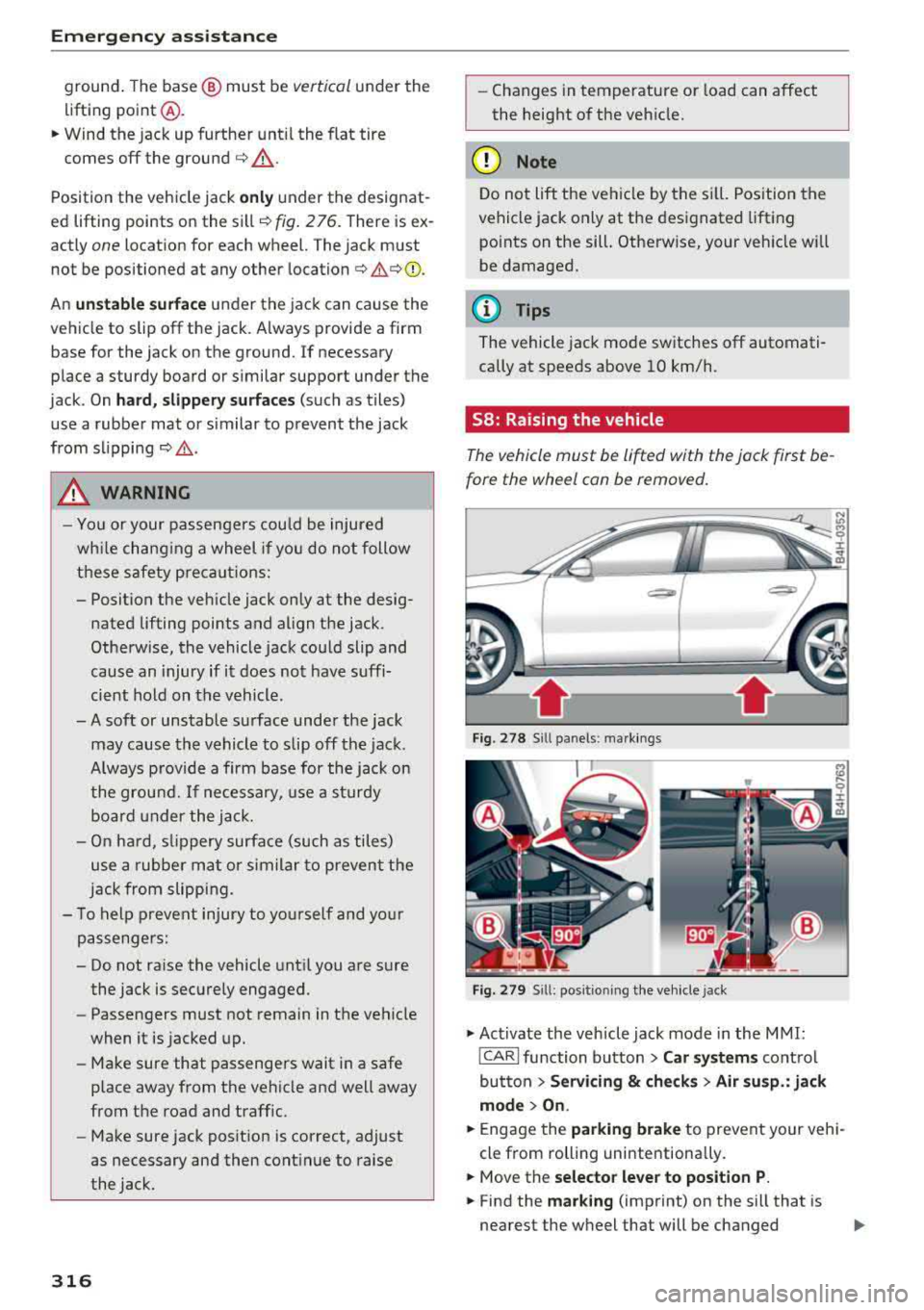
Fig . 278 Sill panels : ma rkings
Fig. 279 Sill : posi tioning the vehicle jack
.,. Activate the vehicle jack mode in the MMI:
!CARI function button> Car systems control
button >
Servicing & checks > Air susp.: jack
mode > On .
.,. Engage the parking brake to prevent your vehi
cle from rolling unintentiona lly.
.,. Move the selector lever to position P.
"'" Find the marking (imprint) on the sill that is
nearest the wheel that will be changed
..,.
Page 327 of 356
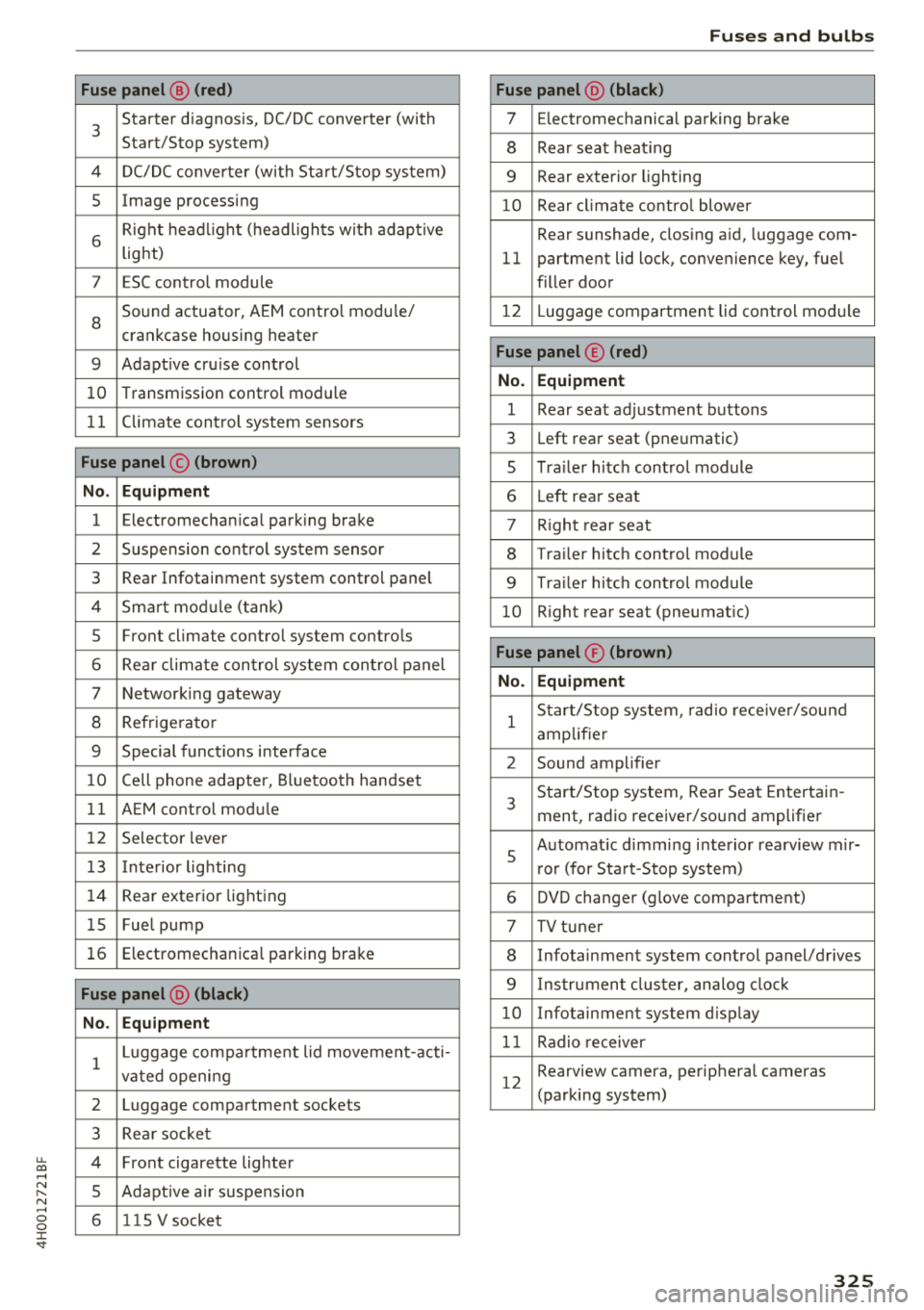
u. co .... N
" N .... 0 0 :c '
3
Starter diagnosis, DC/DC converter (with
Start/Stop system)
4 DC/DC converter (with Start/Stop system)
5 Image processing
6
Right headlight (headlights with adaptive
light)
7 ESC control module
8
Sound actuator, AEM control module/
crankcase housing heater
9 Adapt ive cru ise control
10 Transmission control module
11 Climate control system sensors
Fuse panel © (brown)
No. Equipment
1 Electromechan ica l park ing brake
2 Suspension control system sensor
3 Rear Infotainment system control panel
4 Smart module ( tan k)
5 Front climate control system controls
6 Rea r climate control system control panel
7 Networking gateway
8 Refrigerator
9 Special functions interface
10 Cell phone adapter, Bluetooth handset
11 AEM control module
12 Selector lever
1 3 Inte rior lighting
14 Rear exterior lighting
15 Fue l pump
16 Electromechanica l parking brake
Fuse panel @ (black)
No. Equipment
1
Luggage compa rtment lid movement-acti-
vated opening
2 Luggage compartment sockets
3 Rear socket
4 Fro nt cigarette lighter
5 Adaptive air su spension
6 115 V socket
Fuses and bulbs
Fuse panel @ (black)
7 Electromechanical parking brake
8 Rear seat heat ing
9 Rear exterior lighting
10 Rear climate control blower
Rear sunshade, closing a id, luggage com-
11 partment lid lock, convenience key, fue l
filler door
12 L uggage compartment lid control module
Fuse panel © (red)
No. Equipment
1 Rear seat adjustment buttons
3 Left rear seat (pne umatic)
5 Tra iler hitch control module
6 Left rea r seat
7 Right rear seat
8 Trailer hitch control module
9 Trailer hitch control module
10 Right rear seat (pneumat ic)
Fuse panel ® (brown)
No. Equipment
1
Start/Stop system , radio receiver/sound
amplifier
2 Sound amplifier
3
Start/Stop system, Rear Seat Entertain -
ment, radio receiver/sound amplifier
5
Automat ic dimming interior rea rview mir-
r or (for Start-Stop system)
6 DVD changer (glove compartment)
7 TV tuner
8 Infotainment system control panel/drives
9 Instrument cluster, analog clock
10 Infotainment system d isp lay
11 Radio receiver
12
Rearview camera, perip heral cameras
(parking system)
325