key AUDI A8 2018 Owner's Manual
[x] Cancel search | Manufacturer: AUDI, Model Year: 2018, Model line: A8, Model: AUDI A8 2018Pages: 356, PDF Size: 54.71 MB
Page 66 of 356
Seats and storage
(D Note
Beverage containers in the cup holders should
always have a lid. If not, beverages could spill
and cause damage to vehicle equipment, such
electronics or seat covers.
Cooled glove compartment
The cooled glove compartment only functions
when the A/C system is switched on.
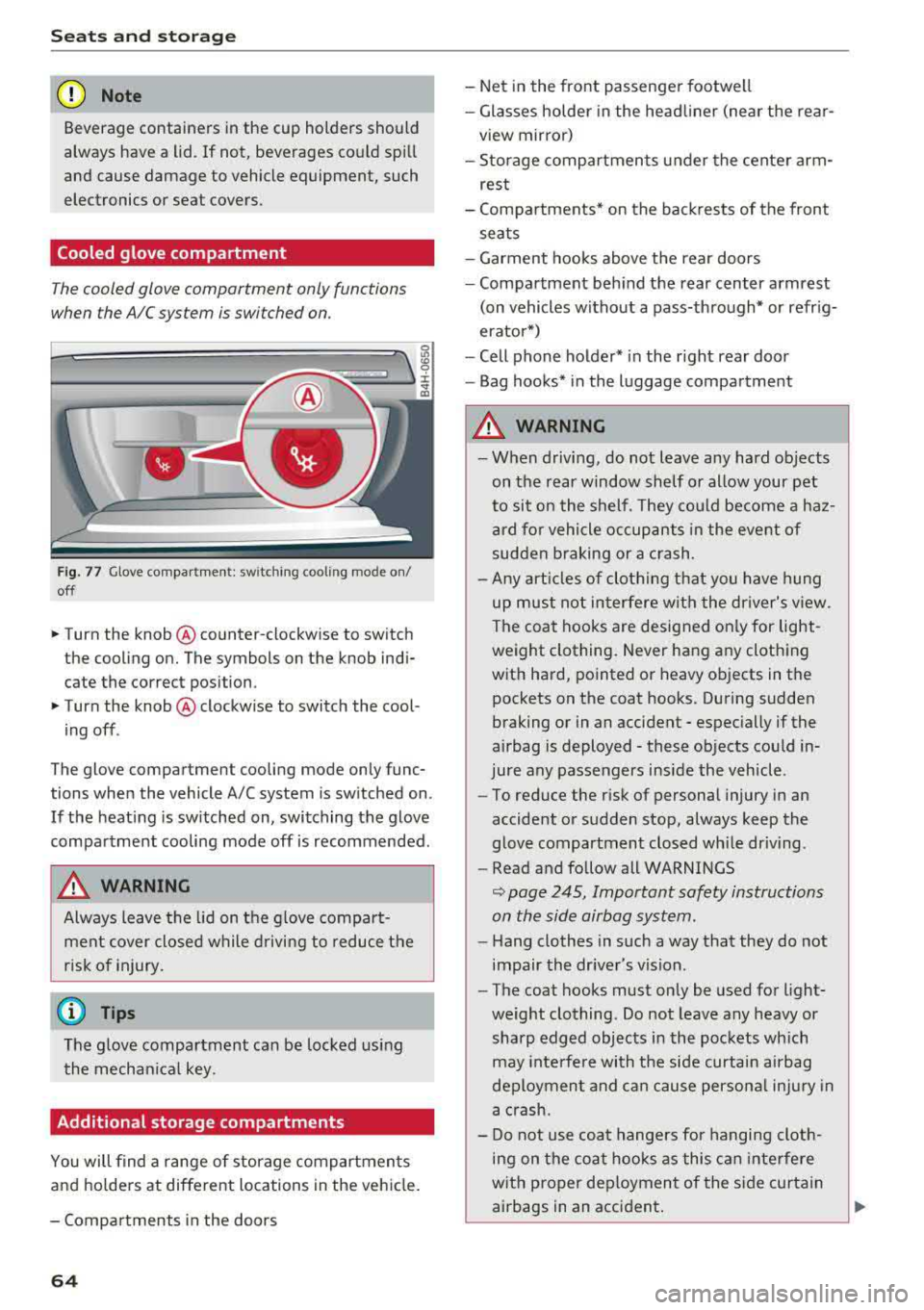
Fig. 77 Glove compar tment: switching cooling mode on/
off
.. Turn the knob @counter-clockwise to switch
the cooling on. The symbols on the knob indi
cate the correct position.
.. Turn the knob @clockwise to switch the cool-
ing off .
The glove compartment cooling mode only func
tions when the vehicle A/C system is switched on.
If the heating is switched on, switching the glove
compartment cooling mode off is recommended.
A WARNING
-
Always leave the lid on the glove compart
ment cover closed while driving to reduce the
risk of injury.
(D Tips
The glove compartment can be locked using
the mechanical key.
Additional storage compartments
You will find a range of storage compartments
and hold ers at different locations in the vehicle.
- Compartments in the doors
64
- Net in the front passenger footwell
- Glasses holder in the headliner (near the rear-
view mirror)
- Storage compartments under the center arm
rest
- Compartments* on the backrests of the front
seats
- Garment hooks above the rear doors
- Compartment behind the rear center armrest
(on vehicles without a pass-through* or refrig
erator*)
- Cell phone holder* in the right rear door
- Bag hooks* in the luggage compartment
A WARNING
-When driving, do not leave any hard objects
on the rear window shelf or allow your pet
to sit on the shelf. They could become a haz
ard for vehicle occupants in the event of
sudden braking or a crash.
- Any articles of clothing that you have hung
up must not interfere with the driver's view .
The coat hooks are designed only for light
weight clothing. Never hang any clothing
with hard, pointed or heavy objects in the
pockets on the coat hooks. During sudden
braking or in an accident
-especially if the
airbag is deployed
-these objects could in
jure any passengers inside the vehicle .
- To reduce the risk of personal injury in an
accident or sudden stop, always keep the
glove compartment closed while driving.
- Read and follow all WARNINGS
~ page 245, Important safety instructions
on the side airbag system.
- Hang clothes in such a way that they do not
impair the driver's vision.
- The coat hooks must only be used for light
weight clothing. Do not leave any heavy or
sharp edged objects in the pockets which
may interfere with the side curtain airbag
deployment and can cause personal injury in
a crash.
- Do not use coat hangers for hanging cloth
ing on the coat hooks as this can interfere
with proper deployment of the side curtain
airbags in an accident.
Page 71 of 356
u. co .... N
" N .... 0 0 :c '
climate control
Description
The climate control system warms, cools and re
moves humidity from the air in the vehicle interi
or. It is the most effective when the windows and
sunroof* are closed. If there is a build-up of heat inside the vehicle, ventilation can help to speed
up the cooling process .
In all heating mode functions, except for defrost,
the blower only switches to a higher speed once
the engine coolant has reached a sufficient tem
perature .
Pollut ant filt er
The po llutant filter removes pollutants such as
dust and pollen from the air.
Ke y r eco gnition
The climate control settings are a utomatically
stored and assigned to the remote control key
that is in use .
A WARNING
Poor visibility can lead to accidents.
- For safer driving, keep all windows free of
ice, snow and fog .
- Become familiar as quickly as possible with
the correct use and function of the climate contro l system, especially with the defrost
ing and defogging function.
- When the temperature is below freezing,
only use the windshield washer system after
Warm and c old
the windshield has been warmed by the cli
mate control system. The washer fluid could
freeze on the windshield and impair visibili
ty .
@ Note
-If you suspect that the climate contro l sys
tem is damaged, switch the system off to
prevent further damage and have it checked
by an authorized Audi dealer or authorized
Aud i Serv ice Facility.
- Repa irs to the Aud i climate control system
require special technical knowledge and
special tools . See an authorized Aud i dealer
or authorized Audi Serv ice Fac ility .
@ For the s ake of the environment
Reducing the amount of fuel used also re
duces the amount of pollutants that enter the
a ir .
(D Tips
- To prevent interference with the heat ing
and cooling output and to prevent the win
dows from fogging over, the a ir intake in
fro nt of t he w indshie ld must be free of ice,
snow or leaves.
- Condensat ion from the coo ling system can
dr ip and form a pudd le of water under the
veh icle . T h is is no rma l and does not mean
there is a leak .
- Th e energy management system may tem
porarily switch off certain functions, suc h as
the seat heating* or rear window defogger .
T hese systems are avai lable again as soon
as the energy supply has been restored.
69
Page 74 of 356
Warm and cold
(D Note
To avoid damage to the heating elements in
the seats, do not kneel on the seats or place
heavy loads on a small area of the seat.
Basic settings
The climate control system basic settings ore ac
cessed in the Infotainment system.
,.. Select: the ICARI function button > Car systems
control button > AC.
Rear seat settings*
When this function is selected, all settings for
the rear can be adjusted through the climate con
trol system in the cockpit. The climate control
system settings cannot be adjusted in the rear
seat at the same time. This function switches off
after a certain period of time or when one of the
dials in the cockpit is pressed.
Auto recirculation*
The sensit ivity level of the automatic recircula
tion mode can be set at various levels from
Off to
Sensitive. When recirculation mode 1~ 1 is switch
ed on, the air recirculation is controlled automat
ically. If the windows fog up, press the
I ® FRONT I
button.
Footwell temperature
You can adjust the footwell temperature so that
it is cooler or warmer .
Solar roof*
Parking ventilation is controlled automatically in
the
Auto setting.
When the ignition is switched off, solar-powered
parking ventilation may switch on, as long as
- there is sufficient sunlight,
- the outside temperature is not too low,
- the sunroof is closed or tilted and
-Auto (Infotainment system) is set
72
Steering wheel heating
Applies to: vehicles with steering wheel heating
The steering wheel rim can be heated .
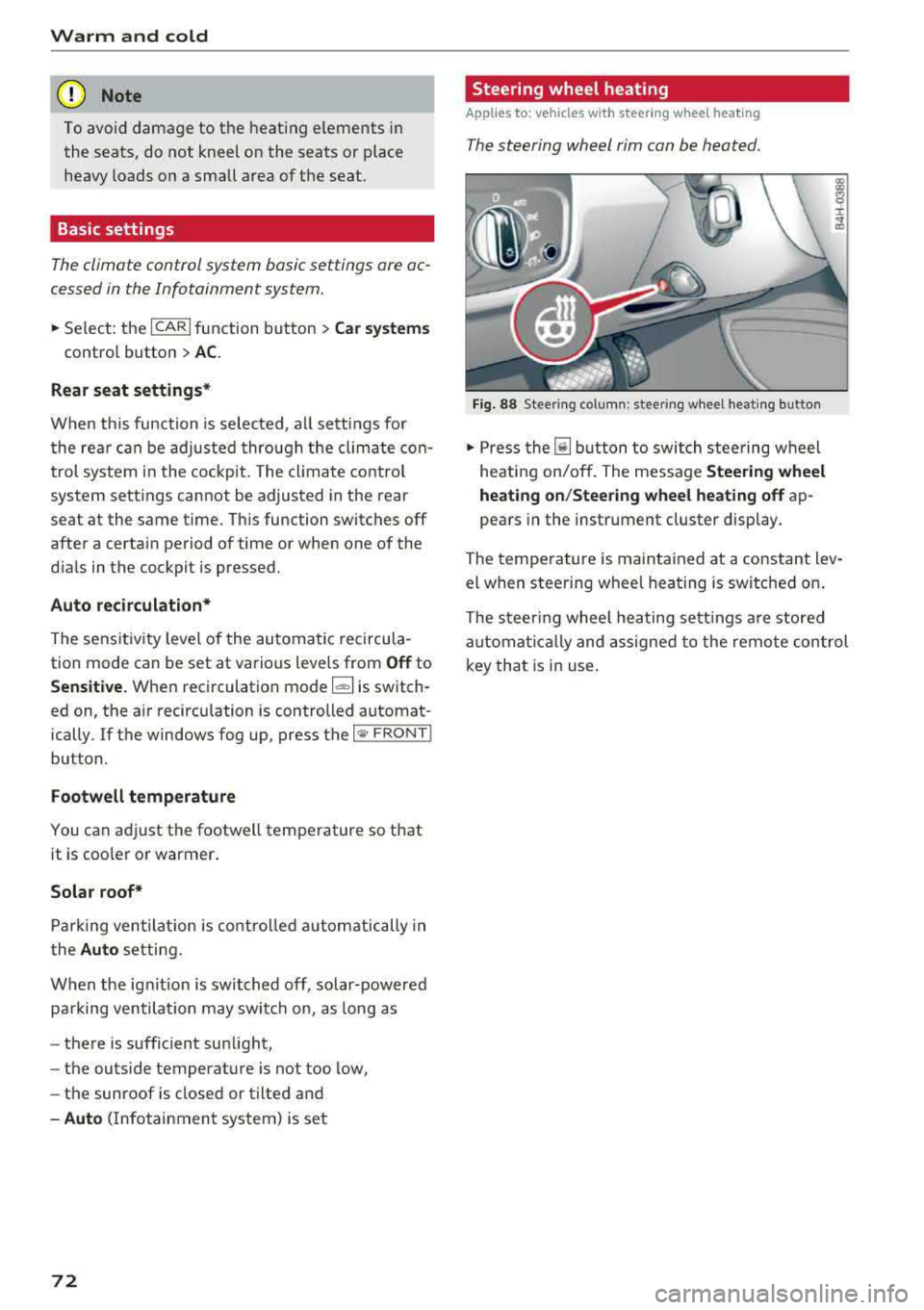
Fig. 88 Steering column: steering wheel heating button
,.. Press the [il button to switch steering wheel
heating on/off. The message
Steering wheel
heating on/Steering wheel heating off
ap
pears in the instrument cluster display.
The temperature is maintained at a constant lev
el when steering wheel heating is switched on.
The steering wheel heating settings are stored
automat ical ly and assigned to the remote control
key that is in use.
Page 79 of 356
u. co .... N
" N .... 0 0 :c '
-Some noise after starting the engine is nor
mal and is no cause for concern.
- If you leave the vehicle with the ignition
switched on, the ignition will switch off af
ter a certain amount of time. Make sure that
electrical equipment such as the exterior
lights are switched off.
Stopping the engine
.,. Bring the vehicle to a full stop.
.,. Select the P or N selector lever position .
.. Press the I START ENGI NE STOPI button
~ page 76, fig. 90.
Steering lock
The steering locks when you turn the engine off
using the lSTART
ENGINE STOPlbutton and
open the driver's door. The locked steering helps
prevent vehicle theft.
Emergency off function
If it is absolutely necessary, the engine can also
be turned off while driving in the
R, Dor S selec
tor lever position at speeds below 6 mph (10 km/
h). To stop the engine, press and hold the
I START ENGINE STOPI button and also press the
brake pedal.
& WARNING
-Never turn off the engine before the vehicle
has come to a complete stop. The full func
tion of the brake booster and the power
steering is not guaranteed. You must use
more force to turn or brake. Because you
cannot steer and brake as you usually
would, this could lead to accidents and seri
ous injuries .
-Always take the key with you whenever you
leave your vehicle. Otherwise, the engine
cou ld be started or electrical equipment
such as the power windows could be operat
ed. This can lead to serious injury.
-For safety reasons, always park the vehicle
with the selector lever in the P position .
Driving
Otherwise, there is the risk that the vehicle
could roll unintentionally.
@ Note
If the engine has been under heavy load for
an extended period of time, heat builds up in
the engine compartment after the engine is
switched off and there is a risk of damaging
the engine. For this reason, let the engine run
at idle for approximately two minutes before
shutting it off .
(D Tips
For up to 10 minutes after stopping the en
gine, the radiator fan may turn on again auto
matically or it may continue to run (even if
the ignition is switched off) for the following
reasons :
- The coolant temperature is increasing due
to trapped heat.
- If the engine is warm and the engine com
partment also heats up from strong sun
light.
Messages in the instrument cluster display
Turn off ignition before leaving car
This message appears and a warning tone sounds
if you open the driver's door when the ignition is
switched on.
Press brake pedal to start engine
This message appears when you press the
I START ENGINE STOP ! button to start the engine
and do not press the brake pedal while doing so.
The engine can only be started when the brake pedal is pressed .
Ill Is key in the vehicle?
This indicator light turns on and this message ap
pears if the ignition key was removed from the
vehicle when the engine was running. If the igni
tion key is no longer in the vehicle, you cannot
switch on the ignition or start the engine once
you stop it. You also cannot lock the vehicle from
the outside .
.,.
77
Page 80 of 356
Driving
Shift to P, otherwise vehicle can roll away.
Doors do not lock if lever is not in
P.
This driver message appears fo r safety reasons if
the transmission has not been shifted to the P
position when you switch the ignition off. Move
the selector lever to the P position . Otherwise the
veh icle is not protected from ro lling and it cannot
be locked.
(I Key is not recognized. Hold back of key
against marked area. See owner's manual
If the i ndicator light turns on and this message
appears, there is a
malfunction ~ page 78.
Turn off ignition before leaving car
This message appears if the driver's door is
ope ned while the ignition is switched on . Always
sw itch off the ignition if you are leavi ng the vehi
cle .
Shift to P and turn off ignition before leav ing
car, otherwise vehicle can roll away
This message appears if the driver's door is
opened while the ignition is switched on and the
transmission has not been shifted to the P posi
tion . Shift the transm iss ion into the P posit ion
and turn off the ign ition if you are leaving the ve
h icle . Otherwise the vehicle could roll.
Starting the engine when there is a
malfunction
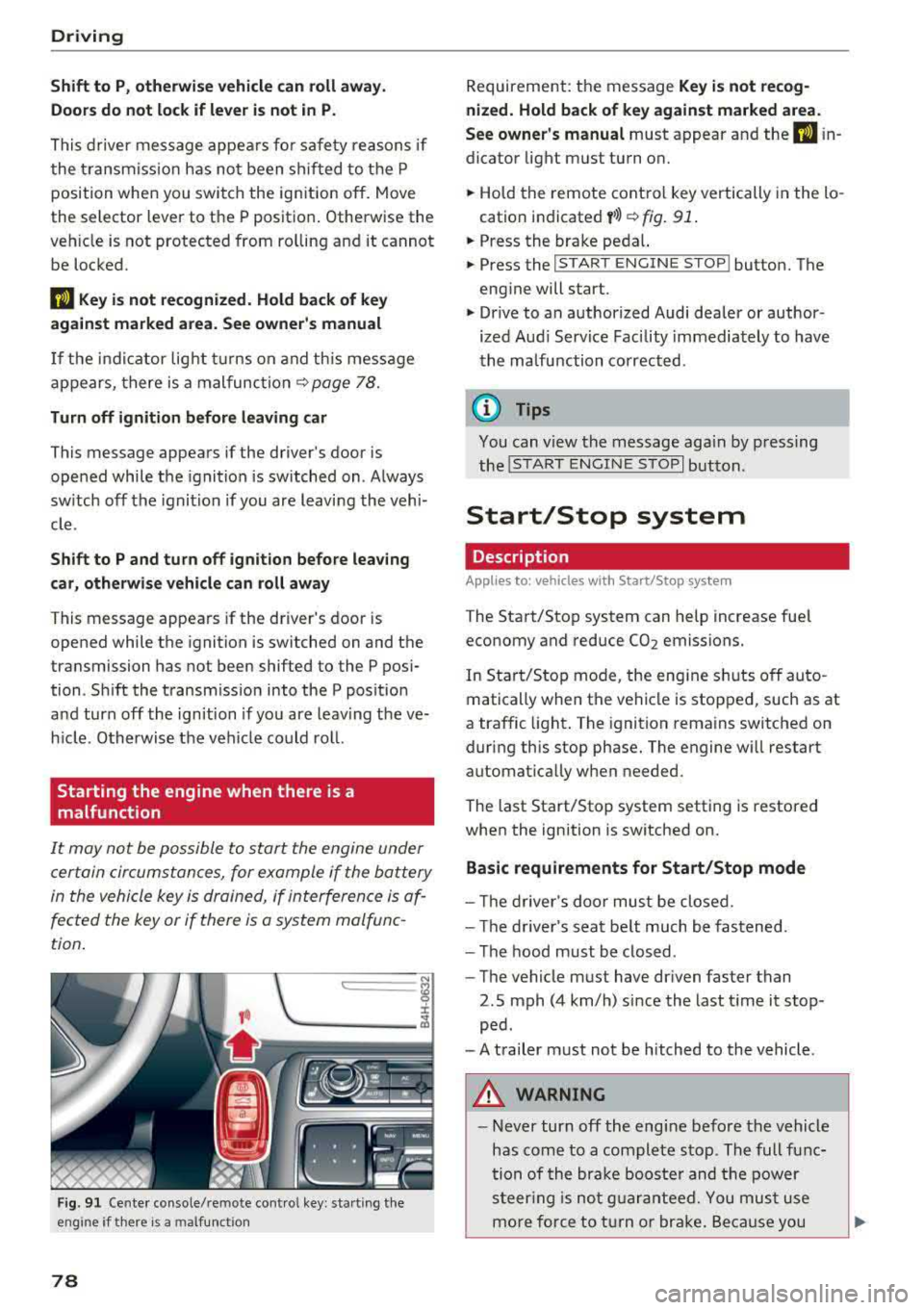
It may not be possible to start the engine under
certain circumstances, for example if the battery
in the vehicle key is drained, if interference is af
fected the key or if there is a system malfunc
tion .
c:====== ~
~ _____ ___ ci5
Fig . 91 Cente r console/remote cont ro l key : sta rt ing the
eng ine
if t here is a malfunc tion
78
Requirement: the message Key is not recog
nized. Hold back of key against marked area .
See owner's manual
must appear and the (I i n
dicator light must turn on.
.,. Hold the remote control key vertically in the lo
cation indicated
y >l) ~ fig. 91 .
.,. Press the brake peda l.
.,. Press the I START ENGINE STOPI button. The
engine will start.
.,. Drive to an authorized Audi dealer or author
ized Aud i Serv ice Facility immediately to have
the malfunction corrected .
(0 Tips
You can v iew the message aga in by pressing
the
I S TAR T ENGINE STOP I button.
Start/Stop system
Description
Applies to: vehicles with Start/Stop syste m
The Start/Stop system can help increase fuel
economy and reduce CO2 emissions.
In Start/Stop mode, the eng ine s hut s off auto
matically when the vehicle is stopped, such as at
a traffic light . The ignition remains switched on
during this stop phase. The engine w ill restart
automat ically w hen needed.
The last Start/Stop system setting is restored
when the ignition is switched on.
Basic requirements for Start/Stop mode
- Th e driver's door must be closed.
- The driver's seat belt much be fastened.
- The hood must be closed .
- The vehicle must have dr iven faster than
2.5 mph (4 km/h) since the last t ime it stop
ped .
- A trailer must not be hitched to the vehicle .
A WARNING
-Never turn off the eng ine before the vehicle
has come to a complete stop . The full func
tion of the brake booster and the power
steering is not guaranteed. You must use
more force to turn or brake. Because you
Page 84 of 356
Drivin g
During emergency braking, your vehicle will
brake sim ilar to heavy brak ing. ESC and the
associated components (ABS, ASR, EDL)
cannot overcome the laws of physics . In cor
ners and when road or weather cond it ions
are bad, a full b rake applicat ion ca n cause
the vehicle to skid o r the rear end to swerve,
wh ic h increases the r is k of an accident.
- If the powe r supply fa ils, you cannot set the
par king b rake if it is re leased. In th is case,
par k the vehicle on level ground and secure
it by placing the selector lever in the P posi
tion . See an authorized Audi dea ler or a u
thorized Audi Service Facility for assistance .
- Always take the vehicle key with you when
leaving your vehicle, even fo r a short period
of time . This applies particular ly w hen ch il
dren rema in in the vehicle. Otherwise ch il
dren could start the engine, release the
park ing brake or operate electrical eq uip
ment such as powe r windows, which in
c reases the risk of an acc ident.
- No one sho uld rema in in the vehicle when it
is locked - especially ch ild ren. Locked doo rs
make it mo re diff icu lt fo r eme rgency wor k
ers to get into the vehicle, which puts lives
at r is k .
0) Tips
When stopping at a traffic s ignal or stopping
in c ity traffic, you can set the parking b rake
manually. The vehicle does no t have to be
he ld w it h t he br ake peda l. The parking b rake
elim ina tes the tendency to creep when a se
lecto r lever position is engaged . As soon as
you p ress t he accelerator pedal, the parking
brake releases automat ica lly and your vehicle
starts to move
c::, page 82.
(D Tips
- Occasiona l noises when the parking brake is
set and re leased a re normal and a re not a
cause for concer n.
- The park ing bra ke goes thro ugh a se lf-test
cycle at regular intervals when the ve hicle is
stopped. Any noises associated w ith this a re
normal.
82
- If there is a powe r fail ure, the par king b rake
wi ll not set if it is released, and it wi ll not
re lease if it is
set ~.&. . See an a uth orized
Audi dealer or author ized Audi Se rvice Fa
cility for assistance.
Starting to drive
Various convenience and safety f unct ions may be
available when the vehicle begins dr iving, de
pendi ng on vehicle equipment .
Starting on hills with th e pa rking brake set
Requirement: the driver's door must be closed
and the driver's safety belt must be fastened.
.,. To sta rt driving comfortably when on a h ill, set
the parking brake and begin driving as usu a l.
The braking force of the parking brake does not
release automatically unt il the whee ls build up
enoug h driving force.
Starting on hills with hill hold assist
Hill hold assis t makes it easier to start on hills.
Requireme nt: the d rive r's doo r must be closed
and t he engine must be runn ing.
.,. To activate h ill hold assist, press and hold the
brake pedal for several seco nds . The vehicle
m ust be in an uphill d irect io n of t ravel.
After re leas ing the brake pedal, the brak ing pow
er is maintained for a brief moment
c::, &. to pre
vent the veh icle from rolli ng back w hen starting.
Du ring this t ime, you can easily begin to move
yo ur vehicle.
_8. WARNING
Applies to: vehicles with hill hold assist
-If you do not beg in d riving immed iate ly or
the engine stalls after releasing the bra ke
pedal, your veh icle may beg in to roll back
ward. Press the brake pedal or set the park
ing brake immedia tely.
- The inte lligent technology of hill ho ld assist
cannot ove rcome the limitat ions imposed by
natural p hys ica l laws. The increased comfort
offe red by hill ho ld assist should not cause
you to t ake safety r is ks.
Page 102 of 356
Ass is tance sy stem s
~-~ ---Di sta nce 1: this setting corresponds
to a distance of 92 ft (28 m) when traveling at 62
mph (100 km/h), for example (time between: 1
second) .
~-- ~--Di stan ce 2: this setting corresponds
to a distance of 118
ft (36 m) when traveling at
62 mph (100 km/h), for example (time between:
1.3 seconds) .
~--- ~-Distance 3: this setting corresponds
to a distance of
164 ft (SO m) when traveling at
62 mph (100 km/h), for example (time between:
1.8 seconds) .
~--- -~ Distance 4 : This setting corresponds
to a distance of 210
ft (64 m) when traveling at
62 mph (100 km/h), (time d istance of 2.3 sec
onds).
A WARNING
Following other vehicles too closely increases
the risk of collisions and ser ious personal in
jury .
- Setting short distances to the traffic ahead
reduces the time and distance available to
br ing your vehicle to a safe stop and makes
it eve n mo re necessary to pay close atten
t ion to traffic.
- Always obey applicable traffic laws, use
good judgment, and select a safe following
distance fo r the traffic, road and weather
cond itio ns.
(D Tips
-Distance 3 is set automatically each time
you switch the ignit ion on.
-Your settings are automatically stored and
assigned to the remote control key being
used.
Selecting the driving mode
Applies to: vehicles with Audi adaptive cruise control
.. Se lect the des ired driving mode in dr ive se lect
¢ page 111 .
100
@ Tips
Your settings are automatically stored and as
signed to the remote contro l key being used.
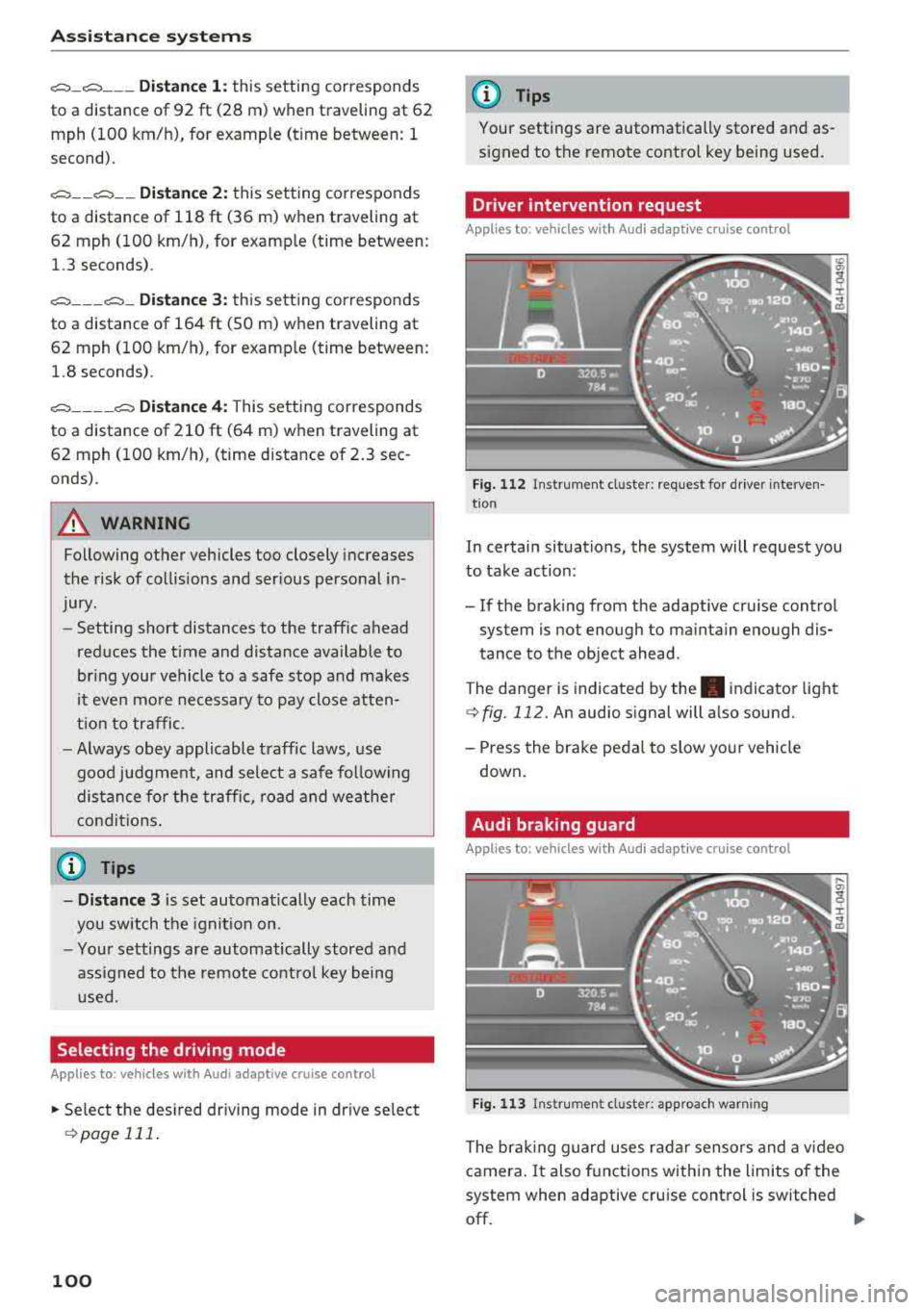
Driver intervention request
Applies to: vehicles with Audi adaptive cruise control
Fig . 112 Instrument cluster : request for driver interven·
t ion
In certain situations, the system will request you
to take action:
- If the braking from the adaptive cru ise control
system is not enough to ma inta in enough dis
tance to the object ahead.
The danger is indicated by
the . indicator light
¢fig. 112. An audio signal will also sound.
- Press the brake peda l to slow yo ur vehicle
down .
Audi braking guard
Applies to: vehicles with Aud i adaptive cruise control
F ig . 113 In strume nt cl us ter: approach warning
The brak ing guard uses radar sensors and a video
camera .
It also functions within the limits of the
system when adaptive cru ise cont rol is switched
off.
IIJ,,
Page 104 of 356

Ass is tanc e system s
- Keep in mind that braking guard can brake
unexpected ly. Always secure any cargo or
objects that you are transport ing to reduce
the r isk of damage or in jury.
Settings in the Infotainment system
Applies to: vehicles with Audi adaptive cruise control
.,. Select : the ICARI function button > Ca r sy stems
control button > Dri ver a ssistan ce > Audi bra k
ing guard .
Sy stem
-switches the brak ing guard On /Off .
When you switch the ignition on, the message
Braking guard: Off appears if the system is
sw itched off .
Early warning -the distance and approach warn
ings in the display can be sw itched
On /Off .
(D Tips
- Your settings are automatically stored and
assigned to the remote control key being used.
- If you restrict or sw itch off the ESC, the
braking guard also switches itse lf off
c> page 128.
-Switch braking guard off when you are load
i ng the veh icle onto a vehicle carr ier, train,
sh ip or other type of transportation . This
can prevent undesired warnings from the braking gua rd system.
Messages
Applies to: vehicles with Audi adaptive cruise control
Braking guard : Off
This message appears if the system is sw itc hed
off throug h the Infota inment system . Otherwise ,
if the system is tur ned off, the information ap
pea rs every time shortly after the start of t he
trip .
The message also appears if the system is not
ava ilable d ue to a ma lfunct ion or if the ESC is
sw itched
off ¢ page 128 . If this is the case, the
system wi ll not provide warnings about a possi
b le co llision.
Braking guard : engaged
102
This message appears if a sharp brake pressure
was applied due to an acute warning .
ACC: Unavailable!
ACC and Audi braking guard: Una vailable
The system cannot guarantee that it will detect
objects correctly and is sw itched off. The sensors
have been moved or are faulty . The pre sense
funct ions may also be affected . Drive to an au
t h orized Aud i dea ler or authorized Audi Se rvice
Fac il ity immed iate ly to have the ma lfunction cor
r ec ted .
ACC : Currently unavailable . No sen sor vis ion
AC C and Audi braking gua rd: Curr entl y una vail
able. No sensor vision
This message appears if the sensor view is ob
structed, for examp le by leaves, snow, heavy
spray or dirt. Clean the
sensors ¢ page 95,
fig. 104.
ACC : Cu rrently un avail able . G radient too steep
The road exceeds the maxim um poss ible a ngle
fo r safe adaptive cruise co ntro l opera tion. Ada pa
tive cru ise con trol is switched off.
ACC : Only available in D , Sor M
Se lect the D, Sor M selector lever position .
ACC: Cu rrently un available . Parking br ake ap
plied
The adaptive cru ise con trol system sw itches o ff
automatica lly if the parking brake is set .
ACC: Currently unavailabl e. Stability contr ol
( ES C) inpu t.
This message appears if the electron ic stabiliza
tion cont rol ( ESC) is tak ing action to stabilize the
vehicle. In t his case, adaptive c ruise cont ro l
swi tches off autom atically.
ACC off: Manual control!
This message appears when adaptive cruise con
trol cannot set the parking brake. Press the brake
pedal to prevent the vehicle from rolling .
... ~
Page 107 of 356
White line(s) Active lane assist is activated
and ready to provide warnings.
Red line(s) Active lane assist warns you
(left or right) before leaving a lane
¢ fig. 116. In addit ion, the
steering wheel vibrates light ly .
Gray line(s) Active lane assist is activated,
but not ready to give warning
¢ fig. 117.
Me ssages in the in strum ent clu ster di splay
If the active lane ass ist switches off automat ica l
l y, the indicator light in the display turns off and
one of the following messages appears:
Audi active lane a ssist: Cu rrentl y un available.
N o ca mera view
This message appea rs if the came ra is u nable to
detect the lines. This co uld happen if :
- The came ra field of v iew
<;;) page 104, fig. 115 is
dirty o r cove red in ice. C lean this area on the
wi ndshield .
- The came ra field of v iew is fogged over . Wait
u ntil the fog has cleared before sw itching the
active lane assis t on agai n.
- T he system has been unab le to detec t the lanes
for an extended period of time d ue to road con
di tions. Sw itch act ive lane assis t back on when
the lines are more visible.
Audi active lane a ssis t: Currently una vailabl e
There is a temporary active lane assist malfunc
tion . Try sw itch ing the active la ne assist on aga in
later.
Audi acti ve lane assist : Syste m f ault!
Drive to an authorized Audi dealer or a uthorized
Audi Service Facility immediately to have the
malfunct ion corrected.
Audi acti ve lane a ssis t: Pl ease take over steering
This message appea rs if you are not stee ring by
yourse lf. If th is is the case, act ive lane assis t does
not switch off, but it is
"not ready " to provide a
~ warn ing. The system can he lp you keep the veh i-...,
~ cle in the lane . However, you a re responsible for
~ driving the vehicle and must steer it yourself . 0 0 :c "
A WARNING
Note that messages may be de layed or not
d isplayed o n veh icles w ith accesso ries mount
ed on the stee ring wheel, such as a steer ing
whee l spinne r knob. Always keep your hands
on the s tee ring wheel.
Setting the vibration warning
App lies to : veh icles w ith Aud i act ive lane ass ist
11> Select: the ICAR I func tion but ton> C ar sy stem s
control b utt on > Driver assi stance > Audi a c
ti ve lane as sist .
Vibration warning
You can switch the addit io nal vibration warn ing
in the steer ing wheel on or off.
(D Tips
Your settings are automatically stored and as
s igned to the remote control key being used.
Audi side assist
Description
Applies to: vehicles w ith Audi s ide ass ist
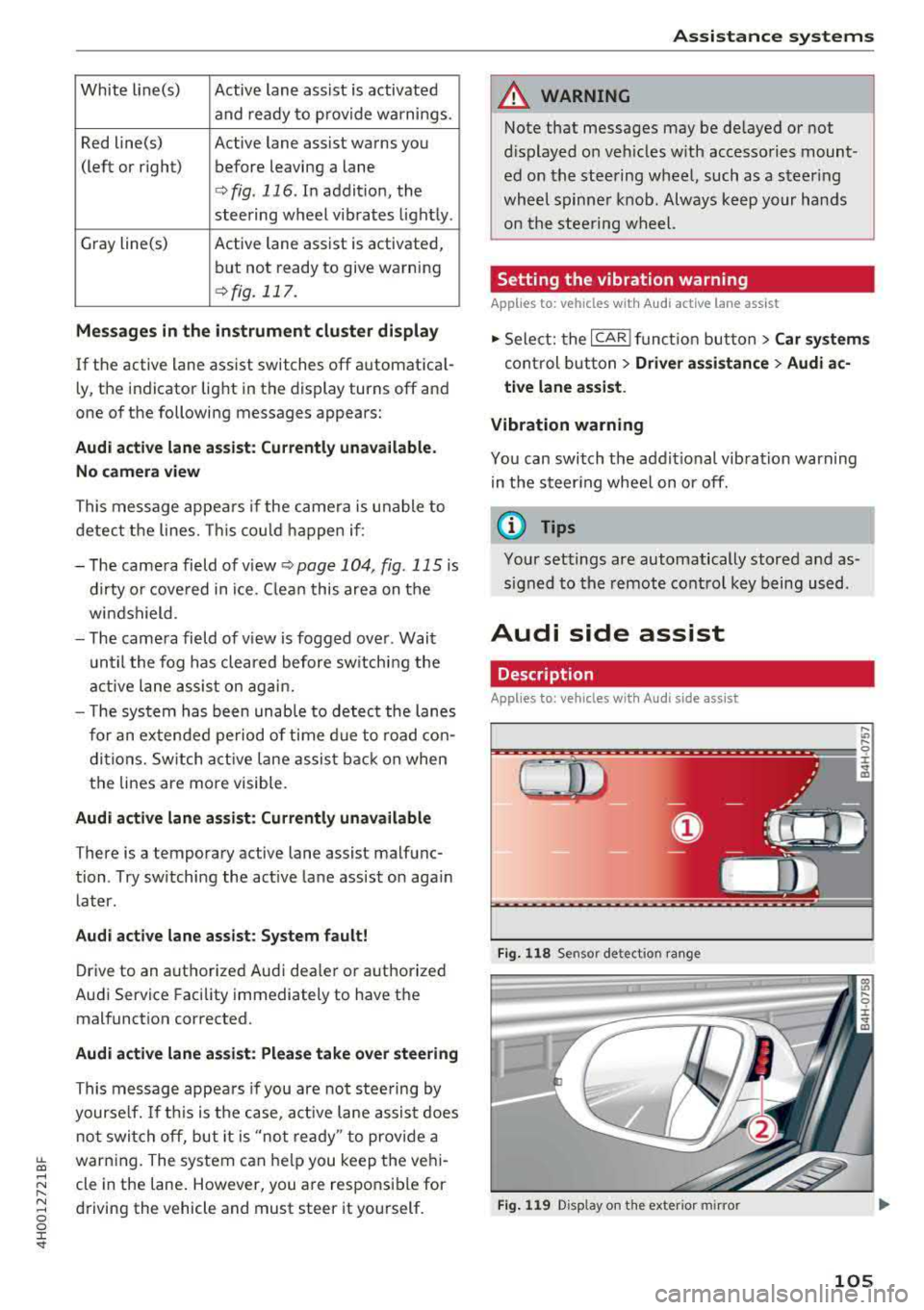
Fi g. 1 18 Sensor detect ion ra n ge
F ig . 119 Disp lay on the exterio r m irror
,... .,,
9 ::c
"' co
105
Page 110 of 356
Assistance systems
Switching on/off
Applies to: ve hicles w ith Aud i side ass ist
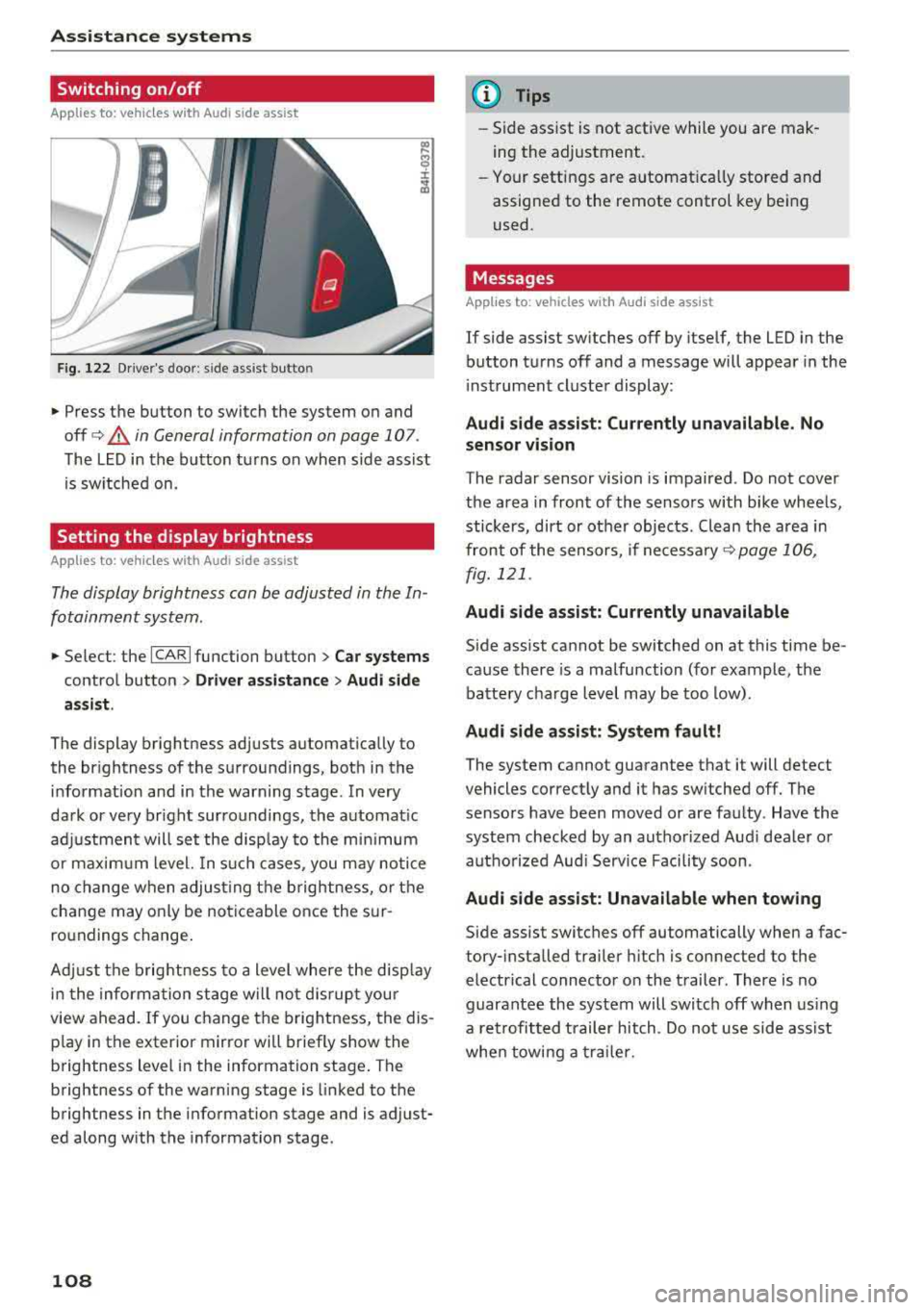
F ig. 122 Driver's door : side ass ist butto n
• Press the button to switch the system on and
off
c> .&, in General information on page 107 .
The LED in the button turns on when side assist
is sw itched on.
Setting the display brightness
App lies to: ve hicles with Aud i side ass is t
The display brightness can be adjusted in the In
fotainment system .
• Select : the ICARI function button > Car systems
control button > Driver assistance > Audi side
assist .
The display brightness adjusts automatically to
the br ightness of the surroundings, both in the
information and in the warning stage . In very
dark or very br ight surroundings, the automat ic
adj ustment will set the disp lay to the minim um
or maximum level. In such cases , you may notic e
no change when adjust ing the brightness, or the
change may only be noticeable once the sur
ro undings change .
Adj ust the brightness to a level where the disp lay
i n the information stage will no t disrupt your
view ahead.
If you change the brightness, the dis
p lay in the exter ior mirror wi ll briefly show the
brightness lev el in the information stage . T he
brightness of the warning stage is linked to the
brightness in the information stage and is adjust
ed along with the information stage.
108
@ Tips
-Side assist is not active while you are mak
ing the adjustment .
- Your settings are automat ica lly stored and
assigned to the remote control key being
used .
Messages
Applies to : vehicles wi th Audi side ass ist
If side assist switches off by itself, the LED in the
button turns off and a message will appear in the
i nstrument cluster display:
Audi side assist: Currently unavailable. No
sensor vision
The radar sensor vision is impaired . Do not cover
the area in front of the sensors with bike wheels,
stickers, dirt or ot her objects . Clean the area in
front of the sensors, if
necessary ¢ page 106,
fig. 121 .
Audi side assist: Currently unavailable
Side assist cannot be switched on at this time be
cause there is a malfunction (for example, the
battery charge level may be too low).
Audi side assist: System fault!
The system cannot guarantee that it will detect
vehicles correctly and it has switched off. The
sensors have been moved or are faulty . Have the
system checked by an authorized Audi dealer or
autho rized Aud i Serv ice Facility soon.
Audi side assist: Unavailable when towing
Side assist switches off automatically when a fac
tory- installed trailer hitch is connected to the
electrical connector on the trailer. There is no
guarantee the system will switch off when using
a retrofitted trailer hitch. Do not use side ass ist
when towing a trailer.