tire pressure AUDI A8 2018 Owner's Manual
[x] Cancel search | Manufacturer: AUDI, Model Year: 2018, Model line: A8, Model: AUDI A8 2018Pages: 356, PDF Size: 54.71 MB
Page 305 of 356
u. co .... N
" N .... 0 0 :c '
installation of replacement or alternate tires or
wheels on the vehicle that prevent the TPMS
from functioning properly . Always check the
TPMS malfunction telltale after replacing one or
more tires or wheels on your vehicle to ensure
that the replacement or alternate tires and
wheels allow the TPMS to continue to function
properly.
Description
Applies to: 58 plus
The tire pressure monitoring system monitors
the pressure in the four tires when driving.
The system uses sensors that measure the tem
perature and pressure in the tires . The data is
sent from these sensors to the control module by
radio frequency.
The Tire Pressure Monitoring System shows the
current pressures and temperatures of the tires
in the Infota inment system
c:> page 303 . It also
compa res the current tire pressures with the
stored tire press ures and gives a warning in the
driver information system if the tire pressure is
different from what is stored
c:> page 304.
The system does not detect if the stored tire
pressures match the recommended tire pres
sures.
- Every time the tire pressures change, for exam-
ple when the load in the vehicle changes,
- after replac ing a tire, or
- if wheels with new wheel sensors are used,
you must store the tire pressures again
c:> page 304.
A WARNING
-The tire pressure mon itor ing system assists
the driver in monitoring tire pressures. The
dr iver is responsible for having the tires in
flated to the correct pressure.
- Do not change the tire pressure when the
temperature of the tire is extremely high.
T his cou ld result in serious damage to the
t ir e and even cause the tire to burst, in
creasing the risk of an accide nt.
Wheels
-A tire with low pressure flexes more . This
heats the tire up too much. This could cause
the tread to separate and even cause the
tire to burst, increasing the risk of an acci
dent.
- The Tire Pressure Monitoring System does
not warn you of damage or defects in the
tire construct ion that could cause the tire to
burst, for example. Inspect your tires regu
larly.
@ For the sake of the environment
Low tire pressure increases fuel consumption
and tire wear.
(D Tips
-The pressure of the spare t ire* is not mon i
tored.
- If tires are replaced, the sensors/va lves do
not need to be removed or replaced. Just re
placed the valve stem and, if necessary, the
valve and the whee l electronics . If you have
questions, see an authorized Audi dealer or
authorized Audi Service Facility.
Displaying tire pressures/temperatures
Applies to: 58 plus
Requirement: the ignition must be switched on.
.. Select: the I CAR! funct ion button > Car systems
> Service & control > Tire pressure monitor >
Display tire pressure .
The current tire pressures are shown in green and
yellow numbers in the Infotainment system:
-Green: the current tire pressure and the spec i
fied tire pressure are approx imately the same .
-Yellow: the current tire pressure is too low
compared to the specified tire pressure .
The specified tire pressure is the last tire pres
sure that was stored
c:> page 304 .
Note that the tire pressure also depends on the
temperature of the tire . The tire pressure in
creases as the engine becomes warmer while
driv ing.
.,.
303
Page 306 of 356
Wheels
~ WARNING
Read and follow the important information
and notes ¢
page 303.
© Tips
The tire pressure or tem perature a re not di s
played in ada pta tion mode. Da shes --.-- a re
shown in place of the press ure and tempera
ture .
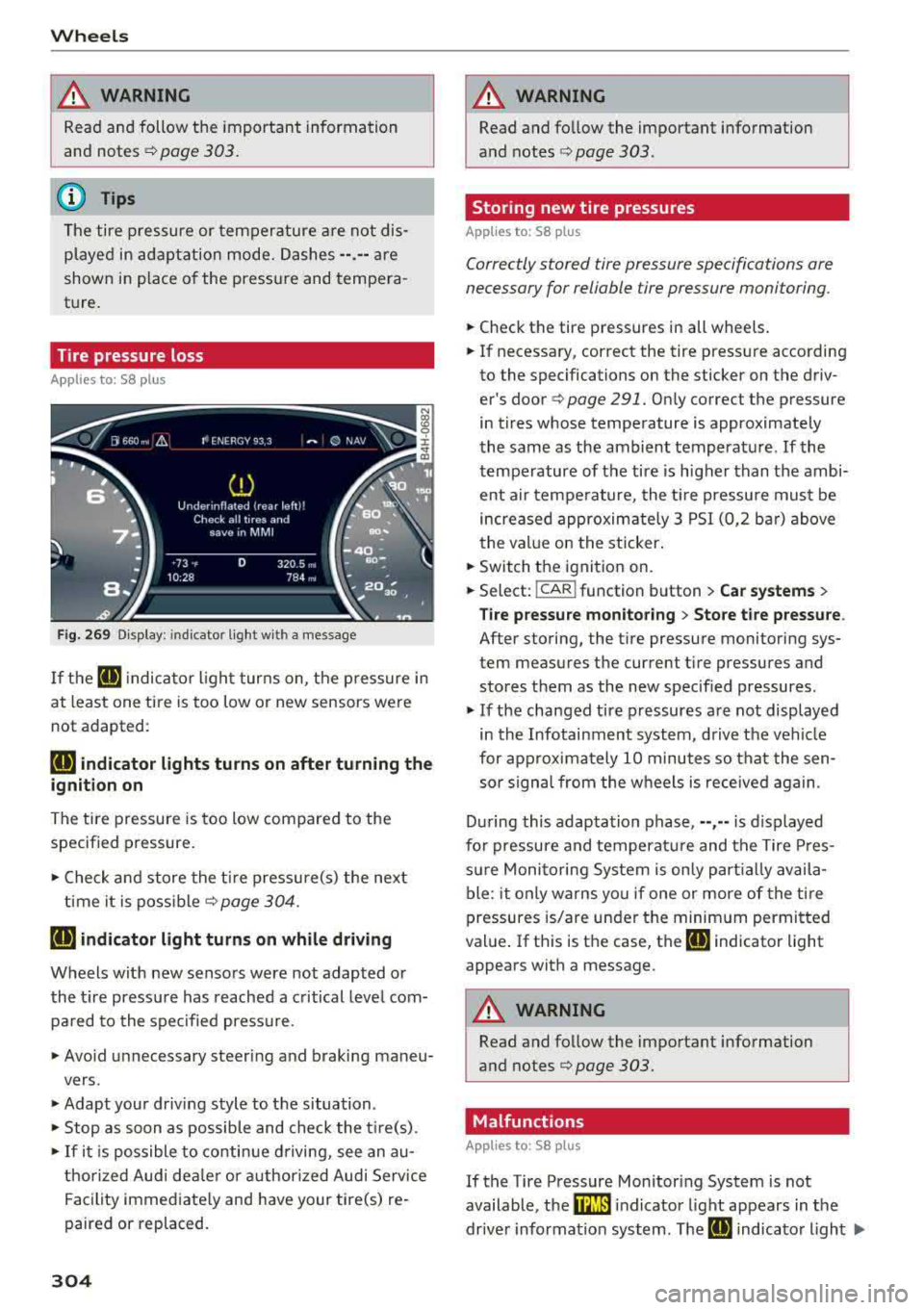
Tire pressure loss
Applies to: 58 plus
F ig. 269 D isp lay: ind icator light wi th a message
-
If the IE indica to r li ght turns on, the p ressure in
at least one ti re is too low or new sensors were
not adapted :
RE indicator lights turns on after turning the
ignition on
The tire pressure is too low compared to the
specif ied pressure .
.,. Check and store the t ire pressure(s) the next
ti me it is poss ible¢
page 304 .
RE indicator light turns on while driving
Wheels with new senso rs were not adapted or
the t ire pressu re has reached a c ritical leve l com
p ar ed to the specified press ure.
.,. Avo id unnecessary steering and braking maneu-
vers .
.,. Adapt you r d riving style to the situation .
.,. Stop as soon as possible and check the t ire(s) .
.,. If it i s po ssible to co nti nu e d riving, see an au-
t horized Audi dea le r or a uthorized Audi Service
Fa cility immed iate ly and have your tire(s) re
paired or replaced.
304
A WARNING
, -
Read and fo llow the important information
and notes
¢ page 303.
Storing new tire pressures
App lies to: 58 pl us
Correctly stored tire pressure specifications are
necessary for reliable tire pressure monitoring.
.,. Check the tire pressures in all wheels .
-
.,. If necessary , correct the tire press ure according
to the specifications on the sticker on the driv
er's doo r
q page 291. On ly co rrect t he pressure
in t ires whose tempe rature is appro ximate ly
the same as the ambient tempera ture. If the
tempe rature of the tire is higher than the ambi
ent air tempe rature, the t ire pressure must be
i n creased approxim ate ly 3 PSI (0 ,2 ba r) above
the val ue on the sticker .
.,. Switch the ignitio n on .
.,. Select: !CAR ! function button > Car systems >
Tire pressure mon itoring > Sto re tire pressure .
After storing, the t ire pressu re monitoring sys
tem measures t he current t ire pressures and
s to res them as the new specif ied pressures .
.,. If the changed tire p ressures are not displayed
in the Infotainment system, d riv e the veh icle
for approximately 10 minutes so that the sen so r signa l from the w heels is received again.
D ur ing this adapta tion phase, --,--is displayed
fo r pressure and temperat ure and t he Tire Pres
su re Moni toring Sys tem is on ly p arti all y av ail a
ble: it only warns yo u if one or more of the tire
pressures is/are under t he minim um permitted
val ue. If th is is the case, the
IE indicator light
appears with a message .
A WARNING
Read and follow the important information
and notes
q page 303.
Malfunctions
App lies to: 58 plus
-
If the Tire Pressure Mon itoring System is not
available, t he
mm indicato r light appears in the
dr ive r informa tion system . T he
IE indica to r light .,..
Page 307 of 356
u. co ..... N
" N ..... 0 0 :c '
time the ignition is switched on . The tire pressure
monitoring system cannot be selected in the In
fotainment system. The following are examples
of situations that could cause a malfunction:
- If the message appears at the end of the adap
tation phase, the system cannot detect the
wheels installed on the vehicle . This may result
from one or more wheels being installed with out wheel sensors or with incompatible wheel
sensors .
- A wheel sensor or another component has
failed .
- Using snow chains can affect the function of
the system because of the shielding effect of
the chains .
- The tire pressure monitoring system is not
available due to a malfunction .
- Transmitters with the same frequency, such as
headphones or remote-controlled devices, may
cause a temporary system malfunction due to
the strong e lectromagnetic field .
The
@m indicator light turns off once the Tire
Pressure Monitoring System is available again . If
you cannot correct the malfunction and the
mm
indicator light stays on, drive immediately to an
author ized Audi dealer or author ized Audi Service
F acility to have the malfunction repaired.
Wheels
305
Page 308 of 356
Care and cleaning
Care and cleaning
General information
Regular, proper care helps to maintain your vehi
cle's value. It can also be a requirement when
submitting warranty claims for corrosion damage
and paint defects on the body.
The necessary care products can be obtained
from an authorized Audi dea ler or authorized
Audi Service Facility. Read and follow the instruc
tions for use on the packaging.
A WARNING
-Using cleaning and care products incorrectly
can be dangerous to your health.
- Always store clean ing and care products out
of reach of children to reduce the r isk of poi
sonin g.
@ For the sake of the environment
- Preferab ly purchase environmenta lly-friend
l y cleaning products.
- Do not dispose of leftover cleaning and care
products with household trash.
Car washes
The longer that deposits such as insects, bird
droppings, tree sap or road salt remain on the ve
h icle, the more the surface can be damaged. High
temperatures such as those caused by sunlight
increase the damaging effect.
Before washing, r inse
off heavy deposits with
p lenty of water.
Stubborn deposits such as bird droppings or tree
sap are best removed with plenty of water and a microfiber cloth.
A lso, wash the underside of yo ur vehicle once
road sa lt stops being used for the season .
Pressure washers
When washing your veh icle w ith a pressure wash
er , al ways fo llow the operating instructions pro
vided with the press ure washer. This is especially
important in regard to the pressure and spraying
distance. Do not aim the spray directly at the
306
seals on the side windows, doors, lids or the sun
roof* or at tires, rubber hoses, insulating materi
a l, sensors* or camera lenses* . Keep a distance of
at least 16 in (40 cm).
Do not remove snow and ice with a pressure
washer.
Never use cone nozz les or high pressure nozzles.
The water temperature must not be above 140 °F
(60 °C) .
Automatic car washes
Spray off the vehicle before washing.
Make sure that the windows and roof* are closed
and the windshie ld wipers are
off . Follow instruc
tions from the car wash operator, especially if
there are accessories attached to your vehicle.
If possible, use car washes that do not have
brushes.
Only use car washes where the vehicle remains
stationary and the washing equipmen t moves
around the vehicle when washing and drying. Car
washes that move the vehicle t hrough the car
wash using a chain are not recommended .
Washing by hand
Clean the vehicl e starting from the top and work
ing down using a soft sponge or cleaning brush.
Use solvent -free cleaning products.
Washing vehicles with matte finish paint by
hand
To avoid damaging the paint when washing, first
remove dust and large particles from your vehi
cle. Insects, grease spots and fingerprints are
best removed with a special cleaner for matte
finish paint .
Apply t he product using a microfiber cloth. To
avoid damaging the paint surface, do not use too
much pressure.
Rinse t he ve hicle thoroughly with wate r. Then
clean using a neutral shampoo and a soft micro
fiber clot h.
R inse the vehicl e thoroughly again and let it air
dry. Remove any water residue using a chamois.
..,..
Page 316 of 356
Emergency assistance
6. Remove the wheel with the flat tire and then
install
the spare r::!> page 318.
7. Tighten all wheel bo lts light ly .
8. Lower the veh icle w ith the jack.
9. Use the wheel bolt wrench and firmly t ighten
a ll whee l bolts
r::!> page 315 .
10 .
Replace the decorative wheel cover* .
11. D eactivate the vehi cle jack mode in the MMI:
ICAR I fu nction bu tton > Car systems con trol
b utt on
> Servicing & c heck s > Air susp .: ja ck
mode > Off.
The vehicle jack mode switches off a utomat ically
at speeds above
10 k m/ h.
_& WARNING
Alw ays read and fo llow all WARNI NGS and in
formation
c::> .&. in AB: Raising the vehicle on
poge316an d
¢page 319.
After changing a wheel
A wheel change is not complete without the do
ing the following.
• A lway s store the vehicle tool kit, the jack* a nd
t he repl aced t ire in the luggage compartment
r::!:> poge 213.
• Check the tire pre ssure on the spare whee l im
med iate ly after mount ing it.
• As soon as possible, have th e tightening tor
ques
on all wheel bolts checked with a torque
wrench. The correct tightening torque is
90 ft
lb
(120 Nm) .
• Have the fla t tire replaced as soon as possible .
(D Tips
- If you notice that the whee l bolts are cor
r oded and diffic ult to t urn wh ile cha nging a
tire, they should be rep laced before you
c hec k th e tighte ning torque .
- Drive a t reduced speed until you have the
tightening torques c hec ke d .
- After changi ng a wheel, the ti re pressure in
a ll four tires must be chec ked/corrected and
the tire pr ess ure mon itoring indicato r mus t
be store d in t he MM I
r::!:> page 302 .
314 Decorative wheel covers
App
lies to : vehicles with decorative w heel covers
The decorative wheel covers must be removed
first to access the wheel bolts.
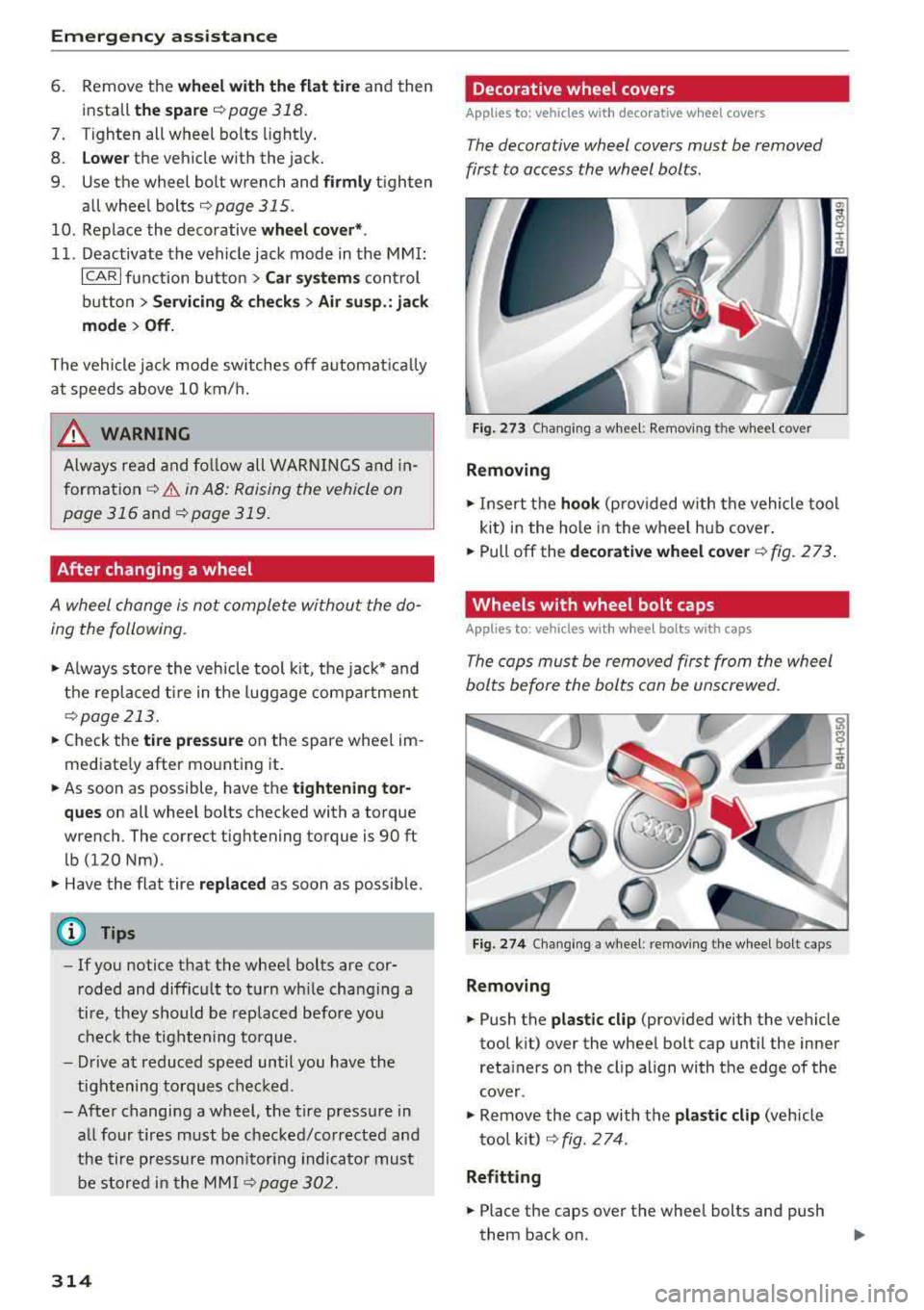
F ig. 273 Changing a whee l: Remov ing t he whe el cover
Removing
• Insert the hook (p rovided w ith the vehicle tool
kit) i n the hole in the wheel hu b cover .
• Pull off the decorative wheel cover r::!:> fig. 273 .
Wheels with wheel bolt caps
Applies to: vehicles with w heel bolts with caps
The cops must be removed first from the wheel
bolts before the bolts con be unscrewed.
Fi g. 274 Chang ing a wheel: remov ing the w heel bo lt caps
Removing
• Push the plastic clip (prov ided with the vehicle
tool k it) over the whee l bolt cap until the inner
reta iners on the clip a lign with t he edge of the
cover.
• Remove the cap with t he plastic clip (veh icle
t oo l kit )
r::!> fig. 274.
Refitt ing
• Place the caps over the whee l bolts and push
them back on .
Page 321 of 356
lL t:0 ....
'"" ......
'"" .... 0 0 :c '
Tires with unidirectional tread design must be
mounted with their tread pattern pointed in the
right direction .
Using a spare tire with a tread pattern
intended for use in a specific direction
When using a spare t ire with a tread pattern in
tended fo r use in a specific direction, please note
the following:
- The direction of rotat ion is marked by an arrow
on the side of the tire .
- If the spare tire has to be installed in the incor
rect direction, use the spare tire only tempora
rily s ince the tire will not be able to achieve its
opt imum performance character istics with re
gard to aquaplaning, noise and wear .
- We recommend that you pay particular atten
t ion to this fact during wet weather and that
you adjust your speed to match road condi
tions.
- Replace the flat tire with a new one and have it
installed on your vehicle as soon as possible to
restore the handling advantages of a unidirec
tiona l tire .
Notes on wheel changing
Please read the information ~ page 290 if you
are going to use a spare tire which is different
from the tires on your vehicle.
After you change a tire:
- Check the tire pressure on the spare immedi
ately after installation.
- Have the wheel bolt tightening torque
checked with a torque wrench as soon as pos
sible by your authorized Audi dealer or a
qualified service station.
- With steel and alloy wheel rims, the wheel
bolts are correctly tightened at a torque of 90
ft lb
(120 Nm).
- If you notice that the wheel bolts are corroded
and difficult to turn while changing a tire ,
they should be replaced before you check the
tightening torque .
Emergency assistance
-Replace the flat tire with a new one and have
it installed on your vehicle as soon as possi
ble. Remount the wheel cover.
Until then , drive with extra care and at reduced
speeds.
A WARNING
- If you are going to equip your vehicle with
tires or rims which differ from those which
were factory installed, then be sure to read the information
Q page 290.
- Always make sure the damaged wheel or
even a flat tire and the jack and tool kit are
properly secured in the luggage compart
ment and are not loose in the passenger
compartment.
- In an accident or sudde n maneuver they
could fly forward, injuri ng anyone in the ve
h icle .
- Always store damaged wheel, jack and tools
securely in the luggage compartment. Oth
erwise, in an accident or sudden maneuver
they could fly forward, causing injury to pas
sengers in the vehicle.
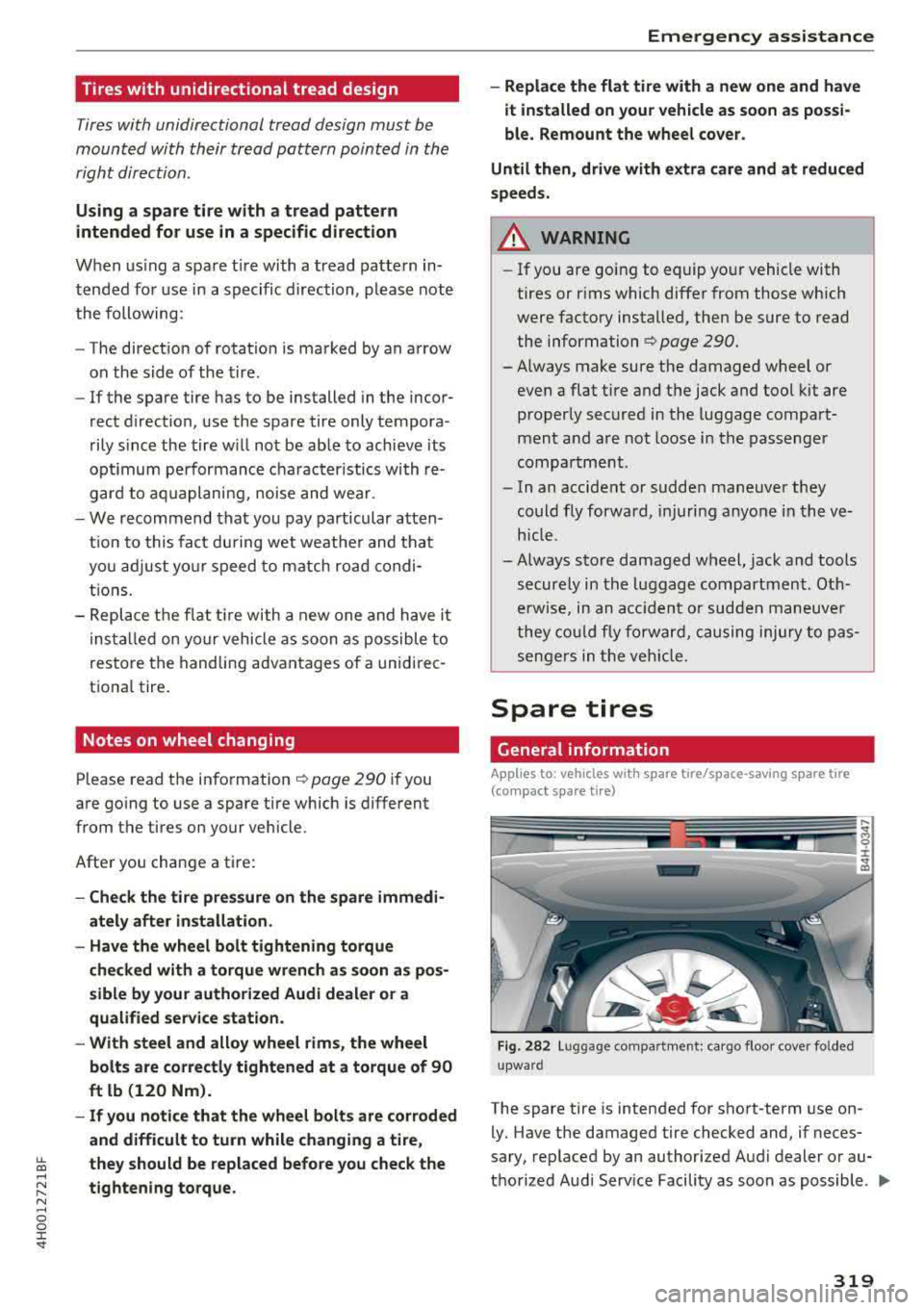
Spare tires
General information
Applies to : vehicles wit h spare tire/space-saving spare tire
(com pact spa re tire)
Fig. 282 Lu ggage compar tmen t: ca rgo floor cover fo lded
upwa rd
The spare tire is intended for short-term use on-
-
ly. Have the damaged tire checked and, if neces
sary, replaced by an authorized Audi dealer or au
thorized Audi Serv ice Facility as soon as possible.
II>-
319
Page 323 of 356
u. co .... N
" N .... 0 0 :c '
tire )*
The ti re pressure must be 6 1 PSI (4.2 ba r).
Emergency assistance
321
Page 332 of 356
Emergency situations
& WARNING
If the towing loop is not tightened until it
stops when installing, the threads may be
pulled out when towing the vehicle and that
could cause an accident.
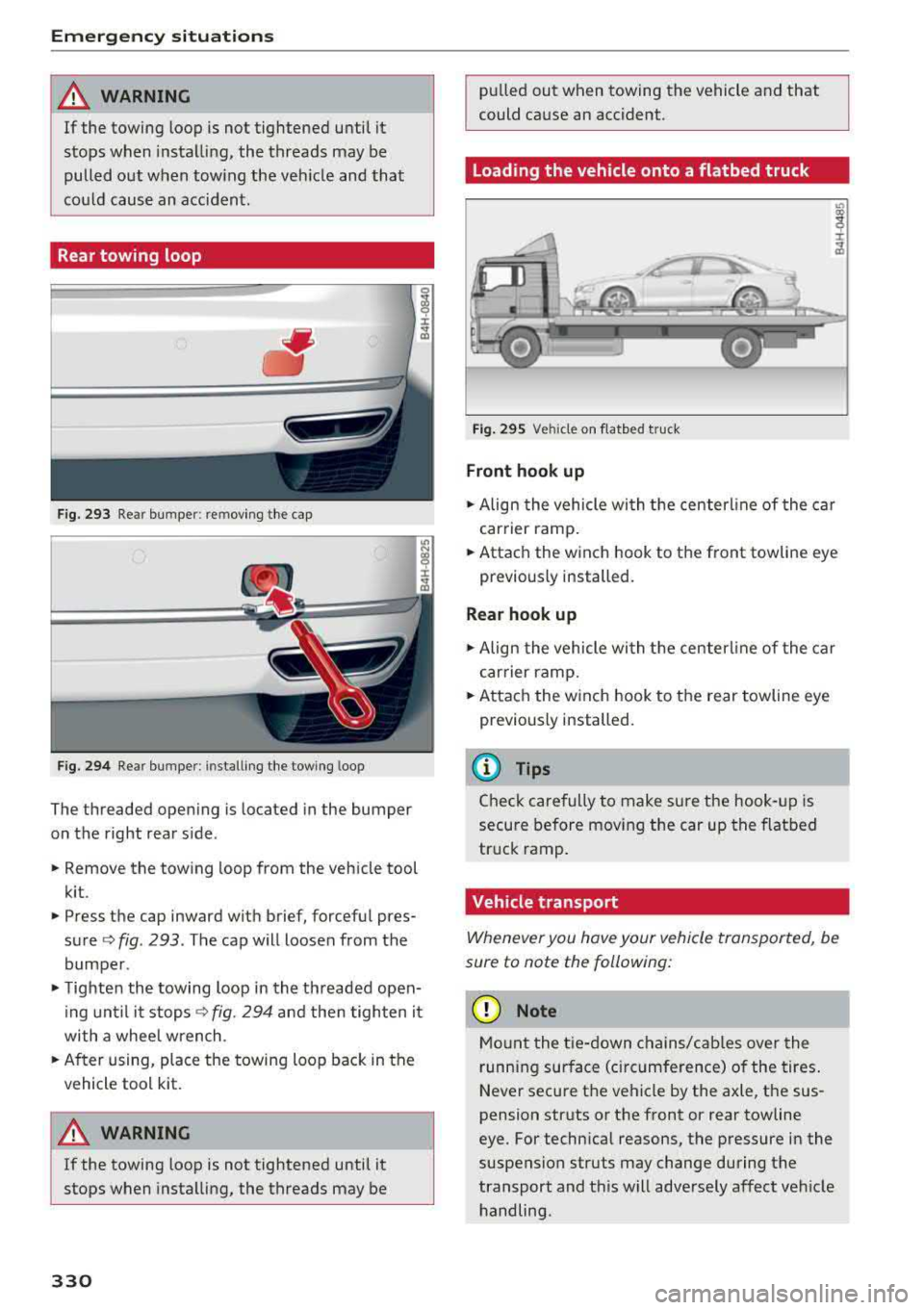
Rear towing loop
Fig. 293 Rear bumper: re moving the cap
Fig. 294 Rear bumper : installi ng the towing loop
The threaded opening is located in the bumper
on the right rear side .
• Remove the towing loop from the vehicle tool
kit .
• Press the cap inward with brief, forceful pres
sure ¢
fig. 293 . The cap will loosen from the
bumper .
• Tighten the towing loop in the threaded open
ing until it
stops¢ fig. 294 and then tighten it
with a whee l wrench .
• After using, place the towing loop back in the
vehicle tool kit.
A WARNING
If the towing loop is not tightened until it
stops when installing, the threads may be
330
-
pulled out when towing the vehicle and that
could cause an accident .
Loading the vehicle onto a flatbed truck
Fig. 295 Vehicle on f latbed tru ck
Front hook up
• Align the vehicle with the centerline of the car
carrier ramp.
• Attach the winch hook to the front towline eye
previously installed.
Rear hook up
• Align the vehicle wi th the centerl ine of the car
carrier ramp.
• Attach the w inch hook to the rear towline eye
previously installed.
@ Tips
Check carefully to make sure the hook-up is
secure before moving the car up the flatbed
truck ramp.
Vehicle transport
Whenever you hove your vehicle transported, be
sure to note the following:
(D Note
Mount the tie-down chains/cables over the
running surface (ci rcumference) o f the tires.
Never secure the vehicle by the axle, the sus
pension struts or the front or rear towline
eye. For technical reasons, the pressure in the
suspension struts may change during the
transport and this will adversely affect vehicle handling.
Page 341 of 356
u. co .... N
" N .... 0 0 :c '
damage which occurs due to fai lure to com
p ly wit h these st ipulat ions .
Technical Modifications
Our guidelines must be complied with when tech
nical modifications are made.
A lways consult an author ized A udi dealer b efore
starting work on any modifications .
This will he lp e nsu re that veh icle function, pe r
forma nce and safety are not
impa ired ¢.&, .
Attempting to work on electron ic components
and the software used w ith them ca n cause ma l
functions . Because of the way electron ic compo
n ents are inte rconnected with each other, such
malfunct ions can also have an adve rse effect on
other systems that are not directly involved. This
means that you risk both a substantia l reduction
in the operationa l safety of your vehicle and an
increased wear of vehicle
parts ¢.&, .
Authorized Audi dealers wi ll per form this work in
a professional and competent manner or, in spe
cial cases, refer you to a professional company
that spec iali zes in such modifications.
A WARNING
Improper repairs and mod ificat ions can
change the way veh icle systems work and
cause damage to the veh icle and ser ious per
sonal injury .
@ Note
If emergency repa irs must be performed else
where, have the vehicle examined by an au thor ized Audi dealer as soon as possible.
Con sum er In form ation
Declaration of
Compliance, Telecom
munication or Electronic
Systems
Radio Frequency Devices and Radiocommunica
tion Equipment User Manual Notice .
The manufacturer is not responsible for any radio
or TV interference caused by unauthorized mod i
ficat ions to this equipment.
D ev ices
T he following dev ices each comply wi th FC C P art
15. 19, FCC 15 .21 and RSS -Gen Issue 1:
-Adapt ive cru ise control
-Aud i side assist
-Cell phone package
-Conven ience key
-Electronic immobilizer
-Head phones
-Homelink u niversa l remote cont rol
-Remote cont rol key
-S8 plus: tire pressure monitoring system
FCC P art 15 .19
This device complies with part 15 of the FCC
Rules. Operation is subject to the follow ing two
condit ions:
(1) This device may not cause harmfu l interfer
ence, and
(2) this device must accept any interference re
ceived, including interference that may ca use un
desired operation.
FCC Part 15.21
CAU TION:
Changes or mod ificat ions not expressly approved
by the pa rty responsible for compliance could
vo id the user's aut ho rity to ope rate t he eq uip
ment .
RSS-Gen Issue 1
Operat ion is subject to the following two cond i
t ions:
(1) this device may not cause interference, and
3 39
Page 343 of 356
A
A/C (automatic climate control) . . . . . . . . . . 70
Accessories . . . . . . . . . . . . . . . . . . . . . . . 61 , 338
Active lane assist (lane departure assist) . . 103
Cleaning the camera area . . . . . . . . . . . . . 307
Messages . . . . . . . . . . . . . . . . . . . . . . . . . . 104
Adapter cable (Audi music interface) . . . . . 186
Adaptive air suspension/sport . . . . . . . . . . . 111
Adaptive cruise control. . . . . . . . . . . . . . . . . . 95
Cleaning the sensors . . . . . . . . . . . . . . . . . 307
Messages . . . . . . . . . . . . . . . . . . . . . . . . . . 102
Adjusting the sound . . . . . . . . . . . . . . . . . . . 205
Adjusting the sound (tone) . . . . . . . . . . . . . 196
Adjusting the temperature (automatic climate
control system) . . . . . . . . . . . . . . . . . . . . . . . . 71
Adjusting the volume RSE . . . . . . . . . . . . . . . . . . . . . . . . . . . . . . . 195
Airbag . . . . . . . . . . . . . . . . . . . . . . . . . . . . . . 227
Airbag system . . . . . . . . . . . . . . . . . . . . 235, 245
Care .. .. .. .. ............... .. .. .. . 240
Children . . . . . . . . . . . . . . . . . . . . . . . . . . . 250
Child restraints . . . . . . . . . . . . . . . . . . . . . 251
Components (front a irbags) . . . . . . . . . . . 233
Danger of fitting a child seat on the front
passenger seat . . . . . . . . . . . . . . . . . . . . . . 228
Disposal . . . . . . . . . . . . . . . . . . . . . . . . . . . 240
Front airbags . . . . . . . . . . . . . . . . . . . . . . . 231
Important information . . . . . . . . . . . . . . . 227
Knee airbags . . . . . . . . . . . . . . . . . . . . . . . . 241
Monitoring . . . . . . . . . . . . . . . . . . . . . . . . . 237
PASSENGER A IR BAG OFF light . . . . . . . . . 237
Repairs . . . . . . . . . . . . . . . . . . . . . . . . . . . . 240
Safety instructions . . . . . . . . . . . . . . . . . . . 239
Side airbags . . . . . . . . . . . . . . . . . . . . . . . . 243
Side curtain airbags . . . . . . . . . . . . . . . . . . 246
We ight-sensing mat . . . . . . . . . . . . . . . . . 2Sl
Aircraft Transporting your vehicle . . . . . . . . . . . . . 330
Air distribution (automatic climate control) . 71
Air pressure (Tire Pressure Monitoring Sys-
tem) . . . . . . . . . . . . . . . . . . . . . . . . . . . . . . . 302
Air pressure (tires) . . . . . . . . . . . . . . . . . . . . 293
Air suspension . . . . . . . . . . . . . . . . . . . . . . . 111
u. ~ Alignment pin (changing the wheel) . . . . . . 312
N ~ All season tires . . . . . . . . . . . . . . . . . . . . . . . 298 ......
g Alternative route . . . . . . . . . . . . . . . . . . . . . 173
:c '
Anti-freeze
Windshield washer system . . . . . . . . . . . . 281
Anti- Lock Braking System (ABS) . . . . . . . . . 127
Anti-Slip Regulation (ASR) . . . . . . . . . . . . . . 127
Audi connect . . . . . . . . . . . . . . . . . . . . . . . . . 158
Data connection . . . . . . . . . . . . . . . . . . . . . 162
Data protection . . . . . . . . . . . . . . . . . . . . . 164
Services (overview) . . . . . . . . . . . . . . . . . . 160
Setup . . . . . . . . . . . . . . . . . . . . . . . . . . . . . 158
Audi music interface . . . . . . . . . . . . . . . . . . . 186
Adapter cable . . . . . . . . . . . . . . . . . . . . . . . 186
Connecting and disconnecting . . . . . . . . . 186
Screen settings . . . . . . . . . . . . . . . . . . . . . 191
Audio player
refer to Bluetooth . . . . . . . . . . . . . . . . . . . 184
Audio track (DVD) . . . . . . . . . . . . . . . . . . . . . 191
Audi Service R epair Manuals and Literature 336
AUTO Automatic climate control system . . . . . . . 70
Automatic headlights . . . . . . . . . . . . . . . . . 43
Auto Lock (central locking) . . . . . . . . . . . . . . 27
Automatic belt retractor . . . . . . . . . . . . . . . 222
Automat ic climate control . . . . . . . . . . . . . . . 69
Automatic traffic rerouting . . . . . . . . . . . . . 173
Automatic transmission (tiptronic) . . . . . . . . 83
Emerg ency mode . . . . . . . . . . . . . . . . . . . . . 87
Hill descent control . . . . . . . . . . . . . . . . . . . 86
Overboost . . . . . . . . . . . . . . . . . . . . . . . . . . . 87
Parking lock emergency release . . . . . . . . . 88
Automatic wipe/wash system . . . . . . . . . . . . SO
Auto Safety Hotline . . . . . . . . . . . . . . . . . . . 215
Average consumption . . . . . . . . . . . . . . . . . . . 12
Average speed . . . . . . . . . . . . . . . . . . . . . . . . 12
B
BACK button . . . . . . . . . . . . . . . . . . . . . . . . . 135
Balance (sound) . . . . . . . . . . . . . . . . . . . . . . 206
Belt tensioners . ..... ............. 217,225
Blended gasoline . . . . . . . . . . . . . . . . . . . . . 268
Blower (automatic climate control) . . . . . . . . 71
Bluetooth Audio player . . . . . . . . . . . . . . . . . . . . . . . . 184
Connecting a cell phone . . . . . . . . . . . . . . 147
Booster seats . . . . . . . . . . . . . . . . . . . . . . . . 2 5 7
Brake fluid Checking the brake fluid level . . . . . . . . . . 279
341