wheel AUDI A8 2018 Owner's Guide
[x] Cancel search | Manufacturer: AUDI, Model Year: 2018, Model line: A8, Model: AUDI A8 2018Pages: 356, PDF Size: 54.71 MB
Page 114 of 356
Ass is tanc e system s
In the sporty dynamic mode, the transmission
shifts at higher speed ranges.
Air su spen sion
The adaptive air suspension/adaptive air suspen
sion spo rt* is an e lectron ica lly contro lled a ir sus
pens ion and damping system . The adjustment
depends on the driving mode selected, steering movements, the driver's braking and accelera
tion , and as the road surface, vehicle speed and
load . A sporty sett ing is generally used in vehicles
with adap tive a ir suspension sport*.
The vehicle ground clearance depends on the mode se lected and the speed . When you are in
the auto or dynamic mode, the h ighway sett ing is
activated when you dr ive above 75 mph (120 km/
h) for more than 30 seconds . The ground clear
ance is increased automatically if the speed
drops below 44 mph (70 km/h) for more than 120 seconds .
Stee ring
The power steer ing adap ts . Indirect steer ing that
moves easily as in comfort mode is especially
suited to long drives on a h ighway . The dynam ic
mode p rovides spo rty , d irect steering.
Applies to: vehicles with dynamic steering
The steering ratio changes based on vehicle
speed in order to ma intain optimum steering ef
fort for the dr ive r at all times . This sets the steer
i n g to be less sensit ive at hig he r speeds in o rder
to p rovide imp roved vehicle contro l. At reduced
speeds, steer ing is more direct in order to keep
the steering effort as minima l as possib le when
the driv er is maneuvering the v ehicl e. At low and
average speeds, dynamic steering* addit ionally
provides more responsive steering performance.
Sport diff ere ntial *
As a component of the all wheel drive system (quattro)
¢ page 131, the sport differential dis
tributes the driving power to the rear axle de
pending on the situation. The distribution of
power va ries from balanced (comfort) to sporty
(dynamic) depending on the selec ted mode . The
goal is a high level of agility and ab il ity to accel
erate on curves . The ve hicle is very respons ive to
steer ing .
112 Corn
ering light *
The co rnering ligh t adapts the hig h beams to the
direction of the curve depending on the speed.
The pivoting action and the lighting also adapt to
the mode.
Adaptive cruise cont rol*
The be hav io r whe n accelerat ing ca n be adjusted
from comfortable to sporty, depending on the drive select mode. Adaptive cruise control also
responds to the driving behavior of the vehicle
ahead in a more cons ervative or sporty manner.
Engine sound *
The eng ine sound adapts to the c urrent mode
and can be subtle to spo rty.
{[» Note
- Make s ure there is enough clearance above
and be low the vehicle when pa rk ing . T he
heig ht of t he ve hicle can change on ce it is
parked d ue to temperature fluctuations,
changes to the load conditions and changes
to the driv ing modes, which can affect clear
ance .
- When transporting the vehicle on a car car
rier, train, ship or by other means, on ly tie
the vehicle down at the runn ing surface of
the tires, which is the outer c ircumference.
Securing the vehicle at the axle compo
nents, suspens ion struts o r tow ing eyes is
not pe rm itted because the p ressure i n the
air suspe nsion s truts ca n change d uring
t ra nspo rt. The vehi cle may not be secu red
sufficiently i f th i s happens.
(D Tips
- In some mo dels, the max imum ve hicle
speed can only be reached in t he auto and
dynamic modes.
- Th e S se lector lever posi tion a utomat ic all y
engages if the dynami c mode is selected.
- In ve hicl es tha t h ave dynam ic stee rin g*, op
erat ing no ise is he ard when sta rting o r stop
ping the engine . This does no t indi ca te a
prob lem.
Page 117 of 356
u. co .... N
" N .... 0 0 :c '
General information
A pp lies to: ve hicles with pa rk in g system p lus/rearview cam
era/peripheral camera
Depending on your vehicle 's equipment, various
pa rking aids wi ll help you when parking and ma
ne uvering.
The
p arki ng sys tem plu s assists you when park
ing by aud ibly and visua lly indicating objects de
tected in front of and behind the vehicle
¢ page 116.
The re arv ie w ca mer a shows the area beh ind the
veh icle in the Infotainment system d isplay. This
d isplay assists you when you are cross or parallel
pa rking
¢ page 117 . The park ing system p lus
functions are also available
¢ page 116.
The periph eral ca mera s give var ious views to
h e lp you whe n pa rking or maneuver ing
¢ page 120. T he pa rking system pl us functions
are also availab le
¢ page 116.
& WARNING
-Always look for traffic and check the area
around your vehicle by looking at it direct ly
as well. The parking system cannot replace
the driver's attent ion. The driver is always
responsible when enter ing or leav ing a park
ing space and during similar maneuvers.
- Please note that some surfaces, such as
clothing, are not detected by the system .
-
-Sensors and cameras have blind spots in
wh ich people and objects cannot be detect
ed . Be especially caut ious of small children
and animals .
- The sensors can be displaced by impacts or
damage to the radiator gr ille, bumper,
wheel housing and the underbody . The park
ing system may be impa ired as a result.
Have a n author ized A udi dealer or author
ized Audi Serv ice Facility check their func
tion .
- Make s ure the senso rs a re not obstructed by
stickers, deposits o r other materia ls. If they
are, the sensor function could be impaired.
For additiona l information on cleaning, see
¢ page 306.
Parking syste m s
@ Note
-Some objects are not detected or disp layed
by the system under certain circumstances:
- objects such as barrier cha ins, tra iler draw
bars, vertical po les or fences
- objects above the sensors such as wall ex
tensions
- objects with certain surfaces or structures
such as cha in link fences or powder snow
- If you continue driving closer to a low ob
ject, it may disappear from the sensor range . Note that you will no longer be
wa rned about t his obstacle.
(D Tips
-The system may provide a warning even
tho ugh the re are no obstacles in the cover
age area in some situations, such as:
- certain road surfaces or when there is tall
grass
- externa l ultrasonic sources such as from
cleaning vehicles
- in heavy rain, snow, or th ick vehicle ex
haust
- We recommend tha t you practice par king in
a traffic-free location or parking lot to be
come fami liar with the system . W hen doing
this, there sho uld be good light and weath
er conditions.
- You can change the volume and pitch of the
signa ls as well as the
display ¢ page 125.
-Please refer to the instructions for towing a
trai ler located in
r:!:> page 125 .
-What appears in the infotainment display is
somewhat time-delayed .
- T he sensors m ust be kept clean and free of
snow and ice for the parking aid to operate .
115
Page 120 of 356
Parking syste m s
-For objects that do not touch the ground,
such as the bumper of a parked vehicle, a
trailer hitch or the rear of a truck. Do not
use the orientation lines in this case.
- If driven from a level surface onto an in
cline, or a downward slope.
- If driven toward protruding objects.
- If the vehicle is carrying too much load in
the rear.
- The accuracy of the orientation lines and
blue surfaces decreases when the vehicle is
raised/lowered
¢ page 111.
(D Note
-Always read and follow the applicable warn
ings
¢ (D in General information on
page 115.
- The orange -colored or ientation lines in the
Infotainment display show the vehicle path based on the steering wheel angle. The
front of the vehicle swings out more than
the rear of the veh icle. Maintain p lenty of
distance so that an exterior mirror or a cor ner of the veh icle does not co llide w ith any
obstacles.
Switching on/off
Ap plies to: ve hicles w ith rearview camera
Switching on
~ Sh ift i nto reverse, or
~ P ress the p, qA bu tton in the cente r console
¢ page 116, fig . 130. A sho rt confirmat io n
tone sounds and the LED in the but ton turns
on .
Switching between the rearview camera and
optical display
~ Press t he Graphic contro l but ton ®
¢ page 118, fig. 135 to see the optica l disp lay.
~ Press the Rear view contro l button to see the
rearview camera image.
Sw itch ing off
~ D rive faster than 6 mph (10 km/h), or
~ Press the p, qA bu tton, or
~ Switch the ignition off.
118
@ Tips
- The visua l display in the left part of the dis
play should he lp you detect the crit ica l vehi-
cle areas.
- You can change the vol ume and pitch of the
signals as well as the display¢
page 125.
Perpendicular parking
App lies to : vehicles wi th rearv iew camera
This view may be used when parking in a garage
or in
a parking space.
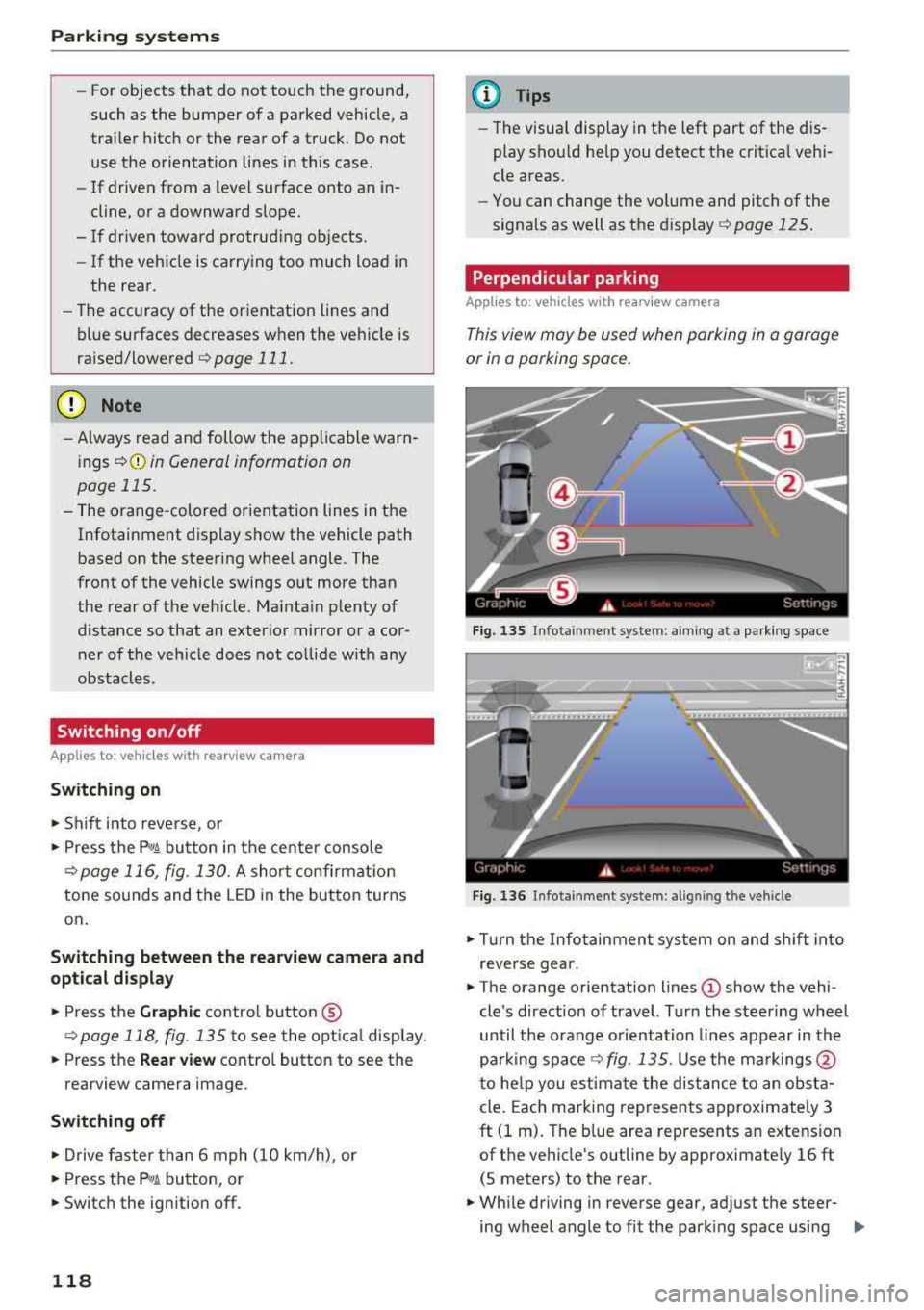
F ig. 13 S Infota inment system: aim ing at a pa rk in g space
Fig. 1 36 Infota inment system : alig ning the vehicle
~ Turn the Infotainment system on and shift into
reverse gear.
~ The orange orie ntation lines (!) show the vehi
cle 's direction of travel. Turn the steering wheel
until the orange o rientation lines appear in th e
parking
space ¢ fig. 135. Use the ma rkings @
t o he lp you estima te the dist ance to an obsta
cle . Each marking represents approximate ly 3
ft (1 m). The b lue area represents an extension
of the vehicle's outline by approximate ly 16 ft
(5 meters) to the rear.
~ Wh ile driving in reverse gear, ad just the steer-
ing wheel angle to fit the park ing space using
..,.
Page 121 of 356
lL t:0 ....
"' ......
"' .... 0 0 :c '
¢ A in General information on page 117, ¢(D
in General information on page 118 .@ repre
sents the rear bumper . At the very latest, stop
the vehicle when the red orientation
line @
borders an object .
Parallel parking
Applies to: veh icles with rearview camera
This view may be used when parallel parking
along the side of a stree t.
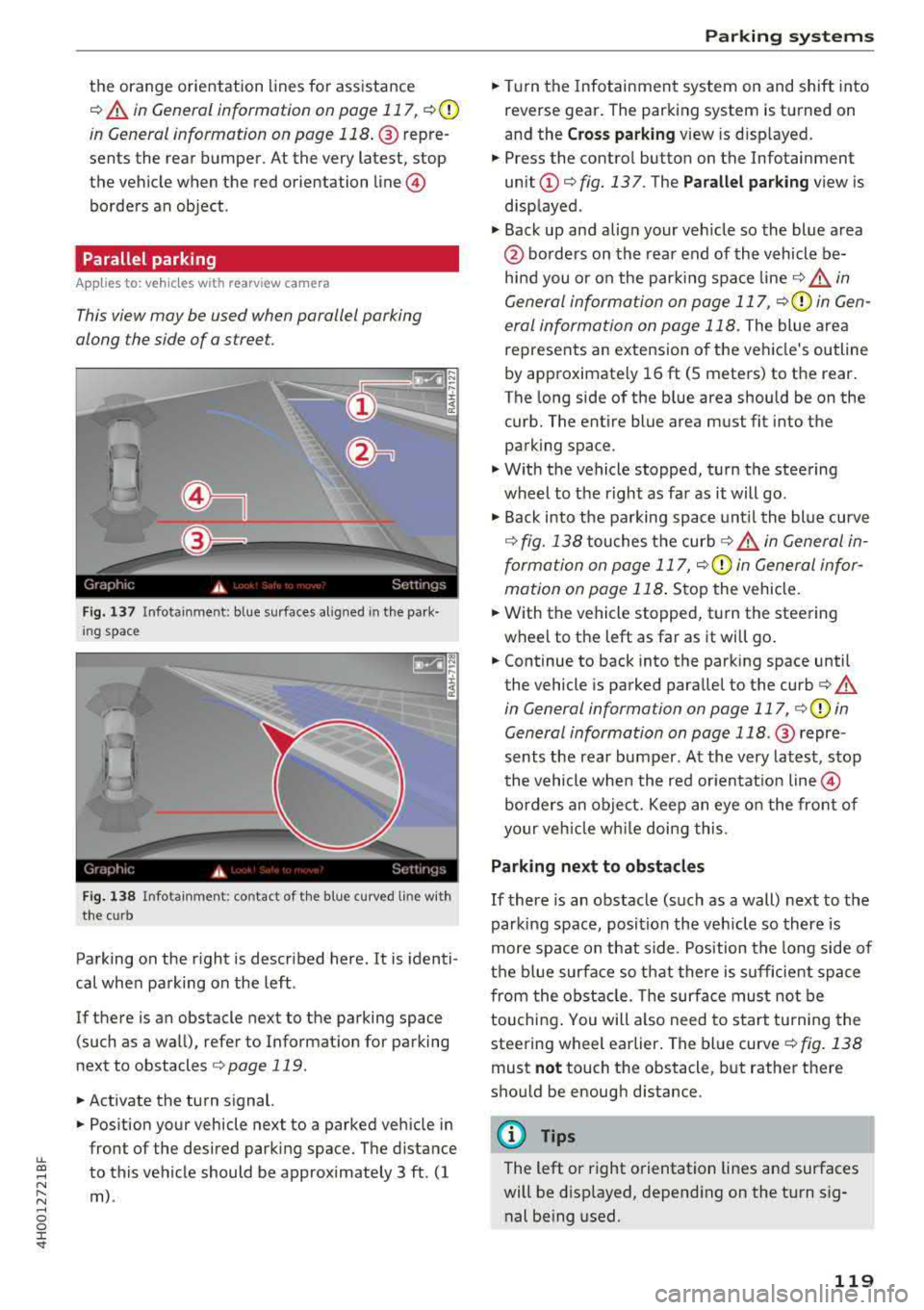
Fig . 137 In fota inment : blue surfaces alig ned in the pa rk ·
i ng space
Fi g. 138 In fo ta inm ent: c onta ct of the blue curv ed li ne with
the curb
Parking on the r ight is described here. It is identi
cal when parking on the left .
If there is an obstacle next to the parking space (such as a wall), refer to Informat ion for parking
next to obstacles
¢ page 119 .
.. Activate the turn signal.
.. Position your vehicle next to a parked veh icle in
front of the desired parking space. The d istance
to this vehicle should be approximately 3 ft . (1
m) .
Parking systems
.. T urn the Infotainment system on and shift into
reverse gear. The parking system is turned on
and the
C ros s parking view is d isp layed .
.. Press the contro l button on the Infotainment
unit @¢ fig. 137 . The Parallel parking view is
disp layed .
.. Back up and alig n your veh icle so the blue area
@ bo rders on the rear end of the vehicle be
hind you o r on the park ing spa ce
line ¢&_ in
General information on page 117,
¢ (Din Gen
eral information on page 118.
The blue area
represents an extension o f the vehicle's outline
by approximate ly 16 ft (5 meters) to the rear.
T he long side of the b lue area s hou ld be on the
curb. The entire blue area must fit into the
parking space .
.,. With the vehicle stopped, turn the steering
wheel to t he right as far as it will go .
.,. Back into the parking space unt il the blue curve
¢ fig. 138 touches the curb ¢&_ in General in
formation on page 117,
¢ (Din General infor
mation on page 118 .
Stop the vehicle .
.. With the vehicle stopped, t urn the steering
wheel to the left as far as it wi ll go .
.. Continue to back into the parking space until
the vehicle is parked parallel to the
curb ¢ A
in General informa tion on page 117, ¢ @ in
General information on page 118 .@ repre ·
sents the rear bumper. At the very latest, stop
the vehicle when the red or ien tat io n line
@
borders an object. Keep an eye o n the front of
your veh icle w hile doing this.
Parking next to obstacles
If there is an obstacle (such as a wall) next to the
parking space, position the veh icle so there is
more space on that side . Position the long side of
the b lue surfa ce so t hat there is sufficient spa ce
from the obstacle . T he su rface must not be
touchi ng . You will a lso need to s tart tu rning the
steering wheel earlier . The blue curve
¢ fig . 138
must not touch the obstacl e, b ut rather there
should be enough d istance .
(D Tips
The left or right orientation lines an d surfaces
will be disp layed, depend ing on the turn sig
nal be ing used.
119
Page 122 of 356
Parking systems
Peripheral cameras
Introduction
Applies to: ve hicles with per ipheral cameras
W ith this equipment, the parking system plus*
¢ page 116 is supplemented w ith vario us periph
eral cameras.
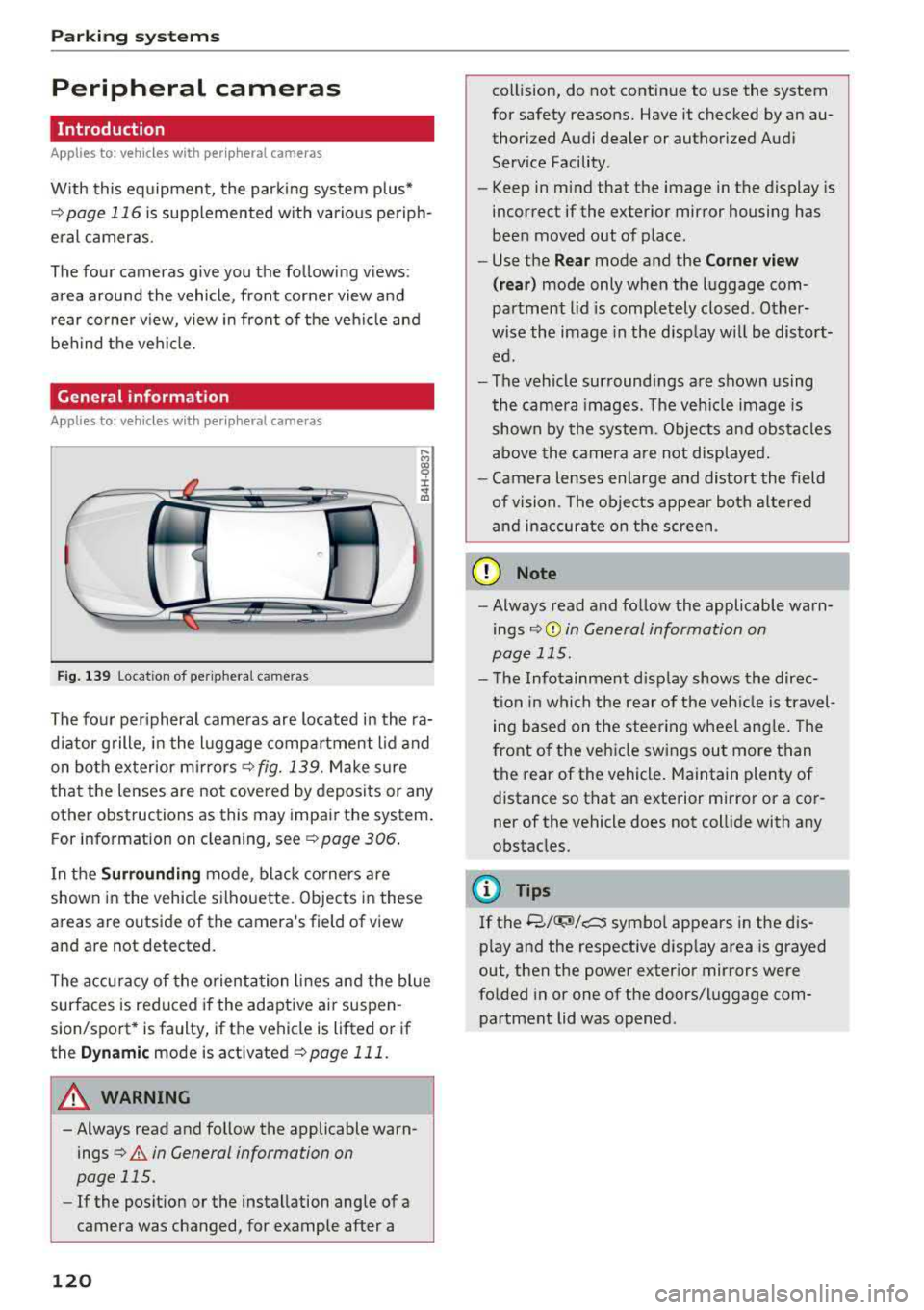
The four cameras g ive you the following views:
area around the vehicle, front corner view and rear corner v iew, view in front of the veh icle and
behind the vehicle.
General information
Applies to: ve hicles w ith pe ripheral cameras
F ig. 139 Location of peripheral cameras
....
"' gg
± ., a,
The four peripheral cameras are located in the ra
d iator grille, in the luggage compartment lid and
on both exterior mirrors¢
fig. 139. Make sure
that the lenses are not covered by deposits or any
other obstructions as this may impair the system.
For information on cleaning, see ¢
page 306.
In the Surrounding mode, black corners are
shown in the vehicle silhouette. Objects in these
areas are outside of the camera's field of view
and are not detected.
The accuracy of the orientation lines and the blue
surfaces is reduced if the adaptive ai r suspen
sion/sport* is faulty, if the vehicle is lifted or if
the
Dynamic mode is activated ¢ page 111.
A WARNING
-Always read and follow the applicable warn
ings
¢&. in General information on
page 115.
-If the position or the installation angle of a
camera was changed, for example after a
120
collision, do not continue to use the system
for safety reasons. Have it checked by an au thorized Audi dealer or authorized Audi
Service Facility .
- Keep in mind that the image in the display is
incorrect if the exterior mirror housing has
been moved out of place.
- Use the
Rear mode and the Corner view
( rear)
mode only when the luggage com
partment lid is completely closed . Other
wise the image in the disp lay w ill be distort
ed.
- The vehicle surroundings are shown using
the camera images. The vehicle image is
shown by the system. Objects and obstacles
above the camera are not displayed .
- Camera lenses enlarge and distort the field
of vision. The objects appear both altered
and inaccurate on the screen.
(D Note
-Always read and follow the applicable warn
ings
¢ (Din General information on
page 115.
-The Infotainment disp lay shows the direc
tion in which the rear of the veh icle is travel
ing based on the steer ing wheel angle. The
front of the veh icle swings out more than
the rear of the vehicle. Maintain plenty of
distance so that an exterior mirror or a cor
ner of the vehicle does not collide with any
obstacles.
@ Tips
If
the 8/IT;M/c:5 symbol appears in the dis
play and the respective disp lay area is grayed
out, then the power exterior mirrors were
folded in or one of the doors/luggage com
partment lid was opened .
Page 125 of 356
lL t:0 ....
"" ......
"" .... 0 0 :c '
this mode.
.,. To cross park, parallel park or position the vehi
cle in front of a tra iler*, press the control but
ton ® on the control panel repeatedly unt il the
symbol for the des ired mode is selected .
Perpendicular parking
Applies to: vehicles with peripheral cameras
This view may be used when parking in a garage
or in a parking space .
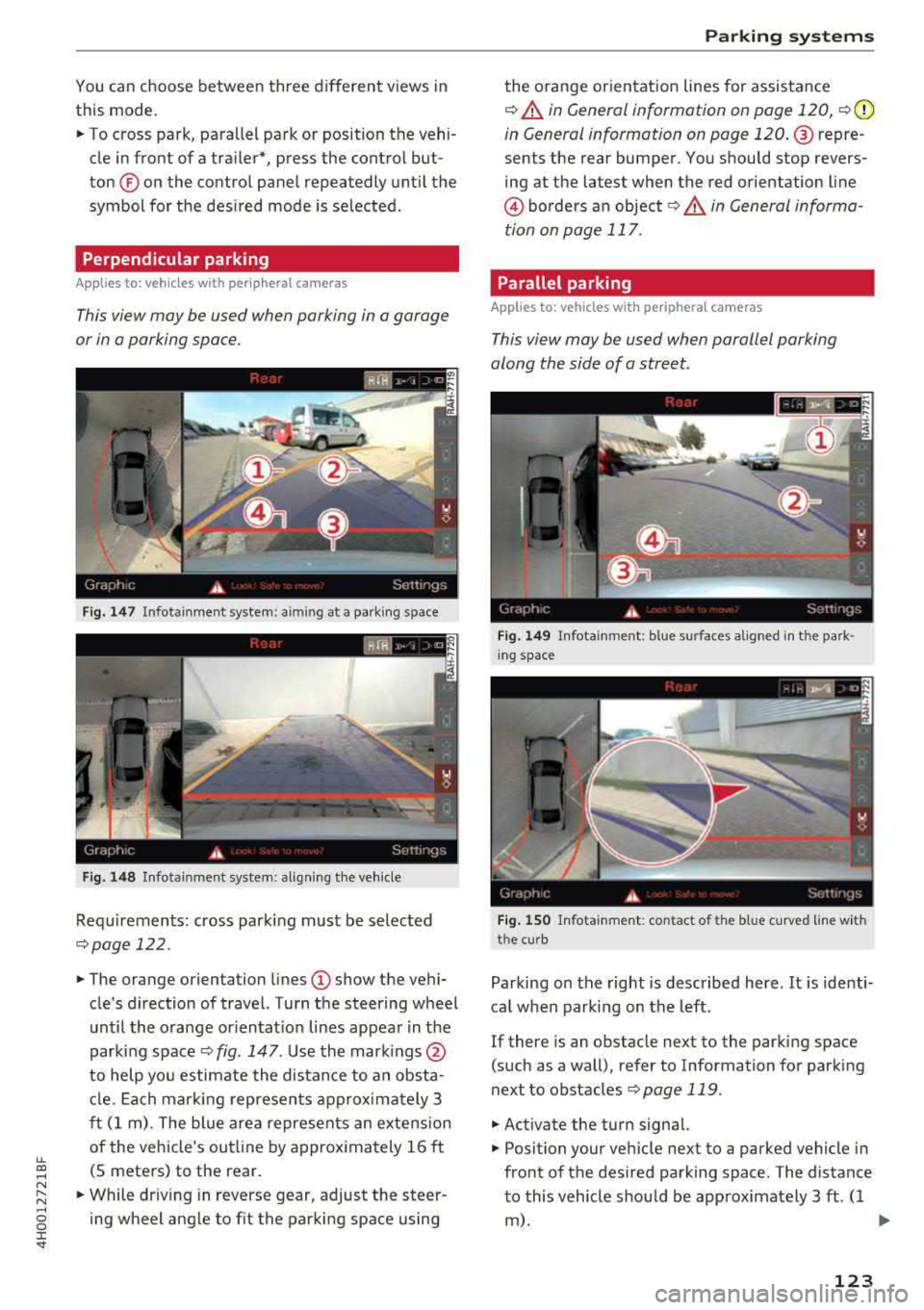
Fig . 1 47 In fota inmen t system: aiming at a pa rking s pace
Fig. 1 48 In fot ainm en t system : align ing t he vehicle
Requ irements: cross park ing must be selected
q page 122 .
.,. The orange orientation lines (I) show the vehi
cle's direction of travel. Turn the steering wheel
unt il the orange or ientat io n lines appear in t he
parking space
q fig . 147 . Use the mark ings @
to help yo u estimate the distance to an obsta
cl e. Ea ch mar king represen ts approx imately 3
ft (1 m) . The blue are a represents an extens ion
of the vehicle's outl ine by approx imately 16 ft
(S meters) to the rear.
.,. While dr iv ing in reverse gear, adjust the steer
ing wheel ang le to fit the parking space using
Parking systems
the orange orientat ion lines for assistance
q &. in General information on page 120, q (D
in G eneral information on page 120 . @repre
sents the rear bumper. You should stop revers
ing at the la test when the red orientation line
@ borders an object ¢&. in General informa
tion on page 117 .
Parallel parking
Applies to: vehicles with peripheral cameras
This view may be used when parallel parking
along the side of a street.
F ig. 149 In fota inment : blue s urfaces a lig ned i n th e pa rk ·
i ng space
Fi g. 1 50 Info tainment: con tac t of th e blu e curved line w ith
t he cu rb
Parking on the right is described here . It is identi·
ca l when parking on the left.
If there is an obstacle next to the parking space
(such as a wall), refer to Information for parking
next to obstacles
q page 119 .
.,. Activate the turn signal.
.,. Position your vehicle next to a parked vehicle in
front of the des ired parking space. The distance
to this vehicle shou ld be approximately 3 ft . (1
m). ..,.
123
Page 126 of 356
Parking systems
,.. Turn the Infotainment system on and shift into
reverse gear. The parking system is turned on
and the
Cross parking view is displayed.
,.. Press the control button on the Infotainment
unit @ Q page 119, fig . 13 7. The Parallel park
ing
view is displayed .
,.. Back up and align your vehicle so the blue area
@ borders on the rear end of the vehicle be
hind yo u or on the parking space line
Q .&. in
General information on page 120,
Q (Q) in Gen
eral information on page 120 .
The blue area
rep resents an extension of the vehicle's out line
by approximately 16 ft (5 meters) to the rear.
The long s ide of the blue area should be on the
curb . The entire blue area must f it into the
parking space.
,.. With the vehicle stopped, turn the steering
wheel to the right as far as it w ill go .
,.. Back into the parking space until the b lue curve
Q fig. 150 touches the curb-=?.&. in General in
formation on page 120, ¢@ in General infor
mation on page 120.
Stop the vehicle .
,.. With the vehicle stopped, turn the steering
whee l to the left as far as it will go.
,.. Continue to back into the parking space until
the vehicle is parked parallel to the
curb¢ &.
in General information on page 120, ¢@ in
General information on page 120 .
® repre
sents the rear bumper. At the very latest, stop
the vehicle when the red orientation
line ©
borde rs an object . Keep an eye on the front of
your vehicle while doing this.
Parking next to obstacles
If there is an obstacle (such as a wall) next to the
parking space, position the vehicle so there is
mo re space on that side. Position the long side of
the blue area so that there is sufficient space
from the object. The area must not be on the
ob
stacle. You will a lso need to start turning the
steering whee l earlier. The blue curve
¢ page 119, fig . 138 must not touch the obsta
cle , but rather there should be enough distance.
@ Tips
The left or right orientation lines and surfaces
will be displayed, depending on the turn
sig
nal being used.
124
Trailer mode
Applies to: vehicles with peripheral cameras and trailer hitch
This view assists you in positioning the vehicle in
front of a trailer .
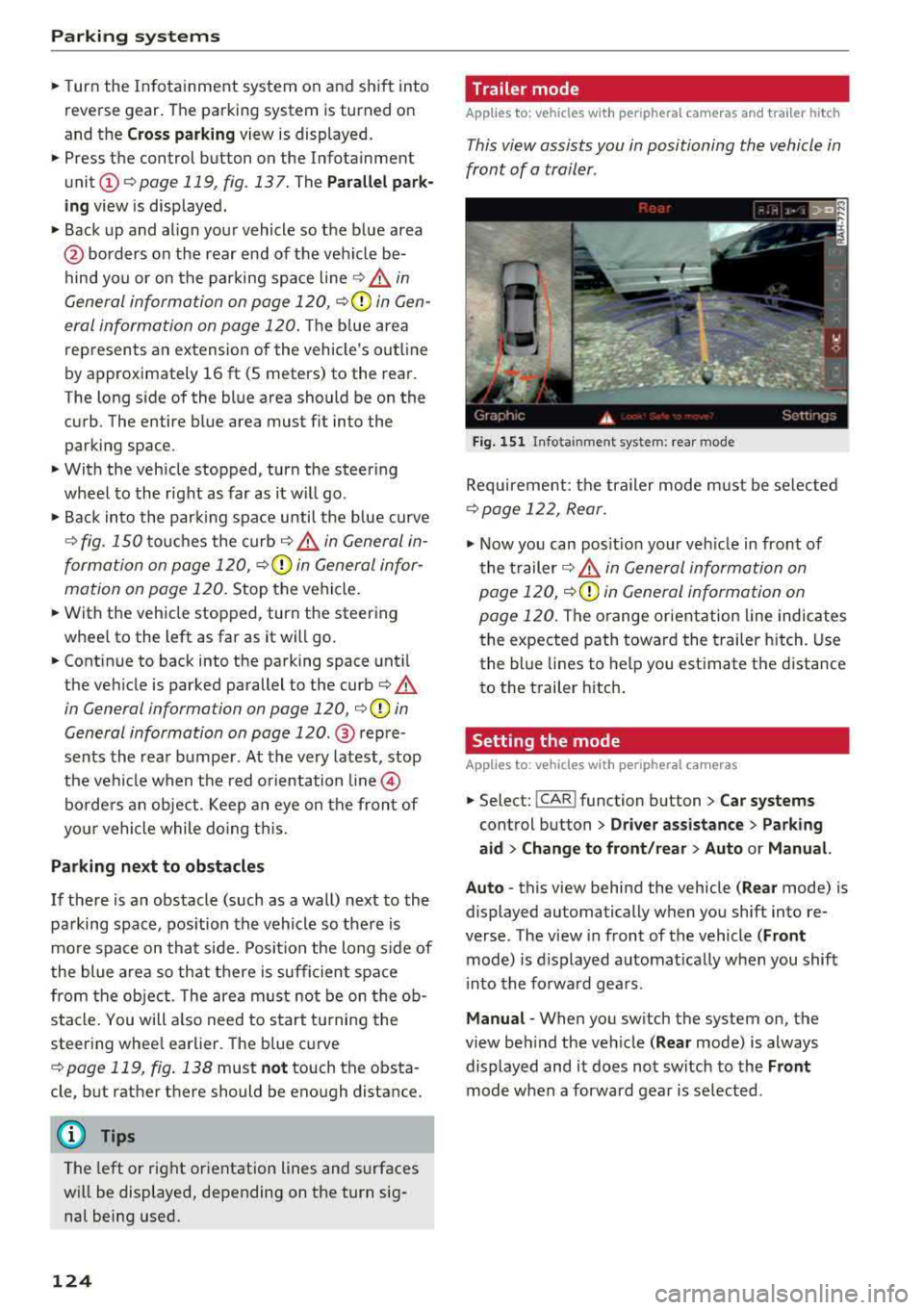
Fig. 151 In fota inment system: rear mode
Requirement: the trailer mode must be selected
¢ page 122, Rear.
.,. Now you can posit ion your veh icle in front of
the trailer
c::;, .&. in General information on
page 120,
c::;, (Q) in General information on
page 120.
The orange or ientation line indicates
the expected path toward the trailer hitch. Use
the blue lines to help you estimate the d istance
to the trailer hitch.
Setting the mode
Applies to : vehicles with peripheral cameras
,.. Select: !CAR ! function button> Car systems
control button > Driver assistance > Parking
aid > Change to front/rear > Auto or Manual.
Auto
-this view behind the vehicle ( Rear mode) is
displayed automatically when you shift into re
verse. The view in front of the vehicle
(Front
mode) is d isplayed automat ically when you shift
i nto the forward gears .
Manual -When you switch the system on, the
view beh ind the veh icle
( Rear mode) is always
displayed and it does not switch to the
Front
mode when a forward gear is se lected.
Page 129 of 356
u. co .... N
" N .... 0 0 :c '
Control (ESC)
Description
The ESC increases driving safety. It reduces the
risk of slipping and improves driving stability.
ESC detects critical situations such as when the
vehicle is oversteering and understeering or the
wheels are spinning. The vehicle is stabilized by
applying the brakes or reducing engine torque .
When the ESC engages,
the G1 indicator light
b links in the instrument cluster.
The following systems are integrated in the ESC:
Anti-lock braking system (ABS)
ABS prevents the whee ls from locking when brak
ing. The vehicle can still be steered even during
hard braking. Apply steady pressure to the brake
pedal. Do not pump the pedal. A pulsing in the
brake pedal indicates that the system is acting to
stabilize the vehicle .
Brake assist system
The brake assist system can decrease braking dis
tance. It increases braking power when the driver
presses the brake pedal quickly in emergency sit
uations . You must press and hold the brake pedal
until the dangerous situat ion is over . In veh icles
w ith adaptive cruise contro l*, the brake assist
system is more sensitive if the distance detected
to the vehicle dr iv in g ahead is too small. On
ve hicl es w ith activated and functioning night vi
sion assist*, the brake assist system can respond
more sensitively if there is a warning .
Anti-Slip Regulation (ASR)
ASR reduces engine power when the drive wheels
begin spinning and adapts the force to the road
conditions. This makes it easier to start, acceler
ate and drive up hills.
Electronic differential lock (EDL)
EDL applies the brakes to a wheel that starts
sp inn ing and transfers the drive power to the
other driving wheels. This functio n is not availa
ble at higher speeds.
Intelligent Technology
In extreme cases, EDL automatica lly switches off
to keep the brake on the braked whee l from over
heating. The vehicle is still working correct ly. ED L
will switch on again automatically when condi
tions have returned to normal.
Steering recommendation
T he ESC he lp s to stabilize the vehicle by changing
the steering torque .
In veh icles with dynamic steer ing*, ESC also
helps to stab ilize the steer ing in crit ica l situa
tions.
Selective wheel torque control
Selective wheel torque control is used when driv
in g on curves.
The front wheel on the inside of the curve or both
wheels on the inside of the curve are braked se
lectively as needed. This allows more precise driv
in g in curves . The applicable system may not acti
vate when dr iv in g in wet or snowy conditions .
Automatic post -collision braking system
Th e "automat ic post-collis ion braking system"
can help to reduce the risk of sliding and of addi
t iona l co llisions after an acc ident. If the airbag
control module detects a co llision above a certa in
vehicle speed, the veh icle is braked by the ESC.
The vehicle does not brake automatically if :
- the dr iver presses the acce lerator pedal, or
- the braking force generated by the pressed
brake pedal is greater than the braking force
that would be initiated by the system, or
- the ESC, the brake system or the vehicle electri
cal system are not functioning.
A WARNING
,--
- The ESC and its integrated systems cannot
overcome the lim its imposed by natural
p hys ical laws. This is especially important
on slippery or wet roads. If the systems be
g in acting to stabilize your vehicle, you
should immediately alter your speed to
match the road and traffic conditions. Do
not let the increased safety provided tempt
127
Page 130 of 356
Intelligent Technology
you into taking risks. T his could increase
your risk of a co llision.
- Please note the risk of a co llision increases
when driving fast, especially through curves
and on slippery or wet roads, and when driv
ing too close to objects ahead. The ESC and
its integrated systems cannot always pre
vent collisions - there is still a risk of acc i
dents!
- Press the accelerator pedal carefully when
acce lerating on even, slippery surfaces such
as ice and snow. The drive wheels can spin
Switching on and off
even when these control systems are instal
led and this can affect driving stability and
increase the risk of a collision.
(D Tips
- Th e ABS and ASR only function correct ly
when a ll four wheels have a simi lar wear
condition. Different tire sizes can lead to a
reduction in engine power.
- You may hear noises when the systems de
scribed are working.
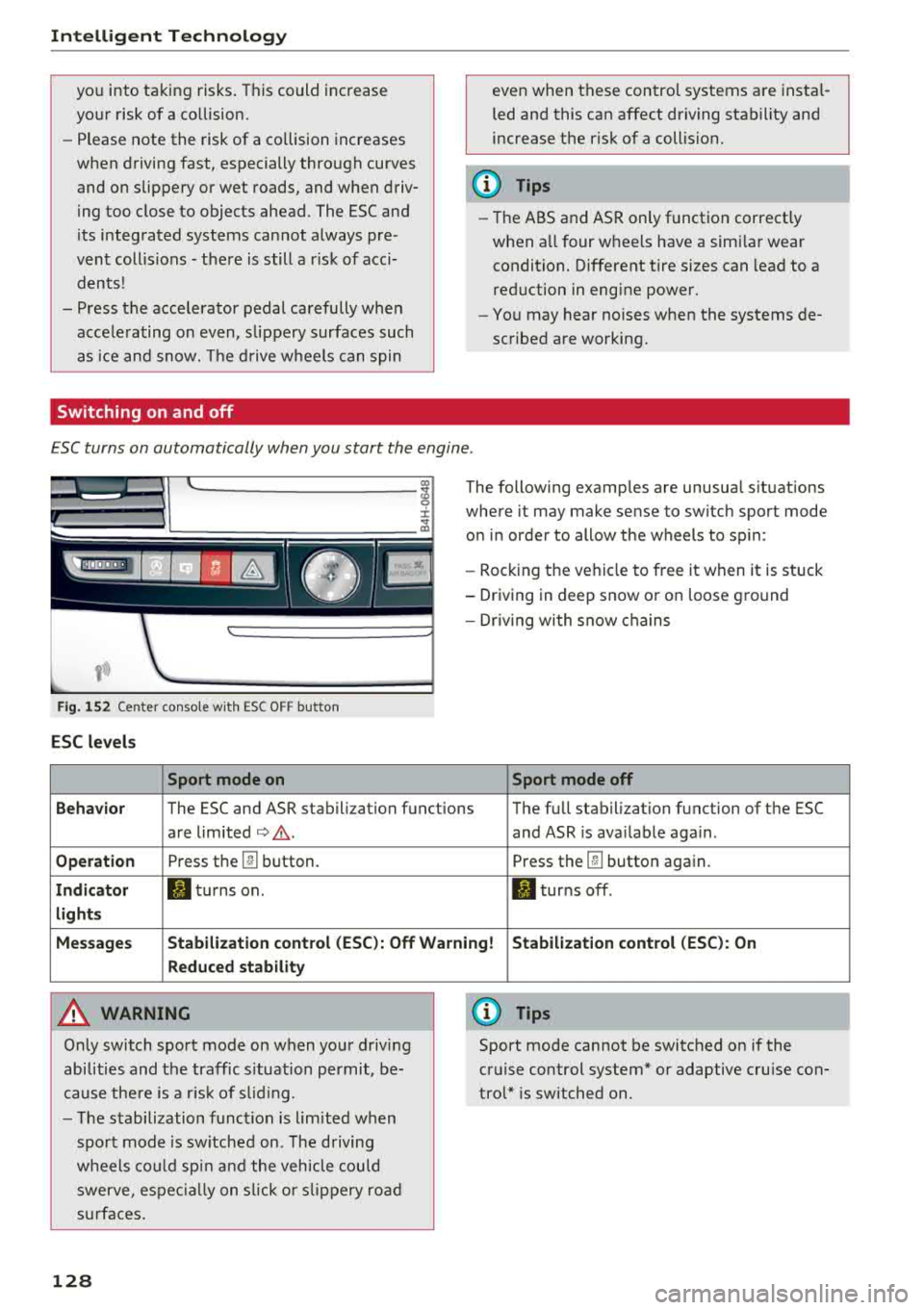
ESC turns on automatically when you start the engine .
Fig . 152 Center conso le wit h ESC O FF but ton
ESC levels
Sport mode on
The following examples are unusual situations
where it may make sense to switch sport mode
on in order to allow the wheels to sp in:
- Rocking the ve hicle to free it when it is stuck
- Driving in deep snow or on loose ground
- Dr iv in g with snow chains
Sport mode off
Behavior
The ESC and ASR stabilization functions The full stabilization function of the ESC
are limited
¢ .&. . and ASR is ava ilable aga in .
Operation Press th e @ button. Press the@button again.
Indicator II turns on. II turns off .
lights
Messages Stabilization control (ESC): Off Warning! Stabilization control (ESC): On
Reduced stability
A WARNING
Only switch sport mode on when your driving
abilities and the traffic s ituation permit, be
cause there is a risk of s liding.
- The stabilization function is l im ited when
sport mode is sw itched on. The driving
whee ls could spin and the veh icle could
swerve , espec ially on slic k or slippery road
s urfac es.
128
0) Tips
Sport mode cannot be switched on if the
cruise control system* or adaptive cruise con
trol* is switched on .
Page 132 of 356
Intellig ent T echn olo gy
- New brake pads do not achieve their full
braking effect during the first 250 mi
(400 km). They must be "broken in" first.
However, you can compensate for the
sl ightly reduced brak ing force by pressing
firmly on the brake pedal. Avoid heavy brak
i ng dur ing t he break- in per iod.
- Certa in weather and operat ing cond it ions
such as dr iv ing through water, driving in
heavy ra in or driving after washing your ve
hicle can impair the effectiveness of the
brakes . In the winter, ice may build up on
the brake pads, rotors and drums . Check
these components by braking carefu lly. Ap
plying the brakes carefully severa l times
dr ies the brakes and removes ice bu ild-up.
- The effic iency of the brakes can also be im
paired by driving for long stretches on roads
covered w ith salt w ithout using the brakes.
You can remove salt deposits from the brake rotors and pads by carefully applying
the b rakes severa l t imes .
- If the front spo iler is damaged or you install
another spoiler, make sure the front wheel
bra kes are vent ilated properly. Otherwise,
the brake system could ove rheat, w hich re
duces the ir effectiveness.
- Failure of a b rake circuit impa irs b raking
perfo rmance, which inc reases brak ing dis
tance . Avoid driving the vehicle and have it
towed it to the nearest authorized Audi
dealer or authorized Audi Service Facility .
- If the brake booster is not working, you will
have to press m uch harder on the brake
peda l to compensate for the lack of the
booster.
@ Note
- Never let the brakes " rub" by pressing the
pedal light ly when braking is not actually
necessary. This causes the brakes to over
heat and increases braking distance and
causes wear.
- Before driving downhill a long distance on a
steep hill, decrease your speed and select a l ower gear. This makes use of the engine
braking effect and relieves the brakes. If
130
you need to brake add itiona lly, brake in in
terva ls and not continuous ly .
(D Tips
- If the bra ke boos ter is not wor king, you
must press the brake peda l with much more
force than normal.
- If you retrof it your vehicle with a front spoi l
er, wheel covers or simi lar items, make sure
that the air flow to the front wheels is not interrupted. Otherwise the brake system
can become too hot.
Electromechanical
steering, dynamic
steering
The electromechonicol steering supports the
driver's steering movements.
Power steering adapts electronically based on
the vehicle speed .
Indicator lights and messages
• Do not drive vehi cle: S tee rin g defect ive
If this indicator light turns on and stays on and
th is message appears, the power steering may
have failed .
Stop the vehicle in a safe location as soon as pos
s ible. Do
not conti nue driving. See an authorized
Audi dealer or authorized Audi Service Fac il ity for
ass istance.
l;rfl St ee ring: System faul t You ca n cont inue
dr ivi ng
If the indicator light turns on and the message
appears, the steering wheel may be more diffi
cu lt to move or more sensitive than usual. The
steering wheel may also be at an angle when driv ing stra ight .
Drive slowly to an authorized Audi dea ler or au
thori zed Audi Serv ice Facility to have the mal
funct io n corrected.
'-r-ij Dynamic stee ring: Init ializing
If the indicato r light is blinking and this message
appears, dynamic steering* is being initialized.
IJ>-