window AUDI A8 2020 User Guide
[x] Cancel search | Manufacturer: AUDI, Model Year: 2020, Model line: A8, Model: AUDI A8 2020Pages: 360, PDF Size: 95.38 MB
Page 57 of 360
![AUDI A8 2020 User Guide 4N0012721BD
Opening and closing
Convenience opening and closing the
sunshade*
Applies to: vehicles with power blinds
You can open or close all of the sunshades at
once.
> Press and hold [2:]](/img/6/57606/w960_57606-56.png "AUDI A8 2020 User Guide 4N0012721BD
Opening and closing
Convenience opening and closing the
sunshade*
Applies to: vehicles with power blinds
You can open or close all of the sunshades at
once.
> Press and hold [2:]")
4N0012721BD
Opening and closing
Convenience opening and closing the
sunshade*
Applies to: vehicles with power blinds
You can open or close all of the sunshades at
once.
> Press and hold [2:] on the lower display. Or:
> Press and hold the [2:] button in the rear door.
Or:
> Applies to: Rear Seat Remote: Select on the
home screen: Blinds. Press on the picture of
the sunshade to operate it.
ZA WARNING
— Never close the windows or panoramic glass
roof* carelessly or in an uncontrolled man-
ner, because this increases the risk of injury.
— For security reasons, the windows and the
panoramic glass roof* can only be opened
and closed with the vehicle key at a maxi-
mum distance of approximately 6.5 feet
(2 m) from the vehicle. Always pay attention
when using the f button to close the win-
dows and the panoramic glass roof* so that
no one is pinched. The closing process will
stop immediately when the ff button is re-
leased.
Panoramic glass roof
Operating the panoramic glass roof and
coe) mee dar-Le(-)
Applies to: vehicles with panoramic glass roof and roof sun-
shade
Fig. 45 Headliner: panoramic glass roof and sunshade*
buttons
The control buttons are equipped with a two-
stage function. Depending on the equipment, it
RAZ-0027
may also be possible to operate the roof and the
roof sunshade from the rear.
When tilting or opening the roof, the roof sun-
shade will open partially or completely if the sun-
shade is closed.
Operating the front roof sunshade
Requirement: the roof must be closed.
> Opening and closing the sunshade: push the
2D switch in the headliner @) briefly toward
the rear or forward to the second level. Or:
Push or pull the &> switch in the rear briefly
downward or upward to the second level.
> Partially opening the sunshade: press the A>
switch to the first level until the sunshade
reaches the desired position. Or:
> Applies to: Rear Seat Remote: Open or close the
sunshade: select on the home screen: Blinds.
Press on the picture of the sunshade to operate
it.
Operating the rear roof sunshade*
> Opening and closing the sunshade: push the -&
switch in the headliner @) briefly forward or to-
ward the rear to the second level. Or:
> Push or pull the switch in the rear door
briefly downward or upward to the second lev-
el.
> Partially opening the sunshade: press the
switch to the first level until the sunshade
reaches the desired position. Or:
> Applies to: Rear Seat Remote: Select on the
home screen: Blinds. Press on the picture of
the sunshade to operate it.
Operating the roof from the cockpit
> Tilting the roof: press the A> switch in the
headliner briefly upward to the second level (@).
> Closing the tilted roof: pull the 2> switch
downward briefly to the second level.
> Opening the roof: slide the 2s switch back
briefly twice in a row to the second level @).
> Closing the roof: push the 2> switch forward
briefly to the second Level.
> Opening or closing partially: slide the A>
switch to the first level and hold it there until
the roof reaches the desired position.
55
Page 58 of 360

Opening and closing
Operating the roof from the rear*
> Tilting the roof: briefly press the > switch* in
the rear door downward once to the second lev-
el.
> Closing the tilted roof: pull the > switch* up-
ward briefly to the second Level.
> Opening the roof: press the 2S switch* in the
rear door downward again briefly to the second
level.
> Closing the roof: pull the 2> switch* upward
briefly to the second level.
> Opening partially: pull or press the 2> switch*
to the first level until the roof reaches the de-
sired position. Or:
> Applies to: Rear Seat Remote: Select on the
home screen: Blinds. Press on the picture of
the roof to operate it.
Quick opening and closing
You can also open or close the roof and front sun-
shade from the cockpit in one movement.
> Opening the roof and sunshade: slide the 2>
switch back briefly twice in a row to the second
level @).
> Closing the opened roof: push the 2S switch
forward briefly twice in a row to the second lev-
el.
Roof emergency closing
If an object is detected when closing, the roof
will open again automatically. In this case, you
can then close it with the power emergency clos-
ing function.
> Within five seconds after the sunroof opens au-
tomatically, pull the applicable button until the
roof is closed.
ZA\ WARNING
To reduce the risk of injury, always pay atten-
tion when closing the roof. Always switch the
ignition off and take the key with you when
leaving the vehicle.
)_ This function is not available in all countries.
56
C@) Note
Always close the roof when you leave the vehi-
cle and when there is precipitation to reduce
the risk of damage to the interior equipment,
particularly the electronic equipment.
Gi) Tips
— After switching off the ignition, the roof and
sunshades can still be operated for several
minutes as long as neither of the front
doors are opened.
— It is not possible to open the roof when
temperatures are too low.
Opening and closing the rear window
Tete
Applies to: vehicles with a sunshade on the rear window
The sunshade on the rear window can be operat-
ed both from the cockpit and from the rear seats.
Operating the sunshade on the rear window
> Applies to: MMI: Opening and closing the sun-
shade: Press [4] on the lower display. Or:
> Press the [2:] button briefly in the rear door. Or:
> Applies to: Rear Seat Remote: Select on the
home screen: Blinds. Press on the picture of
the rear window sunshade to operate it.
Valet parking
Applies to: vehicles with valet parking function
The valet parking function can protect the lug-
gage compartment from unauthorized access.
The [VALET] button for valet parking is in the
glove compartment.
You can switch the valet parking function on, for
example when someone else is parking your vehi-
cle ). The vehicle can be driven, locked, and un-
locked using the vehicle key, but access to the
luggage compartment is blocked.
> Remove the mechanical key > page 47.
> Press the [VALET] button in the glove compart-
ment. The LED in the button turns on if the
function is switched on.
Page 69 of 360

4N0012721BD
Lights and Vision
adjusted by pressing on the edge of it by
hand.
Dimming the mirrors
> The interior and exterior mirrors* dim automat-
ically when light shines on them, for example
from headlights on a vehicle behind you.
ZX WARNING
— If the glass on an automatic dimming mir-
ror* breaks, electrolyte can leak out. This
liquid can irritate the skin, eyes and respira-
tory system. If there is contact with the flu-
id, flush immediately with plenty of water.
Consult a physician if necessary.
— Repeated or long-term exposure to electro-
lyte fluid can lead to irritation of the air-
ways, especially in people with asthma or
other respiratory conditions. Take deep
breaths immediately after leaving the vehi-
cle or, if this is not possible, open all of the
doors and windows as wide as possible.
— If electrolyte fluid comes into contact with
the eyes, flush them thoroughly with plenty
of clean water for at least 15 minutes and
then seek medical attention.
— If electrolyte fluid comes into contact with
the skin, flush the affected area with clean
water for at least 15 minutes, and then
clean with soap and water and seek medical
attention. Clean affected clothing and shoes
thoroughly before wearing again.
— If the fluid was swallowed and the person is
conscious, flush the mouth with water for at
least 15 minutes. Do not induce vomiting
unless this is recommended by medical pro-
fessionals. Seek medical attention immedi-
ately.
Q) Note
If the glass on an automatic dimming mirror*
breaks, electrolyte can leak out. This liquid
damages plastic surfaces and paint. Clean
this liquid as quickly as possible, for example
with a wet sponge.
— If the light reaching the rearview mirror is
obstructed, the automatic dimming mirror*
will not function correctly.
— The automatic dimming mirrors* do not dim
when the interior lighting is turned on or re-
verse gear is selected.
Fig. 54 Roof headliner: sun visor
Sun visor
The
sun visors for the driver and front passenger
can be released from their mounts and turned to-
ward the doors (a).
They can also be moved back and forth length-
wise in this position.
Vanity mirror
The mirror light switches on when the cover over
the
vanity mirror @) opens.
Vanity mirror in the rear
Applies to: vehicles with vanity mirrors in the rear
Fig. 55 Rear headliner: vanity mirror
67
Page 74 of 360

Sitting correctly and safely
Sitting correctly and
safely
Correct passenger
seating position
General information
As the driver, you are responsible for making sure
every passenger is sitting correctly in their seat
and maintaining this seating position while driv-
ing. Make sure that:
— Every passenger in the vehicle has adjusted his
or her seat correctly > page 72
— The steering wheel is adjusted correctly
=> page 80
— The mirrors are adjusted so that there is a suffi-
cient view of the area around the vehicle
=> page 66
— Every passenger in the vehicle has his or her
head restraint adjusted correctly > page 81
— Every passenger in the vehicle has his or her
safety belt fastened correctly > page 82
— The activation status of the front passenger's
airbag is suitable for the passenger in the front
passenger's seat > page 89
— Children are secured in suitable child safety
seats that are secured to appropriate vehicle
seats > page 91. Read and observe the impor-
tant safety information pertaining to the use of
child safety seats on the front passenger's seat
= A in General information on page 91.
Examples of incorrect seating positions
Safety belts can only provide its optimal protec-
tion when they are routed correctly. Incorrect
seating positions significantly reduce the protec-
tive functions of the safety belts and increase the
risk of injury due to incorrect belt routing.
The following list includes examples of seating
positions that could be dangerous for all vehicle
occupants. This is not a complete list. The pur-
pose is to provide examples to increase your
awareness of the topic. The following points ap-
ply when the vehicle is in motion:
— Never stand inside the vehicle.
— Never stand on the seats.
72
— Never kneel on the seats.
— Never tilt your backrest too far back.
— Never lean against the instrument panel.
— Never lie down on the rear bench seat.
— Never sit only on the front section of the seat.
— Never sit sideways on the seat.
— Never lean against the window.
— Never place your feet out of the window.
— Never place your feet on the instrument panel.
— Never place your feet on the seat cushion.
— Never ride in the footwell.
— Never sit on the armrests.
— Never drive or ride in a seat without fastening
your safety belt.
— Never ride in the luggage compartment.
ZA WARNING
Incorrect seating positions, failure to wear a
safety belt, or being too close to an airbag in-
crease the risk of serious or fatal injury to ve-
hicle occupants, especially if the airbags de-
ploy and come into contact with occupants
who are not seated correctly. Note the impor-
tant information and warnings in the chapters
for the topics given above.
Gi) Tips
— Save your seat profile* > page 85. This al-
lows you to access your personal seat profile
quickly and easily at any time.
— If you or other vehicle passengers have
physical limitations that prevent sitting in a
correct position, modifications to the vehi-
cle may be necessary. For more information,
contact an authorized Audi dealer or author-
ized Audi Service Facility, or call Audi cus-
tomer support at 1-800-822-2834.
Front seats
General information
Make sure that:
— You can press the pedals down completely
while your legs are slightly bent
Page 75 of 360

4N0012721BD
Sitting correctly and safely
— The distance between your upper body and the
steering wheel or instrument panel is at least
10 inches (25 cm)
— The distance between your knees and the in-
strument panel is at least 4 inches (10 cm)
— Your thighs are lightly supported by the front
surface of the seat
— The backrest is in an upright position and your
back
is resting against it
— You have a sufficient view of the area around
the vehicle
— You have a clear view of the instrument cluster,
indicator lights, and the head-up display*
Seat settings menu: quick access
If you press on the image of the driver's or front
passenger's seat in the climate control system
menu & page 104, fig. 95 @, you will go directly
to the seat settings for that seat.
ZA WARNING
— If you are too close to the steering wheel or
instrument panel, the airbag system cannot
provide the optimal protection, which in-
creases the risk of injury and death.
—To reduce the risk of injury in the event of
sudden braking maneuvers or accidents,
never drive with the backrest reclined very
far. The airbag system and seat belts can on-
ly provide optimal protection when the back-
rest is in an upright position and the driver
is wearing the seat belt correctly. If the
backrest is angled back too far, the safety
belt can shift to soft areas of the body, such
as the stomach, which increases the risk of
injury.
—To reduce the risk of an accident, only adjust
the seats when the vehicle is stationary.
— Be careful when adjusting the seat. Lack of
control or attention when adjusting can re-
sult in injuries due to pinching to vehicle oc-
cupants both in the front seats and rear
seats.
— Never place objects in the driver's footwell.
Objects could shift and enter the area
around the pedals, which could prevent you
from using them. You would then be unable
to use the pedals if sudden driving or brak-
ing maneuvers were needed, which increas-
es the risk of an accident.
— Make sure that the floor mats are always se-
curely attached.
—To reduce the risk of an accident, never place
additional floor mats or other floor covers
over the installed floor mats, because this
reduces the pedal's range of motion and can
impair pedal operation.
—To reduce the risk of injury, never place your
feet on the instrument panel, out of the
window, or on the seat surfaces. This also
applies to passengers in the rear seats.
G) Tips
At the same time, only move the respective
seat using the controls.
Adjusting the front seats with buttons
You can adjust the basic settings using the but-
tons.
RAZ-0172
Fig. 60 Front seat: seat adjustment buttons
The settings depend on the vehicle equipment.
Adjusting the seat position
> To move the seat forward or backward, push
the button @ forward or backward.
> To adjust the seat upward or downward, push
the rear section of the button @ upward or
downward.
> To adjust the seat surface, press the front part
of the button @ upward or downward.
Adjusting the backrests
> To move the backrest forward or backward,
press the button (@) forward or backward.
73
Page 88 of 360

Sitting correctly and safely
— Outer rear seats*: seat
Storing and recalling a seat profile
Applies to: vehicles with memory function
The memory function buttons are located in the
door trim panel.
Storing a seat profile
> Press the [SET] button. If the LED in the button
turns on, a seat profile can be stored.
> Push one of the numbered memory buttons. A
tone confirms that the settings were stored.
Accessing a seat profile
> When the a door is open and the ignition is
switched off, press the memory button once
briefly. The seat will be fully adjusted to the
settings in the seat profile.
> If the door is closed or the ignition is switched
on, press and hold the memory button until the
seat is fully adjusted to the settings in the seat
profile.
Z\ WARNING
—To reduce the risk of an accident, the seat
setting can only be recalled when the vehicle
is stationary.
— In an emergency, the recall process can be
canceled by pressing the seat adjustment
button on that seat.
@) Tips
Certain settings are stored automatically in
the active personal profile.
Airbag system
ZA\ WARNING
— If you have not fastened your safety belt,
you are in an incorrect seating position, or
you are too close to the airbag system, the
airbag system will not be able to protect
you. This increases the risk of serious or fa-
tal injuries. Make sure that every vehicle
passenger has his or her safety belt correctly
86
fastened and is sitting in a correct seating
position = page 72. This is necessary regard-
less of whether the seat is equipped with an
airbag or not.
Never place your feet on the instrument
panel, out of the window, or on the seat sur-
faces. To help ensure that the airbag system
can deploy correctly, never bend forward or
lean on the door or the side window. Other-
wise, serious and possibly fatal injuries can
occur if the airbags deploy.
People, animals, or objects between the
passengers and the airbag system can inter-
fere with the correct deployment of the air-
bag or can be thrown through the vehicle in-
terior, increasing the risk of serious or fatal
injuries. Make sure that nothing is located
between the vehicle occupants and the air-
bag system. Do not secure or transport any
objects within the deployment zone of the
airbag systems, especially on the steering
wheel, on the instrument panel, on the
doors, on the windows, in the footwell, or
on the rear shelf.
Never put stickers on the airbag system cov-
ers or cover them with any objects.
Only lightweight clothing should be hung
from the garment hooks in the vehicle. Do
not use clothes hangers to hang clothing.
The pockets of the clothing must not con-
tain any heavy, breakable, or sharp-edged
objects. This could impair the effectiveness
of the side curtain airbags.
You must not use seat or protective covers
that are not specifically approved for use on
Audi seats with side airbags. Since the side
airbags deploy from the seat backrest, such
covers could impair the protective function
of the side airbags.
Applies to: vehicles with front center airbag:
You must not use seat or protective covers
that are not specifically approved for use on
Audi seats with center airbags. The center
armrest must be closed while driving. Since
the front center airbag deploys from the
driver's seat backrest, such covers could im-
pair the protective function of the center air-
bag.
Page 89 of 360

4N0012721BD
Sitting correctly and safely
— Damage to the original seat covers in the
side airbag and front center airbag deploy-
ment area must always be repaired by an au-
thorized Audi dealer or authorized Audi
Service Facility.
— Airbag system components are installed at
various locations in your vehicle. Incorrect
work or repairs on the vehicle could damage
the airbag system components or impair
their functionality. This may prevent the air-
bags from deploying or cause them to de-
ploy incorrectly in the event of an accident,
which increases the risk of serious or fatal
injuries. Only have an authorized Audi dealer
or authorized Audi Service Facility make re-
pairs or modifications to a vehicle.
— The airbag system can only provide protec-
tion during one collision. If there is another
collision, the airbag system will not deploy
again. If the airbag system has deployed,
have it replaced immediately by an author-
ized Audi dealer or authorized Audi Service
Facility.
— Fine dust may appear if the airbags deploy.
This is completely normal and does not indi-
cate a fire in the vehicle. The fine dust can ir-
ritate the skin and mucous membranes in
the eyes and can cause difficulty breathing,
particularly for individuals who have or have
had asthma or other health issues that af-
fect breathing. Exit the vehicle or open the
windows or doors to get access to fresh air.
(i) Tips
If you are transporting children in the vehicle,
read
the information and follow the safety
precautions > page 91.
Safety systems monitoring
The 2] indicator light in the instrument cluster
monitors the safety systems such as the airbags
(including the control modules, sensors, and wir-
ing) and the belt tensioners. It turns on when you
switch the ignition on and turns off after several
seconds.
If the ka indicator light does not turn on when
the ignition is switched on, does not turn off af-
ter several seconds, or turns on or flashes while
driving, there may be a malfunction in one of the
safety systems. Drive to an authorized Audi deal-
er or authorized Audi Service Facility immediately
to have the malfunction corrected.
ZA\ WARNING
Have the malfunction in the safety systems in-
spected immediately. Otherwise, there is a
risk that the systems may not activate during
an accident, which increases the risk of seri-
ous or fatal injury.
87
Page 99 of 360
4N0012721BD
Stowing and using
Stowing and using
Power sources
When the ignition is switched on, you may be
able to use multiple power sources for external
devices, depending on the vehicle equipment.
12 volt sockets
You can connect electrical accessories to the 12
volt sockets. The power usage must not exceed
120 watts.
The 12 volt sockets are labeled with the 12V
symbol. They are located in the front center con-
sole, in the rear* and on the side trim panel in the
luggage compartment*.
USB ports
Applies to: vehicles with USB port
You can charge mobile devices using the USB
ports. The USB ports are labeled with the «<> or
(4 symbol or CHARGE ONLY.
115 volt socket
Applies to: vehicles with 115 volt socket
The socket is located in the center console in the
rear and can be used for electrical devices > A\.
The power usage must not exceed 150 watts.
When you push the device connector all the way
into the socket, the child safety mechanism re-
leases and there is electric current.
—If the LED on the socket is green or flashes
slowly, then the socket is ready for use.
—If the LED is red and flashes quickly, there is a
malfunction in the connected device or the
socket is too hot. The socket will switch off for
safety reasons. To reactivate the socket, remove
the device connector. Connect the device after
correcting the malfunction or reconnect after a
brief cool-down period.
— Incorrect usage can lead to serious injuries
or burns. To reduce the risk of injuries, never
leave children unattended in the vehicle
with the key.
Z\ WARNING
Applies to: vehicles with 115 volt socket
—To reduce the risk of fatal injury, do not in-
sert any conductive objects, such as knitting
needles, into the contacts on the socket.
—To reduce the risk of fatal injury, do not spill
any fluids on the socket. Should any mois-
ture enter the socket, make sure that it has
dried out completely before using the socket
again.
— If devices or connectors that are heavy (such
as a power supply unit) are attached directly
to the socket, the holder can become dam-
aged, which increases the risk of injury.
— Using adapters and extension cables in-
creases the risk of injury because they over-
ride the safety devices for the socket.
—To reduce the risk of injury, remove the con-
nector of the connected device if the socket
has switched off due to a malfunction.
Z\ WARNING
—To reduce the risk of fatal injury, store all
connected devices securely when driving so
that they do not move around inside the ve-
hicle when braking or in the event of an acci-
dent.
@) Note
— Read the operating manuals for the con-
nected devices.
—To reduce the risk of damage to the vehicle
electrical system, never attempt to charge
the vehicle battery by connecting accesso-
ries that provide power to the power sour-
ces.
— Do not connect any device whose network
class (voltage) does not match the network
class designed for the socket.
— Disconnect the connectors from the power
sources carefully to reduce the risk of dam-
aging them.
(i) Tips
Applies to: vehicles with 115 volt socket
— Devices that are not shielded or devices near
the rear window antenna can cause mal-
functions in the radio, TV, or vehicle electri-
cal system.
97
Page 101 of 360
4N0012721BD
Stowing and using
Folding tray tables
Applies to: vehicles with folding tray tables
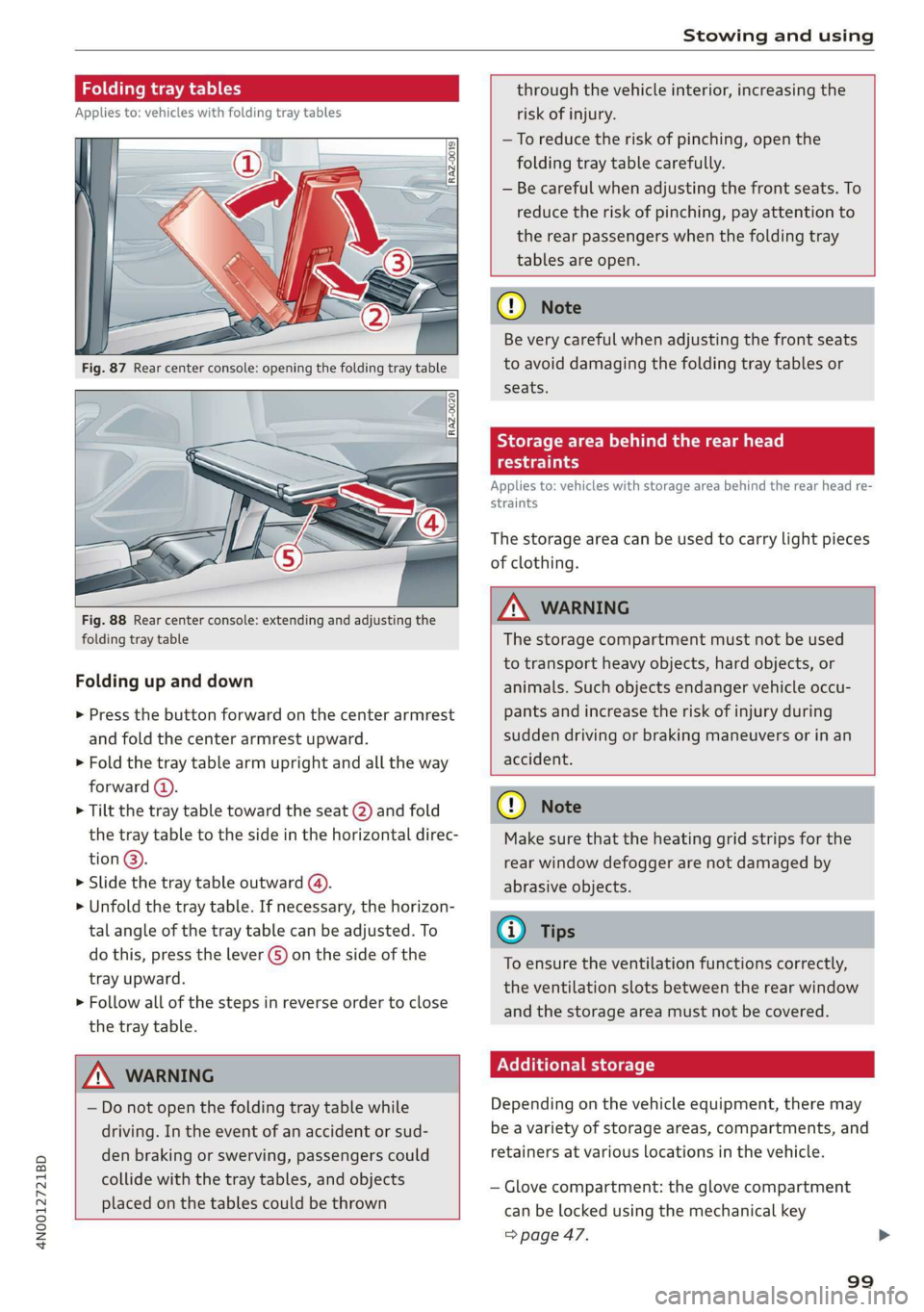
Fig. 88 Rear center console: extending and adjusting the
folding tray table
Folding up and down
> Press the button forward on the center armrest
and fold the center armrest upward.
> Fold the tray table arm upright and all the way
forward (4).
> Tilt the tray table toward the seat (2) and fold
the tray table to the side in the horizontal direc-
tion @).
> Slide the tray table outward (4).
>» Unfold the tray table. If necessary, the horizon-
tal angle of the tray table can be adjusted. To
do this, press the lever G) on the side of the
tray upward.
> Follow all of the steps in reverse order to close
the tray table.
ZA WARNING
— Do not open the folding tray table while
driving. In the event of an accident or sud-
den braking or swerving, passengers could
collide with the tray tables, and objects
placed on the tables could be thrown
through the vehicle interior, increasing the
risk of injury.
—To reduce the risk of pinching, open the
folding tray table carefully.
— Be careful when adjusting the front seats. To
reduce the risk of pinching, pay attention to
the rear passengers when the folding tray
tables are open.
() Note
Be very careful when adjusting the front seats
to avoid damaging the folding tray tables or
seats.
Storage area behind the rear head
oe)
Applies to: vehicles with storage area behind the rear head re-
straints
The storage area can be used to carry light pieces
of clothing.
ZA WARNING
The storage compartment must not be used
to transport heavy objects, hard objects, or
animals. Such objects endanger vehicle occu-
pants and increase the risk of injury during
sudden driving or braking maneuvers or in an
accident.
@) Note
Make sure that the heating grid strips for the
rear window defogger are not damaged by
abrasive objects.
@ Tips
To ensure the ventilation functions correctly,
the ventilation slots between the rear window
and the storage area must not be covered.
Nellie etl lel
Depending on the vehicle equipment, there may
be a variety of storage areas, compartments, and
retainers at various locations in the vehicle.
— Glove compartment: the glove compartment
can be locked using the mechanical key
=> page 47.
99
Page 103 of 360
4N0012721BD
Stowing and using
[Oe > Attach the hooks for the cargo net to the tie-
downs.
Make sure that the heating grid strips for the
rear window defogger are not damaged by |
abrasive objects.
Applies to: vehicles with pass-through
— The tire pressure must be adapted to the
load > page 299.
— You can purchase straps at specialty stores.
iz
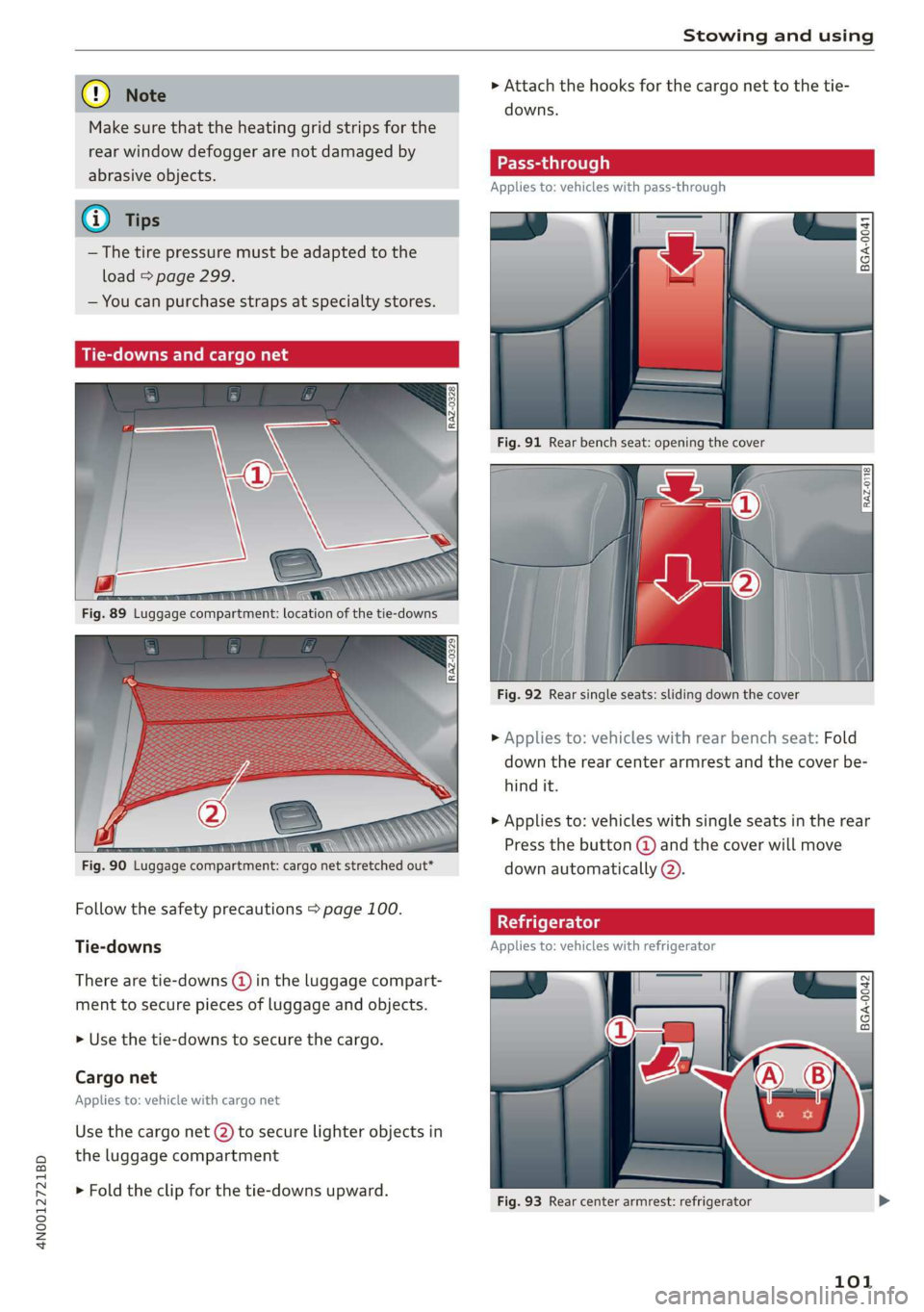
Fig. 91 Rear bench seat: opening the cover
Fig. 92 Rear single seats: sliding down the cover
> Applies to: vehicles with rear bench seat: Fold
down the rear center armrest and the cover be-
hind it.
>
Applies to: vehicles with single seats in the rear
Press the button @) and the cover will move
down automatically @).
Follow the safety precautions > page 100. | 5
Tie-downs Applies to: vehicles with refrigerator
There are tie-downs () in the luggage compart-
ment to secure pieces of luggage and objects.
> Use the tie-downs to secure the cargo.
Cargo net
Applies to: vehicle with cargo net
Use the cargo net (2) to secure lighter objects in
the luggage compartment
> Fold the clip for the tie-downs upward.
Fig. 93 Rear center armrest: refrigerator
101