wheel AUDI A8 2020 Owner's Manual
[x] Cancel search | Manufacturer: AUDI, Model Year: 2020, Model line: A8, Model: AUDI A8 2020Pages: 360, PDF Size: 95.38 MB
Page 91 of 360

4N0012721BD
Sitting correctly and safely
Each deployed airbag is filled with gas. When this
occurs, the airbag covers open and the airbags
unfold with great force into the deployment zone
within milliseconds. Inflated airbags reduce the
movement of passengers wearing safety belts in
the direction of the impact and thus help to re-
duce the risk of injury. They can help to protect
the head, upper body, and lap, for example. How-
ever, there is the possibility that airbag deploy-
ment can cause injuries.
The airbag system only works when the ignition
is turned on.
If you or other vehicle passengers have physical
limitations that prevent sitting in a correct posi-
tion, modifications to the vehicle may be neces-
sary. For more information, contact an author-
ized Audi dealer or authorized Audi Service Facili-
ty, or call Audi customer support at
1-800-822-2834.
@) Tips
The side curtain airbags in your vehicle have
ejection mitigation functions. This reduces
the risk of being ejected from the vehicle inte-
rior during an accident, especially in the event
of a vehicle rollover.
Advanced airbag system
Fig. 79 Headliner: indicator light to display the status of
the front passenger's airbag
The Advanced Airbag System in your vehicle has
been certified to comply with the requirements
of the United States Federal Motor Vehicle Safety
Standard (FMVSS) 208, as well as Canada Motor
Vehicle Safety Standard (CMVSS) 208 as applica-
ble at the time your vehicle was manufactured.
According to these requirements, the front Ad-
vanced Airbag System on the passenger’s side
has been certified for “suppression” for infants
approximately 12 months old and younger, and
for “low risk deployment” for children aged 3 to
6 years old (as defined in the standard).
The advanced airbag system will activate or deac-
tivate the front passenger's airbag based on the
occupancy of the seat. If a front airbag deploys
during an accident, the deployment force will
adapt to the passenger.
Components
The advanced airbag system consists of the fol-
lowing components:
— Front airbags in the steering wheel and in the
instrument panel on the front passenger's side:
these can protect the front passengers during
an accident
— Passenger occupant detection sensor in the
front passenger's seat: this detects if the front
passenger's seat is occupied (for example, by a
person or a small child in a child safety seat)
— Seat position sensors on the front seats: these
determine the distance between the seat and
the steering wheel or instrument panel
— Sensors in the front seat belt latch: these de-
tect if the safety belts are fastened
—The PASSENGER AIR BAG OFF ®; ON @
indicator light in the headliner:this indicates if
the front passenger's airbag is activated or de-
activated
- Ea indicator light in the instrument cluster:
this monitors the function of the Advanced Air-
bag System components to ensure they are
functioning correctly
How the components function together
The passenger occupant detection sensor in the
front passenger's seat detects if the front pas-
senger's seat is occupied. The passenger occu-
pant detection sensor measures the electrical ca-
pacity on the front passenger’s seat. The pas-
senger's airbag is activated or deactivated de-
pending on the electrical capacity that is meas-
ured.
The passenger's airbag is activated if:
89
Page 92 of 360

Sitting correctly and safely
— The electrical capacity is higher than the
threshold stored in the control module
— The electrical capacity is the same as or greater
than the electrical capacity of a typical adult
The passenger's airbag is deactivated if:
— The electrical capacity is lower than the thresh-
old stored in the control module
— The electrical capacity is the same as or less
than the electrical capacity of a typical one-
year-old child in a child safety seat that has
been used for certification in accordance with
FMVSS 208
If the front passenger's airbag is activated, the
PASSENGER AIR BAG ON @ indicator light
will turn on. If the front passenger's airbag is de-
activated, the PASSENGER AIR BAG OFF #;
indicator light will turn on.
The deployment force of the front airbags adapts
based on whether or not the safety belt is used
and the distance between the seat and the steer-
ing wheel/instrument panel. For example, if a
person is too close to the front airbag, the front
airbag will deploy with less force to help reduce
the risk of injury.
Meaning of PASSENGER AIR BAG OFF #4, ON
® indicator light
When the ignition is switched on, the system de-
tects whether the front passenger's seat is occu-
pied. PASSENGER AIR BAG OFF #; ON ®
will turn on for several seconds during this proc-
ess. Then it will indicate whether the front pas-
senger's airbag is activated or deactivated.
— PASSENGER AIR BAG OFF 8%; the front
passenger's airbag is deactivated and will not
deploy in the event of an accident.
— PASSENGER AIR BAG ON @®: the front pas-
senger's airbag is activated and could deploy in
the event of an accident.
If a change to the occupancy status of the front
passenger's seat is detected
PASSENGER AIR BAG OFF #; ON @ will
flash for several seconds and will then display the
status of the front passenger's airbag.
90
Always make sure the indicator light corresponds
to the occupancy of the front passenger's seat.
— Adults or individuals with a similar stature sit-
ting in the front passenger seat: The front pas-
senger's airbag must be activated.
PASSENGER AIR BAG ON @ must remain
on.
— Individuals with a smaller stature (for exam-
ple, adolescents or smaller adults) sitting in
the front passenger seat: The front passeng-
er's airbag must be activated.
PASSENGER AIR BAG ON ® must remain
on.
— Child in a child safety seat secured on the
front passenger seat: The front passenger's air-
bag must be deactivated.
PASSENGER AIR BAG OFF ®, must remain
on.
— Front passenger seat is not occupied: The front
passenger's airbag must be deactivated.
PASSENGER AIR BAG OFF 3, must remain
on.
Z\ WARNING
— An adult or a person with a small stature
(such as a young person or small adult) seat-
ed on the front passenger's seat will not be
protected by the passenger's airbag in the
event of a collision if the passenger's airbag
is deactivated. This increases the risk of in-
jury and death. Always make sure that
PASSENGER AIR BAG ON @ remains on
while driving. If
PASSENGER AIR BAG ON @ does not
turn on, make sure the front passenger is
sitting correctly in the seat > page 72 and
that there are no objects covering the front
passenger's seat (such as blankets or pil-
lows). If PASSENGER AIR BAG ON @
still does not turn on, the front passenger's
seat must not be used. Drive to an author-
ized Audi dealer or authorized Audi Service
Facility and have the airbag system inspect-
ed.
—Achild ina child safety seat on the front
passenger's seat - especially in a rear-facing
child safety seat - can receive a severe im-
pact if the front passenger's airbag deploys,
Page 110 of 360
Warm and cold
Air quality display
Applies to: vehicles with air quality display
You can display information about the air quality.
> Applies to: MMI: Select on the home screen:
VEHICLE > Climate control > Air quality.
> Applies to: Rear Seat Remote: Press AIR QUAL.
on the home screen.
Pollutant filter
A pollutant filter cleans the air in the vehicle inte-
rior when the blower is switched on.
A schematic display represents the effectiveness
of the filter. The display visualizes the amount of
pollutant particles in the vehicle interior in com-
parison to the surroundings.
@ Tips
For optimal air quality in the vehicle interior,
close all windows and doors and activate A/C
cooling mode, the AUTO function, and recircu-
lation mode.
Well
a/c] Air conditioner: increase in CO2 concentra-
tion. Ventilate vehicle. See owner's manual
Ventilate the vehicle. If this message continues
to display, stop driving as soon as you can safely
park your vehicle and contact an authorized Audi
dealer or authorized Audi Service Facility. If this
message appears, drive to an authorized Audi
dealer or authorized Audi Service Facility immedi-
ately.
Steering wheel heating
Switching on and off
Applies to: vehicles with steering wheel heating
> Press the @ button to switch steering wheel
heating on/off.
You can also operate the steering wheel heating
using the multifunction steering wheel
=> page 40.
108
G) Tips
The steering wheel heating setting will be au-
tomatically stored in the active personal pro-
file.
Applies to: vehicles with steering wheel heating
@& Steering wheel heating: on/Steering wheel
heating: off
This message appears if you have switched the
steering wheel heating on or off.
Steering wheel heating: malfunction! See own-
er's manual
If this message appears, there is a malfunction.
Drive immediately to an authorized Audi dealer
or authorized Audi Service Facility to have the
malfunction repaired.
Auxiliary climate control
Applies to: vehicles with auxiliary climate control
The auxiliary climate control system warms or
cools the vehicle interior. The vehicle will turn on
the auxiliary climate control system if needed,
depending on the last temperature that was set
with the climate control system controls. This
function can be used when the drive system is
switched off.
You can turn the auxiliary climate control system
on and off immediately in the MMI or set a timer.
Requirement: The charge level of the high-volt-
age battery must be sufficient.
@ Tips
— The temperature that the auxiliary climate
control adjusts to depends on the last tem-
perature that was set > page 104.
— Using the auxiliary climate control while
charging can also reduce the charge level of
the high-voltage battery.
— Starting or stopping the vehicle will not
switch off the auxiliary climate control auto-
matically.
Page 111 of 360

4N0012721BD
Warm and cold
Applies to: vehicles with auxiliary climate control
Applies to: MMI: Select on the home screen: VE-
HICLE > Climate control. F
Immediate start
You can immediately switch the auxiliary climate
control on and off using the f button. When this
function is switched on, a colored bar lights up
over the button and the remaining time is dis-
played.
The auxiliary climate control will run for a maxi-
mum of 30 minutes after the immediate start.
Timer programming
You can set up to two timers for the departure
time. Each one of the timers can be activated.
> Select one timer.
> Set the date and select Next.
>» Set the time (departure time) and select OK.
> Activate the timer with CD.
By setting the departure time, you determine
when your vehicle should reach the desired tem-
perature. The departure time can be a maximum
of six days in the future. The auxiliary climate
control will continue to run approximately ten
minutes after the departure time is reached.
After switching off the ignition
Information about the active timer(s) will appear
on the upper display after switching off the igni-
tion. You can start the set climate control set-
tings immediately with the f button, or go to the
auxiliary climate control menu with the > button.
G) Tips
— Make sure the time and date match in the
system settings so that the timer can func-
tion correctly > page 266.
— The auxiliary climate control can also be
switched on and off immediately when a
timer is set.
— You can operate the climate control in the
vehicle interior when the high-voltage bat-
tery is charging using the charging timer
= page 141. The climate control output de-
pends on the power socket capacity.
— The auxiliary climate control can continue to
run after the departure time is reached.
Additional settings
> Applies to: MMI: Select on the home screen:
VEHICLE > Climate control > Auxiliary air con-
ditioning > ©.
Start air conditioning after unlocking*
If this function is activated, the climate control
will continue to run for five minutes after the ve-
hicle has been unlocked.
Comfort aux. A/C*
Applies to: vehicles with comfort auxiliary air conditioning
You can set if the steering wheel heating* and
seat heating or seat ventilation should also be
automatically activated with auxiliary climate
control. You can select the respective zones.
Window and mirror heating*
Applies to: vehicles with comfort auxiliary air conditioning
You can set if the rear window and mirrors should
also be heated during auxiliary climate control.
2— There is a malfunction in the auxiliary air
conditioning.
If this message appears, there is a system mal-
function. Drive immediately to an authorized
Audi dealer or authorized Audi Service Facility to
have the malfunction repaired.
Fluids in the A/C system
Refrigerant in the A/C system
The sticker in the engine compartment provides
information about the type and amount of refrig-
erant used in the vehicle’s A/C system. The stick-
er is located in the front section of the engine
compartment or at the front or back of the hood. >
109
Page 114 of 360
Driving
usual may increase the risk of accidents and
serious injuries.
— Always select the “P” selector lever position
when parking the vehicle; otherwise, the ve-
hicle could roll away.
C) Note
— Avoid high engine speed, full throttle, and
heavy engine load if the engine has not
reached operating temperature yet. You
could damage the engine.
— If the engine has been under heavy load for
an extended period of time, heat builds up
in the engine compartment after the engine
is switched off and there is a risk of damag-
ing the engine. For this reason, let the en-
gine run at idle for approximately two mi-
nutes before shutting it off.
G) Tips
— Brief noises are normal when starting and
stopping the vehicle and are no cause for
concern.
— For up to 10 minutes after stopping the en-
gine, the radiator fan may turn on again au-
tomatically or it may continue to run, even if
the ignition is switched off.
— It may not be possible to start the vehicle in
extremely low temperatures.
— Power will be fully available once the engine
is at operating temperature.
= Engine start system: malfunction! Please
contact Service
Do not switch the ignition off because you may
not be able to switch it on again. Drive to an au-
thorized Audi dealer or authorized Audi Service
Facility immediately to have the malfunction cor-
rected.
|| Engine start system: malfunction! Please
contact Service
There is a malfunction in the engine start system.
Drive immediately to an authorized Audi dealer
112
or authorized Audi Service Facility to have the
malfunction repaired.
B Remote control key: key not detected. Is the
key
still in the vehicle?
The vehicle key was removed from the vehicle
while the engine is running. If the vehicle key is
no longer in the vehicle, you cannot switch the ig-
nition on or start the engine once you stop it. You
also cannot lock the vehicle from the outside.
Remote control key: hold back of key
against the designated area. See owner's man-
ual
The battery in the vehicle key may be drained or
there may be a malfunction. To start the vehicle,
you must also hold the vehicle key against the lo-
cation shown ?) & page 111, fig. 97.
If the malfunction remains, drive immediately to
an authorized Audi dealer or authorized Audi
Service Facility to have the malfunction correct-
ed.
When driving
Starting to drive, stopping, and parking
Starting from a stop
> Press and hold the brake pedal.
> Start the engine.
> Select a gear.
> Release the parking brake.
> Release the brake pedal. The vehicle may roll.
> Press the accelerator pedal to accelerate.
Stopping and parking
> Bring the vehicle to a full stop and press and
hold the brake pedal.
> Set the parking brake.
> Select the “P” selector lever position to secure
the vehicle from rolling away.
> Turn the steering wheel when parking on in-
clines so that the wheels will roll into the curb
if the vehicle starts moving.
> Switch off the ignition before leaving the vehi-
cle.
On hills, activate the parking brake first and then
shift into the "P" selector lever position. This >
Page 116 of 360
Driving
—P (Park)
— R (Reverse)
—N (Neutral)
—D (Drive)
Selecting a gear
Requirement: the ignition must be switched on.
— Bring the vehicle to a full stop and press the
brake pedal.
— Press the release button (@ on the selector lev-
er.
—To select the nearest gear, move the selector
lever forward or back until you feel the first
pressure point.
—To skip a gear (for example, move from “D” to
“R”), move the selector lever past the pressure
point in the desired direction.
— The label next to the selector lever for the se-
lected gear will light up.
“N” (Neutral) gear
In the “N” gear, power is not transmitted to the
driving wheels. Use the “N” gear in a car wash
(with conveyor belts), for example.
If you unintentionally select “N” while driving
(faster than 1 mph (2 km/h)), you can also shift
back to “D” without pressing the brake pedal.
For safety reasons, the vehicle cannot be locked
when the transmission is in the "N” gear.
“p” (Park) gear
Requirement: the ignition must be switched on.
The vehicle is secured from rolling away by the
parking lock when in the “P” gear.
— Bring the vehicle to a full stop and press the
brake pedal.
— Press the “P” button @) on the selector lever.
— The “P” next to the selector lever will light up.
“P” engages automatically if you switch the en-
gine off while the “D” or “R” gear is selected. If
you switch the engine off in “N”, “P” will engage
automatically after approximately 30 minutes.
If you want to switch to another gear from “P”,
the engine must be running.
114
If you cannot shift out of “P”, for example be-
cause the vehicle has no power, you may need to
use the emergency release for the parking lock
=> page 116.
Selecting the driving program
Various driving programs can be selected when in
the “D” gear. The programs influence when the
transmission shifts and how the accelerator ped-
al responds.
The selected driving program is displayed in the
instrument cluster.
— D (Drive): normal driving mode
— S (Sport): sporty driving mode
If you select the Dynamic mode in Audi drive se-
lect*, the “S” driving program will be activated.
When the ignition is switched off, the driving pro-
gram may be reset to “D”.
To switch between the current driving program
and “S”, push the selector lever toward the rear.
Plug-in hybrid drive: if you press the
lected.
A WARNING
— Before starting to drive, check if the desired
gear is displayed next to the selector lever.
— Always secure your vehicle from rolling
away. Press the brake pedal or shift to “P”.
When leaving the vehicle, also set the park-
ing brake.
— Power is still transmitted to the wheels
when the engine is running at idle. To pre-
vent the vehicle from “creeping”, you must
keep your foot on the brake in all selector
lever positions (except "P" and "N") when
the engine is running.
— To reduce the risk of an accident, do not
press the accelerator pedal when changing
gears if the vehicle is stationary and the en-
gine is running.
— Never select the “R" or "P” gears while driv-
ing. Doing so could cause an accident.
— The vehicle can roll even if the ignition is
switched off.
Page 117 of 360

4N0012721BD
Driving
@ Tips
If you shift between “D” and “R” within one
second, you do not need to press the brake
pedal. This makes it possible to “rock” if it is
stuck, for example.
Manual shifting
RAZ.0411
Fig. 99 Center console: shifting manually with the selector
lever
Fig. 100 Steering wheel: shift paddles*
You can shift the gears manually when in “D”
mode. The transmission must be in tiptronic
mode.
Shifting with the selector lever
You can shift into manual shifting mode while the
vehicle is stationary or while driving.
> To switch to manual shifting mode, tilt the se-
lector lever toward the front passenger's side
=> fig. 99. “M” will be displayed in the instru-
ment cluster.
> Upshifting: push the selector lever forward @).
> Downshifting: push the selector lever toward
the rear (©).
> To switch back to automatic mode, tilt the se-
lector lever toward the driver's side.
Shifting with the shift paddles
Applies to: vehicles with shift paddles
» Upshifting: press the @) shift paddle > fig. 100.
> Downshifting: press the ©) shift paddle.
> To engage the lowest possible gear for maxi-
mum acceleration, press and hold the ©) shift
paddle.
> To switch back to automatic mode, press and
hold the (@) shift paddle or push the selector
lever toward the rear.
If you stop using the shift paddles temporarily,
the transmission will switch back to automatic
mode. To keep shifting manually, tilt the selector
lever toward the front passenger's side.
o Tips
— The transmission only allows manual shift-
ing when the engine speed is within the per-
mitted range.
— The transmission automatically shifts up or
down before critical engine speed is
reached.
Accelerator pedal
Fig. 101 Footwell: accelerator pedal
You can accelerate the vehicle using the accelera-
tor pedal.
Depending on the equipment, you may be able to
adjust the haptic feedback for the accelerator
pedal in the MMI.
— Select on the home screen: VEHICLE > (Charg-
ing & Efficiency) > Efficiency assist > (Interac-
tive accelerator). >
115
Page 118 of 360
Driving
Accelerator pedal feedback / predictive
messages
Haptic feedback in the accelerator pedal indi-
cates when you should take your foot off the ac-
celerator pedal to drive more efficiently.
Combustion engine startup
Applies to: vehicles with plug-in hybrid drive
A haptic pressure point indicates when the com-
bustion engine will be started. The pressure point
is variable and depends on the high-voltage bat-
tery charge level.
Coasting or recuperation
Power by electric motor
Pressure point
Power by combustion engine
©®OCO Maximum acceleration
Maximum acceleration
If you press the accelerator pedal all the way
down, the motor’s full power will be used and
you will reach maximum acceleration, also called
“kick-down”.
Applies to: vehicles with boost function: The elec-
tric motor can switch on for a brief period if the
accelerator pedal is pressed all the way down in
the “D” and “S” driving program. The availability
of this function depends on the charge level of
the high-voltage battery and the temperature of
the drive system components, among other
things.
ZA WARNING
The driving wheels could spin and the vehicle
could swerve on slick or slippery road surfaces
when using kick-down, which increases the
risk of an accident.
116
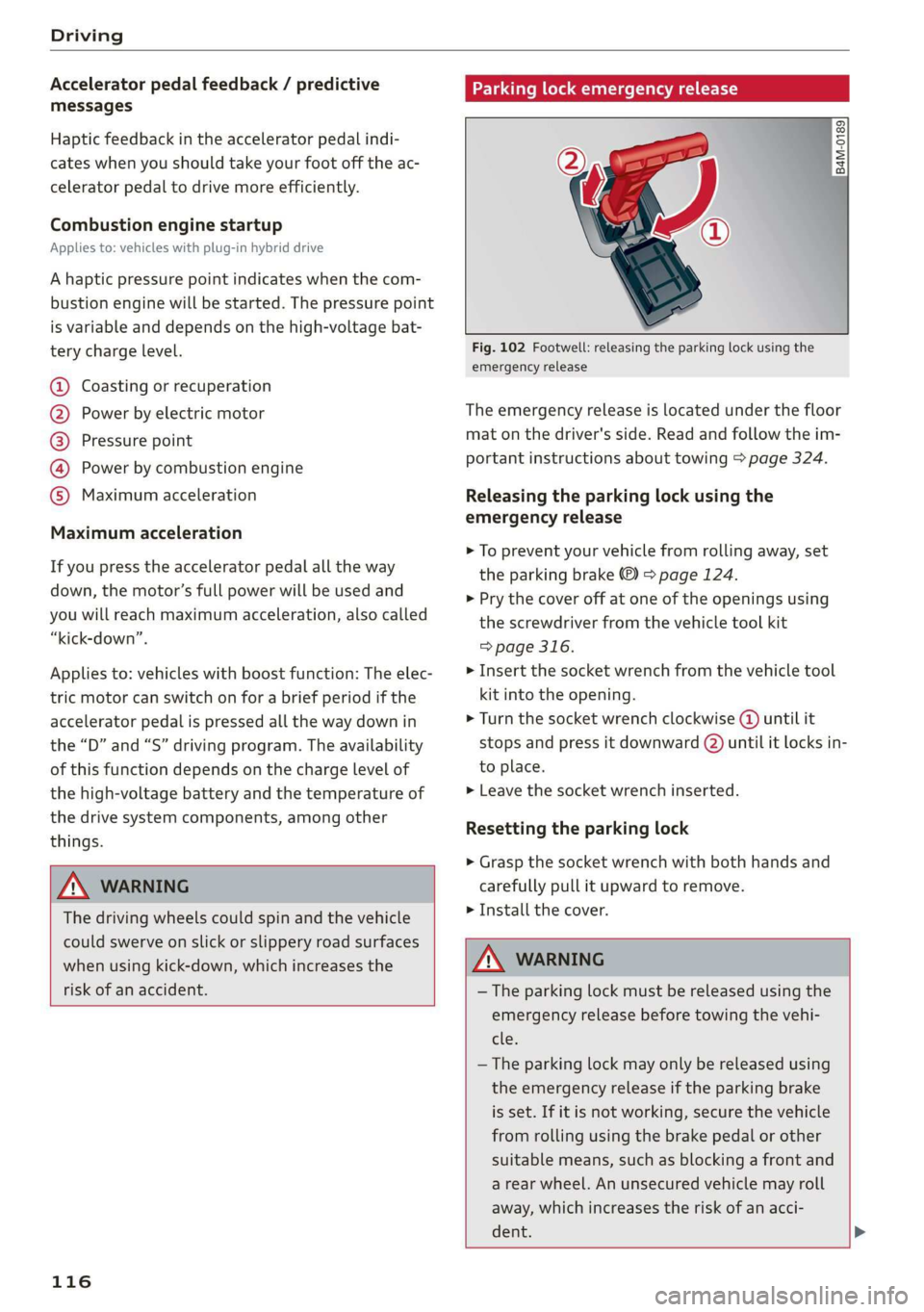
Parking lock emergency release
@
B4M-0189
@
Fig. 102 Footwell: releasing the parking lock using the
emergency release
The emergency release is located under the floor
mat on the driver's side. Read and follow the im-
portant instructions about towing > page 324.
Releasing the parking lock using the
emergency release
> To prevent your vehicle from rolling away, set
the parking brake ©) > page 124.
> Pry the cover off at one of the openings using
the screwdriver from the vehicle tool kit
> page 316.
> Insert the socket wrench from the vehicle tool
kit into the opening.
> Turn the socket wrench clockwise () until it
stops and press it downward (2) until it locks in-
to place.
> Leave the socket wrench inserted.
Resetting the parking lock
> Grasp the socket wrench with both hands and
carefully pull it upward to remove.
> Install the cover.
ZA WARNING
— The parking lock must be released using the
emergency release before towing the vehi-
cle.
— The parking lock may only be released using
the emergency release if the parking brake
is set. If it is not working, secure the vehicle
from rolling using the brake pedal or other
suitable means, such as blocking a front and
a rear wheel. An unsecured vehicle may roll
away, which increases the risk of an acci-
dent. >
Page 124 of 360
Driving
The Start/Stop system is automatically activated
once
the ignition is switched on.
Switching the Start/Stop system off and on
The & button is located above the selector lever
in the center console. The LED in the button turns
on when the function is switched off.
> Press & to switch on or off.
If you switch the system off during a Stop phase,
the engine will start again automatically.
Basic requirements
—The driver's door and hood must be closed.
—"P","N", or"D" must be engaged.
— The steering wheel must not be turned far in ei-
ther direction.
— The vehicle must have driven faster than 2 mph
(3 km/h) since the last time it stopped.
— The vehicle is not in trailer mode.
® Note
Always switch the Start/Stop system off when
driving through water > page 122.
G) Tips
— Depending on the driving situation, the en-
gine may already stop when coasting before
the vehicle has come to a complete stop )).
— If you select the "D" position after shifting
into reverse, the vehicle must be driven fast-
er than 6 mph (10 km/h) in order for the
Start/Stop system to become active again.
This makes it possible to maneuver without
stopping the engine.
Stopping and starting the engine
Applies to: vehicles with Start/Stop system
> Press and hold the brake pedal until the vehicle
has stopped. The @ indicator light appears in
the instrument cluster once the engine stops
automatically.
> The engine starts again when you remove your
foot from the brake pedal. The indicator light
turns off.
D_ In certain countries.
122
G) Tips
— Press the brake pedal during a Stop phase
to keep the vehicle from rolling.
— The ignition will turn off if you press the
START ENGINE STOP] button during a Stop
phase.
— If you leave the vehicle briefly during a Stop
phase, the driver's door must be closed and
the safety belt buckled for the engine to be
able to restart.
— You can control if the engine will stop or not
by reducing or increasing the amount of
force you use to press the brake pedal. For
example, if you only lightly press on the
brake pedal in stop-and-go traffic or when
turning, the engine will not switch off when
the vehicle is stationary. If you press the
brake pedal harder, the engine will switch
off.
Starting and stopping the engine automat-
ire] AY
Applies to: vehicles with Start/Stop system
The system checks if certain conditions are met
before and during the Stop phase, and deter-
mines if the engine stops and how long it re-
mains stopped. For example, if power usage is
high, the engine will not be stopped. Along with
other conditions, the following factors influence
the automatic engine start or stop:
— Environmental conditions (slopes, inclines, ele-
vation, temperature)
— Battery (charge status, temperature, power us-
age)
— Engine temperature
— Assist systems
— Driving behavior
Depending on the engine, the indicator light
may appear if the engine is not stopped.
Messages
Applies to: vehicles with Start/Stop system
Drive system: please start the vehicle manually >
Page 126 of 360
Driving
@) Note
— Never let the brakes “rub” by pressing the
pedal lightly when braking is not actually
necessary. This can cause the brakes to over-
heat and increases braking distance and
causes wear.
— Observe the important information for driv-
ing downhill > page 126. This especially ap-
plies when towing a trailer.
@ Tips
— If you retrofit your vehicle with a front spoil-
er, wheel covers or similar items, make sure
that the air flow to the brakes is not ob-
structed. Otherwise the brake system can
overheat.
— Also refer to the information about brake
fluid > page 283.
WEEE Tel
GG 7 @ Brakes: malfunction! Safely stop ve-
hicle
There is a malfunction in the brake system. If
fs) and also turn on, there is a malfunc-
tion in the ABS, ESC, and braking distribution.
Do not continue driving. See an authorized Audi
dealer or authorized Audi Service Facility for as-
sistance. Read and follow the other safety pre-
cautions > A.
Gia / © Brake pads: wear limit reached. You
can continue driving. Please contact Service
The brake pads are worn. Drive to an authorized
Audi dealer or authorized Audi Service Facility as
soon as possible to have the malfunction correct-
ed.
Brake booster: limited functionality.You can
continue driving. Please contact Service
There is a brake booster malfunction. The brake
booster is available, but its effectiveness is re-
duced. The braking performance may be different
compared to the usual performance. Drive to an
authorized Audi dealer or authorized Audi Service
Facility immediately to have the malfunction cor-
rected.
124
Brake booster: deactivated. See owner's manual
The brake booster remains active for a brief peri-
od of time after switching off the ignition. Secure
the vehicle from rolling by setting the parking
brake and select the “P” gear.
Other indicator lights
if is displayed when there is a malfunction,
the brakes were under heavy load. Follow the in-
structions in the message to utilize the engine
braking effect and to relieve the brakes.
Z\ WARNING
If a malfunction occurs in the ABS, ESC, and
braking distribution, interventions that stabi-
lize the vehicle will no longer be available.
This could cause the vehicle to swerve, which
increases the risk that the vehicle will slide.
Do not continue driving. See an authorized
Audi dealer or authorized Audi Service Facility
for assistance.
Electromechanical
parking brake
Operating the parking brake
The electromechanical parking brake is used to
secure the vehicle from rolling away unintention-
ally.
The @) switch is located under the selector lever
in the center console. It turns on when the park-
ing brake is set. You can release the parking brake
manually or automatically when you start to
drive.
Setting and releasing the parking brake
> Closing: Pull the © switch.
> 1* ©) appears, the parking brake is hold-
ing the vehicle. You can remove your foot from
the brake pedal.
> Releasing: when the ignition is switched on,
press and hold the brake pedal and press the
button.
If the red indicator light flashes, the braking
force has not built up enough or it has decreased.
You can also secure the vehicle by selecting the >