lock AUDI A8 2020 Workshop Manual
[x] Cancel search | Manufacturer: AUDI, Model Year: 2020, Model line: A8, Model: AUDI A8 2020Pages: 360, PDF Size: 95.38 MB
Page 132 of 360
Driving dynamic
With Road ahead: level correction, you can ad-
just how much the vehicle will compensate for
bumps in the road. For this purpose, there is a
camera behind the windshield that detects the
road conditions and activates the active suspen-
sion when bumps are predicted. A colored cone in
the display indicates when this function is acti-
vated. This function may only have limited availa-
bility under certain conditions, for example,
when it is dark > page 155.
Applies to: vehicles with elevated entry
With the Elevated entry function, you can select
if the vehicle should be raised when a door is
opened in order to enter and exit the vehicle
more comfortably. The vehicle will lower again
slowly in the following situations:
— When starting from a stop
— When locking the vehicle
— When changing the Audi drive select* mode
— Approximately 10 seconds after all doors have
been closed
— After a certain period of time when the engine
is stopped and a door is open, in order to main-
tain the battery charge level.
This function may not be available under certain
conditions, for example if the ground is not level
or when the battery charge level is low. The func-
tion may also be deactivated temporarily after
the
vehicle is serviced using diagnostic equip-
ment, and it will only be available again once the
vehicle is driven a certain distance.
©) Note
When the elevated entry function is activated,
make sure there is sufficient space above and
below the vehicle. This particularly applies to
space under open doors and above roof struc-
tures. If you are unsure about the amount of
space, deactivate the elevated entry function
before exiting the vehicle to reduce the risk of
damage.
@ Tips
— If an open door touches the ground or be-
comes stuck, use the Raise > page 129
130
function in the MMI to raise the vehicle us-
ing the air suspension.
— When the curve tilting function is switched
on, the vehicle passengers will experience
less turning force when driving around
curves. This may influence the perception of
speed. Always adjust the speed to the driv-
ing situation.
Ground clearance
The vehicle height and clearance can be influ-
enced by the following factors:
— Change in temperature
— Change in load
— Change to the Audi drive select* mode
— Lifting and lowering via the air suspension*
— Automatic lifting and lowering using the Ele-
vated entry* function
ZA\ WARNING
To reduce the risk of injury, make sure no one
gets pinched when the vehicle level is chang-
ing, for example when cleaning the under-
body or the wheel housings.
C) Note
Always make sure there is enough clearance
above and below the vehicle. This is especially
important for entrances with height restric-
tions, for example, before driving into under-
ground garages. You could also scrape the
ground when driving over the edges of curbs
or on steep ramps, which could damage your
vehicle.
Messages
B Air suspension: malfunction! You may con-
tinue driving slowly at max. XX mph (km/h)
There is a malfunction. Driving stability may be
limited. Drive to an authorized Audi dealer or au-
thorized Audi Service Facility immediately. Do not
drive faster than the speed given in the message.
B Air suspension: malfunction! Safely stop ve-
hicle. Steering and ground clearance limited >
Page 133 of 360
4N0012721BD
Driving dynamic
There is a malfunction. Do not continue driving.
Stop the vehicle safely. Avoid turning the steer-
ing wheel, because the vehicle ground clearance
may be so low that turning the steering wheel
could result in damage to the wheels and wheel
housings.
EB Active suspension: unavailable. Limited sta-
bility. Can continue driving with caution. See
owner's manual
There is a heavy load on the vehicle electrical sys-
tem or the active suspension. Therefore, the ac-
tive suspension functions will be temporarily
switched off. Driving stability is reduced. Contin-
ue driving with caution.
EB Active suspension: malfunction! Limited sta-
bility. You can continue driving with caution
There is a malfunction. Driving stability is re-
duced. See an authorized Audi dealer or author-
ized Audi Service Facility for assistance.
B Air suspension: vehicle too low. Limited
ground clearance
The vehicle ground clearance is very low. Wait un-
til the air suspension system has restored normal
ground clearance. Have an authorized Audi dealer
or authorized Audi Service Facility repair the mal-
function immediately if the indicator light does
not turn off after a significant period of time.
B Air suspension: malfunction! Please contact
Service
There is a malfunction. The driving stability may
be limited and the ground clearance may be low.
See an authorized Audi dealer or authorized Audi
Service Facility for assistance.
Active suspension: currently limited. See
owner's manual
There is a heavy load on the vehicle electrical sys-
tem or the active suspension. Therefore, the ac-
tive suspension functions are temporarily limit-
ed.
Active suspension: predictive scanning un-
available. See owner's manual
There is a malfunction. The camera’s visual field
may be blocked. Clean the windshield. If the mal-
function continues, drive to an authorized Audi
dealer or authorized Audi Service Facility immedi-
ately.
Audi drive select: automatic suspension low-
ering. See owner's manual
The vehicle level is adjusted to the setting stored
for the active personal profile > page 41.
Audi drive select: automatic suspension lift.
See owner's manual
The vehicle level is adjusted to the setting stored
for the active personal profile > page 41.
Steering
Electromechanical steering supports the driver's
steering movements by electronically adapting
the power steering depending on the vehicle
speed. The settings depend on the selected Audi
drive select* mode.
Dynamic all-wheel steering
Applies to: vehicles with dynamic all-wheel steering
Active corrective steering at the front and rear
axles increases the driving dynamic and driving
stability. At low speeds, the rear wheels are
steered in the opposite direction from the front
wheels to reduce the steering effort needed by
the driver and to reduce the turning radius. Vehi-
cle handling improves. At high speeds, steering
the rear wheels in the same direction as the front
wheels improves the vehicle response and driving
stability. The vehicle reacts quickly and precisely
to the driver's steering movements.
a Steering: malfunction! Please stop vehicle
The power steering may have failed. Adapt your
driving style immediately to compensate for the
fact that it may be more difficult to turn the
steering wheel, and stop your vehicle in a safe lo-
cation as soon as possible. Do not continue driv-
ing. See an authorized Audi dealer or authorized
Audi Service Facility for assistance.
131
Page 134 of 360

Driving dynamic
& Steering: malfunction! Please stop vehicle.
Pay attention to distance at side
The rear axle steering may have failed. More
space on the road may be needed at the side of
the vehicle. Slow down immediately, and stop
your vehicle as soon as possible in a safe location
with enough space at the sides of the vehicle. Do
not continue driving. See an authorized Audi
dealer or authorized Audi Service Facility for as-
sistance.
BS Steering: malfunction! Please stop vehicle
There is a malfunction in the electronic steering
lock. You cannot turn the ignition on. Do not tow
your vehicle because it cannot be steered. See an
authorized Audi dealer or authorized Audi Service
Facility for assistance.
a Steering: malfunction! You can continue
driving
There is a malfunction. Steering may be more dif-
ficult or more sensitive. Adapt your driving style.
Have the steering system checked immediately
by an authorized Audi dealer or authorized Audi
Service Facility. Please note that the red indicator
light may turn on after restarting the engine. Do
not continue driving if it does.
a Steering: malfunction! Adapt driving style.
Larger turning radius
The rear axle steering may have failed. The vehi-
cle will have a larger turning radius, and the sta-
bility when driving around curves will be compa-
rable to a vehicle without rear axle steering. Drive
carefully to an authorized Audi dealer or author-
ized Audi Service Facility to have the malfunction
corrected.
BS Steering lock: malfunction! Please contact
Service
There is a malfunction in the electronic steering
lock. Drive immediately to an authorized Audi
dealer or authorized Audi Service Facility to have
the malfunction repaired.
Dynamic steering: correcting steering wheel
position
132
The steering is reinitializing. The steering wheel
will move easily after starting the vehicle. Reiniti-
alization might be necessary if the steering wheel
was moved while the engine was switched off.
The display turns off if the initialization was suc-
cessful.
Z\ WARNING
Do not tow your vehicle if there is a malfunc-
tion in the electronic steering lock because
this increases the risk of an accident.
@ Tips
— If there is a malfunction, the steering wheel
may be crooked when driving straight.
—Ifthe a or a indicator light only stays on
for a short time, you may continue driving.
ALL wheel drive (quattro)
Applies to: vehicles with all wheel drive
The all-wheel drive system distributes the driving
power variably to the front and rear axle to im-
prove the driving characteristics. It works togeth-
er with selective wheel torque control, which can
activate when driving through curves
> page 134.
The all-wheel drive system is designed for high
engine power. Your vehicle is exceptionally pow-
erful and has excellent driving characteristics
both under normal driving conditions and on
snow and ice. Always read and follow safety pre-
cautions > A\.
Z\ WARNING
— Even in vehicles with all wheel drive, you
should adapt your driving style to the cur-
rent road and traffic conditions to reduce
the risk of an accident.
— The braking ability of your vehicle is limited
to the traction of the wheels. In this way, it
is not different from a two wheel drive vehi-
cle. Do not drive too fast because this in-
creases the risk of an accident.
— Note that on wet streets, the front wheels
can “hydroplane” if driving at speeds that >
Page 135 of 360
4N0012721BD
Driving dynamic
are too high. Unlike front wheel drive
vehicles, the engine RPM does not increase
suddenly when the vehicle begins hydro-
planing. Adapt your speed to the road condi-
tions to reduce the risk of an accident.
Sy Telamelaielcls
Applies to: vehicles with sport differential
The sport differential distributes the drive power
to the rear axle based on the situation. The goal
is a high level of agility and ability to accelerate
on curves. The vehicle is very responsive to steer-
ing. The settings depend on the selected Audi
drive select* mode.
Messages
Hi Sport differential: malfunction! Please con-
tact Service
Drive immediately to an authorized Audi dealer
or authorized Audi Service Facility to have the
malfunction repaired.
it} Sport differential: temperature too high.
Please adapt driving style
The transmission temperature has increased sig-
nificantly due to the sporty driving manner. Drive
in a less sporty manner until the temperature re-
turns to the normal range and the indicator light
switches of.
Z\ WARNING
Contact an authorized Audi dealer or author-
ized Audi Service Facility if the sport differen-
tial is faulty or malfunctioning. The repair
must be performed by trained personnel us-
ing the correct oil in order to ensure safety.
Electronic Stabilization
Control
Electronic Stabilization Control (ESC) supports
driver safety. It reduces the risk of slipping and
improves driving stability. ESC detects critical sit-
uations, such as if the vehicle is oversteering or
understeering, or if the wheels are spinning. The
brakes are applied or the engine torque is re-
duced in order to stabilize the vehicle.
If the [i indicator light blinks while driving, the
ESC is actively regulating.
If the B&B indicator light turns on, the system has
switched the ESC off. In this case, you can switch
the ignition off and then on to switch the ESC on
again. The indicator light turns off when the sys-
tem is fully functional.
If the B indicator light turns on, ESC was limit-
ed or switched off manually > page 134.
The following systems are integrated in the ESC:
Anti-lock braking system (ABS)
ABS prevents the wheels from locking when brak-
ing. The vehicle can still be steered even during
hard braking. Apply steady pressure to the brake
pedal. Do not pump the pedal.
A pulsing in the brake pedal indicates that the
system is acting to stabilize the vehicle.
Brake assist
The brake assist system can decrease braking dis-
tance. It increases braking power when the driver
presses the brake pedal quickly in emergency sit-
uations. You must press and hold the brake pedal
until the dangerous situation is over. Depending
on the activated driver assistance systems, the
brake assist system may react with increased sen-
sitivity.
Anti-Slip Regulation (ASR)
ASR reduces drive power when the wheels begin
spinning and adapts the power to the road condi-
tions. This will increase the driving stability.
Electronic Differential Lock (EDL)
The EDL applies the brakes to wheels that are
slipping and transfers the drive power to the oth-
er wheels. This function is not available at higher
speeds.
In extreme cases, EDL automatically switches off
to keep the brake on the braked wheel from over-
heating. The vehicle is still functioning correctly. >
133
Page 141 of 360

4N0012721BD
High-voltage system
— IEC 61851 and IEC 62196 (Europe)
— SAE J1772 (North America, Japan)
— You can use your Audi charging system if
there is a household or industrial connec-
tion available at the charging station.
@ Tips
Applies to: Audi charging systems
— For an uninterrupted charging process, we
recommend only charging using sockets
that are connected to a separately protected
circuit.
— It is recommended to use Audi charging sys-
tems in the wall mount clip* during opera-
tion. If this is not possible, always position
Audi charging systems ona secure surface
during the charging process > A.
—To reduce the risk of overheating during op-
eration, do not place Audi charging systems
in direct sunlight for long periods of time. If
the control unit is overheated, the charging
process is automatically paused until the
temperature has lowered back within the
normal range.
Cee Tact)
Applies to: vehicles with plug-in hybrid drive
Fig. 106 Left rear side of the vehicle: opening the high-
voltage charging port door
RAZ-0835
Fig. 107 Charging unit: charging port and buttons/LED
Connecting the charging cable
If you charge your vehicle at a charging station,
the following sequence of steps may vary. Follow
the manufacturer guidelines and operating in-
structions for the charging station.
Requirement: the “P” gear must be selected, the
parking brake must be set, and drive ready mode
must have ended.
— If necessary, remove the charging cable from
the vehicle > page 144, Transport.
— Remove the cap from the charging cable if nec-
essary.
— First connect the charging cable to the power
supply, or remove it from the charging station.
— Unwind the charging cable completely.
— Unlock the vehicle.
— To open the charging port door, press on the
right
side of the door > fig. 106.
— Remove the cap from the vehicle charging port
and place it on the holder on the charging port
door.
— Plug the charging connector into the vehicle
charging port.
Starting to charge automatically (immediate
charging)
If charging is not delayed with a timer, the charg-
ing process will begin immediately. If necessary,
the charging station may need to be activated.
Follow the manufacturer guidelines and operat-
ing instructions for the charging station.
While charging
The charging display on the charging unit @) will
flash green while charging. It will pulse |} in the
instrument cluster. You can find the meaning of >
139
Page 142 of 360
High-voltage system
the possible charging display colors under
=> page 140.
The charging connector is locked while charging
and cannot be removed.
If the driver's door is opened while the ignition is
switched off, the current battery charge level and
the high-voltage battery range will be displayed
in the instrument cluster. If charging is in prog-
ress, the remaining charging time will also be
displayed.
Immediate charging and timer charging
You can switch between the immediate charging
@ and charging timer @ options during the
charging process if a charging timer is set
= page 141. Press the desired button to do this.
Ending the charging process
You can interrupt the charging process at any
time.
— Unlock the vehicle or press the @/(@) button
when the vehicle is unlocked, and the LED will
turn on.
— Remove the charging connector. If the charging
connector is not removed within 30 seconds, it
will automatically relock and the charging proc-
ess may continue.
— Put the cap back on the charging port.
— Close the charging port door.
— Disconnect the charging cable from the power
supply if necessary or return it securely to the
charging station.
— Install the protective caps on the charging ca-
ble again.
— If you are transporting the charging cable in
the vehicle, store it securely > page 144.
If the charging connector cannot be removed,
you must unlock it manually > page 142.
ZA\ WARNING
— Do not disconnect the charging cable from
the socket or the vehicle charging port while
the vehicle is charging. End the charging
process before removing the charging cable
from the socket in order to reduce the risk of
damaging the connector contacts from
sparks.
—If the charging unit is damaged, do not
charge using the charging port to reduce the
risk of injury.
— If the charging unit is damaged or the
charging port door cannot close or is miss-
ing, drive immediately to an authorized Audi
dealer or authorized Audi Service Facility
and have the malfunction corrected to re-
duce the risk of injury.
() Note
If you drive with the charging unit open, both
the charging port door and the electronics in-
stalled behind it could be damaged. Check
each time after charging if the port door is
locked before you start driving the vehicle.
@) Tips
— If the parking brake is set, it could create
noises when the charging connector is con-
nected.
— Remove ice and snow in the charging unit
using a hand brush and solvent-free deicing
spray.
— The vehicle radio and TV systems may have
limited reception when charging the vehicle.
Charging display
Applies to: vehicles with plug-in hybrid drive
The charging display is an LED light on the charg-
ing unit @) > page 139, fig. 107 that indicates
the charging status. The key for the LED light is
explained in the following table.
LED on the charging unit Meaning
Vehicle charging system is in sleep mode. A timer may be active,
Off but charging has not started yet.
Charging process is interrupted. >
140
Page 143 of 360

4N0012721BD
High-voltage system
LED on the charging unit Meaning
Pulsing The high-voltage battery is charging.
Green Flashing A timer is active, but charging has not started yet.
On High-voltage battery charging process is completed.
When using the Audi charging system, make sure the power
plug is inserted in the power socket > page 144. No power sup-
ply was recognized even though the charging cable is plugged
On in. Have the power supply or power supply system inspected.
When using the Audi charging system, check the status displays
Yellow on the unit > table on page 145. See an authorized Audi dealer
or authorized Audi Service Facility for assistance if necessary.
The vehicle is not secured from rolling away. Check if “P” is se-
lected and the parking brake is set. If the LED continues to
flash, see an authorized Audi dealer or authorized Audi Service
Facility for assistance.
Flashing
The charging connector may not be able to lock correctly in the
vehicle charging port. Check if the charging connector is insert-
ed correctly. Remove the charging connector and plug it in the
charging port again, or use a different charging station. If the
Red On LED stays turned on, there is a malfunction either in the vehicle
charging system or at the power source. See an authorized Audi
dealer or authorized Audi Service Facility for assistance if neces-
sary.
The outside temperature is too low or too high.
@ Tips > If the timer should be set one time, select Indi-
: vidual timer. If the timer should be set to re-
peat, select Repeat timer.
> Set a preferred charging time if desired, for ex-
ample to use off-peak power rates.
> To also activate the climate control with a tim-
Yad tare mans er, select CD.
Applies to: vehicles with plug-in hybrid drive > Select Next and follow the instructions in the
The operation status indicated by the LED on
the charging unit are is displayed in the in-
strument cluster Es.
menu.
> To turn ona timer, select CD.
> To activate an enabled timer, select s— until the
Timer charging mode is displayed.
Use a timer to set at what departure time your
vehicle should be fully charged. A timer can ei-
ther be set one time or to repeat at the selected
times. You can also specify if your vehicle should
be heated or cooled to the temperature set in the If the set departure time on the timer is too
climate control system. You can turn on multiple close, it may not be possible to charge the vehicle
timers at the same time. fully.
> Applies to: MMI: Select on the home screen: @ :
VEHICLE > Charging & Efficiency > Charging. Tips
It is not possible to charge using the timer at
Multiple timers are displayed that you can set peer
separately.
> To set a timer, select > in the line for the de-
sired timer.
141
Page 144 of 360
High-voltage system
Emergency release
In case of malfunction, you can manually release
the charging port door or the charging connec-
tor.
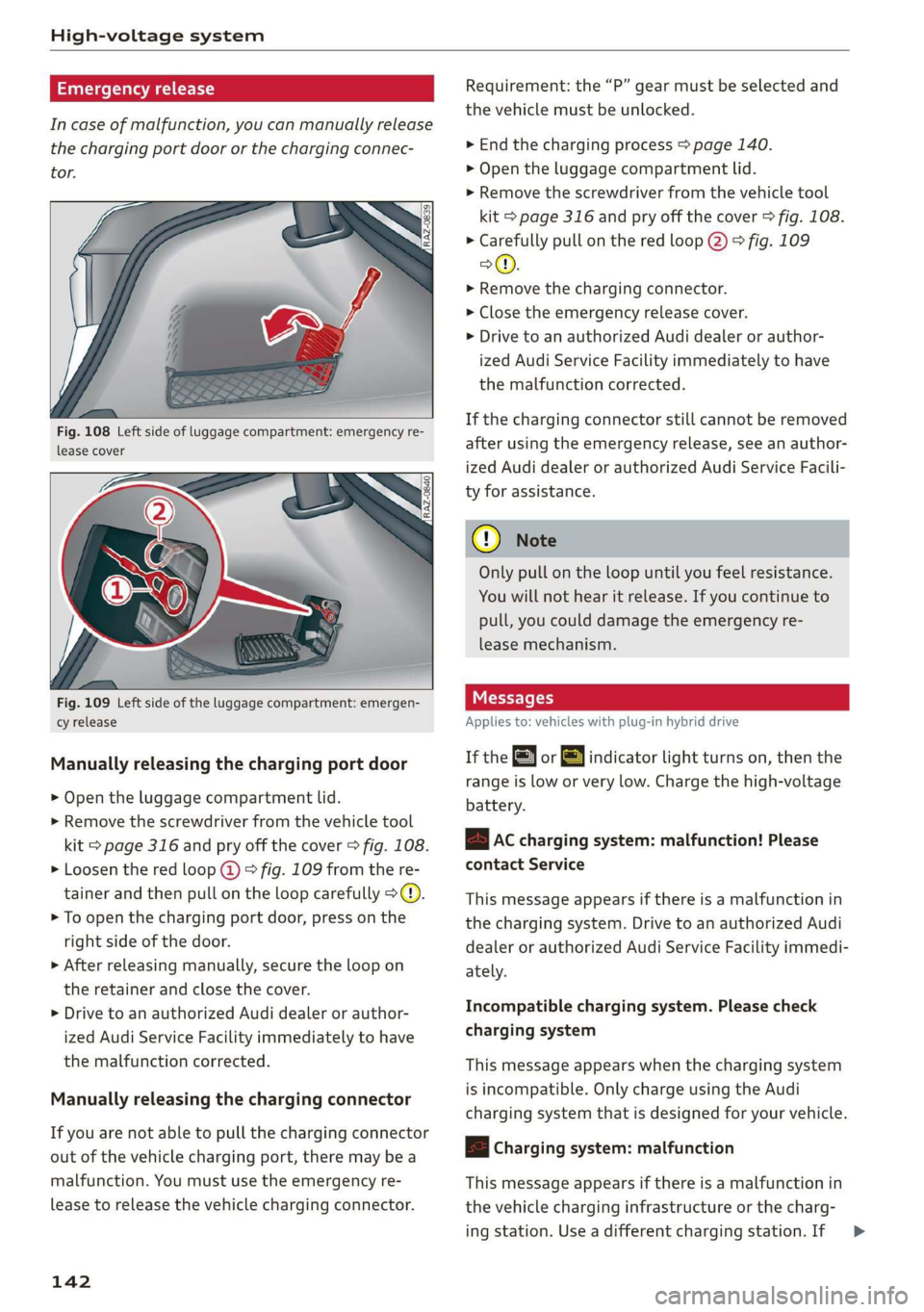
Fig. 108 Left side of luggage compartment: emergency re-
lease cover
Fig. 109 Left side of the luggage compartment: emergen-
cy release
Manually releasing the charging port door
> Open the luggage compartment lid.
> Remove the screwdriver from the vehicle tool
kit > page 316 and pry off the cover > fig. 108.
> Loosen the red loop @) > fig. 109 from the re-
tainer and then pull on the loop carefully >@.
> To open the charging port door, press on the
right side of the door.
>» After releasing manually, secure the loop on
the retainer and close the cover.
> Drive to an authorized Audi dealer or author-
ized Audi Service Facility immediately to have
the malfunction corrected.
Manually releasing the charging connector
If you are not able to pull the charging connector
out of the vehicle charging port, there may bea
malfunction. You must use the emergency re-
lease to release the vehicle charging connector.
142
Requirement: the “P” gear must be selected and
the vehicle must be unlocked.
> End the charging process > page 140.
> Open the luggage compartment lid.
> Remove the screwdriver from the vehicle tool
kit > page 316 and pry off the cover > fig. 108.
> Carefully pull on the red loop @) > fig. 109
>©.
> Remove the charging connector.
> Close the emergency release cover.
> Drive to an authorized Audi dealer or author-
ized Audi Service Facility immediately to have
the malfunction corrected.
If the charging connector still cannot be removed
after using the emergency release, see an author-
ized Audi dealer or authorized Audi Service Facili-
ty for assistance.
® Note
Only pull on the loop until you feel resistance.
You
will not hear it release. If you continue to
pull, you could damage the emergency re-
lease mechanism.
IY tre (1
Applies to: vehicles with plug-in hybrid drive
If the or =] indicator light turns on, then the
range is low or very low. Charge the high-voltage
battery.
B AC charging system: malfunction! Please
contact Service
This message appears if there is a malfunction in
the charging system. Drive to an authorized Audi
dealer or authorized Audi Service Facility immedi-
ately.
Incompatible charging system. Please check
charging system
This message appears when the charging system
is incompatible. Only charge using the Audi
charging system that is designed for your vehicle.
|< Charging system: malfunction
This message appears if there is a malfunction in
the vehicle charging infrastructure or the charg-
ing station. Use a different charging station. If >
Page 152 of 360
High-voltage system
> Close the lever @) until it is resting on the con-
nector (2).
> Remove the connector (2) completely.
Attaching the cable
> Lift the lever @ up slightly.
> Insert the connector (2) into the control unit
just until you feel resistance.
> Lift the lever @ all the way up.
> Insert the connector (2) all the way into the
control unit.
> Close the lever ().
> Tighten the screw (3) using the screwdriver pro-
vided.
Z\ WARNING
— Note the warnings for charging > A\ in
Charging on page 140.
— Before switching a cable, always unplug the
power cable from the socket.
— Only change cables in a dry environment.
— The Audi charging system may only be used
as a complete unit consisting of the power
cables, the control unit, and the vehicle ca-
ble. Depending on the country, the total
length of the power cable, control panel and
vehicle cable may be restricted, for example
to 24.6 ft (7.5 m) in the USA. We recom-
mend using only cables approved by Audi.
G) Tips
The power cable with the power connector for
industrial sockets and the Audi charging sys-
tem control unit are designed to work togeth-
er. Changing the power cable to another con-
nector type may reduce the available charging
power of the entire system.
150
Wall mount clip
Applies to: vehicles with plug-in hybrid drive and wall mount
clip
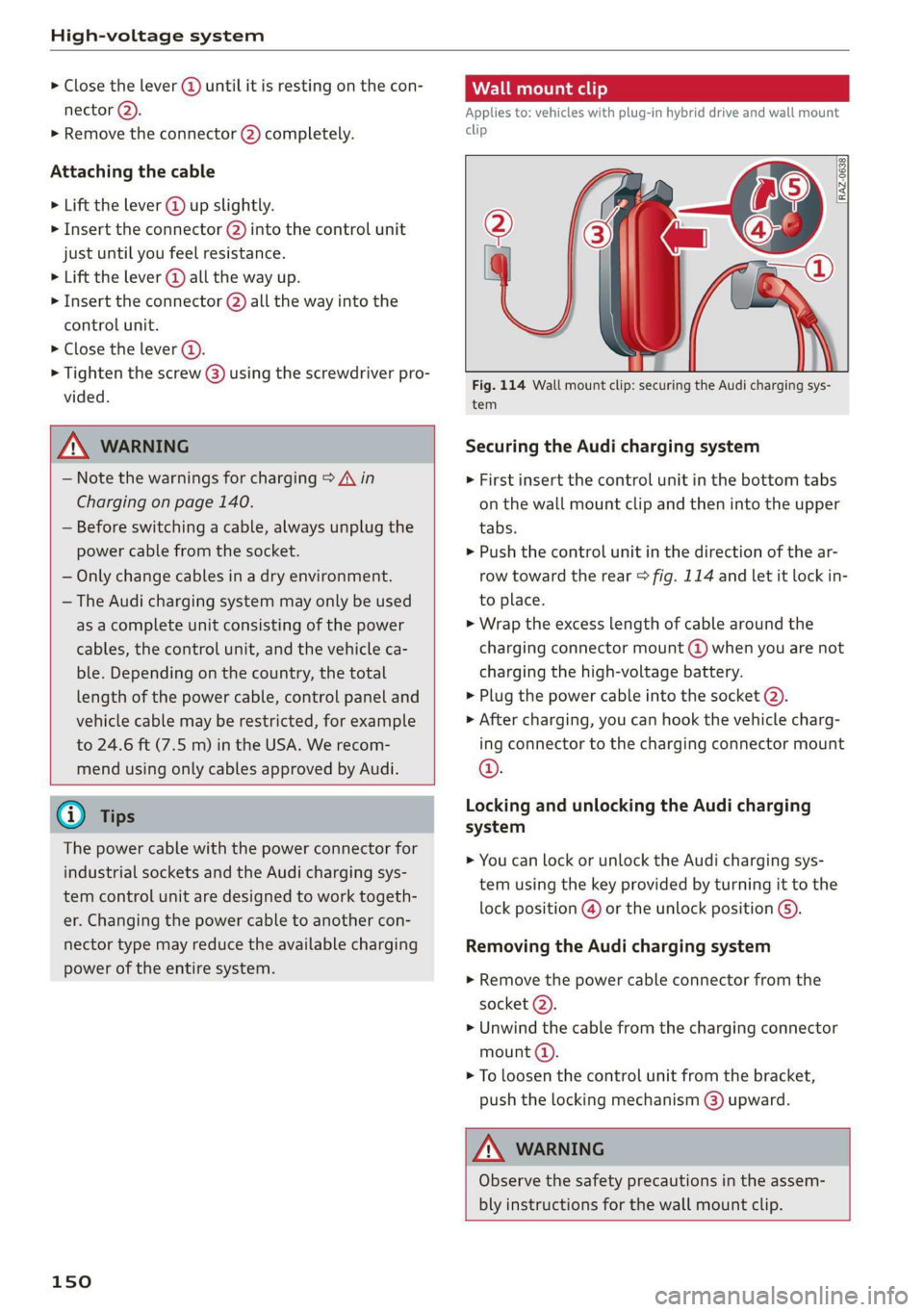
[RAZ-0638|
Fig. 114 Wall mount clip: securing the Audi charging sys-
tem
Securing the Audi charging system
> First insert the control unit in the bottom tabs
on the wall mount clip and then into the upper
tabs.
» Push the control unit in the direction of the ar-
row toward the rear > fig. 114 and let it lock in-
to place.
> Wrap the excess length of cable around the
charging connector mount @) when you are not
charging the high-voltage battery.
> Plug the power cable into the socket (2).
» After charging, you can hook the vehicle charg-
ing connector to the charging connector mount
©.
Locking and unlocking the Audi charging
system
> You can lock or unlock the Audi charging sys-
tem using the key provided by turning it to the
lock position @) or the unlock position @).
Removing the Audi charging system
> Remove the power cable connector from the
socket @).
> Unwind the cable from the charging connector
mount (a).
> To loosen the control unit from the bracket,
push the locking mechanism @) upward.
ZA\ WARNING
Observe the safety precautions in the assem-
bly instructions for the wall mount clip.
Page 154 of 360
Trailer towing
you are operating the vehicle. Contact an author-
ized Audi dealer or authorized Audi Service Facili-
ty for more information.
Before you start driving, check all lighting equip-
ment on the trailer while it is hitched to the vehi-
cle.
The headlight range control automatically ad-
justs the light range of the headlights.
Safety chains
Make sure the safety chains are correctly applied
when pulling a trailer. The chains should hang
enough so that the trailer can drive around
curves. However, they must not touch the
ground.
Air suspension
Applies to: vehicles with air suspension
The Audi drive select* comfort mode > page 128
must be selected before you adjust the tongue
weight on the trailer and hitch the trailer >@,
=> page 130.
Likewise, the vehicle cannot be raised manually
using the Raise function > page 130.
For vehicles with a retrofitted trailer hitch, you
must switch on the air suspension trailer mode
manually.
Applies to: MMI: Select on the home screen: VE-
HICLE > Settings & Service > Air suspension:
trailer.
Switch it off again when you are no longer towing
a trailer.
When using carrier systems that are mounted di-
rectly on the trailer hitch ball head, you can also
switch trailer mode off manually.
If you must drive on roads that are in poor condi-
tion, you can raise the vehicle again after hitching
the trailer or after adjusting the tongue weight
=> page 130.
Vehicle levels below the values set in the comfort
level will no longer be available, even if you are
lowering the vehicle manually.
152
Z\ WARNING
— Never turn off trailer mode while driving
when a trailer is hitched, because then the
restrictions for controlling the vehicle level
will be turned off.
— Driving with a trailer on unpaved roads when
the vehicle is raised may change the vehicle
handling. Adapt your speed.
— Note that the vehicle will lower automatical-
ly at certain speeds if you have lifted the ve-
hicle manually.
() Note
— Applies to: vehicles with air suspension: Se-
lect the Audi drive select* comfort mode.
Otherwise, the tongue load specified for
your vehicle will no longer be applicable.
— Attachments retrofitted on the vehicle may
cause damage, especially on the trailer
hitch ball head. In cases of damage, have
the function checked by an authorized Audi
dealer or authorized Audi Service Facility.
G) Tips
— Block the wheels with chocks when parking
on inclines if the trailer is loaded.
— Having the vehicle inspected between the
inspection intervals is recommended if you
tow a trailer frequently.
— Avoid driving with a trailer during the vehi-
cle break-in period.
Driving with a trailer
Driving with a trailer requires extra caution.
Speed
Adhere to the legal speed limits. Follow the legal
regulations that are applicable in the country
where you are operating the vehicle.
As the speed increases, the driving stability of
the trailer decreases. Therefore you should not
exceed the maximum legal speed limit when
there are unfavorable road, weather, and/or wind
conditions. This especially applies when driving
downhill.