steering wheel AUDI A8 2020 Workshop Manual
[x] Cancel search | Manufacturer: AUDI, Model Year: 2020, Model line: A8, Model: AUDI A8 2020Pages: 360, PDF Size: 95.38 MB
Page 244 of 360
![AUDI A8 2020 Workshop Manual Radio
Radio
Opening the radio
Cet Sted
7 a P Leh
M
Cues ae} HD2
ee ci
Cees GE)
Se ea
Ce Cite
S S|
7 | Ba ce| Coleen y-\>) (0119)
(ole) Me ar aT]
Pea
The Rock Band - Numero uno
(ole](/img/6/57606/w960_57606-243.png "AUDI A8 2020 Workshop Manual Radio
Radio
Opening the radio
Cet Sted
7 a P Leh
M
Cues ae} HD2
ee ci
Cees GE)
Se ea
Ce Cite
S S|
7 | Ba ce| Coleen y-\>) (0119)
(ole) Me ar aT]
Pea
The Rock Band - Numero uno
(ole")
Radio
Radio
Opening the radio
Cet Sted
7 a P Leh
M
Cues ae} HD2
ee ci
Cees GE)
Se ea
Ce Cite
S S|
7 | Ba ce| Coleen y-\>) (0119)
(ole) Me ar aT]
Pea
The Rock Band - Numero uno
(ole IT
Cece
(ley a Os
Fig. 170 Upper display: SiriusXM channel list
Depending on the vehicle equipment, the radio
may support the FM, AM, and SiriusXM (satellite
radio) frequency bands. Using the HD Radio re-
ceiver also allows you to receive radio stations on
the FM and AM bands in digital format.
Depending on the station list, the following in-
formation may be displayed:
@ Station list
Shows the station that is currently playing.
The station list updates automatically.
@ Stations
Depending on availability, the station name
as well as program information, for example,
may
be displayed.
@ HD Radio technology
FM/AM stations that can be received by digi-
tal radio are marked with the HD Radio tech-
nology symbol H).
If reception quality declines, the radio auto-
matically switches to the analog FM/AM sta-
tion depending on availability.
@ Additional stations
Digital HD Radio stations may contain multi-
ple additional stations. If you lose reception,
the additional stations will be muted since
they can no longer be received.
242
© Radio ID
Your radio ID and contact data for your satel-
lite radio provider are displayed.
© Channel number
@ Smart Favorite
See > page 245.
Adjusting the radio using the MMI
> Applies to: MMI: To set a frequency band, select
on the home screen: RADIO > Source a fre-
quency band.
> Applies to: MMI: To set a station, select on the
home screen: RADIO > Source > select a sta-
tion list > select a station.
> To select a frequency, follow the instructions
under > page 244, Free text search.
Adjusting the radio using the multifunction
steering wheel
Requirement: radio mode must be on.
> Select the Radio/Media tab using the multi-
function steering wheel.
> To switch between radio and media, select the
EE] button > Switch to radio/Switch to media.
> Turn the left thumbwheel to display the station
list.
> To switch to a different source, press the
button.
> To select a station or a source, turn and press
the left thumbwheel.
Adjusting the radio using the Rear Seat
Remote
Applies to: vehicles with Rear Seat Remote
Requirement: the Rear Seat Remote must be con-
nected to the MMI > page 27.
> Applies to: Rear Seat Remote: Press RADIO on
the home screen.
Operation of the available radio functions using
the Rear Seat Remote is very similar to operation
in the MMI > page 243.
Adjusting the radio using the Audi tablet
Applies to: Vehicles with Audi tablet
Requirement: the Audi tablet must be connected
to the MMI 5 page 34.
Page 245 of 360
4N0012721BD
Radio
» Applies to: Audi tablet: Press RADIO on the — Buildings, tunnels, bridges, open areas, oth-
home screen. er vehicles or objects on the vehicle roof can
affect reception.
— Satellite radio is not available in Alaska and
Hawaii.
Operation of the available radio functions in the
Audi tablet is very similar to operation in the
MMI & page 243.
— Applies to: Multifunction steering wheel:
Depending on the selected function, it may
be necessary to use the MMI.
ZA WARNING
Note the safety precautions > page 25, Rear
Seat Remote and > page 29, Rear Seat Enter-
tainment (Audi tablet).
@ Tips
— Contact the SiriusXM* provider if you would
like to receive satellite programming.
Radio functions
Lea TN]
RAX-0097
ac)
Search and
manual tuning Last stations fed
\/ Eo]
reer
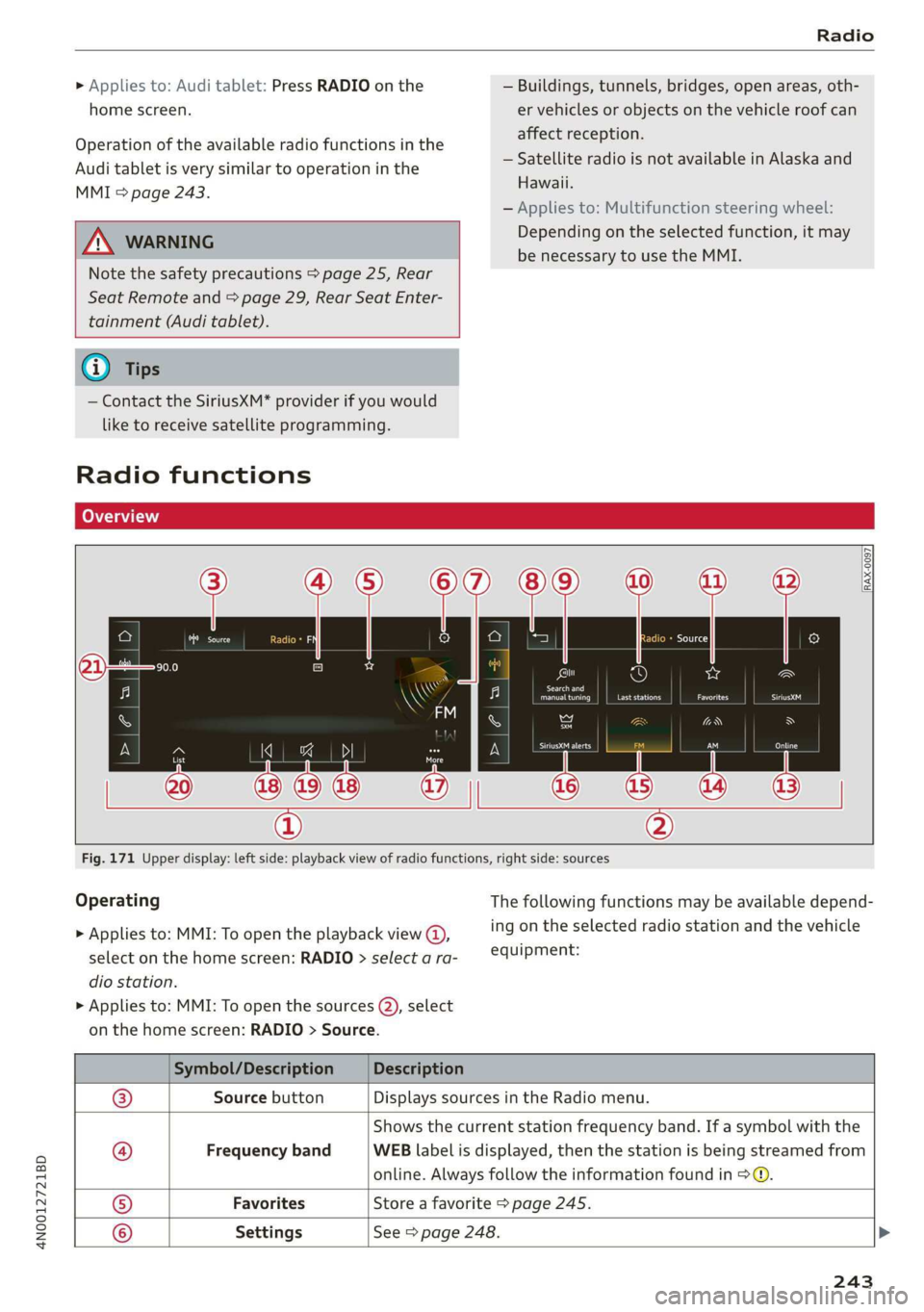
Fig. 171 Upper display: left side: playback view of radio functions, right side: sources
Operating The following functions may be available depend-
> Applies to: MMI: To open the playback view @), ing on the selected radio station and the vehicle
select on the home screen: RADIO > select a ra- equipment:
dio station.
> Applies to: MMI: To open the sources (2), select
on the home screen: RADIO > Source.
Symbol/Description Description
Source button Displays sources in the Radio menu.
Shows the current station frequency band. If a symbol with the
Frequency band WEB label is displayed, then the station is being streamed from
online. Always follow the information found in >@.
Favorites ‘Store a favorite > page 245.
@|©|
© ©
Settings See > page 248.
243
Page 257 of 360
4N0012721BD
Media
— For more information about the Audi music
interface and supported devices, check the
Audi database for mobile devices at www.
audi.com/mp3 or contact an authorized
Audi dealer or authorized Audi Service Fa-
cility.
Playing media
The following sources can be selected depending
on the vehicle equipment:
— Amazon Alexa > page 253.
-SD card > page 250.
— USB > page 254.
— DVD drive > page 251.
— Connect external device: you can connect ex-
ternal devices via Bluetooth and use the Blue-
tooth audio player > page 252, or you can con-
nect
an external device directly to the Audi mu-
sic interface > page 254.
— Connect online media > page 252.
— DVD changer > page 251.
Accessing media
Playing media files using the MMI
> Applies to: MMI: Select on the home screen:
MEDIA > Source > a source. Depending on the
connected device or online media service*, the
symbol for a source may change. The device
name may be displayed (for example: my-
Phone).
> Select a track from the categories in the media
center > page 256.
Playing media files using the multifunction
steering wheel
Requirement: a media drive must contain media
files > page 255.
> Select the Radio/Media tab using the multi-
function steering wheel.
> Turn the left thumbwheel to display the play-
list.
> To switch to a different source, press the
button.
> To select a media file or a source, turn and
press the left thumbwheel.
> To switch between radio and media, select the
button > Switch to radio/Switch to media.
Playing media files using the Rear Seat
Remote
Applies to: vehicles with Rear Seat Remote
Requirement: the Rear Seat Remote must be con-
nected to the MMI > page 27.
> Applies to: Rear Seat Remote: Press MEDIA on
the home screen.
Operation of the available media functions with
the Rear Seat Remote is very similar to operation
in the MMI > page 258.
Playing media files using the Audi tablet
Applies to: Vehicles with Audi tablet
Requirement: the Audi tablet must be connected
to the MMI & page 34.
> Applies to: Audi tablet: Press MEDIA on the
home screen.
If a media source is available in the MMI and is
supported by the Audi tablet, it can be selected
as the media source. Operation of available me-
dia functions in the Audi tablet is very similar to
operation in the MMI => page 258.
Audi tablet media source
Requirement: media files must be stored on the
SD card in the Audi tablet or on the internal flash
drive.
> Applies to: Audi tablet: Select on the home
screen: MEDIA > Source > Local media source.
> Select a title from the media center
=> page 256.
Playlists in the Audi tablet media source
> Applies to: Audi tablet: Select on the home
screen: MEDIA > Source > Local media source >
Playlists.
> Creating a new playlist: select: Z > Create
new playlist > enter a name > Create.
> Renaming a playlist: select: Z > 7 > entera
name > Save.
> Deleting a playlist: select: Z > (I.
255
Page 258 of 360
Media
> Adding files to a playlist: press on a song or an
album until the Options menu is displayed. Se-
lect: Add to playlist > select a list > Add.
> Playing a playlist: select: a playlist > a song.
ZX WARNING
Note the safety precautions > page 25, Rear
Seat Remote and > page 29, Rear Seat Enter-
tainment (Audi tablet).
@) Tips
— For safety reasons, the video image is only
displayed when the vehicle is stationary. On-
ly the sound from the video plays while driv-
ing.
— Applies to: Multifunction steering wheel:
Depending on the selected function, it may
be necessary to use the MMI.
— Applies to: Audi tablet
— Transferring video files from the MMI to
the Audi tablet is not available in all coun-
tries.
— Transferring video files from MMI to the
Audi tablet is only possible under the fol-
lowing circumstances for vehicles without
a navigation system: The embedded SIM
card in the vehicle must be registered in
the mobile phone network > page 216.
Make sure the function > page 211, Turn
on car phone or data module is switched
on.
— The file formats supported by the Audi
tablet may differ from the MMI. A mes-
sage will appear if you attempt to play a
file format that is not supported.
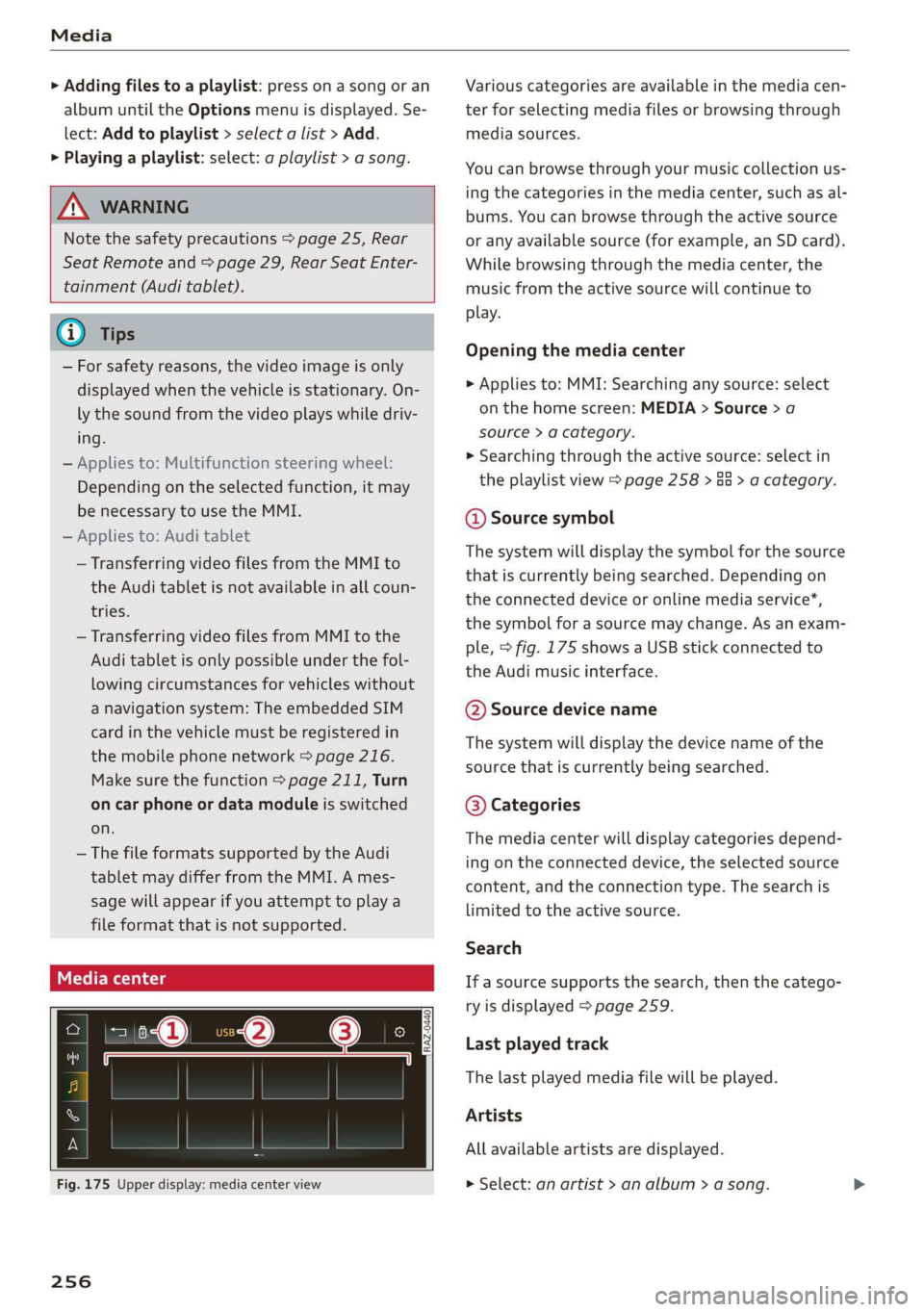
Fig. 175 Upper display: media center view
256
Various categories are available in the media cen-
ter for selecting media files or browsing through
media sources.
You can browse through your music collection us-
ing the categories in the media center, such as al-
bums. You can browse through the active source
or any available source (for example, an SD card).
While browsing through the media center, the
music from the active source will continue to
play.
Opening the media center
> Applies to: MMI: Searching any source: select
on the home screen: MEDIA > Source > a
source > a category.
» Searching through the active source: select in
the playlist view > page 258 > Ga > a category.
@ Source symbol
The system will display the symbol for the source
that is currently being searched. Depending on
the connected device or online media service*,
the symbol for a source may change. As an exam-
ple, > fig. 175 shows a USB stick connected to
the Audi music interface.
©@ Source device name
The system will display the device name of the
source that is currently being searched.
@® Categories
The media center will display categories depend-
ing on the connected device, the selected source
content, and the connection type. The search is
limited to the active source.
Search
If a source supports the search, then the catego-
ry is displayed > page 259.
Last played track
The last played media file will be played.
Artists
All available artists are displayed.
> Select: an artist > an album > a song.
Page 300 of 360

Wheels
not permitted can lead to ve-
hicle damage or accidents.
—If you install wheel covers on
the vehicle, make sure they al-
low enough air circulation to
cool the brake system. If they
do not, this could increase the
risk of an accident.
Tire wear and damage
B4H-0415
a
Fig. 190 Tire profile: treadwear indica-
tor
Tire wear
Check the tires regularly for wear.
—Inflation pressure that is too low
or high can increase tire wear
considerably.
—Driving quickly through curves,
rapid acceleration, and heavy
braking increase tire wear.
—Have an authorized Audi dealer
or authorized Audi Service Facili-
) Obey any applicable regulations in the
country where the vehicle is being oper-
ated.
298
ty check the wheel alignment if
there is unusual wear.
—Have the wheels rebalanced if an
imbalance is causing noticeable
vibration in the steering wheel.
If you do not, the tires and other
vehicle components could wear
more quickly.
Treadwear indicator
Original equipment tires contain
treadwear indicators in the tread
pattern, which are bars that are
1/16 in (1.6 mm) high and are
spaced evenly around the tire per-
pendicular to the running direc-
tion > fig. 190. The letters “TWI”
or triangles on the tire sidewall
indicate the location of the tread-
wear indicators.
The tires have reached the mini-
mum tread depth !) when they
have worn down to the treadwear
indicators. Replace the tires with
new ones > A.
Tire rotation
Rotating the tires regularly is rec-
ommended to ensure the tires
wear evenly. To rotate the tires, >
Page 306 of 360
Wheels
exceed the available cargo and
luggage load capacity calculat-
ed in Step 4.
6. If your vehicle will be towing a
trailer, load from your trailer
will be transferred to your vehi-
cle. Consult this manual to de-
termine how this reduces the
available cargo and luggage
load capacity of your vehicle.
> Check the tire sidewall
(=> page 290, fig. 189) to deter-
mine the designated load rating
for a specific tire.
Wheel bolts and rims
Wheel bolts
Wheel bolts must be clean and loosen/tighten
easily. You will need a special adapter to loosen
the anti-theft wheel bolts* > page 319.
Rims
Rims with a bolted rim ring* or with bolted wheel
covers* consist of multiple pieces. These compo-
nents were bolted together using special bolts
and a special procedure. You must not repair or
disassemble them > A\.
ZA WARNING
Wheel bolts that are tightened or repaired in-
correctly can become loose and result in loss
of vehicle control, which increases the risk of
an accident. For the correct tightening specifi-
cation, see > page 322, Finishing.
— Always keep the wheel bolts and the threads
in the wheel hub clean and free of grease.
— Only use wheel bolts that fit the rim.
— Always have damaged rims repaired by an
authorized Audi dealer or authorized Audi
Service Facility. Never repair or disassemble
304
rims yourself, because this increases the risk
of
an accident.
Loose wheel warning
Applies to: vehicles with loose wheel warning
Within the limits of the system, the loose wheel
warning in the instrument cluster warns you if
one or more wheels are loose.
Using the ABS sensors, the loose wheel warning
system compares the vibration characteristics of
the individual tires. If one or more wheels are
loose, it will be indicated in the instrument clus-
ter display with the fi indicator light and a mes-
sage. If only one wheel is affected, the location
of that wheel will be indicated.
Messages
fi Wheel bolts loose. Please safely stop the ve-
hicle and check all wheel bolts!
Loose wheel warning for at least one wheel > A\.
Check the wheel bolts on all wheels with the
wheel wrench (vehicle tool kit). Have the tighten-
ing specification checked as soon as possible with
a torque wrench. Drive carefully until then. For
the correct tightening specification, see
=> page 322, Finishing.
fi Wheel assessment active. Please continue
driving carefully
After this message appears and you have checked
the wheel bolts, the assessment phase begins
when the vehicle is in motion. This may take sev-
eral minutes.
& Loose wheel warning: malfunction! See
owner's manual
There is a system malfunction. Drive immediately
to an authorized Audi dealer or authorized Audi
Service Facility to have the malfunction repaired.
ZA\ WARNING
Wheel bolts that are tightened incorrectly can
become loose and result in loss of vehicle con-
trol, which increases the risk of an accident.
— If a message appears, reduce your speed im-
mediately and avoid any hard steering or >
Page 310 of 360

Wheels
changing or replacing a tire on your vehicle
=> page 308. The tire pressure monitoring system
only monitors the tire pressure you have stored.
Refer to the tire pressure label for the recom-
mended tire pressure for your vehicle
=> page 299, fig. 192.
Tire tread circumference and vibration character-
istics can change and cause a tire pressure warn-
ing if:
— The tire pressure in one or more tires is too low
— The tires have structural damage
— The tire was replaced or the tire pressure was
changed and it was not stored > page 308
— Tires that are only partially used are replaced
with new tires
Indicator lights
® - Loss of pressure in at least one tire > A\.
Check the tires and replace or repair if necessary.
Check and correct the pressures of all four tires
and store the pressure again > page 308.
is (Tire Pressure Monitoring System) Tire pres-
sure: malfunction! See owner's manual. If fi
appears after switching the ignition on or while
driving and the @ indicator light in the instru-
ment cluster blinks for approximately one minute
and then stays on, there is system malfunction.
Try to store the correct tire pressures
= page 308. In some cases, you must drive for
several minutes after storing the pressures until
the indicator light turns off. If the indicator light
does turn off or turns on again after a short peri-
od of time, drive to an authorized Audi dealer or
authorized Audi Service Facility immediately to
have the malfunction corrected.
ZA WARNING
— If the tire pressure indicator appears in the
display, reduce your speed immediately and
avoid any hard steering or braking maneu-
vers. Stop as soon as possible and check the
tires and their pressure.
— The driver is responsible for maintaining the
correct tire pressure. You must check the
tire pressure regularly.
— Under certain conditions (such as a sporty
driving style, winter conditions, or unpaved
308
roads), the tire pressure monitoring system
indicator may be delayed.
@ Tips
—The tire pressure monitoring system can al-
so stop working when there is an ESC mal-
function.
— Using snow chains may result in a system
malfunction.
—The tire pressure monitoring system in your
Audi was calibrated with “Audi Original
Tires” > page 296. Using these tires is rec-
ommended.
Storing tire pressures
Applies to: vehicles with Tire Pressure Monitoring System
If the tire pressure changes or a tire is replaced,
it must be confirmed in the MMI.
> Before storing the tire pressures, make sure the
tire pressures in all four tires meet the speci-
fied values and are adapted to the load
=> page 299.
> Switch the ignition on.
> Applies to: MMI: Select on the home screen:
VEHICLE > Settings & Service > Tire pressure
monitoring > Store tire pressure > Yes, store
now.
@ Tips
Do not store the tire pressures if snow chains
are installed.
Page 327 of 360

4N0012721BD
Emergency assistance
bar is not available. Use a towing cable made of
synthetic elastic cable similar elastic material.
Z\ WARNING
— Towing highly increases the risk of an acci-
dent, for example from colliding with the
towing vehicle.
— To reduce the risk of an accident, do not al-
low anyone to remain inside the vehicle
when it is being transported by a tow truck
or a special transporter.
@) Note
— If normal towing is not possible, for exam-
ple if the transmission is faulty or if the
towing distance is greater than 30 miles
(50 km), then transport the vehicle on a
special carrier.
— If the vehicle is towed by a tow truck at the
axle that is not permitted, this can cause se-
vere damage to the transmission.
— The vehicle must not be tow started for
technical reasons.
@ Tips
— If the power supply is interrupted, then it
will not be possible to move the selector
lever out of the "P" position. The parking
lock must be released using the emergency
release before towing the vehicle
=> page 116.
— Switch Audi pre sense* off > page 185 when
loading the vehicle onto a vehicle carrier,
train, ship, or other type of transportation,
or when towing the vehicle. This can prevent
an undesired intervention from the pre
sense* system.
— Follow the local legal regulations for tow-
ing.
Read and follow the important information under
=> page 324.
Preparations
> Only secure the towing cable or tow bar at the
designated towing loops > page 325,
=> page 326.
> Make sure the towing cable is not twisted. Oth-
erwise it could disconnect from the towing loop
while towing.
> Switch the emergency flashers on in both
vehicles > page 64. However, do not do this if it
prohibited by law.
Towing vehicle (front)
> Only start to drive when the towing cable is
taut.
> Press the brake pedal very carefully.
> Avoid sudden braking or driving maneuvers.
Vehicle being towed (rear)
> Make sure the ignition is switched on so that
the steering wheel is not locked and so that you
can use the turn signals, the horn, and the
windshield wipers if needed > A\.
> Switching it off before the vehicle has stopped
may impair the function of the brake booster
and power steering. You would then need to
use more force to steer and brake the vehicle.
> Release the parking brake > page 124.
> Select the “N” selector lever position.
> Make sure the towing cable is always taut.
ZA WARNING
Never tow a vehicle using a tow bar or towing
cable if the vehicle does not have electrical
power.
Front towing loop
BFV-0305
Fig. 207 Front bumper: installing the towing loop
325
Page 330 of 360
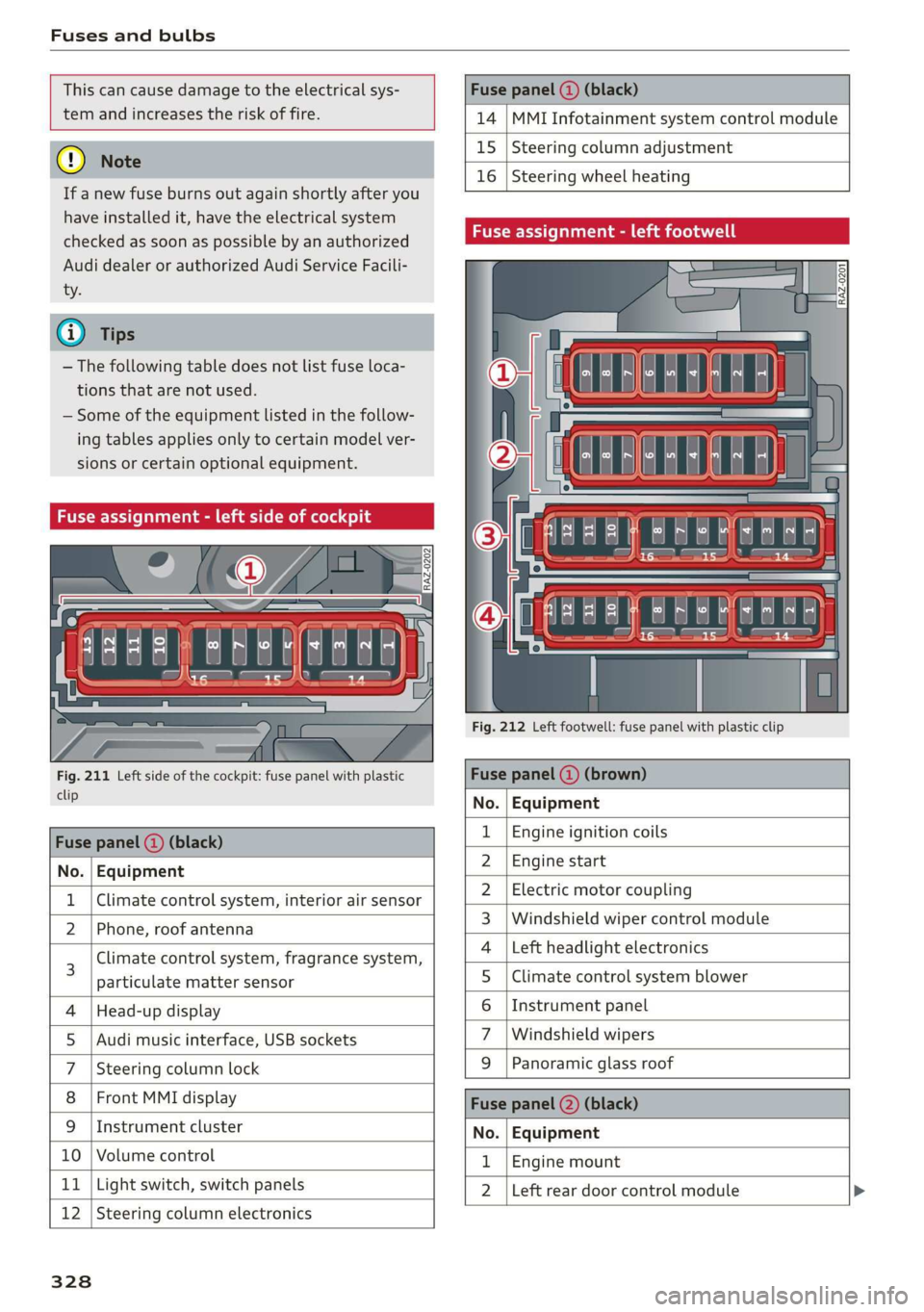
Fuses and bulbs
This can cause damage to the electrical sys-
tem and increases the risk of fire.
(G) Note
If a new fuse burns out again shortly after you
have installed it, have the electrical system
checked as soon as possible by an authorized
Audi dealer or authorized Audi Service Facili-
- The following table does not list fuse loca-
tions that are not used.
— Some of the equipment listed in the follow-
ing tables applies only to certain model ver-
sions or certain optional equipment.
Fuse assignment - left side of cockpit
Fig. 211 Left side of the cockpit: fuse panel with plastic
clip
Fuse panel (2) (black)
No. | Equipment
Climate control system, interior air sensor
N Phone, roof antenna
Climate control system, fragrance system,
particulate matter sensor
Head-up display
Audi music interface, USB sockets
Steering column lock
Front MMI display
Instrument cluster
Ol/aOIN/uys
10 | Volume control
11 | Light switch, switch panels
12 | Steering column electronics
328
Fuse panel (@ (black)
14 MMI Infotainment system control module
15 Steering column adjustment
16
Steering wheel heating
Fuse assignment - left footwell
lo} | He
ia i, L
. | Equipment
Engine ignition coils
Engine start
Electric motor coupling
Windshield wiper control module
Left headlight electronics
Climate control system blower
Instrument panel
Windshield wipers
OND)
OMA)
WININI]
eR
Panoramic glass roof
Fuse panel (2) (black)
No. Equipment
Engine mount
Left rear door control module
Page 348 of 360

Index
Demo mode
refer to Presentation mode............. 239
Destination onthe map................. 230
Details. « ence ox sens © 0 weenwe 0 seme © m omnoes 230
Determining correct load limit........... 303
Digital COMPASS swiss cs veces oo owas eS ee 70
Dime@nSiOnS's « « ssw » s sows x & awe ¥ o awe 3 341
Dimming the exterior mirrors............. 67
Dimming the rearview mirror............. 67
Directory
S@LUINGS cus s seve « & wen © x Bee & o ewe E 2d
also refer to ContactS.............0005 205
Display
Cleaning. .... 2... cee eee eee eee 312
Disposal... 02.0... c cece eee eee eee 336
DiStaMCO bwin
Doors
Child safety lock......... 0.0.0 eee eee 53
Door contact switch. ............0.0000. 64
Mechanically unlocking and locking....... 46
Power closing/closing aid............... 43
Driver information system................ 13
Drives
refer to Media.............000005 250, 255
Drive select
refer to Audi drive select............... 128
Drive systeM.... cece eee ee eee 118, 122
Audi GIVE SELECE’s see 2s came ye een ss 128
Driving down hills.............2--0000- 126
Driving program..............0005 114,178
Driving through water...............005 126
Driving time... .. 2... eee eee eee eee 16
Driving tips
Driving through water................. 126
EMiCienyCrivinig
« ews « « sews 4 x cows oo ew 124,
Uphilland downhill................... 126
Drivingup hills. + & seis 6 sre @ 6 aera & 0 sees 126
Dust filter
refer to Pollutant filter..............0. 108
DVD changer (media drives)............. 251
DVD drive (media drives) ............0.05 251
Dynamic all-wheel steering.............. 131
346
E
E-mail
Message options...........0eee evens 209
SOECIAGS secsses x wssne © ¥ owes +H emcunte 6 a oeeuone 209
SECON MOTO rien & anion a = amuev wo w mnsome 2 2 eI 119
EDL
refer to Electronic Differential Lock...... 133
EDR
Event Data Recorder...............0.. 332
Efficiency assist... 1... eee eee 167
Electricalisystenmiss « snes » seven 2 > eveano «2 284
Electric FAN ge wwe. + sswas + x sone 2 0 arate o seen 236
Electromechanical parking brake......... 124
Electronic Differential Lock.............. 133
Electronic immobilizer 2x: 2 s wes sy ewes 9 es 48
Electronic Stabilization Control........... 133
Embedded SIM card............000000ee 217
Emergency assist...........00-.00 eee ee 190
Emergency assistance..............000. 316
Emergency braking function............. 125
Emergencyi¢allscin oa miwew 6 wamen @ 0 ivacs 207, 223
Emergency flashersii: + woos « 2 wows as ween s 64
Emergency mode.............---0e eee 117
Emergency operation
DOOMSic + wens 2 6 wed 2 same ao wa ao wie Do 46
Fuel filler door............0 000000000 273
Luggage compartment lid............... 52
Panoramic glass roof................... 56
Emissions control system.............05 274
Energy CONSUMETSina + wasewa + neue oy Me eee 17
Energy flow display..............0000ee 119
Energy management................05 121
Energy recovery ..... 0.2... .e eee e eee ee 118
Engine
BréakiniGiins = xsay ¢ > scree % 5 coms 7 e Hees ee 118
GOOLENE «sess 3 a wee ox ese wo seme ¥ eaWoR 281
EMMeNnGeney SEOPLens » 0 wissen « 6 cesnnie s meses a 6 6 TL
Jump starting.....................0. 322
Start/StOpisysteM « ceo « 2 waves x s aus g es 121
Starting/stopping.................04. ary
Engine braking effect
refer to Recuperation..............005 118