wheel bolts AUDI A8 2020 Owners Manual
[x] Cancel search | Manufacturer: AUDI, Model Year: 2020, Model line: A8, Model: AUDI A8 2020Pages: 360, PDF Size: 95.38 MB
Page 299 of 360
4N0012721BD
Wheels
differently even if they are the
same size > (\.
>If you would like to equip your
vehicle with a tire and rim com-
bination that is different from
what was installed at the facto-
ry, consult with an authorized
Audi dealer or authorized Audi
Service Facility before making a
purchase > A.
Because the spare tire® is differ-
ent from the regular tires instal-
led on the vehicle (such as winter
tires or wide tires), only use the
spare tire* temporarily in case of
emergency and drive carefully
while it is in use. It should be re-
placed with a regular tire as soon
as possible.
All four wheels must be equipped
with tires that are the same brand
and have the same construction
and tread pattern so that the
drive system is not damaged by
different tire speeds. For this rea-
son, in case of emergency, only
use a Spare tire* that is the same
circumference as the regular tires.
Z\ WARNING
—Do not use steel rims that are
17 inches or larger. Otherwise,
damage to the vehicle and an
accident could result.
—Only use tire/rim combina-
tions and suitable wheel bolts
that have been approved by
Audi. Otherwise, damage to
the vehicle and an accident
could result.
—For technical reasons, it is not
possible to use tires from oth-
er vehicles. In some cases, you
cannot even use tires from the
same vehicle model.
—Make sure that the tires you
select have enough clearance
to the vehicle. Replacement
tires should not be chosen
simply based on the nominal
size, because tires with a dif-
ferent construction can differ
greatly even if they are the
same size. If there is not
enough clearance, the tires or
the vehicle can be damaged
and this can reduce driving
safety and increase the risk of
an accident.
—Only use tires that are more
than six years old when abso-
lutely necessary and drive
carefully when doing so.
—Do not use run-flat tires on
your vehicle. Using them when
297
Page 306 of 360
Wheels
exceed the available cargo and
luggage load capacity calculat-
ed in Step 4.
6. If your vehicle will be towing a
trailer, load from your trailer
will be transferred to your vehi-
cle. Consult this manual to de-
termine how this reduces the
available cargo and luggage
load capacity of your vehicle.
> Check the tire sidewall
(=> page 290, fig. 189) to deter-
mine the designated load rating
for a specific tire.
Wheel bolts and rims
Wheel bolts
Wheel bolts must be clean and loosen/tighten
easily. You will need a special adapter to loosen
the anti-theft wheel bolts* > page 319.
Rims
Rims with a bolted rim ring* or with bolted wheel
covers* consist of multiple pieces. These compo-
nents were bolted together using special bolts
and a special procedure. You must not repair or
disassemble them > A\.
ZA WARNING
Wheel bolts that are tightened or repaired in-
correctly can become loose and result in loss
of vehicle control, which increases the risk of
an accident. For the correct tightening specifi-
cation, see > page 322, Finishing.
— Always keep the wheel bolts and the threads
in the wheel hub clean and free of grease.
— Only use wheel bolts that fit the rim.
— Always have damaged rims repaired by an
authorized Audi dealer or authorized Audi
Service Facility. Never repair or disassemble
304
rims yourself, because this increases the risk
of
an accident.
Loose wheel warning
Applies to: vehicles with loose wheel warning
Within the limits of the system, the loose wheel
warning in the instrument cluster warns you if
one or more wheels are loose.
Using the ABS sensors, the loose wheel warning
system compares the vibration characteristics of
the individual tires. If one or more wheels are
loose, it will be indicated in the instrument clus-
ter display with the fi indicator light and a mes-
sage. If only one wheel is affected, the location
of that wheel will be indicated.
Messages
fi Wheel bolts loose. Please safely stop the ve-
hicle and check all wheel bolts!
Loose wheel warning for at least one wheel > A\.
Check the wheel bolts on all wheels with the
wheel wrench (vehicle tool kit). Have the tighten-
ing specification checked as soon as possible with
a torque wrench. Drive carefully until then. For
the correct tightening specification, see
=> page 322, Finishing.
fi Wheel assessment active. Please continue
driving carefully
After this message appears and you have checked
the wheel bolts, the assessment phase begins
when the vehicle is in motion. This may take sev-
eral minutes.
& Loose wheel warning: malfunction! See
owner's manual
There is a system malfunction. Drive immediately
to an authorized Audi dealer or authorized Audi
Service Facility to have the malfunction repaired.
ZA\ WARNING
Wheel bolts that are tightened incorrectly can
become loose and result in loss of vehicle con-
trol, which increases the risk of an accident.
— If a message appears, reduce your speed im-
mediately and avoid any hard steering or >
Page 307 of 360

4N0012721BD
Wheels
braking maneuvers. Stop as soon as possible
and check the wheel bolts.
— Check your wheels for damage. Have the
damaged wheels checked and/or replaced
immediately by an authorized Audi dealer or
authorized Audi Service Facility.
— Under certain conditions (such as a sporty
driving style, winter conditions, or unpaved
roads), the message may be delayed.
— The driver is responsible for ensuring that
the wheels are attached correctly.
@ Tips
— The loose wheel warning system can also
stop working when there is an ESC malfunc-
tion.
— Using snow chains may result in a system
malfunction.
Winter tires significantly improve the vehicle's
handling when driving in winter conditions. Be-
cause of their construction (width, compound,
tread pattern), summer tires provide less traction
on ice and snow.
> Use winter tires on all four wheels.
> Only use winter tires that are approved for your
vehicle.
> Please note that the maximum permitted
speed may be lower with winter tires > /\ in
General information on page 289. An author-
ized Audi dealer or authorized Audi Service Fa-
cility can inform you about the maximum per-
mitted speed for your tires.
> Check the tire pressure after installing wheels
=> page 299.
The effectiveness of winter tires is reduced great-
ly when the tread is worn down to a depth of
0.16 in (4 mm). The characteristics of winter tires
also decrease greatly as the tire ages, regardless
of the remaining tread.
@ For the sake of the environment
Reinstall summer tires at the appropriate
time, because they provide better handling
when roads are free of snow and ice. Summer
tires cause less road noise, tire wear, and fuel
consumption.
G) Tips
You can also use all season tires instead of
winter tires. Please note that in some coun-
tries where winter tires are required, only win-
ter tires with the a symbol may be permit-
ted.
Snow chains improve both driving and braking in
winter road conditions.
> Only install snow chains on the front wheels.
> Check and correct the seating of the snow
chains after driving a few feet, if necessary. Fol-
low the instructions from the manufacturer.
> Note the maximum speed of 30 mph
(50 km/h). Observe the local regulations.
Use of snow chains is only permitted with certain
rim/tire combinations due to technical reasons.
Check with an authorized Audi dealer or author-
ized Audi Service Facility to see if you may use
snow chains.
Use fine-mesh snow chains. They must not add
more than 0.40 inch (10.5 mm) in height, includ-
ing the chain lock.
You must remove the snow chains on roads with-
out snow. Otherwise, you could impair driving
ability and damage the tires.
ZA\ WARNING
Using incorrect snow chains or installing snow
chains incorrectly can result in loss of vehicle
control, which increases the risk of an acci-
dent.
@) Note
— Snow chains can damage the rims and
wheel covers* if the chains come into direct
contact with them. Remove the wheel cov-
ers* first. Use coated snow chains.
— Do not install and use snow chains if there is
a malfunction in the air suspension, because
the vehicle height will be very low. If you
305
>
Page 321 of 360
4N0012721BD
Emergency assistance
Replacing wheels
You must complete the preparation before
changing a tire.
> Read and follow the important safety precau-
tions > page 316.
> Set the parking brake.
> Select the “P” position.
> When towing a trailer: disconnect the trailer
from your vehicle.
> Lay out the vehicle tool kit > page 316 and the
spare tire > page 322.
> Applies to: MMI: Select on the home screen:
VEHICLE > Settings & Service > Air suspen-
sion: wheel change.
> Switch the ignition off.
Z\ WARNING
The vehicle must also be secured to prevent it
from rolling when using the vehicle jack”. Use
suitable objects to block the front and back of
the wheel that is diagonal from the wheel
Removing the caps
with the flat tire.
B4L-1337
&
[
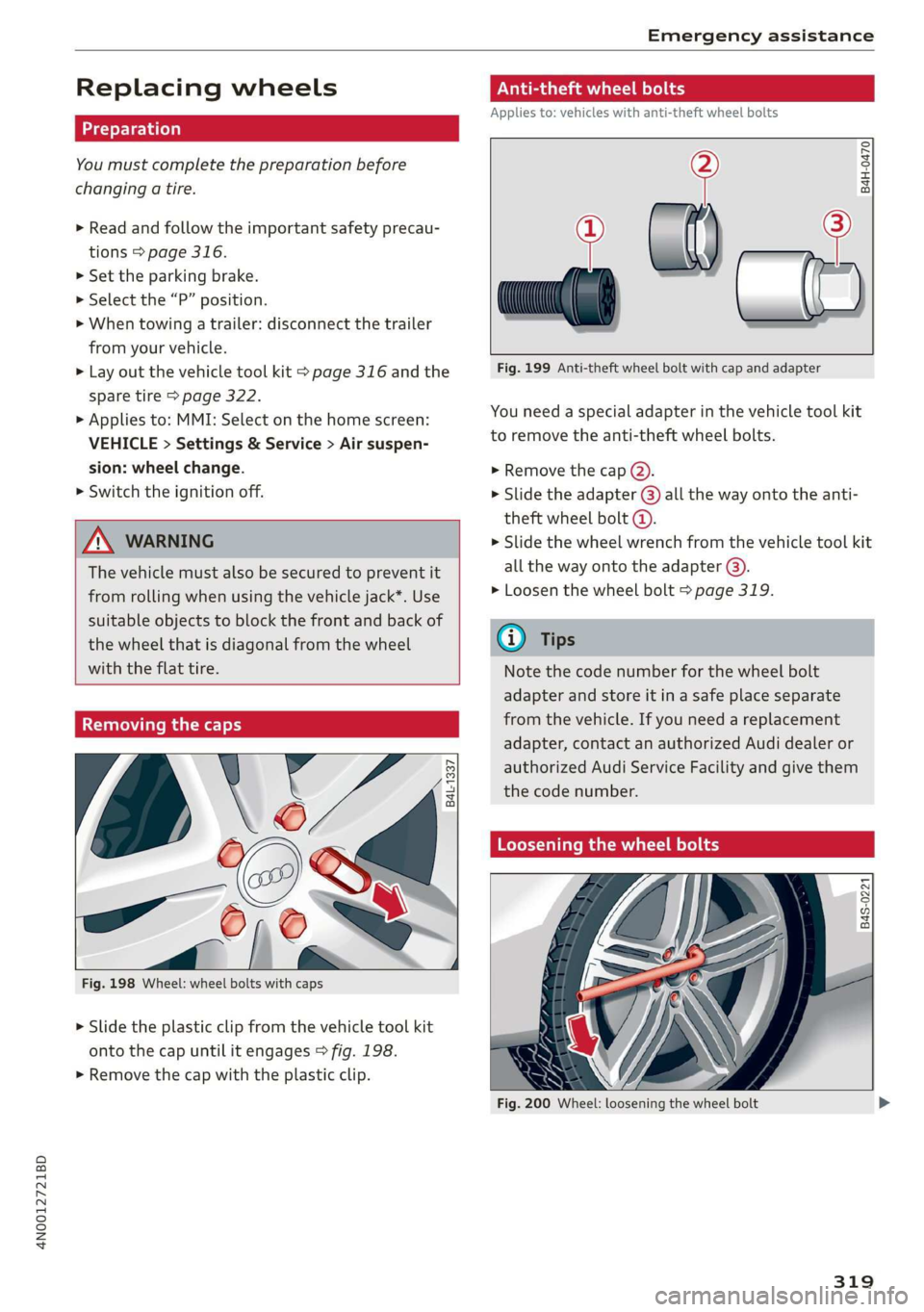
Fig. 198 Wheel: wheel bolts with caps
> Slide the plastic clip from the vehicle tool kit
onto the cap until it engages > fig. 198.
> Remove the cap with the plastic clip.
Anti-theft wheel bolts
Applies to: vehicles with anti-theft wheel bolts
i
> all
Fig. 199 Anti-theft wheel bolt with cap and adapter
B4H-0470
v
You need a special adapter in the vehicle tool kit
to remove the anti-theft wheel bolts.
>» Remove the cap @).
> Slide the adapter @) all the way onto the anti-
theft wheel bolt @.
» Slide the wheel wrench from the vehicle tool kit
all the way onto the adapter @).
> Loosen the wheel bolt > page 319.
@) Tips
Note the code number for the wheel bolt
adapter and store it in a safe place separate
from the vehicle. If you need a replacement
adapter, contact an authorized Audi dealer or
authorized Audi Service Facility and give them
the code number.
Loosening the wheel bolts
B4S-0221
Fig. 200 Wheel: loosening the wheel bolt
319
Page 322 of 360

Emergency assistance
>» Slide the wheel wrench from the vehicle tool kit
all the way onto the wheel bolt).
> Turn the wheel bolt approximately one turn to
the left. To achieve the required torque, hold
the end of the wheel wrench. If the wheel bolt
will not loosen, press carefully on the wheel
wrench with your foot. Hold onto the vehicle se-
curely while doing this and make sure your foot-
ing is stable.
ZA WARNING
To reduce the risk of an accident, only loosen
the wheel bolts gently one turn before raising
the vehicle with the vehicle jack*.
Raising the vehicle
Applies to: vehicles with vehicle jack
> Find the marking on the sill that is closest to
the tire that will be changed > fig. 201. Behind
the marking, there is a lifting point on the side
sill for the vehicle jack.
> Turn the vehicle jack located under the lifting
point on the sill to raise the jack until its arm @
=> fig. 202 is located under the designated plas-
tic mount.
> Align the vehicle jack so the arm (@) engages in
the designated Lifting point in the door sill and
the movable base (2) lies flat on the ground.
The base @) must be directly under the mount-
ing point @.
> Continue raising the vehicle jack until the wheel
lifts off the ground slightly.
RAZ-0257,
Fig. 202 Sill: positioning the vehicle jack
> Place the vehicle jack from the vehicle tool kit
ona firm surface. Use a flat, stable support if
necessary. On a slippery surface such as tile,
you should use a non-slip pad such as a rubber
mat > /A\.
D_ You need the matching adapter in order to loosen and
tighten anti-theft wheel bolts* > page 319.
320
Z\ WARNING
—To reduce the risk of injury, make sure no
one is in the vehicle before raising it.
— Make sure the vehicle jack is stable. The risk
of injury is increased when the ground is
slippery or soft, because the vehicle jack
could slide or sink.
— Only raise your vehicle with the vehicle jack
provided by the factory. If you use a vehicle
jack designed for another vehicle, your vehi-
cle could slip and cause injury.
— Position the vehicle jack only at the desig-
nated mounting points on the side sill and
align the jack. Otherwise, the vehicle jack
could slip and cause an injury if it does not
have sufficient hold on the vehicle.
—To reduce the risk of injury, do not raise any
other vehicles or other loads using the vehi-
cle jack provided by the factory.
— Changes in temperature or load can affect
the height of the vehicle.
— To reduce the risk of an accident, never start
the engine when the vehicle is raised.
—To reduce the risk of injury, no work should
be performed under the vehicle while it is
raised.
Page 323 of 360
4N0012721BD
Emergency assistance
@) Note
Do not Lift the vehicle by the sill. Position the
vehicle jack only at the designated mounting
points on the side sill. Otherwise, your vehicle
could be damaged.
Removing and installing a wheel
@ g + “
0 oO
B8K-1477
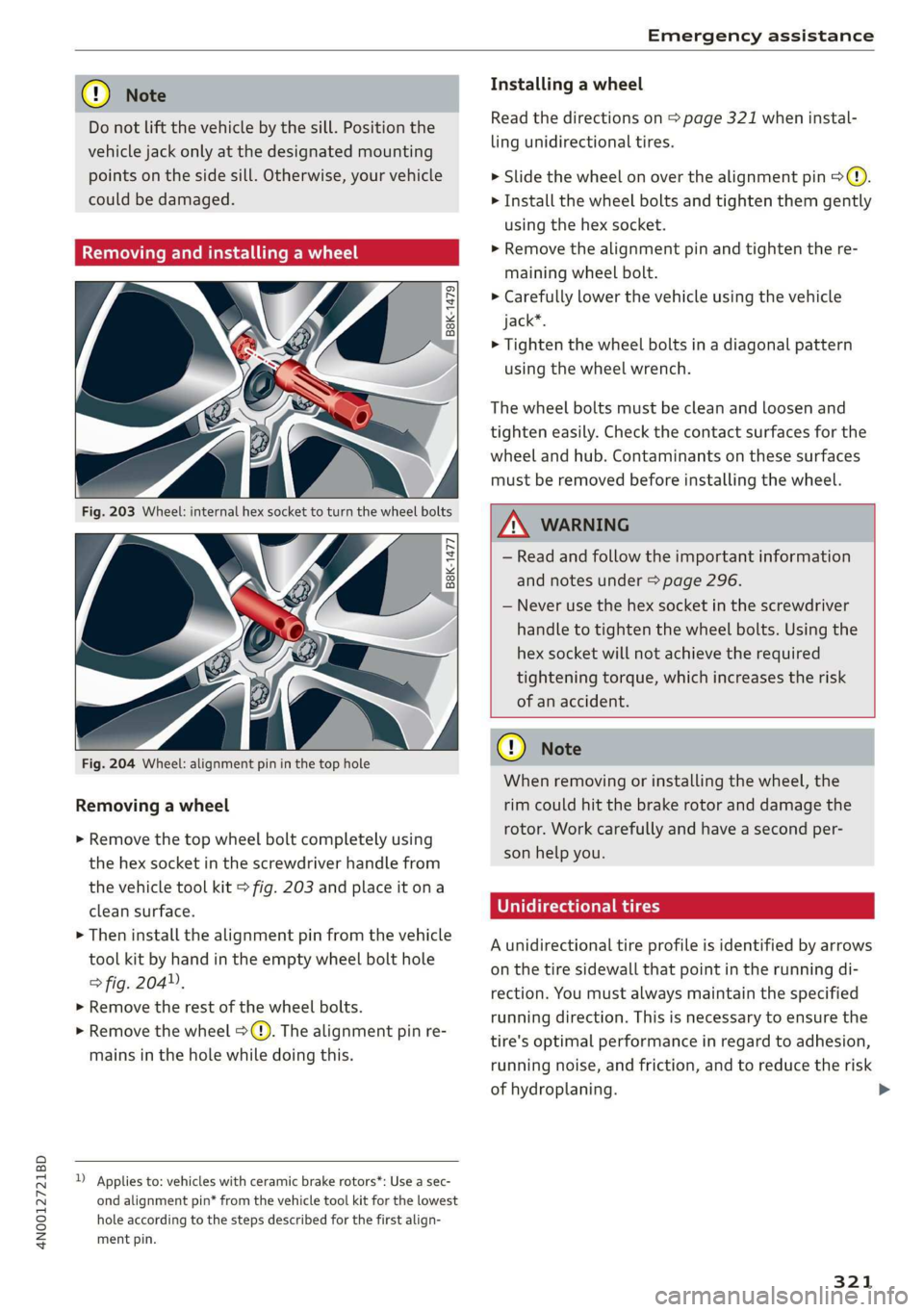
Fig. 204 Wheel: alignment pin in the top hole
Removing a wheel
> Remove the top wheel bolt completely using
the hex socket in the screwdriver handle from
the vehicle tool kit > fig. 203 and place it ona
clean surface.
> Then install the alignment pin from the vehicle
tool kit by hand in the empty wheel bolt hole
> fig. 204”,
> Remove the rest of the wheel bolts.
> Remove the wheel >(). The alignment pin re-
mains in the hole while doing this.
D Applies to: vehicles with ceramic brake rotors*: Use a sec-
ond alignment pin* from the vehicle tool kit for the lowest
hole according to the steps described for the first align-
ment pin.
Installing a wheel
Read the directions on > page 321 when instal-
ling unidirectional tires.
> Slide the wheel on over the alignment pin >@.
> Install the wheel bolts and tighten them gently
using the hex socket.
> Remove the alignment pin and tighten the re-
maining wheel bolt.
> Carefully lower the vehicle using the vehicle
jack*.
> Tighten the wheel bolts in a diagonal pattern
using the wheel wrench.
The wheel bolts must be clean and loosen and
tighten easily. Check the contact surfaces for the
wheel and hub. Contaminants on these surfaces
must be removed before installing the wheel.
Z\ WARNING
— Read and follow the important information
and notes under > page 296.
— Never use the hex socket in the screwdriver
handle to tighten the wheel bolts. Using the
hex
socket will not achieve the required
tightening torque, which increases the risk
of an accident.
@) Note
When removing or installing the wheel, the
rim could hit the brake rotor and damage the
rotor. Work carefully and have a second per-
son help you.
Unidirectional tires
A unidirectional tire profile is identified by arrows
on the tire sidewall that point in the running di-
rection. You must always maintain the specified
running direction. This is necessary to ensure the
tire's optimal performance in regard to adhesion,
running noise, and friction, and to reduce the risk
of hydroplaning. >
321
Page 324 of 360

Emergency assistance
To benefit fully from the advantages of the uni-
directional tire design, you should replace faulty
tires as soon as possible and restore the correct
running direction on all of the tires.
> Reinstall the caps on the wheel bolts if necessa-
ry.
> Store the vehicle tool kit in its designated
place.
> If the removed wheel does not fit in the spare
wheel well, store it securely in the luggage
compartment > page 100.
> Check the tire pressure on the installed wheel
as soon as possible.
> Correct the tire pressure and store it in the MMI
=> page 308.
> The wheel bolt tightening specification must be
90 ft lbs (120 Nm). Have it checked as soon as
possible with a torque wrench. Drive carefully
until then.
> Have the faulty wheel replaced as quickly as
possible.
Space-saving spare tire
Applies to: vehicles with space-saving spare tire (compact
spare tire)
The spare tire is intended for short-term use only.
Have the damaged tire checked and replaced if
necessary by an authorized Audi dealer or author-
ized Audi Service Facility as soon as possible.
There are some restrictions on the use of the
compact spare tire. The compact spare tire has
been designed specifically for your type of vehi-
cle. Do not replace it with the spare tire from an-
other type of vehicle.
The compact spare tire is located in the luggage
compartment under the cargo floor cover
> page 316.
The tire pressure must be 61 PSI (420 kPA).
Snow chains
For technical reasons, the use of snow chains on
the compact spare tire is not permitted.
322
If you have to drive with snow chains and a front
tire fails, mount the spare tire in place of a rear
tire. Install the snow chains on the rear tire that
you removed, and install that in place of the
front tire that failed.
ZA\ WARNING
— After installing a spare tire, the tire pressure
must be checked as soon as possible.
— Do not drive faster than 50 mph (80 km/h)
with a compact spare tire. Driving faster
than that increases the risk of an accident.
— To reduce the risk of an accident, avoid hard
acceleration or braking and driving fast
around curves with the compact spare tire.
— To reduce the risk of an accident, never drive
with more than one compact spare tire.
— Normal summer or winter tires must not be
mounted on the compact spare wheel rim.
Jump starting
You should only perform the steps that follow if
you have the necessary tools and technical ex-
pertise.
If the engine does not start because the vehicle
battery is drained, you can jump start your vehi-
cle using another vehicle. Jump start cables are
needed to do this.
Both vehicle batteries must have 12 V nominal
voltage. The voltage capacity (Ah) of the vehicle
battery that is giving power must not be less
than the capacity of the drained vehicle battery.
Jump start cable
Only use a jump start cable with a large enough
diameter. Note the manufacturer's specifica-
tions.
Only use a jump start cable with insulated termi-
nal clamps.
Positive cable - usually red.
Negative cable - usually black.
Page 345 of 360
4N0012721BD
Index
A
A/C cooling mode.............. eee eee ee 105
Accelerator pedal..............--000005 115
also refer to Accelerator pedal.......... 115
AccessorieS .. 0.00... cece eee eee ee 338
Active lane assist
refer to Lane departure warning......... 180
refer to Lane guidance................ 180
Active suspensioniicss + « sss so sasusia vs ssuen s o 129
Adaptive cruise assist................00. 170
Cleaning the sensors..............000- 310
Predictive control.................... 169
Adaptive speed assist
refer to Adaptive cruise assist........... 170
Adjusting the air distribution............ 105
Adjusting the brightness................. 65
Adjusting the sound..............-...0- 266
Adjusting the temperature.............. 105
Adjusting the volume..............000005 40
Adjusting the volume (announcements) .... 266
Adjusting the welcome sound............ 266
AirbagisySteM « + aims x eaen 3 = seme se OE a Zs 86
Ait GUality displayie. sy ees x s eeu 5 e wee a 108
Airsuspension...........2...0.00.0005 129
Airtransport................0.00.00005 136
Alarm system
refer to Anti-theft alarm system.......... 46
Alignment pin (changing the wheel)....... 316
All-weather lights...............-.00000. 60
Allseason tires... 2.2.00... 22020 305
All wheel drive
refer to quattro... 2... eee eee eee 132
Amazon Alexa integration
Média playback’: ¢ sos s ¢ wees ¢ 4 orem b eae 253
Operation « sion ss aac sv rere © omen wa ar 39
AMI
refer to Audi music interface....... 253,254
Android Auto
refer to Audi smartphone interface...... 264
Anti-freeze
Windshield washer system............. 287
Anti-lock braking system. ........-....-. 133
Anti-Slip Regulation.................0.. 133
Anti-theft alarm system...........-..00-- 46
Anti-theft wheel bolts................0. 319
Apple CarPlay
refer to Audi smartphone interface...... 264
Aspect ratio (video) ..........-..00. 258, 259
ASR
refer to Anti-Slip Regulation............ 133
Audi adaptive light.................0005. 60
Audi connect
refer to CONNECt:. « s ccascs seas ieeeee oe 216
Audi connect Remote & Control
refer to Vehicle control services......... 218
Audirdrive seletticy: « + sven « x cee x ¢ neem ¢ 2 2 128
Audi e-tron compact charging system..... 144
Adjusting the charging power level...... 145
Changing or attaching the power cable... 149
S@CUTING . 6... eee eee eee eee 150
Status and malfunction indicators....... 145
Audi music interface ioc. . ies. een ea ee 253
AUGIO TINGS crx = ¢ ces & ¢ cee £ & aeee Fc eS 25S
Audi phone box...........0.-. cee eee eee 202
Audi presense.... 6.6... 0. cece ee eee eee 182
MESSAGES vcr « 5 wey § 2 eee Fs eee 8 6 Ree 185
Audi pre sense front.............-..000- 183
Audi side assist
refer to Side assist............-..20--5 186
Audi smartphone interface.............. 264
Legal information: ¢ css os vei se owen oe 269
Auditableties « «cei + 2 some a 2 awa 3 eee ¢ 29
Device setup... 2.0... cece eee eee eee 30
Device test... 2.2... cece cece eee 35
Legal information's swe ss eae se eee oa 269
LIGENSES: scsi 6 0 cites 6 o veces © eeemeni © aperetne 269
Menus and symbols.............02+-00- 33
Operating’: « « wss6 s secu ss see ss eee s 18, 33
Regulatory information................ 269
Audi virtual cockpit
refer to Instrument cluster.............. 12
AUTO
Automatic headlights.................- 60
Climate control system ............005- 105
Auto Lock (central locking) ............... 43
Automatic climate control system
refer to Climate control system......... 104
Automatic luggage compartment lid.... 51,52
Automatic transmission............-.455 113
Parking lock emergency release......... 116
Automatic wipe/wash system............. 68
343
Page 354 of 360
Index
Plug-in hybrid drive..................-. 118
Coolant......... 0. cece eee eee 281, 282
NCANSPOFt ese + ween xo mows & & eeeD se co 136
Podcast
refer to Online radio.................. 245
POL» s saws = = eetee = » gees ee epee SaeE Ee we 228
Point of interest
refer to Online Points of Interest........ 228
Polishing perc: «= seems y ercrwe v seme ee mee a oo 311
Pollen filter
refer to Pollutant filter.............004 108
Pollutant filter’. s sors 2s wwe 6 semen ao soavem a 108
Power closing (doors)............--.00005 43
PoWEr Meter. secs se wees ss hoes ye REESE 12,15
POWEFSOULGES's « = vem < s seme 2 o weme = 5 97,254
Power window malfunction............... 54
Power windows............-.0 eee eee eres 54
MalTUNCHOTins < zusm gs pecs 3 5 ome es eeu sg 54
Predictive Control; « seas se seeu i sees ae es 169
Predictive messages............... 116, 168
pre sense
refer to Audi presense.............00 182
Presentation Mode... ss es.ss esses sveeuss 240
Pressure
Tire pressure monitoring system........ 307
TANOSL: 5 o eoenis 5 ¥ cones wh omen wo mmoEE a & ERRORS 299
PROECEEING ins ve wescieue xs cosuswe 6 & eemn ¥ cnawens a 8 311.
Pyrotechnic elements.................- 336
Q
QUattIO:s » caus s eens © + wows & + Ewa 2 x Oe 2 132
Selective wheel torque control.......... 134
Quick Charging « ssc < eee ve enw ve eee ¥ 137
Radio communications equipment........ 338
Radio equipment ..............00e seas 338
Radio Standards Specification (RSS) ....... 339
Rai Beane’. cece w+ ven © © spomwe 4 «rome 6 ot 129
Rain/light sensor
Headlights ............ 0.0 eee e eee 60
Intermittent mode (windshield wipers).... 68
352
RANGels «x sscsses we saree vo sommes woo me ow ree 16
Range mMOnitor's «waco os mio av waren 2 vs 120
Range potential: ..... 06s. ccs eee eet e ees 120
Range (Clectrie) cai sence ss neues s tees eee 236
Readifig liGhtSiss « 2 nace g x mame so cere & te 64
Rear cross-traffic assist........ 0.000000 198
Rear fog lights. ..................0 02a 60
Rear lid
refer to Luggage compartment lid........ 50
Rear seat entertainment
refer to Audi tablet.................... 29
Rear Seat ReEMOte saan « ¢ gas a ¢ ceae ay eeea a 25
Device Setups « ssswe + a saws vo aromas os eran 8 26
Legalinformation................0005 269
Menus and symbols..............2--00. 27
Operating’: « s esev0 2 + mewn + + wwe ¥ 6 eouee 18, 27
Software information................. 269
RearSe@atsie. 2 cases: oo averse © 5 wawene © 0 soamine © os 76
Rear shelf
refer to Storage area behind the rear head
FESURSINIES saws s ¢ owe « ¢ geste 7 o eeee Fo Ree 99
Rearview camera........... see e eee eee 194
Rear window defogger.........0..eeeeee 106
REAR (climate control system)........... 105
REGEPEION FAME: « u orncane oo oxeriase o « esemie a 8 ome 242
Recinculation¢mode « csi « 2 mace x « wmmes x oo 106
Reclining Position ses oo wena ao cae xo wees ¥ 78
Reclining seat system. ...........0--000. 78
RECUPErStION swe ¢ x news ys eee & bee 17,118
REfrIGEratOM: « « eeae +p eaee s eee Zs PewR as 101
Gleam as « : swaweue vx smonses x canes av ania wx 313
Refueling’: = 2 sows 2 o awe 2 a eens ws eee eo 271
Remote control
Garage doOrOpenelr’s « sie a 6 ssevace 2 6 enews os 57
Remotercontrobkey®. sss so cece 6 v eve 6 ¥ ow 47
Convenience opening and closing......... 54
Key
réplacemetitics : s wsew ss vewa ss ven ss 47
LED « svaseiec 2 © asswim 0 5 wweie a % sowie ww inuate 6 6 ams 49
Replacing the battery.................. 49
Unlocking and locking...............005 48
also refer to Vehicle key..............-. 47
Removing the caps (wheel bolts)......... 319
REBalrsS = sews: x ¢ eee © 5 eee FE Owe Fe eee 336
REPEAL s,s « saver © 5 Rieu & 3 BeUER OF RUE ST 258
Replacement key............00 00 e ee eee 47
Replacement parts.......... 0-0 ee ee aes 338
Page 356 of 360
SOCK tecwis v scans ov canes x a ycecue wu aston ¥ a awen 97
Software
Update ...... 2. ee eee eee 267
Software information
Legalinformation................0005 269
Software version (MMI)
Version information...............004 269
Sound
refer to Adjusting the sound............ 266
Space-saving spare tire (compact spare tire) . 322
Sparetire’: « s sees sv wows + wees GY Ree « § Be 322
Speed limit information
refer to Traffic sign recognition......... 159
Speed limits
refer to Traffic sign recognition......... 159.
SPeedOMeters wrens o % www « % ime ae een 4 12
Speed warning system............00000- 159
Sport differential esas <= cas « e awe vo noes 133
Start/Stop systeM........- cee eee eee ee 121
MeSSAQES inisiss oo aoc xo onan ow Hse & we 122
Switching offandon...............00- 122
Starting climate control after unlocking.... 109
Starting toidrive’. 2. cscs 2 v asvice ev emma 2 oe L112
Starting (engine)s. « « seseise v + soi oo swiss 9 0 a 122
StEGliNG ins « ¢ saws + & eam ¥ 8 eae XB ges FO 131,
Audi drive select..............000000. 128
also refer to Steering..............05. 131
Steering lock. ....... ee cece ee eee 111,131
Steering wheel
Adjusting .......... 0... cece eee eee ee 80
Shiftipaddles » savas s 2 newe « 2 saws & 2 eae L1S
Steering wheel heating................ 108
also refer to Multifunction steering wheel. . 13
Steps for determining correct load limit... 303
Stopover (navigation) .................. 231
StOppiINg (ENGINE) recrie so scorsce s: snvenve « sown a 122
StOMaAG@ se v & secnves wv suas ww sean w vem WS HEeaHT 98
Storage area behind the rear head restraints. 99
Storage compartment..........0.e eee e ee 99
Storage Net: s « sais so eee ee ees oe Hee eee 99
Streaming
refer to Online media................. 252
Subtitles: (DVD) + wey « x cages x x ques 9 3 wa a 259
Sunshade
ROOF: 2 sess x 2 waive 2 x omaxene va wena w ceamene ae 55
354
Sunshade (windows)
Opening and closing.............00000e 54
Rear’sidé WINdOWS . ya ss tau s yew es a 54
Rear WIT OWéeie 2 scones x ames ae ona Ose res 56
SUN'VISOMS © wins oe wosmn 2s awe ot eee oo eee 67
Surface heating .<: =. cess ss ees ee cewaaee 107
SUSPENSION = seux « = see x y eens & x ee gee 129
Audi drivesélects: «sins © s issn 2 2 wane © we 128
SWAP Galllrs scceime 2 v seers vo oem oo ome ow noes 207
SWEMVESSSISC x sce s « pews & + ewe ov cee ys 184
Symbols
Charging equipment. « seis sees ss sons 143
Navigation..............0..0..20000- 231
"TWhatfiCiscss ¢ ¢ waa = 2 ate 5b cet eB eee ge 238
also refer to Indicator lights.............. 7
SYNC (climate control system) ........... 105
SYStEM SELLINGS « scien ss eae ss weme + a oe 266
T
Tachotietéticcss ¢ : wows = x eas st eee xc 12,14
Tail lights
ClOANING s< = o sewn + y gan + yews «wen eee 310
Technical data’ « = seis = sews ¢ ¢ news oe oe 341
AUG tablets, cicvinc x ccm ox asenes 2 v ommsane a 5 om 35
Rear Seat Remote.............0--0000- 28
Technical modifications..............005 336
Telephone....... 2.00... cee e eee eee 200
Audi phone box............00- eee eee 202
Connecting acell phone............... 200
Dialing anumber... 0.0... 0 0c eee e ween 206
Options during aphonecall............ 207
PlayinGsuste « sey = 2 meme x 2 gee ¢ 8 eereR « 252
Temperature display (outside temperature).. 15
Temperature gauge
GOOLANE » saws 5 2 amas so mewn 3 8 aeeR x am ae 12
TEXC(MPUES cases 9 = eau 3 eras & B see ee cE 24
Text messages
SOttIGS sows «2 ssvsess 6 2 some se ser % H aoraeT 208
Text messaging settings............... 208
also refer to Text messages............ 208
Tie-downs .... 0... 1c cece eee eee eee 101
Tightening specification
Wheel. DOltSicc« s scum oy seue « e reer y 2 em 322
Tightening specification (wheel bolts) .... . 322
TIMG 2 ee eee 16
Timer (high-voltage battery)............. 141