headlights AUDI A8 2021 User Guide
[x] Cancel search | Manufacturer: AUDI, Model Year: 2021, Model line: A8, Model: AUDI A8 2021Pages: 362, PDF Size: 99.29 MB
Page 163 of 362

4N0012721BF
Driving information
The Sl symbol will appear when pedestrian and
wild animal detection is not available.
Marking light*
To direct the driver's attention to a pedestrian,
the headlights can flash on the pedestrian when
there is a pedestrian warning.
This occurs at speeds above approximately
35 mph (60 km/h) if you are outside of illuminat-
ed areas and no detected vehicles are shown. The
marking light is not used for wild animals. The
high beam assistant* controls the marking
light*> page 59.
Adjusting the contrast
Applies to: vehicles with night vision assist
Requirement: the night vision assist must be
switched on and the 1 tab must be displayed.
> Applies to MMI: Select on the home screen: VE-
HICLE > Driver assistance > (<2) > Night vision
assist.
> To set the desired contrast, move the slider.
Messages
Applies to: vehicles with night vision assist
Night vision assist: currently unavailable.
See owner's manual
The system is not functioning correctly at the
time, so it has been switched off. If the malfunc-
tion persists, drive immediately to an authorized
Audi dealer or authorized Audi Service Facility to
have the malfunction repaired.
Integrated Toll Module
Applies to: vehicles with Integrated Toll Module
Depending on the region, you can pay toll fees in
certain countries using the Integrated Toll Mod-
ule (ITM). It replaces a separate transponder for
detecting toll fees. The system electronics are in-
tegrated in the rearview mirror housing.
To use the ITM in toll zones, you must register
and activate it.
Registration
> Applies to MMI: Select on the home screen: VE-
HICLE > Settings & Service > Vehicle informa-
tion Toll module.
> Note the Integrated Toll Module ID.
> To register the ITM, go to the displayed web ad-
dress and follow the instructions.
Activation
> To activate the ITM, press CD in the MMI.
Entering the number of passengers
Depending on the number of passengers and the
region, a lower toll fee may be charged. You must
either enter the number of passengers or deacti-
vate the ITM based on the laws applicable in the
area where you are driving.
> To enter the number of passengers, select the
appropriate button in the MMI.
> To deactivate the ITM, press C in the MMI.
@) Tips
— The driver is responsible for specifying the
correct number of passengers and activat-
ing or deactivating the ITM.
— Malfunctions can occur when detecting tolls
if both the ITM and transponder are activat-
ed. Deactivate the system not being used or
remove it as necessary.
—Ifa rearview mirror is replaced, you must
register the new ITM and remove the old
ITM from the account.
—The system complies with United States FCC
regulations and ISED regulations
> page 341.
Display
Applies to: vehicles with Integrated Toll Module
The selected number of passengers is displayed
in the MMI status bar > page 23.
The ii symbol in the status bar and a notifica-
tion in the MMI will indicate if there is a faulty
connection between the ITM and the MMI or if
the ITM is faulty. If the connection interference
continues or the ITM is faulty, drive immediately >
161
Page 313 of 362
4N0012721BF
Care and cleaning
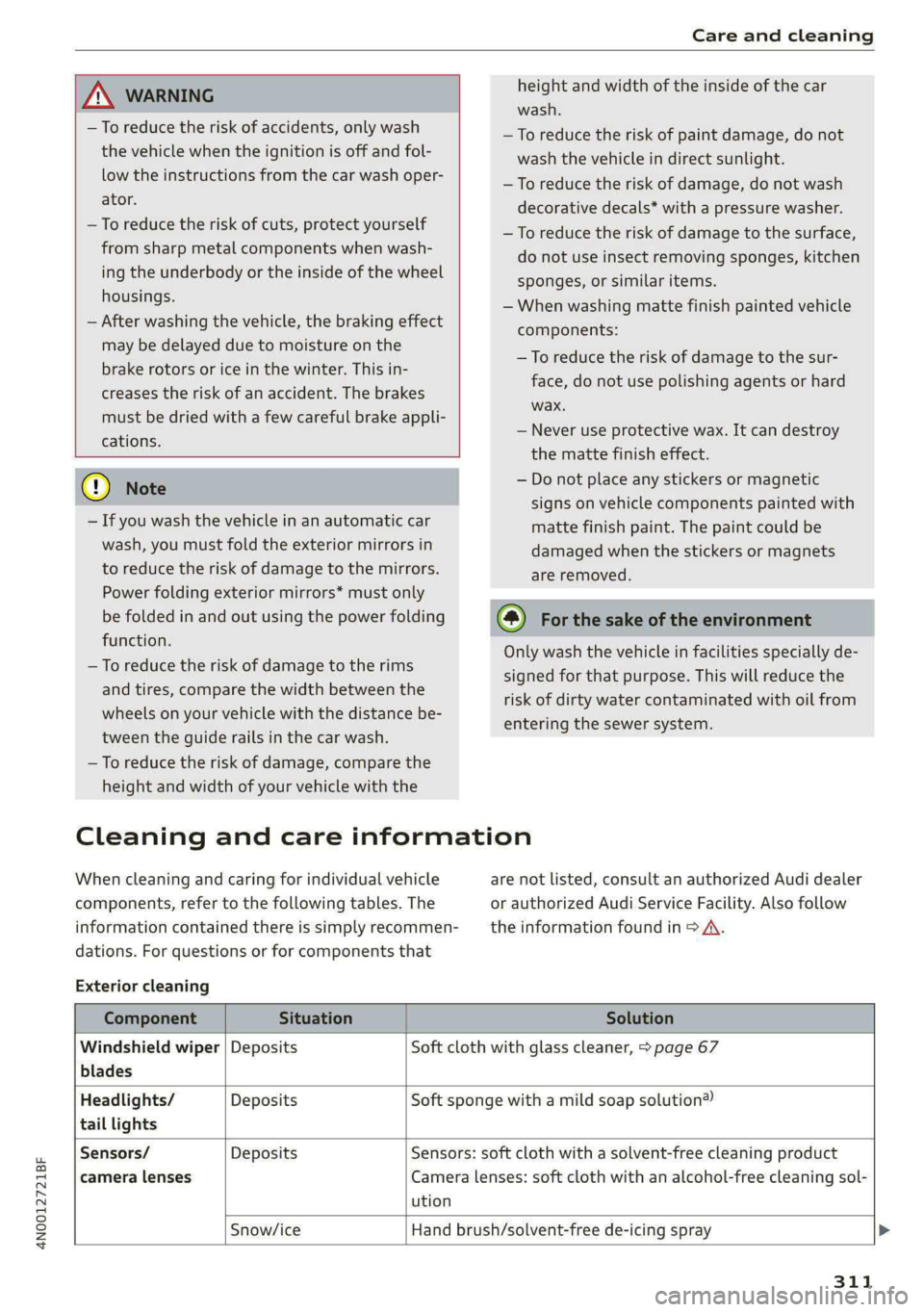
height and width of the inside of the car
wash.
ZA WARNING
—To reduce the risk of accidents, only wash
the vehicle when the ignition is off and fol-
low the instructions from the car wash oper-
ator.
—To reduce the risk of paint damage, do not
wash the vehicle in direct sunlight.
—To reduce the risk of damage, do not wash
decorative decals* with a pressure washer.
—To reduce the risk of damage to the surface,
do not use insect removing sponges, kitchen
sponges, or similar items.
— When washing matte finish painted vehicle
components:
—To reduce the risk of cuts, protect yourself
from sharp metal components when wash-
ing the underbody or the inside of the wheel
housings.
— After washing the vehicle, the braking effect
may be delayed due to moisture on the
brake rotors or ice in the winter. This in-
creases the risk of an accident. The brakes
must be dried with a few careful brake appli-
cations.
— To reduce the risk of damage to the sur-
face, do not use polishing agents or hard
wax.
— Never use protective wax. It can destroy
the matte finish effect.
@) Note — Do not place any stickers or magnetic
signs on vehicle components painted with
matte finish paint. The paint could be
damaged when the stickers or magnets
are removed.
— If you wash the vehicle in an automatic car
wash, you must fold the exterior mirrors in
to reduce the risk of damage to the mirrors.
Power folding exterior mirrors* must only
be folded in and out using the power folding (@) For the sake of the environment
function.
—To reduce the risk of damage to the rims
and tires, compare the width between the
wheels on your vehicle with the distance be-
tween the guide rails in the car wash.
—To reduce the risk of damage, compare the
height and width of your vehicle with the
Only wash the vehicle in facilities specially de-
signed for that purpose. This will reduce the
risk of dirty water contaminated with oil from
entering the sewer system.
Cleaning and care information
When cleaning and caring for individual vehicle are not listed, consult an authorized Audi dealer
components, refer to the following tables. The or authorized Audi Service Facility. Also follow
information contained there is simply recommen- __ the information found in > A.
dations. For questions or for components that
Exterior cleaning
Component Situation Solution
Windshield wiper | Deposits Soft cloth with glass cleaner, > page 67
blades
Headlights/ Deposits Soft sponge with a mild soap solution®
tail lights
Sensors/ Deposits Sensors: soft cloth with a solvent-free cleaning product
camera lenses Camera lenses: soft cloth with an alcohol-free cleaning sol-
ution
Snow/ice Hand brush/solvent-free de-icing spray >
311
Page 316 of 362
Care and cleaning
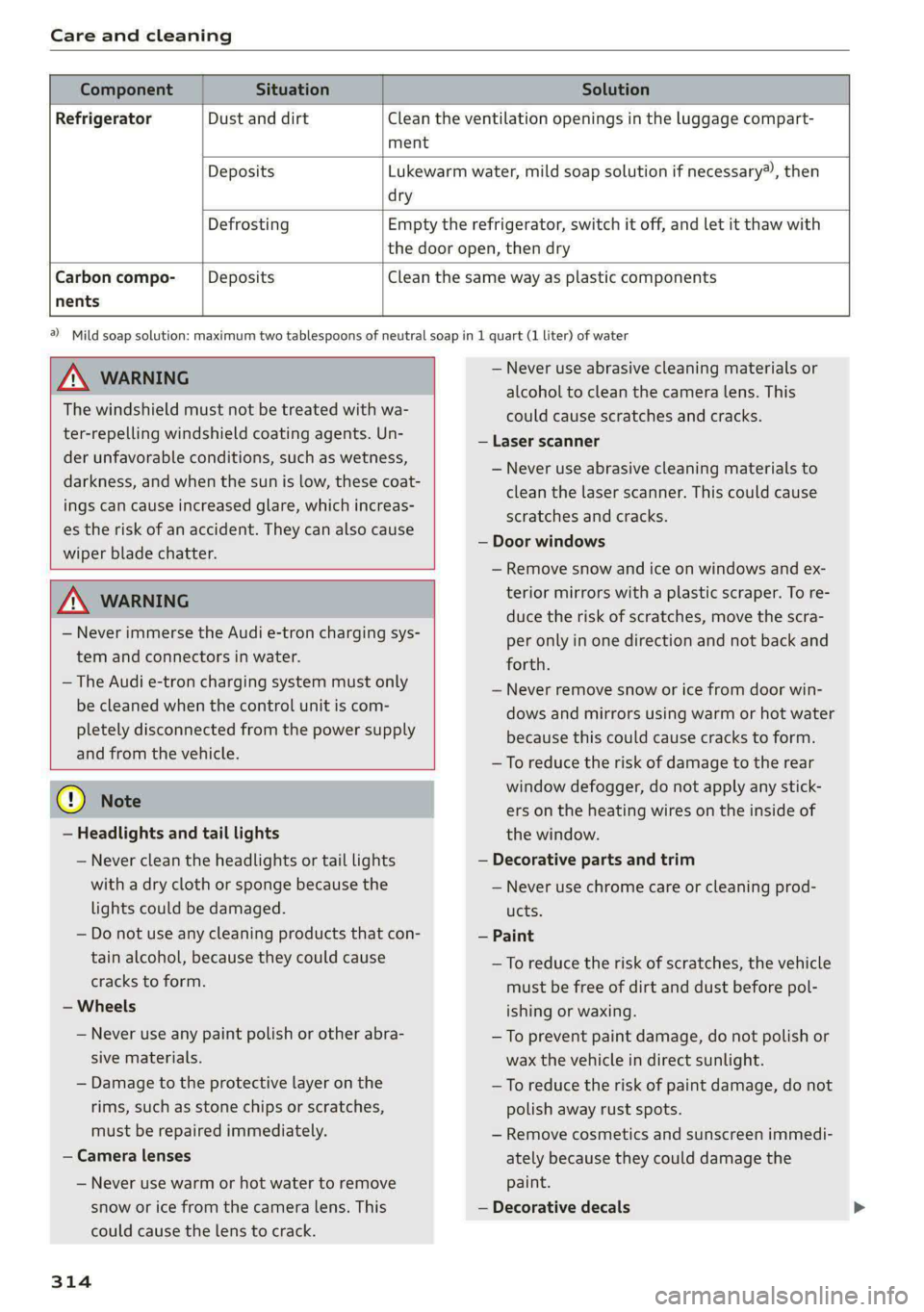
Component Situation Solution
Refrigerator Dust and dirt Clean the ventilation openings in the luggage compart-
ment
Deposits Lukewarm water, mild soap solution if necessary), then
dry
Defrosting Empty the refrigerator, switch it off, and let it thaw with
the door open, then dry
Carbon compo- Deposits Clean the same way as plastic components
nents
ZA\ WARNING
The windshield must not be treated with wa-
ter-repelling windshield coating agents. Un-
der unfavorable conditions, such as wetness,
darkness, and when the sun is low, these coat-
ings can cause increased glare, which increas-
es the risk of an accident. They can also cause
wiper blade chatter.
ZA\ WARNING
— Never immerse the Audi e-tron charging sys-
tem and connectors in water.
— The Audi e-tron charging system must only
be cleaned when the control unit is com-
pletely disconnected from the power supply
and from the vehicle.
@) Note
— Headlights and tail lights
— Never clean the headlights or tail lights
with a dry cloth or sponge because the
lights could be damaged.
— Do not use any cleaning products that con-
tain alcohol, because they could cause
cracks to form.
— Wheels
— Never use any paint polish or other abra-
sive materials.
— Damage to the protective layer on the
rims, such as stone chips or scratches,
must be repaired immediately.
— Camera lenses
— Never use warm or hot water to remove
snow or ice from the camera lens. This
could cause the lens to crack.
314
2) Mild soap solution: maximum two tablespoons of neutral soap in 1 quart (1 liter) of water
— Never use abrasive cleaning materials or
alcohol to clean the camera lens. This
could cause scratches and cracks.
— Laser scanner
— Never use abrasive cleaning materials to
clean the laser scanner. This could cause
scratches and cracks.
— Door windows
— Remove snow and ice on windows and ex-
terior mirrors with a plastic scraper. To re-
duce the risk of scratches, move the scra-
per only in one direction and not back and
forth.
— Never remove snow or ice from door win-
dows and mirrors using warm or hot water
because this could cause cracks to form.
—To reduce the risk of damage to the rear
window defogger, do not apply any stick-
ers on the heating wires on the inside of
the window.
— Decorative parts and trim
— Never use chrome care or cleaning prod-
ucts.
— Paint
— To reduce the risk of scratches, the vehicle
must be free of dirt and dust before pol-
ishing or waxing.
— To prevent paint damage, do not polish or
wax the vehicle in direct sunlight.
—To reduce the risk of paint damage, do not
polish away rust spots.
— Remove cosmetics and sunscreen immedi-
ately because they could damage the
paint.
— Decorative decals
Page 327 of 362

4N0012721BF
Emergency assistance
4. Attach the other end of the negative cable
(black) to the jump-start pin @) on the vehi-
cle.
Starting the engine
> Start the engine in the vehicle giving the charge
and let it run at idle.
> Now start the engine in your vehicle, which has
the
drained battery.
> If the engine does not start, stop the starting
procedure after 10 seconds and then repeat it
after approximately 30 seconds.
> Turn on the rear window defogger in your vehi-
cle in order to reduce any voltage peaks that
may occur when disconnecting the jump start
cables. The headlights must be switched off.
> With the engines running, remove the cables in
reverse order of the way they were installed.
> Close the red cover on the positive terminal.
Z\ WARNING
— Never connect the jump start cable directly
to your vehicle battery. Only use the connec-
tions in the engine compartment.
— Do not touch the non-insulated parts of the
terminal clamps. The cable must also not
come into contact with vehicle components
that conduct electricity when it is connected
to the positive vehicle battery terminal. This
can cause a short circuit.
— The plugs on the battery cells must not be
opened.
— Keep ignition sources (such as open flames,
burning cigarettes, etc.) away from the vehi-
cle batteries to reduce the risk of an explo-
sion.
— Route the jump start cables so they cannot
get caught in the moving parts in the other
vehicle's engine compartment.
@ Note
Please note that the connecting process previ-
ously described for the jump start cables is in-
tended for when your vehicle is being jump
started.
@) Tips
Make sure that the connected jump start ca-
bles have sufficient contact with metal.
Towing
General information
You should only perform the steps that follow if
you have the necessary tools and technical ex-
pertise.
Towing requires a certain amount of practice.
Audi recommends contacting a towing company
to have the vehicle transported.
You should only have your vehicle towed by an-
other vehicle when disabled in exceptional cir-
cumstances. Inexperienced drivers should not
tow.
Notes on towing
When the engine is stopped, the transmission
will not be sufficiently lubricated if traveling at
high speeds and long distances:
— The maximum permitted towing speed is 30
mph (50 km/h).
— The maximum permitted towing distance is 30
miles (50 km).
Additional information on towing with a tow
truck
The vehicle may only be towed with the front axle
raised. Do not wrap any chains or cables around
the brake lines.
Tow bar and towing cable
The vehicle can be towed with a tow bar or tow-
ing cable. Both drivers should be familiar with
the special considerations when towing, especial-
ly when using a towing cable.
Always make sure the traction force does not ex-
ceed the permitted level and there are no shock
loading conditions. There is always the risk of the
coupling becoming overloaded when driving off-
road.
For the most safety and security, drive with a tow
bar. You should use a towing cable onlyifatow >
325
Page 334 of 362

Fuses and bulbs
Fuse panel ©) (white)
2 |Rear sliding sunroof
DVD drive
AC socket
3 5
6 |Passenger’s side rear safety belt tensioner
7 8
Front center armrest heating
Rear footrest heating
11 | Rear Seat Remote
12 | Driver’s side rear safety belt tensioner
Bulbs
[Note
Your vehicle is equipped with maintenance-free
headlights and tail lights. However, if a light bulb
needs to be replaced, please contact an author-
ized Audi dealer or authorized Audi Service Facili-
ty.
332
Page 347 of 362

4N0012721BF
Index
A
A/C cooling mode............ eee eee eee
A/C system refrigerant oil...............
Accelerator pedal.............2--00000-
also refer to Accelerator pedal..........
ACCESSOFICS 2. eee
Active lane assist
refer to Lane departure warning.........
refer to Lane guidance................
Active SuSpenSiOt es ¢ « ccs so ewe ss eewe ss
Adaptive cruise assist................04.
Cleaning the sensors.............0 0005
Adaptive cruise control
Predictive control..............000005
Adaptive speed assist
refer to Adaptive cruise assist..........
Adjusting the air distribution............
Adjusting the brightness.................
Adjusting the sound.................005
Adjusting the temperature..............
Adjusting the vents.................05.
Adjusting the volume..............00-00-
Adjusting the volume (announcements) ... .
Adjusting the welcome sound............
Airbag system... 2... ee eee eee
Air suspension..............00 000-00 ee
Alarm system
refer to Anti-theft alarm system..........
Alignment pin (changing the wheel).......
All-weather lights...............-.00000.
Allseasontires...............00 eee eee
All wheel drive
refer to quattro... .... eee eee eee
Amazon Alexa integration
Media playback.................00005
QPerating « « ses so secs oo moms 9 wa & ¥ BRE
AMI
refer to Audi music interface...........
Android Auto
refer to Audi smartphone interface......
Anti-lock braking system............0065
Anti-Slip Regulation.................05.
Antietheftalarmr system siccs oe owes oc cna «
Anti-theft wheel bolts..................
Apple CarPlay
refer to Audi smartphone interface...... 261
Aspect ratio
NidGO verse < ¢ seven & 5 seaRE ze SeHER Fo Bee 255; 257
ASR
refer to Anti-Slip Regulation............ 129
Audi adaptive light...............-..000- 58
Audi connect
MEFEPTONCONNECE: « «esses oo wesc ow xem ¥ v0 222
AUGIGriVe’SelECt ios: « « suas > gemy 2 x seme gee 124
Audi e-tron compact charging system..... 140
Adjusting the charging power level...... 140
Changing or attaching the power cable... 145
SECUCINGls » 5 seme ¢ 9 same < a eR Eee EOE ne 145
Status and malfunction indicators....... 141
Audi musiciintertace sas ss iwes se gee ay oo 252
UGGS iexsy: a 2 wares & & gee & 2 eR Ee ER 253
Audi phone BOX eis 5 y omnes 5 3 eas «8 ews 211
Audi presense........ 0.00 e cee eee eee 178
MGSSAGES saws + & cmer 9 ¢ cemes 9 o ews 8 9 ee 182
Audi pre sense front.............eeeeeee 179
Audi side assist
refer to Side assist............-.00000. 182
Audi smartphone interface.............. 261
Legaliinformationi. . soe. s + scars se cesses ¥ 266
Audi virtual cockpit
refer to Instrument cluster.............. 12
AUTO
Automatic headlights.................. 58
Climate control system..............5- 101
Auto Lock (central locking) ............... 41
Automatic climate control system
refer to Climate control system......... 100
Automatic luggage compartment lid.... 49,50
Automatic transmission...............- 109
Parking lock emergency release......... 112
Automatic wipe/wash system............. 66
Auxiliary climate control................ 104
Average consumption.................-- 16
Average speed ..... 0... cece ccc eee renee 16
B
Bag hooks........ 0... eee eee eee eee 97
Band
refer to Frequency band............... 242
345
Page 352 of 362

Index
Glossary of tire and loading terminology... 292
Glove compartment ........0. 0c cece scene 97
Cooled... 62... eee eee 95
Valet parking’: + exes « ¥ cans & ¢ Sees + ¥ eevee 2 55
Gross Axle Weight Rating (GAWR)........ 344
Gross Vehicle Weight Rating (GVWR) ...... 344
GVWR
refer to Gross Vehicle Weight
Rating (GVWR) « sees © 2 sorves 2 0 ssamewe « a aes 344
H
Handset
refer to Rear Seat Remote............... 26
Hamdstreeis « snscsa: x x srawaws a x sams tv aceon wx one 210
HandsiFree Profiles. «ssw oo amin ss mmm © 210
Head-up display
TAGJUSTIAG scsi «6 sxsvews «a anexsen on amma 6 suszens wo 33
Adjusting the brightness................ 63
QOPErSLING’s + aces 3 = news 3 2 mom § ede + Ee 33
Headlight range control...............00. 58
Headlights
Cleaning’: « ¢ saws = ¢ sews oy eeew ee ees ene 311
Headlight range control................ 58
Washer system... .. 0... eee eee eee eee 66
Washer system (filling washer fluid) ..... 287
Head restraints
IACJUStIN Gans s cuecem @ 3 owen « 8 wee 6 oreHeR 79
Removing and installing................ 79
Heated rear Window occ. cee eee eee 102
Heated steering wheel.............00005 104
FO atingpasies ao svsise « & smwene © & anaes @ Hanae @ 0 6 100
HFP
refer to Hands Free Profile............. 209
High-voltage battery...............008- 131
Audi e-tron compact charging system.... 140
CharginiGee: « s eves = x sees + o eee eg 131, 134
Charging display on the vehicle......... 135
Charging equipment.................. 138
Charging methods.................... 131
Charging ports on the vehicle........... 131
Charging time.......... 2... eee eee 132
Connecting the charging cable.......... 134
Messages while driving................ 137
Not running for long periods of time..... 133
Opening the charging port door......... 134
Quick:eharging sec = 2 sews 2s eves vs wens we 131
350
Setting the timer’. « « esses v6 meee ve meee vs 136
Transporting charging equipment....... 139
High-voltage system............-...00-. 131
High beams
High beam assistant............00e00u 59
Highway lights..................-.0000s 58
Hill descent control.............0 2200s 122
Hill.holdiassisty. w:cesice x ecesese w = syersim oo avoir 109
Home
refer to Home address.............005 236
Home address............ 000-00 e eee 236
HomeLink
refer to Garage door opener............. 55
Home screen... 1... 0. cece eee eee eee ee 19
HOM... eee ete teens 6
Hotspot
refer to Wi-Fi...........0.- 00 eee eee 225
I
Ignition
Switching on and off...............0-. 107
Imbalance (wheels)..................-- 298
Immobilizer
refer to Electronic immobilizer........... 45
Indicator lights: : see: ss eens sy ores x copes se 7
Inspection interval............-.00--00. 287
Instrument cluster...............-0000-5 12
Adjusting the layout................0.. 13
Cleaning iwi: © swine ¥ o cwenie 2 weve wo 2 een « © 313
Engine code... .. 2... eee eee eee 267
FailUr@lve s = eee 2 x mown a = Beers ee ee x eee 12
Onsboard:computen « sss x x wari so swans oa 16
Operating......... 00. c cece eee ee eee 13
Service interval display...............- 287
Software information................. 267
Switching tabs.................0000005 13
SWitchintg CHE VIEW ass + ans 4 s ees xo Ra 13
Vehicle functions « « sivas < siren oo mewn 6 9 oe 16
Version information...............00- 267
Instrument illumination................. 63
Integrated assistance................0.. 20
Integrated Toll Module................. 161
Intelligent search
NaVvigatlotincs + weseuire + exaueas wo avassos i # eae 231
Interference-Causing Equipment Standard
(ICES) 2... eee eee 342
Page 353 of 362

4N0012721BF
Interior lighting © ssc ve snes vo ene oo oe 62, 63
Interior MONITONING & & sis so ese oe eee oo 44
Intermittent mode (windshield wipers) ..... 66
International travels « wow» ss eau 4 a worms & 225
Internet
refer toCOnnect « sews «wien oo ewes eo oe 222
Internet radio
refer to Online radio.............. 246, 247
Intersection assistanteoes « scsi so sien oo one 185
TOMIZEPS < sce oo case w % esorm 6 > oom sw OTR 102
iPhone
refer to Audi music interface........... 252
J
JUMMPEStartin gions 6 o sess + a sane oo secu vo ave 323
K
ROY, cassis oe emia oo mee 6 © arenas oo ene F 8 41,45
Convenience opening and closing......... 53
Key replacement..........:ceeeee eens 45
Mechanical key icc 2 saunas s ave «2 emiee eee 45
Not recognized...............0 eee eae 108
PANIC button.....................0005 45
Replacing the battery.................. 47
Unlocking and locking...............005 46
Vehicle code... 2.0... 0... eee eee eee 45
Key user... 2... eee eee 39
Kick-down .. eee eee eee ee 112
L
Lane assist
refer to Lane departure warning......... 176
refer to Lane guidance.............45- 176
Lane departure warning...............-. 176
Cleaning the camera area.............. 311
Lane :qQuidanee:s « sssvise s ¢ siveine os eres ae wes 169
Laptimer’s sess « = new a ¢ eee + + neres oe nes 158
Laser lighting): ¢ sees ¢ ¢ sews se eee a e eee « 60
LaSerSeaniners » mew: + 2 meme 5 2 eeeS Xe a 151
Cleaning « « css «= sewn ee sone oo ae wo os 312
LATCH (securing child safety seats)......... 91
Leather care andcleaning............... 313
Legal information
License subscriptions................. 266
Software information...............05 266
Software licensesinis ss swcvsie « 0 sane © savers © 266
Version information.............-.00- 266
Legsupport....................000000. 75
License plate bracket................0.. 340
Lifting points (vehicle jack).............. 321
Light/rain sensor
Headlights .......... 6... cece eee eee 58
Intermittent mode (windshield wipers) .... 66
Lighting
Exterior’: = ess ss eee sy eee eo ee ee pees 58
FM GONIOR sesius ow susie 0 v aces 6 o eawaue 9 w aeneand wa 62
LIQHES « issssns so aeiwies ow mene + wan © ¥ MERITS oa 8 58
Lights on the charging port
refer to Charging display............... 135
Listening to music
referto Media................-.. 250, 253
Load... 2... eee 344
GOGALUSETS iin «a secnene « rains oo cuesems @ 2 osmeee wo « 38
Locking and unlocking
By remote control... 2.2... cece eee eee 46
Using the lock cylinder................. 44
With the convenience key............... 46
Low beam headlights.................... 58
LTE
refer to Exterior antenna.............. 212
Luggage compartment................-. 97
Power SOUrCES .... eee eee eee eee 94
Valet Parking’: s » asec: seme x : xeuu « t eae & 55
also refer to Luggage compartment...... 97
Luggage compartment lid................ $1
Closing button.............. 0000000005 49
Generalinformation...............0005 48
Mechanically unlocking...............-- 51
Opening. and Closing ecco s 0 sissies sss so 49
Opening and closing with foot motion..... 50
Opening from the inside in an emergency.. 51
Power opening and closing.............. 49
Lumbar’supports sisicn se esova 2 maces eo a 71,74
M
Maintenances. « cmos s 2 eos 9 2 aes 4 e eee 338
Maintenance intervals.................. 287
Malfunction Indicator Lamp (MIL)........ 274
Maneuver assist........-..0 0000s ee eens 207
Manually releasing the charging connector. 137
Manually releasing the charging port door.. 137
351
Page 356 of 362

Index
Pollutant filter. ccs 2 2 comes 2 wee 2 eure 100
Power closing (doors) « . oiccs as saves oe ones ae 41
Power Meter: esas ss mean se eee se owas 12, 15
PoWerSOUICeS. ss eiws eevee ee wees ee 94,252
Power window malfunction............... 52
Power Windows ....... 0.0. e cee eee eens 52
MAlfUNCtION . ecaea ware & s ware o ¥ ws 52,53
Predictive Controls « was « « emws ¢ ¢ eee ¢ 2 we 170
Predictive messages.............4. 111,165
pre sense
refer to Audi presense................ 178
Presentation mode............ee eee aee 241
Presets
RadiGiccns « 2 mee oo came oo oe oo see 8 245
Presets list
refer to Presets... 0.0... cece eee eee 245
Pressure
Tire pressure monitoring system........ 308
Nicer ee eee eee ee 299
Profile picture... 2.2... eee eee eee 38
Protecting............... 0.0... e eee 312
Pyrotechnic elements................0- 338
Q
quattro... eee eee 128
Selective wheel torque control.......... 129
Quick charging.................0e ee eee 131
R
Radio... 2... eee eee eee 242
Radid t@Xtxx « = xces « s nomen 2 e weme so eee 246
Station lists « e sswess s © waves 6 2 were 6 & eens 242
Radio communications equipment........ 340
Radio’ GquipMentens « aes x 2 neue 4 + nwa s & 340
Radio Standards Specification (RSS)....... 341
Railcarrier... 2.2... eee eee eee eee 125
Rain/light sensor
HeadlightSiens + o awn < gauus s gen 5 3 aoe o 58
Intermittent mode (windshield wipers).... 66
Random
refer to Shuffle.................0000. 255
RANGES. « crn « x examen # # somes A eee oo eT wo 16
RaNGeHNONitOl's + wcciene © vecwees a vues wo wmemne 116
Range potential «0... 2 seve ee oven ee ene 116
Ratige (Clectric)icn + » sews # x game 2 eam o we 238
354
Reading lights: <2 csi
Rear cross-traffic assist . cic... ci ae sees 195
Rear fog lights + mcus si sees se sees se eee ve 58
Rear lid
refer to Luggage compartment lid........ 49
Rear Seat Remote ovis « o ssiwca oo wea so wena 26
Device setup .. 0... 0... eee eee eee eee 27
Legalinformation.................005 266
Menusiandisymbols « sce ev aime s 2 ann sa 28
Operating. ........ 00... eee eee eee 18, 28
Software information................. 266
Rear Seats... 0... cece 74
Rear shelf
refer to Storage area behind the rear head
PESERAINES css ao areeine & aseoies @ 8 arom Te oneSe 96
Rearview: Cameras: ss sivas i sew sa eens es 191
Rear window defogger...............555 102
REAR (climate control system) ........... 101
Recirculation mode..............-..05- 102
Reclining position. .......... 0c eee eee eee 76
Reclining seat system. ...........0.-000. 76
REGUPCFALION srccces + x wares ao mecnene ao onmenee 16,114
RefrigerantiOi serie © = scoscs « 2 sae ¥ veneer © He 344
Refrigerator
Cleaning ....... 2... cece eee eee eee 314
Refieling?. x 2 ccs: wx snes 2 smmnene an apipene 2 8 8 270
Remote access authorization (key user)..... 39
Remote control
Garage door opener..........--.000000- 55
Remotercontrol-key*s siccse = a ainnne «a cus 6 ae 45
Convenience opening and closing......... 53
Key replacement.........-....--0000-5 45
LED 2 iviseos 4 & ori & oessye a 8 tenia © W dassiice 6 8 ais 47
PANIC function............ 0.000 e ee eee 45
Replacing the battery.................. 47
Unlocking and locking............-...-- 46
also refer to Vehicle key...........0000. 45
Remote controlled parking.............. 202
Remote park assist plus
refer to Remote controlled parking...... 202
Remote park assist plus with garage function
refer to Remote controlled parking...... 202
Removing the caps (wheel bolts)......... 320
Repairs... 2.2.6... eee eee eee 338
Replacement key...........0 0c see e eee 45
Replacement parts...............000005 340