turn signal AUDI A8 2021 Owner's Manual
[x] Cancel search | Manufacturer: AUDI, Model Year: 2021, Model line: A8, Model: AUDI A8 2021Pages: 362, PDF Size: 99.29 MB
Page 185 of 362

4N0012721BF
Driver assistance
Warning stage
If you activate a turn signal and the display flash-
es, side assist is warning about objects that have
been classified as critical.
Depending on the vehicle equipment and other
driver assistance systems, the display may also
flash if you have not activated a turn signal. If
you are approaching a detected lane marker line
and it appears you will be leaving the lane, the
display will warn you about detected vehicles
that are classified as critical. You can also be
warned with corrective steering > page 176,
Lane departure warning.
Detection range
The radar sensors are designed to detect the left
and right adjacent lanes when the road lanes are
the normal width. In some situations, the display
may turn on even though there is no vehicle lo-
cated in the area that is critical for a lane change.
For example:
— If the lanes are narrow or if you are driving on
the edge of your lane. If this is the case, the
system may have detected a vehicle in another
lane that is not adjacent to your current lane.
— If you are driving through a curve. Side assist
may react to a vehicle that is in the same lane
or one lane over from the adjacent lane.
— If side assist reacts to other objects (such as
roadside structures like guard rails).
ZA\ WARNING
— Observe the safety precautions and note the
limits of the assist systems, sensors, and
cameras > page 150.
— The display may not appear on time when
vehicles are approaching or being passed
very quickly.
@ Tips
— If the window glass in the driver's door or
front passenger's door has been tinted, the
display in the exterior mirror may be incor-
rect.
— The coverage areas of the sensors > fig. 132
are diagrams and do not represent a true-
to-scale image of the sensor ranges.
— The system complies with United States FCC
regulations and ISED regulations
> page 341.
Adjusting side assist
Applies to: vehicles with side assist
The system can be switched on and off in the
MMI => page 153. If the system is activated, the
displays will turn on briefly when the ignition is
switched on.
Adjusting the brightness
You can adjust the brightness of the display in
the exterior mirror. The settings depend on the
vehicle equipment.
> Applies to: MMI: Select on the home screen:
VEHICLE > Driver assistance > (<2}) > Side as-
sist > Brightness.
The display brightness is automatically adapted
to the ambient light. If the automatic adaptation
has already reached the upper or lower limit, no
change will be apparent when the setting is
changed, or it will only become visible when the
ambient light changes. Adjust the brightness to a
level where the display in the information stage
will not disrupt your view ahead. If you change
the brightness, the display will briefly show the
brightness level in the information stage.
Messages
Applies to: vehicles with side assist
fg or Eg is displayed when there is a malfunc-
tion, the side assist and exit warning system
functions may be unavailable or may be limited.
A message that indicates the cause and possible
solution may appear with some displays. The
weather conditions may be too poor or a sensor
may be covered. Clean the sensor area at the rear
corners of the vehicle > page 152, fig. 111 and
try to turn the systems on again later.
If the malfunction remains, drive to an author-
ized Audi dealer or authorized Audi Service Facili-
ty immediately to have the malfunction correct-
ed.
183
Page 187 of 362

4N0012721BF
Driver assistance
Intersection assistant
Applies to: vehicles with intersection assistant
o D
oS
& > &
ao
Fig. 136 Instrument cluster: directional display from the
intersection assistant
General information
The intersection assistant can warn the driver of
approaching cross traffic in complex intersections
> fig. 135.
The system monitors intersections and exit
ramps using the sensors installed in the vehicle
that detect the front and side areas around the
vehicle. Moving objects that are approaching
from behind, such as cars, are detected within
the limits of the system > A\. The system can al-
so warn the driver of a potential collision with de-
tected approaching cross traffic in intersections
and exit ramps with poor visibility.
Requirements for using the intersection
assistant:
— The speed must not be higher than approxi-
mately 18 mph (30 km/h).
— The “D” gear is selected.
Displays, warnings, and braking
— Display: the red arrow (@) can indicate the direc-
tion from which the cross traffic is approaching.
The indicator in the upper display only appears
when the parking aid is activated. For vehicles
with peripheral cameras only in the Front and
Front corner camera views. The display only ap-
pears in the instrument cluster > fig. 136 when
the Driver assistance display is open in the on-
board computer > page 16.
— Warnings: the message Cross traffic! © can
warn about critical cross-traffic when driving
forward. There may also be an audible signal.
— Automatic brake activation: if you do not react
to a warning, a brief braking by the system can
warn you of a potential collision with an ap-
proaching object when driving forward at
speeds up to approximately 6 mph (10 km/h).
Switching the intersection assistant on and
off
— The system can be switched on and off in the
MMI & page 153.
Messages
If, or > is displayed when there is a mal-
function, the intersection assistant functions
may be unavailable or may be limited.
A message that indicates the cause and possible
solution may appear with some displays. The
weather conditions may be too poor or a sensor
may be covered. Clean the area in front of the
sensors > page 152 and try to turn the system on
again later.
If the malfunction remains, drive to an author-
ized Audi dealer or authorized Audi Service Facili-
ty immediately to have the malfunction correct-
ed.
Z\ WARNING
— Observe the safety precautions and note the
limits of the assist systems, sensors, and
cameras > page 150.
— The intersection assistant will not provide
alerts about people and cannot warn you
about every type of approaching objects,
such as cyclists. Always monitor the traffic >
185
Page 191 of 362

4N0012721BF
Parking and maneuvering
General information
The parking aid assists when parking and maneu-
vering by providing warnings about obstacles. If
the ultrasonic sensors on the vehicle > page 151,
fig. 108 detect an obstacle, the system will pro-
vide audio and visual warnings.
Activating and deactivating
Requirement: the vehicle speed must be under
approximately 6 mph (10 km/h).
> Press the Pvt or { button @ in the center con-
sole. When activating, a brief tone will sound
and the LED in the button will turn on.
Automatic activation
> The system activates automatically when re-
verse gear is engaged while the engine is run-
ning. A brief tone will sound.
> If Automatic activation is switched on in the
MMI and if the vehicle approaches an obstacle
at speeds below approximately 6 mph (10
km/h), the parking aid will switch on automati-
cally. Audible signals will sound once the obsta-
cle is within the sensor detection area.
> Applies to: MMI: To switch Automatic activa-
tion on or off, select on the home screen: VEHI-
CLE > Parking aid > Automatic activation.
Automatic deactivation
The distance indicator for the parking aid plus
will deactivate automatically when driving for-
ward faster than 6 mph (10 km/h).
Z\ WARNING
Observe the safety precautions and note the
limits of the assist systems, sensors, and
cameras > page 150.
@) Note
Keep enough distance from the curb to avoid
damage to the rims.
@) Tips
— If the parking aid is deactivated, it can only
be reactivated automatically when one of
the following conditions is met:
— The vehicle speed exceeds 6 mph
(10 km/h)
— The ignition is switched off and back on
again
— The parking brake is set and then released
— The “P” gear is engaged and released
again
Applies to: vehicles with parking aid plus
Fig. 138 Upper display: distance indicator
If the sensors detect an obstacle, audible and vis-
ual signals will warn you.
Visual warnings
The visual warnings in the upper display help you
to detect the critical vehicle area and to estimate
the distance to an obstacle.
Red segments (2) show detected obstacles that
are in your vehicle's path. The red lines @) mark
the expected direction of travel based on the
steering angle. A white segment @) indicates a
detected obstacle that is outside of the vehicle's
path. The closer your vehicle comes to the obsta-
cle, the closer the segments will move to the ve-
hicle. The collision area has been reached when
the next to last segment is displayed. Obstacles
in the collision area, including those outside of
the vehicle's path, are shown in red. Do not con-
tinue driving farther.
Audio signals
The closer your vehicle gets to a detected obsta-
cle, the shorter the time between the audible sig-
nals. A continuous tone sounds when an obstacle
is less than approximately 1 foot (0.30 m) away
from the front or rear of the vehicle. A continu-
ous tone sounds when an obstacle is less than
approximately 0.7 feet (0.20 m) away from the
189
>
Page 192 of 362

Parking and maneuvering
sides* of the vehicle. Do not continue driving for-
ward or in reverse >@©.
> To deactivate audio signals while parking, press
(in the upper display. The audio signals will be
automatically activated again the next time the
parking aid is activated.
Adjusting the volume
You can adjust the volume to your preferences.
The settings depend on the vehicle equipment.
> Applies to MMI: Select on the home screen: VE-
HICLE > Parking aid. Or
> Press |--]in the upper display when the parking
system is active.
Possible settings:
Front volume - Volume for the front and side*
area.
Rear volume - Volume for the rear area.
Entertainment fader —- The volume of the audio/
video source is lowered when the parking aid is
activated.
The new level is demonstrated briefly* when the
volume is adjusted.
Error messages
If P4 appears, the sensor in the respective area
or the speaker is faulty. Drive immediately to an
authorized Audi dealer or authorized Audi Service
Facility to have the malfunction repaired.
If Avis displayed in the MMI, the ultrasonic sen-
sor indicated is icy or dirty. Clean the area in front
of the sensors > page 152.
if or is displayed when there is a malfunc-
tion, the parking aid functions may be unavaila-
ble or may be limited.
A message that indicates the cause and possible
solution may appear with some displays. The
weather conditions may be too poor or a sensor
may be covered. Clean the area in front of the
sensors > page 152 and try to turn the system on
again later.
If the malfunction remains, drive to an author-
ized Audi dealer or authorized Audi Service Facili-
190
ty immediately to have the malfunction correct-
ed.
ZA\ WARNING
— Observe the safety precautions and note the
limits of the assist systems, sensors, and
cameras > page 150.
— Sensors and cameras have spots in which
the surrounding area cannot be detected.
Objects, animals, and people may only be
detected with limitations may not be detect-
ed at all. Always monitor the traffic and the
vehicle's surroundings directly and do not
become distracted.
@) Note
— Keep enough distance from the curb to
avoid damage to the rims.
— Applies to: vehicles with assisted parking
systems: If you park in short parking spaces
using assisted parking systems, a continu-
ous tone will sound from the parking aid
when the distance to an object is less than
approximately 0.7 feet (0.20 m). Do not
continue driving farther.
G) Tips
—The side area* > page 151, fig. 108 is de-
tected and evaluated when passing. There
may have been changes to the surrounding
area after switching the ignition off and on
again, after opening the doors, or if the ve-
hicle is left stationary for a period of time.
In this case, the area will appear black until
the area has been detected and evaluated.
— If the distance to an obstacle remains con-
stant, the volume of the distance warning
gradually lowers after a few seconds until it
is muted (this does not apply to the continu-
ous tone). If the obstacle comes closer than
it was before the sound was muted, the
tone will sound again. If the obstacle be-
comes farther away than it was before the
sound was muted, no tone will sound. Pay
attention to the vehicle's surroundings
when you start to drive.
Page 197 of 362

4N0012721BF
Parking and maneuvering
Rear cross-traffic assist
Applies to: vehicles with rear cross-traffic assist
3 s
&
= st a
Fig. 144 Upper display: rear cross-traffic assist display
General information
The rear cross-traffic assist monitors the area be-
hind and next to the vehicle using radar sensors
at the rear corners of the vehicle. The system can
detect moving objects that are approaching, such
as vehicles > fig. 143. A display in the MMI and
various warnings provide assistance when exiting
a parking space.
Requirements for using the rear cross-traffic
assist:
— The parking system is switched on > page 188.
— Reverse gear must be engaged and the speed
while driving in reverse must not be higher than
6 mph (10 km/h).
Displays, warnings, and braking
— Display: the display @ appears only when the
parking aid is active. In vehicles with peripheral
cameras, the display only appears in the Rear
and Rear corner camera views. Arrows show the
direction from which the cross traffic is ap-
proaching.
— Audible warnings: an audio signal may sound
as an additional warning when driving in re-
verse.
— Automatic brake activation: if you do not react
to a warning, a brief braking by the system can
warn you of a potential collision with an ap-
proaching object.
The audible warning signal and the automatic
brake activation occur only when driving in re-
verse.
Switch rear cross-traffic assist on and off
— Applies to MMI: Select on the home screen: VE-
HICLE > Parking aid > Rear cross-traffic assist.
Or
— Select |--| > Rear cross-traffic assist in the upper
display when the parking aid is active.
Messages
re or >% is displayed when there is a mal-
function, the rear cross traffic assist functions
may be unavailable or may be limited.
A message that indicates the cause and possible
solution may appear with some displays. The
weather conditions may be too poor or a sensor
may be covered. Clean the sensor area in the ve-
hicle rear and try to turn the system on again lat-
er.
If the malfunction remains, drive to an author-
ized Audi dealer or authorized Audi Service Facili-
ty immediately to have the malfunction correct-
— Observe the safety precautions and note the
limits of the assist systems, sensors, and
cameras > page 150.
— The rear cross-traffic assist will not provide
alerts about people and cannot warn you
about every type of approaching objects,
such as cyclists. Always monitor the traffic
as well as the vehicle's surroundings with di-
rect eye contact.
— The system may not react if objects are ap-
proaching very quickly.
— The rear cross-traffic assist will not provide
alerts if your vehicle is parallel parked or if
195
Page 199 of 362
4N0012721BF
Parking and maneuvering
© Two-car garages”
@ Tips
— If there is enough space in a two-car garage,
the system automatically selects the park-
ing position in front of the vehicle that the
driver has selected.
— You can also drive into a perpendicular park-
ing space yourself and then activate the sys-
tem. If this is the case, the front of the vehi-
cle should already be in the space () so that
the sensors can measure the space.
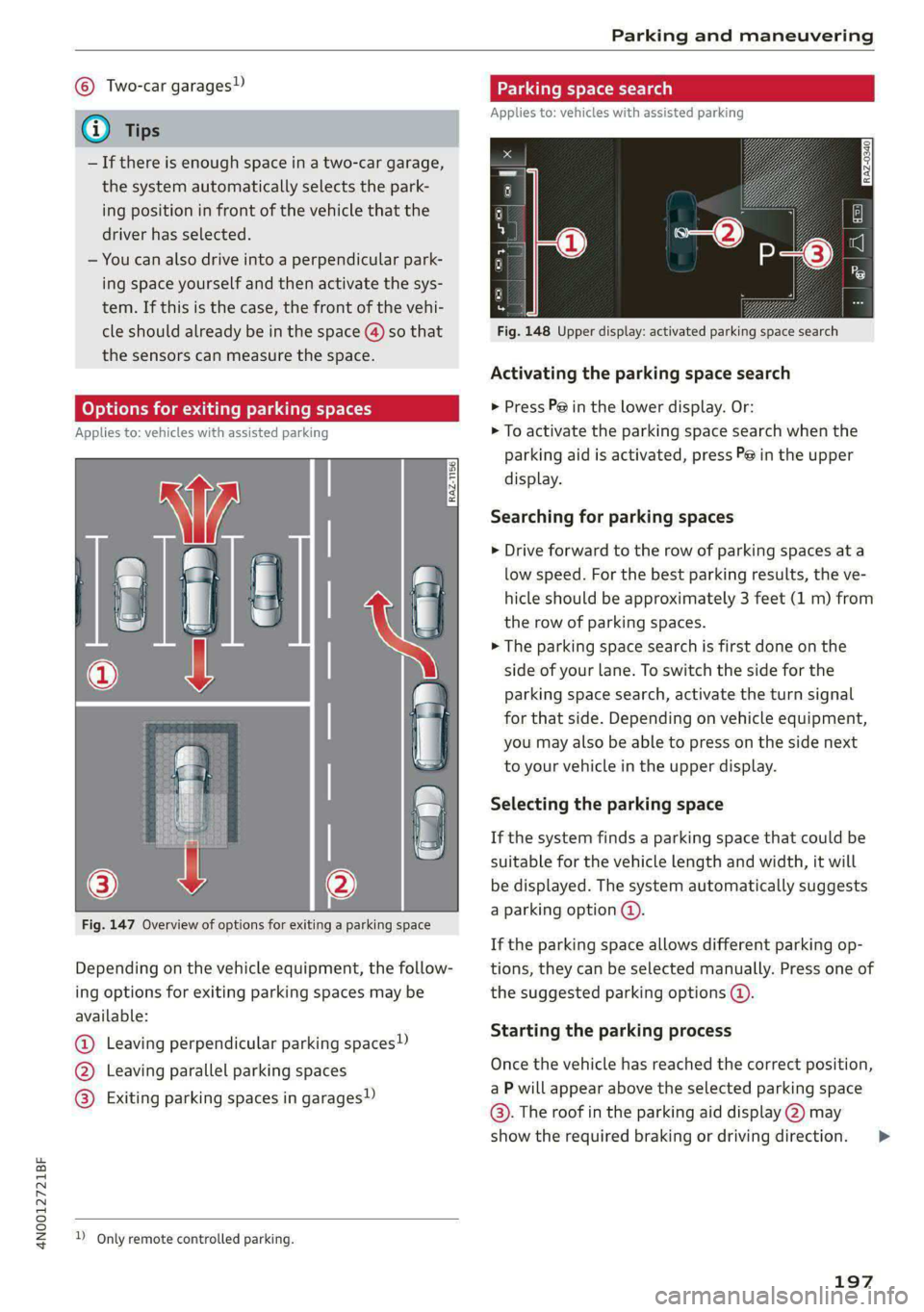
(oy oy a] for exiting parking spaces
Applies to: icles with assisted parking
Fig. 147 Overview of options for exiting a parking space
Depending on the vehicle equipment, the follow-
ing options for exiting parking spaces may be
available:
@ Leaving perpendicular parking spaces»)
@ Leaving parallel parking spaces
@® Exiting parking spaces in garages)
2 Only remote controlled parking.
Parking space search
Applies to: vehicles with assisted parking
S g 3
3]
&
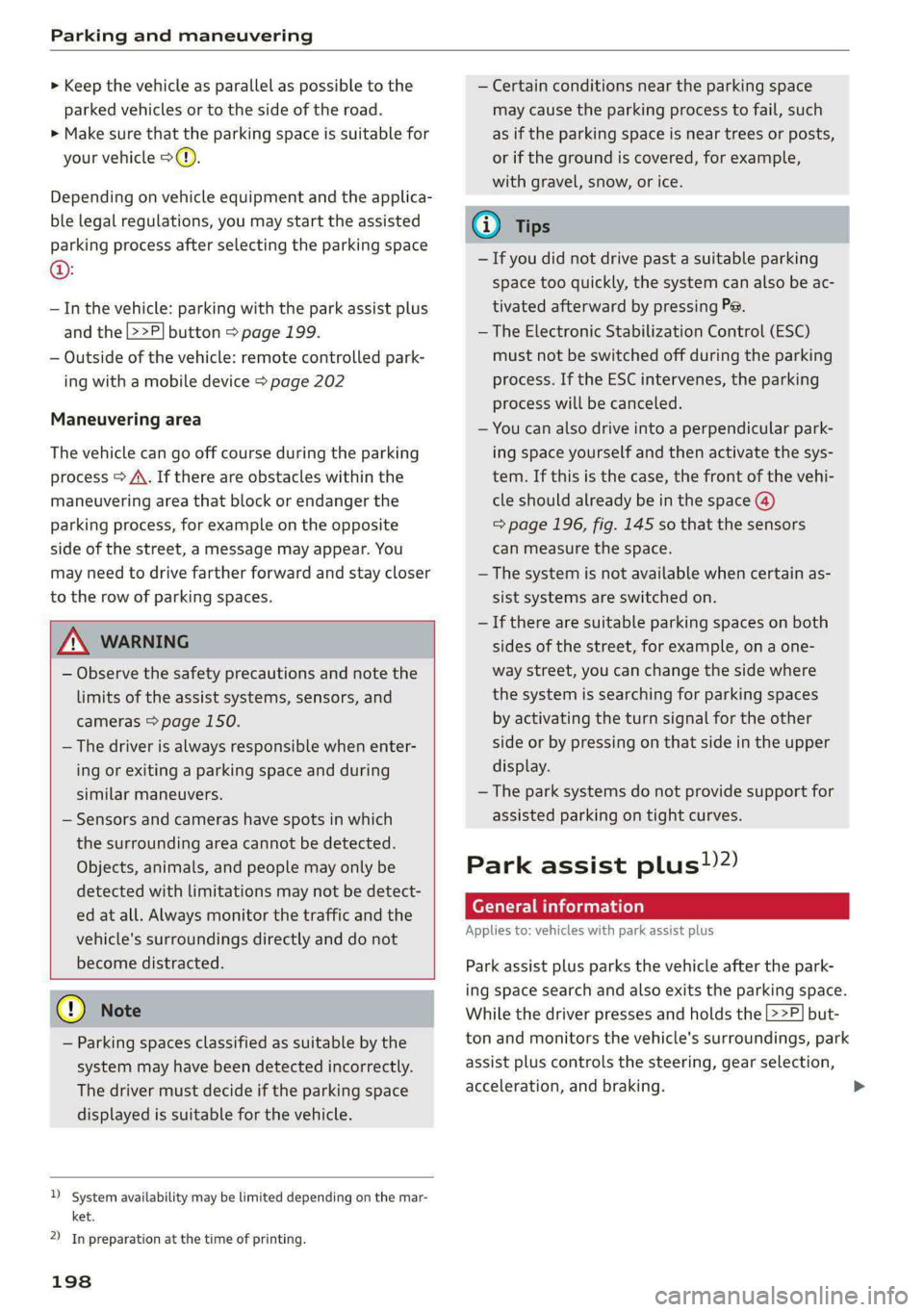
Fig. 148 Upper display: activated parking space search
Activating the parking space search
> Press P@ in the lower display. Or:
> To activate the parking space search when the
parking aid is activated, press Pe in the upper
display.
Searching for parking spaces
> Drive forward to the row of parking spaces at a
low speed. For the best parking results, the ve-
hicle should be approximately 3 feet (1 m) from
the row of parking spaces.
> The parking space search is first done on the
side of your lane. To switch the side for the
parking space search, activate the turn signal
for that side. Depending on vehicle equipment,
you may also be able to press on the side next
to your vehicle in the upper display.
Selecting the parking space
If the system finds a parking space that could be
suitable for the vehicle length and width, it will
be displayed. The system automatically suggests
a parking option @.
If the parking space allows different parking op-
tions, they can be selected manually. Press one of
the suggested parking options @).
Starting the parking process
Once the vehicle has reached the correct position,
a P will appear above the selected parking space
©. The roof in the parking aid display @) may
show the required braking or driving direction.
197
>
Page 200 of 362
Parking and maneuvering
> Keep the vehicle as parallel as possible to the
parked vehicles or to the side of the road.
> Make sure that the parking space is suitable for
your vehicle >@).
Depending on vehicle equipment and the applica-
ble legal regulations, you may start the assisted
parking process after selecting the parking space
@:
— In the vehicle: parking with the park assist plus
and the |>>P] button > page 199.
— Outside of the vehicle: remote controlled park-
ing with a mobile device > page 202
Maneuvering area
The vehicle can go off course during the parking
process
> A\. If there are obstacles within the
maneuvering area that block or endanger the
parking process, for example on the opposite
side of the street, a message may appear. You
may need to drive farther forward and stay closer
to the row of parking spaces.
ZA WARNING
— Observe the safety precautions and note the
limits of the assist systems, sensors, and
cameras > page 150.
— The driver is always responsible when enter-
ing or exiting a parking space and during
similar maneuvers.
— Sensors and cameras have spots in which
the surrounding area cannot be detected.
Objects, animals, and people may only be
detected with limitations may not be detect-
ed at all. Always monitor the traffic and the
vehicle's surroundings directly and do not
become distracted.
@) Note
— Parking spaces classified as suitable by the
system may have been detected incorrectly.
The driver must decide if the parking space
displayed is suitable for the vehicle.
)_ system availability may be limited depending on the mar-
ket.
2) In preparation at the time of printing.
198
— Certain conditions near the parking space
may cause the parking process to fail, such
as if the parking space is near trees or posts,
or if the ground is covered, for example,
with gravel, snow, or ice.
G) Tips
— If you did not drive past a suitable parking
space
too quickly, the system can also be ac-
tivated afterward by pressing Pe.
— The Electronic Stabilization Control (ESC)
must not be switched off during the parking
process. If the ESC intervenes, the parking
process will be canceled.
— You can also drive into a perpendicular park-
ing space yourself and then activate the sys-
tem. If this is the case, the front of the vehi-
cle should already be in the space @)
=> page 196, fig. 145 so that the sensors
can measure the space.
— The system is not available when certain as-
sist systems are switched on.
—If there are suitable parking spaces on both
sides of the street, for example, on a one-
way street, you can change the side where
the system is searching for parking spaces
by activating the turn signal for the other
side or by pressing on that side in the upper
display.
— The park systems do not provide support for
assisted parking on tight curves.
Park assist plus!)2)
General information
Applies to: vehicles with park assist plus
Park assist plus parks the vehicle after the park-
ing space search and also exits the parking space.
While the driver presses and holds the [>>P] but-
ton and monitors the vehicle's surroundings, park
assist plus controls the steering, gear selection,
acceleration, and braking.
Page 203 of 362
4N0012721BF
Parking and maneuvering
Exiting a parking space with park assist
plus!)2)
Applies to: vehicles with park assist plus
If you parked the vehicle in a parallel parking
space, park assist plus can help you drive out of
it.
>» Start the engine.
> Press P@ in the lower display.
> Wait until a message appears on the upper dis-
play that requests you to select the direction to
travel in when exiting the parking space.
> Activate the turn signal on the desired side or
press that side next to the vehicle in the upper
display.
> Remove your hands from the steering wheel.
> Pay attention to the path of the vehicle. If the
traffic situation permits it, press and hold the
>>P] button @ > page 199, fig. 149 and re-
lease the brakes > A\.
> Pay attention to the path of the vehicle. If an
obstacle appears, interrupt the parking process
by releasing the [>>P] button. The vehicle re-
mains stopped.
> To resume the parking process, press and hold
the |>>P] button again.
> The process of exiting the parking space has
ended if additional corrective movements are
no longer necessary and the specified steering
wheel angle is sufficient to drive out of the
parking space. Resume control of the steering
wheel >@).
Pause park assist plus > page 201.
ZA WARNING
— Observe the safety precautions and note the
limits of the assist systems, sensors, and
cameras > page 150.
— Press and hold the |>>P] button only if you
are sure that there are no obstacles in the
vehicle's path or under the vehicle, and that
no obstacles will move into the vehicle's
path.
)_ System availability may be limited depending on the mar-
ket.
2) In preparation at the time of printing.
— Park assist plus is an assist system. The driv-
er is still responsible for monitoring the ve-
hicle's surroundings and preventing colli-
sions when using the system.
— When using park assist plus to drive into or
out of a parking space, the steering wheel
turns quickly on its own. Reaching into the
steering wheel spokes while this is happen-
ing can result in injury.
CG) Note
Resume steering immediately after the last
corrective movement and the takeover
prompt, so that the specified steering wheel
angle is not recentered.
(i) Tips
You can reduce the speed selected by the ve-
hicle or stop the vehicle at any time by press-
ing the brake pedal.
PPTs tle aceite) rere
Applies to: vehicles with park assist plus
You can pause park assist plus at any time by re-
leasing the [>>P] button @ > page 199, fig. 149.
To resume the parking process, press and hold
the [>>P] button again.
Canceling automatically
Park assist plus is canceled automatically among
other things, if:
— If you switch off the system
— You take over steering or press the brake pedal,
— If the time limit is exceeded
— If an obstacle is detected
— The ESC intervenes
Resume control of the vehicle, end the parking
process manually, or:
You can resume the parking process in some sit-
uations. Press and hold the brake pedal and press
Pe.
201
Page 328 of 362

Emergency assistance
bar is not available. Use a towing cable made of
synthetic elastic cable similar elastic material.
ZA WARNING
— Towing highly increases the risk of an acci-
dent, for example from colliding with the
towing vehicle.
— To reduce the risk of an accident, do not al-
low anyone to remain inside the vehicle
when it is being transported by a tow truck
or a special transporter.
@) Note
— If normal towing is not possible, for exam-
ple if the transmission is faulty or if the
towing distance is greater than 30 miles
(50 km), then transport the vehicle on a
special carrier.
— If the vehicle is towed by a tow truck at the
axle that is not permitted, this can cause se-
vere damage to the transmission.
— The vehicle must not be tow started for
technical reasons.
@) Tips
— If the power supply is interrupted, then it
will not be possible to move the selector
lever out of the "P" position. The parking
lock must be released using the emergency
release before towing the vehicle
=> page 112.
— Switch Audi pre sense* off > page 181 when
loading the vehicle onto a vehicle carrier,
train, ship, or other type of transportation,
or when towing the vehicle. This can prevent
an undesired intervention from the pre
sense* system.
— Follow the local legal regulations for tow-
ing.
Read and follow the important information under
=> page 325.
326
Preparations
> Only secure the towing cable or tow bar at the
designated towing loops > page 327,
=> page 327.
> Make sure the towing cable is not twisted. Oth-
erwise it could disconnect from the towing loop
while towing.
> Switch the emergency flashers on in both
vehicles > page 61. However, do not do this if it
prohibited by law.
Towing vehicle (front)
> Only start to drive when the towing cable is
taut.
> Press the brake pedal very carefully.
> Avoid sudden braking or driving maneuvers.
Vehicle being towed (rear)
> Make sure the ignition is switched on so that
the steering wheel is not locked and so that you
can use the turn signals, the horn, and the
windshield wipers if needed > A\.
> Switching it off before the vehicle has stopped
may impair the function of the brake booster
and power steering. You would then need to
use more force to steer and brake the vehicle.
> Release the parking brake > page 121.
> Select the “N” selector lever position.
> Make sure the towing cable is always taut.
ZA\ WARNING
— Never tow a vehicle using a tow bar or tow-
ing cable if the vehicle does not have electri-
cal power.
— If the vehicle runs out of power while it is
being towed, stop towing the vehicle imme-
diately and consult an authorized Audi deal-
er or qualified repair facility.
Page 341 of 362

4N0012721BF
Accessories and technical changes
Usually maintenance and repair work requires
special tools, measuring devices, and other
equipment that is available to trained vehicle
technicians in order to help ensure that your vehi-
cle and all of its systems operate correctly, relia-
bly, and safely. Performing work on the vehicle
incorrectly can impair the operation and reliabili-
ty of your vehicle and may void one or more of
your vehicle's warranties.
Technical Modifications
Interference with electronic components, their
software, the wiring, and data transfer may cause
malfunctions. Because of the way electronic com-
ponents are interconnected, such malfunctions
can also impair systems that are not directly in-
volved. This means that you risk both a substan-
tial reduction in the operational safety of your ve-
hicle and increased wear of vehicle components.
Some convenience functions, such as the conven-
ience turn signal function, individual door open-
ing function, and displays, can be reprogrammed
using special workshop equipment. If functions
are reprogrammed, the information and descrip-
tions about these functions in this Owner's Man-
ual may no longer apply to the changed func-
tions. Audi recommends that an authorized Audi
dealer or authorized Audi Service Facility perform
and verify any reprogramming procedures.
— Never perform any work in the engine com-
partment unless you know exactly how to
carry out the job and have the correct tech-
nical information and the correct tools.
— If you are uncertain about what to do, have
the work performed by an authorized Audi
dealer, an authorized Audi Service Facility,
or another qualified workshop. Serious per-
sonal injury may result from improperly per-
formed work.
ZA WARNING
Maintenance work, repairs, or technical modi-
fications to the vehicle (such as installing ad-
ditional equipment) that is not performed
correctly can cause serious injuries and in-
crease the risk of an accident.
Z\ WARNING
The engine compartment in any motor vehicle
is a potentially dangerous area and can cause
serious personal injury.
— Always use extreme caution when doing any
work in the engine compartment. Always
follow commonly accepted safety practices
and use common sense. Never risk personal
injury.
@) Note
— Maintenance work, repairs, or technical
modifications to the vehicle (such as instal-
ling additional equipment) that is not per-
formed correctly can cause vehicle damage.
— If emergency repairs must be performed,
take your vehicle to an authorized Audi deal-
er or authorized Audi Service Facility as soon
as possible.
— Audi is not liable for damage to the vehicle
resulting from failure to comply with these
guidelines.
@) For the sake of the environment
— Regular maintenance can help protect the
environment.
— Technical modifications to the vehicle can
have a negative impact on fuel consumption
and vehicle emissions.
@) For the sake of the environment
Certain components in your vehicle such as
undeployed airbag modules, pretensioners
and remote control batteries may contain Per-
chlorate Material - special handling may ap-
ply, See www.dtsc.ca.gov/hazardouswaste/
perchlorate. When the vehicle or parts of the
restraint system including airbag modules
and safety belts with pretensioners are scrap-
ped, all applicable laws and regulations must
be observed. Your authorized Audi dealer is
familiar with these requirements and we rec-
ommend that you have your dealer perform
this service for you.
339