vehicle starting system AUDI A8 2021 Owner's Manual
[x] Cancel search | Manufacturer: AUDI, Model Year: 2021, Model line: A8, Model: AUDI A8 2021Pages: 362, PDF Size: 99.29 MB
Page 205 of 362
4N0012721BF
Parking and maneuvering
the vehicle is too far. Make sure the connec-
tion is sufficient, and when in doubt, resume
parking the vehicle yourself.
— Blocking notifications, tones, and vibrations
increase the risk of an accident. The myAudi
app can only warn you if dangers are detect-
ed if you make sure that your mobile device
allows all notifications, tones, and vibra-
tions for the myAudi app.
@) Note
— Do not use remote controlled parking when
transporting cargo that projects outside of
the vehicle or when snow chains are mount-
ed.
— Remote controlled parking may guide the
vehicle either away from curbs or onto them
if other vehicles are parked on the curb.
Make sure that your vehicle's tires and rims
are not damaged. Resume control of the ve-
hicle in time or stop the parking process if
needed to prevent damage.
— In parking spaces without curbs, maintain a
distance of at least 19 inches (50 cm) from
walls and buildings in order to reduce the
risk of vehicle damage.
@) Tips
— Follow the legal regulations in the country
where you are operating the vehicle when
using remote controlled parking. Remote
controlled parking may be prohibited in
some countries. The system may be unavail-
able in countries where it has been deacti-
vated in order to comply with legal regula-
tions. Data will not be transmitted to Audi.
The driver is always responsible for adhering
to the regulations applicable in the country
where the vehicle is being operated.
— Any individual that uses the mobile device
for remote controlled parking is considered
the driver and is participating in traffic. The
driver is always responsible for adhering to
the regulations for using remote controlled
)_ System availability may be limited depending on the mar-
ket.
2) In preparation at the time of printing.
parking that are applicable in the country
where the vehicle is being operated.
— Do not endanger any other road users when
using remote controlled parking. Testing re-
mote controlled parking in a parking lot
with minimal traffic is recommended.
— Your mobile device should have a sufficient
battery charge level. If necessary, charge
the mobile device before starting to drive.
— Do not use the remote controlled parking
function with devices that are faulty or dam-
aged or whose function is impaired. Only
use the operating systems approved by the
mobile device manufacturer.
— When using remote controlled parking, al-
ways pay attention to the areas where your
vehicle can be accessed. Check that no one
can enter your vehicle and if the vehicle has
been locked after parking is completed.
Take the vehicle key with you when leaving
the vehicle.
Applies to: vehicles with remote park assist plus
The following steps must be completed before
using for the first time:
> Create a myAudi account by registering in the
myAudi app or at my.audi.com, depending on
your country.
> Add your vehicle to your myAudi account.
> Set the key user > page 38.
> Install the myAudi app on your mobile device
and log in with your access information.
Device compatibility
The mobile device will be checked at the start of
a parking procedure. If an incompatibility is de-
tected, it will be displayed in the myAudi app.
Audi does not recommend using the function if
an incompatibility is detected > A\.
A selection of supported Bluetooth devices can
be found in the database for tested mobile devi-
ces at www.audi.com/bluetooth. Compatibility
203
>
Page 207 of 362
4N0012721BF
Parking and maneuvering
Preparing the vehicle
> To enable the selected parking space (2) for re-
mote controlled parking, press E @ on the up-
per display.
> If you have already approached a parking space
in the vehicle, remote controlled parking can be
activated to continue with the rest of the park-
ing process. To enable remote controlled park-
ing, press [J in the upper display.
> Exit the vehicle while the engine is running and
take the vehicle key with you. Always keep both
the vehicle key and the mobile device with you
during the entire remote controlled parking
process.
> Make sure that all doors and the luggage com-
partment lid are closed.
Starting the parking process
> Start the myAudi app soon, or the function will
be canceled.
> Pay attention to the path of the vehicle. If the
traffic situation permits, park your vehicle in
the parking space using the mobile device
> JX. The vehicle key and the mobile device
cannot be more than approximately 20 feet
(6 m) away from the vehicle.
> Pay attention to the path of the vehicle. In un-
clear situations, pause the parking process us-
ing
the mobile device. For example, this may be
necessary if an obstacle appears or the vehicle
comes very close to an obstacle.
> To resume the parking process, start it again on
the mobile device. The rest of the parking proc-
ess will be recalculated based on the vehicle po-
sition.
End of the parking process
If an obstacle appears, stop the parking process
=> page 206.
The parking process will end automatically once
the vehicle has reached the end point in the park-
ing space. Once parking is successfully complet-
ed, the parking lock will be engaged, the parking
brake will be set, and the engine will switch off.
The vehicle will also be locked.
ZA WARNING
— Observe the safety precautions and note the
limits of the assist systems, sensors, and
cameras > page 150.
— Failing to pay careful attention to the vehi-
cle's surroundings increases the risk of an
accident. Park your vehicle with the mobile
device only if you are sure that no obstacle is
in the vehicle's path or under the vehicle,
and that no obstacles will move into the ve-
hicle's path.
@ Tips
— If the parking space is located in a garage, it
must be detected correctly by the vehicle.
When the parking space is detected com-
pletely, the edges of the space will be high-
lighted @).
— The parking process can only be started if
the vehicle key is located outside the vehicle
after the vehicle is prepared. Always keep
both the vehicle key and the mobile device
with you during the entire remote control-
led parking process.
— Remote controlled parking may be restrict-
ed or unavailable in situations such as the
following:
—If the ESC is restricted or switched off, or
if there is a malfunction.
—If there is another vehicle key inside the
vehicle or nearby.
— The system can incorrectly interpret parking
space barriers (such as parking curbs). Take
over the parking process > page 206 if the
vehicle is not completely inside the parking
space or if the vehicle tries to drive over the
parking space barrier.
205
Page 208 of 362
Parking and maneuvering
Exiting parking spaces with the myAudi
app)2)
Applies to: vehicles with remote park assist plus
> Start the myAudi app.
> Start the engine in the myAudi app soon. When
starting, the vehicle key and mobile device
must not be more than approximately 10 feet
(3 m) away from the vehicle.
> Start the parking process with the mobile de-
vice soon. Otherwise, the function will be can-
celed.
> Pay attention to the path of the vehicle. If the
traffic situation permits, drive the vehicle out of
the parking space using the mobile device
> JX. The vehicle key and the mobile device
cannot be more than approximately 20 feet
(6 m) away from the vehicle during remote con-
trolled parking.
> The process for exiting a parking space ends
when the maximum distance is reached or if ad-
ditional corrective movements are no longer
necessary. Unlock and resume manual control
of the vehicle.
If an obstacle appears, stop the parking process
=> page 206.
Z\ WARNING
— Observe the safety precautions and note the
limits of the assist systems, sensors, and
cameras > page 150.
— Failing to pay careful attention to the vehi-
cle's surroundings increases the risk of an
accident. Park your vehicle with the mobile
device only if you are sure that no obstacle is
in the vehicle's path or under the vehicle,
and that no obstacles will move into the ve-
hicle's path.
@) Tips
You can interrupt the path set by the vehicle,
for example if it will drive very close to an ob-
stacle, by pausing the parking process using
the mobile device. Based on the position of
)_ system availability may be limited depending on the mar-
ket.
2) In preparation at the time of printing.
206
the vehicle, the system then calculates the
additional steering and driving directions for
maneuvering.
Interrupting remote controlled parking)
Applies to: vehicles with remote park assist plus
To stop the vehicle, you can temporarily pause re-
mote controlled parking at any time using your
mobile device.
You can also completely stop the parking process
and come to full stop immediately using the ve-
hicle key by pressing any button on the vehicle
key. Therefore, always keep the vehicle key with
you during the remote controlled parking proc-
ess.
Canceling automatically
The remote controlled parking will be canceled
automatically in the following situations, among
other things:
— If the myAudi app is not started soon after exit-
ing the vehicle,
— If you switch off the system
— If the time limit is exceeded
— The ESC intervenes
Taking over the parking process
After canceling the parking process, the vehicle
will come to a stop and the "P" position will be
engaged. Take over control of the vehicle, end the
parking process manually, and stop the vehicle.
You can also restart the entire parking process
from inside the vehicle.
ZA WARNING
— Observe the safety precautions and note the
limits of the assist systems, sensors, and
cameras > page 150.
— Failing to pay careful attention to the vehi-
cle's surroundings increases the risk of an
accident. Park your vehicle with the mobile
device only if you are sure that no obstacle is
in the vehicle's path or under the vehicle, >
Page 243 of 362
4N0012721BF
Navigation
— 3D heading-up map: the current vehicle posi-
tion is shown on a three-dimensional map and
is aligned to the direction of travel.
— Overview: the entire route from the vehicle po-
sition to the destination or the next stopover is
displayed on the map. The map is oriented to
the north.
Automatic zoom
— On: the map scale is adapted automatically de-
pending on the type of road being traveled (ex-
pressway, highway, other roads) so that you al-
ways have an optimal overview of the road
ahead. When route guidance is active, the scale
is adjusted automatically for a better detailed
view when there are upcoming maneuvers.
— Intersection: when route guidance is active, the
scale is adjusted automatically for a better de-
tailed view when there are upcoming maneu-
vers.
— Off
MMI map contents/Map content: you can switch
the display of additional information (such as
POIs) on the map in the upper display on or off.
Voice guidance
Voice guidance: you can adjust the navigation
prompts. With the Traffic setting, the MMI will
only give prompts if there are traffic incidents on
your route.
Voice guidance during phone call
Entertainment fader during navigation: the au-
dio playback volume is temporarily lowered when
navigation prompts are active.
Route criteria
You can adjust which route criteria should be al-
lowed or avoided for the route calculation.
HOV/carpool lanes
Highways
Toll roads
Ferries
Route information
When this function is switched on and route
guidance is active, route information
=> page 234, fig. 162 is displayed. The next ma-
neuver will be displayed at the bottom. POIs and
traffic information will also be displayed. Press
route
information to display a preview of the next
maneuver on the map. You can switch the follow-
ing information on or off in route information.
— Points of interest along the route
— Traffic incidents
Presentation mode
In presentation mode, the system simulates driv-
ing on the display along the planned route with-
out the vehicle actually moving. You can use
Specify starting point when you would like to
calculate a route starting from a location other
than the current vehicle position, for example.
Simulating route guidance: start route guidance
and press presentation mode.
@ Tips
You can change the volume of navigation an-
nouncements while one is playing > page 37.
241
Page 274 of 362
Checking and Filling
out of the container and ignite, especially dur-
ing an accident. This can cause explosions,
fires, and injuries.
— If you must transport fuel in a fuel contain-
er, note the following:
— Always place the fuel container on the
ground before filling. Never fill the fuel
container with fuel while it is inside or on
the vehicle. Electrostatic discharge can oc-
cur while refueling and the fuel vapors
could ignite.
— When using fuel containers made of met-
al, the fuel pump nozzle must always re-
main in contact with the container to re-
duce the risk of static charge.
— Insert the fuel pump nozzle as far as pos-
sible into the filler opening while refuel-
ing.
— Follow the applicable legal regulations in
the country where you are driving when
using, storing and transporting fuel con-
tainers.
— Make sure that the fuel container meets
the industry standards, for example ANSI
or ASTM F852-86.
©) Note
— Remove fuel that has overflowed onto any
vehicle components immediately to reduce
the risk of damage to the vehicle.
— Never drive until the fuel tank is completely
empty. The irregular supply of fuel that re-
sults from that can cause engine misfires.
Uncombusted fuel may enter the exhaust
system and increase the risk of damage to
the catalytic converter.
@) For the sake of the environment
— Do not overfill the fuel tank, or fuel could
leak out when the vehicle is warming up.
— Fuel should never enter the sewer system or
come into contact with the ground.
@) Tips
The fuel filler door on your vehicle does not
lock if you lock the vehicle from the inside us-
ing
the central locking switch.
272
G) Tips
Applies to: vehicles with plug-in hybrid drive
— When inserting the fuel pump nozzle, make
sure that you do not press on the fuel filler
door opener @) with the fuel pump nozzle.
See the label in the fuel filler door @)
> fig. 176. Otherwise, a valve will close in
the fuel filler neck and fueling will stop even
if the tank is not full.
— You must vent the tank system again if you
press on the fuel filler door opener. The fuel
pump nozzle can stay in the fuel filler neck
when doing this. Vent the tank system by
pulling the EQ) switch in the driver's door
again.
— If the engine turned off because the fuel
level was too low, then you may need to re-
fuel with up to 4.0 gallons (15 liters) of fuel
in order for the vehicle to detect the new
fuel level. Otherwise, the engine may not
restart.
— Fuel can age and may lead to problems
when starting. Audi recommends replacing
the fuel in your vehicle within six months.
Page 277 of 362

4N0012721BF
Checking and Filling
— Do not remove the engine cover under any
circumstances. This increases the risk of
burns.
— Due to the risk of electric shock, never touch
the ignition cable or other components in
the electronic high-voltage ignition system
when the engine is running or is starting.
— If a gear is engaged while the vehicle is sta-
tionary and the engine is running, do not
press the accelerator pedal inadvertently.
Pressing the accelerator pedal will cause the
vehicle to move, and this could result in an
accident.
— If inspections or repairs must be performed
while the engine is running, moving compo-
nents (such as the ribbed belt, generator,
and radiator fan) pose an additional risk.
— Set the parking brake first and select the
“P” (Park) selector lever position.
— Always make sure that no parts of the
body, jewelry, ties, loose clothing, and
long hair can be caught in moving engine
components. Before any work, always re-
move any jewelry and/or ties, tie back long
hair, and make sure all clothing fits close
to the body to reduce the risk of anything
becoming caught in engine components.
— Pay attention to the following warnings list-
ed when work on the fuel system or on the
electrical equipment is required.
— Do not smoke.
— Never work near open flames.
— Always have a working fire extinguisher
nearby.
— All work on the battery or electrical system
in your vehicle can result in injuries, chemi-
cal burns, accidents, or burns. Because of
this, all work must be performed only by an
authorized Audi dealer or authorized Audi
Service Facility.
— Limit your exposure to exhaust and chemi-
cals to as short a time as possible.
emit chemicals known to the State of Cali-
fornia to cause cancer and birth defects and
reproductive harm. In addition, certain flu-
ids contained in vehicles and certain prod-
ucts of component wear contain or emit
chemicals known to the State of California
to cause cancer and birth defects or other
reproductive harm.
— Battery posts, terminals and related acces-
sories contain lead and lead compounds,
chemicals known to the State of California
to cause cancer and reproductive harms.
Wash hands after handling.
ZA WARNING
California Proposition 65 Warning:
— Engine exhaust, some of its constituents,
and certain vehicle components contain or
@) Note
When filling fluids, be sure not to add any flu-
ids to the wrong reservoirs. Otherwise severe
malfunctions and engine damage will occur.
@) For the sake of the environment
You should regularly check the ground under
your vehicle in order to detect leaks quickly. If
there are visible spots from oil or other fluids,
bring your vehicle to an authorized Audi deal-
er or authorized Audi Service Facility to be
checked.
275
Page 286 of 362

Checking and Filling
Stop the vehicle and check the brake fluid level.
See an authorized Audi dealer or authorized Audi
Service Facility for assistance.
Changing the brake fluid
Brake fluid should be changed at regular inter-
vals. Have the brake fluid changed by an author-
ized Audi dealer or authorized Audi Service Facili-
ty. The authorized Audi dealer or authorized Audi
Service Facility will inform you of the replace-
ment intervals.
ZA\ WARNING
— If the brake fluid level is below the MIN
marking, it can impair the braking effect and
driving safety, which increase the risk of an
accident. Do not continue driving. See an au-
thorized Audi dealer or authorized Audi
Service Facility for assistance.
— If the brake fluid is old, bubbles may form in
the brake system during heavy braking. This
could impair braking performance and driv-
ing safety, which increases the risk of an ac-
cident.
— The brake fluid in your vehicle must meet
the standard VW 501 14 and is available at
an authorized Audi dealer or authorized
Audi Service Facility. If this brake fluid is not
available, another high-grade brake fluid of
equivalent quality may be used, and it must
meet the U.S. Federal Motor Vehicle Stand-
ard (FMVSS) 116 DOT 4, Class 6.
@) Note
— If the brake fluid level is above the MAX
marking, brake fluid may leak out over the
edge of the reservoir and result in damage
to the vehicle.
— Do not allow any brake fluid to come into
contact with the vehicle paint, because it
will corrode the paint.
Electrical system
If the = / B or = indicator light turns on,
there is a malfunction in the power supply, the
battery, or the vehicle electrical system.
284
= / B Electrical system: malfunction! Safely
stop vehicle
Do not continue driving and switch the ignition
off > A\. See an authorized Audi dealer or author-
ized Audi Service Facility for assistance.
= Electrical system: malfunction! Restart not
possible. Please contact Service
If you switch the ignition off, you will not be able
to restart the vehicle. Vehicle functions or driving
stability may be limited. Drive to an authorized
Audi dealer or authorized Audi Service Facility im-
mediately.
=} Electrical system: malfunction! Please con-
tact Service
Switch off all electrical equipment that is not
needed. If necessary, some equipment will be
switched off automatically. Vehicle functions or
driving stability may be limited. Drive to an au-
thorized Audi dealer or authorized Audi Service
Facility immediately.
= Electrical system: low battery charge. Bat-
tery
will be charged while driving
The starting ability may be impaired.
If this message turns off after a little while, the
vehicle battery has charged enough while driving.
If this message does not turn off, drive immedi-
ately to an authorized Audi dealer or authorized
Audi Service Facility.
ZA\ WARNING
When there is an electrical system malfunc-
tion, vehicle functions may not work and driv-
ing stability may be limited, which increases
the risk of an accident. Do not continue driv-
ing and switch the ignition off. See an author-
ized Audi dealer or authorized Audi Service Fa-
cility for assistance.
Battery
Battery general information
Because of the complex power supply, all work on
batteries such as disconnecting, replacing, etc., >
Page 287 of 362

4N0012721BF
Checking and Filling
should only be performed by an authorized Audi
dealer or authorized Audi Service Facility > A\.
Multiple batteries with different technologies
may be installed in your vehicle:
— Vehicle battery (for example, for starting the
engine, basic power supply) > page 285, 12
Volt vehicle battery or > page 286, Other bat-
tery types
— Auxiliary battery (for example, for recuperation
or optional equipment) > page 286, Other bat-
tery types
— Plug-in hybrid drive: High-voltage battery (for
example, for electric driving) > page 131, In-
troduction.
Not running the vehicle for long periods of
time
The battery will gradually drain if the vehicle
does not run for long periods of time. To ensure
that the vehicle can still be started, the electrical
equipment will be limited or switched off. Some
convenience functions, such as interior lighting
or power seat adjustment, may not be available
under certain circumstances. The convenience
functions will be available again when you start
the
engine.
Even when electrical equipment is switched off,
the equipment can still drain the battery if the
vehicle is not driven for long periods of time.
Deep draining results in a chemical reaction that
destroys the inside of the battery. The battery
must be charged every month to prevent this
= page 286. Contact an authorized Audi dealer or
authorized Audi Service Facility for more infor-
mation.
Winter operation
Cold weather places an especially high load on
the 12 Volt vehicle battery. Have the battery
checked by an authorized Audi dealer or author-
ized Audi Service Facility before cold weather be-
gins.
this, all work must be performed only by an
authorized Audi dealer or authorized Audi
Service Facility.
— Never connect a charging cable or jump
start cable directly to the 12 Volt vehicle
battery. Only use the connections in the en-
gine compartment > page 286.
Z\ WARNING
California Proposition 65 Warning:
— Battery posts, terminals and related acces-
sories contain lead and lead compounds,
chemicals known to the State of California
to cause cancer and reproductive harms.
Wash hands after handling.
@) Note
— If the vehicle will be parked for long periods
of time, protect the battery against the cold
so that it will not be destroyed by “freezing”
=> page 286, Charging the 12 Volt vehicle
battery.
— There are electrical components under the
cargo floor behind a trim panel that warm
up during operation. To reduce the risk of
the components overheating, do not store
objects such as blankets under the cargo
floor. If the components overheat, they will
switch off temporarily. This will be indicated
by a message that will be displayed in the
instrument cluster until the temperature re-
turns to normal.
12 Volt vehicle battery
Explanation of warnings:
Always wear eye protection.
Battery acid is highly corrosive. Always
wear protective gloves and eye protection.
Fire, sparks, open flame, and smoking are
forbidden.
Z\ WARNING
— All work on the battery or electrical system
in your vehicle can result in injuries, chemi-
cal burns, accidents, or burns. Because of
A highly explosive mixture of gases can
form when charging batteries. >
@
>
©
285
Page 326 of 362
Emergency assistance
ZA\ WARNING
— A drained battery can freeze at tempera-
tures around 32 °F (0 °C). If the vehicle bat-
tery is frozen, it must be thawed before con-
necting the jump start cables. If it is not,
the risk of an explosion and chemical burns
increases. After jump starting the vehicle,
drive to an authorized Audi dealer or author-
ized Audi Service Facility immediately to
have the vehicle battery checked.
— Read the warnings when working in the en-
gine compartment > page 274.
— Handling the jump start cables incorrectly
may cause the vehicle battery to explode
and lead to serious injuries.
@) Note
— Jump start cables can cause considerable
damage to the vehicle electrical system if
they are connected incorrectly.
— Plug-in hybrid drive: You must not give a
jump start with your vehicle. This could
cause significant damage to the electrical
system in your vehicle.
G) Tips
— There must be no contact between the
vehicles, or else voltage could flow when
connecting the positive terminal and drain
the vehicle battery of the vehicle providing
the jump start.
— The drained vehicle battery must be con-
nected correctly to the electrical system.
— Switch off electrical equipment that is not
needed.
324
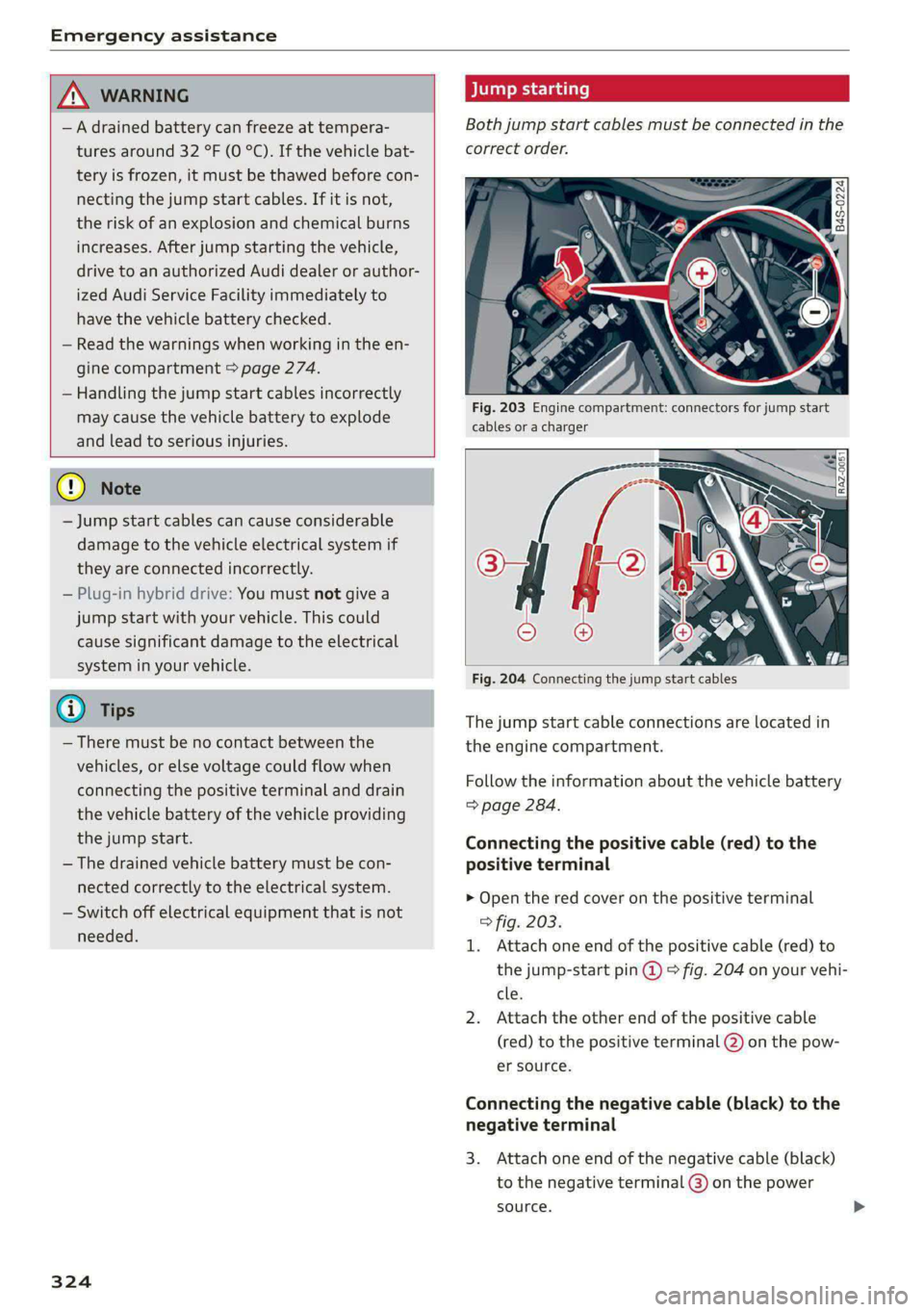
Both jump start cables must be connected in the
correct order.
Fig. 203 Engine compartment: connectors for jump start
cables or a charger
Fig. 204 Connecting the jump start cables
T
he jump start cable connections are located in
the engine compartment.
Fi ollow the information about the vehicle battery
=> page 284.
Connecting the positive cable (red) to the
positive terminal
>
I.
Open the red cover on the positive terminal
> fig. 203.
Attach one end of the positive cable (red) to
the jump-start pin @ ° fig. 204 on your vehi-
cle.
Attach the other end of the positive cable
(red) to the positive terminal @ on the pow-
er source.
Connecting the negative cable (black) to the
n
3
egative terminal
. Attach one end of the negative cable (black)
to the negative terminal @) on the power
source. >
Page 336 of 362
Data privacy
typically 30 seconds or less. The EDR in this vehi-
cle is designed to record such data as:
— How various systems in your vehicle were oper-
ating;
— Whether or not the driver and passenger safety
belts were buckled/fastened;
— How far (if at all) the driver was depressing the
accelerator and/or brake pedal; and,
— How fast the vehicle was traveling.
These data can help provide a better understand-
ing of the circumstances in which crashes and in-
juries occur. NOTE: EDR data are recorded by your
vehicle only if a non-trivial crash situation occurs;
no data are recorded by the EDR under normal
driving conditions and no personal data (e.g.
name, gender, age, and crash location) are re-
corded. However, other parties, such as law en-
forcement, could combine the EDR data with the
type of personally identifying data routinely ac-
quired during a crash investigation.
To read data recorded by an EDR, special equip-
ment is required, and access to the vehicle or the
EDR is needed. In addition to the vehicle manu-
facturer, other parties, such as law enforcement,
that have the special equipment, can read the in-
formation if they have access to the vehicle or the
EDR.
Assist system monitor
This vehicle is equipped with an Assist System
Monitor (ASM). The ASM collects data that is not
stored by the EDR in the event of an accident. The
main task of the ASM is to make it possible to un-
derstand the role and the behavior of the assist
systems in these accident situations. In addition
to the data that the EDR stores, the ASM records
data related to the assist systems starting sever-
al seconds before the accident or near-accident.
The data collected by ASM depends on the equip-
ment and may include the following information:
status information of the assist systems (for ex-
ample, if they are switched on or off, system
events, etc.), control interventions (for example,
D_ System availability may be limited depending on the mar-
ket.
2) In preparation at the time of printing.
334
by ESC, ABS, Audi pre sense’, etc.), and assist
systems settings (such as speed settings).
Special devices and access to the vehicle or to the
ASM are necessary in order to read the data from
the ASM memory. In addition to the vehicle man-
ufacturer, third parties such as law enforcement
authorities can also read and analyze the stored
data if they have access to the vehicle or to the
ASM.
Data usage
Audi can read out the information stored in the
data memories or similar data, or give this infor-
mation to third parties, especially in the follow-
ing situations:
— If the vehicle owner or lessee agrees
— If there is an official request from the police
— Ifa court or authorities request it
If legally permitted, Audi can also use the data
for analysis of vehicle operation and safety per-
formance or provide this data to third parties for
research purposes.
Data memory for autonomous driving!)
Applies to: vehicles with data memory for autonomous driv-
ing
When park assist plus is active > page 198, data
is stored in a memory in the vehicle. This data is
continuously overwritten by more current data
after a few seconds. The data is erased when the
ignition is switched off.
In certain situations, such as if an airbag has
been triggered or a parking process was ended,
the corresponding technical data may be stored
in the data memory for autonomous driving. The
data memory for autonomous driving is a read-
only memory that has a limited amount of stor-
age space. If the storage space is full, the oldest
data will be overwritten with the newest data. >