charging AUDI A8 2021 Owner's Guide
[x] Cancel search | Manufacturer: AUDI, Model Year: 2021, Model line: A8, Model: AUDI A8 2021Pages: 362, PDF Size: 99.29 MB
Page 226 of 362

Audi connect
> To display the weather for your current loca-
tion, press on the location that is marked with
the crosshairs.
Requirement: route guidance must be active.
> To display the weather at your destination,
press on the location that is marked with the
flag PB.
Adding a location: select: WEATHER > Gu > Ina
new city > a location.
Removing a location: select: WEATHER > 44 > Z
> one or more locations or Select all > Delete.
Online news
> Applies to: MMI: Select on the home screen:
NEWS.
Access to the calendar
Requirement: the myAudi app must be installed
and open on your mobile device. Access to your
calendar must be enabled on your mobile device.
You must be logged into the myAudi app with
your myAudi login data and you must have select-
ed your vehicle. The Wi-Fi function on your mo-
bile device and the MMI must be enabled and
your mobile device must be paired to the MMI
Wi-Fi hotspot > page 225, Wi-Fi.
You can display the your mobile device calendar
on the MMI.
> Applies to: MMI: Select on the home screen:
CALENDAR.
ZA\ WARNING
Always follow the information found in > A\
in General information on page 222.
©) Note
Always follow the information found in >@ in
General information on page 222.
224
Audi connect vehicle
control services
Services
Applies to: vehicles with Audi connect vehicle control
Using Audi connect vehicle control services, you
can perform tasks such as viewing data about
your vehicle or control vehicle functions remote-
ly.
You can view and use services available for your
vehicle at my.audi.com or through the myAudi
app.
Information about the services and the corre-
sponding app was accurate at the time this man-
ual was printed. The scope of services depends
on the country and equipment. There may be
changes over the service life of the vehicle.
Z\ WARNING
— Always follow the information found in > AA
in General information on page 222.
— Driver messages, text messages, and illumi-
nated warning and indicator lights in the ve-
hicle always take priority over information
from the Audi connect services. The infor-
mation displayed by the Audi connect serv-
ices should not cause you to take safety
risks. This can result in the vehicle breaking
down in traffic and to serious injuries or ac-
cidents.
— Applies to: vehicles with plug-in hybrid
drive: Only perform the Audi connect cli-
mate control functions if your vehicle was
shut off correctly and the ignition is switch-
ed off.
— Applies to: vehicles with plug-in hybrid
drive: Only perform charging functions on
the high-voltage battery if the vehicle is
shut off correctly, is connected to a suitable
socket ,and if the ignition is switched off.
G) Tips
— Accessing specific data or controlling func-
tions remotely depends on the charge level
of the vehicle battery. Therefore, these
Page 254 of 362

Media
» Applies to: MMI: Select on the home screen:
MEDIA > Source > Amazon Alexa.
@) Note
Read the information about Audi connect, and
be sure to note the connectivity costs section
> page 222.
Multimedia connections
USB adapter cable
[RAH-9202
Fig. 172 Audi Genuine Accessories: USB adapter
You can connect your mobile devices through the
Audi music interface to the MMI using the USB
adapter and charge the battery at the same time.
You can purchase the USB adapter cable from an
authorized Audi dealer or at specialty stores:
@ USB adapter for devices with a mi-
cro USB connection
@ USB adapter for Apple devices with
a Lightning connection
@ USB adapter for devices with USB
type C connection
@) Note
Handle the USB adapter carefully. Do not al-
low it to be pinched.
G) Tips
Apple devices with a dock connector can only
be charged using a USB adapter designed for
devices with a dock connector. Data cannot be
transmitted.
252
ONU reat em Tale)
Connect your mobile devices to the Audi music in-
terface in order to operate them through the
MMI and charge the batteries.
The Audi music interface USB ports are located in
the storage compartment under the front and
rear* center armrest and are labeled with the +<
symbol. If multiple USB devices are connected to
the USB ports (for example, a smartphone and a
USB flash drive), all of these devices can be used
as the playback source.
Connecting or charging mobile devices using
a USB adapter
> Connect the matching USB adapter to the Audi
music interface USB port and connect it to the
mobile device, such as a smartphone.
The battery will charge automatically.
Mobile devices connected to the Audi music inter:
face can be started and operated using the MMI
=> page 253.
Disconnecting a mobile device from the Audi
music interface
> Remove the USB adapter cable from the Audi
music interface.
ZA\ WARNING
Driving requires your complete and undivided
attention. As the driver, you have complete re-
sponsibility for safety in traffic. Never operate
mobile devices while driving, because this in-
creases the risk of an accident.
@) Note
— Pull the cable out of the Audi music inter-
face carefully so that the USB ports are not
damaged.
— Use a USB extension cable to connect devi-
ces that have an integrated USB connector
(such as a USB stick) to reduce the risk of
damage to your USB device and the Audi
music interface.
— Extremely high or low temperatures that
can occur inside vehicles can damage mobile
devices and/or impair their performance.
Page 279 of 362

4N0012721BF
Checking and Filling
Engine compartment overview
The most important check points.
Fig. 181 Typical location of the reservoir and the engine oil filler opening (example)
Observe the safety precautions > page 274, Gen-
eral information.
@ Washer fluid reservoir (>) > page 287
@ Jump start point (+) under a cover, (-) with
hex head screw > page 286, Charging the 12
Volt vehicle battery > page 323, Jump start-
ing
Engine oil filler opening (7) > page 279
Brake fluid reservoir (OC) under a cover
=> page 283
Coolant expansion tank for combustion en-
gine (£) > page 282
© Plug-in hybrid drive: coolant expansion tank
for the high-voltage system (-) > page 282
©
©®&
@ Sticker* for engine oil specifications
=> page 277
The engine oil filler opening may be located ina
different area depending on the specific engine.
@ Tips
Plug-in hybrid drive*: read the information re-
garding the coolant expansion tank under
= page 282 and the jump start under >@ in
Preparation on page 324.
Engine oil
If the engine oil level is too low
If you need to add engine oil, use an oil that is
listed on the sticker. The sticker is located at the
front
of the engine compartment > page 277,
fig. 181. When using the engine oil listed on the
sticker, you can adjust the oil level as often as
needed.
If engine oil that meets the recommended speci-
fication is not available, in an emergency you
may add a maximum of 1 quart (1 liter) of
ACEA C3 or API SN engine oil one time until the
next oil change.
277
>
Page 287 of 362

4N0012721BF
Checking and Filling
should only be performed by an authorized Audi
dealer or authorized Audi Service Facility > A\.
Multiple batteries with different technologies
may be installed in your vehicle:
— Vehicle battery (for example, for starting the
engine, basic power supply) > page 285, 12
Volt vehicle battery or > page 286, Other bat-
tery types
— Auxiliary battery (for example, for recuperation
or optional equipment) > page 286, Other bat-
tery types
— Plug-in hybrid drive: High-voltage battery (for
example, for electric driving) > page 131, In-
troduction.
Not running the vehicle for long periods of
time
The battery will gradually drain if the vehicle
does not run for long periods of time. To ensure
that the vehicle can still be started, the electrical
equipment will be limited or switched off. Some
convenience functions, such as interior lighting
or power seat adjustment, may not be available
under certain circumstances. The convenience
functions will be available again when you start
the
engine.
Even when electrical equipment is switched off,
the equipment can still drain the battery if the
vehicle is not driven for long periods of time.
Deep draining results in a chemical reaction that
destroys the inside of the battery. The battery
must be charged every month to prevent this
= page 286. Contact an authorized Audi dealer or
authorized Audi Service Facility for more infor-
mation.
Winter operation
Cold weather places an especially high load on
the 12 Volt vehicle battery. Have the battery
checked by an authorized Audi dealer or author-
ized Audi Service Facility before cold weather be-
gins.
this, all work must be performed only by an
authorized Audi dealer or authorized Audi
Service Facility.
— Never connect a charging cable or jump
start cable directly to the 12 Volt vehicle
battery. Only use the connections in the en-
gine compartment > page 286.
Z\ WARNING
California Proposition 65 Warning:
— Battery posts, terminals and related acces-
sories contain lead and lead compounds,
chemicals known to the State of California
to cause cancer and reproductive harms.
Wash hands after handling.
@) Note
— If the vehicle will be parked for long periods
of time, protect the battery against the cold
so that it will not be destroyed by “freezing”
=> page 286, Charging the 12 Volt vehicle
battery.
— There are electrical components under the
cargo floor behind a trim panel that warm
up during operation. To reduce the risk of
the components overheating, do not store
objects such as blankets under the cargo
floor. If the components overheat, they will
switch off temporarily. This will be indicated
by a message that will be displayed in the
instrument cluster until the temperature re-
turns to normal.
12 Volt vehicle battery
Explanation of warnings:
Always wear eye protection.
Battery acid is highly corrosive. Always
wear protective gloves and eye protection.
Fire, sparks, open flame, and smoking are
forbidden.
Z\ WARNING
— All work on the battery or electrical system
in your vehicle can result in injuries, chemi-
cal burns, accidents, or burns. Because of
A highly explosive mixture of gases can
form when charging batteries. >
@
>
©
285
Page 288 of 362

Checking and Filling
Always keep children away from battery
acid and the battery. @
@/
oo
Always follow the instructions in the oper-
ating manual.
@ For the sake of the environment
2 ¥ Lead-acid batteries must be disposed of
using methods that will not harm the environ-
ment. Do not dispose of them in household
trash. They contain harmful substances, such
as sulfuric acid and lead, and also recyclable
raw materials. Contact an authorized Audi
dealer or authorized Audi Service Facility for
more information.
Other battery types
Explanation of warnings:
® ®
@/
oo
Fire, sparks, open flame, and smoking are
forbidden.
Always keep children away from battery
acid and the battery.
Always follow the instructions in the oper-
ating manual.
ZA WARNING
All work on the batteries must only be per-
formed by an authorized Audi dealer or au-
thorized Audi Service Facility.
— Gases that escape from these different bat-
tery types can be poisonous or flammable.
— The contents of these battery types can be
corrosive. If any battery contents come into
contact with the skin, flush the affected
area for at least 15 minutes with clean wa-
ter. Then wash the affected area with soap.
Have the affected area examined by a medi-
cal professional.
@) Note
Components must not be connected to the
battery terminals and wires on these battery
types because this increases the risk of dam-
age, for example due to overvoltage.
286
@) For the sake of the environment
OE These types of batteries must be dis-
posed of using methods that will not harm
the environment. Do not dispose of them in
household trash. They contain harmful sub-
stances and recyclable raw materials. Contact
an authorized Audi dealer or authorized Audi
Service Facility for more information.
arging the 12 Volt vehicle battery
Fig. 185 Engine compartment: connectors for a charger or
jump start cables
Observe the safety precautions > page 274, Gen-
eral information, > /\ in Battery general infor-
mation on page 285 and > /\.
Requirement: only use chargers with a maximum
charging current of 14.8 volts. The battery ca-
bles remain connected.
The charging cable connections are located in the
motor compartment. The ground point ©) is al-
ways located on the vehicle body.
> Switch off the ignition and all electrical equip-
ment.
> Open the hood > page 276.
» Press the release lever on the positive terminal
and fold the cover upward > fig. 185.
> Clamp the charger terminal clamps to the jump
start pins according to the instructions. (Hex
head bolt under a cover (), ground point on the
vehicle body ©)).
> Insert the power cable for the charging device
into the socket and switch the device on.
> At the end of the charging process, switch the
charger off and pull the power cable out of the
socket.
» Remove the charging device terminal clamps. >
Page 289 of 362
4N0012721BF
Checking and Filling
> Close the cover on the positive terminal.
> Close the hood > page 276.
ZA WARNING
— Never connect a charging cable or jump
start cable directly to the 12 Volt vehicle
battery. Only use the connections in the en-
gine compartment > page 286.
— A highly explosive mixture of gases can form
when charging batteries. Only charge the
battery in well-ventilated areas.
— A drained battery can freeze at tempera-
tures around 32 °F (0 °C). Do not charge or
use a frozen or thawed battery. If ice forms,
the battery housing can crack and battery
electrolyte can leak out, which increases the
risk of an explosion and chemical burns.
Contact an authorized Audi dealer or author-
ized Audi Service Facility for more informa-
tion.
— Do not connect or disconnect the charging
cable while charging because this increases
the risk of an explosion.
@) Tips
Read all of the manufacturer's instructions
for the charger before charging the battery.
Windshield washer
system
B4M-0135)
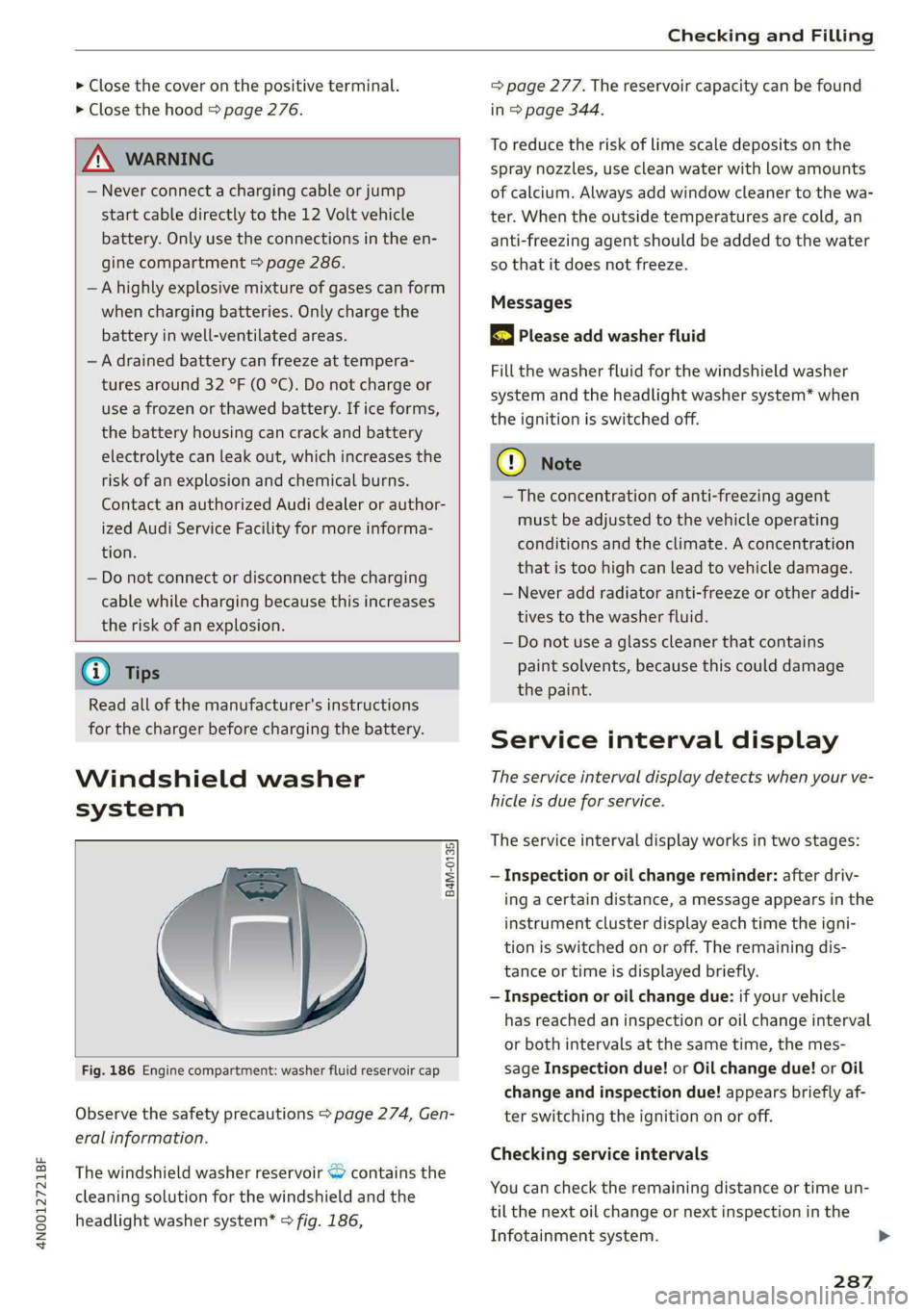
Fig. 186 Engine compartment: washer fluid reservoir cap
Observe the safety precautions > page 274, Gen-
eral information.
The windshield washer reservoir <> contains the
cleaning solution for the windshield and the
headlight washer system* > fig. 186,
= page 277. The reservoir capacity can be found
in > page 344.
To reduce the risk of lime scale deposits on the
spray nozzles, use clean water with low amounts
of calcium. Always add window cleaner to the wa-
ter. When the outside temperatures are cold, an
anti-freezing agent should be added to the water
so that it does not freeze.
Messages
|} Please add washer fluid
Fill the washer fluid for the windshield washer
system and the headlight washer system* when
the ignition is switched off.
CG) Note
—The concentration of anti-freezing agent
must be adjusted to the vehicle operating
conditions and the climate. A concentration
that is too high can lead to vehicle damage.
— Never add radiator anti-freeze or other addi-
tives to the washer fluid.
— Do not use a glass cleaner that contains
paint solvents, because this could damage
the paint.
Service interval display
The service interval display detects when your ve-
hicle is due for service.
The service interval display works in two stages:
— Inspection or oil change reminder: after driv-
ing a certain distance, a message appears in the
instrument cluster display each time the igni-
tion is switched on or off. The remaining dis-
tance or time is displayed briefly.
— Inspection or oil change due: if your vehicle
has reached an inspection or oil change interval
or both intervals at the same time, the mes-
sage Inspection due! or Oil change due! or Oil
change and inspection due! appears briefly af-
ter switching the ignition on or off.
Checking service intervals
You can check the remaining distance or time un-
til the next oil change or next inspection in the
Infotainment system.
287
Page 314 of 362
Care and cleaning
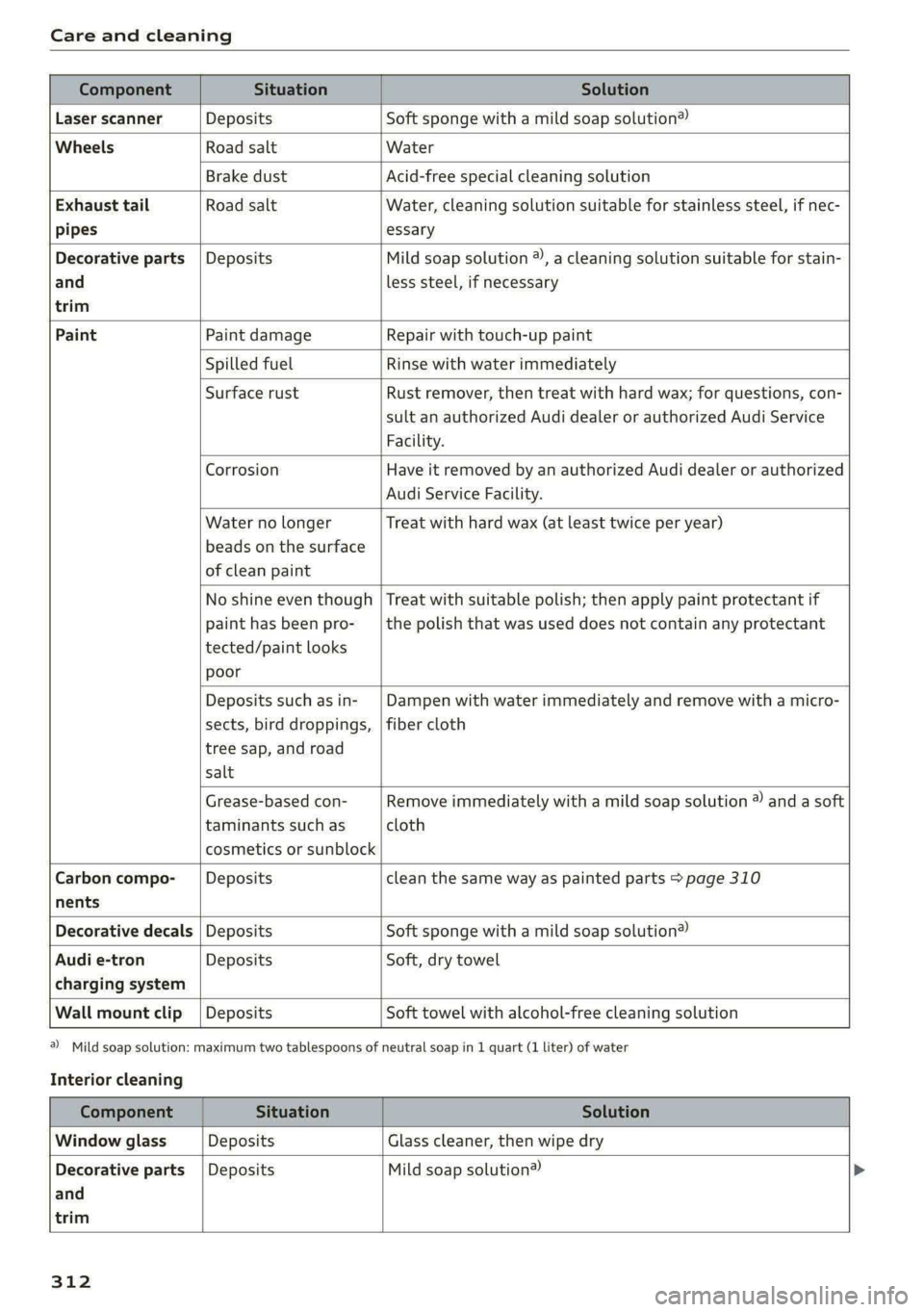
Component Situation Solution
Laser scanner Deposits Soft sponge with a mild soap solution®
Wheels Road salt Water
Brake dust Acid-free special cleaning solution
Exhaust tail Road salt Water, cleaning solution suitable for stainless steel, if nec-
pipes essary
Decorative parts | Deposits Mild soap solution ®, a cleaning solution suitable for stain-
and
trim
less steel, if necessary
Paint Paint damage Repair with touch-up paint
Spilled fuel Rinse with water immediately
Surface rust Rust remover, then treat with hard wax; for questions, con-
sult an authorized Audi dealer or authorized Audi Service
Facility.
Corrosion Have it removed by an authorized Audi dealer or authorized
Audi Service Facility.
Water no longer
beads on the surface
of clean paint
Treat with hard wax (at least twice per year)
No shine even though
paint has been pro-
tected/paint looks
poor
Treat with suitable polish; then apply paint protectant if
the polish that was used does not contain any protectant
Deposits such as in-
sects, bird droppings,
tree sap, and road
salt
Dampen with water immediately and remove with a micro-
fiber cloth
Grease-based con-
taminants such as
cosmetics or sunblock
Remove immediately with a mild soap solution ® and a soft
cloth
Carbon compo-__| Deposits clean the same way as painted parts > page 310
nents
Decorative decals | Deposits Soft sponge with a mild soap solution®
Audi e-tron Deposits Soft, dry towel
charging system
Wall mount clip | Deposits Soft towel with alcohol-free cleaning solution
a) Mild soap solution: maximum two tablespoons of
Interior cleaning
neutral soap in 1 quart (1 liter) of water
Component Situation Solution
Window glass Deposits Glass cleaner, then wipe dry
Decorative parts {Deposits Mild soap solution®
and
trim
312
Page 316 of 362
Care and cleaning
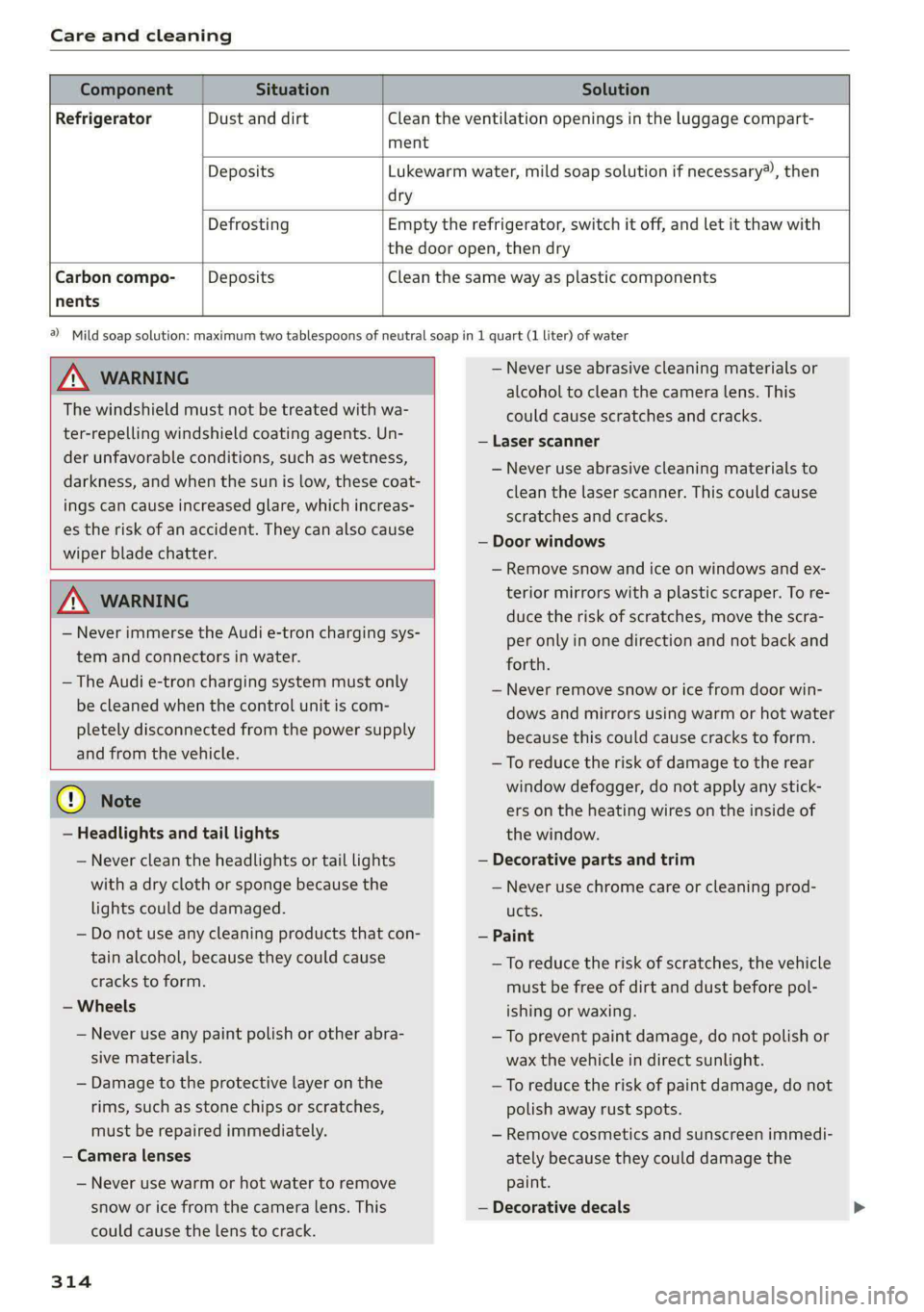
Component Situation Solution
Refrigerator Dust and dirt Clean the ventilation openings in the luggage compart-
ment
Deposits Lukewarm water, mild soap solution if necessary), then
dry
Defrosting Empty the refrigerator, switch it off, and let it thaw with
the door open, then dry
Carbon compo- Deposits Clean the same way as plastic components
nents
ZA\ WARNING
The windshield must not be treated with wa-
ter-repelling windshield coating agents. Un-
der unfavorable conditions, such as wetness,
darkness, and when the sun is low, these coat-
ings can cause increased glare, which increas-
es the risk of an accident. They can also cause
wiper blade chatter.
ZA\ WARNING
— Never immerse the Audi e-tron charging sys-
tem and connectors in water.
— The Audi e-tron charging system must only
be cleaned when the control unit is com-
pletely disconnected from the power supply
and from the vehicle.
@) Note
— Headlights and tail lights
— Never clean the headlights or tail lights
with a dry cloth or sponge because the
lights could be damaged.
— Do not use any cleaning products that con-
tain alcohol, because they could cause
cracks to form.
— Wheels
— Never use any paint polish or other abra-
sive materials.
— Damage to the protective layer on the
rims, such as stone chips or scratches,
must be repaired immediately.
— Camera lenses
— Never use warm or hot water to remove
snow or ice from the camera lens. This
could cause the lens to crack.
314
2) Mild soap solution: maximum two tablespoons of neutral soap in 1 quart (1 liter) of water
— Never use abrasive cleaning materials or
alcohol to clean the camera lens. This
could cause scratches and cracks.
— Laser scanner
— Never use abrasive cleaning materials to
clean the laser scanner. This could cause
scratches and cracks.
— Door windows
— Remove snow and ice on windows and ex-
terior mirrors with a plastic scraper. To re-
duce the risk of scratches, move the scra-
per only in one direction and not back and
forth.
— Never remove snow or ice from door win-
dows and mirrors using warm or hot water
because this could cause cracks to form.
—To reduce the risk of damage to the rear
window defogger, do not apply any stick-
ers on the heating wires on the inside of
the window.
— Decorative parts and trim
— Never use chrome care or cleaning prod-
ucts.
— Paint
— To reduce the risk of scratches, the vehicle
must be free of dirt and dust before pol-
ishing or waxing.
— To prevent paint damage, do not polish or
wax the vehicle in direct sunlight.
—To reduce the risk of paint damage, do not
polish away rust spots.
— Remove cosmetics and sunscreen immedi-
ately because they could damage the
paint.
— Decorative decals
Page 338 of 362

Data privacy
When the function is switched off, the data con-
nection will be available in order to use Audi
connect services.
Adjusting individual privacy settings
In the MMI, you can adjust individually which da-
ta should be transmitted from the vehicle. If you
switch on a data category, the data will be trans-
mitted.
You can also deactivate individual services for
your vehicle at my.audi.com if you are logged into
the vehicle as the key user > page 38. These de-
activated services will not be available in the ve-
hicle. For additional information, visit my.audi.
com.)
@) Note
You are responsible for all precautions taken
for data protection, anti-virus protection, and
protection against loss of data on mobile de-
vices that are used to access the Internet
through the Wi-Fi hotspot.
G) Tips
— The following interfaces are not affected by
changes to the privacy settings: Bluetooth,
Bluetooth Low Energy (BLE), Wi-Fi, Audi
smartphone interface (ASI), Near Field
Communication (NFC), charging communi-
cation (high-voltage system), Electronic Toll
Collect (ETC), On-Board Diagnostic System
(OBD) if equipped.
— If the maximum privacy settings are switch-
ed on, your vehicle may not receive security
updates and certificates for establishing an
encrypted connection, depending on vehicle
equipment. In order to receive security up-
dates and certificates, switch the maximum
privacy settings off for at least ten minutes
every six months. Make sure that your vehi-
cle is connected to the Internet. A symbol in
the MMI status bar indicates if the required
data connection is available > page 23.
— If the transmission of data is limited, it will
have the following effects on the exchange
D_ In certain countries.
336
of data for Audi connect services and emer-
gency calls, if equipped:
— The emergency call function will remain
available without restrictions and will con-
tinue to transmit data.
— If an online roadside assistance call is ini-
tiated, no data will be transmitted, but a
call will be made.
— If the Geofencing Alert, Speed Alert,
and/or Valet Alert services have been acti-
vated by the key user, then they will re-
main available without restrictions and
continue to transmit data.
— Stored destinations (favorites, last desti-
nations) are only stored in the vehicle. If
you allow transmission of data again,
these destinations will be synchronized via
the myAudi account. To prevent synchroni-
zation of destinations, delete the destina-
tions before you allow data to be trans-
mitted again.
Applies to: vehicles with Audi connect Infotainment
Audi collects, uses, stores and shares your per-
sonal information, such as contact data, vehicle
data, usage data, driving data and precise geolo-
cation, in order to provide you with the products
and services you have purchased or requested,
and for a number of other purposes, for example,
to track quality issues, to performance and safe-
ty, to meet our internal compliance or legal re-
quirements and to market to customers and po-
tential customers. For a more complete list of
the data we collect, how we use it and with
whom we share it, please visit your Audi nation-
al/sales region website at www.audi.com.
The collection, use and sharing may vary depend-
ing on your model and model year, your subscrip-
tion status, or the service offering. For example,
collection, use and sharing may vary between
Audi connect services, if you have designated a
key user, or if you are driving a model equipped
with persistent data logging. Please review the
complete Privacy Statement to understand our >
Page 347 of 362

4N0012721BF
Index
A
A/C cooling mode............ eee eee eee
A/C system refrigerant oil...............
Accelerator pedal.............2--00000-
also refer to Accelerator pedal..........
ACCESSOFICS 2. eee
Active lane assist
refer to Lane departure warning.........
refer to Lane guidance................
Active SuSpenSiOt es ¢ « ccs so ewe ss eewe ss
Adaptive cruise assist................04.
Cleaning the sensors.............0 0005
Adaptive cruise control
Predictive control..............000005
Adaptive speed assist
refer to Adaptive cruise assist..........
Adjusting the air distribution............
Adjusting the brightness.................
Adjusting the sound.................005
Adjusting the temperature..............
Adjusting the vents.................05.
Adjusting the volume..............00-00-
Adjusting the volume (announcements) ... .
Adjusting the welcome sound............
Airbag system... 2... ee eee eee
Air suspension..............00 000-00 ee
Alarm system
refer to Anti-theft alarm system..........
Alignment pin (changing the wheel).......
All-weather lights...............-.00000.
Allseasontires...............00 eee eee
All wheel drive
refer to quattro... .... eee eee eee
Amazon Alexa integration
Media playback.................00005
QPerating « « ses so secs oo moms 9 wa & ¥ BRE
AMI
refer to Audi music interface...........
Android Auto
refer to Audi smartphone interface......
Anti-lock braking system............0065
Anti-Slip Regulation.................05.
Antietheftalarmr system siccs oe owes oc cna «
Anti-theft wheel bolts..................
Apple CarPlay
refer to Audi smartphone interface...... 261
Aspect ratio
NidGO verse < ¢ seven & 5 seaRE ze SeHER Fo Bee 255; 257
ASR
refer to Anti-Slip Regulation............ 129
Audi adaptive light...............-..000- 58
Audi connect
MEFEPTONCONNECE: « «esses oo wesc ow xem ¥ v0 222
AUGIGriVe’SelECt ios: « « suas > gemy 2 x seme gee 124
Audi e-tron compact charging system..... 140
Adjusting the charging power level...... 140
Changing or attaching the power cable... 145
SECUCINGls » 5 seme ¢ 9 same < a eR Eee EOE ne 145
Status and malfunction indicators....... 141
Audi musiciintertace sas ss iwes se gee ay oo 252
UGGS iexsy: a 2 wares & & gee & 2 eR Ee ER 253
Audi phone BOX eis 5 y omnes 5 3 eas «8 ews 211
Audi presense........ 0.00 e cee eee eee 178
MGSSAGES saws + & cmer 9 ¢ cemes 9 o ews 8 9 ee 182
Audi pre sense front.............eeeeeee 179
Audi side assist
refer to Side assist............-.00000. 182
Audi smartphone interface.............. 261
Legaliinformationi. . soe. s + scars se cesses ¥ 266
Audi virtual cockpit
refer to Instrument cluster.............. 12
AUTO
Automatic headlights.................. 58
Climate control system..............5- 101
Auto Lock (central locking) ............... 41
Automatic climate control system
refer to Climate control system......... 100
Automatic luggage compartment lid.... 49,50
Automatic transmission...............- 109
Parking lock emergency release......... 112
Automatic wipe/wash system............. 66
Auxiliary climate control................ 104
Average consumption.................-- 16
Average speed ..... 0... cece ccc eee renee 16
B
Bag hooks........ 0... eee eee eee eee 97
Band
refer to Frequency band............... 242
345