lock AUDI A8 2021 Service Manual
[x] Cancel search | Manufacturer: AUDI, Model Year: 2021, Model line: A8, Model: AUDI A8 2021Pages: 362, PDF Size: 99.29 MB
Page 104 of 362

Warm and cold
button or deactivate all three arrows. With °,
the air will be directed toward the windshield.
Applies to: vehicles with 4-zone automatic cli-
mate control: You can press J in the rear control
panel multiple times to adjust the air distribution
based on the direction of the arrow.
® Defrosting
The windshield and side windows are defrosted
or cleared of condensation as quickly as possible.
Align the outer air vents with the side windows.
The maximum amount of air flows mainly from
the vents below the windshield. Recirculation
mode switches off. The temperature should be
set at 72 °F (+22 °C) or higher. Depending on the
outside temperature, the A/C cooling mode may
automatically switch on.
& Rear window defogger
The rear window defogger only operates when
the engine is running. It switches off automati-
cally after 10 to 20 minutes, depending on the
outside temperature.
To prevent the rear window defogger from
switching off automatically, press and hold the
{® button for more than three seconds. It will re-
main on until the ignition is switched off.
Auto
/& Recirculation mode
In recirculation mode, the air inside the vehicle is
circulated and filtered. This prevents the unfil-
tered air outside the vehicle from entering the
vehicle interior > A\.
Pressing <> switches recirculation mode on or
off manually.
AUTO
When switched on, automatic recirculation <3
controls the recirculation mode automatically.
You must press the & button if fog forms on the
windows.
«? Seat heating
Applies to: vehicles with heated seats
The seat heating temperature can be set at mul-
tiple levels. Press w) once to switch on the highest
level. Press 4? again to decrease the temperature
one level at a time. The seat heating is switched
off if the button is not illuminated.
102
You can adjust the seat temperature balance®* in
the seat settings.
Applies to: surface heating: You can set whether
surfaces are also heated when the seat heating is
switched on > page 103.
2) Seat ventilation
Applies to: vehicles with seat ventilation
The seat ventilation intensity can be set to multi-
ple levels. Press 2) once to switch on the highest
level. Press 2) again to decrease the heat level
one level at a time. The seat ventilation is switch-
ed off if the button is not illuminated.
fz Foot heating
Applies to: vehicles with a reclining seat system and foot
heating
Fold out the leg support and select the setting
for the reclining seat in the Rear Seat Remote*
= page 75. You can now switch the foot heating
on or off with .
The foot heating intensity can be set at multiple
levels. Press 2 once to switch on the highest lev-
el. Press again to decrease the heat level one
level at a time. The foot heating is switched off if
the button is not illuminated.
The foot heating switches off automatically when
the leg support is folded in.
& Child safety lock*
If 8 lights up in the Rear Seat Remote*, the pa-
rental control is active and operation is locked
=> page 51.
“3 Ionizer
Applies to: vehicles with ionizer
Hazardous particles and germs in the air may be
reduced through ionization. This helps to im-
prove the air quality for individuals in the passen-
ger compartment.
&* Fragrance
Applies to: vehicles with fragrance function
The fragrance function will dispense a scent in
the vehicle interior. It is dispensed through the
front outer vents. This will produce a pleasant
scent. The fragrance is time-delayed, especially >
Page 107 of 362

4N0012721BF
Warm and cold
@) Tips
— Make sure the time and date match in the
system settings so that the timer can func-
tion correctly > page 263.
— The auxiliary climate control can also be
switched on and off immediately when a
timer is set.
— You can operate the climate control in the
vehicle interior when the high-voltage bat-
tery is charging using the charging timer
= page 136. The climate control output de-
pends on the power supply capacity.
Additional settings
Applies to: vehicles with auxiliary climate control
> Applies to MMI: Select on the home screen: VE-
HICLE > Air conditioning > F > <2.
Start A/C after unlocking
If this function is activated, the climate control
will continue to run for five minutes after the ve-
hicle has been unlocked.
Comfort aux. A/C
Applies to: vehicles with comfort auxiliary climate control
You can set if the steering wheel heating* and
seat heating” or seat ventilation* should also be
automatically activated with auxiliary climate
control. You can select the respective zones.
Window and mirror heating*
Applies to: vehicles with comfort auxiliary climate control
You can set if the rear window and mirrors should
also be heated during auxiliary climate control.
Messages
Applies to: vehicles with auxiliary climate control
2— There is a malfunction in the auxiliary air
conditioning.
If this message appears, there is a system mal-
function. Drive immediately to an authorized
Audi dealer or authorized Audi Service Facility to
have the malfunction repaired.
Fluids in the A/C system
Refrigerant in the A/C system
The sticker in the engine compartment provides
information about the type and amount of refrig-
erant used in the vehicle’s A/C system. The stick-
er is located in the front section of the engine
compartment or at the front or back of the hood.
Symbol | Meaning
Warning: the A/C system must only
be serviced by qualified technicians. A
Refrigerant type
wt
ot
Lubricant type
Refer to the service information
(only available for authorized Audi
dealers or authorized Audi Service
Facilities)
Y
The A/C system must only be serv-
iced by qualified technicians.
Flammable refrigerant
Se
Be
Make sure all components are dis-
posed of correctly and never install
components in the vehicle that have
been removed from old vehicles or
a
taken from recycling.
Lubricant in the A/C system
The sticker in the engine compartment provides
information about the type and amount of refrig-
erant oil used in the vehicle’s A/C system. For the
refrigerant oil quantity, refer to the Technical Da-
ta > page 344.
ZX WARNING
To ensure secure and safe operation, the A/C
system must only be serviced by qualified
technicians and certified technicians (SAE
standard J2845).
@) Tips
— Never repair the A/C system evaporator with
components from old vehicles or from recy-
cling.
105
>
Page 109 of 362
4N0012721BF
Driving
Driving
Starting the vehicle
pyr Told T ola (ela)
= i
Fig. 91 Center console: starting the engine
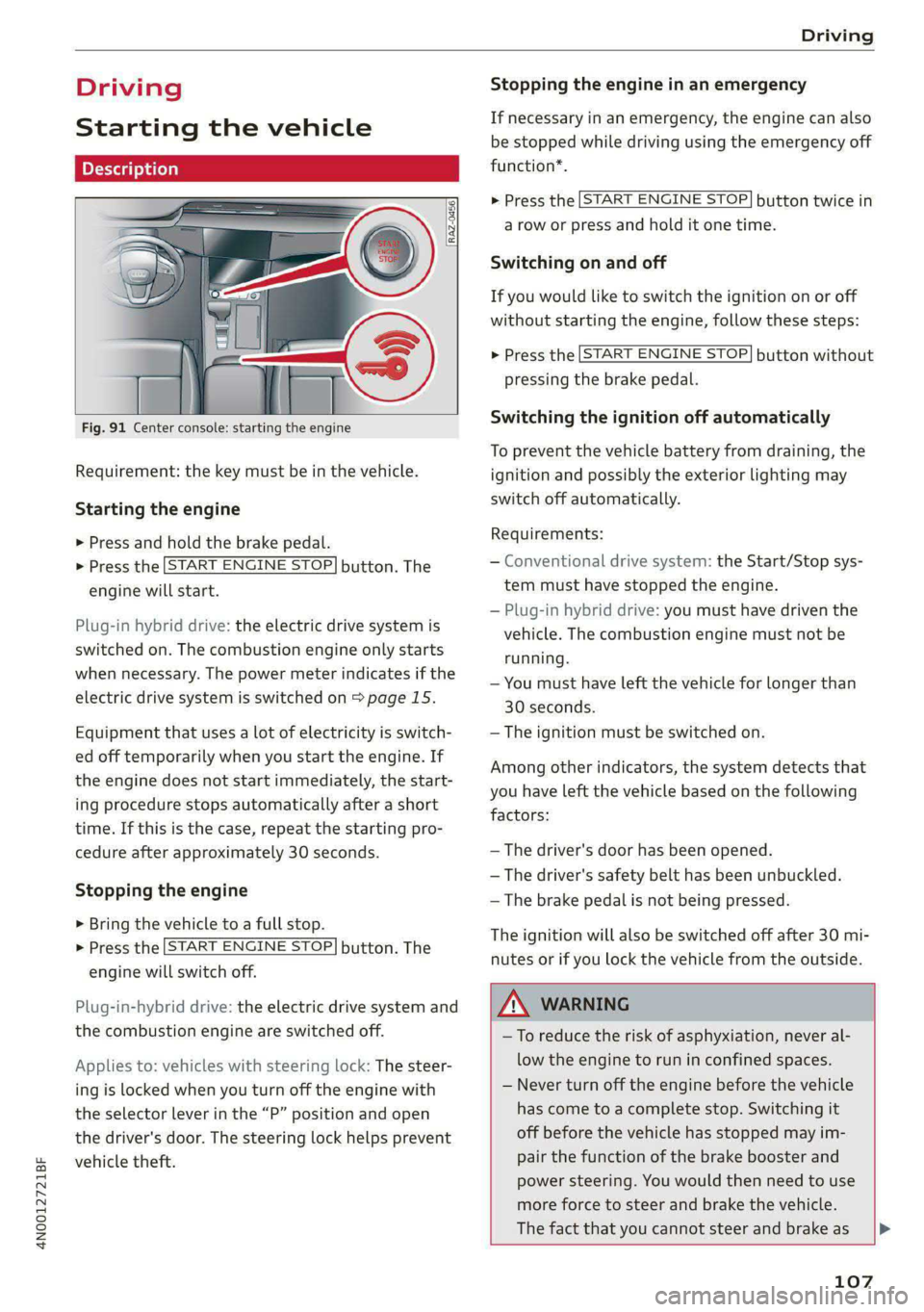
Requirement: the key must be in the vehicle.
Starting the engine
> Press and hold the brake pedal.
> Press the [START ENGINE STOP] button. The
engine will start.
Plug-in hybrid drive: the electric drive system is
switched on. The combustion engine only starts
when necessary. The power meter indicates if the
electric drive system is switched on > page 15.
Equipment that uses a lot of electricity is switch-
ed off temporarily when you start the engine. If
the engine does not start immediately, the start-
ing procedure stops automatically after a short
time. If this is the case, repeat the starting pro-
cedure after approximately 30 seconds.
Stopping the engine
> Bring the vehicle to a full stop.
> Press the [START ENGINE STOP] button. The
engine will switch off.
Plug-in-hybrid drive: the electric drive system and
the combustion engine are switched off.
Applies to: vehicles with steering lock: The steer-
ing is locked when you turn off the engine with
the selector lever in the “P” position and open
the driver's door. The steering lock helps prevent
vehicle theft.
Stopping the engine in an emergency
If necessary in an emergency, the engine can also
be stopped while driving using the emergency off
function*.
> Press the [START ENGINE STOP] button twice in
a row or press and hold it one time.
Switching on and off
If you would like to switch the ignition on or off
without starting the engine, follow these steps:
> Press the [START ENGINE STOP] button without
pressing the brake pedal.
Switching the ignition off automatically
To prevent the vehicle battery from draining, the
ignition and possibly the exterior lighting may
switch off automatically.
Requirements:
— Conventional drive system: the Start/Stop sys-
tem must have stopped the engine.
— Plug-in hybrid drive: you must have driven the
vehicle. The combustion engine must not be
running.
— You must have left the vehicle for longer than
30 seconds.
— The ignition must be switched on.
Among other indicators, the system detects that
you have left the vehicle based on the following
factors:
— The driver's door has been opened.
— The driver's safety belt has been unbuckled.
— The brake pedal is not being pressed.
The ignition will also be switched off after 30 mi-
nutes or if you lock the vehicle from the outside.
ZA WARNING
—To reduce the risk of asphyxiation, never al-
low the engine to run in confined spaces.
— Never turn off the engine before the vehicle
has come to a complete stop. Switching it
off before the vehicle has stopped may im-
pair the function of the brake booster and
power steering. You would then need to use
more force to steer and brake the vehicle.
The fact that you cannot steer and brake as [>
107
Page 110 of 362
Driving
usual may increase the risk of accidents and
serious injuries.
— Secure the vehicle against rolling before ex-
iting the vehicle > page 108.
@) Note
— Avoid high engine speed, full throttle, and
heavy engine load if the engine has not
reached operating temperature yet. You
could damage the engine.
— If the engine has been under heavy load for
an extended period of time, heat builds up
in the engine compartment after the engine
is switched off and there is a risk of damag-
ing the engine. For this reason, let the en-
gine run at idle for approximately two mi-
nutes before shutting it off.
@ Tips
— Brief noises are normal when starting and
stopping the vehicle and are no cause for
concern.
— For up to 10 minutes after stopping the en-
gine, the radiator fan may turn on again au-
tomatically or it may continue to run, even if
the ignition is switched off.
— It may not be possible to start the vehicle in
extremely low temperatures.
— Power will be fully available once the engine
is at operating temperature.
Messages
Hj Engine start system: malfunction! Please
contact Service
Do not switch the ignition off because you may
not be able to switch it on again. Drive to an au-
thorized Audi dealer or authorized Audi Service
Facility immediately to have the malfunction cor-
rected.
B Engine start system: malfunction! Please
contact Service
There is a malfunction in the engine start system.
Drive immediately to an authorized Audi dealer
or authorized Audi Service Facility to have the
malfunction repaired.
108
B Remote control key: key not detected. Is the
key still in the vehicle?
The vehicle key was removed from the vehicle
while the engine is running. If the vehicle key is
no longer in the vehicle, you cannot switch the ig-
nition on or start the engine once you stop it. You
also cannot lock the vehicle from the outside.
Remote control key: hold back of key
against the designated area. See owner's man-
ual
The battery in the vehicle key may be drained or
there may be a malfunction. To start the vehicle,
you must also hold the vehicle key against the lo-
cation shown ?) > page 107, fig. 91.
If the malfunction remains, drive immediately to
an authorized Audi dealer or authorized Audi
Service Facility to have the malfunction correct-
ed.
When driving
Starting to drive, stopping, and parking
Starting from a stop
> Press and hold the brake pedal.
> Start the engine.
> Select a gear.
> Release the parking brake.
> Release the brake pedal. The vehicle may roll.
> Press the accelerator pedal to accelerate.
Securing the vehicle against rolling
Secure your vehicle to prevent it from rolling be-
fore exiting the vehicle.
> Set the parking brake.
> Select the “P” selector lever position.
> If parking on a steep road, turn the steering
wheel so that your vehicle will roll against the
curb in case it should start to move.
If one of these measures is not possible, for ex-
ample because there is no vehicle power, you
must secure your vehicle against rolling using ad-
ditional measures.
> Only park the vehicle on a level surface.
> Use suitable objects to block the front and rear
wheels.
Page 111 of 362
4N0012721BF
Driving
Set the parking brake before selecting the “P” se-
lector lever position. This prevents too much
stress from being placed on the locking mecha-
nism when parking on a steep surface.
ZX WARNING
— Always set the parking brake when leaving
your vehicle, even if for a short period of
time. If the parking brake is not set, the ve-
hicle could roll away, increasing the risk of
an accident.
— Do not leave your vehicle unattended while
the engine is running, because this increases
the risk of an accident.
— If the parking brake is set, it can release au-
tomatically when the accelerator pedal is
pressed. To reduce the risk of an accident,
do not inadvertently press the accelerator
pedal and always shift into “P” when the ve-
hicle is stopped.
— If you leave the vehicle, switch the ignition
off and take the key with you. This is espe-
cially important when leaving persons or an-
imals in the vehicle. Otherwise, the vehicle
could start unintentionally, the parking
brake could release, or electronic equipment
could activate, which increases the risk of an
accident.
— No persons or animals should be left in a
locked vehicle. Locked doors make it more
difficult for emergency workers to enter the
vehicle, which puts lives at risk.
— If you do not begin driving immediately af-
ter releasing the brake pedal, your vehicle
may begin to roll backward. Press the brake
pedal or set the parking brake immediately.
@) Note
If you have to stop on an incline, always press
the brake pedal to hold the vehicle in place to
reduce the risk of the vehicle rolling back-
ward. Do not try to hold the vehicle in place
by pressing and holding the accelerator pedal.
The transmission can overheat, which increas-
es the risk of damage.
Hill hold assist
If you take your foot off of the brake pedal when
driving on hills, the braking force will be held for
several seconds. At that time, you can start driv-
ing without the vehicle rolling backward.
Requirement: the driver's door must be closed,
the engine must be on, and the vehicle must be
traveling uphill.
> To activate hill hold assist, press and hold the
brake pedal for several seconds while the vehi-
cle is stationary.
Z\ WARNING
— If you do not begin driving immediately af-
ter releasing the brake pedal, your vehicle
may begin to roll backward. Press the brake
pedal
or set the parking brake immediately.
— The hill hold assist cannot hold the vehicle
on inclines in every scenario (for example,
on slippery or icy ground).
Gears and driving programs
(1)
(2S
[RAZ-0410
R
N
:
D/S
~— SI
Fig. 92 Center console: selector lever
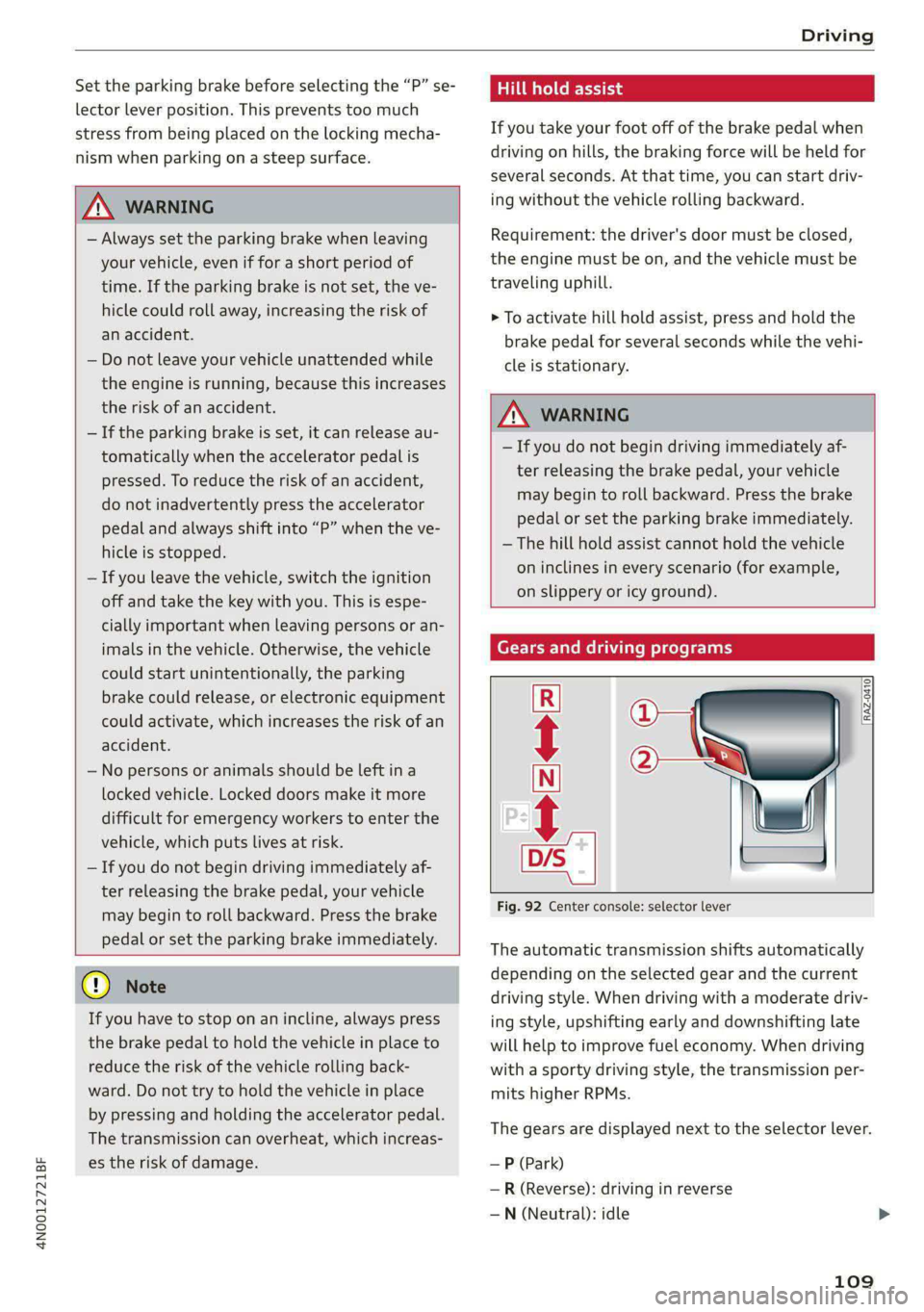
The automatic transmission shifts automatically
depending on the selected gear and the current
driving style. When driving with a moderate driv-
ing style, upshifting early and downshifting late
will help to improve fuel economy. When driving
with a sporty driving style, the transmission per-
mits higher RPMs.
The gears are displayed next to the selector lever.
— P (Park)
— R (Reverse): driving in reverse
—N (Neutral): idle
109
Page 112 of 362

Driving
— D (Drive)
Selecting a gear
Requirement: the ignition must be switched on.
— Bring the vehicle to a full stop and press the
brake pedal.
— Press the release button @ on the selector lev-
er.
—To select the nearest gear, move the selector
lever forward or back until you feel the first
pressure point.
—To skip a gear (for example, move from “D” to
“R”), move the selector lever past the pressure
point in the desired direction.
— The label next to the selector lever for the se-
lected gear will light up.
“N” (Neutral) gear
In the “N” gear, power is not transmitted to the
driving wheels. Use the “N” gear in a car wash
(with conveyor belts), for example.
If you unintentionally select “N” while driving
(faster than 1 mph (2 km/h)), you can also shift
back to “D” without pressing the brake pedal.
For safety reasons, the vehicle cannot be locked
when the transmission is in the "N” gear.
“Pp” (Park) gear
Requirement: the ignition must be switched on.
The vehicle is secured from rolling away by the
parking lock when in the “P” gear.
— Bring the vehicle to a full stop and press the
brake pedal.
— Press the “P” button (2) on the selector lever.
— The “P” next to the selector lever will light up.
“P” engages automatically if you switch the en-
gine off while the “D” or “R” gear is selected. If
you switch the engine off in “N”, “P” will engage
automatically after approximately 30 minutes.
If you want to switch to another gear from “P”,
the engine must be running.
If you cannot shift out of “P”, for example be-
cause the vehicle has no power, you may need to
use the emergency release for the parking lock
=> page 112.
110
Selecting the driving program
Various driving programs can be selected when in
the “D” gear. The programs influence when the
transmission shifts and how the accelerator ped-
al responds.
The selected driving program is displayed in the
instrument cluster.
—D (Drive): normal driving mode
—S (Sport): sporty driving mode
If you select the Dynamic mode in Audi drive se-
lect*, the “S” driving program will be activated.
When the ignition is switched off, the driving pro-
gram may be reset to “D”.
To switch between the current driving program
and “S”, push the selector lever toward the rear.
Plug-in hybrid drive system: Not all plug-in hy-
brid modes are available in the “S” driving pro-
gram. The driving program or plug-in hybrid
mode will be automatically adjusted if it is not
compatible with an operation.
ZA\ WARNING
— Before you start driving, check if the label
for the desired selector lever position next
to the selector lever is lit up.
— Secure the vehicle against rolling before ex:
iting the vehicle > page 108.
— Power is still transmitted to the wheels
when the engine is running at idle. To pre-
vent the vehicle from “creeping”, you must
keep your foot on the brake in all selector
lever positions (except "P" and "N") when
the engine is running.
— To reduce the risk of an accident, do not
press the accelerator pedal when changing
gears if the vehicle is stationary and the en-
gine is running.
— Never select the “R" or "P” gears while driv-
ing. Doing so could cause an accident.
— The vehicle can roll even if the ignition is
switched off.
G) Tips
If you shift between “D” and “R” within one
second, you do not need to press the brake >
Page 114 of 362

Driving
Combustion engine startup
Applies to: vehicles with plug-in hybrid drive
A haptic pressure point indicates when the com-
bustion engine will be started. The pressure point
is variable and depends on the high-voltage bat-
tery charge level.
@ Recuperation
@ Power by electric motor
@) Pressure point
@ Power by combustion engine
© Maximum acceleration
Maximum acceleration
If you press the accelerator pedal all the way
down, the motor’s full power will be used and
you will reach maximum acceleration, also called
“kick-down”.
Applies to: vehicles with boost function: The elec-
tric motor can switch on for a brief period if the
accelerator pedal is pressed all the way down in
the “D” and “S” driving program. The availability
of this function depends on the charge level of
the high-voltage battery and the temperature of
the drive system components, among other
things.
Z\ WARNING
The driving wheels could spin and the vehicle
could swerve on slick or slippery road surfaces
when using kick-down, which increases the
risk of an accident.
Parking lock emergency release
B4mM-0189
@
@
Fig. 96 Footwell: releasing the parking lock using the
emergency release
112
The emergency release is located under the floor
mat on the driver's side. Read and follow the im-
portant instructions about towing > page 325.
Releasing the parking lock using the
emergency release
> Secure the vehicle against rolling > page 108.
> Pry the cover off at one of the openings using
the screwdriver from the vehicle tool kit
=> page 317.
> Insert the socket wrench from the vehicle tool
kit into the opening.
> Turn the socket wrench clockwise () until it
stops and press it downward @) until it locks in-
to place.
> Leave the socket wrench inserted.
Resetting the parking lock
> Grasp the socket wrench with both hands and
carefully pull it upward to remove.
> Install the cover.
Z\ WARNING
— The parking lock must be released using the
emergency release before towing the vehi-
cle.
— Only use the parking lock emergency release
if the vehicle is secured against rolling
= page 108. An unsecured vehicle may roll,
which increases the risk of an accident.
— Only activate the emergency release while
on a level surface or a slight slope.
—To reduce the risk of an accident, you must
not drive when the emergency release is ac-
tivated.
i Transmission: malfunction! Safely stop vehi-
cle
Do not continue driving. Stop the vehicle as soon
as possible in a safe location and secure it so it
does not roll > page 108. See an authorized Audi
dealer or authorized Audi Service Facility for as-
sistance.
Bi Transmission: too hot. Please stop vehicle >
Page 115 of 362

4N0012721BF
Driving
Do not continue driving. Select "P" and contact an
authorized Audi dealer or authorized Audi Service
Facility for assistance.
5 Transmission: too hot. Please adapt driving
style
The transmission temperature has increased sig-
nificantly. Drive very cautiously or take a break
from driving until the temperature returns to the
normal range and the indicator light turns off.
[@] Transmission: malfunction! You can contin-
ue driving. See owner's manual
There is a system malfunction in the transmis-
sion. You may continue driving. Drive to an au-
thorized Audi dealer or authorized Audi Service
Facility soon to have the malfunction corrected.
[@] Transmission: malfunction! You can contin-
ue driving with limited function. Please contact
Service
There is a system malfunction in the transmis-
sion. The transmission is switching to emergency
mode. This mode only shifts into certain gears or
may no longer shift at all. The engine may stall.
Drive to an authorized Audi dealer or authorized
Audi Service Facility immediately to have the
malfunction corrected.
[8] Transmission: malfunction! You can contin-
ue driving with limited function. No reverse
gear
There is a system malfunction in the transmis-
sion. The transmission is switching to emergency
mode. This mode only shifts into certain gears or
may no longer shift at all. The engine may stall.
You cannot engage the reverse gear. Drive to an
authorized Audi dealer or authorized Audi Service
Facility immediately to have the malfunction cor-
rected.
[8] Transmission: malfunction! You can contin-
ue driving in D until engine is off
There is a system malfunction in the transmis-
sion. The transmission is switching to emergency
mode. If you turn the engine off, you will not be
able to select any other gears after restarting the
engine. Drive to an authorized Audi dealer or au-
thorized Audi Service Facility immediately to have
the malfunction corrected.
fal Selector lever: malfunction! You can contin-
ue driving. Please contact Service
There is a system malfunction in the selector lev-
er. Drive immediately to an authorized Audi deal-
er or authorized Audi Service Facility to have the
malfunction repaired.
& Selector lever: malfunction! Gear change on-
ly possible if using both shift paddles.
There is a system malfunction in the selector lev-
er. You can continue driving with restricted func-
tion. The selector lever is not working. Gears can
only be selected by tapping both shift paddles at
the same time when the vehicle is stationary. The
“P” gear is automatically engaged when you turn
off the engine. Drive to an authorized Audi dealer
or authorized Audi Service Facility immediately to
have the malfunction corrected.
i P button: malfunction! Auto P when engine
off. Please contact Service
There is a malfunction in the "P" button on the
selector lever. The “P” gear is automatically en-
gaged when you turn off the engine. Drive to an
authorized Audi dealer or authorized Audi Service
Facility immediately to have the malfunction cor-
rected.
fel Danger of rolling away! P not possible.
Please apply parking brake
— The parking lock was released using the emer-
gency release > page 112. Or:
— The parking lock can no longer be engaged.
Drive to an authorized Audi dealer or author-
ized Audi Service Facility immediately to have
the malfunction corrected. Secure the vehicle
against rolling before exiting the vehicle
=> page 108.
Move selector lever to automatic position
The transmission has switched out of tiptronic
mode. Switch back to automatic mode with the
selector lever > page 111.
113
Page 128 of 362

Driving dynamic
Applies to: vehicles with elevated entry
With the Elevated entry function, you can select
if the vehicle should be raised when a door is
opened in order to enter and exit the vehicle
more comfortably. The vehicle will lower again
slowly in the following situations:
— When starting from a stop
— When locking the vehicle
— When changing the Audi drive select* mode
— Approximately 10 seconds after all doors have
been closed
— After a certain period of time when the engine
is stopped and a door is open, in order to main-
tain the battery charge level.
This function may not be available under certain
conditions, for example if the ground is not level
or when the battery charge level is low. The func-
tion may also be deactivated temporarily after
the vehicle is serviced using diagnostic equip-
ment, and it will only be available again once the
vehicle is driven a certain distance.
@ Note
When the elevated entry function is activated,
make sure there is sufficient space above and
below the vehicle. This particularly applies to
space under open doors and above roof struc-
tures. If you are unsure about the amount of
space, deactivate the elevated entry function
before exiting the vehicle to reduce the risk of
damage.
@) Tips
— If an open door touches the ground or be-
comes stuck, use the Raise > page 125
function in the MMI to raise the vehicle us-
ing the air suspension.
— When the curve tilting function is switched
on, the vehicle passengers will experience
less turning force when driving around
curves. This may influence the perception of
speed. Always adjust the speed to the driv-
ing situation.
126
Ground clearance
The vehicle height and clearance can be influ-
enced by the following factors:
— Change in temperature
— Change in load
— Change to the Audi drive select* mode
— Lifting and lowering via the air suspension*
— Automatic lifting and lowering using the Ele-
vated entry* function
ZA\ WARNING
To reduce the risk of injury, make sure no one
gets pinched when the vehicle level is chang-
ing, for example when cleaning the under-
body or the wheel housings.
@) Note
Always make sure there is enough clearance
above and below the vehicle. This is especially
important for entrances with height restric-
tions, for example, before driving into under-
ground garages. You could also scrape the
ground when driving over the edges of curbs
or on steep ramps, which could damage your
vehicle.
B Air suspension: malfunction! You may con-
tinue driving slowly at max. XX mph (km/h)
There is a malfunction. Driving stability may be
limited. Drive to an authorized Audi dealer or au-
thorized Audi Service Facility immediately. Do not
drive faster than the speed given in the message.
B Air suspension: malfunction! Safely stop ve-
hicle. Steering and ground clearance limited
There is a malfunction. Do not continue driving.
Secure the vehicle against rolling before exiting
the vehicle > page 108. Avoid turning the steer-
ing wheel, because the vehicle ground clearance
may be so low that turning the steering wheel
could result in damage to the wheels and wheel
housings.
B Active suspension: unavailable. Limited sta-
bility. You can continue driving with caution >
Page 129 of 362

4N0012721BF
Driving dynamic
There is a heavy load on the vehicle electrical sys-
tem or the active suspension. Therefore, the ac-
tive suspension functions will be temporarily
switched off. Driving stability is reduced. Contin-
ue driving with caution.
EZ Active suspension: malfunction! Limited sta-
bility. You can continue driving with caution
There is a malfunction. Driving stability is re-
duced. See an authorized Audi dealer or author-
ized Audi Service Facility for assistance.
B Air suspension: vehicle too low. Limited
ground clearance
The vehicle ground clearance is very low. Wait un-
til the air suspension system has restored normal
ground clearance. Have an authorized Audi dealer
or authorized Audi Service Facility repair the mal-
function immediately if the indicator light does
not turn off after a significant period of time.
Bair suspension: malfunction! Please contact
Service
There is a malfunction. The driving stability may
be limited and the ground clearance may be low.
See an authorized Audi dealer or authorized Audi
Service Facility for assistance.
Active suspension: currently limited. See
owner's manual
There is a heavy load on the vehicle electrical sys-
tem or the active suspension. Therefore, the ac-
tive suspension functions are temporarily limit-
ed.
Active suspension: predictive scanning un-
available. See owner's manual
There is a malfunction. The camera’s visual field
may be blocked. Clean the windshield. If the mal-
function continues, drive to an authorized Audi
dealer or authorized Audi Service Facility immedi-
ately.
Audi drive select: automatic suspension low-
ering. See owner's manual
The vehicle level is adjusted to the setting stored
for the active personal profile > page 38.
Audi drive select: automatic suspension lift.
See owner's manual
The vehicle level is adjusted to the setting stored
for the active personal profile > page 38.
Steering
Electromechanical steering supports the driver's
steering movements by electronically adapting
the power steering depending on the vehicle
speed. The settings depend on the selected Audi
drive select* mode.
Dynamic all-wheel steering
Applies to: vehicles with dynamic all-wheel steering
Active corrective steering at the front and rear
axles increases the driving dynamic and driving
stability. At low speeds, the rear wheels are
steered in the opposite direction from the front
wheels to reduce the steering effort needed by
the driver and to reduce the turning radius. Vehi-
cle handling improves. At high speeds, steering
the rear wheels in the same direction as the front
wheels improves the vehicle response and driving
stability. The vehicle reacts quickly and precisely
to the driver's steering movements.
Ba Steering: malfunction! Please stop vehicle
The power steering may have failed. Adapt your
driving style immediately to compensate for the
fact that it may be more difficult to turn the
steering wheel, and stop your vehicle in a safe lo-
cation as soon as possible. Do not continue driv-
ing. See an authorized Audi dealer or authorized
Audi Service Facility for assistance.
a Steering: malfunction! Please stop vehicle.
Pay attention to distance at side
The rear axle steering may have failed. More
space on the road may be needed at the side of
the vehicle, and the turning radius may be much
larger. Slow down immediately, and stop your ve-
hicle as soon as possible in a safe location with
enough space at the sides of the vehicle. Do not
continue driving. See an authorized Audi dealer
or authorized Audi Service Facility for assistance.
& Steering: malfunction! Please stop vehicle >
127