cruise control AUDI A8 2021 Owners Manual
[x] Cancel search | Manufacturer: AUDI, Model Year: 2021, Model line: A8, Model: AUDI A8 2021Pages: 362, PDF Size: 99.29 MB
Page 5 of 362
4N0012721BF
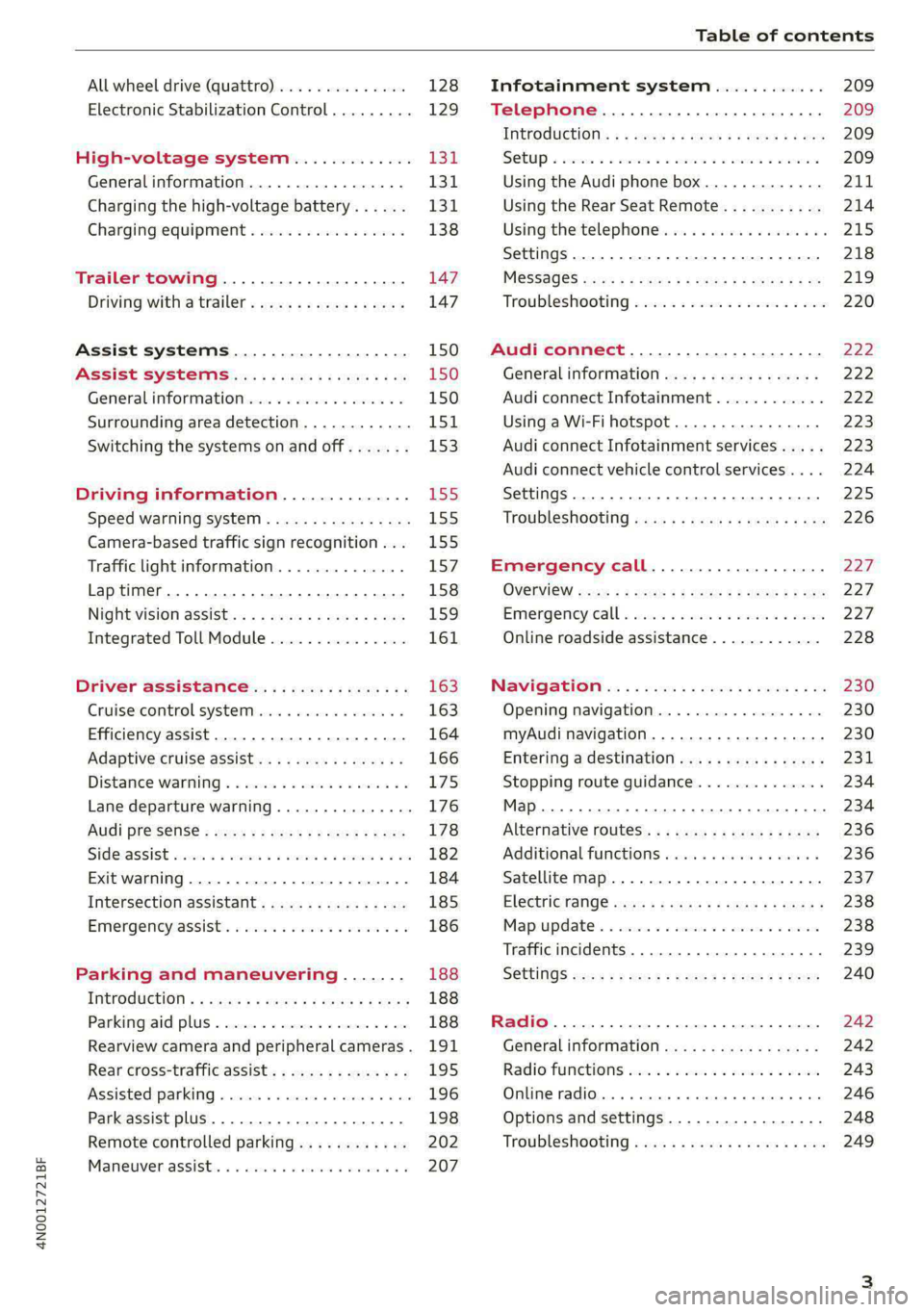
Table of contents
All wheel drive (quattro).............. 128
Electronic Stabilization Control......... 129
High-voltage system............. I31
Generalinformation................. 131
Charging the high-voltage battery...... 131
Charging equipment................. 138
Trailer towing.................055 147
Driving with atrailer................. 147
Assist systems................... 150
Assist systems............... eee 150
General information................. 150
Surrounding area detection............ 151
Switching the systems on and off....... 153
Driving information.............. E55
Speed warning system..............-. 155
Camera-based traffic sign recognition... 155
Traffic light information.............. 157
Laptimer................0..0.0000. 158
Night vision assist..............-.00. 159:
Integrated Toll Module............... 161
Driver assistance................. 163
Cruise control system..........0.0 eee 163
Efficiency assist..............2--004. 164
Adaptive cruise assist............00-. 166
Distance Warning « « wese« + 6 wou ss ese & « 175
Lane departure warning.............4. 176
Audi presense............-.22+-- 0s 178
Sidesassist wsscon x ssescs « 7 ermewn vv suaseme © 8 oe 182
Exit warning .................2.00005 184
Intersection assistant................ 185
Emergencyassists. «icin wasn 3 3 wore oo 186
Parking and maneuvering....... 188
IMEROGUCUION « » see x 2 savas a 2 eae 4 & wee 188
Parking aid plus..................04. 188
Rearview camera and peripheral cameras. 191
Rear cross-traffic assist... ............. 195
Assisted:parkinng « coins 6 asus ¢ 0 caus 6 5 ue 196
Park assist plus.................0.-. 198
Remote controlled parking............ 202
Maneuver.assistis « + cess » semen « wanes a 2 x 207
Infotainment system............ 209
Telephone............... cece eee 209
INthOAUCEION:: « « sews « ¢ news ¢ © mee a x eee 209
SOLU o cncses vo sess + 8 cosine 6 5 ameueus ¥ tuesenens 209
Using the Audi phone box............. 211
Using the Rear Seat Remote........... 214
Using the telephone..............006- 215
Settings............0 0.00.00. 2 eee 218
ME@SSEGES syems 5 2 wom ¢ 5 aan Ff perm FE 219
Troubleshooting sci: 2 aww o 2 wwe 2 2 wow 220
Audi connect..................... 222
Generalinformation................. 222
Audi connect Infotainment............ 222
Using a Wi-Fi hotspot................ 223
Audi connect Infotainment services..... 223
Audi connect vehicle control services.... 224
Settings............0..0 200-02 225
TrOUBlESHOOtING gas 2 s geay s 5 nome & a ae 226
Emergency call................... 227
OVERVIEW some: » = meus <2 came & eee bo ee 227
Emergency call «: issios ¢ sce w ¥ wane wo narem 227
Online roadside assistance............ 228
Navigation «.. < oics seis sc ewe ee os 230
Opening navigation.................. 230
myAudi navigation.................05 230
Entering adestination................ 231
Stopping route guidance.............. 234
Map... sce cece eee eee 234
Alternative routes.............2.-04. 236
Additional functions................. 236
Satellite map............... 0c eee 237
ElGGtriGHanGe veces ¢ ¢ cawy 9 = seme 7 2 ee & 238
Map:updates « ccc xs sco vo eens eo wees 238
Traffic incidents........ 0.00... eee eee 239
SGQtinGS seuss = » aus « Hewes Heme Fx ORE 240
Radio.......... 0... eee 242
Generalinformation................. 242
Radio functions sive. cies as wee 2s wee 243
Online radio... . eee ee eee eee 246
Options and settings................. 248
TroubleShOOting ewes vs woe as eas oe ees 249
Page 9 of 362
4N0012721BF
Quick access
—Park assist plus ............... 198
— Driver assistance systems ...... 153
@_ Depending on equipment:
—Cup holder ..............00.. 95
—SOCkEt: ss seas ¢ 5 cease go eR Fe ee 94
@0) Depending on equipment:
— Starting the engine if there is a
malfunction ................. 108
— Audi music interface .......... 252
—Audi phone box ............... 211
@) Electromechanical parking brake
button 2... 6... cece ee ee eee ee 121
@ Automatic transmission selector
lever... 2... cece eee eee eee ee 109
@ [START ENGINE STOP] button .... 107
@4 Steering wheel adjustment ...... 78
@5) Lever for:
— Cruise control system ......... 163
— Adaptive cruise assist .......... 166
@8 Connection port for the On Board
Diagnostic System (OBD) ........ 333
@) Buttons for:
> LIQHtS sc ss sees ¢ 2 wees 3s ewes G 58
—All-weather lights ............ 58
— Rear fog lights ............... 58
Hood release .............0.00. 276
@9) Button for:
— Luggage compartment lid ...... 48
— Fuel filler door release (plug-in
hybrid drive) ............0.00. 27
60 Exterior mirror adjustment ...... 64
@2 Buttons for:
— Power windows .............. 52
—Child safety lock .............. 51
@) Tips
Some the equipment listed here is only instal-
led in certain models or is available as an op-
tion.
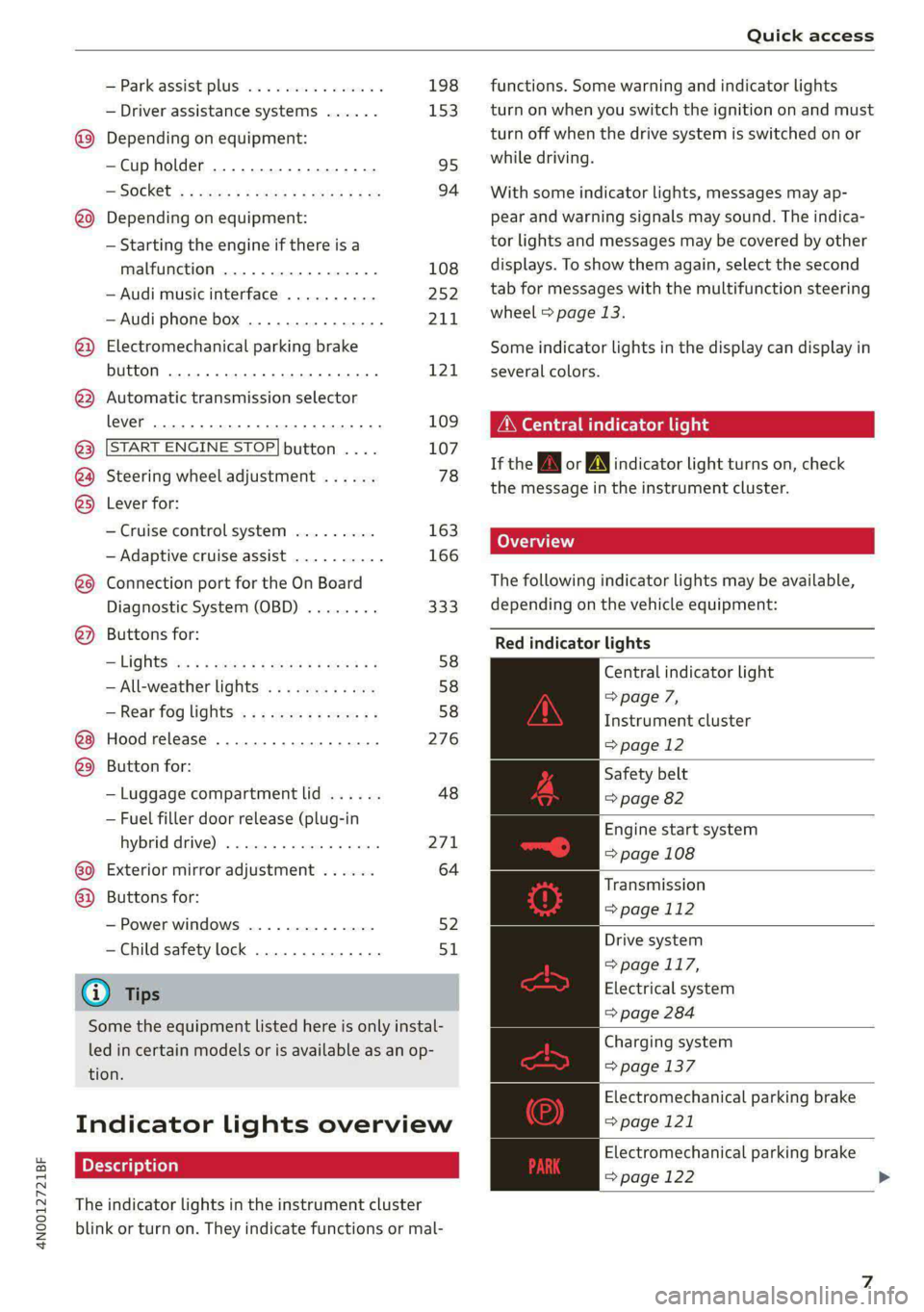
Indicator lights overview
The indicator lights in the instrument cluster
blink or turn on. They indicate functions or mal-
functions. Some warning and indicator lights
turn on when you switch the ignition on and must
turn off when the drive system is switched on or
while driving.
With some indicator lights, messages may ap-
pear and warning signals may sound. The indica-
tor lights and messages may be covered by other
displays. To show them again, select the second
tab for messages with the multifunction steering
wheel & page 13.
Some indicator lights in the display can display in
several colors.
ONC eae sh
If the A or A indicator light turns on, check
the message in the instrument cluster.
The following indicator lights may be available,
depending on the vehicle equipment:
Red indicator lights
Central indicator light
=> page 7,
Instrument cluster
=> page 12
Safety belt
=> page 82
Engine start system
=> page 108
Transmission
=> page 112
Drive system
=> page 117,
Electrical system
=> page 284
Charging system
=> page 137
Electromechanical parking brake
=> page 121
Electromechanical parking brake
=> page 122
Page 10 of 362
Quick access
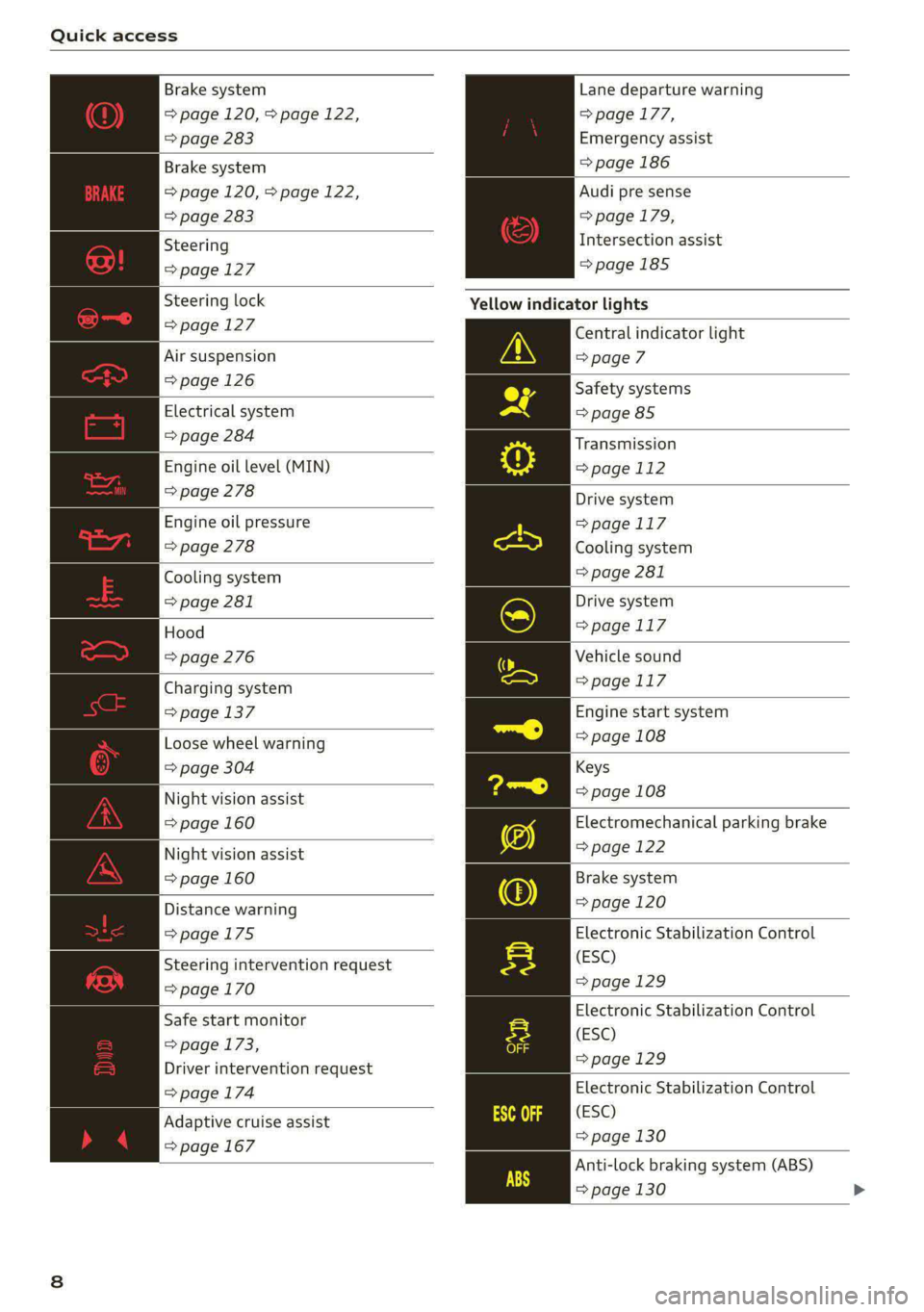
Brake system
=> page 120, > page 122,
=> page 283
Lane departure warning
=> page 177,
Emergency assist
Brake system => page 186
=> page 120, > page 122,
=> page 283
Audi pre sense
=> page 179,
Intersection assist
=>page 185
Steering
=>page 127
Steering lock Yellow indicator lights
= page 127 Central indicator light
Air suspension > page 7
= page 126 Safety systems
Electrical system => page 85
=> page 284
Engine oil level (MIN)
=> page 278
Transmission
=>page 112
Drive system
=>page 117
Cooling system
> page 281
Engine oil pressure
=> page 278
Cooling system
=> page 281
Hood
=> page 276
Drive system
=>page 117
Vehicle sound
Charging system => page 117
= page 137 Engine start system
Loose wheel warning => page 108
=> page 304 Keys
Night vision assist => page 108
=> page 160 Electromechanical parking brake
Night vision assist => page 122
=> page 160 Brake system
Distance warning => page 120
=>page 175 Electronic Stabilization Control
(ESC)
=> page 129
Steering intervention request
=>page 170
Electronic Stabilization Control
(ESC)
=>page 129
Safe start monitor
=> page 173,
Driver intervention request
=> page 174 Electronic Stabilization Control
(ESC)
=> page 130
Anti-lock braking system (ABS)
=> page 130 >
Adaptive cruise assist
=> page 167
Page 11 of 362
4N0012721BF
Quick access
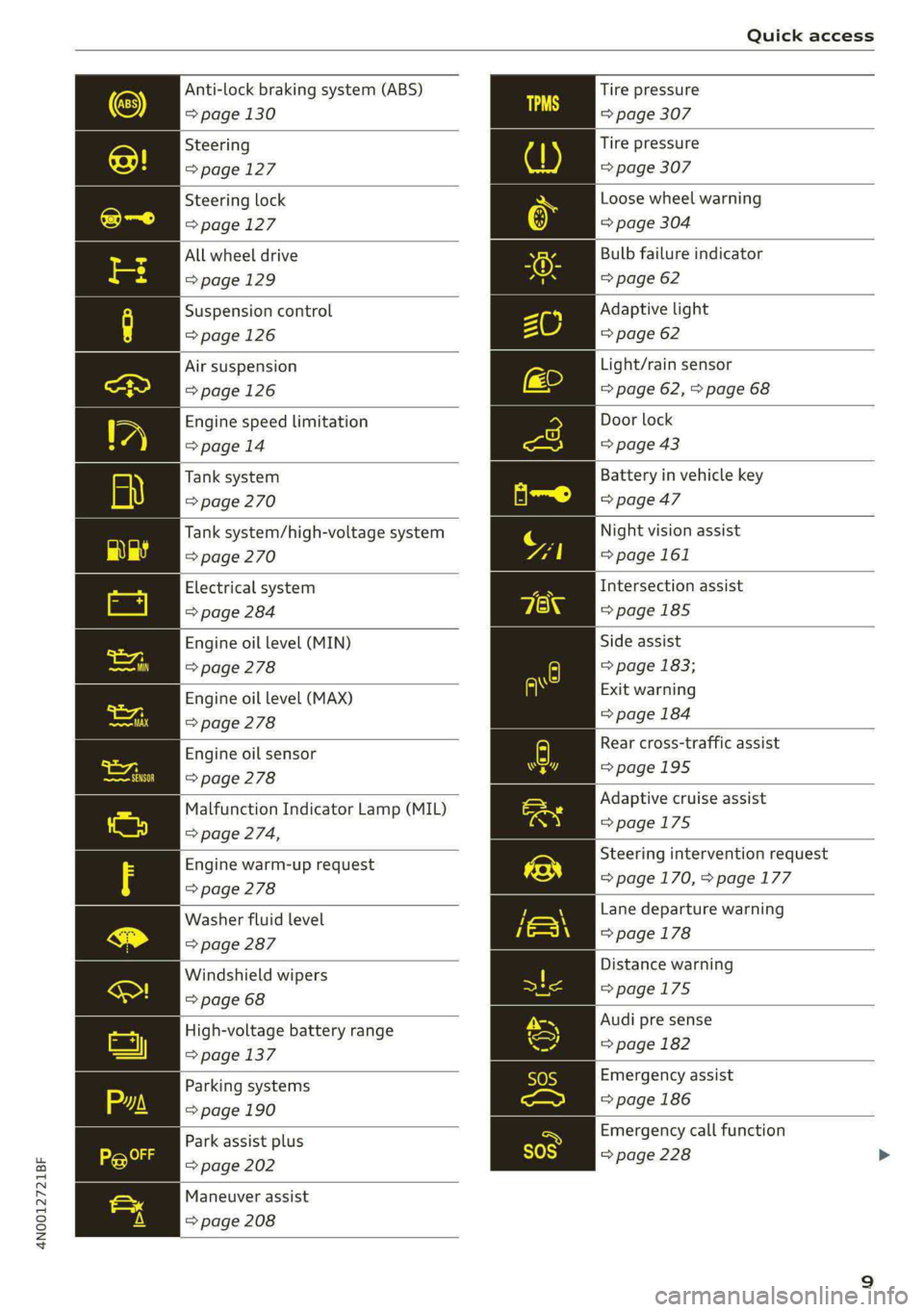
Anti-lock braking system (ABS)
=> page 130
Steering
=>page 127
Steering lock
=>page 127
All wheel drive
=>page 129
Suspension control
=>page 126
Air suspension
=> page 126
Engine speed limitation
>page 14
Tank system
=> page 270
Tank system/high-voltage system
=> page 270
Electrical system
> page 284
Engine oil level (MIN)
> page 278
Engine oil level (MAX)
=> page 278
Engine oil sensor
> page 278
Malfunction Indicator Lamp (MIL)
=> page 274,
Engine warm-up request
> page 278
Washer fluid level
=> page 287
Windshield wipers
=> page 68
High-voltage battery range
=> page 137
Parking systems
=> page 190
Park assist plus
=> page 202
Maneuver assist
=> page 208
Tire pressure
=> page 307
Tire pressure
=> page 307
Loose wheel warning
=> page 304
Bulb failure indicator
=> page 62
Adaptive light
=> page 62
Light/rain sensor
=> page 62, > page 68
Door lock
=> page 43
Battery in vehicle key
=> page 47
Night vision assist
=> page 161
Intersection assist
=> page 185
Side assist
=> page 183;
Exit warning
=> page 184
Rear cross-traffic assist
=>page 195
Adaptive cruise assist
=>page 175
Steering intervention request
=>page 170, > page 177
Lane departure warning
=> page 178
Distance warning
=>page 175
Audi pre sense
=> page 182
Emergency assist
=> page 186
Emergency call function
=> page 228
Page 12 of 362
Quick access
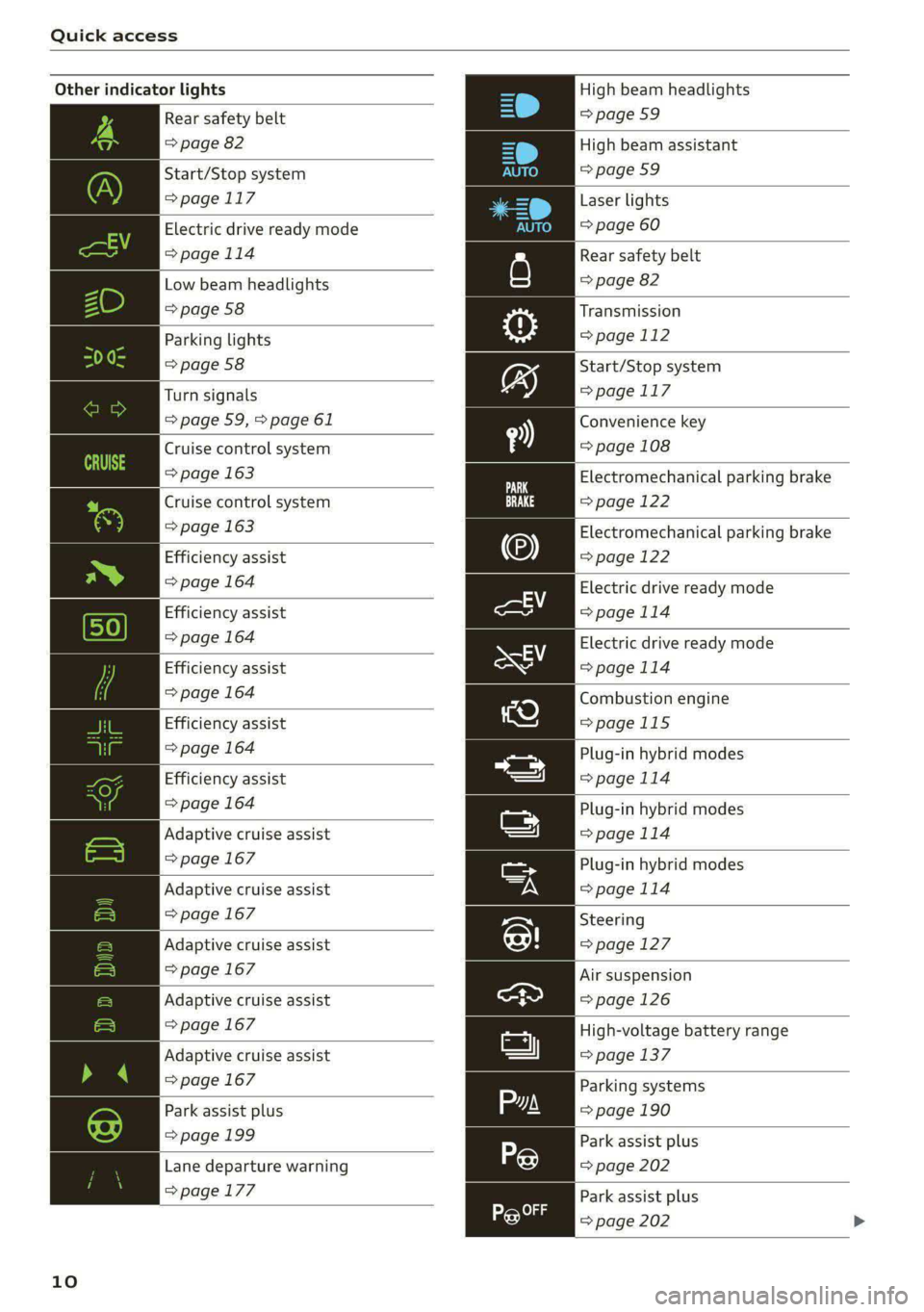
Other indicator lights
Rear safety belt
=> page 82
Start/Stop system
>page 117
>page 114
Low beam headlights
=> page 58
Parking lights
=> page 58
Turn signals
=> page 59, > page 61
Cruise control system
=> page 163
Cruise control system
=> page 163
Efficiency assist
> page 164
Efficiency assist
=> page 164
Efficiency assist
=> page 164
Efficiency assist
=> page 164
Efficiency assist
=> page 164
Adaptive cruise assist
=> page 167
Adaptive cruise assist
=> page 167
Adaptive cruise assist
=> page 167
Adaptive cruise assist
=> page 167
Adaptive cruise assist
=> page 167
10
Electric drive ready mode
Park assist plus
=> page 199
Lane departure warning
=>page 177
High beam headlights
=> page 59
High beam assistant
=>page 59
Laser
lights
=> page 60
Rear safety belt
=> page 82
Transmission
=> page 112
Start/Stop system
=> page 117
Convenience key
=> page 108
Electromechanical parking brake
=> page 122
Electromechanical parking brake
=> page 122
Electric drive ready mode
= page 114
Electric drive ready mode
=>page 114
Combustion engine
>page 115
Plug-in hybrid modes
=>page 114
Plug-in hybrid modes
=> page 114
Plug-in hybrid modes
>page 114
Steering
>page 127
Air suspension
=>page 126
High-voltage battery range
=> page 137
Parking systems
=> page 190
Park assist plus
=> page 202
Park assist plus
=> page 202
Page 13 of 362

4N0012721BF
Quick access
High beam assistant
=>page 59
OLED tail lights
=> page 62
Door lock
=> page 43
Child safety lock
=> page 51
Speed warning system
=>page 155
Speed warning system
>page 155
Camera-based traffic sign recog-
nition
=>page 156
Night vision assist
=> page 161
Cruise control system
=> page 163
Cruise control system
=> page 163
Intersection assist
>page 185
Side assist
> page 183
Distance warning
>page 175
A) Rear cross-traffic assist
here =>page 195
Adaptive cruise assist
=>page 175,
Efficiency assist
=>page 171
Adaptive cruise assist
LR © page 167
Adaptive cruise assist
=>page 172
Lane departure warning
=>page 177
Lane departure warning
=> page 178
Audi pre sense
=> page 182
Emergency assist
=> page 186
11
Page 165 of 362

4N0012721BF
Driver assistance
Driver assistance
Cruise control system
Applies to: vehicles with cruise control system
The cruise control system assists the driver in
maintaining a constant speed above approxi-
mately 15 mph (20 km/h). The system maintains
the desired speed by braking and accelerating.
Switching the system on
Applies to: vehicles with cruise control system
ZA WARNING
— Always pay attention to the traffic around
your vehicle when the cruise control system
is in operation. As the driver, you are always
responsible for controlling your vehicle
speed and the distance between your vehicle
and
other vehicles.
— For safety reasons, cruise control should not
be used in the city, in stop-and-go traffic, on
winding roads, and when road conditions are
poor (such as ice, fog, gravel, heavy rain,
and conditions that could lead to hydroplan-
ing), because this increases the risk of an ac-
cident.
— Switch the cruise control off temporarily
when driving in turning lanes, highway exits,
or in construction zones.
—To reduce the risk of an accident, you should
only resume the stored speed if it is suitable
for the current traffic conditions.
BFV-0220
() Note
— Conventional drive system:Before driving
downhill a long distance on a steep hill, de-
crease your speed and select a lower gear.
This makes use of the engine braking effect
and reduces the load placed on the brakes.
— Plug-in hybrid drive: Before driving downhill
a long distance on a steep hill, decrease
your speed and use the recuperation braking
effect > page 114. This reduces the load on
the brakes.
@ Tips
The brake lights turn on when the brakes are
applied automatically.
Fig. 116 Operating lever: switching the system on
Requirement: the ignition must be switched on.
> To switch the system on, pull the lever toward
you to position ©.
The Gia or i$) indicator light and the corre-
sponding message will appear in the instrument
cluster.
ZA\ WARNING
If the brakes are malfunctioning (for example,
overheating) while the cruise control system
is switched on, the regulating functions may
shut off automatically.
Preselecting or activating a cruise con
speed
Applies to: vehicles with cruise control system
When the vehicle is stationary, you can preselect
the cruise control speed or activate the speed
while driving.
Requirement: the system must be switched on.
> To preselect a cruise control speed when the ve-
hicle is stationary, tap the lever toward @)/G)
=> page 163, fig. 116.
> To activate the cruise control speed, pull the
lever
toward position @ while driving.
> To set the current driving speed as the cruise
control speed, press the button @) on the lever.
The active cruise control speed is indicated with
the Gg or kl indicator light in the instrument
cluster.
163
>
Page 166 of 362
Driver assistance
An additional indicator will appear in the head-up
display*.
Changing the cruise control speed
Applies to: vehicles with cruise control system
Requirement: the system must be switched on.
> To increase or decrease the cruise control speed
in small increments, tap the lever up to the
first level toward @)/G) 9 page 163, fig. 116.
> To increase or decrease the cruise control speed
in larger increments, tap the lever up to the
second level toward @)/G).
> To increase or decrease the cruise control speed
continuously, tap and hold the lever at the first
or second level toward @)/G).
Overriding or deactivating the cruise
control speed
Applies to: vehicles with cruise control system
You can override or deactivate the cruise control
system. When you deactivate the system, your
cruise control speed will be stored and you can
resume that speed.
Requirement: the system must be switched on
and the regulated speed must be activated.
Overriding
> To temporarily override the cruise control
speed, press the accelerator pedal.
> To resume the stored regulated speed, remove
your foot from the accelerator pedal.
If you override the cruise control system for a
long period of time, the cruise control system
will be deactivated. The [Ud or [RM indicator
light will be displayed and the cruise control
speed will be saved.
Deactivating
> To deactivate the cruise control speed, press
the lever toward @) (not locked into place)
=> page 163, fig. 116, or
> Press the brake pedal.
164
ZA WARNING
Resting your foot on the accelerator pedal
could override the cruise control. This will pre-
vent braking interventions by the system.
See me Lai
Applies to: vehicles with cruise control system
When you switch the system off, the cruise con-
trol speed will be erased.
Requirement: the system must be switched on.
> To switch the system off, press the lever toward
@ (locked into place) > page 163, fig. 116, or
> Switch the ignition off.
Applies to: vehicles with cruise control system
Gir / 3) Speed control system: currently un-
available. See owner's manual
If the indicator light turns on and this message
appears, the cruise control system has been deac-
tivated. There is a temporary malfunction, for ex-
ample the brakes are overheating. Switch the
cruise control system on again later.
Efficiency assist
Applies to: vehicles with efficiency assist
Efficiency assist can assist the driver with predic-
tive information in order to reduce fuel consump-
tion. Depending on vehicle equipment, the sys-
tem may access data from the navigation system,
the camera behind the windshield, and the radar
sensors.
Adjusting the efficiency assist
You can adjust efficiency assist functions individ-
ually. The settings depend on the vehicle equip-
ment.
— Accelerator pedal feedback > page 111.
— Interactive accelerator > page 111.
— Predictive messages > page 165.
— Predictive control > page 174, Adjusting the
adaptive cruise assist.
Page 167 of 362
4N0012721BF
Driver assistance
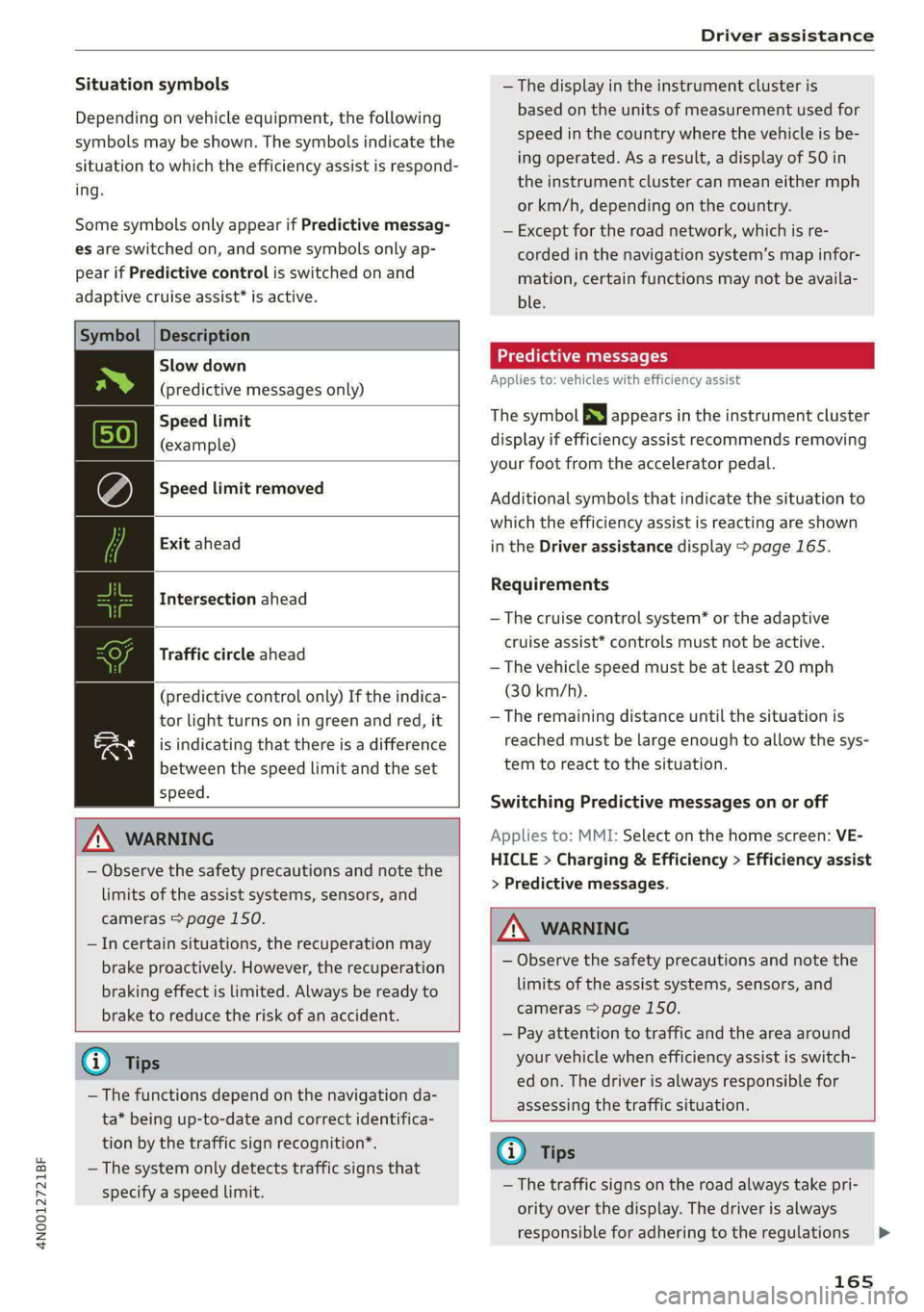
Situation symbols
Depending on vehicle equipment, the following
symbols may be shown. The symbols indicate the
situation to which the efficiency assist is respond-
ing.
Some symbols only appear if Predictive messag-
es are switched on, and some symbols only ap-
pear if Predictive control is switched on and
adaptive cruise assist* is active.
Description
Slow down
(predictive messages only)
Speed limit
(example)
Speed limit removed
Exit ahead
Intersection ahead
Traffic circle ahead
(predictive control only) If the indica-
tor light turns on in green and red, it
is indicating that there is a difference
between the speed limit and the set
speed.
ZA WARNING
— Observe the safety precautions and note the
limits of the assist systems, sensors, and
cameras > page 150.
—Incertain situations, the recuperation may
brake proactively. However, the recuperation
braking effect is limited. Always be ready to
brake to reduce the risk of an accident.
@ Tips
— The functions depend on the navigation da-
ta* being up-to-date and correct identifica-
tion by the traffic sign recognition*.
— The system only detects traffic signs that
specify a speed limit.
— The display in the instrument cluster is
based on the units of measurement used for
speed in the country where the vehicle is be-
ing operated. As a result, a display of 50 in
the instrument cluster can mean either mph
or km/h, depending on the country.
— Except for the road network, which is re-
corded in the navigation system’s map infor-
mation, certain functions may not be availa-
ble.
Predictive messages
Applies to: vehicles with efficiency assist
The symbol BS appears in the instrument cluster
display if efficiency assist recommends removing
your foot from the accelerator pedal.
Additional symbols that indicate the situation to
which the efficiency assist is reacting are shown
in the Driver assistance display > page 165.
Requirements
— The cruise control system* or the adaptive
cruise assist* controls must not be active.
— The vehicle speed must be at least 20 mph
(30 km/h).
— The remaining distance until the situation is
reached must be large enough to allow the sys-
tem to react to the situation.
Switching Predictive messages on or off
Applies to: MMI: Select on the home screen: VE-
HICLE > Charging & Efficiency > Efficiency assist
> Predictive messages.
ZA\ WARNING
— Observe the safety precautions and note the
limits of the assist systems, sensors, and
cameras > page 150.
— Pay attention to traffic and the area around
your vehicle when efficiency assist is switch-
ed on. The driver is always responsible for
assessing the traffic situation.
G) Tips
— The traffic signs on the road always take pri-
ority over the display. The driver is always
responsible for adhering to the regulations
165
Page 168 of 362
Driver assistance
applicable in the country where the vehicle
is being operated.
— When a route is planned using the naviga-
tion system*, then system displays messag-
es based on an assumed route. Without
route guidance, the system displays mes-
sages based on an assumed route.
— The wording of the message may vary de-
pending on the selected Audi drive select*
mode and the selected gear. No messages
are displayed when in the "S" driving pro-
gram.
Adaptive cruise assist
General information
Applies to: vehicles with adaptive cruise assist
Depending on the vehicle equipment, the adap-
tive cruise assist may consist of the following
functions:
Within the limits of the system, the adaptive
speed assist assists the driver in controlling the
speed and the set distance to the vehicle driving
ahead. If the system detects a vehicle driving
ahead, the adaptive speed assist can brake and
accelerate your vehicle within the limits of the
system. On open roads with no traffic, it Func-
tions like a cruise control system. The stored
speed is maintained. When approaching a vehicle
driving ahead, the adaptive speed assist auto-
matically brakes to match that vehicle's speed
and then maintains the set distance as much as
possible. Once the system does not detect a vehi-
cle driving ahead, adaptive speed assist will ac-
celerate up to the set speed.
The additional lane guidance assists the driver
with corrective steering in order to stay in the
lane. You can adjust if the adaptive cruise assist
will provide support with lane guidance
=> page 169, Switching lane guidance on and off.
In stop-and-go traffic and in traffic jams, the ve-
hicle may brake to a full stop and then may also
start driving again automatically under certain
conditions.
Applies to: vehicles with efficiency assist: Predic-
tive control can adjust the speed based on traffic
166
and road conditions > page 170, Predictive con-
trol.
ZA WARNING
Observe the safety precautions and note the
limits of the assist systems, sensors, and
cameras > page 150.
@ Tips
The system complies with United States FCC
regulations and ISED regulations > page 341.
mitations
Applies to: vehicles with adaptive cruise assist
B4m-0093
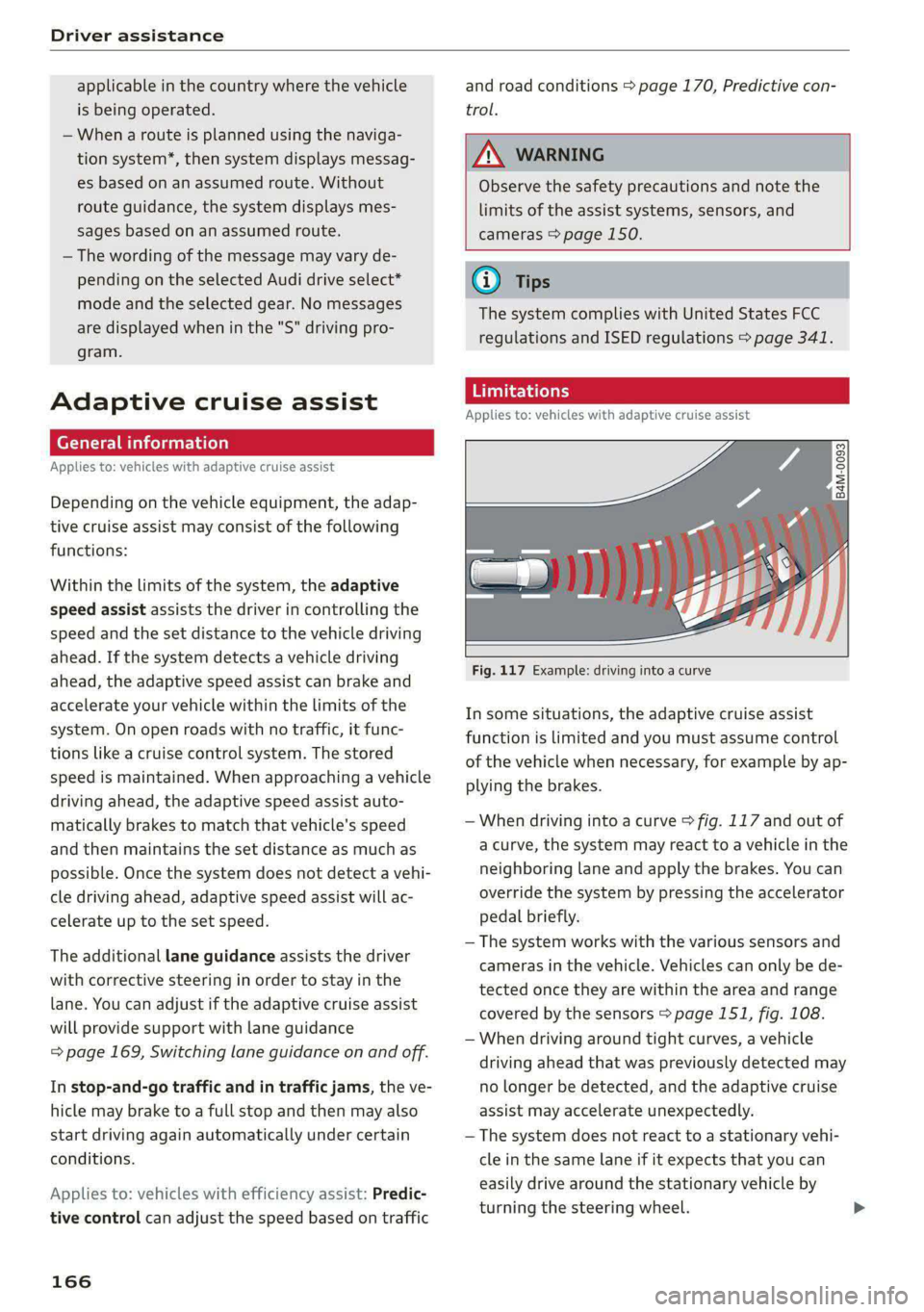
Fig. 117 Example: driving into a curve
In some situations, the adaptive cruise assist
function is limited and you must assume control
of the vehicle when necessary, for example by ap-
plying the brakes.
— When driving into a curve > fig. 117 and out of
a curve, the system may react to a vehicle in the
neighboring lane and apply the brakes. You can
override the system by pressing the accelerator
pedal briefly.
— The system works with the various sensors and
cameras in the vehicle. Vehicles can only be de-
tected once they are within the area and range
covered by the sensors > page 151, fig. 108.
— When driving around tight curves, a vehicle
driving ahead that was previously detected may
no longer be detected, and the adaptive cruise
assist may accelerate unexpectedly.
— The system does not react to a stationary vehi-
cle in the same lane if it expects that you can
easily drive around the stationary vehicle by
turning the steering wheel.