center console AUDI A8 2021 Owners Manual
[x] Cancel search | Manufacturer: AUDI, Model Year: 2021, Model line: A8, Model: AUDI A8 2021Pages: 362, PDF Size: 99.29 MB
Page 29 of 362
4N0012721BF
Touch displays
— The system complies with United States FCC
regulations and ISED regulations
=> page 341.
Applies to: vehicles with Rear Seat Remote
a
=.
S
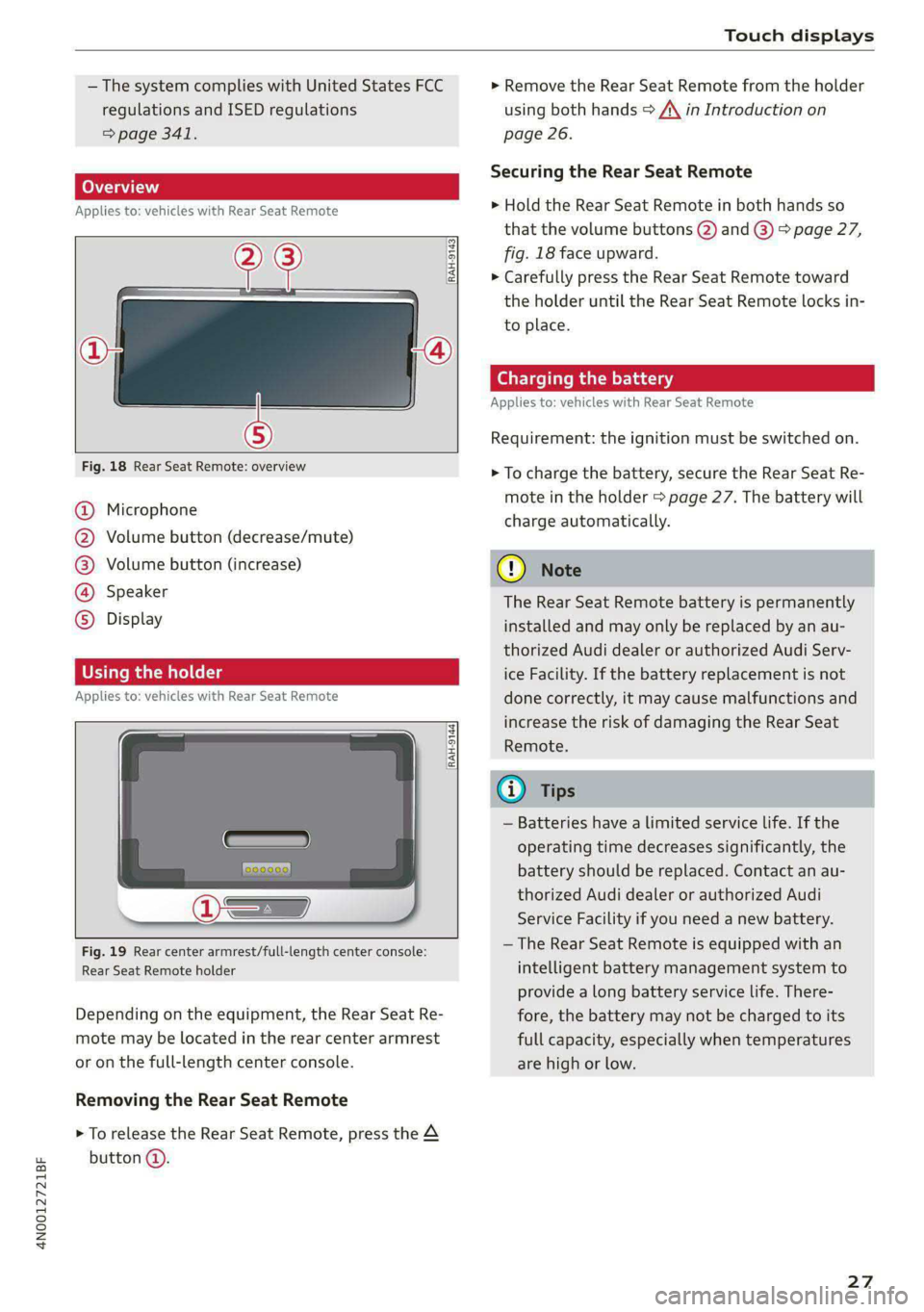
Fig. 18 Rear Seat Remote: overview
a] g
| = <
ic
@ Microphone
@ Volume button (decrease/mute)
@®) Volume button (increase)
@ Speaker
©) Display
Using the holder
Applies to: vehicles with Rear Seat Remote
[RAH-9144)
Fig. 19 Rear center armrest/full-length center console:
Rear Seat Remote holder
Depending on the equipment, the Rear Seat Re-
mote may be located in the rear center armrest
or on the full-length center console.
Removing the Rear Seat Remote
> To release the Rear Seat Remote, press the A
button @.
> Remove the Rear Seat Remote from the holder
using both hands > A\ in Introduction on
page 26.
Securing the Rear Seat Remote
> Hold the Rear Seat Remote in both hands so
that the volume buttons @) and @) > page 27,
fig. 18 face upward.
> Carefully press the Rear Seat Remote toward
the holder until the Rear Seat Remote locks in-
to place.
Charging the battery
Applies to: vehicles with Rear Seat Remote
Requirement: the ignition must be switched on.
> To charge the battery, secure the Rear Seat Re-
mote in the holder > page 27. The battery will
charge automatically.
G) Note
The Rear Seat Remote battery is permanently
installed and may only be replaced by an au-
thorized Audi dealer or authorized Audi Serv-
ice Facility. If the battery replacement is not
done correctly, it may cause malfunctions and
increase the risk of damaging the Rear Seat
Remote.
@) Tips
— Batteries have a limited service life. If the
operating time decreases significantly, the
battery should be replaced. Contact an au-
thorized Audi dealer or authorized Audi
Service Facility if you need a new battery.
— The Rear Seat Remote is equipped with an
intelligent battery management system to
provide a long battery service life. There-
fore, the battery may not be charged to its
full capacity, especially when temperatures
are high or low.
27
Page 63 of 362

4N0012721BF
Lights and Vision
The B indicator light turns on if the laser lights
are switched on.
The laser lights are switched off when the speed
decreases below approximately 30 mph (50
km/h) or when the high beam assistant switches
the LED headlights off.
Nv WARNING
— Observe the safety precautions and note the
limits of the assist systems, sensors, and
cameras > page 150.
— All repair procedures on the headlights must
be performed by an authorized Audi dealer
or authorized Audi Service Facility that will
perform the work according to Audi factory
specifications. Incorrect repairs could result
in eye injury, impair the function, and may
void the vehicle's operating license.
— Opening the laser module is not permitted
and could cause permanent injuries to the
eyes.
— Dangerous exposure to laser beams may oc-
cur if the covers are removed or if the head-
lamp module housing is opened.
G) Tips
— The headlight contains a class 4 laser. The
technical design converts the laser beam so
that there is no danger when it is used for
its intended purpose.
—The laser beam emission from the head-
lamp has been classified in accordance with
IEC 60825-1:2007.
— The possible emission is below the thresh-
old for laser class 2.
—
Maximum laser beam output: 5W (continu-
ous emission), wavelength range A= 400 nm
- 700 nm.
— The headlamp light functions are rated in
accordance with IEC 62471-5:2015.
— The beam emitted from the headlamp was
classified as risk group 2.
Adjusting the exterior lighting
You can adjust the exterior lighting separately.
The settings depend on the vehicle equipment.
> Applies to: MMI: Select on the home screen:
VEHICLE > Light & Visibility > Exterior light-
ing.
Automatic headlights
You can adjust the following settings in the Auto-
matic
headlights menu:
Activation time - You can adjust if the headlights
switch on Early, Medium, or Late based on the
sensitivity of the light sensor.
High beam assistant - You can switch the high
beam assistant on and off.
Laser lights - You can switch the laser lights on
and off.
Entry/exit lighting
The Entry/exit lighting illuminates the area
around the vehicle when the vehicle is unlocked
or when the driver’s door is opened while the ig-
nition is off. The entry/exit lighting works when it
is dark and when the AUTO light function is
switched on. The front and rear daytime running
lights* switch on automatically each time the ve-
hicle is unlocked regardless of how bright it is
outside the vehicle.
Daytime running lights
USA models: The daytime running lights can be
switched on and off.
Canada models: The daytime running lights can-
not be switched off. The lights activate automati-
cally each time the ignition is switched on.
rgency flashers
Fig. 45 Center console: emergency flashers
61
Page 76 of 362

Sitting correctly and safely
vehicle interior during sudden driving or
braking maneuvers, which increases the risk
of an accident. Store objects securely while
driving.
— Applies to: vehicles with front center arm-
rest The center armrest must remain closed
while driving. Otherwise, the protective
function of the front center airbag could be
impaired because it deploys from the driv-
er's seat backrest. This increases the risk of
injury.
Rear seats
ZA\ WARNING
— The power seats can also be adjusted when
the ignition is switched off. To reduce the
risk of injury, children should never be left
unattended in the vehicle for this reason.
— Be careful when adjusting the seat. Unsu-
pervised or careless seat adjustment could
cause parts of the body to get pinched,
which increases the risk of injury.
@) Note
Before adjusting the seat position, you must
remove the retainers for the LATCH child safe-
ty seat restraint system, if installed.
@ Tips
At the same time, only move the respective
seat using the controls.
74
Adjusting seats with buttons
Applies to: vehicles with power adjustable rear seats
| BFY.0106
|
Fig. 59 Rear center armrest/full-length center console:
seat adjustment buttons
You can adjust the basic settings using the but-
tons.
The settings depend on the vehicle equipment.
Adjusting the lumbar support
> To adjust the curvature of the lumbar support,
press the left or right button @.
> To adjust the height of the lumbar support,
press the upper or lower button @.
Adjusting the backrests
> To move the backrest forward or backward,
press the button @) to the left or right.
Adjusting the head restraints
> See > page 79
Adjusting the seat position
> To adjust the seat forward or backward, press
the button @) to the left or right. The backrest
will automatically adjust with it.
> To move the seat upward or downward, press
the button @) upward or downward.
Adjusting the front passenger's seat
See > page 75
Adjusting the comfort position
See > page 76
Page 77 of 362
4N0012721BF
Sitting correctly and safely
Adjusting seats with the Rear Seat Remote
Applies to: vehicles with Rear Seat Remote
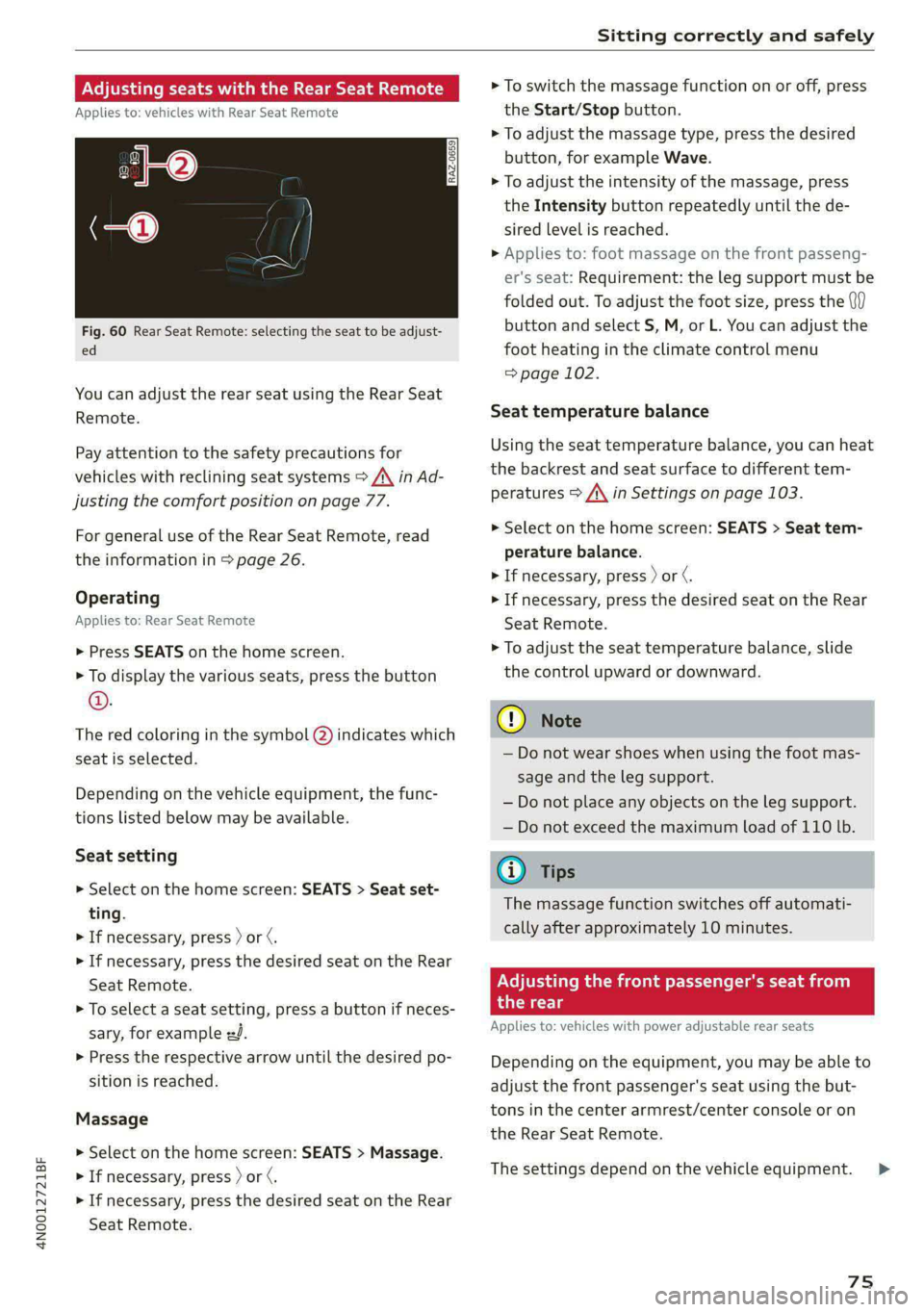
Fig. 60 Rear Seat Remote: selecting the seat to be adjust-
ed
You can adjust the rear seat using the Rear Seat
Remote.
Pay attention to the safety precautions for
vehicles with reclining seat systems > A\ in Ad-
justing the comfort position on page 77.
For general use of the Rear Seat Remote, read
the information in > page 26.
Operating
Applies to: Rear Seat Remote
> Press SEATS on the home screen.
> To display the various seats, press the button
©.
The red coloring in the symbol Q) indicates which
seat is selected.
Depending on the vehicle equipment, the func-
tions listed below may be available.
Seat setting
> Select on the home screen: SEATS > Seat set-
ting.
> If necessary, press ) or ¢.
> If necessary, press the desired seat on the Rear
Seat Remote.
> To select a seat setting, press a button if neces-
sary, for example #J.
> Press the respective arrow until the desired po-
sition is reached.
Massage
> Select on the home screen: SEATS > Massage.
> If necessary, press ) or ¢.
> If necessary, press the desired seat on the Rear
Seat Remote.
> To switch the massage function on or off, press
the Start/Stop button.
> To adjust the massage type, press the desired
button, for example Wave.
> To adjust the intensity of the massage, press
the Intensity button repeatedly until the de-
sired level is reached.
> Applies to: foot massage on the front passeng-
er's seat: Requirement: the leg support must be
folded out. To adjust the foot size, press the (if)
button and select S, M, or L. You can adjust the
foot heating in the climate control menu
=> page 102.
Seat temperature balance
Using the seat temperature balance, you can heat
the backrest and seat surface to different tem-
peratures > A\ in Settings on page 103.
> Select on the home screen: SEATS > Seat tem-
perature balance.
> If necessary, press ) or ¢.
> If necessary, press the desired seat on the Rear
Seat Remote.
> To adjust the seat temperature balance, slide
the control upward or downward.
C@) Note
— Do not wear shoes when using the foot mas-
sage and the leg support.
— Do not place any objects on the leg support.
— Do not exceed the maximum load of 110 lb.
@ Tips
The massage function switches off automati-
cally after approximately 10 minutes.
Adjusting the front passenger's seat from
the rear
Applies to: vehicles with power adjustable rear seats
Depending on the equipment, you may be able to
adjust the front passenger's seat using the but-
tons in the center armrest/center console or on
the Rear Seat Remote.
The settings depend on the vehicle equipment.
75
Page 78 of 362

Sitting correctly and safely
Requirements
> Read and follow the important safety precau-
tions about the reclining rear seats > /\ in Ad-
justing the comfort position on page 77.
> Make sure Passenger side rear seat adjustment
is switched on in the MMI > page 73.
> To activate the front passenger's seat adjust-
ment, press the button @)= page 74, fig. 59.
The LED in the button will turn on.
» Applies to: Rear Seat Remote: Press SEATS on
the Rear Seat Remote. Press the desired func-
tion and select the front passenger seat
=> page 75, fig. 60.
Adjusting the backrests
> Applies to: buttons in the center console/center
armrest: Press the button (2) to the left or right
=> page 74, fig. 59.
> Applies to: Rear Seat Remote: Press the < but-
ton. Press the respective arrow until the desired
position is reached.
Adjusting the front passenger seat forward
or backward
> Applies to: buttons in the center armrest/
center console: Push the button @) > page 74,
fig. 59 to the left or right.
> Applies to: Rear Seat Remote: Press the 2 but-
ton.
Press the respective arrow until the desired
position is reached.
Adjusting the front passenger seat upward
and downward
» Applies to: buttons in the center armrest/
center console: Press the button @) > page 74,
fig. 59 upward or downward.
> Applies to: Rear Seat Remote: Press the 2 but-
ton. Press the respective arrow until the desired
position is reached.
Adjusting the leg support
Applies to: reclining rear seats
Requirement: the reclining position must be se-
lected.
>» Applies to: Rear Seat Remote: Press the 24 but-
ton to fold the leg support out and in. Press the
respective arrow until the desired position is
reached.
76
> To adjust the height or depth of the leg sup-
port, adjust the front passenger seat forward/
backward or upward/downward.
> To adjust the foot massage area, adjust the an-
gle of the front passenger seat backrest.
Z\ WARNING
Applies to: reclining seats: To reduce the risk
of injury, make sure the area between the leg
support and the front passenger's seat back-
rest is clear before folding in the leg support.
G@) Tips
— If the settings cannot be applied from the
rear, then the child safety lock may be
switched on or the front passenger’s seat
adjustment for the rear seats may be
switched off in the MMI > page 73. If the
child safety lock is switched on, the @ but-
ton in the driver's door > page 51 turns on.
PNA m da Meolicela a eth ela|
Applies to: vehicles with reclining/upright position or reclin-
ing seat system
Depending on the equipment, you may be able to
adjust the comfort position using the buttons in
the rear door or on the Rear Seat Remote.
Selecting the reclining position
> Applies to: buttons in the rear door for the re-
clining/upright position: To adjust the reclining
position, press the =% button until the seat has
reached its end position.
> Applies to: Rear Seat Remote: Select on the
home screen: SEATS > Seat setting.
> Press ) or ( until the x= or = symbol is dis-
played.
> Press & or =.
Selecting the upright position
> Applies to: buttons in the rear door for the re-
clining/upright position: To set the upright po-
sition, press the & or J button until the seat
has reached its end position.
> Applies to: Rear Seat Remote: Select on the
home screen: SEATS > Seat setting.
Page 96 of 362

Storage and convenience
Storage and convenience
Power
sources
When the ignition is switched on, you may be
able to use multiple power sources for external
devices, depending on the vehicle equipment.
12 volt sockets
You can connect electrical accessories to the 12
volt sockets. The power usage from the sockets
must not exceed a total of 120 watts. Do not
connect multiple devices to the sockets in the ve-
hicle at the same time.
The 12 volt sockets are labeled with the 12V
symbol. They are located at the front and rear of
the center console and on the side trim panel in
the luggage compartment”.
USB ports
Applies to: vehicles with USB port
You can charge mobile devices using the USB
ports. The USB ports are labeled with the «> or
[4 symbol or CHARGE ONLY.
115 volt socket
Applies to: vehicles with 115 volt socket
The socket is located in the rear center console
and can be used for electrical devices > A\. The
power usage must not exceed 150 watts.
When you push the device connector all the way
into the socket, the child safety mechanism re-
leases and there is electric current.
—If the LED on the socket is green or flashes
slowly, then the socket is ready for use.
— Ifthe LED is red and flashes quickly, there is a
malfunction in the connected device or the
socket is too hot. The socket will switch off for
safety reasons. To reactivate the socket, remove
the device connector. Connect the device after
correcting the malfunction or reconnect after a
brief cool-down period.
hicle when braking or in the event of an acci-
dent.
— Incorrect usage can lead to serious injuries
or burns. To reduce the risk of injuries, never
leave children unattended in the vehicle
with the vehicle key.
ZA\ WARNING
Applies to: vehicles with 115 volt socket
—To reduce the risk of fatal injury, do not in-
sert any conductive objects, such as knitting
needles, into the contacts on the socket.
—To reduce the risk of fatal injury, do not spill
any fluids on the socket. Should any mois-
ture enter the socket, make sure that it has
dried out completely before using the socket
again.
— If devices or connectors that are heavy (such
as a power supply unit) are attached directly
to the socket, the holder can become dam-
aged, which increases the risk of injury.
— Using adapters and extension cables in-
creases the risk of injury because they over-
ride the safety devices for the socket.
—To reduce the risk of injury, remove the con-
nector of the connected device if the socket
has switched off due to a malfunction.
ZA\ WARNING
— To reduce the risk of fatal injury, store all
connected devices securely when driving so
that they do not move around inside the ve-
94
(!) Note
— Read the operating manuals for the con-
nected devices.
—To reduce the risk of damage to the vehicle
electrical system, never attempt to charge
the vehicle battery by connecting accesso-
ries that provide power to the power sour-
ces.
— Do not connect any device whose network
class (voltage) does not match the network
class designed for the socket.
— Disconnect the connectors from the power
sources carefully to reduce the risk of dam-
aging them.
@) Tips
Applies to: vehicles with 115 volt socket
— Devices that are not shielded or devices near
the rear window antenna can cause
Page 97 of 362

4N0012721BF
Storage and convenience
malfunctions in the radio, TV*, or vehicle
electrical system.
— The functions on some devices may be limit-
ed due to the low power output.
— With some power supply units, the integrat-
ed overcurrent protection may prevent it
from switching on. In this case, disconnect
the power supply unit from the electrical
equipment and reconnect after approxi-
mately 10 seconds.
@® Tips
Do not connect any other devices to the sock-
ets when using the compressor* provided by
the factory > page 317. The power consump-
tion in the sockets may be temporarily ex-
ceeded when using the compressor*.
Cup holders
Applies to: vehicles with cup holders
RAZ-0745:
Fig. 80 Rear center armrest and rear center console: cup
holder
Cup holders in the front center console
> The cup holder (@) may be under a cover. To
open the cup holder, tap on the strip on the
cover.
Cup holders in the rear center armrest
> Fold the center armrest downward.
> To open the cup holder @), tap on the cover on
the front side.
> To close the cup holder, push the cup holder all
the way back into the slot.
Cup holders in the rear center console*
> To open the cup holders (8) in the rear center
console, tap on the cover.
ZA\ WARNING
— Do not put any hot beverages in the cup
holder while the vehicle is moving. Hot bev-
erages could spill, which increases the risk
of injury.
— Do not use any breakable beverage contain-
ers (for example, made out of glass or por-
celain). You could be injured by them in the
event of an accident.
® Note
Beverage containers in the cup holders should
always
have a lid. Otherwise, the liquid inside
could spill and cause damage to vehicle
equipment.
Storage and
compartments
Cooled glove compartment
Applies to: vehicles with cooled glove compartment
a
RAZ-0036|
Fig. 81 Glove compartment: cooling mode knob
> To switch the refrigeration function on, turn the
knob counterclockwise until the symbols indi-
cate that refrigeration is switched on @).
95
Page 98 of 362

Storage and convenience
> To switch the refrigeration function off, turn
the knob clockwise until the symbols indicate
that refrigeration is switched off 2).
@) Tips
The glove compartment cooling mode only
functions when the vehicle A/C system is
switched on.
Folding tray tables
Applies to: vehicles with folding tray tables
Fig. 83 Rear center console*: extending and adjusting the
folding tray table
Opening and closing the folding tray table
> Press the button forward on the center armrest
and fold the center armrest upward.
> Fold the tray table arm upright and all the way
forward @).
> Tilt the tray table toward the seat (2) and fold
the tray table to the side in the horizontal direc-
tion®.
> Slide the tray table outward @).
> Unfold the tray table. If necessary, the horizon-
tal angle of the tray table can be adjusted. To
do this, press the lever G) on the side of the
tray upward.
96
> To fold the table in, perform all of the steps in
reverse order.
ZA WARNING
— Do not open the folding tray table while
driving. In the event of an accident or sud-
den braking or swerving, passengers could
collide with the tray tables, and objects
placed on the tables could be thrown
through the vehicle interior, increasing the
risk of injury.
—To reduce the risk of pinching, open the
folding tray table carefully.
— Be careful when adjusting the front seats. To
reduce the risk of pinching, pay attention to
the rear passengers when the folding tray
tables are open.
@) Note
Be very careful when adjusting the front seats
to avoid damaging the folding tray tables or
seats.
Storage area behind the rear head
ary
Applies to: vehicles without rear center airbag:
The storage area can be used to carry light pieces
of clothing.
ZA WARNING
The storage compartment must not be used
to transport heavy objects, hard objects, or
animals. Such objects endanger vehicle occu-
pants and increase the risk of injury during
sudden driving or braking maneuvers or in an
accident.
C@) Note
Make sure that the heating grid strips for the
rear window defogger are not damaged by
abrasive objects.
G) Tips
To ensure the ventilation functions correctly,
the ventilation slots between the rear window
and the storage area must not be covered.
Page 102 of 362

Warm and cold
Warm and cold
Climate control system
One of the following options may be available,
depending on vehicle equipment:
— A deluxe automatic climate control system with
3 zones where the temperature, air distribu-
tion, and air supply can be set separately on the
left front side, the right front side, and in the
rear
— A deluxe automatic climate control system with
4 zones to individually adjust the temperature,
air distribution, and amount of ventilation at all
of the seats
The climate control system warms, cools, dehu-
midifies, and filters the air in the vehicle interior.
It is the most effective when the windows and
panoramic glass roof* are closed. If there is a
build-up of heat inside the vehicle, ventilation
can help to speed up the cooling process.
The deluxe climate control system automatically
maintains a temperature once it has been set. In
all heating mode functions except defrost, the
blower only switches to a higher speed once the
coolant has reached a certain temperature.
Pollutant filter
The pollutant filter removes pollutants such as
dust and pollen from the air.
@ For the sake of the environment
Energy can be saved by switching off the A/C
mode.
@ Tips
— To prevent interference with the heating or
cooling output and to prevent the windows
from fogging over, the air intake in front of
the windshield must be free of ice, snow,
and leaves.
— Condensation from the cooling system can
drip and form a puddle of water under the
vehicle. This is normal and does not mean
there is a leak.
100
— The energy management system may tem-
porarily switch off certain functions, such as
the seat heating” or rear window defogger.
These systems are available again as soon as
the energy supply has been restored.
[RAZ-0638
Fig. 89 Center console: lower display and switch panel
The settings can be adjusted using both displays,
the switch panel in the center console, the con-
trol panel in the rear*, or the Rear Seat Remote*
display. For information on how to operate the
touch displays, see > page 18, Touch displays.
You can adjust all climate control system settings
in the front; only certain functions are available
in the rear.
Lower display
The lower display has two sections with controls:
You can regulate the blower and the air distribu-
tion automatically using AUTO in area @). You can
also apply individual settings here.
In area Q), you can switch individual climate con-
trol system functions on and off.
Switch panel in the center console
Both the & and & buttons to defog windows as
quickly as possible are located in area @).
Upper display
In the upper display, you can switch additional
functions on and off, display them, and adjust
settings.
> Applies to: MMI: Select on the home screen:
VEHICLE > Air conditioning, or
> Press +++ on the lower display.
Page 105 of 362

4N0012721BF
Warm and cold
at low or high temperatures. You can adjust the
fragrance function > page 103.
Residual heat
The residual heat from the coolant is used to
heat the vehicle interior. To use this function,
press and hold the $8 button for more than two
seconds while the ignition is switched off. The
function switches off automatically after about
15 minutes.
Z\ WARNING
— You should not use the recirculation mode
for an extended period of time, because no
fresh air is drawn in and the windows can
fog when cooling mode is switched off. This
increases the risk of an accident.
— Individuals with reduced sensitivity to pain
or temperature could develop burns when
using the seat heating* function. To reduce
the risk of injury, these individuals should
not use seat heating*.
G) Note
To reduce the risk of damage to the seat heat-
ing* elements, do not kneel on the seats or
place heavy pressure on one area of the seat.
@ Tips
— If the front passenger's seat heating” is
turned on, it will not turn on again automat-
ically if more than 10 minutes have passed
between switching the ignition off and on
again.
— Only use the fragrance function* in modera-
tion and take any other passengers and ani-
mals into consideration when using the
function. An overlap of different scents or
odors could cause discomfort. If there is
discomfort, reduce the intensity or switch
the fragrance function* off. Only use fra-
grances that are approved by Audi.
Adjusting the vents
S| a g
S| = + a
Fig. 90 Cockpit and rear center console: adjusting the air
vents
You can open and close the air vents.
> Swipe right to open the air vents.
> Swipe left to close the air vents.
You can also press on the symbols directly to set
the air supply at a certain level or turn it off.
The levers adjust the direction of the airflow from
the vents.
Additional settings
You can adjust additional settings.
> Applies to: MMI: Select on the home screen:
VEHICLE > Air conditioning > ©.
Fragrance
Applies to: vehicles with fragrance function
Using Fragrance selection, you can select the fra-
grance and see the fill level of the fragrance.
You can select the strength of the scent with Fra-
grance level.
Footwell temperature*
You can adjust the footwell temperature for the
driver and front passenger.
Surface heating
Applies to: vehicles with surface heating
You can select if surfaces are also heated when
the seat heating is switched on. Other surfaces,
such as the door armrest and the center armrest,
may be heated, depending on the equipment.
103