emergency towing AUDI A8 2021 Owners Manual
[x] Cancel search | Manufacturer: AUDI, Model Year: 2021, Model line: A8, Model: AUDI A8 2021Pages: 362, PDF Size: 99.29 MB
Page 5 of 362
4N0012721BF
Table of contents
All wheel drive (quattro).............. 128
Electronic Stabilization Control......... 129
High-voltage system............. I31
Generalinformation................. 131
Charging the high-voltage battery...... 131
Charging equipment................. 138
Trailer towing.................055 147
Driving with atrailer................. 147
Assist systems................... 150
Assist systems............... eee 150
General information................. 150
Surrounding area detection............ 151
Switching the systems on and off....... 153
Driving information.............. E55
Speed warning system..............-. 155
Camera-based traffic sign recognition... 155
Traffic light information.............. 157
Laptimer................0..0.0000. 158
Night vision assist..............-.00. 159:
Integrated Toll Module............... 161
Driver assistance................. 163
Cruise control system..........0.0 eee 163
Efficiency assist..............2--004. 164
Adaptive cruise assist............00-. 166
Distance Warning « « wese« + 6 wou ss ese & « 175
Lane departure warning.............4. 176
Audi presense............-.22+-- 0s 178
Sidesassist wsscon x ssescs « 7 ermewn vv suaseme © 8 oe 182
Exit warning .................2.00005 184
Intersection assistant................ 185
Emergencyassists. «icin wasn 3 3 wore oo 186
Parking and maneuvering....... 188
IMEROGUCUION « » see x 2 savas a 2 eae 4 & wee 188
Parking aid plus..................04. 188
Rearview camera and peripheral cameras. 191
Rear cross-traffic assist... ............. 195
Assisted:parkinng « coins 6 asus ¢ 0 caus 6 5 ue 196
Park assist plus.................0.-. 198
Remote controlled parking............ 202
Maneuver.assistis « + cess » semen « wanes a 2 x 207
Infotainment system............ 209
Telephone............... cece eee 209
INthOAUCEION:: « « sews « ¢ news ¢ © mee a x eee 209
SOLU o cncses vo sess + 8 cosine 6 5 ameueus ¥ tuesenens 209
Using the Audi phone box............. 211
Using the Rear Seat Remote........... 214
Using the telephone..............006- 215
Settings............0 0.00.00. 2 eee 218
ME@SSEGES syems 5 2 wom ¢ 5 aan Ff perm FE 219
Troubleshooting sci: 2 aww o 2 wwe 2 2 wow 220
Audi connect..................... 222
Generalinformation................. 222
Audi connect Infotainment............ 222
Using a Wi-Fi hotspot................ 223
Audi connect Infotainment services..... 223
Audi connect vehicle control services.... 224
Settings............0..0 200-02 225
TrOUBlESHOOtING gas 2 s geay s 5 nome & a ae 226
Emergency call................... 227
OVERVIEW some: » = meus <2 came & eee bo ee 227
Emergency call «: issios ¢ sce w ¥ wane wo narem 227
Online roadside assistance............ 228
Navigation «.. < oics seis sc ewe ee os 230
Opening navigation.................. 230
myAudi navigation.................05 230
Entering adestination................ 231
Stopping route guidance.............. 234
Map... sce cece eee eee 234
Alternative routes.............2.-04. 236
Additional functions................. 236
Satellite map............... 0c eee 237
ElGGtriGHanGe veces ¢ ¢ cawy 9 = seme 7 2 ee & 238
Map:updates « ccc xs sco vo eens eo wees 238
Traffic incidents........ 0.00... eee eee 239
SGQtinGS seuss = » aus « Hewes Heme Fx ORE 240
Radio.......... 0... eee 242
Generalinformation................. 242
Radio functions sive. cies as wee 2s wee 243
Online radio... . eee ee eee eee 246
Options and settings................. 248
TroubleShOOting ewes vs woe as eas oe ees 249
Page 6 of 362
Table of contents
Co | fan a 250
General information................. 250
DVD: drive « swe s 2 awe 2 ewes 2 ewe see 250
Bluetooth audio player............... 251
Amazon Alexa.... 2.0.0. cece eee eee 251
Multimedia connections.............. 252
Playing medias. « & ssc 2c ewae « owe oo ee 253
Options and settings................. 257
Supported media and file formats...... 258
Troubleshooting ewies 2 < sce se enw so xy 259
Audi smartphone interface...... 261
S@tUD « ses + y gam peas + yoms os Bene 261
Troubleshooting.............-..00005 262
Additional settings.............. 263
Systemisettingsc « + cssuene so mvswee a soseeue vs 263
Software update........... 0.0 e eee 264
Connected devices..............2---5 265
Legal.information ss « sess s+ ama sx ween « 266
Additional information.......... 268
Brands and licenses...............-4- 268
Maintenance and Care........... 269
Checking and Filling............. 269
Fuel... cee eee 269
Refueling ......... 0... ce eee ee eee eee 270
Emissions control system............. 273
Engine:compartmMentss. scsi so vec eo cee 274
Engineoil........ 00... eee eee eee 277
COOLINGSYSEEM « « sees & = nets 5 = eetew so ore 281
Brake:fluid «2 csoswe s 2 wscceve ov eevee oo erm 283
Electrical system. ...........002-0 00 284
Battery: » = sees = » mean 5 4 meee ye ee Gt BE 284
Windshield washer system...........- 287
Service interval display............... 287
WWATEBUSE. core 5 6 sae oo sms oo ee oo oe 289
Wheels and Tires...........--0000 00s 289
Tire pressure monitoring system....... 307
Care and cleaning................ 310
Generalinformation................. 310
Carwashes ; aves + + sews ss ews se eee ee 310
Cleaning and care information......... 311
Taking your vehicle out of service....... 316
DO.It YOUSUF ovis. io 6 sssicone 3 6 excess 8 4 sane 317
Emergency assistance........... Sly
Generalinformation................. 317
Equipment sncseas xo wexeas ae seems as arvuews ¥ 2 317,
Tire mobility kit.............0...000- 317
Replacing wheels................-00. 319
Space-saving spare tire............... 323
Jump starting....................00. 323
"TOWING © szerws = i sates & 2 a £ § See 5g ee 325
Fuses and bulbs.................. 328
Fuses... 0... eee eee eee 328
BULDS ccs = seme x eens ot ewe ve ee a Pe 332
Customer information........... 333
Data Privaes:s ss seus ss gown se wom ss 333
PRIVAGY, MOLICE «sues 2 w avin w semecwns w vues a 333
Image recording..............00-000- 333
DatainieMmories:: < + sen x = wees sp eee eas 333
Transmitted information.............. 335
Accessories and technical
OMAMGES. « & cicrees 5 2 sn. 6 a snore 0 soe wo 338
Warranty... . 0. ee eee cece 338
Audi Literature Shop..............--- 338
Driving in other countries............. 338
Maintenance, repairs, and technical
modifications. ........ 0... cee eee eee 338
Accessories and parts.............0-. 340
Reporting Safety Defects.............. 340
Declaration of compliance for
telecommunications equipment and
electronic systeMS........0 cece ee eeee 341
Teennical datas: ¢ «ox. is meen ss ees 343
Identification data................ 00% 343
Vehicle data... 2... . ee eee eee eee ee 343
TAA Sis scence: oo cesses 2 v wee © o omen © 2 ove 345
Page 47 of 362
4N0012721BF
Opening and closing
Interior/towing protection monitor
The alarm will be triggered if there are move-
ments detected in the vehicle interior (for exam-
ple, by animals) or if there is a change in the vehi-
cle angle (for example, when the vehicle is being
towed).
You can prevent the alarm from being triggered
by deactivating the interior/towing protection
monitor.
Deactivating the interior/towing protection
monitor
There are the following options for deactivating
the interior/towing protection monitor:
> Press the @ button on the vehicle key a second
time within two seconds. Or
» Applies to: vehicles with convenience key:
Touch the sensor on the door handle a second
time within two seconds. Or
> Turn the mechanical key in the door lock to the
close position a second time within two sec-
onds.
> Applies to: vehicles with MMI: Select on the
home screen: VEHICLE > Settings & Service >
Interior monitoring.
If you lock the vehicle, then the interior/towing
protection monitor will stay off until the next
time the vehicle is unlocked.
ZA\ WARNING
No one, especially children, should stay in the
vehicle when it is locked from the outside, be-
cause the windows can no longer be opened
from the inside. Locked doors make it more
difficult for emergency workers to enter the
vehicle, which puts lives at risk.
@) Tips
The interior/towing protection monitor only
functions correctly when the windows and the
panorama glass roof* are closed.
RAZ-0621
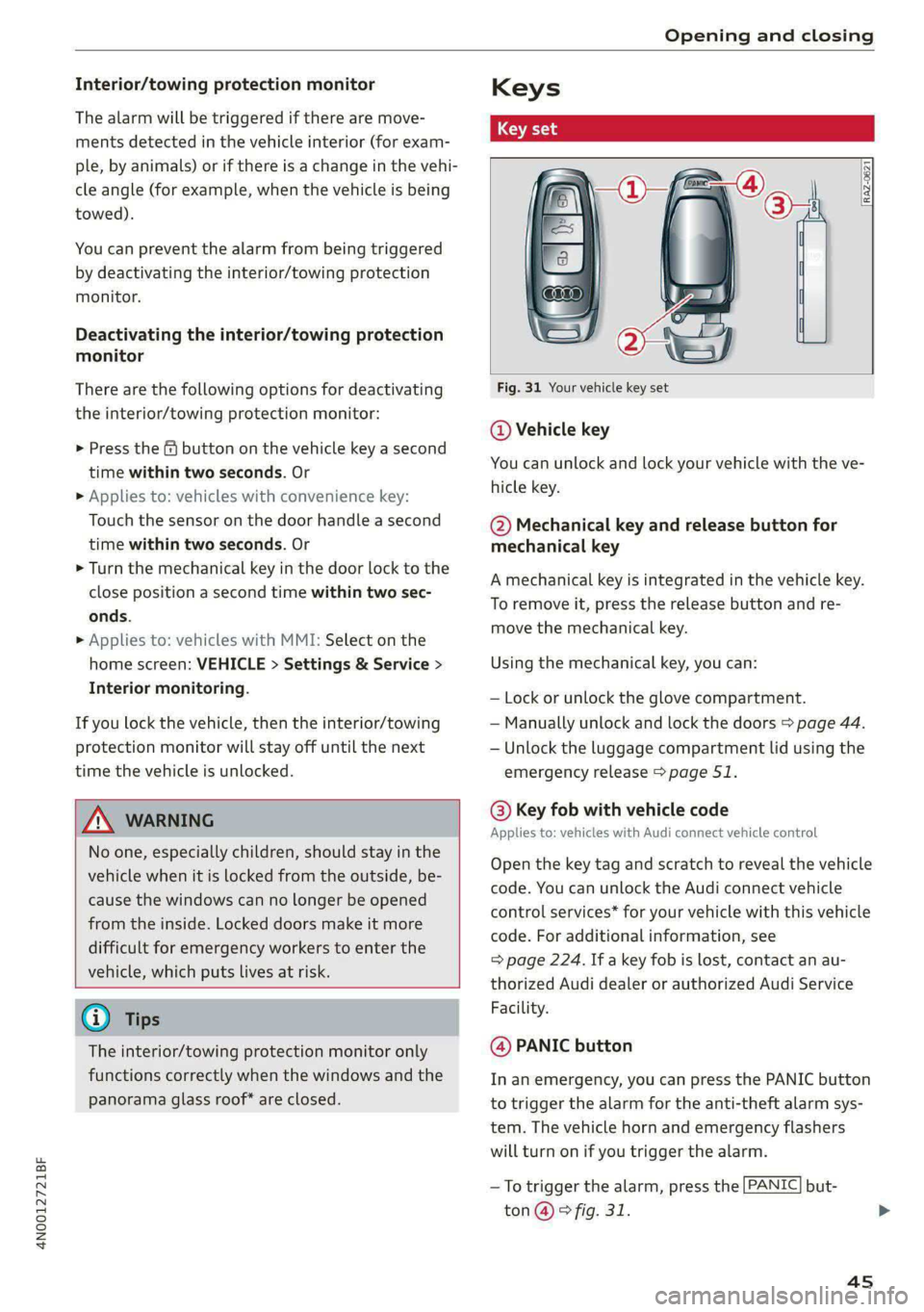
Fig. 31 Your vehicle key set
@ Vehicle key
You can unlock and lock your vehicle with the ve-
hicle key.
@ Mechanical key and release button for
mechanical key
A mechanical key is integrated in the vehicle key.
To remove it, press the release button and re-
move the mechanical key.
Using the mechanical key, you can:
— Lock or unlock the glove compartment.
— Manually unlock and lock the doors > page 44.
— Unlock the luggage compartment lid using the
emergency release > page 51.
@ Key fob with vehicle code
Applies to: vehicles with Audi connect vehicle control
Open the key tag and scratch to reveal the vehicle
code. You can unlock the Audi connect vehicle
control services* for your vehicle with this vehicle
code. For additional information, see
= page 224. If a key fob is lost, contact an au-
thorized Audi dealer or authorized Audi Service
Facility.
@ PANIC button
In an emergency, you can press the PANIC button
to trigger the alarm for the anti-theft alarm sys-
tem. The vehicle horn and emergency flashers
will turn on if you trigger the alarm.
—To trigger the alarm, press the [PANIC] but-
ton @ © fig. 31.
4s
Page 114 of 362

Driving
Combustion engine startup
Applies to: vehicles with plug-in hybrid drive
A haptic pressure point indicates when the com-
bustion engine will be started. The pressure point
is variable and depends on the high-voltage bat-
tery charge level.
@ Recuperation
@ Power by electric motor
@) Pressure point
@ Power by combustion engine
© Maximum acceleration
Maximum acceleration
If you press the accelerator pedal all the way
down, the motor’s full power will be used and
you will reach maximum acceleration, also called
“kick-down”.
Applies to: vehicles with boost function: The elec-
tric motor can switch on for a brief period if the
accelerator pedal is pressed all the way down in
the “D” and “S” driving program. The availability
of this function depends on the charge level of
the high-voltage battery and the temperature of
the drive system components, among other
things.
Z\ WARNING
The driving wheels could spin and the vehicle
could swerve on slick or slippery road surfaces
when using kick-down, which increases the
risk of an accident.
Parking lock emergency release
B4mM-0189
@
@
Fig. 96 Footwell: releasing the parking lock using the
emergency release
112
The emergency release is located under the floor
mat on the driver's side. Read and follow the im-
portant instructions about towing > page 325.
Releasing the parking lock using the
emergency release
> Secure the vehicle against rolling > page 108.
> Pry the cover off at one of the openings using
the screwdriver from the vehicle tool kit
=> page 317.
> Insert the socket wrench from the vehicle tool
kit into the opening.
> Turn the socket wrench clockwise () until it
stops and press it downward @) until it locks in-
to place.
> Leave the socket wrench inserted.
Resetting the parking lock
> Grasp the socket wrench with both hands and
carefully pull it upward to remove.
> Install the cover.
Z\ WARNING
— The parking lock must be released using the
emergency release before towing the vehi-
cle.
— Only use the parking lock emergency release
if the vehicle is secured against rolling
= page 108. An unsecured vehicle may roll,
which increases the risk of an accident.
— Only activate the emergency release while
on a level surface or a slight slope.
—To reduce the risk of an accident, you must
not drive when the emergency release is ac-
tivated.
i Transmission: malfunction! Safely stop vehi-
cle
Do not continue driving. Stop the vehicle as soon
as possible in a safe location and secure it so it
does not roll > page 108. See an authorized Audi
dealer or authorized Audi Service Facility for as-
sistance.
Bi Transmission: too hot. Please stop vehicle >
Page 322 of 362

Emergency assistance
> Set the parking brake.
> Select the “P” position.
>» When towing a trailer: disconnect the trailer
from your vehicle.
> Lay out the vehicle tool kit > page 317 and the
spare tire > page 323.
» Applies to MMI: Select on the home screen: VE-
HICLE > Settings & Service > Air suspension:
wheel change.
> Switch the ignition off.
ZA\ WARNING
The vehicle must also be secured to prevent it
from rolling when using the vehicle jack”. Use
suitable objects to block the front and back of
the wheel that is diagonal from the wheel
with the flat tire.
Removing the caps
nb oD i)
ail z a
Ve
ae)
é
Fig. 196 Wheel: wheel bolts with caps
> Slide the plastic clip from the vehicle tool kit
onto the cap until it engages > fig. 196.
> Remove the cap with the plastic clip.
320
Tada more) bed
Applies to: vehicles with anti-theft wheel bolts
B4H-0470
Fig. 197 Anti-theft wheel bolt with cap and adapter
You need a special adapter in the vehicle tool kit
to remove the anti-theft wheel bolts.
> Remove the cap @).
> Slide the adapter @) all the way onto the anti-
theft wheel bolt @.
> Slide the wheel wrench* from the vehicle tool
kit all the way onto the adapter @).
> Loosen the wheel bolt > page 320.
@ Tips
Note the code number for the wheel bolt
adapter and store it in a safe place separate
from the vehicle. If you need a replacement
adapter, contact an authorized Audi dealer or
authorized Audi Service Facility and give them
the code number.
Loosening the wheel bolts
B4S-0221
Fig. 198 Wheel: loosening the wheel bolts
Page 327 of 362

4N0012721BF
Emergency assistance
4. Attach the other end of the negative cable
(black) to the jump-start pin @) on the vehi-
cle.
Starting the engine
> Start the engine in the vehicle giving the charge
and let it run at idle.
> Now start the engine in your vehicle, which has
the
drained battery.
> If the engine does not start, stop the starting
procedure after 10 seconds and then repeat it
after approximately 30 seconds.
> Turn on the rear window defogger in your vehi-
cle in order to reduce any voltage peaks that
may occur when disconnecting the jump start
cables. The headlights must be switched off.
> With the engines running, remove the cables in
reverse order of the way they were installed.
> Close the red cover on the positive terminal.
Z\ WARNING
— Never connect the jump start cable directly
to your vehicle battery. Only use the connec-
tions in the engine compartment.
— Do not touch the non-insulated parts of the
terminal clamps. The cable must also not
come into contact with vehicle components
that conduct electricity when it is connected
to the positive vehicle battery terminal. This
can cause a short circuit.
— The plugs on the battery cells must not be
opened.
— Keep ignition sources (such as open flames,
burning cigarettes, etc.) away from the vehi-
cle batteries to reduce the risk of an explo-
sion.
— Route the jump start cables so they cannot
get caught in the moving parts in the other
vehicle's engine compartment.
@ Note
Please note that the connecting process previ-
ously described for the jump start cables is in-
tended for when your vehicle is being jump
started.
@) Tips
Make sure that the connected jump start ca-
bles have sufficient contact with metal.
Towing
General information
You should only perform the steps that follow if
you have the necessary tools and technical ex-
pertise.
Towing requires a certain amount of practice.
Audi recommends contacting a towing company
to have the vehicle transported.
You should only have your vehicle towed by an-
other vehicle when disabled in exceptional cir-
cumstances. Inexperienced drivers should not
tow.
Notes on towing
When the engine is stopped, the transmission
will not be sufficiently lubricated if traveling at
high speeds and long distances:
— The maximum permitted towing speed is 30
mph (50 km/h).
— The maximum permitted towing distance is 30
miles (50 km).
Additional information on towing with a tow
truck
The vehicle may only be towed with the front axle
raised. Do not wrap any chains or cables around
the brake lines.
Tow bar and towing cable
The vehicle can be towed with a tow bar or tow-
ing cable. Both drivers should be familiar with
the special considerations when towing, especial-
ly when using a towing cable.
Always make sure the traction force does not ex-
ceed the permitted level and there are no shock
loading conditions. There is always the risk of the
coupling becoming overloaded when driving off-
road.
For the most safety and security, drive with a tow
bar. You should use a towing cable onlyifatow >
325
Page 328 of 362

Emergency assistance
bar is not available. Use a towing cable made of
synthetic elastic cable similar elastic material.
ZA WARNING
— Towing highly increases the risk of an acci-
dent, for example from colliding with the
towing vehicle.
— To reduce the risk of an accident, do not al-
low anyone to remain inside the vehicle
when it is being transported by a tow truck
or a special transporter.
@) Note
— If normal towing is not possible, for exam-
ple if the transmission is faulty or if the
towing distance is greater than 30 miles
(50 km), then transport the vehicle on a
special carrier.
— If the vehicle is towed by a tow truck at the
axle that is not permitted, this can cause se-
vere damage to the transmission.
— The vehicle must not be tow started for
technical reasons.
@) Tips
— If the power supply is interrupted, then it
will not be possible to move the selector
lever out of the "P" position. The parking
lock must be released using the emergency
release before towing the vehicle
=> page 112.
— Switch Audi pre sense* off > page 181 when
loading the vehicle onto a vehicle carrier,
train, ship, or other type of transportation,
or when towing the vehicle. This can prevent
an undesired intervention from the pre
sense* system.
— Follow the local legal regulations for tow-
ing.
Read and follow the important information under
=> page 325.
326
Preparations
> Only secure the towing cable or tow bar at the
designated towing loops > page 327,
=> page 327.
> Make sure the towing cable is not twisted. Oth-
erwise it could disconnect from the towing loop
while towing.
> Switch the emergency flashers on in both
vehicles > page 61. However, do not do this if it
prohibited by law.
Towing vehicle (front)
> Only start to drive when the towing cable is
taut.
> Press the brake pedal very carefully.
> Avoid sudden braking or driving maneuvers.
Vehicle being towed (rear)
> Make sure the ignition is switched on so that
the steering wheel is not locked and so that you
can use the turn signals, the horn, and the
windshield wipers if needed > A\.
> Switching it off before the vehicle has stopped
may impair the function of the brake booster
and power steering. You would then need to
use more force to steer and brake the vehicle.
> Release the parking brake > page 121.
> Select the “N” selector lever position.
> Make sure the towing cable is always taut.
ZA\ WARNING
— Never tow a vehicle using a tow bar or tow-
ing cable if the vehicle does not have electri-
cal power.
— If the vehicle runs out of power while it is
being towed, stop towing the vehicle imme-
diately and consult an authorized Audi deal-
er or qualified repair facility.
Page 329 of 362
4N0012721BF
Emergency assistance
Front towing loop
Rear towing loop
fry 3 o 2
i a
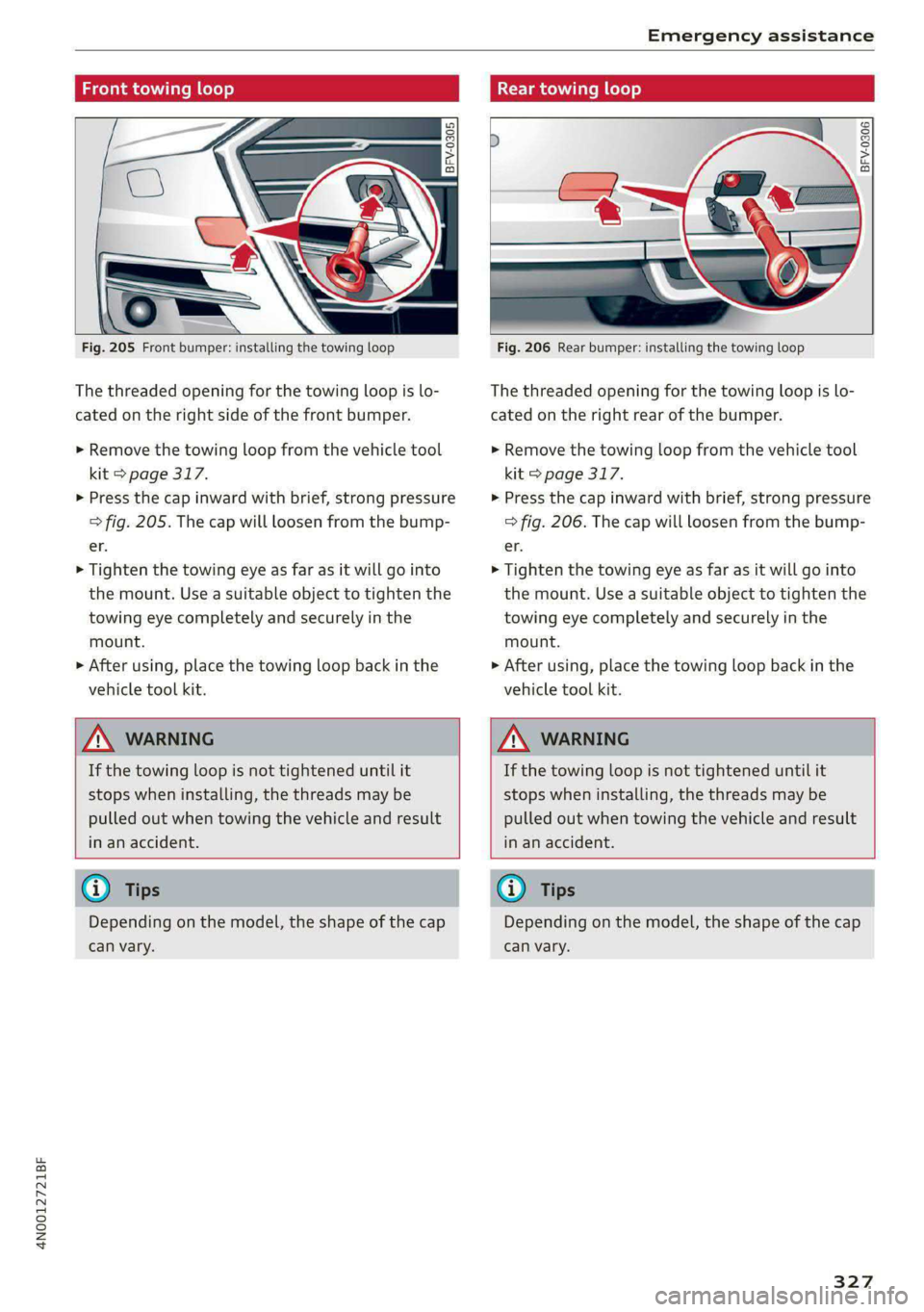
Fig. 205 Front bumper: installing the towing loop
The threaded opening for the towing loop is lo-
cated on the right side of the front bumper.
> Remove the towing loop from the vehicle tool
kit > page 317.
> Press the cap inward with brief, strong pressure
> fig. 205. The cap will loosen from the bump-
er.
> Tighten the towing eye as far as it will go into
the mount. Use a suitable object to tighten the
towing eye completely and securely in the
mount.
> After using, place the towing loop back in the
vehicle tool kit.
BFV-0306
Fig. 206 Rear bumper: installing the towing loop
The threaded opening for the towing loop is lo-
cated on the right rear of the bumper.
> Remove the towing loop from the vehicle tool
kit > page 317.
> Press the cap inward with brief, strong pressure
> fig. 206. The cap will loosen from the bump-
er.
> Tighten the towing eye as far as it will go into
the mount. Use a suitable object to tighten the
towing eye completely and securely in the
mount.
> After using, place the towing loop back in the
vehicle tool kit.
ZA WARNING
If the towing loop is not tightened until it
stops when installing, the threads may be
pulled out when towing the vehicle and result
in an accident.
ZA WARNING
If the towing loop is not tightened until it
stops when installing, the threads may be
pulled out when towing the vehicle and result
in an accident.
G) Tips
Depending on the model, the shape of the cap
can vary.
G) Tips
Depending on the model, the shape of the cap
can vary.
327