interior light AUDI A8 2021 Owners Manual
[x] Cancel search | Manufacturer: AUDI, Model Year: 2021, Model line: A8, Model: AUDI A8 2021Pages: 362, PDF Size: 99.29 MB
Page 4 of 362
Table of contents
About this Owner's Manual......
SUMIMAry: < = exe : eens: Seen cs sens
QutckeaeCe ssh: «i esis se ois a eaves @
Cockpit. ...... 0... eee eee eee eee
Indicator lights overview...........4..
Display and operation...........
Instrument cluster...............
Instrument cluster overview...........
Operating. ecccuse w+ were oo wens oo ayes 9 ¥
Adjusting the display.................
Coolant temperature display...........
Tachometer’ series i ewe so snes ¥ & ome
Power meter...............0 00000005
QUOOMEtEr as + 2 ame < gas = papas s ¥ HERS &
Outside temperature display...........
Engine oil temperature indicator.......
Boost indicator’: 2 2c« «= sesa ¢ x sews «x 2x8
Vehicle functions « seis ss emis ee mes ee
Touch displays....................
General touch display operation........
Multi Media Interface................
Rear Seat Remote...............2...
Screens (NPCs « s wees s eae se wee as ee
Head-up display..................
Descriptionis: ss gem = x eames ¢ eee ge eee
Voice recognition system........
General information.................
DeSeriptionis = ssssas « « wens s + eres « + aes
External voice operation..............
Global functions.................
Additional function buttons...........
Starting and driving.............
Personalization..................
Luggage compartment lid.............
Child safety lock.............0...000.
POWEr WIKdOWS 6: «oxen se aes ye eee
NOD
OO
12 12 12
13
13
14 14
15
15
15
15
16
16
18 18
20
26
29
33 33
34 34
34
35
3F 37 38 38 38
Al 41 45
48
51
52
Panoramic glass roof................. 53
Valet parking............... 0c eee eee 55
Garage door opener.........60..e sees 55
Lights and Vision................. 58
Exterior lighting « sce ss ees se eea se ees 58
Interior lighting wiv «= ssw 2 6 ese = 3 ese 62
ViSION. 0. ee eee eee 64
Windshield wipers............-..00-- 66
Digitalcomipass’s ss gos « s wasn x & were 8 3 68
Sitting correctly and safely...... 70
Correct passenger seating position...... 70
FROMUSOAES!, «areas ao axoniva 5 & aumeane wa savers 70
Rear seats... 2... eee 74
SECeriig WHEEL su: s x wou 4 x naaee ee ee 77
Head restraintsisn: «+ cscs vo asceine vo wen ws 78
Safety belts........ 0.0... cee eee eee 80
Memory function..............-.000+ 83
Aitbag System sms: «+ suscens oe sowie «5 voeusic 84
Child safety seats................000- 88
Storage and convenience........ 94
POWEPrSOUICES wece ae ete ee ore ne 94
Cup holders..............00--0 eee ee 95
Storage and compartments............ 95
Luggage compartment............... 97
Roof rack... eee eee 99
WWarmitanGicolediics «6 scien «6 eve 6 6 on 100
Climate control system............... 100
Steering
wheel heating.............-. 104
Auxiliary climate control.............- 104
Fluids in the A/C system.............. 105
BXRIMIIG)). 5 sccces 6 ase wo moms 3 o OOM 8 Ho 107
Starting the vehicle.................. 107
When driving.......-..e0ceeeee sees 108
Drive SYStC Mises oo scene +o em oo omen oo 114
Start/Stop system............00 0 eee 117
Brakes... 2.0.0... eee eee ee eee eee 119
Electromechanical parking brake....... 121
Special driving situations.............. 122
Driving dynamic.................. 124
Audi driverselectis « was «+ cine 2 6 navies a 0 124
Suspension..............0 0.02.0 000. 125
StCGKitig + scm ss caus a e seen se Sees 4 eee 127
Page 36 of 362
Voice recognition system
Voice recognition system
General information
Applies to: vehicles with voice recognition system
You can operate many functions in the vehicle
easily using voice commands.
Using the voice recognition system optimally
> Speak clearly and distinctly at a normal volume.
Speak louder when driving faster.
> Emphasize the words in the commands evenly
and do not leave long pauses.
> Close the doors, the windows, and the sunroof*
to reduce background noise. Make sure that
passengers are not speaking when you are giv-
ing a voice command.
> Do not direct the vents toward the hands-free
microphone, which is in the roof headliner near
the front interior lights.
> Only the driver should speak to the system, be-
cause the handsfree microphone is aimed to-
ward this seating position.
ZA\ WARNING
— Direct your full attention to driving. As the
driver, you have complete responsibility for
safety in traffic. Only use the functions in
such a way that you always maintain com-
plete control over your vehicle in all traffic
situations.
— Do not use the voice recognition system in
emergencies because your voice may change
in stressful situations. The system may take
longer to dial the number or may not be
able to dial it at all. Dial the emergency
number manually.
G) Tips
There are no voice guidance* prompts when a
dialog is active.
34
Description
Operating the voice recognition system
Applies to: vehicles with voice recognition system
iS] (2) ie
>| |
STEN
Daa) re
Neer) a
Connect 5
Pre)
oy c a
ey
Cesc >
coy
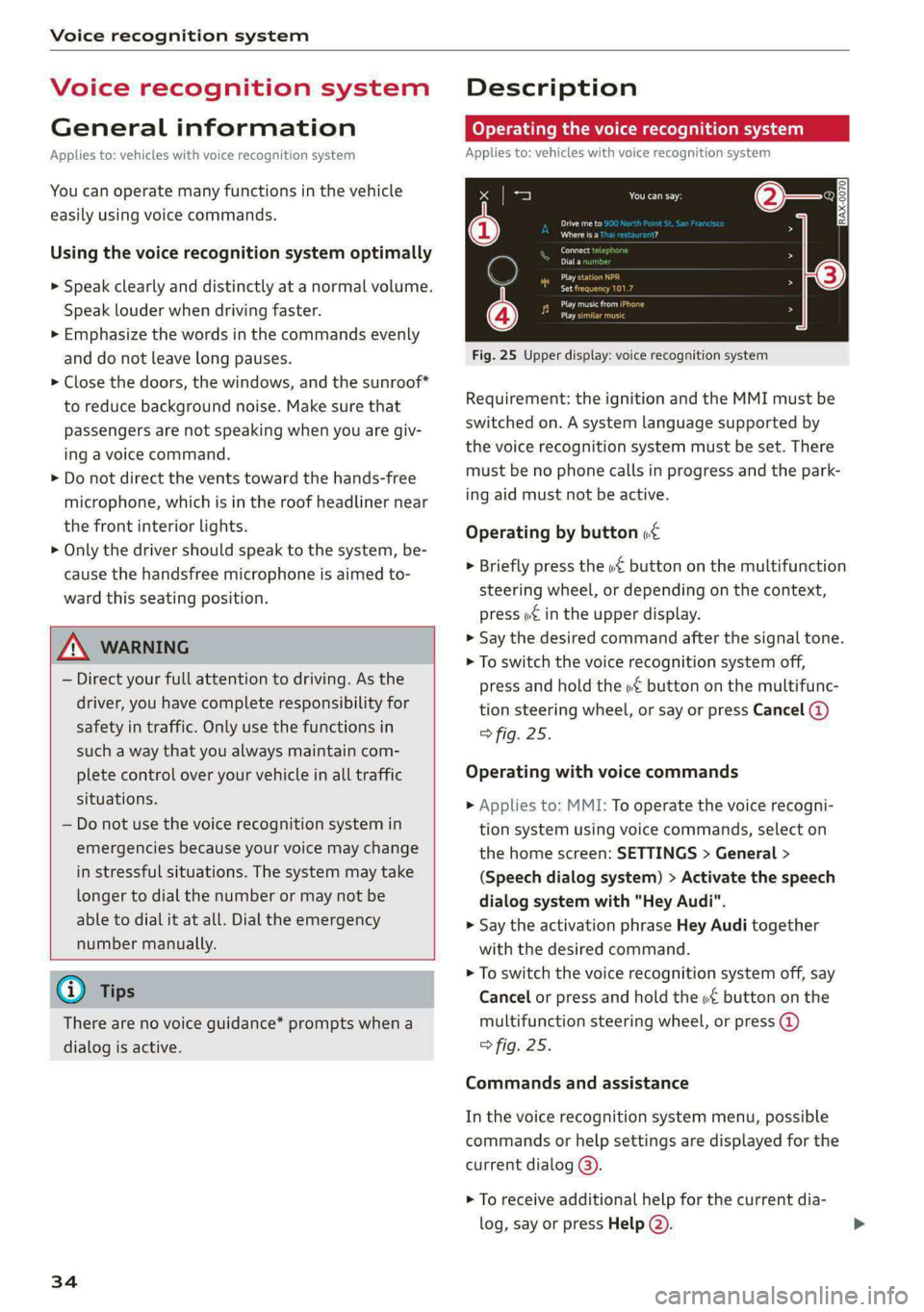
Fig. 25 Upper display: voice recognition system
Requirement: the ignition and the MMI must be
switched on. A system language supported by
the voice recognition system must be set. There
must be no phone calls in progress and the park-
ing aid must not be active.
Operating by button «¢
> Briefly press the «€ button on the multifunction
steering wheel, or depending on the context,
press we in the upper display.
> Say the desired command after the signal tone.
> To switch the voice recognition system off,
press and hold the «€ button on the multifunc-
tion steering wheel, or say or press Cancel (@)
> fig. 25.
Operating with voice commands
> Applies to: MMI: To operate the voice recogni-
tion system using voice commands, select on
the home screen: SETTINGS > General >
(Speech dialog system) > Activate the speech
dialog system with "Hey Audi".
> Say the activation phrase Hey Audi together
with the desired command.
> To switch the voice recognition system off, say
Cancel or press and hold the «£ button on the
multifunction steering wheel, or press @)
> fig. 25.
Commands and assistance
In the voice recognition system menu, possible
commands or help settings are displayed for the
current dialog @).
> To receive additional help for the current dia-
log, say or press Help (2).
Page 43 of 362
4N0012721BF
Opening and closing
Opening and closing
Central locking
General information
Z\ WARNING
— If you leave the vehicle, switch the ignition
off and take the key with you. This applies
particularly when children remain in the ve-
hicle. Otherwise, children could start the ve-
hicle or operate electrical equipment (such
as power windows), which increases the risk
of an accident.
— Applies to vehicles with anti-theft alarm sys-
tem: When the vehicle is locked from the
outside, no one - especially children - should
remain in the vehicle, because the windows
can no longer open from the inside
=> page 44, Anti-theft alarm system.
Locked doors make it more difficult for
emergency workers to enter the vehicle,
which puts lives at risk.
All doors and the luggage compartment lid can
be centrally unlocked and locked at once. You can
select in the MMI if the entire vehicle or only the
driver's door should unlock when unlocking the
vehicle > page 42. The turn signals flash twice
when you unlock the vehicle and flash once when
you lock the vehicle. If they do not flash when
locking, check if all doors and lids are closed.
Depending on the vehicle equipment, you may
have different options for centrally unlocking and
locking your vehicle.
— Vehicle key > page 46
— Sensors in the door handles > page 46
— Lock cylinder in the driver's door > page 44
— Interior central locking switch > page 43
Vehicle key
The term “vehicle key” refers to the remote con-
trol key or convenience key*. The convenience
key* is a remote control key with special func-
tions > page 46 and > page 107.
Power closing*
When closing a door or the luggage compart-
ment lid, you only have to Let it fall lightly into
the latch. It then closes automatically > A.
Automatic locking
If you unlock the vehicle but then do not open
any of the doors, the luggage compartment, or
the hood within a short period time, the vehicle
locks again automatically. This feature prevents
the vehicle from being accidentally left unlocked
for a long period of time.
Automatic locking (Auto Lock)
The Auto Lock function locks all doors and the
luggage compartment lid once the speed has ex-
ceeded approximately 9 mph (15 km/h). The ve-
hicle will unlock again if the unlock function in
the central locking switch is pressed, the “P” gear
is engaged, or the ignition is switched off.
You can open the doors individually from the in-
side by pulling the door handle one time. To open
the rear doors individually, you must pull the
door handle twice.
In the event of a crash with airbag deployment,
the doors will also automatically unlock to allow
access to the vehicle.
Unintentionally locking yourself out
Only lock your vehicle when all of the doors and
the luggage compartment lid are closed and
there is no key in the vehicle. This reduces the
risk of locking yourself out accidentally.
The
following features help to reduce the risk of
locking your vehicle key in the vehicle:
— If the driver's door is open, the vehicle cannot
be locked by pressing the & button on the re-
mote control key or by touching the locking
sensor* on a door.
— If the vehicle key that was used most recently is
inside the luggage compartment, the luggage
compartment lid will automatically open again
after it closes > ©.
— If the vehicle key that was last used is detected
inside the vehicle, then the vehicle cannot be
locked from the outside > ©.
41
Page 53 of 362

4N0012721BF
Opening and closing
— You are standing too close to the bumper or
too far away from it
— The luggage compartment lid was closed or
opened immediately beforehand
— You park close to a hedge and the branches
move back and forth under the vehicle for a
long period of time
— You clean your vehicle, for example with a
pressure washer or in a car wash
— There is heavy rain
— The bumper is very dirty, for example after
driving on salt-covered roads
— There is interference to the vehicle key's ra-
dio signal, such as from mobile devices or
remote controls
Mechanically unlocking the luggage
compartment lid
BGA-0026
Fig. 37 Luggage compartment lid: mechanical key in lock
cylinder
>» Remove the integrated mechanical key
=> page 45.
> Insert the mechanical key in the luggage com-
partment lid lock cylinder.
> Turn the key counterclockwise. The luggage
compartment lid opens.
A ‘WARNING
Observe the safety precautions > page 48.
Opening the luggage compartment lid
bicedu mia sie(M Une ( Tn
Fig. 38 Inner luggage compartment lid: lever
> Press the lever in the direction of the arrow un-
til the luggage compartment lid opens.
Never close the luggage compartment lid us-
ing
the emergency handle.
Child safety lock
The child safety lock prevents the rear doors
from being opened from the inside and the rear
power windows from being operated.
RAZ-1026|
Fig. 39 Driver's door: controls
> To activate or deactivate the child safety lock
for the rear doors (which controls the power
windows and interior door handle), press the
left and/or right 8 button in the driver's door
> fig. 39. The indicator light in the button turns
on/blinks.
> Make sure the child safety lock is working by
checking the function on the rear power win-
dow switch and door handle.
> Applies to: vehicles with controls for the cli-
mate control system in the rear and MMI: To
51
>
Page 57 of 362

4N0012721BF
Opening and closing
Opening and closing the rear window ( Tips
Om
Applies to: vehicles with a sunshade on the rear window
The sunshade on the rear window can be operat-
ed both from the cockpit and from the rear seats.
Operating the sunshade on the rear window
> Applies to: MMI: Opening or closing the sun-
shade: press the [=] button on the lower dis-
play. Or:
> Press the [25] button briefly in the rear door.
Valet parking
Applies to: vehicles with valet parking function
The valet parking function can protect the lug-
gage compartment from unauthorized access.
The VALET] button for valet parking is in the
glove compartment.
You can switch the valet parking function on, for
example when someone else is parking your vehi-
cle )). The vehicle can be driven, locked, and un-
locked using the vehicle key, but access to the
luggage compartment is blocked.
> Remove the mechanical key > page 45.
> Press the [VALET] button in the glove compart-
ment. The LED in the button turns on if the
function is switched on.
> Lock the glove compartment with the mechani-
cal key.
> Give your vehicle key to the service personnel
who are parking your vehicle and keep the me-
chanical key.
The following buttons are deactivated when the
valet parking function is switched on:
— << Button in the driver's door
— &s Button on the vehicle key
— Handle in the luggage compartment lid
If the valet parking function is switched on, a
message will appear every time the ignition is
switched on.
D_ This function is not available in all countries.
2) The possible number of hand-held transmitters depends
on the equipment.
Please note that the luggage compartment
can still be accessed from the vehicle interior
in vehicles with fixed rear seat backrests or
ones that cannot be locked, even when the
valet parking function is switched on.
Garage door opener
Applies to: vehicles with garage door opener
With the garage door opener, you can activate
systems such as the garage doors, security sys-
tems or house lights from inside your vehicle.
These functions are operated in the MMI. Multi-
ple receivers can be programmed, which can con-
trol the functions of up to eight?) hand-held
transmitters.
ZA WARNING
— When operating or programming the garage
door opener, make sure that no people or
objects are in the area immediately sur-
rounding the equipment. People can be in-
jured or property can be damaged if struck
when closing.
— Do not allow yourself to be distracted from
traffic by the viewing and operating the dis-
plays.
G) Tips
— If you sell your vehicle, reset all settings to
the factory default settings > page 264.
—The system complies with United States FCC
regulations and ISED regulations
=> page 341.
@ Tips
Before you program your system to the ga-
rage door opener, first check the compatibili-
ty:
— Ask an authorized Audi dealer or authorized
Audi Service Facility or check at www.
55
Page 64 of 362

Lights and Vision
The emergency flashers help to make other driv-
ers aware of your vehicle in dangerous situations.
> Press the A @ button to switch the emergency
flashers on or off.
When the emergency flashers are turned on, the
a and B indicator lights will flash at the same
time.
You can indicate a lane change or a turn when the
emergency flashers are switched on by using the
turn signal lever. The emergency flashers stop
temporarily.
The emergency flashers also work when the igni-
tion is turned off.
@) Tips
You should switch the emergency flashers on
if:
— you are the last car ina traffic jam so that
all other vehicles approaching from behind
can see your vehicle
— your vehicle has broken down or you are
having an emergency
— your vehicle is being towed or if you are tow-
ing another vehicle
Messages
If the 8, indicator light turns on, a bulb has
failed. The displayed message indicates the cause
and possible solutions. If one of the messages re-
mains on, drive immediately to an authorized
Audi dealer or authorized Audi Service Facility to
have the malfunction repaired.
By Audi adaptive light: malfunction! See own-
er's manual
Adaptive light* is not working. The headlights
still function. Drive immediately to an authorized
Audi dealer or authorized Audi Service Facility to
have the malfunction repaired.
OLED tail light: malfunction! Switched off
permanently. See owner's manual
Drive immediately to an authorized Audi dealer
or authorized Audi Service Facility to have the
malfunction repaired.
62
High beam assistant: malfunction! See own-
er's manual
You can still switch the high beams on or off
manually. Drive immediately to an authorized
Audi dealer or authorized Audi Service Facility to
have the malfunction repaired.
High beam assistant: currently unavailable.
Camera view limited due to surroundings. See
owner's manual
This message appears if the camera's visual field
is blocked. The system will switch itself off. Try
switching the systems on later.
a Automatic headlights: malfunction! See
owner's manual
The light/rain sensor is malfunctioning. When
the AUTO light function is on, the low beams will
remain switched on at all times for safety rea-
sons. Drive immediately to an authorized Audi
dealer or authorized Audi Service Facility to have
the malfunction repaired.
Interior lighting
ry 3S
S 2
> a
oO
Fig. 46 Headliner: interior lighting
Interior lighting buttons
axs* - Interior lighting on/off
con® - Rear interior lighting on/off
4 - Door contact switch on/off. The interior light-
ing is controlled automatically.
Touch-sensitive reading lights
> To turn a reading light on or off, touch the sur-
face @ briefly.
Page 65 of 362
4N0012721BF
Lights and Vision
> To activate the manual dimming function,
touch the surface @) when the light is switched
off and keep touching it until the desired
brightness is reached.
Rear interior lighting
RAZ-0006|
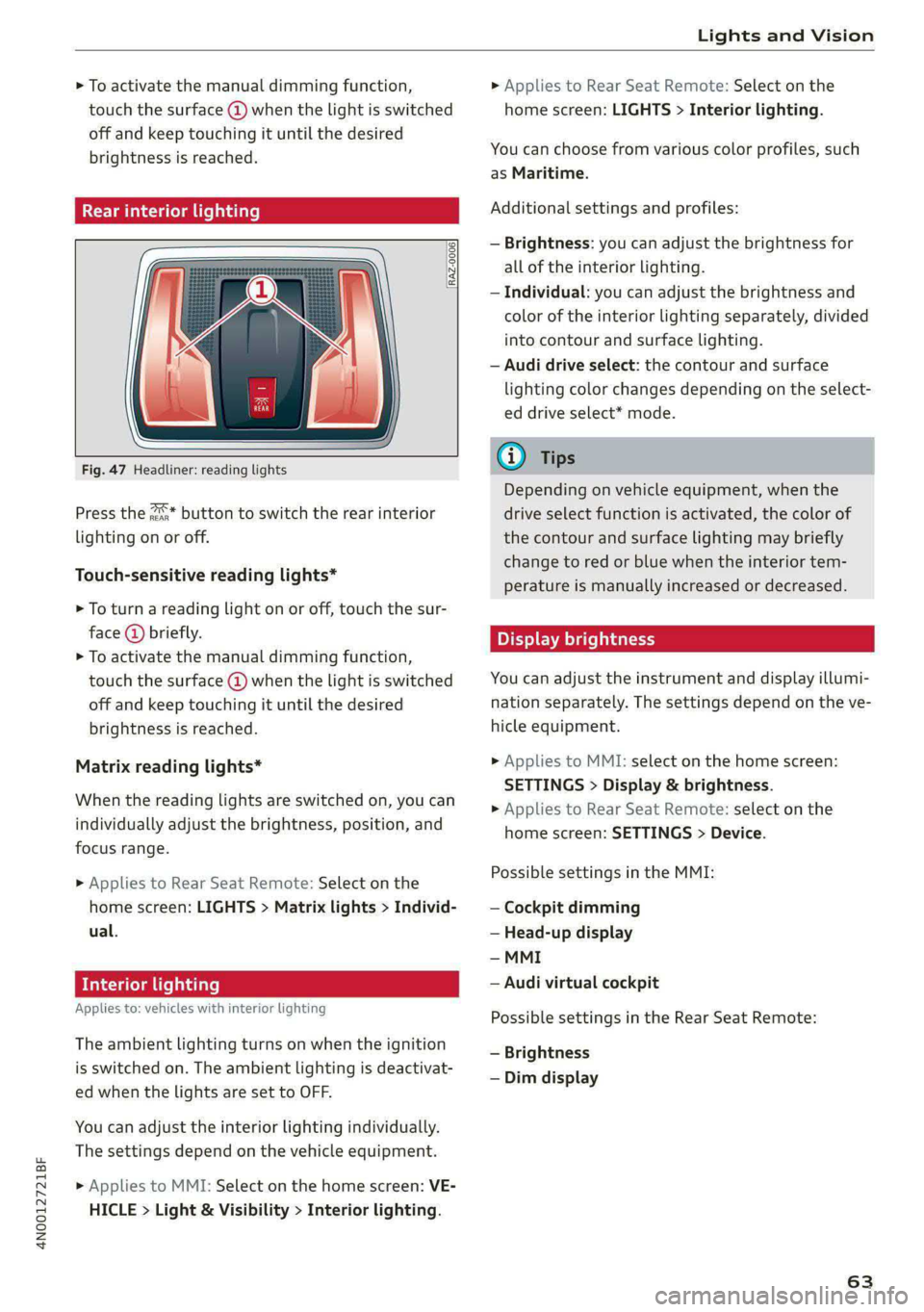
Fig. 47 Headliner: reading lights
Press the 2* button to switch the rear interior
lighting on or off.
Touch-sensitive reading lights*
> To turn a reading light on or off, touch the sur-
face @ briefly.
> To activate the manual dimming function,
touch the surface @) when the light is switched
off and keep touching it until the desired
brightness is reached.
Matrix reading lights*
When the reading lights are switched on, you can
individually adjust the brightness, position, and
focus range.
» Applies to Rear Seat Remote: Select on the
home screen: LIGHTS > Matrix lights > Individ-
ual.
Interior lighting
Applies to: vehicles with interior lighting
The ambient lighting turns on when the ignition
is switched on. The ambient lighting is deactivat-
ed when the lights are set to OFF.
You can adjust the interior lighting individually.
The settings depend on the vehicle equipment.
> Applies to MMI: Select on the home screen: VE-
HICLE > Light & Visibility > Interior lighting.
> Applies to Rear Seat Remote: Select on the
home screen: LIGHTS > Interior lighting.
You can choose from various color profiles, such
as Maritime.
Additional settings and profiles:
— Brightness: you can adjust the brightness for
all of the interior lighting.
— Individual: you can adjust the brightness and
color of the interior lighting separately, divided
into contour and surface lighting.
— Audi drive select: the contour and surface
lighting color changes depending on the select-
ed drive select* mode.
@ Tips
Depending on vehicle equipment, when the
drive select function is activated, the color of
the contour and surface lighting may briefly
change to red or blue when the interior tem-
perature is manually increased or decreased.
Display brightness
You can adjust the instrument and display illumi-
nation separately. The settings depend on the ve-
hicle equipment.
> Applies to MMI: select on the home screen:
SETTINGS > Display & brightness.
> Applies to Rear Seat Remote: select on the
home screen: SETTINGS > Device.
Possible settings in the MMI:
— Cockpit dimming
— Head-up display
— MMI
— Audi virtual cockpit
Possible settings in the Rear Seat Remote:
— Brightness
— Dim display
63
Page 66 of 362

Lights and Vision
Vision
Adjusting exterior mirrors
RAZ-0150
Fig. 48 Driver's door: knob for the exterior mirrors
> Turn the knob in the driver's door to the desired
position:
0 - Deactivates all adjustment functions.
Q/ §- Selects the left or right exterior mirror.
To adjust the mirror glass in a mirror, press the
knob in the desired direction.
GA - Heats* the mirror glass depending on the
outside temperature.
©) - Folds the exterior mirrors*. To fold the mir-
rors out, turn the knob to one of the other posi-
tions. In the MMI, you can select if the mirrors
fold in automatically when you lock the vehicle
=> page 42.
Front passenger's exterior mirror tilt
function*
Requirement: the knob must be in the position
for the front passenger’s exterior mirror.
The mirror surfaces tilt slightly when reverse
gear is selected to provide a better view, for ex-
ample of the edge of the curb.
You can adjust the mirror surface by turning the
knob in the desired direction.
The mirror moves from the reversing position
back to the original position:
— When you switch the ignition off
— When you drive forward at speeds faster than 9
mph (15 km/h).
— When the knob is no longer in the position for
the front passenger exterior mirror
64
ZA WARNING
Curved mirror surfaces (for example convex)
enlarge the field of vision. However, they
make objects in the mirror appear smaller and
farther away. When using these mirrors to es-
timate your distance to vehicles behind you
when changing lanes, you could estimate in-
correctly, which increases the risk of an acci-
dent.
@) Note
— Applies to: vehicles with power folding exte-
rior mirrors: If the mirror housing was
moved by outside forces (such as an impact
when maneuvering), you must use the pow-
er folding function to fold the mirror all the
way out. The mirrors will make a loud noise
when they latch into place. The mirror hous-
ing must not be moved back into place by
hand because this could impair the function
of the mirror mechanism.
— Applies to: vehicles without power folding
exterior mirrors: If the mirror housing was
moved by outside forces (such as an impact
when maneuvering), you must move it back
in place by hand.
— If you wash the vehicle in an automatic car
wash, you must fold the exterior mirrors in
to reduce the risk of damage to the mirrors.
Never fold power folding exterior mirrors*
by hand. Only fold them in and out using
the power controls.
G) Tips
If the power adjusting function malfunctions,
the glass in both mirrors can be adjusted by
pressing on the edge of it by hand.
Dimming the mirrors
> The interior and exterior mirrors dim automati-
cally when light shines on them, for example
from headlights on a vehicle behind you.
ZX WARNING
— If the glass on an automatic dimming mirror
breaks, electrolyte can leak out. This liquid >
Page 67 of 362

4N0012721BF
Lights and Vision
can irritate the skin, eyes and respiratory
system. If there is contact with the fluid,
flush immediately with plenty of water. Con-
sult a physician if necessary.
— Repeated or long-term exposure to electro-
lyte fluid can lead to irritation of the air-
ways, especially in people with asthma or
other respiratory conditions. Take deep
breaths immediately after leaving the vehi-
cle or, if this is not possible, open all of the
doors and windows as wide as possible.
— If electrolyte fluid comes into contact with
the eyes, flush them thoroughly with plenty
of clean water for at least 15 minutes and
then seek medical attention.
— If electrolyte fluid comes into contact with
the skin, flush the affected area with clean
water for at least 15 minutes, and then
clean with soap and water and seek medical
attention. Clean affected clothing and shoes
thoroughly before wearing again.
— If the fluid was swallowed and the person is
conscious, flush the mouth with water for at
least 15 minutes. Do not induce vomiting
unless this is recommended by medical pro-
fessionals. Seek medical attention immedi-
ately.
G) Note
If the glass on an automatic dimming mirror
breaks, electrolyte can leak out. This liquid
damages plastic surfaces and paint. Clean
this liquid as quickly as possible, for example
with a wet sponge.
@ Tips
— If the light reaching the rearview mirror is
obstructed, the automatic dimming mirror
will not function correctly,
— The automatic dimming mirrors do not dim
when the interior lighting is turned on or
the reverse gear is selected.
Fig. 49 Roof headliner: sun visor
Sun visor
The sun visors can be moved out of their brackets
and turned toward the doors (a).
They can also be moved back and forth length-
wise in this position.
Vanity mirror
The mirror light switches on when the cover over
the
vanity mirror @) opens.
Vanity mirror in the rear
Applies to: vehicles with vanity mirrors in the rear
Nees
Fig. 50 Rear headliner: vanity mirror
> Press the button to fold the mirror open. The
mirror lighting turns on automatically.
> To change the mirror's angle, move it forward
or back with your hand.
65
Page 71 of 362

4N0012721BF
Lights and Vision
Fig. 54 Magnetic zone map
The magnetic zone must be adjusted correctly for
the compass to read accurately.
> Press and hold the button @ > page 68, fig. 53
until the number of the magnetic zone appears
in the interior rearview mirror.
> Press the button () repeatedly to select the
correct magnetic zone. The selection mode
turns off after a few seconds.
Calibrating the co
Applies to: vehicles with digital compass
You must recalibrate the compass if it does not
display the correct direction.
> Press and hold the button @ untila C
=> page 68, fig. 53 appears in the rearview mir-
ror.
> Drive in a circle at about 6 mph (10 km/h) until
a direction is displayed in the rearview mirror.
B42-0405
To reduce the risk to yourself and other driv-
ers, calibrate the compass in an area where
there is no traffic.
69