ECO mode AUDI ALLROAD 2000 User Guide
[x] Cancel search | Manufacturer: AUDI, Model Year: 2000, Model line: ALLROAD, Model: AUDI ALLROAD 2000Pages: 306, PDF Size: 9.95 MB
Page 142 of 306
--------------------CONTROLS AND
EQUIPMEN T
If there are one or more faults, the driver in
formation disappears about 15 seconds af
ter the engine has been started and the ap
propriate fault symbol appears in the
display.
If neither "OK" nor any other fault symbol
appear in the displa y, the auto-check sy
stem must itself be checked. Displays
In case of a malfunction or component fail
ure, the acoustic warning will sound and the
following symbols can appear.
Brake light
USA models:
Canada models: BRAKE
LIGHT
(@)
The following electrical components should
be checked, repaired or replaced, as neces
sary:
• Brake light bulbs
• Fuses
• All wiring connections Engine
coolant
temperature /level
If the light flashes, either the coolant ten:
perature is too high, or the coolant level1s
too low.
• If the light starts to f_lash, move
the vehicle a safe d1stance off
the road, stop the engine, depress
the emergency flasher switch, turn
off the engine and let it cool down.
Check coolant level. Top up as necessary
(see "Cooling system", page 238). ·
g Always heed all WA RNINGS
� on page 232.
141
Page 147 of 306
CONT
ROLS AND EQUIPMENT---------------------
Trip computer
This feature generates much helpful infor
mation by simple touch control. For the driv
er's convenience, the computer's memory
display window is integrated in the instru
ment cluster.
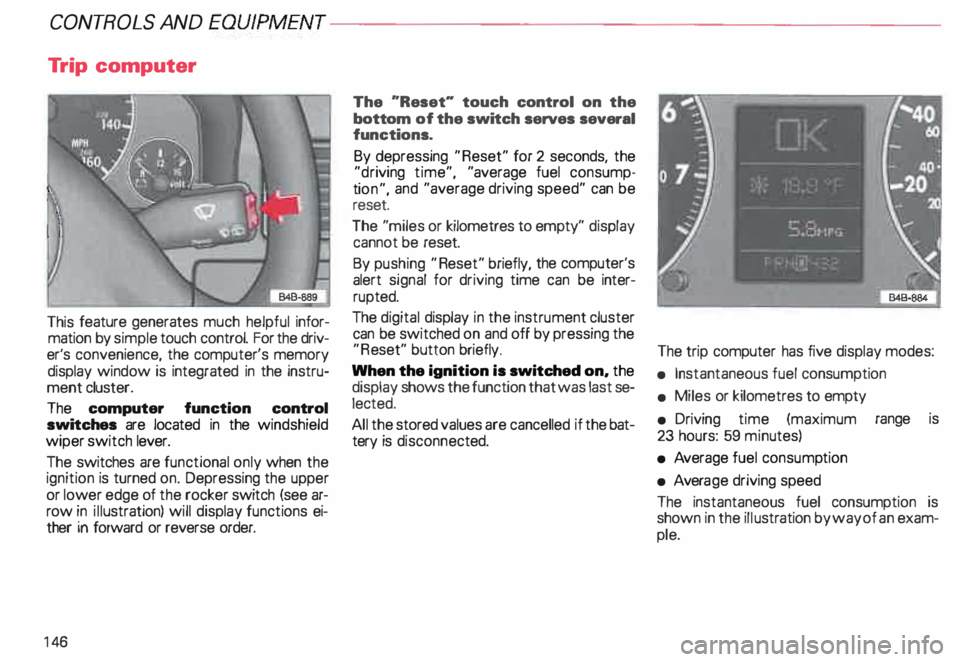
The computer function control
switches are located in the windshield
wiper switch lever.
The switches are functional only when the
ignition is turned on. Depressing the upper
or lower edge of the rocker switch (see ar
row in illustration) will display functions ei
ther in forward or reverse order.
14 6 The
"Reset" touch control on the
bottom of the switch serves several
functions.
By depressing "Reset" for 2 seconds, the
"d riving time", "average fuel consump
ti on", and "average driving speed" can be
reset.
The "miles or kilometres to empty" display
cannot be reset.
By pushing "Reset" briefly, the computer's
alert signal for driving time can be inter
rupted.
The digital display in the instrument cluster
can be switched on and off by pressing the
"R eset" button briefly.
When the ignition is switched on, the
display shows the function that was last se
lected.
All the stored values are cancelled if the bat
tery is disconne cted. The
trip computer has five display modes:
• Instantaneous fuel consumption
• Miles or kilometres to empty
• Driving time (maximum range is
23 hours: 59 minutes)
• Average fuel consump tion
• Avera ge driving speed
The instantaneous fuel consumption is
shown in the illustration by way of an exam
ple.
Page 148 of 306
---------------------CONTROLS AND
EQUIPMEN T
USA models:
computer calculations are displayed in the
USA measuring system
Canada models:
computer calculations are displayed in the
metric system
1/1 00 km -Instantaneous
(MPG) fuel
consumption
Fuel consumed instantaneously IS mea
sured every 1 00 feet or 30 meters and dis
played in units of miles per gallon (MPG) or
liters per 100 kilometres (1/1 OOkm). When
this function is selected right after engine
start -up, the display will show the average
fuel consump tion figure for the first 100
feet or 30 meters. When the vehicle is sta
tionar y, the last unit measured will be dis
played.
km -Kilome tres or miles to
{Mi) empty
The displa yed information (indicated in
stages of 5 miles or 1 0 kilometres) is based
on the average fuel consumption computed
during the last 20 miles or 30 kilometers. This
feature informs the driver how many
miles or kilometres of normal and smooth
driving can be covered with whatever
amount of fuel remains in the tank. Fuel
economy is the result of good driving habits.
h Driving time
Driving time elapsed will remain in storage,
even pfter the ignition is turned off. Further
driving time will be added automat ically af
ter engine restart. Maximum storage and
display range is 23 hours: 59 minutes. To
keep track of driving time between points,
depress "Reset" for zero.
Driving time alert
While driving, the computer will automati
cally switch to the "driving time" display ev
ery two hours. The indicator "2:00" (or
"4:00", "6:00", "8:00" etc.) will blink in the
display window to alert the driver to take a
break. The blinker can be turned off briefly
by pushing "Reset'' or either side of the
switch. If the
ignition is off more than ten minu tes,
the driving time alert counter will automati
cally start again from zero. If the ignition is
off less than ten minutes, the display will
blink again every two hours.
0 I (MPG) -Ave rage fuel
100 km
consumption
The display will show the computed aver
age since the last "Reset". When the igni
tion is turned off, the computed average re
mains in storage. When driving is resumed,
the computation continues automatically.
To delete stored data, push "Reset".
0 km/h -Average driving
(MPH) speed
The display will show the computed aver
age of driving speed variations since the last
"R eset". When the ignition is turned off,
the computed average remains in stora ge.
When driving is resumed, the computation
continues automatically. To delete stored
data, push "Reset"
147
Page 154 of 306
Ride height adjustment (4 Level Air Suspension)
......., _____ ___ �--
-�
�. 842· 8!18 ..J
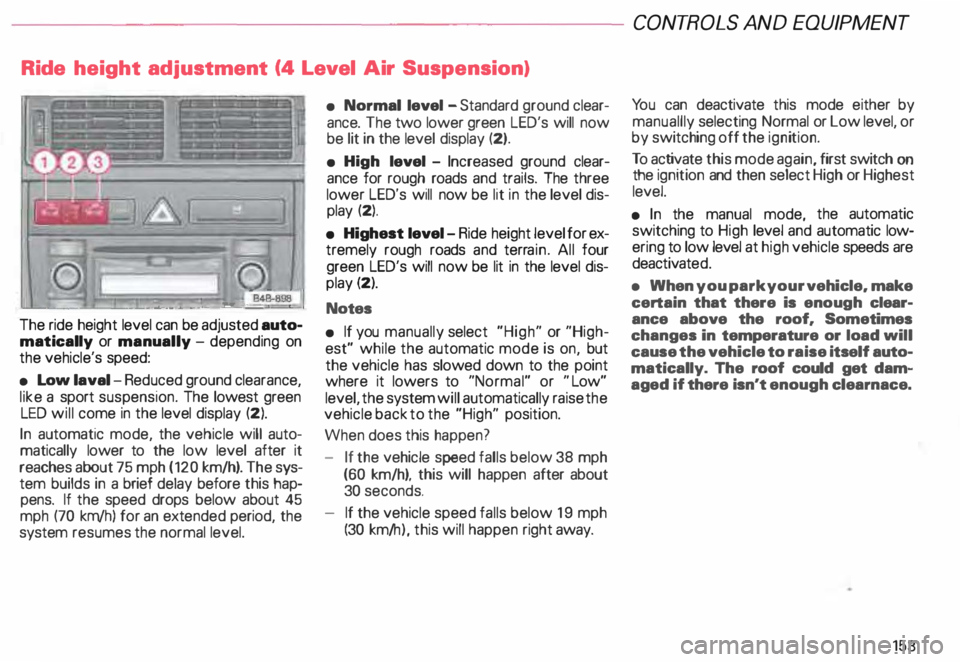
The ride height level can be adjusted auto
matically or manually -depending on
the vehicle's speed:
• Low laval -Reduced ground clearance,
like a sport suspension. The lowest green
LED will come in the level display (2).
In automatic mode, the vehicle will auto
matically lower to the low level after it
reaches about 75 mph (120 km/h). The sys
tem builds in a brief delay before this hap
pens. If the speed drops below about 45
mph (70 km/h) for an extended period, the
system resumes the normal level. •
Normal level -Standard ground clear
ance. The two lower green LED's will now
be lit in the level display (2).
• High level -Increased ground clear
ance for rough roads and trails. The three
lower LED's will now be lit in the level dis
play (2).
• Highest level-Ride height level for ex
tremely rough roads and terrain. All four
green LED's will now be lit in the level dis
play (2).
Notes
• If you manually select "High" or "High
est" while the automatic mode is on, but
the vehicle has slowed down to the point
where it lowers to "Normal" or "Low"
level, the system will automatically raise the
vehicle back to the "High" position.
When does this happen?
- If the vehicle speed falls below 38 mph
(60 km/h), this will happen after about
30 seconds.
- If the vehicle speed falls below 19 mph
(30 km/ h), this will happen right away. CONT
ROLS AND EQUIPMEN T
Yo u can deactivate this mode either by
manuallly selecting Normal or Low level, or
by switching off the ignition.
To activate this mode again, first switch on
the ignition and then select High or Highest
level.
• In the manual mode, the automatic
switching to High level and automatic low
ering to low level at high vehicle speeds are
deactivat ed.
• When you park your vehicle. make
certain that there is enough clear
ance above the roof. Sometimes
changes in temperature or load will
cause the vehicle to raise itself auto
matically. The roof could get dam
aged if there isn't enough clearnace.
153
Page 155 of 306
CONT
ROLS AND
EQUIPMENT---------------------
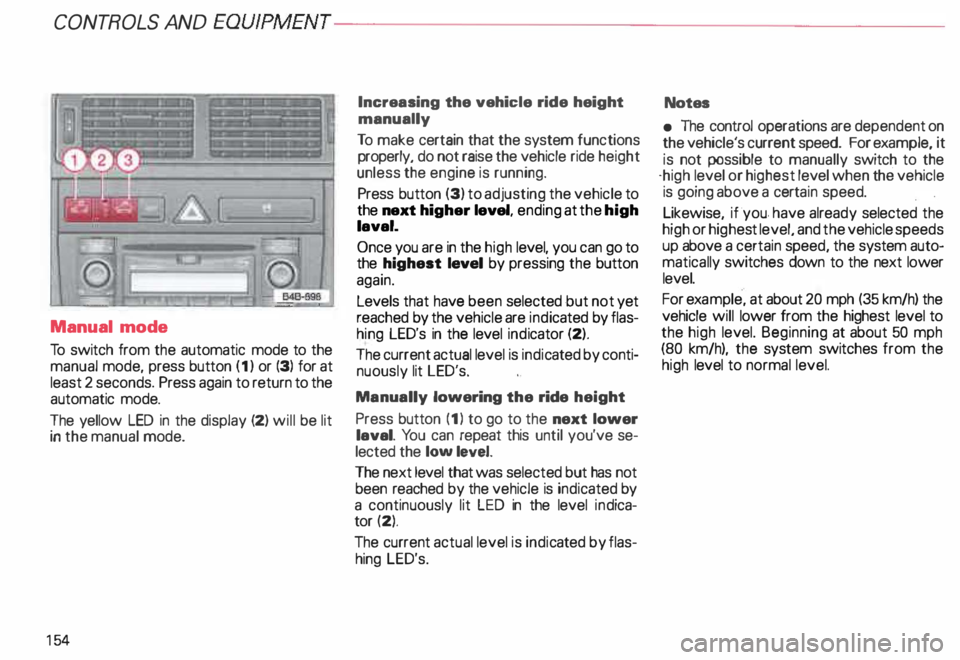
Manual mode
To switch from the automatic mode to the
manual mode, press button (1) or (3) for at
least 2 seconds. Press again to return to the
automatic mode.
The yellow LED in the display (2) will be lit
in the manual mode.
15 4 Increasing
the vehicle ride height
manually
To make certain that the system functions
properly, do not raise the vehicle ride height
unless the engine is running.
Press button (3) to adjusting the vehicle to
the next higher level, ending at the high
laval.
Once you are in the high level, you can go to
the highest laval by pressing the button
again.
Levels that have been selected but not yet
reached by the vehicle are indicated by flas
hing LED's in the level indicator (2).
The current actual level is indic ated by conti
nuously lit LED's.
Manually lowering the ride height
Press button (1) to go to the next lower
laval. You can repeat this until you've se
lected the low level.
The next level that was selected but has not
been reached by the vehicle is indicated by
a continuously lit LED in the level indica
tor (2).
The current actual level is indic ated by flas
hing LED's. Notes
• The control operations are dependent on
the vehicle's current speed. For example, it
is not possible to manually switch to the
·high level or highest level when the vehicle
is going above a cert ain speed.
Likewise, if ·you. have already selected the
high or highe st level, and the vehicle speeds
up above a certain speed, the system auto
matically switches down to the next lower
level.
For example, at about 20 mph (35 km/h) the
vehicle will lower from the highest level to
the high level. Beginning at about 50 mph
(80 km/h), the system switches from the
high level to normal level.
Page 156 of 306
---------------------CONTROLS AND EQUIPMEN T
Notes continued
• At excessive loads (for example, over
heating caused by frequent changes in the
ride height when the vehicle is stationary),
the system is temporarily deactivated for
safety reasons. The system will return to
full operation once it has cooled down.
• The system automatically switches to
the normal level if the ESP automatically
shuts off (see page 205). If this happens,
switch the ignition off, and then on again.
Now you can select the desired level once
again.
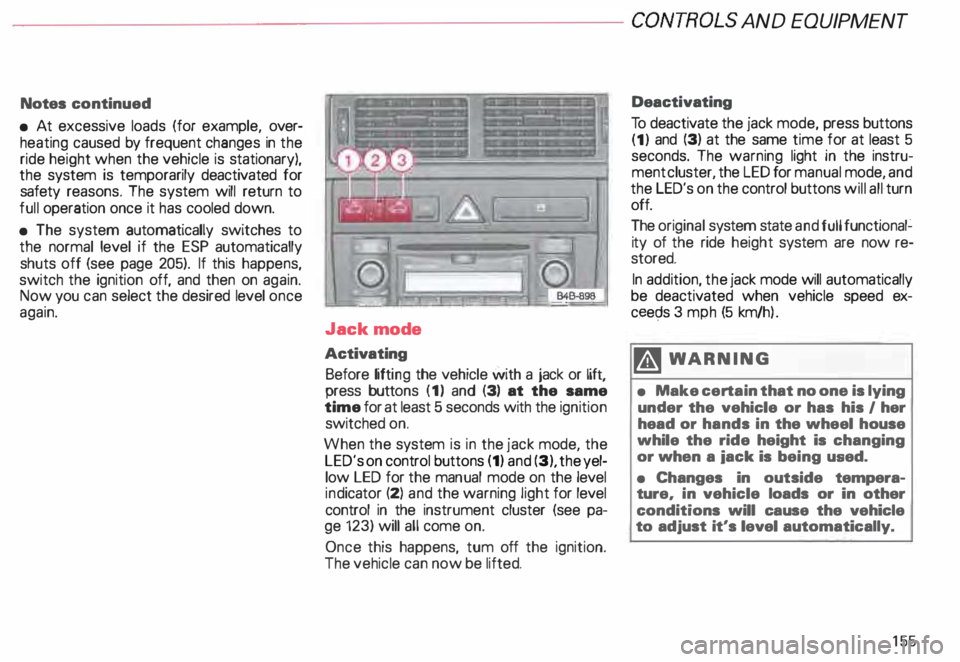
Jack mode
Activating Before lifting the vehicle with a jack or lift,
press buttons (1) and (3) at the same
time for at least 5 seconds with the ignition
switched on.
When the system is in the jack mode, the
LED's on control buttons (1) and (3), the yel
low LED for the manual mode on the level
ind icator (2) and the warning light for level
control in the instrument cluster (see pa
ge 123) will all come on.
Once this happens, tum off the ignition.
The vehicle can now be lifted. Deactivating
To deactivate the jack mode, press buttons
(1) and (3) at the same time for at least 5
seconds. The warning light in the instru
ment cluster, the LED for manual mode, and
the LED's on the control buttons will all turn
off.
The original system state and full functional�
ity of the ride height system are now re
stored.
In addition, the jack mode will automatically
be deactivated when vehicle speed ex
ceec;ls 3 mph (5 km/h ).
�W ARNING
• Make certain that no one is lying
under the vehicle or has his I her
head or hands in the wheel house
while the ride height is changing
or when a iack is being used.
• Changes in outside tempera
ture, in vehicle loads or in other
conditions will cause the vehicle
to adjust it's level automatically.
155
Page 165 of 306
CONTROLS AND
EQUIPMENT---------------------
C... -Air recirculation
In the air recirculation mode, the supply of
outside air is blocked and the air in the pas
senger compartment is recirculated. This
helps to prevent pollutant-conta ining out
side air from entering the passenger
compartment. It is best not to use this set
ting for exte nded periods of time.
If the windows begin to fog or ice
up, select the ® program setting as
soon as possible.
�W ARNING
• You will not receive any fresh
outside air when air recirculation
is on. Do not use this setting over
long periods of time because stale
air contributes to fatigue and re
duced driver alertness.
• If the windows fog up, press the
air recirculation button again im
mediately to switch off the air re
circulation function or select de
frost.
16 4 ECON -
Economy
The air conditioner compressor can be
turned off to save fuel. However, the com
fort level that the system can achieve in this
mode limited.
If the interior of the vehicle gets too hot, or
if the windows begin to fog or ice up, press
the ECON button again to tum the compres
sor on again and switch back to AUTO .
OFF -Switching air conditioner oft
The air conditioner can be switched off by
pressing the button briefly. This cuts off the
supply of air from the outside.
To reactivate the air conditioner,
press the AUTO button or one of the blower,
temperature or air distribution selector but
tons, or press OFF again.
It is not normally necessary to switch off the
air condition er.
- + Fan speed
The automatically selected fan speed (vol
ume of air delivery) can be reduced or in
creased manually by operati ng these but
tons. The selected fan speed is shown by a
segment display above the buttons. 4iiJ
-Rear window defogger
See page 151.
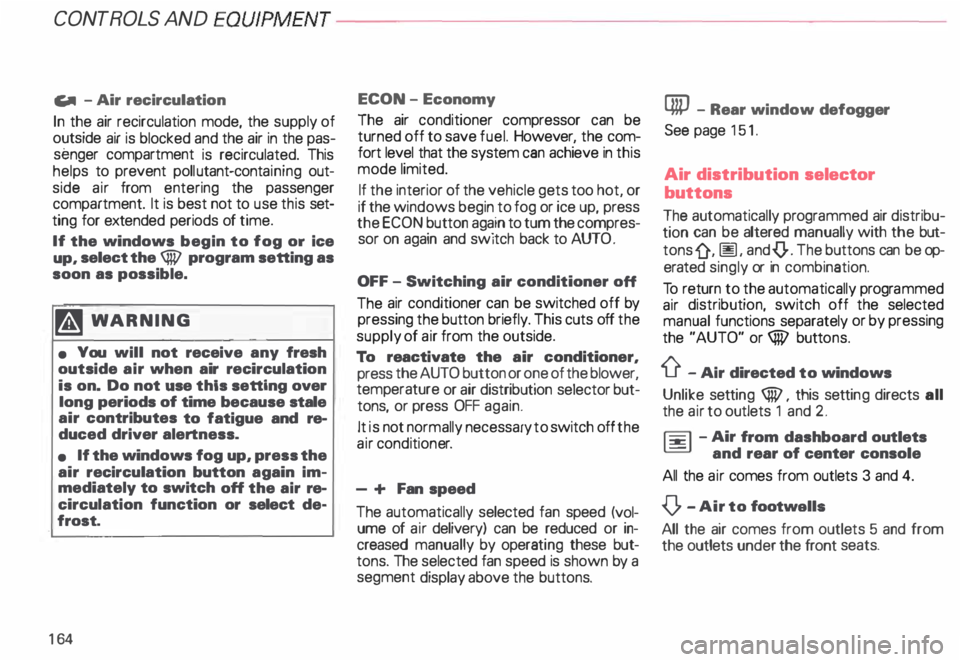
Air distribution selector
buttons
The automatically programmed air distribu
tion can be altered manually with the but
tons {},� . and {).. The buttons can be op
erated singly or in combination.
To return to the automatically programmed
air distribution, switch off the selected
manual functions separately or by pressing
the "AUTO" or ® butto ns.
iJ -Air directed to windows
Unlike setting ®, this setting directs all
the air to outlets 1 and 2.
1 :s::
1 -
Air
from dashboard outlets
-
and rear of center console
All the air comes from outlets 3 and 4.
0 -Air to footwall&
All the air comes from outlets 5 and from
the outlets under the front seats.
Page 168 of 306
---------------------CONTROLS AND
EQUIPMENT
General notes
• Vehicle heating is depend upon tne tem
perature of the engine coolant -therefore,
your vehicle interior will warm uponly when
the engine has reached its operating tem
perature.
When the ambient temperature is too low,
the fan only switches to high speed modes
when the coolant has reached a sufficiently
high temperature, or when the ® button
has been depressed.
• Keeping the air intake slots in front of the
windshield free from ice, snow and debris
helps to make sure that the climate control
system will work properly.
• When the air conditioner compressor is
on it reduces both the temperature and the
humid ity of the air inside the vehicle. This
prevents the windows from fogging up.
• The air conditioner works best with the
windows and power roof* closed. •
If the inside temperature is very high af
ter the vehicle has been parked in the sun,
open windows and allow the hot air to es
cape before switching on the air condi
tioner.
• The dust and pollen filter will prevent
dust and pollen etc. in the outside air from
entering the car. Switch to air recirculation
to prevent unpleasant fumes from entering
the vehicle.
If water drips under the
vehicle ...
At high outside temperatures and humidity,
condensation may drip from the evaporator.
This is normal and does not indicate a leak.
If the airflow is not cool ...
• At low ambient temperatures the air con
ditioner compressor switches off automati
cally. The compressor cannot be switc hed
on again in this case, even by pressing the
AUTO button. •
The air conditioner may switch itself off
temporarily to ensure sufficient engine
cooling when the engine is running at full
load.
The air conditioner will also be switched off
temporarily in the kick-down function. See
page 109.
• Check the air conditioning fuse on the
fuse p imel -see page 27 4. Have it replaced,
if necessary.
• If you suspect that the air conditioner is
damaged, for instance after an accident,
switch to the ECON and have the system
examined immediately for leaks or other
damage.
167
Page 176 of 306
Training a Garage Door
Equip ped with Rolling Code
To train your rolling code garage door
opener to operate from your Homelink®
Universal Transmi tter, follow these steps
after completing the "Program
ming" portion of this text (the aid of a sec
ond person may make the training quicker
and easier):
1 - Locate and press and relaaaa the
training (or "learning") button on the
garage door opener motor head unit.
(Exact location and color of the button
may vary by garage door opener brand.)
If there is difficulty locating the training
button, reference the garage door
opener owner's manual or call toll free:
1- 800-355- 3515.
2 - Return to the vehicle and press and re
lease the progr ammed Homelink ®
channel. Press and release the
Homelink ® channel a second time to
complete the progra mming process.
(Some garage door openers may re
qu i· re you to do this procedure a thir d
ti me.) The
garage door opener should now recog
nize the Audi Homelink ® Un iversal Trans
mitter. You may use either the hand-held
transmitter or the Audi Home link® Univer
sal Transmi tter to activate the garage door.
Oper ating the Audi HomeLink ®
Uni versal Transmitter
1 - Tum the ignition switch on.
2 - Select and firmly press and release the
appropriate channel (1, 2, or 3) to acti
vate the trained device (e.g. garage
door, estate gate, home security sy
stem, entry door lock, or home or office
lighting). CONTROLS
AND EQUIPMENT
Erasing the Audi HomeLink ®
Universal Transm itter's Pro
gramming
1 - Turn the ignition switch on.
2 - Simult aneously press and hold chan
nels 1 and 3 until the indicator light be
gins to flash after 20 seconds.
3 - Release both buttons.
This process will erase the trained codes of
the three channels or erase the factory set
default codes.
The Audi Homelink ® Un iversal Transmitter
is now in the train (or progra mming) mode
and can be progra mmed at any time follow
ing steps 3 through 5 in the "Progr amming"
portion of this text.
175
Page 177 of 306
CONT
ROLS AND EQ
UIPMEN T---------------------
Reprogramming a Single Audi
HomeLink ® Universal Transmit
ter Channel
If a Homelink ® channel has been pro
grammed to activate a device, and it has
been decided to program another device us
ing the same Homelink® channel, follow
these steps:
Press and hold the desired Homelink ®
button for approximately 20 seconds.
Do not release until step 3 has been
completed.
2 - When the indicator light begins to flash
slowly, position the hand-held transmit
ter approximately 2 inches away from
the Homelink ® surface. Press and
hold the hand-held transmitter button.
3- The indicator light will flash, first slowly,
and then rapidly. When the indicator
light begins to flash rapidly, release
both the button and channel.
The previous device has now been erased
and the new device has been progra mmed
into Homelink ®. This procedure will not af
fect any other programmed Homelink®
channels.
17 6 Accessories
Accessories for the Audi Homelink ® Uni
versal Transmitter are available through vari
ous sources.
If you would like additional information on
Homelink ®. where to purchase the
Homelink ® compatible products, or would
like to purchase the Homelink ® Home
Lighting Package, please call toll-free:
1- 800-355- 3515. Notes
This device complies with FCC rules
part 15. Operation is subject to following
conditi ons:
1 - This device may not cause any harmful
interference and
2 - This device must accept any interfer
ence that may be received including in
terference that may cause undesired
operation.
� WARNING
The transmitter has been tested
and complies with FCC and DOC/
MDC rules. Changes or modifica
tions not expressly approved by
the party responsible for com
pliance could void the user's au
thority to operate the device.
DOC: ISTC 1763 102 264
Prince MODEUFCC ID: CB2 V94800