buttons AUDI ALLROAD 2000 User Guide
[x] Cancel search | Manufacturer: AUDI, Model Year: 2000, Model line: ALLROAD, Model: AUDI ALLROAD 2000Pages: 306, PDF Size: 9.95 MB
Page 176 of 306
Training a Garage Door
Equip ped with Rolling Code
To train your rolling code garage door
opener to operate from your Homelink®
Universal Transmi tter, follow these steps
after completing the "Program
ming" portion of this text (the aid of a sec
ond person may make the training quicker
and easier):
1 - Locate and press and relaaaa the
training (or "learning") button on the
garage door opener motor head unit.
(Exact location and color of the button
may vary by garage door opener brand.)
If there is difficulty locating the training
button, reference the garage door
opener owner's manual or call toll free:
1- 800-355- 3515.
2 - Return to the vehicle and press and re
lease the progr ammed Homelink ®
channel. Press and release the
Homelink ® channel a second time to
complete the progra mming process.
(Some garage door openers may re
qu i· re you to do this procedure a thir d
ti me.) The
garage door opener should now recog
nize the Audi Homelink ® Un iversal Trans
mitter. You may use either the hand-held
transmitter or the Audi Home link® Univer
sal Transmi tter to activate the garage door.
Oper ating the Audi HomeLink ®
Uni versal Transmitter
1 - Tum the ignition switch on.
2 - Select and firmly press and release the
appropriate channel (1, 2, or 3) to acti
vate the trained device (e.g. garage
door, estate gate, home security sy
stem, entry door lock, or home or office
lighting). CONTROLS
AND EQUIPMENT
Erasing the Audi HomeLink ®
Universal Transm itter's Pro
gramming
1 - Turn the ignition switch on.
2 - Simult aneously press and hold chan
nels 1 and 3 until the indicator light be
gins to flash after 20 seconds.
3 - Release both buttons.
This process will erase the trained codes of
the three channels or erase the factory set
default codes.
The Audi Homelink ® Un iversal Transmitter
is now in the train (or progra mming) mode
and can be progra mmed at any time follow
ing steps 3 through 5 in the "Progr amming"
portion of this text.
175
Page 186 of 306

--------------------CONTROLS AND
EQUIPMENT
Steering wheel with Audio controls*
To help make certain that you are not diS
tracted from paying proper attention to the
traffic conditions when you are using the ra
dio, switches have been provided on the
st eering wheel for basic audio functions for
factory installed radios. The radio, cassette
player, or CD player, can, of course, also be
operated without restriction on the unit it
self.
A detailed description of the radio is pro
vided in a separate Sound System manual.
The following functions can be operated by
pressing the buttons on the steering wheel:
C -I ncrease volume
A -S eek I Advance -
Radio
Radio: seek forward
- Cassette player: fast forward
- CD: CD track forward
B - Seek I Rewind
- Radio: seek in reverse direction
- Cassette player: fast rewind
- CD: CO-track back -
Cassette player
-C D
Depending on which unit is currently oper
ating.
D -R educe volume
Radio
- Cassette player
- CD
Depending on which unit is currently oper
ating. E
-Stat ion buttons (Preset) I
back •
You can recall up to twelve stations one af-
ter another in the reverse direction.
If no sta tions are assigned to the presets or
if they are not being received, you may only
hear static.
F - Station buttons (Preset) I for�
ward
Yo u can recall up to twelve stations one af
ter another in the forward direction.
If no stations are assigned to the presets or
if they are not being received, you may only
hear static.
185
Page 188 of 306
D
-Increase volume
- Radio
- Cassette
- CD
- Hands-free operation (telephone)
depending on which unit is currently operat
ing.
E -Reduce volume
Radio
- Cassette
- CD
- Hands-free operation (telephone)
depending on which unit is currently operat
ing.
F - Te lephone
Press this button to:
- answer telephone calls using the spea
ker phone system,
- "send" a call, or
- finish a call that is already in progress. How
the telephone works
Operation of the Audi telephone is de
scribed in the operating manual, however
please note the following information:
Defaults must be set once on the tele
phone. The "Name Preference" must
be to ON -refer to the Audi Cellular Phone
Operating manual.
If the telephone is replaced, the telephone
book entries must be copied once from the
telephone into the system.
This operation can be performed in the "Ra
dio" operating mode. It takes a few min
utes. If the "T elephone" mode is active,
press the C button.
Once you have done this, any change in the
telephone book made as a result of data en
tered at the telephone will automatically be
updated in the syste m.
To begin copying telephone book data into
the system, press buttons B and E simul ta
neously for at least 5 seconds.
During the transfer of data, the data set that
is currently being transferred will appear in
the DIS disp lay. CONT
ROLS AND EQUIPMENT
The following status messages may appear
in the DIS display:
- INCOMING CALL-
an outside call is being received.
- PHONE IN USE -
the telephone is currently connected to
the cellular phone sytem.
- MEMORY EMPTY-
memory is empty.
- SYSTEM BUSY-
the cellular phone system is busy.
- PHONE OFF-
the telephone is turned off.
NO SERV ICE-
no connection to the cellular phone net
work.
187
Page 189 of 306
CONT
ROLS AND
EQUIPMENT-------------------------------------------
Changing the language setting
The default setting for displaying messages
is ENGLISH. If you want to use a different
language, proceed as follows:
• Langugage changes can only be made in
the "Radio" mode. If you are in the "Tele
phone" mode, press the C button.
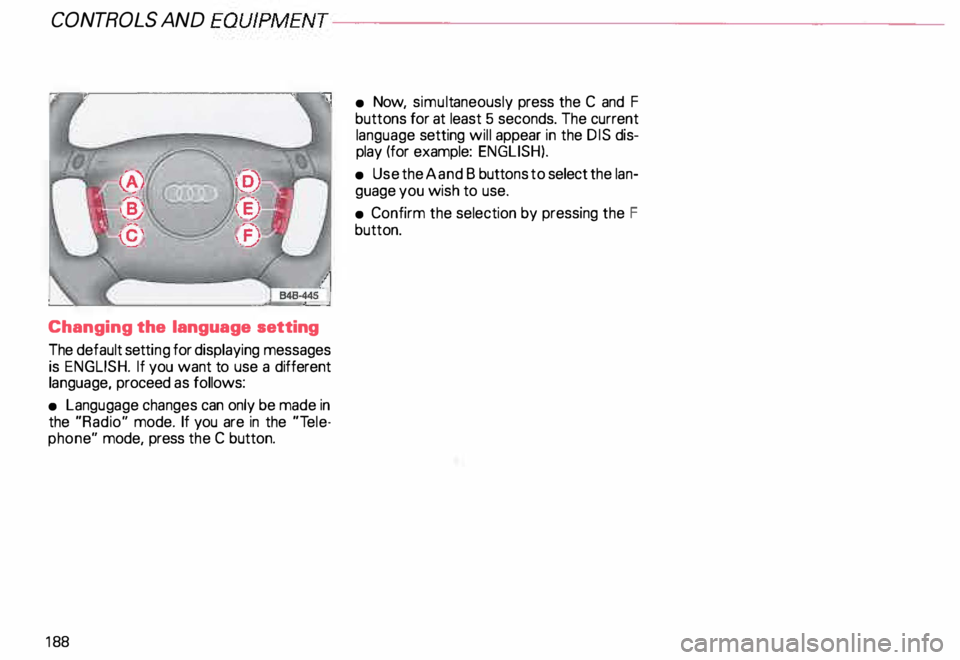
18 8 •
Now, simult aneously press the C and F
buttons for at least 5 seconds. The current
language setting will appear in the DIS dis
play (for example: ENGLISH).
• Use the A and B butt ons to select the lan
guage you wish to use.
• Confirm the selection by pressing the F
button.
Page 269 of 306
DO-IT-Y
OURSELF SERVICE----------------------
Step 1 ·"7
r.-&
.--· t I . ... ,.. . . . --------� .... ... . . ...
-
' . .. . ...
.. - - . .
J
To avoid damaging parts of the air
suspension system. you must have
the ride level adjustment system in
the jack mode whenever a jack or lift
is used to raise the vehicle:
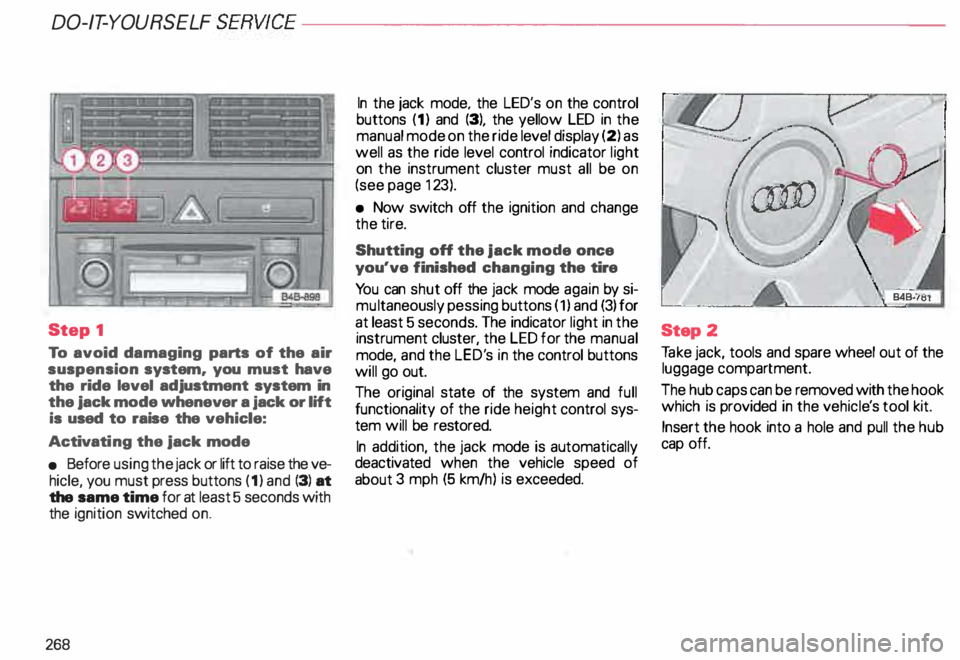
Activati ng the jack mode
• Before using the jack or lift to raise the ve
hicle, you must press buttons (1) and (3) at
the same time for at least 5 seconds with
the ignition switched on.
268 In
the jack mode. the LED's on the control
buttons (1) and (3), the yellow LED in the
manual mode on the ride level display (2) as
well as the ride level control indicator light
on the instrument cluster must all be on
(see page 123).
• Now switch off the ignition and change
the tire.
Shutting off the jack mode once
you've finished changing the tire
Yo u can shut off the jack mode again by si
mu ltaneously pessing buttons (1) and (3) for
at least 5 seconds. The indicator light in the
instrument cluster, the LED for the manual
mode, and the LED's in the control buttons
will go out.
The original state of the system and full
functionality of the ride height control sys
tem will be restored.
In addition, the jack mode is automatically
deactivated when the vehicle speed of
about 3 mph (5 km/h) is exceeded. Step
2
Ta ke jack, tools and spare wheel out of the
luggage compartment.
The hub caps can be removed with the hook
which is provided in the vehicl e's tool kit.
Insert the hook into a hole and pull the hub
cap off.
Page 285 of 306
DO-IT-YOURSELF
SERVICE----------------------
Jack
mode
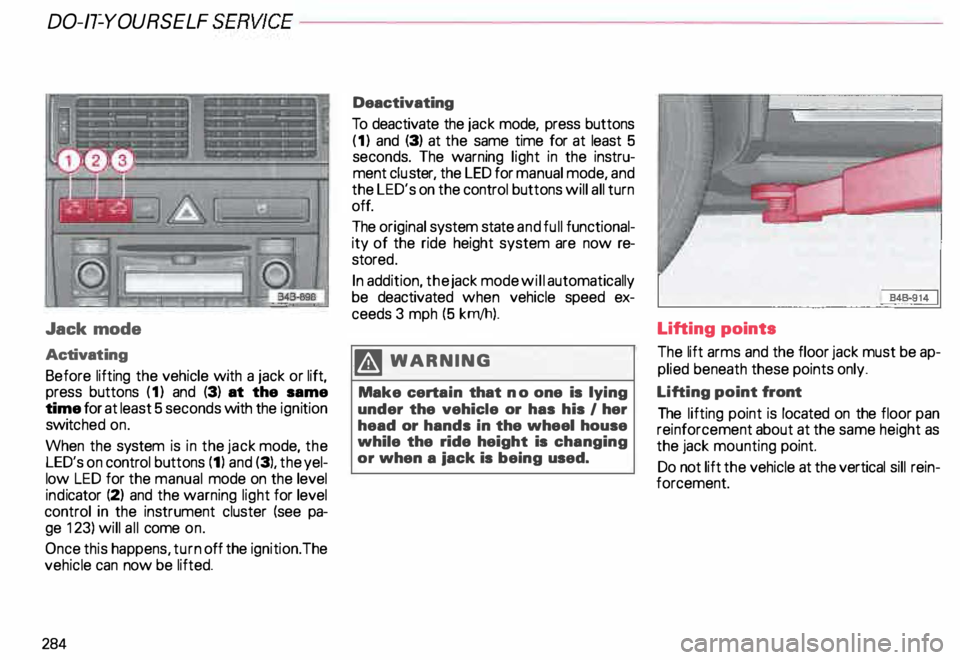
Activat ing
Before lifting the vehicle with a jack or lift,
press buttons (1) and (3) at the same
time for at least 5 seconds with the ignition
switc hed on.
When the system is in the jack mode, the
LED's on control buttons (1) and (3), the yel
low LED for the manual mode on the level
ind icator (2) and the warning light for level
control in the instrument cluster (see pa
ge 123) will all come on.
Once this happens, turn off the ignition. The
vehicle can now be lifted.
284 Deactivating
To deactivate the jack mode, press buttons
(1) and (3) at the same time for at least 5
seconds. The warning light in the instru
ment cluster, the LED for manual mode, and
the LED's on the control buttons will all turn
off.
The original system state and full functional
ity of the ride height system are now re
store d.
In addition, the jack mode will automatically
be deactivated when vehicle speed ex
ceeds 3 mph (5 krn/h).
.� WARNING
Make certain that no one is lying
under the vehicle or has his I her
head or hands in the wheel house
while the ride height is changing
or when a iack is being used. Lifting points
The
lift arms and the floor jack must be ap
plied beneath these points only.
Lifting point front
The lifting point is located on the floor pan
reinforcement about at the same height as
the jack mounting point.
Do not lift the vehicle at the vertical sill rein
forcement.