door lock AUDI ALLROAD 2000 User Guide
[x] Cancel search | Manufacturer: AUDI, Model Year: 2000, Model line: ALLROAD, Model: AUDI ALLROAD 2000Pages: 306, PDF Size: 9.95 MB
Page 64 of 306
B
-Child lock engaged
When the child lock is engaged (position 8),
the inside door handle is now locked and
you can only open the door from the out
side. The locking knob must be raised in or
der to open the door.
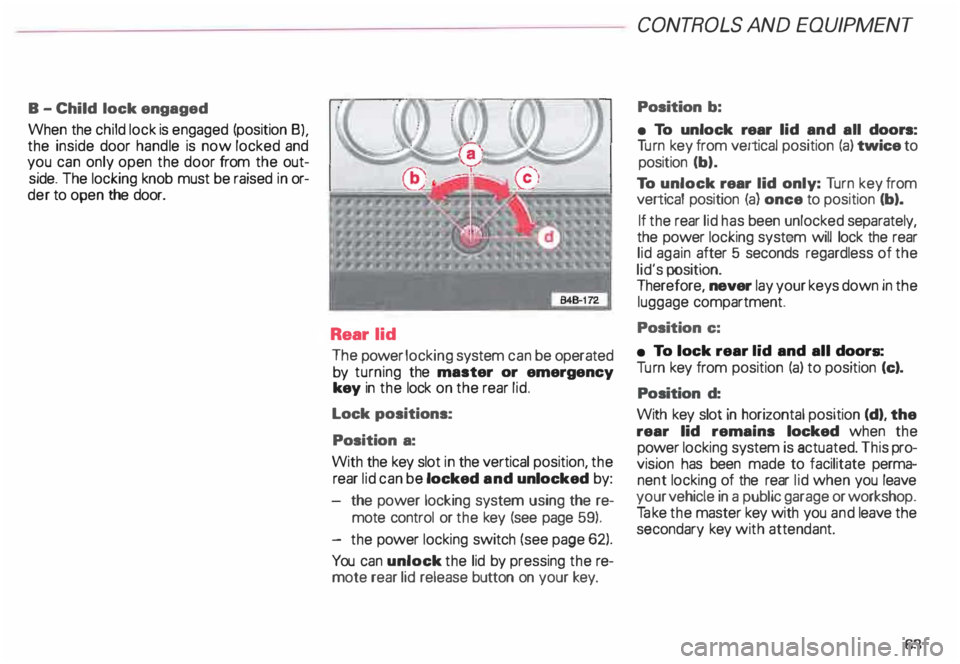
Rear lid
The power locking system can be operated
by turning the master or emergency
key in the lock on the rear lid.
Lock positions:
Position a:
With the key slot in the vertical position, the
rear lid can be locked and unlocked by:
the power locking system using the re
mote control or the key (see page 59).
- the power locking switch (see page 62).
You can unlock the lid by pressing the re
mote rear lid release button on your key. CONT
ROLS AND EQUIPMEN T
Position b:
• To unlock rear lid and all doors:
Tu rn key from vertical position (a) twice to
position (b).
To unlock rear lid only: Turn key from
vertical position (a) once to position (b).
If the rear lid has been unlocked separately,
the power locking system will lock the rear
lid again after 5 seconds regardless of the
lid's position.
Therefore, never lay your keys down in the
luggage compartment.
Position c:
• To lock rear lid and all doors:
Tu rn key from position (a) to position (c).
Position d:
With key slot in horizontal position (d), the
rear lid remains locked when the
power locking system is actuated. This pro
vision has been made to facilitate perma
nent locking of the rear lid when you leave
your vehicle in a public garage or workshop.
Ta ke the master key with you and leave the
secondary key with attendant.
63
Page 65 of 306
CONT
ROLS AND
EQUIPMENT------
L-----------------------�[_��� B-�3;�
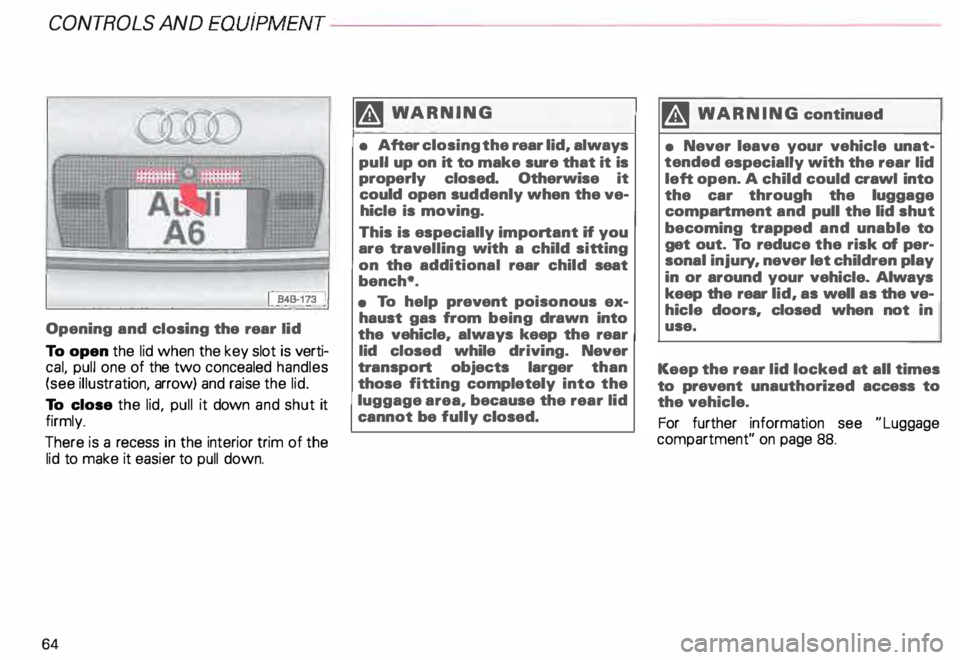
Opening and closing the rear lid
To open the lid when the key slot is verti
cal, pull one of the two concealed handles
(see illustration, arrow) and raise the lid.
To close the lid, pull it down and shut it
firmly_
There is a recess in the interior trim of the
lid to make it easier to pull down.
64 �W
ARNING
• After closing the rear lid, always
pull up on it to make sure that it is
properly closed. Otherwise it
could open suddenly when the ve
hicle is moving.
This is especially important if you
are trav elling with a child sitting
on the additional rear child seat
bench*.
• To help prevent poisonous ex
haust gas from being drawn into
the vehicle, always keep the rear
lid closed while driving. Never
tra nsport objects larger than
those fitting completely into the
luggage area, because the rear lid
cannot be fully closed. �,
WARNING continued
• Never leave your vehicle unat
tended especially with the rear lid
left open. A child could crawl into
the car through the luggage
compartment and pull the lid shut
becoming trapped and unable to
get out. To reduce the risk of per
sonal injury, never let children play
in or around your vehicle. Always
keep the rear lid, as well as the ve
hicle doors, closed when not in
use.
Keep the rear lid locked at all times
to prevent unauthorized access to
the vehicle.
For further information see "Luggage
compartment" on page 88.
Page 66 of 306
---------------------CONTROLS AND EQUIPMENT
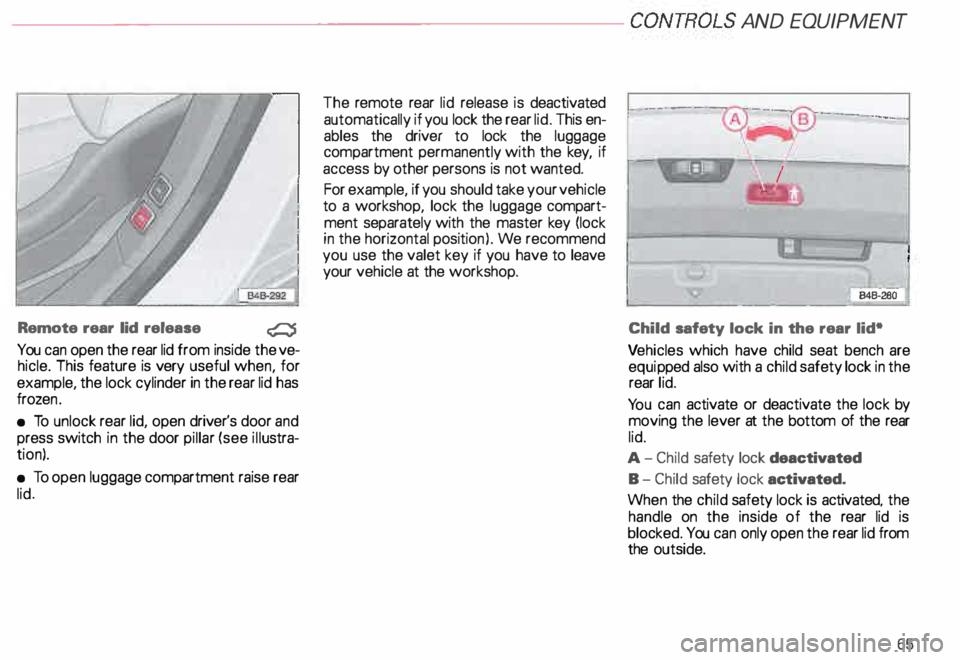
Remote rear lid release
�
You can open the rear lid from inside the ve
hicle. This feature is very useful when, for
example, the lock cylinder in the rear lid has
froze n.
• To unlock rear lid, open driver's door and
press switch in the door pillar (see illustra
tion).
• To open luggage compartment raise rear
lid. The
remote rear lid release is deactivated
automatically if you lock the rear lid. This en
ables the driver to lock the luggage
compartment permanently with the key, if
access by other persons is not wanted.
For example, if you should take your vehicle
to a workshop, lock the luggage compart
ment separately with the master key (lock
in the horizontal position). We recommend
you use the valet key if you have to leave
your vehicle at the workshop. I
I
B4B-
2Bo-i
Child safety lock in the rear lid•
Ve hicles which have child seat bench are
equi pped also with a child safety lock in the
rear lid.
Yo u can activate or deactivate the lock by
moving the lever at the bottom of the rear
lid.
A- Child safety lock deactivated
B- Child safety lock activated.
When the child safety lock is activated. the
handle on the inside of the rear lid is
blocked. You can only open the rear lid from
the outside.
65
Page 67 of 306
CONT
ROLS AND EQUIPMENT---------------------
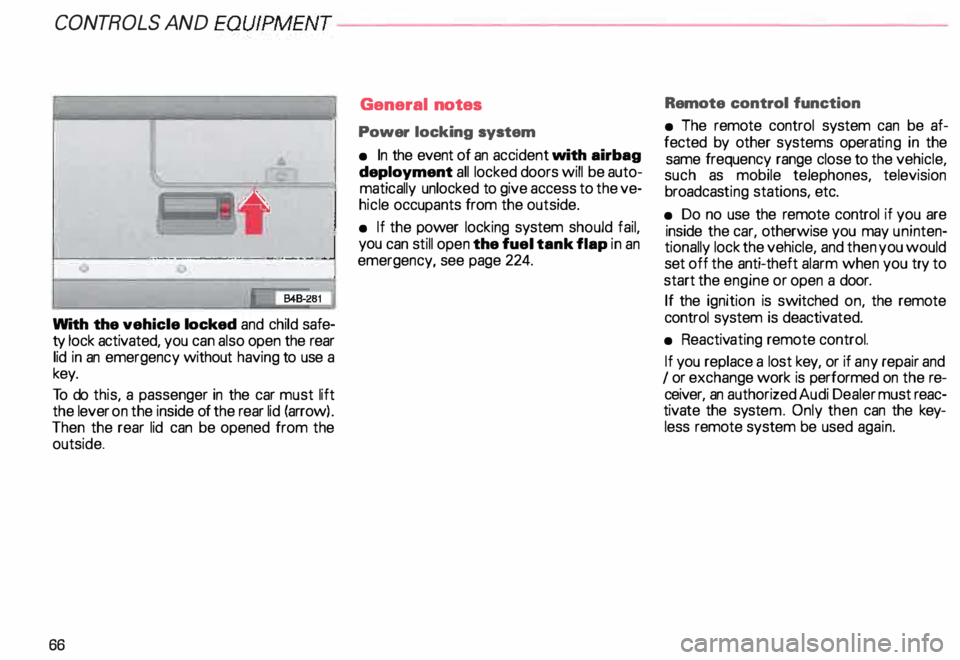
With the vehicle locked and child safe
ty lock activated, you can also open the rear
lid in an emergency without having to use a
key.
To do this, a passenger in the car must lift
the lever on the inside of the rear lid (arrow) .
Then the rear lid can be opened from the
outside.
66 General
notes
Power locking system
• In the event of an accident with airbag
deployment all locked doors will be auto
matically unlocked to give access to the ve
hicle occupants from the outside.
• If the power locking system should fail,
you can still open the fuel tank flap in an
emergency, see page 224. Remote
control function
• The remote control system can be af
fected by other systems operating in the
same frequency range close to the vehicle,
such as mobile telephones, television
broadcas ting stations, etc.
• Do no use the remote control if you are
inside the car, otherwise you may uninten
tionally lock the vehicle, and then you would
set off the anti-theft alarm when you try to
start the engine or open a door.
If the ignition is switched on, the remote
control system is deactiv ated.
• Reactiv ating remote control.
If you replace a lost key, or if any repair and
I or exchange work is performed on the re
ceiver, an authorized Audi Dealer must reac
tivate the syste m. Only then can the key
less remote system be used again.
Page 68 of 306
---------------------CONTROLS
AND EQUIPMENT
• Certification
The remote control device complies with
Part 15 of the FCC Rules. Operation is sub
ject to the following conditions:
1 - this device may not cause harmful in
terfere nce, and
2 - this device must accept any interfer
ence received, including interference
that may cause undesir ed operation.
The manufacturer is not responsible for
ANY RADIO OR TV Interference caused by
una uthorized modifications to this equip
ment. Such modifications could void the
user's authority to operate the equipment. Anti-theft
alarm system
The anti-theft alarm system triggers an
acoustic alarm and switches on the emer
genc y flasher if it senses unauthorized inter
ference with the vehicle.
When the vehicle is locked the alarm sy
stem monitors and protects the following
parts of the vehicle:
• engine compartment
• luggage compartment
• doors
• factory installed radio
• passenger compartment
• ignition.
The alarm system is switched on or off
whenever you lock or unlock the vehicle.
Simply tum the key to the lock or unlock
position or use the remote control.
The system is activated about 30 seconds
after the vehicle is locked, and the indicator
lights on the front door window sills start
flashing. The
horn sounds briefly when the car is
locked to confirm that the alarm system is
operative and that all doors, hood and rear
lid are properly closed. If the hom does not
sound, or the indicator lights do not flash,
check all doors, rear lid and hood and close
them properly. The horn will also sound if
the door, lid and hood are closed when the
system is already switched on.
The rear lid can be opened separately even
when the system is active. When the rear
lid is closed the luggage compartment will
again be included in the alarm circuit.
When the system is switched on the alarm
will be triggered if one of the doors, the en
gine hood or the rear lid are opened, or if the
ign ition is switched on or the radio re
moved.
When the alarm is triggered the hom
sounds and all four turn signals flash simul
taneously. The engine cannot be started un
til the system is switched off with the key
or the remote control.
67
Page 69 of 306

CONT
ROLS AND
EQUIPMENT---------------------
If the alarm has sounded one time, and then
the vehicle is forced open again (for exam
ple, someone tries to forcibly open a door,
and then tries to force open the rear lid), the
signal will sound once again.
You can also trigger the alarm by pressing
the PANIC switch on your remote control
to alert other people in case of emergency
or when in another difficult situation. The
alarm can be switched off by pressing the
PA NIC switch again.
Warn ing lights
After you lock the vehicle, the warning light
on the window sills will blink quickly first for
30 seconds and will then blink slowly. This
is to let you know that the anti-theft alarm
system is activated, including the interior
move ment sensors.
If the warning lights come on continuously
for about 30 seconds instead of flashing
when the vehicle is locked, this indicates
that the interior movement sensor is defec
tive.
68 Swit
ching off the interior
movement sensors l
Yo u should switch off the interior move
ment sensors if there is the possibility that
the alarm system could be set off, for exam
ple by a pet left in the vehicle. •
Press the switch in the door pillar (see il
lustration). The indicator light in the switch
will come on. The indicator light on the win
dow sills will come on for approx imately
3 seconds. This verifies that the interior
movement sensors have been deactivat ed.
The sensors will be reactivated when you
unlo ck and lock the vehicle again.
• Lock the vehicle.
The indi cator lights in the doorpillarwill blink
quickly for approximately 3 seconds at first.
Then, after approximately 30 seconds, the
light will flash slowly.
Page 70 of 306
·--------------------CONT
ROLS AND EQUIPMENT
Power windows
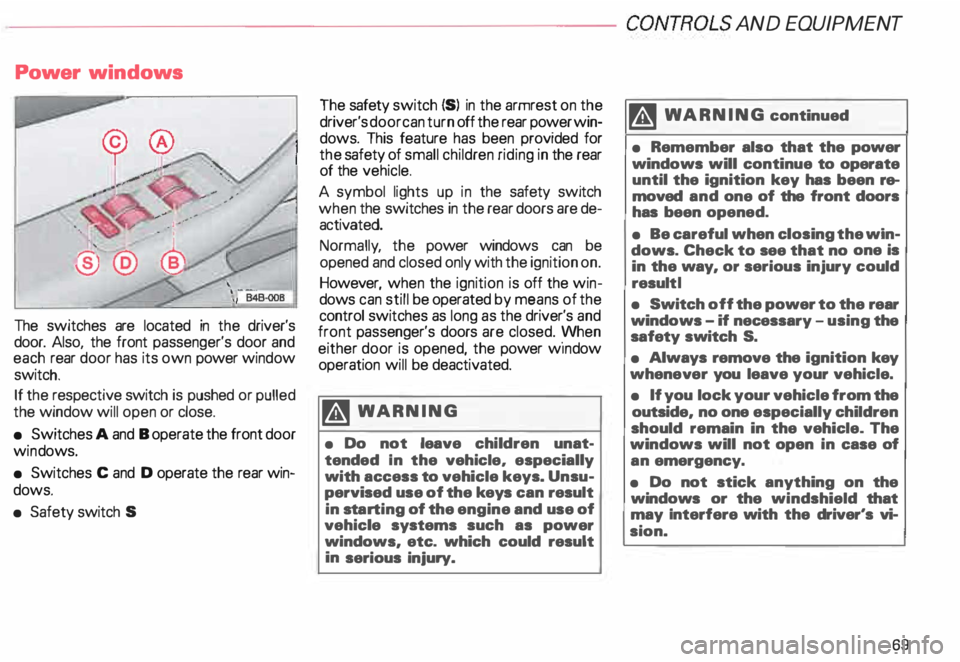
The switches are located in the driver's
door. Also, the front passenger's door and
each rear door has its own power window
switch.
If the respective switch is pushed or pulled
the window will open or close.
• Switches A and B operate the front door
win dows.
• Switches C and D operate the rear win
dows.
• Safety switch S The
safety switch {S) in the armrest on the
driver's door can turn off the rear power win
dows. This feature has been provided for
the safety of small children riding in the rear
of the vehicle.
A symbol lights up in the safety switch
when the switches in the rear doors are de
activated.
Normally , the power windows can be
opened and closed only with the ignition on.
However, when the ignition is off the win
dows can still be operated by means of the
control switches as long as the driver's and
front passenger's doors are closed. yvhen
either door is opened, the power w1ndow
operation will be deactivated.
�W ARNING
• Do not leave children unat
tended In the vehicle, especially
with access to vehicle keys. Unsu
pervised use of the keys can result
in sta rting of the engine and use of
vehicle systems such as power
windows, etc. which could result
in serious injury. m
WARNING continued
• Remember also that the power
windows will continue to operate
until the ignition key has been re
moved and one of the front doors
has been opened.
• Be careful when closing the win
dows. Check to see that no one is
in the way, or serious injury could
result I
• Switch off the power to the rear
windows -if necessary -using the
safety switch S.
• Always remove the ignition key
whenever you leave your vehicle.
• If you lock your vehicle from the
outside, no one especially children
should remain in the vehicle. The
windows will not open in case of
an emergency.
• Do not stick anything on the
windows or the windshield that
may Interfere with the driver's vi
sion.
69
Page 72 of 306
---------------------CONTROLS AND EQUIPMEN T
Convenience close I open
feature
For the convenience of the driver all win
dows can be closed I opened centrally with
the ignition key while locking I unlocking the
vehicle:
Closing windows
In sert key into the lock of driver's door,
turn and hold in the locking position until all
windows are closed. The automatic close
func tion will stop imme diately if the key is
released.
�W ARNING
• Be careful when closing the win
dows.
• Check to see that no one is in
the way, or serious injury could re
sult. Opening
windows
Inse rt key into the lock of driver's door,
turn the key and hold in the unlocking posi
tion until all windows are opened.
This feature enables the driver, to let the
heat escape from the interior of the car, af
ter having parked in direct sunlight.
The convenience close I open feature is not
available when locking the vehicle using the
remote control. Note
If you disconnect and then reconnect the
battery, the convenience open and close
feature will not work.
The follow ing steps describe how to reacti
vate the convenience open I close feature
after reconnecting the battery:
• Close the window completely by lifting
the power window switch and holding.
• Release the switch and then lift it again
for a second.
• The convenience feature is now acti
vated.
71
Page 84 of 306
Retrievi
ng seat position and stored
adjustments from memory
The settings stored can be retrieved both
with the remote control and with the
memory buttons.
- Retri eving using the
remote control
When you unlock the vehicle with the re-.
mote control the outside mirrors automati
cally adjusts. Then, after you open the driv
er's door, the driver's seat also
automatically adjusts.
The seat will automatically adjust itself if
you open the driver's door within 1 0 min
utes after unlocking the vehicle.
If you wait longer than 10 minutes to open
the driver's door, after unlocking the car,
then you must use the memory button to re
call the seat position. -
Retrieving using the
memory buttons
�W ARNING
For your safety, use the recall fea
ture only when the vehicle is not
moving.
• With the driver's door open, depress
and release the desired memory button.
The seat and outside mirrors will automati
cally adjust to the stored position.
• If the door has been closed, or if the
door has been left opened for more than 1 0
minu tes. you must then depress and hold
the memory button until the seat and out
side mirrors reach their stored position. CONT
ROLS AND EQUIPMENT
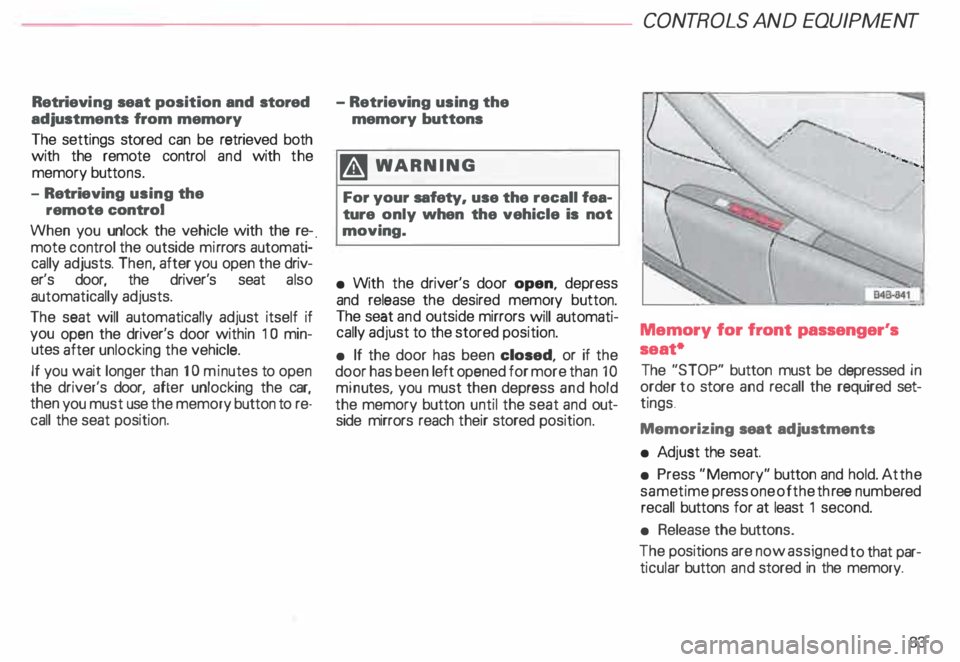
Memory for front passenger's
seat•
The "STOP" button must be depressed in
order to store and recall the required set
tings .
Memorizing seat adjustments
• Ad just the seat.
• Press "Memory" button and hold. At the
same time press one of the three numb ered
recall buttons for at least 1 second.
• Release the buttons.
The positions are now assigned to that par
ticular button and stored in the memory.
83
Page 85 of 306
CONTROLS AND EQ
UIPMEN T---------------------
Retrieving using the
memory buttons
• With the passenger's door open, de
press and release the desired memory but
ton. The seat will automatically adjust to the
stored position.
• If the door has been closed, you must
then depress and hold the memory button
until the seat has reached its stored posi
tion.
Note
You can not reca ll the stored seat adjust
ment for the front passenger's seat using
the remote control in the master key.
84 Emergency
Off
In an emergency, you can interrupt
any retrieval procedure by
• pressing the '"STOP'" button (see il
lustration on page 81 and 83). or
• tapping one of the memory buttons.
Pushing the"ON/OFF"button to the OFF
position only switches off the Memory. The
stored settings will not be erased.
It's a good idea to turn the Memory off if the
vehicle is going to be used temporarily by a
driver whose driving position will not be
memorized.
The advantage is that the personal settings
that have already been memorized will re
main intact and will not change each time
the vehicle is unlocked using the remote
control. Note
The memory function is switched off when
the STOP button is pressed. The word
''OFF" lights up if the headlights are
switched on. However, the programmed
seat, outside mirrors and steering wheel
positions remain stored in the memory.