door lock AUDI ALLROAD 2000 Owner's Manual
[x] Cancel search | Manufacturer: AUDI, Model Year: 2000, Model line: ALLROAD, Model: AUDI ALLROAD 2000Pages: 306, PDF Size: 9.95 MB
Page 95 of 306
CONTROLS ANDEO�PMENT-----------------------------------------
I 948-277
I
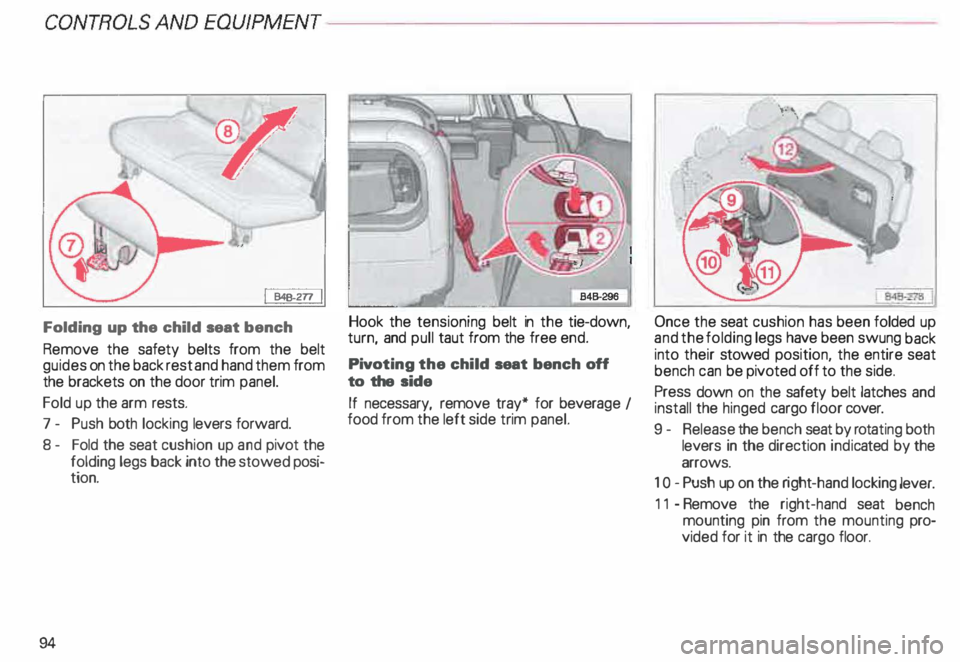
Folding up the child seat bench
Remove the safety belts from the belt
guides on the back rest and hand them from
the brackets on the door trim panel.
Fold up the arm rests.
7 - Push both locking levers forward.
8- Fold the seat cushion up and pivot the
folding legs back into the stowed posi
tion.
94 Hook
the tensioning belt in the tie-down,
turn, and pull taut from the free end.
Pivot ing the child seat bench off
to the side
If necessary, remove tray* for bever age I
food from the left side trim panel. Once
the seat cushion has been folded up
and the folding legs have been swung back
into their stowed position, the entire seat
bench can be pivoted off to the side.
Press down on the safety belt latches and
install the hinged cargo floor cover.
9 - Release the bench seat by rotating both
levers in the direction indicated by the
arrows.
1 0- Push up on the right -hand locking lever.
11 -Remove the right-hand seat bench
mounting pin from the mounting pro
vided for it in the cargo floor.
Page 114 of 306
Ignition
switch
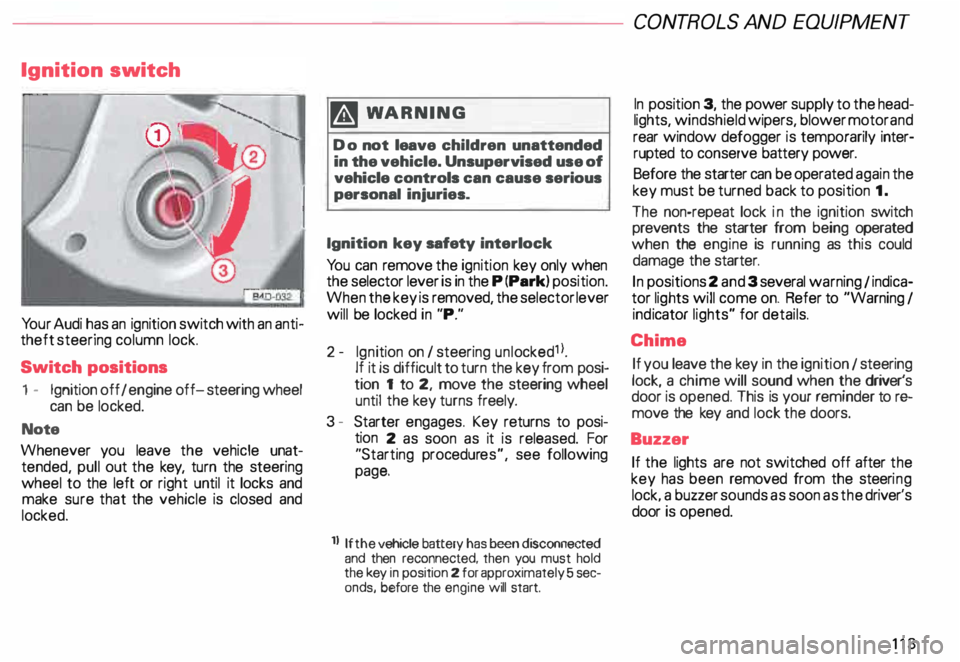
Yo ur Audi has an ignition switch with an anti
theft steering column lock.
Switch positions
1 - Ignition off I engine off-steering wheel
can be locked.
Note
Whenever you leave the vehicle unat
tended, pull out the key, turn the steering
wheel to the left or right until it locks and
make sure that the vehicle is closed and
locked. m
WARNING
Do not leave children unattended
in the vehicle. Unsupervised use of
vehicle controls can cause serious
personal injuries.
Ignition key safety interlock
Yo u can remove the ignition key only when
the selector lever is in the P (Park) position.
When the key is removed, the selector lever
will be locked in "P."
2- Ignition on I steering unlocked1 l.
If it is difficult to turn the key from posi
tion 1 to 2, move the steering wheel
until the key turns freely.
3 - Starter engages. Key returns to posi
tion 2 as soon as it is released. For
"Starting procedures", see following
page.
ll If the
vehicle battery has been disconnected
and then reconnected, then you must hold
the key in position 2 for approximately 5 sec
onds, before the engine will start. CONT
ROLS AND EQUIPMEN T
In position 3, the power supply to the head
lights, windshield wipers, blower motor and
rear window defogger is temporarily inter·
rupted to conserve battery power.
Before the starter can be operated again the
key must be turned back to position 1.
The non-repeat lock in the ignition switch
prevents the starter from being operated
when the engine is running as this could
damage the starter.
In positions 2 and 3 several warning 1 indica
tor lights will come on. Refer to "Warning I
ind icator lights" for details.
Chime If you leave the key in the ignition 1 steering
lock, a chime will sound when the driver's
door is opened. This is your reminder tor&
move the key and lock the doors.
Buzzer If the lights are not switched off after the
key has been removed from the steeri ng
lock. a buzzer sounds as soon as the driver's
door is opened.
113
Page 121 of 306
CONTROLS AND
EQUIPMEN T--------------------
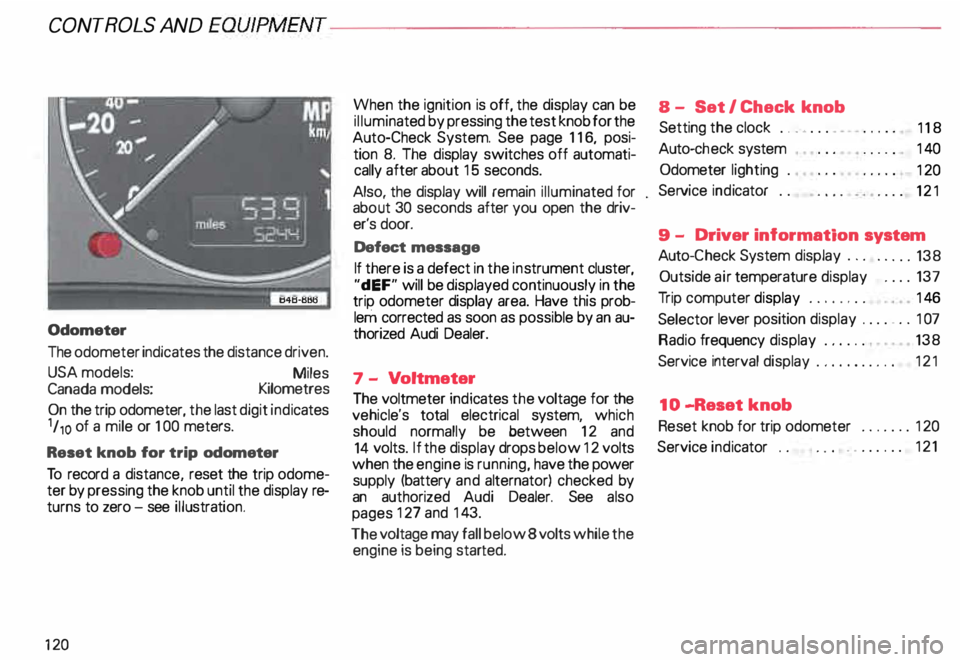
Odometer
The odometer indicates the distance driven.
USA models:
Miles
Canada models: Kilometres
On the trip odometer, the last digit indicates
1 /,0 of a mile or 1 00 meters.
Reset knob for trip odometer
To record a distance, reset the trip odome
ter by pressing the knob until the display re
turns to zero -see illustrat ion.
12 0 When
the ignition is off, the display can be
ill umin ated by pressing the test knob for the
Auto-Check System. See page 116, posi
tion 8. The display switches off automati
cally after about 15 seconds.
Also the display will remain illuminated for
abo �t 30 seconds after you open the driv
er's door.
Defect message
If there is a defect in the instrument cluster,
"dEF" will be displayed continuously in the
trip odometer display area. Have this prob
lem corrected as soon as possible by an au
thorized Audi Dealer.
7 - Vo ltmeter
The voltmeter indicates the voltage for the
vehicle's total electrical system, which
should normally be between 12 and
14 volts. If the display drops below 12 volts
when the engine is running, have the power
supply (battery and alternator) checked by
an authorized Audi Dealer. See also
pages 127 and 143.
The voltage may fall below 8 volts while the
engine is being started. 8
- Set I Check knob
Setting the clock ...• ... .
Auto-ch eck system
Odometer lighting .
Service indicator .. 118
14 0
12 0
121
9 - Driver information system
Auto-C heck System display . . . . . ... 138
Outside air temperature display .... 137
Tr ip computer display . . . . . . . . 146
Selector lever position display ....... 1 07
Radio frequency display . . . . . . 138
Service interval display . . . . . . . . . . .
121
10 -Reset knob
Reset knob for trip odometer . .... .. 12 0
Service indicator . . . . . .. . . . . . . 121
Page 150 of 306
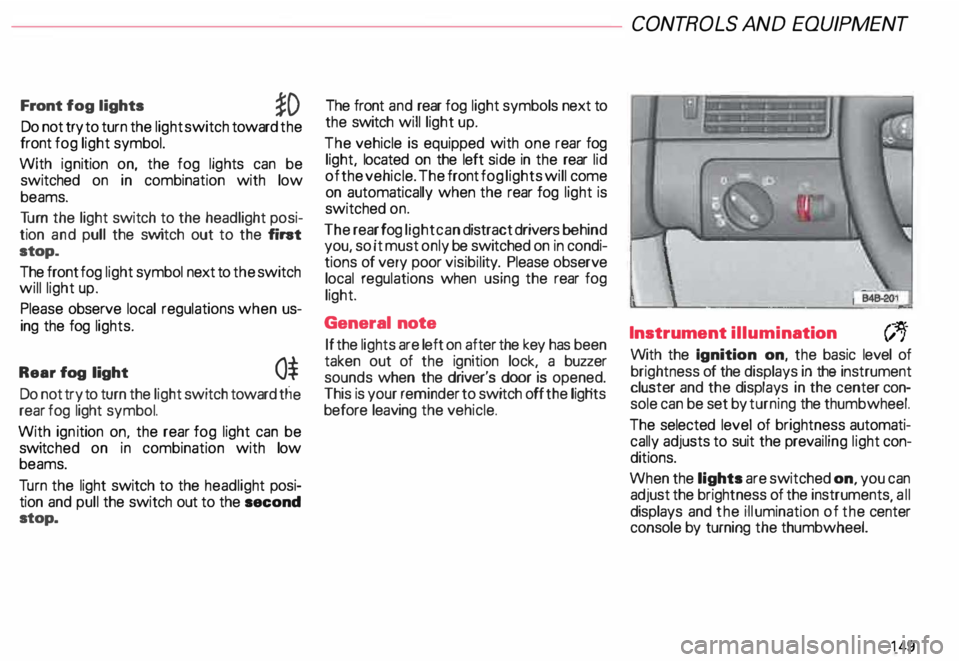
Front
fog lights
�D
Do not try to turn the light switch toward the
front fog light symbol.
With ignition on, the fog lights can be
switched on in combination with low
beams.
Tu rn the light switch to the headlight posi
tion and pull the switch out to the fint
stop.
The front fog light symbol next to the switch
will light up.
Please observe local regulations when us
ing the fog lights.
Rear fog light
0$
Do not try to turn the light switch toward tlie
rear fog light symbol.
With ignition on. the rear fog light can be
switc hed on in combination with low
beams.
Tu rn the light switch to the headlight posi
tion and pull the switch out to the second
stop. The front
and rear fog light symbols next to
the switch will light up.
The vehicle is equipped with one rear fog
light, located on the left side in the rear lid
of the vehicle. The front fog lights will come
on automatically when the rear fog light is
switched on.
The rear fog light can distract drivers behind
you, so it must only be switched on in condi
tions of very poor visibil ity. Please observe
local regulations when using the rear fog
light.
General note
If the lights are left on after the key has been
taken out of the ignition lock, a buzzer
sounds when the driver's door is opened.
This is your reminder to switch off the ligHts
before leaving the vehicle. CONT
ROLS AND EQUIPMEN T
Instrument illumination
(;,.
With the Ignition on, the basic level of
brightness of the displays in the instrument
cluster and the displays in the center con
sole can be set by turning the thumbwheel.
The selected level of brightness automati
cally adjusts to suit the prevailing light con
ditions.
When the lights are switched on, you can
adjust the brightness of the instruments all
displays and the illumination of the ce�ter
console by turning the thumbwheel.
149
Page 170 of 306
;
\ I
\. ,. _
---________.)
---------� =::�1
Opening and closing
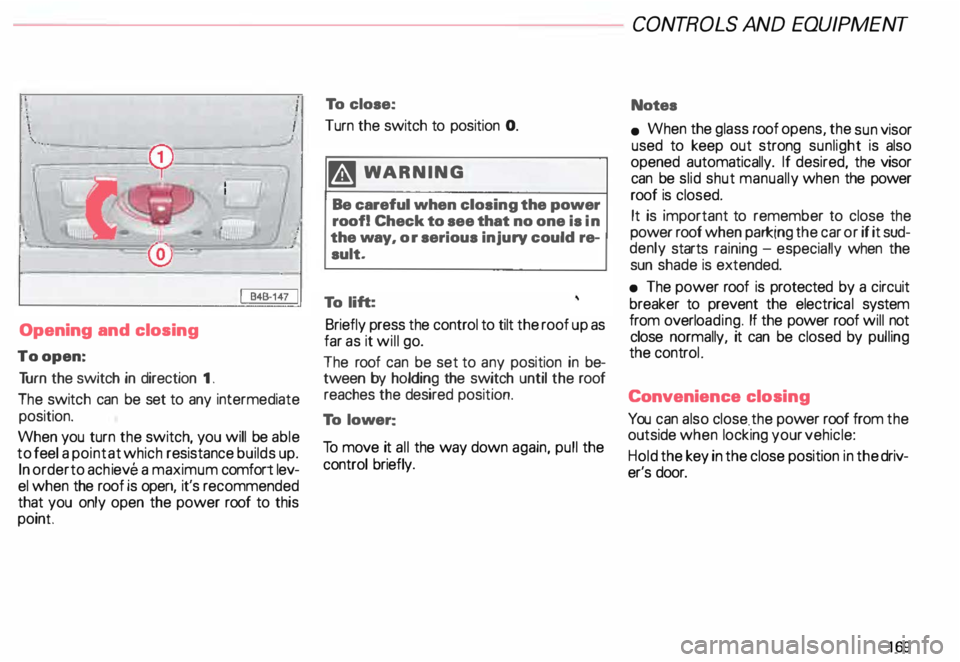
To open: Tu rn the switch in direction 1.
The switch can be set to any intermediate
position.
When you turn the switch, you will be able
to feel a point at which resistance builds up.
In order to achieve a maximum comfort lev
el when the roof is operi, it's recommended
that you only open the power roof to this
point To
close:
Turn the switch to position 0.
�W ARNING
Be careful when closing the power
roof! Check to see that no one is in
the way, or serious injury could re
sult.
To lift:
Briefly press the control to tilt the roof up as
far as it will go.
The roof can be set to any position in be
tween by holding the switch until the roof
reaches the desired position.
To lower:
To move it all the way down again, pull the
control briefly. CONT
ROLS AND EQUIPMENT
Notes
• When the glass roof opens, the sun visor
used to keep out strong sunlight is also
opened automatically. If desired, the visor
can be slid shut manually when the power
roof is closed.
It is important to remember to close the
power roof when parking the car or if it sud
denly starts raining -especially when the
sun shade is extended.
• The power roof is protected by a circuit
breaker to prevent the electrica l system
from overlo ading. If the power roof will not
close normally, it can be closed by pulling
the controL
Conv enience closing
You can also close . the power roof from the
outside when locking your vehicle:
Hold the key in the close position in the driv
er's door.
169
Page 172 of 306
---------------------CONTROLS
AND EQUIPMENT
Interior lights, reading lights
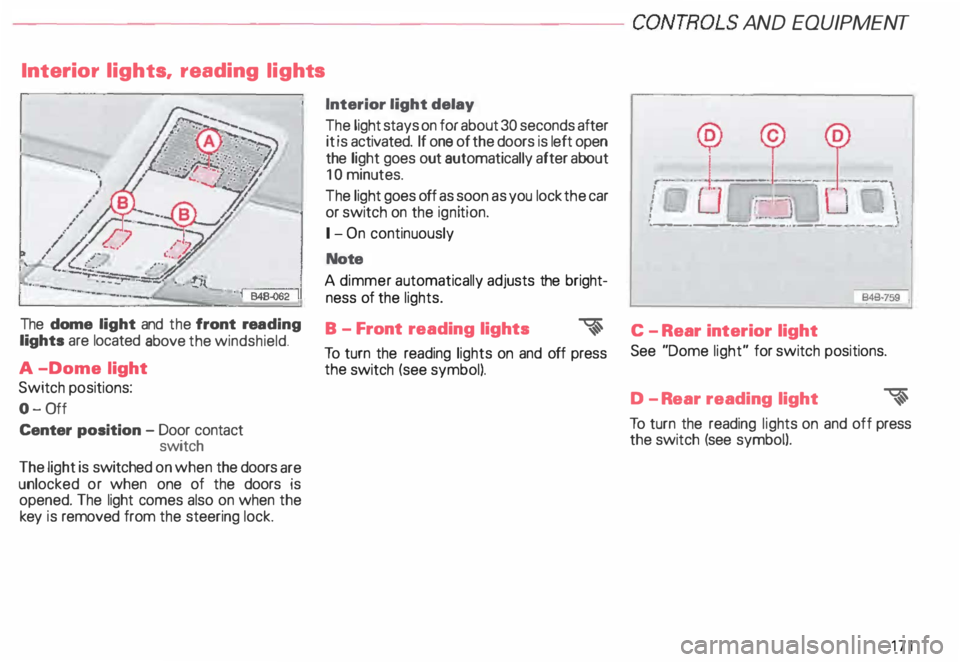
The dome light and the front rea ding
lights are located above the windshield.
A -Dome light
Switch positions:
0- 0ff
Center position -Door contact
switch
The light is switched on when the doors are
unlocked or when one of the doors is
opened. The light comes also on when the
key is removed from the steering lock. Interior light
delay
The light stays on for about 30 seconds after
it is activated. If one of the doors is left open
the light goes out automatically after about
10 minutes.
The light goes off as soon as you lock the car
or switch on the ignition.
1- On continuously
Note
A dimmer automatically adjusts the bright
ness of the lights.
B - Front reading lights
�
To turn the reading lights on and off press
the switch (see symbol). --
--� J: ___ ! __
\
I
Ot.:-= � :UJ,-.
i ·��-_:]
: \
·- ------- -···----·--- --·
846·759
'
C - Rear interior light
See "Dome light" for switch positions.
D -R ear reading light
�
To turn the reading lights on and off press
the switch (see symbol).
171
Page 174 of 306
-------------�-------CONTROLS AND
EQUIPMEN T
Audi Homelink ® Uni versal Transm itter*
-� ....... ..
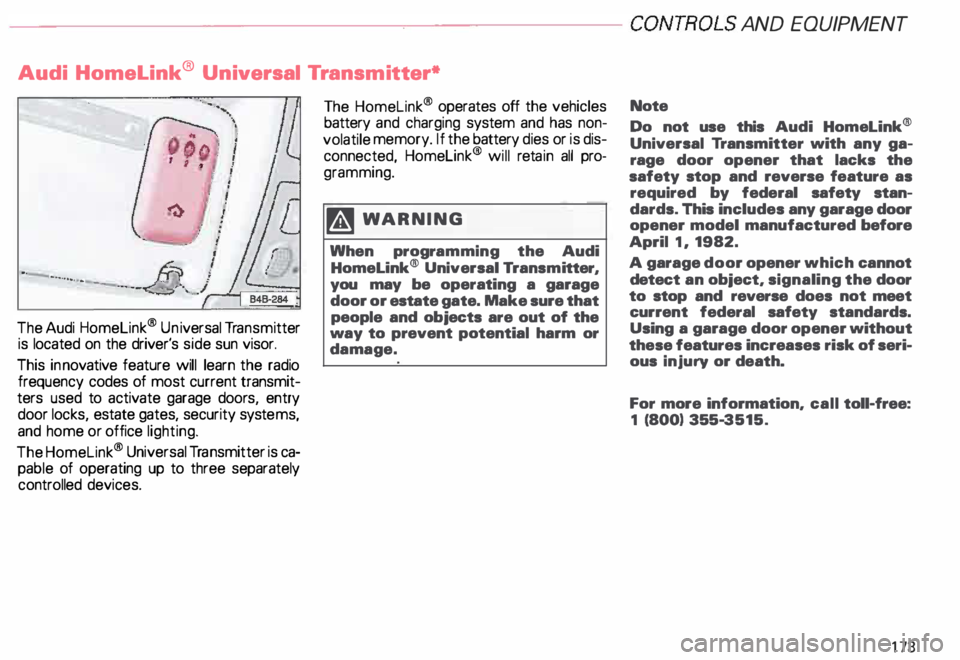
The Audi Homelink ® Un iversal Transm itter
is located on the driver's side sun visor.
This innovative feature will learn the radio
frequency codes of most current transmit
ters used to activate garage doors, entry
door locks, estate gates, security systems,
and home or office lighting.
The Homelink ® Universal Transmitter is ca
pable of operating up to three separately
controlled devices. The
Homelink ® operates off the vehicles
battery and charging system and has non
volatile memory. If the battery dies or is dis
connected, Homelink® will retain all pro
gramming.
�W ARNING
When programming the Audi
Homelink® Universal Transm itter,
you may be operating a garage
door or estate gate. Make sure that
people and objects are out of the
way to prevent potential harm or
damage. Note
Do not
use this Audi Homelink®
Universal Transmitter with any ga
rage door opener that lacks the
safety stop and reverse feature as
required by federal safety stan
dards. This includes any garage door
opener model manufactured before
April 1, 1982.
A garage door opener which cannot
detect an object, signaling the door
to stop and reverse does not meet
current federal safety standards.
Using a garage door opener without
these features increases risk of seri
ous injury or death.
For more information, call toll-free:
1 (800) 355-3515.
173
Page 176 of 306
Training a Garage Door
Equip ped with Rolling Code
To train your rolling code garage door
opener to operate from your Homelink®
Universal Transmi tter, follow these steps
after completing the "Program
ming" portion of this text (the aid of a sec
ond person may make the training quicker
and easier):
1 - Locate and press and relaaaa the
training (or "learning") button on the
garage door opener motor head unit.
(Exact location and color of the button
may vary by garage door opener brand.)
If there is difficulty locating the training
button, reference the garage door
opener owner's manual or call toll free:
1- 800-355- 3515.
2 - Return to the vehicle and press and re
lease the progr ammed Homelink ®
channel. Press and release the
Homelink ® channel a second time to
complete the progra mming process.
(Some garage door openers may re
qu i· re you to do this procedure a thir d
ti me.) The
garage door opener should now recog
nize the Audi Homelink ® Un iversal Trans
mitter. You may use either the hand-held
transmitter or the Audi Home link® Univer
sal Transmi tter to activate the garage door.
Oper ating the Audi HomeLink ®
Uni versal Transmitter
1 - Tum the ignition switch on.
2 - Select and firmly press and release the
appropriate channel (1, 2, or 3) to acti
vate the trained device (e.g. garage
door, estate gate, home security sy
stem, entry door lock, or home or office
lighting). CONTROLS
AND EQUIPMENT
Erasing the Audi HomeLink ®
Universal Transm itter's Pro
gramming
1 - Turn the ignition switch on.
2 - Simult aneously press and hold chan
nels 1 and 3 until the indicator light be
gins to flash after 20 seconds.
3 - Release both buttons.
This process will erase the trained codes of
the three channels or erase the factory set
default codes.
The Audi Homelink ® Un iversal Transmitter
is now in the train (or progra mming) mode
and can be progra mmed at any time follow
ing steps 3 through 5 in the "Progr amming"
portion of this text.
175
Page 256 of 306
Only
when tires show unusual wear such as
feather-e dging should they be rotated diag
� nall y. Yo ur vehicle may be equipped with
trres which have a specified rotation direc
tion. The rotation direction is identified by
arrow markings on the sides of the tires.
The rotation direction must not be revers ed.
Therefore, these tires cannot be switched
diagonally. If in doubt, discuss any unusual
tire wear with your authorized Audi Dealer's
service department.
After rotation adjust tire pressure and
torque wheel bolts diagonally to 90 tt lb
(120 Nm). Refer to "Changing a wheel" on
page 267 for details. Tire
replacement
Wheels and tires approved by the manu fac
turer have been specially matched to your
vehicle and contribute greatly to the road
holding, driving characteristics and safety of
the vehicle.
Make sure that the new tires also meet the
specifications listed on the label located on
the inside of the fuel filler flap or on the driv
er's door lock jamb.
It's �mporta nt to remember that in spite of
h �vrng the same tire designation, the actual
s1ze of a tire can vary from tire man ufacturer
to tire man ufacturer. Using different tire and
wheel rim combinations can result in re
duced clearance between the tire and the
vehicle body.
Therefore, never mount tires that
are of a different designation or
have different dimensions from
those of the factory supplied tires
which came equipped on your ve
hicle. VE
HICLE CARE
• If you must replace tires different from
those which were originally factory supplied
on your vehicle, always use the specific
brands, specifications and dimensions
which were specified by Audi for your ve
hicle.
Yo ur authorized Audi dealer or Audi Client
Relations have information regarding the
t1res and wheel rims specified for your car,
and can tell you which tires and tire
man ufacturers were approved by the fac
tory for original equipment installation.
• We recommend that you have your tires
changed by an authorized Audi Dealer, be
cause they have the special tools and nec
essary expertis e.
Furthermore, your authorized Audi Dealer
stocks a range of tires and wheels.
• If the spare tire is different from the tires
that you have mounted on your vehicle (for
example winter tires or wide profile tires),
then use the spare tire for a short period of
time only and drive with extra care. Replace
the flat tire with a tire matching the others
on your vehicle as soon as possible.
255
Page 298 of 306
c
Capacities ...• ••.•. .......• o o 287
Care of
-e xterior . 212
-i nterior . . 217
Cargo net . .
89
earphone . . •
• . . • • 190
Catalytic converter •
. . . • • o 197
CB radios . . . . . . . . . . . . . . . . • . . . 189
CD changer . . . . . . . . . . . . . . . . . . . 184
Central locking system .. ... . 0 • • 59
- Rear lid . . . . . . . . . . . . • . . . • . • . 63
Changing a wheel . . . . . . . .. o • • 267
Changing engine oil . . . . . . . . • 236
Checking engine oil level . . . . . . . 235
Child restra int anc horages . . . . . . . 53
Child safety ... ........... .. ... 44
Child safety lock for rear doors . . . 62
Child seat bench . . . . 92
Child seats
- Booster seats . . . . . . • • • • • . . 48
-C onvertible seats .. • .. o •• 47
- Infant seats . . . . .
. .. ... .. . 45
-O lder children . . . • . . . . . . . . 49 Chime
...
Ciga rette lighter
Cleaning 57,
113, 14 9
18 1
- Engine compartment ..... . 219
217
-
Glass ............. ... .. . .
- Inside of vehicle . . . . 217
- Leather upholstery . . . . . . . 217
-O utside of vehicle .... . • .. 212
- Safety belts . . . . . . . . . . . . . . . 218
-W indows· . . . . . . . . . . . • . . . . 215
Cleaning and protection . . . . . . . . 212
Clima te controls . . . . . . . . .... o • 16 2
Clock .. .. . .. .. . .. .. .. .. .. .
117
Coat hooks . . . . . . . . . . . . . . • . •
179
Com partment for Service
Literature Wallet ......... .... 18 3 .,)
Convenient entry function . . . . . . 1 01
Convertible locking retractor .... . 51
Convertible seats......... . ... 47
Coolant temperature gauge . . . . . 118
Cooling system . . . . . . . .
238
- Expansion tank 0 • • • • • • • • • 239
Cruise control . . . . 15
8
Cup holder . . . . . . . . . • . • . . • . . 182
Curb weight . . . . . . . . _. . . . ... 289 ALP
HABETICAL INDEX
D
Dashboard ...... •••• .••.• .... 8
Data . . . . . . . o • • • • • • • • • • • • • 286
Date display . . . . . .
• .. 0 • 117
Daytime running lights .
148
Deflated full size spare tire ..... 266
Defrosting windows . . . . . . . • . . . 151
Difficult operating conditions . . . . 262
Digital clock . . . . . . . . . . . . . . . . . 117
Dimensions . . . . . . . . . . . . . . . . . . 288
Doors ....................... 0. 59
Driver information system . . . . . . 130
-C alling up the menu ....... . 131
- Display types . . . . . . . . . • . • 133
- Entering settings . . . . • . • . . . 134
- Menu display . . . . . . . • • • . . . 131
- Navigation display ..... _ . . . . 130
Driving economically . . . . 19
5
Dri ving in foreign countries . . . . . 292
Driving on slopes . . . . . . . . . . . . . 200
Driving under difficult conditions
262
Driving with Four-Wheel Drive . . 207
Dupl icate key ....... .... ....... 57
297