steering wheel AUDI ALLROAD 2000 Owner's Manual
[x] Cancel search | Manufacturer: AUDI, Model Year: 2000, Model line: ALLROAD, Model: AUDI ALLROAD 2000Pages: 306, PDF Size: 9.95 MB
Page 107 of 306
CONT
ROLS AND EQUIPMEN T---------------------
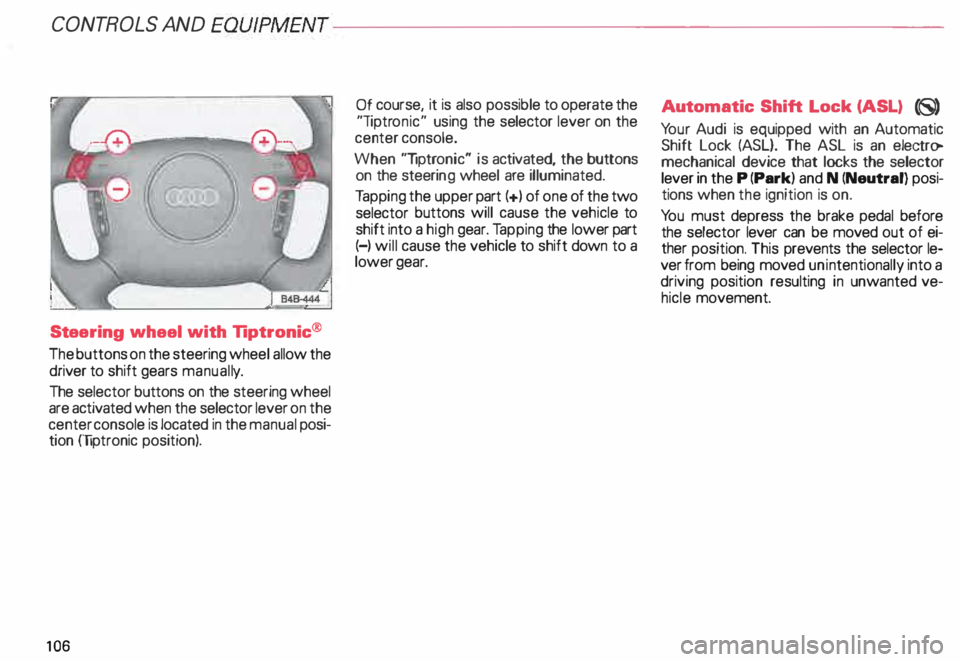
Steering wheel with Tiptronic ®
The buttons on the steering wheel allow the
driver to shift gears manuall y.
The selector buttons on the steering wheel
are activated when the selector lever on the
center console is located in the manual posi
tion (liptronic position).
10 6 Of
course, it is also possible to operate the
"liptr onic" using the selector lever on the
center console.
When "liptronic" is activated, the buttons
on the steeri ng wheel are illuminated.
Ta pping the upper part(+) of one of the two
selector buttons will cause the vehicle to
shift into a high gear. Tapping the lower part
(-) will cause the vehicle to shift down to a
lower gear. Aut
omatic Shift Lock (ASL) (8)
Yo ur Audi is equipped with an Automatic
Shift Lock (ASL}. The ASL is an electro
mechanical device that locks the selector
lever in the P (Park) and N (Neutral) posi
tions when the ignition is on.
Yo u must depress the brake pedal before
the selector lever can be moved out of ei
ther position. This prevents the selector le
ver from being moved unintentionally into a
driving position resulting in unwanted ve
hicle movement.
Page 114 of 306
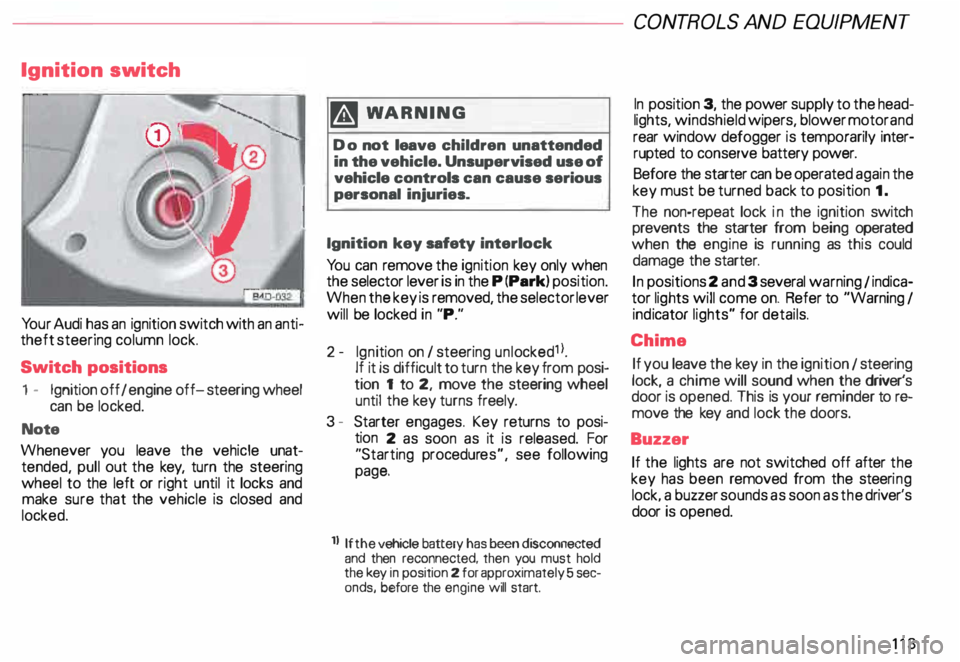
Ignition
switch
Yo ur Audi has an ignition switch with an anti
theft steering column lock.
Switch positions
1 - Ignition off I engine off-steering wheel
can be locked.
Note
Whenever you leave the vehicle unat
tended, pull out the key, turn the steering
wheel to the left or right until it locks and
make sure that the vehicle is closed and
locked. m
WARNING
Do not leave children unattended
in the vehicle. Unsupervised use of
vehicle controls can cause serious
personal injuries.
Ignition key safety interlock
Yo u can remove the ignition key only when
the selector lever is in the P (Park) position.
When the key is removed, the selector lever
will be locked in "P."
2- Ignition on I steering unlocked1 l.
If it is difficult to turn the key from posi
tion 1 to 2, move the steering wheel
until the key turns freely.
3 - Starter engages. Key returns to posi
tion 2 as soon as it is released. For
"Starting procedures", see following
page.
ll If the
vehicle battery has been disconnected
and then reconnected, then you must hold
the key in position 2 for approximately 5 sec
onds, before the engine will start. CONT
ROLS AND EQUIPMEN T
In position 3, the power supply to the head
lights, windshield wipers, blower motor and
rear window defogger is temporarily inter·
rupted to conserve battery power.
Before the starter can be operated again the
key must be turned back to position 1.
The non-repeat lock in the ignition switch
prevents the starter from being operated
when the engine is running as this could
damage the starter.
In positions 2 and 3 several warning 1 indica
tor lights will come on. Refer to "Warning I
ind icator lights" for details.
Chime If you leave the key in the ignition 1 steering
lock, a chime will sound when the driver's
door is opened. This is your reminder tor&
move the key and lock the doors.
Buzzer If the lights are not switched off after the
key has been removed from the steeri ng
lock. a buzzer sounds as soon as the driver's
door is opened.
113
Page 151 of 306

CONTROLS AND
EQUIPMENT--------------------
1 and 4-Electrically heated ... 8
seats• utJ
The heating elements in both seats can be
turned on and regulated separately with the
two thumb wheel switches.
With the ignition on, the seat cushion and
backrest of the front seats can be heated
electrically.
15 0 1
- Use this thumb wheel switch to activate
and regulate the heating elements in the
driver's seat.
4- Use this thumbwheel switch to activate
and regulate the heating elements in the
front passenger's seat.
From position 0, roll thumbwheel upward to
activate the heating elements.
Select the desired temperature setting be
tween positions 1-6. When the heating ele
ments are activated, the numbers on the
thumb wheel will light up.
The steering wheel heating* is
swit ched on automatically when the seat
heating is switched on. The temperature.
however, remains at a constant preset level
and cannot be regulated with the thumb
wheel (1).
Note
To prevent possible damage to the heating
elements, do not kneel on the seats or in
any other way apply a heavy load to relative
ly small areas of the seat. The
heating elements* for the left and right
seating positions of the rear seat bench are
switched on and off and regulated by the
thumbwheel in the center console:
a - left
b- right
The rear seat heating* only operates when
a sensor registers the weight of the occu
pant on the seat.
Select the desired temperature setting be
tween positions 1-6. When the heating ele
ments are activated, the numb ers on the
thumbwheel will light up.
Page 157 of 306
CONTROLS
AND EQUIPMENT---------------------
Turn signals, headlight dimmer switch lever
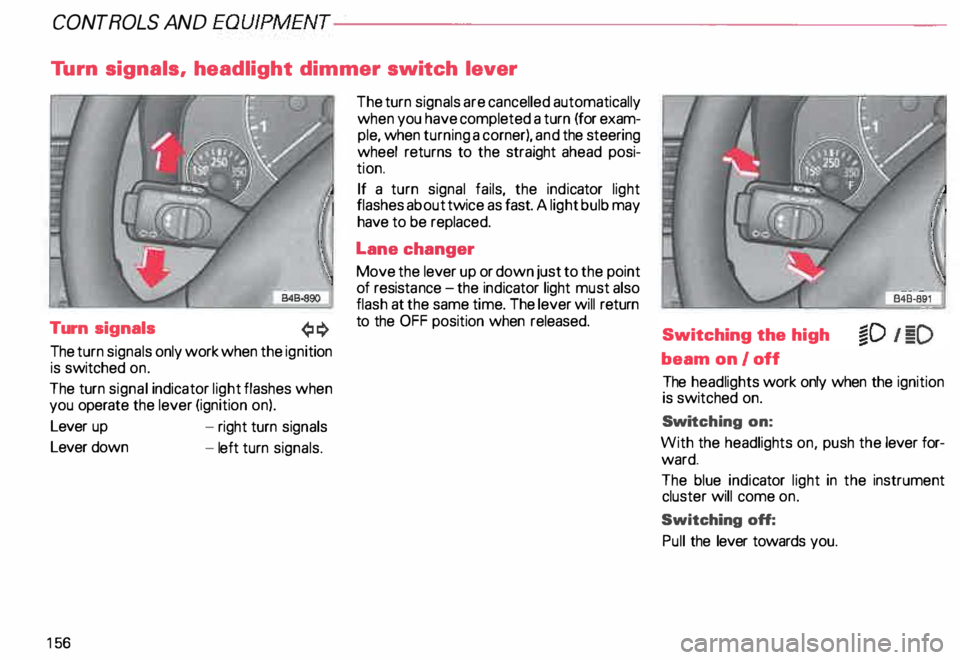
Turn signals
The turn signals only work when the ignition
is switched on.
The turn signal indicator light flashes when
you operate the lever (ignition on).
Lever up
Lever down
15 6 -
right turn signals
- left turn signals. The
turn signals are cancelled automatically
when you have completed a turn (for exam
ple, when turning a corner), and the steering
wheel returns to the straight ahead posi
tion.
If a turn signal fails, the indicator light
flashes about twice as fast. A light bulb may
have to be replaced.
Lane changer
Move the lever up or down just to the point
of resista nce-the ind icator light must also
flash at the same time. The lever will return
to the OFF position when released.
Switching the high
beam on/off
The headlights work only when the ignition
is switched on.
Swi tching on:
With the headlights on, push the lever for
ward.
The blue indicator light in the instrument
cluster will come on.
Switching off:
Pull the lever towards you.
Page 158 of 306
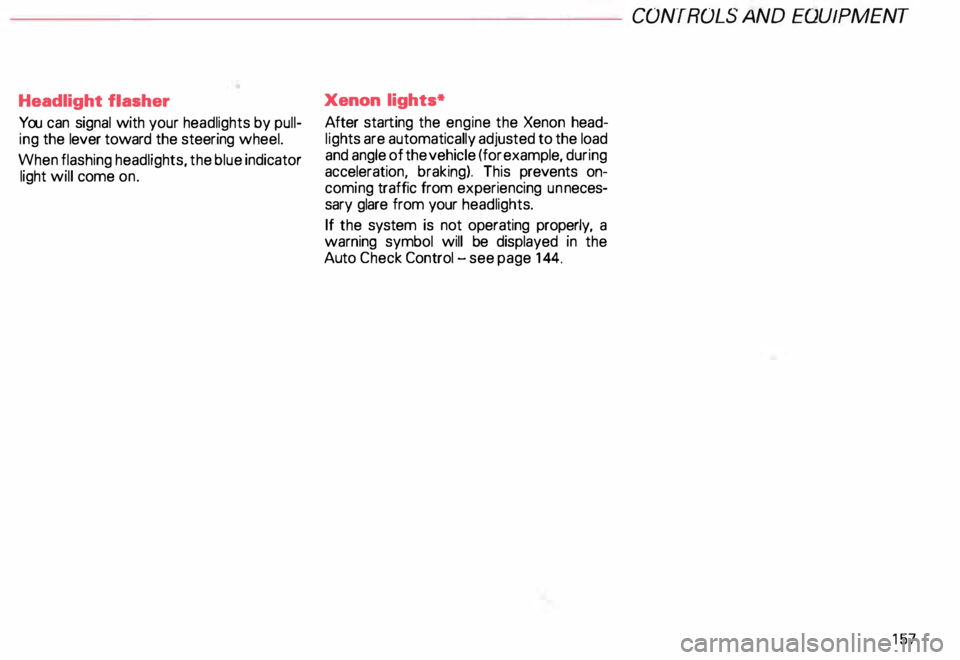
Headlight flasher
You can signal with your headlights by pull
ing the lever toward the steering wheel.
When flashing headlights, the blue indicator
light will come on. Xenon
lights*
After starting the engine the Xenon head
ligh ts are automatically adjusted to the load
and angle of the vehicle (for example, during
acceleration, braking). This prevents on
coming traffic from experiencing unneces
sary glare from your headlights.
If the system is not operating properly, a
warning symbol will be displayed in the
Auto Check Control -see page 144. CONTROLS
AND EQUIPMENT
157
Page 161 of 306
CONT
ROLS AND EQUIPMENT---------------------
Wiper and washer system
The wiper and washer system only works
when the ignition is on.
The heated washer jets do not have a
separate switch. Depending on the outside
temperature, the heated washer jets will
operate when the ignition is on.
To prevent damage to the w1pmg
system. always loosen blades frozen
to glass before operating wipers.
Notes
• Filling washer container, see page 250.
• Replacing wiper blades, see page 251.
� WARNING
Always heed WARNINGS on
page 161.
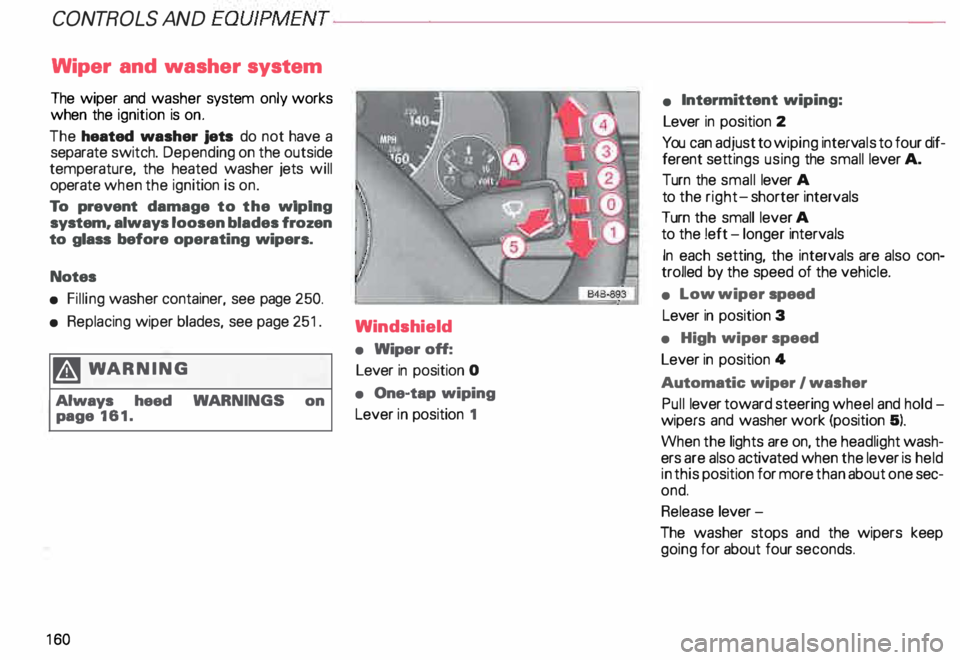
16 0 Windshield
•
Wiper off:
Lever in position 0
• One-tap wiping
Lever in position 1 •
Intermittent wiping:
Lever in position 2
You can adjust to wiping intervals to four dif
ferent settings using the small lever A.
Turn the small lever A
to the right- shorter intervals
Turn the small lever A
to the !eft -longer intervals
In each setting, the intervals are also con
trolled by the speed of the vehicle.
• Low wiper speed
Lever in position 3
• High wiper speed
Lever in position 4
Automatic wiper I washer
Pull lever toward steering wheel and hold
wipers and washer work (position 5).
When the lights are on, the headlight wash
ers are also activated when the lever is held
in this position for more than about one sec
ond.
Release lever-
The washer stops and the wipers keep
going for about four seconds.
Page 162 of 306
---------------------CONTROLS AND
EQUIPMENT
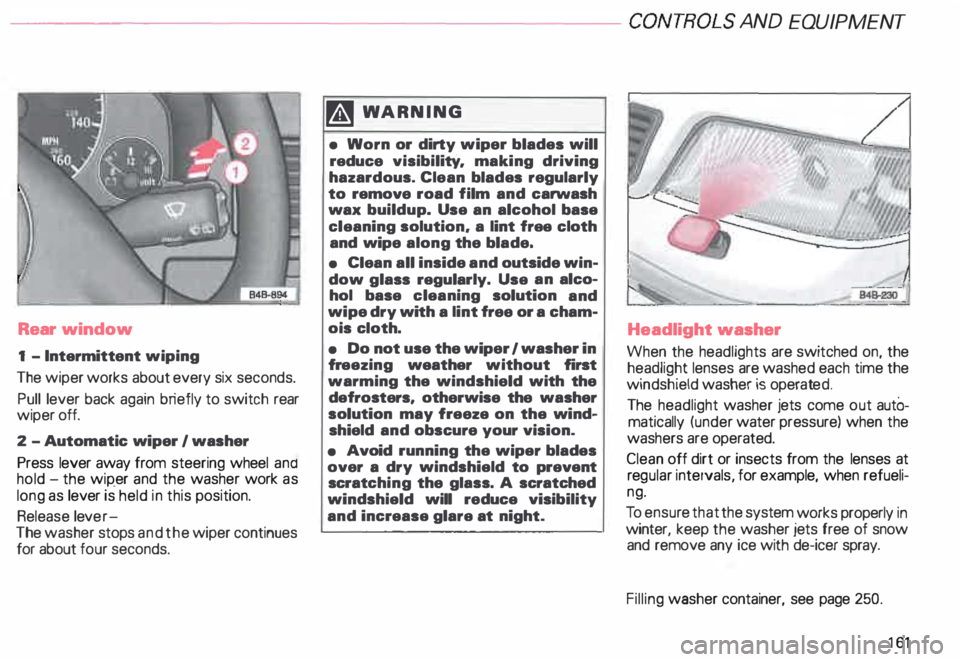
Rear window
1 - Intermittent wiping
The wiper works about every six seconds.
Pull lever back again briefly to switch rear
wiper off.
2 -Automatic wiper I washer
Press lever away from steering wheel and
hold -the wip_er and the washer work as
long as lever is held in this position.
Release lever-
The washer stops and the wiper continues
for about four seconds. �W
ARNING
• Worn or dirty wiper blades will
reduce visibility. making driving
hazardous. Clean blades regularly
to remove road film and carwash
wax buildup. Use an alcohol base
cleaning solution. a lint free cloth
and wipe along the blade.
• Clean all inside and outside win
dow glass regularly. Use an alco
hol base cleaning solution and
wipe dry with a lint free or a cham
ois cloth.
• Do not use the wiper 1 washer in
fr eezing weather without first
warming the windshield with the
defrosters, otherwise the washer
solution may freeze on the wind
shield and obscure your vision.
• Avoid running the wiper blades
over a dry windshield to prevent
scratc hing the glass. A scratched
windshield will reduce visibility
and increase glare at night. Headlight
washer
When the headlights are switched on, the
headlight lenses are washed each time the
windshield washer is operated.
The headlight washer jets come out autO
matically (under water pressure) when the
washers are operated.
Clean off dirt or insects from the lenses at
reg ular intervals, for example, when refueli
ng.
To ensur e that the system works properly in
winter, keep the washer jets free of snow
and remove any ice with de-icer spray.
Filling washer container, see page 250.
161
Page 186 of 306

--------------------CONTROLS AND
EQUIPMENT
Steering wheel with Audio controls*
To help make certain that you are not diS
tracted from paying proper attention to the
traffic conditions when you are using the ra
dio, switches have been provided on the
st eering wheel for basic audio functions for
factory installed radios. The radio, cassette
player, or CD player, can, of course, also be
operated without restriction on the unit it
self.
A detailed description of the radio is pro
vided in a separate Sound System manual.
The following functions can be operated by
pressing the buttons on the steering wheel:
C -I ncrease volume
A -S eek I Advance -
Radio
Radio: seek forward
- Cassette player: fast forward
- CD: CD track forward
B - Seek I Rewind
- Radio: seek in reverse direction
- Cassette player: fast rewind
- CD: CO-track back -
Cassette player
-C D
Depending on which unit is currently oper
ating.
D -R educe volume
Radio
- Cassette player
- CD
Depending on which unit is currently oper
ating. E
-Stat ion buttons (Preset) I
back •
You can recall up to twelve stations one af-
ter another in the reverse direction.
If no sta tions are assigned to the presets or
if they are not being received, you may only
hear static.
F - Station buttons (Preset) I for�
ward
Yo u can recall up to twelve stations one af
ter another in the forward direction.
If no stations are assigned to the presets or
if they are not being received, you may only
hear static.
185
Page 187 of 306

CONT
ROLS AND
EQUIPMENT--------------------
Steering wheel with radio and
telephone equipment in the steering wheel*
If your radio or mobile telephone are factory
ins talled, switches for the radio and tele
phone functions are provided in the steering
wheel to help you give your fullest attention
to your driving responsibilities while operat
ing the radio or telephone system. Of
course, all the operating features of your ra
dio, cassette/CO player, or telephone can
still be accessed on this equipment itself.
Detailed description of the radio and Audi
telephone are provided in separate operat
ing manuals.
18 6 The following
functions can be operated by
pressing the button:
A -S eek I Advance
- Radio: seek in forward direction
- Cassette: fast forward
- CD: CD track forward
Autodial numbers (telephone memory):
scroll down (names in alphabetical order
Z --+ A). Holding this button down will
cause the display to scroll quickly
through the autodial numbers. B
-Seek I Rewind
- Radio: seek in reverse direction
- Cassette: fast rewind
- CD: CD track back
- Autodial numbers (telephone memory):
scroll down (names in alphab etical order
A --+ Z}. Holding this button down will
cause the display to scroll quickly
through the autodial numbers.
C -Radio I telephone button
Pressing this button allows you to switch
between the radio function (R) and the tele
phone function m.
Depending on which mode is selected, the
Driver Information System (DIS) will either
display the radio data or the telephone data.
The telephone data will suppress the radio
data in the DIS display whenever the tele
phone is in use.
Page 207 of 306
VEHICLE
OPER ATION----------------------
Operation
The Anti-Lock Brake System (ABS) and the
Electronic Differential Lock (EDU are inte
grat _ed in the Electronic Stability Progr am. In
a _ddrtron to the data provided by these func
tions, the ESP control unit requires addition
al measurement data provided by hig h-per
forman ?e sensors. The rotat ional speed of
the veh1cle about its vertical axis, vehicle lat
eral acceleration, brake pressure and the
steering angle are measured.
The direction in which the driverwishes to
travel is determined with the aid of the
stee �ing angle and the vehicle speed and is
contmually compared with the actual be
havior of the vehicle.
If the data do not match - for example when
a vehrcle is beginning to spin out of control
- the ESP applies the brakes to the appropri
ate wheels for the given situation and, if
necessar y, changes the vehicle traction
forces so as to reduce the slipping of individ
ual wheels (ASR anti-slip regulation).
206 The
vehicle is then stabilized by the forces
a ?tin � on the wheel during braking. If the ve
hicle IS overstee ring (rear tends to skid out
of the turn), the brakes are mainly applied on
the wheel that is on the outside ofthe curve.
In the case of a vehicle that is und ersteering
(tendency to slide out of the curve). the
brakes are applied at the rear wheel that is
on the inside of the curve. An audible signal
�rll accompany the brake application func
tion.
All �SP senso rs a�e monitored continuously
wh1le the vehicle IS being driven. However,
when the vehicle is driven at low speed on
ex tremely rugged terrain, it is not always
possrble to monrtor the ESP sensors contin
uously. Thus, in rare and exceptional cases
the ESP itself can deactivate (ESP and ABS
ind icator lights will be lit continuously).
In this case. the ride level adjustment sys
tem lowers the vehicle to the normal level
If this happens, you may need to select th�
ride level again (see page 153).
Operation of the ESP and ABS is restored
whenever you restart the engine. m
WAR NING
! he Electronic Stability Program
•• nevertheless subject to the laws
of physics. It is particularly impor
tant to pay attention to this fact on
wet and slippery roads.
It is therefore important that you
always adapt your driving to the
condition of the road and traffic
conditions. Do not allow the in
creased safety provided by the
Electro nic Stability Program sys
tem to lull you into accepting addi
tional safety risks.