Charging port AUDI E-TRON 2019 User Guide
[x] Cancel search | Manufacturer: AUDI, Model Year: 2019, Model line: E-TRON, Model: AUDI E-TRON 2019Pages: 310, PDF Size: 81.91 MB
Page 114 of 310
High-voltage system
> Open the cover in the motor compartment on
the side of the applicable charging port.
> Loosen the yellow loop (2) from the retainer
and then pull on the loop carefully >@).
> Remove the charging connector.
> Drive to an authorized Audi dealer or author-
ized Audi Service Facility immediately to have
the malfunction corrected.
If the charging connector still cannot be removed
after using the emergency release, see an author-
ized Audi dealer or authorized Audi Service Facili-
ty for assistance.
After releasing manually, secure the loop(s) on
the retainer and close the cover in the motor
compartment.
() Note
Only pull on the loop until you feel resistance.
You
will not hear it release. If you continue to
pull, you could damage the emergency re-
lease mechanism.
Messages
If the or =] indicator light turns on, then the
range is low or very low. Charge the high-voltage
battery.
Esq Warning! Please check the charging unit
cover. See owner's manual
This message appears if the charging unit cover is
opened while driving. Stop the vehicle as soon as.
possible and try to close the cover using the but-
ton @ © page 108, fig. 89 or by hand. If the cov-
er cannot close and/or the message continues to
appear, drive to an authorized Audi dealer or au-
thorized Audi Service Facility immediately and
have the malfunction corrected > A\ in Charging
on page 109; >@ in Charging on page 109.
B AC charging system: malfunction! Please
contact Service
B DC charging system: malfunction! Please
contact Service
This message appears if there is a malfunction in
the charging system. Drive to an authorized Audi
112
dealer or authorized Audi Service Facility immedi-
ately.
Incompatible charging system. Please check
charging system
This message appears when the charging system
is incompatible. Only charge using the Audi
charging system that is designed for your vehicle.
EB charging system: malfunction
This message appears if there is a malfunction in
the vehicle charging infrastructure or the charg-
ing station. Use a different charging station. If
this message does not turn off, contact an au-
thorized Audi dealer or authorized Audi Service
Facility.
Charging equipment
Introduction
Depending on the vehicle equipment, the Audi e-
tron compact charging system may be available.
Using the charging equipment
Pay attention to the following information for
safe handling of the charging equipment:
— Secure the charging equipment against any
strain, such as being run over, falling, pulling,
bending, and crushing.
— Do not submerge the charging equipment in
water and do not cover it with snow or ice.
— Only pull at the plugs when removing the
charging cable from the vehicle and from the
power supply.
— Put the cap on after using the charging cable.
— Only operate the Audi charging system ina
power supply system with a frequency of
50 Hz/60 Hz.
— Only operate or store the Audi charging system
at a humidity level between 5% and 95% (no
condensation).
— The Audi charging system is protected against
dust and splashing water (IP55 (USA: Enclosure
3).
Depending on the country, different warnings
may be on the charging equipment.
Page 115 of 310
4KE012721BB
High-voltage system
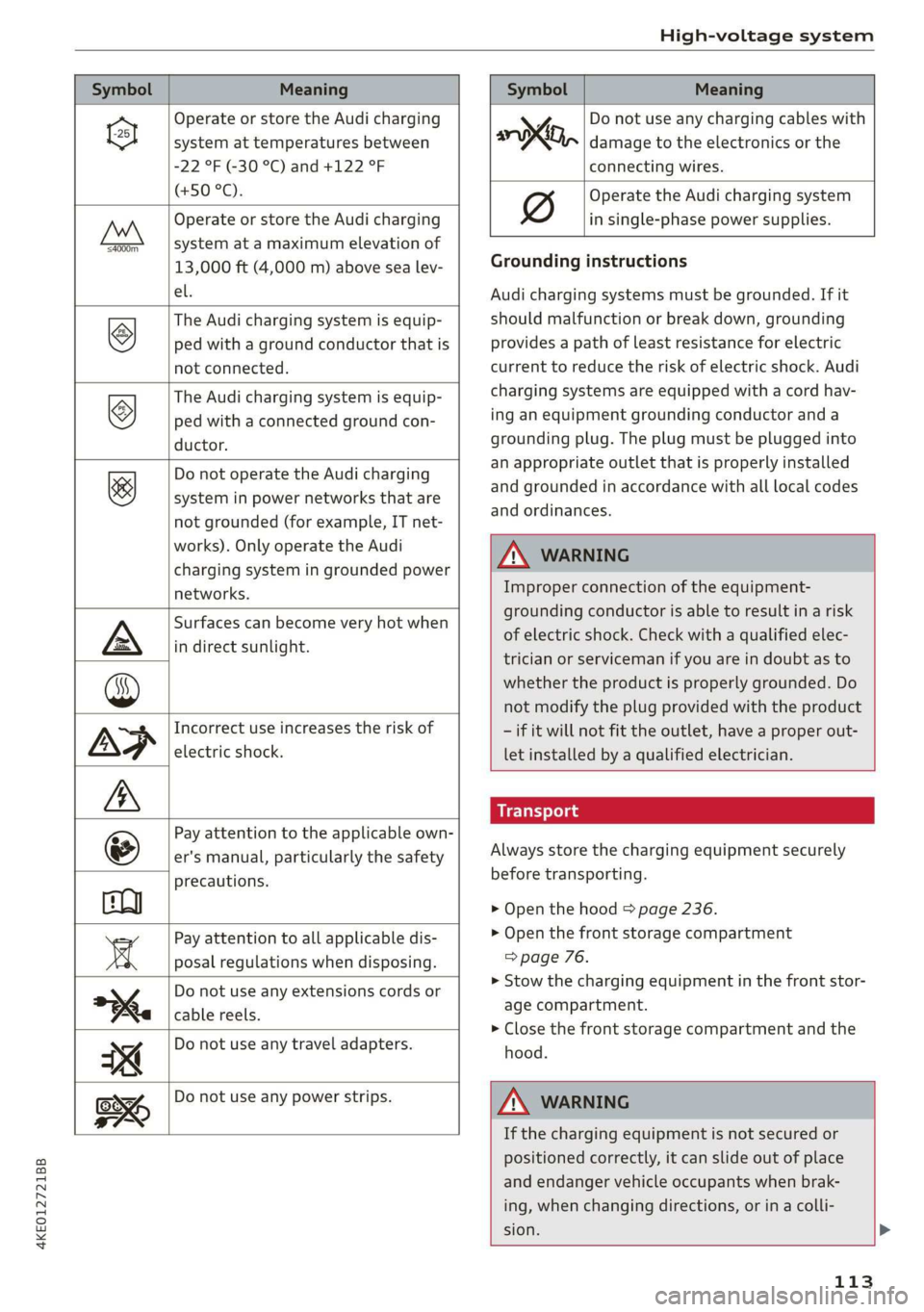
Symbol Meaning Meaning
Operate or store the Audi charging
system at temperatures between
-22 °F (-30 °C) and +122 °F
(+50 °C).
Operate or store the Audi charging
system at a maximum elevation of
4000m_
13,000 ft (4,000 m) above sea lev-
el.
The Audi charging system is equip-
ped with a ground conductor that is
not connected.
©
The Audi charging system is equip-
ped with a connected ground con-
ductor.
&
Do not operate the Audi charging
system in power networks that are
not grounded (for example, IT net-
works). Only operate the Audi
charging system in grounded power
networks.
Surfaces can become very hot when
in direct sunlight.
Incorrect use increases the risk of
electric shock.
Pay attention to the applicable own-
er's manual, particularly the safety
precautions.
Pay attention to all applicable dis-
posal regulations when disposing.
Do not use any extensions cords or
cable reels.
Do not use any travel adapters.
y Do not use any charging cables with
oo, damage to the electronics or the
connecting wires.
Operate the Audi charging system
in single-phase power supplies.
Grounding instructions
Audi charging systems must be grounded. If it
should malfunction or break down, grounding
provides a path of least resistance for electric
current to reduce the risk of electric shock. Audi
charging systems are equipped with a cord hav-
ing an equipment grounding conductor and a
grounding plug. The plug must be plugged into
an appropriate outlet that is properly installed
and grounded in accordance with all local codes
and ordinances.
Z\ WARNING
Improper connection of the equipment-
grounding conductor is able to result in a risk
of electric shock. Check with a qualified elec-
trician or serviceman if you are in doubt as to
whether the product is properly grounded. Do
not modify the plug provided with the product
- if it will not fit the outlet, have a proper out-
let installed by a qualified electrician.
Always store the charging equipment securely
before transporting.
> Open the hood > page 236.
> Open the front storage compartment
=> page 76.
>» Stow the charging equipment in the front stor-
age compartment.
> Close the front storage compartment and the
hood.
Do not use any power strips.
Z\ WARNING
If the charging equipment is not secured or
positioned correctly, it can slide out of place
and endanger vehicle occupants when brak-
ing, when changing directions, or in a colli-
sion. >
113
Page 116 of 310
High-voltage system
— Only transport the charging equipment in
the front storage compartment and never
unsecured or in the passenger compart-
ment.
C@) Note
Always lift or carry the Audi charging system
as one unit and never by the cables.
Audi e-tron compact charging system
Applies to: vehicles with Audi e-tron compact charging system
o~ |
[RAZ-0605|
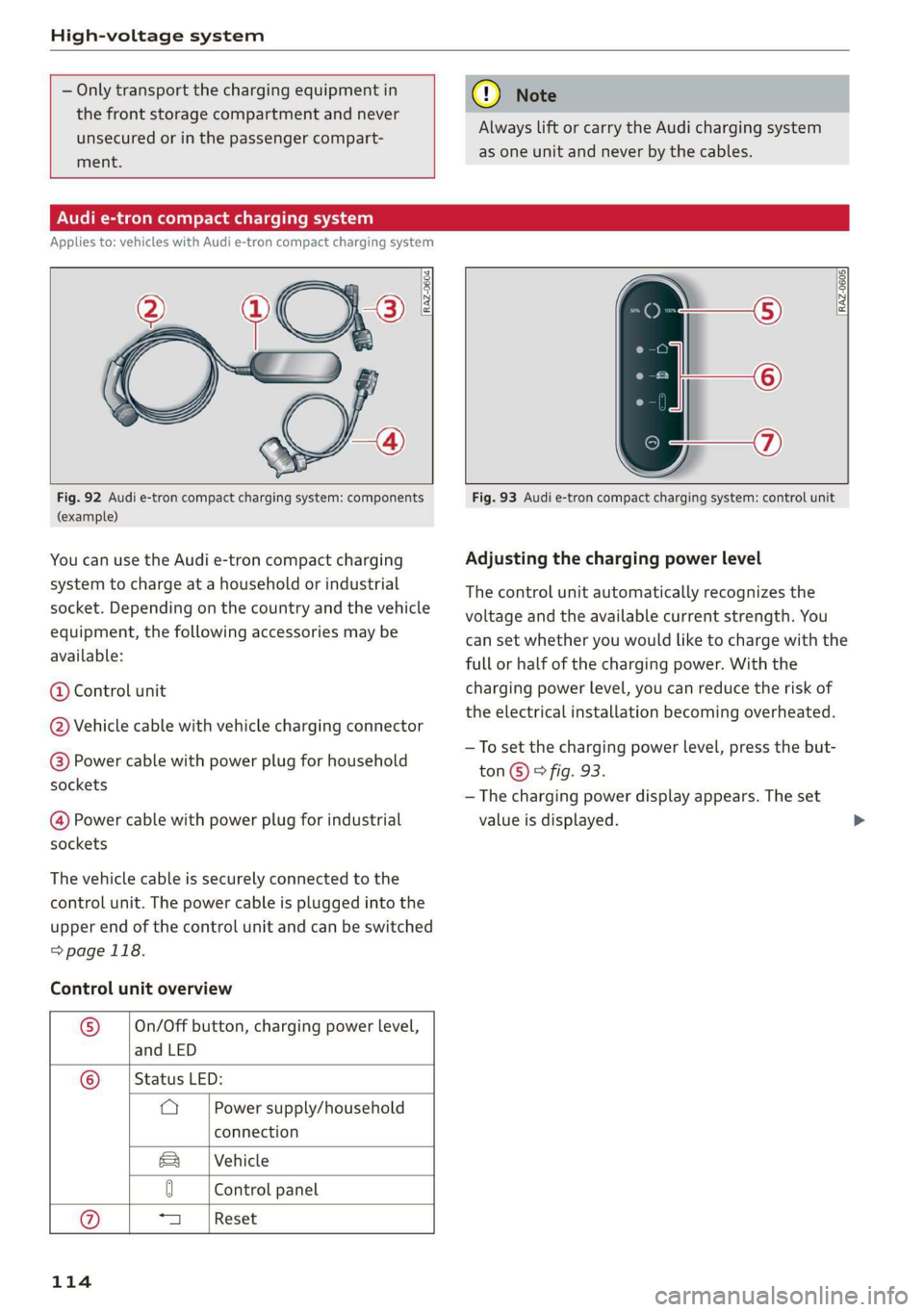
Fig. 92 Audi e-tron compact charging system: components
(example)
You can use the Audi e-tron compact charging
system to charge at a household or industrial
socket. Depending on the country and the vehicle
equipment, the following accessories may be
available:
@ Control unit
@ Vehicle cable with vehicle charging connector
@® Power cable with power plug for household
sockets
@ Power cable with power plug for industrial
sockets
The vehicle cable is securely connected to the
control unit. The power cable is plugged into the
upper end of the control unit and can be switched
=>page 118.
Control unit overview
® On/Off button, charging power level,
and LED
© _ |Status LED:
a Power supply/household
connection
Vehicle
Sa
0 Control panel
a Reset
114
Fig. 93 Audi e-tron compact charging system: control unit
Adjusting the charging power level
The control unit automatically recognizes the
voltage and the available current strength. You
can set whether you would like to charge with the
full or half of the charging power. With the
charging power level, you can reduce the risk of
the electrical installation becoming overheated.
—To set the charging power level, press the but-
ton©) & fig. 93.
— The charging power display appears. The set
value is displayed.
Page 118 of 310
High-voltage system
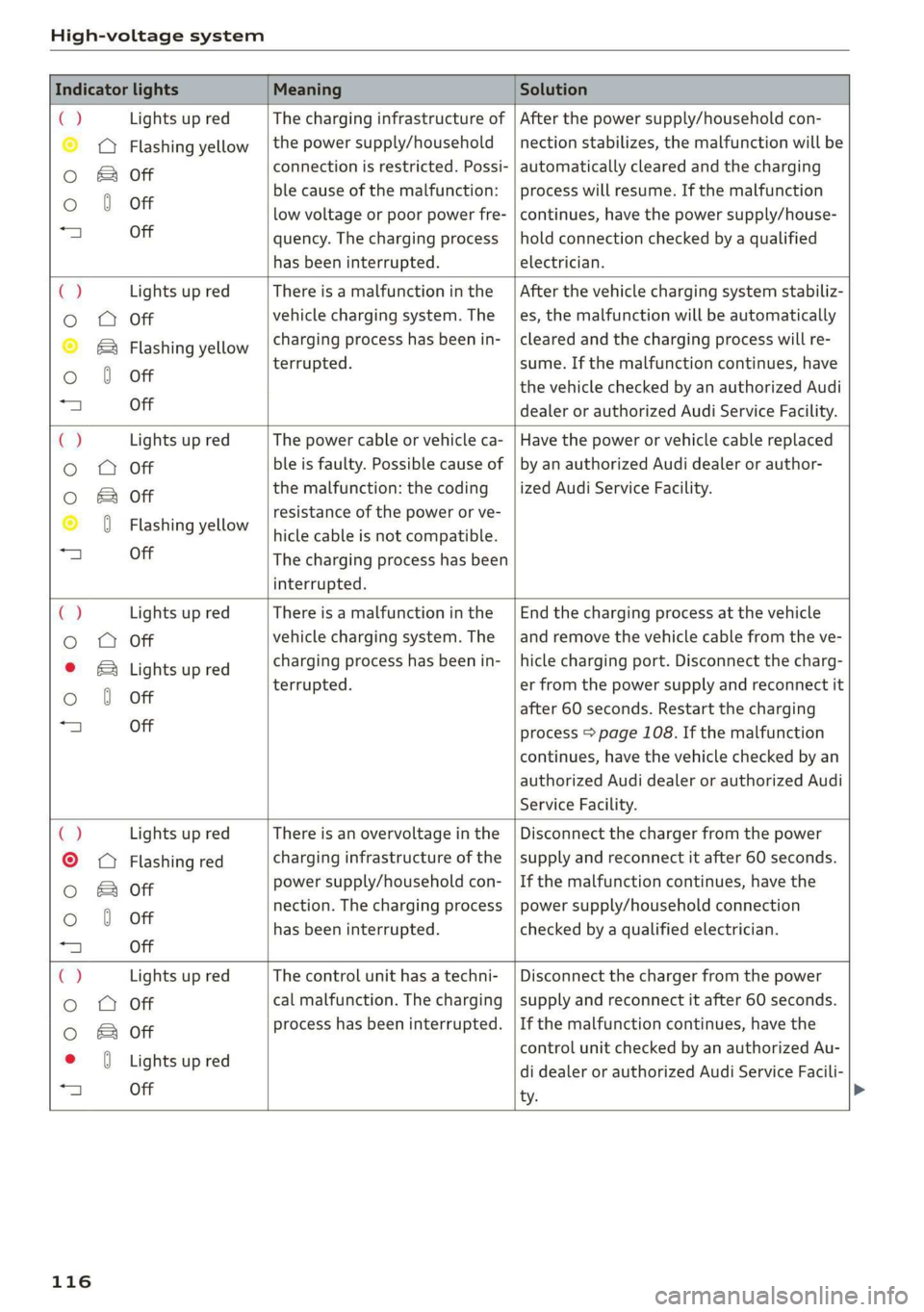
Indicator lights Meaning Solution
ia Lights up red The charging infrastructure of | After the power supply/household con-
© © Flashing yellow |the power supply/household | nection stabilizes, the malfunction will be
Oo B of connection is restricted. Possi- | automatically cleared and the charging
o 8 of ble cause of the malfunction: | process will resume. If the malfunction
low voltage or poor power fre- | continues, have the power supply/house-
“4 Off quency. The charging process | hold connection checked by a qualified
has been interrupted. electrician.
4 Lights up red There is a malfunction inthe | After the vehicle charging system stabiliz-
o O Off vehicle charging system. The | es, the malfunction will be automatically
© B® Flashing yellow charging process has been in- | cleared and the charging process will re-
oO 6 Off terrupted. sume. If the malfunction continues, have
the vehicle checked by an authorized Audi
“A Off dealer or authorized Audi Service Facility.
C2 Lights up red The power cable or vehicle ca- | Have the power or vehicle cable replaced
o OQ Off ble is faulty. Possible cause of | by an authorized Audi dealer or author-
oO B otf the malfunction: the coding _| ized Audi Service Facility.
© 0 Flashing yellow resistance of the power or ve-
hicle cable is not compatible.
a) Off The charging process has been
interrupted.
€) Lights up red There is a malfunction in the | End the charging process at the vehicle
o OQ Off vehicle charging system. The | and remove the vehicle cable from the ve-
© B Lights up red charging process has been in- | hicle charging port. Disconnect the charg-
Oo 0 Off terrupted. er from the power supply and reconnect it
after 60 seconds. Restart the charging
“a Off process > page 108. If the malfunction
continues, have the vehicle checked by an
authorized Audi dealer or authorized Audi
Service Facility.
() Lights up red There is an overvoltage inthe | Disconnect the charger from the power
©
© Flashing red charging infrastructure of the | supply and reconnect it after 60 seconds.
Oo B of power supply/household con- | If the malfunction continues, have the
Oo 0 Off nection. The charging process | power supply/household connection
has been interrupted. checked by a qualified electrician.
=| Off
Ca Lights up red The control unit has atechni- | Disconnect the charger from the power
Oo QO Off cal malfunction. The charging | supply and reconnect it after 60 seconds.
0 & of process has been interrupted. | If the malfunction continues, have the
* 0 vightsupred control unit checked by an authorized Au-
25 see di dealer or authorized Audi Service Facili-
ty.
116
Page 120 of 310
High-voltage system
Indicator lights Meaning Solution
() Off The indicator light in the
© © Lights up red On/Off button on the control
© & Lights up red unit is faulty. The charging
. process has been interrupted.
e {Lights up red
aj Lights up red
Have the control unit replaced by an au-
thorized Audi dealer or authorized Audi
Service Facility.
@ Tips
— The device runs a self test after power has
been restored to the control unit. If a self
test is successful, all indicator lights will il-
luminate green for two seconds.
— If a household socket is used for the charg-
ing process, the charging power level is au-
tomatically set to 100%. If multiple electri-
cal consumers are connected to a circuit,
the charging power may be limited to 50%
when charging with a household socket in
order to relieve the load on the electrical in-
stallation.
— If an industrial socket is used for the charg-
ing process, the charging power level is au-
tomatically set to 50%. To receive the maxi-
mum charging power, the value must be set
to 100%.
— The Audi e-tron compact charging system is
designed for charging at sockets with a volt-
age of 120 V/240 V. If your socket has a dif-
ferent voltage, contact and authorized Audi
dealer or authorized Audi Service Facility.
— If your Audi e-tron compact charging sys-
tem has a fixed connection, meaning can be
connected directly to the power supply
without a power cable, contact a qualified
electrician or an authorized Audi dealer or
authorized Audi Service Facility.
118
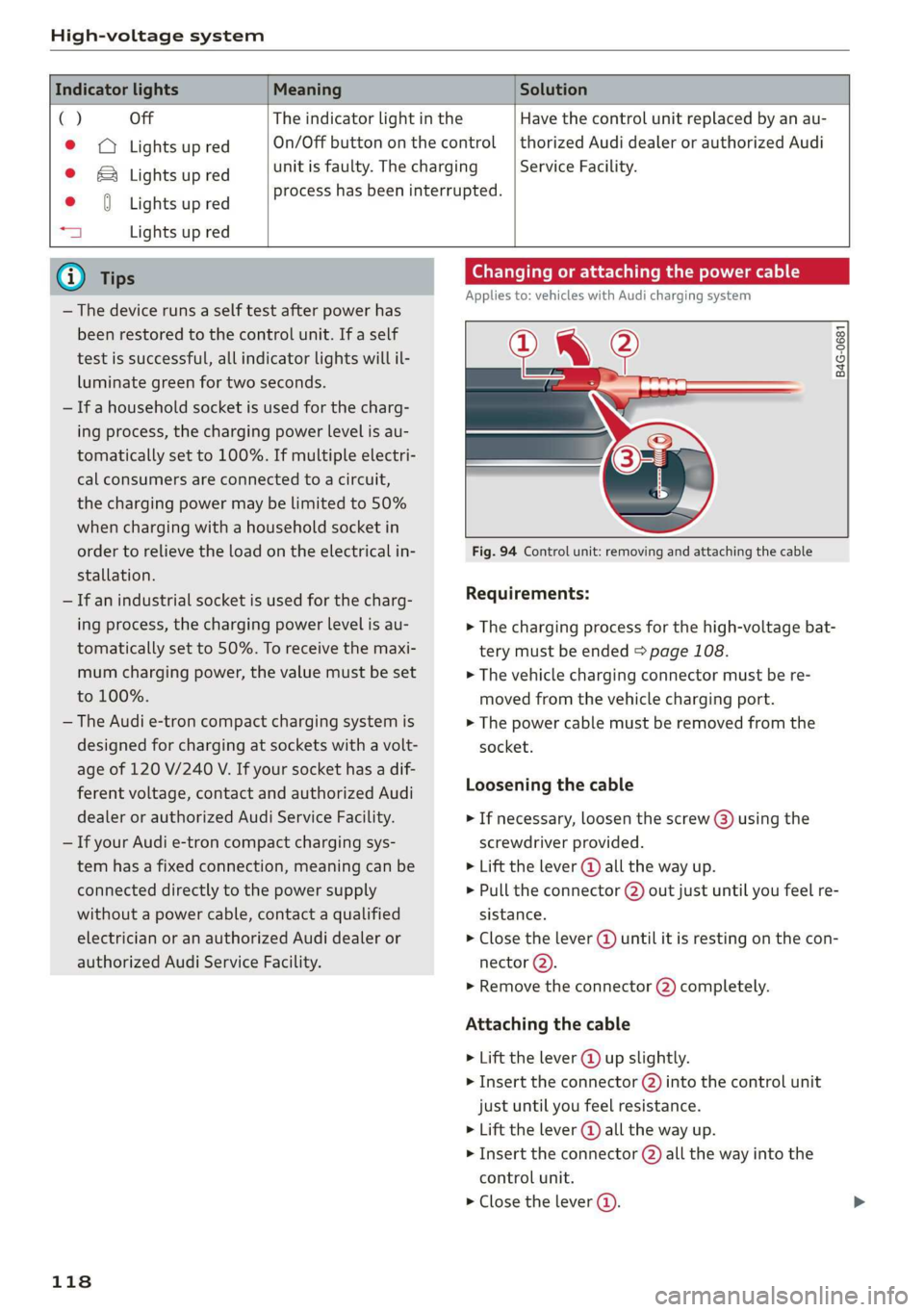
Changing or attaching the power cable
Applies to: vehicles with Audi charging system
NL ?
B4G-0681
Fig. 94 Control unit: removing and attaching the cable
Requirements:
> The charging process for the high-voltage bat-
tery must be ended > page 108.
> The vehicle charging connector must be re-
moved from the vehicle charging port.
> The power cable must be removed from the
socket.
Loosening the cable
> If necessary, loosen the screw (3) using the
screwdriver provided.
> Lift the lever @ all the way up.
> Pull the connector @) out just until you feel re-
sistance.
> Close the lever @) until it is resting on the con-
nector (2).
» Remove the connector (2) completely.
Attaching the cable
> Lift the lever @ up slightly.
> Insert the connector (2) into the control unit
just until you feel resistance.
> Lift the lever @ all the way up.
> Insert the connector (2) all the way into the
control unit.
> Close the lever @).
Page 185 of 310
4KE012721BB
Telephone
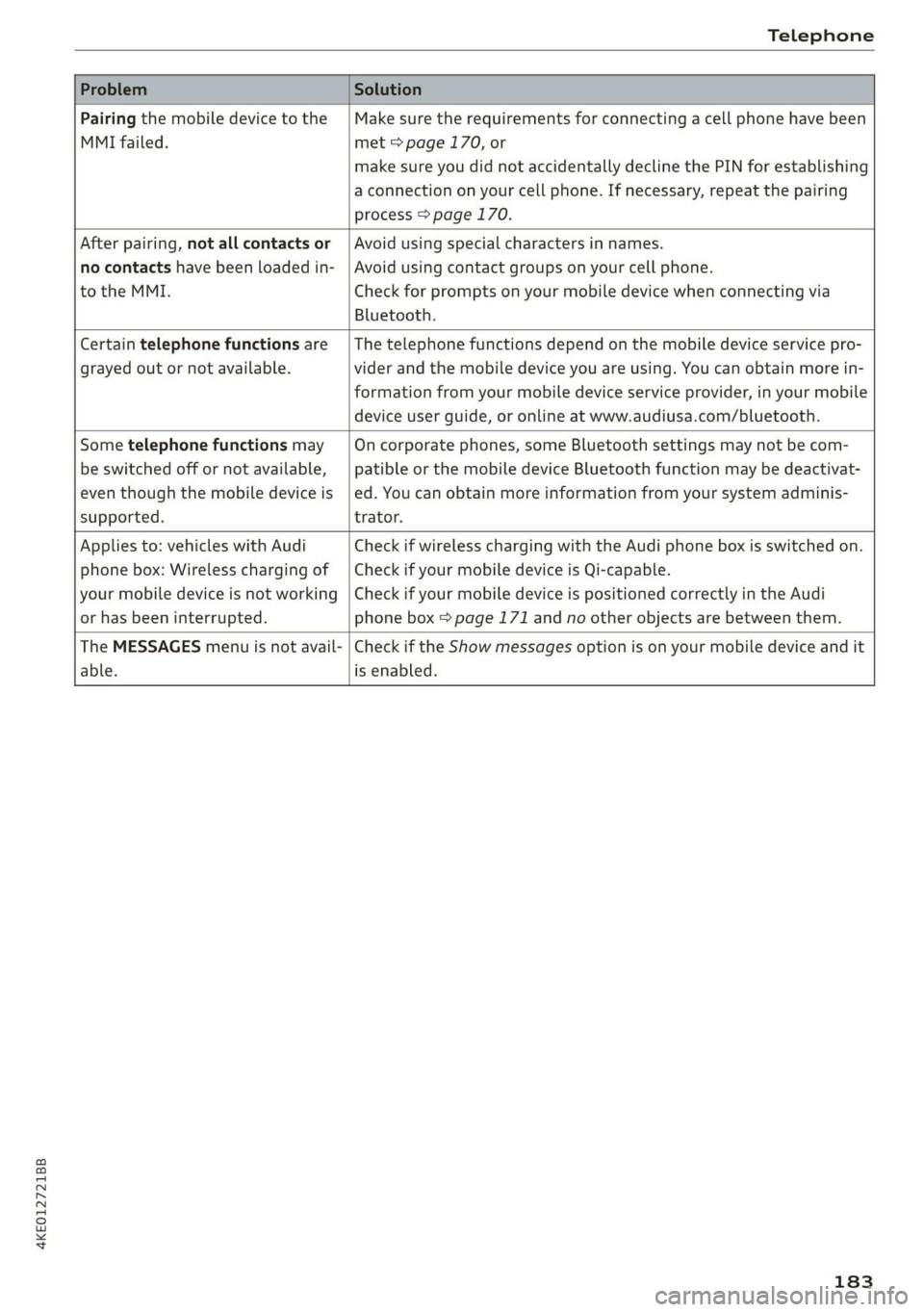
Problem Solution
Pairing the mobile device to the
MMI failed.
Make sure the requirements for connecting a cell phone have been
met > page 170, or
make sure you did not accidentally decline the PIN for establishing
a connection on your cell phone. If necessary, repeat the pairing
process > page 170.
After pairing, not all contacts or
no contacts have been loaded in-
to the MMI.
Avoid using special characters in names.
Avoid using contact groups on your cell phone.
Check for prompts on your mobile device when connecting via
Bluetooth.
Certain telephone functions are
grayed out or not available.
The telephone functions depend on the mobile device service pro-
vider and the mobile device you are using. You can obtain more in-
formation from your mobile device service provider, in your mobile
device user guide, or online at www.audiusa.com/bluetooth.
Some telephone functions may
be switched off or not available,
even though the mobile device is
supported.
On corporate phones, some Bluetooth settings may not be com-
patible or the mobile device Bluetooth function may be deactivat-
ed. You can obtain more information from your system adminis-
trator.
Applies to: vehicles with Audi
phone box: Wireless charging of
your mobile device is not working
or has been interrupted.
Check if wireless charging with the Audi phone box is switched on.
Check if your mobile device is Qi-capable.
Check if your mobile device is positioned correctly in the Audi
phone box > page 171 and no other objects are between them.
The MESSAGES menu is not avail-
able.
Check if the Show messages option is on your mobile device and it
is enabled.
183
Page 189 of 310
4KE012721BB
Audi connect
services. The cell phone network, for exam-
ple, must be available to use these services.
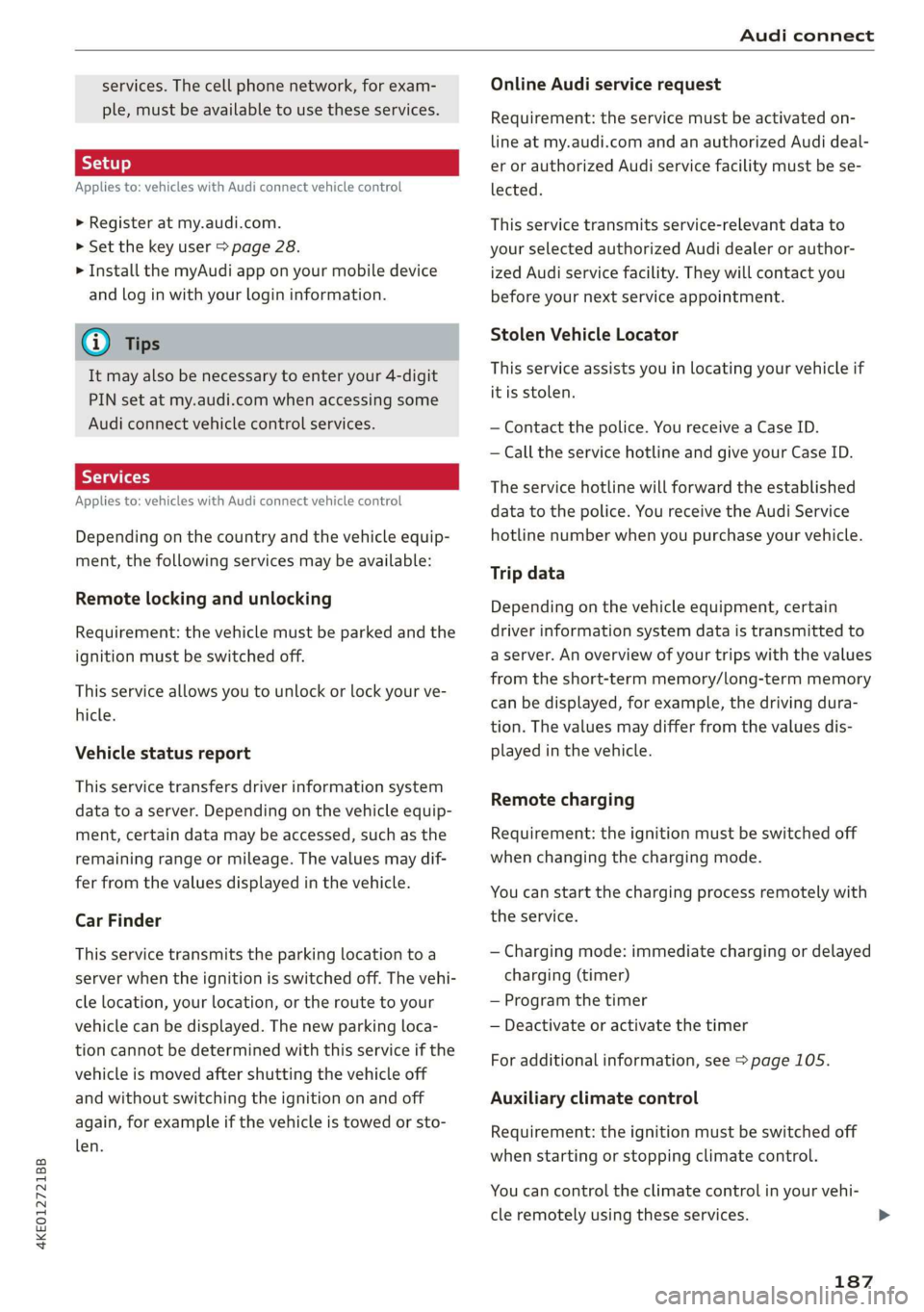
Applies to: vehicles with Audi connect vehicle control
> Register at my.audi.com.
> Set the key user > page 28.
> Install the myAudi app on your mobile device
and log in with your login information.
G@) Tips
It may also be necessary to enter your 4-digit
PIN set at my.audi.com when accessing some
Audi connect vehicle control services.
Yate]
Applies to: vehicles with Audi connect vehicle control
Depending on the country and the vehicle equip-
ment, the following services may be available:
Remote locking and unlocking
Requirement: the vehicle must be parked and the
ignition must be switched off.
This service allows you to unlock or lock your ve-
hicle.
Vehicle status report
This service transfers driver information system
data to a server. Depending on the vehicle equip-
ment, certain data may be accessed, such as the
remaining range or mileage. The values may dif-
fer from the values displayed in the vehicle.
Car Finder
This service transmits the parking location to a
server when the ignition is switched off. The vehi-
cle location, your location, or the route to your
vehicle can be displayed. The new parking loca-
tion cannot be determined with this service if the
vehicle is moved after shutting the vehicle off
and without switching the ignition on and off
again, for example if the vehicle is towed or sto-
len.
Online Audi service request
Requirement: the service must be activated on-
line at my.audi.com and an authorized Audi deal-
er or authorized Audi service facility must be se-
lected.
This service transmits service-relevant data to
your selected authorized Audi dealer or author-
ized Audi service facility. They will contact you
before your next service appointment.
Stolen Vehicle Locator
This service assists you in locating your vehicle if
it is stolen.
— Contact the police. You receive a Case ID.
— Call the service hotline and give your Case ID.
The service hotline will forward the established
data to the police. You receive the Audi Service
hotline number when you purchase your vehicle.
Trip data
Depending on the vehicle equipment, certain
driver information system data is transmitted to
a server. An overview of your trips with the values
from the short-term memory/long-term memory
can be displayed, for example, the driving dura-
tion. The values may differ from the values dis-
played in the vehicle.
Remote charging
Requirement: the ignition must be switched off
when changing the charging mode.
You can start the charging process remotely with
the service.
— Charging mode: immediate charging or delayed
charging (timer)
— Program the timer
— Deactivate or activate the timer
For additional information, see > page 105.
Auxiliary climate control
Requirement: the ignition must be switched off
when starting or stopping climate control.
You can control the climate control in your vehi-
cle remotely using these services.
187
>
Page 190 of 310
Audi connect
— Start or stop climate control
— Program the timer
— Deactivate or activate the timer
For additional information, see > page 84.
Geofencing Alert
Requirement: a key user must be set in the vehi-
cle > page 28.
This service allows you to set permitted and for-
bidden zones for your vehicle as well as set time
limits for these zones. If your vehicle leaves a
permitted zone or enters a forbidden zone, you
will be notified with a push notification and/or an
e-mail.
Speed Alert
Requirement: a key user must be set in the vehi-
cle > page 28.
You can set up to two speed limits for your vehi-
cle using this service. If your vehicle exceeds a set
speed limit, you will be notified with a push noti-
fication and/or e-mail.
Valet Alert
Requirement: a key user must be set in the vehi-
cle > page 187.
If you give your vehicle to a parking service, you
can set a zone and a speed limit using the myAu-
di app. If the vehicle leaves the zone or exceeds
the speed limit, you will be notified with a push
notification and/or e-mail.
ZA WARNING
— Do not ignore messages and warning or indi-
cator lights that turn on in the vehicle be-
cause of the information in the vehicle sta-
tus report. This could lead to break downs in
on the road, accidents and serious injuries.
— Only perform charging functions on the
high-voltage battery if the vehicle is shut off
correctly, is connected to a suitable socket
and if the ignition is switched off.
188
G) Tips
For some services, you can select if you would
like to be notified with a push notification
and/or an e-mail.
Settings
(et) telat -Matian celia
> Applies to: MMI: Select on the home screen:
SETTINGS > Connection settings > Mobile
phone network.
Depending on the country, vehicle equipment,
and connection type, the following functions may
be available:
Data connection settings
Using the Data connection settings menu, you
can set when the system should connect to the
Internet. The Internet connection disconnects
automatically once the requested Audi connect
Infotainment service no longer requires any data.
— Data roaming: data roaming is switched off at
the factory. To use a data connection outside of
the country, data roaming must be switched
on. The setting is stored for the current SIM
card or the mobile device that is currently con-
nected.
— Allow MMI online services: when this function
is switched on, a data connection is automati-
cally established in order to use Audi connect
Infotainment services.
— Allow Wi-Fi devices: when this function is
switched on, you can allow or deny Internet
connections.
Access point
The connection is configured automatically based
on the SIM card being used. The following values
can be changed. You can obtain more information
from your cell phone service provider.
— Access Point Name (APN): the access point de-
pends on the cell phone service provider and is
assigned automatically.
— User name: your cell phone service provider as-
signs the user name for your online profile. >
Page 222 of 310
Media
Amazon Alexa
Applies to: vehicles with Amazon Alexa Integration
You can play various Amazon Alexa content using
the MMI. The voice recognition system is used to
operate it.
Requirement: Amazon Alexa must be activated
=>page 25.
> Start Amazon Alexa using the voice recognition
system.
> Applies to: MMI: Select on the home screen:
MEDIA > Source > Amazon Alexa.
() Note
Read the information about Audi connect, and
be sure to note the connectivity costs section
=> page 184.
Multimedia connections
USB adapter cable
[RAH-9202
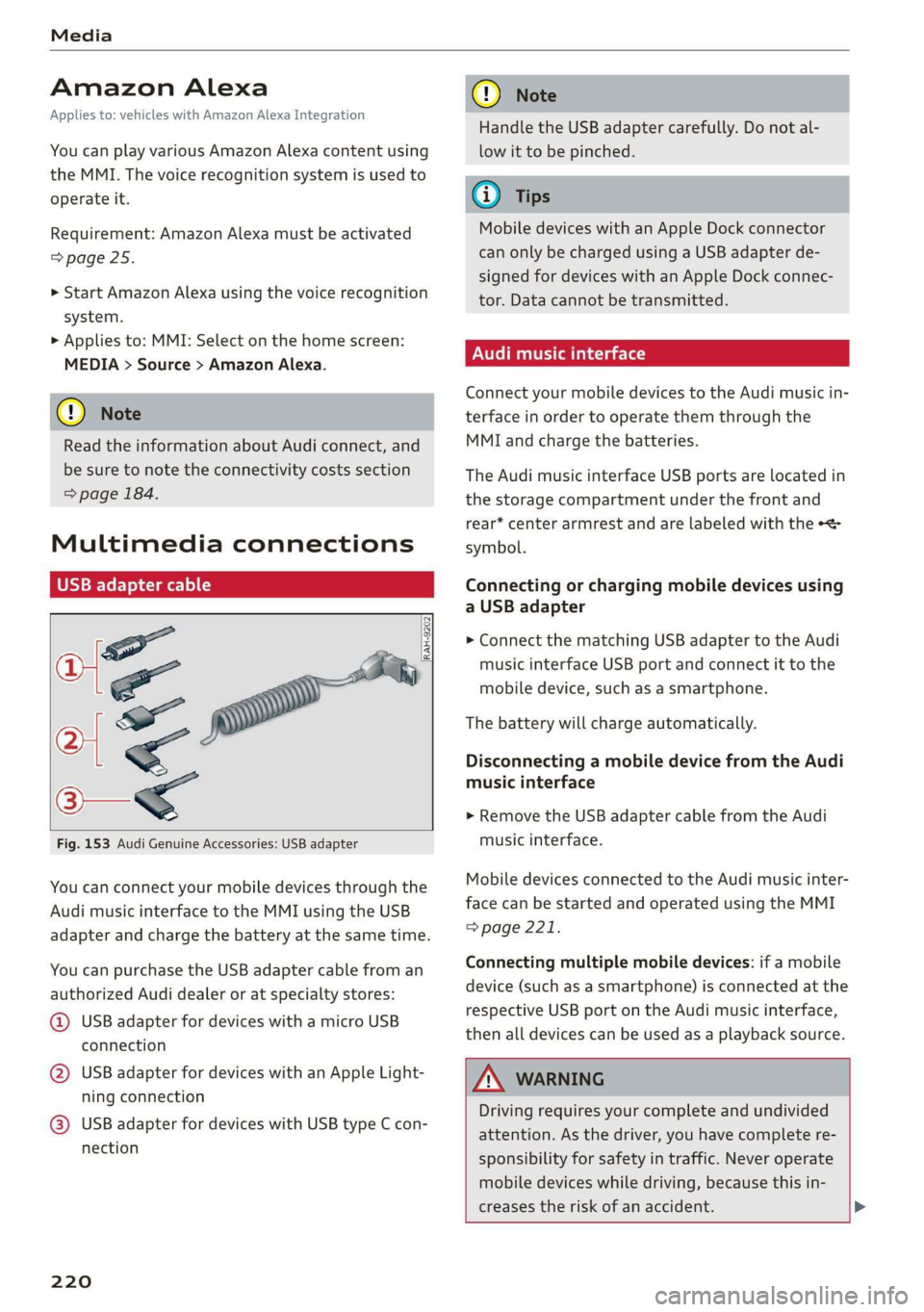
Fig. 153 Audi Genuine Accessories: USB adapter
You can connect your mobile devices through the
Audi music interface to the MMI using the USB
adapter and charge the battery at the same time.
You can purchase the USB adapter cable from an
authorized Audi dealer or at specialty stores:
@ USB adapter for devices with a micro USB
connection
@ USB adapter for devices with an Apple Light-
ning connection
@ USB adapter for devices with USB type C con-
nection
220
C@) Note
Handle the USB adapter carefully. Do not al-
low it to be pinched.
G) Tips
Mobile devices with an Apple Dock connector
can only be charged using a USB adapter de-
signed for devices with an Apple Dock connec-
tor. Data cannot be transmitted.
Audi music interface
Connect your mobile devices to the Audi music in-
terface in order to operate them through the
MMI and charge the batteries.
The Audi music interface USB ports are located in
the storage compartment under the front and
rear* center armrest and are labeled with the «<>
symbol.
Connecting or charging mobile devices using
a USB adapter
> Connect the matching USB adapter to the Audi
music interface USB port and connect it to the
mobile device, such as a smartphone.
The battery will charge automatically.
Disconnecting a mobile device from the Audi
music interface
> Remove the USB adapter cable from the Audi
music interface.
Mobile devices connected to the Audi music inter-
face can be started and operated using the MMI
=> page 221.
Connecting multiple mobile devices: if a mobile
device (such as a smartphone) is connected at the
respective USB port on the Audi music interface,
then all devices can be used as a playback source.
ZA\ WARNING
Driving requires your complete and undivided
attention. As the driver, you have complete re-
sponsibility for safety in traffic. Never operate
mobile devices while driving, because this in-
creases the risk of an accident. >
Page 282 of 310
Fuses and bulbs
— Some of the equipment listed in the follow-
ing tables applies only to certain model ver-
sions or certain optional equipment.
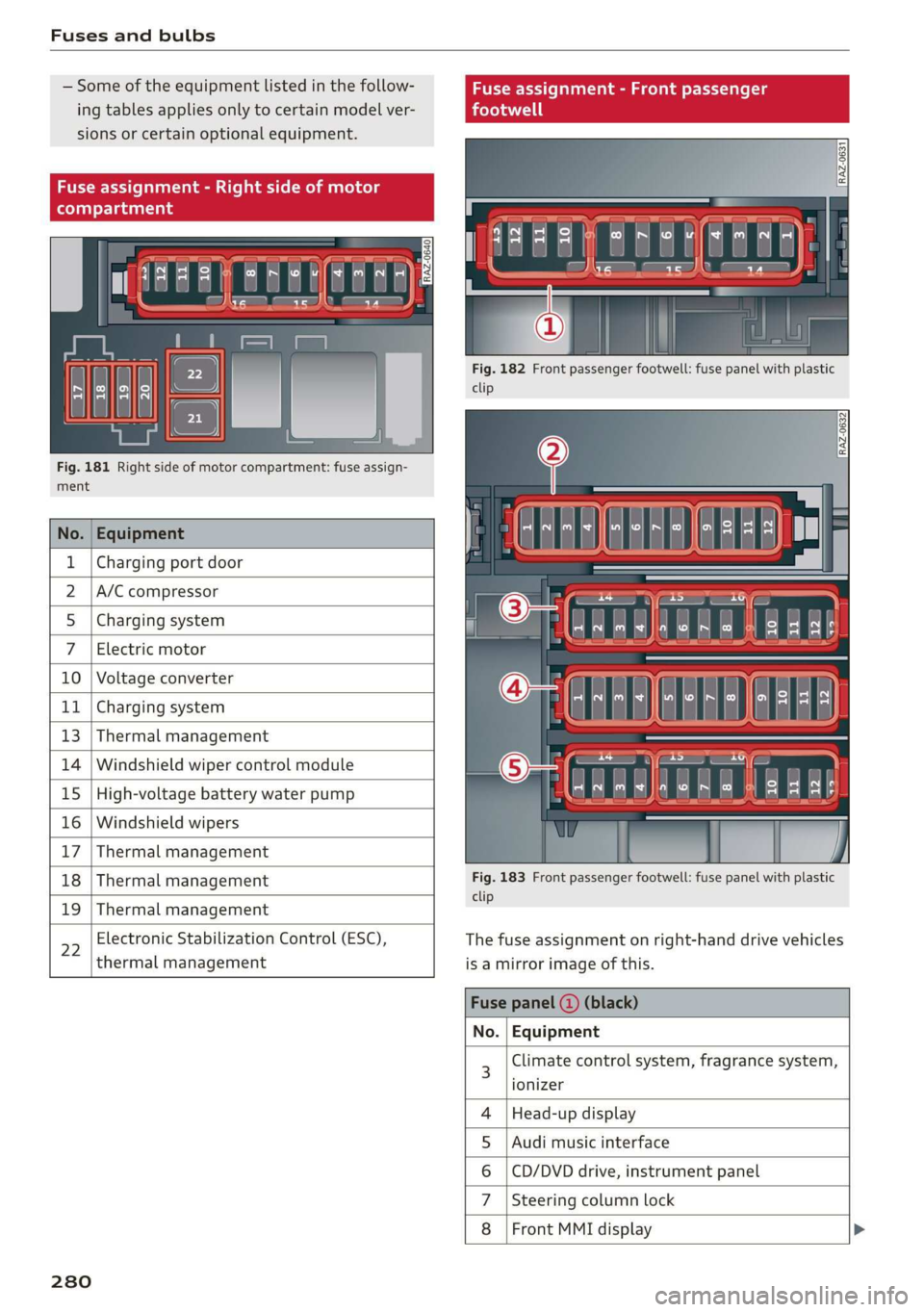
Fig. 181 Right side of motor compartment: fuse assign-
ment
No. Equipment
Charging port door
A/C compressor
Charging system
Electric motor
10 Voltage converter
11 Charging system
13 Thermal management
14 Windshield wiper control module
15 High-voltage battery water pump
16 Windshield wipers
17 Thermal management
18 Thermal management
19 Thermal management
22
Electronic Stabilization Control (ESC),
thermal management
280
Fig. 182 Front passenger footwell: fuse panel with plastic
clip
Fig. 183 Front passenger footwell: fuse panel with plastic
clip
The fuse assignment on right-hand drive vehicles
is a mirror image of this.
Climate control system, fragrance system,
ionizer
Head-up display
Audi music interface
CD/DVD drive, instrument panel
Steering column lock
Front MMI display >
OlN|
A)
uy
sA