cruise control AUDI E-TRON 2019 User Guide
[x] Cancel search | Manufacturer: AUDI, Model Year: 2019, Model line: E-TRON, Model: AUDI E-TRON 2019Pages: 310, PDF Size: 81.91 MB
Page 142 of 310
Driver assistance
system expects that you can easily drive around
the stationary vehicle by turning the steering
wheel.
— The adaptive cruise assist may not react to sta-
tionary obstacles, such as the end of a traffic
jam, especially at high speeds.
— The adaptive cruise assist has a limited ability
to detect vehicles that are a short distance
ahead, off to the side of your vehicle, or moving
into your lane.
— Objects that are difficult to detect, such as mo-
torcycles, vehicles with high ground clearance,
or vehicles with an overhanging load, may be
detected late or not detected at all.
— The adaptive cruise assist does not respond to
people, animals, or objects that are crossing or
approaching from the opposite direction.
Z\ WARNING
Follow the safety precautions and note the
limits of the assist systems, sensors, and
cameras > page 123.
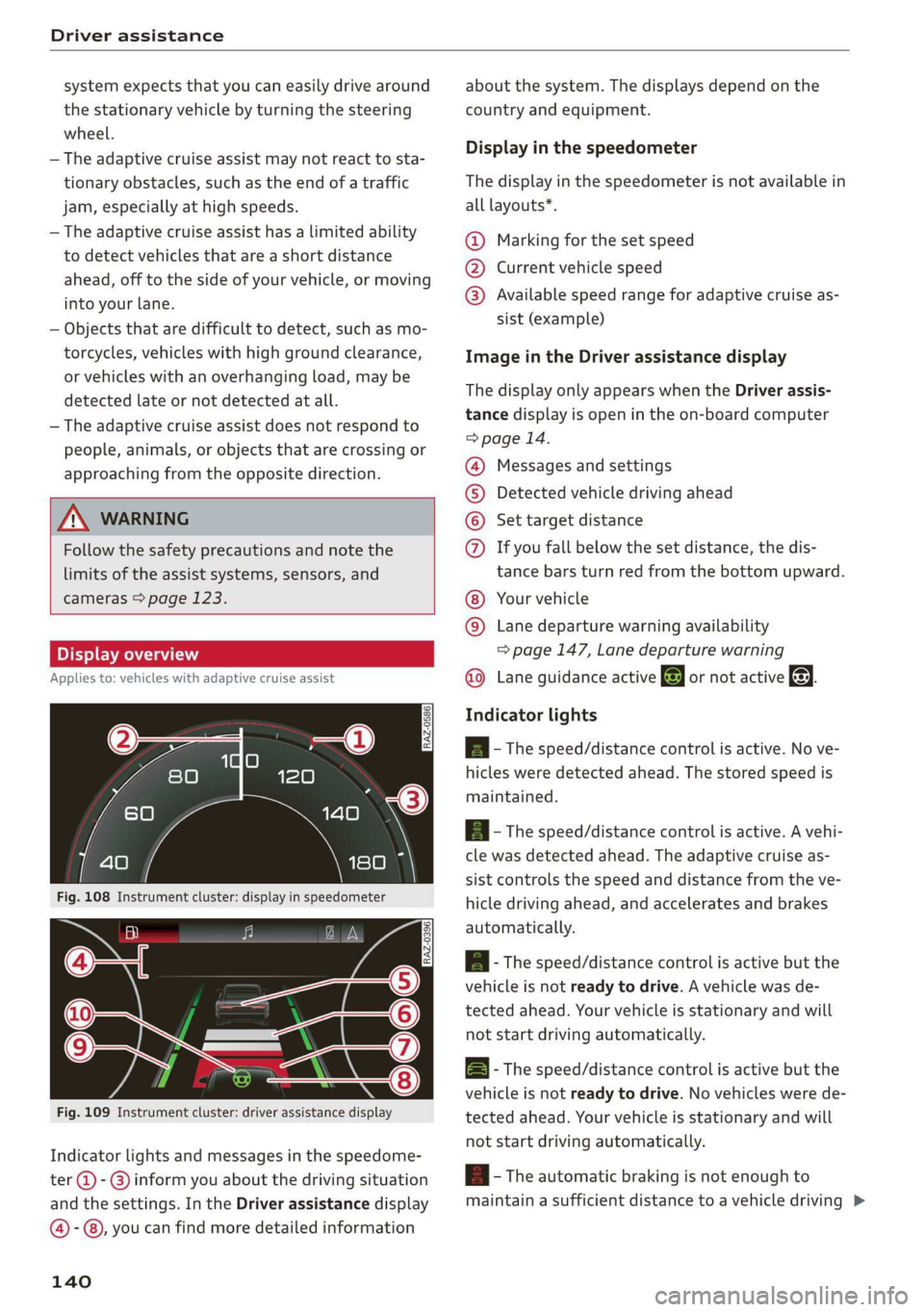
Display overview
Applies to: vehicles with adaptive cruise assist
eI S|
3 | kel Ny =|
fac
Fig. 109 Instrument cluster: driver assistance display
Indicator lights and messages in the speedome-
ter @ -@ inform you about the driving situation
and the settings. In the Driver assistance display
@-©®, you can find more detailed information
140
about the system. The displays depend on the
country and equipment.
Display in the speedometer
The display in the speedometer is not available in
all layouts*.
@ Marking for the set speed
@ Current vehicle speed
@® Available speed range for adaptive cruise as-
sist (example)
Image in the Driver assistance display
The display only appears when the Driver assis-
tance display is open in the on-board computer
> page 14.
Messages and settings
Detected vehicle driving ahead
Set target distance
COO® If you fall below the set distance, the dis-
tance bars turn red from the bottom upward.
Your vehicle
©® Lane departure warning availability
=> page 147, Lane departure warning
Lane guidance active @ or not active &. ©
Indicator lights
A - The speed/distance control is active. No ve-
hicles were detected ahead. The stored speed is
maintained.
a - The speed/distance control is active. A vehi-
cle was detected ahead. The adaptive cruise as-
sist controls the speed and distance from the ve-
hicle driving ahead, and accelerates and brakes
automatically.
ial - The speed/distance control is active but the
vehicle is not ready to drive. A vehicle was de-
tected ahead. Your vehicle is stationary and will
not start driving automatically.
B - The speed/distance control is active but the
vehicle is not ready to drive. No vehicles were de
tected ahead. Your vehicle is stationary and will
not start driving automatically.
B- The automatic braking is not enough to
maintain a sufficient distance to a vehicle driving
Page 143 of 310
4KE012721BB
Driver assistance
ahead. You must intervene > page 145, Driver in-
tervention request.
Es this indicator light appears if steering activity
is no longer detected. Always keep your hands on
the steering wheel so you can be ready to steer at
any time > page 146.
ZA WARNING
Follow the safety precautions and note the
limits of the assist systems, sensors, and
cameras > page 123.
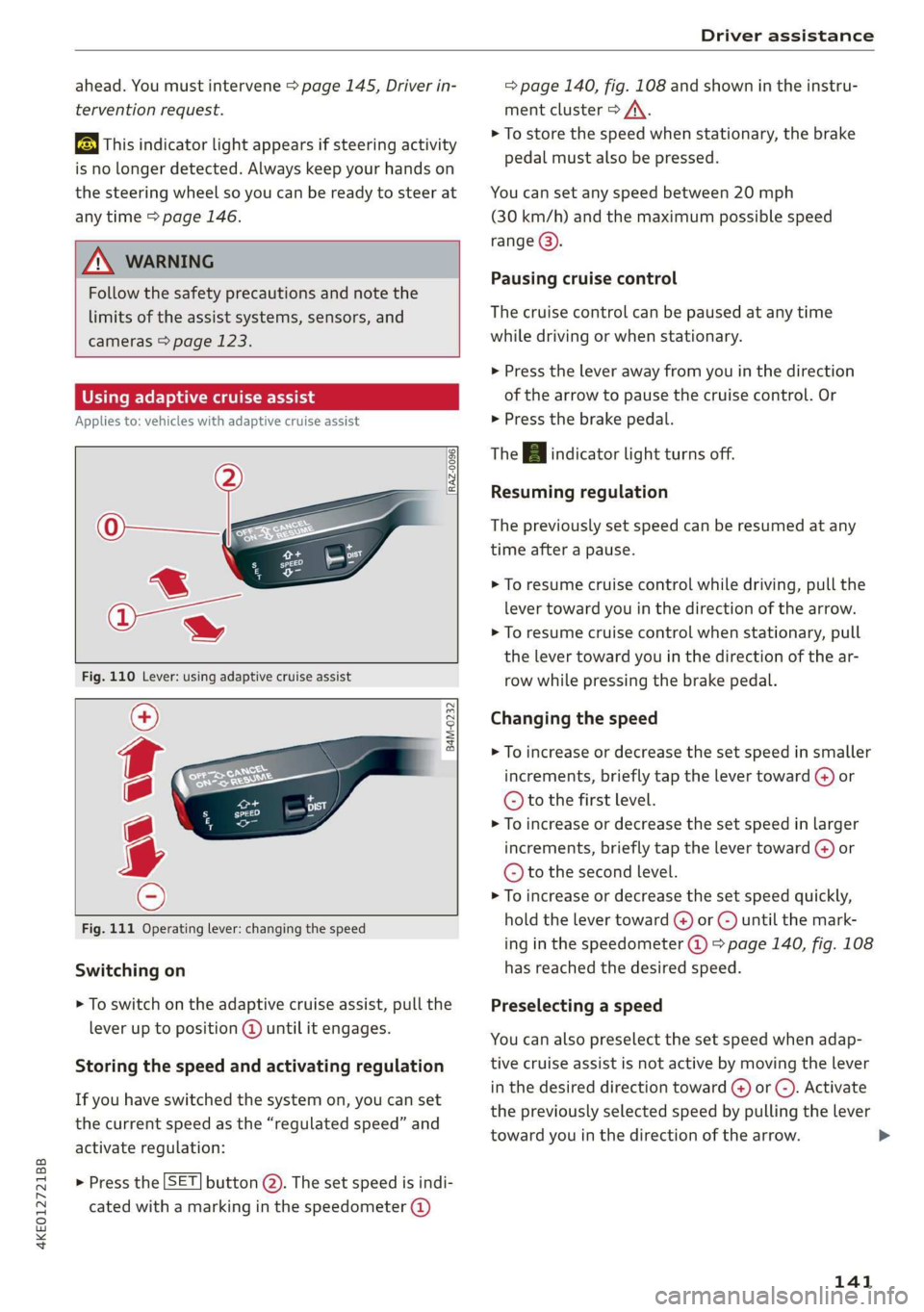
Using adaptive cruise assist
Applies to: vehicles with adaptive cruise assist
RAZ-0096
B4M-0232
Fig. 111 Operating lever: changing the speed
Switching on
> To switch on the adaptive cruise assist, pull the
lever up to position @ until it engages.
Storing the speed and activating regulation
If you have switched the system on, you can set
the current speed as the “regulated speed” and
activate regulation:
> Press the [SET] button @). The set speed is indi-
cated with a marking in the speedometer @)
= page 140, fig. 108 and shown in the instru-
ment cluster > /\.
> To store the speed when stationary, the brake
pedal must also be pressed.
You can set any speed between 20 mph
(30 km/h) and the maximum possible speed
range @).
Pausing cruise control
The cruise control can be paused at any time
while driving or when stationary.
> Press the lever away from you in the direction
of the arrow to pause the cruise control. Or
> Press the brake pedal.
The B indicator light turns off.
Resuming regulation
The previously set speed can be resumed at any
time after a pause.
> To resume cruise control while driving, pull the
lever
toward you in the direction of the arrow.
> To resume cruise control when stationary, pull
the lever toward you in the direction of the ar-
row while pressing the brake pedal.
Changing the speed
> To increase or decrease the set speed in smaller
increments, briefly tap the lever toward @) or
© to the first level.
> To increase or decrease the set speed in larger
increments, briefly tap the lever toward @) or
© to the second level.
> To increase or decrease the set speed quickly,
hold the lever toward @) or ) until the mark-
ing in the speedometer (@) > page 140, fig. 108
has reached the desired speed.
Preselecting a speed
You can also preselect the set speed when adap-
tive cruise assist is not active by moving the lever
in the desired direction toward () or (-). Activate
the previously selected speed by pulling the lever
toward you in the direction of the arrow.
141
>
Page 144 of 310
Driver assistance
Switching off
If you do not want to use the adaptive cruise as-
sist for a longer period of time, you can switch it
off.
> To switch off the adaptive cruise assist, push
the lever away from you to position © until it
engages.
The indicator light and the set speed will turn on.
ZA\ WARNING
— Follow the safety precautions and note the
limits of the assist systems, sensors, and
cameras > page 123.
— The activated adaptive cruise assist is only
an assist system, and the driver is still re-
sponsible for controlling the vehicle. The
driver is especially responsible for braking,
steering, starting to drive, and controlling
the speed and the distance from other vehi-
cles.
— Activate the adaptive cruise assist only if the
surrounding conditions permit it. Always
adapt your driving style to the current visu-
al, weather, road, and traffic conditions.
— Switch the adaptive cruise assist off tempo-
rarily when driving in turning lanes or high-
way exits. This prevents the vehicle from ac-
celerating to the stored speed when in these
situations.
— If you press the [SET|) button when driving
at speeds below 20 mph (30 km/h), then 20
mph (30 km/h) will be set because that is
the minimum speed that can be set. If no
vehicle is detected ahead of you, the vehicle
will accelerate up to that speed.
G) Tips
— Always keep your hands on the steering
wheel. The driver is always responsible for
adhering to the regulations applicable in
the country where the vehicle is being oper-
ated.
— If you switch the ignition or the adaptive
cruise assist off, the stored speed is erased
for safety reasons.
142
— When the adaptive cruise assist is switched
on, the ESC and the ASR are switched on au-
tomatically.
— The system cannot be switched off if the
road exceeds the maximum possible grade
for safe operation.
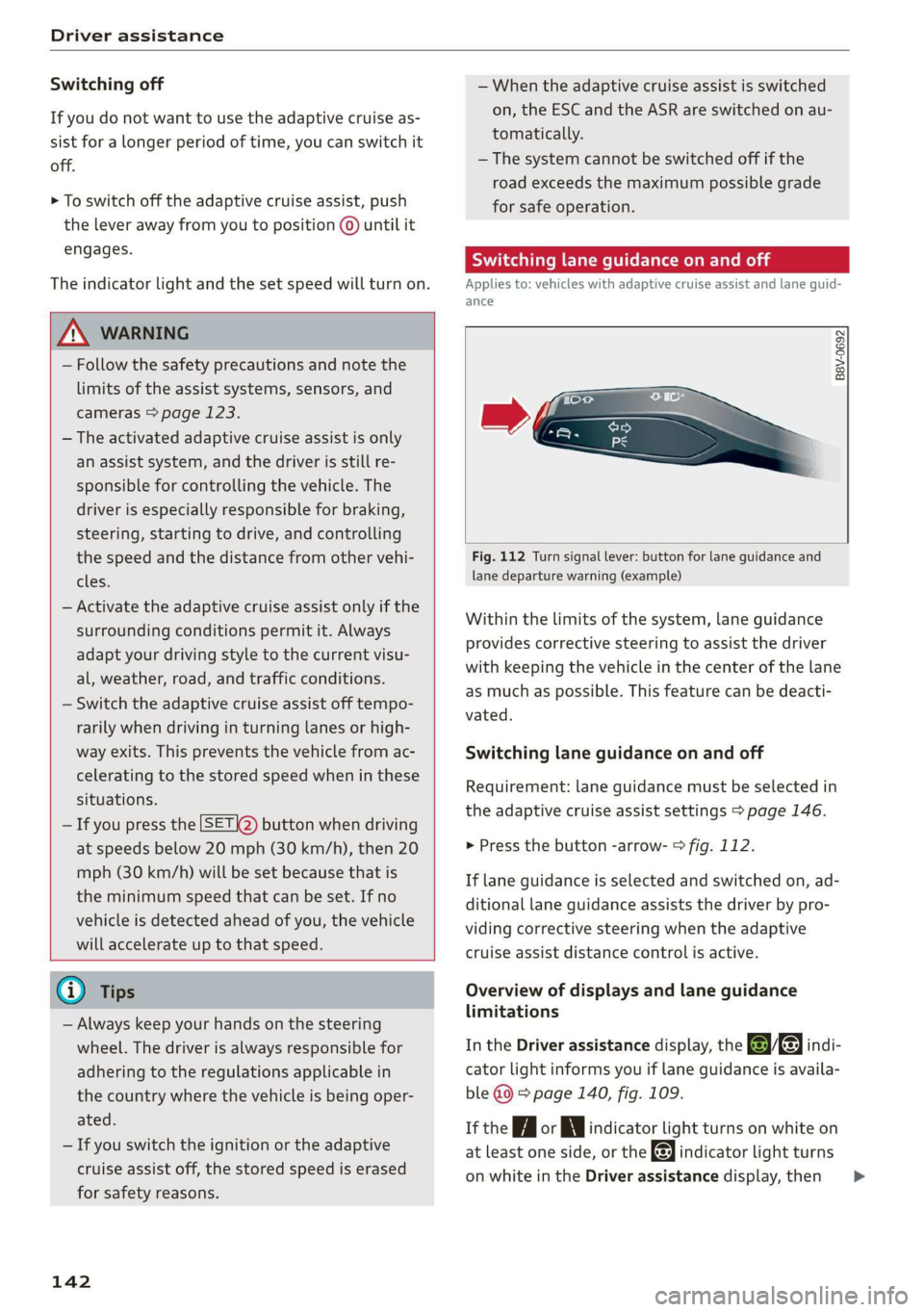
Switching lane guidance on and off
Applies to: vehicles with adaptive cruise assist and lane guid-
ance
B8V-0692
Fig. 112 Turn signal lever: button for lane guidance and
lane departure warning (example)
Within the limits of the system, lane guidance
provides corrective steering to assist the driver
with keeping the vehicle in the center of the lane
as much as possible. This feature can be deacti-
vated.
Switching lane guidance on and off
Requirement: lane guidance must be selected in
the adaptive cruise assist settings > page 146.
> Press the button -arrow- > fig. 112.
If lane guidance is selected and switched on, ad-
ditional lane guidance assists the driver by pro-
viding corrective steering when the adaptive
cruise assist distance control is active.
Overview of displays and lane guidance
limitations
In the Driver assistance display, the Bae indi-
cator light informs you if lane guidance is availa-
ble @ > page 140, fig. 109.
If the Hi or indicator light turns on white on
at least one side, or the indicator light turns
on white in the Driver assistance display, then >
Page 146 of 310
Driver assistance
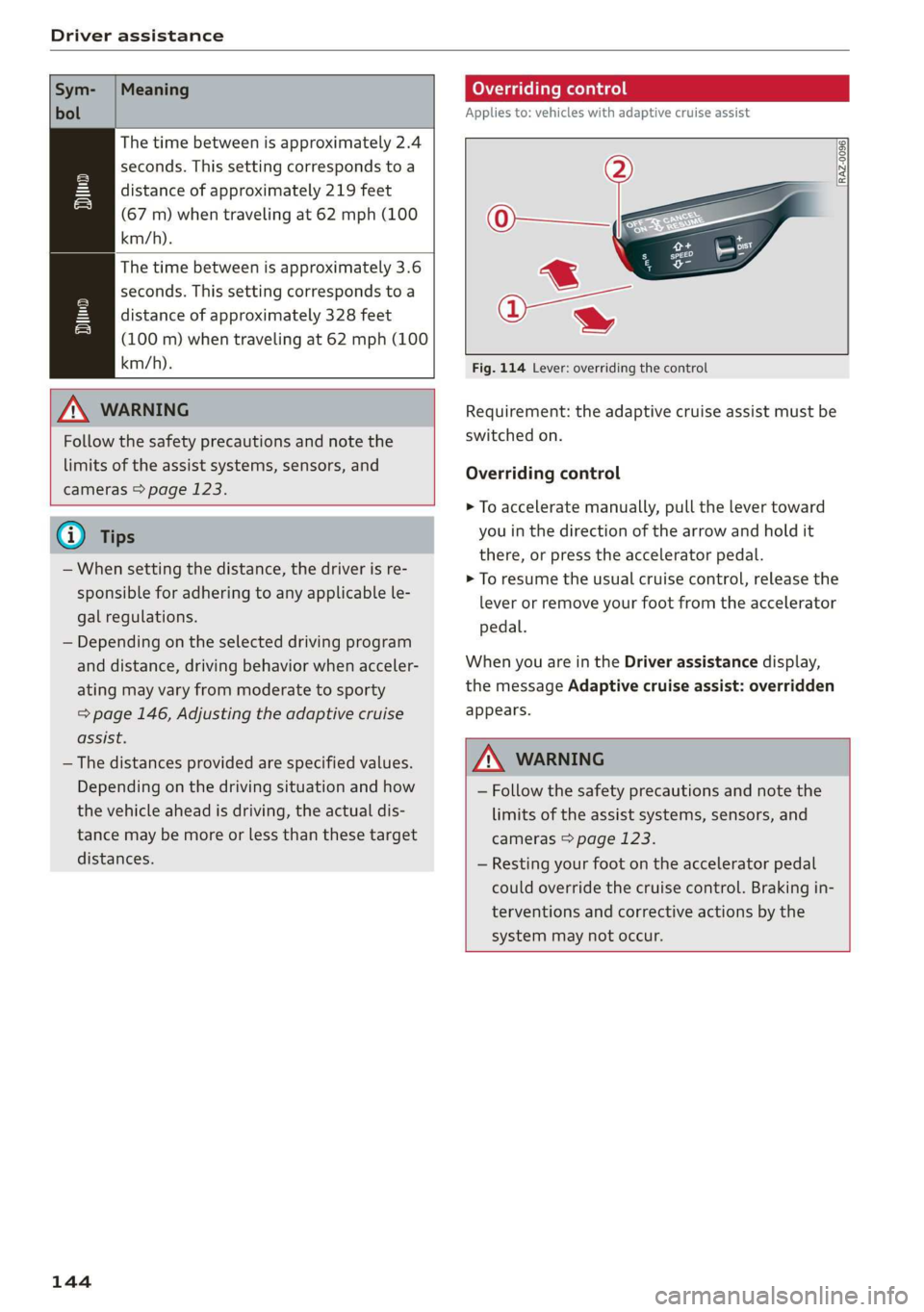
Sym-
bol
Meaning
The time between is approximately 2.4
seconds. This setting corresponds to a
distance of approximately 219 feet
(67 m) when traveling at 62 mph (100
km/h).
The time between is approximately 3.6
seconds. This setting corresponds to a
distance of approximately 328 feet
(100 m) when traveling at 62 mph (100
km/h).
iN)
Z\ WARNING
Follow the safety precautions and note the
limits of the assist systems, sensors, and
cameras > page 123.
G) Tips
— When setting the distance, the driver is re-
sponsible for adhering to any applicable le-
gal regulations.
— Depending on the selected driving program
and distance, driving behavior when acceler-
ating may vary from moderate to sporty
= page 146, Adjusting the adaptive cruise
assist.
— The distances provided are specified values.
Depending on the driving situation and how
the vehicle ahead is driving, the actual dis-
tance may be more or less than these target
distances.
144
Overriding control
Applies to: vehicles with adaptive cruise assist
[RAZ-0096]
Fig. 114 Lever: overriding the control
Requirement: the adaptive cruise assist must be
switched on.
Overriding control
> To accelerate manually, pull the lever toward
you in the direction of the arrow and hold it
there, or press the accelerator pedal.
> To resume the usual cruise control, release the
lever or remove your foot from the accelerator
pedal.
When you are in the Driver assistance display,
the message Adaptive cruise assist: overridden
appears.
Z\ WARNING
— Follow the safety precautions and note the
limits of the assist systems, sensors, and
cameras > page 123.
— Resting your foot on the accelerator pedal
could override the cruise control. Braking in-
terventions and corrective actions by the
system may not occur.
Page 147 of 310
4KE012721BB
Driver assistance
Driving in stop-and-go traffic
Applies to: vehicles with adaptive cruise assist
> Press the brake pedal to slow your vehicle
down.
S 3 S z
ee
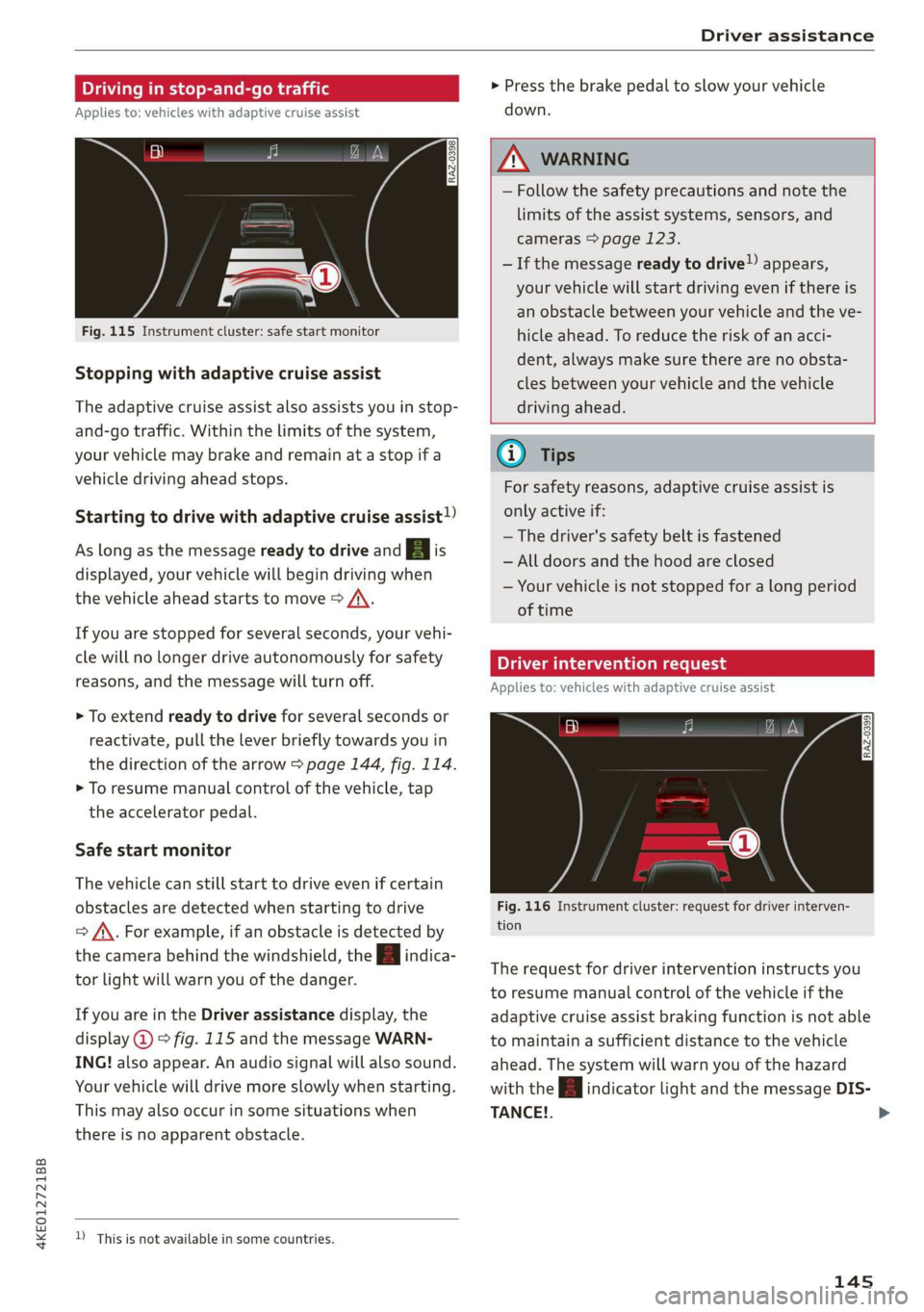
Fig. 115 Instrument cluster: safe start monitor
Stopping with adaptive cruise assist
The adaptive cruise assist also assists you in stop-
and-go traffic. Within the limits of the system,
your vehicle may brake and remain at a stop if a
vehicle driving ahead stops.
Starting to drive with adaptive cruise assist!)
As long as the message ready to drive and aA is
displayed, your vehicle will begin driving when
the vehicle ahead starts to move > /\.
If you are stopped for several seconds, your vehi-
cle will no longer drive autonomously for safety
reasons, and the message will turn off.
> To extend ready to drive for several seconds or
reactivate, pull the lever briefly towards you in
the direction of the arrow > page 144, fig. 114.
> To resume manual control of the vehicle, tap
the accelerator pedal.
Safe start monitor
The vehicle can still start to drive even if certain
obstacles are detected when starting to drive
=> /\. For example, if an obstacle is detected by
the camera behind the windshield, the a indica-
tor light will warn you of the danger.
If you are in the Driver assistance display, the
display @ © fig. 115 and the message WARN-
ING! also appear. An audio signal will also sound.
Your vehicle will drive more slowly when starting.
This may also occur in some situations when
there is no apparent obstacle.
D_ This is not available in some countries.
Z\ WARNING
— Follow the safety precautions and note the
limits of the assist systems, sensors, and
cameras > page 123.
— If the message ready to drive!) appears,
your vehicle will start driving even if there is
an obstacle between your vehicle and the ve-
hicle ahead. To reduce the risk of an acci-
dent, always make sure there are no obsta-
cles between your vehicle and the vehicle
driving ahead.
G) Tips
For safety reasons, adaptive cruise assist is
only active if:
— The driver's safety belt is fastened
— All doors and the hood are closed
— Your vehicle is not stopped for a long period
of time
Tamia e cme [sid
Applies to: vehicles with adaptive cruise assist
Fig. 116 Instrument cluster: request for driver interven-
tion
The request for driver intervention instructs you
to resume manual control of the vehicle if the
adaptive cruise assist braking function is not able
to maintain a sufficient distance to the vehicle
ahead. The system will warn you of the hazard
with the A indicator light and the message DIS-
TANCE!.
145
>
Page 148 of 310
Driver assistance
The display @ only appears when the Driver as-
sistance display is open in the on-board
computer > page 14.
ZA WARNING
Follow the safety precautions and note the
limits of the assist systems, sensors, and
cameras > page 123.
Adjusting the adaptive cruise assist
Applies to: vehicles with adaptive cruise assist
You can adjust the adaptive cruise assist to your
own preferences. The settings depend on the ve-
hicle equipment.
> Applies to: MMI: Select on the home screen:
VEHICLE > Driver assistance > (<3) > Adaptive
cruise assist.
Possible settings:
Lane guidance - If lane guidance is also active
when adaptive cruise assist control is active, you
can switch it on or off.
Driving program - Depending on the driving pro-
gram and the distance that are set, the vehicle
handling will be adjusted from Sport to Moder-
ate and the lane guidance haptic feedback will be
adjusted.
Store last distance - The last distance that was
set will be stored after the ignition is switched
off. If the distance is not stored, distance
(time distance of approximately 1.8 seconds) is
automatically preset every time the ignition is
switched on.
Applies to: vehicles with efficiency assist
Predictive control - When predictive control is
switched on, the system reacts automatically to
situations > page 137.
G) Tips
— In the efficiency* Audi drive select mode,
vehicle handling and the adaptive cruise as-
sist haptic feedback are also affected. The
Driving program can no longer be adjusted.
— Specific settings are stored automatically in
the active personal profile.
146
Messages
Applies to: vehicles with adaptive cruise assist
a | or is displayed when there is a malfunc-
tion, the adaptive cruise assist functions may be
unavailable or limited.
A message that indicates the cause and possible
solution may appear with some displays. The
weather conditions may be too poor or a sensor
may be covered. Clean the area in front of the
sensors > page 124, fig. 97 and try to turn on
the systems again later.
If the malfunction remains, drive to an author-
ized Audi dealer or authorized Audi Service Facili-
ty immediately to have the malfunction correct-
ed.
Applies to: vehicles with narrowed road assist
Narrow area
Depending on vehicle equipment, this message
appears in the Driver assistance display if the
adaptive cruise assist is adjusting the speed ina
narrow area, for example a construction zone.
ae Please take over steering and pay atten-
tion to traffic!
Be Please take over!
This message appears if steering activity is no
longer detected. Always keep your hands on the
steering wheel so you can be ready to steer at any
time.
Adaptive cruise assist: Please take over!
This message appears if the vehicle rolls back
when starting on a slight incline, even though the
systems are active. Press the brake pedal to pre-
vent the vehicle from rolling or starting to move.
Depending on the equipment, this message may
also appear if the driver does not take over steer-
ing after multiple requests for the driver to take
action. The adaptive cruise assist is switched off.
Applies to: vehicles with laser scanner
3] Adaptive cruise assist: limited availability.
See owner's manual
This message appears when the sensor view is
limited, for example, when weather conditions >
Page 160 of 310
Driver assistance
G) Tips
For an explanation on conformity with the
FCC regulations in the United States and the
Industry Canada regulations, see > page 289.
Emergency assist
Applies to: vehicles with emergency assist
General information
Within the limits of the system, the emergency
assist detects if the driver is inactive. In these in-
stances, the system warns the driver, assumes
control of the vehicle if necessary, and brings the
vehicle automatically to a stop in the lane.
Regardless of the speed, the emergency assist is
automatically available when the adaptive cruise
assist* is activated. When the adaptive cruise as-
sist* is deactivated, the system is only active at
speeds higher than approximately 40 mph
(65 km/h).
Emergency assist functions
Within the limits of the system, the emergency
assist monitors the driver’s steering, accelerator,
and brake pedal activity. Depending on the se-
verity of the situation, it may initiate visual, au-
dio, and haptic warnings in stages:
— Reduces the speed
— Messages
— Lowers the volume of the Infotainment system
— Audible warning
— Tightening of the safety belt
—A brief application of the brakes
If the driver remains inactive despite the warn-
ings, the emergency assist controls the vehicle
within the limits of the system:
— The Audi pre sense preemptive safety measures
are triggered > page 150.
— The vehicle will stay in the lane and will be
braked to a stop.
— As soon as the vehicle comes to a full stop, the
emergency flashers are activated and the vehi-
) This function is not available in every market and on all ve-
hicle equipment levels.
158
cle prepares for the vehicle passengers to be
rescued. The parking brake is set, “P” gear is
engaged, the doors are unlocked, and the inte-
rior lighting is activated. If there is no move-
ment for several seconds, the emergency call
will be made if necessary.
Overriding the emergency assist
You can override the emergency assist > A\:
— Move the steering wheel. Or
— Press the brake pedal. Or
— Press the accelerator pedal distinctly.
When stationary, you can end the emergency as-
sist by leaving the "P" position or releasing the
parking brake > page 93.
Switching the emergency assist on and off
The system can be switched on and off in the
MMI & page 126.
Messages
1g or is displayed when there is a malfunc-
tion, the emergency assist functions may be un-
available or may be limited.
A message that indicates the cause and possible
solution may appear with some displays. The
weather conditions may be too poor or a sensor
may be covered. Clean the area in front of the
sensors > page 124, fig. 97 and try to turn on
the systems again later.
If the malfunction remains, drive to an author-
ized Audi dealer or authorized Audi Service Facili-
ty immediately to have the malfunction correct-
ed.
ZX WARNING
— Follow the safety precautions and note the
limits of the assist systems, sensors, and
cameras > page 123.
— The emergency assist is an assist system
that should only be used in cases of emer-
gency to take over control of the vehicle and
bring it to a stop. >
Page 283 of 310
4KE012721BB
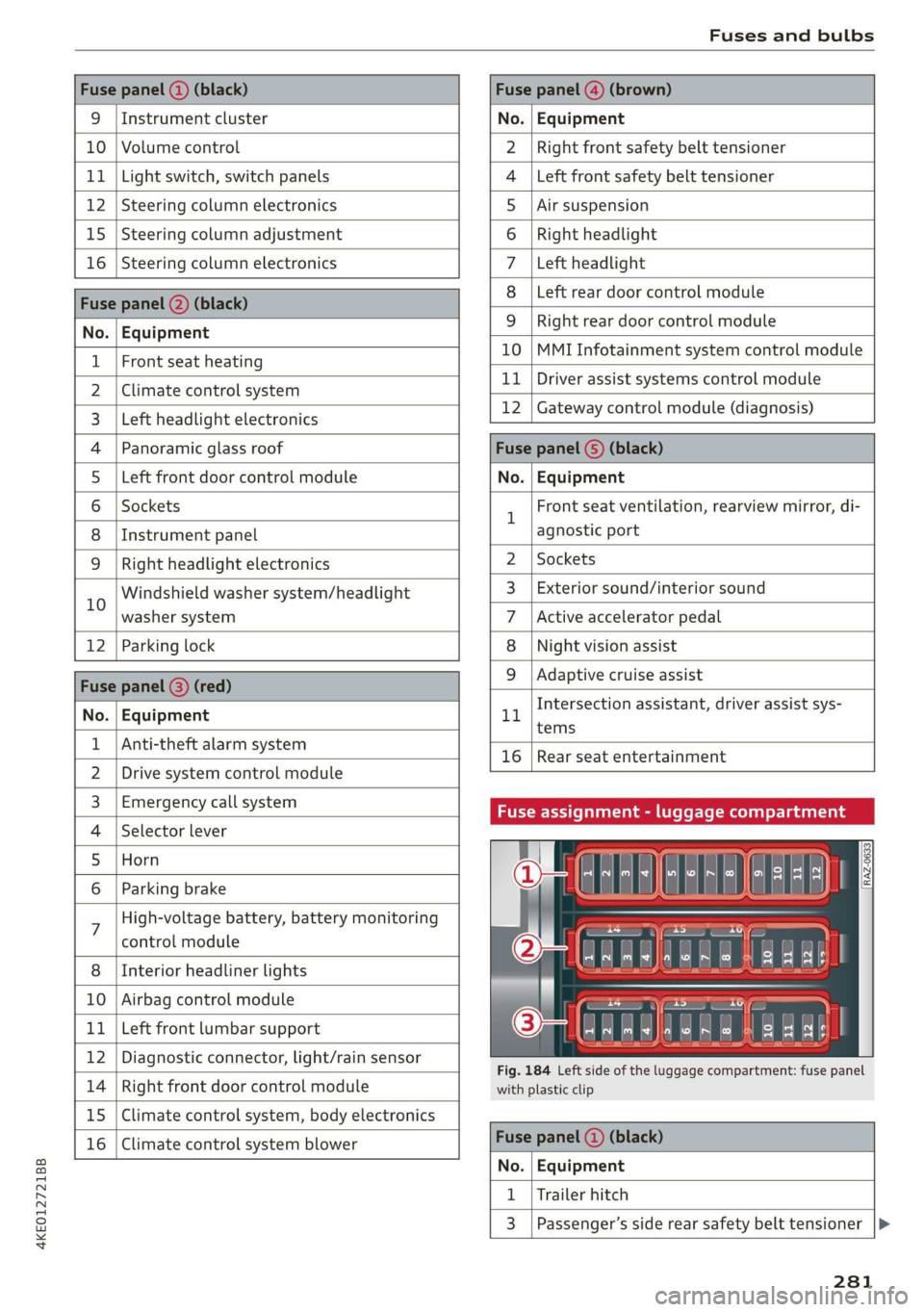
Fuses and bulbs
Fuse panel (2) (black) Fuse panel @) (brown)
9 |Instrument cluster No. | Equipment
10 | Volume control Right front safety belt tensioner
11 | Light switch, switch panels Left front safety belt tensioner
12 | Steering column electronics Air suspension
15 | Steering column adjustment Right headlight
16 | Steering column electronics Left headlight
Fuse panel (2) (black)
No. | Equipment
Left rear door control module
WOlOIN|
A)
Mm]
ALN
Right rear door control module
10 |MMI Infotainment system control module
1 |Front seat heating - -
2 |ehmmareconeral system 11 | Driver assist systems eantte) iene
Z | betvheadlightdlecironias 12 | Gateway control module (diagnosis)
4 |Panoramic glass roof Fuse panel 6) (black)
5 |Left front door control module No. | Equipment
6 | Sockets 1 Front seat ventilation, rearview mirror, di-
8 | Instrument panel agnostic port
9 | Right headlight electronics 2 | Sockets
iG Windshield washer system/headlight 3_| Exterior sound/interior sound
washer system 7 |Active accelerator pedal
12 | Parking lock 8 | Night vision assist
Fuse panel @ (red) 9 |Adaptive cruise assist
7 Intersection assistant, driver assist sys-
No. | Equipment 11
tems
1 {Anti-theft alarm system -
16 | Rear seat entertainment
2 |Drive system control module
3, | Emergency:callsystem Fuse assignment - luggage compartment
4 | Selector lever
5 |Horn 8
le
6 |Parking brake a
7 High-voltage battery, battery monitoring
control module
8 | Interior headliner lights
10 | Airbag control module
11 | Left front lumbar support
12 | Diagnostic connector, light/rain sensor
14 | Right front door control module
15 | Climate control system, body electronics
16 | Climate control system blower
7
ed ey
aE EEE
Fig. 184 Left side of the luggage compartment: fuse panel
with plastic clip
Fuse panel (4) (black)
No. | Equipment
1 | Trailer hitch
3 | Passenger’s side rear safety belt tensioner
281
Page 291 of 310
4KE012721BB
Accessories and technical changes
Applicable to Canada
If you live in Canada and you be-
lieve that your vehicle has a de-
fect that could cause a crash, in-
jury or death, you should immedi-
ately inform Transport Canada,
Defect Investigations and Recalls.
You should also notify Audi Cana-
da.
Canadian customers who wish to
report a safety-related defect to
Transport Canada, Defect Investi-
gations and Recalls, may either
call Transport Canada toll-free at:
Tel.: 1-800-333-0510 or
Tel.: 1-819-994-3328 (Ottawa re-
gion and from other countries)
TTY for hearing impaired:
1-888-675-6863
or contact Transport Canada by
mail at:
Transport Canada
Motor Vehicle Safety Investiga-
tions Laboratory
80 Noel Street
Gatineau, QC
J8Z OA1
For additional road safety infor-
mation, please visit the Road
Safety website at:
English:
http://www.tc.gc.ca/eng/
motorvehiclesafety/menu.htm
French:
http://www.tc.gc.ca/fra/
securiteautomobile/menu.htm
Declaration of
compliance for telecom-
munications equipment
and electronic systems
The manufacturer is not liable for radio malfunc-
tions that are caused by unauthorized changes to
the equipment.
Equipment
The following equipment complies with FCC sec-
tion 15 and RSS-Gen:
— Adaptive cruise assist*
— Remote control key
— Garage door opener (HomeLink)*
— Intersection assistant*
— Side assist*
— Exit warning*
— Rear cross traffic assist*
FCC Part 15.19
This device complies with part 15 of the FCC
Rules. Operation is subject to the following two
conditions: (1) This device may not cause harmful
interference, and (2) this device must accept any
interference received, including interference that
may cause undesired operation.
FCC Part 15.21
Changes or modifications not expressly approved
by the party responsible for compliance could
void the user's authority to operate the equip-
ment.
RSS-Gen
This device complies with Industry Canada’s Li-
cence-exempt RSSs. Operation is subject to the
following two conditions:
289
Page 295 of 310
4KE012721BB
Index
A
A/C cooling mode............. ee eee eee ee 82
Accelerator pedal.............--00000005 89
also refer to Accelerator pedal........... 89
ACCeSSOFICS . 6... eee 288
Active lane assist
refer to Lane departure warning......... 147
refer to Lane guidance................ 147
Adaptive cruise assist..............-000. 139
Cleaning the sensors...........00 ee eee 264
Predictive control.................... 137
Adaptive cruise control
refer to Adaptive cruise assist........... 139
Adaptive darnipers « wax ss eae 2» seme s oe 99
Adjusting the air distribution............. 82
Adjusting the brightness................. 48
Adjusting the sound..............-...0- 231
Adjusting the temperature............... 82
Adjusting the vents ...........0 cece eens 84
Adjusting the volume..............000005 26
Adjusting the volume (announcements) .... 231
Adjusting the welcome sound............ 231
Airbag SySteM « » ene s ews 4 5 Hemme tee Eee 64
Air quality display...............022-.08. 84
Air suspension...........0..0 000. ee eee 99
Airtransport........... 0.0.00 .00200 eee 104
Alarm system
refer to Anti-theft alarm system.......... 32
Alignment pin (changing the wheel)....... 269
All-weather lights.................00000. 44
ALSeaSOMtineSien. is 5: suse 6 samme «0 imevsnee ow we 258
All wheel drive
refer to quattro... . 2... cece eee eee 101
AMI
refer to Audi music interface........... 220
Android Auto
refer to Audi smartphone interface...... 229
Anti-freeze
Windshield washer system............. 241
Anti-lock braking system.............05. 101
Anti-Slip Regulation.................05. 102
Anti-theft alarm system ..........--..00-- 32
Anti-theft wheel bolts.................. 272
Apple CarPlay
refer to Audi smartphone interface...... 229
Aspect ratio (video) ..............0. 223,225
ASR
refer to Anti-Slip Regulation............ 101
Audi adaptive light..................000. 44
Audi connect
refer to connect............ee008 184,185
Audi drive select. .... 0.0... eee e eee eee eee 98
Audi e-tron compact charging system..... 114
Adjusting the charging power level...... 114
Changing or attaching the power cable... 118
SOGUIING*s « & cvsiane wo cranes = wiersie © eireten @ © on 119
Status and malfunction indicators....... 115
Audi music interface...............2.-- 220
AUTOM ESiscns x 5: scaniae 0 0 scones 0 atasene 0 a asouane 221
Audi phone BOX. weiss & scinie ev eerie ve emcene 171
Audi PreISONS@iics 4 + svnns ae maces os oes o 8 150
Messages ...... 00.0.0. cece eee eee eee 153
Audi side assist
refer to Side assist. ........0.. 0000000 154
Audi smartphone interface.............. 229
Legalinformation..........0...eebeee 233
Audi virtual cockpit
refer to Instrument cluster.............. 11
AUTO
Automatic headlights .................. 44
Climate control system..............0-. 82
Auto Lock (central locking) ............... 29
Automatic climate control
refer to Climate control system.......... 81
Automatic luggage compartment lid.... 36,37
Automatic wipe/wash system............. 50
Auxiliary climate control................. 84
AVErAGe CONSUMPTION 4 6 weieure o weceie ae waco 14
Average’Speed ic. i civ 6 x essen so cranes 6 w sre 14
B
BaqehOOKsts « scan
Charge level display.............0005 ee 11
Charging (12 Volt vehicle battery)....... 241
High-voltage batteryiews « ass ss gouy s x as 104
Vehicle battery (12 Volt)............... 240
Winter operation (12 Volt vehicle battery) . 240
Battery (vehicle)
refer to High-voltage battery........... 104
293