drive select AUDI E-TRON 2019 User Guide
[x] Cancel search | Manufacturer: AUDI, Model Year: 2019, Model line: E-TRON, Model: AUDI E-TRON 2019Pages: 310, PDF Size: 81.91 MB
Page 32 of 310
Opening and closing
ZA WARNING
Follow the safety precautions > page 29.
Z\ WARNING
Applies to: vehicles with power closing
—To reduce the risk of injury, make sure that
the area where the door is closing is clear
during the closing process.
— The closing process can be stopped at any
time by pulling on the outer or inner door
handle.
@) Note
Applies to: vehicles with convenience key
— If the convenience key that was last used is
detected inside the passenger compart-
ment, then the vehicle cannot be locked
from the outside using the sensor. Take the
convenience key with you and lock the vehi-
cle again. Otherwise, the vehicle will not be
protected against unauthorized access.
— If you lock the vehicle using the button on
the vehicle key with the front passenger's
or rear door open while accidentally placing
the key in the passenger compartment and
closing the door, the vehicle will not lock.
The turn signals will flash several times to
indicate this. If you do not open the vehicle
within a short time to remove the vehicle
key, then the vehicle will lock automatically.
This prevents the vehicle from being left un-
locked for long periods of time. The key will
then be locked inside the vehicle.
— If the convenience key* that was used last is
detected inside the luggage compartment,
it will not be possible to lock the luggage
compartment and the luggage compart-
ment lid will open. The turn signals will
flash several times to indicate this. The
doors will lock. Always take the convenience
key with you, or unauthorized people may
be able to enter the vehicle.
@ Tips
— Do not leave valuables unattended in the ve-
hicle. A locked vehicle is not a safe!
30
— The LED in the driver's door rail blinks when
you lock the vehicle. If the LED lights up for
approximately 30 seconds after locking,
there is a malfunction in the central locking
system. Have the problem corrected by an
authorized Audi dealer or authorized Audi
Service Facility.
Setting the central locking system
You can adjust the central locking system to your
preferences. The settings depend on the vehicle
equipment.
> Applies to: MMI: Select on the home screen:
VEHICLE > Settings & Service > Central lock-
ing.
Door unlocking
—If you select All, all doors and the luggage
compartment lid will be unlocked when unlock-
ing.
— If you select Driver's door, only the driver's
door will be unlocked. To unlock all doors and
the luggage compartment lid, press the &@ but-
ton on the vehicle key twice. In vehicles with a
convenience key”, only the driver's door will un-
lock when you pull the driver's door handle. If
you pull another door handle, the entire vehicle
will be unlocked.
The entire vehicle will always be locked when you
press the & button.
Long press to open windows
You can select if all windows and the panoramic
glass roof* should open using the vehicle key
=> page 40, Convenience opening and closing. If
you press and hold the fj button on the vehicle
key, all of the windows and the panoramic glass
roof* will close.
Disable rear lid handle
You can select if the luggage compartment lid
can open with the handle. If you activate this
function, the luggage compartment lid can only
be opened with the <¥ or 4s button on the vehi-
cle key or in the driver's door. In vehicles with a
convenience key*, you can still open the luggage
compartment lid using the handle if an
Page 33 of 310
4KE012721BB
Opening and closing
authorized convenience key is detected
=> page 35.
Fold mirrors
You can select if the exterior mirrors automatical-
ly fold in when locking.
Tone
when locking!)
You can select if an audio signal sounds when
locking the vehicle.
Open with convenience key
Applies to: vehicles with convenience key
You can deactivate the feature for unlocking us-
ing
the sensor. The function for locking via the
sensor will still be enabled > page 34.
The settings are automatically stored and as-
signed to the active personal profile.
Central locking switch
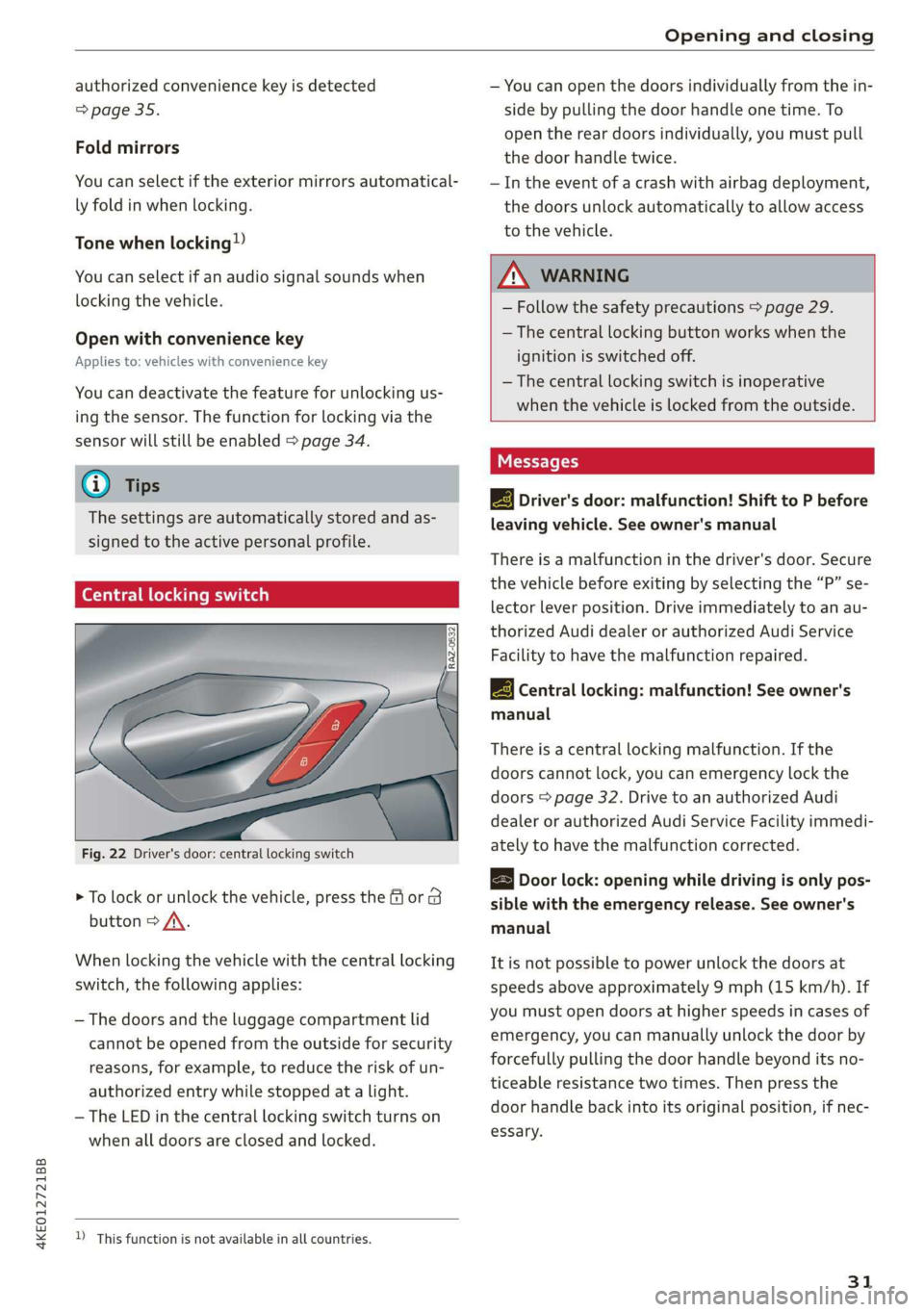
Fig. 22 Driver's door: central locking switch
> To lock or unlock the vehicle, press the or 8
button > /\.
When locking the vehicle with the central locking
switch, the following applies:
— The doors and the luggage compartment lid
cannot be opened from the outside for security
reasons, for example, to reduce the risk of un-
authorized entry while stopped at a light.
—The LED in the central locking switch turns on
when all doors are closed and locked.
D_ This function is not available in all countries.
— You can open the doors individually from the in-
side by pulling the door handle one time. To
open the rear doors individually, you must pull
the door handle twice.
—In the event of a crash with airbag deployment,
the doors unlock automatically to allow access
to the vehicle.
— Follow the safety precautions > page 29.
— The central locking button works when the
ignition is switched off.
— The central locking switch is inoperative
when the vehicle is locked from the outside.
Messages
EB Driver's door: malfunction! Shift to P before
leaving vehicle. See owner's manual
There is a malfunction in the driver's door. Secure
the vehicle before exiting by selecting the “P” se-
lector lever position. Drive immediately to an au-
thorized Audi dealer or authorized Audi Service
Facility to have the malfunction repaired.
2B Central locking: malfunction! See owner's
manual
There is a central locking malfunction. If the
doors cannot lock, you can emergency lock the
doors > page 32. Drive to an authorized Audi
dealer or authorized Audi Service Facility immedi-
ately to have the malfunction corrected.
B Door lock: opening while driving is only pos-
sible with the emergency release. See owner's
manual
It is not possible to power unlock the doors at
speeds above approximately 9 mph (15 km/h). If
you must open doors at higher speeds in cases of
emergency, you can manually unlock the door by
forcefully pulling the door handle beyond its no-
ticeable resistance two times. Then press the
door handle back into its original position, if nec-
essary.
31
Page 34 of 310
Opening and closing
Mechanically unlocking and locking the
doors
If the central locking fails, you must unlock or
lock the doors separately.
[RAz-0026|
BGA-0027
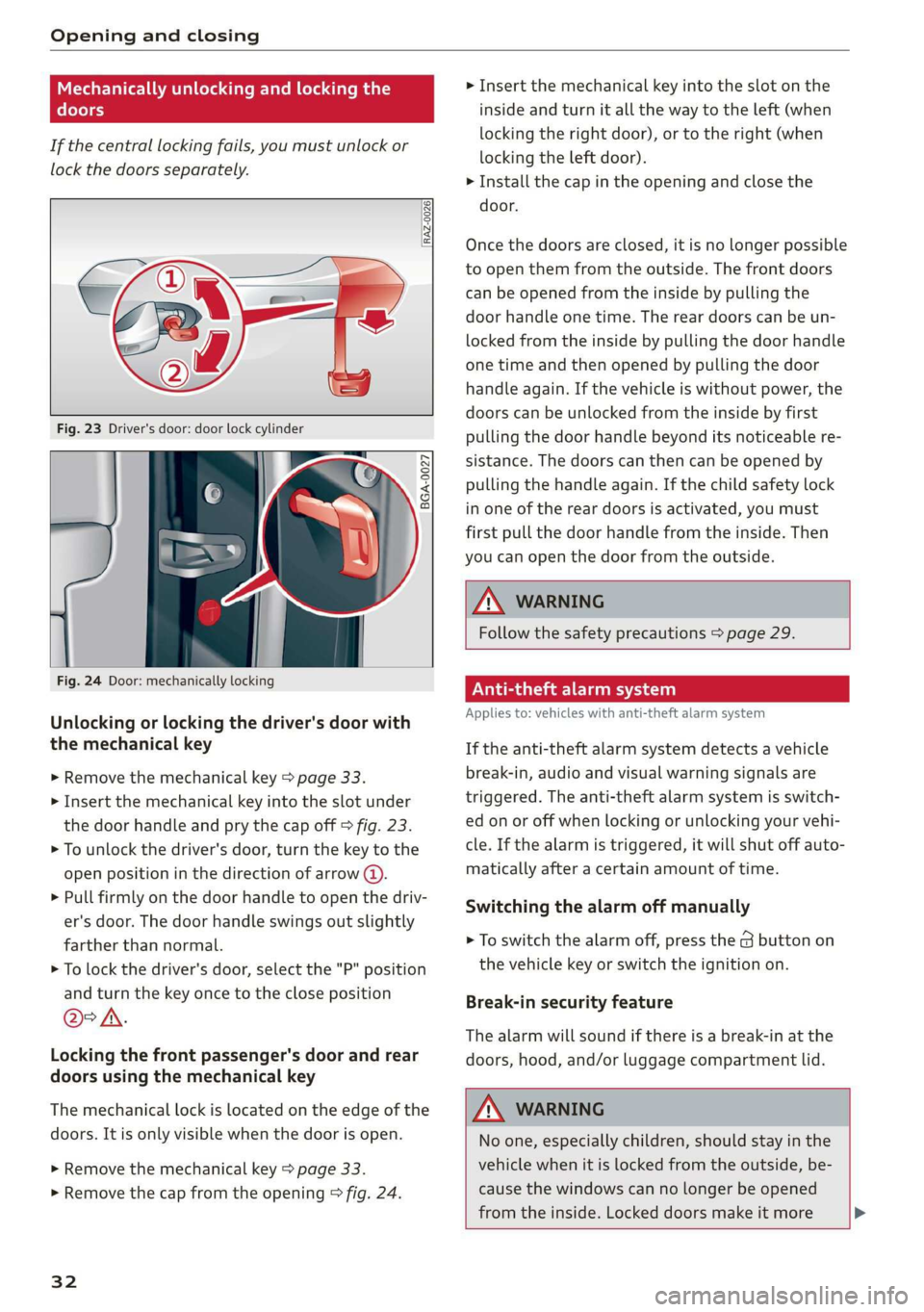
Fig. 24 Door: mechanically locking
Unlocking or locking the driver's door with
the mechanical key
> Remove the mechanical key > page 33.
> Insert the mechanical key into the slot under
the door handle and pry the cap off > fig. 23.
> To unlock the driver's door, turn the key to the
open position in the direction of arrow @).
> Pull firmly on the door handle to open the driv-
er's door. The door handle swings out slightly
farther than normal.
> To lock the driver's door, select the "P" position
and turn the key once to the close position
@°A.
Locking the front passenger's door and rear
doors using the mechanical key
The mechanical lock is located on the edge of the
doors. It is only visible when the door is open.
> Remove the mechanical key > page 33.
> Remove the cap from the opening > fig. 24.
32
> Insert the mechanical key into the slot on the
inside and turn it all the way to the left (when
locking the right door), or to the right (when
locking the left door).
> Install the cap in the opening and close the
door.
Once the doors are closed, it is no longer possible
to open them from the outside. The front doors
can be opened from the inside by pulling the
door handle one time. The rear doors can be un-
locked from the inside by pulling the door handle
one time and then opened by pulling the door
handle again. If the vehicle is without power, the
doors can be unlocked from the inside by first
pulling the door handle beyond its noticeable re-
sistance. The doors can then can be opened by
pulling the handle again. If the child safety lock
in one of the rear doors is activated, you must
first pull the door handle from the inside. Then
you can open the door from the outside.
ZA WARNING
Follow the safety precautions > page 29.
eae ee)
Applies to: vehicles with anti-theft alarm system
If the anti-theft alarm system detects a vehicle
break-in, audio and visual warning signals are
triggered. The anti-theft alarm system is switch-
ed on or off when locking or unlocking your vehi-
cle. If the alarm is triggered, it will shut off auto-
matically after a certain amount of time.
Switching the alarm off manually
> To switch the alarm off, press the G button on
the vehicle key or switch the ignition on.
Break-in security feature
The alarm will sound if there is a break-in at the
doors, hood, and/or luggage compartment lid.
Z\ WARNING
No one, especially children, should stay in the
vehicle when it is locked from the outside, be-
cause the windows can no longer be opened
from the inside. Locked doors make it more >
Page 38 of 310
Opening and closing
— Applies to: vehicles with power-operated or
sensor-controlled luggage compartment lid:
Pay careful attention when closing the lug-
gage compartment lid. Otherwise, you could
cause serious injury to yourself or others de-
spite the pinch protection.
© Note
The luggage compartment lid can bump into
objects such as the garage ceiling when open-
ing and become damaged.
@ Tips
— When the vehicle is locked, the luggage
compartment lid can be unlocked separately
by pressing the << or 4s button on the ve-
hicle key. The luggage compartment lid
locks automatically when it is closed again.
— The ability to open the luggage compart-
ment lid using the handle can be deactivat-
ed or activated in the MMI > page 30.
Opening and closing the luggage
compartment lid
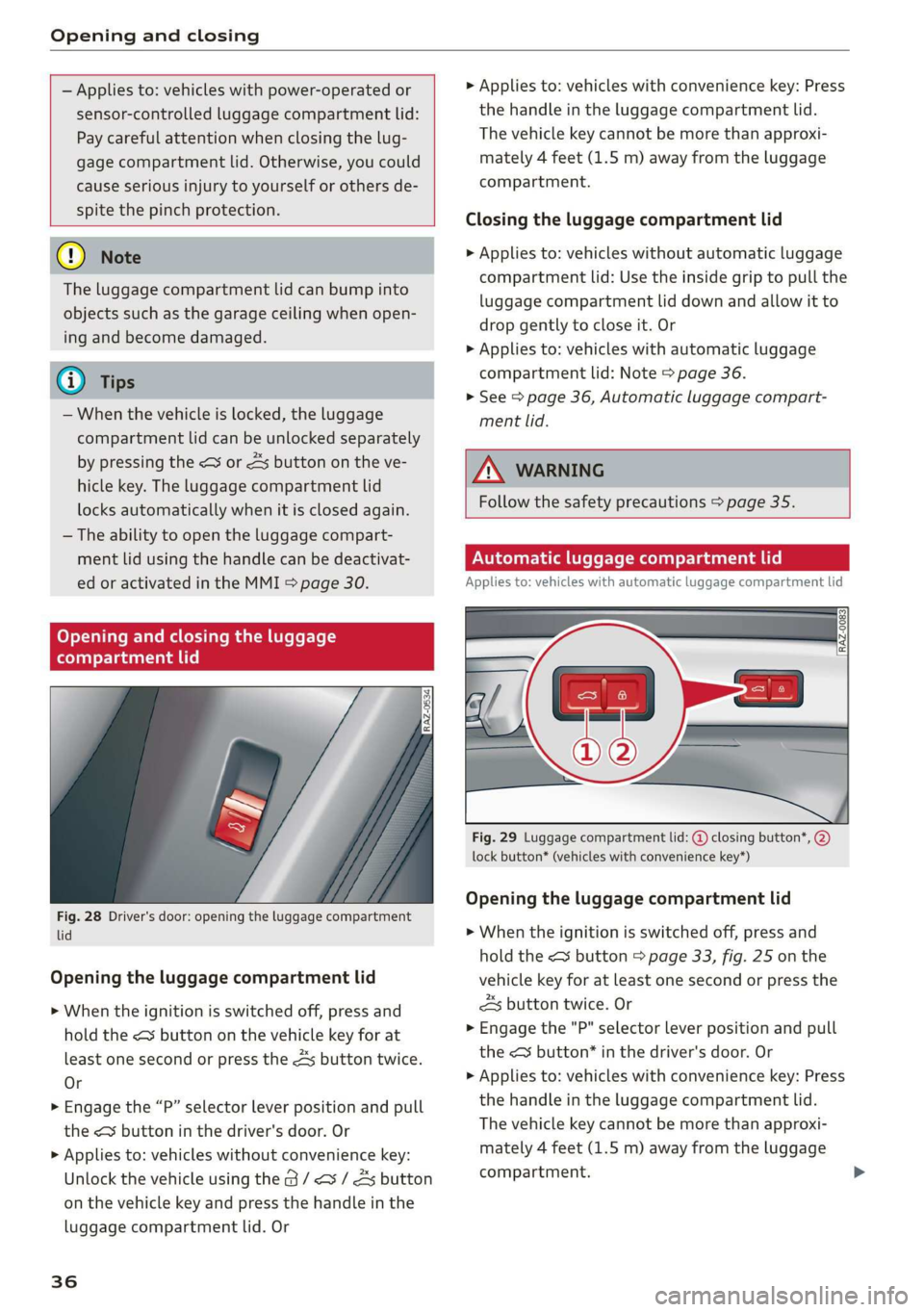
Fig. 28 Driver's door: opening the luggage compartment.
lid
Opening the luggage compartment lid
> When the ignition is switched off, press and
hold the < button on the vehicle key for at
least one second or press the 4s button twice.
Or
> Engage the “P” selector lever position and pull
the < button in the driver's door. Or
> Applies to: vehicles without convenience key:
Unlock the vehicle using the @ / <3 / As button
on the vehicle key and press the handle in the
luggage compartment lid. Or
36
> Applies to: vehicles with convenience key: Press
the handle in the luggage compartment lid.
The vehicle key cannot be more than approxi-
mately 4 feet (1.5 m) away from the luggage
compartment.
Closing the luggage compartment lid
> Applies to: vehicles without automatic luggage
compartment lid: Use the inside grip to pull the
luggage compartment lid down and allow it to
drop gently to close it. Or
> Applies to: vehicles with automatic luggage
compartment lid: Note > page 36.
> See > page 36, Automatic luggage compart-
ment lid.
Z\ WARNING
Follow the safety precautions > page 35.
Automatic luggage compartment lid
Applies to: vehicles with automatic luggage compartment lid
Fig. 29 Luggage compartment lid: @ closing button*, 2)
lock button* (vehicles with convenience key*)
Opening the luggage compartment lid
> When the ignition is switched off, press and
hold the <3 button > page 33, fig. 25 on the
vehicle key for at least one second or press the
3 button twice. Or
> Engage the "P" selector lever position and pull
the <3 button* in the driver's door. Or
> Applies to: vehicles with convenience key: Press
the handle in the luggage compartment lid.
The vehicle key cannot be more than approxi-
mately 4 feet (1.5 m) away from the luggage
compartment.
Page 41 of 310
4KE012721BB
Opening and closing
Child safety lock
The child safety lock prevents the rear doors
from being opened from the inside and the rear
power windows from being operated.
ry a 3 2
<=
og a
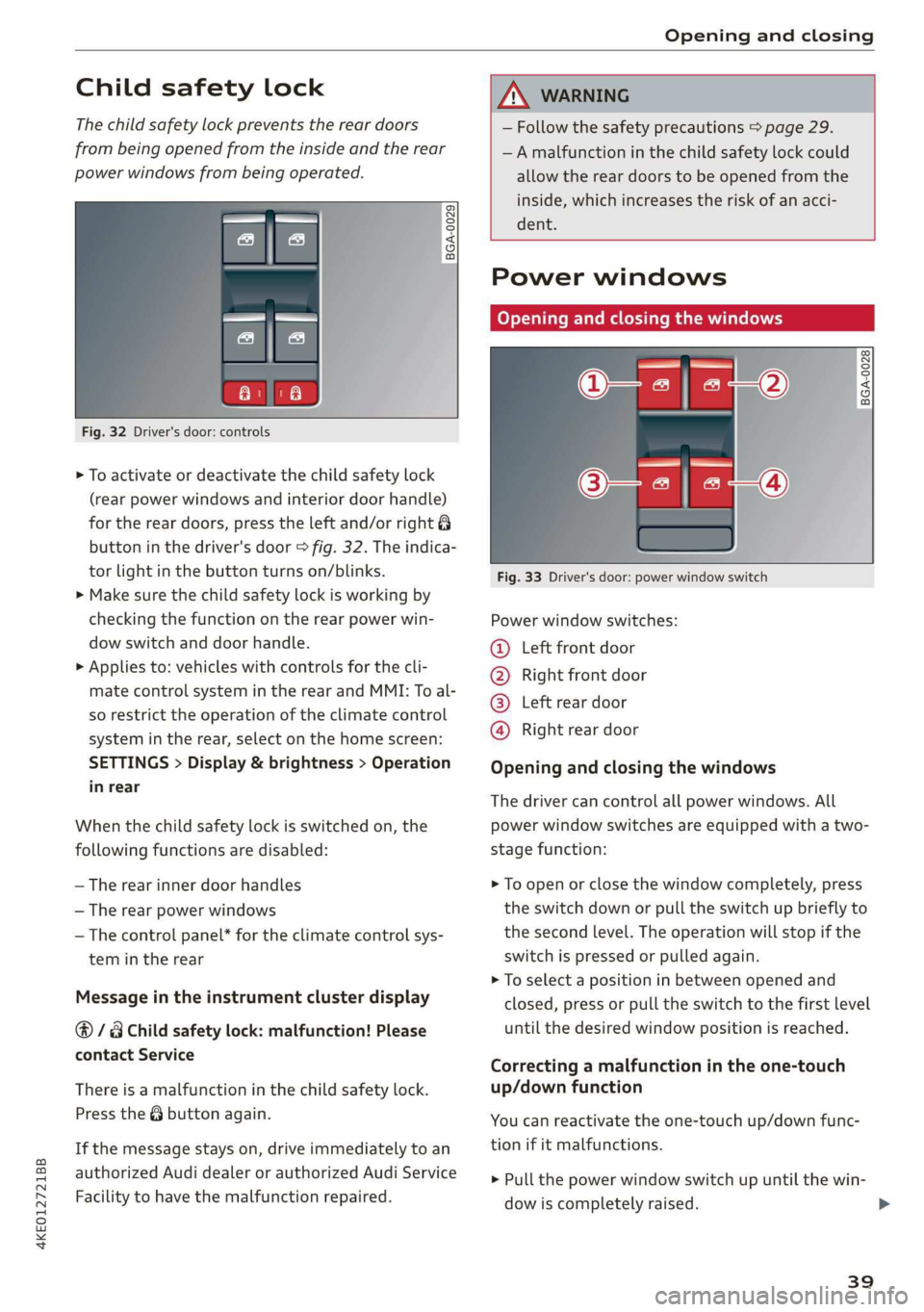
Fig. 32 Driver's door: controls
> To activate or deactivate the child safety lock
(rear power windows and interior door handle)
for the rear doors, press the left and/or right 8
button in the driver's door > fig. 32. The indica-
tor light in the button turns on/blinks.
> Make sure the child safety lock is working by
checking the function on the rear power win-
dow switch and door handle.
> Applies to: vehicles with controls for the cli-
mate control system in the rear and MMI: To al-
so restrict the operation of the climate control
system in the rear, select on the home screen:
SETTINGS > Display & brightness > Operation
in rear
When the child safety lock is switched on, the
following functions are disabled:
— The rear inner door handles
— The rear power windows
— The control panel* for the climate control sys-
tem in the rear
Message in the instrument cluster display
@/ Child safety lock: malfunction! Please
contact Service
There is a malfunction in the child safety lock.
Press the @ button again.
If the message stays on, drive immediately to an
authorized Audi dealer or authorized Audi Service
Facility to have the malfunction repaired.
— Follow the safety precautions > page 29.
—A malfunction in the child safety lock could
allow the rear doors to be opened from the
inside, which increases the risk of an acci-
dent.
Power windows
Opening and closing the windows
___BGA-0028
Fig. 33 Driver's door: power window switch
Power window switches:
@ Left front door
® Right front door
@® Left rear door
@ Right rear door
Opening and closing the windows
The driver can control all power windows. All
power window switches are equipped with a two-
stage function:
> To open or close the window completely, press
the switch down or pull the switch up briefly to
the second level. The operation will stop if the
switch is pressed or pulled again.
> To select a position in between opened and
closed, press or pull the switch to the first level
until the desired window position is reached.
Correcting a malfunction in the one-touch
up/down function
You can reactivate the one-touch up/down func-
tion if it malfunctions.
> Pull the power window switch up until the win-
dow is completely raised.
39
>
Page 46 of 310
Lights and Vision
Lights and Vision
Exterior lighting
Sitar MeL Lats eal
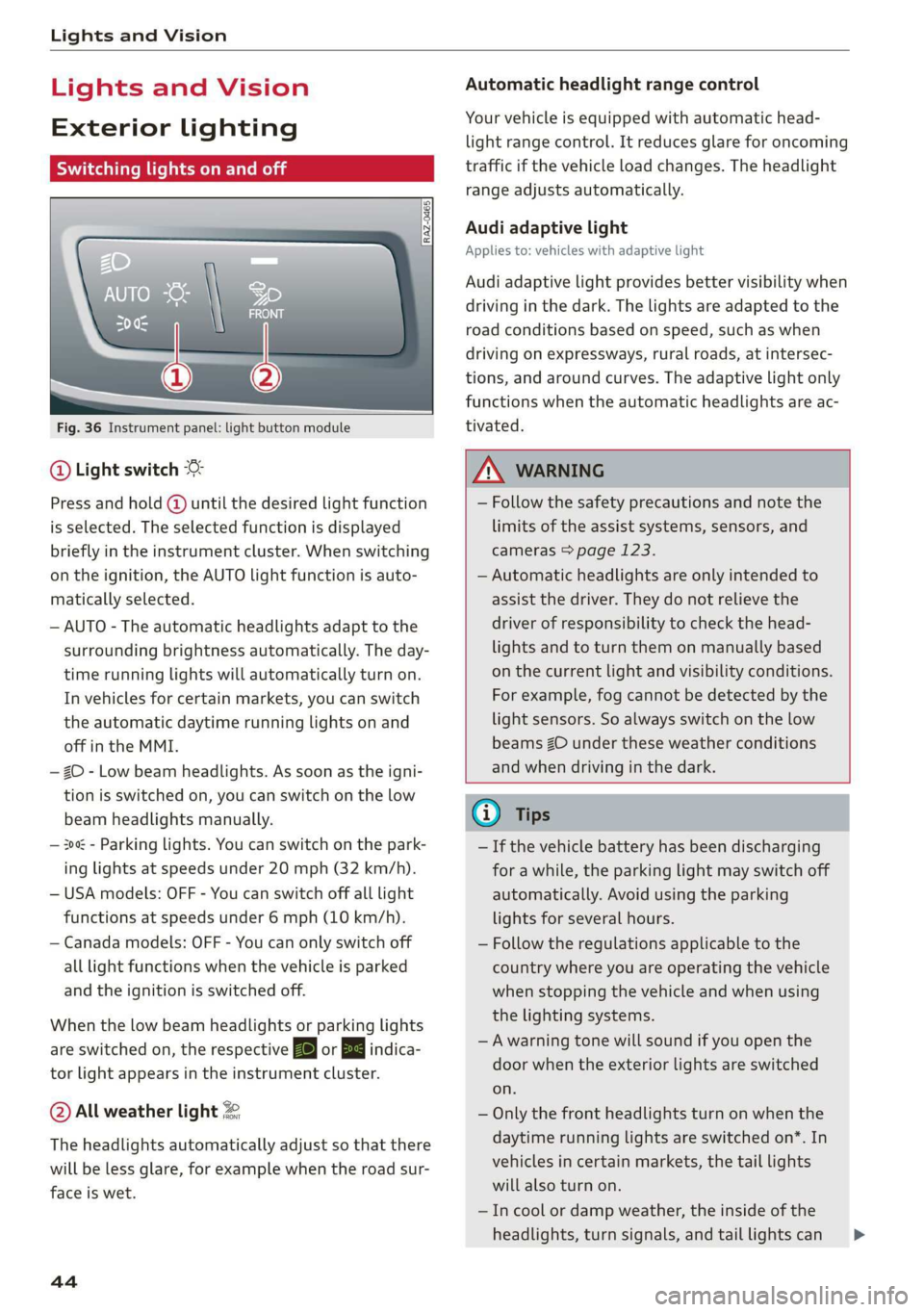
Fig. 36 Instrument panel: light button module
@ Light switch &
Press and hold @ until the desired light function
is selected. The selected function is displayed
briefly in the instrument cluster. When switching
on the ignition, the AUTO light function is auto-
matically selected.
— AUTO - The automatic headlights adapt to the
surrounding brightness automatically. The day-
time running lights will automatically turn on.
In vehicles for certain markets, you can switch
the automatic daytime running lights on and
off in the MMI.
— 20 - Low beam headlights. As soon as the igni-
tion is switched on, you can switch on the low
beam headlights manually.
— 30a - Parking lights. You can switch on the park-
ing lights at speeds under 20 mph (32 km/h).
— USA models: OFF - You can switch off all light
functions at speeds under 6 mph (10 km/h).
— Canada models: OFF - You can only switch off
all light functions when the vehicle is parked
and the ignition is switched off.
When the low beam headlights or parking lights
are switched on, the respective Ba or Ea indica-
tor light appears in the instrument cluster.
@ All weather light 2
The headlights automatically adjust so that there
will be less glare, for example when the road sur-
face is wet.
44
Automatic headlight range control
Your vehicle is equipped with automatic head-
light range control. It reduces glare for oncoming
traffic if the vehicle load changes. The headlight
range adjusts automatically.
Audi adaptive light
Applies to: vehicles with adaptive light
Audi adaptive light provides better visibility when
driving in the dark. The lights are adapted to the
road conditions based on speed, such as when
driving on expressways, rural roads, at intersec-
tions, and around curves. The adaptive light only
functions when the automatic headlights are ac-
tivated.
A WARNING
— Follow the safety precautions and note the
limits of the assist systems, sensors, and
cameras > page 123.
— Automatic headlights are only intended to
assist the driver. They do not relieve the
driver of responsibility to check the head-
lights and to turn them on manually based
on the current light and visibility conditions.
For example, fog cannot be detected by the
light sensors. So always switch on the low
beams ZO under these weather conditions
and when driving in the dark.
@ Tips
— If the vehicle battery has been discharging
for a while, the parking light may switch off
automatically. Avoid using the parking
lights for several hours.
— Follow the regulations applicable to the
country where you are operating the vehicle
when stopping the vehicle and when using
the lighting systems.
—Awarning tone will sound if you open the
door when the exterior lights are switched
on.
— Only the front headlights turn on when the
daytime running lights are switched on*. In
vehicles in certain markets, the tail lights
will also turn on.
—Incool or damp weather, the inside of the
headlights, turn signals, and tail lights can >
Page 48 of 310
Lights and Vision
Operating the headlight flasher
> To operate the headlight flashers, pull the lever
back @) > page 45, fig. 37. If the high beam as-
sistant is activated, but the high beams were
not turned off, the high beam assistant remains
activated.
ZA\ WARNING
— Follow the safety precautions and note the
limits of the assist systems, sensors, and
cameras > page 123.
— High beam assistant is only intended to as-
sist the driver. The driver is still responsible
for controlling the headlights and may need
to switch them on and off manually depend-
ing on light and visibility conditions.
— High beams can cause glare for other driv-
ers, which increases the risk of an accident.
For this reason, only use the high beams or
the headlight flasher when they will not cre-
ate glare for other drivers.
@) Tips
Specific settings are stored automatically in
the active personal profile.
Adjusting the exterior lighting
You can adjust the exterior lighting separately.
The settings depend on the vehicle equipment.
> Applies to: MMI: Select on the home screen:
VEHICLE > Light & Visibility > Exterior light-
ing.
Automatic headlights
You can adjust the following settings in the Auto-
matic
headlights menu:
Activation time - You can adjust if the headlights
switch on Early, Medium, or Late according to
the sensitivity of the light sensor.
High beam assistant - You can switch the high
beam assistant on and off.
Entry/exit lighting
When it is dark, the Entry/exit lighting illumi-
nates the area around the vehicle when unlocking
46
the vehicle and after switching off the ignition
and opening the driver's door. The entry/exit
lighting only works when it is dark and the light
switch is in the AUTO light function.
Daytime running lights
USA models: the daytime running lights can be
switched on and off.
Canada models: the daytime running lights can-
not be switched off. The lights activate automati-
cally each time the ignition is switched on.
@ Tips
Specific settings are stored automatically in
the active personal profile.
Emergency flashers
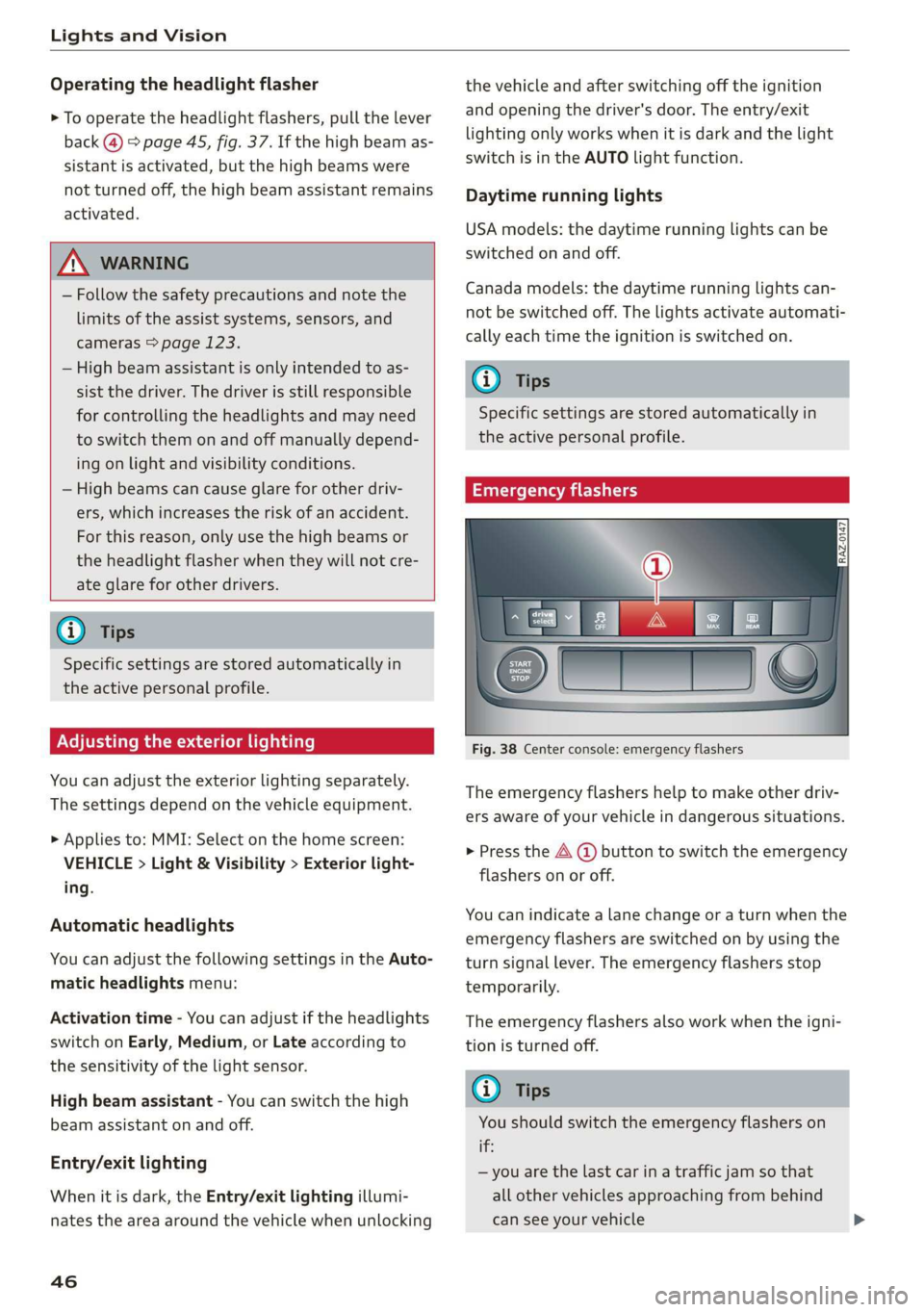
Fig. 38 Center console: emergency flashers
The emergency flashers help to make other driv-
ers aware of your vehicle in dangerous situations.
> Press the A @ button to switch the emergency
flashers on or off.
You can indicate a lane change or a turn when the
emergency flashers are switched on by using the
turn signal lever. The emergency flashers stop
temporarily.
The emergency flashers also work when the igni-
tion is turned off.
@ Tips
You should switch the emergency flashers on
if:
— you are the last car in a traffic jam so that
all other vehicles approaching from behind
can see your vehicle
Page 50 of 310
Lights and Vision
“¥ @ and keep touching it until the desired
brightness is reached.
Interior lighting
Applies to: vehicles with interior lighting
The ambient lighting turns on when the ignition
is switched on. The ambient lighting is deactivat-
ed when the light function is OFF.
You can adjust the interior lighting individually.
The settings depend on the vehicle equipment.
» Applies to: MMI: Select on the home screen:
VEHICLE > Light & Visibility > Interior light-
ing.
You can choose among predefined color profiles,
such as Maritime.
Additional settings and profiles:
— Brightness: you can adjust the brightness for
all of the interior lighting.
— Individual: you can adjust the brightness and
color of the interior lighting separately, divided
into contour and surface lighting.
— Drive select: the contour and surface lighting
color changes depending on the selected Audi
drive select* mode.
@ Tips
Depending on vehicle equipment, when the
Drive select function is activated, the color of
the contour and surface lighting may briefly
change to red or blue when the interior tem-
perature is manually increased or decreased.
@ Tips
Specific settings are stored automatically in
the active personal profile.
PETE ayaa
You can adjust the instrument and display illumi-
nation separately. The settings depend on the ve-
hicle equipment.
> Applies to: MMI: Select on the home screen:
SETTINGS > Display & brightness.
Possible settings in the MMI:
48
— Cockpit dimming
— Head-up display
—MMI
— Virtual cockpit
Vision
Adjusting exterior mirrors
[RAZ-0150.
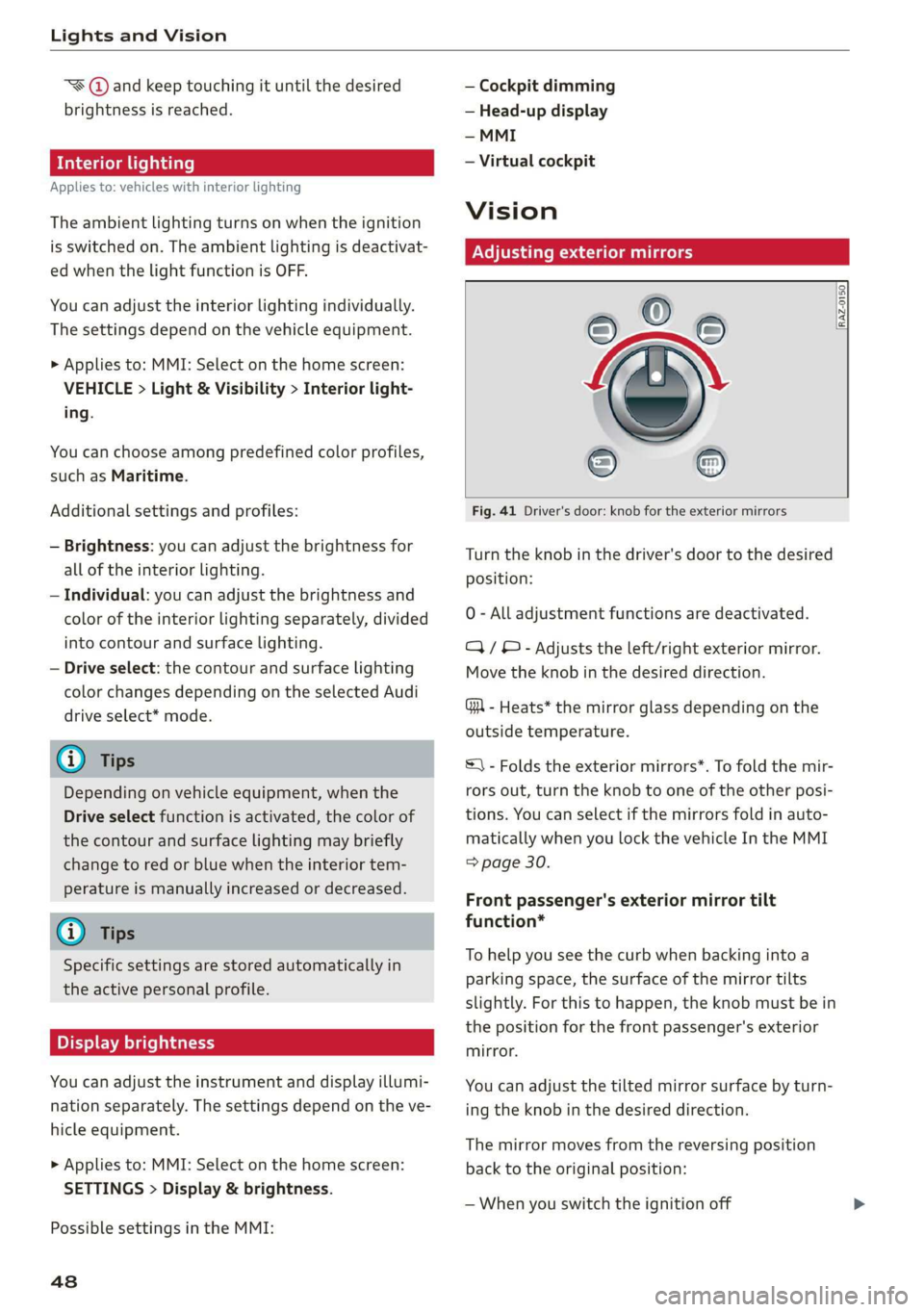
Fig. 41 Driver's door: knob for the exterior mirrors
Turn the knob in the driver's door to the desired
position:
0 - All adjustment functions are deactivated.
Q/ ®- Adjusts the left/right exterior mirror.
Move the knob in the desired direction.
GR - Heats* the mirror glass depending on the
outside temperature.
S) - Folds the exterior mirrors*. To fold the mir-
rors out, turn the knob to one of the other posi-
tions. You can select if the mirrors fold in auto-
matically when you lock the vehicle In the MMI
=> page 30.
Front passenger's exterior mirror tilt
function*
To help you see the curb when backing into a
parking space, the surface of the mirror tilts
slightly. For this to happen, the knob must be in
the position for the front passenger's exterior
mirror.
You can adjust the tilted mirror surface by turn-
ing the knob in the desired direction.
The mirror moves from the reversing position
back to the original position:
— When you switch the ignition off
Page 52 of 310
Lights and Vision
— If the light reaching the rearview mirror is
obstructed, the automatic dimming mirror
will not function correctly,
—The automatic dimming mirrors do not dim
when the interior lighting is turned on or
the reverse gear is selected.
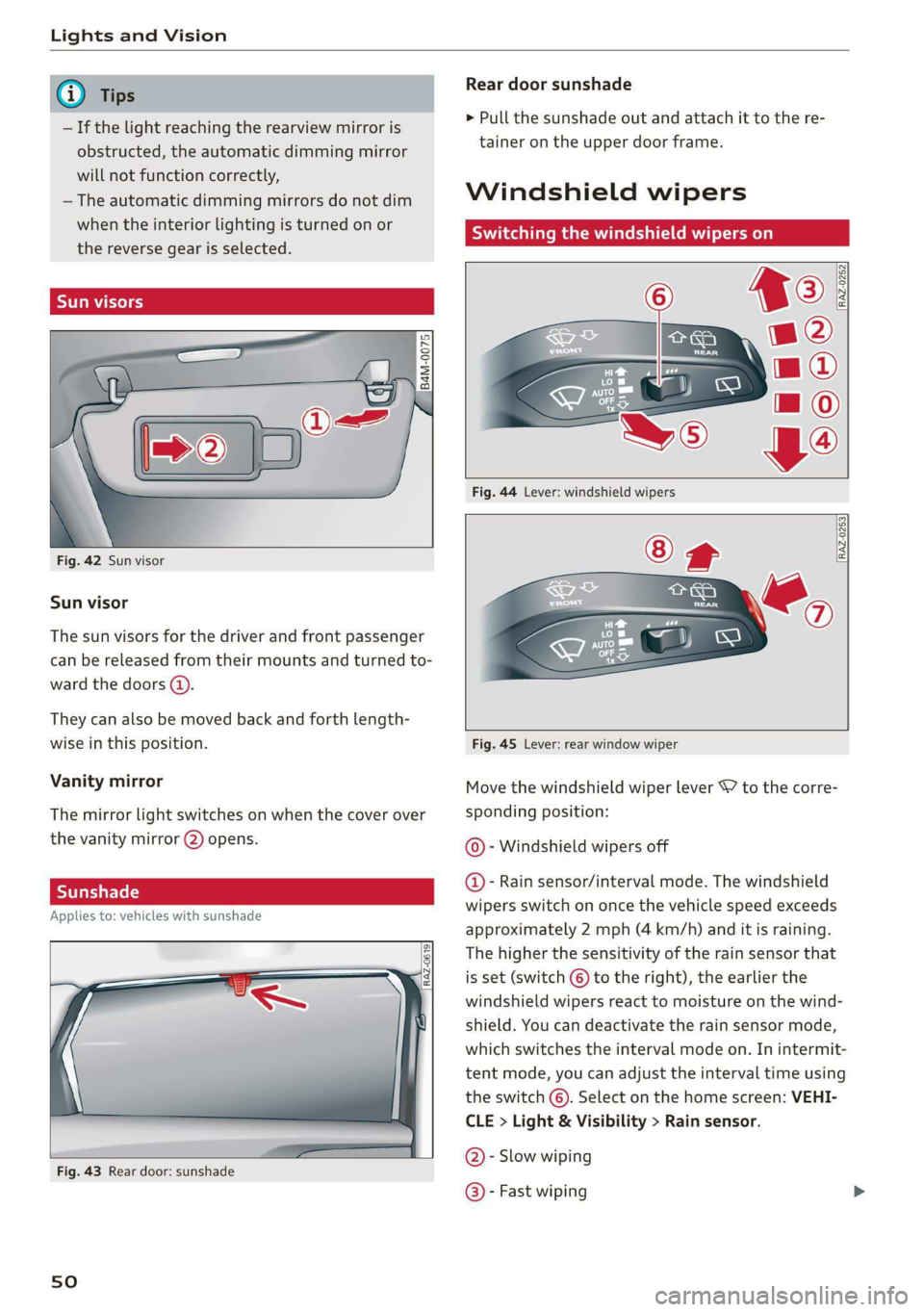
Sun visors
Fig. 42 Sun visor
Sun visor
The
sun visors for the driver and front passenger
can be released from their mounts and turned to-
ward the doors (4).
They can also be moved back and forth length-
wise in this position.
Vanity mirror
The mirror light switches on when the cover over
the
vanity mirror 2) opens.
Applies to: vehicles with sunshade
Fig. 43 Rear door: sunshade
sO
Rear door sunshade
> Pull the sunshade out and attach it to the re-
tainer on the upper door frame.
Windshield wipers
Switching the windshield wipers on
RAZ-0252
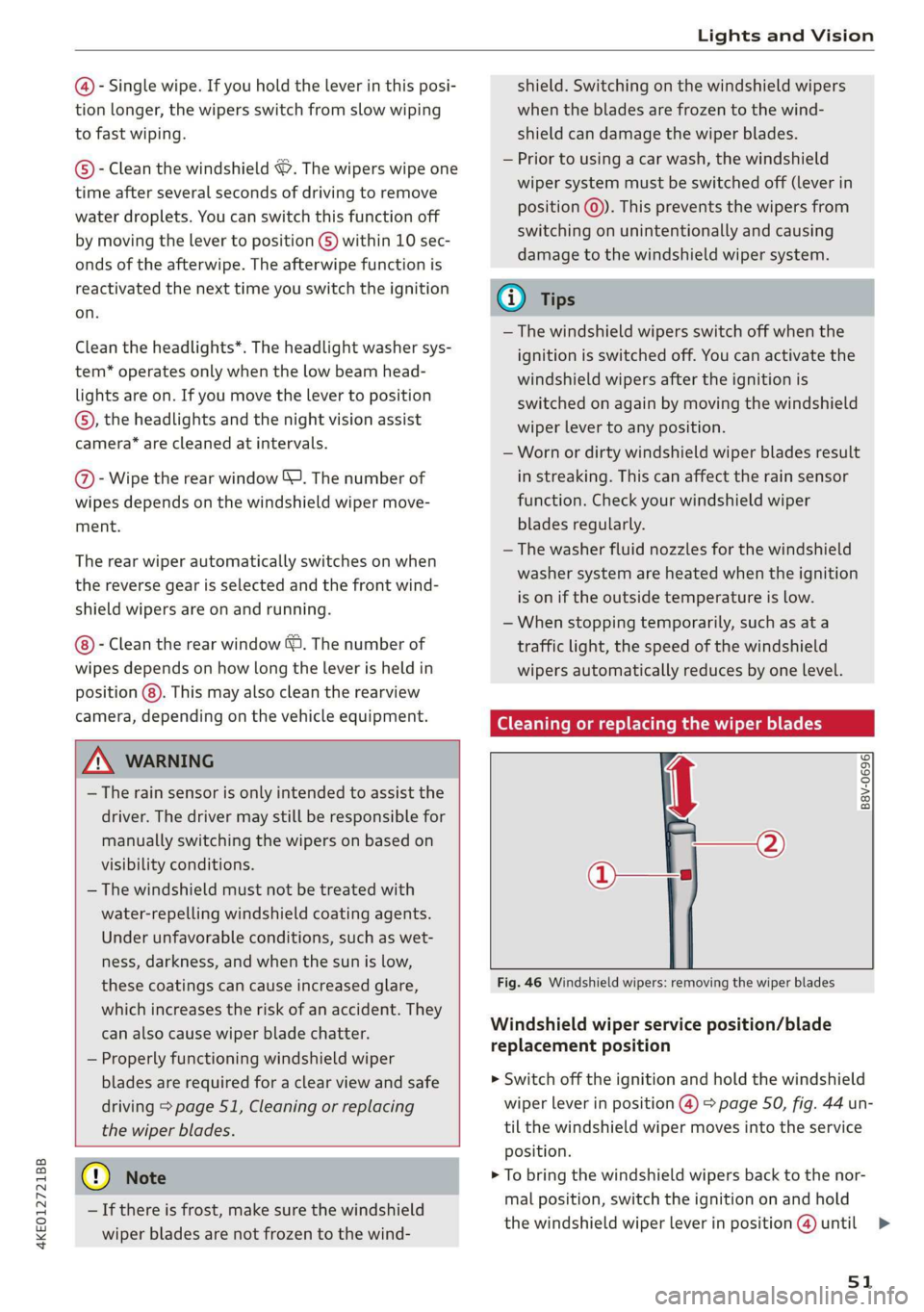
RAZ-0253
Fig. 45 Lever: rear window wiper
Move the windshield wiper lever S7 to the corre-
sponding position:
@- Windshield wipers off
@- Rain sensor/interval mode. The windshield
wipers switch on once the vehicle speed exceeds
approximately 2 mph (4 km/h) and it is raining.
The higher the sensitivity of the rain sensor that
is set (switch © to the right), the earlier the
windshield wipers react to moisture on the wind-
shield. You can deactivate the rain sensor mode,
which switches the interval mode on. In intermit-
tent mode, you can adjust the interval time using
the switch ©. Select on the home screen: VEHI-
CLE > Light & Visibility > Rain sensor.
@- Slow wiping
@- Fast wiping
Page 53 of 310
4KE012721BB
Lights and Vision
@- Single wipe. If you hold the lever in this posi-
tion longer, the wipers switch from slow wiping
to fast wiping.
© - Clean the windshield ©. The wipers wipe one
time after several seconds of driving to remove
water droplets. You can switch this function off
by moving the lever to position ©) within 10 sec-
onds of the afterwipe. The afterwipe function is
reactivated the next time you switch the ignition
on.
Clean the headlights*. The headlight washer sys-
tem* operates only when the low beam head-
lights are on. If you move the lever to position
©, the headlights and the night vision assist
camera* are cleaned at intervals.
@ - Wipe the rear window \. The number of
wipes depends on the windshield wiper move-
ment.
The rear wiper automatically switches on when
the reverse gear is selected and the front wind-
shield wipers are on and running.
- Clean the rear window @. The number of
wipes depends on how long the lever is held in
position (8). This may also clean the rearview
camera, depending on the vehicle equipment.
Z\ WARNING
— The rain sensor is only intended to assist the
driver. The driver may still be responsible for
manually switching the wipers on based on
visibility
conditions.
— The windshield must not be treated with
water-repelling windshield coating agents.
Under unfavorable conditions, such as wet-
ness, darkness, and when the sun is low,
these coatings can cause increased glare,
which increases the risk of an accident. They
can also cause wiper blade chatter.
— Properly functioning windshield wiper
blades are required for a clear view and safe
driving > page 51, Cleaning or replacing
the wiper blades.
() Note
— If there is frost, make sure the windshield
wiper blades are not frozen to the wind-
shield. Switching on the windshield wipers
when the blades are frozen to the wind-
shield can damage the wiper blades.
— Prior to using a car wash, the windshield
wiper system must be switched off (lever in
position @). This prevents the wipers from
switching on unintentionally and causing
damage to the windshield wiper system.
Gi) Tips
— The windshield wipers switch off when the
ignition is switched off. You can activate the
windshield wipers after the ignition is
switched on again by moving the windshield
wiper lever to any position.
— Worn or dirty windshield wiper blades result
in streaking. This can affect the rain sensor
function. Check your windshield wiper
blades regularly.
—The washer fluid nozzles for the windshield
washer system are heated when the ignition
is on if the outside temperature is low.
—When stopping temporarily, such as ata
traffic light, the speed of the windshield
wipers automatically reduces by one level.
GG ceca hack ce ee or replacing the wiper blades
Ae
B8V-0696|
Fig. 46 Windshield wipers: removing the wiper blades
Windshield wiper service position/blade
replacement position
> Switch off the ignition and hold the windshield
wiper lever in position @) > page 50, fig. 44 un-
til the windshield wiper moves into the service
Position.
> To bring the windshield wipers back to the nor-
mal position, switch the ignition on and hold
the windshield wiper lever in position @) until
51
>