parking brake AUDI E-TRON 2019 User Guide
[x] Cancel search | Manufacturer: AUDI, Model Year: 2019, Model line: E-TRON, Model: AUDI E-TRON 2019Pages: 310, PDF Size: 81.91 MB
Page 98 of 310
Driving
ZA WARNING
— If you do not begin driving immediately af-
ter releasing the brake pedal, your vehicle
may begin to roll backward. Press the brake
pedal or set the parking brake immediately.
— The hill hold assist cannot hold the vehicle
on inclines in every scenario (for example,
on slippery or icy ground).
Messages
Take over!
If this message appears, press the brake pedal.
Special driving situations
Driving uphill and downhill
Please note the following when driving on in-
clines and hills:
— Drive slowly and carefully.
— Do not try to turn around if you cannot safely
drive on an incline or hill. Instead, drive in re-
verse.
— When driving down hills, use the recuperation
braking effect > page 90. This reduces the load
on the brakes.
— Use the hold assist if necessary > page 94
— Use the hill descent assist if necessary
=> page 97
ZA WARNING
— Only drive on inclines that your vehicle is de-
signed to handle. Do not exceed the hill
climbing ability of your vehicle. Your vehicle
could tip or slide.
— Do not drive at an angle on steep inclines
and hills. If your vehicle is about to tip, you
must immediately start steering in the di-
rection of the downward slope to reduce the
risk of an accident.
— Always be ready to brake when using the hill
descent control function.
96
Offroad driving
Your vehicle is not an offroad vehicle. Note the
following points when driving offroad:
— Drive slowly and carefully.
—To reduce the risk of underbody damage, pay
attention to the vehicle's ground clearance
= page 99 and drive across raised areas of the
ground with the wheels on one side of the vehi-
cle, instead of allowing the center of the vehi-
cle to pass over the raised areas.
—To reduce the risk of becoming stuck, drive
through sandy or swampy areas at a steady
speed and without stopping, if possible.
If necessary, use the following functions:
— Audi drive select* offroad mode > page 98
— Hill descent assist* > page 97
— Raising the vehicle > page 99
— Limit ESC > page 102
ZA\ WARNING
Only drive in terrain that is suitable for the ve-
hicle and your driving ability.
@) For the sake of the environment
Avoid actions that are damaging to the envi-
ronment. Show respect for the natural envi-
ronment and remain on marked routes.
(Gi) Tips
Clean your vehicle after driving offroad. Dirt
and stones falling off your vehicle can affect
other road users.
PUN Mele mules
If you must drive through water, follow these in-
structions:
— Check the stability of the ground, the current,
and the water depth. If the ground is unstable,
there is a strong current, or there are waves,
the water must only reach up to the lower edge
of the body at the most.
— Drive carefully and no faster than at walking
speeds to prevent the front of the vehicle from
creating waves, because they could splash >
Page 110 of 310
High-voltage system
Charging
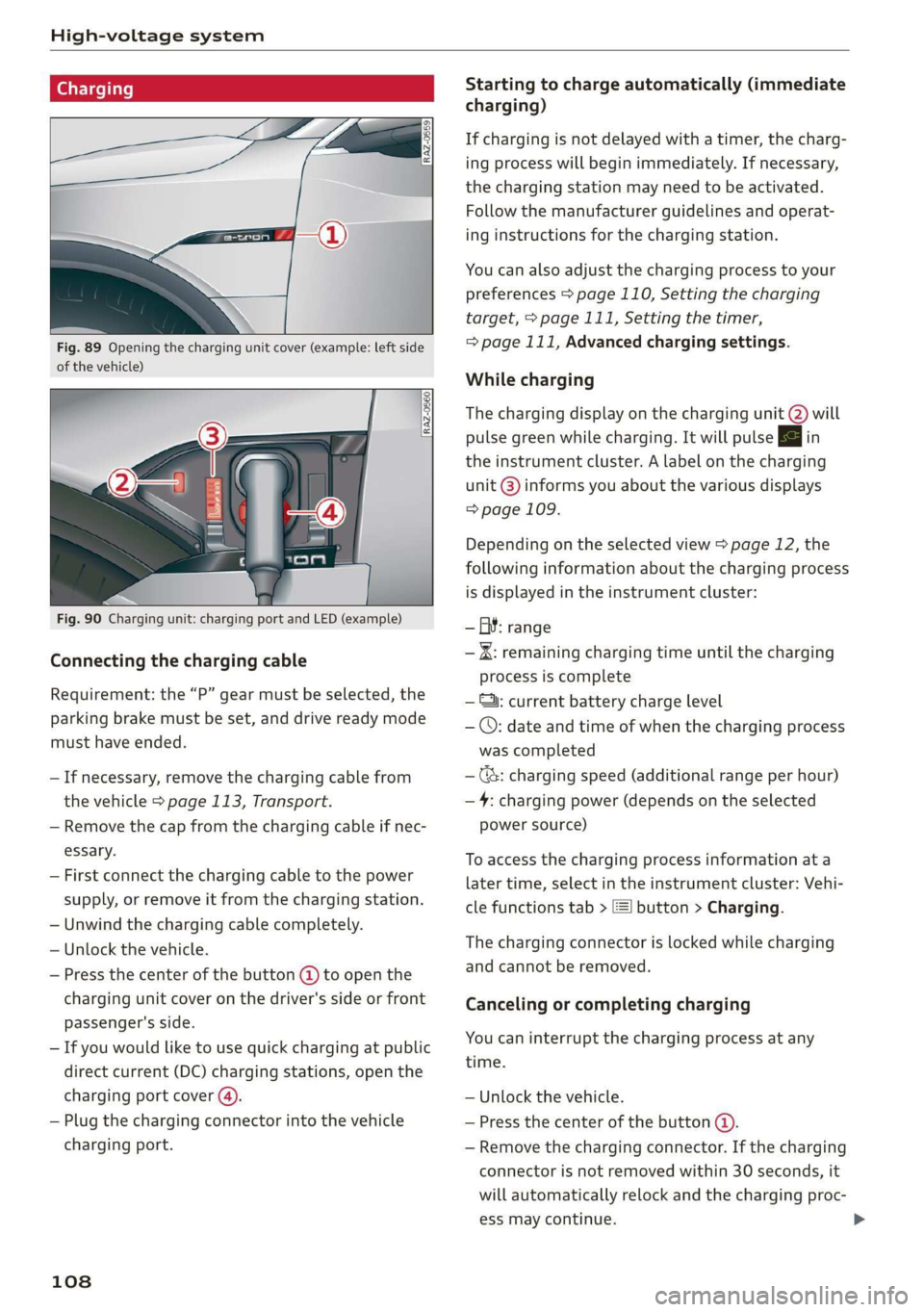
Fig. 89 Opening the charging unit cover (example: left side
of the vehicle)
Fig. 90 Charging unit: charging port and LED (example)
Connecting the charging cable
Requirement: the “P” gear must be selected, the
parking brake must be set, and drive ready mode
must have ended.
— If necessary, remove the charging cable from
the vehicle > page 113, Transport.
— Remove the cap from the charging cable if nec-
essary.
— First connect the charging cable to the power
supply, or remove it from the charging station.
— Unwind the charging cable completely.
— Unlock the vehicle.
— Press the center of the button @ to open the
charging unit cover on the driver's side or front
passenger's side.
— If you would like to use quick charging at public
direct current (DC) charging stations, open the
charging port cover (4).
— Plug the charging connector into the vehicle
charging port.
108
Starting to charge automatically (immediate
charging)
If charging is not delayed with a timer, the charg-
ing process will begin immediately. If necessary,
the charging station may need to be activated.
Follow the manufacturer guidelines and operat-
ing instructions for the charging station.
You can also adjust the charging process to your
preferences > page 110, Setting the charging
target, > page 111, Setting the timer,
=> page 111, Advanced charging settings.
While charging
The charging display on the charging unit @) will
pulse green while charging. It will pulse & in
the instrument cluster. A label on the charging
unit @) informs you about the various displays
=> page 109.
Depending on the selected view > page 12, the
following information about the charging process
is displayed in the instrument cluster:
— GY: range
— IK: remaining charging time until the charging
process is complete
— ©: current battery charge level
— ©: date and time of when the charging process
was completed
—(&: charging speed (additional range per hour)
—4: charging power (depends on the selected
power source)
To access the charging process information at a
later time, select in the instrument cluster: Vehi-
cle functions tab > [=] button > Charging.
The charging connector is locked while charging
and cannot be removed.
Canceling or completing charging
You can interrupt the charging process at any
time.
— Unlock the vehicle.
— Press the center of the button @.
— Remove the charging connector. If the charging
connector is not removed within 30 seconds, it
will automatically relock and the charging proc-
ess may continue.
Page 111 of 310
4KE012721BB
High-voltage system
—If the battery has been charged to the desired
level, the charging unit cover will automatically
relock. Otherwise, the cover must be manually
locked. To do this, press the center of the but-
ton @,.
— Disconnect the charging cable from the power
supply if necessary or return it securely to the
charging station.
— Install the protective caps on the charging ca-
ble again.
— If you are transporting the charging cable in
the vehicle, store it securely > page 113.
If the charging connector cannot be removed,
you must unlock it manually > page 111.
ing, drive immediately to an authorized Audi
dealer or authorized Audi Service Facility
and have the malfunction corrected to re-
duce the risk of injury.
ZA WARNING
— When closing the cover on the charging
unit, make sure the area where the cover is
closing is clear to reduce the risk of injury.
— Do not disconnect the charging cable from
the socket or the vehicle charging port while
the vehicle is charging. End the charging
process before removing the charging cable
from the socket in order to reduce the risk of
damaging the connector contacts from
sparks.
— Never drive with the charging unit open. If
the cover on the charging unit is open, it
could hit other road users and potentially
cause injury.
— If a charging unit is damaged, the vehicle
must not be charged at the damaged charg-
ing port or at the charging port on the other
side* to reduce the risk of injury.
— If the charging unit is damaged or the
charging unit cover cannot close or is miss-
@) Note
— If you drive with an open charging unit, both
the cover and the electronics installed be-
hind it could be damaged. Check before ev-
ery drive after charging if the cover is
locked.
— Applies to: vehicles with charging ports on
the driver and front passenger’s side: Never
attempt to charge the vehicle using both
charging ports at the same time, because
this could damage the charging infrastruc-
ture.
(i) Tips
— Applies to: MMI: in addition to other set-
tings, you can also select if the charging
connector should be released automatically
after the immediate charging process is
complete. To do this, select on the home
screen: VEHICLE > Charging & Efficiency >
Charging > <3 > DC connector: unlock after
charging ends.
— The parking brake may make noises when
connecting the charging connector.
— Remove ice and snow in the charging unit
using a hand brush and solvent-free deicing
spray.
— The vehicle radio and TV systems may have
limited reception when charging the vehicle.
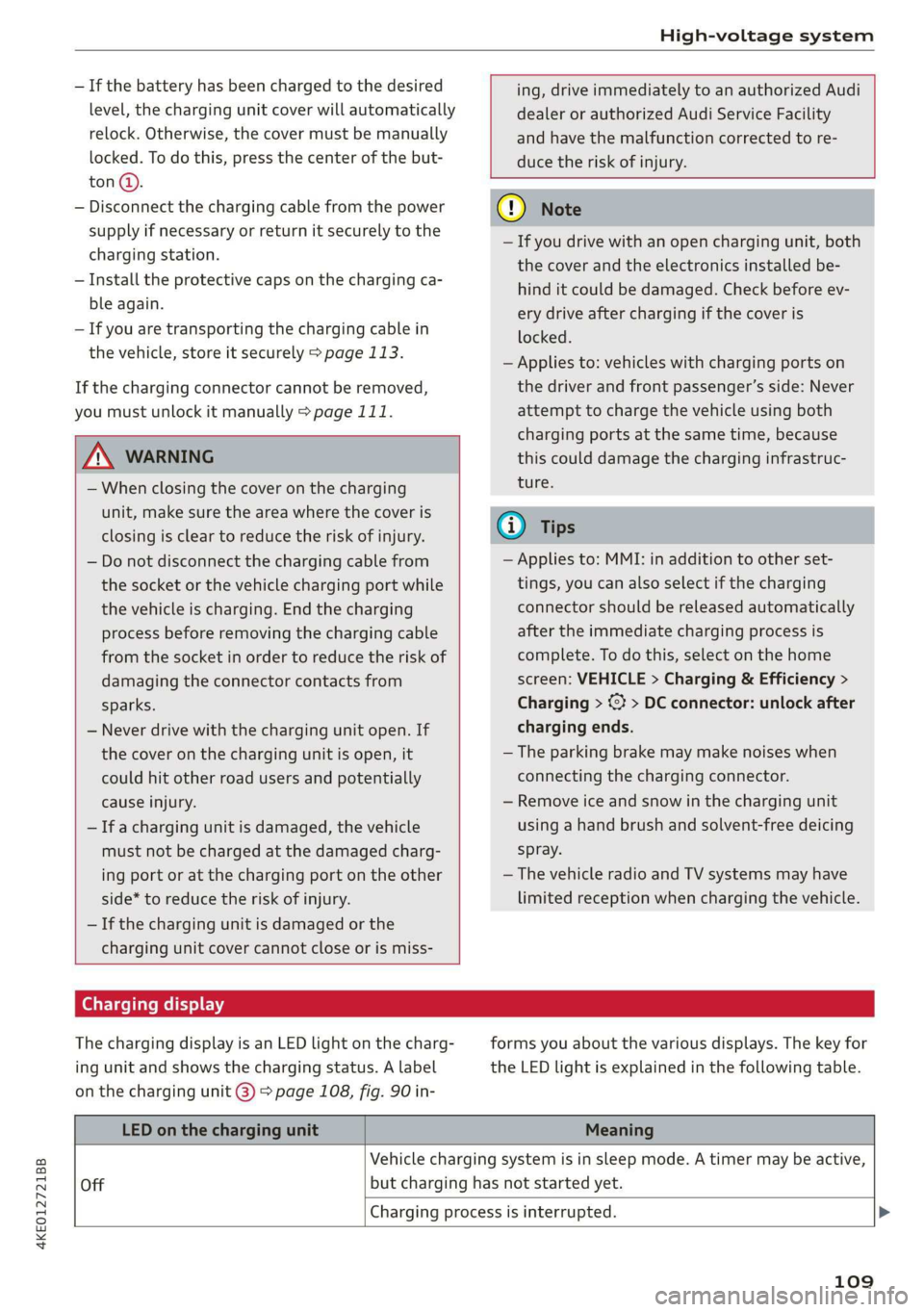
Charging display
The charging display is an LED light on the charg-
ing unit and shows the charging status. A label
on the charging unit @) > page 108, fig. 90 in-
forms you about the various displays. The key for
the LED light is explained in the following table.
LED on the charging unit Meaning
Vehicle charging system is in sleep mode. A timer may be active,
Off but charging has not started yet.
Charging process is interrupted. >
109
Page 112 of 310
High-voltage system
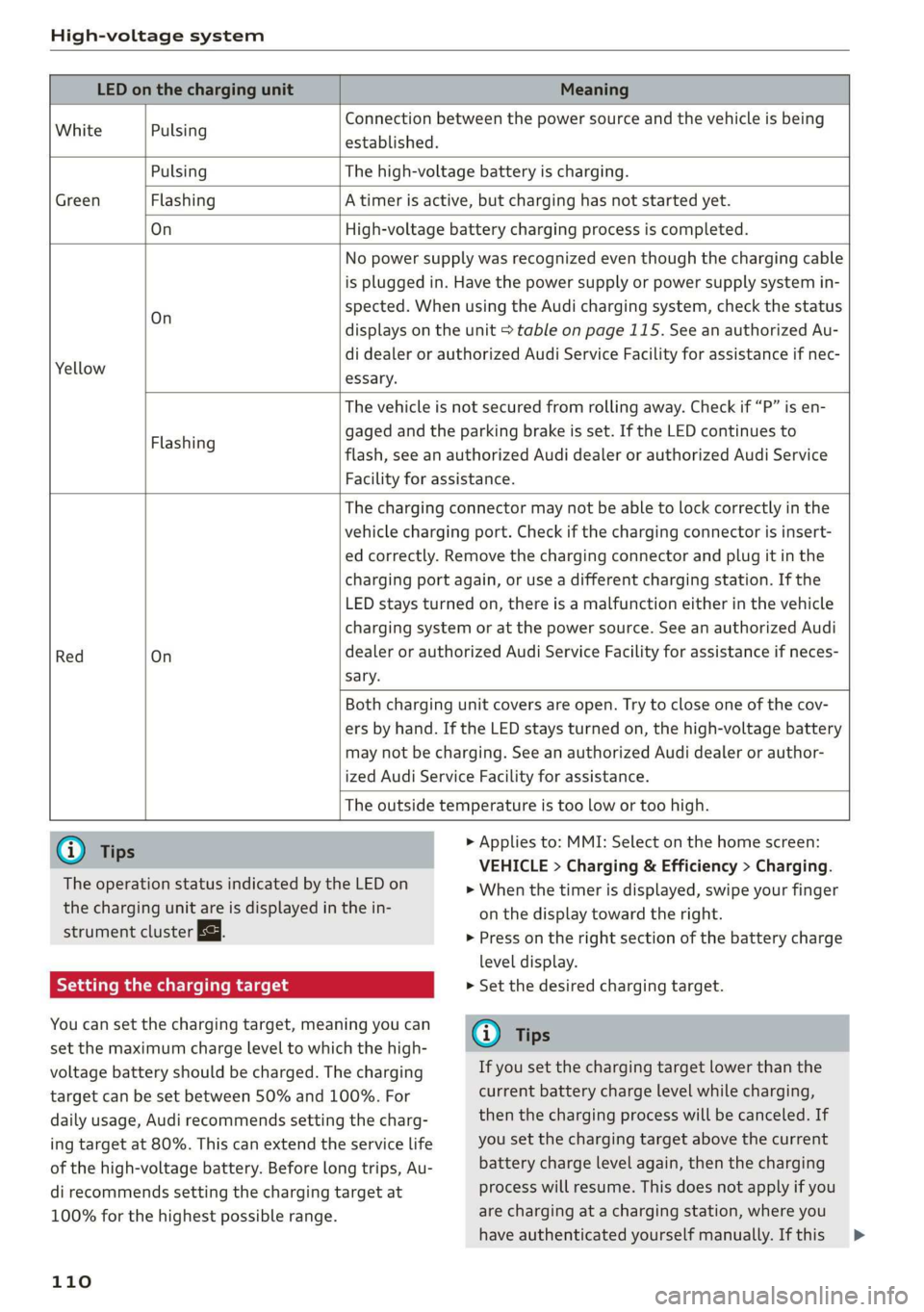
LED on the charging unit Meaning
White Pulsing
Connection between the power source and the vehicle is being
established.
Green
Pulsing The high-voltage battery is charging.
Flashing A timer is active, but charging has not started yet.
On High-voltage battery charging process is completed.
Yellow
On
No power supply was recognized even though the charging cable
is plugged in. Have the power supply or power supply system in-
spected. When using the Audi charging system, check the status
displays on the unit > table on page 115. See an authorized Au-
di dealer or authorized Audi Service Facility for assistance if nec-
essary.
Flashing
The vehicle is not secured from rolling away. Check if “P” is en-
gaged and the parking brake is set. If the LED continues to
flash, see an authorized Audi dealer or authorized Audi Service
Facility for assistance.
Red
On
The charging connector may not be able to lock correctly in the
vehicle charging port. Check if the charging connector is insert-
ed correctly. Remove the charging connector and plug it in the
charging port again, or use a different charging station. If the
LED stays turned on, there is a malfunction either in the vehicle
charging system or at the power source. See an authorized Audi
dealer or authorized Audi Service Facility for assistance if neces-
sary.
Both charging unit covers are open. Try to close one of the cov-
ers by hand. If the LED stays turned on, the high-voltage battery
may not be charging. See an authorized Audi dealer or author-
ized Audi Service Facility for assistance.
The outside temperature is too low or too high.
@ Tips
The operation status indicated by the LED on
> Applies to: MMI: Select on the home screen:
VEHICLE > Charging & Efficiency > Charging.
>» When the timer is displayed, swipe your finger
the charging unit are is displayed in the in-
strument cluster gy.
Setting the charging target
You can set the charging target, meaning you can
set the maximum charge level to which the high-
voltage battery should be charged. The charging
target can be set between 50% and 100%. For
daily usage, Audi recommends setting the charg-
ing target at 80%. This can extend the service life
of the high-voltage battery. Before long trips, Au-
di recommends setting the charging target at
100% for the highest possible range.
110
on the display toward the right.
> Press on the right section of the battery charge
level display.
> Set the desired charging target.
G) Tips
If you set the charging target lower than the
current battery charge level while charging,
then the charging process will be canceled. If
you set the charging target above the current
battery charge level again, then the charging
process will resume. This does not apply if you
are charging at a charging station, where you
have authenticated yourself manually. If this >
Page 124 of 310
Trailer towing
— Note that the vehicle will lower automatical-
ly at certain speeds if you have lifted the
vehicle manually.
@) Note
— Select the Audi drive select* comfort mode.
Otherwise, the tongue load specified for
your vehicle will no longer be applicable.
— Attachments retrofitted on the vehicle may
cause damage, especially on the trailer
hitch ball head. In cases of damage, have
the function checked by an authorized Audi
dealer or authorized Audi Service Facility.
@ Tips
— Block the wheels with chocks when parking
on inclines if the trailer is loaded.
— Having the vehicle inspected between the
inspection intervals is recommended if you
tow a trailer frequently.
Driving with a trailer
Driving with a trailer requires extra caution.
Speed
Adhere to the legal speed limits. Follow the legal
regulations that are applicable in the country
where you are operating the vehicle.
As the speed increases, the driving stability of
the trailer decreases. Therefore you should not
exceed the maximum legal speed limit when
there are unfavorable road, weather, and/or wind
conditions. This especially applies when driving
downhill.
Hill
When you start driving uphill or downhill, trailers
may tilt or sway sooner than when driving ona
level surface. If small swaying movements have
already occurred, you can stabilize the trailer by
firmly braking immediately. Never try to
“straighten out” the trailer by accelerating.
122
Brakes
When using a trailer with overrun brakes, first
brake gently then quickly. This reduces the risk of
jerking while braking if the trailer wheels lock up.
ZA WARNING
Constant braking causes the brakes to over-
heat and can substantially reduce braking per-
formance, increase braking distance, or cause
complete failure of the brake system.
Page 159 of 310
4KE012721BB
Driver assistance
Intersection assistant
Applies to: vehicles with intersection assistant
So 2 Ss
g > %
oO
| _
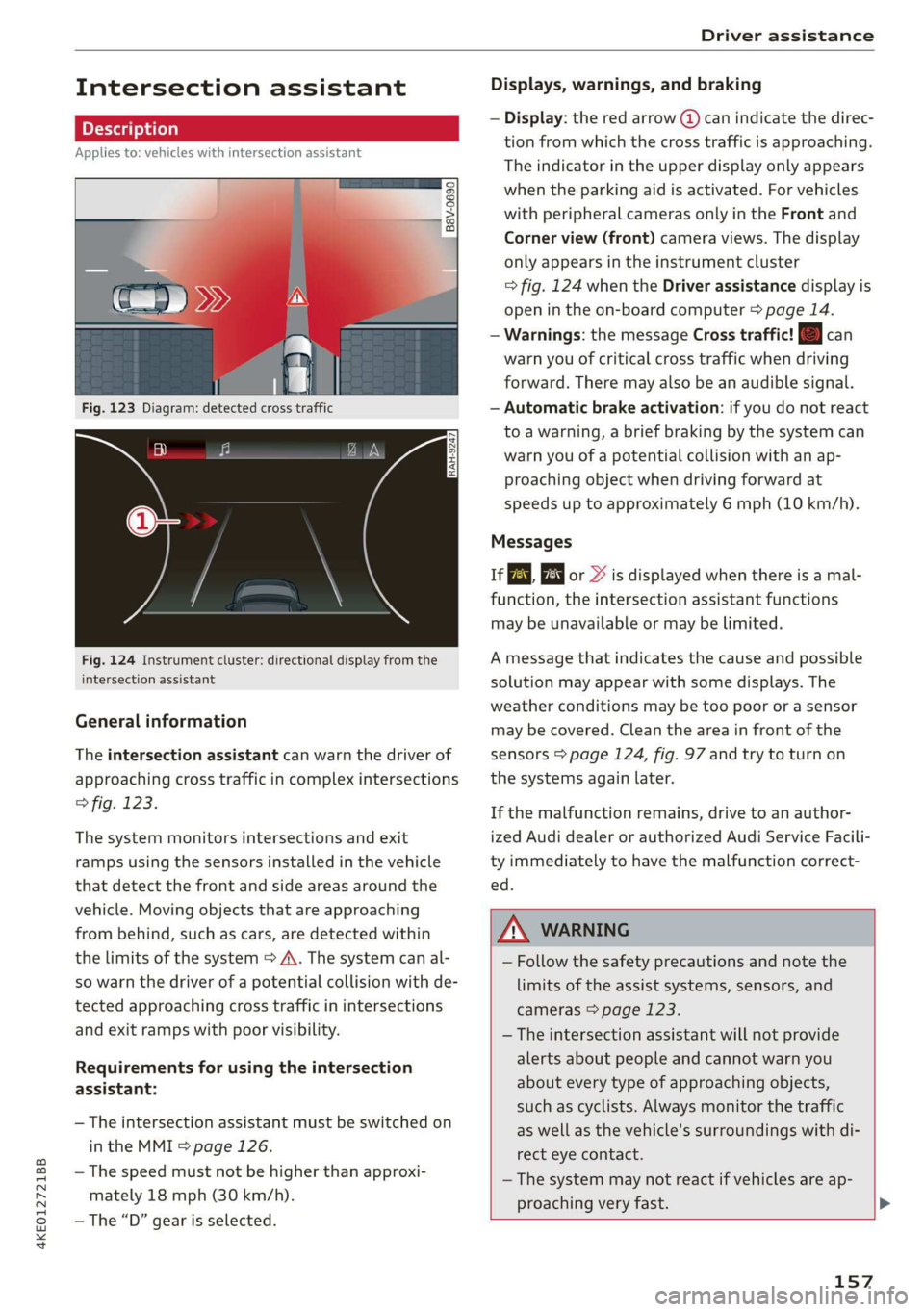
Fig. 123 Diagram: detected cross traffic
Fig. 124 Instrument cluster: directional display from the
intersection assistant
General information
The intersection assistant can warn the driver of
approaching cross traffic in complex intersections
> fig. 123.
The system monitors intersections and exit
ramps using the sensors installed in the vehicle
that detect the front and side areas around the
vehicle. Moving objects that are approaching
from behind, such as cars, are detected within
the limits of the system > A\. The system can al-
so warn the driver of a potential collision with de-
tected approaching cross traffic in intersections
and exit ramps with poor visibility.
Requirements for using the intersection
assistant:
— The intersection assistant must be switched on
in the MMI = page 126.
— The speed must not be higher than approxi-
mately 18 mph (30 km/h).
— The “D” gear is selected.
Displays, warnings, and braking
— Display: the red arrow (@) can indicate the direc-
tion from which the cross traffic is approaching.
The indicator in the upper display only appears
when the parking aid is activated. For vehicles
with peripheral cameras only in the Front and
Corner view (front) camera views. The display
only appears in the instrument cluster
=> fig. 124 when the Driver assistance display is
open in the on-board computer > page 14.
— Warnings: the message Cross traffic! © can
warn you of critical cross traffic when driving
forward. There may also be an audible signal.
— Automatic brake activation: if you do not react
to a warning, a brief braking by the system can
warn you of a potential collision with an ap-
proaching object when driving forward at
speeds up to approximately 6 mph (10 km/h).
Messages
If or » is displayed when there is a mal-
function, the intersection assistant functions
may be unavailable or may be limited.
A message that indicates the cause and possible
solution
may appear with some displays. The
weather conditions may be too poor or a sensor
may be covered. Clean the area in front of the
sensors > page 124, fig. 97 and try to turn on
the systems again later.
If the malfunction remains, drive to an author-
ized Audi dealer or authorized Audi Service Facili-
ty immediately to have the malfunction correct-
ed.
ZA WARNING
— Follow the safety precautions and note the
limits of the assist systems, sensors, and
cameras > page 123.
— The intersection assistant will not provide
alerts about people and cannot warn you
about every type of approaching objects,
such as cyclists. Always monitor the traffic
as well as the vehicle's surroundings with di-
rect eye contact.
—The system may not react if vehicles are ap-
proaching very fast. >
157
Page 160 of 310
Driver assistance
G) Tips
For an explanation on conformity with the
FCC regulations in the United States and the
Industry Canada regulations, see > page 289.
Emergency assist
Applies to: vehicles with emergency assist
General information
Within the limits of the system, the emergency
assist detects if the driver is inactive. In these in-
stances, the system warns the driver, assumes
control of the vehicle if necessary, and brings the
vehicle automatically to a stop in the lane.
Regardless of the speed, the emergency assist is
automatically available when the adaptive cruise
assist* is activated. When the adaptive cruise as-
sist* is deactivated, the system is only active at
speeds higher than approximately 40 mph
(65 km/h).
Emergency assist functions
Within the limits of the system, the emergency
assist monitors the driver’s steering, accelerator,
and brake pedal activity. Depending on the se-
verity of the situation, it may initiate visual, au-
dio, and haptic warnings in stages:
— Reduces the speed
— Messages
— Lowers the volume of the Infotainment system
— Audible warning
— Tightening of the safety belt
—A brief application of the brakes
If the driver remains inactive despite the warn-
ings, the emergency assist controls the vehicle
within the limits of the system:
— The Audi pre sense preemptive safety measures
are triggered > page 150.
— The vehicle will stay in the lane and will be
braked to a stop.
— As soon as the vehicle comes to a full stop, the
emergency flashers are activated and the vehi-
) This function is not available in every market and on all ve-
hicle equipment levels.
158
cle prepares for the vehicle passengers to be
rescued. The parking brake is set, “P” gear is
engaged, the doors are unlocked, and the inte-
rior lighting is activated. If there is no move-
ment for several seconds, the emergency call
will be made if necessary.
Overriding the emergency assist
You can override the emergency assist > A\:
— Move the steering wheel. Or
— Press the brake pedal. Or
— Press the accelerator pedal distinctly.
When stationary, you can end the emergency as-
sist by leaving the "P" position or releasing the
parking brake > page 93.
Switching the emergency assist on and off
The system can be switched on and off in the
MMI & page 126.
Messages
1g or is displayed when there is a malfunc-
tion, the emergency assist functions may be un-
available or may be limited.
A message that indicates the cause and possible
solution may appear with some displays. The
weather conditions may be too poor or a sensor
may be covered. Clean the area in front of the
sensors > page 124, fig. 97 and try to turn on
the systems again later.
If the malfunction remains, drive to an author-
ized Audi dealer or authorized Audi Service Facili-
ty immediately to have the malfunction correct-
ed.
ZX WARNING
— Follow the safety precautions and note the
limits of the assist systems, sensors, and
cameras > page 123.
— The emergency assist is an assist system
that should only be used in cases of emer-
gency to take over control of the vehicle and
bring it to a stop. >
Page 163 of 310
4KE012721BB
Parking and maneuvering
@) Note
Keep enough distance from the curb to avoid
damage to the rims.
G) Tips
If the parking aid is switched off, it can only
be reactivated automatically when one of the
following conditions is met:
— The vehicle speed exceeds 6 mph (10 km/h)
— The ignition is switched off and back on
again
— The parking brake is set and then released
—The “P” gear is engaged and released again
Applies to: vehicles with parking system plus
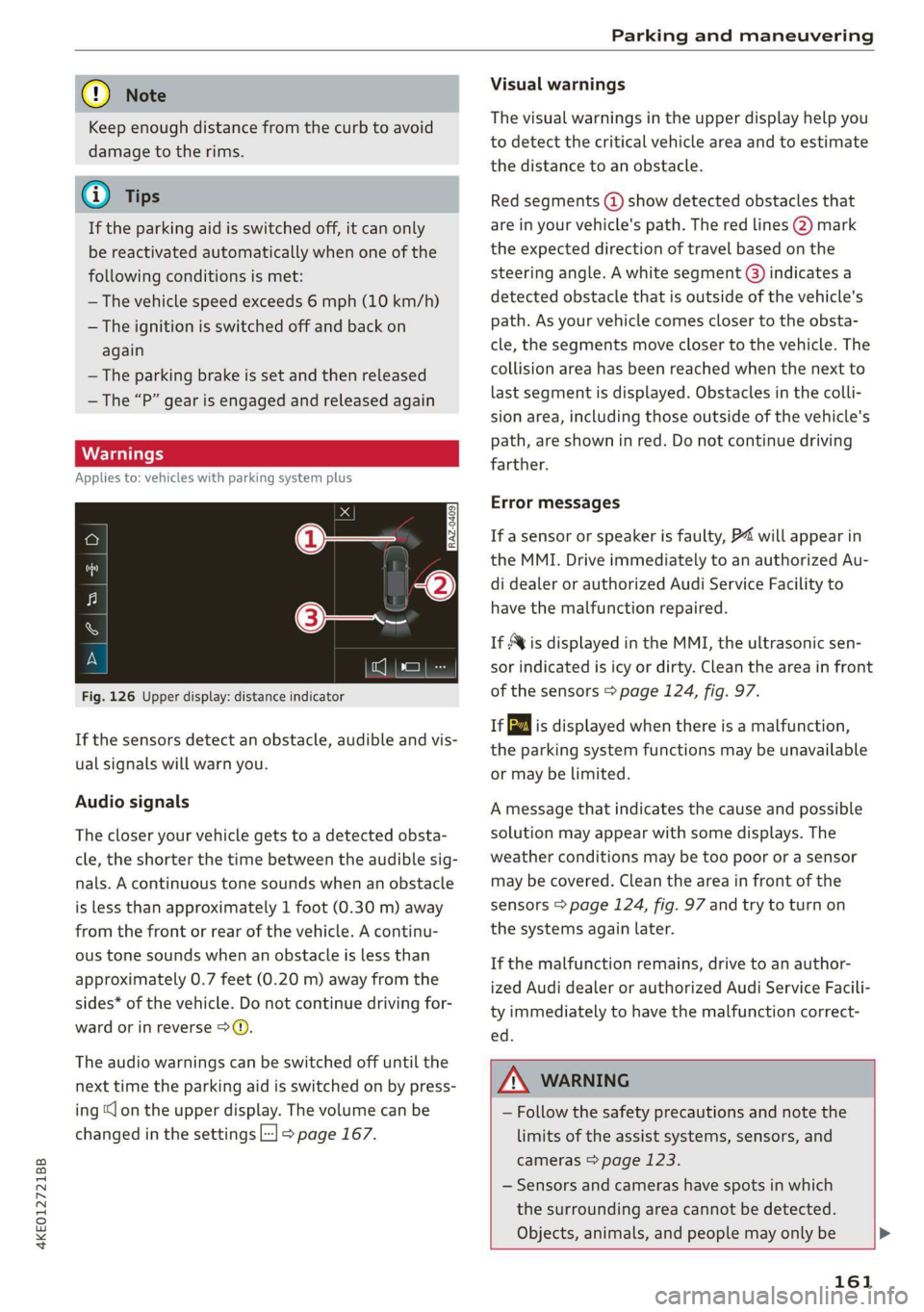
Fig. 126 Upper display: distance indicator
If the sensors detect an obstacle, audible and vis-
ual signals will warn you.
Audio signals
The closer your vehicle gets to a detected obsta-
cle, the shorter the time between the audible sig-
nals. A continuous tone sounds when an obstacle
is less than approximately 1 foot (0.30 m) away
from the front or rear of the vehicle. A continu-
ous tone sounds when an obstacle is less than
approximately 0.7 feet (0.20 m) away from the
sides* of the vehicle. Do not continue driving for-
ward or in reverse 9>Q.
The audio warnings can be switched off until the
next time the parking aid is switched on by press-
ing “lon the upper display. The volume can be
changed in the settings L-] > page 167.
Visual warnings
The visual warnings in the upper display help you
to detect the critical vehicle area and to estimate
the distance to an obstacle.
Red segments (@) show detected obstacles that
are in your vehicle's path. The red lines 2) mark
the expected direction of travel based on the
steering angle. A white segment (8) indicates a
detected obstacle that is outside of the vehicle's
path. As your vehicle comes closer to the obsta-
cle, the segments move closer to the vehicle. The
collision area has been reached when the next to
last segment is displayed. Obstacles in the colli-
sion area, including those outside of the vehicle's
path, are shown in red. Do not continue driving
farther.
Error messages
If a sensor or speaker is faulty, P4 will appear in
the MMI. Drive immediately to an authorized Au-
di dealer or authorized Audi Service Facility to
have the malfunction repaired.
If Avis displayed in the MMI, the ultrasonic sen-
sor indicated is icy or dirty. Clean the area in front
of the sensors > page 124, fig. 97.
iff is displayed when there is a malfunction,
the parking system functions may be unavailable
or may be limited.
A message that indicates the cause and possible
solution may appear with some displays. The
weather conditions may be too poor or a sensor
may be covered. Clean the area in front of the
sensors > page 124, fig. 97 and try to turn on
the systems again later.
If the malfunction remains, drive to an author-
ized Audi dealer or authorized Audi Service Facili-
ty immediately to have the malfunction correct-
ed.
ZA\ WARNING
— Follow the safety precautions and note the
limits of the assist systems, sensors, and
cameras > page 123.
— Sensors and cameras have spots in which
the surrounding area cannot be detected.
Objects, animals, and people may only be >
161
Page 169 of 310
4KE012721BB
Parking and maneuvering
Displays, warnings, and braking
— Display: the indicator @ in the upper display
only appears when the parking aid is activated.
For vehicles with peripheral cameras, this only
happens in the Rear and Corner view (rear)
camera views. Arrows show the direction from
which the cross traffic is approaching.
— Audible warnings: an audio signal may sound
as an additional warning when driving in re-
verse.
— Automatic brake activation: if you do not react
to a warning, a brief braking by the system can
warn you of a potential collision with an ap-
proaching object.
The audible warning signal and the automatic
brake activation occur only when driving in re-
verse.
Messages
1f EM, Bg or > is displayed when there is a mal-
function, the rear cross traffic assist functions
may be unavailable or may be limited.
A message that indicates the cause and possible
solution may appear with some displays. The
weather conditions may be too poor or a sensor
may be covered. Clean the sensor area in the ve-
hicle rear and try to turn the systems on again
later.
If the malfunction remains, drive to an author-
ized Audi dealer or authorized Audi Service Facili-
ty immediately to have the malfunction correct-
ed.
ZA WARNING
— Follow the safety precautions and note the
limits of the assist systems, sensors, and
cameras > page 123.
— The rear cross-traffic assist will not provide
alerts about people and cannot warn you
about every type of approaching objects,
such as cyclists. Always monitor the traffic
as well as the vehicle's surroundings with di-
rect eye contact.
— The system may not react if objects are ap-
proaching very quickly.
— The rear cross-traffic assist will not provide
alerts if your vehicle is parallel parked or if
your vehicle is pulled too far into the park-
ing space so that it is hidden by adjacent ve-
hicles.
(i) Tips
— Once an automatic brake activation occurs,
the system cannot initiate another activa-
tion for several seconds.
—If there is an acoustic warning signal from
the rear cross-traffic assist, then the park-
ing system may not warn you of detected
obstacles under certain circumstances.
— The system is not available when the vehicle
detects that you are towing a trailer. There
is no guarantee the functions will switch off
when using a retrofitted trailer hitch. Do not
use
these functions when towing a trailer.
— For an explanation on conformity with the
FCC regulations in the United States and the
Industry Canada regulations, see
=> page 289.
Adjusting the parking
aids
You can adjust the parking aid to your preferen-
ces. The settings depend on the vehicle equip-
ment.
> Applies to: MMI: Select on the home screen:
VEHICLE > Parking aid.
> Applies to: MMI: Select L-] on the upper display
when the parking aid is active.
Possible settings:
Activating automatically
Trailer view - Shows the trailer view. In vehicles
with peripheral cameras, this can only be opened
in the Rear view.
View - Switches between the visual display
(Graphic) and vehicle surroundings (Camera) in
the side view on the screen.
Clean rearview camera - Starts cleaning the rear-
view camera.
167
Page 237 of 310
4KE012721BB
Checking and Filling
Checking and Filling
Motor compartment
General information
Special care is required if you are working in the
motor compartment
For work in the motor compartment, such as
checking and filling fluids, there is a risk of in-
jury, scalding, accidents, and burns. For this
reason, follow all the warnings and general
safety precautions provided in the following in-
formation. The motor compartment is a danger-
ous area in the vehicle. > A.
age component can result in a fatal electric
shock. The components in the high-voltage
system are marked with a warning label which
warns of the high-voltage.
— The voltage level in the high-voltage system
is still dangerous and potentially life-threat-
ening when the ignition is switched off.
— Never perform work on orange high-voltage
cables or on high-voltage components. Only
authorized repair facilities that are certified
may perform work on the high-voltage sys-
tem.
ZA WARNING
— Switch the ignition off.
— Set the parking brake.
— Select the “P” (Park) selector lever position.
— Keep children away from the motor com-
partment.
— Never spill operating fluids in the motor
compartment.
— Avoid short circuits in the electrical system.
— Never open the hood when there is steam or
coolant escaping from the motor compart-
ment, because there is a risk that you could
be burned. Wait until no steam or coolant is
escaping.
— Never open the cap on the coolant reservoir
if the coolant is hot. The cooling system is
under pressure.
— To protect your face, hands, and arms from
hot steam or coolant, cover the cap with a
thick cloth when opening.
— All work on the battery or electrical system
in your vehicle can result in injuries, chemi-
cal burns, accidents, or burns. Because of
this, all work must be performed only by an
authorized Audi dealer or authorized Audi
Service Facility.
— Limit your exposure to chemicals to as short
a time as possible.
ZA WARNING
California Proposition 65 Warning:
— Engine exhaust, some of its constituents,
and certain vehicle components contain or
emit chemicals known to the State of Cali-
fornia to cause cancer and birth defects and
reproductive harm. In addition, certain flu-
ids contained in vehicles and certain prod-
ucts of component wear contain or emit
chemicals known to the State of California
to cause cancer and birth defects or other
reproductive harm.
— Battery posts, terminals and related acces-
sories contain lead and lead compounds,
chemicals known to the State of California
to cause cancer and reproductive harms.
Wash hands after handling.
ZA\ WARNING
The voltage in the high-voltage system is life-
threatening. Touching a damaged high-volt-
() Note
When filling fluids, be sure not to add any flu-
ids to the wrong reservoirs. Otherwise, severe
malfunctions and damage will occur.
@) For the sake of the environment
You should regularly check the ground under
your vehicle in order to detect leaks quickly. If
there are visible spots from oil or other fluids,
bring your vehicle to an authorized Audi deal-
er or authorized Audi Service Facility to be
checked.
235