door lock AUDI E-TRON 2019 Owner's Manual
[x] Cancel search | Manufacturer: AUDI, Model Year: 2019, Model line: E-TRON, Model: AUDI E-TRON 2019Pages: 310, PDF Size: 81.91 MB
Page 79 of 310
4KE012721BB
Stowing and using
Additional storage
You will find a variety of storage compartments
and holders at various locations in the vehicle.
— Glove compartment: the glove compartment
can be locked using the mechanical key
=> page 33.
— Holders for a notepad, pen, and coins in the
glove compartment
— Storage compartment in the cockpit on the
driver's side
— Storage compartments in the door trim panel
— Storage compartments in the front center con-
sole
— Storage compartment under the front center
armrest*
— Nets on the back of the front seats
— Garment hooks in the rear
— Storage compartment in the rear center arm-
rest*
— Removable box* under the cargo floor in the
luggage compartment
— Bag hooks* in the luggage compartment
— Net* in luggage compartment
ZA\ WARNING
—To reduce the risk of injury, make sure all
storage compartments are always closed
while driving.
— Loose objects can be thrown around the ve-
hicle interior during sudden driving or brak-
ing maneuvers, which increases the risk of
an accident. Store objects securely while
driving.
— Only use the storage compartments in the
door trim panels to store small objects that
will not stick out of the compartment and
impair the function of the side airbags.
— Only lightweight clothing should be hung
from the garment hooks in the vehicle. Do
not use clothes hangers to hang clothing.
The pockets of the clothing must not con-
tain any heavy, breakable, or sharp-edged
objects. This could impair the effectiveness
of the side curtain airbags.
— Make sure your view toward the rear is not
blocked, for example by hanging clothing or
objects in the vehicle.
Luggage compartment
General information
All pieces of luggage or objects must be securely
fastened in the luggage compartment. Note the
following to maintain good vehicle handling:
> Distribute the load evenly in the luggage com-
partment.
> Stow heavy luggage as far forward in the lug-
gage compartment as possible.
> Use non-elastic cords attached to the tie-downs
to secure objects.
ZA\ WARNING
— The luggage compartment cover is not a
surface for storing objects. Objects placed
on the cover increase the risk of injury to all
vehicle occupants during sudden driving or
braking maneuvers or in the event of an ac-
cident.
— Loose objects can be thrown around the ve-
hicle interior during sudden driving or brak-
ing maneuvers, which increases the risk of
an accident. Always stow objects securely in
the luggage compartment and secure them
at the tie-downs. Use straps suitable for
heavy objects.
— If pieces of luggage or objects are secured
to the tie-downs with unsuitable or dam-
aged straps, this can increase the risk of in-
jury during braking maneuvers or accidents.
— When transporting heavy objects, the vehi-
cle characteristics will change due to the
shift in the center of gravity, which increases
the risk of an accident. You may need to
adapt your driving style and speed to the
current conditions.
— The cargo net is only strong enough to se-
cure light objects. Heavy objects are not ade-
quately secured. Attempting to secure heavy
objects increases the risk of injury.
— Never exceed the permitted axle and load
and vehicle weight > page 292.
77
Page 80 of 310
Stowing and using
— Never secure a child safety seat to the tie-
downs.
— Never leave your vehicle unattended, espe-
cially if the luggage compartment lid is
open. Children could enter the luggage com-
partment and close the luggage compart-
ment lid from the inside. This creates the
risk of fatal injury, since the children would
be locked in and may not be able to escape
by themselves.
— Do not allow children to play in or on the ve-
hicle. Close and lock the luggage compart-
ment lid as well as all other doors when you
leave the vehicle.
— Never transport passengers in the luggage
compartment. Every passenger must be cor-
rectly secured with the safety belts in the
vehicle > page 60.
— Be careful when releasing the backrest and
folding
it forward. To reduce the risk of be-
ing pinched, pay attention and check when
folding backrests forward.
— The backrest must be securely latched so
objects cannot slide forward out of the lug-
gage compartment during sudden braking.
— The backrest must be latched securely to en-
sure that the safety belt is protecting the
center seating position.
— Always pull forward on the backrest to make
sure it is check if it is correctly locked in
place.
@ Note
—To reduce the risk of damage, move the rear
head restraints down > page 60 before fold-
ing the rear backrests forward.
— When folding the backrest forward, make
sure the outer safety belts are in the belt
guide recess so that they do not get pinched
in the backrest lock and damaged. Other ob-
jects
should be removed from the rear
bench seat to protect the backrest from
damage.
— If you move the front seat back when the
rear seat backrest is folded forward, you
could damage the head restraints on the
rear seat.
78
— Make sure that the heating grid strips for
the rear window defogger are not damaged
by abrasive objects.
— Let the luggage compartment cover roll up
slowly to reduce the risk of damage.
— Let the partition net roll up slowly to pre-
vent damage.
@) Tips
— The tire pressure must be adapted to the
load > page 253.
— You can purchase straps at specialty stores.
Luggage compartment cover
Applies to: vehicles with luggage compartment cover
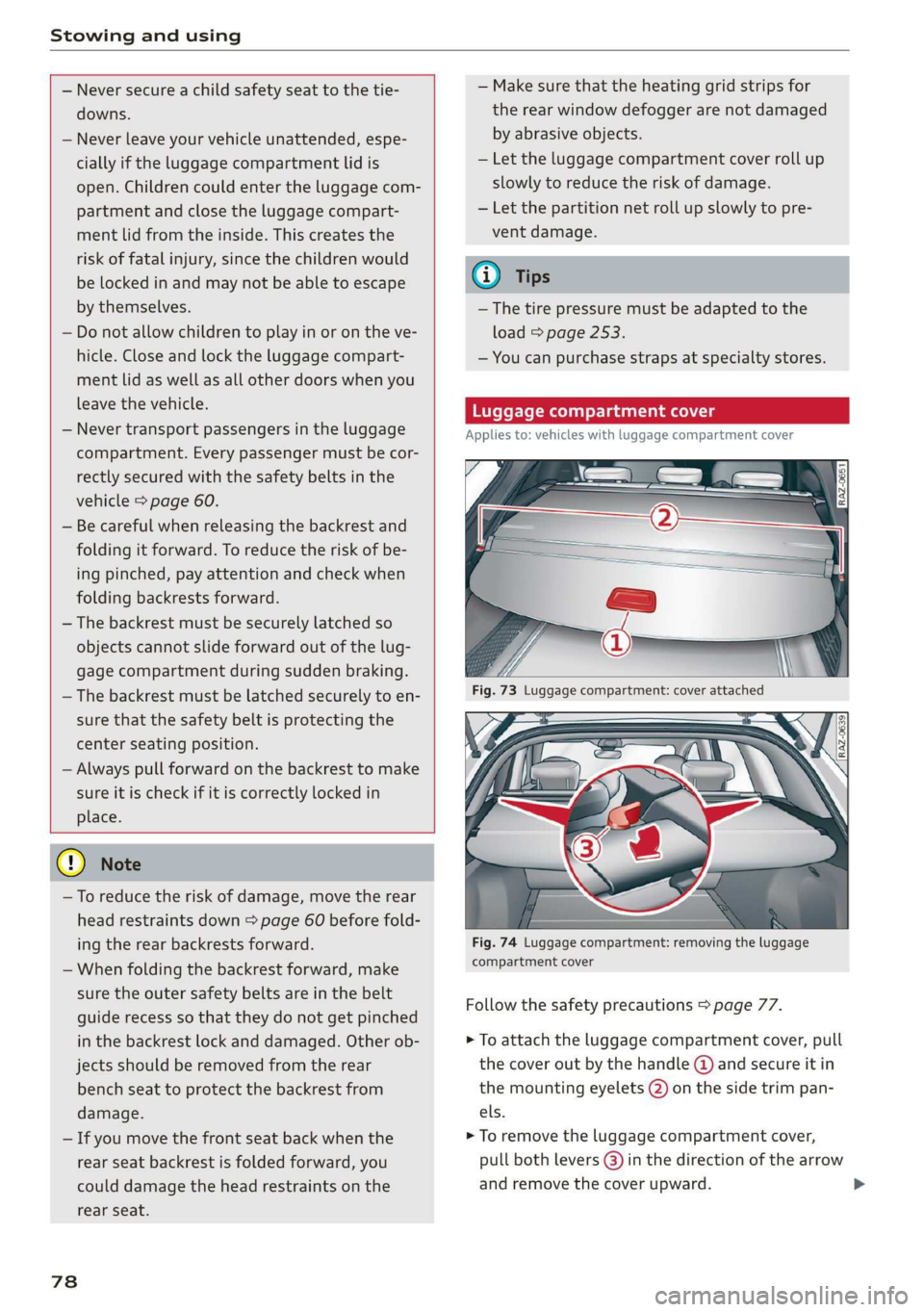
Fig. 74 Luggage compartment: removing the luggage
compartment cover
Follow the safety precautions > page 77.
> To attach the luggage compartment cover, pull
the cover out by the handle @ and secure it in
the mounting eyelets (2) on the side trim pan-
els.
> To remove the luggage compartment cover,
pull both levers (3) in the direction of the arrow
and remove the cover upward.
Page 88 of 310
Driving
Driving
Starting the vehicle
Description
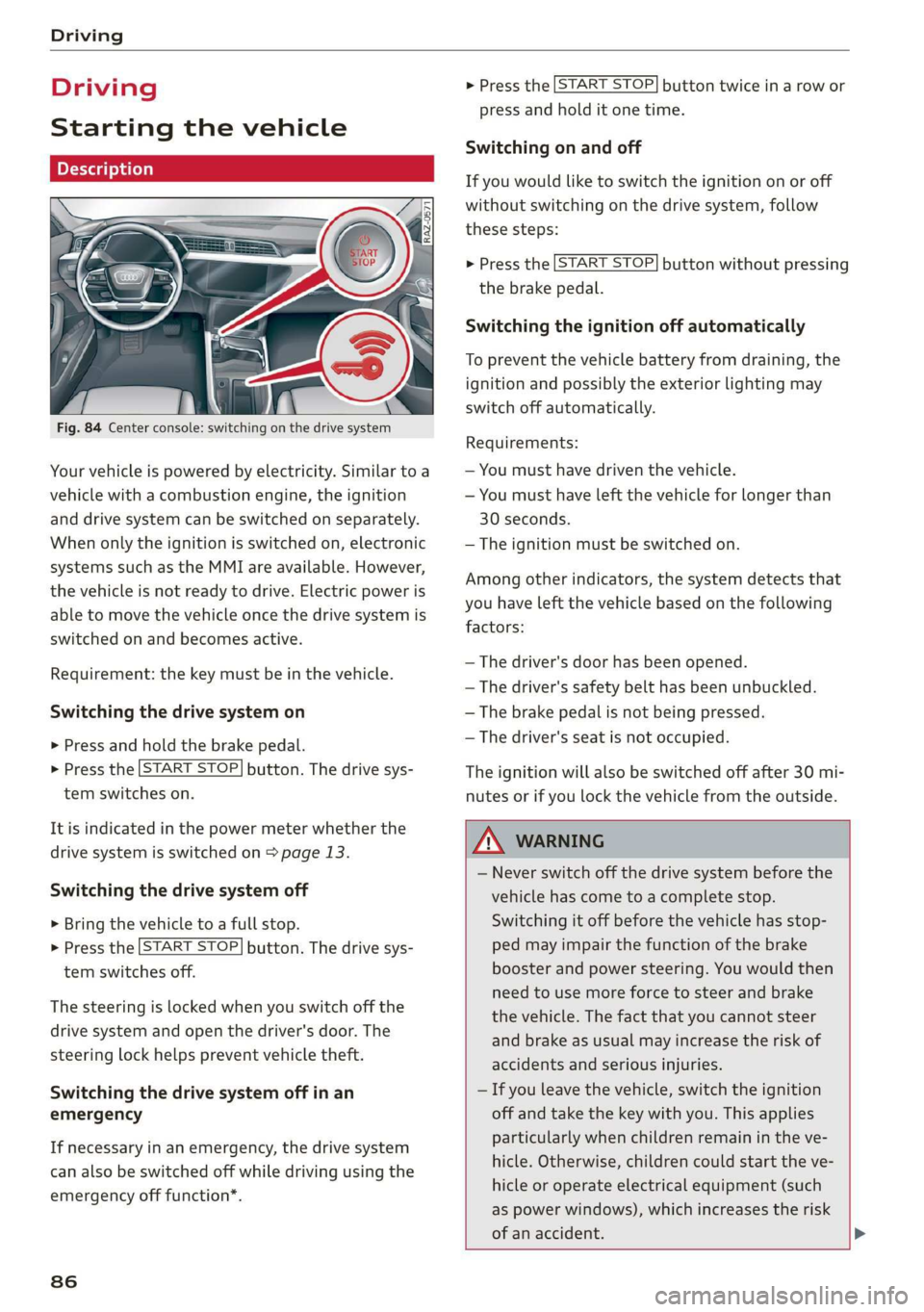
Fig. 84 Center console: switching on the drive system
Your vehicle is powered by electricity. Similar to a
vehicle with a combustion engine, the ignition
and drive system can be switched on separately.
When only the ignition is switched on, electronic
systems such as the MMI are available. However,
the vehicle is not ready to drive. Electric power is
able to move the vehicle once the drive system is
switched on and becomes active.
Requirement: the key must be in the vehicle.
Switching the drive system on
> Press and hold the brake pedal.
> Press the [START STOP] button. The drive sys-
tem switches on.
It is indicated in the power meter whether the
drive system is switched on > page 13.
Switching the drive system off
> Bring the vehicle to a full stop.
> Press the [START STOP] button. The drive sys-
tem switches off.
The steering is locked when you switch off the
drive
system and open the driver's door. The
steering lock helps prevent vehicle theft.
Switching the drive system off in an
emergency
If necessary in an emergency, the drive system
can also be switched off while driving using the
emergency off function”.
86
> Press the [START STOP] button twice in a row or
press and hold it one time.
Switching on and off
If you would like to switch the ignition on or off
without switching on the drive system, follow
these steps:
> Press the [START STOP] button without pressing
the brake pedal.
Switching the ignition off automatically
To prevent the vehicle battery from draining, the
ignition and possibly the exterior lighting may
switch off automatically.
Requirements:
— You must have driven the vehicle.
— You must have left the vehicle for longer than
30 seconds.
— The ignition must be switched on.
Among other indicators, the system detects that
you have left the vehicle based on the following
factors:
— The driver's door has been opened.
— The driver's safety belt has been unbuckled.
— The brake pedal is not being pressed.
— The driver's seat is not occupied.
The ignition will also be switched off after 30 mi-
nutes or if you lock the vehicle from the outside.
ZA WARNING
— Never switch off the drive system before the
vehicle has come to a complete stop.
Switching it off before the vehicle has stop-
ped may impair the function of the brake
booster and power steering. You would then
need to use more force to steer and brake
the vehicle. The fact that you cannot steer
and brake as usual may increase the risk of
accidents and serious injuries.
— If you leave the vehicle, switch the ignition
off and take the key with you. This applies
particularly when children remain in the ve-
hicle. Otherwise, children could start the ve-
hicle or operate electrical equipment (such
as power windows), which increases the risk
of an accident.
Page 90 of 310
Driving
— If you leave the vehicle, switch the ignition
off and take the key with you. This is espe-
cially important when leaving persons or an-
imals in the vehicle. Otherwise, the vehicle
could start unintentionally, the parking
brake could release, or electronic equipment
could activate, which increases the risk of an
accident.
— No persons or animals should be left in a
locked vehicle. Locked doors make it more
difficult for emergency workers to enter the
vehicle, which puts lives at risk.
G) Tips
Always make sure that the vehicle does not
“creep” when starting to drive and maneuver-
ing. If you take your foot off the brake pedal,
the vehicle will not be set into motion by the
drive system.
Gears and driving programs
RAZ-0570
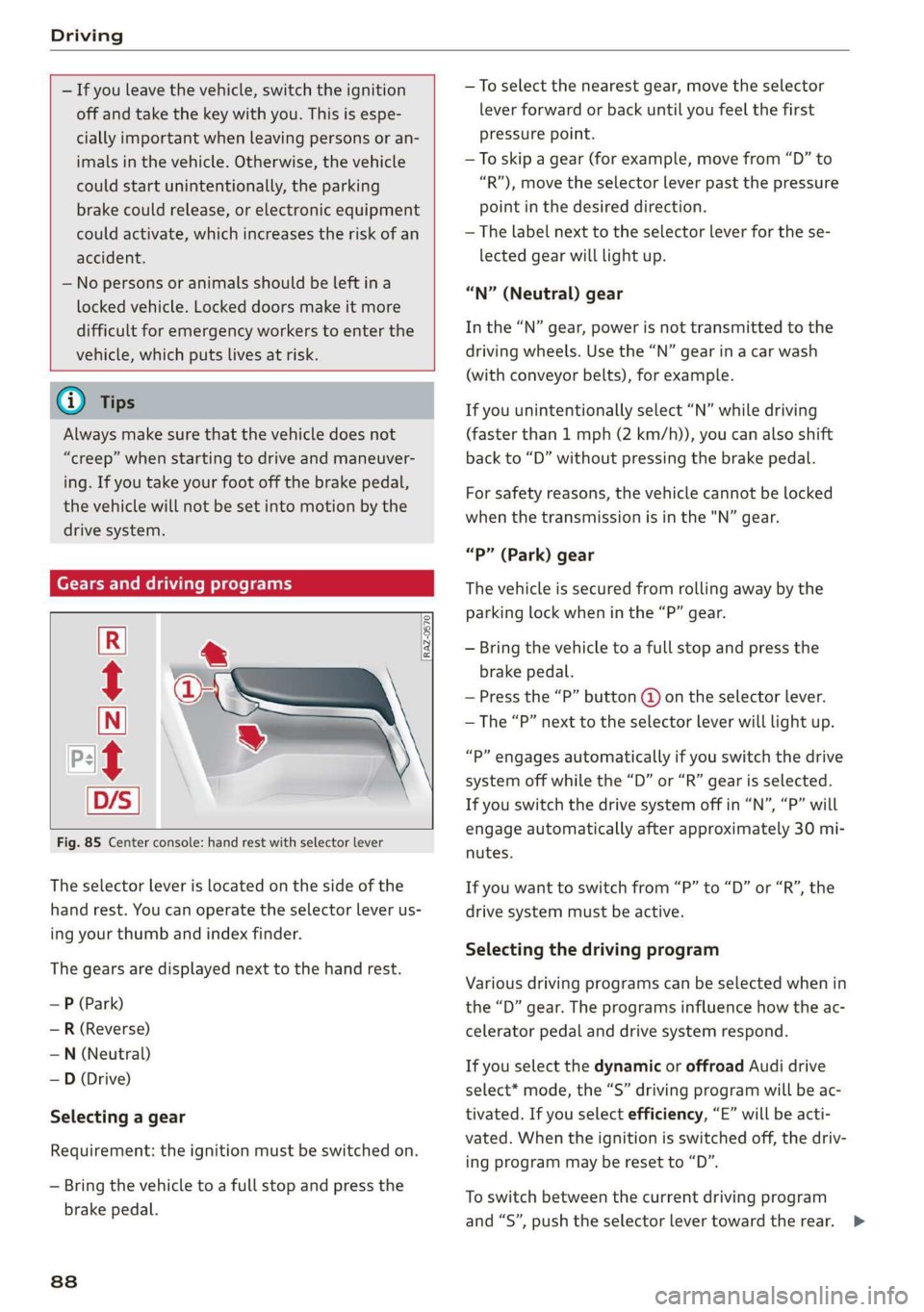
Fig. 85 Center console: hand rest with selector lever
The selector lever is located on the side of the
hand rest. You can operate the selector lever us-
ing your thumb and index finder.
The gears are displayed next to the hand rest.
— P (Park)
— R (Reverse)
—N (Neutral)
—D (Drive)
Selecting a gear
Requirement: the ignition must be switched on.
— Bring the vehicle to a full stop and press the
brake pedal.
838
—To select the nearest gear, move the selector
lever forward or back until you feel the first
pressure point.
—To skip a gear (for example, move from “D” to
“R”), move the selector lever past the pressure
point in the desired direction.
— The label next to the selector lever for the se-
lected gear will light up.
“N” (Neutral) gear
In the “N” gear, power is not transmitted to the
driving wheels. Use the “N” gear in a car wash
(with conveyor belts), for example.
If you unintentionally select “N” while driving
(faster than 1 mph (2 km/h)), you can also shift
back to “D” without pressing the brake pedal.
For safety reasons, the vehicle cannot be locked
when the transmission is in the "N” gear.
“Pp” (Park) gear
The vehicle is secured from rolling away by the
parking lock when in the “P” gear.
— Bring the vehicle to a full stop and press the
brake pedal.
— Press the “P” button @ on the selector lever.
— The “P” next to the selector lever will light up.
“P” engages automatically if you switch the drive
system off while the “D” or “R” gear is selected.
If you switch the drive system off in “N”, “P” will
engage automatically after approximately 30 mi-
nutes.
If you want to switch from “P” to “D” or “R”, the
drive system must be active.
Selecting the driving program
Various driving programs can be selected when in
the “D” gear. The programs influence how the ac-
celerator pedal and drive system respond.
If you select the dynamic or offroad Audi drive
select* mode, the “S” driving program will be ac-
tivated. If you select efficiency, “E” will be acti-
vated. When the ignition is switched off, the driv-
ing program may be reset to “D”.
To switch between the current driving program
and “S”, push the selector lever toward the rear. >
Page 158 of 310
Driver assistance
Exit warning
Applies to: vehicles with exit warning system
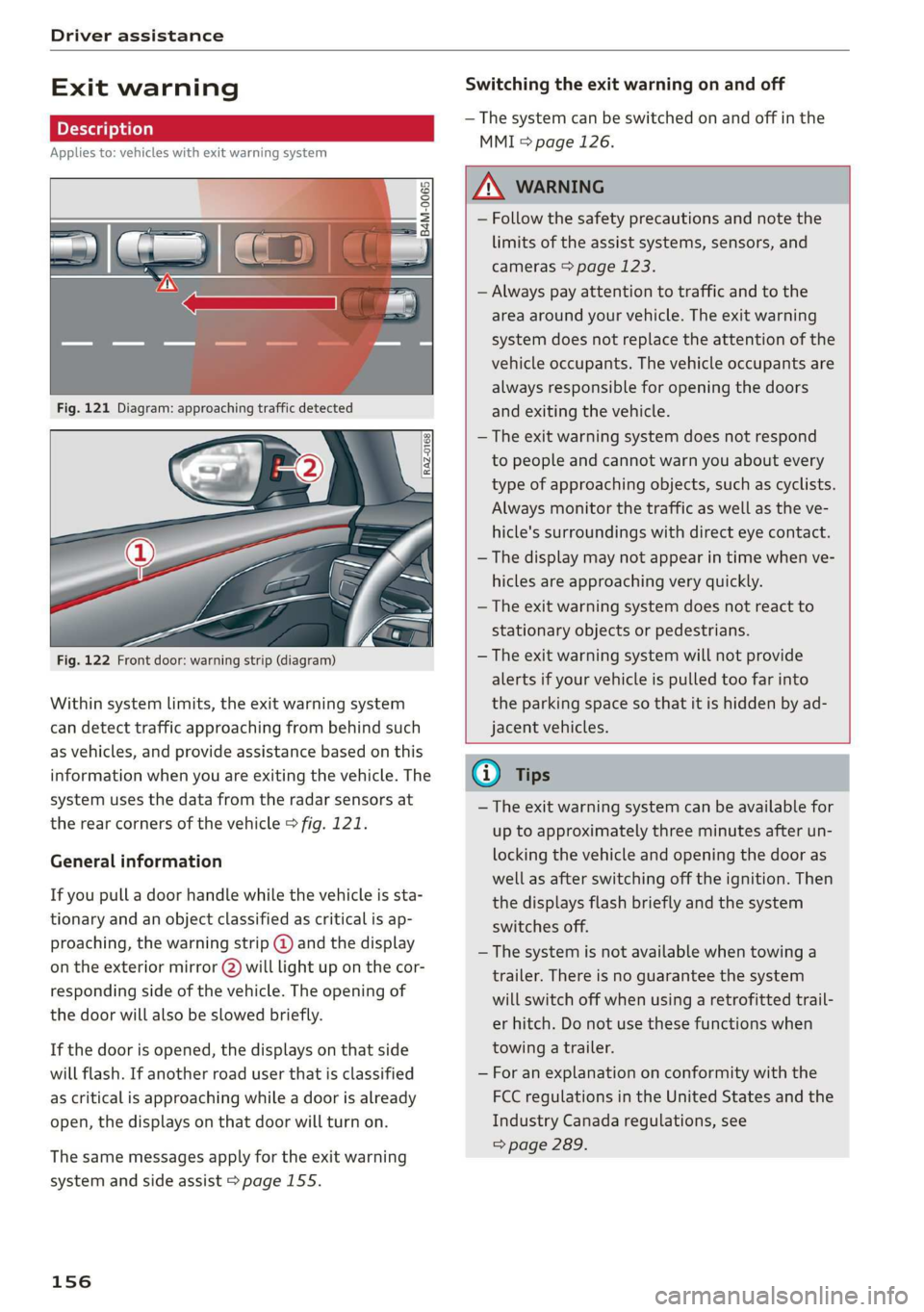
Fig. 122 Front door: warning strip (diagram)
Within system limits, the exit warning system
can detect traffic approaching from behind such
as vehicles, and provide assistance based on this
information when you are exiting the vehicle. The
system uses the data from the radar sensors at
the rear corners of the vehicle > fig. 121.
General information
If you pull a door handle while the vehicle is sta-
tionary and an object classified as critical is ap-
proaching, the warning strip @ and the display
on the exterior mirror (2) will light up on the cor-
responding side of the vehicle. The opening of
the door will also be slowed briefly.
If the door is opened, the displays on that side
will flash. If another road user that is classified
as critical is approaching while a door is already
open, the displays on that door will turn on.
The same messages apply for the exit warning
system and side assist > page 155.
156
Switching the exit warning on and off
— The system can be switched on and off in the
MMI & page 126.
A WARNING
— Follow the safety precautions and note the
limits of the assist systems, sensors, and
cameras > page 123.
— Always pay attention to traffic and to the
area around your vehicle. The exit warning
system does not replace the attention of the
vehicle occupants. The vehicle occupants are
always responsible for opening the doors
and exiting the vehicle.
— The exit warning system does not respond
to people and cannot warn you about every
type of approaching objects, such as cyclists.
Always monitor the traffic as well as the ve-
hicle's surroundings with direct eye contact.
— The display may not appear in time when ve-
hicles are approaching very quickly.
— The exit warning system does not react to
stationary objects or pedestrians.
— The exit warning system will not provide
alerts if your vehicle is pulled too far into
the parking space so that it is hidden by ad-
jacent vehicles.
@ Tips
— The exit warning system can be available for
up to approximately three minutes after un-
locking the vehicle and opening the door as
well as after switching off the ignition. Then
the displays flash briefly and the system
switches off.
— The system is not available when towing a
trailer. There is no guarantee the system
will switch off when using a retrofitted trail-
er hitch. Do not use these functions when
towing a trailer.
— For an explanation on conformity with the
FCC regulations in the United States and the
Industry Canada regulations, see
=> page 289.
Page 160 of 310
Driver assistance
G) Tips
For an explanation on conformity with the
FCC regulations in the United States and the
Industry Canada regulations, see > page 289.
Emergency assist
Applies to: vehicles with emergency assist
General information
Within the limits of the system, the emergency
assist detects if the driver is inactive. In these in-
stances, the system warns the driver, assumes
control of the vehicle if necessary, and brings the
vehicle automatically to a stop in the lane.
Regardless of the speed, the emergency assist is
automatically available when the adaptive cruise
assist* is activated. When the adaptive cruise as-
sist* is deactivated, the system is only active at
speeds higher than approximately 40 mph
(65 km/h).
Emergency assist functions
Within the limits of the system, the emergency
assist monitors the driver’s steering, accelerator,
and brake pedal activity. Depending on the se-
verity of the situation, it may initiate visual, au-
dio, and haptic warnings in stages:
— Reduces the speed
— Messages
— Lowers the volume of the Infotainment system
— Audible warning
— Tightening of the safety belt
—A brief application of the brakes
If the driver remains inactive despite the warn-
ings, the emergency assist controls the vehicle
within the limits of the system:
— The Audi pre sense preemptive safety measures
are triggered > page 150.
— The vehicle will stay in the lane and will be
braked to a stop.
— As soon as the vehicle comes to a full stop, the
emergency flashers are activated and the vehi-
) This function is not available in every market and on all ve-
hicle equipment levels.
158
cle prepares for the vehicle passengers to be
rescued. The parking brake is set, “P” gear is
engaged, the doors are unlocked, and the inte-
rior lighting is activated. If there is no move-
ment for several seconds, the emergency call
will be made if necessary.
Overriding the emergency assist
You can override the emergency assist > A\:
— Move the steering wheel. Or
— Press the brake pedal. Or
— Press the accelerator pedal distinctly.
When stationary, you can end the emergency as-
sist by leaving the "P" position or releasing the
parking brake > page 93.
Switching the emergency assist on and off
The system can be switched on and off in the
MMI & page 126.
Messages
1g or is displayed when there is a malfunc-
tion, the emergency assist functions may be un-
available or may be limited.
A message that indicates the cause and possible
solution may appear with some displays. The
weather conditions may be too poor or a sensor
may be covered. Clean the area in front of the
sensors > page 124, fig. 97 and try to turn on
the systems again later.
If the malfunction remains, drive to an author-
ized Audi dealer or authorized Audi Service Facili-
ty immediately to have the malfunction correct-
ed.
ZX WARNING
— Follow the safety precautions and note the
limits of the assist systems, sensors, and
cameras > page 123.
— The emergency assist is an assist system
that should only be used in cases of emer-
gency to take over control of the vehicle and
bring it to a stop. >
Page 238 of 310
Checking and Filling
Opening and closing the hood
The hood is released from inside the vehicle.
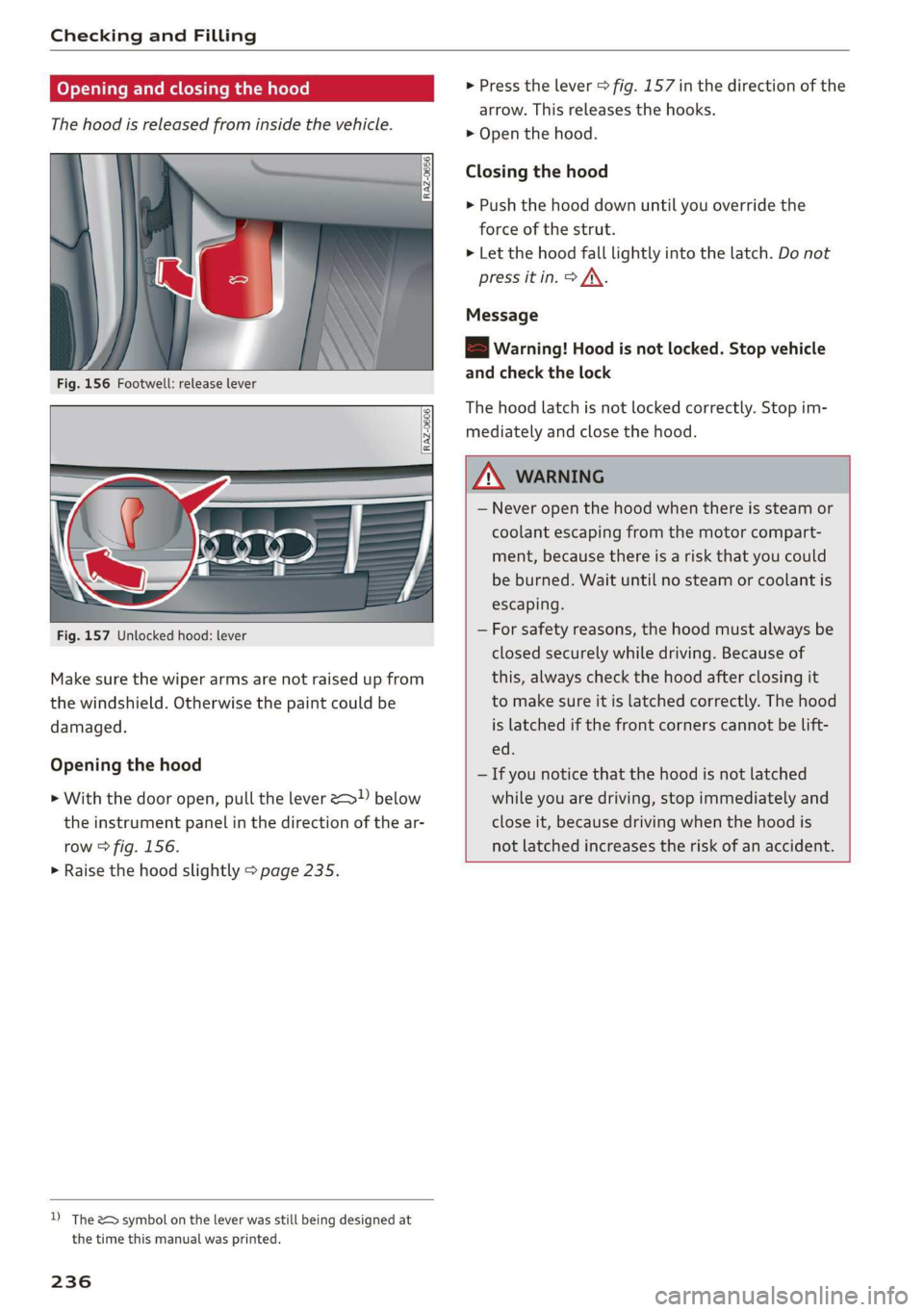
Fig. 156 Footwell: release lever
RAZ-0606
Fig. 157 Unlocked hood: lever
Make sure the wiper arms are not raised up from
the windshield. Otherwise the paint could be
damaged.
Opening the hood
> With the door open, pull the lever > below
the instrument panel in the direction of the ar-
row > fig. 156.
> Raise the hood slightly > page 235.
D) The &> symbol on the lever was still being designed at
the time this manual was printed.
236
> Press the lever > fig. 157 in the direction of the
arrow. This releases the hooks.
> Open the hood.
Closing the hood
> Push the hood down until you override the
force of the strut.
> Let the hood fall lightly into the latch. Do not
press it in. > /\.
Message
EB warning! Hood is not locked. Stop vehicle
and check the lock
The hood latch is not locked correctly. Stop im-
mediately and close the hood.
ZA WARNING
— Never open the hood when there is steam or
coolant escaping from the motor compart-
ment, because there is a risk that you could
be burned. Wait until no steam or coolant is
escaping.
— For safety reasons, the hood must always be
closed securely while driving. Because of
this, always check the hood after closing it
to make sure it is latched correctly. The hood
is latched if the front corners cannot be lift-
ed.
— If you notice that the hood is not latched
while you are driving, stop immediately and
close it, because driving when the hood is
not latched increases the risk of an accident.
Page 275 of 310
4KE012721BB
Emergency assistance
Raising the vehicle
Applies to: vehicles with vehicle jack
RAZ-0258
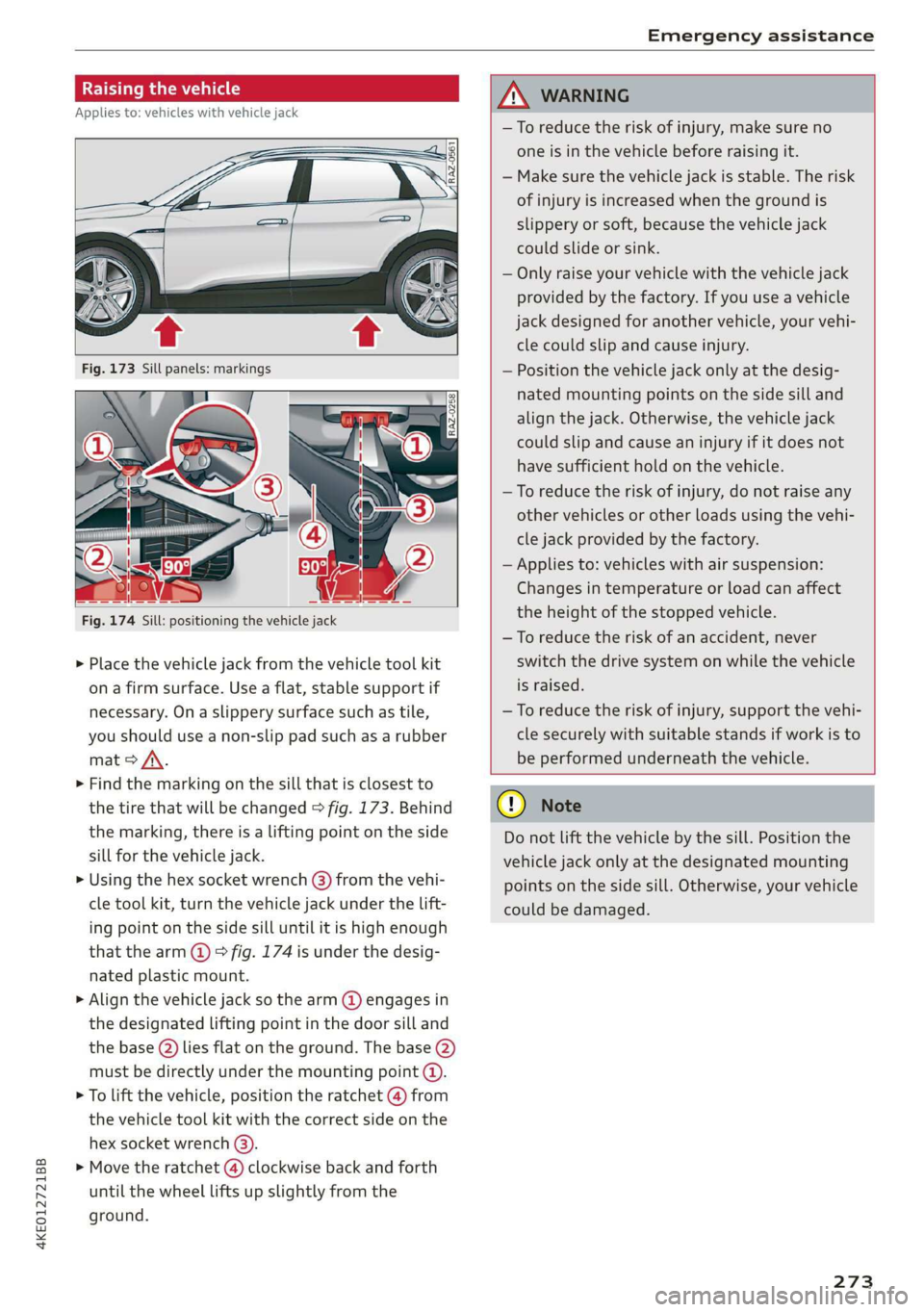
Fig. 174 Sill: positioning the vehicle jack
> Place the vehicle jack from the vehicle tool kit
ona firm surface. Use a flat, stable support if
necessary. On a slippery surface such as tile,
you should use a non-slip pad such as a rubber
mat > /\.
> Find the marking on the sill that is closest to
the tire that will be changed > fig. 173. Behind
the marking, there is a lifting point on the side
sill for the vehicle jack.
» Using the hex socket wrench (3) from the vehi-
cle tool kit, turn the vehicle jack under the lift-
ing point on the side sill until it is high enough
that the arm @ © fig. 174 is under the desig-
nated plastic mount.
> Align the vehicle jack so the arm @ engages in
the designated Lifting point in the door sill and
the base () lies flat on the ground. The base (2)
must be directly under the mounting point (@).
> To lift the vehicle, position the ratchet @ from
the vehicle tool kit with the correct side on the
hex socket wrench (3).
> Move the ratchet (@) clockwise back and forth
until the wheel lifts up slightly from the
ground.
ZX WARNING
—To reduce the risk of injury, make sure no
one is in the vehicle before raising it.
— Make sure the vehicle jack is stable. The risk
of injury is increased when the ground is
slippery or soft, because the vehicle jack
could slide or sink.
— Only raise your vehicle with the vehicle jack
provided by the factory. If you use a vehicle
jack designed for another vehicle, your vehi-
cle could slip and cause injury.
— Position the vehicle jack only at the desig-
nated mounting points on the side sill and
align the jack. Otherwise, the vehicle jack
could slip and cause an injury if it does not
have sufficient hold on the vehicle.
—To reduce the risk of injury, do not raise any
other vehicles or other loads using the vehi-
cle jack provided by the factory.
— Applies to: vehicles with air suspension:
Changes in temperature or load can affect
the height of the stopped vehicle.
—To reduce the risk of an accident, never
switch the drive system on while the vehicle
is raised.
—To reduce the risk of injury, support the vehi-
cle securely with suitable stands if work is to
be performed underneath the vehicle.
@) Note
Do not lift the vehicle by the sill. Position the
vehicle jack only at the designated mounting
points on the side sill. Otherwise, your vehicle
could be damaged.
273,
Page 282 of 310
Fuses and bulbs
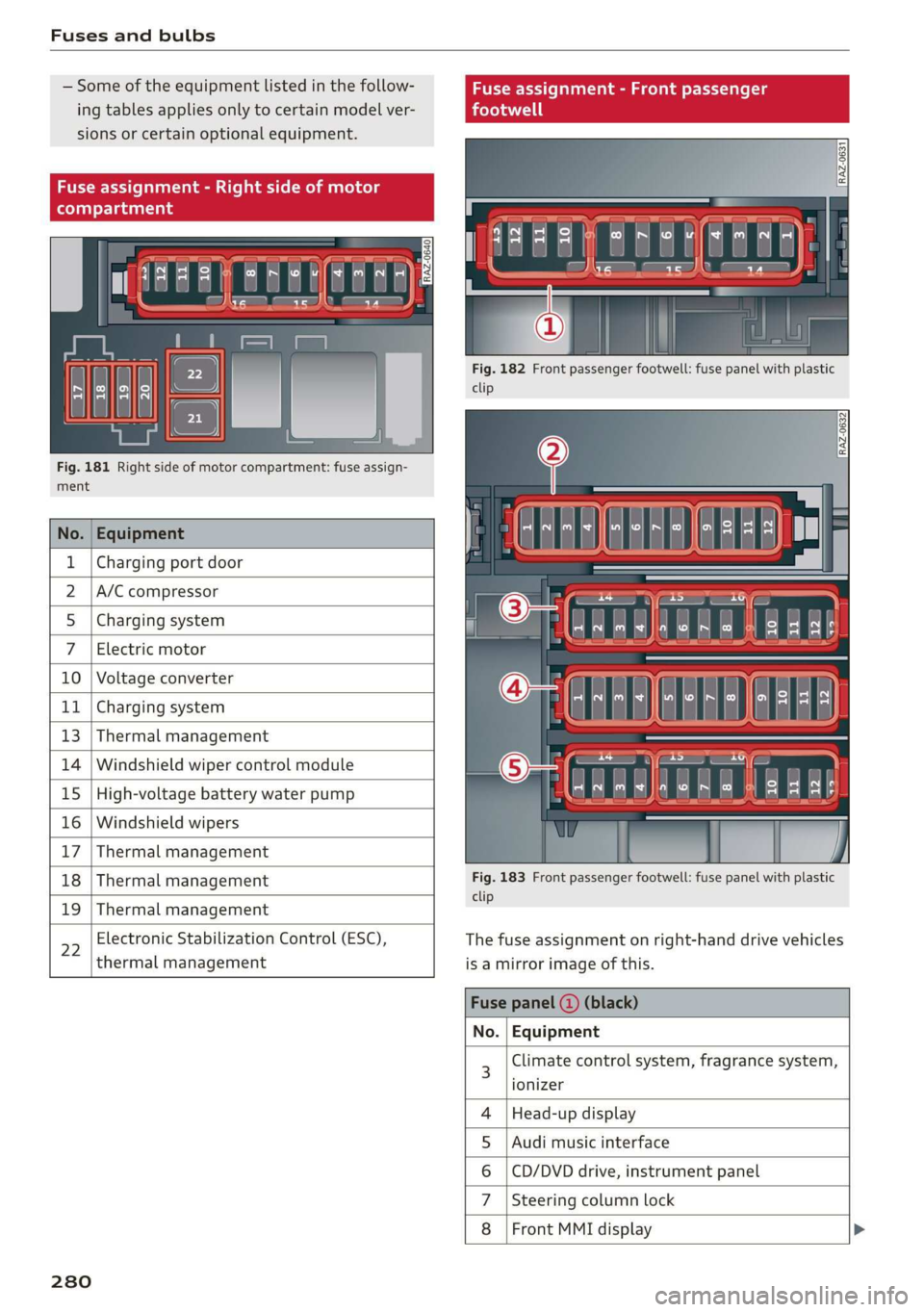
— Some of the equipment listed in the follow-
ing tables applies only to certain model ver-
sions or certain optional equipment.
Fig. 181 Right side of motor compartment: fuse assign-
ment
No. Equipment
Charging port door
A/C compressor
Charging system
Electric motor
10 Voltage converter
11 Charging system
13 Thermal management
14 Windshield wiper control module
15 High-voltage battery water pump
16 Windshield wipers
17 Thermal management
18 Thermal management
19 Thermal management
22
Electronic Stabilization Control (ESC),
thermal management
280
Fig. 182 Front passenger footwell: fuse panel with plastic
clip
Fig. 183 Front passenger footwell: fuse panel with plastic
clip
The fuse assignment on right-hand drive vehicles
is a mirror image of this.
Climate control system, fragrance system,
ionizer
Head-up display
Audi music interface
CD/DVD drive, instrument panel
Steering column lock
Front MMI display >
OlN|
A)
uy
sA
Page 283 of 310
4KE012721BB
Fuses and bulbs
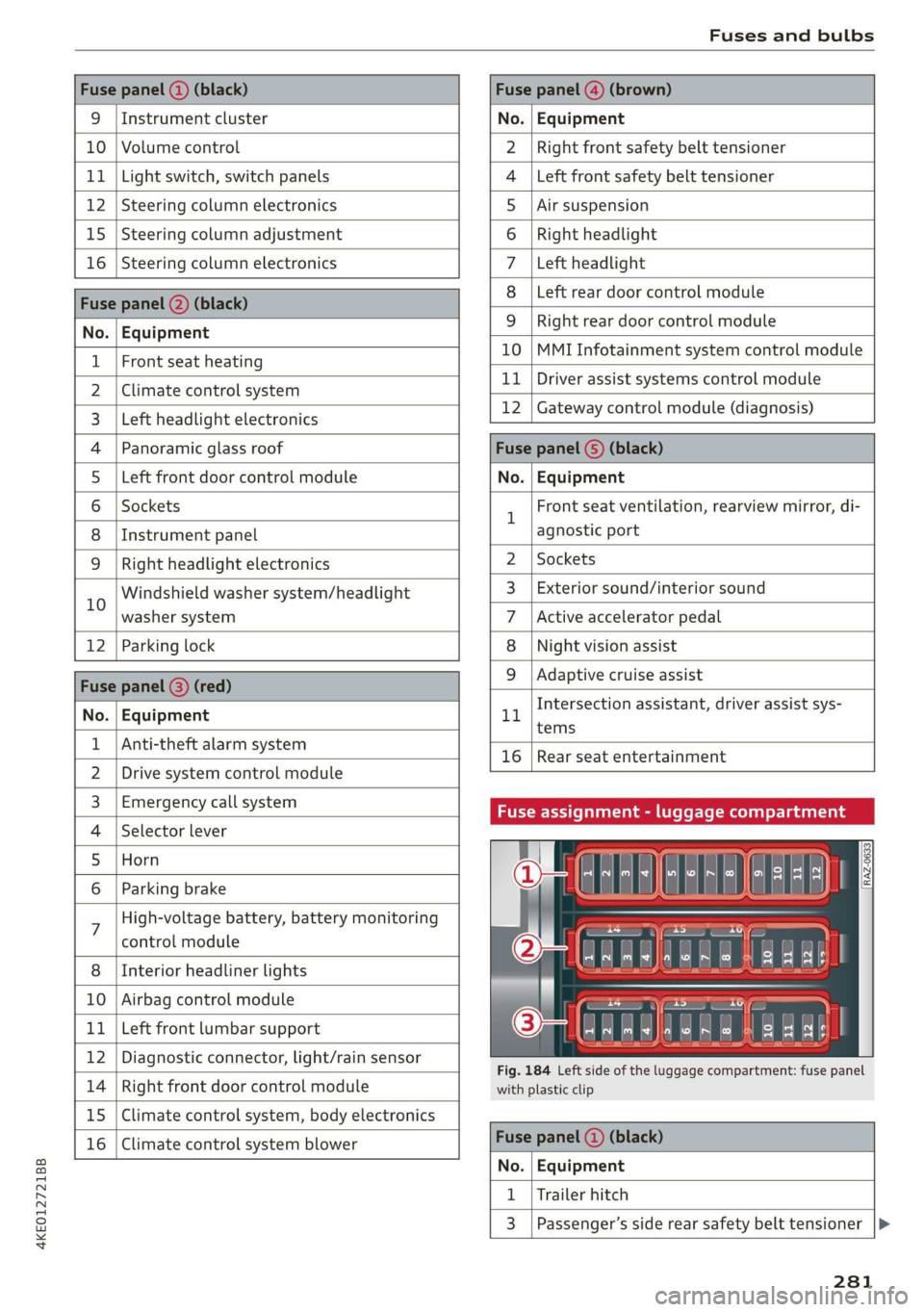
Fuse panel (2) (black) Fuse panel @) (brown)
9 |Instrument cluster No. | Equipment
10 | Volume control Right front safety belt tensioner
11 | Light switch, switch panels Left front safety belt tensioner
12 | Steering column electronics Air suspension
15 | Steering column adjustment Right headlight
16 | Steering column electronics Left headlight
Fuse panel (2) (black)
No. | Equipment
Left rear door control module
WOlOIN|
A)
Mm]
ALN
Right rear door control module
10 |MMI Infotainment system control module
1 |Front seat heating - -
2 |ehmmareconeral system 11 | Driver assist systems eantte) iene
Z | betvheadlightdlecironias 12 | Gateway control module (diagnosis)
4 |Panoramic glass roof Fuse panel 6) (black)
5 |Left front door control module No. | Equipment
6 | Sockets 1 Front seat ventilation, rearview mirror, di-
8 | Instrument panel agnostic port
9 | Right headlight electronics 2 | Sockets
iG Windshield washer system/headlight 3_| Exterior sound/interior sound
washer system 7 |Active accelerator pedal
12 | Parking lock 8 | Night vision assist
Fuse panel @ (red) 9 |Adaptive cruise assist
7 Intersection assistant, driver assist sys-
No. | Equipment 11
tems
1 {Anti-theft alarm system -
16 | Rear seat entertainment
2 |Drive system control module
3, | Emergency:callsystem Fuse assignment - luggage compartment
4 | Selector lever
5 |Horn 8
le
6 |Parking brake a
7 High-voltage battery, battery monitoring
control module
8 | Interior headliner lights
10 | Airbag control module
11 | Left front lumbar support
12 | Diagnostic connector, light/rain sensor
14 | Right front door control module
15 | Climate control system, body electronics
16 | Climate control system blower
7
ed ey
aE EEE
Fig. 184 Left side of the luggage compartment: fuse panel
with plastic clip
Fuse panel (4) (black)
No. | Equipment
1 | Trailer hitch
3 | Passenger’s side rear safety belt tensioner
281