ignition AUDI E-TRON 2019 Owner's Manual
[x] Cancel search | Manufacturer: AUDI, Model Year: 2019, Model line: E-TRON, Model: AUDI E-TRON 2019Pages: 310, PDF Size: 81.91 MB
Page 50 of 310
Lights and Vision
“¥ @ and keep touching it until the desired
brightness is reached.
Interior lighting
Applies to: vehicles with interior lighting
The ambient lighting turns on when the ignition
is switched on. The ambient lighting is deactivat-
ed when the light function is OFF.
You can adjust the interior lighting individually.
The settings depend on the vehicle equipment.
» Applies to: MMI: Select on the home screen:
VEHICLE > Light & Visibility > Interior light-
ing.
You can choose among predefined color profiles,
such as Maritime.
Additional settings and profiles:
— Brightness: you can adjust the brightness for
all of the interior lighting.
— Individual: you can adjust the brightness and
color of the interior lighting separately, divided
into contour and surface lighting.
— Drive select: the contour and surface lighting
color changes depending on the selected Audi
drive select* mode.
@ Tips
Depending on vehicle equipment, when the
Drive select function is activated, the color of
the contour and surface lighting may briefly
change to red or blue when the interior tem-
perature is manually increased or decreased.
@ Tips
Specific settings are stored automatically in
the active personal profile.
PETE ayaa
You can adjust the instrument and display illumi-
nation separately. The settings depend on the ve-
hicle equipment.
> Applies to: MMI: Select on the home screen:
SETTINGS > Display & brightness.
Possible settings in the MMI:
48
— Cockpit dimming
— Head-up display
—MMI
— Virtual cockpit
Vision
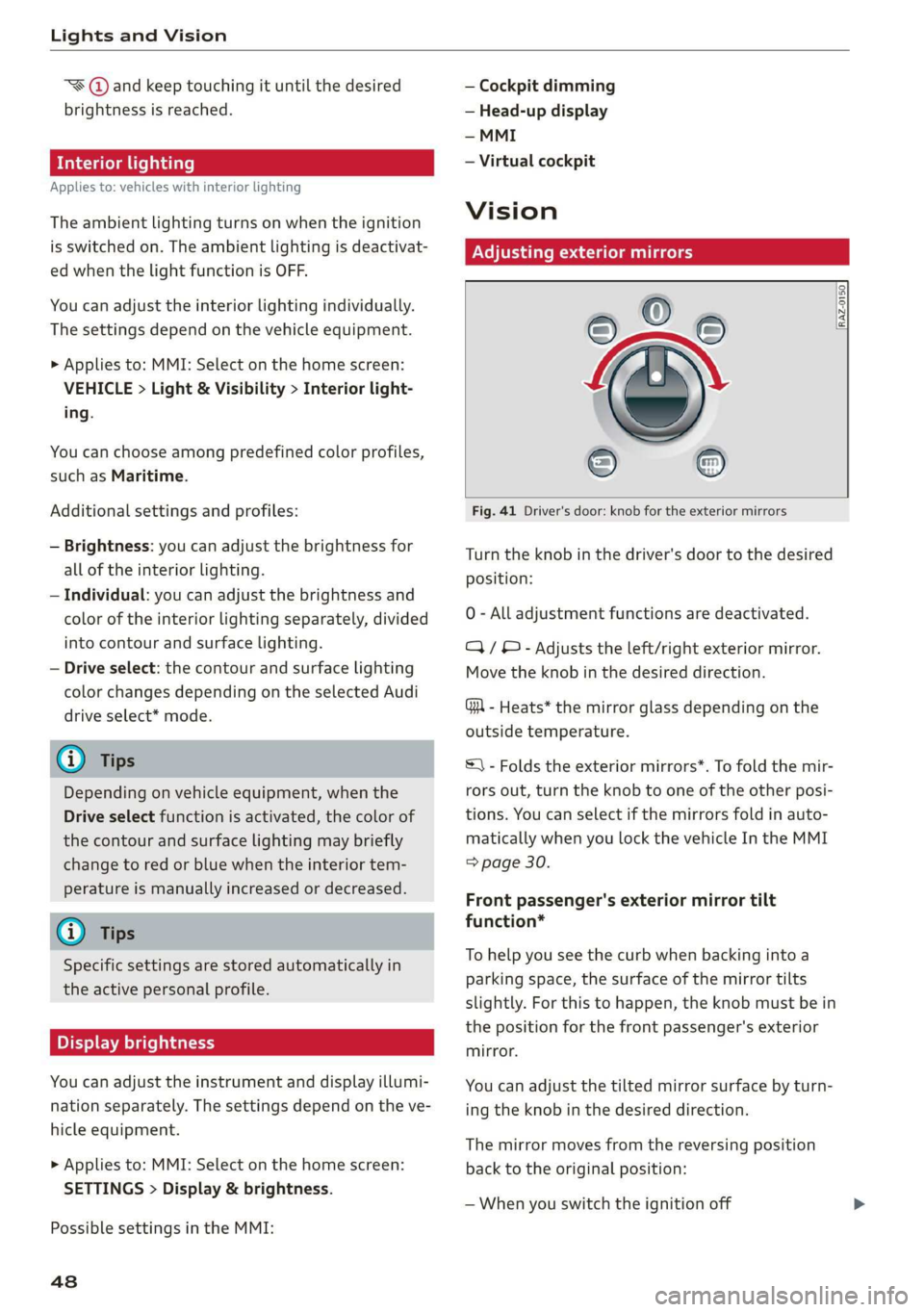
Adjusting exterior mirrors
[RAZ-0150.
Fig. 41 Driver's door: knob for the exterior mirrors
Turn the knob in the driver's door to the desired
position:
0 - All adjustment functions are deactivated.
Q/ ®- Adjusts the left/right exterior mirror.
Move the knob in the desired direction.
GR - Heats* the mirror glass depending on the
outside temperature.
S) - Folds the exterior mirrors*. To fold the mir-
rors out, turn the knob to one of the other posi-
tions. You can select if the mirrors fold in auto-
matically when you lock the vehicle In the MMI
=> page 30.
Front passenger's exterior mirror tilt
function*
To help you see the curb when backing into a
parking space, the surface of the mirror tilts
slightly. For this to happen, the knob must be in
the position for the front passenger's exterior
mirror.
You can adjust the tilted mirror surface by turn-
ing the knob in the desired direction.
The mirror moves from the reversing position
back to the original position:
— When you switch the ignition off
Page 53 of 310
4KE012721BB
Lights and Vision
@- Single wipe. If you hold the lever in this posi-
tion longer, the wipers switch from slow wiping
to fast wiping.
© - Clean the windshield ©. The wipers wipe one
time after several seconds of driving to remove
water droplets. You can switch this function off
by moving the lever to position ©) within 10 sec-
onds of the afterwipe. The afterwipe function is
reactivated the next time you switch the ignition
on.
Clean the headlights*. The headlight washer sys-
tem* operates only when the low beam head-
lights are on. If you move the lever to position
©, the headlights and the night vision assist
camera* are cleaned at intervals.
@ - Wipe the rear window \. The number of
wipes depends on the windshield wiper move-
ment.
The rear wiper automatically switches on when
the reverse gear is selected and the front wind-
shield wipers are on and running.
- Clean the rear window @. The number of
wipes depends on how long the lever is held in
position (8). This may also clean the rearview
camera, depending on the vehicle equipment.
Z\ WARNING
— The rain sensor is only intended to assist the
driver. The driver may still be responsible for
manually switching the wipers on based on
visibility
conditions.
— The windshield must not be treated with
water-repelling windshield coating agents.
Under unfavorable conditions, such as wet-
ness, darkness, and when the sun is low,
these coatings can cause increased glare,
which increases the risk of an accident. They
can also cause wiper blade chatter.
— Properly functioning windshield wiper
blades are required for a clear view and safe
driving > page 51, Cleaning or replacing
the wiper blades.
() Note
— If there is frost, make sure the windshield
wiper blades are not frozen to the wind-
shield. Switching on the windshield wipers
when the blades are frozen to the wind-
shield can damage the wiper blades.
— Prior to using a car wash, the windshield
wiper system must be switched off (lever in
position @). This prevents the wipers from
switching on unintentionally and causing
damage to the windshield wiper system.
Gi) Tips
— The windshield wipers switch off when the
ignition is switched off. You can activate the
windshield wipers after the ignition is
switched on again by moving the windshield
wiper lever to any position.
— Worn or dirty windshield wiper blades result
in streaking. This can affect the rain sensor
function. Check your windshield wiper
blades regularly.
—The washer fluid nozzles for the windshield
washer system are heated when the ignition
is on if the outside temperature is low.
—When stopping temporarily, such as ata
traffic light, the speed of the windshield
wipers automatically reduces by one level.
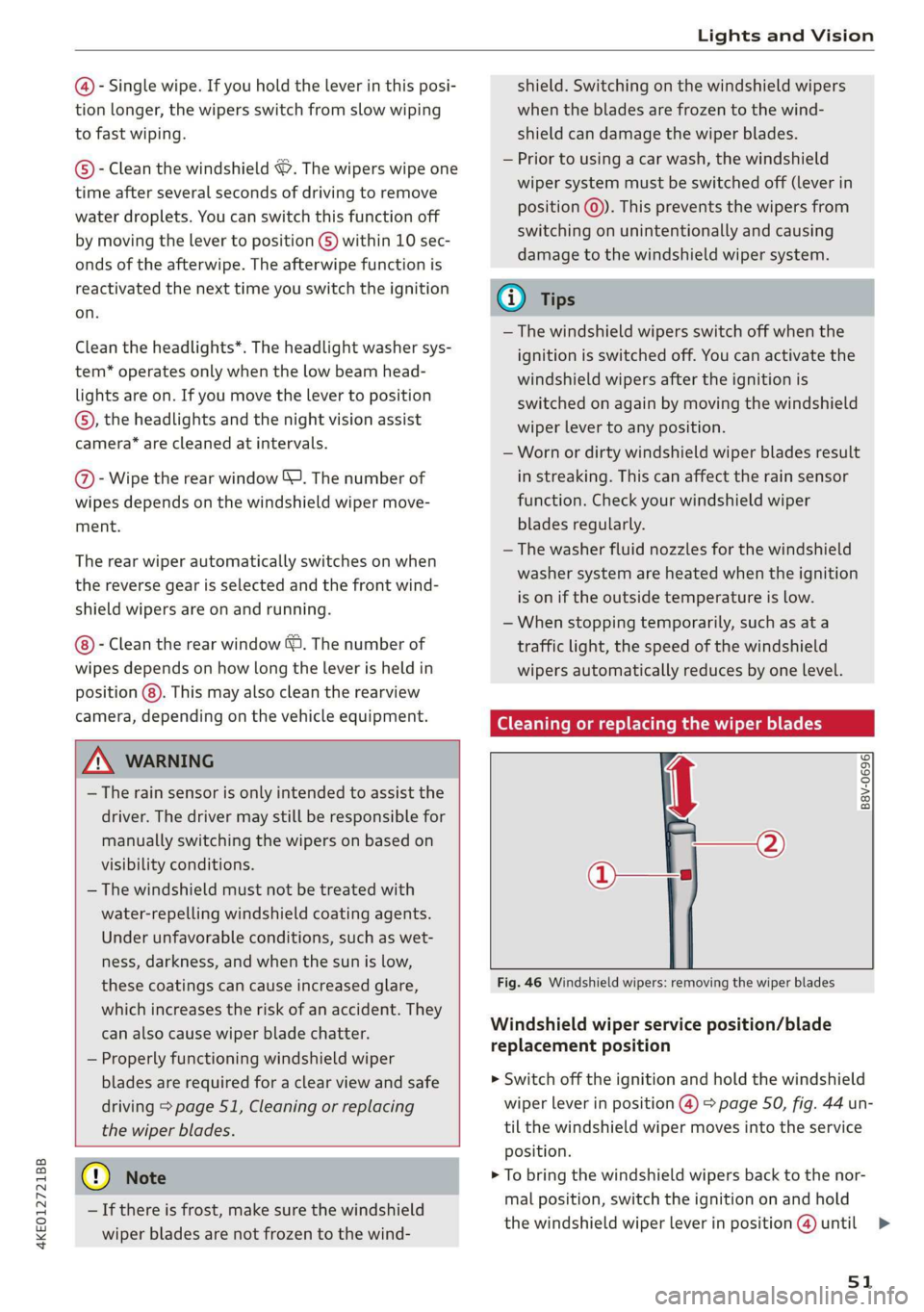
GG ceca hack ce ee or replacing the wiper blades
Ae
B8V-0696|
Fig. 46 Windshield wipers: removing the wiper blades
Windshield wiper service position/blade
replacement position
> Switch off the ignition and hold the windshield
wiper lever in position @) > page 50, fig. 44 un-
til the windshield wiper moves into the service
Position.
> To bring the windshield wipers back to the nor-
mal position, switch the ignition on and hold
the windshield wiper lever in position @) until
51
>
Page 55 of 310
4KE012721BB
Lights and Vision
message indicates the cause and possible solu-
tions. If one of the messages does not turn off,
drive immediately to an authorized Audi dealer or
authorized Audi Service Facility to have the mal-
function repaired.
Automatic wipers: malfunction! See owner's
manual
The light/rain sensor is malfunctioning. You can
still control all functions that are independent of
the rain sensor through the windshield wiper lev-
er. Drive immediately to an authorized Audi deal-
er or authorized Audi Service Facility to have the
malfunction repaired.
Digital compass
Switching the compass on and off
Applies to: vehicles with digital compass
BFV-0288
i
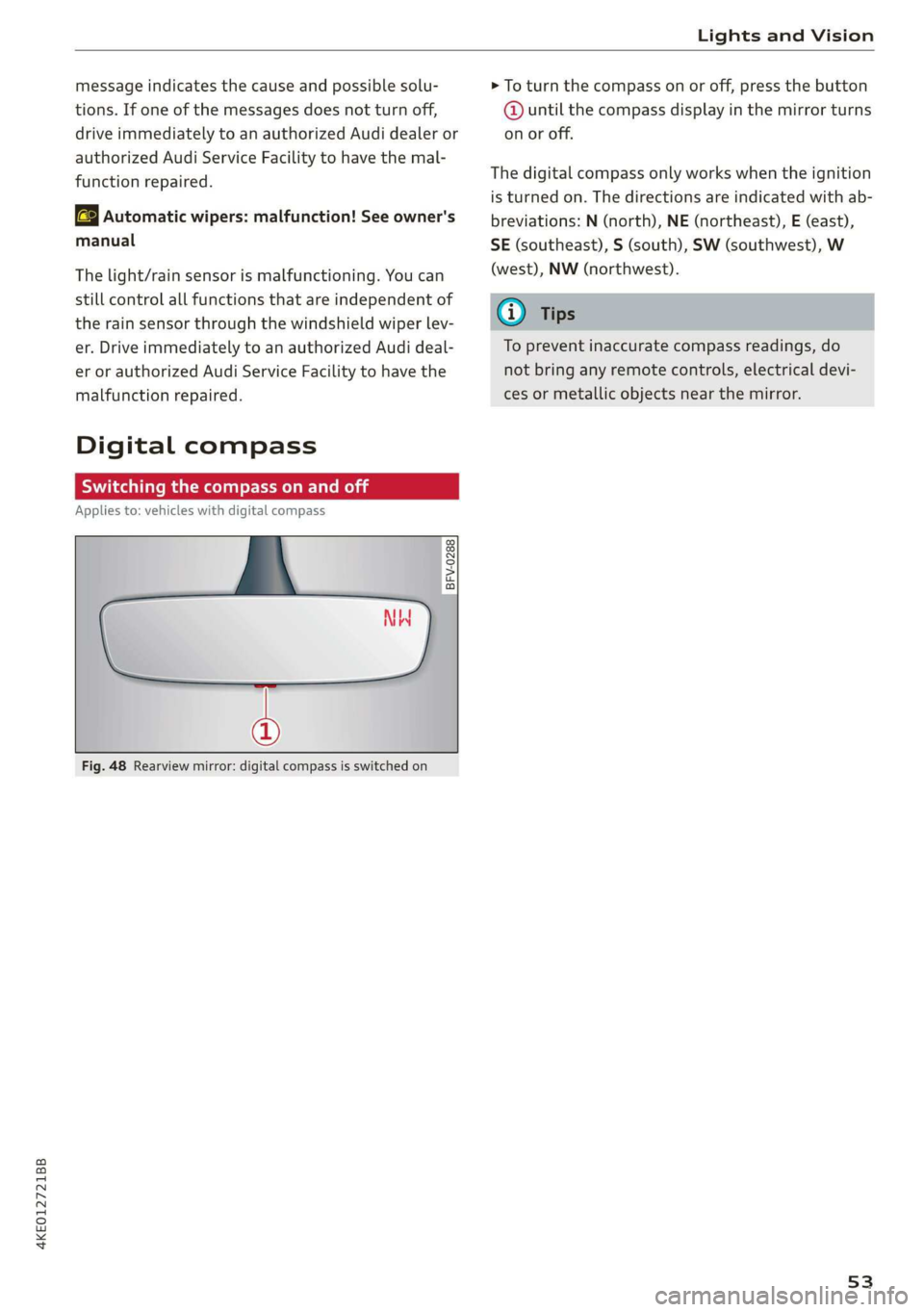
Fig. 48 Rearview mirror: digital compass is switched on
> To turn the compass on or off, press the button
@ until the compass display in the mirror turns
on or off.
The digital compass only works when the ignition
is turned on. The directions are indicated with ab-
breviations: N (north), NE (northeast), E (east),
SE (southeast), S (south), SW (southwest), W
(west), NW (northwest).
G@) Tips
To prevent inaccurate compass readings, do
not bring any remote controls, electrical devi-
ces or metallic objects near the mirror.
53
Page 59 of 310
4KE012721BB
Sitting correctly and safely
The settings depend on the vehicle equipment.
Adjusting the seat position
> To move the seat forward or backward, push
the button @ forward or backward.
> To move the seat upward or downward, press
the button @ upward or downward.
> To adjust the seat surface, press the front part
of the button @ upward or downward.
Adjusting the backrests
> To move the backrest forward or backward,
press the button @) forward or backward.
Adjusting the lumbar support
> To adjust the lumbar support, press the button
@) at the applicable location.
Massage function
Switch the massage function on or off (@). Setting
the massage type and intensity > page 57.
Z\ WARNING
The power front seats can also be adjusted
when the ignition is switched off. To reduce
the risk of injury, children should never be left
unattended in the vehicle.
Adjusting the front seats in the MMI
Applies to: vehicles with seat settings in the MMI
You can adjust additional settings in the MMI.
al 8
S| ny
| ce|
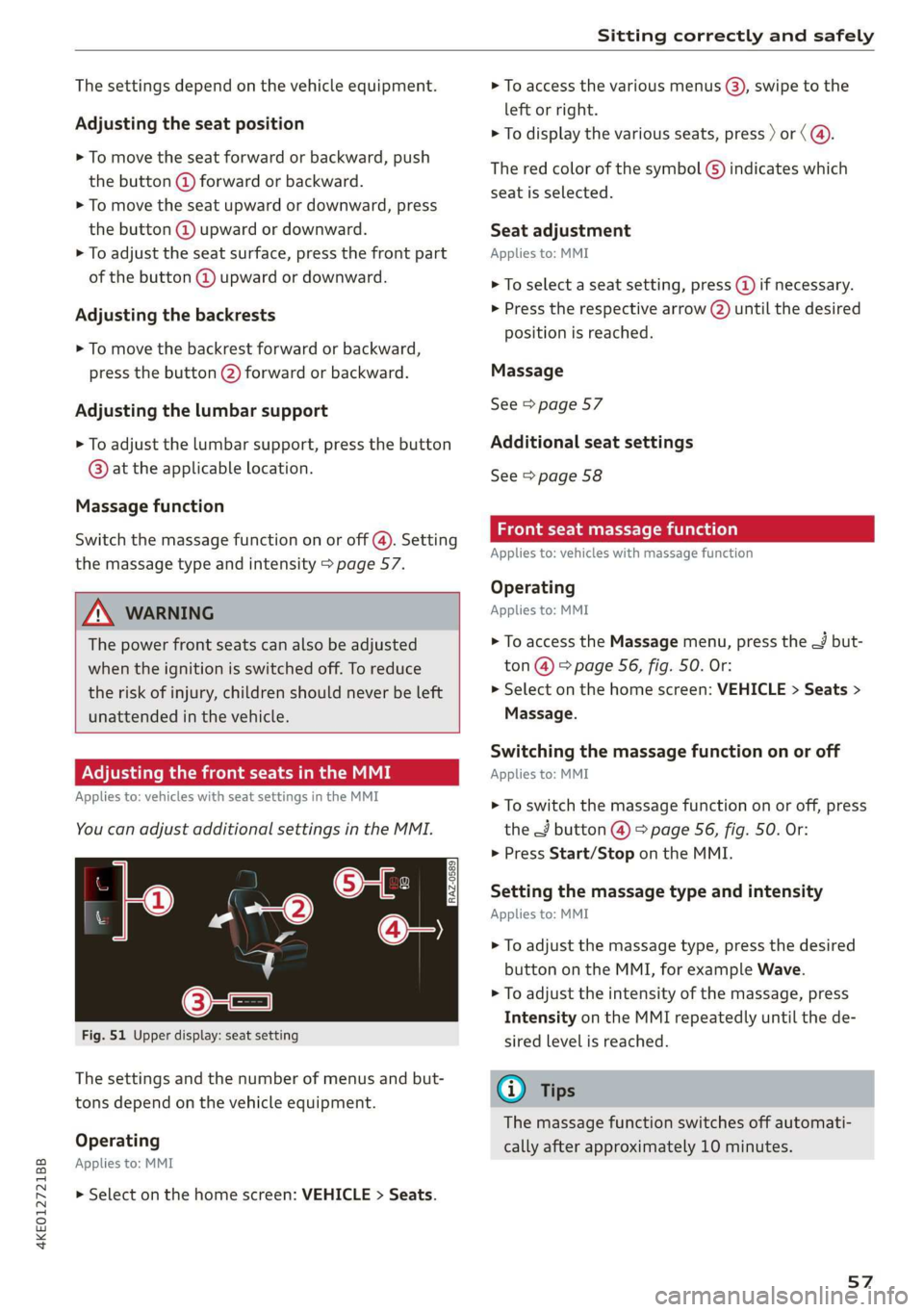
Fig. 51 Upper display: seat setting
The settings and the number of menus and but-
tons depend on the vehicle equipment.
Operating
Applies to: MMI
> Select on the home screen: VEHICLE > Seats.
> To access the various menus ®, swipe to the
left or right.
> To display the various seats, press ) or ( @.
The red color of the symbol @) indicates which
seat is selected.
Seat adjustment
Applies to: MMI
> To select a seat setting, press (@ if necessary.
> Press the respective arrow (2) until the desired
position is reached.
Massage
See > page 57
Additional seat settings
See > page 58
eae emia (ola)
Applies to: vehicles with massage function
Operating
Applies to: MMI
> To access the Massage menu, press the J but-
ton @ > page 56, fig. 50. Or:
> Select on the home screen: VEHICLE > Seats >
Massage.
Switching the massage function on or off
Applies to: MMI
> To switch the massage function on or off, press
the J button @ © page 56, fig. 50. Or:
> Press Start/Stop on the MMI.
Setting the massage type and intensity
Applies to: MMI
> To adjust the massage type, press the desired
button on the MMI, for example Wave.
> To adjust the intensity of the massage, press
Intensity on the MMI repeatedly until the de-
sired level is reached.
@) Tips
The massage function switches off automati-
cally after approximately 10 minutes.
57
Page 60 of 310
Sitting correctly and safely
Neer t Cela eae iale MU ME
You can adjust additional settings and switch
functions on or off in the MMI.
> Applies to: MMI: Select on the home screen:
VEHICLE > Seats > Additional seat settings.
Depending on the vehicle equipment, the follow-
ing options may be available.
Reset seat position
You can adjust the position of the front passeng-
er’s seat to match the driver's seat.
Driver's seat entry assistance
Entry assistance makes it easier to enter or exit
the vehicle. The steering column will automati-
cally move upward > page 59.
Requirement: the ignition must be switched off.
The driver's seat moves back when the driver’
door is opened. Some of the air in the side bol-
sters may be released.
Front passenger's seat entry assistance
Entry assistance makes it easier to enter or exit
the vehicle.
Requirement: the ignition must be switched off.
The front passenger's seat moves back when the
front passenger’ door is opened. Some of the air
in the side bolsters may be released.
Adjusting the front passenger's seat from
the driver's seat
Applies to: vehicles with front passenger seat adjustment
You can adjust the front passenger's side with the
driver's seat buttons.
Applies to: MMI:
> Select on the home screen: VEHICLE > Seats.
> To display the various seats, press ) or <.
> To switch on the function, press the 2/ button.
The lower edge of the button will turn red.
After you have switched on the function, you can
adjust the front passenger's seat using the driv-
er's seat buttons > page 56, fig. 50.
58
G) Tips
The function switches off automatically when
you exit the menu.
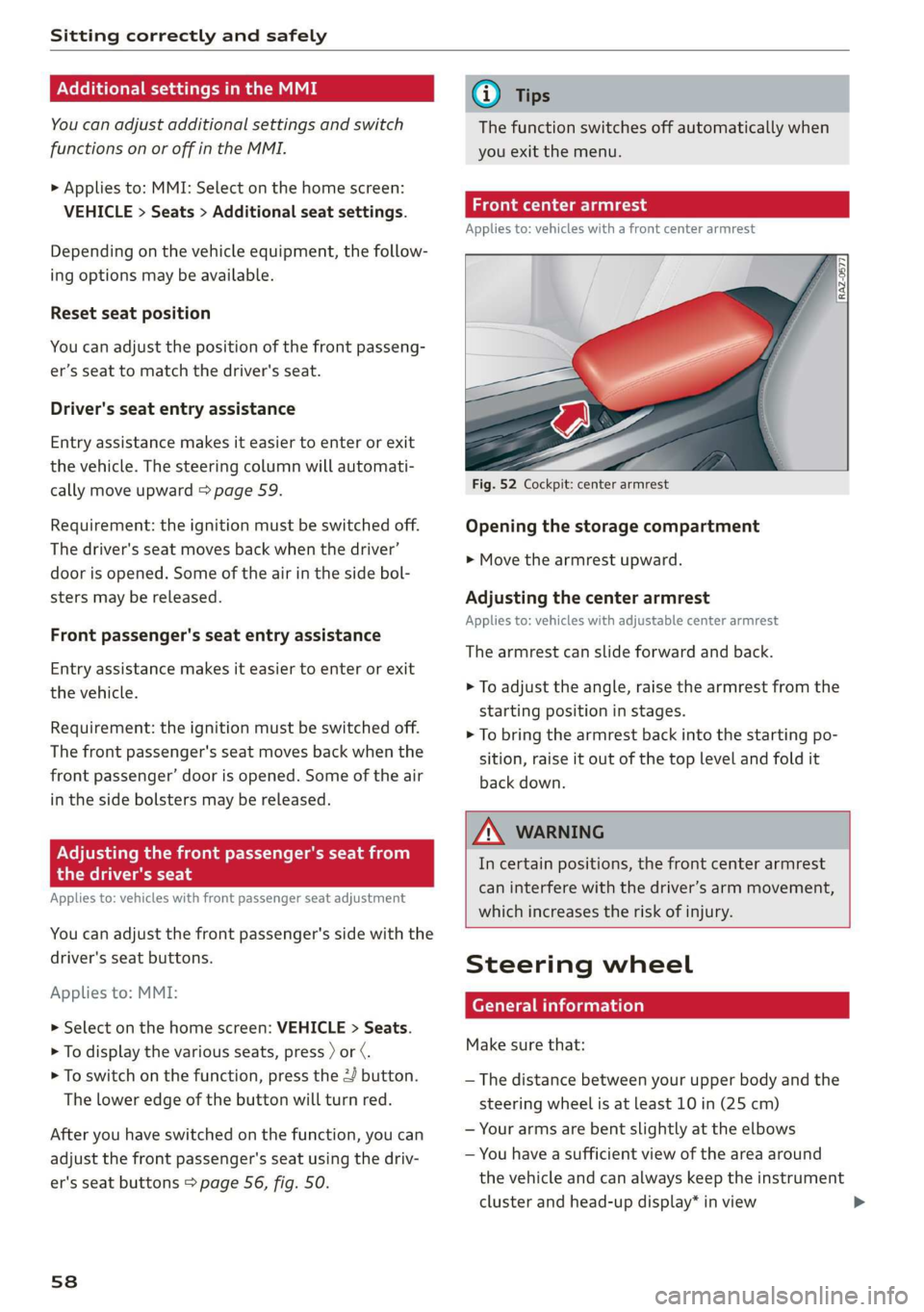
claim ler- eet
Applies to: vehicles with a front center armrest
Opening the storage compartment
> Move the armrest upward.
Adjusting the center armrest
Applies to: vehicles with adjustable center armrest
The armrest can slide forward and back.
> To adjust the angle, raise the armrest from the
starting position in stages.
> To bring the armrest back into the starting po-
sition, raise it out of the top level and fold it
back down.
ZA WARNING
In certain positions, the front center armrest
can interfere with the driver’s arm movement,
which increases the risk of injury.
Steering wheel
General information
Make sure that:
— The distance between your upper body and the
steering wheel is at least 10 in (25 cm)
— Your arms are bent slightly at the elbows
— You have a sufficient view of the area around
the vehicle and can always keep the instrument
cluster and head-up display* in view
Page 61 of 310
4KE012721BB
Sitting correctly and safely
— You are always holding the steering wheel with
both hands on the outer edge at the sides (9:00
and
3:00 position) when driving
Z\ WARNING
— If you are too close to the steering wheel,
the driver's airbag cannot provide optimal
protection, which increases the risk of injury
or death.
— Never hold the steering wheel in the 12:00
position or in any other way, such as holding
the center of the steering wheel. Otherwise,
your arms, hands, and head could be injured
in the event that the driver's airbag deploys.
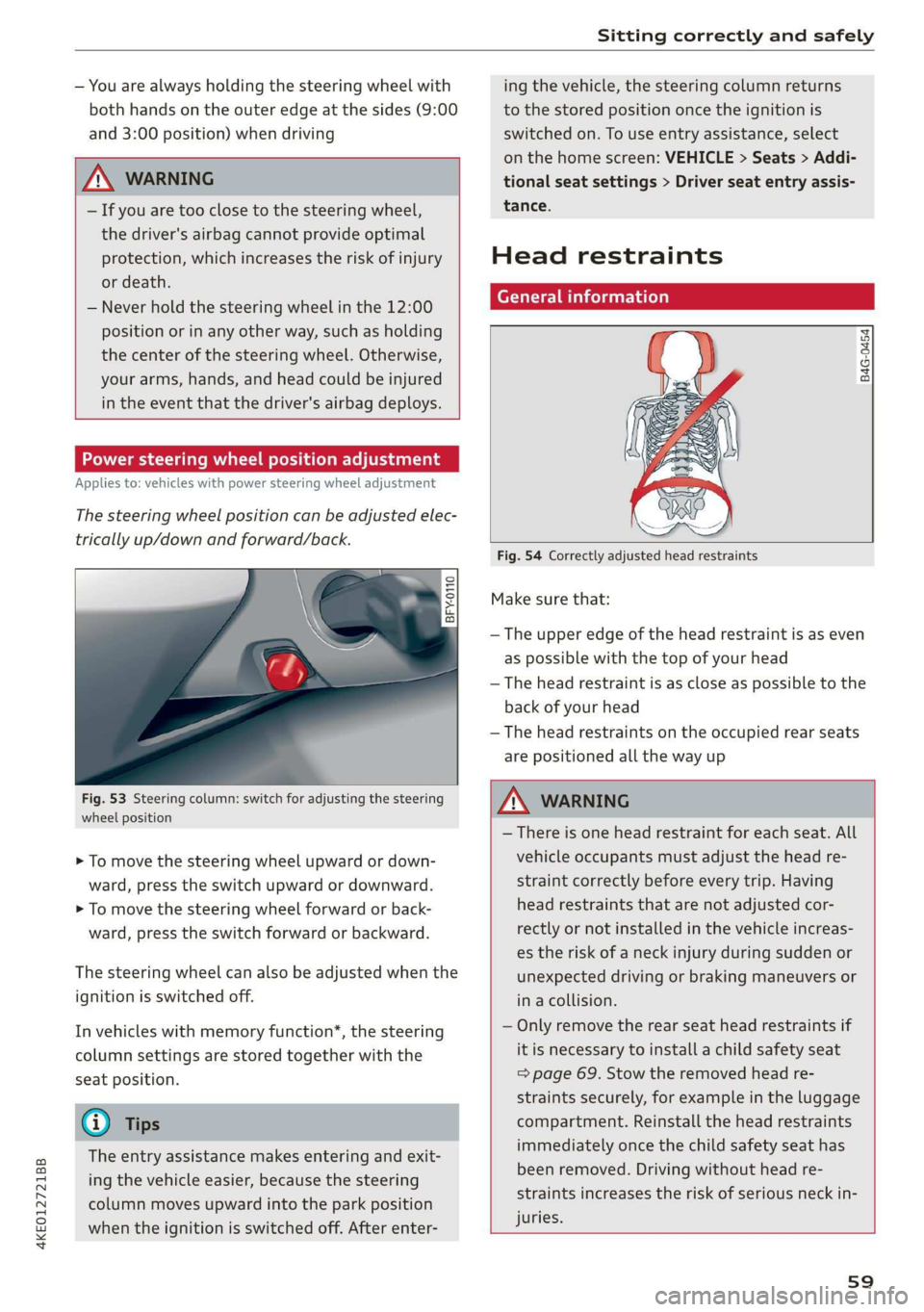
Power steering wheel position adjustment
Applies to: vehicles with power steering wheel adjustment
The steering wheel position can be adjusted elec-
trically up/down and forward/back.
7
Ss = c o
Fig. 53 Steering column: switch for adjusting the steering
wheel position
> To move the steering wheel upward or down-
ward, press the switch upward or downward.
> To move the steering wheel forward or back-
ward, press the switch forward or backward.
The steering wheel can also be adjusted when the
ignition is switched off.
In vehicles with memory function*, the steering
column settings are stored together with the
seat position.
@) Tips
The entry assistance makes entering and exit-
ing
the vehicle easier, because the steering
column moves upward into the park position
when the ignition is switched off. After enter-
ing the vehicle, the steering column returns
to the stored position once the ignition is
switched on. To use entry assistance, select
on the home screen: VEHICLE > Seats > Addi-
tional seat settings > Driver seat entry assis-
tance.
Head restraints
General information
B4G-0454
Fig. 54 Correctly adjusted head restraints
Make sure that:
— The upper edge of the head restraint is as even
as possible with the top of your head
— The head restraint is as close as possible to the
back of your head
— The head restraints on the occupied rear seats
are positioned all the way up
Z\ WARNING
— There is one head restraint for each seat. All
vehicle occupants must adjust the head re-
straint correctly before every trip. Having
head restraints that are not adjusted cor-
rectly or not installed in the vehicle increas-
es the risk of a neck injury during sudden or
unexpected driving or braking maneuvers or
in a collision.
— Only remove the rear seat head restraints if
it is necessary to install a child safety seat
=> page 69. Stow the removed head re-
straints securely, for example in the luggage
compartment. Reinstall the head restraints
immediately once the child safety seat has
been removed. Driving without head re-
straints increases the risk of serious neck in-
juries.
s9
Page 66 of 310
Sitting correctly and safely
Depending on the equipment, it may be possible
to store the following settings:
— Driver's seat: seat, steering wheel*, exterior
mirrors
— Front passenger's seat: seat
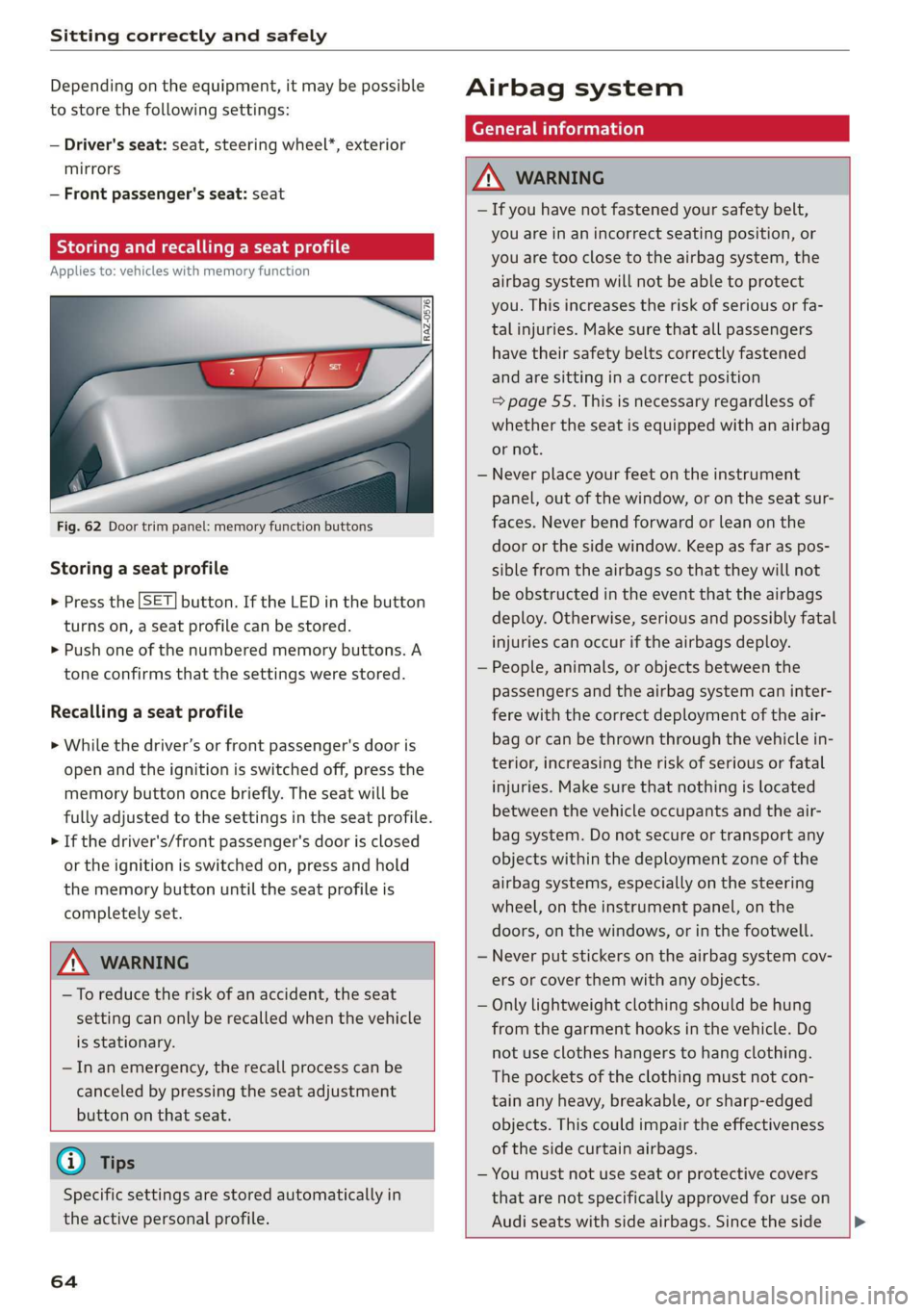
Storing and recalling a seat profile
Applies to: vehicles with memory function
Fig. 62 Door trim panel: memory function buttons
Storing a seat profile
> Press the [SET] button. If the LED in the button
turns on, a seat profile can be stored.
> Push one of the numbered memory buttons. A
tone confirms that the settings were stored.
Recalling a seat profile
> While the driver’s or front passenger's door is
open and the ignition is switched off, press the
memory button once briefly. The seat will be
fully adjusted to the settings in the seat profile.
> If the driver's/front passenger's door is closed
or the ignition is switched on, press and hold
the memory button until the seat profile is
completely set.
ZA\ WARNING
—To reduce the risk of an accident, the seat
setting can only be recalled when the vehicle
is stationary.
—Inan emergency, the recall process can be
canceled by pressing the seat adjustment
button on that seat.
@ Tips
Specific settings are stored automatically in
the active personal profile.
64
Airbag system
General information
ZX WARNING
— If you have not fastened your safety belt,
you are in an incorrect seating position, or
you are too close to the airbag system, the
airbag system will not be able to protect
you. This increases the risk of serious or fa-
tal injuries. Make sure that all passengers
have their safety belts correctly fastened
and are sitting in a correct position
= page 55. This is necessary regardless of
whether the seat is equipped with an airbag
or not.
— Never place your feet on the instrument
panel, out of the window, or on the seat sur-
faces. Never bend forward or lean on the
door or the side window. Keep as far as pos-
sible from the airbags so that they will not
be obstructed in the event that the airbags
deploy. Otherwise, serious and possibly fatal
injuries can occur if the airbags deploy.
— People, animals, or objects between the
passengers and the airbag system can inter-
fere with the correct deployment of the air-
bag or can be thrown through the vehicle in-
terior, increasing the risk of serious or fatal
injuries. Make sure that nothing is located
between the vehicle occupants and the air-
bag system. Do not secure or transport any
objects within the deployment zone of the
airbag systems, especially on the steering
wheel, on the instrument panel, on the
doors, on the windows, or in the footwell.
— Never put stickers on the airbag system cov-
ers or cover them with any objects.
— Only lightweight clothing should be hung
from the garment hooks in the vehicle. Do
not use clothes hangers to hang clothing.
The pockets of the clothing must not con-
tain any heavy, breakable, or sharp-edged
objects. This could impair the effectiveness
of the side curtain airbags.
— You must not use seat or protective covers
that are not specifically approved for use on
Audi seats with side airbags. Since the side
Page 67 of 310
4KE012721BB
Sitting correctly and safely
airbags deploy from the seat backrest, such
covers could impair the protective function
of the side airbags.
Damage to the original seat covers in the
side airbag deployment area must always be
repaired by an authorized Audi dealer or au-
thorized Audi Service Facility.
Airbag system components are installed at
various locations in your vehicle. Incorrect
work or repairs on the vehicle could damage
the airbag system components or impair
their functionality. This may prevent the air-
bags from deploying or cause them to de-
ploy incorrectly in the event of an accident,
which increases the risk of serious or fatal
injuries. Only have an authorized Audi dealer
or authorized Audi Service Facility make re-
pairs or modifications to a vehicle.
The airbag system can only provide protec-
tion during one collision. If there is another
collision, the airbag system will not deploy
again. If the airbag system has deployed,
have it replaced immediately by an author-
ized Audi dealer or authorized Audi Service
Facility.
Fine dust may appear if the airbags deploy.
This is completely normal and does not indi-
cate a fire in the vehicle. The fine dust can ir-
ritate the skin and mucous membranes in
the eyes and can cause difficulty breathing,
particularly for individuals who have or have
had asthma or other health issues that af-
fect breathing. Exit the vehicle or open the
windows or doors to get access to fresh air.
(i) Tips
If you are transporting children in the vehicle,
read
the information and follow the safety
precautions > page 69.
Safety systems monitoring
The 2] indicator light in the instrument cluster
monitors the safety systems such as the airbags
(including the control modules, sensors, and wir-
ing) and the belt tensioners. It turns on when you
switch the ignition on and turns off after several
seconds.
If the ka indicator light does not turn on when
the ignition is switched on, does not turn off af-
ter several seconds, or turns on or flashes while
driving, there may be a malfunction in one of the
safety systems. Drive to an authorized Audi deal-
er or authorized Audi Service Facility immediately
to have the malfunction corrected.
ZA\ WARNING
Have the malfunction in the safety systems in-
spected immediately. Otherwise, there is a
risk that the systems may not activate during
an accident, which increases the risk of seri-
ous or fatal injury.
65
Page 69 of 310
4KE012721BB
Sitting correctly and safely
The airbag is filled by a gas generator when it de-
ploys. When this occurs, the airbag covers open
and the airbags unfold with great force into the
deployment zone within milliseconds.
Airbags lessen the movement of passengers in
the direction of the impact and thus help to re-
duce the risk of injury. They can help to protect
the head, upper body, and lap, for example. How-
ever, there is the possibility that airbag deploy-
ment can cause injuries.
The airbag system only works when the ignition
is turned on.
If you or other vehicle passengers have physical
limitations that prevent sitting in a correct posi-
tion, modifications to the vehicle may be neces-
sary. For more information, contact an author-
ized Audi dealer or authorized Audi Service Facili-
ty, or call Audi customer support at
1-800-822-2834.
G@) Tips
The side curtain airbags in your vehicle have
ejection mitigation functions. This reduces
the risk of being ejected from the vehicle inte-
rior during an accident, especially in the event
of a vehicle rollover.
Advanced airbag system
(Ri A Gasca cae) Ones \, e
[sr
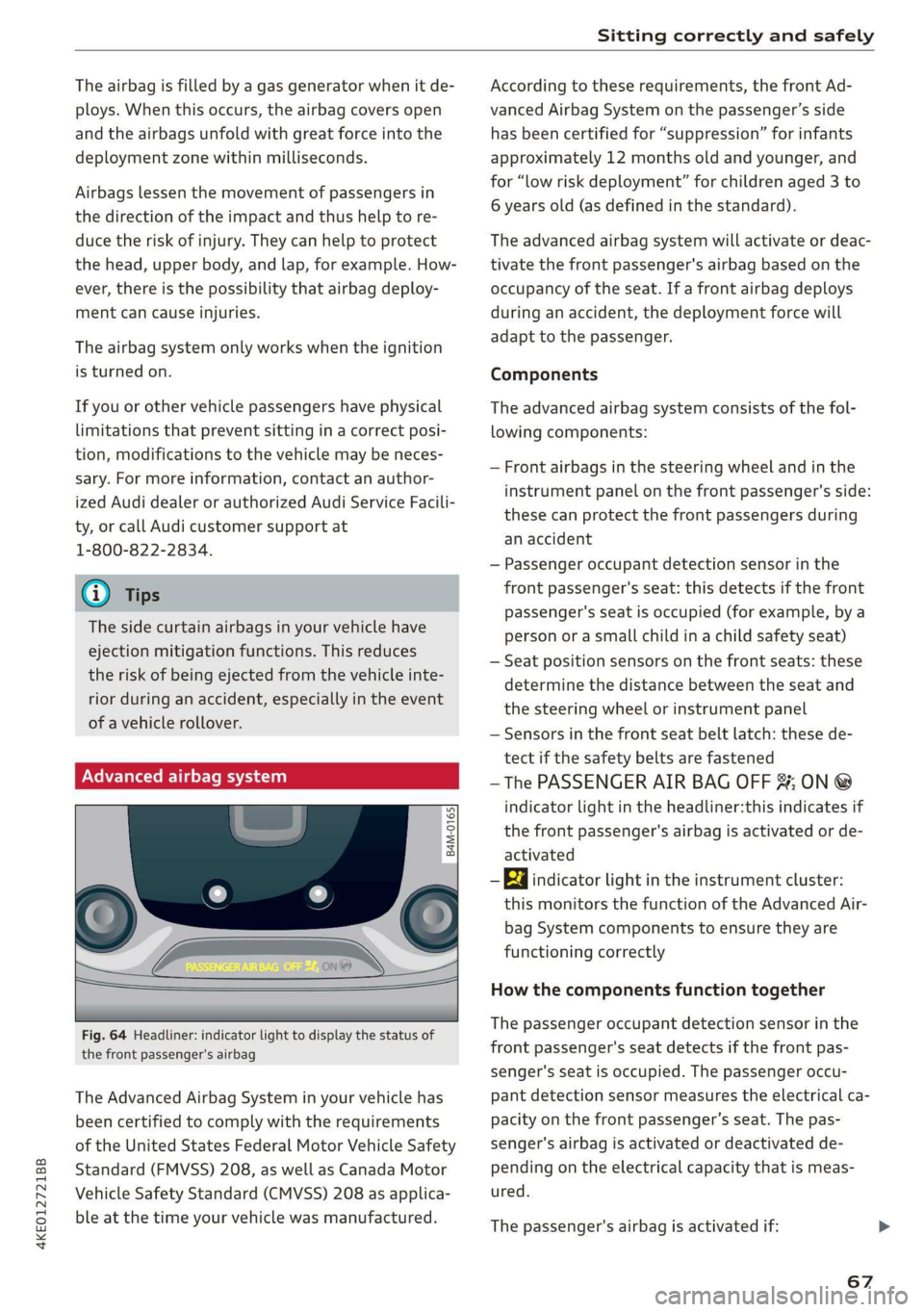
Fig. 64 Headliner: indicator light to display the status of
the front passenger's airbag
The Advanced Airbag System in your vehicle has
been certified to comply with the requirements
of the United States Federal Motor Vehicle Safety
Standard (FMVSS) 208, as well as Canada Motor
Vehicle Safety Standard (CMVSS) 208 as applica-
ble at the time your vehicle was manufactured.
According to these requirements, the front Ad-
vanced Airbag System on the passenger’s side
has been certified for “suppression” for infants
approximately 12 months old and younger, and
for “low risk deployment” for children aged 3 to
6 years old (as defined in the standard).
The advanced airbag system will activate or deac-
tivate the front passenger's airbag based on the
occupancy of the seat. If a front airbag deploys
during an accident, the deployment force will
adapt to the passenger.
Components
The advanced airbag system consists of the fol-
lowing components:
— Front airbags in the steering wheel and in the
instrument panel on the front passenger's side:
these can protect the front passengers during
an accident
— Passenger occupant detection sensor in the
front passenger's seat: this detects if the front
passenger's seat is occupied (for example, by a
person or a small child in a child safety seat)
— Seat position sensors on the front seats: these
determine the distance between the seat and
the steering wheel or instrument panel
— Sensors in the front seat belt latch: these de-
tect if the safety belts are fastened
—The PASSENGER AIR BAG OFF %; ON @
indicator light in the headliner:this indicates if
the front passenger's airbag is activated or de-
activated
- Ea indicator light in the instrument cluster:
this monitors the function of the Advanced Air-
bag System components to ensure they are
functioning correctly
How the components function together
The passenger occupant detection sensor in the
front passenger's seat detects if the front pas-
senger's seat is occupied. The passenger occu-
pant detection sensor measures the electrical ca-
pacity on the front passenger’s seat. The pas-
senger's airbag is activated or deactivated de-
pending on the electrical capacity that is meas-
ured.
The passenger's airbag is activated if:
67
Page 70 of 310
Sitting correctly and safely
— The electrical capacity is higher than the
threshold stored in the control module
— The electrical capacity is the same as or greater
than the electrical capacity of a typical adult
The passenger's airbag is deactivated if:
— The electrical capacity is lower than the thresh-
old stored in the control module
— The electrical capacity is the same as or less
than the electrical capacity of a typical one-
year-old child in a child safety seat that has
been used for certification in accordance with
FMVSS 208
If the front passenger's airbag is activated, the
PASSENGER AIR BAG ON @ indicator light
will turn on. If the front passenger's airbag is de-
activated, the PASSENGER AIR BAG OFF #;
indicator light will turn on.
The deployment force of the front airbags adapts
based on whether or not the safety belt is used
and the distance between the seat and the steer-
ing wheel/instrument panel. For example, if a
person is too close to the front airbag, the front
airbag will deploy with less force to help reduce
the risk of injury.
Meaning of PASSENGER AIR BAG OFF #4, ON
® indicator light
When the ignition is switched on, the system de-
tects whether the front passenger's seat is occu-
pied. PASSENGER AIR BAG OFF #; ON ®
will turn on for several seconds during this proc-
ess. Then it will indicate whether the front pas-
senger's airbag is activated or deactivated.
— PASSENGER AIR BAG OFF 8%; the front
passenger's airbag is deactivated and will not
deploy in the event of an accident.
— PASSENGER AIR BAG ON @®: the front pas-
senger's airbag is activated and could deploy in
the event of an accident.
If a change to the occupancy status of the front
passenger's seat is detected
PASSENGER AIR BAG OFF #; ON @ will
flash for several seconds and will then display the
status of the front passenger's airbag.
68
Always make sure the indicator light corresponds
to the occupancy of the front passenger's seat.
— An adult or individual of similar size in the
front passenger's seat: the front passenger's
airbag must be activated, so
PASSENGER AIR BAG ON @ must remain
on.
—
An individual of smaller size (for example, an
adolescent or small adult) in the front pas-
senger's seat: the front passenger's airbag
must be activated, so
PASSENGER AIR BAG ON ® must remain
on. Move the front passenger's seat as far back
as possible.
— Child in a child safety seat on the front pas-
senger's seat: the front passenger's airbag
must be deactivated, so
PASSENGER AIR BAG OFF #; must remain
on.
— Front passenger's seat not occupied: the front
passenger's airbag must be deactivated, so
PASSENGER AIR BAG OFF #; must remain
on.
Z\ WARNING
— An adult or a person with a small stature
(such as a young person or small adult) seat-
ed on the front passenger's seat will not be
protected by the passenger's airbag in the
event of a collision if the passenger's airbag
is deactivated. This increases the risk of in-
jury and death. Always make sure that
PASSENGER AIR BAG ON @ remains on
while driving. If
PASSENGER AIR BAG ON @ does not
turn on, make sure the front passenger is
sitting correctly in the seat > page 55 and
that there are no objects covering the front
passenger's seat (such as blankets or pil-
lows). If PASSENGER AIR BAG ON ®
still does not turn on, the front passenger's
seat must not be used. Drive to an author-
ized Audi dealer or authorized Audi Service
Facility and have the airbag system inspect-
ed.
—Achild in a child safety seat on the front
passenger's seat - especially in a rear-facing