warning lights AUDI E-TRON 2019 Owner's Manual
[x] Cancel search | Manufacturer: AUDI, Model Year: 2019, Model line: E-TRON, Model: AUDI E-TRON 2019Pages: 310, PDF Size: 81.91 MB
Page 136 of 310
Driver assistance
Driver assistance
Cruise control system
Applies to: vehicles with cruise control system
The cruise control system assists the driver in
maintaining a constant speed above approxi-
mately 15 mph (20 km/h). The system maintains
the desired speed by braking and accelerating.
ZA WARNING
— Always pay attention to the traffic around
your vehicle when the cruise control system
is in operation. As the driver, you are always
responsible for controlling your vehicle
speed and the distance between your vehicle
and
other vehicles.
— For safety reasons, cruise control should not
be used in the city, in stop-and-go traffic, on
winding roads, and when road conditions are
poor (such as ice, fog, gravel, heavy rain,
and conditions that could lead to hydroplan-
ing), because this increases the risk of an ac-
cident.
— Switch the cruise control off temporarily
when driving in turning lanes, highway exits,
or in construction zones.
—To reduce the risk of an accident, you should
only resume the stored speed if it is suitable
for the current traffic conditions.
C) Note
Before driving downhill a long distance ona
steep hill, decrease your speed and use the
braking effect of recuperation > page 90. This
reduces the load on the brakes.
@) Tips
The brake lights turn on when the brakes are
applied automatically.
134
Switching the system on
Applies to: vehicles with cruise control system
BFV-0220
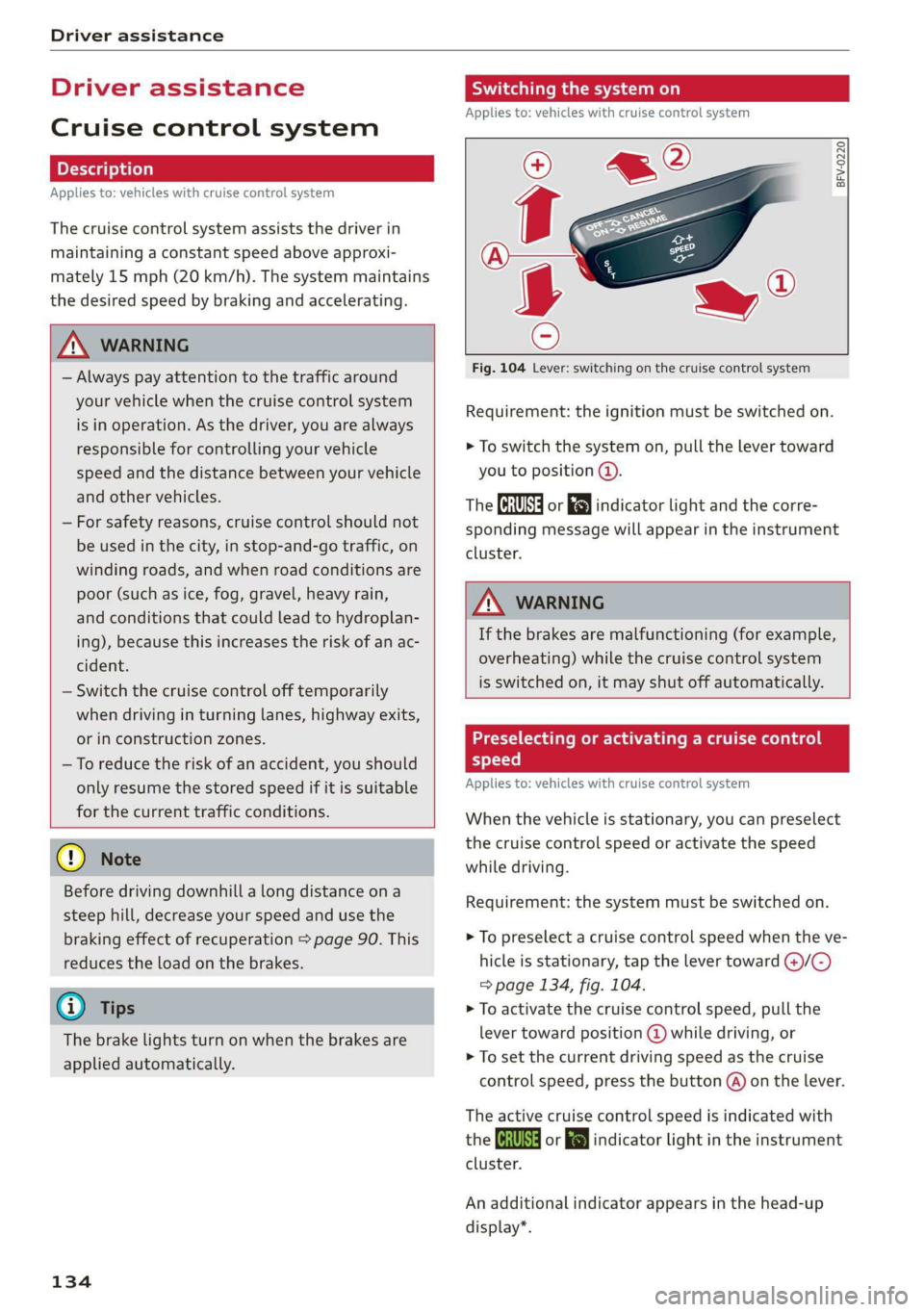
Fig. 104 Lever: switching on the cruise control system
Requirement: the ignition must be switched on.
> To switch the system on, pull the lever toward
you to position @.
The Ga or 8) indicator light and the corre-
sponding message will appear in the instrument
cluster.
A WARNING
If the brakes are malfunctioning (for example,
overheating) while the cruise control system
is switched on, it may shut off automatically.
Preselecting or activating a cruise control
speed
Applies to: vehicles with cruise control system
When the vehicle is stationary, you can preselect
the cruise control speed or activate the speed
while driving.
Requirement: the system must be switched on.
> To preselect a cruise control speed when the ve-
hicle is stationary, tap the lever toward @)/C)
=> page 134, fig. 104.
> To activate the cruise control speed, pull the
lever
toward position @ while driving, or
> To set the current driving speed as the cruise
control speed, press the button @) on the lever.
The active cruise control speed is indicated with
the Gs or kl indicator light in the instrument
cluster.
An additional indicator appears in the head-up
display*.
Page 140 of 310
Driver assistance
Set speed limit - Adjusts to speed limits. You can
also set With tolerance if desired. In this scenar-
io, you may fall below or exceed the set speed in
favor of increased efficiency.
Adjustment to curves along route - Can be
switched Off or be set individually from Slow to
Fast. The setting influences vehicle handling with
predictive control, for example the speed for
driving through curves.
Messages
as and a message with Adaptive cruise assist:
Predictive control is displayed when there is a
malfunction, the efficiency assist functions are
unavailable or limited.
A message that indicates the cause and possible
solution may appear with some displays. The
weather conditions may be too poor or a sensor
may be covered. Clean the area in front of the
sensors > page 124, fig. 97 and try to turn on
the systems again later.
If the malfunction remains, drive to an author-
ized Audi dealer or authorized Audi Service Facili-
ty immediately to have the malfunction correct-
ed.
along route setting to reduce the risk of an
accident.
ZA\ WARNING
— Follow the safety precautions and note the
limits of the assist systems, sensors, and
cameras > page 123.
— Pay attention to traffic and the area around
your vehicle when predictive control is
switched on. The driver is always responsible
for assessing the traffic situation.
— The system does not consider “right of way”
rules and does not respond to traffic lights,
so lack of driver attention in these situations
can increase the risk of an accident.
— The speed when driving through curves may
be different from what you as a driver would
do or may not be suitable for the weather
and road conditions. If necessary, apply the
brakes and reduce the selected speed to be
maintained in the Adjustment to curves
YD In certain countries
138
@) Tips
— Predictive control can exceed or drop below
the maximum permitted speed. The driver
is responsible for adhering to the permitted
speed limit.
— The traffic signs on the road always take pri-
ority over the display. The driver is always
responsible for adhering to the regulations
applicable in the country where the vehicle
is being operated.
— Ifa speed limit is detected, the marking @
of the set speed limit will be adjusted even
if the adaptive cruise assist is not actively
regulating.
— You may temporarily fall below or exceed
the set speed due to recuperation.
— Control by the system depends on which
adaptive cruise assist driving program is set
or on the selected Audi drive select* mode.
— After switching on the ignition and first
driving onto a freeway or similar road with-
out a speed limit, the system will regulate
the speed to 80 mph (130 km/h), Then
the system adjusts to the last speed set by
the driver.
— There is no adaptation to speed limits when
driving through highway interchanges and
when driving on or off the expressway.
— The system can fail to provide control or the
control may be faulty if the values from the
camera-based traffic sign recognition* are
incorrect or the navigation system map data
is outdated.
— When route guidance is switched on, the
system adapts to the route provided by the
navigation system. Driving without route
guidance or leaving a route can result in
faulty control.
— Specific settings are stored automatically in
the active personal profile.
Page 142 of 310
Driver assistance
system expects that you can easily drive around
the stationary vehicle by turning the steering
wheel.
— The adaptive cruise assist may not react to sta-
tionary obstacles, such as the end of a traffic
jam, especially at high speeds.
— The adaptive cruise assist has a limited ability
to detect vehicles that are a short distance
ahead, off to the side of your vehicle, or moving
into your lane.
— Objects that are difficult to detect, such as mo-
torcycles, vehicles with high ground clearance,
or vehicles with an overhanging load, may be
detected late or not detected at all.
— The adaptive cruise assist does not respond to
people, animals, or objects that are crossing or
approaching from the opposite direction.
Z\ WARNING
Follow the safety precautions and note the
limits of the assist systems, sensors, and
cameras > page 123.
Display overview
Applies to: vehicles with adaptive cruise assist
eI S|
3 | kel Ny =|
fac
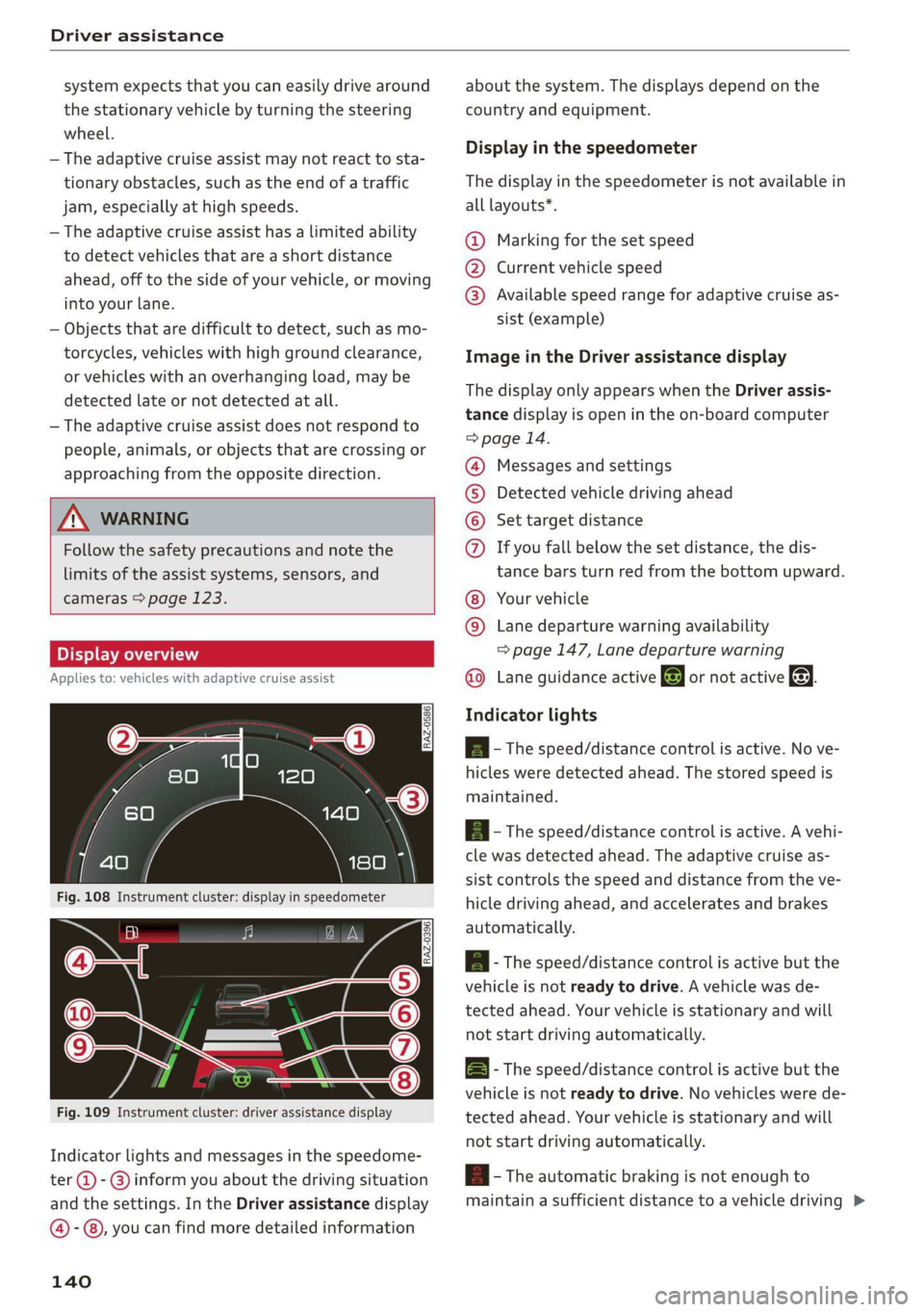
Fig. 109 Instrument cluster: driver assistance display
Indicator lights and messages in the speedome-
ter @ -@ inform you about the driving situation
and the settings. In the Driver assistance display
@-©®, you can find more detailed information
140
about the system. The displays depend on the
country and equipment.
Display in the speedometer
The display in the speedometer is not available in
all layouts*.
@ Marking for the set speed
@ Current vehicle speed
@® Available speed range for adaptive cruise as-
sist (example)
Image in the Driver assistance display
The display only appears when the Driver assis-
tance display is open in the on-board computer
> page 14.
Messages and settings
Detected vehicle driving ahead
Set target distance
COO® If you fall below the set distance, the dis-
tance bars turn red from the bottom upward.
Your vehicle
©® Lane departure warning availability
=> page 147, Lane departure warning
Lane guidance active @ or not active &. ©
Indicator lights
A - The speed/distance control is active. No ve-
hicles were detected ahead. The stored speed is
maintained.
a - The speed/distance control is active. A vehi-
cle was detected ahead. The adaptive cruise as-
sist controls the speed and distance from the ve-
hicle driving ahead, and accelerates and brakes
automatically.
ial - The speed/distance control is active but the
vehicle is not ready to drive. A vehicle was de-
tected ahead. Your vehicle is stationary and will
not start driving automatically.
B - The speed/distance control is active but the
vehicle is not ready to drive. No vehicles were de
tected ahead. Your vehicle is stationary and will
not start driving automatically.
B- The automatic braking is not enough to
maintain a sufficient distance to a vehicle driving
Page 145 of 310
4KE012721BB
Driver assistance
lane guidance is not active. This may be due to
the following reasons:
— The necessary lane marker lines have not been
detected (for example, in a construction zone
or because the lines are obstructed by snow,
dirt, water, or lighting)
— The lane is too narrow or too wide
— The curve is too narrow
— Visibility is obstructed by a rise or dip.
— The driver's hands are not on the steering
wheel
ZA WARNING
Follow the safety precautions and note the
limits of the assist systems, sensors, and
cameras > page 123.
@ Tips
— Always keep your hands on the steering
wheel. The driver is always responsible for
adhering to the regulations applicable in
the country where the vehicle is being oper-
ated.
— It is recommended to only switch on lane
guidance on well-constructed roads.
— Specific settings are stored automatically in
the active personal profile.
— The button -arrow- switches lane guidance
availability and the lane departure warning
on or off simultaneously, if lane guidance is
selected in the adaptive cruise assist set-
tings.
Setting the distance
Applies to: vehicles with adaptive cruise assist
B4M-0234
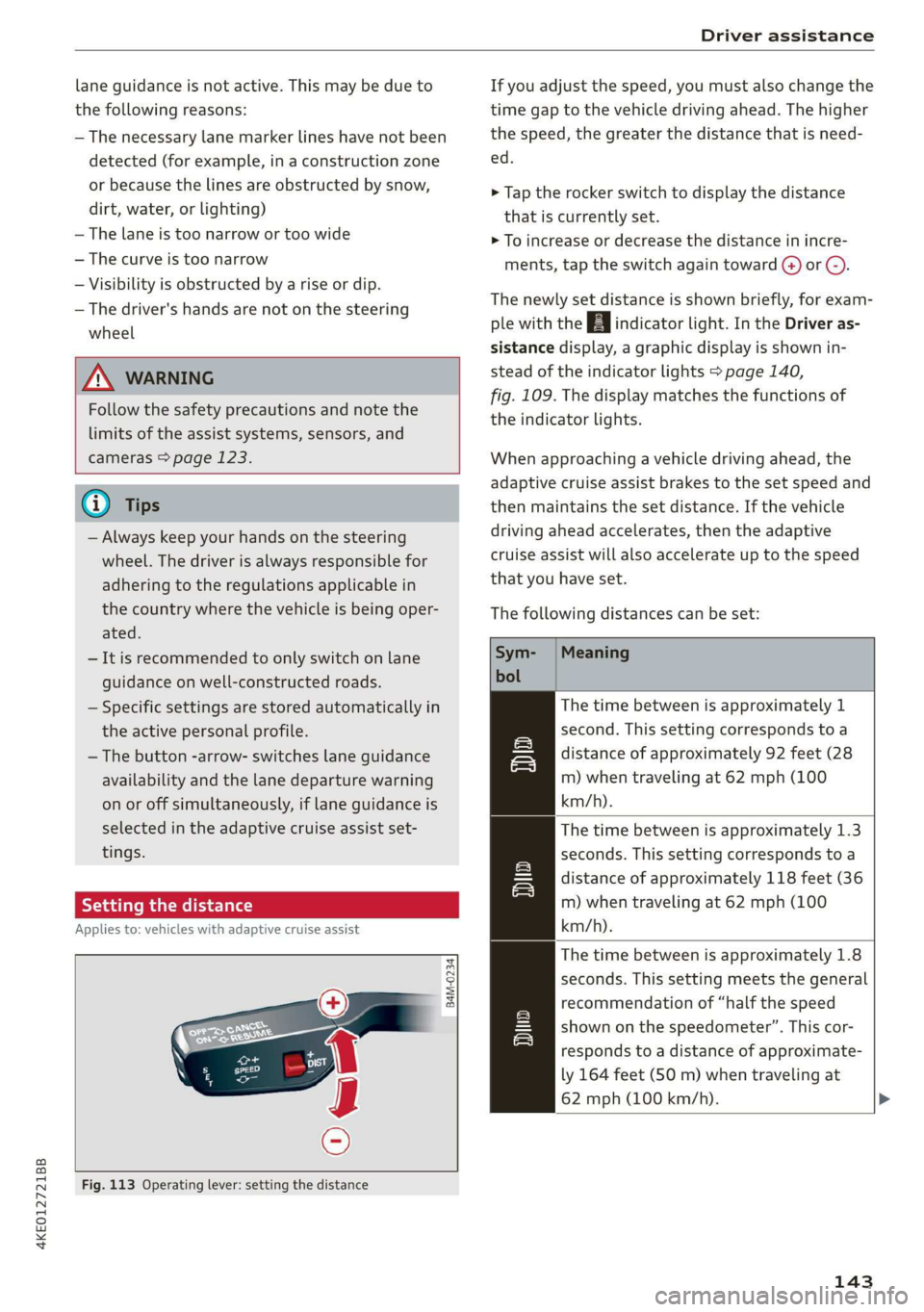
Fig. 113 Operating lever: setting the distance
If you adjust the speed, you must also change the
time gap to the vehicle driving ahead. The higher
the speed, the greater the distance that is need-
ed.
> Tap the rocker switch to display the distance
that is currently set.
> To increase or decrease the distance in incre-
ments, tap the switch again toward (4) or @).
The newly set distance is shown briefly, for exam-
ple with the indicator light. In the Driver as-
sistance display, a graphic display is shown in-
stead of the indicator lights > page 140,
fig. 109. The display matches the functions of
the indicator lights.
When approaching a vehicle driving ahead, the
adaptive cruise assist brakes to the set speed and
then maintains the set distance. If the vehicle
driving ahead accelerates, then the adaptive
cruise assist will also accelerate up to the speed
that you have set.
The following distances can be set:
Meaning
The time between is approximately 1
second. This setting corresponds to a
distance of approximately 92 feet (28
m) when traveling at 62 mph (100
km/h).
The time between is approximately 1.3
seconds. This setting corresponds toa
distance of approximately 118 feet (36
m) when traveling at 62 mph (100
km/h).
The time between is approximately 1.8
seconds. This setting meets the general
recommendation of “half the speed
shown on the speedometer”. This cor-
responds to a distance of approximate-
ly 164 feet (SO m) when traveling at
62 mph (100 km/h).
wT
143
Page 150 of 310
Driver assistance
system can warn you with corrective steering and
a steering wheel vibration, if necessary.
The system functions in the speed range of ap-
proximately 40 mph - 155 mph (65 km/h -
250 km/h).
Applies to: vehicles with lane departure warning
and without side assist: Even if the system is
ready, it will not warn you if you activate a turn
signal before crossing the lane marker line. In
this case, it assumes that you are changing lanes
intentionally.
Applies to: vehicles with lane departure warning
in combination with side assist: If the turn signal
is activated, the lane departure warning is ready,
and a lane change has been classified as critical
by the lane departure warning due to vehicles
traveling beside you or due to approaching vehi-
cles, then a noticeable corrective steering move-
ment will occur briefly before exiting the lane.
This will attempt to keep your vehicle in the lane.
Z\ WARNING
Follow the safety precautions and note the
limits of the assist systems, sensors, and
cameras > page 123.
Applies to: vehicles with lane departure warning
B8V-0692
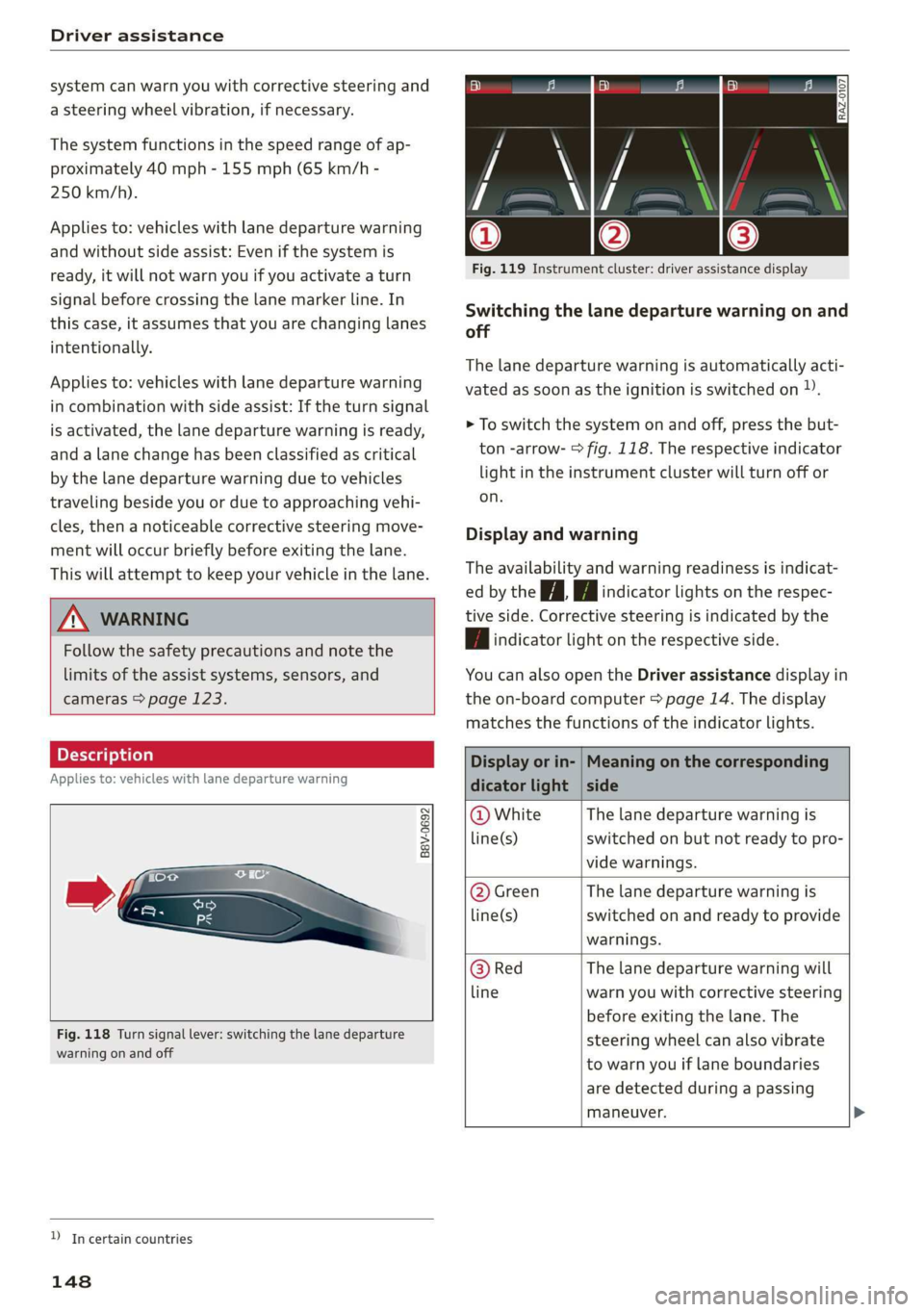
Fig. 118 Turn signal lever: switching the lane departure
warning on and off
YD In certain countries
148
a ©| BY ie le
Fig. 119 Instrument cluster: driver assistance display
Switching the lane departure warning on and
off
The lane departure warning is automatically acti-
vated as soon as the ignition is switched on »).
> To switch the system on and off, press the but-
ton -arrow- > fig. 118. The respective indicator
light in the instrument cluster will turn off or
on.
Display and warning
The availability and warning readiness is indicat-
ed by the it Hi indicator lights on the respec-
tive side. Corrective steering is indicated by the
| | indicator light on the respective side.
You can also open the Driver assistance display in
the on-board computer > page 14. The display
matches the functions of the indicator lights.
Display or in- | Meaning on the corresponding
dicator light | side
@ White The lane departure warning is
line(s) switched on but not ready to pro-
vide warnings.
@ Green The lane departure warning is
line(s) switched on and ready to provide
warnings.
@ Red The lane departure warning will
line warn you with corrective steering
before exiting the lane. The
steering wheel can also vibrate
to warn you if lane boundaries
are detected during a passing
maneuver.
Page 190 of 310
Audi connect
— Start or stop climate control
— Program the timer
— Deactivate or activate the timer
For additional information, see > page 84.
Geofencing Alert
Requirement: a key user must be set in the vehi-
cle > page 28.
This service allows you to set permitted and for-
bidden zones for your vehicle as well as set time
limits for these zones. If your vehicle leaves a
permitted zone or enters a forbidden zone, you
will be notified with a push notification and/or an
e-mail.
Speed Alert
Requirement: a key user must be set in the vehi-
cle > page 28.
You can set up to two speed limits for your vehi-
cle using this service. If your vehicle exceeds a set
speed limit, you will be notified with a push noti-
fication and/or e-mail.
Valet Alert
Requirement: a key user must be set in the vehi-
cle > page 187.
If you give your vehicle to a parking service, you
can set a zone and a speed limit using the myAu-
di app. If the vehicle leaves the zone or exceeds
the speed limit, you will be notified with a push
notification and/or e-mail.
ZA WARNING
— Do not ignore messages and warning or indi-
cator lights that turn on in the vehicle be-
cause of the information in the vehicle sta-
tus report. This could lead to break downs in
on the road, accidents and serious injuries.
— Only perform charging functions on the
high-voltage battery if the vehicle is shut off
correctly, is connected to a suitable socket
and if the ignition is switched off.
188
G) Tips
For some services, you can select if you would
like to be notified with a push notification
and/or an e-mail.
Settings
(et) telat -Matian celia
> Applies to: MMI: Select on the home screen:
SETTINGS > Connection settings > Mobile
phone network.
Depending on the country, vehicle equipment,
and connection type, the following functions may
be available:
Data connection settings
Using the Data connection settings menu, you
can set when the system should connect to the
Internet. The Internet connection disconnects
automatically once the requested Audi connect
Infotainment service no longer requires any data.
— Data roaming: data roaming is switched off at
the factory. To use a data connection outside of
the country, data roaming must be switched
on. The setting is stored for the current SIM
card or the mobile device that is currently con-
nected.
— Allow MMI online services: when this function
is switched on, a data connection is automati-
cally established in order to use Audi connect
Infotainment services.
— Allow Wi-Fi devices: when this function is
switched on, you can allow or deny Internet
connections.
Access point
The connection is configured automatically based
on the SIM card being used. The following values
can be changed. You can obtain more information
from your cell phone service provider.
— Access Point Name (APN): the access point de-
pends on the cell phone service provider and is
assigned automatically.
— User name: your cell phone service provider as-
signs the user name for your online profile. >
Page 263 of 310
4KE012721BB
Wheels
check your tires as soon as possible, and inflate
them to the proper pressure. Driving ona signifi-
cantly under-inflated tire causes the tire to over-
heat and can lead to tire failure. Under-inflation
also reduces fuel efficiency and tire tread life,
and may affect the vehicle's handling and stop-
ping ability.
Please note that the TPMS is not a substitute for
proper tire maintenance, and it is the driver's re-
sponsibility to maintain correct tire pressure,
even if under-inflation has not reached the level
to trigger illumination of the TPMS low tire pres-
sure telltale.
Your vehicle has also been equipped with a TPMS
malfunction indicator to indicate when the sys-
tem is not operating properly. The TPMS mal-
function indicator is combined with the low tire
pressure telltale. When the system detects a
malfunction, the telltale will flash for approxi-
mately one minute and then remain continuously
illuminated. This sequence will continue upon
subsequent vehicle start-ups as long as the mal-
function exists.
When the malfunction indicator is illuminated,
the system may not be able to detect or signal
low tire pressure as intended. TPMS malfunctions
may occur for a variety of reasons, including the
installation of replacement or alternate tires or
wheels on the vehicle that prevent the TPMS
from functioning properly. Always check the
TPMS malfunction telltale after replacing one or
more tires or wheels on your vehicle to ensure
that the replacement or alternate tires and
wheels allow the TPMS to continue to function
properly.
a Meee ee Muir Melee
appears
The tire pressure indicator in the instrument
cluster informs you if the tire pressure is too low
or if there is a system malfunction.
Using the ABS sensors, the tire pressure monitor-
ing system compares the tire tread circumference
and vibration characteristics of the individual
tires. If the pressure changes in one or more
tires, this is indicated in the instrument cluster
display with an indicator light @ and a message.
If only one tire is affected, the location of that
tire will be indicated.
The tire pressures must be stored again each
time you change the pressures (switching be-
tween partial and full load pressure) or after
changing or replacing a tire on your vehicle
=> page 262. The tire pressure monitoring system
only monitors the tire pressure you have stored.
Refer to the tire pressure label for the recom-
mended tire pressure for your vehicle
=> page 253, fig. 165.
Tire tread circumference and vibration character-
istics can change and cause a tire pressure warn-
ing if:
— The tire pressure in one or more tires is too low
— The tires have structural damage
— The tire was replaced or the tire pressure was
changed and it was not stored > page 262
— Tires that are only partially used are replaced
with new tires
Indicator lights
@ - Loss of pressure in at least one tire > A\.
Check the tires and replace or repair if necessary.
Check and correct the pressures of all four tires
and store the pressure again > page 262.
is (Tire Pressure Monitoring System) Tire pres-
sure: malfunction! See owner's manual. If i
appears after switching the ignition on or while
driving and the @ indicator light in the instru-
ment cluster blinks for approximately one minute
and then stays on, there is system malfunction.
Try to store the correct tire pressures
= page 262. In some cases, you must drive for
several minutes after storing the pressures until
the indicator light turns off. If the indicator light
does turn off or turns on again after a short peri-
od of time, drive to an authorized Audi dealer or
authorized Audi Service Facility immediately to
have the malfunction corrected.
ZX WARNING
— If the tire pressure indicator appears in the
display, reduce your speed immediately and
avoid any hard steering or braking
261
Page 266 of 310
Care and cleaning
height and width of the inside of the car
wash.
ZA WARNING
—To reduce the risk of accidents, only wash
the vehicle when the ignition is off and fol-
low the instructions from the car wash oper-
ator.
—To reduce the risk of cuts, protect yourself
from sharp metal components when wash-
ing the underbody or the inside of the wheel
housings.
— After washing the vehicle, the braking effect
may be delayed due to moisture on the
brake rotors or ice in the winter. This in-
creases the risk of an accident. The brakes
must be dried with a few careful brake appli-
cations.
—To reduce the risk of paint damage, do not
wash the vehicle in direct sunlight.
—To reduce the risk of damage, do not wash
decorative decals* with a pressure washer.
—To reduce the risk of damage to the surface,
do not use insect removing sponges, kitchen
sponges, or similar items.
— When washing matte finish painted vehicle
components:
— To reduce the risk of damage to the sur-
face, do not use polishing agents or hard
wax.
— Never use protective wax. It can destroy
the matte finish effect.
@) Note — Do not place any stickers or magnetic
signs on vehicle components painted with
matte finish paint. The paint could be
damaged when the stickers or magnets
are removed.
— If you wash the vehicle in an automatic car
wash, you must fold the exterior mirrors in
to reduce the risk of damage to the mirrors.
Power folding exterior mirrors* must only
be folded in and out using the power folding @) For the sake of the environment
function.
—To reduce the risk of damage to the rims
and tires, compare the width between the
wheels on your vehicle with the distance be-
tween the guide rails in the car wash.
—To reduce the risk of damage, compare the
height and width of your vehicle with the
Only wash the vehicle in facilities specially de-
signed for that purpose. This will reduce the
risk of dirty water contaminated with oil from
entering the sewer system.
Cleaning and care information
When cleaning and caring for individual vehicle are not listed, consult an authorized Audi dealer
components, refer to the following tables. The or authorized Audi Service Facility. Also follow
information contained there is simply recommen- __ the information found in > A.
dations. For questions or for components that
Exterior cleaning
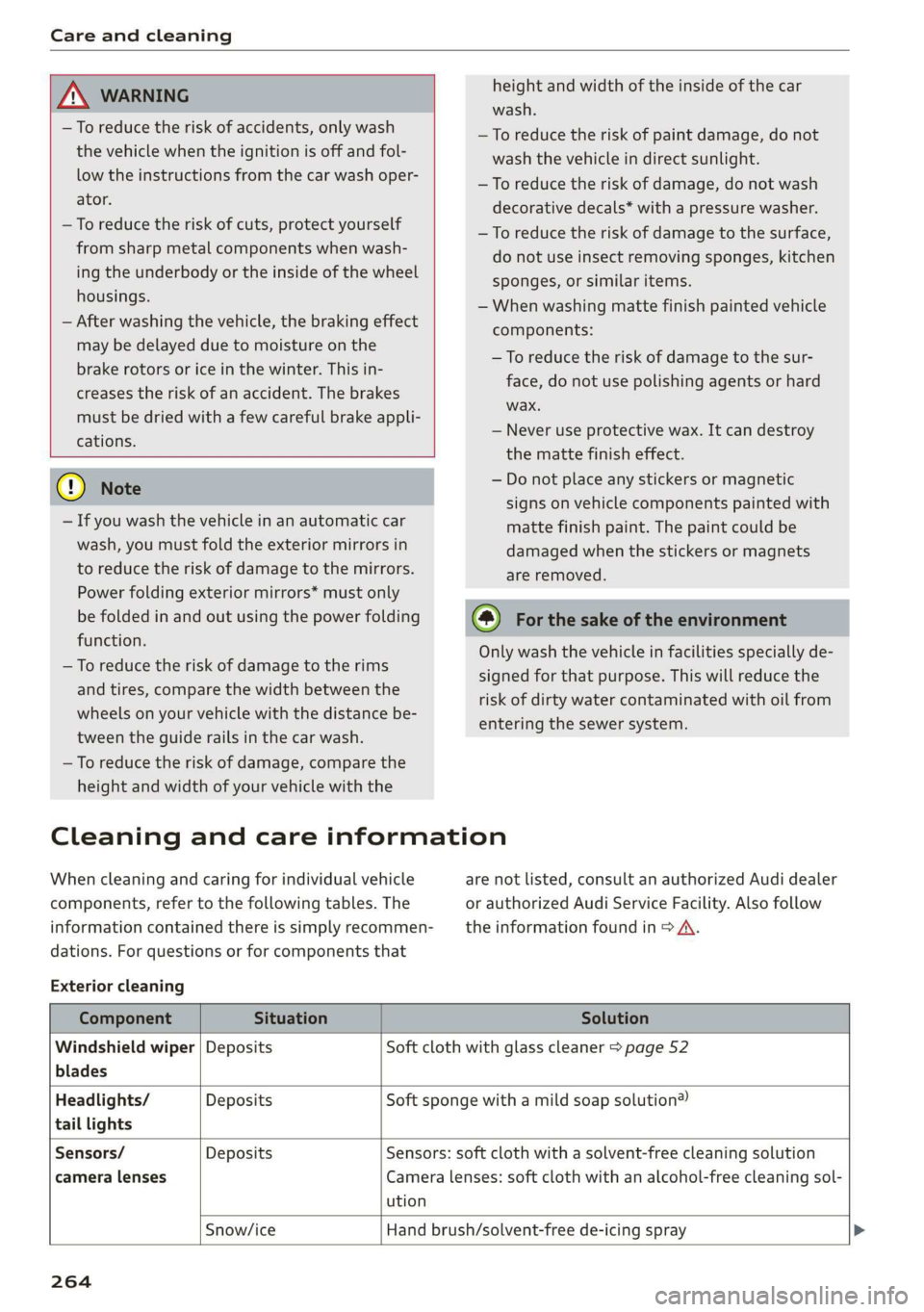
Component Situation Solution
Windshield wiper | Deposits Soft cloth with glass cleaner > page 52
blades
Headlights/ Deposits Soft sponge with a mild soap solution®
tail lights
Sensors/ Deposits Sensors: soft cloth with a solvent-free cleaning solution
camera lenses Camera lenses: soft cloth with an alcohol-free cleaning sol-
ution
Snow/ice Hand brush/solvent-free de-icing spray >
264
Page 295 of 310
4KE012721BB
Index
A
A/C cooling mode............. ee eee eee ee 82
Accelerator pedal.............--00000005 89
also refer to Accelerator pedal........... 89
ACCeSSOFICS . 6... eee 288
Active lane assist
refer to Lane departure warning......... 147
refer to Lane guidance................ 147
Adaptive cruise assist..............-000. 139
Cleaning the sensors...........00 ee eee 264
Predictive control.................... 137
Adaptive cruise control
refer to Adaptive cruise assist........... 139
Adaptive darnipers « wax ss eae 2» seme s oe 99
Adjusting the air distribution............. 82
Adjusting the brightness................. 48
Adjusting the sound..............-...0- 231
Adjusting the temperature............... 82
Adjusting the vents ...........0 cece eens 84
Adjusting the volume..............000005 26
Adjusting the volume (announcements) .... 231
Adjusting the welcome sound............ 231
Airbag SySteM « » ene s ews 4 5 Hemme tee Eee 64
Air quality display...............022-.08. 84
Air suspension...........0..0 000. ee eee 99
Airtransport........... 0.0.00 .00200 eee 104
Alarm system
refer to Anti-theft alarm system.......... 32
Alignment pin (changing the wheel)....... 269
All-weather lights.................00000. 44
ALSeaSOMtineSien. is 5: suse 6 samme «0 imevsnee ow we 258
All wheel drive
refer to quattro... . 2... cece eee eee 101
AMI
refer to Audi music interface........... 220
Android Auto
refer to Audi smartphone interface...... 229
Anti-freeze
Windshield washer system............. 241
Anti-lock braking system.............05. 101
Anti-Slip Regulation.................05. 102
Anti-theft alarm system ..........--..00-- 32
Anti-theft wheel bolts.................. 272
Apple CarPlay
refer to Audi smartphone interface...... 229
Aspect ratio (video) ..............0. 223,225
ASR
refer to Anti-Slip Regulation............ 101
Audi adaptive light..................000. 44
Audi connect
refer to connect............ee008 184,185
Audi drive select. .... 0.0... eee e eee eee eee 98
Audi e-tron compact charging system..... 114
Adjusting the charging power level...... 114
Changing or attaching the power cable... 118
SOGUIING*s « & cvsiane wo cranes = wiersie © eireten @ © on 119
Status and malfunction indicators....... 115
Audi music interface...............2.-- 220
AUTOM ESiscns x 5: scaniae 0 0 scones 0 atasene 0 a asouane 221
Audi phone BOX. weiss & scinie ev eerie ve emcene 171
Audi PreISONS@iics 4 + svnns ae maces os oes o 8 150
Messages ...... 00.0.0. cece eee eee eee 153
Audi side assist
refer to Side assist. ........0.. 0000000 154
Audi smartphone interface.............. 229
Legalinformation..........0...eebeee 233
Audi virtual cockpit
refer to Instrument cluster.............. 11
AUTO
Automatic headlights .................. 44
Climate control system..............0-. 82
Auto Lock (central locking) ............... 29
Automatic climate control
refer to Climate control system.......... 81
Automatic luggage compartment lid.... 36,37
Automatic wipe/wash system............. 50
Auxiliary climate control................. 84
AVErAGe CONSUMPTION 4 6 weieure o weceie ae waco 14
Average’Speed ic. i civ 6 x essen so cranes 6 w sre 14
B
BaqehOOKsts « scan
Charge level display.............0005 ee 11
Charging (12 Volt vehicle battery)....... 241
High-voltage batteryiews « ass ss gouy s x as 104
Vehicle battery (12 Volt)............... 240
Winter operation (12 Volt vehicle battery) . 240
Battery (vehicle)
refer to High-voltage battery........... 104
293
Page 297 of 310
4KE012721BB
Index
HOO « cnsvecs 2 v citvace ow eneaene oo somes ve soto ¥ 236
Luggage compartment lid............... 36
Luggage compartment lid with foot motion . 37
Panoramic glass roofs. «esc se eevee eae 40
Sunshade (roof)... 2.2.0.6. eee eee 40
WINdOWS : soce = ¢ xews 2 y cee xs eee 5 oes 39
Closing aid (power closing doors).......... 29
Cockpit dimming...............002-000 48
Cockpit (overview) ....... 0.000 c cece ee eee 6
Collapsible spare tire
Inflating....... 2... eee eee eee ee eee 275
Collapsible tire
refer to Collapsible spare tire........... 2715
GOlGr MUMBEN: ¢ sees 5 xy ream sy eee 5 e eR « 291
Comfort auxiliary climate control.......... 85
Coming home/Leaving home
refer to Entry/exit lighting.............. 46
Compartments: < s ceau ze ee@s so eRe eb eS 76
Compass inthe mirror................00- 53
Compliance ........ 6.0... cece eee eee ee 289
Configuration wizard.................00. 17
CONME Cie. va nce & mene a moms @ a ee @ sue 184
Data plans... .... 2. ee eee eee eee 189
Data Privatyiee = « news ¢ x eng s eae a 5 eee 285
Emmengeneyseall ssc «a ssi 6 svensewe + syacene 191,
Infotainment...............-.-0 eee eee 185
Infotainment services............00005 185
Online roadside assistance............. 192
Vehicle control services................ 186
Connected devices
Device overvieW.... 0... cece e ee ee eee 232
Connections
referto Media............--.+++- 217,221
Consumer information.................- 286
Consumption
Reducing « svar es senw e waen @ o wee ey wee 91
Consumption (energy) ...............0005 14
Contacts
Add destinations ssw: « x cima © 2 aves @ 2 sone 203
Importing and exporting.............. 181
Memory capacity............000e eae 181
Opening (business card)............... 175
Updatinginthe MMI.................. 181
Convenience key............00 020 e sees 29
Convenience closing. ..........0eeee eee 40
also refer to Vehicle key..............-- 33
Convenience opening and closing
Windows or panoramic glass roof........ 40
Cooling mode..... 0.2... eee eee eee 82
Cooling system
Coolant... ... eee ee eee 237
Coolant l6VEl sence 2 5 seen s cage 2 eevee ga 238
Cornering
light: =» sees ¢ 2 eese 2» ewan ss es 44
Cross traffic assist (intersection assistant)... 157
Cruise control system
refer to Speed control systems.......... 134
Cup Holdets es « « sven ¢ ¢ een se eee x e sees 75
Current consumption.................... 14
D
Data plans... 0... eee eee eee 189
Data Privacy....... 0... cece eee eee 285
Date... eee 14
Daytime running lights.................. 44
Declaration of compliance............... 289
DEF (instrument cluster) ..............004 11
Demo mode
refer to Presentation mode............. 207
Destination on the map..............0.. 198
Detailsts os sscmve o vam 2 2 amore ao ansome oy ave 197
Determining correct load limit........... 256
Digital: cOMpaSs sew: : 2 sees c= reas ve een se 53
Dimensions ...........-..0 0c e eee eee ee 291
Dimming the exterior mirrors............. 49
Dimming the rearview mirror............. 49
Directory
Settings........... 002.2 eee eee eee 181
also refer to ContactS..............00. 175
Display
Gleanings « « exes = > eavane « esecnie ow ears owe 266
Disposalicne is « scsswa se suns « @ mnenes oe mae ow 286
DiStaNCC rss « ¢ eames = o sage s ¥ eeupe & 2 Hee x 14
DIStanGe WARNING, ames 3 « says se gems «eR 147
Doors
Childisatety lock eric. ss cio so ween a ewes « 39
Door contact switch................200. 47
Mechanically unlocking and locking....... 32
Power closing/closing aid............... 29
Driver information system................ 12
Drives
refer toMed idles « «wees sv eww 6 owen 217,221
295