tow AUDI E-TRON 2019 Service Manual
[x] Cancel search | Manufacturer: AUDI, Model Year: 2019, Model line: E-TRON, Model: AUDI E-TRON 2019Pages: 310, PDF Size: 81.91 MB
Page 157 of 310
4KE012721BB
Driver assistance
— If the lanes are narrow or if you are driving on
the edge of your lane. If this is the case, the
system may have detected a vehicle in another
lane that is not adjacent to your current lane.
— If you are driving through a curve. Side assist
may react to a vehicle that is in the same lane
or one lane over from the adjacent lane.
—If side assist reacts to other objects (such as
roadside structures like guard rails).
ZA WARNING
— Follow the safety precautions and note the
limits of the assist systems, sensors, and
cameras © page 123.
— The display may not appear on time when
vehicles are approaching or being passed
very quickly.
G) Tips
— If the window glass in the driver's door or
front passenger's door has been tinted, the
display in the exterior mirror may be incor-
fects
— These systems are not available in trailer
towing mode. There is no guarantee the sys-
tems will switch off when using a retrofitted
trailer hitch. Do not use these functions
when towing a trailer.
— For an explanation on conformity with the
FCC regulations in the United States and the
Industry Canada regulations, see
=> page 289.
Adjusting side assist
Applies to: vehicles with side assist
The system can be switched on and off in the
MMI = page 126. If the system is activated, the
displays will turn on briefly when the ignition is
switched on.
Adjusting the brightness
You can adjust the brightness of the display in
the exterior mirror. The settings depend on the
vehicle equipment.
> Applies to: MMI: Select on the home screen:
VEHICLE > Driver assistance > (<23) > Side as-
sist > Brightness.
The display brightness is automatically adapted
to the ambient light. If the automatic adaptation
has already reached the upper or lower limit, no
change will be apparent when the setting is
changed, or it will only become visible when the
ambient light changes. Adjust the brightness to a
level where the display in the information stage
will not disrupt your view ahead. If you change
the brightness, the display will briefly show the
brightness level in the information stage.
Messages
Applies to: vehicles with side assist
rig or fii is displayed when there is a malfunc-
tion, the side assist and exit warning system
functions may be unavailable or may be limited.
A message that indicates the cause and possible
solution may appear with some displays. The
weather conditions may be too poor or a sensor
may be covered. Clean the sensor area in the ve-
hicle rear and try to turn the systems on again
later.
If the malfunction remains, drive to an author-
ized Audi dealer or authorized Audi Service Facili-
ty immediately to have the malfunction correct-
ed.
155
Page 158 of 310
Driver assistance
Exit warning
Applies to: vehicles with exit warning system
Fig. 122 Front door: warning strip (diagram)
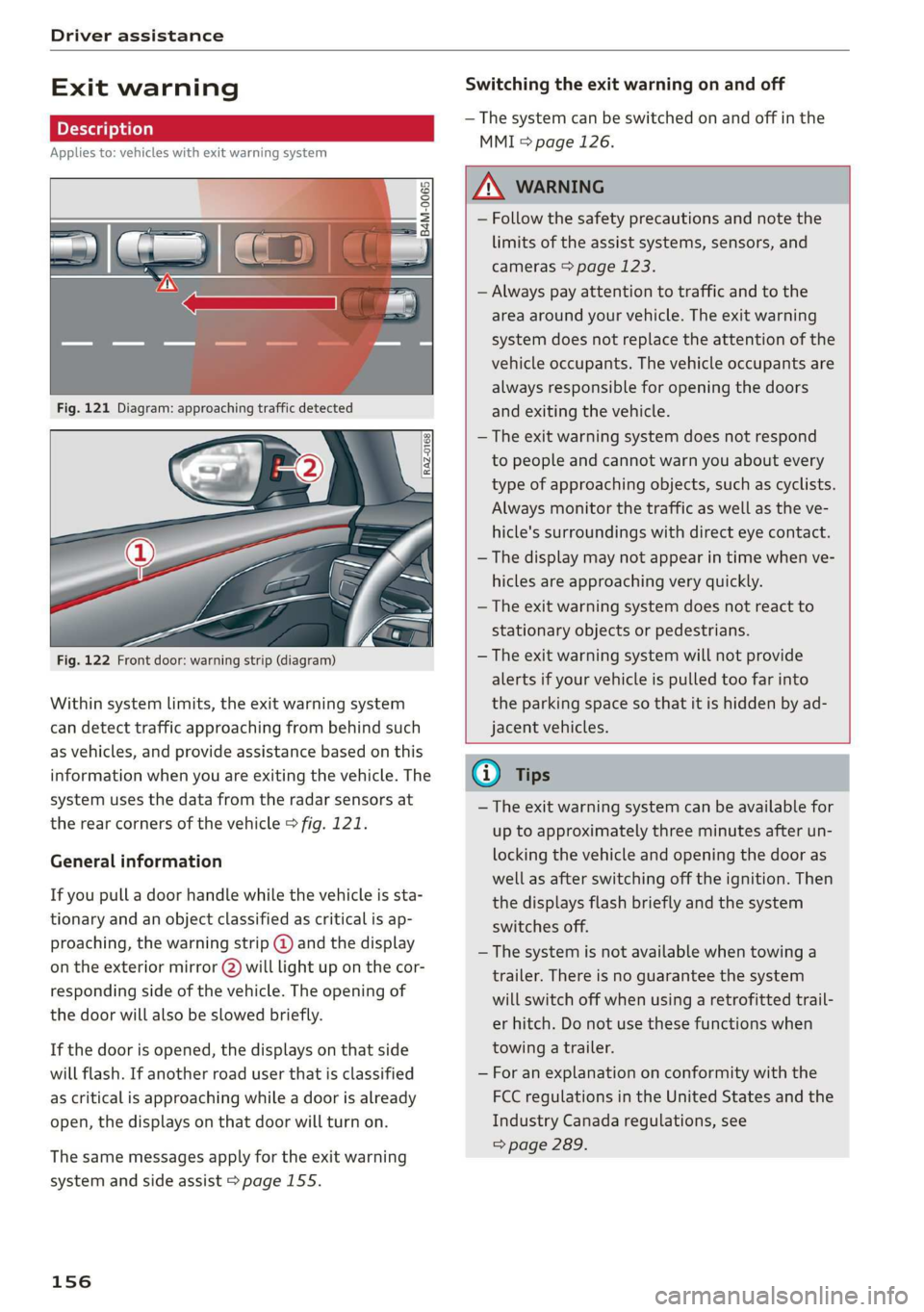
Within system limits, the exit warning system
can detect traffic approaching from behind such
as vehicles, and provide assistance based on this
information when you are exiting the vehicle. The
system uses the data from the radar sensors at
the rear corners of the vehicle > fig. 121.
General information
If you pull a door handle while the vehicle is sta-
tionary and an object classified as critical is ap-
proaching, the warning strip @ and the display
on the exterior mirror (2) will light up on the cor-
responding side of the vehicle. The opening of
the door will also be slowed briefly.
If the door is opened, the displays on that side
will flash. If another road user that is classified
as critical is approaching while a door is already
open, the displays on that door will turn on.
The same messages apply for the exit warning
system and side assist > page 155.
156
Switching the exit warning on and off
— The system can be switched on and off in the
MMI & page 126.
A WARNING
— Follow the safety precautions and note the
limits of the assist systems, sensors, and
cameras > page 123.
— Always pay attention to traffic and to the
area around your vehicle. The exit warning
system does not replace the attention of the
vehicle occupants. The vehicle occupants are
always responsible for opening the doors
and exiting the vehicle.
— The exit warning system does not respond
to people and cannot warn you about every
type of approaching objects, such as cyclists.
Always monitor the traffic as well as the ve-
hicle's surroundings with direct eye contact.
— The display may not appear in time when ve-
hicles are approaching very quickly.
— The exit warning system does not react to
stationary objects or pedestrians.
— The exit warning system will not provide
alerts if your vehicle is pulled too far into
the parking space so that it is hidden by ad-
jacent vehicles.
@ Tips
— The exit warning system can be available for
up to approximately three minutes after un-
locking the vehicle and opening the door as
well as after switching off the ignition. Then
the displays flash briefly and the system
switches off.
— The system is not available when towing a
trailer. There is no guarantee the system
will switch off when using a retrofitted trail-
er hitch. Do not use these functions when
towing a trailer.
— For an explanation on conformity with the
FCC regulations in the United States and the
Industry Canada regulations, see
=> page 289.
Page 164 of 310
Parking and maneuvering
detected with limitations may not be detect-
ed at all. Always monitor the traffic and the
vehicle's surroundings directly and do not
become distracted.
® Note
Keep enough distance from the curb to avoid
damage to the rims.
G) Tips
—The side area * > page 124, fig. 96 is de-
tected and evaluated when passing. There
may have been changes to the surrounding
area after switching the ignition off and on
again, after opening the doors, or if the ve-
hicle is left stationary for a period of time.
In this case, the area will appear black until
the area has been detected and evaluated.
— If the distance to an obstacle remains con-
stant, the volume of the distance warning
gradually lowers after a few seconds until it
is muted (this does not apply to the continu-
ous tone). If the obstacle comes closer than
it was before the sound was muted, the
tone will sound again. If the obstacle be-
comes farther away than it was before the
sound was muted, no tone will sound. Pay
attention to the vehicle's surroundings
when you start to drive.
— There is no distance warning for the rear
and the sides* when trailer towing mode is
detected. The front sensors remain activat-
ed. The visual display switches to trailer
mode. There is no guarantee the functions
will switch off when using a retrofitted trail-
er hitch.
162
Rearview camera and
peripheral cameras
Introduction
Applies to: vehicles with rearview camera/peripheral cameras
B8V-0629
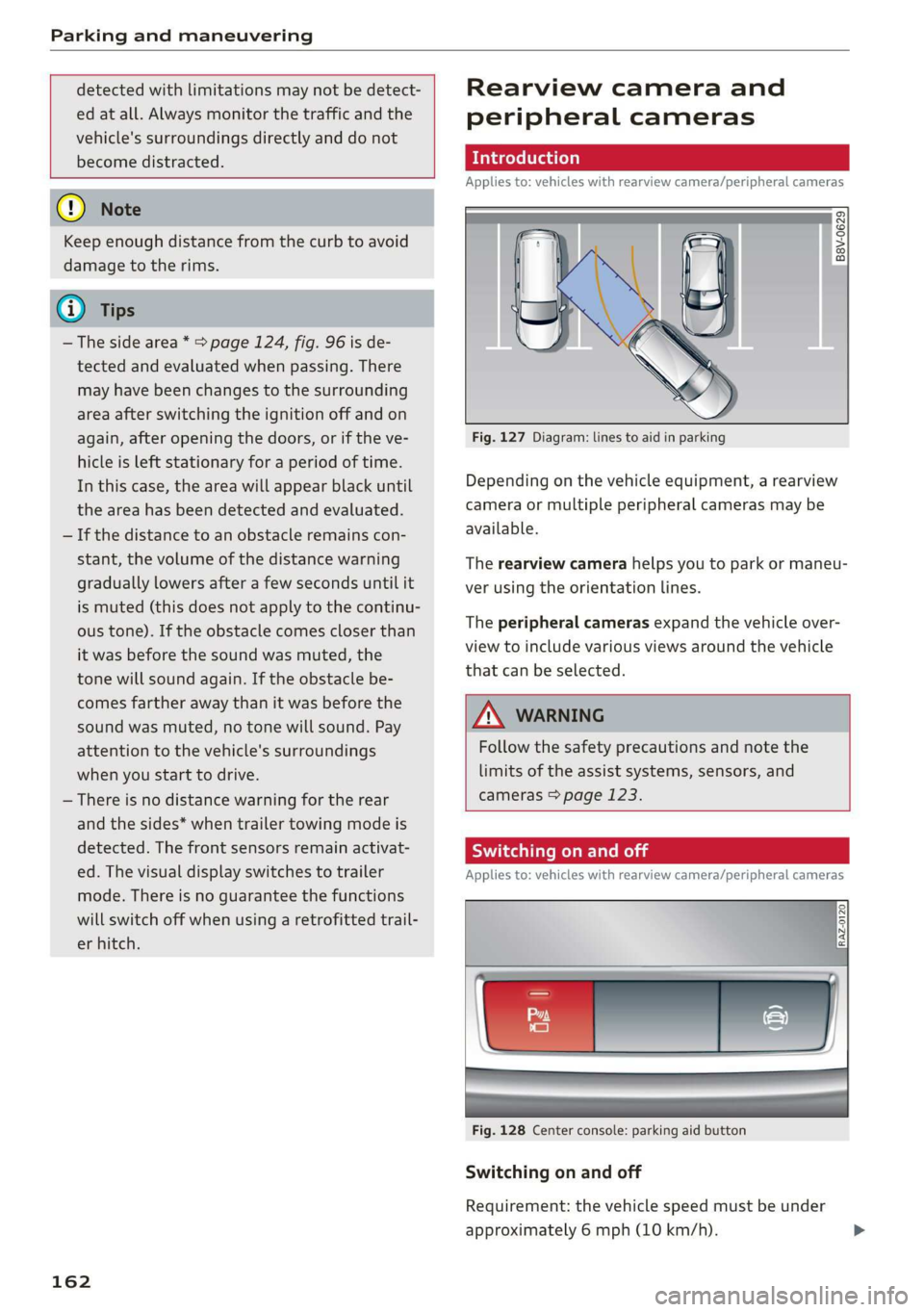
Fig. 127 Diagram: lines to aid in parking
Depending on the vehicle equipment, a rearview
camera or multiple peripheral cameras may be
available.
The rearview camera helps you to park or maneu-
ver using the orientation lines.
The peripheral cameras expand the vehicle over-
view to include various views around the vehicle
that can be selected.
Z\ WARNING
Follow the safety precautions and note the
limits of the assist systems, sensors, and
cameras > page 123.
Sica Re meal
Applies to: vehicles with rearview camera/peripheral cameras
Fig. 128 Center console: parking aid button
Switching on and off
Requirement: the vehicle speed must be under
approximately 6 mph (10 km/h).
Page 165 of 310
4KE012721BB
Parking and maneuvering
> Press the & button in the center console. When
switching on, a brief tone sounds and the LED
in the button turns on. Or
> Select 1 on the upper display if the visual dis-
tance indicator is shown > page 161, fig. 126.
Switching on automatically
The system switches on automatically when re-
verse gear is engaged while the drive system is
active. A brief tone will sound.
Switching off automatically
The system switches off automatically when driv-
ing forward faster than 6 mph (10 km/h).
ZA WARNING
Follow the safety precautions and note the
limits of the assist systems, sensors, and
cameras > page 123.
Warnings
Applies to: vehicles with rearview camera/peripheral cameras
Fig. 130 Upper display: distance view
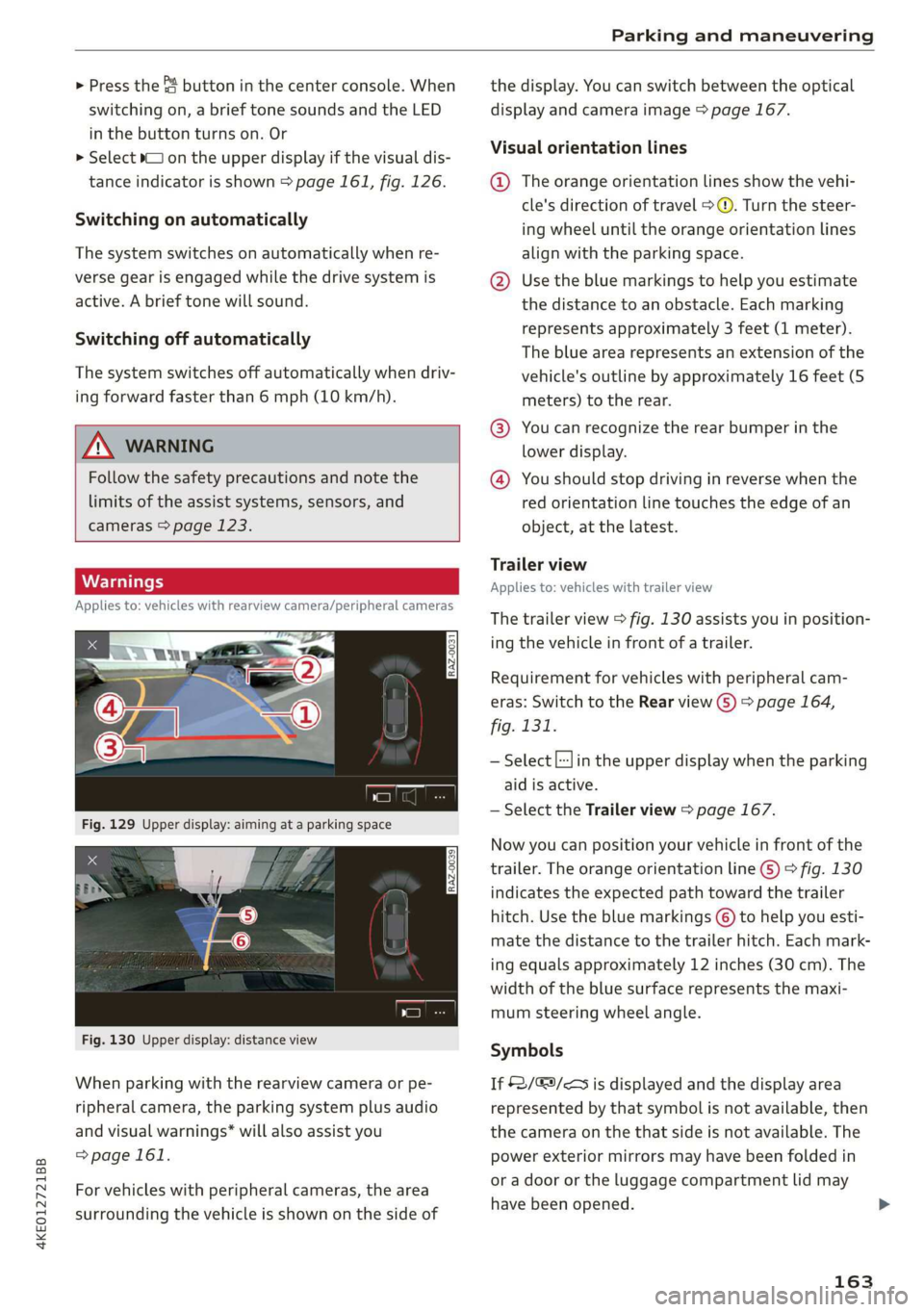
When parking with the rearview camera or pe-
ripheral camera, the parking system plus audio
and visual warnings* will also assist you
=>page 161.
For vehicles with peripheral cameras, the area
surrounding the vehicle is shown on the side of
the display. You can switch between the optical
display and camera image > page 167.
Visual orientation lines
@ The orange orientation lines show the vehi-
cle's direction of travel > ©. Turn the steer-
ing wheel until the orange orientation lines
align with the parking space.
@ Use the blue markings to help you estimate
the distance to an obstacle. Each marking
represents approximately 3 feet (1 meter).
The blue area represents an extension of the
vehicle's
outline by approximately 16 feet (5
meters) to the rear.
@® You can recognize the rear bumper in the
lower display.
@ You should stop driving in reverse when the
red orientation line touches the edge of an
object, at the latest.
Trailer view
Applies to: vehicles with trailer view
The
trailer view > fig. 130 assists you in position-
ing the vehicle in front of a trailer.
Requirement for vehicles with peripheral cam-
eras: Switch to the Rear view G) > page 164,
fig. 131.
— Select |:-}in the upper display when the parking
aid is active.
— Select the Trailer view > page 167.
Now you can position your vehicle in front of the
trailer. The orange orientation line ©) > fig. 130
indicates the expected path toward the trailer
hitch. Use the blue markings © to help you esti-
mate the distance to the trailer hitch. Each mark-
ing equals approximately 12 inches (30 cm). The
width of the blue surface represents the maxi-
mum steering wheel angle.
Symbols
If $2/&9/< is displayed and the display area
represented by that symbol is not available, then
the camera on the that side is not available. The
power exterior mirrors may have been folded in
or a door or the luggage compartment lid may
have been opened.
163
Page 166 of 310
Parking and maneuvering
If # is displayed, there is a system malfunction
and the display area represented by that symbol
is not available. The camera is not working in this
area.
If Nis displayed, the respective ultrasonic sensor
is icy or dirty. Clean the area in front of the sen-
sors > page 124, fig. 97.
If one of the symbols continues to be displayed,
drive immediately to an authorized Audi dealer or
authorized Audi Service Facility to have the mal-
function repaired.
ZA\ WARNING
— Follow the safety precautions and note the
limits of the assist systems, sensors, and
cameras > page 123.
— Sensors and cameras have spots in which
the surrounding area cannot be detected.
Objects, animals, and people may only be
detected with limitations may not be detect-
ed at all. Always monitor the traffic and the
vehicle's
surroundings directly and do not
become distracted.
©) Note
— The orange orientation lines @) show the di-
rection the rear of the vehicle will be travel-
ing, based on the steering wheel angle. The
front of the vehicle swings out more than
the rear of the vehicle. Maintain plenty of
distance so that an exterior mirror or a cor-
ner of the vehicle does not collide with any
obstacles.
— Keep enough distance from the curb to
avoid damage to the rims.
— Only use the images provided by the camera
on the rear of the vehicle when the luggage
compartment lid is completely closed. Make
sure any objects you may have mounted on
the luggage compartment lid do not block
the rearview camera.
G) Tips
— Applies to: vehicles with air suspension: The
accuracy of the orientation lines and blue
surfaces on the camera display decreases
when the vehicle is raised or lowered with
the air suspension.
— There is no distance warning for the rear
and the sides* when trailer towing mode is
detected. The front sensors remain activat-
ed. The visual display switches to trailer
mode. The rearview camera image will not
show the orientation lines and the blue sur-
faces. There is no guarantee the functions
will switch off when using a retrofitted trail-
er hitch.
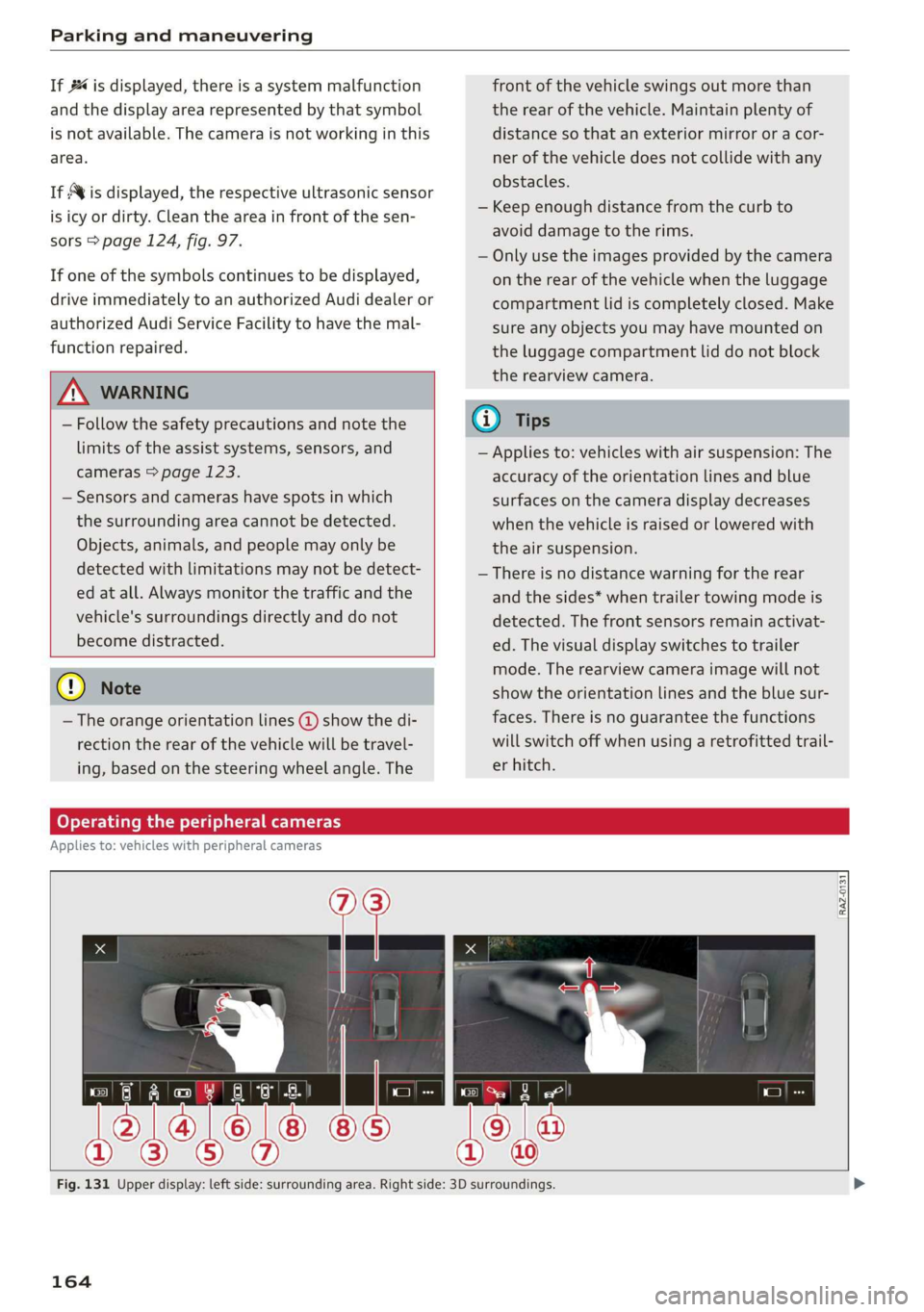
Oe lee maleate
Applies to: vehicles with peripheral cameras
RAZ-0131
Fig. 131 Upper display: left side: surrounding area. Right side: 3D surroundings.
164
Page 169 of 310
4KE012721BB
Parking and maneuvering
Displays, warnings, and braking
— Display: the indicator @ in the upper display
only appears when the parking aid is activated.
For vehicles with peripheral cameras, this only
happens in the Rear and Corner view (rear)
camera views. Arrows show the direction from
which the cross traffic is approaching.
— Audible warnings: an audio signal may sound
as an additional warning when driving in re-
verse.
— Automatic brake activation: if you do not react
to a warning, a brief braking by the system can
warn you of a potential collision with an ap-
proaching object.
The audible warning signal and the automatic
brake activation occur only when driving in re-
verse.
Messages
1f EM, Bg or > is displayed when there is a mal-
function, the rear cross traffic assist functions
may be unavailable or may be limited.
A message that indicates the cause and possible
solution may appear with some displays. The
weather conditions may be too poor or a sensor
may be covered. Clean the sensor area in the ve-
hicle rear and try to turn the systems on again
later.
If the malfunction remains, drive to an author-
ized Audi dealer or authorized Audi Service Facili-
ty immediately to have the malfunction correct-
ed.
ZA WARNING
— Follow the safety precautions and note the
limits of the assist systems, sensors, and
cameras > page 123.
— The rear cross-traffic assist will not provide
alerts about people and cannot warn you
about every type of approaching objects,
such as cyclists. Always monitor the traffic
as well as the vehicle's surroundings with di-
rect eye contact.
— The system may not react if objects are ap-
proaching very quickly.
— The rear cross-traffic assist will not provide
alerts if your vehicle is parallel parked or if
your vehicle is pulled too far into the park-
ing space so that it is hidden by adjacent ve-
hicles.
(i) Tips
— Once an automatic brake activation occurs,
the system cannot initiate another activa-
tion for several seconds.
—If there is an acoustic warning signal from
the rear cross-traffic assist, then the park-
ing system may not warn you of detected
obstacles under certain circumstances.
— The system is not available when the vehicle
detects that you are towing a trailer. There
is no guarantee the functions will switch off
when using a retrofitted trailer hitch. Do not
use
these functions when towing a trailer.
— For an explanation on conformity with the
FCC regulations in the United States and the
Industry Canada regulations, see
=> page 289.
Adjusting the parking
aids
You can adjust the parking aid to your preferen-
ces. The settings depend on the vehicle equip-
ment.
> Applies to: MMI: Select on the home screen:
VEHICLE > Parking aid.
> Applies to: MMI: Select L-] on the upper display
when the parking aid is active.
Possible settings:
Activating automatically
Trailer view - Shows the trailer view. In vehicles
with peripheral cameras, this can only be opened
in the Rear view.
View - Switches between the visual display
(Graphic) and vehicle surroundings (Camera) in
the side view on the screen.
Clean rearview camera - Starts cleaning the rear-
view camera.
167
Page 189 of 310
4KE012721BB
Audi connect
services. The cell phone network, for exam-
ple, must be available to use these services.
Applies to: vehicles with Audi connect vehicle control
> Register at my.audi.com.
> Set the key user > page 28.
> Install the myAudi app on your mobile device
and log in with your login information.
G@) Tips
It may also be necessary to enter your 4-digit
PIN set at my.audi.com when accessing some
Audi connect vehicle control services.
Yate]
Applies to: vehicles with Audi connect vehicle control
Depending on the country and the vehicle equip-
ment, the following services may be available:
Remote locking and unlocking
Requirement: the vehicle must be parked and the
ignition must be switched off.
This service allows you to unlock or lock your ve-
hicle.
Vehicle status report
This service transfers driver information system
data to a server. Depending on the vehicle equip-
ment, certain data may be accessed, such as the
remaining range or mileage. The values may dif-
fer from the values displayed in the vehicle.
Car Finder
This service transmits the parking location to a
server when the ignition is switched off. The vehi-
cle location, your location, or the route to your
vehicle can be displayed. The new parking loca-
tion cannot be determined with this service if the
vehicle is moved after shutting the vehicle off
and without switching the ignition on and off
again, for example if the vehicle is towed or sto-
len.
Online Audi service request
Requirement: the service must be activated on-
line at my.audi.com and an authorized Audi deal-
er or authorized Audi service facility must be se-
lected.
This service transmits service-relevant data to
your selected authorized Audi dealer or author-
ized Audi service facility. They will contact you
before your next service appointment.
Stolen Vehicle Locator
This service assists you in locating your vehicle if
it is stolen.
— Contact the police. You receive a Case ID.
— Call the service hotline and give your Case ID.
The service hotline will forward the established
data to the police. You receive the Audi Service
hotline number when you purchase your vehicle.
Trip data
Depending on the vehicle equipment, certain
driver information system data is transmitted to
a server. An overview of your trips with the values
from the short-term memory/long-term memory
can be displayed, for example, the driving dura-
tion. The values may differ from the values dis-
played in the vehicle.
Remote charging
Requirement: the ignition must be switched off
when changing the charging mode.
You can start the charging process remotely with
the service.
— Charging mode: immediate charging or delayed
charging (timer)
— Program the timer
— Deactivate or activate the timer
For additional information, see > page 105.
Auxiliary climate control
Requirement: the ignition must be switched off
when starting or stopping climate control.
You can control the climate control in your vehi-
cle remotely using these services.
187
>
Page 239 of 310
4KE012721BB
Checking and Filling
[RAZ-0572
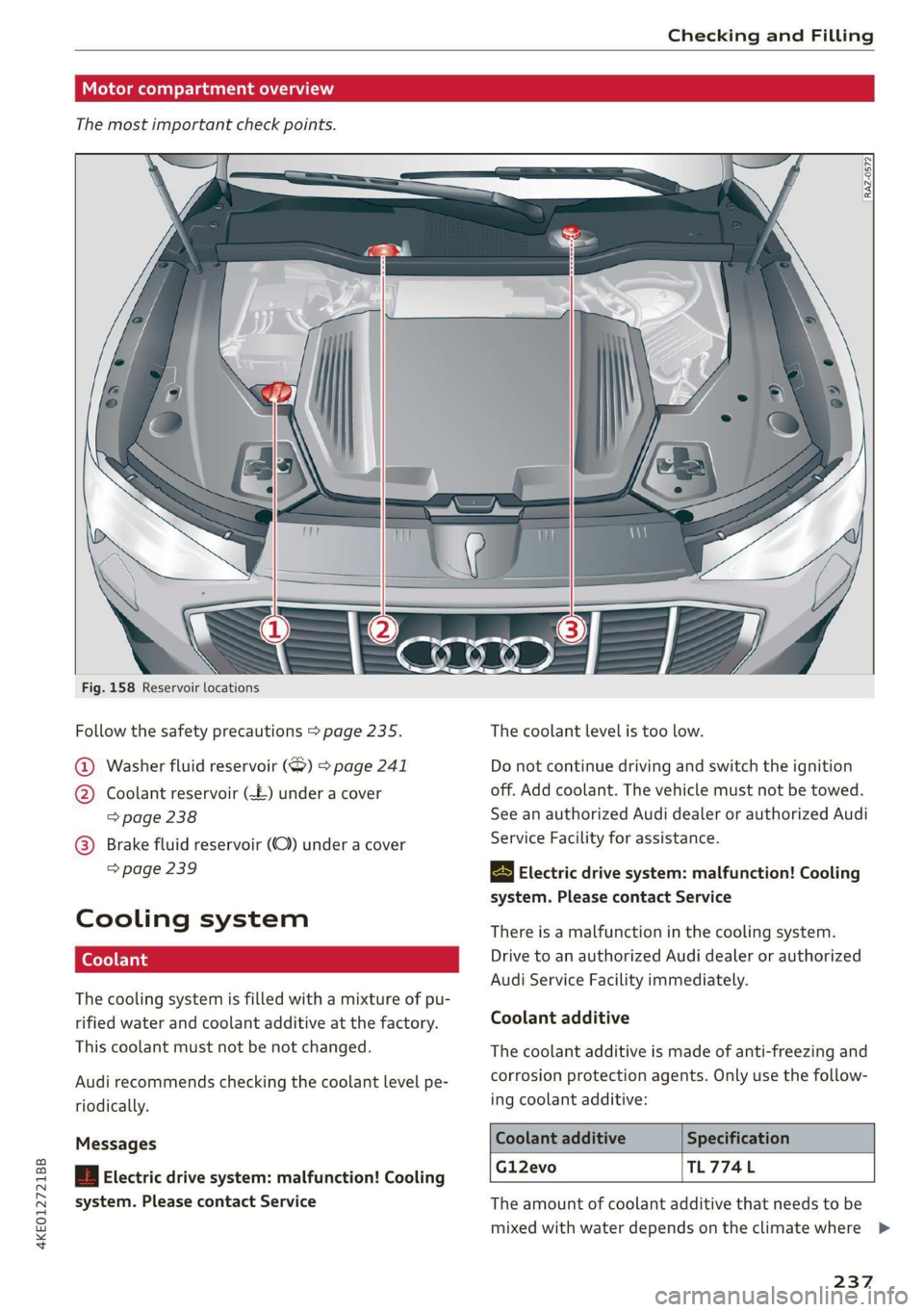
Fig. 158 Reservoir locations
Follow the safety precautions > page 235. The coolant level is too low.
1) Washer fluid reservoir (7) > page 241 Do not continue driving and switch the ignition
) Coolant reservoir (£-) under a cover off. Add coolant. The vehicle must not be towed.
> page 238 See an authorized Audi dealer or authorized Audi
(GB) @) Brake fluid reservoir (OC) under a cover
> page 239 Electric drive system: malfunction! Cooling
system. Please contact Service
Service Facility for assistance.
Cooli ng system There is a malfunction in the cooling system.
| Drive to an authorized Audi dealer or authorized
Audi Service Facility immediately.
The cooling system is filled with a mixture of pu-
rified water and coolant additive at the factory. Coolant additive
This coolant must not be not changed. The coolant additive is made of anti-freezing and
Audi recommends checking the coolant level pe- corrosion protection agents. Only use the follow-
riodically. ing coolant additive:
Messages Coolant additive Specification
Gl12evo TL774L
| Electric drive system: malfunction! Cooling
system. Please contact Service The amount of coolant additive that needs to be
mixed with water depends on the climate where >
237
Page 240 of 310
Checking and Filling
the vehicle will be operated. If the coolant addi-
tive percentage is too low, the coolant can freeze
and cause damage.
Coolant Freeze protec-
additive tion
Warm min. 40% min. -13 °F
regions max. 45% (25°)
Cold min. 50% max. -40 °F
regions max. 55% (-40 °C)
@) Note
— Before winter weather begins, have an au-
thorized Audi dealer or authorized Audi
Service Facility check if the coolant additive
in your vehicle matches the percentage ap-
propriate for the climate. This is especially
important when driving in colder climates.
— If the appropriate coolant additive is not
available in an emergency, do not add any
other additive. Using other additives in-
creases the risk of damage. If this happens,
only use water and restore the correct mix-
ture ratio with the specified coolant additive
as soon as possible.
— Only refill with new coolant.
— Radiator sealant must not be mixed with
the coolant.
Coolant level
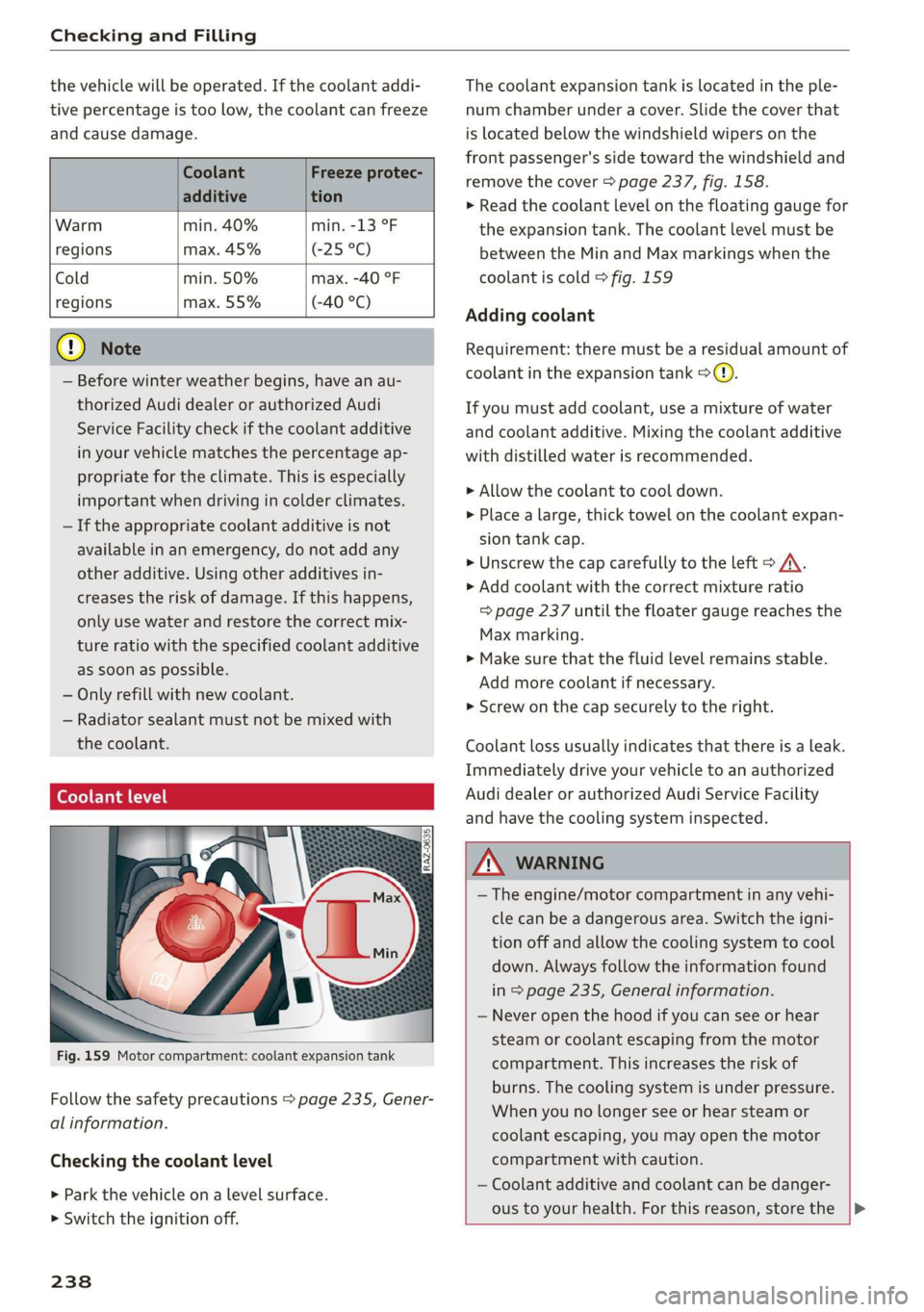
Fig. 159 Motor compartment: coolant expansion tank
Follow the safety precautions > page 235, Gener-
al information.
Checking the coolant level
> Park the vehicle on a level surface.
> Switch the ignition off.
238
The coolant expansion tank is located in the ple-
num chamber under a cover. Slide the cover that
is located below the windshield wipers on the
front passenger's side toward the windshield and
remove the cover > page 237, fig. 158.
> Read the coolant level on the floating gauge for
the expansion tank. The coolant level must be
between the Min and Max markings when the
coolant is cold > fig. 159
Adding coolant
Requirement: there must be a residual amount of
coolant in the expansion tank >@).
If you must add coolant, use a mixture of water
and coolant additive. Mixing the coolant additive
with distilled water is recommended.
> Allow the coolant to cool down.
> Place a large, thick towel on the coolant expan-
sion tank cap.
> Unscrew the cap carefully to the left > A\.
> Add coolant with the correct mixture ratio
=> page 237 until the floater gauge reaches the
Max marking.
> Make sure that the fluid level remains stable.
Add more coolant if necessary.
> Screw on the cap securely to the right.
Coolant loss usually indicates that there is a leak.
Immediately drive your vehicle to an authorized
Audi dealer or authorized Audi Service Facility
and have the cooling system inspected.
Z\ WARNING
— The engine/motor compartment in any vehi-
cle can be a dangerous area. Switch the igni-
tion off and allow the cooling system to cool
down. Always follow the information found
in > page 235, General information.
— Never open the hood if you can see or hear
steam or coolant escaping from the motor
compartment. This increases the risk of
burns. The cooling system is under pressure.
When you no longer see or hear steam or
coolant escaping, you may open the motor
compartment with caution.
— Coolant additive and coolant can be danger-
ous to your health. For this reason, store the |>
Page 241 of 310
4KE012721BB
Checking and Filling
coolant in the original container and away
from children. There is a risk of poisoning.
@) Note
— Do not add coolant if the expansion tank is
empty. Air could enter the cooling system
and increase the risk of damage. If this is
the case, do not continue driving. See an au-
thorized Audi dealer or authorized Audi
Service Facility for assistance.
— If coolant must be added multiple times
within two months, drive immediately to an
authorized Audi dealer or authorized Audi
Service Facility because there is a risk of
damage.
Brake fluid
BFV-0229|
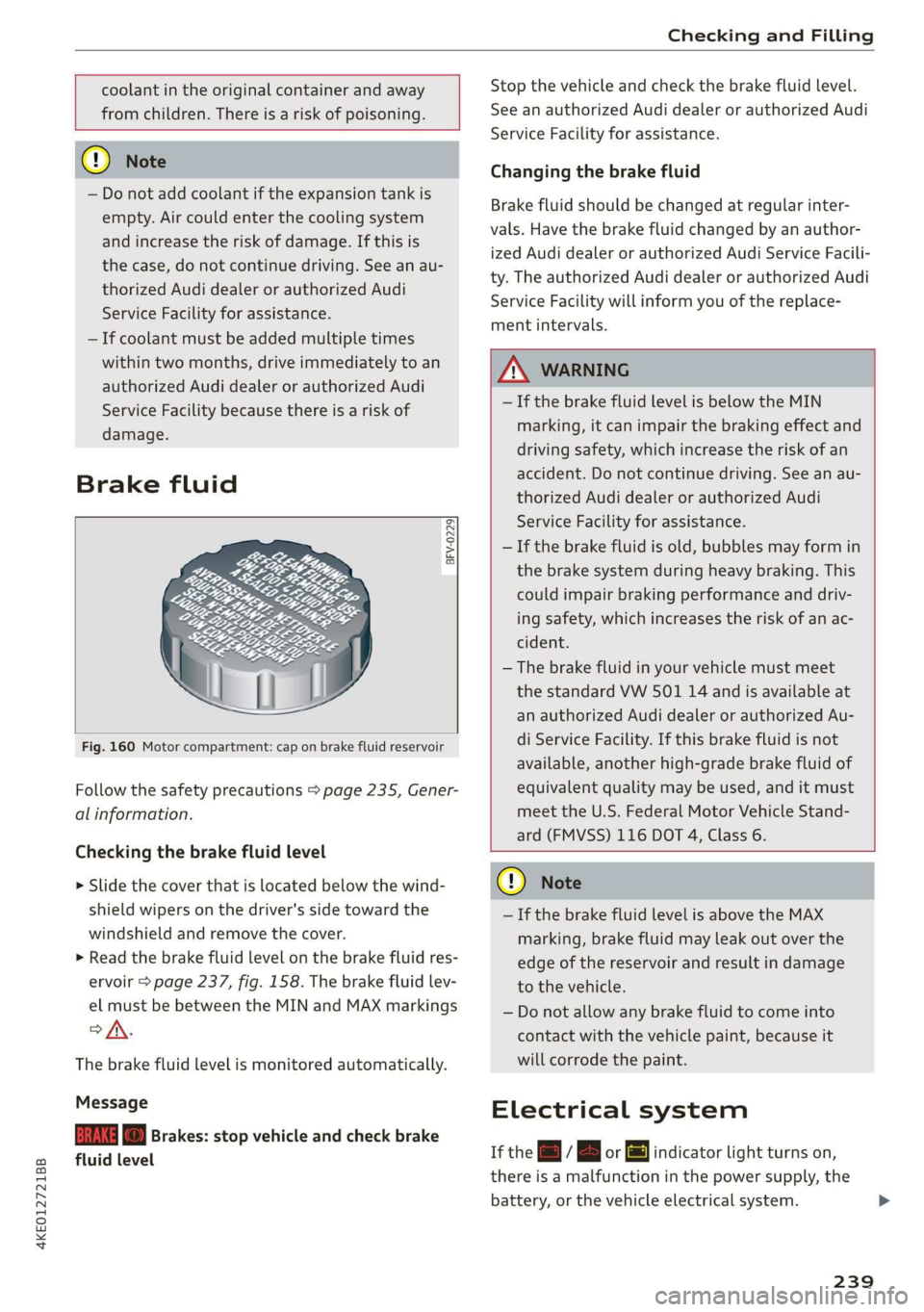
Fig. 160 Motor compartment: cap on brake fluid reservoir
Follow the safety precautions > page 235, Gener-
al information.
Checking the brake fluid level
> Slide the cover that is located below the wind-
shield wipers on the driver's side toward the
windshield and remove the cover.
> Read the brake fluid level on the brake fluid res-
ervoir > page 237, fig. 158. The brake fluid lev-
el must be between the MIN and MAX markings
of.
The brake fluid level is monitored automatically.
Message
EG f) Brakes: stop vehicle and check brake
fluid level
Stop the vehicle and check the brake fluid level.
See an authorized Audi dealer or authorized Audi
Service Facility for assistance.
Changing the brake fluid
Brake fluid should be changed at regular inter-
vals. Have the brake fluid changed by an author-
ized Audi dealer or authorized Audi Service Facili-
ty. The authorized Audi dealer or authorized Audi
Service Facility will inform you of the replace-
ment intervals.
Z\ WARNING
— If the brake fluid level is below the MIN
marking, it can impair the braking effect and
driving safety, which increase the risk of an
accident. Do not continue driving. See an au-
thorized Audi dealer or authorized Audi
Service Facility for assistance.
— If the brake fluid is old, bubbles may form in
the brake system during heavy braking. This
could impair braking performance and driv-
ing safety, which increases the risk of an ac-
cident.
— The brake fluid in your vehicle must meet
the standard VW 501 14 and is available at
an authorized Audi dealer or authorized Au-
di Service Facility. If this brake fluid is not
available, another high-grade brake fluid of
equivalent quality may be used, and it must
meet the U.S. Federal Motor Vehicle Stand-
ard (FMVSS) 116 DOT 4, Class 6.
@) Note
— If the brake fluid level is above the MAX
marking, brake fluid may leak out over the
edge of the reservoir and result in damage
to the vehicle.
— Do not allow any brake fluid to come into
contact with the vehicle paint, because it
will corrode the paint.
Electrical system
If the =] / B or [ml indicator light turns on,
there is a malfunction in the power supply, the
battery, or the vehicle electrical system.
239