ECU AUDI E-TRON 2019 Workshop Manual
[x] Cancel search | Manufacturer: AUDI, Model Year: 2019, Model line: E-TRON, Model: AUDI E-TRON 2019Pages: 310, PDF Size: 81.91 MB
Page 191 of 310
4KE012721BB
Audi connect
— Password: your cell phone service provider as-
signs the password for your online profile.
— Apply settings: saves the changed settings.
— Reset configuration: resets the connection set-
tings.
Data usage counter
Your current data usage is displayed.
— Reset counter: you can reset your usage statis-
tics to zero.
— Warning limit: you can set a warning limit for
your data usage (GB/MB).
Always follow the information found in > AV
in General information on page 184.
Always follow the information found in >@® in
General information on page 184.
For more information on roaming charges,
contact your cell phone service provider.
Wi-Fi settings
Applies to: vehicles with Wi-Fi hotspot
Requirement: the ignition must be switched on.
» Applies to: MMI: Select on the home screen:
SETTINGS > Connection settings > Wi-Fi
Depending on the country and the vehicle equip-
ment, the following functions may be available:
Wi-Fi
When the function is switched on, the MMI's Wi-
Fi hotspot is active and Wi-Fi devices can be con-
nected to the hotspot.
Wi-Fi hotspot settings
The Wi-Fi connection between the MMI and your
Wi-Fi device is encrypted. You can change the fol-
lowing information if needed.
D_ Not available in every market.
— Access point (SSID): name of the Wi-Fi hot-
spot.
— Password: a random password was set at the
factory in the MMI. The password can be
changed. The encryption method requires a
password to be at least eight characters long.
Choose a secure password.
— Visible to others: you can switch the visibility
of the Wi-Fi hotspot on or off.
Always follow the information found in > A\
in General information on page 184.
Always follow the information found in >@® in
General information on page 184.
Data plans)
Applies to: vehicles with data plans
Requirement: you must have created a myAudi
account at my.audi.com. Your vehicle must be
registered in your myAudi account.
You can purchase data plans at my.audi.com.
Always follow the information found in > A\
in General information on page 184.
Always follow the information found in >@ in
General information on page 184.
If driving out of the country, applicable data
plans must be purchased.
189
Page 219 of 310
4KE012721BB
Media
Media
General information
There are various media drives and connections
available in the MMI. For example, you can play
media files using the SD card reader or connect
your mobile devices to the Audi music interface
and operate them through the MMI.
Media and format restrictions: the MMI (includ-
ing the SD card reader and the USB storage de-
vice connection*) was tested with a variety of
products and media available in the market.
However, there may be cases where individual de-
vices or media and audio/video files may not be
recognized, may play only with restrictions, or
may not play at all.
Restricted functionality: reset the Media to the
factory default settings if functionality is restrict-
ed.
Digital Rights Management: please note that
the
audio/video files are subject to copyright pro-
tection.
The media drives do not play files that are pro-
tected by DRM and are identified with the symbol
&.
Data security: never store important data on SD
cards, CDs/DVDs, or mobile devices. Audi AG is
not responsible for damaged or lost files and me-
dia.
Loading times: the more files/folders/playlists
there are on a storage medium, the longer it will
take to load. To reduce the amount of time it
takes the audio/video files to load, use a storage
medium that only contains audio/video files, and
create subfolders (for example, for each artist or
album).
Additional information: when playing, audio
files are automatically displayed with any addi-
tional information that is stored (such as the ar-
tist, track and album cover). If this information is
not available on the storage medium, the MMI
will check the Gracenote metadata database.
However, in some cases, the additional informa-
tion may not be displayed.
CG) Note
Read the information about Audi connect, and
be sure to note the connectivity costs section
=@ in General information on page 184.
SD card reader
The SD card reader is in the storage compartment
under the front center armrest.
Inserting the SD card
> The angled corner of the SD card must face to-
ward the right front side when being inserted.
>» Slide the SD card into the card reader slot until
the SD card clicks into place.
The SD card reader is accessed and operated
through the MMI = page 221.
® Note
— Only use one-piece SD cards. If adapter
cards (SD cards with more than one piece)
are used, the card could fall out of the
adapter when driving because of vibrations.
Individual pieces could then become stuck
in the drive and impair the functionality.
—To reduce the risk of damaging drives and
data carriers, always keep data carriers ina
sleeve and never expose them to direct sun-
light.
DVD drive
General information
The functionality of individual storage mediums
may be limited due to the variety of blank CDs/
DVDs available and the various capacities. Audio
CDs or video DVDs with copy protection, CDs/
DVDs that do not conform to the standard, and
multisession CDs may have limited playback or
may not play at all. AUDI AG recommends finaliz-
ing the recording process when creating multi-
session CDs. Multisession DVDs are not support-
ed.
217
>
Page 220 of 310
To reduce the risk of damaging the drive and
data carriers:
— Always store data carriers in a protective
sleeve and do not expose them to direct
sunlight
— Do not use damaged, dirty, or laminated da-
ta carriers
— Do not use single CDs/DVDs with an 8 cm
diameter, non-circular CDs/DVDs (shaped
CDs), cleaning CDs, and protective rings
— Never force CDs/DVDs into the drive. Discs
are pulled in automatically.
@ Tips
The thermal protection switch stops playback
temporarily when outside temperatures are
too high.
peel)
Applies to: vehicles with a DVD drive
RAH-9153
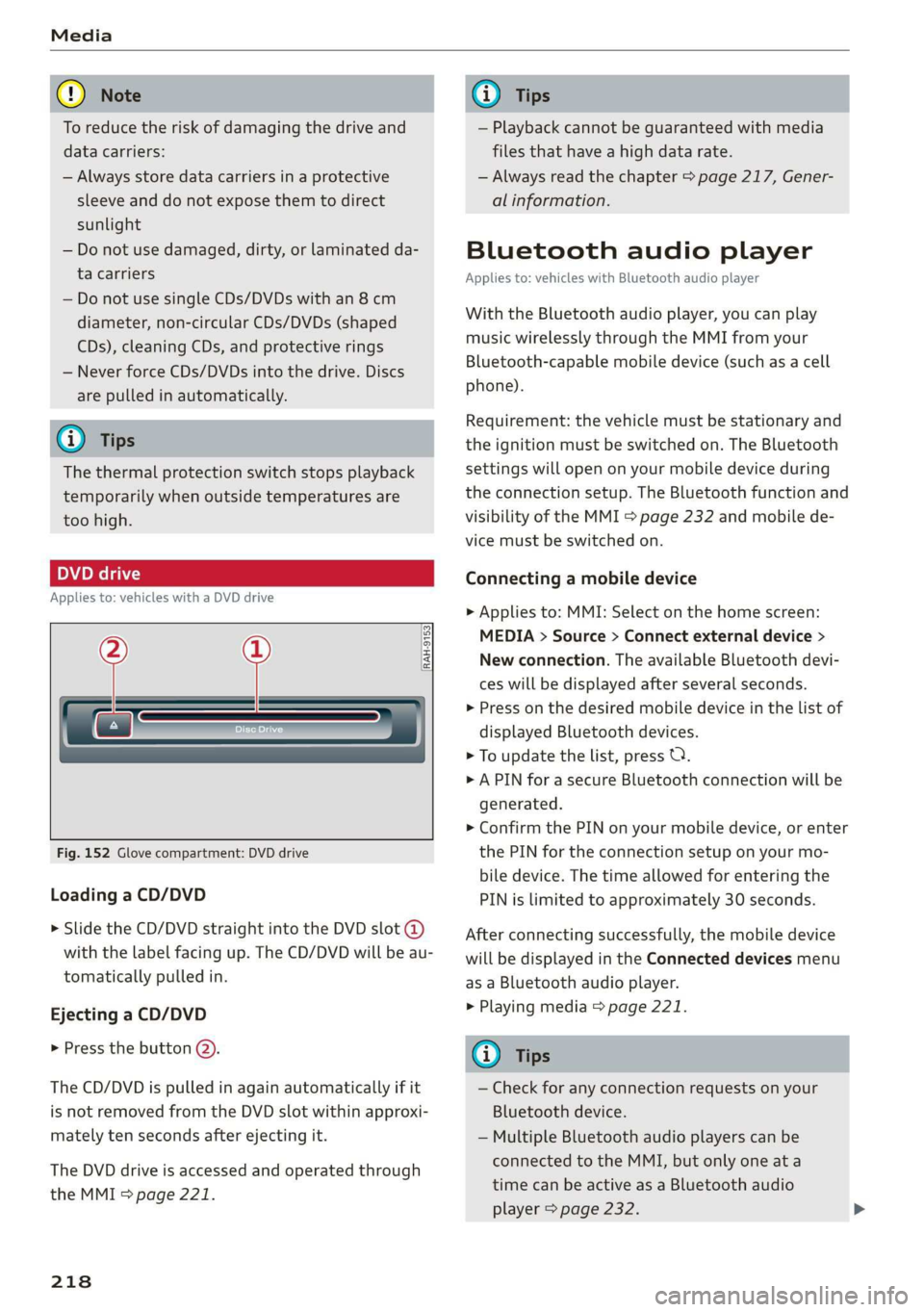
Fig. 152 Glove compartment: DVD drive
Loading a CD/DVD
> Slide the CD/DVD straight into the DVD slot @
with the label facing up. The CD/DVD will be au-
tomatically pulled in.
Ejecting a CD/DVD
> Press the button @).
The CD/DVD is pulled in again automatically if it
is not removed from the DVD slot within approxi-
mately ten seconds after ejecting it.
The DVD drive is accessed and operated through
the MMI > page 221.
218
G) Tips
— Playback cannot be guaranteed with media
files that have a high data rate.
— Always read the chapter > page 217, Gener-
al information.
Bluetooth audio player
Applies to: vehicles with Bluetooth audio player
With the Bluetooth audio player, you can play
music wirelessly through the MMI from your
Bluetooth-capable mobile device (such as a cell
phone).
Requirement: the vehicle must be stationary and
the ignition must be switched on. The Bluetooth
settings will open on your mobile device during
the connection setup. The Bluetooth function and
visibility of the MMI = page 232 and mobile de-
vice must be switched on.
Connecting a mobile device
> Applies to: MMI: Select on the home screen:
MEDIA > Source > Connect external device >
New connection. The available Bluetooth devi-
ces will be displayed after several seconds.
> Press on the desired mobile device in the list of
displayed Bluetooth devices.
> To update the list, press OQ.
> A PIN for a secure Bluetooth connection will be
generated.
> Confirm the PIN on your mobile device, or enter
the PIN for the connection setup on your mo-
bile device. The time allowed for entering the
PIN is limited to approximately 30 seconds.
After connecting successfully, the mobile device
will be displayed in the Connected devices menu
as a Bluetooth audio player.
> Playing media > page 221.
G) Tips
— Check for any connection requests on your
Bluetooth device.
— Multiple Bluetooth audio players can be
connected to the MMI, but only one ata
time can be active as a Bluetooth audio
player > page 232.
Page 238 of 310
Checking and Filling
Opening and closing the hood
The hood is released from inside the vehicle.
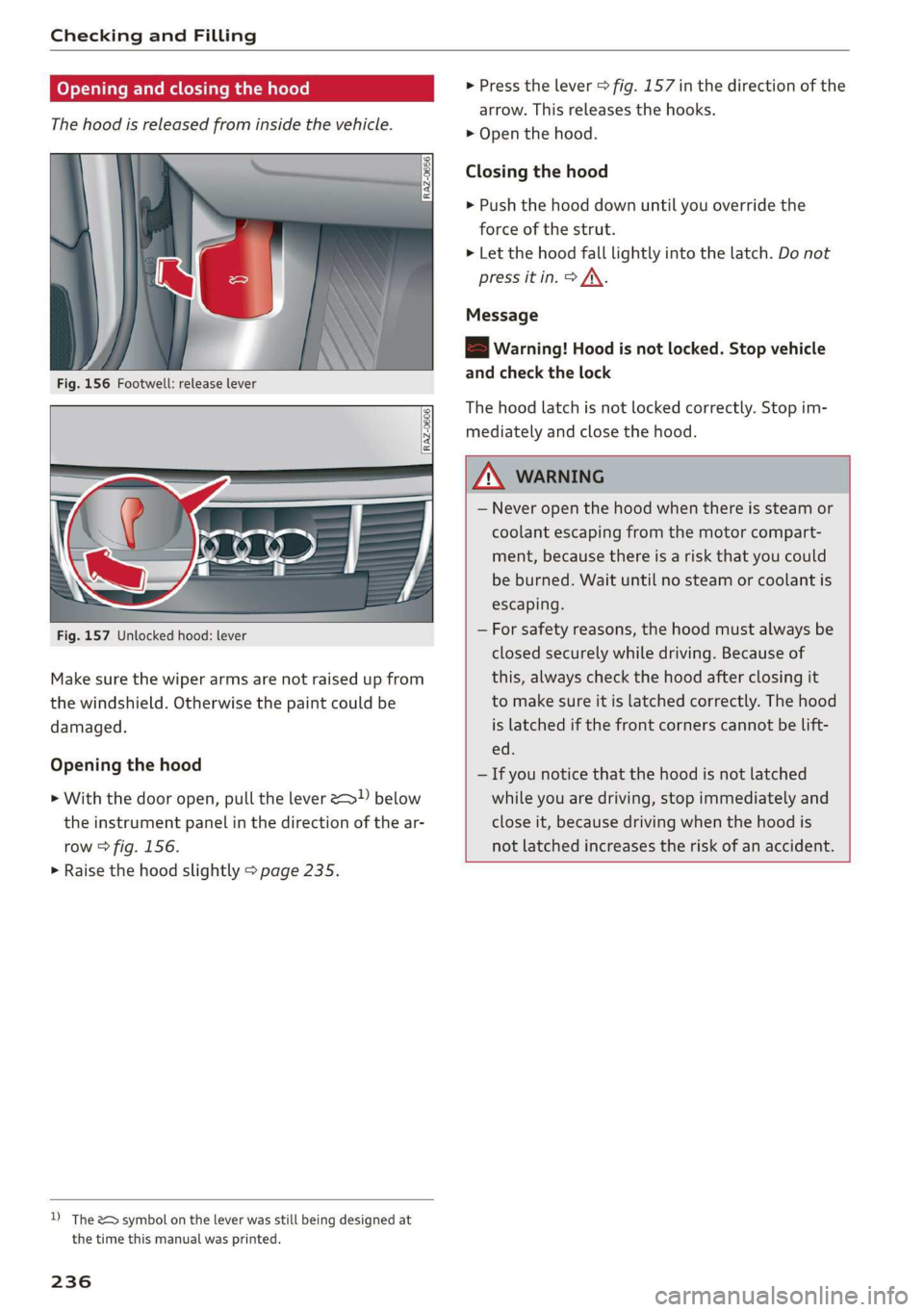
Fig. 156 Footwell: release lever
RAZ-0606
Fig. 157 Unlocked hood: lever
Make sure the wiper arms are not raised up from
the windshield. Otherwise the paint could be
damaged.
Opening the hood
> With the door open, pull the lever > below
the instrument panel in the direction of the ar-
row > fig. 156.
> Raise the hood slightly > page 235.
D) The &> symbol on the lever was still being designed at
the time this manual was printed.
236
> Press the lever > fig. 157 in the direction of the
arrow. This releases the hooks.
> Open the hood.
Closing the hood
> Push the hood down until you override the
force of the strut.
> Let the hood fall lightly into the latch. Do not
press it in. > /\.
Message
EB warning! Hood is not locked. Stop vehicle
and check the lock
The hood latch is not locked correctly. Stop im-
mediately and close the hood.
ZA WARNING
— Never open the hood when there is steam or
coolant escaping from the motor compart-
ment, because there is a risk that you could
be burned. Wait until no steam or coolant is
escaping.
— For safety reasons, the hood must always be
closed securely while driving. Because of
this, always check the hood after closing it
to make sure it is latched correctly. The hood
is latched if the front corners cannot be lift-
ed.
— If you notice that the hood is not latched
while you are driving, stop immediately and
close it, because driving when the hood is
not latched increases the risk of an accident.
Page 240 of 310
Checking and Filling
the vehicle will be operated. If the coolant addi-
tive percentage is too low, the coolant can freeze
and cause damage.
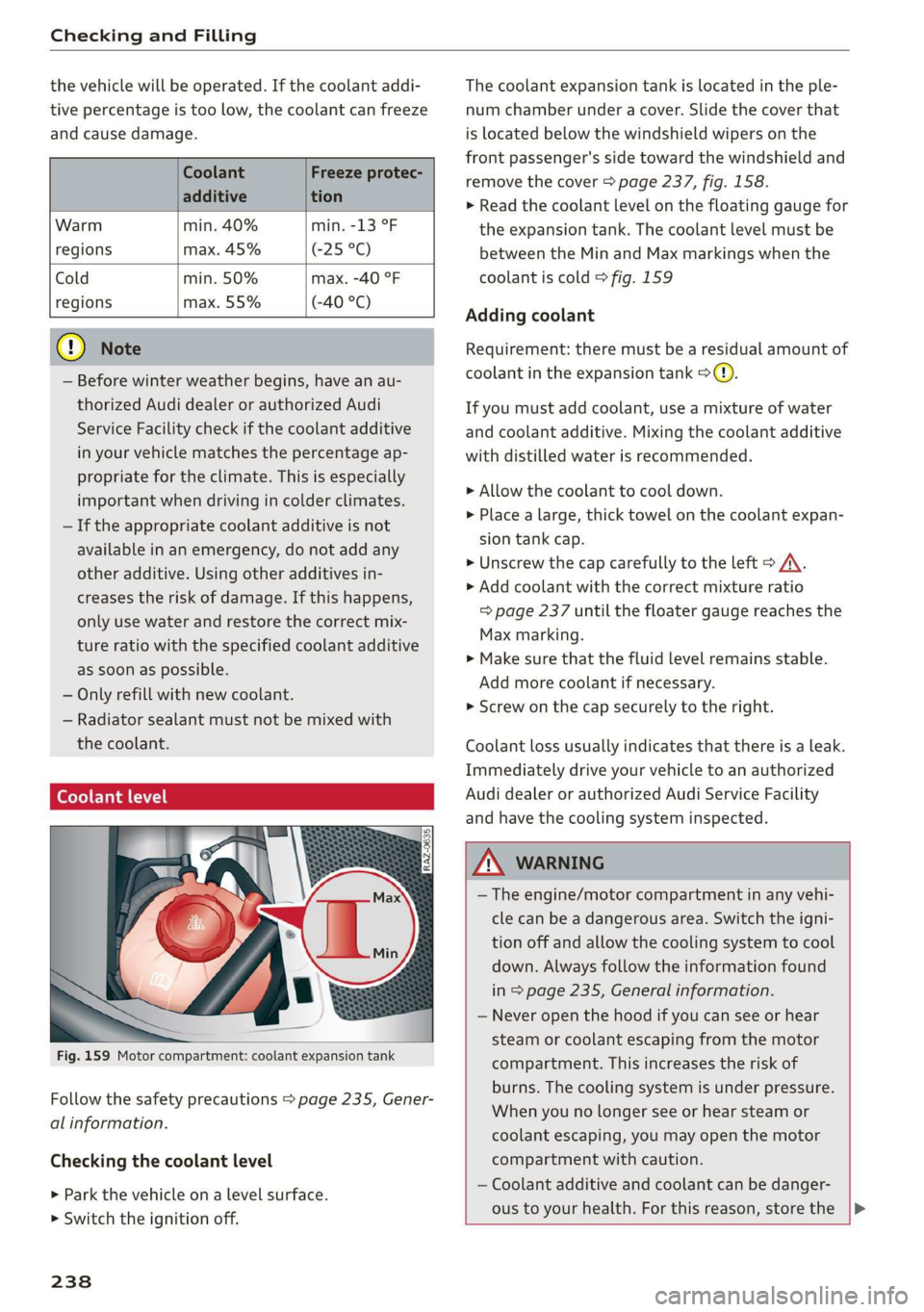
Coolant Freeze protec-
additive tion
Warm min. 40% min. -13 °F
regions max. 45% (25°)
Cold min. 50% max. -40 °F
regions max. 55% (-40 °C)
@) Note
— Before winter weather begins, have an au-
thorized Audi dealer or authorized Audi
Service Facility check if the coolant additive
in your vehicle matches the percentage ap-
propriate for the climate. This is especially
important when driving in colder climates.
— If the appropriate coolant additive is not
available in an emergency, do not add any
other additive. Using other additives in-
creases the risk of damage. If this happens,
only use water and restore the correct mix-
ture ratio with the specified coolant additive
as soon as possible.
— Only refill with new coolant.
— Radiator sealant must not be mixed with
the coolant.
Coolant level
Fig. 159 Motor compartment: coolant expansion tank
Follow the safety precautions > page 235, Gener-
al information.
Checking the coolant level
> Park the vehicle on a level surface.
> Switch the ignition off.
238
The coolant expansion tank is located in the ple-
num chamber under a cover. Slide the cover that
is located below the windshield wipers on the
front passenger's side toward the windshield and
remove the cover > page 237, fig. 158.
> Read the coolant level on the floating gauge for
the expansion tank. The coolant level must be
between the Min and Max markings when the
coolant is cold > fig. 159
Adding coolant
Requirement: there must be a residual amount of
coolant in the expansion tank >@).
If you must add coolant, use a mixture of water
and coolant additive. Mixing the coolant additive
with distilled water is recommended.
> Allow the coolant to cool down.
> Place a large, thick towel on the coolant expan-
sion tank cap.
> Unscrew the cap carefully to the left > A\.
> Add coolant with the correct mixture ratio
=> page 237 until the floater gauge reaches the
Max marking.
> Make sure that the fluid level remains stable.
Add more coolant if necessary.
> Screw on the cap securely to the right.
Coolant loss usually indicates that there is a leak.
Immediately drive your vehicle to an authorized
Audi dealer or authorized Audi Service Facility
and have the cooling system inspected.
Z\ WARNING
— The engine/motor compartment in any vehi-
cle can be a dangerous area. Switch the igni-
tion off and allow the cooling system to cool
down. Always follow the information found
in > page 235, General information.
— Never open the hood if you can see or hear
steam or coolant escaping from the motor
compartment. This increases the risk of
burns. The cooling system is under pressure.
When you no longer see or hear steam or
coolant escaping, you may open the motor
compartment with caution.
— Coolant additive and coolant can be danger-
ous to your health. For this reason, store the |>
Page 275 of 310
4KE012721BB
Emergency assistance
Raising the vehicle
Applies to: vehicles with vehicle jack
RAZ-0258
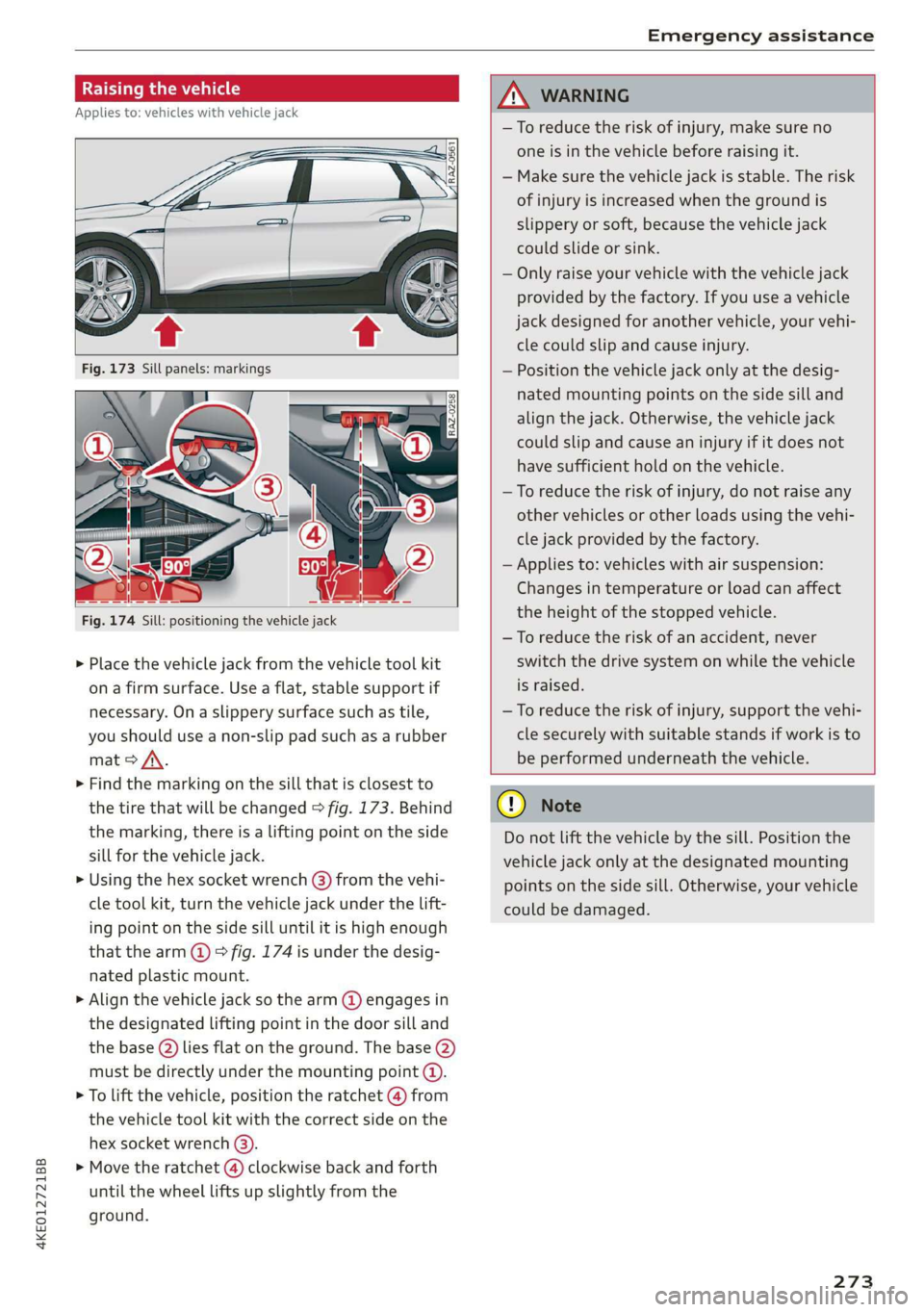
Fig. 174 Sill: positioning the vehicle jack
> Place the vehicle jack from the vehicle tool kit
ona firm surface. Use a flat, stable support if
necessary. On a slippery surface such as tile,
you should use a non-slip pad such as a rubber
mat > /\.
> Find the marking on the sill that is closest to
the tire that will be changed > fig. 173. Behind
the marking, there is a lifting point on the side
sill for the vehicle jack.
» Using the hex socket wrench (3) from the vehi-
cle tool kit, turn the vehicle jack under the lift-
ing point on the side sill until it is high enough
that the arm @ © fig. 174 is under the desig-
nated plastic mount.
> Align the vehicle jack so the arm @ engages in
the designated Lifting point in the door sill and
the base () lies flat on the ground. The base (2)
must be directly under the mounting point (@).
> To lift the vehicle, position the ratchet @ from
the vehicle tool kit with the correct side on the
hex socket wrench (3).
> Move the ratchet (@) clockwise back and forth
until the wheel lifts up slightly from the
ground.
ZX WARNING
—To reduce the risk of injury, make sure no
one is in the vehicle before raising it.
— Make sure the vehicle jack is stable. The risk
of injury is increased when the ground is
slippery or soft, because the vehicle jack
could slide or sink.
— Only raise your vehicle with the vehicle jack
provided by the factory. If you use a vehicle
jack designed for another vehicle, your vehi-
cle could slip and cause injury.
— Position the vehicle jack only at the desig-
nated mounting points on the side sill and
align the jack. Otherwise, the vehicle jack
could slip and cause an injury if it does not
have sufficient hold on the vehicle.
—To reduce the risk of injury, do not raise any
other vehicles or other loads using the vehi-
cle jack provided by the factory.
— Applies to: vehicles with air suspension:
Changes in temperature or load can affect
the height of the stopped vehicle.
—To reduce the risk of an accident, never
switch the drive system on while the vehicle
is raised.
—To reduce the risk of injury, support the vehi-
cle securely with suitable stands if work is to
be performed underneath the vehicle.
@) Note
Do not lift the vehicle by the sill. Position the
vehicle jack only at the designated mounting
points on the side sill. Otherwise, your vehicle
could be damaged.
273,
Page 276 of 310

Emergency assistance
Removing and installing a wheel
@ Rg tT
“% © oO
B8K-1477
Fig. 176 Wheel: alignment pin in the top hole
Removing a wheel
>» Remove the top wheel bolt completely using
the hex socket in the screwdriver handle from
the vehicle tool kit > fig. 175 and place it ona
clean surface.
> Then install the alignment pin from the vehicle
tool kit in the empty wheel bolt hole by hand
> fig. 176.
> Remove the rest of the wheel bolts.
>» Remove the wheel >(). The alignment pin re-
mains in the hole while doing this.
Installing a wheel
Read the directions on > page 274 when instal-
ling unidirectional tires.
> Slide the wheel on over the alignment pin >@.
> Install the wheel bolts and tighten them gently
using the hex socket.
» Remove the alignment pin and tighten the re-
maining wheel bolt.
> Carefully lower the vehicle using the vehicle
jack*.
> Tighten the wheel bolts in a diagonal pattern
using the wheel wrench.
274
The wheel bolts must be clean and loosen and
tighten easily. Check the contact surfaces for the
wheel and hub. Contaminants on these surfaces
must be removed before installing the wheel.
ZA\ WARNING
— Read and follow the important information
and notes under > page 250.
— Never use the hex socket in the screwdriver
handle to tighten the wheel bolts. Using the
hex socket will not achieve the required
tightening torque, which increases the risk
of an accident.
©) Note
When removing or installing the wheel, the
rim
could hit the brake rotor and damage the
rotor. Work carefully and have a second per-
son help you.
Unidirectional tires
A unidirectional tire profile is identified by arrows
on the tire sidewall that point in the running di-
rection. You must always maintain the specified
running direction. This is necessary to ensure the
tire's optimal performance in regard to adhesion,
running noise, and friction, and to reduce the risk
of
hydroplaning.
To benefit fully from the advantages of the uni-
directional tire design, you should replace faulty
tires as soon as possible and restore the correct
running direction on all of the tires.
> Reinstall the caps on the wheel bolts if necessa-
ry.
> Store the vehicle tool kit in its designated
place.
> If the removed wheel does not fit in the spare
wheel well, store it securely in the luggage
compartment > page 77.
> Check the tire pressure on the installed wheel
as soon as possible.
> Correct the tire pressure and store it in the MMI
=> page 262.
Page 277 of 310
4KE012721BB
Emergency assistance
> The wheel bolt tightening specification must be
120 ft lbs (160 Nm). Have it checked as soon as
possible with a torque wrench. Drive carefully
until then.
> Have the faulty wheel replaced as quickly as
possible.
Collapsible spare tire
Applies to: vehicles with collapsible spare tire
The collapsible spare tire is intended for short-
term use only. Have the damaged tire checked
and replaced if necessary by an authorized Audi
dealer or authorized Audi Service Facility as soon
as possible.
There are some restrictions on the use of the col-
lapsible spare tire. The collapsible spare tire has
been designed specifically for your type of vehi-
cle. Do not replace it with the collapsible spare
tire from another type of vehicle.
The collapsible spare tire is located in the lug-
gage compartment under the cargo floor cover.
Requirement: the vehicle tool kit > page 269 and
the compressor must be laid out.
Removing
> Lift the cargo floor using the handle.
> Turn the handwheel counter-clockwise and re-
move it.
> Remove the cover.
> Remove the collapsible spare tire.
You must inflate the collapsible spare tire before-
hand in order to use it.
Inflating
> Remove the valve cap from the collapsible
spare tire.
> Tighten the compressor hose on the collapsible
spare tire valve.
> Connect the compressor hose to a vehicle sock-
et and switch it on.
> Let the compressor run until the specified value
on the tire pressure sticker is reached
> page 253, fig. 165>©.
> Screw the valve cap back onto the valve.
Returning to storage
> Remove the valve cap to drain the air.
» Wait several hours before placing the collapsi-
ble spare tire in the spare wheel well. Only then
will it fold down completely so that you can
store it securely.
> Then screw the valve cap back onto the valve.
> Secure the collapsible spare tire with the cover
and the handwheel.
> Fold the cargo floor cover back into place.
Snow chains
Using snow chains on the collapsible spare tire is
not permitted for technical reasons.
If you have to drive with snow chains and a rear
tire fails, mount the collapsible spare tire in place
of a front tire. Install the snow chains on the
front tire that you removed, and install that in
place of the rear tire that failed.
ZA\ WARNING
— Only use the collapsible spare tire in emer-
gencies and drive very carefully, especially if
it is more than six years old.
— The compressor and the hose can become
very hot during operation which increases
the risk of burn injuries.
— After installing a collapsible spare tire, the
tire pressure must be checked as quickly as
possible to reduce the risk of an accident.
— Do not drive faster than 50 mph (80 km/h)
with the collapsible spare tire. Driving faster
than that increases the risk of an accident.
—To reduce the risk of an accident, avoid hard
acceleration or braking and driving fast
around curves with the collapsible spare
tire.
— Never drive using more than one collapsible
spare tire, because this increases the risk of
an accident.
— Normal tires or winter tires must not be
mounted on the collapsible spare tire rim.
@) Note
The compressor must be switched off after six
minutes at the most to reduce the risk of
275
>
Page 278 of 310
Emergency assistance
overheating. Let the compressor cool down
for several minutes before using it again.
@) Tips
The ESC must not be limited or switched off
when driving with the collapsible spare tire
=> page 102.
Jump starting
The vehicle cannot be operated when the 12 Volt
vehicle battery is drained. Your vehicle must not
be jump started in this case. Contact an author-
ized Audi dealer or authorized Audi Service Facili-
ty.
@) Note
The vehicle battery must not be bridged using
conventional jump start methods.
— You may neither give nor receive a jump
start. Otherwise, the electronic systems in
the vehicle may be severely damaged.
—The jump start pins in the motor compart-
ment are designed specifically for qualified
technicians.
Towing
ee eeue lela)
You should only perform the steps that follow if
you have the necessary tools and technical ex-
pertise.
Towing requires a certain amount of practice. Au-
di recommends contacting a towing company to
have the vehicle transported.
You should only have your vehicle towed by an-
other vehicle when disabled in exceptional cir-
cumstances. Inexperienced drivers should not
tow.
Notes on towing
— The maximum permitted towing speed is 30
mph (50 km/h).
— The maximum permitted towing distance is 30
miles (50 km).
276
Additional information on towing with a tow
truck
The vehicle may only be towed with the front axle
raised. Do not wrap any chains or cables around
the brake lines.
Tow bar and towing cable
The vehicle can be towed with a tow bar or tow-
ing cable. Both drivers should be familiar with
the special considerations when towing, especial-
ly when using a towing cable.
Always make sure the traction force does not ex-
ceed the permitted level and there are no shock
loading conditions. There is always the risk of the
coupling becoming overloaded when driving off-
road.
For the most safety and security, drive with a tow
bar. You should use a towing cable only if a tow
bar is not available. Use a towing cable made of
synthetic elastic cable similar elastic material.
ZA WARNING
— Towing highly increases the risk of an acci-
dent, for example from colliding with the
towing vehicle.
—To reduce the risk of an accident, do not al-
low anyone to remain inside the vehicle
when it is being transported by a tow truck
or a special transporter.
@) Note
—Ifthe |_E| indicator light turns on, there is a
fault in the cooling circuit. The vehicle must
not be towed. The drive system can be se-
verely damaged.
— If normal towing is not possible, for exam-
ple if the transmission is faulty or if the
towing distance is greater than 30 miles
(50 km), then transport the vehicle on a
special carrier.
— If the vehicle is towed by a tow truck at the
axle that is not permitted, this can cause se-
vere damage to the transmission.
— Towing must not be used to charge the
high-voltage battery (recuperation), be-
cause this could result in major damages to
the tow vehicle or the vehicle being towed. >
Page 279 of 310
4KE012721BB
Emergency assistance
— The vehicle must not be tow started for
technical reasons.
@ Tips
— Switch Audi pre sense* off > page 153 when
loading the vehicle onto a vehicle carrier,
train, ship,
or other type of transportation,
or when towing the vehicle. This can prevent
an undesired intervention from the pre
sense* system.
— Follow the local legal regulations for tow-
ing.
Read and follow the important information under
=> page 276.
Preparations
> Only secure the towing cable or tow bar at the
designated towing loops > page 277,
=> page 278.
> Make sure the towing cable is not twisted. Oth-
erwise it could disconnect from the towing loop
while towing.
> Switch the emergency flashers on in both vehi-
cles > page 46. However, do not do this if it
prohibited by law.
Towing vehicle (front)
> Only start to drive when the towing cable is
taut.
> Press the brake pedal very carefully.
> Avoid sudden braking or driving maneuvers.
Vehicle being towed (rear)
> Make sure the ignition is switched on so that
the steering wheel is not locked and so that you
can use the turn signals, the horn, and the
windshield wipers if needed > A\.
> The brake booster only operates when the igni-
tion is switched on. Power steering only works
when the ignition is switched on and the vehicle
is rolling ). If the brake booster and power
steering are not functioning, you must press
D_ Requirement: the vehicle battery must have a sufficient
charge level.
the brake pedal much harder and use more
force to steer.
> Release the parking brake > page 93.
> Select the “N” selector lever position.
> Make sure the towing cable is always taut.
ZA\ WARNING
Never tow a vehicle using a tow bar or towing
cable if the vehicle does not have electrical
power.
Front towing loop
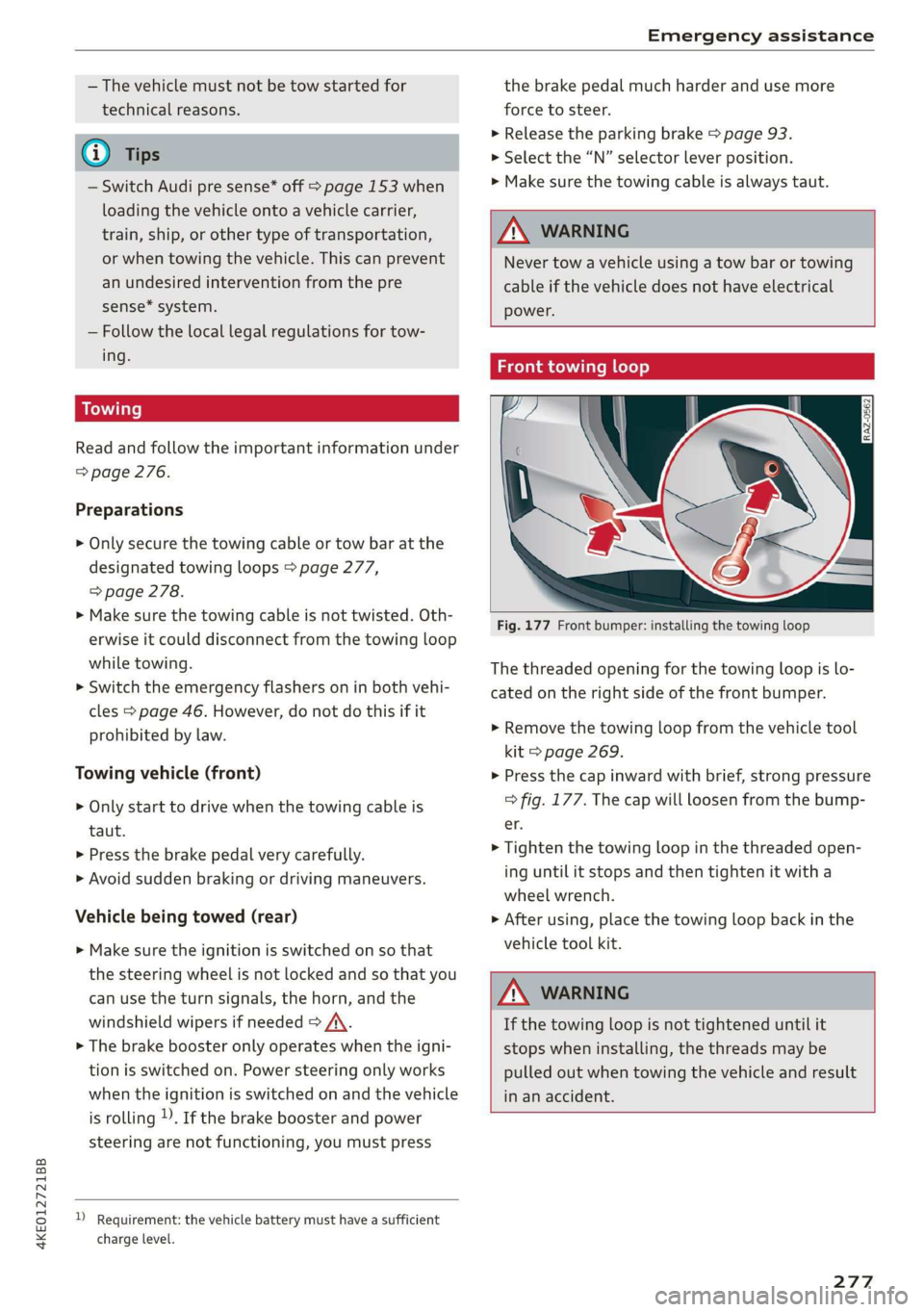
Fig. 177 Front bumper: installing the towing loop
The threaded opening for the towing loop is lo-
cated on the right side of the front bumper.
> Remove the towing loop from the vehicle tool
kit > page 269.
> Press the cap inward with brief, strong pressure
=> fig. 177. The cap will loosen from the bump-
er.
> Tighten the towing loop in the threaded open-
ing until it stops and then tighten it with a
wheel wrench.
> After using, place the towing loop back in the
vehicle tool kit.
ZA WARNING
If the towing loop is not tightened until it
stops when installing, the threads may be
pulled out when towing the vehicle and result
in an accident.
277