Mmi AUDI E-TRON 2019 Owners Manual
[x] Cancel search | Manufacturer: AUDI, Model Year: 2019, Model line: E-TRON, Model: AUDI E-TRON 2019Pages: 310, PDF Size: 81.91 MB
Page 8 of 310
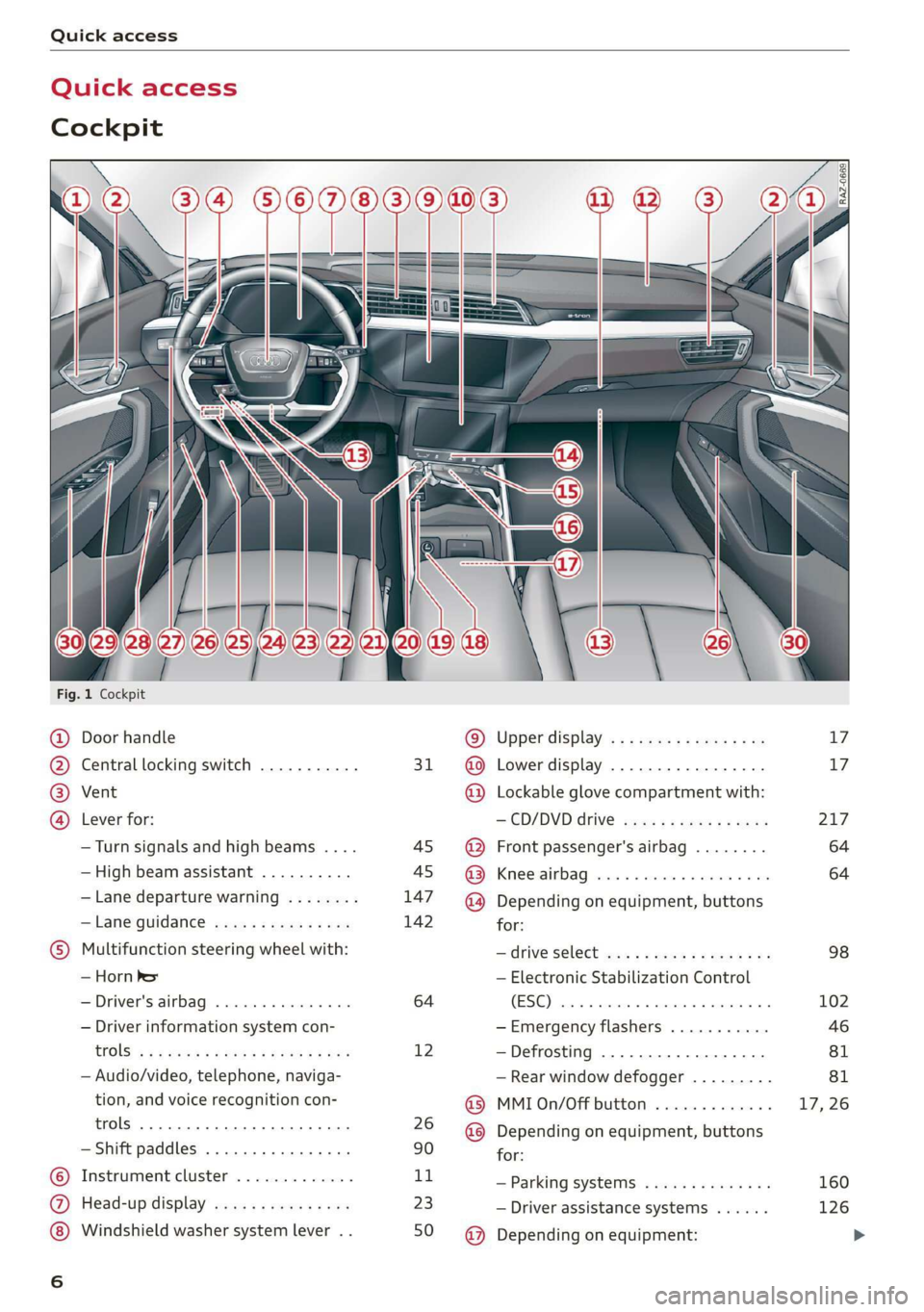
Quick access
Quick access
Cockpit
Fig. 1 Cockpit
@ @ @ @
©C®
oa
Door handle
Central locking switch ...........
Vent
Lever for:
—Turn signals and high beams ....
— High beam assistant ..........
— Lane departure warning ........
—Lane guidance ...............
Multifunction steering wheel with:
— Horn Pe
— Driver's airbag .............0.
— Driver information system con-
CGS! « = 2 eeu go oes eee ez ee
— Audio/video, telephone, naviga-
tion, and voice recognition con-
trols... eee eee
— Shift paddles .............00.
Instrument cluster .............
Head-up display ...............
Windshield washer system lever . .
31
45 45
147
142
64
12
26
90
1,
23
50
© @ @ ® ® @ ® ®
@
Upper display, « « x sees x = aaa + ox
Lower display ................-
Lockable glove compartment with:
CD/DVD drive sess ¢ s saws 9 « ame
Front passenger's airbag ........
Kees AG wisn v 6 ores o soca oi ans
Depending on equipment, buttons
for:
— ‘drive SelGCt sce ss gewy so eee a oe
— Electronic Stabilization Control
(ESE) sess co ssenionn as comune «of auanane 0
—Emergency flashers ...........
—Defrosting ..................
— Rear window defogger .........
MMI On/Off button .............
Depending on equipment, buttons
for:
— Parking systems ..............
— Driver assistance systems ......
Depending on equipment:
17 17
217
64
64
98
102
Page 13 of 310
4KE012721BB
Instrument cluster
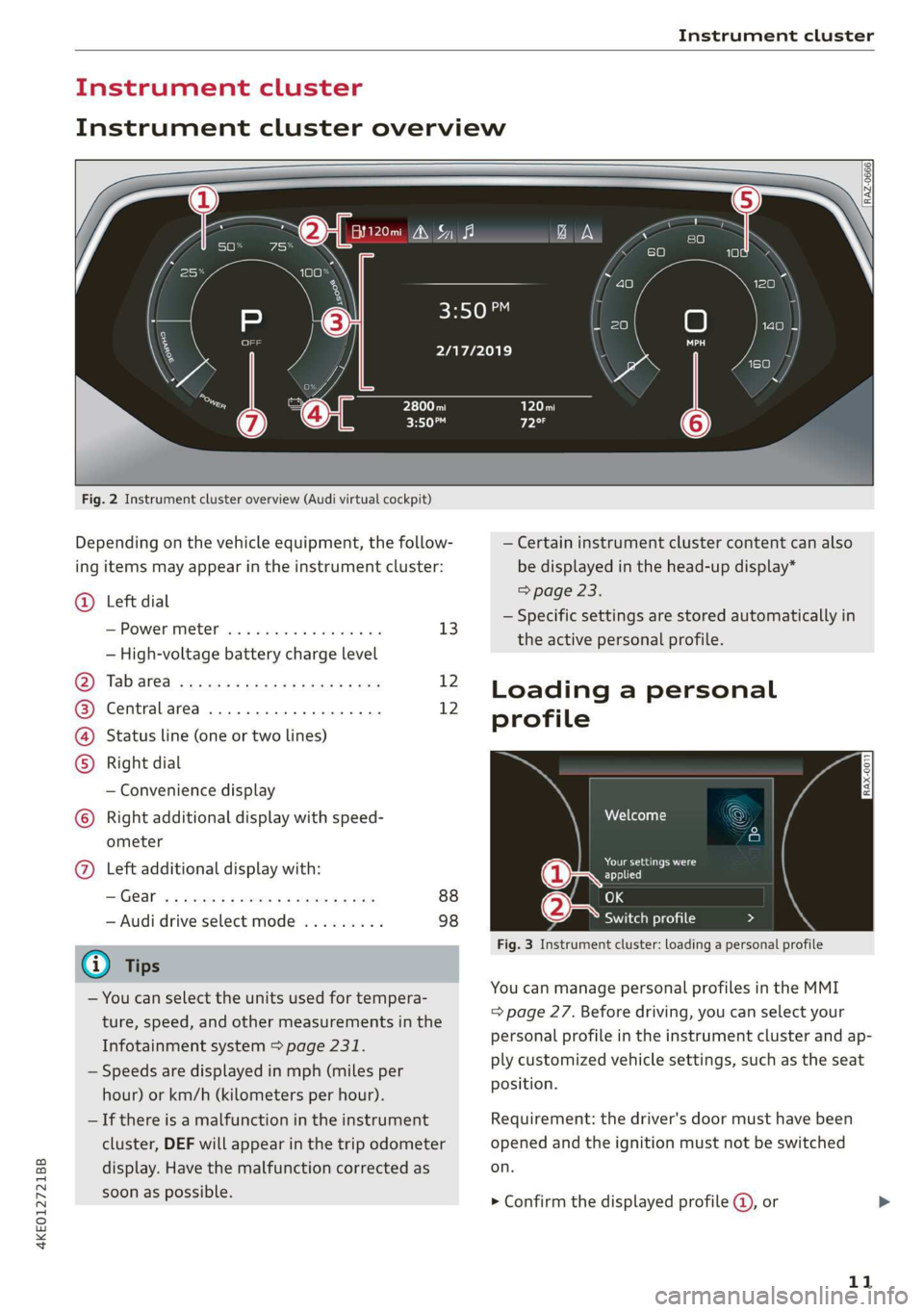
Instrument cluster overview
Fig. 2 Instrument cluster overview (Audi virtual cockpit)
Depending on the vehicle equipment, the follow-
ing items may appear in the instrument cluster:
@ Left dial
S:Powerimetert sia se seco a v seen ov 13
— High-voltage battery charge level
Oy Tab areal sess = ewe ¢ x oxen 2 2 ee 12
@) Centralarea .............0.000. 12
(4) Status line (one or two lines)
Right dial
— Convenience display
) Right additional display with speed-
ometer
@) Left additional display with:
IGG « 2 eee s 5 ee +e eee 9 ce 88
— Audi drive select mode ......... 98
@) Tips
— You can select the units used for tempera-
ture, speed, and other measurements in the
Infotainment system > page 231.
— Speeds are displayed in mph (miles per
hour) or km/h (kilometers per hour).
— If there is a malfunction in the instrument
cluster, DEF will appear in the trip odometer
display. Have the malfunction corrected as
soon as possible.
2/17/2019
— Certain instrument cluster content can also
be displayed in the head-up display*
=> page 23.
— Specific settings are stored automatically in
the active personal profile.
Loading a personal
profile
iy Aten
Darren ad
applied
(eae Switch profile Da 7 N
Fig. 3 Instrument cluster: loading a personal profile
You can manage personal profiles in the MMI
= page 27. Before driving, you can select your
personal profile in the instrument cluster and
ap-
ply customized vehicle settings, such as the seat
position.
Requirement: the driver's door must have been
opened and the ignition must not be switched
on.
> Confirm the displayed profile @, or
11
Page 14 of 310
Instrument cluster
> To load another profile, select and confirm
Switch profile 2).
> Select and confirm the desired profile. The
user-specific settings will load.
> To cancel the seat, mirror, and steering column
adjustment, select Cancel.
@) Tips
For more information and usage options for
personal profiles, see > page 27.
Operating
S| S| 9] ny S| cc
3:50™
2/17/2019
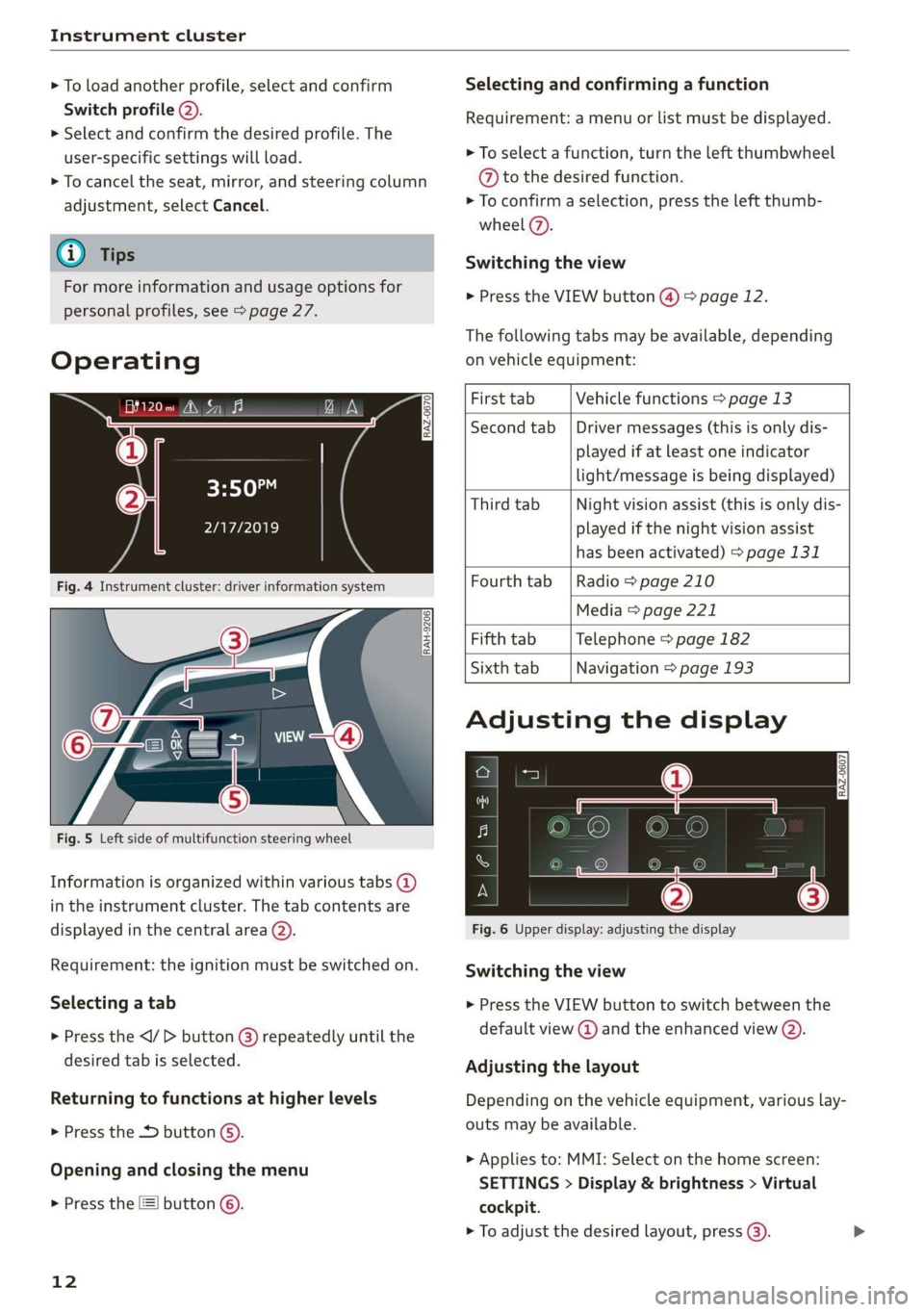
Fig. 4 Instrument cluster: driver information system
RAH-9206|
Fig. 5 Left side of multifunction steering wheel
Information is organized within various tabs @)
in the instrument cluster. The tab contents are
displayed in the central area (2).
Requirement: the ignition must be switched on.
Selecting a tab
> Press the button @) repeatedly until the
desired tab is selected.
Returning to functions at higher levels
> Press the D button ©).
Opening and closing the menu
> Press the [=] button ©.
12
Selecting and confirming a function
Requirement: a menu or list must be displayed.
> To select a function, turn the left thumbwheel
@ to the desired function.
> To confirm a selection, press the left thumb-
wheel (7).
Switching the view
> Press the VIEW button @) > page 12.
The following tabs may be available, depending
on vehicle equipment:
First tab Vehicle functions > page 13
Second tab | Driver messages (this is only dis-
played if at least one indicator
light/message is being displayed)
Third tab Night vision assist (this is only dis-
played if the night vision assist
has been activated) > page 131
Fourth
tab | Radio > page 210
Media > page 221
Fifth tab Telephone > page 182
Sixth tab Navigation > page 193
Adjusting the display
S| 3| S| iS
| ec
Fig. 6 Upper display: adjusting the display
Switching the view
> Press the VIEW button to switch between the
default view @ and the enhanced view ().
Adjusting the layout
Depending on the vehicle equipment, various lay-
outs may be available.
> Applies to: MMI: Select on the home screen:
SETTINGS > Display & brightness > Virtual
cockpit.
> To adjust the desired layout, press (3).
Page 15 of 310
4KE012721BB
Instrument cluster
Adjusting the additional display
Depending on the vehicle equipment, the addi-
tional displays that can be selected may vary.
> Applies to: MMI: Select on the home screen:
SETTINGS > Display & brightness > Virtual
cockpit > Configure.
> Select the desired additional display.
Reducing the display
Depending on the vehicle equipment, you can
hide the central area in the instrument cluster.
> Select on the instrument cluster: vehicle func-
tions tab > E] button > Reduced display.
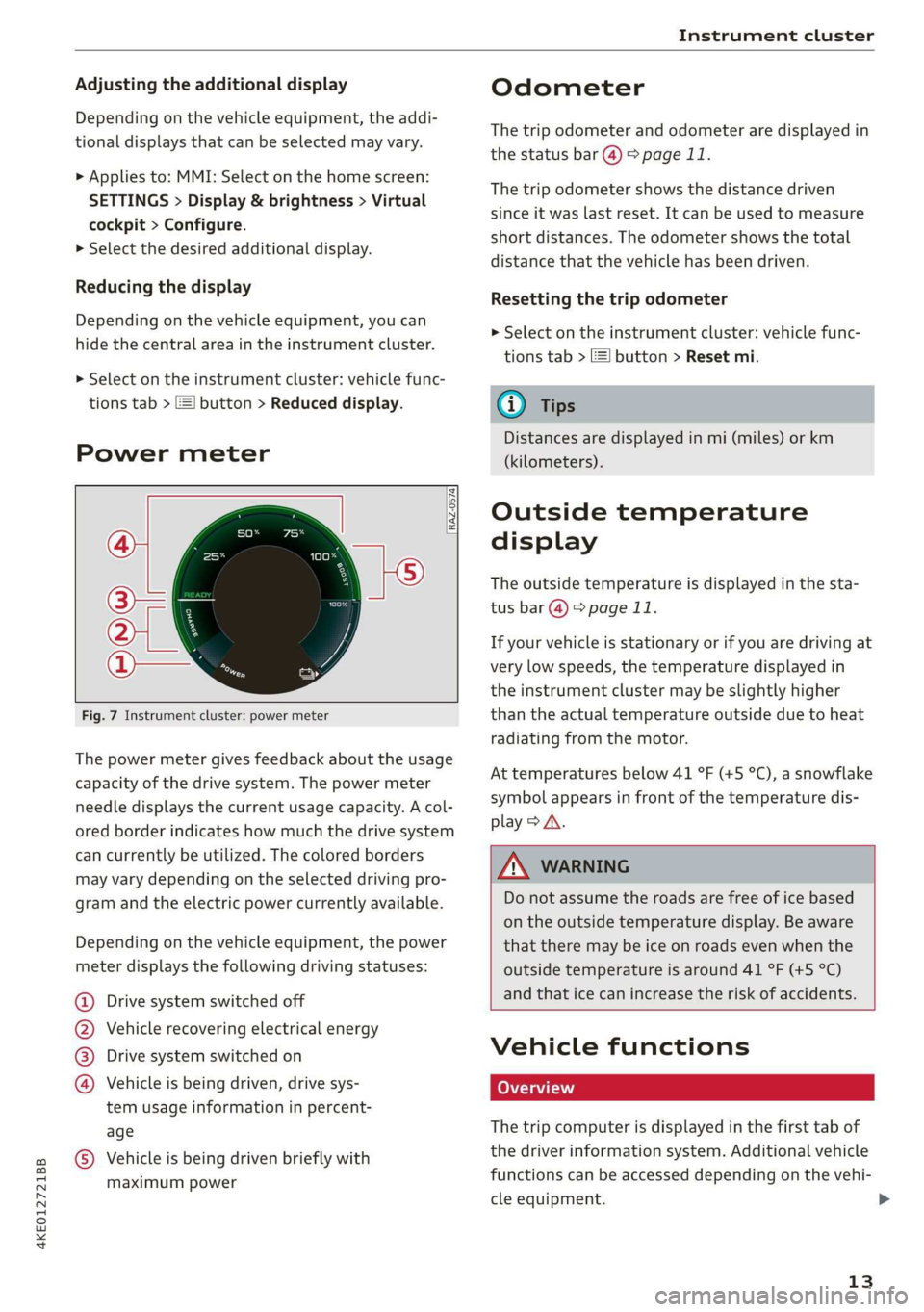
Power meter
[RAZ-0574]
Fig. 7 Instrument cluster: power meter
The power meter gives feedback about the usage
capacity of the drive system. The power meter
needle displays the current usage capacity. A col-
ored border indicates how much the drive system
can currently be utilized. The colored borders
may vary depending on the selected driving pro-
gram and the electric power currently available.
Depending on the vehicle equipment, the power
meter displays the following driving statuses:
Drive system switched off
Vehicle recovering electrical energy
Drive system switched on
®©&O Vehicle is being driven, drive sys-
tem usage information in percent-
age
@ Vehicle is being driven briefly with
maximum power
Odometer
The trip odometer and odometer are displayed in
the status bar @) > page 11.
The trip odometer shows the distance driven
since it was last reset. It can be used to measure
short distances. The odometer shows the total
distance that the vehicle has been driven.
Resetting the trip odometer
> Select on the instrument cluster: vehicle func-
tions tab > I button > Reset mi.
@) Tips
Distances are displayed in mi (miles) or km
(kilometers).
Outside temperature
display
The outside temperature is displayed in the sta-
tus bar @) 9 page 11.
If your vehicle is stationary or if you are driving at
very low speeds, the temperature displayed in
the instrument cluster may be slightly higher
than the actual temperature outside due to heat
radiating from the motor.
At temperatures below 41 °F (+5 °C), a snowflake
symbol appears in front of the temperature dis-
play > A\.
Z\ WARNING
Do not assume the roads are free of ice based
on the outside temperature display. Be aware
that there may be ice on roads even when the
outside temperature is around 41 °F (+5 °C)
and that ice can increase the risk of accidents.
Vehicle functions
The trip computer is displayed in the first tab of
the driver information system. Additional vehicle
functions can be accessed depending on the vehi-
cle equipment.
13
>
Page 18 of 310
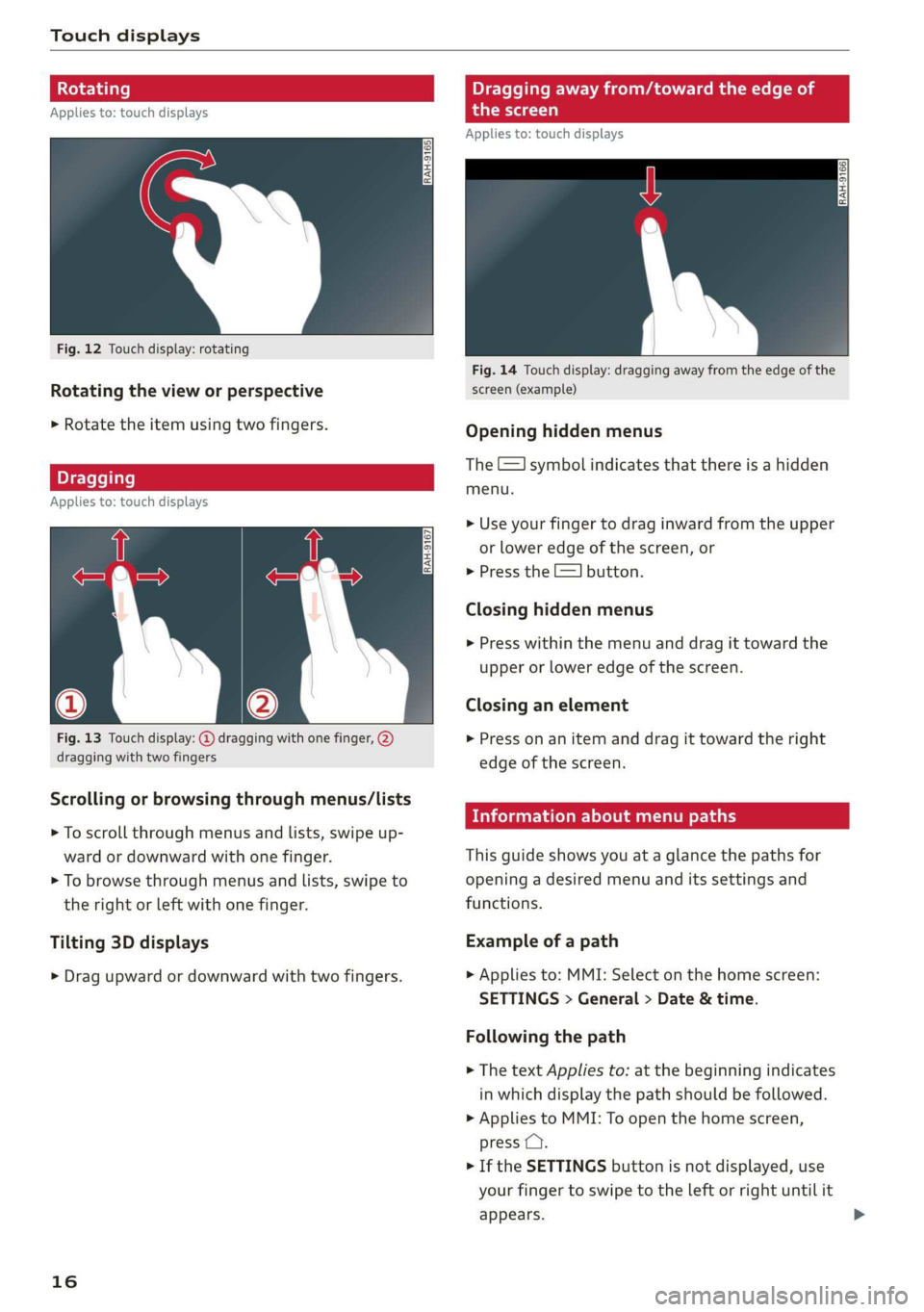
Touch displays
Rotating Dragging away from/toward the edge of
Applies to: touch displays the screen
Applies to: touch displays
Fig. 12 Touch display: rotating
Fig. 14 Touch display: dragging away from the edge of the
Rotating the view or perspective screen (example)
> Rotate the item using two fingers. Opening hidden menus
The E=] symbol indicates that there is a hidden
menu.
Dragging
Applies to: touch displays
>» Use your finger to drag inward from the upper
or lower edge of the screen, or
> Press the E=] button.
Closing hidden menus
> Press within the menu and drag it toward the
upper or lower edge of the screen.
Closing an element
Fig. 13 Touch display: @ dragging with one finger, @, > Press on an item and drag it toward the right
dragging with two fingers edge of the screen.
Information about menu paths
Scrolling or browsing through menus/lists
> To scroll through menus and lists, swipe up-
ward or downward with one finger. This guide shows you at a glance the paths for
> To browse through menus and lists, swipe to opening a desired menu and its settings and
the right or left with one finger. functions.
Tilting 3D displays Example of a path
> Drag upward or downward with two fingers. >» Applies to: MMI: Select on the home screen:
SETTINGS > General > Date & time.
Following the path
> The text Applies to: at the beginning indicates
in which display the path should be followed.
> Applies to MMI: To open the home screen,
press C.
> If the SETTINGS button is not displayed, use
your finger to swipe to the left or right until it
appears.
16
Page 19 of 310
4KE012721BB
Touch displays
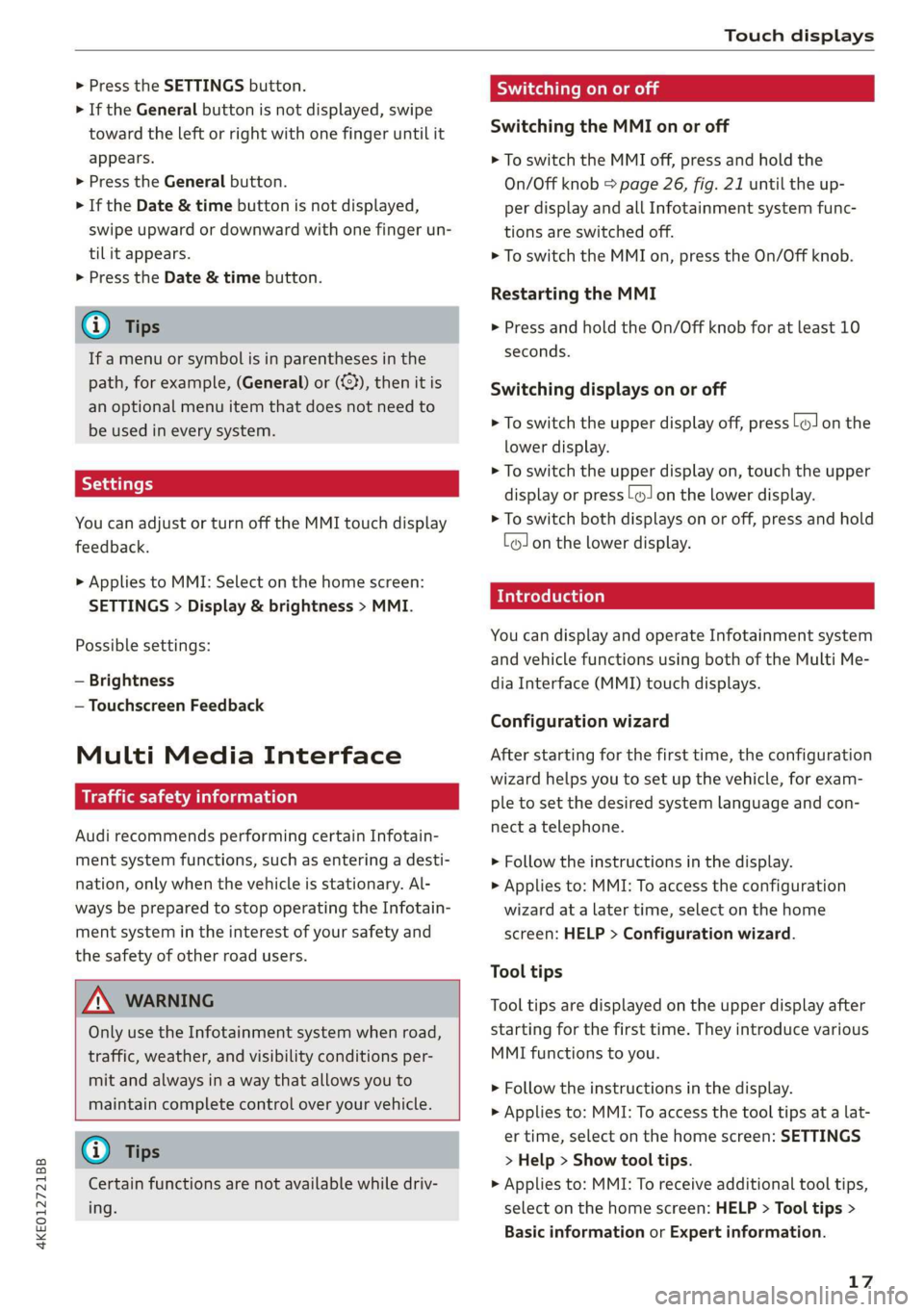
> Press the SETTINGS button.
> If the General button is not displayed, swipe
toward the left or right with one finger until it
appears.
> Press the General button.
> If the Date & time button is not displayed,
swipe upward or downward with one finger un-
tilit appears.
> Press the Date & time button.
@) Tips
If a menu or symbol is in parentheses in the
path, for example, (General) or (%23), then it is
an optional menu item that does not need to
be used in every system.
You can adjust or turn off the MMI touch display
feedback.
> Applies to MMI: Select on the home screen:
SETTINGS > Display & brightness > MMI.
Possible settings:
— Brightness
— Touchscreen Feedback
Multi Media Interface
Ne MCL
Audi recommends performing certain Infotain-
ment system functions, such as entering a desti-
nation, only when the vehicle is stationary. Al-
ways be prepared to stop operating the Infotain-
ment system in the interest of your safety and
the safety of other road users.
ZA WARNING
Only use the Infotainment system when road,
traffic, weather, and visibility conditions per-
mit and always in a way that allows you to
maintain complete control over your vehicle.
G) Tips
Certain functions are not available while driv-
ing.
Sy isealiae Mela Me) me) ai
Switching the MMI on or off
> To switch the MMI off, press and hold the
On/Off knob > page 26, fig. 21 until the up-
per
display and all Infotainment system func-
tions are switched off.
> To switch the MMI on, press the On/Off knob.
Restarting the MMI
>» Press and hold the On/Off knob for at least 10
seconds.
Switching displays on or off
> To switch the upper display off, press [Jon the
lower display.
> To switch the upper display on, touch the upper
display or press [Jon the lower display.
> To switch both displays on or off, press and hold
[oJ on the lower display.
Introduction
You can display and operate Infotainment system
and vehicle functions using both of the Multi Me-
dia Interface (MMI) touch displays.
Configuration wizard
After starting for the first time, the configuration
wizard helps you to set up the vehicle, for exam-
ple to set the desired system language and con-
nect
a telephone.
> Follow the instructions in the display.
> Applies to: MMI: To access the configuration
wizard at a later time, select on the home
screen: HELP > Configuration wizard.
Tool tips
Tool tips are displayed on the upper display after
starting for the first time. They introduce various
MMI functions to you.
> Follow the instructions in the display.
> Applies to: MMI: To access the tool tips at a lat-
er time, select on the home screen: SETTINGS
> Help > Show tool tips.
> Applies to: MMI: To receive additional tool tips,
select on the home screen: HELP > Tool tips >
Basic information or Expert information.
17
Page 21 of 310
4KE012721BB
Touch displays
Configuring quick access
> Press and hold a button on the home screen
display area or in the quick access bar.
> To move a button to the quick access bar, pull it
from the display area to the quick access bar.
> To adjust the placement of the buttons in the
quick access bar, pull them to the desired posi-
tion in the bar.
G) Tips
The position of © cannot be adjusted.
Display area
You can freely change the location of the buttons
on the home screen display area.
Configuring the display area
> Press and hold a button on the home screen
display area.
> To adjust the placement of the buttons, pull
them to the desired locations.
Switching between menu pages
If a menu contains multiple menu pages, febatd iS
displayed in the display area. The white bar
shows the location of the current menu page.
> To switch between menu pages, swipe your fin-
ger to the right or left.
Off Of o8
Om of am
Of of of
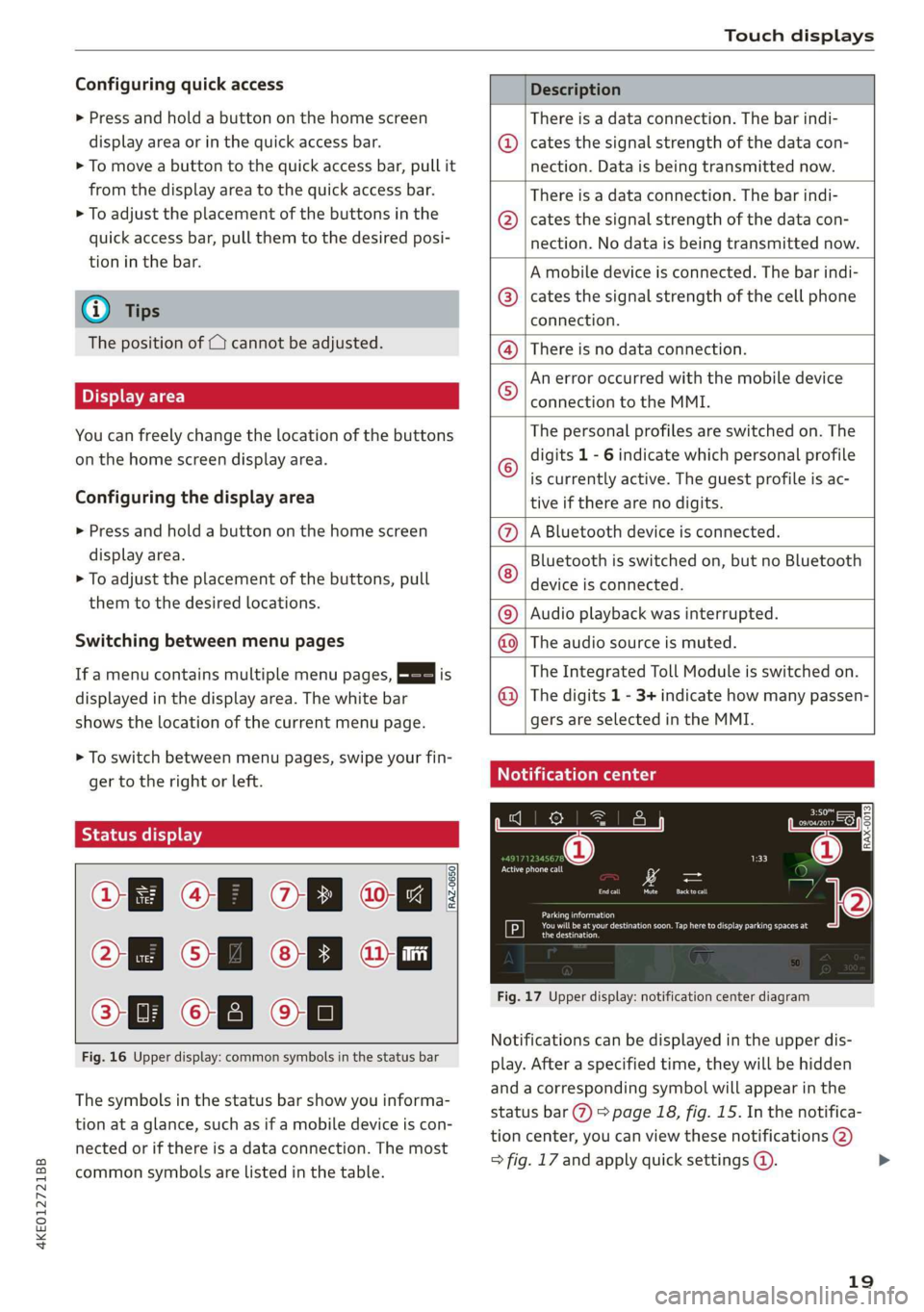
Fig. 16 Upper display: common symbols in the status bar
RAZ-0650
The symbols in the status bar show you informa-
tion at a glance, such as if a mobile device is con-
nected or if there is a data connection. The most
common symbols are listed in the table.
Description
There is a data connection. The bar indi-
@ | cates the signal strength of the data con-
nection. Data is being transmitted now.
There is a data connection. The bar indi-
@ | cates the signal strength of the data con-
nection. No data is being transmitted now.
A mobile device is connected. The bar indi-
@® | cates the signal strength of the cell phone
connection.
There is no data connection. ®
An error occurred with the mobile device
connection to the MMI. ©
The personal profiles are switched on. The
digits 1 - 6 indicate which personal profile
is currently active. The guest profile is ac-
tive if there are no digits.
A Bluetooth device is connected.
Bluetooth is switched on, but no Bluetooth
device is connected.
®©®
Ee
©
Audio playback was interrupted.
The audio source is muted.
The Integrated Toll Module is switched on.
The digits 1 - 3+ indicate how many passen-
®
|O|©
gers are selected in the MMI.
Celtic Leos
EI som
Cr
RAX-0013
Oe
Cruel
rs = =
Cee)
Tr SRS aC Looe Cece g
the destination.
Fig. 17 Upper display: notification center diagram
Notifications can be displayed in the upper dis-
play. After a specified time, they will be hidden
and a corresponding symbol will appear in the
status bar @) > page 18, fig. 15. In the notifica-
tion center, you can view these notifications @)
> fig. 17 and apply quick settings @.
19
>
Page 22 of 310
![AUDI E-TRON 2019 Owners Manual Touch displays
Using the notification center
> To open the notification center, pull the status
bar downward, or
>» Press the E=] button on the status bar.
> To apply quick settings, press th](/img/6/57624/w960_57624-21.png "AUDI E-TRON 2019 Owners Manual Touch displays
Using the notification center
> To open the notification center, pull the status
bar downward, or
>» Press the E=] button on the status bar.
> To apply quick settings, press th")
Touch displays
Using the notification center
> To open the notification center, pull the status
bar downward, or
>» Press the E=] button on the status bar.
> To apply quick settings, press the respective
symbol @).
> To obtain additional information about a notifi-
cation, press it.
> To delete a notification, pull it toward the right
edge of the screen.
> If there are more than four notifications in the
notification center, the older notifications will
be hidden. To display the older notifications,
drag your finger upward on the screen.
Setting displayed content
You can set whether some notifications should be
displayed.
> To set the displayed content, press @, or
> Applies to MMI: Select on the home screen:
SETTINGS > Notifications.
> Select and confirm which notifications should
be displayed.
Possible quick settings
Description
Apply sound settings
Open menu settings
Manage connected devices
Manage personal profiles
Set date and time
Set displayed content in the noti-
fication center
Depending on the vehicle equipment, you can op-
erate various functions in the function bar.
Description
Switch hill descent assist on or off
Opens the garage door opener
function
20
Symbol Description
Press: shows settings for the
ae head-up display
Press and hold: switches the
head-up display on or off
Press: switches the upper display
on or off
Press and hold: switches both dis-
plays on or off
Shortcuts
By creating shortcuts, you have quick access to
various items, such as radio stations, frequently
used contacts, or vehicle settings.
Adding shortcuts
The «+» buttons in the upper display indicate, for
example, if a selected radio station can be added
to the shortcuts. Depending on the context, you
may also be able to add items from a list to the
shortcuts.
> Press +++ or press and hold an item ina list.
>» Press Save as a shortcut. The selected item will
be added to the shortcuts on the lower display
and displayed as a tile.
Using shortcuts
> Press the aat (4) > page 18, fig. 15 button in the
function bar on the lower screen. The saved
shortcuts will be displayed or hidden.
> To access the stored function, press the respec-
tive tile.
Moving or deleting shortcuts
> Press and hold a shortcut on the lower display.
> To adjust the order of the shortcuts, drag a
shortcut to the desired location.
> To delete a shortcut, press ®.
Page 23 of 310
4KE012721BB
Touch displays
acailelt ia
[ee Gye esl
g >
les, CA, 90012
Pe)
les, Los Feliz, CA, 90027
Pt)
(eer Com es
Pea
NET)
[RAZ-0115
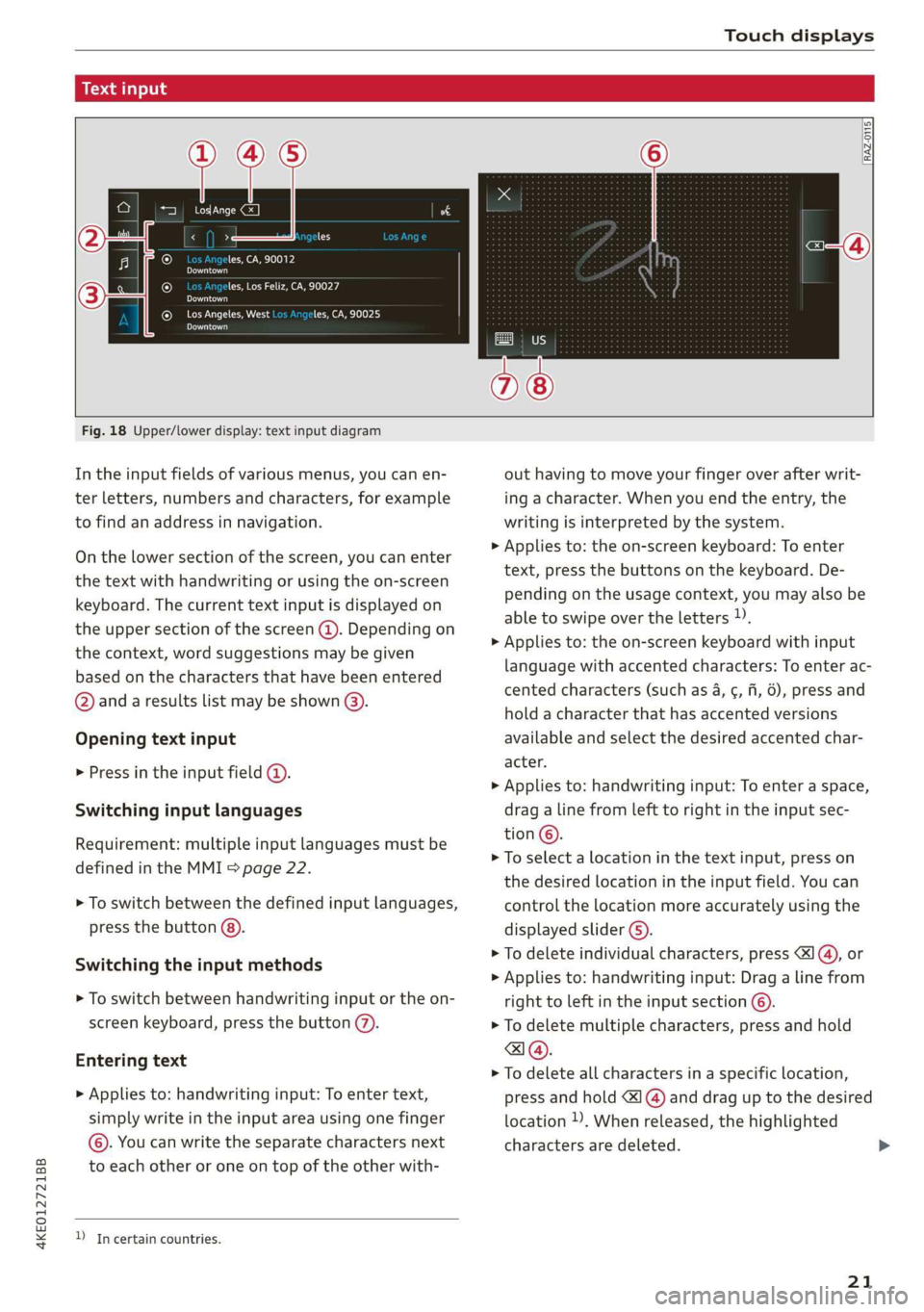
Fig. 18 Upper/lower display: text input diagram
In the input fields of various menus, you can en-
ter letters, numbers and characters, for example
to find an address in navigation.
On the lower section of the screen, you can enter
the text with handwriting or using the on-screen
keyboard. The current text input is displayed on
the upper section of the screen @). Depending on
the context, word suggestions may be given
based on the characters that have been entered
@ and a results list may be shown @).
Opening text input
> Press in the input field @.
Switching input languages
Requirement: multiple input languages must be
defined in the MMI > page 22.
> To switch between the defined input languages,
press the button @).
Switching the input methods
> To switch between handwriting input or the on-
screen keyboard, press the button (7).
Entering text
> Applies to: handwriting input: To enter text,
simply write in the input area using one finger
©. You can write the separate characters next
to each other or one on top of the other with-
D In certain countries.
out having to move your finger over after writ-
ing a character. When you end the entry, the
writing is interpreted by the system.
> Applies to: the on-screen keyboard: To enter
text, press the buttons on the keyboard. De-
pending on the usage context, you may also be
able to swipe over the letters )).
> Applies to: the on-screen keyboard with input
language with accented characters: To enter ac-
cented characters (such as 4, ¢, fi, 6), press and
hold a character that has accented versions
available and select the desired accented char-
acter.
> Applies to: handwriting input: To enter a space,
drag a line from left to right in the input sec-
tion ©.
> To select a location in the text input, press on
the desired location in the input field. You can
control the location more accurately using the
displayed slider ©).
> To delete individual characters, press
> Applies to: handwriting input: Drag a line from
right to left in the input section ©.
> To delete multiple characters, press and hold
> To delete all characters in a specific location,
press and hold <1 @) and drag up to the desired
location ). When released, the highlighted
characters are deleted.
21
Page 24 of 310
Touch displays
Applying suggested words or entries from
the results list
> To apply a suggested word (2) or entry from the
results list @), press on it.
> To display more content in the results list, drag
your finger upward or downward on the screen.
Setting the input language or keyboard
layout
> Applies to MMI: Select on the home screen:
SETTINGS > Language & keyboard > Keyboard.
> To define additional input languages, press the
© button.
> To change the keyboard layout for an input lan-
guage, press >. For example, you can select be-
tween QWERTZ and QWERTY.
22