battery AUDI E-TRON 2020 User Guide
[x] Cancel search | Manufacturer: AUDI, Model Year: 2020, Model line: E-TRON, Model: AUDI E-TRON 2020Pages: 316, PDF Size: 85.96 MB
Page 90 of 316
Driving
Driving
Starting the vehicle
pyre d | ola eda)
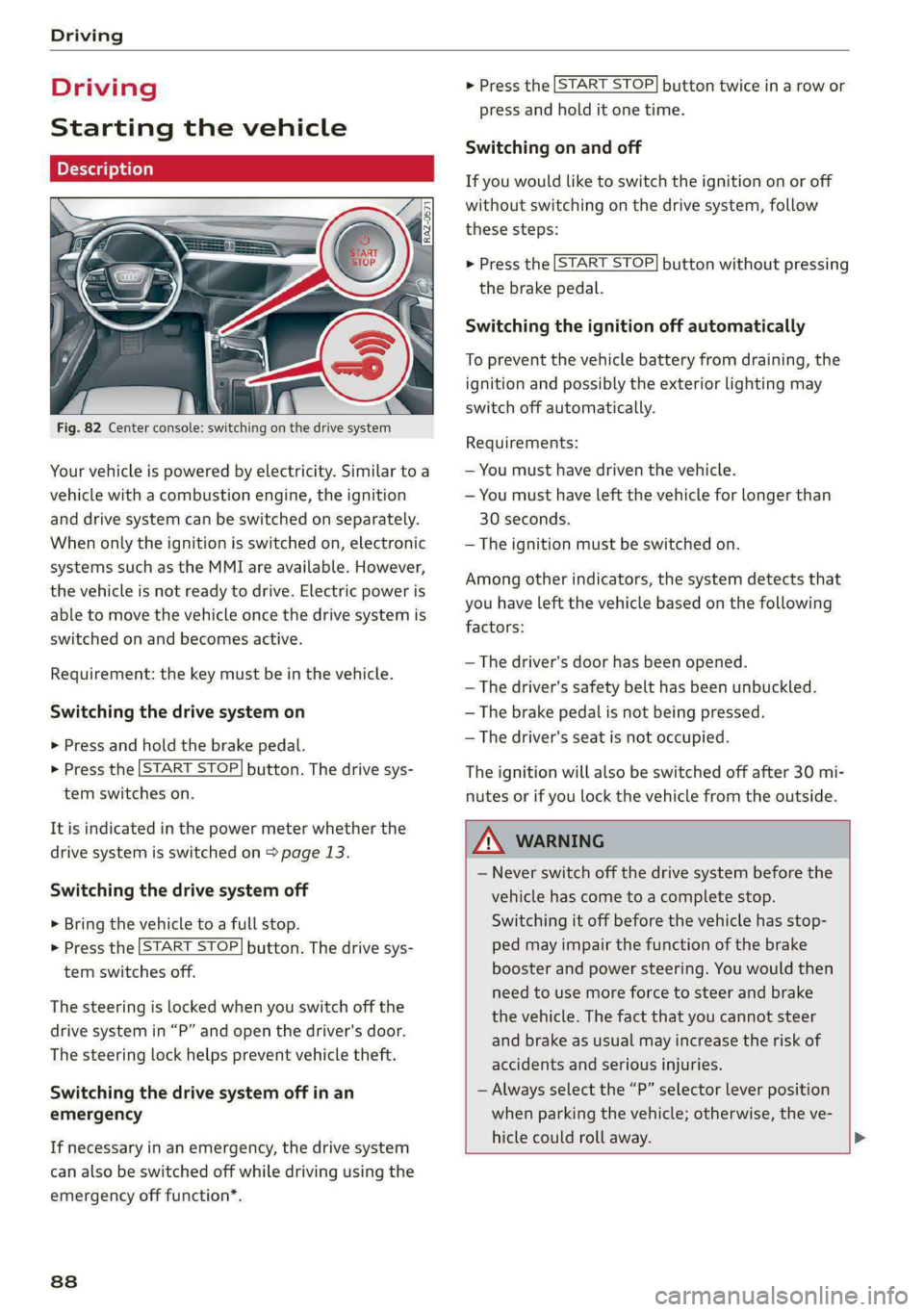
Fig. 82 Center console: switching on the drive system
Your vehicle is powered by electricity. Similar to a
vehicle with a combustion engine, the ignition
and drive system can be switched on separately.
When only the ignition is switched on, electronic
systems such as the MMI are available. However,
the vehicle is not ready to drive. Electric power is
able to move the vehicle once the drive system is
switched on and becomes active.
Requirement: the key must be in the vehicle.
Switching the drive system on
> Press and hold the brake pedal.
> Press the [START STOP] button. The drive sys-
tem switches on.
It is indicated in the power meter whether the
drive system is switched on > page 13.
Switching the drive system off
> Bring the vehicle to a full stop.
> Press the [START STOP] button. The drive sys-
tem switches off.
The steering is locked when you switch off the
drive
system in “P” and open the driver's door.
The steering lock helps prevent vehicle theft.
Switching the drive system off in an
emergency
If necessary in an emergency, the drive system
can also be switched off while driving using the
emergency off function*.
88
> Press the [START STOP] button twice in a row or
press and hold it one time.
Switching on and off
If you would like to switch the ignition on or off
without switching on the drive system, follow
these steps:
> Press the [START STOP] button without pressing
the brake pedal.
Switching the ignition off automatically
To prevent the vehicle battery from draining, the
ignition and possibly the exterior lighting may
switch off automatically.
Requirements:
— You must have driven the vehicle.
— You must have left the vehicle for longer than
30 seconds.
— The ignition must be switched on.
Among other indicators, the system detects that
you have left the vehicle based on the following
factors:
— The driver's door has been opened.
— The driver's safety belt has been unbuckled.
— The brake pedal is not being pressed.
— The driver's seat is not occupied.
The ignition will also be switched off after 30 mi-
nutes or if you lock the vehicle from the outside.
ZA WARNING
— Never switch off the drive system before the
vehicle has come to a complete stop.
Switching it off before the vehicle has stop-
ped may impair the function of the brake
booster and power steering. You would then
need to use more force to steer and brake
the vehicle. The fact that you cannot steer
and brake as usual may increase the risk of
accidents and serious injuries.
— Always select the “P” selector lever position
when parking the vehicle; otherwise, the ve-
hicle could roll away. >
Page 91 of 316

4KE012721BE
Driving
@) Tips
— Brief noises are normal when starting and
stopping the vehicle and are no cause for
concern.
— It may not be possible to start the vehicle in
extremely low temperatures.
— The drive power depends on the tempera-
ture and the charge level of the high-volt-
age battery.
Messages
E Engine start system: malfunction! Please
contact Service
Do not switch the ignition off because you may
not be able to switch it on again. Drive to an au-
thorized Audi dealer or authorized Audi Service
Facility immediately to have the malfunction cor-
rected.
E Engine start system: malfunction! Please
contact Service
There is a malfunction in the engine start system.
Drive immediately to an authorized Audi dealer
or authorized Audi Service Facility to have the
malfunction repaired.
B Remote control key: key not detected. Is the
key
still in the vehicle?
The vehicle key was removed from the vehicle
while the drive system was active. If the vehicle
key is no longer in the vehicle, you can no longer
switch on the ignition or the drive system after
switching off the drive system. You also cannot
lock the vehicle from the outside.
Remote control key: hold back of key
against the designated area. See owner's man-
ual
The battery in the vehicle key may be drained or
there may be a malfunction. To start the vehicle,
you must also hold the vehicle key against the lo-
cation shown ?) > page 88, fig. 82.
If the malfunction remains, drive immediately to
an authorized Audi dealer or authorized Audi
Service Facility to have the malfunction correct-
ed.
When driving
Starting to drive, stopping, and parking
Starting from a stop
> Press and hold the brake pedal.
> Switch on the drive system.
> Select a gear.
> Release the parking brake.
> Release the brake pedal.
> Press the accelerator pedal to accelerate.
Always make sure that the vehicle does not
“creep” when starting to drive and maneuvering.
If you take your foot off the brake pedal, the ve-
hicle will not be set into motion by the drive sys-
tem.
Stopping and parking
> Bring the vehicle to a full stop and press and
hold the brake pedal.
> Set the parking brake.
> Select the “P” selector lever position to secure
the vehicle from rolling away.
» Turn the steering wheel when parking on in-
clines so that the wheels will roll into the curb
if the vehicle starts moving.
> Switch off the ignition before leaving the vehi-
cle.
On hills, activate the parking brake first and then
shift into the "P" selector lever position. This pre-
vents too much stress from being placed on the
locking mechanism.
Z\ WARNING
— Always set the parking brake when leaving
your vehicle, even if for a short period of
time. If the parking brake is not set, the ve-
hicle could roll away, increasing the risk of
an accident.
— Do not leave your vehicle unattended while
the drive system is active, because this in-
creases the risk of an accident.
— If the parking brake is set, it can release au-
tomatically when the accelerator pedal is
pressed. To reduce the risk of an accident,
do not inadvertently press the accelerator >
89
Page 93 of 316

4KE012721BE
Driving
“N” (Neutral) gear
In the “N” gear, power is not transmitted to the
driving wheels. Use the “N” gear in a car wash
(with conveyor belts), for example.
If you unintentionally select “N” while driving
(faster than 1 mph (2 km/h)), you can also shift
back to “D” without pressing the brake pedal.
For safety reasons, the vehicle cannot be locked
when the transmission is in the "N” gear.
“Pp” (Park) gear
The vehicle is secured from rolling away by the
parking lock when in the “P” gear.
— Bring the vehicle to a full stop and press the
brake pedal.
— Press the “P” button @ on the selector lever.
— The “P” next to the selector lever will light up.
“P” engages automatically if you switch the drive
system off while the “D” or “R” gear is selected.
If you switch the drive system off in “N”, “P” will
engage automatically after approximately 30 mi-
nutes.
If you want to switch from “P” to “D” or “R”, the
drive system must be active.
Selecting the driving program
Various driving programs can be selected when in
the “D” gear. The programs influence how the ac-
celerator pedal and drive system respond.
If you select the dynamic or offroad Audi drive
select* mode, the “S” driving program will be ac-
tivated. If you select efficiency, “E” will be acti-
vated. When the ignition is switched off, the driv-
ing program may be reset to “D”.
To switch between the current driving program
and “S”, push the selector lever toward the rear.
ZA WARNING
— Before you start driving, check if the label
for the desired selector lever position next
to the selector lever is lit up.
— Always secure your vehicle from rolling
away. Press the brake pedal or shift to “P”.
When leaving the vehicle, also set the park-
ing brake.
— To reduce the risk of an accident, do not
press the accelerator pedal when changing
gears if the vehicle is stationary and the
drive system is active.
— Never select the “R" or "P” gears while driv-
ing. Doing so could cause an accident.
—The vehicle can roll even if the ignition is
switched off.
(Gi) Tips
If you shift between “D” and “R” within one
second, you do not need to press the brake
pedal. This makes it possible to “rock” the ve-
hicle if it is stuck, for example.
Accelerator pedal
You can accelerate the vehicle using the accelera-
tor pedal.
Maximum acceleration
If you press the accelerator pedal all the way
down, the motor’s full power will be used and
you will reach maximum acceleration, also called
“kick-down”.
Applies to: vehicles with boost function: In the
“S” driving program, even more power is utilized
for a brief period of time via the boost function.
The availability of this function depends on the
charge level of the high-voltage battery and the
temperature of the drive system components,
among other things.
Z\ WARNING
The driving wheels could spin and the vehicle
could swerve on slick or slippery road surfaces
when using kick-down, which increases the
risk of an accident.
Launch Control
Applies to: vehicles with Launch Control
Launch Control provides the best possible accel-
eration when starting from a stop.
91
Page 94 of 316
Driving
Requirements
— Driving program “S” > page 91 or the dynamic
Audi drive select* mode must be selected
=> page 101.
— The boost function is available > page 91.
Using Launch Control
— Press the brake pedal with your left foot and
hold it all the way down for at least one second.
— With the brake pedal pressed, press the accel-
erator pedal all the way down with your right
foot at the same time.
— As soon as the colored edge of the power meter
actively flashes, remove your foot from the
brake pedal.
ZA WARNING
Only use Launch Control when road and traffic
conditions allow it and other road users will
not be endangered or impacted by your driv-
ing and the vehicle's acceleration. The driving
wheels could spin and the vehicle could
swerve, especially on slick or slippery road
surfaces, which increases the risk of an acci-
dent.
@) Note
When accelerating using Launch Control, all
vehicle components are subject to heavy
loads. This can result in increased wear.
G) Tips
After accelerating using the Launch Control,
the temperature of some vehicle components
may increase greatly. If that happens, the
function will not be available for a few mi-
nutes to reduce the risk of damage. After a
cool-down period, Launch Control will be
available again.
Messages
& Transmission: malfunction! Safely stop vehi-
cle
Do not continue driving. Stop the vehicle as soon
as possible in a safe location and secure it so it
92
does not roll. See an authorized Audi dealer or
authorized Audi Service Facility for assistance.
i] Selector lever: malfunction! Gear change on-
ly possible if using both shift paddles.
There is a system malfunction in the selector lev-
er. You can continue driving with restricted func-
tion. The selector lever is not working. Gears can
only be selected by tapping both shift paddles at
the same time when the vehicle is stationary. The
“P” gear is automatically engaged when you
switch off the drive system. Drive to an author-
ized Audi dealer or authorized Audi Service Facili-
ty immediately to have the malfunction correct-
ed.
i P button: malfunction! Auto P when engine
off. Please contact Service
There is a malfunction in the "P" button on the
selector lever. The “P” gear is automatically en-
gaged when you switch off the drive system.
Drive to an authorized Audi dealer or authorized
Audi Service Facility immediately to have the
malfunction corrected.
i Danger of rolling away! P not possible.
Please apply parking brake
The parking lock can no longer be engaged. Drive
to an authorized Audi dealer or authorized Audi
Service Facility immediately to have the malfunc-
tion corrected.
Drive system
ada ee tee Tn)
Vehicles with an electric drive system are pow-
ered by an electric motor. The drive power de-
pends on the temperature and the charge level of
the high-voltage battery.
The vehicle is able to recover energy by using “re-
cuperation”. The electric drive system operates
like a generator and converts a large portion of
kinetic energy into electrical energy that is stored
in the high-voltage battery. The vehicle is braked
during recuperation, which is similar to the >
Page 96 of 316

Driving
Vehicle sound
The electric drive system generates considerably
less noise than a combustion engine. An artificial
engine sound is generated when driving electri-
cally so that the vehicle can be heard from the
outside when driving. The vehicle sound auto-
matically fades out at higher speeds when the
sounds from the tires and wind start increasing.
ZA WARNING
Other road users may not be able to defini-
tively hear electric vehicles when they are
driving. This increases the risk of an accident
particularly when driving in areas with little
traffic, when maneuvering, or when driving in
reverse.
IAT eMaL eLUN or da aCe
Your driving style greatly influences the amount
of fuel and energy consumed, the environmental
impact, and the wear on the motor, brakes, and
tires. Note the following information for efficient
and environmentally-conscious driving:
— Select the Audi drive select* efficiency mode.
— Turn off electrical equipment that is not need-
ed, for example seat heating*.
— Anticipate upcoming traffic situations while
driving to avoid unnecessary acceleration and
braking.
— Avoid driving at high speeds.
— Avoid adding extra weight to the vehicle if pos-
sible, for example by not leaving roof racks or
bike racks installed when they are not needed.
— Make sure the tire pressure is correct.
— Have maintenance performed regularly on the
vehicle.
— Do not drive with winter tires during the summ-
er.
— Brake early and evenly to use recuperation.
Messages
B Drive system: malfunction! Safely stop vehi-
cle
94
There is a malfunction in the drive system. The
vehicle can no longer be driven. Park the vehicle
in a safe location as soon as possible. See an au-
thorized Audi dealer or authorized Audi Service
Facility for assistance.
EB rive system: malfunction! Please contact
Service
There is a malfunction in the drive system. Drive
slowly to an authorized Audi dealer or authorized
Audi Service Facility to have the malfunction cor-
rected.
a Drive system: warning! Limited performance
The driving power is limited. The high-voltage
battery may not be sufficiently charged or is at
the operating temperature threshold, for exam-
ple, when the outside temperatures are extreme-
ly cold.
BS Vehicle sound: malfunction! Pedestrians
cannot hear vehicle. Please contact Service
There is a malfunction in the vehicle sound func-
tion. Drive extremely carefully, since other road
users may not be able to hear your electric vehi-
cle. Drive to an authorized Audi dealer or author-
ized Audi Service Facility immediately to have the
malfunction corrected.
Brakes
General information
You can apply the vehicle's brakes using the brake
pedal.
Operating noise
Noises may occur when braking depending on the
speed, braking force, and outside conditions such
as temperature and humidity.
When the vehicle is stationary, the brake system
performs system tests at regular intervals. This
can cause brief noise and haptic feedback effects
on the brake pedal.
Braking effect
The response time from the brakes depends on
the weather and environmental conditions. To
ensure the optimal braking effect, the brake >
Page 109 of 316
4KE012721BE
High-voltage system
High-voltage system
General information
Introduction
All work done on the high-voltage system must
only be performed by certified high-voltage tech-
nicians at authorized Audi dealers or authorized
Audi Service Facilities in accordance with Audi
guidelines.
The high-voltage system is composed of the fol-
lowing high-voltage components, among other
things: the high-voltage battery, the power elec-
tronics, the electric motors, the high-voltage A/C
compressor, the high-voltage heater, the charg-
ing system and charging port as well as the or-
ange high-voltage wiring.
The high-voltage battery is located on the vehicle
underbody and does not require any maintenance
from the driver.
ZA WARNING
The voltage in the high-voltage system is high
enough to cause fatal injuries. Touching a
damaged high-voltage component can result
in a fatal electric shock. The components in
the high-voltage system are marked with a
warning label which warns against the high-
voltage.
— The voltage level in the high-voltage system
is still dangerous and potentially life-threat-
ening when the ignition is switched off.
— Never perform work on the orange high-
voltage cables or on other high-voltage
components. Only authorized repair facili-
ties that are certified may perform work on
the high-voltage system.
— Never damage, alter or remove the orange
high-voltage cable or disconnect it from the
high-voltage system.
— Never perform any work using cutting, shap-
ing or sharp-edged tools or heat sources
near the high-voltage system and high-volt-
age cables.
— Gases that escape from the high-voltage
battery can be poisonous or flammable.
— Damage to the high-voltage battery could
cause the high-voltage battery to leak im-
mediately or in the future, and poisonous or
flammable gases could escape. Do not in-
hale the gases!
— Do not expose yourself to any leaking fluids
and do not come into contact with them.
— The high-voltage battery electrolyte fluid is
caustic. If electrolyte fluid comes into con-
tact with the skin, flush the affected area for
at least 15 minutes with clean water. Then
wash the affected area with soap. Have the
affected area examined by a medical profes-
sional.
— In the event of a technical emergency, in-
form the responders that the vehicle is
equipped with a high-voltage battery.
@) Note
The high-voltage system can be damaged if
the vehicle underbody comes into contact
with the ground. Immediately drive your vehi-
cle to an authorized repair facility and have it
inspected.
107
Page 110 of 316
High-voltage system
Charging the high-voltage battery
Introduction
® @€D
RAZ-0665}
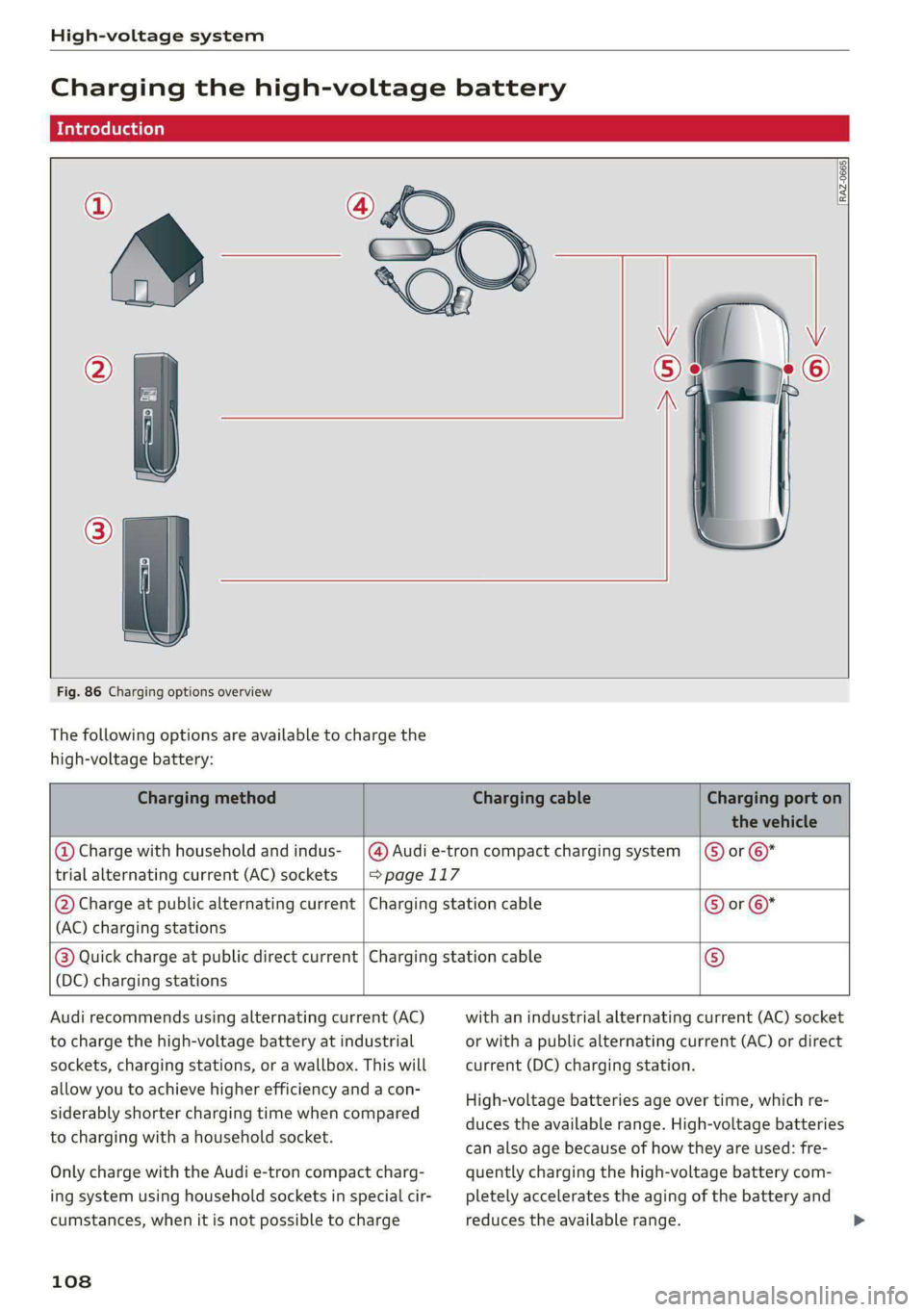
Fig. 86 Charging options overview
The following options are available to charge the
high-voltage battery:
Charging method Charging cable Charging port on
the vehicle
trial alternating current (AC) sockets |>page 117
@ Charge with household and indus- _|@) Audi e-tron compact charging system |) or ©*
(AC) charging stations
@ Charge at public alternating current | Charging station cable © or ©*
(DC) charging stations
@®) Quick charge at public direct current | Charging station cable ©
Audi recommends using alternating current (AC)
to charge the high-voltage battery at industrial
sockets, charging stations, or a wallbox. This will
allow you to achieve higher efficiency and a con-
siderably shorter charging time when compared
to charging with a household socket.
Only charge with the Audi e-tron compact charg-
ing system using household sockets in special cir-
cumstances, when it is not possible to charge
108
with an industrial alternating current (AC) socket
or with a public alternating current (AC) or direct
current (DC) charging station.
High-voltage batteries age over time, which re-
duces the available range. High-voltage batteries
can also age because of how they are used: fre-
quently charging the high-voltage battery com-
pletely accelerates the aging of the battery and
reduces the available range. >
Page 111 of 316
4KE012721BE
High-voltage system
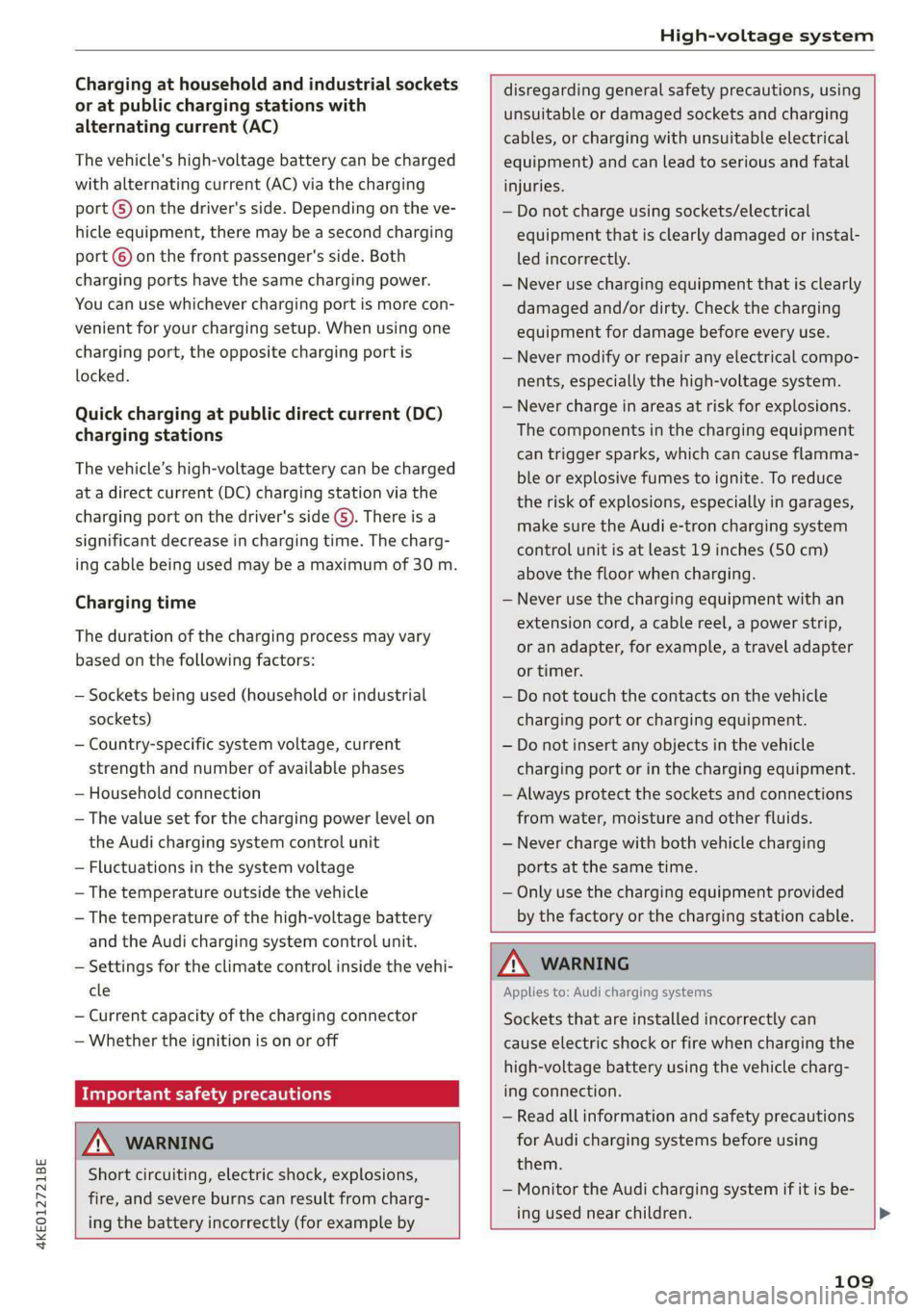
Charging at household and industrial sockets
or at public charging stations with
alternating current (AC)
The vehicle's high-voltage battery can be charged
with alternating current (AC) via the charging
port G) on the driver's side. Depending on the ve-
hicle equipment, there may be a second charging
port © on the front passenger's side. Both
charging ports have the same charging power.
You can use whichever charging port is more con-
venient for your charging setup. When using one
charging port, the opposite charging port is
locked.
Quick charging at public direct current (DC)
charging stations
The vehicle’s high-voltage battery can be charged
at a direct current (DC) charging station via the
charging port on the driver's side (S). There is a
significant decrease in charging time. The charg-
ing cable being used may be a maximum of 30 m.
Charging time
The duration of the charging process may vary
based on the following factors:
— Sockets being used (household or industrial
sockets)
— Country-specific system voltage, current
strength and number of available phases
— Household connection
— The value set for the charging power level on
the Audi charging system control unit
— Fluctuations in the system voltage
— The temperature outside the vehicle
— The temperature of the high-voltage battery
and the Audi charging system control unit.
— Settings for the climate control inside the vehi-
cle
— Current capacity of the charging connector
— Whether the ignition is on or off
Important safety precautions
ZA WARNING
Short circuiting, electric shock, explosions,
fire, and severe burns can result from charg-
ing the battery incorrectly (for example by
disregarding general safety precautions, using
unsuitable or damaged sockets and charging
cables, or charging with unsuitable electrical
equipment) and can lead to serious and fatal
injuries.
— Do not charge using sockets/electrical
equipment that is clearly damaged or instal-
led incorrectly.
— Never use charging equipment that is clearly
damaged and/or dirty. Check the charging
equipment for damage before every use.
— Never modify or repair any electrical compo-
nents, especially the high-voltage system.
— Never charge in areas at risk for explosions.
The components in the charging equipment
can trigger sparks, which can cause flamma-
ble or explosive fumes to ignite. To reduce
the risk of explosions, especially in garages,
make sure the Audi e-tron charging system
control unit is at least 19 inches (50 cm)
above the floor when charging.
— Never use the charging equipment with an
extension cord, a cable reel, a power strip,
or an adapter, for example, a travel adapter
or timer.
— Do not touch the contacts on the vehicle
charging port or charging equipment.
— Do not insert any objects in the vehicle
charging port or in the charging equipment.
— Always protect the sockets and connections
from water, moisture and other fluids.
— Never charge with both vehicle charging
ports at the same time.
— Only use the charging equipment provided
by the factory or the charging station cable.
ZA\ WARNING
Applies to: Audi charging systems
Sockets that are installed incorrectly can
cause electric shock or fire when charging the
high-voltage battery using the vehicle charg-
ing connection.
— Read all information and safety precautions
for Audi charging systems before using
them.
— Monitor the Audi charging system if it is be-
ing used near children.
109
Page 112 of 316
High-voltage system
— Installation and setup of the household con-
nection for Audi charging systems may only
be performed by a qualified electrician. The
qualified electrician is thereby responsible
for adhering to applicable standards and
regulations.
— Make sure that the household socket is
grounded and shielded from water.
— If Audi charging systems do not function ac-
cording to the specifications in the operat-
ing manual, they must not be used. Contact
an authorized Audi dealer or authorized
Audi Service Facility.
— Audi charging systems are intended for use
in private and semi-private areas (for exam-
ple, private property and company parking
lots). Depending on the country where the
vehicle is operated, charging wit a mode 2
charging cable (meaning charging with the
Audi charging system) may be prohibited in
public areas. Contact an authorized Audi
dealer or authorized Audi Service Facility for
more information.
— Operate the Audi charging systems in power
networks that are properly grounded. It can-
not be used with non-grounded power net-
works (such as IT networks).
— When charging the high-voltage battery us-
ing household/industrial sockets, the elec-
trical installation can be used at full capaci-
ty. Having a qualified electrician regularly in-
spect the electrical installations that are
used for charging is recommended.
— If possible, disconnect Audi charging sys-
tems from the power network during a
thunderstorm.
— Never submerge the Audi charging systems
or the connectors in water.
— Audi charging systems must only be cleaned
when the control unit is completely discon-
nected from the power supply and from the
vehicle. Use a dry towel to clean.
— Audi charging systems are only intended for
use on Audi vehicles and vehicles within the
Volkswagen Group. Using the devices on
vehicles made by another manufacturer is
not authorized.
110
@) Note
— If the vehicle is not being used for long peri-
ods of time, the high-voltage battery must
be charged after four months at the latest
or the vehicle must be continuously con-
nected to a power source (for 50% charging
target > page 113). Otherwise, the high-
voltage battery could become damaged.
— Make sure that you always use the correct
charging equipment for the country in
which it is being used. Contact an author-
ized Audi dealer or authorized Audi Service
Facility for more information.
— On vehicles with only one charging port,
there is a cover on the opposite side of the
vehicle with no charging components instal-
led underneath it. Do not try to open this
cover.
(i) Tips
— Your vehicle can only be charged at charging
stations that meet the requirements in the
respective country and meet the following
standards, at a minimum:
— GB/T 18487.1 and GB/T 20234 (China)
— IEC 61851 and IEC 62196 (Europe)
— SAE J1772 (North America, Japan)
— You can use your Audi charging system if
there is a household or industrial connec-
tion available at the charging station.
Gi) Tips
Applies to: Audi charging systems
— For an uninterrupted charging process, we
recommend only charging using sockets
that are connected to a separately protected
circuit.
— It is recommended to use Audi charging sys-
tems in the wall mount clip* during opera-
tion. If this is not possible, always position
Audi charging systems ona secure surface
during the charging process > A\.
—To reduce the risk of overheating during op-
eration, do not place Audi charging systems
in direct sunlight for long periods of time. If
the control unit is overheated, the charging
process is automatically paused until the >
Page 113 of 316

4KE012721BE
High-voltage system
temperature has lowered back within the
normal range.
Fig. 87 Left front side of the vehicle: opening the high-
voltage charging port door
Fig. 88 Charging unit: charging port and LED
Connecting the charging cable
If you charge your vehicle at a charging station,
the following sequence of steps may vary. Follow
the manufacturer guidelines and operating in-
structions for the charging station.
Requirement: the “P” gear must be selected, the
parking brake must be set, and drive ready mode
must have ended.
— If necessary, remove the charging cable from
the vehicle > page 117, Transport.
— Remove the cap from the charging cable if nec-
essary.
— First connect the charging cable to the power
supply, or remove it from the charging station.
— Unwind the charging cable completely.
— Unlock the vehicle.
— Press the center of the button @ to open the
charging port door on the driver's side or front
passenger's side*.
— If you would like to use quick charging at public
direct current (DC) charging stations, open the
charging port cover (4).
— Plug the charging connector into the vehicle
charging port.
Starting to charge automatically (immediate
charging)
If charging is not delayed with a timer, the charg-
ing process will begin immediately. If necessary,
the charging station may need to be activated.
Follow the manufacturer guidelines and operat-
ing instructions for the charging station.
You can also adjust the charging process to your
preferences > page 113, Setting the charging
target, > page 114, Setting the timer,
=> page 114, Advanced charging settings.
While charging
The charging display on the charging unit @) will
pulse green while charging. It will pulse & in
the instrument cluster. A label on the charging
unit @ informs you about the various displays
=> page 113.
The charging connector is locked while charging
and cannot be removed.
Depending on the selected view > page 12, the
following information about the charging process
is displayed in the instrument cluster:
— Hv: Range
— I: remaining charging time until the charging
process is complete
— ©: current battery charge level
— ©): date and time of when the charging process
was completed
—&: charging speed (additional range per hour)
—4: charging power (depends on the selected
power source)
To view information about the charging process
later, select in the instrument cluster: Vehicle
functions tab > E) button > Charging.
Ending the charging process
You can interrupt the charging process at any
time.
— Unlock the vehicle.
111