center console AUDI E-TRON 2020 User Guide
[x] Cancel search | Manufacturer: AUDI, Model Year: 2020, Model line: E-TRON, Model: AUDI E-TRON 2020Pages: 316, PDF Size: 85.96 MB
Page 166 of 316

Parking and maneuvering
Parking and
maneuvering
Introduction
Depending on the vehicle equipment, various
parking aids will help you when parking and ma-
neuvering.
Parking aid
The parking aid plus assists you while parking
using audio and visual signals to warn you about
objects detected in front of, behind, and at the
sides* of the vehicle > page 164.
The rearview camera shows the area behind the
vehicle in the MMI display. The lines in the rear-
view camera image help you to park and maneu-
ver > page 166.
The peripheral cameras are an addition to the
rearview camera and help you to see various
areas around the vehicle while parking and ma-
neuvering > page 166.
The rear cross-traffic assist can warn you of ap-
proaching cross traffic when driving in reverse or
exiting a parking space > page 171.
Settings options
You can adjust parking aid functions individually.
The adjustment options depend on the vehicle
equipment.
— Activating automatically > page 164
— Front and rear volume > page 165
— Entertainment fader > page 165
— Clean rearview camera > page 167
— Trailer view > page 168
— View > page 169
— Rear cross-traffic assist > page 171
ZA WARNING
Observe the safety precautions and note the
limits of the assist systems, sensors, and
cameras > page 127.
G) Tips
Practicing parking in a traffic-free location or
parking lot to become familiar with the sys-
164
tems is recommended. Practice parking in
good light and weather conditions.
Parking aid plus
Activating and deactivating
Applies to: vehicles with parking aid plus
RAZ-1042
Fig. 124 Center console: parking aid button
General information
The parking aid assists when parking and maneu-
vering by providing warnings about obstacles. If
the ultrasonic sensors on the vehicle > page 128,
fig. 94 detect an obstacle, the system will pro-
vide audio and visual warnings.
Activating and deactivating
Requirement: the vehicle speed must be under
approximately 6 mph (10 km/h).
> Press the Pv or {@ button @ in the center con-
sole. When activating, a brief tone will sound
and the LED in the button will turn on.
Automatic activation
> The system switches on automatically when re-
verse gear is engaged while the drive system is
active. A brief tone will sound.
> If Automatic activation is switched on in the
MMI and if the vehicle approaches ) an obstacle
at speeds below approximately 6 mph (10
km/h), the parking aid will switch on automati-
cally. Audible signals will sound once the obsta-
cle is within the sensor detection area.
> Applies to: MMI: To switch Activate automati-
cally on or off, select on the home screen: VE-
HICLE > Parking aid > Automatic activation. >
Page 169 of 316

4KE012721BE
Parking and maneuvering
ZA WARNING
Observe the safety precautions and note the
limits of the assist systems, sensors, and
cameras > page 127.
Activating and deactivating
Applies to: vehicles with rearview camera/peripheral cameras
[RAZ-1042.
Fig. 127 Center console: parking aid button
Activating and deactivating
> Press the {4 button @ in the center console.
When activating, a brief tone will sound and
the LED in the button will turn on. Or
> Press bin the upper display if the visual dis-
tance indicator is shown > page 165, fig. 125.
The system can be activated at low speeds, such
when maneuvering.
Automatic activation
The system activates automatically when reverse
gear is engaged while the drive system is active.
A brief tone will sound.
Automatic deactivation
The system will deactivate automatically once
the vehicle exceeds a certain speed while driving
forward.
Z\ WARNING
Observe the safety precautions and note the
limits of the assist systems, sensors, and
cameras > page 127.
(ead a)
Applies to: vehicles with rearview camera/peripheral cameras
You can manually start the cleaning of the rear-
view camera. The settings depend on the vehicle
equipment.
> Select |---| > Clean rearview camera in the upper
display when the parking aid is active. Or
> Move the window wiper lever S7 into the posi-
tion for cleaning the rear window © & page 51.
ZA\ WARNING
Observe the safety precautions and note the
limits of the assist systems, sensors, and
cameras > page 127.
Warnings
Applies to: vehicles with rearview camera/peripheral cameras
Applies to: vehicles with trailer view
Fig. 129 Upper display: trailer view
When parking with the rearview camera or pe-
ripheral camera, the parking aid plus audio and
visual warnings* will also assist you > page 165.
Visual orientation lines
@ The orange orientation lines show the vehi-
cle's direction of travel > ©. Turn the steer-
ing wheel until the orange orientation lines
align with the parking space. >
167
Page 177 of 316
4KE012721BE
Telephone
A PIN for a secure Bluetooth connection will be
generated.
> Confirm the PIN on your mobile device, or
> Enter the PIN for connecting on your cell
phone. The time allowed for entering the PIN is
limited to approximately 30 seconds.
> Follow the system instructions.
> Pay attention to any other system prompts on
the MMI and on your cell phone.
After connecting successfully
See > page 174, After connecting successfully.
Switching between two mobile devices
Requirement: phone 1 and phone 2 must be con-
nected to the MMI.
>» Applies to: MMI: Select on the home screen:
PHONE > ¢{].
Disconnecting a mobile device
Applies to: vehicles with telephone
The mobile device will be disconnected from the
MMI and removed from the list of paired devices.
> To disconnect a connected device, use the con-
nection manager = page 238.
Using the Audi phone
box
Applies to: vehicles with Audi phone box
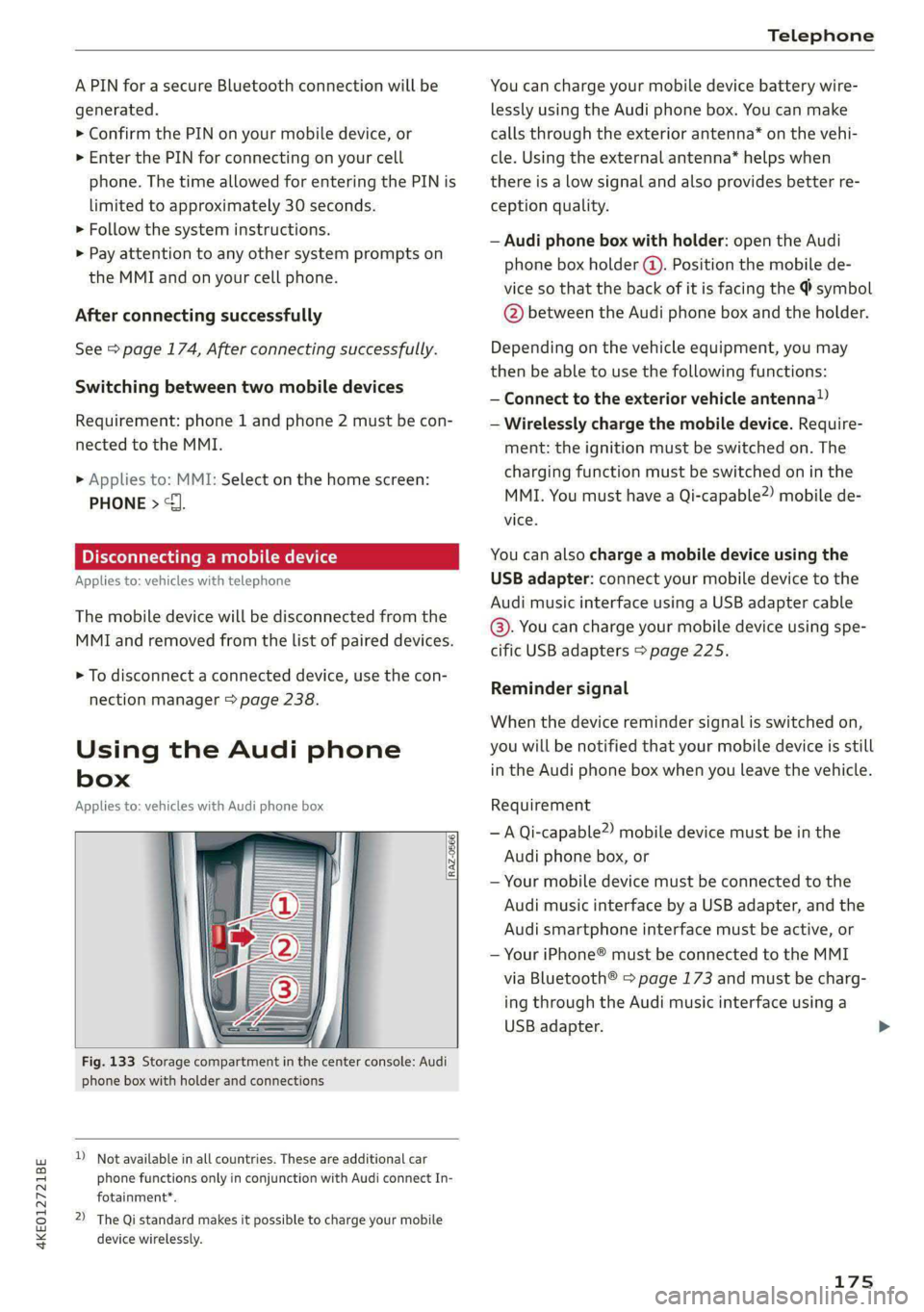
Fig. 133 Storage compartment in the center console: Audi
phone box with holder and connections
) Not available in all countries. These are additional car
phone functions only in conjunction with Audi connect In-
fotainment*.
2) The Qi standard makes it possible to charge your mobile
device wirelessly.
You can charge your mobile device battery wire-
lessly using the Audi phone box. You can make
calls through the exterior antenna* on the vehi-
cle. Using the external antenna* helps when
there is a low signal and also provides better re-
ception quality.
— Audi phone box with holder: open the Audi
phone box holder (@). Position the mobile de-
vice so that the back of it is facing the @ symbol
@ between the Audi phone box and the holder.
Depending on the vehicle equipment, you may
then be able to use the following functions:
— Connect to the exterior vehicle antenna?)
— Wirelessly charge the mobile device. Require-
ment: the ignition must be switched on. The
charging function must be switched on in the
MMI. You must have a Qi-capable2) mobile de-
vice.
You can also charge a mobile device using the
USB adapter: connect your mobile device to the
Audi music interface using a USB adapter cable
@. You can charge your mobile device using spe-
cific USB adapters > page 225.
Reminder signal
When the device reminder signal is switched on,
you will be notified that your mobile device is still
in the Audi phone box when you leave the vehicle.
Requirement
— A Qi-capable?) mobile device must be in the
Audi phone box, or
— Your mobile device must be connected to the
Audi music interface by a USB adapter, and the
Audi smartphone interface must be active, or
— Your iPhone® must be connected to the MMI
via Bluetooth® > page 173 and must be charg-
ing through the Audi music interface using a
USB adapter.
175