charging AUDI E-TRON 2020 Service Manual
[x] Cancel search | Manufacturer: AUDI, Model Year: 2020, Model line: E-TRON, Model: AUDI E-TRON 2020Pages: 316, PDF Size: 85.96 MB
Page 272 of 316
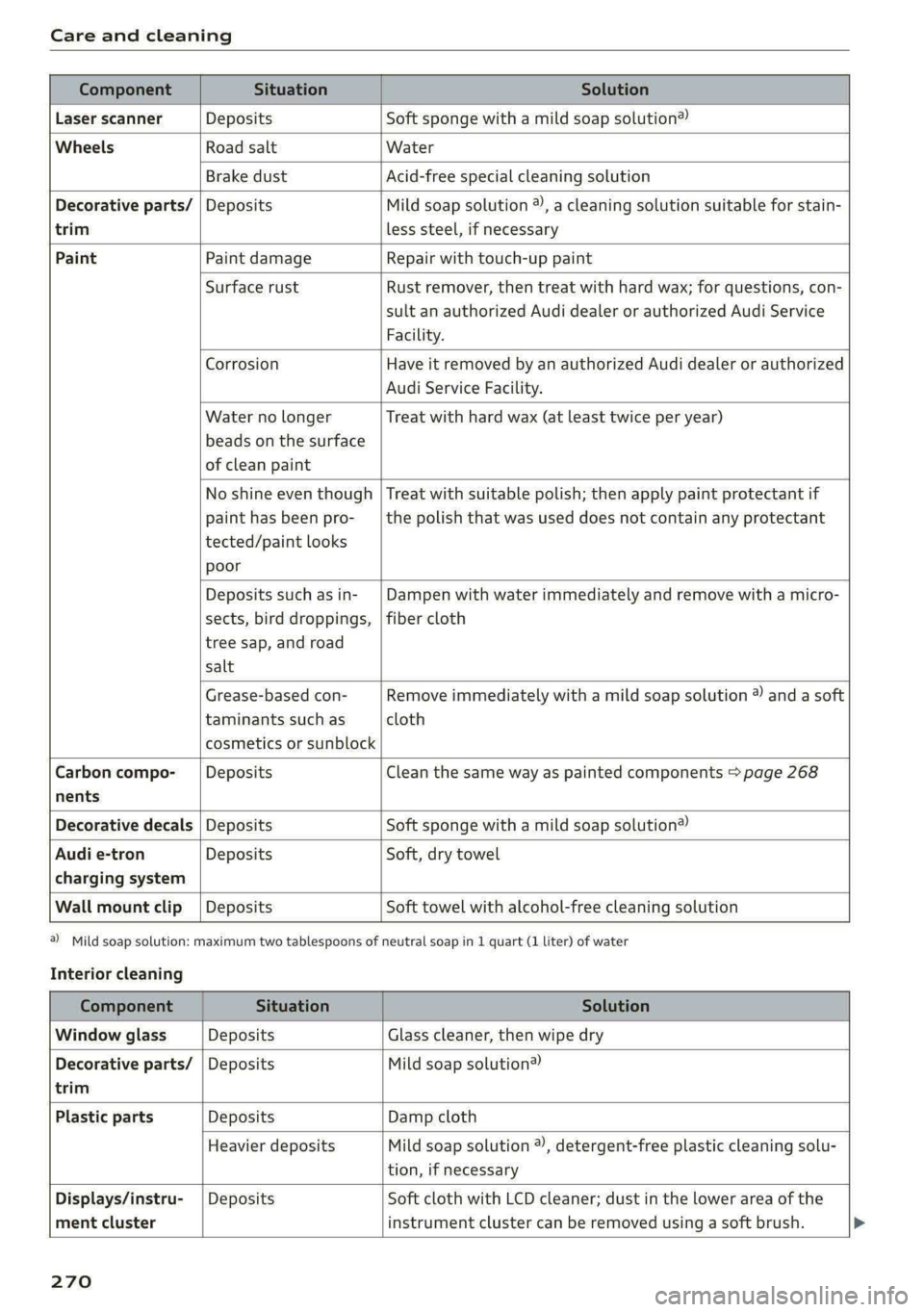
Care and cleaning
trim
Component Situation Solution
Laser scanner Deposits Soft sponge with a mild soap solution®
Wheels Road salt Water
Brake dust Acid-free special cleaning solution
Decorative parts/ | Deposits Mild soap solution ®), a cleaning solution suitable for stain-
less steel, if necessary
Paint Paint damage Repair with touch-up paint
Surface rust Rust remover, then treat with hard wax; for questions, con-
sult an authorized Audi dealer or authorized Audi Service
Facility.
Corrosion Have it removed by an authorized Audi dealer or authorized
Audi Service Facility.
Water no longer
beads on the surface
of clean paint
Treat with hard wax (at least twice per year)
No shine even though
paint has been pro-
tected/paint looks
poor
Treat with suitable polish; then apply paint protectant if
the polish that was used does not contain any protectant
Deposits such as in-
sects, bird droppings,
tree sap, and road
salt
Dampen with water immediately and remove with a micro-
fiber cloth
Grease-based con-
taminants such as
cosmetics or sunblock
Remove immediately with a mild soap solution ® and a soft
cloth
Carbon compo-___| Deposits Clean the same way as painted components > page 268
nents
Decorative decals | Deposits Soft sponge with a mild soap solution®
Audi e-tron Deposits Soft, dry towel
charging system
Wall mount clip | Deposits Soft towel with alcohol-free cleaning solution
Interior cleaning
a) Mild soap solution: maximum two tablespoons of neutral soap in 1 quart (1 liter) of water
Component Situation Solution
Window glass Deposits Glass cleaner, then wipe dry
Decorative parts/ | Deposits Mild soap solution®
trim
Plastic parts Deposits Damp cloth
Heavier deposits Mild soap solution ®), detergent-free plastic cleaning solu-
tion, if necessary
Displays/instru-
ment cluster
Deposits Soft cloth with LCD cleaner; dust in the lower area of the
instrument cluster can be removed using a soft brush.
270
Page 273 of 316
4KE012721BE
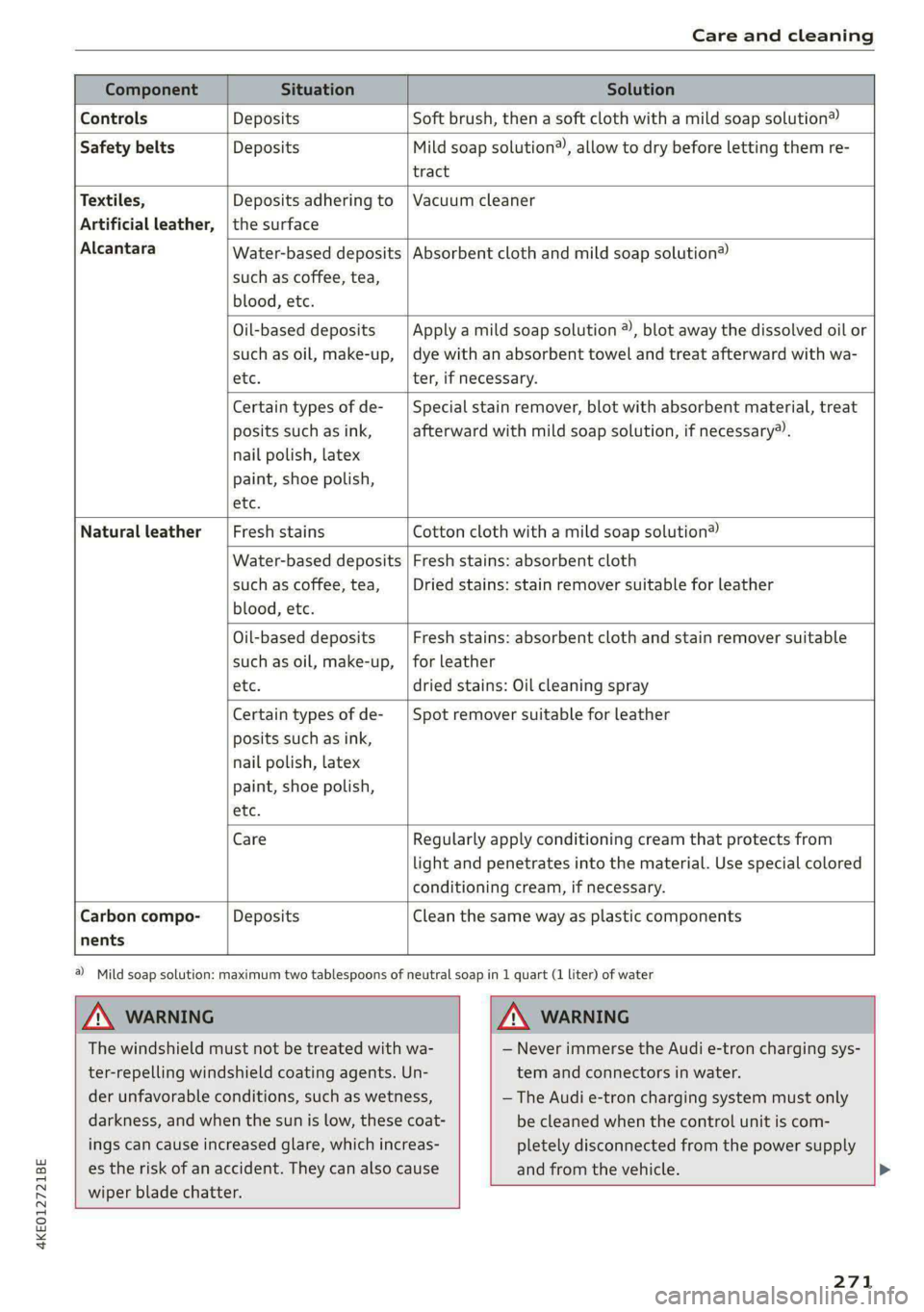
Care and cleaning
Water-based deposits
such as coffee, tea,
blood, etc.
Component Situation Solution
Controls Deposits Soft brush, then a soft cloth with a mild soap solution®)
Safety belts Deposits Mild soap solution®, allow to dry before letting them re-
tract
Textiles, Deposits adhering to | Vacuum cleaner
Artificial leather, | the surface
Alcantara Absorbent cloth and mild soap solution®
Oil-based deposits
such as oil, make-up,
etc.
Apply a mild soap solution ®), blot away the dissolved oil or
dye with an absorbent towel and treat afterward with wa-
ter, if necessary.
Certain types of de-
posits such as ink,
nail polish, latex
paint, shoe polish,
etc.
Special stain remover, blot with absorbent material, treat
afterward with mild soap solution, if necessary®).
Natural leather Fresh stains Cotton cloth with a mild soap solution®
Water-based deposits
such as coffee, tea,
blood, etc.
Fresh stains: absorbent cloth
Dried stains: stain remover suitable for leather
Oil-based deposits
such as oil, make-up,
etc.
Fresh stains: absorbent cloth and stain remover suitable
for leather
dried stains: Oil cleaning spray
Certain types of de-
posits such as ink,
nail polish, latex
paint, shoe polish,
etc.
Spot remover suitable for leather
nents
Care Regularly apply conditioning cream that protects from
light and penetrates into the material. Use special colored
conditioning cream, if necessary.
Carbon compo- Deposits Clean the same way as plastic components
a) Mild soap solution: maximum two tablespoons of neutral soap in 1 quart (1 liter) of water
ZA WARNING ZA\ WARNING
The windshield must not be treated with wa-
ter-repelling windshield coating agents. Un-
der unfavorable conditions, such as wetness,
darkness, and when the sun is low, these coat-
ings can cause increased glare, which increas-
es the risk of an accident. They can also cause
wiper blade chatter.
— Never immerse the Audi e-tron charging sys-
tem and connectors in water.
— The Audi e-tron charging system must only
be cleaned when the control unit is com-
pletely disconnected from the power supply
and from the vehicle.
271
Page 287 of 316
4KE012721BE
Fuses and bulbs
@ Tips
— The following table does not list fuse loca-
tions that are not used.
— Some of the equipment listed in the follow-
ing tables applies only to certain model ver-
sions or certain optional equipment.
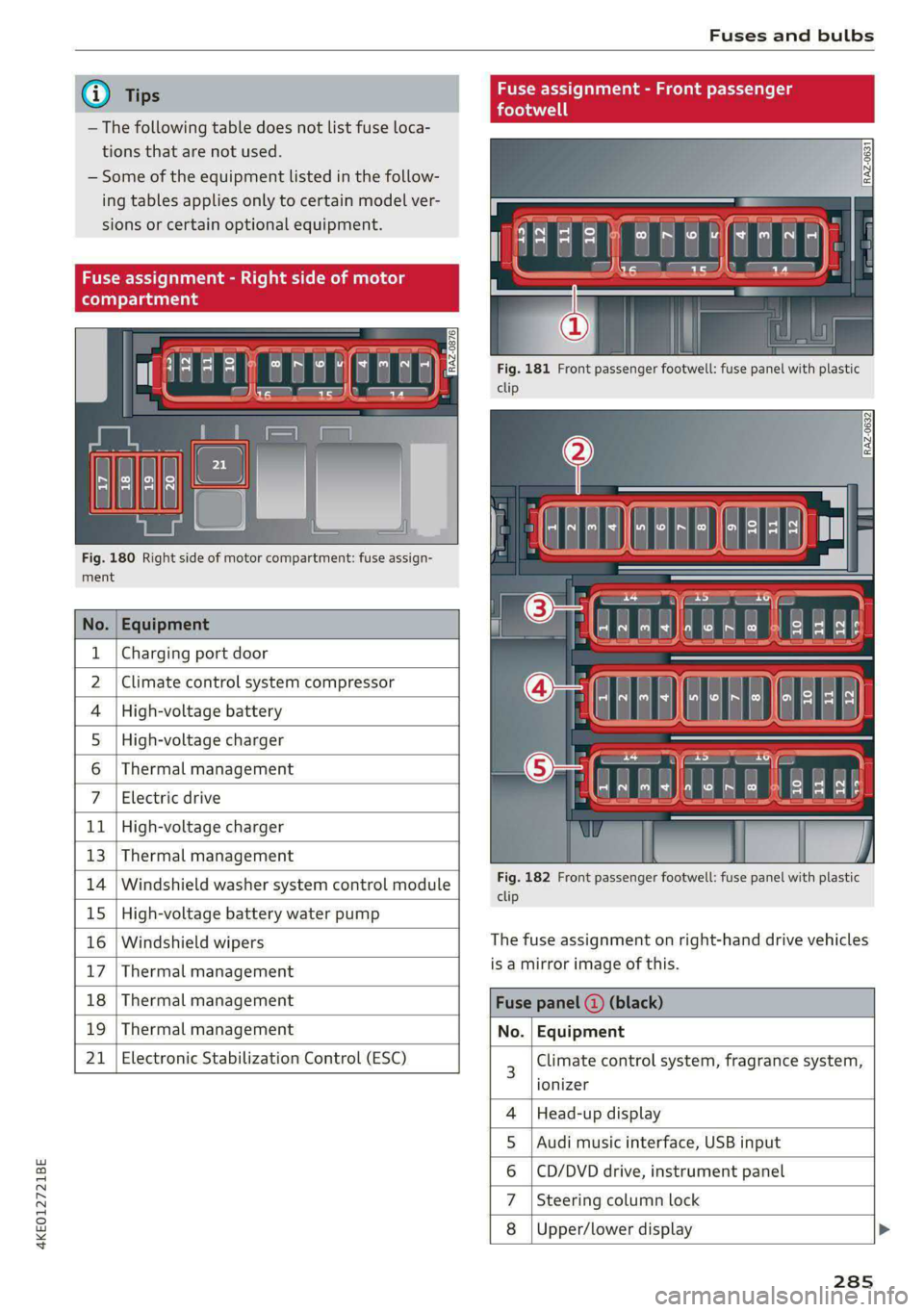
Fig. 180 Right side of motor compartment: fuse assign-
ment
| 33 a |
<| ce|
No. | Equipment
Charging port door
Climate control system compressor
High-voltage charger
Thermal management
1
2
4 |High-voltage battery
5
6
7 Electric drive
11 | High-voltage charger
13 | Thermal management
14 | Windshield washer system control module
15 | High-voltage battery water pump
16 | Windshield wipers
17 | Thermal management
nment - Front |
Fig. 181 Front passenger footwell: fuse panel with plastic
clip
Fig. 182 Front passenger footwell: fuse panel with plastic
clip
The fuse assignment on right-hand drive vehicles
is a mirror image of this.
18 | Thermal management Fuse panel
19 | Thermal management No. | Equipment
21 | Electronic Stabilization Control (ESC) 3 Climate control system, fragrance system,
lonizer
4 |Head-up display
5 |Audi music interface, USB input
6 |CD/DVD drive, instrument panel
7 |Steering column lock
8 |Upper/lower display
285
Page 289 of 316
4KE012721BE
Fuses and bulbs
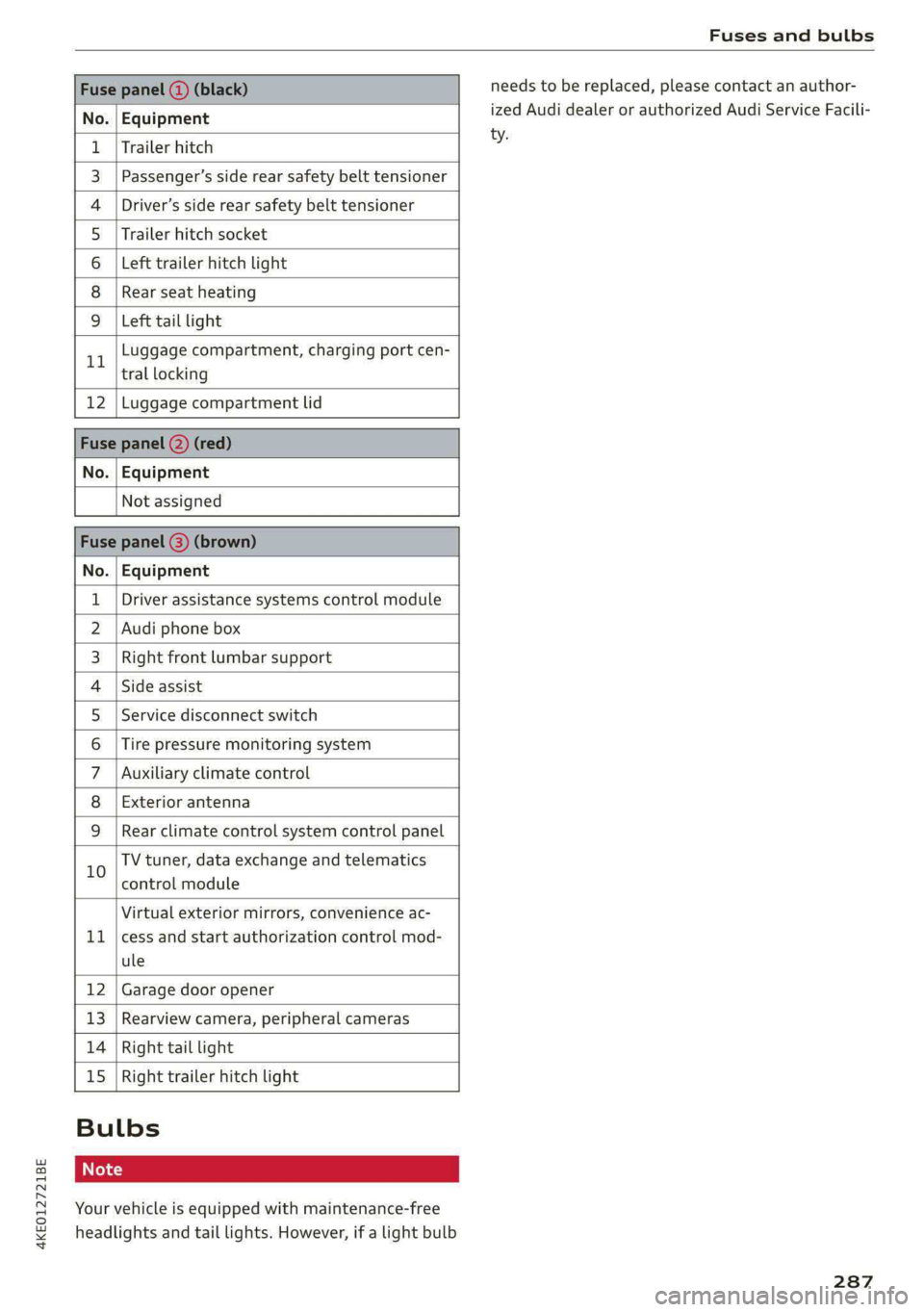
Fuse panel (3) (black)
No. Equipment
Trailer hitch
Passenger’s side rear safety belt tensioner
Driver’s side rear safety belt tensioner
Trailer hitch socket
Left trailer hitch light
Rear seat heating
Ola;
AD)
M/A]
W]e
Left tail light
Luggage compartment, charging port cen-
11 tral locking
12 | Luggage compartment lid
Fuse panel @) (red)
No. | Equipment
Not assigned
Fuse panel (8) (brown)
No. | Equipment
1 | Driver assistance systems control module
2 | Audi phone box
3 | Right front lumbar support
4 | Side assist
5 | Service disconnect switch
6 |Tire pressure monitoring system
7 |Auxiliary climate control
8 | Exterior antenna
9 | Rear climate control system control panel
Bb oO
TV tuner, data exchange and telematics
control module
LL
Virtual exterior mirrors, convenience ac-
cess and start authorization control mod-
ule
12 Garage door opener
13. Rearview camera, peripheral cameras
14 Right tail light
15
Right trailer hitch light
Bulbs
Your vehicle is equipped with maintenance-free
headlights and tail lights. However, if a light bulb
needs to be replaced, please contact an author-
ized Audi dealer or authorized Audi Service Facili-
ty.
287
Page 292 of 316

Data privacy
> To display additional information about the pri-
vacy settings and the associated symbols in the
status bar, press @ in the MMI.
Requirement: the ignition must be switched on.
Setting the maximum privacy settings
When the Activate privacy mode function is
switched on, the data connection is deactivated
or sending of data is restricted, but all safety-re-
lated, legal, or contractually required Audi con-
nect services remain activated. The majority of
the Audi connect services are deactivated.
When the function is switched off, the data con-
nection will be available in order to use Audi con-
nect services.
Adjusting individual privacy settings
In the MMI, you can adjust individually which da-
ta should be transmitted from the vehicle. If you
switch on a data category, the data will be trans-
mitted.
@) Note
You are responsible for all precautions taken
for data protection, anti-virus protection, and
protection against loss of data on mobile de-
vices that are used to access the Internet
through the Wi-Fi hotspot.
@ Tips
— The following interfaces are not affected by
changes to the privacy settings: Bluetooth,
Bluetooth Low Energy (BLE), Wi-Fi, Audi
smartphone interface (ASI), Near Field
Communication (NFC), charging communi-
cation (high-voltage system), Electronic Toll
Collect (ETC), On-Board Diagnostic System
(OBD) if equipped.
— If the maximum privacy settings are switch-
ed on, your vehicle may not receive security
updates and certificates for establishing an
encrypted connection, depending on vehicle
equipment. In order to receive security up-
dates and certificates, switch the maximum
privacy settings off for at least ten minutes
every six months. Make sure that your vehi-
cle is connected to the Internet. A symbol in
290
the MMI status bar indicates if the required
data connection is available > page 19.
— If the transmission of data is limited, it will
have the following effects on the exchange
of data for Audi connect services and emer-
gency calls, if equipped:
—The emergency call function will remain
available without restrictions and will con-
tinue to transmit data.
— If an online roadside assistance call is ini-
tiated, no data will be transmitted, but a
call will be made.
— If the Geofencing Alert, Speed Alert,
and/or Valet Alert services have been acti-
vated by the key user, then they will re-
main available without restrictions and
continue to transmit data.
— Stored destinations (favorites, last desti-
nations) are only stored in the vehicle. If
you allow transmission of data again,
these destinations will be synchronized via
the myAudi account. To prevent synchroni-
zation of destinations, delete the destina-
tions before you allow data to be trans-
mitted again.
Applies to: vehicles with Audi connect Infotainment
AUDI AG collects, uses, stores and shares your
personal information, such as contact data, vehi-
cle data, usage data, driving data and precise ge-
olocation, in order to provide you with the prod-
ucts and services you have purchased or request-
ed, and for a number of other purposes, for ex-
ample, to track quality issues, to performance
and safety, to meet our internal compliance or le-
gal requirements and to market to customers
and potential customers. For a more complete
list of the data we collect, how we use it and with
whom we share it, please visit your Audi nation-
al/sales region website at www.audi.com.
The collection, use and sharing may vary depend-
ing on your model and model year, your subscrip-
tion status, or the service offering. For example,
collection, use and sharing may vary between
Audi connect services, if you have designated a
key user, or if you are driving a model equipped >
Page 298 of 316
Accessories and technical changes
FCC Part 15.19
This device complies with part 15 of the FCC
Rules. Operation is subject to the following two
conditions: (1) This device may not cause harmful
interference, and (2) this device must accept any
interference received, including interference that
may cause undesired operation.
FCC Part 15.21
Changes or modifications not expressly approved
by the party responsible for compliance could
void the user's authority to operate the equip-
ment.
RSS-Gen
This device complies with Industry Canada’s Li-
cence-exempt RSSs. Operation is subject to the
following two conditions:
(1) This device may not cause interference; and
(2) This device must accept any interference, in-
cluding interference that may cause undesired
operation of the device.
Long Range Radar* - Additional declarations
of compliance
Radiofrequency radiation exposure Information:
This equipment complies with FCC and IC radia-
tion exposure limits set forth for an uncontrolled
environment. This equipment should be installed
and operated with minimum distance of 20 cm
between the radiator and your body. This trans-
mitter must not be co-located or operating in
conjunction with any other antenna or transmit-
ter.
Audi e-tron charging system* - Additional
conformity declarations and statements
This equipment has been tested and found to
comply with the limits for a Class B digital device,
pursuant to part 15 of the FCC Rules. These lim-
its are designed to provide reasonable protection
against harmful interference in a residential in-
stallation. This equipment generates, uses and
can radiate radio frequency energy and, if not in-
stalled and used in accordance with the instruc-
tions, may cause harmful interference to radio
communications. However, there is no guarantee
that interference will not occur in a particular in-
296
stallation. If this equipment does cause harmful
interference to radio or television reception,
which can be determined by turning the equip-
ment off and on, the user is encouraged to try to
correct the interference by one or more of the
following measures:
— Reorient or relocate the receiving antenna.
— Increase the separation between the equip-
ment and receiver.
— Connect the equipment into an outlet on a cir-
cuit different from that to which the receiver is
connected.
— Consult the dealer or an experienced radio/TV
technician for help.
This Class B digital apparatus complies with
Canadian ICES-003.
Integrated Toll Module* - FCC (USA) and
ISED (Canada)
This device complies with FCC rules part 90 and
Innovation, Science, and Economic Development
Canada RSS-137. Operation is subject to the fol-
lowing two conditions: (1) This device may not
cause harmful interference, and (2) This device
must accept any interference that may be re-
ceived including interference that may cause un-
desired operation. WARNING: The transmitter
has been tested and complies with FCC and ISED
rules. Changes or modifications not expressly ap-
proved by the party responsible for compliance
could void the user’s authority to operate the de-
vice.
This equipment complies with FCC and ISED radi-
ation exposure limits set forth for an uncontrol-
led environment. End Users must follow the spe-
cific operating instructions for satisfying RF ex-
posure compliance. This transmitter must be at
least 20 cm from the user and must not be co-o-
cated or operating in conjunction with any other
antenna or transmitter.
Page 301 of 316

4KE012721BE
Index
A
A/C cooling mode..........-. eee eee eee ee
Accelerator pedal.............--0000 000
also refer to Accelerator pedal...........
AccessorieS ...... 0.0000 c ee eee eee 75,
Active lane assist
refer to Lane departure warning.........
refer to Lane guidance................
Adaptive cruise assist................00.
Cleaning sensors... ... 0... cee eee eee
Predictive control....................
Adaptive cruise control
refer to Adaptive cruise assist..........
Adaptive dampers « wea sv saws ss meme : 2 oe
Adjusting the air distribution.............
Adjusting the brightness.................
Adjusting the sound..............-..00-
Adjusting the temperature...............
Adjusting the vents ............0eceee eee
Adjusting the volume...............00005
Adjusting the volume (announcements) .. . .
Adjusting the welcome sound............
Airbag SySteM « » seme s eeu s = oem et Sa Eee
Air suspension..............0..00.000.
Alarm system
refer to Anti-theft alarm system..........
Alignment pin (changing the wheel).......
All-weather lights .............. eee eee ee
Allseason tires. ..... 00. .2.000200200005
All wheel drive
FOfEF TO QUAL eis << scces cs wees ce eee
Amazon Alexa integration
Media playback.............--.0-+-05
QPeration « anes «6 cases © o cusses » x ceotane ¥ # ee¥ve
AMI
refer to Audi music interface...........
Android Auto
refer to Audi smartphone interface......
Anti-freeze
Windshield washer system.............
Anti-lock braking system .............00.
Anti-Slip Regulation.................04.
Anti-theft alarm system ..........--..00--
Anti-theft wheel bolts..................
Apple CarPlay
refer to Audi smartphone interface...... 234
Aspect ratio (video) ..........-...-. 228, 230
ASR
refer to Anti-Slip Regulation............ 104
Audi adaptive light..................005. 45
Audi connect
referto CONNECt. . .c..s cc ives esas ae ss 187
Audi connect Remote & Control
refer to Vehicle control services......... 189
Audidrive'selecticn, « + sau oz scum « x newe yoo 101
Audi e-tron compact charging system..... 117
Adjusting the charging power level...... 118
Changing or attaching the power cable... 122
S@CUTING . 6... eee eee eee eee 122
Status and malfunction indicators....... 118
Audi musicinterface...........000 0c ee 225
AUGIG TINGS css = ¢ cans & ¢ eee 5s eee £ eee 226
Audi phone box. ..........00-.00 eevee 175
Audi presens@... 2.0... 0. c cece eee eee 154
M@SSAQES vcers « 5 ery § 2 eae Fe ERGY Fd eee 158
Audi pre sense front..............eeeee 155
Audi side assist
refer to Side assist............--.-+--5 158
Audi smartphone interface.............. 234
Legalinformation ¢ cscs os wae ae ewes «2 238
Audi virtual cockpit
refer to Instrument cluster.............. 11
AUTO
Automatic headlights................0- 4S
Climate control system..............0-5 83
Auto Lock (central locking) ............... 29
Automatic climate control system
refer to Climate control system.......... 82
Automatic luggage compartment lid.... 37,38
Automatic wipe/wash system............. 51
Auxiliary climate control................. 85
Average consumption.............00000. 14
Average speed .... 2.0... . cee eee eee eee 14
B
Bag hooks ......... 00 eee eee eee eee 76
Battery
Charge level display.................0.. 11
Charging (12 Volt vehicle battery)....... 246
High-voltage battery.................. 107
Page 302 of 316

Index
Vehicle battery (12 Volt)............... 245
Winter operation (12 Volt vehicle battery) . 245
Battery (vehicle)
refer to High-voltage battery........... 107
Blinds
refer to Panoramic glass roof............ 41
BIOCK fOUtE soe 2 » nome © x eee x x tee e + SeeE 206
BIOWER's + sas < @ acne 2 5 SRR 7 8 ER TS HOR FS 83
Bluetooth
Audio player « saws s = sews so sees ss eee ae 223
Connecting acell phone............... 173
Deleting adevice................0000- 238
DEVICE OVERVIEW’: cues & = sqeays + 2 ease & 2 eee 237
Disconnecting a device................ 238
Displaying profiles.................00. 238
Searching foradevice................. 238
Selecting adevice « wii se sna ae www ses 238
Specifying a favorite................0. 238
Boost fUmCtion wisn: 0 « sownine a » examen © 0 ageiore ¥ 0 6 91
Brake fluid
Checking the brake fluid level........... 243
Brakes... 2... eee eee eee 94
Brake fluid: « « seas s ¢ wows se eews oo eee 243
Emergency braking function............. 97
Le (0) 98
New brake pads..............2.-0 ee eee 95
Break-in security feature. ............0 eee 32
Breaking in
New brake pads..........--..----e eee 95
INCWAINESY: 2 owners « s wows ov ised @ ener oo 255
Browser
refer to Mediacenter...............04. 227
Bulb:ireplacementiin:. + ¢ csicoa vo ecneana so eosuene oo 287
Business. addressis ¢ vss so mean a 3 man x oo 206
Cc
California Proposition 65 Warning........ 240
Battery specific........... cee eee eee ee 245
CAlLlist,. sacsnis x 2 ommnes + cree & o mean = ema 177
CaMENASiics: 2 eee sv omenE © oso © 8 eNO a 128
Locations ......... ee eee eee eee eee 129
Capacities
Washer fluid reservoir................. 298
Cargo floor. .... 0... eee eee eee eee 80
Cargo mat...... 0... eee eee 80
CArQOMets, « 6 wses oo ieee © casino even & amon 79
300
Car KO Yicniie 2 wesevae 2 weaves oo ease © aseuee © ¥ emeee 33
Car phone
Serial number (IMEI) .................. 184
SWItCHING Off sazc s aes co eee se Gees BS 183
Carwash... . cece eee eee eee eee 268
Cell phone
refer to Telephone...........-..-++-5- 173
Cell phone compartment
refer to Audi phone box............... 175
Central
lockingiss « 22s x + eyes +e eee se ee 29
INUEOHLOGK Ss « cccries « arexsuowe « iranawe a 8 ese te & omaus 29
Convenience key.........--.00 eee eee 34
Convenience opening and closing......... 40
Luggage compartment lid............... 36
Mechanically unlocking and locking....... 32
MBSSAGES « sexs ¢ » meme 5 eae v ¥ eS < Be 31
Remote control: keysis & 6 ssues se smn 6 6 aero 34
Setting... 20... cece eee eee 30
Vehicle key seas = = seme = ¢ wees to eee ty ee 34
Central locking switch...............200. 31
Certification......................000. 295
Changing light bulbs................... 287
Charging
refer to Power sourceS.........--..00-0- 75
Charging clip
refer to Wall mount clip.............0 122
Charging display cewe s x ems 5 s mes xo ca F 113
Charging the battery (mobile devices). 175, 225
Charging time.................00. 000 109
Child safety lock
Climate control system controls inthe rear. 39
POWEP WIND OWSimcica & 2 since wo coausis vo dasa os 39
Rear doors... ..... eee cee eee 39
Child safety seats..... 0.0.0... ee eee eee 69
Securing to the top tether anchor........ 73
Securing with a safety belt.............. 72
Securing with LATCH). « «cess 6 scwcene @ 0 vesvene 71
CleANIING « sesuass x & smeres wo scucens & seawers ¥ w were 268
Cleaning Alcantara......... cece eee eee 271
Cleaning artificial leather............0.. 271,
Cleaning carbon components........ 270; 271
Cleaning controls...................0-. 271
Cleaning decorative parts/trim........... 270
Cleaning plastic parts.................. 270
Cleaning textiles.................0000. 271
Climate control system .............0 00 82
Page 305 of 316
4KE012721BE
Index
FRAQTANGCC bse 2s cwcsue 0 2 comewas w 6 estes ¥ & ssoens 84, 85
Free text search
Media... .... 2. cece eee eee eee eee 230
RediGisu « 3 savas @ sien & E RaUR ¢ E ReUOR £ Be 216
also refer to Intelligent search.......... 198
Freeze protection
GOOLAN Brees so amsias a x cess sv emecene ow nena a 242
Fronticenter armrest « sso ss see os wees oo 59
Front collision warning
refer to Audi pre sense front............ 154
Front passenger’s seat adjustment
Front... 0. cece ee eee 59
ROGE exces ¢ = sqeys & 2 teams & 2 aes xo Ete x Be 58
Front wiper blades
CHANGING’: «seas sw ewes ee tee ee oe 52
Cleaning... 0... cece eee ee eee eee eee 52
G
Garage door opener.............--00000- 41
Garment HOOKS nie so aussie 6 a suasnee ox annie «a oe 76
GAWR
refer to Gross Axle Weight Rating (GAWR) . 298
(Cl 90
Glossary of tire and loading terminology... 251
Glove compartment..............-00000- 76
Gross Axle Weight Rating (GAWR)........ 298
Gross Vehicle Weight Rating (GVWR)...... 298
GVWR
refer to Gross Vehicle Weight
Rating (GVWR)............. cece eee 298
H
Handsfree... . 2... cee eee eee 174
Hands.FreetProfile:. sence «0 wsisase « + canoe 0 6 174
Head-up display
Adjusting... 2.0.0... e cece eee 23
Adjusting the brightness................ 49
Operating « « sss 2 2 secs oo meme o wamN & ¥ BHR 23
Headlight range control................0. 45
Headlights
GLEAMING ss seswns 6 & sumsins aw suwsere @ & somvens @ & ame 269
Headlight range control................ 45
Washer syStert x « swe s « mews 2 2 eke 2 2 ee 51
Head restraints
Adjusting... .... 0. cee eee eee 60
Removing and installing................ 60
Heated rear window............-.000000e 84
Heated steering wheel.............00000e 85
Heating......... 0... c eee eee eee eee 82
HFP
refer to Hands Free Profile............. 173
High-voltage battery................005 107
Advanced charging settings............ 114
Audi e-tron compact charging system.... 117
Charging............-. eee eee eee 108,111
Charging display on the vehicle......... 113
Charging equipment.................- 115
Charging methods...............-.05. 108
Charging ports on the vehicle........... 108
GChargingtimMeter « sewn a 6 wenn sw ee ooo 109
Connecting the charging cable.......... 111
Messages while driving..............-. 115
Not running for long periods of time..... 110
Opening the charging port door......... 111
QUICK Charging as = sees ss eees ts ews eo: 108
Setting the charging target............ 113
SELCIMGCME CHET. « ansvnce ou annsaue » w arnimre & we 114
Transporting charging equipment....... 117
High-voltage system.............00 00 ee 107
High beams
High beam assistant..............-.... 46
Highway lights..............0...0000005 4S
Hill descent assist................00000. 99
Hill hold assist... 0.0... cc eee ee eee 90
HOld.assiSti. « » ansces 2 a seers + m cnneans a a sxamnie «ox 97
also refer to Hold assist..........-...-. 97
Hold Assist
refer to Hold assist & esas ce caws ee pawn ee 97
Home
refer to Home address................ 206
Homeraddress’: sy cwon + 2 gow 3 game w e eam 206
HomeLink
refer to Garage door opener............. 41
HOMe@ISErEON:: « & seems oo setae ow ecco won oo 16
HOMN « ¢ sees 2 & ees os swe oo eee es eee Be 6
Hotspot
MO PEP TONNER: 2 x seawee oo snenewe i amaestes wavs 192
303
Page 306 of 316

Index
I
Idle
refer tO'Gears « s waws so wows 9 i oes a ce ee 90
Ignition
Switching on and off..................- 88
Imbalance (wheels) ...........5....0005 257
Immobilizer
refer to Electronic immobilizer........... 33
Indicator lights 2 wen 2s wees a news ov wee ove 7
Inspection interval............--.2+--5- 246
Instrument cluster.............2--000005 11
‘Adjusting the layout ees «sccm ew were « v oe 12
Cleaning... . 6... cece eee eee eee 270
FailUfes : seme : coe & ¢ GaGH s 2 Bem sD eee 11
Motorcodes: « s ses + eosnw + wenn ae meee a x 239
On-board computer..............2..04. 14
Operating: ; secs zs Hees so ene oo Hees so 12
Personal-profile « wscccc ao amen we eve =o mona 11
Service interval display................ 246
Software information................. 239
SWitchitig tabS's « wawy s ¢ sevas « ¢ soem « 2 eae 12
Switching the view...............-.000- 12
Vehicle functions ......... 0.0 eee eee eee 14
Version information..............0005 239
Instrument illumination................- 49
Integrated assistance. ......... 0. cee eee 17
Integrated Toll Module................. 137
Intelligent search
NaViGatiGniies + s esau x x ween 2 mewn vs Ree x 198
Interference-Causing Equipment Standard
QIGES)|s swceine oo weemces w o seavwms 2 a mvewe & a owe oo 296
Interior lighting
Intermittent mode (windshield wipers) ..... 51
International travel...............00005 192
Internet
refer to connect s = » 28: s2e5 ss een ey 187
Internet radio
refer to Online radio...............04. 218
Intersection assistant...............04. 161
TONIZEMs = wae & ¢ sete & eee be ee be ee 84
iPhone
refer to Audi music interface........... 225
304
J
Jump starting....................0000. 281
K
Key. eee eee eee 29, 33
Convenience opening and closing......... 40
Key replacement... . 00... ccs eee ee eee 33
Mechanical key............. 0000002000 33
NOt reCOGnizéd « = scias ¢ = seus ts same oe eas 89
PANIG KO Yi 2 x cscwcse 2 2 aecmtus o 0 cocoa @ 2 amances we 33
Replacing the battery.................. 35
Unlocking and locking............-...-- 34
Vehicle code « seins s x sens & 2 sees ¥ 5 wae 2 es 33
K@Y USED ic «© ees so eee ss Howe go ews ee Ges 28
Kick-COWiis: < 2 axan x x ere o 2 meme £ eee 2 oe 91
L
Lane assist
refer to Lane departure warning......... 153
refer to Lane guidance................ 153
Lane departure warning................. 153
Cleaning the camera area.............. 269
Lane guidance................--00 00 ee 146
LASERSEANME ex. 5 cscs + 4 essen « 9 aesten « oramen 128
Cleaning....... 6... cece eee eee eee 270
LATCH (securing child safety seats)......... 71
Launch Control.............0 0.00 e eee eee 91
Leather care and cleaning............... 271
Legal information
License subscriptions..............00. 238
Software information..............005 238
Software licemsesies: «sien ss mani ie x aware 2 238
Version information...............05- 238
License plate bracket...............0000. 294
Lifting points (vehicle jack).............. 278
Light/rain sensor
Headlights ....... 0... 0. cece eee ee eee 45
Intermittent mode (windshield wipers).... 51
Lighting
EXteriGr's « gsc « + awom s x ewe 4 2 rere so 45
TINGCHIONs scence » © caameue 5 © oneswue © 0 nae Bw Re © 48
LIQHtS:s & coccens v + cosnene ve accom we mene ow am © 45
Lights on the charging port
refer to Charging display............... 113