brake sensor AUDI E-TRON 2021 User Guide
[x] Cancel search | Manufacturer: AUDI, Model Year: 2021, Model line: E-TRON, Model: AUDI E-TRON 2021Pages: 308, PDF Size: 83.91 MB
Page 167 of 308
4KE012721BF
Driver assistance
— Lowers the volume of the Infotainment system
— Tugs on the safety belt
— Activates the brakes
— The emergency flashers are activated
— Audi pre sense preemptive safety measures are
triggered > page 157
— The brakes are applied until the vehicle is sta-
tionary
As soon as the vehicle comes to a full stop, the
vehicle prepares for the vehicle passengers to be
rescued. The parking brake is set, “P” gear is en-
gaged, the doors are unlocked, and the interior
lighting is activated. The emergency call) will be
started if necessary once the vehicle has been
stationary
for several seconds.
Display
If /\ is displayed for example, the emergency
assist is active.
Overriding the emergency assist
You can override emergency assist as follows
>A:
— Move the steering wheel. Or
— Press the brake pedal. Or
— Press the accelerator pedal distinctly.
When stationary, you can end the emergency as-
sist by leaving the "P" position or releasing the
parking brake > page 98.
Switching the emergency assist on and off
The system can be switched on and off in the
MMI & page 132.
Messages
rg or Ey is displayed when there is a malfunc-
tion, the emergency assist functions may be un-
available or may be limited.
A message that indicates the cause and possible
solution may appear with some displays. The
weather conditions may be too poor or a sensor
may be covered. Clean the area in front of the
sensors > page 131 and try to turn the system on
again later.
If the malfunction remains, drive to an author-
ized Audi dealer or authorized Audi Service Facili-
ty immediately to have the malfunction correct-
ed.
A WARNING
— Observe the safety precautions and note the
limits of the assist systems, sensors, and
cameras > page 129.
— The emergency assist is an assist system
that should only be used in cases of emer-
gency
to take over control of the vehicle and
bring it to a stop.
) This function is not available in every market and on all ve-
hicle equipment levels.
(i) Tips
— Depending on the severity of the detected
situation, not all safety measures will be ini-
tiated. Certain functions can be adjusted or
skipped if necessary.
— If the emergency assist was triggered, it will
only be available again after a brief period.
165
Page 169 of 308
4KE012721BF
Parking and maneuvering
Automatic deactivation
The distance indicator for the parking aid plus
will deactivate automatically when driving for-
ward faster than 6 mph (10 km/h).
ZA\ WARNING
Observe the safety precautions and note the
limits of the assist systems, sensors, and
cameras > page 129.
@ Note
Keep enough distance from the curb to avoid
damage to the rims.
@ Tips
— If the parking aid is deactivated, it can only
be reactivated automatically when one of
the following conditions is met:
— The vehicle speed exceeds 6 mph
(10 km/h)
— The ignition is switched off and back on
again
— The parking brake is set and then released
— The “P” gear is engaged and released
again
Applies to: vehicles with parking aid plus
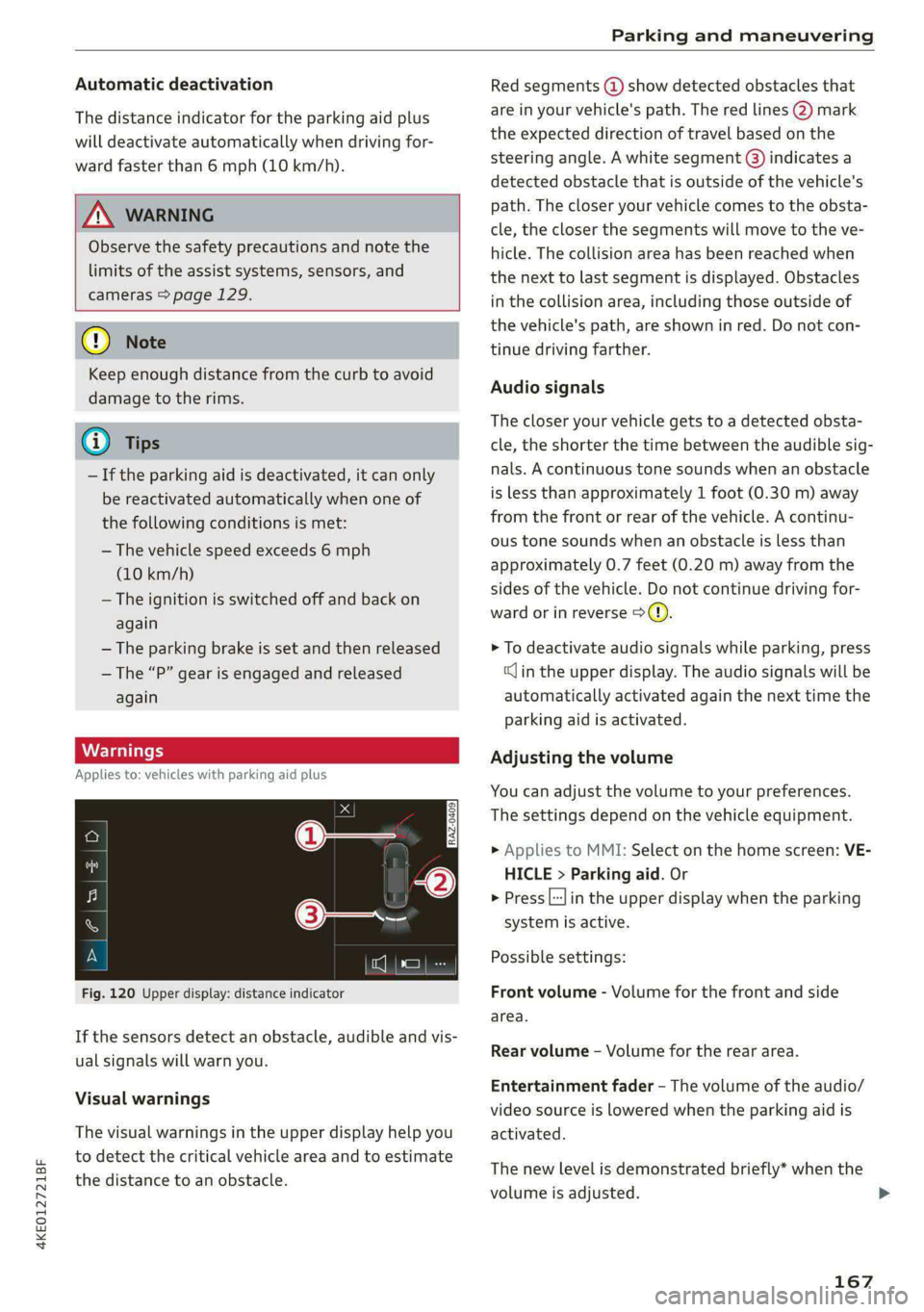
Fig. 120 Upper display: distance indicator
If the sensors detect an obstacle, audible and vis-
ual signals will warn you.
Visual warnings
The visual warnings in the upper display help you
to detect the critical vehicle area and to estimate
the distance to an obstacle.
Red segments (@) show detected obstacles that
are in your vehicle's path. The red lines 2) mark
the expected direction of travel based on the
steering angle. A white segment (8) indicates a
detected obstacle that is outside of the vehicle's
path. The closer your vehicle comes to the obsta-
cle, the closer the segments will move to the ve-
hicle. The collision area has been reached when
the next to last segment is displayed. Obstacles
in the collision area, including those outside of
the vehicle's path, are shown in red. Do not con-
tinue driving farther.
Audio signals
The closer your vehicle gets to a detected obsta-
cle, the shorter the time between the audible sig-
nals. A continuous tone sounds when an obstacle
is less than approximately 1 foot (0.30 m) away
from the front or rear of the vehicle. A continu-
ous tone sounds when an obstacle is less than
approximately 0.7 feet (0.20 m) away from the
sides of the vehicle. Do not continue driving for-
ward or in reverse >).
> To deactivate audio signals while parking, press
(Jin the upper display. The audio signals will be
automatically activated again the next time the
parking aid is activated.
Adjusting the volume
You can adjust the volume to your preferences.
The settings depend on the vehicle equipment.
> Applies to MMI: Select on the home screen: VE-
HICLE > Parking aid. Or
> Press|] in the upper display when the parking
system is active.
Possible settings:
Front volume - Volume for the front and side
area.
Rear volume - Volume for the rear area.
Entertainment fader - The volume of the audio/
video source is lowered when the parking aid is
activated.
The new level is demonstrated briefly* when the
volume is adjusted. >
167
Page 175 of 308
4KE012721BF
Parking and maneuvering
Rear cross-traffic assist
Applies to: vehicles with rear cross-traffic assist
3 s
&
= st a
Fig. 127 Upper display: rear cross-traffic assist display
General information
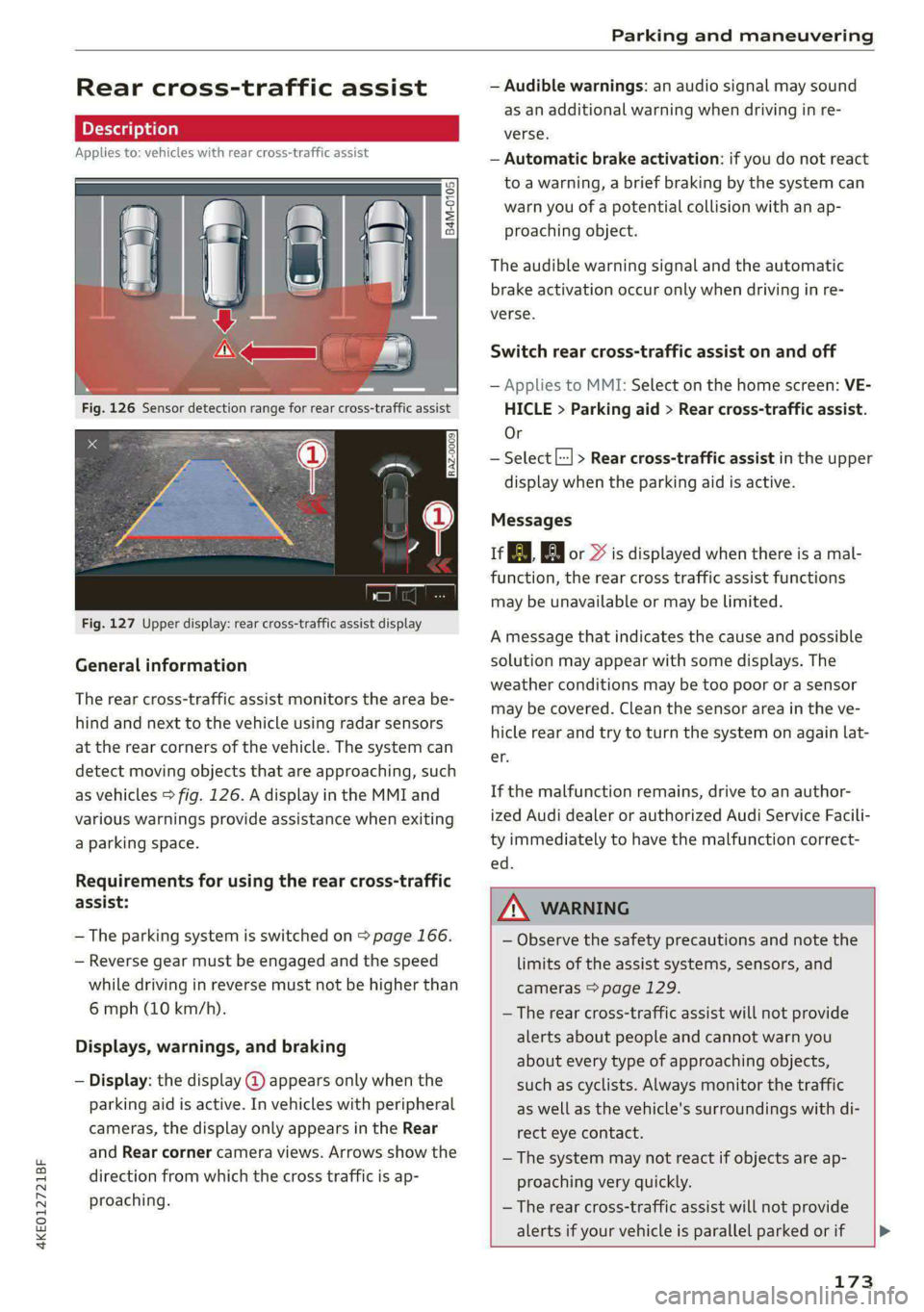
The rear cross-traffic assist monitors the area be-
hind and next to the vehicle using radar sensors
at the rear corners of the vehicle. The system can
detect moving objects that are approaching, such
as vehicles > fig. 126. A display in the MMI and
various warnings provide assistance when exiting
a parking space.
Requirements for using the rear cross-traffic
assist:
— The parking system is switched on > page 166.
— Reverse gear must be engaged and the speed
while driving in reverse must not be higher than
6 mph (10 km/h).
Displays, warnings, and braking
— Display: the display @ appears only when the
parking aid is active. In vehicles with peripheral
cameras, the display only appears in the Rear
and Rear corner camera views. Arrows show the
direction from which the cross traffic is ap-
proaching.
— Audible warnings: an audio signal may sound
as an additional warning when driving in re-
verse.
— Automatic brake activation: if you do not react
to a warning, a brief braking by the system can
warn you of a potential collision with an ap-
proaching object.
The audible warning signal and the automatic
brake activation occur only when driving in re-
verse.
Switch rear cross-traffic assist on and off
— Applies to MMI: Select on the home screen: VE-
HICLE > Parking aid > Rear cross-traffic assist.
Or
— Select |--| > Rear cross-traffic assist in the upper
display when the parking aid is active.
Messages
re or >% is displayed when there is a mal-
function, the rear cross traffic assist functions
may be unavailable or may be limited.
A message that indicates the cause and possible
solution may appear with some displays. The
weather conditions may be too poor or a sensor
may be covered. Clean the sensor area in the ve-
hicle rear and try to turn the system on again lat-
er.
If the malfunction remains, drive to an author-
ized Audi dealer or authorized Audi Service Facili-
ty immediately to have the malfunction correct-
— Observe the safety precautions and note the
limits of the assist systems, sensors, and
cameras > page 129.
— The rear cross-traffic assist will not provide
alerts about people and cannot warn you
about every type of approaching objects,
such as cyclists. Always monitor the traffic
as well as the vehicle's surroundings with di-
rect eye contact.
— The system may not react if objects are ap-
proaching very quickly.
— The rear cross-traffic assist will not provide
alerts if your vehicle is parallel parked or if
173
Page 176 of 308
Parking and maneuvering
your vehicle is pulled too far into the park-
ing space so that it is hidden by adjacent
vehicles.
iG) Tips
— Once an automatic brake activation occurs,
the system cannot initiate another activa-
tion for several seconds.
— System functions may not be available if the
ESC is limited or switched off, or if there is a
malfunction.
— If there is an acoustic warning signal from
the rear cross-traffic assist, then the park-
ing aid may not warn you of detected obsta-
cles under certain circumstances.
— The system is not available when the vehicle
detects that you are towing a trailer. There
is no guarantee the functions will be deacti-
vated when using a retrofitted trailer hitch.
Do not use these functions when towing a
trailer.
— The coverage areas of the sensors > fig. 126
are diagrams and do not represent a true-
to-scale image of the sensor ranges.
— The system complies with United States FCC
regulations and ISED regulations
> page 288.
174
Page 264 of 308
Care and cleaning
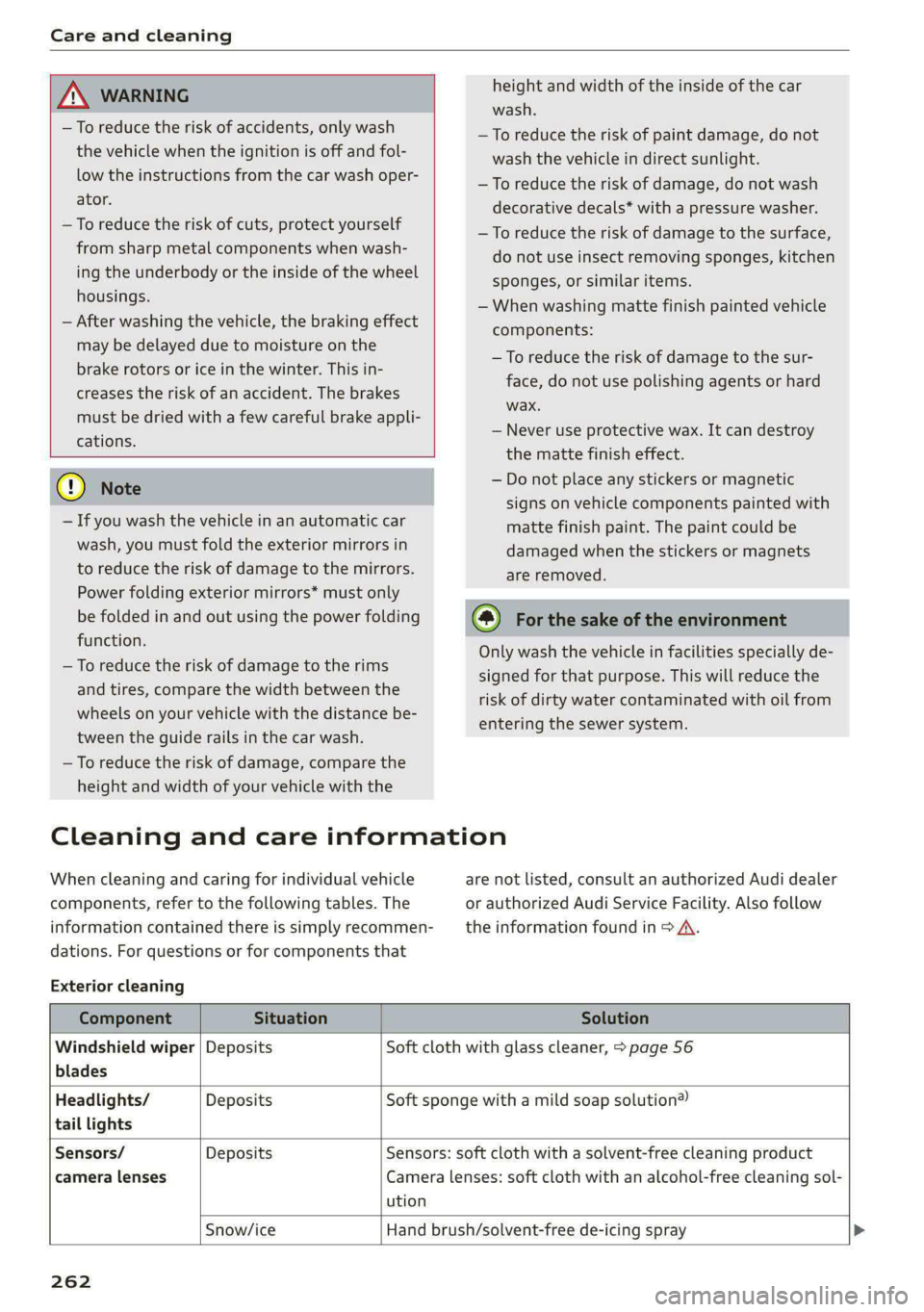
height and width of the inside of the car
wash.
ZA\ WARNING
—To reduce the risk of accidents, only wash
the vehicle when the ignition is off and fol-
low the instructions from the car wash oper-
ator.
—To reduce the risk of cuts, protect yourself
from sharp metal components when wash-
ing the underbody or the inside of the wheel
housings.
— After washing the vehicle, the braking effect
may be delayed due to moisture on the
brake rotors or ice in the winter. This in-
creases the risk of an accident. The brakes
must be dried with a few careful brake appli-
cations.
—To reduce the risk of paint damage, do not
wash the vehicle in direct sunlight.
—To reduce the risk of damage, do not wash
decorative decals* with a pressure washer.
—To reduce the risk of damage to the surface,
do not use insect removing sponges, kitchen
sponges, or similar items.
— When washing matte finish painted vehicle
components:
— To reduce the risk of damage to the sur-
face, do not use polishing agents or hard
wax.
— Never use protective wax. It can destroy
the matte finish effect.
@) Note — Do not place any stickers or magnetic
signs on vehicle components painted with
matte finish paint. The paint could be
damaged when the stickers or magnets
are removed.
— If you wash the vehicle in an automatic car
wash, you must fold the exterior mirrors in
to reduce the risk of damage to the mirrors.
Power folding exterior mirrors* must only
be folded in and out using the power folding @) For the sake of the environment
function.
—To reduce the risk of damage to the rims
and tires, compare the width between the
wheels on your vehicle with the distance be-
tween the guide rails in the car wash.
—To reduce the risk of damage, compare the
height and width of your vehicle with the
Only wash the vehicle in facilities specially de-
signed for that purpose. This will reduce the
risk of dirty water contaminated with oil from
entering the sewer system.
Cleaning and care information
When cleaning and caring for individual vehicle are not listed, consult an authorized Audi dealer
components, refer to the following tables. The or authorized Audi Service Facility. Also follow
information contained there is simply recommen- __ the information found in > A.
dations. For questions or for components that
Exterior cleaning
Component Situation Solution
Windshield wiper | Deposits Soft cloth with glass cleaner, > page 56
blades
Headlights/ Deposits Soft sponge with a mild soap solution®
tail lights
Sensors/ Deposits Sensors: soft cloth with a solvent-free cleaning product
camera lenses Camera lenses: soft cloth with an alcohol-free cleaning sol-
ution
Snow/ice Hand brush/solvent-free de-icing spray >
262
Page 281 of 308
4KE012721BF
Fuses and bulbs
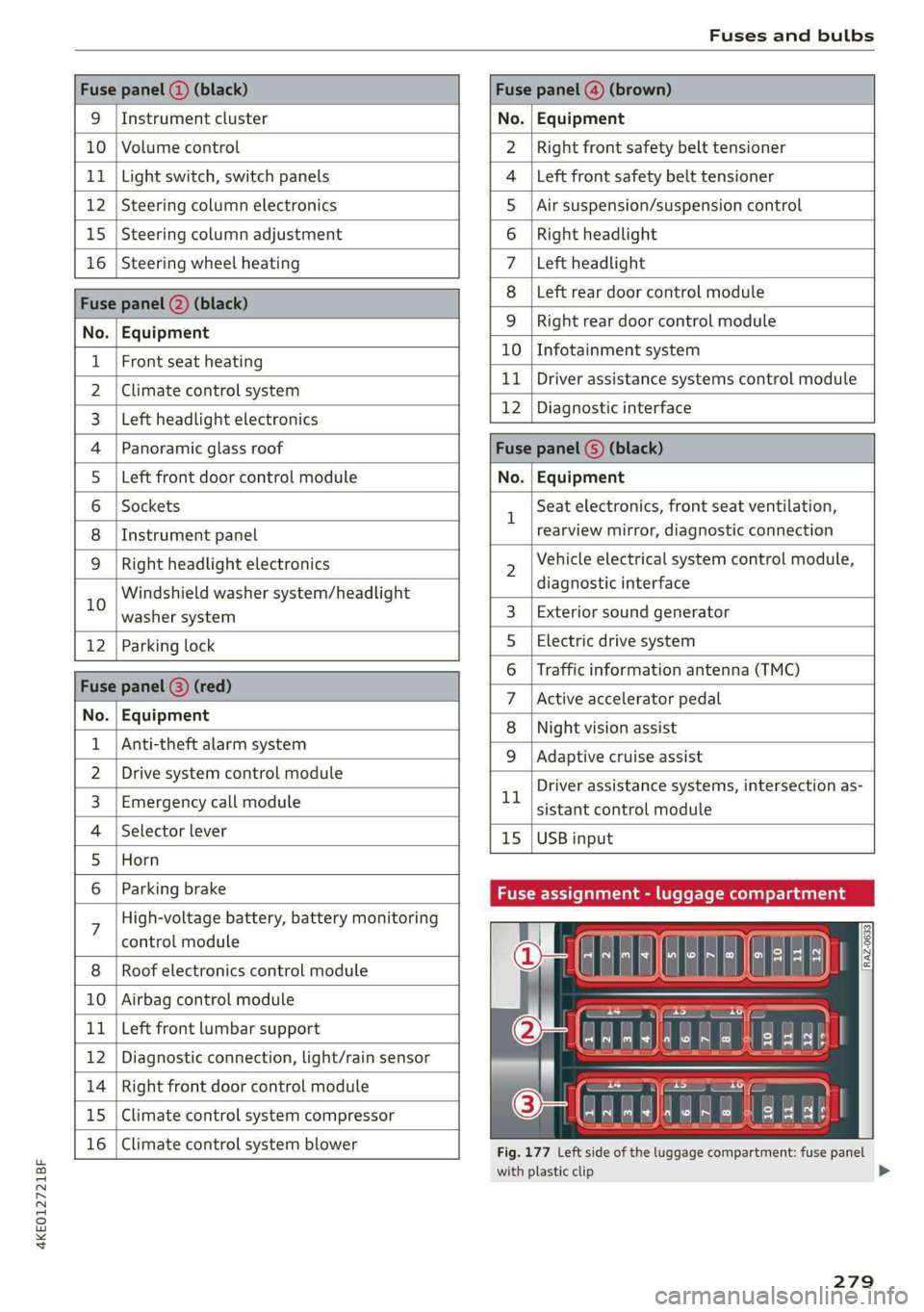
Fuse panel (2) (black) Fuse panel (4) (brown)
9 |Instrument cluster No. | Equipment
10 | Volume control Right front safety belt tensioner
11 | Light switch, switch panels Left front safety belt tensioner
12 | Steering column electronics Air suspension/suspension control
15 |Steering column adjustment Right headlight
16 | Steering wheel heating Left headlight
Fuse panel 2) (black)
Left rear door control module
No. | Equipment
WOl/@OIN|
A)
M|AILN
Right rear door control module
10 | Infotainment system
1 |Front seat heating - -
> |Cimateconerl system 11 Exe Sealealite systems control module
3 |Left headlight electronics 12 | Diagnostic interface
4 |Panoramic glass roof Fuse panel (5) (black)
5 |Left front door control module No. | Equipment
6 | Sockets 1 Seat electronics, front seat ventilation,
8 | Instrument panel rearview mirror, diagnostic connection
9 | Right headlight electronics 2 Vehicle electrical system control module,
Windshield washer system/headlight diagnostic interface
10 washer system 3 | Exterior sound generator
12 | Parking lock 5 | Electric drive system
raven 6 | Traffic information antenna (TMC)
Fuse panel (8) (re
ueeiP eed) 7 |Active accelerator pedal
No. | Equi it
o. atipmen 8 | Night vision assist
1 |Anti-theft alarm system - - -
9 |Adaptive cruise assist
2 |Drive system control module , - . -
ll Driver assistance systems, intersection as-
3_| Emergency call module sistant control module
4 | Selector lever 15 |USB input
5 |Horn
6 | Parking brake Fuse assignment - luggage compa
7 High-voltage battery, battery monitoring
control module
8 | Roof electronics control module
10 | Airbag control module
11 | Left front lumbar support
12 | Diagnostic connection, light/rain sensor
14 | Right front door control module
15 | Climate control system compressor
16 | Climate control system blower
5 iF
| | eo ed oO
' rR mae Y= ae
aR EE
Fig. 177 Left side of the luggage compartment: fuse panel
with plastic clip
279
>
Page 301 of 308
4KE012721BF
Natural leather care and cleaning......... 264
Navigation asco ss scone a i wan oe wae 6 eeu 194
Better route. ........... 2c cece eee 204
CalliGiss + = xews 3 ees 3 FRE FERRO oF; 197
Changing the scale................... 197
also refertoMap...... cece eee eee 199
Navigation database
Version information.................. 231
Navigation (instrument cluster).......... 200
Net... cece eee eee 79
NTS Ao wens a crn 4 x imei x cn wm ke 287
Nightivision:assist's wave ss sewers oo seas os oe 137
Cleaning the camera.............-.0.. 262
Notification center.........0.ceeeee eee 20
Oo
OGOMIELCR wacewe 1 a censsone = a cansene » v sunoane © © venzame 4 13
Resetting............0..0 000.02 eee ee 13
Office address
refer to Business address.............. 201
Offroad
refer to Offroad driving................ 100
Offroad
OrivinG)s « « ews « « mews « x eeu ae caw 100
OFF (climate control system) .............. 85
On-board computer.............e eee eae 14
On Board Diagnostic System (OBD)........ 281
Online map
refer to Satellite map............ eee ee 202
Online radio............ 0.0.00... eee 211
also refer to Online radio.......... 211,212
Online roadside assistance.............. 192
Online services
refer tosconnect)s « sexs «enews vo ees oo oe 186
Online system update.................. 229
Online traffic information............... 204
OBGNiOG)s « = wens « 5 eas & BaeS.8 & aver Fs eR 32
Automatic luggage compartment lid...... 40
Convenience opening..............0000- 44
Hood... 0... eee 234
Luggage compartment lid............... 40
Luggage compartment lid with foot motion . 41
Panoramic glass roof.................-. 44
Sunshade (tOOT)'s « ses « x xem = 2 eee so oe 44
WWAAGOWS -« swccsue x sconce t 1 eames 7 eneomme & 7 vee 43
Opening and closing
refer to Unlocking and locking........ 32,37
Opening the charging port door.......... 112
Operating
Head-up display.................02-00. 24
TnStruiment ClUSteD sacs 4 < seas 2 2 seme <8 Be 12
Multifunction steering wheel............ 12
Multi Media Interface............... 15,18
Text input. ........... 0.2. eee eee eee 22
Touich displayies <3 cses senses s ence se ween 15
Voice recognition system............... 25
Optional equipment number............. 290
Options
Media.... 0.0... cece 222
RadiO svar » © saisa ¢ F Rave 2 READE EE HR BSG 212
Outside noise. ... 6.2... . eee eee eee eee 95
Overview (cockpit) ............0...0000 eee 6
Pp
Paint code... 1... ee eee eee eee 290
Paint damage............-.0 eee eee eee 263
PANIG:DUEROME. 5 saan 6 i sussex anmwase oa enewore 36
PANIG FUNCTION sss os sossane oo anenace 6 & arenaas a 6 ose 36
Panoramic glass roof..............00000- 44
Convenience opening and closing......... 44
Emergency closing...............2.0005 45
Quick‘Opening «<< = sees: ween as weee ee ee 44
Parental control
DN Decsese + « orouawe ss ceva st seas 2 o aoRee wo or 222
Parking « = srs 2 & seca 2 ome 2 wee <2 were a 91
Parking aids: s ¢ sees + 2 eees ye ees 5 Hewes 166
Adjusting the volume..............00 167
Automatic activation.................. 166
Cleaning the sensors and camera........ 262
Deactivating rear cross-traffic assist... . . L73
Parking aid plus..................0005 166
Peripheral
cameraS............ ee eee 168
Rearview: Came raver io caren x 2 sanes a 0 esses 168
Trailer VieW..... 2... cece eee eee 170
Parking and maneuvering..............- 166
Parking brake
refer to Electromechanical parking brake.. 98
Parking heater
refer to Auxiliary climate control......... 87
Parking lights...............0. 000000 eee 48
Parking lock
VEfEr LO GEal' es = sass 5 = news se eae so BOS t 92
PaSS=ChOUGH smous < = swese x ¢ mame Ys eee cae 82
Page 303 of 308
4KE012721BF
Replacement parts.............-.00000- 287
Replacing fuses ........ 000 esc ce eee ees 277
Reporting Safety Defects................ 287
Reverse gear
refer to Gear's « ssc » waver 6 owe es eter 92
RIMS:s ss sesccie = o secece oo ee 2 ween eo a eo 255
Cleaning ....... 0... cece cece eee 263
Road Garnier crs ao sumene 2 3 omme o wneno © woe 103
ROLLING 2 sccmnes 2 snece ev mice ee anaes =n aerene @ ¥ 91
Rolling ability
Electromechanical parking brake......... 98
Hold assist....................0.00005 99
Transmission idle’s « 2 wees + ease 2 5 pea o 5 we 93
Roof
refer to Panoramic glass roof............ 44
ROOFLOA « swisins as sxawes oo orosaun oo imaeen ow a 291
Roofifackeuws s ¢ geen ss news sy ewes ¢ oREES ¢ ae 83
also refer to Roof rack..............0--. 83
Route guidance
StOpPiINg...... cece eee eee eee eee 198
also refer to Navigation............... 194
Raeute planner (@-trOn): « «cows oe coen sc eee 198
Running direction (tires)...........00005 272
S
Safety belts. ........ 0... cee eee eee eee 64
Cleaning « ¢ ecews ¢ 2 sews ¢ e seems co oem ee os 264
LOCKING ire = = wosicens w= coevece « © eweere © w cireuene ou ee 75
Securing child safety seats.............. 75
Satellite map... 2.2... eee eee eee 202
Screen
refer to Touch display..............000. 15
Screwdriver .......... 0c c eee e eee eee 267
Search function
refer to Free text search............... 222
Seat heating............ 0. eee eee eee 86
Seats
Adjusting the front seats............... 60
Cleaning « « sess vs ewes ow seen 2 a sure & o oe 264
Folding
Front passenger’s seat adjustment....... 62
Head restraints: « sisi so oun 2 x svemve © 2 ome 63
Massage function.............. eee eee 60
Memory function..............2-.0 eee 67
Resetting the position.................. 61
Storing aseat profile................... 67
Seatventilationrc «cow «x cecsoee wx awavous oo as 86
Securing the vehicle ............c0eeeeees 91
Selecting a source (media).............. 218
Selector lever's « saws « x warms s g eres ag es g 92
Sensors
Coverage areas aves. w 3 saves w 2 coms o 0 ous 130
Locations..... 00.0.0... ce eee ee eee 131
Service interval display..............0.. 239
Setting measurement units.............. 228
SOCLINGS’s 5 2 ssees w & come © o cone so meses oH Hee 228
Announcements and tones............. 228
Bluetooth........................005 229
Datetaniel tim@iss s ¢ wusu s ¢ eeens « ¢ caves a 2s 228
Dit CORY. cesses x © cance 4 o memes ow memes % sree 183
E-mail... eee eee 184
LANGUAGE sce x + mewn x 2 eS 4 2 EEE 4 2 ce 228
Measurement:umitsice 6 2 cance so namie x + anne 228
Media... .. 2... cee eee eee eee eee 222
NaVigatioOnies + « sac = « sat ¢ x news se ees 205
Radi@iavsns x © suns ov svarene sw amma © x xno Wa 0 213
Sound .......... 0000 eee eee eee eee 228
SYStEM s < s dawg < fae & @ Hotes GY Here ¥ oe 228
Telephone :evccsie = seceses o = eierewe = 4 aoeuene © v eeeve 182
Text MesSageS... 1.2... cee eee eee 183
TIME ZONGicas « s awe 3 y Gee + EES Ge eR 228
WWicEi OTSPOE acces 2 6 cee ov ee a coe oo 189
Setting the charging target.............. 115
Setting the language...............-... 228
Setting the time ss ¢ ¢ ees ss pees cv teas 9? 228
Shift paddles
Adjusting recuperation................. 95
Ship ¢arriet > sees <= ewe s 5 eews =e ewe ee oe 103
SHOp)s = = ews ¢ o ees 2 o ees ge teen gs eee 188
Shortcut
referto Shortcuts « sess a seas ss ova sean 21
SHOPteUtss « < means = nwa ov ewe yy BeeE Ge 21
SHUfElGnye = = soem : seems ¢ SRR GE ReGH s Fe 220
Side assist... .............0 00000 c eee 160
Cleaning the sensors...........00e0 00 262
SIMPGStG 's seus x + emmys xs eae ge Ree ee GOR 187
Sliding/tilting sunroof
refer to Panoramic glass roof............ 44
Smart Favorites
refer to PresetS.........-..00--00 eee 210
Smartphone
refer to Telephone.............02e0 00s 175
301