change wheel AUDI E-TRON 2021 User Guide
[x] Cancel search | Manufacturer: AUDI, Model Year: 2021, Model line: E-TRON, Model: AUDI E-TRON 2021Pages: 308, PDF Size: 83.91 MB
Page 196 of 308
Navigation
Navigation
Opening navigation
Applies to: vehicles with navigation system
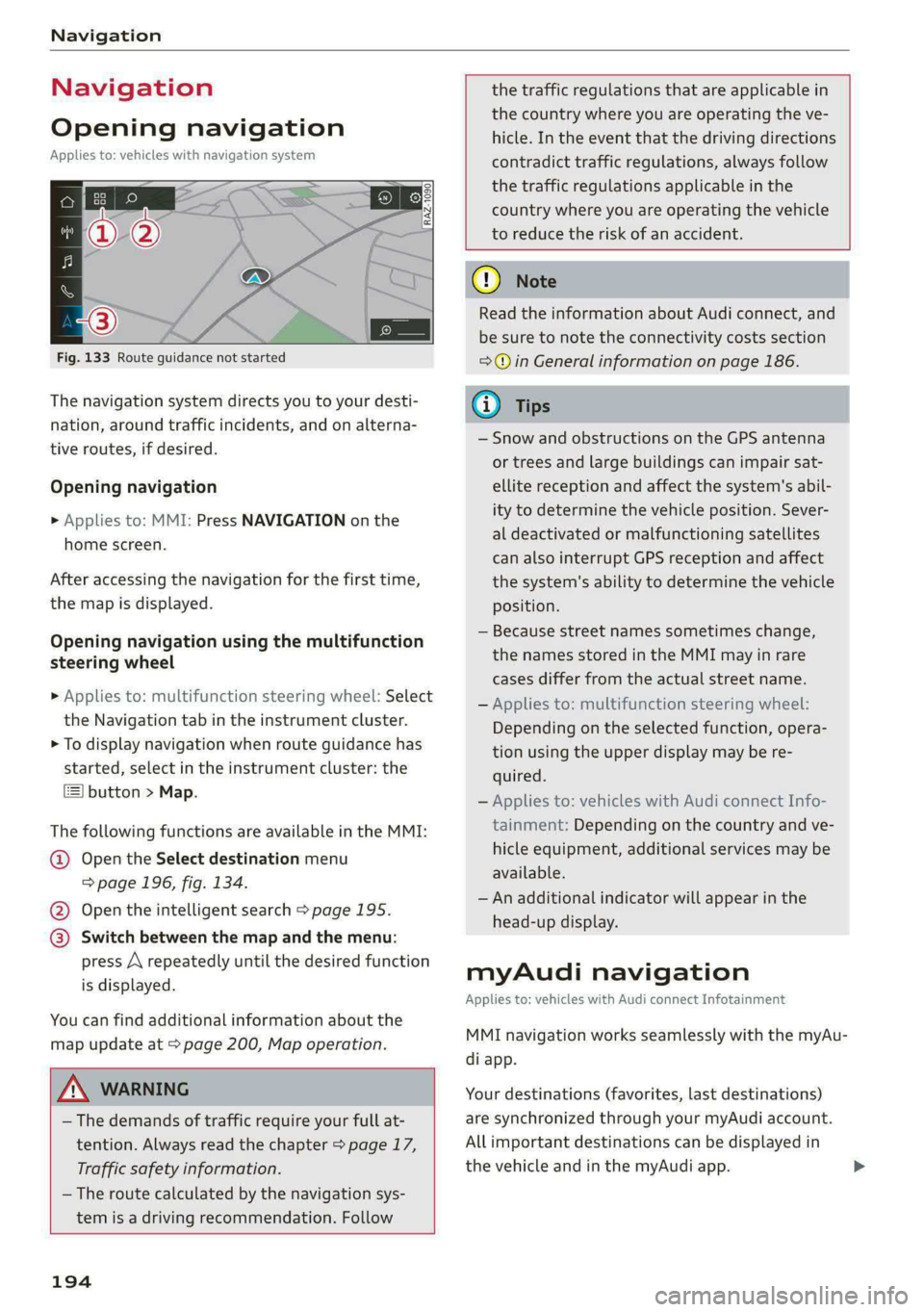
Fig. 133 Route guidance not started
The navigation system directs you to your desti-
nation, around traffic incidents, and on alterna-
tive routes, if desired.
Opening navigation
>» Applies to: MMI: Press NAVIGATION on the
home screen.
After accessing the navigation for the first time,
the map is displayed.
Opening navigation using the multifunction
steering wheel
> Applies to: multifunction steering wheel: Select
the Navigation tab in the instrument cluster.
> To display navigation when route guidance has
started, select in the instrument cluster: the
button > Map.
The following functions are available in the MMI:
@ Open the Select destination menu
=> page 196, fig. 134.
@ Open the intelligent search > page 195.
@ Switch between the map and the menu:
press A repeatedly until the desired function
is displayed.
You can find additional information about the
map update at > page 200, Map operation.
ZA\ WARNING
— The demands of traffic require your full at-
tention. Always read the chapter > page 17,
Traffic safety information.
— The route calculated by the navigation sys-
tem is a driving recommendation. Follow
194
the traffic regulations that are applicable in
the country where you are operating the ve-
hicle. In the event that the driving directions
contradict traffic regulations, always follow
the traffic regulations applicable in the
country where you are operating the vehicle
to reduce the risk of an accident.
() Note
Read the information about Audi connect, and
be sure to note the connectivity costs section
=>@ in General information on page 186.
(i) Tips
— Snow and obstructions on the GPS antenna
or trees and large buildings can impair sat-
ellite reception and affect the system's abil-
ity to determine the vehicle position. Sever-
al deactivated or malfunctioning satellites
can also interrupt GPS reception and affect
the system's ability to determine the vehicle
position.
— Because street names sometimes change,
the names stored in the MMI may in rare
cases differ from the actual street name.
— Applies to: multifunction steering wheel:
Depending on the selected function, opera-
tion using the upper display may be re-
quired.
— Applies to: vehicles with Audi connect Info-
tainment: Depending on the country and ve-
hicle equipment, additional services may be
available.
— An additional indicator will appear in the
head-up display.
myAudi navigation
Applies to: vehicles with Audi connect Infotainment
MMI navigation works seamlessly with the myAu-
di app.
Your destinations (favorites, last destinations)
are synchronized through your myAudi account.
All important destinations can be displayed in
the vehicle and in the myAudi app.
Page 220 of 308
Media
Never leave mobile devices in the vehicle in
extremely high or low temperatures.
@) Tips
— Always follow the information found in
=> page 78.
— When you switch the ignition off, the USB
ports are still supplied with power until the
energy management intervenes.
— Do not use an additional adapter cable or
USB extension cable to connect mobile devi-
ces to the Audi music interface that already
have a cable or that must be connected with
a USB adapter cable (> page 217, fig. 146).
Using an additional adapter or US extension
cable may impair functionality.
— Functionality is not guaranteed for mobile
devices that do not conform to the USB 2.0
specification.
— USB hubs are not supported.
— Video playback through the Audi music in-
terface is not supported on Apple devices
and MTP devices (such as smartphones).
— iPod touch or iPhone malfunctions also af-
fect the operation of the MMI. Reset your
mobile device in these situations.
— Audi recommends updating the iPod touch
or iPhone software to the latest version. Re-
fer to your mobile device owner's manual
for more information.
— The USB adapter on the Audi music inter-
face will support iPod touch or iPhone devi-
ces from the 5th generation or newer with
the lightning connector.
—Aselection of supported devices can be
found in the database for tested mobile de-
vices at www.audi.com/mp3.
Playing media
The following sources can be selected depending
on the vehicle equipment:
— Amazon Alexa > page 216.
— USB device > page 217.
— DVD © page 216.
218
— External device: you can connect external devi-
ces via Bluetooth and use the Bluetooth audio
player > page 216, or you can connect an exter-
nal device directly to the Audi music interface
> page 217.
Accessing media
Playing media files using the MMI
> Applies to: MMI: Select on the home screen:
MEDIA > Source > a source. Depending on the
connected device, the symbol for a source may
change. The device name may be displayed (for
example: myPhone).
> Select a track from the categories in the media
center > page 219.
Playing media files using the multifunction
steering wheel
Requirement: a media source must contain me-
dia files > page 218.
> Select the radio/media tab in the instrument
cluster.
> Turn the left thumbwheel to display the play-
list.
> To switch to a different source, press the
button.
> To select a media file or a source, turn and
press the left thumbwheel.
> To switch between radio and media, select in
the instrument cluster: the EE] button > Switch
to radio/Switch to media.
G) Tips
— For safety reasons, the video image is only
displayed when the vehicle is stationary. On-
ly the sound from the video plays while driv-
ing.
— Applies to: multifunction steering wheel:
Depending on the selected function, opera-
tion through the MMI may be required.
Page 248 of 308
Wheels
Production options weight
means the combined weight of
those installed regular production
options weighing over 5 lbs.
(2.3 kg) in excess of those stand-
ard items which they replace, not
previously considered in curb
weight or accessory weight, in-
cluding heavy duty brakes, ride
levelers, roof rack, heavy duty
battery, and special trim.
Radial ply tire
means a pneumatic tire in which
the ply cords that extend to the
beads are laid at substantially
90 degrees to the centerline of
the tread.
Recommended inflation
pressure
see > page 244, Cold tire infla-
tion pressure.
Reinforced tire
means a tire designed to operate
at higher loads and at higher in-
flation pressures than the corre-
sponding standard tire. Rein-
forced tires may be identified as
“XL”, “xl”, “EXTRA LOAD”, or “RF”
on the sidewall.
246
Rim
means a metal support for a tire
or a tire and tube assembly upon
which the tire beads are seated.
Rim diameter
means nominal diameter of the
bead seat. If you change your
wheel size, you will have to pur-
chase new tires to match the new
rim diameter.
Rim size designation
means rim diameter and width.
Rim width
means nominal distance between
rim flanges.
Sidewall
means that portion of a tire be-
tween the tread and bead.
Speed rating (letter code)
means the speed at which a tire is
designed to be driven for extend-
ed periods of time. The ratings
range from 93 mph (150 km/h)
to 186 mph (298 km/h) > table
on page 242. You may not find
this information on all tires be-
cause it is not required by law.
The speed rating letter code,
where applicable, is molded on
the tire sidewall and indicates the >
Page 254 of 308
Wheels
Checking and correcting tire
pressure
> Check the tire pressure at least
once per month and also check it
before every long drive.
> Always check the tire pressure
when the tires are cold. Do not
reduce the pressure if it increas-
es when the tires are warm.
>Refer to the sticker > fig. 158
for the correct tire pressure.
>Correct the tire pressure if nec-
essary.
> Store the new tire pressure in
the MMI & page 260.
> Check the pressure in the spare
tire*. Always maintain the maxi-
mum temperature that is speci-
fied for the tire.
and follow the important safe-
ty precautions in > page 253.
—The tire must flex more if the
tire pressure is too low or if
the vehicle speed or load are
too high. This heats the tire up
too much. This increases the
risk of an accident because it
can cause the tire to burst and
result in loss of vehicle con-
trol.
—Incorrect tire pressure increas-
es tire wear and has a negative
effect on driving and braking
behavior, which increases the
risk of an accident.
Z\ WARNING
Always adapt the tire pressure
to your driving style and the ve-
hicle load.
—Overloading can lead to loss of
vehicle control and increase
the risk of an accident. Read
() Note
Replace lost valve caps to re-
duce the risk of damage to the
tire valves.
©) For the sake of the envi-
ronment
Tire pressure that is too low in-
creases energy use.
Uc ecm] )
Please note that the information
contained in the following table
was correct at the time of print-
ing, and the information is sub-
252
ject to change. If there are any
differences, you should always
follow the tire pressure sticker
=> page 251, fig. 157.
Page 261 of 308
4KE012721BF
Wheels
As an added safety feature, your vehicle has been
equipped with a tire pressure monitoring system
(TPMS) that illuminates a low tire pressure tell-
tale when one or more of your tires is significant-
ly under-inflated. Accordingly, when the low tire
pressure telltale illuminates, you should stop and
check your tires as soon as possible, and inflate
them to the proper pressure. Driving ona signifi-
cantly under-inflated tire causes the tire to over-
heat and can lead to tire failure. Under-inflation
also reduces fuel efficiency and tire tread life,
and may affect the vehicle's handling and stop-
ping ability.
Please note that the TPMS is not a substitute for
proper tire maintenance, and it is the driver's re-
sponsibility to maintain correct tire pressure,
even if under-inflation has not reached the level
to trigger illumination of the TPMS low tire pres-
sure telltale.
Your vehicle has also been equipped with a TPMS
malfunction indicator to indicate when the sys-
tem is not operating properly. The TPMS mal-
function indicator is combined with the low tire
pressure telltale. When the system detects a
malfunction, the telltale will flash for approxi-
mately one minute and then remain continuously
illuminated. This sequence will continue upon
subsequent vehicle start-ups as long as the mal-
function exists.
When the malfunction indicator is illuminated,
the system may not be able to detect or signal
low tire pressure as intended. TPMS malfunctions
may occur for a variety of reasons, including the
installation of replacement or alternate tires or
wheels on the vehicle that prevent the TPMS
from functioning properly. Always check the
TPMS malfunction telltale after replacing one or
more tires or wheels on your vehicle to ensure
that the replacement or alternate tires and
wheels allow the TPMS to continue to function
properly.
If the tire pressure monitoring indicator
appears
Applies to: vehicles with Tire Pressure Monitoring System in-
dicator
The tire pressure indicator in the instrument
cluster informs you if the tire pressure is too low
or if there is a system malfunction.
Using the ABS sensors, the tire pressure monitor-
ing system compares the tire tread circumference
and vibration characteristics of the individual
tires. If the pressure changes in one or more
tires, this is indicated in the instrument cluster
display with an indicator light @ and a message.
If only one tire is affected, the location of that
tire will be indicated.
The tire pressures must be stored again each
time you change the pressures (switching be-
tween partial and full load pressure) or after
changing or replacing a tire on your vehicle
= page 260. The tire pressure monitoring system
only monitors the tire pressure you have stored.
Refer to the tire pressure label for the recom-
mended tire pressure for your vehicle
=> page 251, fig. 158.
Tire tread circumference and vibration character-
istics can change and cause a tire pressure warn-
ing if:
— The tire pressure in one or more tires is too low
— The tires have structural damage
— The tire was replaced or the tire pressure was
changed and it was not stored > page 260
— Tires that are only partially used are replaced
with new tires
Indicator lights
If the @ indicator light turns on, there is a loss
of pressure in at least one tire .> A\ Check the
tires and replace or repair if necessary. Check and
correct the pressures of all four tires and store
the pressure again > page 260.
ia Tire pressure: malfunction! See owner's
manual
fe appears after switching the ignition on or
while driving and the @ indicator light in the in-
strument cluster blinks for approximately one
259
>
Page 262 of 308
Wheels
minute and then stays on, there is system mal-
function. Try to store the correct tire pressures
= page 260. In some cases, you must drive for
several minutes after storing the pressures until
the indicator light turns off. If the indicator light
does turn off or turns on again after a short peri-
od of time, drive to an authorized Audi dealer or
authorized Audi Service Facility immediately to
have the malfunction corrected.
ZA\ WARNING
— If the tire pressure indicator appears in the
display, reduce your speed immediately and
avoid any hard steering or braking maneu-
vers. Stop as soon as possible and check the
tires and their pressure.
— The driver is responsible for maintaining the
correct tire pressure. You must check the
tire pressure regularly.
— Under certain conditions (such as a sporty
driving style, winter conditions, or unpaved
roads), the tire pressure monitoring system
indicator may be delayed.
(i) Tips
— The tire pressure monitoring system can al-
so stop working when there is an ESC mal-
function.
— Using snow chains may result in a system
malfunction.
— The tire pressure monitoring system in your
Audi was calibrated with “Audi Original
Tires” > page 248. Audi recommends using
these tires.
Storing tire pressures
Applies to: vehicles with Tire Pressure Monitoring System in-
dicator
If the tire pressure changes or a tire is replaced,
it must be confirmed in the MMI.
> Before storing the tire pressures, make sure the
tire pressures in all four tires meet the speci-
fied values and are adapted to the load
=>page 251.
> Switch the ignition on.
> Applies to MMI: Select on the home screen: VE-
HICLE > Settings & Service > Tire pressure
260
monitoring > Store tire pressure > Yes, store
now.
@) Tips
Do not store the tire pressures if snow chains
are installed.
Page 271 of 308
4KE012721BF
Emergency assistance
> Inflate the tire to between 29 psi (200 kPA)
and 36 psi (250 kPA) and read the pressure on
the gauge.
> If this tire pressure is not reached, remove the
filler hose. Drive slowly approximately 33 feet
(10 m) forward or in reverse so that the sealant
can be distributed in the tire. Inflate the tire
again > A\.
ZA\ WARNING
— Read and follow the manufacturer's safety
precautions on the compressor and in the in-
structions on the bottle of sealant.
— Ifa tire pressure of 29 psi (200 kPA) cannot
reached after inflating for 6 minutes, then
the tire is too severely damaged. Do not con-
tinue driving.
— If the tire cannot be repaired with the tire
sealant, see an authorized Audi dealer or au-
thorized Audi Service Facility for assistance.
@) Tips
Do not operate the compressor for more than
six minutes continuously, or it can overheat.
Once the compressor has cooled, you can con-
tinue to use it.
CeoT nn tata]
Applies to: vehicles with tire mobility kit
> Affix the sticker that says "max. 50 mph (max.
80 km/h)" that is provided with the tire mobili-
ty kit within the driver's field of vision.
> Stop the vehicle after driving for about 10 mi-
nutes and check the tire pressure.
> If the tire pressure is lower than 19 psi (130
kPA), then the tire is too severely damaged. Do
not continue driving.
Nv WARNING
Pay attention to the following after repairing
the tire:
— Do not drive faster than 50 mph (80 km/h).
— Avoid hard acceleration or braking and driv-
ing fast around curves.
— The vehicle may become more difficult to
control.
— If the tire is too severely damaged, see an
authorized Audi dealer or authorized Audi
Service Facility for assistance.
(@) For the sake of the environment
You can give the used tire sealant bottle to an
authorized Audi dealer or authorized Audi
Service Facility for disposal.
G) Tips
Remember to obtain a new bottle of sealant
from an authorized Audi dealer or authorized
Audi Service Facility after repairing a tire.
Replacing wheels
You must complete the preparation before
changing a tire.
> Read and follow the important safety precau-
tions > page 267.
> Set the parking brake.
> Select the “P” position.
> When towing a trailer: disconnect the trailer
from your vehicle.
> Lay out the vehicle tool kit > page 267 and the
spare tire > page 273.
> Applies to: vehicles with air suspension: Select
on the home screen: VEHICLE > Settings &
Service > Air suspension: wheel change.
> Switch the ignition off.
Z\ WARNING
The vehicle must also be secured to prevent it
from rolling when using the vehicle jack*. Use
suitable objects to block the front and back of
the wheel that is diagonal from the wheel
with the flat tire.
269
Page 273 of 308
4KE012721BF
Emergency assistance
Applies to: vehicles with vehicle jack
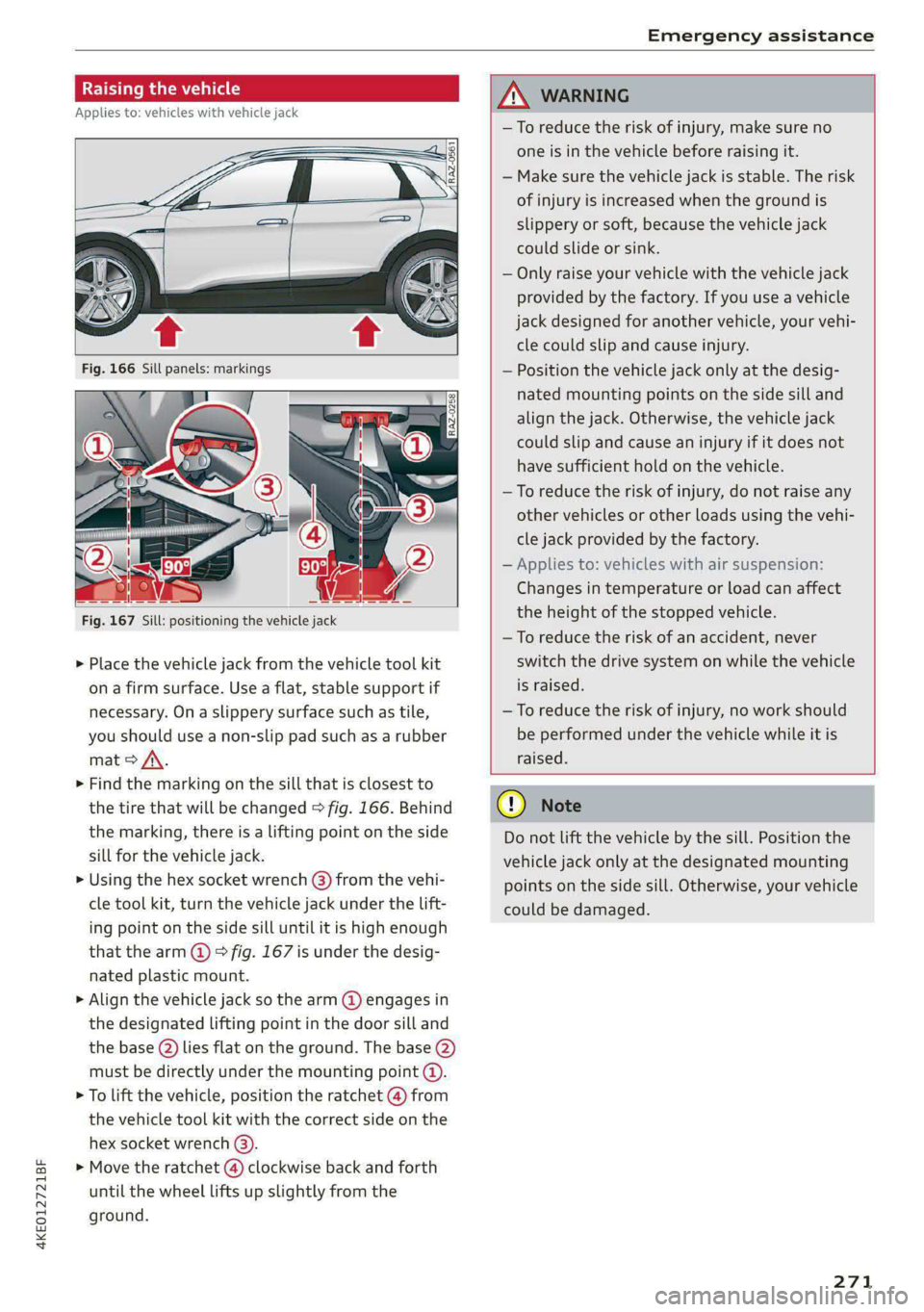
RAZ-0258
Fig. 167 Sill: positioning the vehicle jack
> Place the vehicle jack from the vehicle tool kit
ona firm surface. Use a flat, stable support if
necessary. On a slippery surface such as tile,
you should use a non-slip pad such as a rubber
mat > /\.
> Find the marking on the sill that is closest to
the tire that will be changed > fig. 166. Behind
the marking, there is a lifting point on the side
sill for the vehicle jack.
» Using the hex socket wrench (3) from the vehi-
cle tool kit, turn the vehicle jack under the lift-
ing point on the side sill until it is high enough
that the arm @ © fig. 167 is under the desig-
nated plastic mount.
> Align the vehicle jack so the arm @ engages in
the designated Lifting point in the door sill and
the base () lies flat on the ground. The base (2)
must be directly under the mounting point @.
> To lift the vehicle, position the ratchet @ from
the vehicle tool kit with the correct side on the
hex socket wrench (3).
> Move the ratchet () clockwise back and forth
until the wheel lifts up slightly from the
ground.
ZX WARNING
—To reduce the risk of injury, make sure no
one is in the vehicle before raising it.
— Make sure the vehicle jack is stable. The risk
of injury is increased when the ground is
slippery or soft, because the vehicle jack
could slide or sink.
— Only raise your vehicle with the vehicle jack
provided by the factory. If you use a vehicle
jack designed for another vehicle, your vehi-
cle could slip and cause injury.
— Position the vehicle jack only at the desig-
nated mounting points on the side sill and
align the jack. Otherwise, the vehicle jack
could slip and cause an injury if it does not
have sufficient hold on the vehicle.
—To reduce the risk of injury, do not raise any
other vehicles or other loads using the vehi-
cle jack provided by the factory.
— Applies to: vehicles with air suspension:
Changes in temperature or load can affect
the height of the stopped vehicle.
—To reduce the risk of an accident, never
switch the drive system on while the vehicle
is raised.
—To reduce the risk of injury, no work should
be performed under the vehicle while it is
raised.
@) Note
Do not lift the vehicle by the sill. Position the
vehicle jack only at the designated mounting
points on the side sill. Otherwise, your vehicle
could be damaged.
271
Page 305 of 308

4KE012721BF
Treadwear indicators................-. 250
Unidirectional................4.- 243, 272
Uniform tire quality grading............ 258
Tires and wheels
Glossary of tire and loading terminology .. 244
Tires and vehicle load limits............ 253
Toll Module
refer to Integrated Toll Module......... 139
Tools... cece eee 267
Tool tipS.... 6... eee eee eee eee eee 17
Top tether anchor (securing the child safety
S@at) eee 76
Touch display
Adjusting feedback................008. 17
OPerating ss seman so sesame ov semen + wenn w + cows 15
TOWING’: « 2 saves 5 ¢ ewe 5 9 ewes 2 2 ey + 2 ew 274
TOWING:OOD was ¢ ¢ exes 4 » eee 7s eres 275;276
Towing protection monitoring............. 35
TPMS
Tire pressure monitoring system........ 259
Traffic incidents
refer to Online traffic information....... 204
Traffic INFORMATION & sess 2s wee ¥ woes eo ores 204
Online traffic information.............. 204
Traffic light information................ 136
Traffic sign recognition. «cos. ss cee se ows 134
Thatfie SignSiesia 2 2 soon so semues ow cama oo oe 137
Trailer loadin: « = seam = 2 seme ys seme & y seme 291
Trailer mode
Air SUSPENSION & sissies & ceasice ve sonvee oo samen 126
Trailer towinGies ¢ « sean sv mown 4 5 ows 2 9 new 126
Tongue weight ........... 0... c eee eee 126
Trailer loads... ee eee eee 126
Trailer view. ......................000, 170
Turn assist... 2... cece ee eee ee 159
Turn signals .......... 0.00 cece eee eee 49
U
Uniform tire quality grading............. 258
Unlocking and locking. ...............605 32
By remote control..............-.000-- 37
Using the lock cylinder..............-.. 35
With Audi connect vehicle control........ 38
With the central locking switch.......... 34
With the convenience key............... 37
Update (software) .................0055 229
USB.adapter iin: 3 © sce oo eaaue sv mere 2 waver « 217
USB charging ports. « sis eo sess oo oan so ae 78
USB drive
Supported types/formats.............. 223
USB stick
refer to Audi music interface........... 217
Users
LOCAL USERS suas x 2 same < F Ree FY Skee GY Ga 29
IMYAUUSEDSicx: « «soe 2 x secre 2 een wom seem 29
V
Vanity Minor ces s s ses s saree 3 2 peeee 2 2 tee 54
Vehicle
Gare/cleaning « swan ¢ x isemus v ecninars « siamo 2 9 261
Dimensions .............0 00sec eee eee 290
Identification data................... 290
OULOFSERVICE ecsiie sé «owe ee ewe sv mmo ee 266
Raising........... 0... eee eee eee 271
StArtiiGies ¢ 3 mao g x eae 5 EMER sy eR 90
TRANS POPt cesccer s 2 essen 3 6 ame + eae as REE 103
Unlocking and locking...............05. 37
Weliclertaneinrs + seme ao neneue 2 a snimee 2 4 atene 261
Vehicle control services..............-.. 188
Vehicle data label...............-.0000. 290
Vehicle identification number............ 290
Vehicle jack: = sax « x sees = ¢ sees tp eee bee 267
LifEING POINESE. 5 o somes vo srmane «x cenwere w ¥ ceewe 271
Tire change mode.............00-000- 269
Vehicle key... 20... cee cece eee eee eee 32,36
Vehicle:SOunG icc 6 ces a 6 cere oo avaee ov concer 95
Vehicle: toolkits « cium: ox imma oe nase 2 e sernens 267
Ventilation’: « « wes «2 ween ¢ o wens oy eee a 84
VIEW BUttotiiay: « = coe ¢ 2 eens 2 5 sees 5 3 eee 12
VOIC@MGil « = s secs = = eee 2 y ees oy wee e ge 181
Voice recognition system................. 25,
EXtertial mcu s x noes s eaey ¢ wee as pees as 26
OPeratlings. « a cscs « merssee « scenes « & miedo « 6 a 25
WwW
Weallamountclip somsus & esses s+ crawece w & ceanen 9 125
Warning lights
refer to Indicator lights.................. 7
Washing matte finish paint.............. 261
Wave band
refer to Frequency band............... 207
303