tow AUDI E-TRON 2021 Owner's Manual
[x] Cancel search | Manufacturer: AUDI, Model Year: 2021, Model line: E-TRON, Model: AUDI E-TRON 2021Pages: 308, PDF Size: 83.91 MB
Page 108 of 308
Driving dynamic
Selective wheel torque control
Selective wheel torque control is used when driv-
ing on curves. Braking is targeted toward the
wheels on the inside of the curve as needed. This
allows more precise driving in curves.
Power steering
The ESC can also support vehicle stability
through steering.
ZA\ WARNING
— The ESC and its integrated systems cannot
overcome the limits imposed by natural
physical laws. This is especially important on
slippery or wet roads. If the systems begin
acting to stabilize your vehicle, you should
immediately alter your speed to match the
road and traffic conditions. Do not let the in-
creased safety provided tempt you into tak-
ing risks. This could increase your risk of a
collision.
— Please note the risk of a collision increases
when driving fast, especially through curves
and on slippery or wet roads, and when driv-
ing too close to objects ahead. There is still
a risk of accidents because the ESC and its
integrated systems cannot always prevent
collisions.
— Accelerate carefully when driving on
smooth, slippery surfaces such as ice and
snow. The drive wheels can spin even when
these control systems are installed and this
can affect driving stability and increase the
risk of a collision.
— As the vehicle load increases, especially the
roof load, the vehicle's center of gravity also
increases along with the risk of the vehicle
tipping. To reduce the risk of an accident, al-
ways adapt your driving style to the current
conditions and avoid sudden driving maneu-
vers.
@) Tips
— The ABS and ASR only function correctly
when all four wheels have a similar wear
condition. Different tire sizes can lead toa
reduction in motor power.
106
— You may hear noises when the systems de-
scribed are working.
The So button (or #, depending on the model)
for controlling the ESC is located in the center
console, in front of the selector lever. The ESC is
automatically switched on when the ignition is
switched on.
Limiting ESC
In some situations, it may make sense to limit
the stabilizing function of the ESC so that the
wheels can spin, for example to rock a vehicle to
free it when it is stuck or to drive with snow
chains. The ESC can also be limited to provide
more sporty driving characteristics with fewer
stabilizing corrective actions.
—To limit the ESC, press the 0 button briefly.
The B indicator light will turn on.
— To completely reactivate the ESC stabilization
function, press the button again. The indicator
light turns off.
Depending on the Audi drive select mode that is
selected, one of the following ESC modes will be
selected automatically:
— sport - this mode is designed for driving ona
level surface. It is used in all Audi drive select
modes except offroad.
— offroad - this mode is suited for driving offroad
and is designed for uneven terrain or loose
ground. If you select the offroad Audi drive se-
lect mode, the offroad ESC mode will be auto-
matically used.
Switching off ESC
For a more active control of the vehicle where the
stabilizing functions of the ESC cannot intervene,
the ESC can be switched off.
— To switch off the ESC, press and hold the Sor
button for more than three seconds. The B
and Ea indicator lights turn on.
— To completely reactivate the ESC stabilization
function, press the button again. The indicator
lights turn off.
Page 113 of 308
4KE012721BF
High-voltage system
— Monitor the Audi charging system if it is be-
ing used near children.
— Installation and setup of the household con-
nection for Audi charging systems may only
be performed by a qualified electrician. The
qualified electrician is thereby responsible
for adhering to applicable standards and
regulations.
— Make sure that the household socket is
grounded and shielded from water.
— If Audi charging systems do not function ac-
cording to the specifications in the operat-
ing manual, they must not be used. Contact
an authorized Audi dealer or authorized
Audi Service Facility.
— Audi charging systems are intended for use
in private and semi-private areas (for exam-
ple, private property and company parking
lots). Depending on the country where the
vehicle is operated, charging with a mode 2
charging cable (meaning charging with the
Audi charging system) may be prohibited in
public areas. Contact an authorized Audi
dealer or authorized Audi Service Facility for
more information.
— Operate the Audi charging systems in power
networks that are properly grounded. It can-
not be used with non-grounded power net-
works (such as IT networks).
— When charging the high-voltage battery us-
ing household/industrial sockets, the elec-
trical installation can be used at full capaci-
ty. Audi recommends having a qualified elec-
trician regularly inspect the electrical instal-
lations that are used for charging.
— If possible, disconnect Audi charging sys-
tems from the power network during a
thunderstorm.
— Never submerge the Audi charging systems
or the connectors in water.
— Audi charging systems must only be cleaned
when the control unit is completely discon-
nected from the power supply and from the
vehicle. Use a dry towel to clean.
— Audi charging systems are only intended for
use on Audi vehicles and vehicles within the
Volkswagen Group. Using the devices on
vehicles made by another manufacturer is
not authorized.
() Note
— If the vehicle is not being used for long peri-
ods of time, the high-voltage battery must
be charged after four months at the latest
or the vehicle must be continuously con-
nected to a power source (for 50% charging
target > page 115). Otherwise, the high-
voltage battery could become damaged.
— Make sure that you always use the correct
charging equipment for the country in
which it is being used. Contact an author-
ized Audi dealer or authorized Audi Service
Facility for more information.
— On vehicles with only one charging port,
there is a cover on the opposite side of the
vehicle with no charging components instal-
led underneath it. Do not try to open this
cover.
G@) Tips
— Your vehicle can only be charged at charging
stations that meet the requirements in the
respective country and meet the following
standards, at a minimum:
— GB/T 18487.1 and GB/T 20234 (China)
— IEC 61851 and IEC 62196 (Europe)
— SAE J1772 (North America, Japan)
— You can use your Audi charging system if
there is a household or industrial connec-
tion available at the charging station.
(i) Tips
Applies to: Audi charging systems
— For an uninterrupted charging process, Audi
recommends only charging using sockets
that are connected to a separately protected
circuit.
— Audi recommends using Audi charging sys-
tems in the wall mount clip* during opera-
tion. If this is not possible, always position
Audi charging systems on a secure surface
during the charging process > A.
—To reduce the risk of overheating during op-
eration, do not place Audi charging systems
111
>
Page 117 of 308

4KE012721BF
High-voltage system
LED on the charging unit Meaning
Red On The charging connector may not be able to lock correctly in the
vehicle charging port. Check if the charging connector is insert-
ed correctly. Disconnect the charging connector, reconnect it to
the charging socket, and press it upward lightly for five seconds,
or use a different charging station. If the LED stays turned on,
there is a malfunction either in the vehicle charging system or at
the power source. See an authorized Audi dealer or authorized
Audi Service Facility for assistance if necessary.
Both charging port doors are open. Try to close one of the charg-
ing port doors by hand. If the LED stays turned on, the high-
voltage battery may not be charging. See an authorized Audi
dealer or authorized Audi Service Facility for assistance.
The outside temperature is too low or too high.
@ Tips
The charging display modes are also displayed
in the instrument cluster Bag.
Setting the charging connector to unlock
automatically
To prevent a charging station from being blocked
for long periods of time and to make it possible
for others to charge, you can set the charging
connector to unlock automatically once the
charging process has ended.
> Before charging, always check if the selected
settings are suitable for the current charging
session.
> Applies to: MMI: Select on the home screen:
VEHICLE > Charging & Efficiency > Charging >
@.
@) Note
The function should only be activated if the
charging cable is part of the charging station.
Otherwise, your charging cable could be sto-
len.
Setting the charging target
You can set the charging target, meaning you can
set the maximum charge level to which the high-
voltage battery should be charged. The charging
target can be set between 50% and 100%. For
daily usage, Audi recommends setting the charg-
ing target at 80%. This can extend the service life
of the high-voltage battery. For long trips, Audi
recommends setting the charging target to
100% to achieve the highest possible range.
> Applies to: MMI: Select on the home screen:
VEHICLE > Charging & Efficiency > Charging.
> When the timer is displayed, swipe your finger
on the display toward the right.
> Press on the right section of the battery charge
level display.
> Set the desired charging target.
The charging target that is set will be stored and
used in all locations where you have not defined
specific charging settings. If you are charging at
an address where you have defined specific
charging settings > page 116, Advanced charg-
ing settings, the charging target that is set will
be stored in the advanced charging settings and
used.
G) Tips
If you set the charging target lower than the
current battery charge level while charging,
then the charging process will be canceled. If
you set the charging target above the current
battery
charge level again, then the charging
process will resume. This does not apply if you
are charging at a charging station, where you
have authenticated yourself manually. If this
is the case, authenticate yourself again at the
charging station.
115
Page 118 of 308

High-voltage system
Setting the timer
Introduction
By setting a timer, you determine when your vehi-
cle should reach the desired charging target.
When the timer is activated, it will be run regu-
larly at the set time. In addition to the charging
target, you can also specify if your vehicle should
be heated or cooled to the temperature set in the
climate control system. You can turn on multiple
timers at the same time. The active timer is indi-
cated by the respective number in © in the upper
section of the display.
» Applies to: MMI: Select on the home screen:
VEHICLE > Charging & Efficiency > Charging.
> When the charging target is displayed, swipe
your finger on the display toward the left.
Configuring the timer
> To set a timer, select > in the line for the de-
sired timer.
> Select one ore more days of the week and select
Next.
» Set the desired departure time and select OK.
> To also activate the climate control with a tim-
er, select F.
Switching on the timer and timer charging
The charging process will only follow the timer
settings if you have switched on the timer and
timer charging.
> To turn ona timer, select CD.
> To switch on timer charging, select ©. A col-
ored bar will turn on in the button.
If the set departure time for the timer is too
soon, the desired charging target may not be
reached.
G) Tips
It is not possible to charge using the timer at
some charging stations.
Advanced charging settings
With the advanced charging settings, you can de-
fine
addresses (locations) at which certain charg-
ing settings should apply (for example, charging
116
target, minimum charge). If your vehicle is in the
vicinity of a defined address, the advanced charg-
ing settings will be automatically applied. The
charging target that is set will be used both for
immediate charging and timer charging.
Managing the advanced charging settings
> Applies to: MMI: Select on the home screen:
VEHICLE > Charging & Efficiency > Charging >
<2} > Advanced charging settings.
> To define new settings for a certain address, se-
lect +. Follow the instructions in the display.
> To edit existing settings for a certain address,
press the respective button.
> To delete existing settings for a certain ad-
dress, select Z.
Charging with a preferred charging time
A preferred charging time is only used when tim-
er charging is switched on > page 116, Switching
on the timer and timer charging.
Incase of malfunction, you can manually release
the charging port door or the charging connec-
tor.
Fig. 85 Motor compartment: emergency release
Manually releasing the charging port door
> Open the hood = page 234.
> Open the cover in the motor compartment on
the side of the applicable charging port.
> Loosen the red loop @) > fig. 85 from the re-
tainer and then pull on the loop carefully >@.
> If necessary, open the charging port door by
hand.
> After releasing manually, secure the loop on
the retainer and close the cover.
Page 121 of 308
4KE012721BF
High-voltage system
Always store the charging equipment securely
before transporting.
> Open the hood > page 234.
> Open the front storage compartment
=>page 79.
> Stow the charging equipment in the front stor-
age compartment.
> Close the front storage compartment and the
hood.
Audi e-tron compact charging system
Applies to: vehicles with Audi e-tron compact charging system
ZA\ WARNING
If the charging equipment is not secured or
positioned correctly, it can slide out of place
and endanger vehicle occupants when brak-
ing, when changing directions, or in a colli-
sion.
— Only transport the charging equipment in
the front storage compartment and never
unsecured or in the passenger compart-
ment.
() Note
Always lift or carry the Audi charging system
as one unit and never by the cables.
RAZ-0604
o 9 3)
—{4)
[RAZ-0726]
Fig. 86 Audi e-tron compact charging system: components
(example)
Observe the safety precautions > page 110, Im-
portant safety precautions.
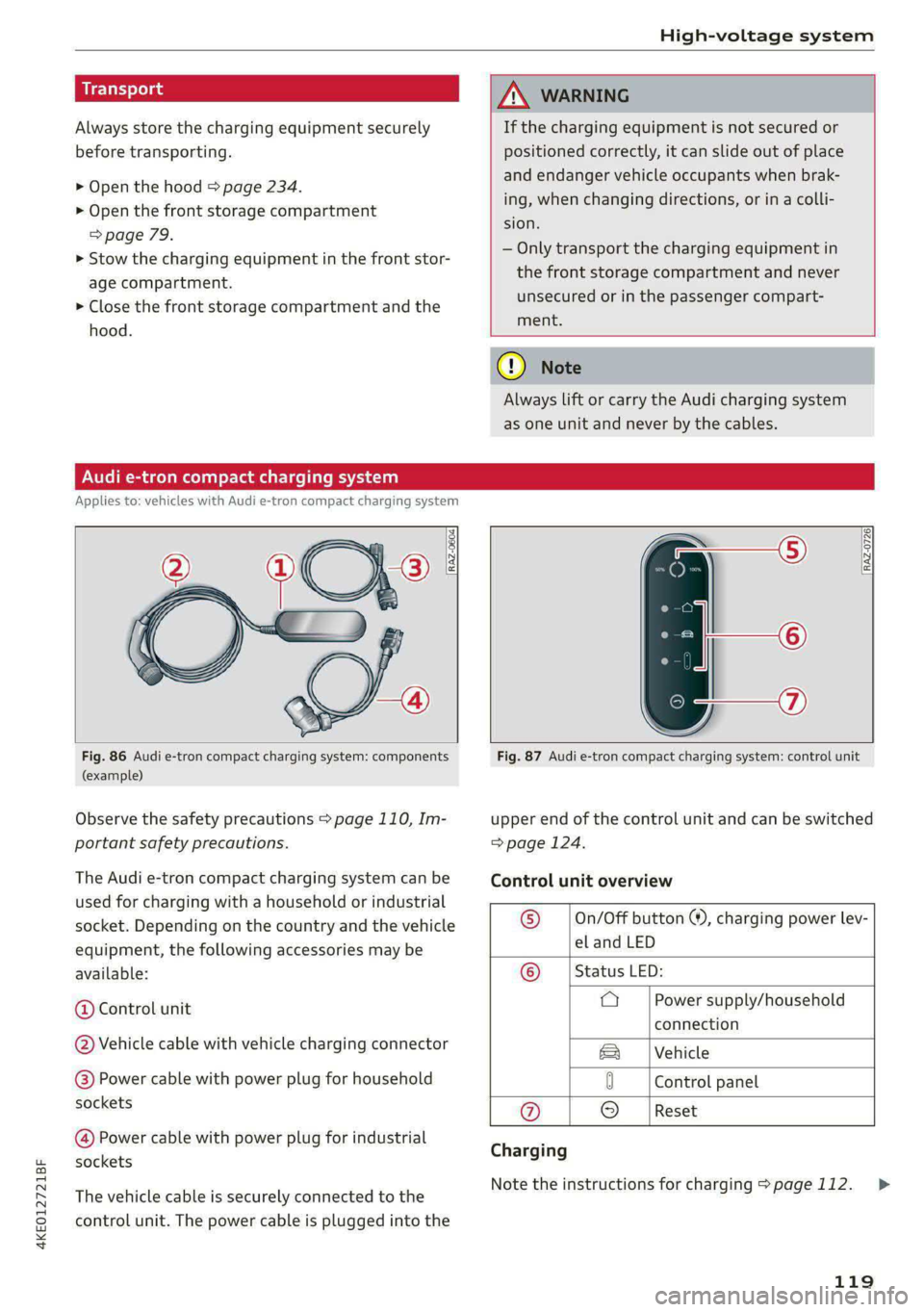
The Audi e-tron compact charging system can be
used for charging with a household or industrial
socket. Depending on the country and the vehicle
equipment, the following accessories may be
available:
@ Control unit
@ Vehicle cable with vehicle charging connector
@) Power cable with power plug for household
sockets
@ Power cable with power plug for industrial
sockets
The vehicle cable is securely connected to the
control unit. The power cable is plugged into the
Fig. 87 Audi e-tron compact charging system: control unit
upper end of the control unit and can be switched
=> page 124.
Control unit overview
© __ |On/Off button ®, charging power lev-
el and LED
© __ | Status LED:
a Power supply/household
connection
|Vehicle
0 Control panel
@ © |Reset
Charging
Note the instructions for charging > page 112.
119
>
Page 123 of 308
4KE012721BF
High-voltage system
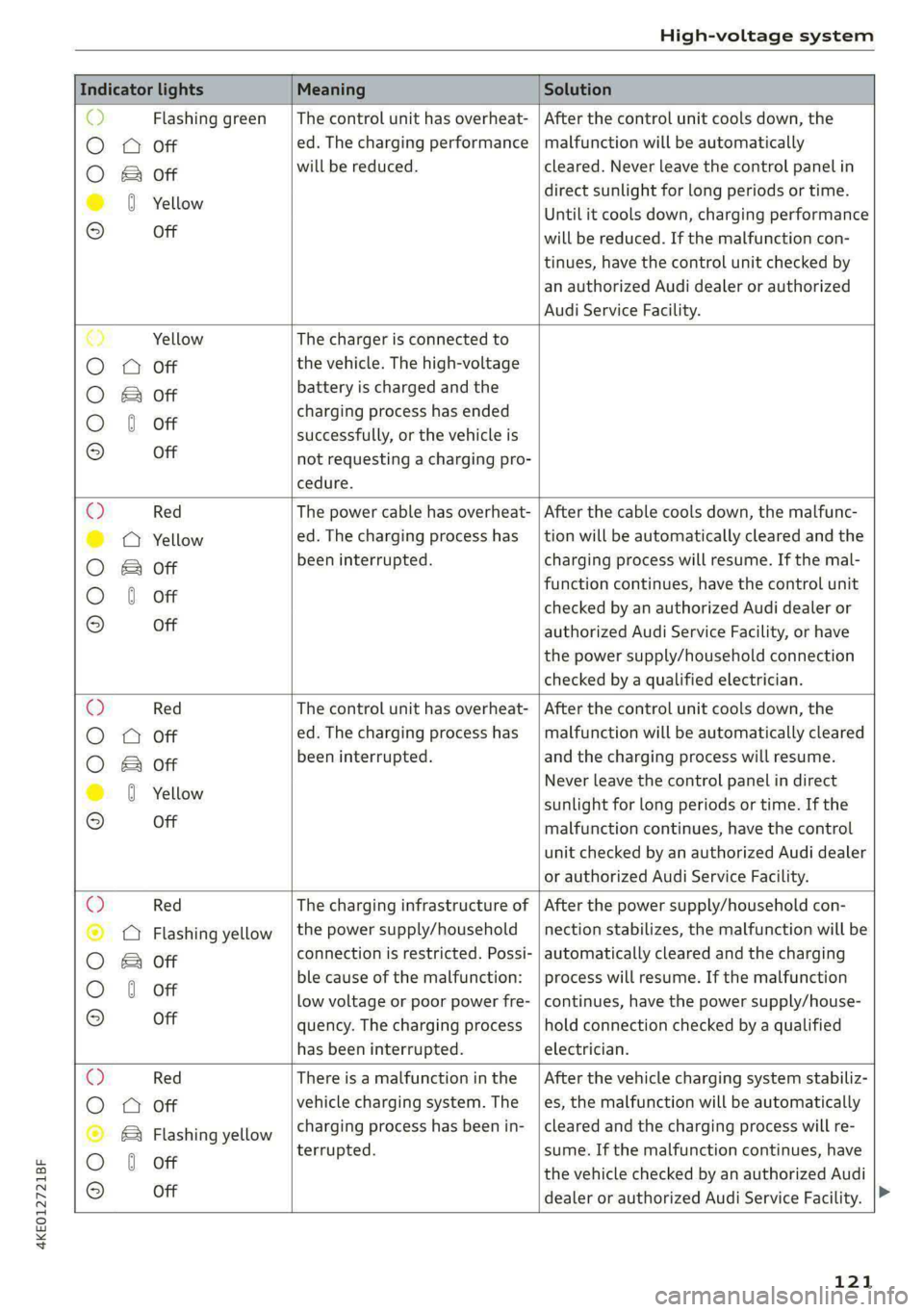
Indicator lights Meaning Solution
o> Flashing green |The control unit has overheat- | After the control unit cools down, the
O A Off ed. The charging performance | malfunction will be automatically
O B&B oft will be reduced. cleared. Never leave the control panel in
direct sunlight for long periods or time.
© 0 Yellow Until it cools down, charging performance
° Off will be reduced. If the malfunction con-
tinues, have the control unit checked by
an authorized Audi dealer or authorized
Audi Service Facility.
€) Yellow The charger is connected to
O QA Off the vehicle. The high-voltage
O B oft battery is charged and the
charging process has ended
O 0 off successfully, or the vehicle is
® Off not requesting a charging pro-
cedure.
© Red The power cable has overheat- | After the cable cools down, the malfunc-
© @ Yellow ed. The charging process has __| tion will be automatically cleared and the
O B oft been interrupted. charging process will resume. If the mal-
function continues, have the control unit
O 0 off checked by an authorized Audi dealer or
© Off authorized Audi Service Facility, or have
the power supply/household connection
checked by a qualified electrician.
Q Red The control unit has overheat- | After the control unit cools down, the
O
A Off ed. The charging process has_ | malfunction will be automatically cleared
O B oft been interrupted. and the charging process will resume.
© 8 Yeltow Never leave the control panel in direct
sunlight for long periods or time. If the
© Off malfunction continues, have the control
unit checked by an authorized Audi dealer
or authorized Audi Service Facility.
O Red The charging infrastructure of | After the power supply/household con-
© Q Flashing yellow |the power supply/household | nection stabilizes, the malfunction will be
O 2 oft connection is restricted. Possi- | automatically cleared and the charging
O 6 off ble cause of the malfunction: | process will resume. If the malfunction
low voltage or poor power fre- | continues, have the power supply/house-
© Off quency. The charging process | hold connection checked by a qualified
has been interrupted. electrician.
O Red There is a malfunction inthe | After the vehicle charging system stabiliz-
O QO Off vehicle charging system. The | es, the malfunction will be automatically
© B Flashing yellow charging process has been in- | cleared and the charging process will re-
O 6 of terrupted. sume. If the malfunction continues, have
© oH the vehicle checked by an authorized Audi
dealer or authorized Audi Service Facility.
121
Page 127 of 308
4KE012721BF
High-voltage system
— Only change cables in a dry environment.
— The Audi charging system may only be used
as a complete unit consisting of the power
cables, the control unit, and the vehicle ca-
ble. Depending on the country, the total
length of the power cable, control panel and
vehicle cable may be restricted, for example
to 24.6 feet (7.5 m) in the USA. Audi recom-
mends using only cables approved by Audi.
@) Tips
The power cable with the power connector for
industrial sockets and the Audi charging sys-
tem control unit are designed to work togeth-
er. Changing the power cable to another con-
nector type may reduce the available charging
power of the entire system. Limitations on
the ability to transfer power (current capacity)
depending on the phase and the number of
available phases may affect the available
charging power.
Wall mo clip
Applies to: vehicles with wall mount clip
RAZ-0638,
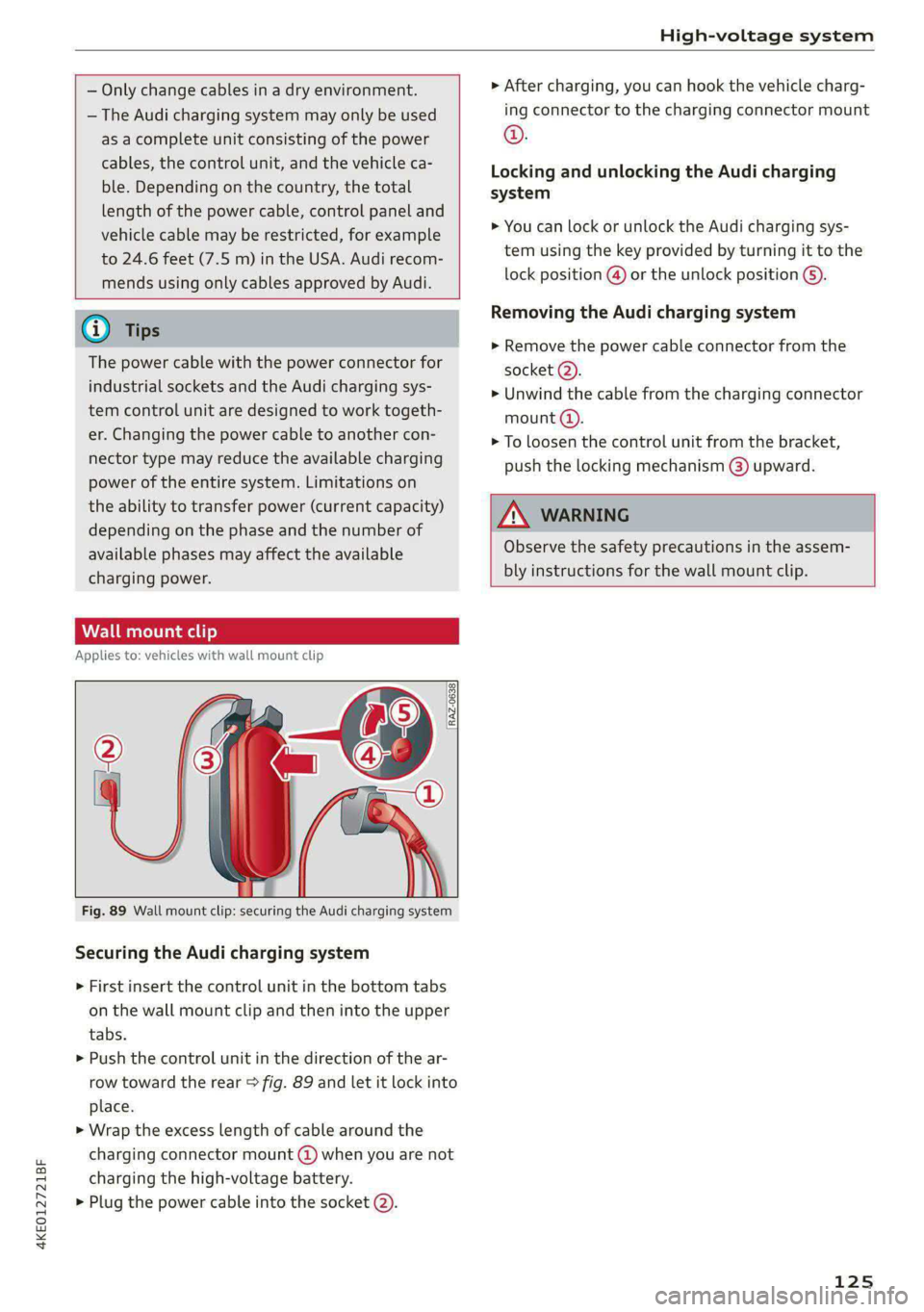
Fig. 89 Wall mount clip: securing the Audi charging system
Securing the Audi charging system
> First insert the control unit in the bottom tabs
on the wall mount clip and then into the upper
tabs.
> Push the control unit in the direction of the ar-
row toward the rear > fig. 89 and let it lock into
place.
> Wrap the excess length of cable around the
charging connector mount @ when you are not
charging the high-voltage battery.
> Plug the power cable into the socket (2).
> After charging, you can hook the vehicle charg-
ing connector to the charging connector mount
©.
Locking and unlocking the Audi charging
system
> You can lock or unlock the Audi charging sys-
tem using the key provided by turning it to the
lock position @) or the unlock position 6).
Removing the Audi charging system
> Remove the power cable connector from the
socket (2).
> Unwind the cable from the charging connector
mount (@).
> To loosen the control unit from the bracket,
push the locking mechanism @) upward.
ZX WARNING
Observe the safety precautions in the assem-
bly instructions for the wall mount clip.
125
Page 128 of 308
Trailer towing
Trailer towing
Driving with a trailer
er else)
Your vehicle is primarily intended for transport-
ing people and luggage. However, if you drive
with a trailer, follow the technical requirements,
the operation and driving tips, and the legal reg-
ulations.
Driving with a trailer affects the vehicle's energy
usage, performance, and wear. It also requires
higher concentration from the driver.
ZA\ WARNING
Do not transport any people in a trailer due to
the risk of fatal injury.
Technical requirements
Trailer hitch
Only use a trailer hitch with a removable ball
hitch mount and ball hitch. The trailer hitch must
be permitted for the vehicle, the trailer and the
permitted total weight of the trailer being
pulled. Above all, it must be securely and safely
attached to the vehicle trailer.
Never mount a trailer hitch on the bumper. The
trailer hitch must be mounted in a way that does
not impair the function of the bumper. Do not
make any modifications to the brake system.
Check regularly if the trailer hitch is securely
mounted. Always follow the instructions given by
the trailer hitch manufacturer.
Trailer brakes
If the trailer has its own brake system, then fol-
low the manufacturer specifications. However,
the brake system on the trailer must never be
connected to the vehicle brake system.
ZA WARNING
— Never mount a "weight-distributing" or
"load-balancing" trailer coupler as the trailer
hitch. The vehicle was not designed for
these types of trailer hitches. The trailer
126
hitch can malfunction and the trailer can
break off from the vehicle.
— If the trailer is equipped with electronic
brakes, these brakes cannot be activated by
a factory-installed control system, which in-
creases the risk of an accident.
—To reduce the risk of injury, always remove
the ball hitch mount if no trailer is mount-
ed.
Operating instructions
Towing capacity
The permitted towing capacity must not be ex-
ceeded under any circumstances > page 291.
You can drive up larger inclines if you are not us-
ing the maximum towing capacity.
Tongue weight
The maximum permitted tongue weight of the
trailer drawbar on the trailer hitch ball head must
not be exceeded.
For driving safety, Audi recommends always us-
ing
the maximum permitted tongue weight, but
do not exceed this weight. Distributing the cargo
in the trailer correctly will help to achieve this
weight. Having the tongue weight too low affects
the vehicle's handling.
You can determine the tongue weight using a
tongue weight scale, a bathroom scale, or a pub-
lic weigh station, for example.
The permitted tongue weight of your vehicle can
be found in the vehicle documentation or in
=> page 291.
Load distribution
Poor cargo load and distribution can negatively
impact vehicle handling. Load the trailer based
on the following criteria as much as possible:
— Store objects in the vehicle luggage compart-
ment, if possible. The vehicle should always
carry the heaviest possible load and the trailer
should have the lightest possible load.
— Distribute the load in the trailer so that the
heavy objects are as close to the axle as possi-
ble.
Page 129 of 308
4KE012721BF
Trailer towing
— Secure objects so that they do not slide.
— Utilize the maximum permitted tongue weight
if possible.
Tires
Set the tire pressure on your vehicle for a “full
load”; see the tire pressure sticker > page 251. If
necessary, also adjust the tire pressure on the
trailer according to the manufacturer's specifica-
tions.
The trailer and the vehicle should be equipped
with winter tires when driving in winter tempera-
tures.
Outside mirrors
Make sure that you can also observe the traffic
area behind the vehicle using the exterior mir-
rors, and use additional exterior mirrors if neces-
sary. Adjust the additional exterior mirrors so
that you have a sufficient visibility behind the ve-
hicle. Follow the local legal regulations for instal-
ling additional exterior mirrors.
Exterior lighting
Follow the legal regulations for lighting on your
trailer that are applicable in the country where
you are operating the vehicle. Contact an author-
ized Audi dealer or authorized Audi Service Facili-
ty for more information.
Before you start driving, check all lighting equip-
ment on the trailer while it is hitched to the vehi-
cle.
The headlight range control automatically ad-
justs the light range of the headlights.
Safety chains
Make sure the safety chains are correctly applied
when pulling a trailer. The chains should hang
enough so that the trailer can drive around
curves. However, they must not touch the
ground.
Air suspension
Applies to: vehicles with air suspension
The Audi drive select* comfort mode > page 102
must be selected before you adjust the tongue
weight on the trailer and hitch the trailer >@,
=> page 103.
The air suspension trailer mode must be switched
on.
Applies to MMI: select on the home screen: VE-
HICLE > Settings & Service > Air suspension:
trailer.
Switch trailer mode off again when you are no
longer towing a trailer.
For vehicles with a factory-installed trailer hitch,
the air suspension trailer mode will automatically
switch on if you connect the trailer connector to
the socket.
When using rear carrier systems that are mount-
ed directly on the trailer hitch ball head, you can
also switch trailer mode off manually.
If you must drive on roads that are in poor condi-
tion, you can raise the vehicle again after hitching
the trailer or after adjusting the tongue weight
=> page 103.
You can also increase ground clearance by select-
ing the Audi drive select* offroad or allroad
modes > page 102.
Vehicle levels below the values set in the comfort
level will no longer be available, even if you are
lowering the vehicle manually.
ZA WARNING
Applies to: vehicles with air suspension
— Never turn off trailer mode while driving
when a trailer is hitched, because then the
restrictions for controlling the vehicle level
will be turned off.
— Driving with a trailer on unpaved roads when
the vehicle is raised may change the vehicle
handling. Adapt your speed.
— Note that the vehicle will lower automatical-
ly at certain speeds if you have lifted the ve-
hicle manually.
@) Note
— Applies to: vehicles with air suspension: Se-
lect the Audi drive select* comfort mode.
127
Page 130 of 308
Trailer towing
Otherwise, the tongue load specified for
your vehicle will no longer be applicable.
— Attachments retrofitted on the vehicle may
cause damage, especially on the trailer
hitch ball head. In cases of damage, have
the function checked by an authorized Audi
dealer or authorized Audi Service Facility.
@) Tips
— Block the wheels with chocks when parking
on inclines if the trailer is loaded.
— Audi recommends having the vehicle in-
spected between the inspection intervals if
you tow a trailer frequently.
Driving with a trailer
Driving with a trailer requires extra caution.
Speed
Adhere to the legal speed limits. Follow the legal
regulations that are applicable in the country
where you are operating the vehicle.
As the speed increases, the driving stability of
the trailer decreases. Therefore you should not
exceed the maximum legal speed limit when
there are unfavorable road, weather, and/or wind
conditions. This especially applies when driving
downhill.
Hill
When you start driving uphill or downhill, trailers
may tilt or sway sooner than when driving ona
level surface. If small swaying movements have
already occurred, you can stabilize the trailer by
firmly braking immediately. Never attempt to
“straighten out” the trailer by accelerating.
reduce the speed and use the recuperation brak-
ing effect > page 94 to relieve the brakes > A\.
Brakes
When using a trailer with overrun brakes, first
brake gently then quickly. This reduces the risk of
jerking while braking if the trailer wheels lock up.
128
AN WARNING
Constant braking causes the brakes to over-
heat and can substantially reduce braking per-
formance, increase braking distance, or cause
complete failure of the brake system.