instrument cluster AUDI E-TRON 2021 Owners Manual
[x] Cancel search | Manufacturer: AUDI, Model Year: 2021, Model line: E-TRON, Model: AUDI E-TRON 2021Pages: 308, PDF Size: 83.91 MB
Page 4 of 308
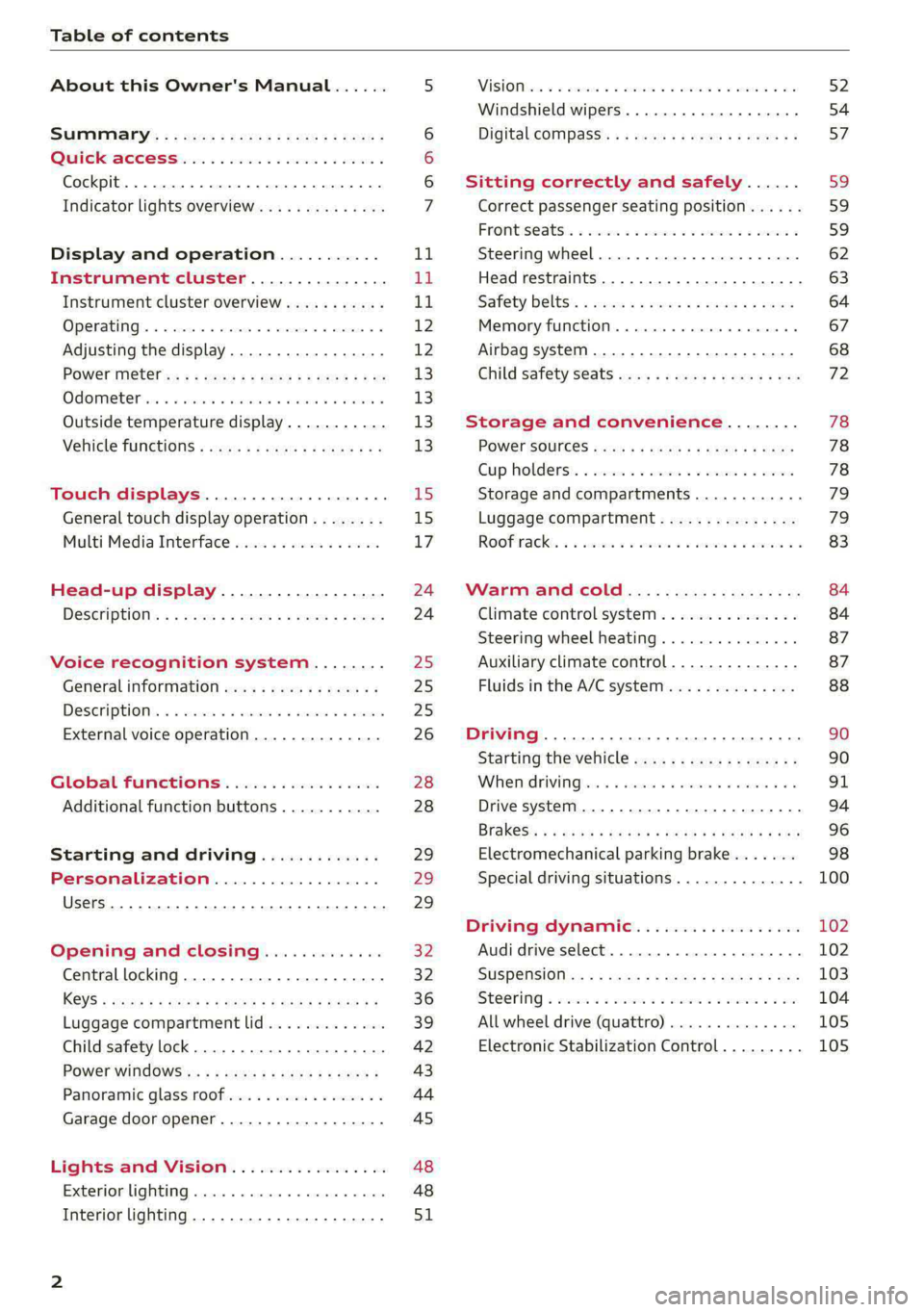
Table of contents
About this Owner's Manual......
SUMIMAry: < = exe : eens: Seen cs sens
QutckeaeCe ssh: «i esis se ois a eaves @
Cockpit. ...... 0... eee eee eee eee
Indicator lights overview...........4..
Display and operation...........
Instrument cluster...............
Instrument cluster overview...........
Operating. ecccuse w+ were oo wens oo ayes 9 ¥
Adjusting the display.................
POWErMe@tel ss « » wees = 5 gees ey ewe xe
OdOMeter sic oo sisiecs a werner » ome ee irae «
Outside temperature display...........
Vehicle functions « sce. ss saes ae sees aes
Touch displays....................
General touch display operation........
Multi Media Interface................
Head-up display..................
DeSGriptlOlls « ¢ sans a ¢ wee a ¢ saws § eae
Voice recognition system........
General information..............4..
DESCRIPTION. 4 & wisevus sa stenius ow aresiue 6 ¥ renin
External voice operation..............
Global Functions’. vc. 6s css se cess
Additional function buttons...........
Starting and driving.............
Personalization..................
Luggage compartment lid.............
Child safety lock........... 00. cece eee
POWEF WINdOWS:: « x sso ¥ 2 eure 9 2 ea
Panoramic glass:n00fiecis < « svsvine so siswes «
Garage door opener...........-.00005
Lights and Vision.................
EXEROPLUGHELAG, soosece « » enscet oo snsuein © 0 asee
Interior lighting..............-...0--
NOD
OO
11
ga:
11 12 12 13 13 13
13
15
15
17
24 24
25
25
25
26
28
28
29
29 29
32 32
36 39
42 43
44
45
48
48
51
ViSIOM i & & soscone wo coasaie 3 w aeeeane © w cease ow 52
Windshield wipers...............000 54
Digital COMPdSS's s s wae se wees se ees ve 57
Sitting correctly and safely...... 59
Correct passenger seating position...... 59
Frontis@ats:. = csv 2» ewes 2 o wom ws eon © 59
SLESKIMG WHEEL eseiince 4 0 eowcene s sontone o 6 axottene 62
Head restraints...................05. 63
Safety belts's « sso: s swans 5 ¢ eeies 5 2 awn 64
Memory function.............. 00s eee 67
Airbag system...............2220005 68
Child
safety seats ..........00 eee eae 72
Storage and convenience........ 78
POWEr SOUFCES seis = = eeu 2 + cee 2 + Hes 78
Cup Rolders': « sis ss ems os ence ee eee 78
Storage and compartments............ 79
Luggage compartment............... 79
Roofirackss + ¢ sseis eevee ev ena oo ween eo 83
Warm and cold.................6. 84
Climate control system............... 84
Steering wheel heating.............-. 87
Auxiliary climate control.............- 87
Fluids in the A/C system.............. 88
Driving ........... 0. cee ee eee 90
Starting the vehicle................-. 90
When:driving jac: 2 + srcwie sv snsine oo earn vos 91
Drive system. ......... 0.0.00 .002000. 94
Brakesi: « « sia < anne 3 gene 3 x nOuR Fs cee 96
Electromechanical parking brake....... 98
Special driving situations.............. 100
Driving dynamic.................. 102
Audi drive select..............000000. 102
SUSPeNSION ss « = seus + < HeeS 4c REER x BRE 103
StOGFING « wicca x cases « 2 oresess a cae © H Lod 104
All wheel drive (quattro).............. 105
Electronic Stabilization Control......... 105
Page 8 of 308
Quick access
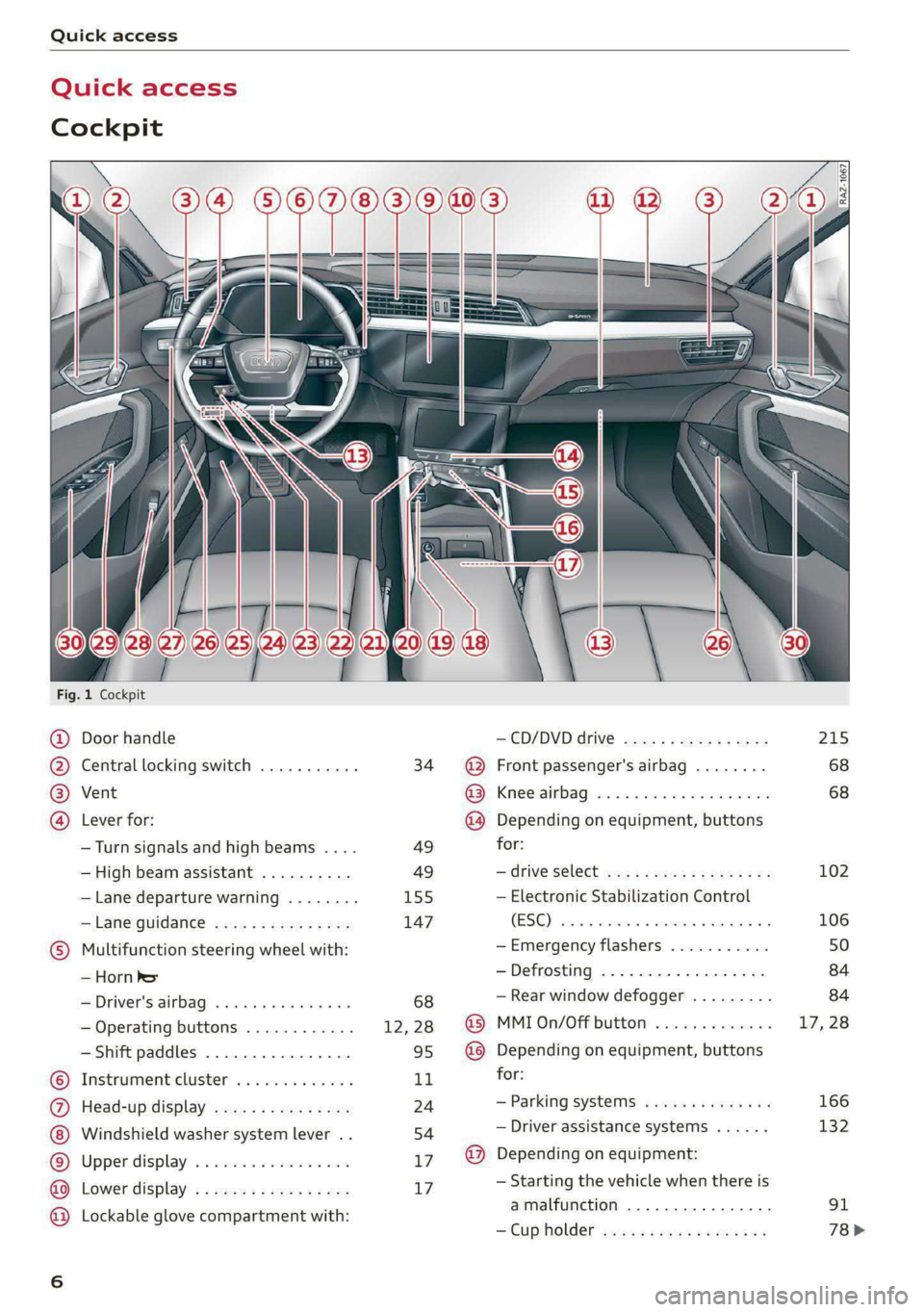
Quick access
Cockpit
Fig. 1 Cockpit
@ @ @ @
©
OO©CV®O
Door handle
Central locking switch ...........
Vent
Lever for:
—Turn signals and high beams ....
— High beam assistant ..........
— Lane departure warning ........
—Lane guidance ...............
Multifunction steering wheel with:
— Horn be
— Driver's airbag ............005
— Operating buttons ............
— Shift paddles ................
Instrument cluster .. 6.0... een
Head-up display ...............
Windshield washer system lever ..
Upper display: « = cer x seems 2 sense
Lower display .................
Lockable glove compartment with:
34
49 49
155
147
—@D/DVDIdrIVE cyeue: 5 2 ems 5 x were
@ Front passenger's airbag ........
GS Krneerairb ag, cies ss secu 2 swe © aoe
@ Depending on equipment, buttons
for:
— drive Select mex ss wamy sv emma soe
— Electronic Stabilization Control
(0) 0) ee eee
—Emergency flashers ...........
—Defrosting ..................
— Rear window defogger .........
@ MMI On/Off button .............
@ Depending on equipment, buttons
for:
— Parking systems ..............
— Driver assistance systems ......
@ Depending on equipment:
— Starting the vehicle when there is
amalfunction ............200.
—"CupHOlder casa ¢ & cows 5 o wens
215
68 68
102
106
Page 9 of 308
4KE012721BF
Quick access
— Audi musicinterface .......... 217
— Audi phone box ............... 177
Socket wz zs sews x 2 uews yo ees sve 78
@ Electromechanical parking brake
BUEtON sgsae «2 came o 2 eawa xo ees 2 98
@0 Selector lever ..............02. 92
@) [START STOP] button ............ 90
@ Steering wheel adjustment ...... 62
@) Lever for:
— Cruise control system ......... 141
— Adaptive cruise assist .......... 144
@4 Connection port for the On Board
Diagnostic System (OBD) ........ 281
@) Hood release ..............00-5 234
@8 Memory function buttons ........ 67
@) Buttons for:
SsLIQWtS | cove & & sonsaws o o amavors & & imamwas 9 0 48
—All-weather lights ............ 48
@8
Luggage compartment lid button . 39
@9 Exterior mirror adjustment ...... 52
60 Buttons for:
— Power windows .............. 43
—Child safety lock .............. 42
() Tips
Some the equipment listed here is only instal-
led in certain models or is available as an op-
tion.
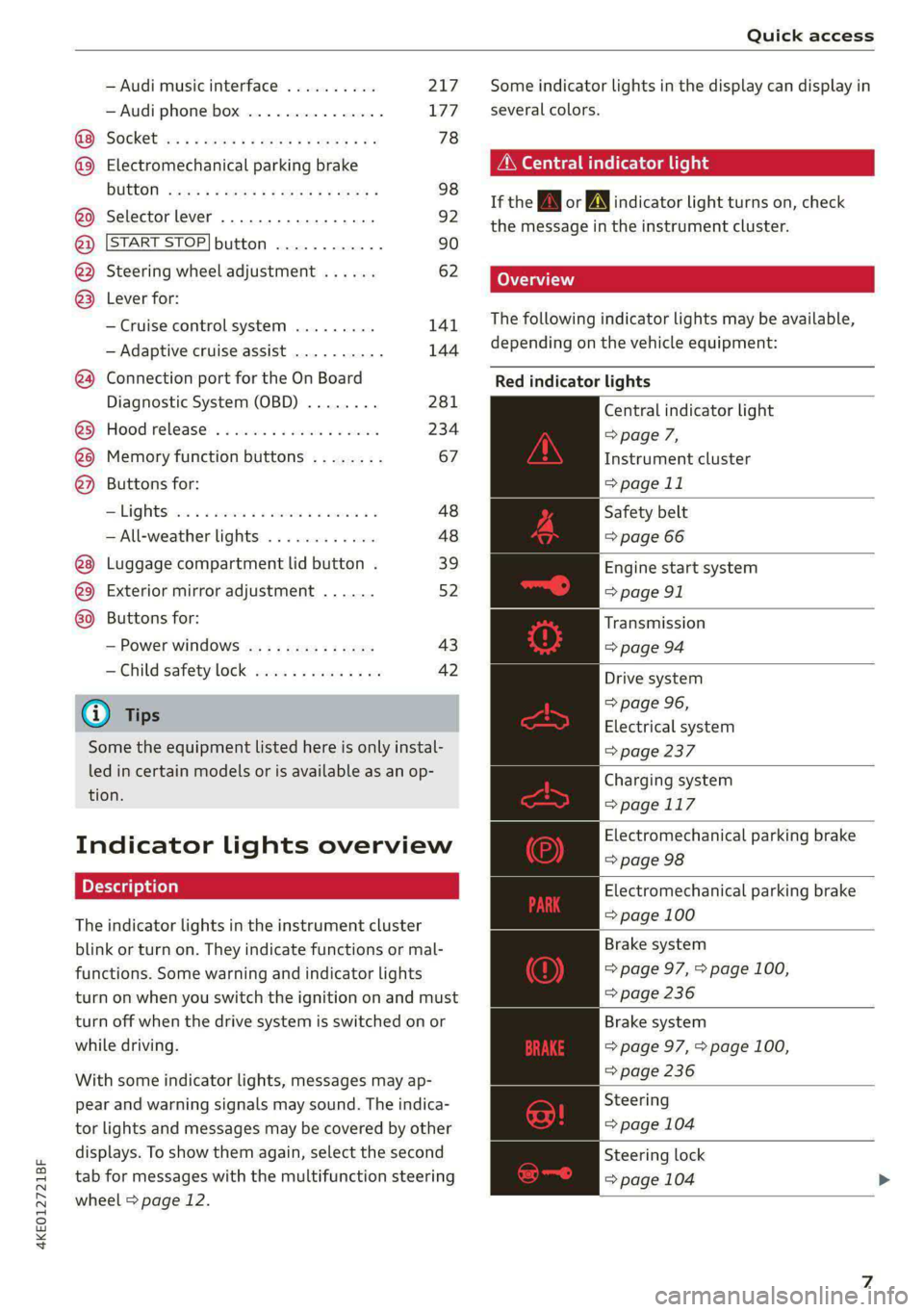
Indicator lights overview
The indicator lights in the instrument cluster
blink or turn on. They indicate functions or mal-
functions. Some warning and indicator lights
turn on when you switch the ignition on and must
turn off when the drive system is switched on or
while driving.
With some indicator lights, messages may ap-
pear and warning signals may sound. The indica-
tor lights and messages may be covered by other
displays. To show them again, select the second
tab for messages with the multifunction steering
wheel > page 12.
Some indicator lights in the display can display in
several colors.
A\ Central indicator light
If the A or indicator light turns on, check
the message in the instrument cluster.
The following indicator lights may be available,
depending on the vehicle equipment:
Red indicator lights
Central indicator light
=> page 7,
Instrument cluster
=> page 11
Safety belt
=> page 66
Engine start system
=> page 91
Transmission
=>page 94
Drive system
=> page 96,
Electrical system
=> page 237
Charging system
=>page 117
Electromechanical parking brake
=> page 98
Electromechanical parking brake
=> page 100
Brake system
=> page 97, > page 100,
=> page 236
Brake system
=> page 97, > page 100,
=> page 236
Steering
=> page 104
Steering lock
=> page 104
Page 13 of 308
4KE012721BF
Instrument cluster
Instrument cluster
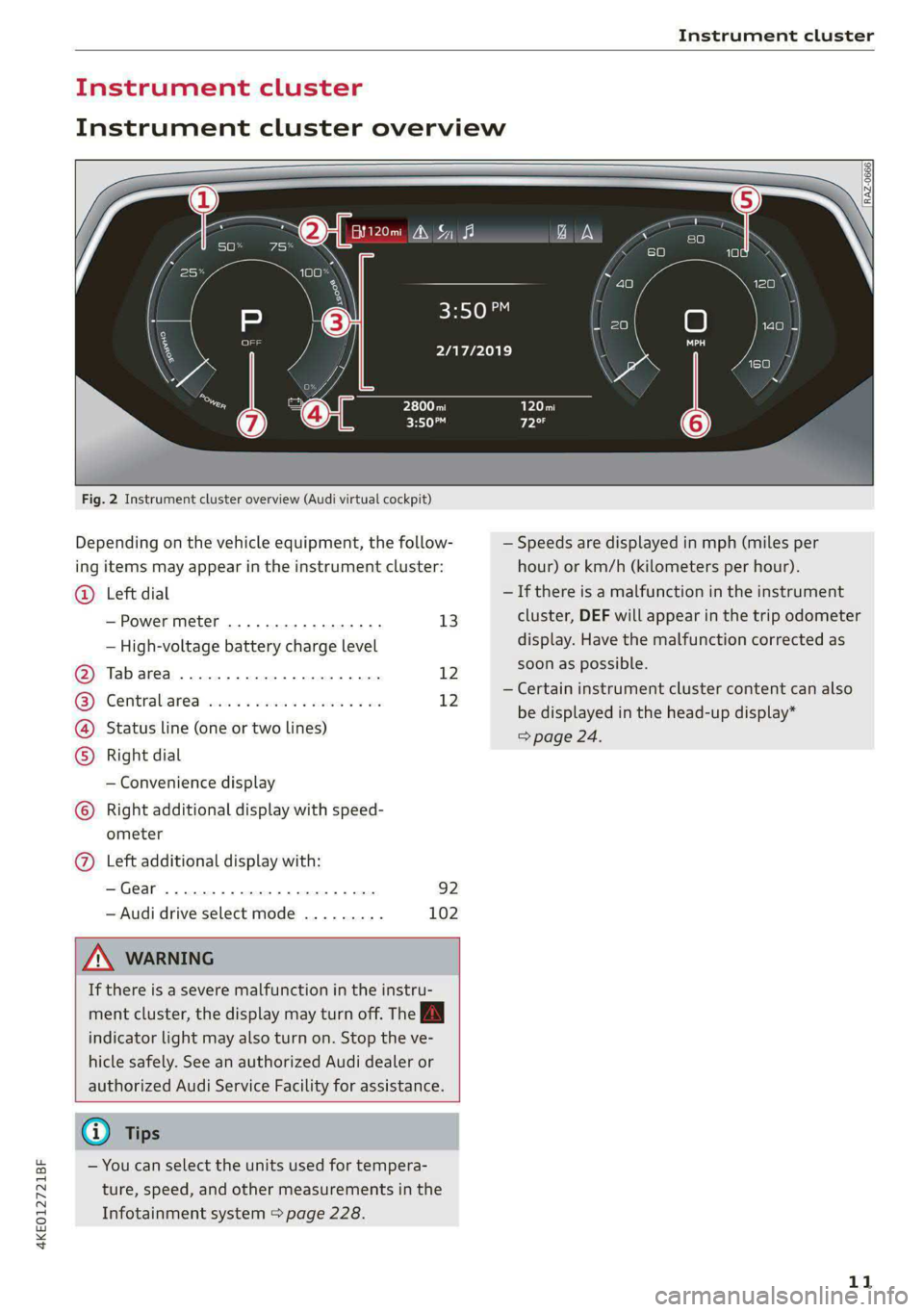
Instrument cluster overview
Fig. 2 Instrument cluster overview (Audi virtual cockpit)
Depending on the vehicle equipment, the follow-
ing items may appear in the instrument cluster:
Left dial
— Power meter ..............00. 13
©
— High-voltage battery charge level
Tabarea .... 0... eee eee 12
Centralised via as ieee s maven 6 wa 12
Status line (one or two lines)
Right dial
— Convenience display
Right additional display with speed-
COE
OLORORS)
3:50™
2/17/2019
ometer
Left additional display with:
—Gear ...... 02. eee eee eee 92
— Audi drive select mode ......... 102
ZA WARNING
If there is a severe malfunction in the instru-
ment cluster, the display may turn off. The A
indicator light may also turn on. Stop the ve-
hicle safely. See an authorized Audi dealer or
authorized Audi Service Facility for assistance.
G) Tips
— You can select the units used for tempera-
ture, speed, and other measurements in the
Infotainment system > page 228.
| zl ‘ae.
N a |
a WAi==)/)
A
— Speeds are displayed in mph (miles per
hour) or km/h (kilometers per hour).
— If there is a malfunction in the instrument
cluster, DEF will appear in the trip odometer
display. Have the malfunction corrected as
soon as possible.
— Certain instrument cluster content can also
be displayed in the head-up display*
> page 24.
11
Page 14 of 308
Instrument cluster
Operating
eH) Oe
2/17/2019
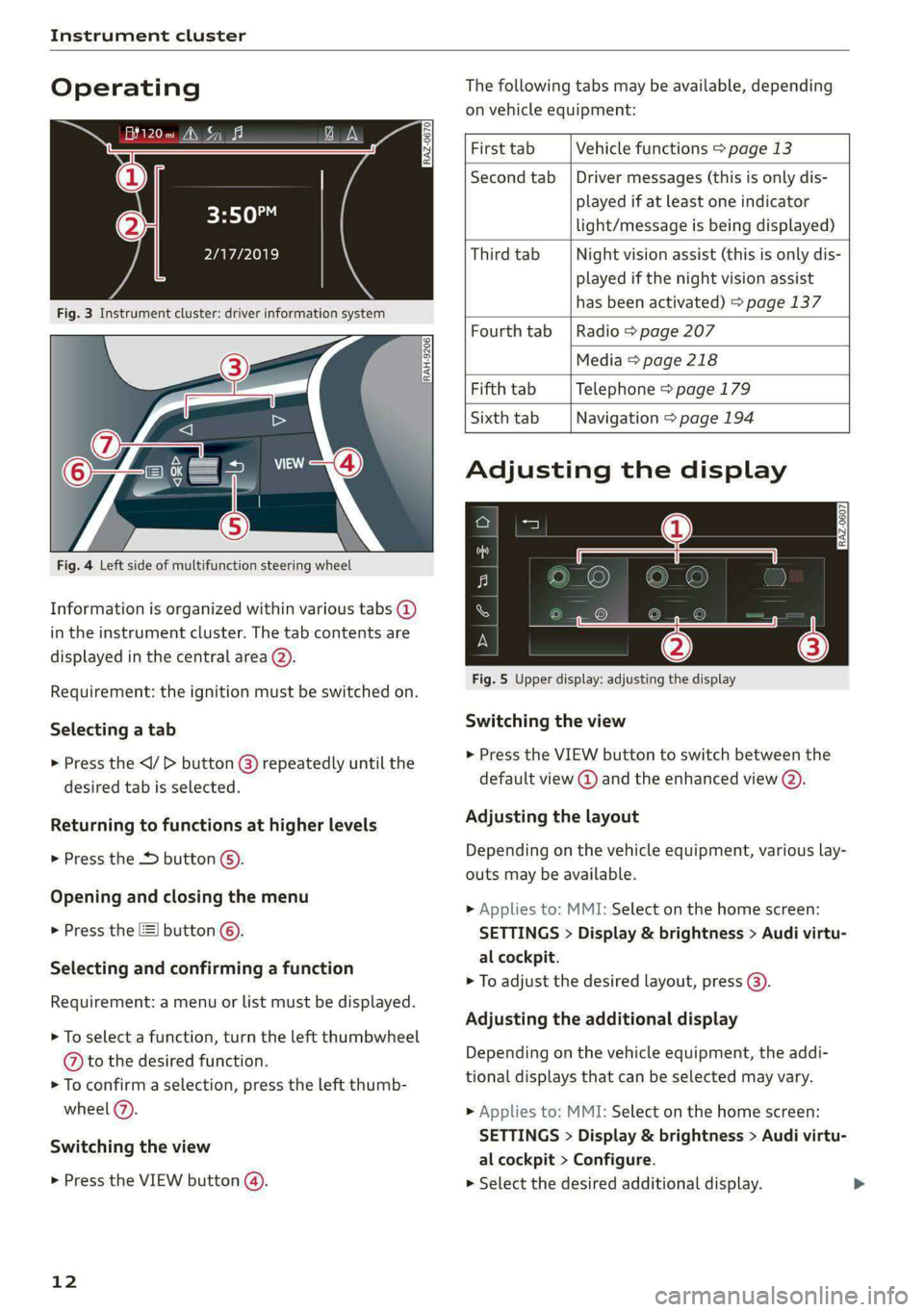
Fig. 3 Instrument cluster: driver information system
The following tabs may be available, depending
on vehicle equipment:
RAH-9206|
Fig. 4 Left side of multifunction steering wheel
Information is organized within various tabs (2)
in the instrument cluster. The tab contents are
displayed in the central area (2).
Requirement: the ignition must be switched on.
Selecting a tab
> Press the button @) repeatedly until the
desired tab is selected.
Returning to functions at higher levels
> Press the D button ©).
Opening and closing the menu
> Press the [=] button ©.
Selecting and confirming a function
Requirement: a menu or list must be displayed.
> To select a function, turn the left thumbwheel
@ to the desired function.
> To confirm a selection, press the left thumb-
wheel (2).
Switching the view
> Press the VIEW button (@).
12
First tab Vehicle functions > page 13
Second tab | Driver messages (this is only dis-
played if at least one indicator
light/message is being displayed)
Third tab Night vision assist (this is only dis-
played if the night vision assist
has been activated) > page 137
Fourth tab | Radio > page 207
Media > page 218
Fifth tab Telephone > page 179
Sixth tab Navigation > page 194
Adjusting the display
S| 3|
wea Ny S|
ce|
Fig. 5 Upper display: adjusting the display
Switching the view
>» Press the VIEW button to switch between the
default view @ and the enhanced view (2).
Adjusting the layout
Depending on the vehicle equipment, various lay-
outs may be available.
> Applies to: MMI: Select on the home screen:
SETTINGS > Display & brightness > Audi virtu-
al cockpit.
> To adjust the desired layout, press (@).
Adjusting the additional display
Depending on the vehicle equipment, the addi-
tional displays that can be selected may vary.
> Applies to: MMI: Select on the home screen:
SETTINGS > Display & brightness > Audi virtu-
al cockpit > Configure.
> Select the desired additional display.
Page 15 of 308
4KE012721BF
Instrument cluster
Reducing the display
Depending on the vehicle equipment, you can
hide the central area in the instrument cluster.
> Select on the instrument cluster: vehicle func-
tions tab > EE] button > Reduced display.
Power meter
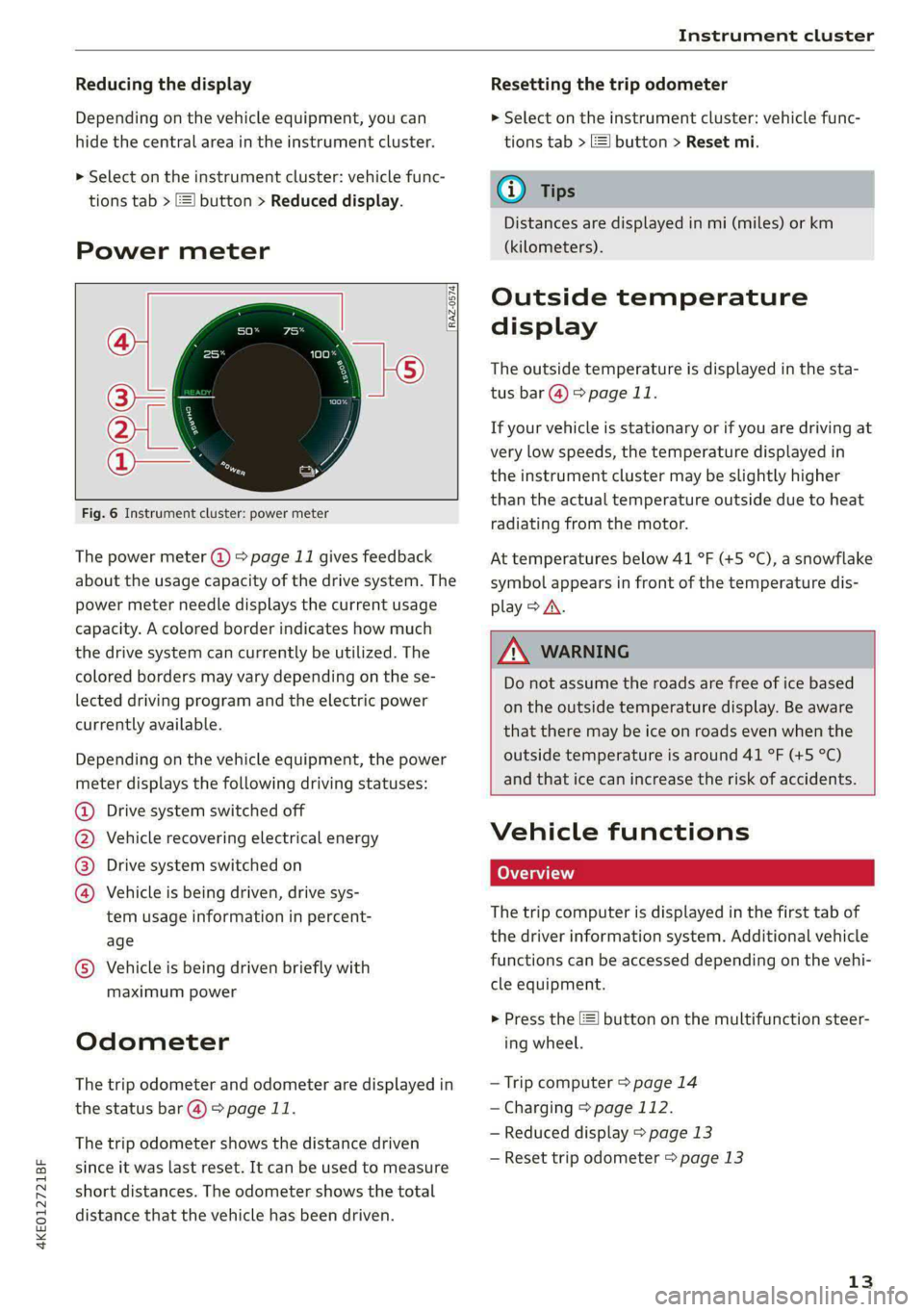
RAZ-0574) fi
@
Fig. 6 Instrument cluster: power meter
The power meter @ > page 11 gives feedback
about the usage capacity of the drive system. The
power meter needle displays the current usage
capacity. A colored border indicates how much
the drive system can currently be utilized. The
colored borders may vary depending on the se-
lected driving program and the electric power
currently available.
Depending on the vehicle equipment, the power
meter displays the following driving statuses:
Drive system switched off
Vehicle recovering electrical energy
Drive system switched on
®©O&O Vehicle is being driven, drive sys-
tem usage information in percent-
age
© Vehicle is being driven briefly with
maximum power
Odometer
The trip odometer and odometer are displayed in
the status bar @) > page 11.
The trip odometer shows the distance driven
since it was last reset. It can be used to measure
short distances. The odometer shows the total
distance that the vehicle has been driven.
Resetting the trip odometer
> Select on the instrument cluster: vehicle func-
tions tab > EJ button > Reset mi.
(i) Tips
Distances are displayed in mi (miles) or km
(kilometers).
Outside temperature
display
The outside temperature is displayed in the sta-
tus bar @) > page 11.
If your vehicle is stationary or if you are driving at
very low speeds, the temperature displayed in
the instrument cluster may be slightly higher
than the actual temperature outside due to heat
radiating from the motor.
At temperatures below 41 °F (+5 °C), a snowflake
symbol appears in front of the temperature dis-
play > A\.
ZA\ WARNING
Do not assume the roads are free of ice based
on the outside temperature display. Be aware
that there may be ice on roads even when the
outside temperature is around 41 °F (+5 °C)
and that ice can increase the risk of accidents.
Vehicle functions
Coa (ai)
The trip computer is displayed in the first tab of
the driver information system. Additional vehicle
functions can be accessed depending on the vehi-
cle equipment.
> Press the E] button on the multifunction steer-
ing wheel.
— Trip computer > page 14
— Charging > page 112.
— Reduced display > page 13
— Reset trip odometer > page 13
13
Page 16 of 308
Instrument cluster
On-board computer
Resetting values to zero
Requirement: the Consumption, Short-term
memory, or Long-term memory display must be
selected.
> To reset the values in one of the memories to
zero, press and hold the left thumbwheel on
the multifunction steering wheel for one sec-
ond, or
> Select on the instrument cluster: vehicle func-
tions tab > [=] button > Reset mi.
Depending on the vehicle equipment, you can call
up the following displays in the on-board com-
puter one at a time by turning the left thumb-
wheel on the multifunction steering wheel:
— Time and date > page 228
— Range display > page 95
— Average consumption > page 14
— Short-term memory overview
— Long-term memory overview
— Driver assistance
— Traffic sign recognition and traffic light infor-
mation
Short-term memory and long-term memory
The short-term memory collects driving informa-
tion from the time the ignition is switched on un-
til it is switched off. If you continue driving within
two hours after switching the ignition off, the
new values will be included when calculating the
current trip information.
Unlike the short-term memory, the long-term
memory is not erased automatically. You can se-
lect the time period for evaluating trip informa-
tion yourself.
Average consumption
The current consumption can be shown using a
bar graph. The average consumption stored in
the short-term memory is also displayed. If the
bar
is green, your vehicle is saving energy (for ex-
ample, using recuperation).
14
G) Tips
The date, time of day, and time and date for-
mat can be set in the Infotainment system
=> page 228.
Page 45 of 308
4KE012721BF
Opening and closing
» Make sure the child safety lock is working by
checking the function on the rear power win-
dow switch and door handle.
> Applies to: vehicles with controls for the cli-
mate control system in the rear and MMI: To al-
so restrict the operation of the climate control
system in the rear, select on the home screen:
SETTINGS > Display & brightness > Operation
in rear
When the child safety lock is switched on, the
following functions are disabled:
—The rear inner door handles
— The rear power windows
— The control panel* for the climate control sys-
tem in the rear
Message in the instrument cluster display
@/ Child safety lock: malfunction! Please
contact Service
There is a malfunction in the child safety lock.
Press the @ button again.
If the message stays on, drive immediately to an
authorized Audi dealer or authorized Audi Service
Facility to have the malfunction repaired.
ZA\ WARNING
— Observe the safety precautions > page 32.
—A malfunction in the child safety lock could
allow
the rear doors to be opened from the
inside, which increases the risk of an acci-
dent.
Power windows
o) Xe Mlle Ma ceiiare amuses
RAZ-0723
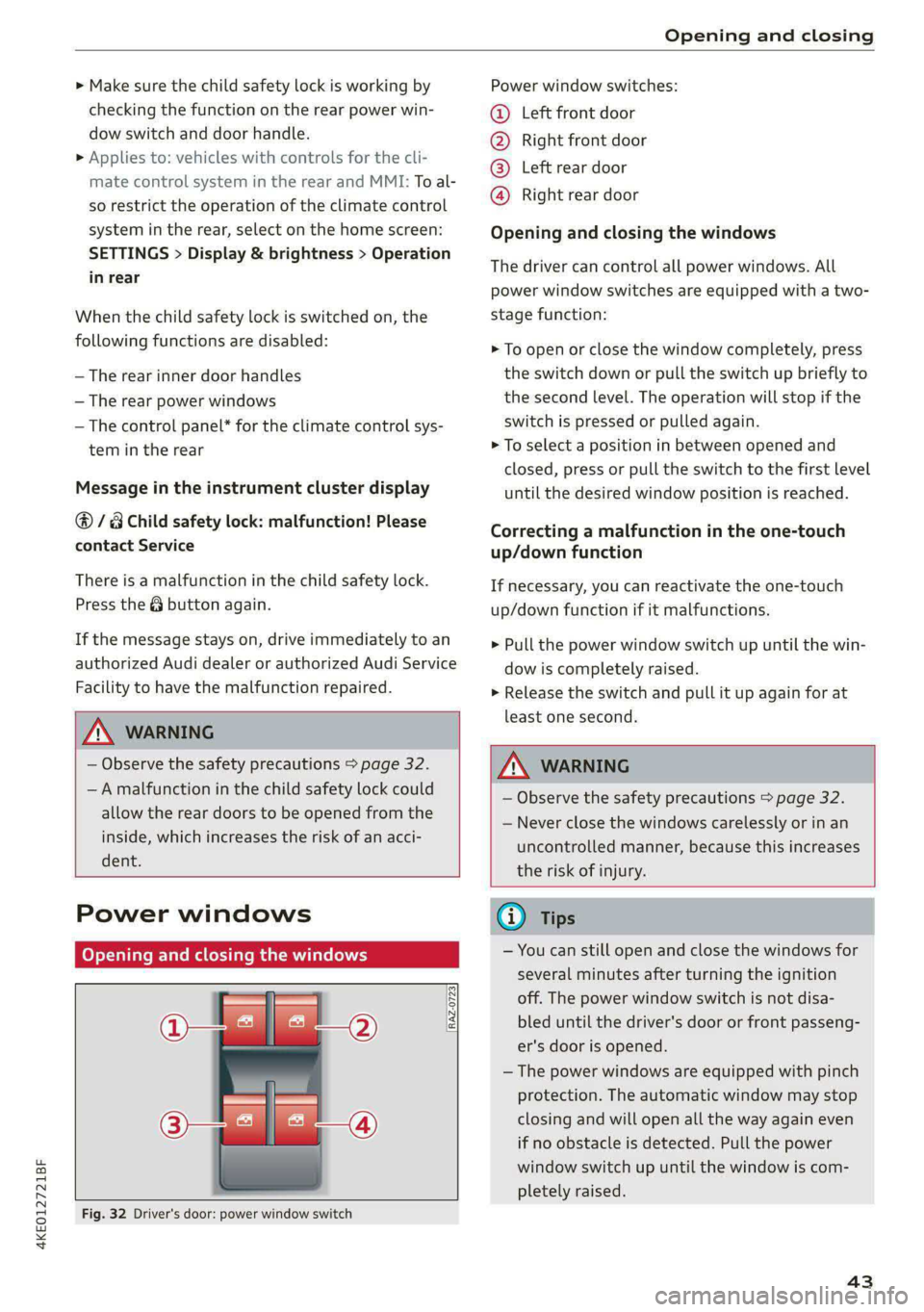
Fig. 32 Driver's door: power window switch
Power window switches:
©@ Left front door
@ Right front door
® Left rear door
@ Right rear door
Opening and closing the windows
The driver can control all power windows. All
power window switches are equipped with a two-
stage function:
> To open or close the window completely, press
the switch down or pull the switch up briefly to
the second level. The operation will stop if the
switch is pressed or pulled again.
> To select a position in between opened and
closed, press or pull the switch to the first level
until the desired window position is reached.
Correcting a malfunction in the one-touch
up/down function
If necessary, you can reactivate the one-touch
up/down function if it malfunctions.
> Pull the power window switch up until the win-
dow is completely raised.
>» Release the switch and pull it up again for at
least one second.
ZA WARNING
— Observe the safety precautions > page 32.
— Never close the windows carelessly or in an
uncontrolled manner, because this increases
the risk of injury.
G) Tips
— You can still open and close the windows for
several minutes after turning the ignition
off. The power window switch is not disa-
bled until the driver's door or front passeng-
er's door is opened.
— The power windows are equipped with pinch
protection. The automatic window may stop
closing and will open all the way again even
if no obstacle is detected. Pull the power
window switch up until the window is com-
pletely raised.
43
Page 50 of 308
Lights and Vision
Lights and Vision
Exterior lighting
Switching the lights on and off
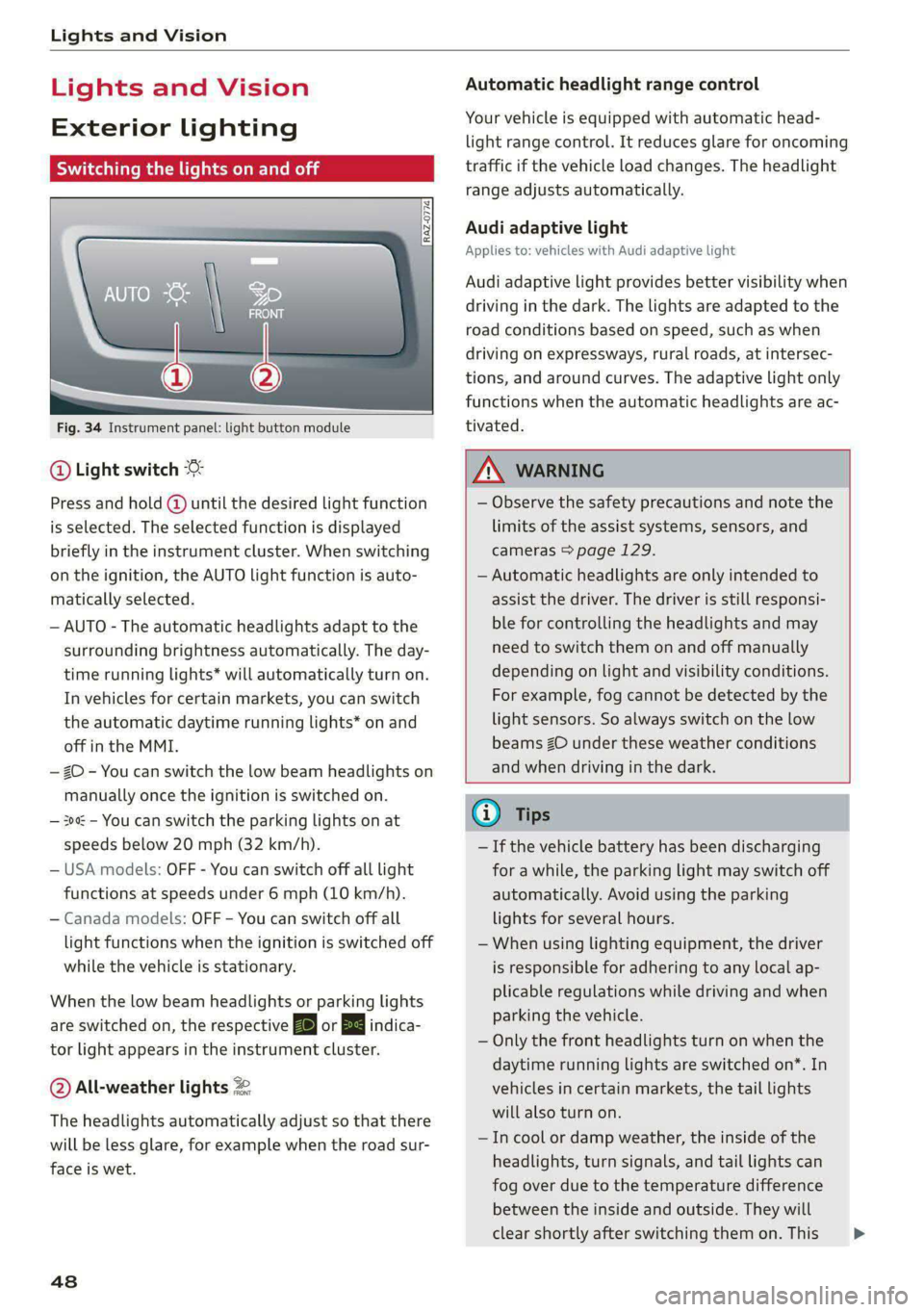
Fig. 34 Instrument panel: light button module
@ Light switch &
Press and hold @ until the desired light function
is selected. The selected function is displayed
briefly in the instrument cluster. When switching
on the ignition, the AUTO light function is auto-
matically selected.
— AUTO - The automatic headlights adapt to the
surrounding brightness automatically. The day-
time running lights* will automatically turn on.
In vehicles for certain markets, you can switch
the automatic daytime running lights* on and
off in the MMI.
— 20 - You can switch the low beam headlights on
manually once the ignition is switched on.
— 3 - You can switch the parking lights on at
speeds below 20 mph (32 km/h).
— USA models: OFF - You can switch off all light
functions at speeds under 6 mph (10 km/h).
— Canada models: OFF - You can switch off all
light functions when the ignition is switched off
while the vehicle is stationary.
When the low beam headlights or parking lights
are switched on, the respective Ba or EB indica-
tor light appears in the instrument cluster.
@ All-weather lights 2
The headlights automatically adjust so that there
will be less glare, for example when the road sur-
face is wet.
48
Automatic headlight range control
Your vehicle is equipped with automatic head-
light range control. It reduces glare for oncoming
traffic if the vehicle load changes. The headlight
range adjusts automatically.
Audi adaptive light
Applies to: vehicles with Audi adaptive light
Audi adaptive light provides better visibility when
driving in the dark. The lights are adapted to the
road conditions based on speed, such as when
driving on expressways, rural roads, at intersec-
tions, and around curves. The adaptive light only
functions when the automatic headlights are ac-
tivated.
A WARNING
— Observe the safety precautions and note the
limits of the assist systems, sensors, and
cameras > page 129.
— Automatic headlights are only intended to
assist the driver. The driver is still responsi-
ble for controlling the headlights and may
need to switch them on and off manually
depending on light and visibility conditions.
For example, fog cannot be detected by the
light sensors. So always switch on the low
beams ZO under these weather conditions
and when driving in the dark.
G) Tips
— If the vehicle battery has been discharging
for a while, the parking light may switch off
automatically. Avoid using the parking
lights for several hours.
— When using lighting equipment, the driver
is responsible for adhering to any local ap-
plicable regulations while driving and when
parking the vehicle.
— Only the front headlights turn on when the
daytime running lights are switched on*. In
vehicles in certain markets, the tail lights
will also turn on.
—Incool or damp weather, the inside of the
headlights, turn signals, and tail lights can
fog
over due to the temperature difference
between the inside and outside. They will
clear shortly after switching them on. This >
Page 51 of 308

4KE012721BF
Lights and Vision
does not affect the service life of the light-
ing.
— When the parking lights are switched on
and the ignition is switched off, the 2002} sym-
bol appears in the light switch module.
Turn signal and high beam lever
BFV-0012
Fig. 35 Lever: switching on the turn signal and high beams
The lever operates the turn signals, the high
beams and the headlight flasher.
Turn signals @>>
The turn signal will activate when you move the
lever into a turn signal position while the ignition
is switched on. The respective Ka] or BY indicator
light flashes.
@ Right turn signal
@ Left turn signal
The turn signal blinks three times if you tap the
lever (convenience turn signal).
If an indicator light blinks twice as fast as usual,
a turn signal bulb has failed. Carefully drive to an
authorized Audi dealer or authorized Audi Service
Facility immediately to have the malfunction cor-
rected.
High beams 2D and headlight flasher
> Move the lever to the corresponding position:
@ High beams on (vehicles with high beam assis-
tant*) > page 49
@ High beams off or headlight flasher
The EJ indicator light in the instrument cluster
will turn on.
ZX WARNING
High beams can cause glare for other drivers,
which increases the risk of an accident. For
this reason, only use the high beams or the
headlight flasher when they will not create
glare for other drivers.
H PTT eld
Applies to: vehicles with high beam assistant
The high beam assistant automatically turns the
high beams on or off depending on the surround-
ing conditions.
A camera on the rearview mirror mount can de-
tect light sources from other road users. The high
beams switch on or off automatically depending
on the position of vehicles driving ahead and on-
coming vehicles, the vehicle speed as well as oth-
er environmental factors and traffic conditions.
Activating high beam assistant
Requirement: the AUTO light function must be
selected and the high beam assistant must be
switched on in the MMI > page 50.
> To activate the high beam assistant, tap the
lever forward @) > page 49, fig. 35. The FM in-
dicator light will appear in the instrument clus-
ter display and the high beams will be switched
on or off automatically. The Ed indicator light
will turn on if the high beams are switched on.
Activating and deactivating the high beam
head lights manually
If the high beams did not switch on or off as ex-
pected, you may switch them on or off manually
instead:
> To activate the high beams manually, tap the
lever
forward @) > page 49, fig. 35. The & in-
dicator light will turn on.
> To deactivate the high beams manually, pull
the lever back @) > page 49, fig. 35. The high
beam assistant is deactivated.
Operating the headlight flasher
> To operate the headlight flashers, pull the lever
back @) > page 49, fig. 35. If the high beam
49