turn signal AUDI E-TRON 2021 Owner's Manual
[x] Cancel search | Manufacturer: AUDI, Model Year: 2021, Model line: E-TRON, Model: AUDI E-TRON 2021Pages: 308, PDF Size: 83.91 MB
Page 166 of 308
Driver assistance
Requirements for using the intersection
assistant:
— The speed must not be higher than approxi-
mately 18 mph (30 km/h).
— The “D” gear is selected.
Displays, warnings, and braking
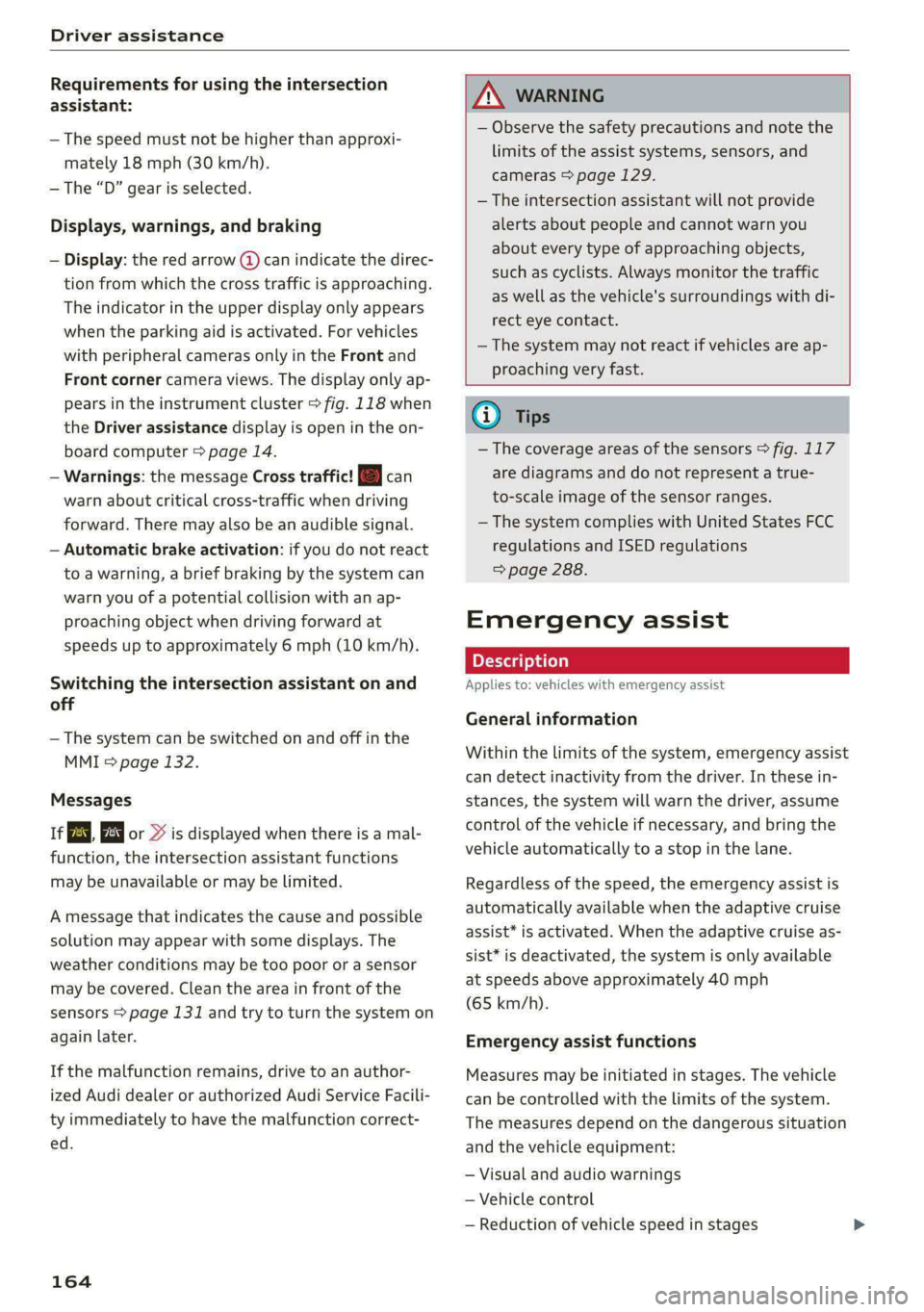
— Display: the red arrow @ can indicate the direc-
tion from which the cross traffic is approaching.
The indicator in the upper display only appears
when the parking aid is activated. For vehicles
with peripheral cameras only in the Front and
Front corner camera views. The display only ap-
pears in the instrument cluster > fig. 118 when
the Driver assistance display is open in the on-
board computer > page 14.
— Warnings: the message Cross traffic! @ can
warn about critical cross-traffic when driving
forward. There may also be an audible signal.
— Automatic brake activation: if you do not react
to a warning, a brief braking by the system can
warn you of a potential collision with an ap-
proaching object when driving forward at
speeds up to approximately 6 mph (10 km/h).
Switching the intersection assistant on and
off
— The system can be switched on and off in the
MMI & page 132.
Messages
fi or 2 is displayed when there is a mal-
function, the intersection assistant functions
may be unavailable or may be limited.
A message that indicates the cause and possible
solution may appear with some displays. The
weather conditions may be too poor or a sensor
may be covered. Clean the area in front of the
sensors > page 131 and try to turn the system on
again later.
If the malfunction remains, drive to an author-
ized Audi dealer or authorized Audi Service Facili-
ty immediately to have the malfunction correct-
ed.
164
ZA WARNING
— Observe the safety precautions and note the
limits of the assist systems, sensors, and
cameras > page 129.
— The intersection assistant will not provide
alerts about people and cannot warn you
about every type of approaching objects,
such as cyclists. Always monitor the traffic
as well as the vehicle's surroundings with di-
rect eye contact.
— The system may not react if vehicles are ap-
proaching very fast.
G) Tips
— The coverage areas of the sensors > fig. 117
are diagrams and do not represent a true-
to-scale image of the sensor ranges.
— The system complies with United States FCC
regulations and ISED regulations
> page 288.
Emergency assist
Applies to: vehicles with emergency assist
General information
Within the limits of the system, emergency assist
can detect inactivity from the driver. In these in-
stances, the system will warn the driver, assume
control of the vehicle if necessary, and bring the
vehicle automatically to a stop in the lane.
Regardless of the speed, the emergency assist is
automatically available when the adaptive cruise
assist* is activated. When the adaptive cruise as-
sist* is deactivated, the system is only available
at speeds above approximately 40 mph
(65 km/h).
Emergency assist functions
Measures may be initiated in stages. The vehicle
can be controlled with the limits of the system.
The measures depend on the dangerous situation
and the vehicle equipment:
— Visual and audio warnings
— Vehicle control
— Reduction of vehicle speed in stages
Page 168 of 308
Parking and maneuvering
Parking and
maneuvering
Introduction
Depending on the vehicle equipment, various
parking aids will help you when parking and ma-
neuvering.
Parking aid
The parking aid plus assists you while parking
using audio and visual signals to warn you about
objects detected in front of, behind, and at the
sides of the vehicle > page 166.
The rearview camera shows the area behind the
vehicle in the MMI display. The lines in the rear-
view camera image help you to park and maneu-
ver > page 168.
The peripheral cameras are an addition to the
rearview camera and help you to see various
areas around the vehicle while parking and ma-
neuvering > page 168.
The rear cross-traffic assist can warn you of ap-
proaching cross traffic when driving in reverse or
exiting a parking space > page 173.
Settings options
You can adjust parking aid functions individually.
The adjustment options depend on the vehicle
equipment.
— Automatic activation > page 166
— Front and rear volume > page 167
— Entertainment fader > page 167.
— Clean rearview camera > page 169
— Trailer view > page 170
—View > page 171
— Rear cross-traffic assist > page 173
ZA WARNING
Observe the safety precautions and note the
limits of the assist systems, sensors, and
cameras > page 129.
G) Tips
Audi recommends practicing parking in a traf-
fic-free location or parking lot to become fa-
166
miliar with the systems. Practice parking in
good light and weather conditions.
Parking aid plus
Activating and deactivating
Applies to: vehicles with parking aid plus
RAZ-1042
Fig. 119 Center console: parking aid button
General information
The parking aid assists when parking and maneu-
vering by providing warnings about obstacles. If
the ultrasonic sensors on the vehicle > page 130,
fig. 90 detect an obstacle, the system will pro-
vide audio and visual warnings.
Activating and deactivating
Requirement: the vehicle speed must be under
approximately 6 mph (10 km/h).
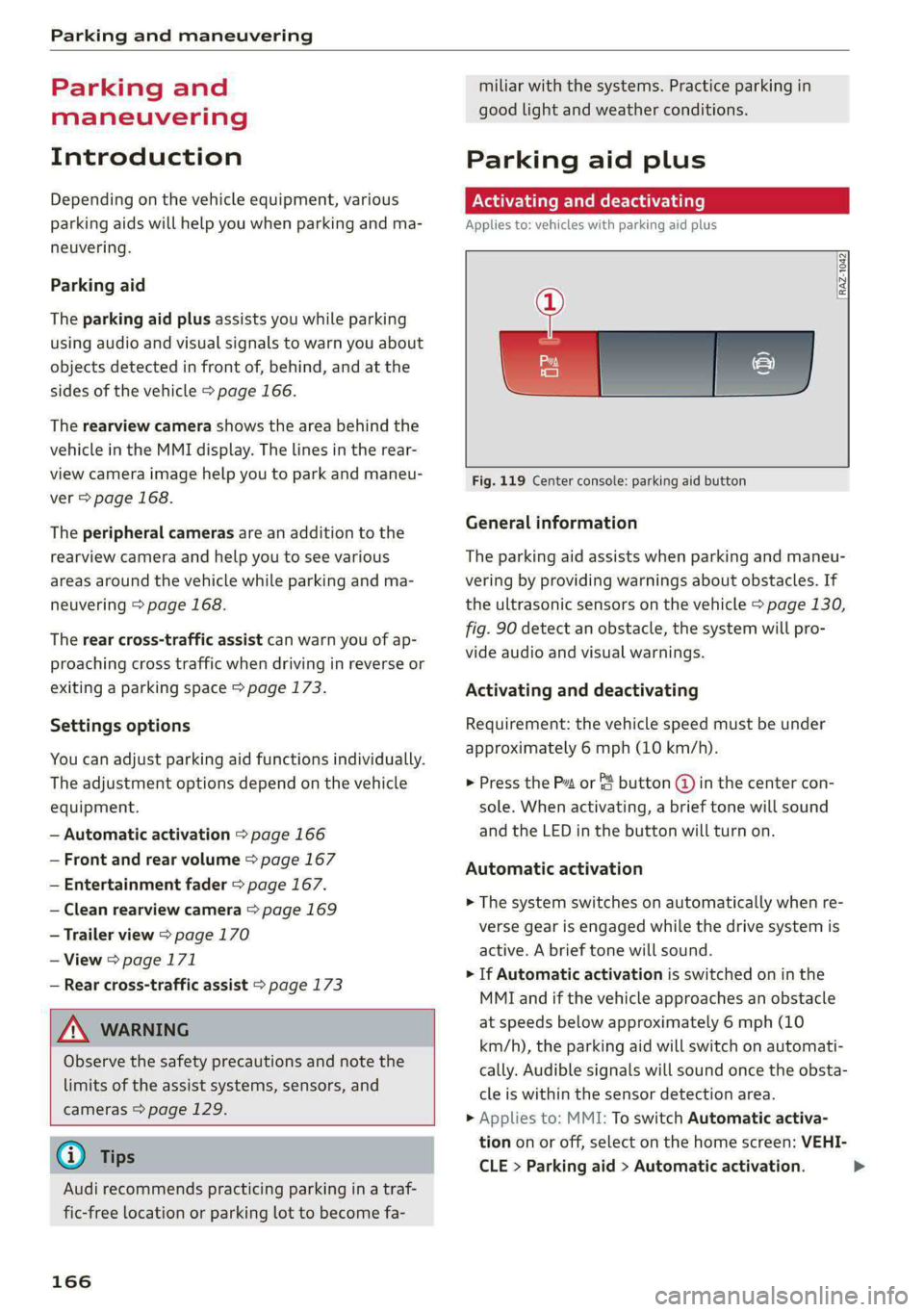
> Press the Pv or {@ button @ in the center con-
sole. When activating, a brief tone will sound
and the LED in the button will turn on.
Automatic activation
> The system switches on automatically when re-
verse gear is engaged while the drive system is
active. A brief tone will sound.
> If Automatic activation is switched on in the
MMI and if the vehicle approaches an obstacle
at speeds below approximately 6 mph (10
km/h), the parking aid will switch on automati-
cally. Audible signals will sound once the obsta-
cle is within the sensor detection area.
> Applies to: MMI: To switch Automatic activa-
tion on or off, select on the home screen: VEHI-
CLE > Parking aid > Automatic activation. >
Page 175 of 308
4KE012721BF
Parking and maneuvering
Rear cross-traffic assist
Applies to: vehicles with rear cross-traffic assist
3 s
&
= st a
Fig. 127 Upper display: rear cross-traffic assist display
General information
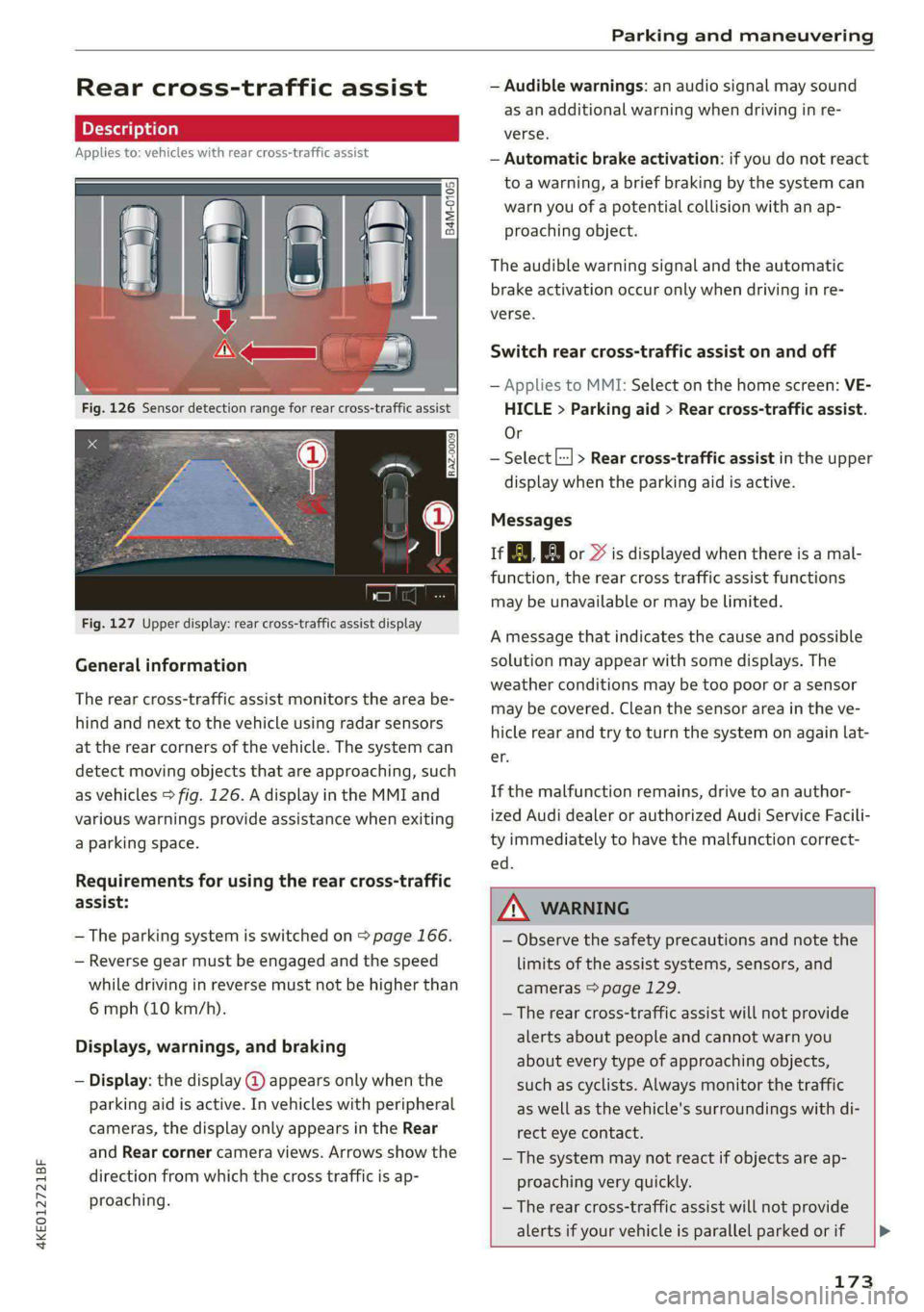
The rear cross-traffic assist monitors the area be-
hind and next to the vehicle using radar sensors
at the rear corners of the vehicle. The system can
detect moving objects that are approaching, such
as vehicles > fig. 126. A display in the MMI and
various warnings provide assistance when exiting
a parking space.
Requirements for using the rear cross-traffic
assist:
— The parking system is switched on > page 166.
— Reverse gear must be engaged and the speed
while driving in reverse must not be higher than
6 mph (10 km/h).
Displays, warnings, and braking
— Display: the display @ appears only when the
parking aid is active. In vehicles with peripheral
cameras, the display only appears in the Rear
and Rear corner camera views. Arrows show the
direction from which the cross traffic is ap-
proaching.
— Audible warnings: an audio signal may sound
as an additional warning when driving in re-
verse.
— Automatic brake activation: if you do not react
to a warning, a brief braking by the system can
warn you of a potential collision with an ap-
proaching object.
The audible warning signal and the automatic
brake activation occur only when driving in re-
verse.
Switch rear cross-traffic assist on and off
— Applies to MMI: Select on the home screen: VE-
HICLE > Parking aid > Rear cross-traffic assist.
Or
— Select |--| > Rear cross-traffic assist in the upper
display when the parking aid is active.
Messages
re or >% is displayed when there is a mal-
function, the rear cross traffic assist functions
may be unavailable or may be limited.
A message that indicates the cause and possible
solution may appear with some displays. The
weather conditions may be too poor or a sensor
may be covered. Clean the sensor area in the ve-
hicle rear and try to turn the system on again lat-
er.
If the malfunction remains, drive to an author-
ized Audi dealer or authorized Audi Service Facili-
ty immediately to have the malfunction correct-
— Observe the safety precautions and note the
limits of the assist systems, sensors, and
cameras > page 129.
— The rear cross-traffic assist will not provide
alerts about people and cannot warn you
about every type of approaching objects,
such as cyclists. Always monitor the traffic
as well as the vehicle's surroundings with di-
rect eye contact.
— The system may not react if objects are ap-
proaching very quickly.
— The rear cross-traffic assist will not provide
alerts if your vehicle is parallel parked or if
173
Page 261 of 308
4KE012721BF
Wheels
As an added safety feature, your vehicle has been
equipped with a tire pressure monitoring system
(TPMS) that illuminates a low tire pressure tell-
tale when one or more of your tires is significant-
ly under-inflated. Accordingly, when the low tire
pressure telltale illuminates, you should stop and
check your tires as soon as possible, and inflate
them to the proper pressure. Driving ona signifi-
cantly under-inflated tire causes the tire to over-
heat and can lead to tire failure. Under-inflation
also reduces fuel efficiency and tire tread life,
and may affect the vehicle's handling and stop-
ping ability.
Please note that the TPMS is not a substitute for
proper tire maintenance, and it is the driver's re-
sponsibility to maintain correct tire pressure,
even if under-inflation has not reached the level
to trigger illumination of the TPMS low tire pres-
sure telltale.
Your vehicle has also been equipped with a TPMS
malfunction indicator to indicate when the sys-
tem is not operating properly. The TPMS mal-
function indicator is combined with the low tire
pressure telltale. When the system detects a
malfunction, the telltale will flash for approxi-
mately one minute and then remain continuously
illuminated. This sequence will continue upon
subsequent vehicle start-ups as long as the mal-
function exists.
When the malfunction indicator is illuminated,
the system may not be able to detect or signal
low tire pressure as intended. TPMS malfunctions
may occur for a variety of reasons, including the
installation of replacement or alternate tires or
wheels on the vehicle that prevent the TPMS
from functioning properly. Always check the
TPMS malfunction telltale after replacing one or
more tires or wheels on your vehicle to ensure
that the replacement or alternate tires and
wheels allow the TPMS to continue to function
properly.
If the tire pressure monitoring indicator
appears
Applies to: vehicles with Tire Pressure Monitoring System in-
dicator
The tire pressure indicator in the instrument
cluster informs you if the tire pressure is too low
or if there is a system malfunction.
Using the ABS sensors, the tire pressure monitor-
ing system compares the tire tread circumference
and vibration characteristics of the individual
tires. If the pressure changes in one or more
tires, this is indicated in the instrument cluster
display with an indicator light @ and a message.
If only one tire is affected, the location of that
tire will be indicated.
The tire pressures must be stored again each
time you change the pressures (switching be-
tween partial and full load pressure) or after
changing or replacing a tire on your vehicle
= page 260. The tire pressure monitoring system
only monitors the tire pressure you have stored.
Refer to the tire pressure label for the recom-
mended tire pressure for your vehicle
=> page 251, fig. 158.
Tire tread circumference and vibration character-
istics can change and cause a tire pressure warn-
ing if:
— The tire pressure in one or more tires is too low
— The tires have structural damage
— The tire was replaced or the tire pressure was
changed and it was not stored > page 260
— Tires that are only partially used are replaced
with new tires
Indicator lights
If the @ indicator light turns on, there is a loss
of pressure in at least one tire .> A\ Check the
tires and replace or repair if necessary. Check and
correct the pressures of all four tires and store
the pressure again > page 260.
ia Tire pressure: malfunction! See owner's
manual
fe appears after switching the ignition on or
while driving and the @ indicator light in the in-
strument cluster blinks for approximately one
259
>
Page 277 of 308
4KE012721BF
Emergency assistance
— When the parking lock is engaged, neither
the front nor rear axle may be lowered or
raised more than 10. The driveshafts or
tires could be seriously damaged.
— Towing must not be used to charge the
high-voltage battery (recuperation), be-
cause this could result in major damages to
the tow vehicle or the vehicle being towed.
— The vehicle must not be tow started for
technical reasons.
G) Tips
— Switch Audi pre sense* off > page 160 when
loading the vehicle onto a vehicle carrier,
train, ship, or other type of transportation,
or when towing the vehicle. This can prevent
an undesired intervention from the pre
sense* system.
— Follow the local legal regulations for tow-
ing.
Read and follow the important information under
=> page 274.
Preparations
> Only secure the towing cable or tow bar at the
designated towing loops > page 275,
=> page 276.
> Make sure the towing cable is not twisted. Oth-
erwise it could disconnect from the towing loop
while towing.
> Switch the emergency flashers on in both
vehicles > page 50. However, do not do this if it
prohibited by law.
Towing vehicle (front)
> Only start to drive when the towing cable is
taut.
> Press the brake pedal very carefully.
> Avoid sudden braking or driving maneuvers.
Vehicle being towed (rear)
> Make sure the ignition is switched on so that
the steering wheel is not locked and so that you
can use the turn signals, the horn, and the
windshield wipers if needed > A\.
> Switching it off before the vehicle has stopped
may impair the function of the brake booster
and power steering. You would then need to
use more force to steer and brake the vehicle.
> Release the parking brake > page 98.
> Select the “N” selector lever position.
>» Switch the ESC off to avoid error messages
=> page 106.
> Make sure the towing cable is always taut.
ZA WARNING
— Never tow a vehicle using a tow bar or tow-
ing cable if the vehicle does not have electri-
cal power.
— If the vehicle runs out of power while it is
being towed, stop towing the vehicle imme-
diately and consult an authorized Audi deal-
er or qualified repair facility.
t towing loop
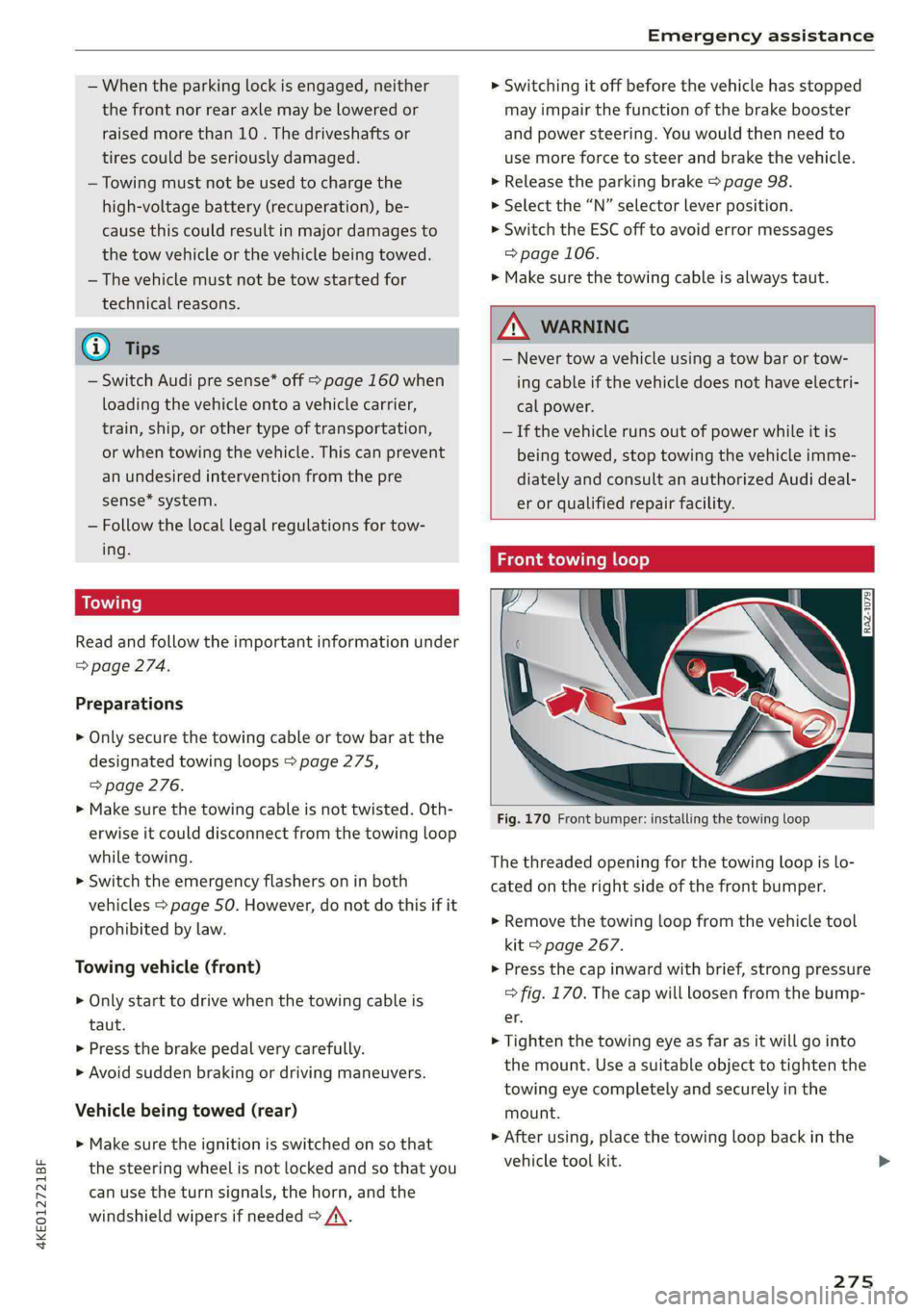
Fig. 170 Front bumper: installing the towing loop
The threaded opening for the towing loop is lo-
cated on the right side of the front bumper.
> Remove the towing loop from the vehicle tool
kit > page 267.
> Press the cap inward with brief, strong pressure
=> fig. 170. The cap will loosen from the bump-
er.
> Tighten the towing eye as far as it will go into
the mount. Use a suitable object to tighten the
towing eye completely and securely in the
mount.
» After using, place the towing loop back in the
vehicle tool kit. >
275
Page 288 of 308
Accessories and technical changes
Technical Modifications
Interference with electronic components, their
software, the wiring, and data transfer may cause
malfunctions. Because of the way electronic com-
ponents are interconnected, such malfunctions
can also impair systems that are not directly in-
volved. This means that you risk both a substan-
tial reduction in the operational safety of your ve-
hicle and increased wear of vehicle components.
Some convenience functions, such as the conven-
ience turn signal function, individual door open-
ing function, and displays, can be reprogrammed
using special workshop equipment. If functions
are reprogrammed, the information and descrip-
tions about these functions in this Owner's Man-
ual may no longer apply to the changed func-
tions. Audi recommends that an authorized Audi
dealer or authorized Audi Service Facility perform
and verify any reprogramming procedures.
Z\ WARNING
Maintenance work, repairs, or technical modi-
fications to the vehicle (such as installing ad-
ditional equipment) that is not performed
correctly can cause serious injuries and in-
crease the risk of an accident.
ZA WARNING
The motor compartment in any motor vehicle
is a potentially dangerous area and can cause
serious personal injury.
— Always use extreme caution when doing any
work in the motor compartment. Always fol-
low commonly accepted safety practices and
use common sense. Never risk personal in-
jury.
— Never perform any work in the motor com-
partment unless you know exactly how to
carry out the job and have the correct tech-
nical information and the correct tools.
— If you are uncertain about what to do, have
the work performed by an authorized Audi
dealer, an authorized Audi Service Facility,
or another qualified workshop. Serious per-
sonal injury may result from improperly per-
formed work.
286
@) Note
— Maintenance work, repairs, or technical
modifications to the vehicle (such as instal-
ling additional equipment) that is not per-
formed correctly can cause vehicle damage.
— If emergency repairs must be performed,
take your vehicle to an authorized Audi deal-
er or authorized Audi Service Facility as soon
as possible.
— Audi is not liable for damage to the vehicle
resulting from failure to comply with these
guidelines.
@) For the sake of the environment
— Regular maintenance can help protect the
environment.
— Technical modifications to the vehicle may
have a negative affect on energy use.
@) For the sake of the environment
Certain components in your vehicle such as
undeployed airbag modules, pretensioners
and remote control batteries may contain Per-
chlorate Material - special handling may ap-
ply, See www.dtsc.ca.gov/hazardouswaste/
perchlorate. When the vehicle or parts of the
restraint system including airbag modules
and safety belts with pretensioners are scrap-
ped, all applicable laws and regulations must
be observed. Your authorized Audi dealer is
familiar with these requirements and we rec-
ommend that you have your dealer perform
this service for you.
(i) Tips
Because of your vehicle's aluminum body de-
sign, all service and repair procedures affect-
ing the body should be performed by an au-
thorized Audi dealer or authorized Audi Serv-
ice Facility, who will perform the work accord-
ing to Audi factory specifications. Only Audi
Genuine Parts are used when Audi experts
perform repair or service procedures. Failure
to use Audi Genuine Parts or Audi Genuine Ac-
cessories or performing repairs incorrectly
may result in severe vehicle damage, such as
corrosion.
Page 305 of 308

4KE012721BF
Treadwear indicators................-. 250
Unidirectional................4.- 243, 272
Uniform tire quality grading............ 258
Tires and wheels
Glossary of tire and loading terminology .. 244
Tires and vehicle load limits............ 253
Toll Module
refer to Integrated Toll Module......... 139
Tools... cece eee 267
Tool tipS.... 6... eee eee eee eee eee 17
Top tether anchor (securing the child safety
S@at) eee 76
Touch display
Adjusting feedback................008. 17
OPerating ss seman so sesame ov semen + wenn w + cows 15
TOWING’: « 2 saves 5 ¢ ewe 5 9 ewes 2 2 ey + 2 ew 274
TOWING:OOD was ¢ ¢ exes 4 » eee 7s eres 275;276
Towing protection monitoring............. 35
TPMS
Tire pressure monitoring system........ 259
Traffic incidents
refer to Online traffic information....... 204
Traffic INFORMATION & sess 2s wee ¥ woes eo ores 204
Online traffic information.............. 204
Traffic light information................ 136
Traffic sign recognition. «cos. ss cee se ows 134
Thatfie SignSiesia 2 2 soon so semues ow cama oo oe 137
Trailer loadin: « = seam = 2 seme ys seme & y seme 291
Trailer mode
Air SUSPENSION & sissies & ceasice ve sonvee oo samen 126
Trailer towinGies ¢ « sean sv mown 4 5 ows 2 9 new 126
Tongue weight ........... 0... c eee eee 126
Trailer loads... ee eee eee 126
Trailer view. ......................000, 170
Turn assist... 2... cece ee eee ee 159
Turn signals .......... 0.00 cece eee eee 49
U
Uniform tire quality grading............. 258
Unlocking and locking. ...............605 32
By remote control..............-.000-- 37
Using the lock cylinder..............-.. 35
With Audi connect vehicle control........ 38
With the central locking switch.......... 34
With the convenience key............... 37
Update (software) .................0055 229
USB.adapter iin: 3 © sce oo eaaue sv mere 2 waver « 217
USB charging ports. « sis eo sess oo oan so ae 78
USB drive
Supported types/formats.............. 223
USB stick
refer to Audi music interface........... 217
Users
LOCAL USERS suas x 2 same < F Ree FY Skee GY Ga 29
IMYAUUSEDSicx: « «soe 2 x secre 2 een wom seem 29
V
Vanity Minor ces s s ses s saree 3 2 peeee 2 2 tee 54
Vehicle
Gare/cleaning « swan ¢ x isemus v ecninars « siamo 2 9 261
Dimensions .............0 00sec eee eee 290
Identification data................... 290
OULOFSERVICE ecsiie sé «owe ee ewe sv mmo ee 266
Raising........... 0... eee eee eee 271
StArtiiGies ¢ 3 mao g x eae 5 EMER sy eR 90
TRANS POPt cesccer s 2 essen 3 6 ame + eae as REE 103
Unlocking and locking...............05. 37
Weliclertaneinrs + seme ao neneue 2 a snimee 2 4 atene 261
Vehicle control services..............-.. 188
Vehicle data label...............-.0000. 290
Vehicle identification number............ 290
Vehicle jack: = sax « x sees = ¢ sees tp eee bee 267
LifEING POINESE. 5 o somes vo srmane «x cenwere w ¥ ceewe 271
Tire change mode.............00-000- 269
Vehicle key... 20... cee cece eee eee eee 32,36
Vehicle:SOunG icc 6 ces a 6 cere oo avaee ov concer 95
Vehicle: toolkits « cium: ox imma oe nase 2 e sernens 267
Ventilation’: « « wes «2 ween ¢ o wens oy eee a 84
VIEW BUttotiiay: « = coe ¢ 2 eens 2 5 sees 5 3 eee 12
VOIC@MGil « = s secs = = eee 2 y ees oy wee e ge 181
Voice recognition system................. 25,
EXtertial mcu s x noes s eaey ¢ wee as pees as 26
OPeratlings. « a cscs « merssee « scenes « & miedo « 6 a 25
WwW
Weallamountclip somsus & esses s+ crawece w & ceanen 9 125
Warning lights
refer to Indicator lights.................. 7
Washing matte finish paint.............. 261
Wave band
refer to Frequency band............... 207
303