lights AUDI E-TRON 2021 Service Manual
[x] Cancel search | Manufacturer: AUDI, Model Year: 2021, Model line: E-TRON, Model: AUDI E-TRON 2021Pages: 308, PDF Size: 83.91 MB
Page 157 of 308
4KE012721BF
Driver assistance
Lane departure warning
General information
Applies to: vehicles with lane departure warning
The lane departure warning can detect lane
marker lines within the limits of the system. If
you are approaching a detected lane marker and
it appears likely that you will leave the lane, the
system can warn you with corrective steering and
a steering wheel vibration, if necessary.
The system functions in the speed range of ap-
proximately 40 mph - 155 mph (65 km/h -
250 km/h).
ZX WARNING
Observe the safety precautions and note the
limits of the assist systems, sensors, and
cameras > page 129.
Applies to: vehicles with lane departure warning
B8V-0692
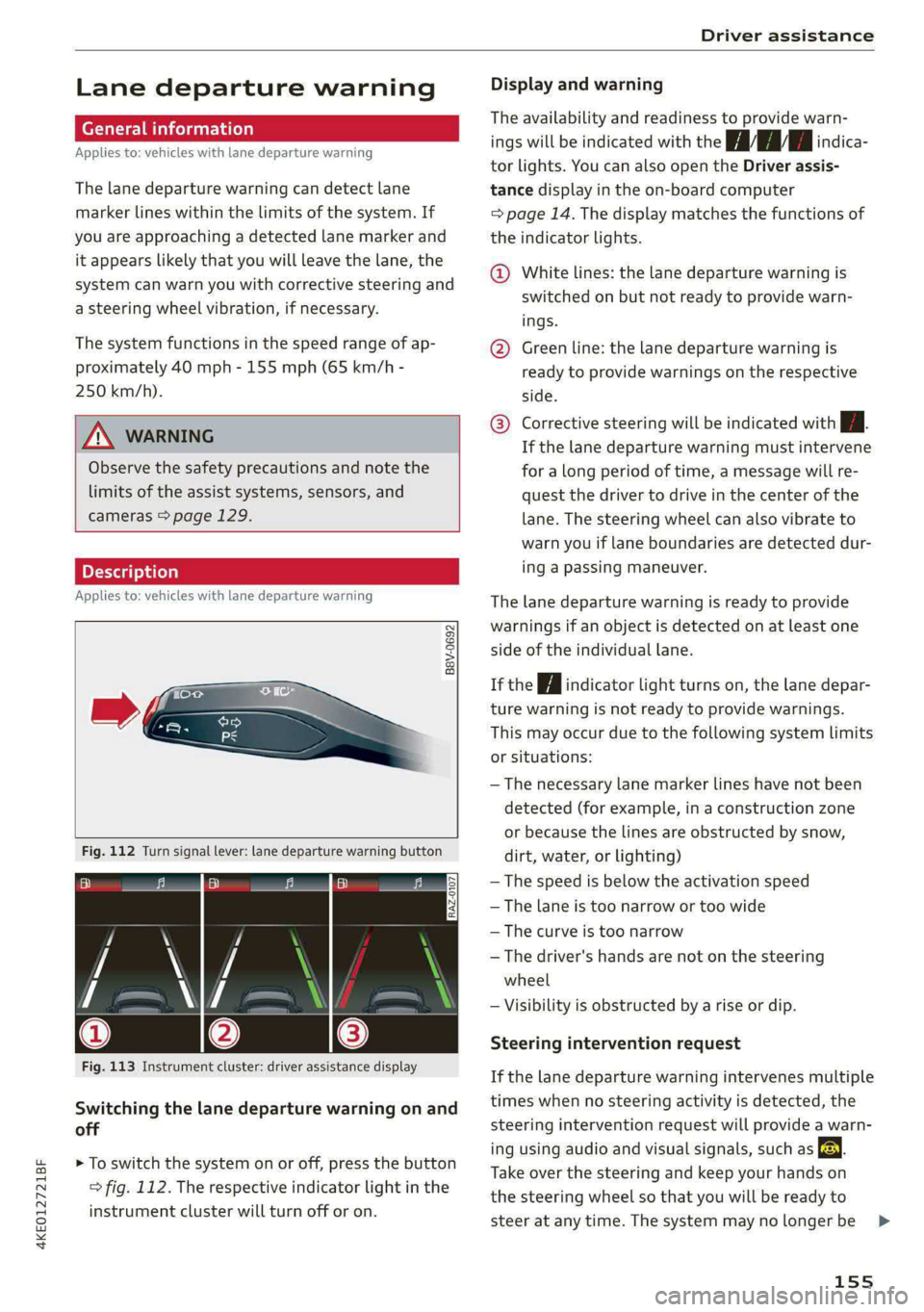
Fig. 112 Turn signal lever: lane departure warning button
RAZ-0107
Fig. 113 Instrument cluster: driver assistance display
Switching the lane departure warning on and
off
> To switch the system on or off, press the button
=> fig. 112. The respective indicator light in the
instrument cluster will turn off or on.
Display and warning
The availability and readiness to provide warn-
ings will be indicated with the HH indica-
tor lights. You can also open the Driver assis-
tance display in the on-board computer
=> page 14. The display matches the functions of
the indicator lights.
@ White lines: the lane departure warning is
switched on but not ready to provide warn-
ings.
@ Green line: the lane departure warning is
ready to provide warnings on the respective
side.
® Corrective steering will be indicated with i.
If the lane departure warning must intervene
for a long period of time, a message will re-
quest the driver to drive in the center of the
lane. The steering wheel can also vibrate to
warn you if lane boundaries are detected dur-
ing a passing maneuver.
The lane departure warning is ready to provide
warnings if an object is detected on at least one
side of the individual lane.
If the | i | indicator light turns on, the lane depar-
ture warning is not ready to provide warnings.
This may occur due to the following system limits
or situations:
— The necessary lane marker lines have not been
detected (for example, in a construction zone
or because the lines are obstructed by snow,
dirt, water, or lighting)
— The speed is below the activation speed
— The lane is too narrow or too wide
—The curve is too narrow
— The driver's hands are not on the steering
wheel
— Visibility is obstructed by a rise or dip.
Steering intervention request
If the lane departure warning intervenes multiple
times when no steering activity is detected, the
steering intervention request will provide a warn-
ing using audio and visual signals, such as EE.
Take over the steering and keep your hands on
the steering wheel so that you will be ready to
steer at any time. The system may no longer be
155
>
Page 191 of 308
4KE012721BF
Audi connect
ZA WARNING
— Always follow the information found in > AA
in General information on page 186.
— Driver messages, text messages, and illumi-
nated warning and indicator lights in the ve-
hicle always take priority over information
from the Audi connect services. The infor-
mation displayed by the Audi connect serv-
ices should not cause you to take safety
risks. This can result in the vehicle breaking
down in traffic and to serious injuries or ac-
cidents.
— Applies to: vehicles with electric drive: Only
perform the Audi connect climate control
functions if your vehicle was shut off cor-
rectly and the ignition is switched off.
— Applies to: vehicles with electric drive: Only
perform charging functions on the high-
voltage battery if the vehicle is shut off cor-
rectly, is connected to a suitable socket ,and
if the ignition is switched off.
@) Tips
— Accessing specific data or controlling func-
tions remotely depends on the charge level
of the vehicle battery. Therefore, these
functions only have limited availability after
switching off the ignition.
— An eSIM card establishes the Internet con-
nection for Audi connect vehicle control
services. The costs for this are included in
the price of Audi connect vehicle control
services. The cell phone network, for exam-
ple, must be available to use these services.
Applies to: vehicles with Audi connect vehicle control
Create a myAudi account by registering in the
myAudi app or at my.audi.com, depending on
your country.
>» Set the key user > page 29.
> Install the myAudi app on your mobile device
and log in with your access information.
@) Tips
Some services require you to enter a 4-digit
PIN that you set up during registration.
Settings
Applies to: vehicles with Wi-Fi hotspot
Requirement: the ignition must be switched on.
> Applies to: MMI: Select on the home screen:
SETTINGS > Connection settings > Wi-Fi
Depending on the country and the vehicle equip-
ment, the following functions may be available:
Wi-Fi
When the function is switched on, the MMI's Wi-
Fi hotspot is active and Wi-Fi devices can be con-
nected to the hotspot.
Wi-Fi hotspot settings
The Wi-Fi connection between the MMI and your
Wi-Fi device is encrypted. You can change the fol-
lowing information if needed.
— Access point (SSID): name of the Wi-Fi hot-
spot.
— Password: an initial password was set at the
factory in the MMI. Audi recommends changing
the initial password. Only use secure passwords
that conform to the general guidelines for se-
cure passwords. For more information, refer to
reputable and current sources on password se-
curity.
Allow data connection through Wi-Fi
When the function is switched on, mobile devices
can use the Internet connection through the Wi-
Fi hotspot. A data plan is needed to do this.
Z\ WARNING
Always follow the information found in > AA
in General information on page 186.
@) Note
Always follow the information found in S@ in
General information on page 186.
189
Page 223 of 308
4KE012721BF
Media
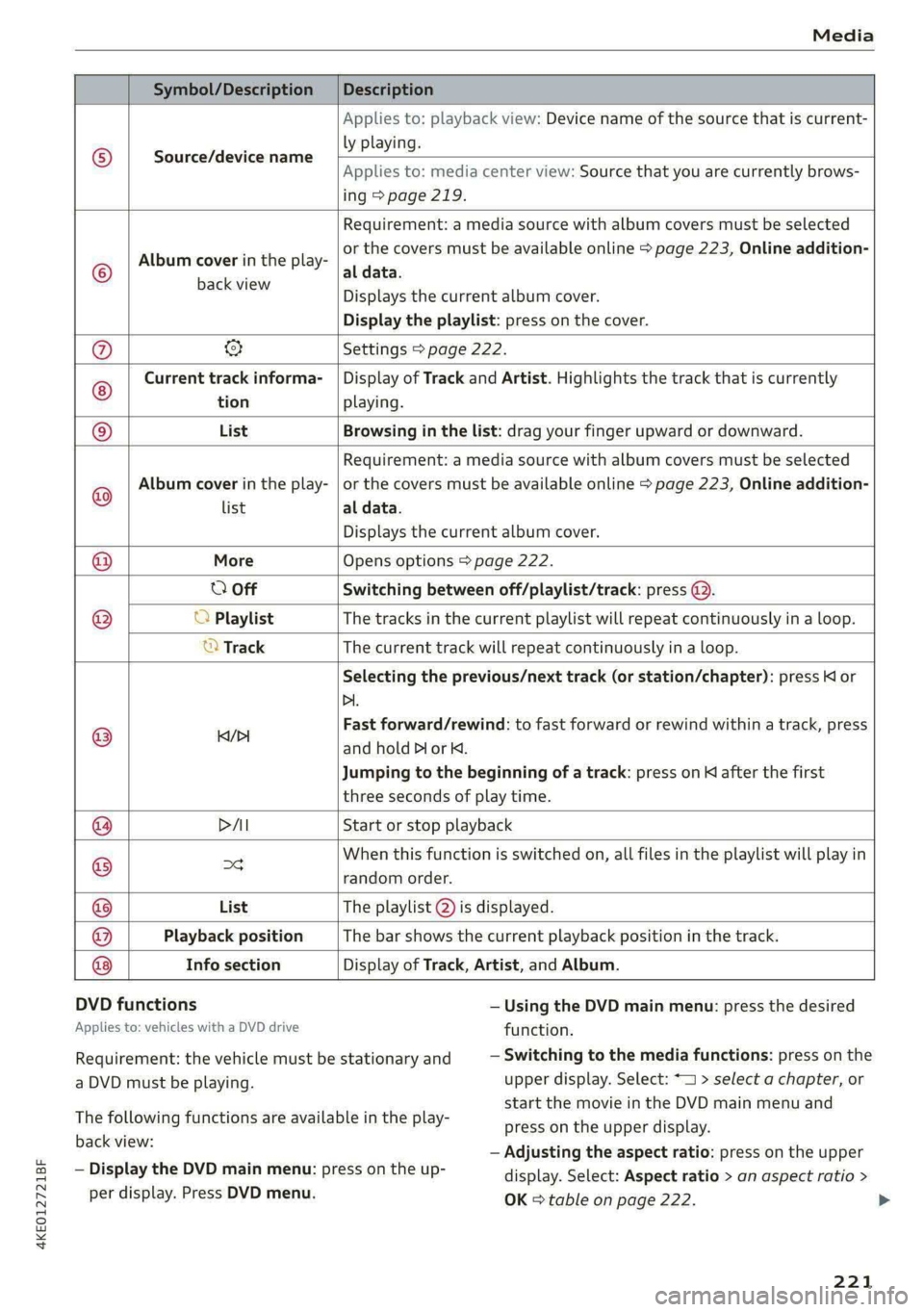
Symbol/Description Description
Source/device name
Applies to: playback view: Device name of the source that is current-
ly playing.
Applies to: media center view: Source that you are currently brows-
ing > page 219.
©
Album cover in the play-
Requirement: a media source with album covers must be selected
or the covers must be available online > page 223, Online addition-
al data.
EEGERER Displays the current album cover.
Display the playlist: press on the cover.
@ & Settings > page 222.
Current track informa- | Display of Track and Artist. Highlights the track that is currently
tion playing.
List Browsing in the list: drag your finger upward or downward.
Album cover in the play-
Requirement: a media source with album covers must be selected
or the covers must be available online > page 223, Online addition-
Playback position The bar shows the current playback position in the track.
Info section
@
@ list al data.
Displays the current album cover.
@ More Opens options > page 222.
0 Off Switching between off/playlist/track: press @).
() O Playlist The tracks in the current playlist will repeat continuously in a loop.
© Track The current track will repeat continuously in a loop.
Selecting the previous/next track (or station/chapter): press Kl or
Di.
@ iil Fast forward/rewind: to fast forward or rewind within a track, press
and hold Dor K.
Jumping to the beginning of a track: press on K after the first
three seconds of play time.
@ PAI Start or stop playback
@ og When this function is switched on, all files in the playlist will play in
random order.
@ List The playlist @ is displayed.
@
Display of Track, Artist, and Album.
DVD functions
Applies to: vehicles with a DVD drive
— Using the DVD main menu: press the desired
function.
— Switching to the media functions: press on the
upper display. Select: * > select a chapter, or
start the movie in the DVD main menu and
press on the upper display.
— Adjusting the aspect ratio: press on the upper
display. Select: Aspect ratio > an aspect ratio >
OK = table on page 222.
Requirement: the vehicle must be stationary and
a DVD must be playing.
The following functions are available in the play-
back view:
— Display the DVD main menu: press on the up-
per display. Press DVD menu.
221
>
Page 261 of 308
4KE012721BF
Wheels
As an added safety feature, your vehicle has been
equipped with a tire pressure monitoring system
(TPMS) that illuminates a low tire pressure tell-
tale when one or more of your tires is significant-
ly under-inflated. Accordingly, when the low tire
pressure telltale illuminates, you should stop and
check your tires as soon as possible, and inflate
them to the proper pressure. Driving ona signifi-
cantly under-inflated tire causes the tire to over-
heat and can lead to tire failure. Under-inflation
also reduces fuel efficiency and tire tread life,
and may affect the vehicle's handling and stop-
ping ability.
Please note that the TPMS is not a substitute for
proper tire maintenance, and it is the driver's re-
sponsibility to maintain correct tire pressure,
even if under-inflation has not reached the level
to trigger illumination of the TPMS low tire pres-
sure telltale.
Your vehicle has also been equipped with a TPMS
malfunction indicator to indicate when the sys-
tem is not operating properly. The TPMS mal-
function indicator is combined with the low tire
pressure telltale. When the system detects a
malfunction, the telltale will flash for approxi-
mately one minute and then remain continuously
illuminated. This sequence will continue upon
subsequent vehicle start-ups as long as the mal-
function exists.
When the malfunction indicator is illuminated,
the system may not be able to detect or signal
low tire pressure as intended. TPMS malfunctions
may occur for a variety of reasons, including the
installation of replacement or alternate tires or
wheels on the vehicle that prevent the TPMS
from functioning properly. Always check the
TPMS malfunction telltale after replacing one or
more tires or wheels on your vehicle to ensure
that the replacement or alternate tires and
wheels allow the TPMS to continue to function
properly.
If the tire pressure monitoring indicator
appears
Applies to: vehicles with Tire Pressure Monitoring System in-
dicator
The tire pressure indicator in the instrument
cluster informs you if the tire pressure is too low
or if there is a system malfunction.
Using the ABS sensors, the tire pressure monitor-
ing system compares the tire tread circumference
and vibration characteristics of the individual
tires. If the pressure changes in one or more
tires, this is indicated in the instrument cluster
display with an indicator light @ and a message.
If only one tire is affected, the location of that
tire will be indicated.
The tire pressures must be stored again each
time you change the pressures (switching be-
tween partial and full load pressure) or after
changing or replacing a tire on your vehicle
= page 260. The tire pressure monitoring system
only monitors the tire pressure you have stored.
Refer to the tire pressure label for the recom-
mended tire pressure for your vehicle
=> page 251, fig. 158.
Tire tread circumference and vibration character-
istics can change and cause a tire pressure warn-
ing if:
— The tire pressure in one or more tires is too low
— The tires have structural damage
— The tire was replaced or the tire pressure was
changed and it was not stored > page 260
— Tires that are only partially used are replaced
with new tires
Indicator lights
If the @ indicator light turns on, there is a loss
of pressure in at least one tire .> A\ Check the
tires and replace or repair if necessary. Check and
correct the pressures of all four tires and store
the pressure again > page 260.
ia Tire pressure: malfunction! See owner's
manual
fe appears after switching the ignition on or
while driving and the @ indicator light in the in-
strument cluster blinks for approximately one
259
>
Page 264 of 308
Care and cleaning
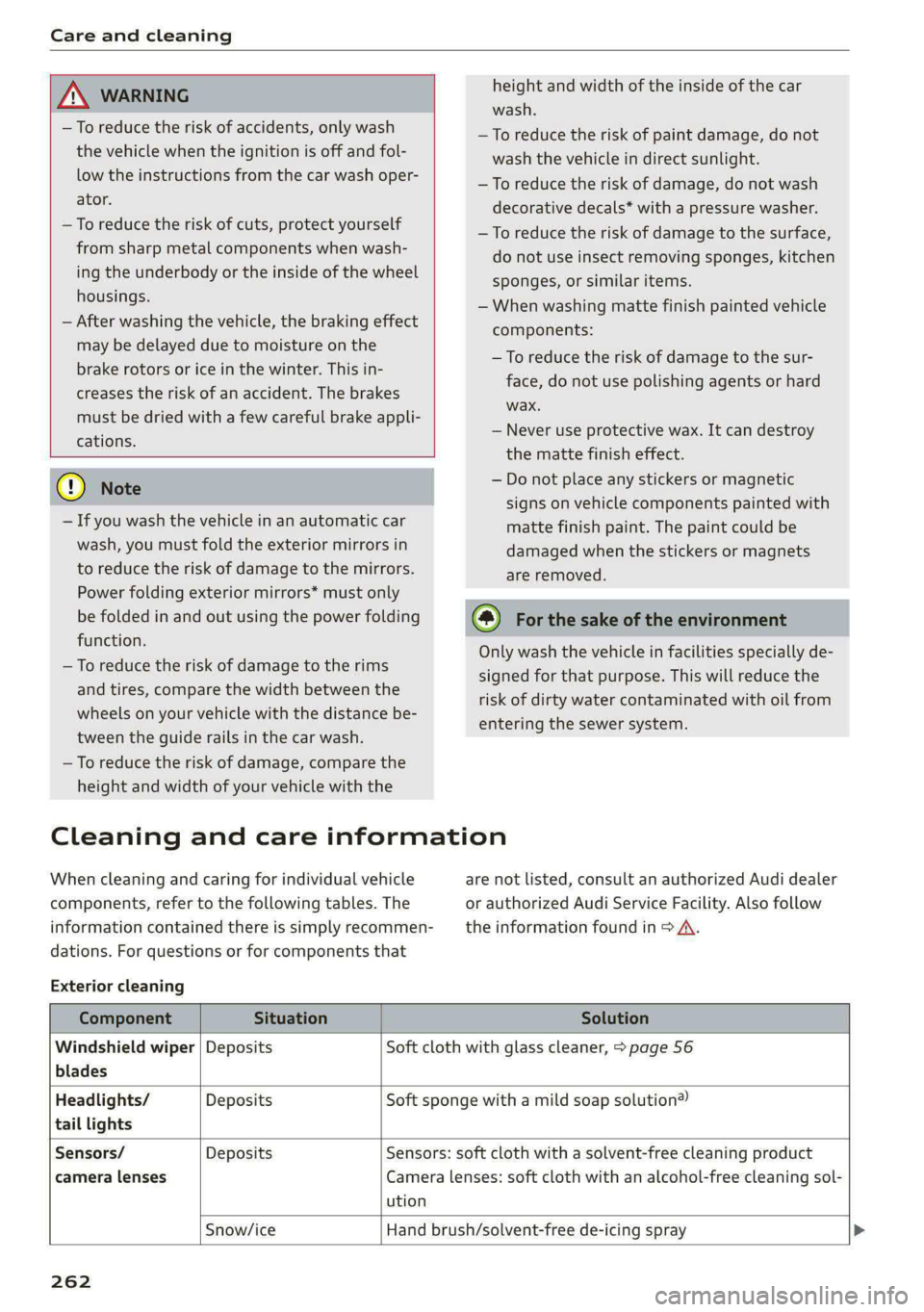
height and width of the inside of the car
wash.
ZA\ WARNING
—To reduce the risk of accidents, only wash
the vehicle when the ignition is off and fol-
low the instructions from the car wash oper-
ator.
—To reduce the risk of cuts, protect yourself
from sharp metal components when wash-
ing the underbody or the inside of the wheel
housings.
— After washing the vehicle, the braking effect
may be delayed due to moisture on the
brake rotors or ice in the winter. This in-
creases the risk of an accident. The brakes
must be dried with a few careful brake appli-
cations.
—To reduce the risk of paint damage, do not
wash the vehicle in direct sunlight.
—To reduce the risk of damage, do not wash
decorative decals* with a pressure washer.
—To reduce the risk of damage to the surface,
do not use insect removing sponges, kitchen
sponges, or similar items.
— When washing matte finish painted vehicle
components:
— To reduce the risk of damage to the sur-
face, do not use polishing agents or hard
wax.
— Never use protective wax. It can destroy
the matte finish effect.
@) Note — Do not place any stickers or magnetic
signs on vehicle components painted with
matte finish paint. The paint could be
damaged when the stickers or magnets
are removed.
— If you wash the vehicle in an automatic car
wash, you must fold the exterior mirrors in
to reduce the risk of damage to the mirrors.
Power folding exterior mirrors* must only
be folded in and out using the power folding @) For the sake of the environment
function.
—To reduce the risk of damage to the rims
and tires, compare the width between the
wheels on your vehicle with the distance be-
tween the guide rails in the car wash.
—To reduce the risk of damage, compare the
height and width of your vehicle with the
Only wash the vehicle in facilities specially de-
signed for that purpose. This will reduce the
risk of dirty water contaminated with oil from
entering the sewer system.
Cleaning and care information
When cleaning and caring for individual vehicle are not listed, consult an authorized Audi dealer
components, refer to the following tables. The or authorized Audi Service Facility. Also follow
information contained there is simply recommen- __ the information found in > A.
dations. For questions or for components that
Exterior cleaning
Component Situation Solution
Windshield wiper | Deposits Soft cloth with glass cleaner, > page 56
blades
Headlights/ Deposits Soft sponge with a mild soap solution®
tail lights
Sensors/ Deposits Sensors: soft cloth with a solvent-free cleaning product
camera lenses Camera lenses: soft cloth with an alcohol-free cleaning sol-
ution
Snow/ice Hand brush/solvent-free de-icing spray >
262
Page 267 of 308
4KE012721BF
Care and cleaning
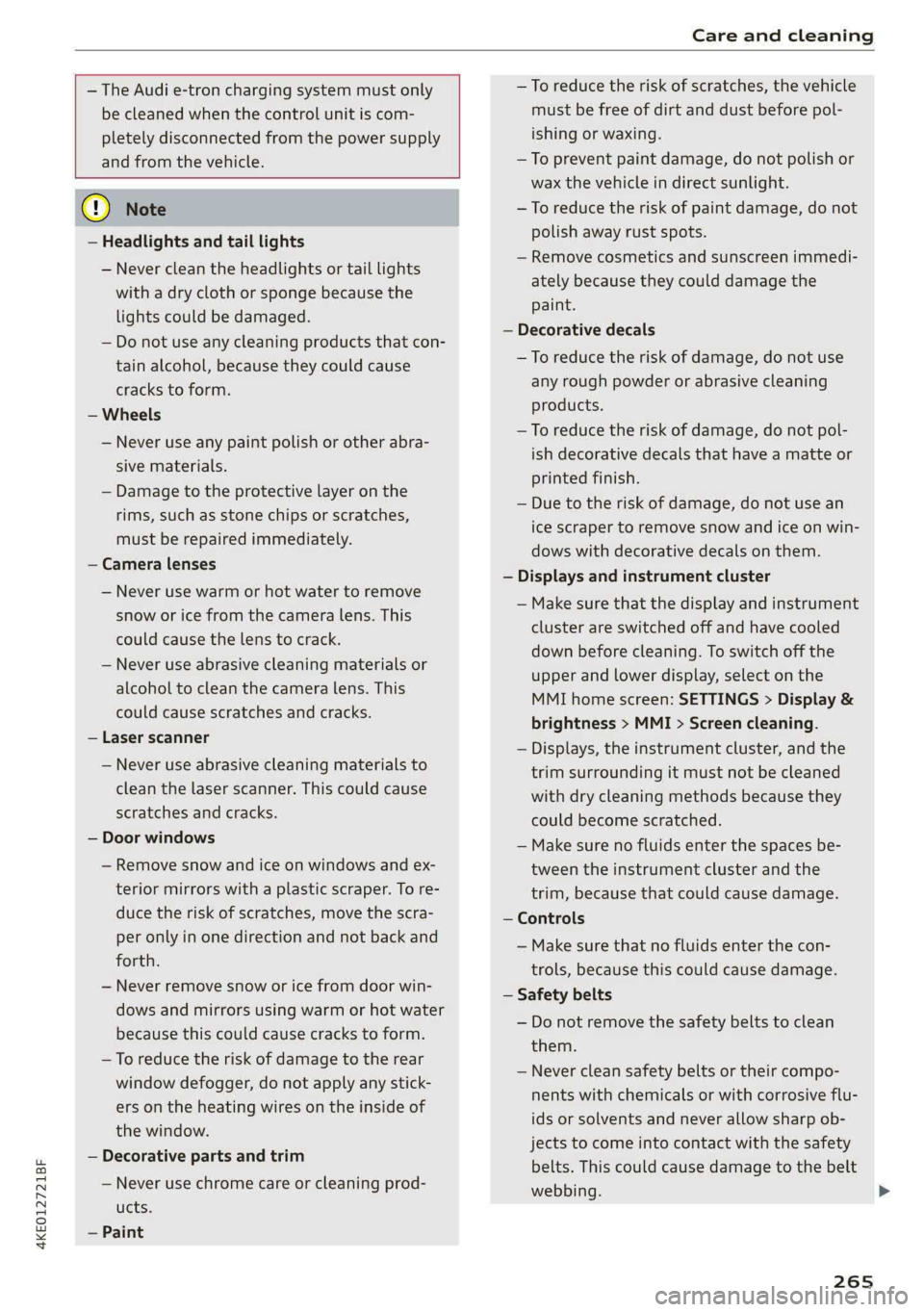
— The Audi e-tron charging system must only
be cleaned when the control unit is com-
pletely disconnected from the power supply
and from the vehicle.
@) Note
— Headlights and tail lights
— Never clean the headlights or tail lights
with a dry cloth or sponge because the
lights could be damaged.
— Do not use any cleaning products that con-
tain alcohol, because they could cause
cracks to form.
— Wheels
— Never use any paint polish or other abra-
sive materials.
— Damage to the protective layer on the
rims, such as stone chips or scratches,
must be repaired immediately.
— Camera lenses
— Never use warm or hot water to remove
snow or ice from the camera lens. This
could cause the lens to crack.
— Never use abrasive cleaning materials or
alcohol to clean the camera lens. This
could cause scratches and cracks.
— Laser scanner
— Never use abrasive cleaning materials to
clean the laser scanner. This could cause
scratches and cracks.
— Door windows
— Remove snow and ice on windows and ex-
terior mirrors with a plastic scraper. To re-
duce the risk of scratches, move the scra-
per only in one direction and not back and
forth.
— Never remove snow or ice from door win-
dows and mirrors using warm or hot water
because this could cause cracks to form.
—To reduce the risk of damage to the rear
window defogger, do not apply any stick-
ers on the heating wires on the inside of
the window.
— Decorative parts and trim
— Never use chrome care or cleaning prod-
ucts.
— Paint
—To reduce the risk of scratches, the vehi
must be free of dirt and dust before po
ishing or waxing.
—To prevent paint damage, do not polish
wax the vehicle in direct sunlight.
cle
L-
or
—To reduce the risk of paint damage, do not
polish away rust spots.
— Remove cosmetics and sunscreen immedi-
ately because they could damage the
paint.
— Decorative decals
—To reduce the risk of damage, do not use
any rough powder or abrasive cleaning
products.
—To reduce the risk of damage, do not pol-
ish decorative decals that have a matte
printed finish.
— Due to the risk of damage, do not use a
or
n
ice scraper to remove snow and ice on win-
dows with decorative decals on them.
— Displays and instrument cluster
— Make sure that the display and instrum ent
cluster are switched off and have cooled
down before cleaning. To switch off the
upper and lower display, select on the
MMI home screen: SETTINGS > Display &
brightness > MMI > Screen cleaning.
— Displays, the instrument cluster, and the
trim surrounding it must not be cleaned
with dry cleaning methods because the!
could become scratched.
My
— Make sure no fluids enter the spaces be-
tween the instrument cluster and the
trim, because that could cause damage
— Controls
— Make sure that no fluids enter the con-
trols, because this could cause damage
— Safety belts
— Do not remove the safety belts to clean
them.
— Never clean safety belts or their compo
nents with chemicals or with corrosive flu-
ids or solvents and never allow sharp ob-
jects to come into contact with the safety
belts. This could cause damage to the belt
webbing.
265
>
Page 282 of 308
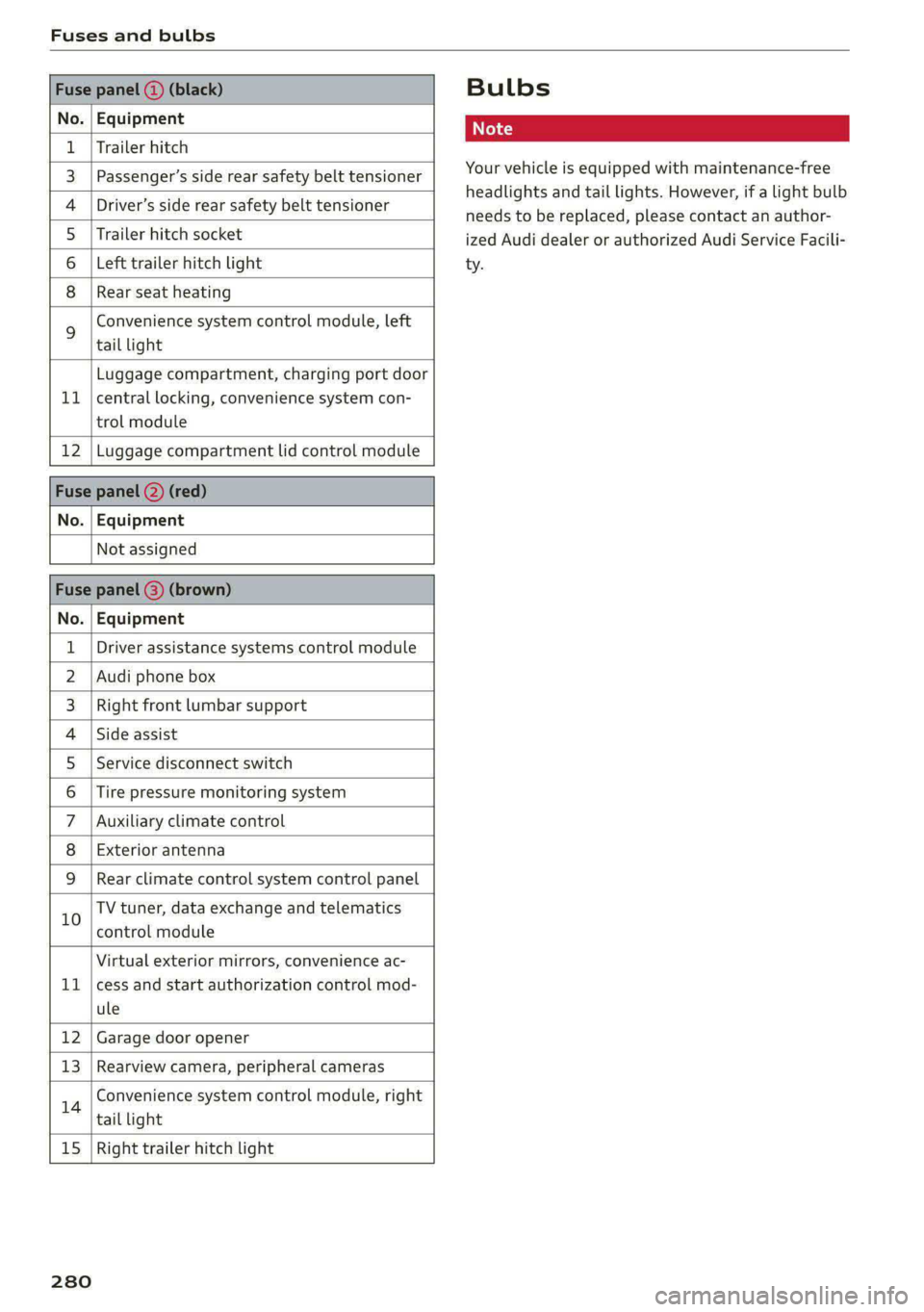
Fuses and bulbs
Fuse panel () (black)
No. | Equipment
1 | Trailer hitch
3 | Passenger’s side rear safety belt tensioner
4 |Driver’s side rear safety belt tensioner
5 |Trailer hitch socket
6 | Left trailer hitch light
8 |Rear seat heating
Convenience system control module, left
% tail light
Luggage compartment, charging port door
11 | central locking, convenience system con-
trol module
12 | Luggage compartment lid control module
Fuse panel (2) (red)
No. | Equipment
Not assigned
Fuse panel (3) (brown)
No. | Equipment
1 | Driver assistance systems control module
2 | Audi phone box
3 | Right front lumbar support
4 |Side assist
5 | Service disconnect switch
6 |Tire pressure monitoring system
7 |Auxiliary climate control
8 | Exterior antenna
9 |Rear climate control system control panel
10 TV tuner, data exchange and telematics
control module
Virtual exterior mirrors, convenience ac-
11 |cess and start authorization control mod-
ule
12 | Garage door opener
13 | Rearview camera, peripheral cameras
14 Convenience system control module, right
tail light
15
| Right trailer hitch light
280
Bulbs
Your vehicle is equipped with maintenance-free
headlights and tail lights. However, if a light bulb
needs to be replaced, please contact an author-
ized Audi dealer or authorized Audi Service Facili-
ty.
Page 294 of 308
Index
A
A/C cooling mode..........-.. eee eee eee
A/C system refrigerant oil...............
Accelerator pedal...............-0000005
also refer to Accelerator pedal...........
ACCESSOFICES . 6. eee
Active lane assist
refer to Lane departure warning.........
refer to Lane guidance................
Adaptive cruise assist................04.
Cleaning the sensors..............000-
Adaptive cruise control
Predictive control..............000005
Adaptive dampers.............0000 eee
Adaptive speed assist
refer to Adaptive cruise assist..........
Adjusting the air distribution.............
Adjusting the brightness.................
Adjusting the sound.............-..0005
Adjusting the temperature...............
Adjusting the vents.................0005
Adjusting the volume..............00000-
Adjusting the volume (announcements)... .
Adjusting the welcome sound............
Airbag system... 2... eee eee
Airsuspension..............2..00-000.
Alarm system
refer to Anti-theft alarm system..........
Alignment pin (changing the wheel).......
All-weather lights.................00000.
Allseasontires...............000 eee ee
All wheel drive
refer to quattro... .... cece eee
Amazon Alexa integration
Media playback..............-eeeeeee
QPGrAtiNG's « wise 2 2 sic 6 2 ees sa oH © vos
AMI
refer to Audi music interface...........
Android Auto
refer to Audi smartphone interface......
Anti-lock braking system............0005
Anti-Slip Regulation...............0008.
Anti-theft alarmsystemt « ccs sc csaw sess
Anti-theft wheel bolts..................
292
Apple CarPlay
refer to Audi smartphone interface...... 226
Aspect ratio
NIDGO saiex 2 < news 2 5 Ra FB Hee s Gas 220, 222
ASR
refer to Anti-Slip Regulation............ 105
Audi adaptive light..................00-. 48
Audi connect
HEfEFTOMONNESE tive » wesc. ae omen a 2 oe ea 186
Auidi‘drive Sele Cts « 2 wows « x cows 4 2 ream ee 102
Audi e-tron compact charging system..... 119
Adjusting the charging power level...... 120
Changing or attaching the power cable... 124
SECUNING: s s sacum a 3 BaeRE GE Mea gE EEE a Ee 125
Status and malfunction indicators....... 120
Audi music interface ..0. 6c aeu es eae ee oe 217
AUGIOTINGS eeu 9 & aeau s x meen se meme 2 Kee 218
Audi phone box’: s sss ¢ s sees se ees se eee 177
Audi presense........ 0.00. e eee eee eee 156
MeSSAQES « sees = s meey 5 4 neue so eee b Bae 160
Audi pre sense front.............eeee eee 157
Audi side assist
refer to Side assist............-..000-. 160
Audi smartphone interface.............. 226
Legal information. « « ccosis x «ccs se amen 231
Audi virtual cockpit
refer to Instrument cluster.............. ay
AUTO
Automatic headlights.................. 48
Climate control system.............0005 85
Auto Lock (central locking) ............... 32
Automatic climate control system
refer to Climate control system.......... 84
Automatic luggage compartment lid.... 40,41
Automatic wipe/wash system............. 54
Auxiliary climate control................. 87
Average consumption..............20-0. 14
Average speed... eee eee eee eee 14
B
Bag hooks .............. cece eee eee ee 79
Band
refer to Frequency band............... 207
Battery
Charge level display...............0505. 11
Charging (12 Volt vehicle battery)....... 239
Page 296 of 308
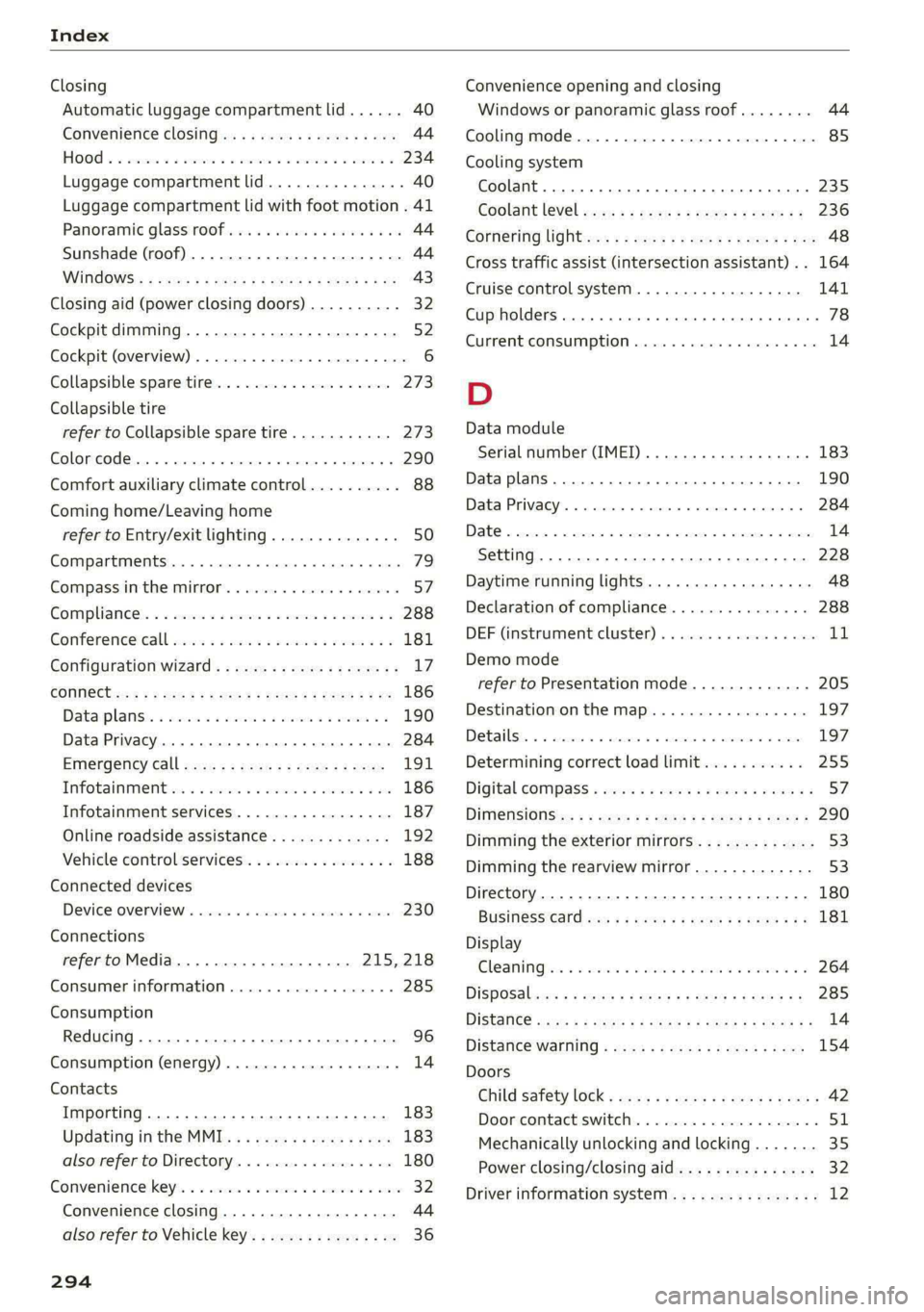
Index
Closing
Automatic luggage compartment lid...... 40
Convenience closing...........00.++00% 44
HOOP «a asaces
Luggage compartment lid............... 40
Luggage compartment lid with foot motion . 41
Panoramic glass'roOf ici «+ eaves ew wrens oo a 44
Sunshade (roof) ................0000008 44
WU6ITdOWS:s « ses ¢ 2 aes 5 2 ee Ee eR cee 43
Closing aid (power closing doors).......... 32
Cockpit dimming....................005 52
Cockpit (overview) ..........-..0 02. e eee ee 6
Collapsible spare tire...............00.. 273
Collapsible tire
refer to Collapsible spare tire........... 273
Color cOd@.. eee eee eee eee 290
Comfort auxiliary climate control.......... 88
Coming home/Leaving home
refer to Entry/exit lighting.............. 50
Compartments ..........00 2.0 eee eee eee 79
Compass inthe mirror..............00 eee 57
Compliance’. « « sis ao avn ve eae ew were os 288
Gonferencevcalll swiss x sane 2 wesw 2 wees 2 2 181
Configuration wizard..................4. 17
CONNEC: = x seme + eee Ge Reee GX HER «EOE 186
Datarplanss » sewn as cman « «sauce sv wawan 6 2 190
Data Privacy...... 0.2.00. ce eee eee 284
EMe@rgeneyCalll sane « x sane © s sau x 2 zeus 191
Infotainment « + scsi se ones 6 & ones 6 & one 186
Infotainment services..............0-- 187
Online roadside assistance............. 192
Vehicle control services..............-- 188
Connected devices
Device overview............ 20.00 e eee 230
Connections
refer to Media...............000- 215, 218
Consumer information................05 285
Consumption
Reducing.......... 0. eee eee eee eee 96
Consumption (energy)............--000 ee 14
Contacts
Importing ........... 02. e eee cece 183
Updating inthe MMI.................. 183
also refer to Directory................. 180
Convenience:key's « « ssics 2 6 scare xo nmi w + ore 32
Convenience closing................00 44
also refer to Vehicle key..............-. 36
294
Convenience opening and closing
Windows or panoramic glass roof........ 44
Cooling mode..... 2.6... cee eee eee 85
Cooling system
Coolant... .. cc cece cece eee eee 235
Coolant level occa ss ceca s = pee se ees ee 236
Cotheritig lighten <= sess se mee = eeee es See 48
Cross
traffic assist (intersection assistant) .. 164
Cruise control system............000005 141
Cup holders. ....... cece cece eee eee 78
Current consumption..............000005 14
D
Data module
Serial number (IMEI) ............000008 183
Data plans
Data Privacy
Date os ccerevs 2 x ernie © eyarens ww eyaieay w © steiteine wo sais
Setting
Daytime running lights.............00005 48
Declaration of compliance............... 288
DEF (instrument cluster) «ssc + scene oo see 1
Demo mode
refer to Presentation mode............. 205
Destination onthe map.............-.+- 197
Debailsi, x snssws » a canceme » o cantens + 0 axcouns % weses 197
Determining correct load limit........... 255
Digital COMPSSS « sew » 2 ewww 2 y wows ¥ WHEE & s 57
DIM@nsiONnS':: = 2 sees + = sews & ¢ eee & « ewes 290
Dimming the exterior mirrors............. 53
Dimming the rearview mirror............. 53
Directory........ 0.2.00. cece ee eee ee eee 180
BUSING@SS°CArd cies ss eas ve ween ve ee eee 181
Display
Cleaning sic: 2 8 wes se wane s wee «owen ooo 264
DiSpOSalvas « s caus 5 = wean 2 & pee oe REOR 2 285
DiStanGe seus + ¢ eaves x = ewe x eee xe EwR e 14
DIStance Warniiid « sews ss wean so eee ¢ aS 154
Doors
Child safety lock « sices «ogee se eae s ems 42
Dooricomtact Switch. . 5 coms 2 snerous © aaa 51
Mechanically unlocking and locking....... 35
Power closing/closing aid............... 32
Driver information system................ 12
Page 298 of 308
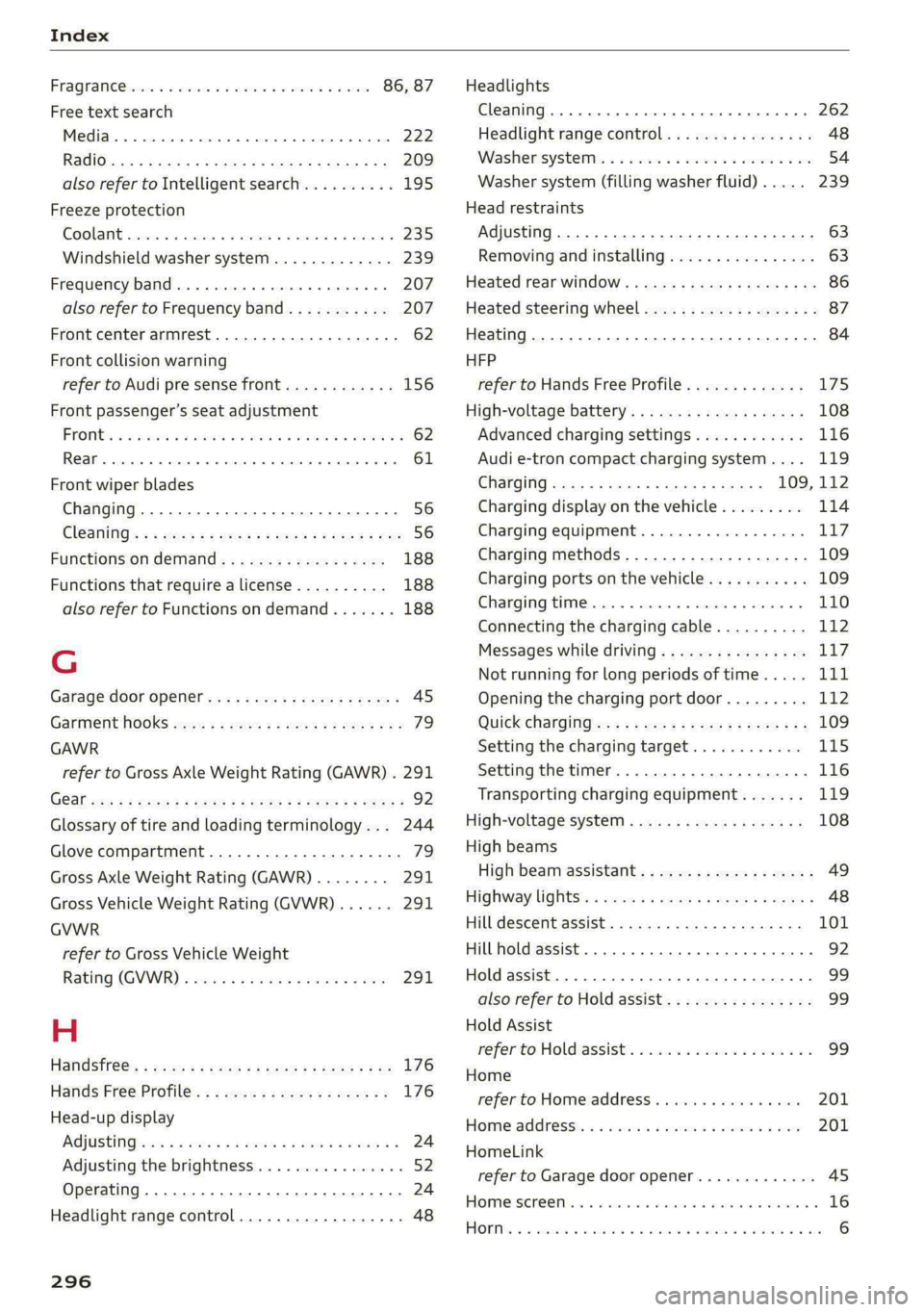
Index
FRAQKAMNCCb scons a secswin «+ cwevne vo eeu v shew 86, 87
Free text search
Media.... 2... cece eee eee eee 222
R&Oterax ¢ = sans ¢ = Sots ¢ ¥ Hae 7 eRe gE 209
also refer to Intelligent search.......... 195
Freeze protection
COOLANE sncosns « 0 ences x 0 oman + 6 orem = ut aemawe 235
Windshield washer system............. 239
Frequency band.............e eee eee eee 207
also refer to Frequency band........... 207
Front center armrest............2....00. 62
Front collision warning
refer to Audi pre sense front............ 156
Front passenger’s seat adjustment
FROME so sees oo nase 3 a nen 2 wae ae MREO wo 62
Rear... eee eee eee 61
Front wiper blades
Changing.......... eee eee eee ee 56
ClOANING s « = eee = « neues to Hewat Bea ee 56
Functions ondemand............--..-- 188
Functions that require a license.......... 188
also refer to Functions on demand....... 188
G
Garage door opener.............--+2200- 45
Garment HOOKS ec
GAWR
refer to Gross Axle Weight Rating (GAWR) . 291
GOat sce: 2 s gome 2 x wee ey BES GF Be Ge ees 92
Glossary of tire and loading terminology... 244
Glove compartment..............-00000- 79
Gross Axle Weight Rating (GAWR)........ 291
Gross Vehicle Weight Rating (GVWR)...... 291
GVWR
refer to Gross Vehicle Weight
Ratirig (GVWR) « sce « 2 eevee x « caus 8 2 eeu 291.
H
Handsfree: = 2can s gems sv seen ey eee ee ee 176
Hands Free Profile.................-.-- 176
Head-up display
AG\OStING an se meas x pwan ee wees s wenn os 24
Adjusting the brightness................ 52
Operating ............ 0.0 e eee eee eee 24
Headlight range control................0. 48
296
Headlights
Cleaning....... 06... cece eee eee ee eee 262
Headlight range control................ 48
Washerisystem). «2 escioe ence ee eee ¥ 6 oe 54
Washer system (filling washer fluid) .... . 239
Head restraints
Adjusting... 0.0... 0.00 e cece eee eee 63
Removing and installing................ 63
Heated rear window.............0eee eee 86
Heated steering wheel................0.. 87
Heating..............0 0.2 cee eee eee 84
HFP
refer to Hands Free Profile............. 175
High-voltage battery................... 108
Advanced charging settings............ 116
Audi e-tron compact charging system.... 119
GHAGING scas + = sevou x = Saree 3 5 eee a 109, 112
Charging display on the vehicle......... 114
Charging equipment................0- 117
Charging methods...............-.... 109
Charging ports on the vehicle........... 109
Charging time...............0. eee ee 110
Connecting the charging cable.......... 112
Messages while driving................ 11/7
Not running for long periods of time..... Lit
Opening the charging port door......... 112
QUICK CHANGING ews « « eos s quem x 2 Beme Bs 109
Setting the charging target............ 115
Setting the timer..................0.. 116
Transporting charging equipment....... 119
High-voltage system.............0.005- 108
High beams
High beam assistant................... 49
Highway lights’: s scsn ss ease # weee sz oes x 48
Hill.descentassist, ¢ cca ceeasssiaaases 101
Hill hold assist... 0.0... cc cece e eee eee ee 92
Hold assist... 0.2... eee eee 99
also refer to Hold assist..............-. 99
Hold Assist
Hefer'to HOldassists. wave + wins av waren evo 99
Home
refer to Home address............00 0s 201
Home.addresss « « ssc « « wenn 3 « wwe 6 o owe 201
HomeLink
refer to Garage door opener............. 45
HOMEISEFEC Mises so seis « ononans wa crowns 4 ooes 16
HOBM: 5 3 aceases oo aera & 3 anos «wae @ % aMweaM 6 2 O88 6