Tire AUDI E-TRON 2021 Owners Manual
[x] Cancel search | Manufacturer: AUDI, Model Year: 2021, Model line: E-TRON, Model: AUDI E-TRON 2021Pages: 308, PDF Size: 83.91 MB
Page 6 of 308
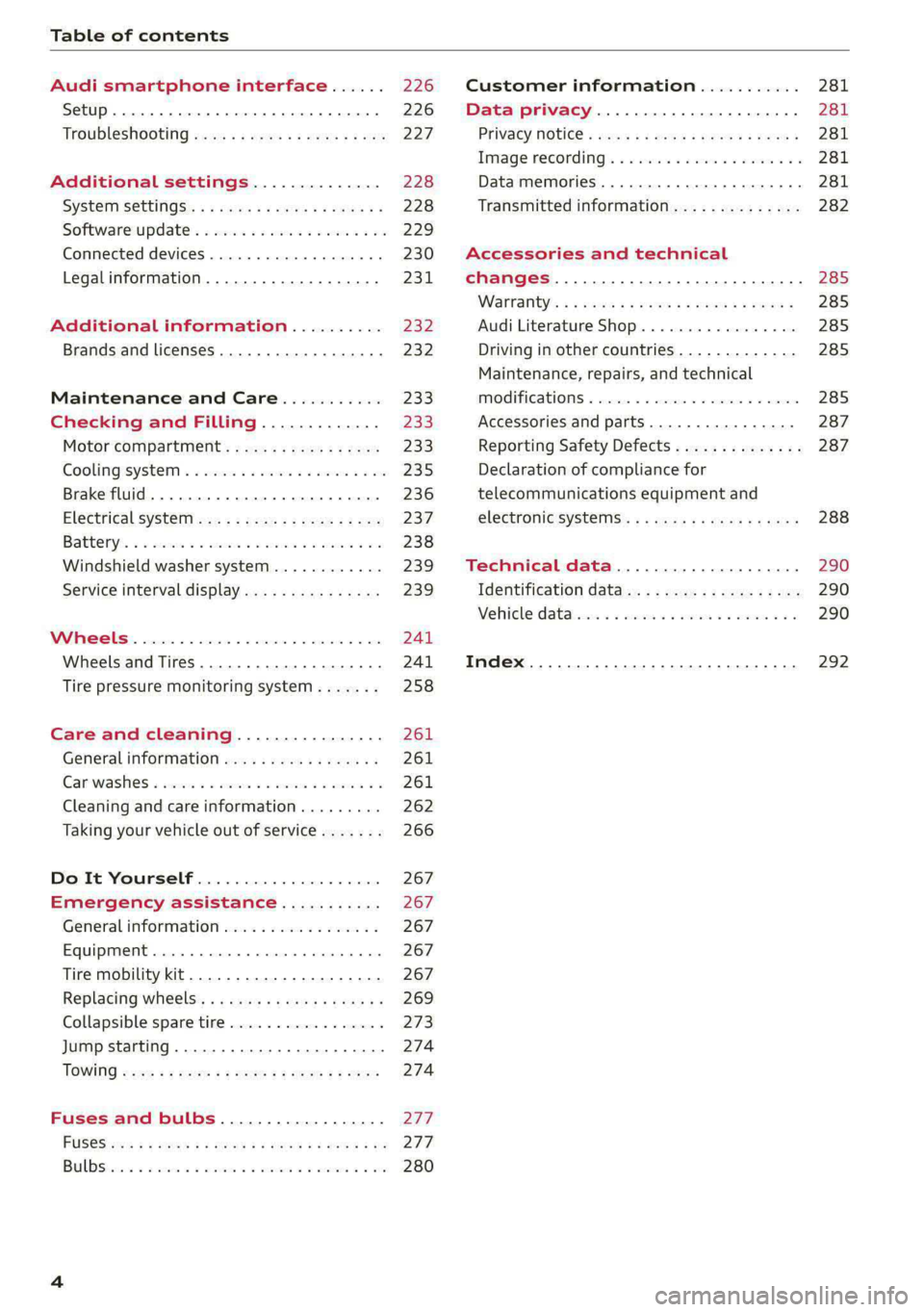
Table of contents
Audi smartphone interface...... 226
Setup... eee eee eee eee 226
Troubleshooting wv s & wees se cows 6 bey 227
Additional settings.............. 228
System Settings: : s eens s i vows ve sews es 228
Software update...............2..-0. 229
Connected devices.............000005 230
Legalinformation................... 231
Additional information.......... 232
Brands and licenses...............--- 232
Maintenance and Care........... 233
Checking and Filling............. 233
Motor'compartment’. sc. ¢ « wcen es oes 233.
CoolingisysteM « x sisws ov sass ov somes & & ane 235
Brake fluid. ........ 0.0.0.0 c eee eee 236
Electrical system <
Battenyis ¢ «sic s 6 wen 2 9 ween oy were 2 ere 238
Windshield washer system...........- 239
Service interval display............... 239
WWINGOIS : ceciices co costes 6 a sncewvs ow oneners 0 at 241
Wheels and Tires . . 241
Tire pressure monitoring system....... 258
Care and cleaning................ 261
Generalinformation................. 261
Car washes « swe: vx awa: oo amin 0 x snanae #2 261
Cleaning and care information......... 262
Taking your vehicle out of service....... 266
Do It Yourself .................... 267
Emergency assistance........... 267
General information................. 267
Equipment............. 0c eee eee 267
Tire mobility kit..................00. 267
Replacing wheels. ........:cceeeeeees 269
Collapsible spare tire..............0.. 273
Jump starting ..............e eee eee 274
IQWING were: worms 5 cee 9 + eee + eee 274
Fuses and bulbs.................. 277
FUSES 3 2 amow 4 meme a 2 mee ay ome 2 277.
Bel DSyonsn = secaais 2s omens a orate vw acct =e aa 280
Customer information........... 281
Data privacy..................008. 281
Privacy MOtiCe « mes x x eee 2 Ree ¢ RES ¥ 281
Image recording): « « sus 2 wanes 2 2 wweem 2 2s 281
Data memories............0..00 eee ee 281
Transmitted information.............. 282
Accessories and technical
changes................ 0.0.02 eee 285
Warranty’: « + esos & + meen & ¢ eee se sees 285
Audi Literature Shop.............000- 285
Driving in other countries............. 285
Maintenance, repairs, and technical
IMOGIFICATIONS « snocue so sume = emmace # m annem 285
Accessories and parts..............-. 287
Reporting Safety Defects.............. 287
Declaration of compliance for
telecommunications equipment and
electronicisysteMms:: s = caws se waa « 2 gems 288
Technical data.................... 290
Identification data................04. 290
Vehicle datas ss nico s ves se oman evs 290
Index ...... 00.0... eee eee 292
Page 11 of 308
4KE012721BF
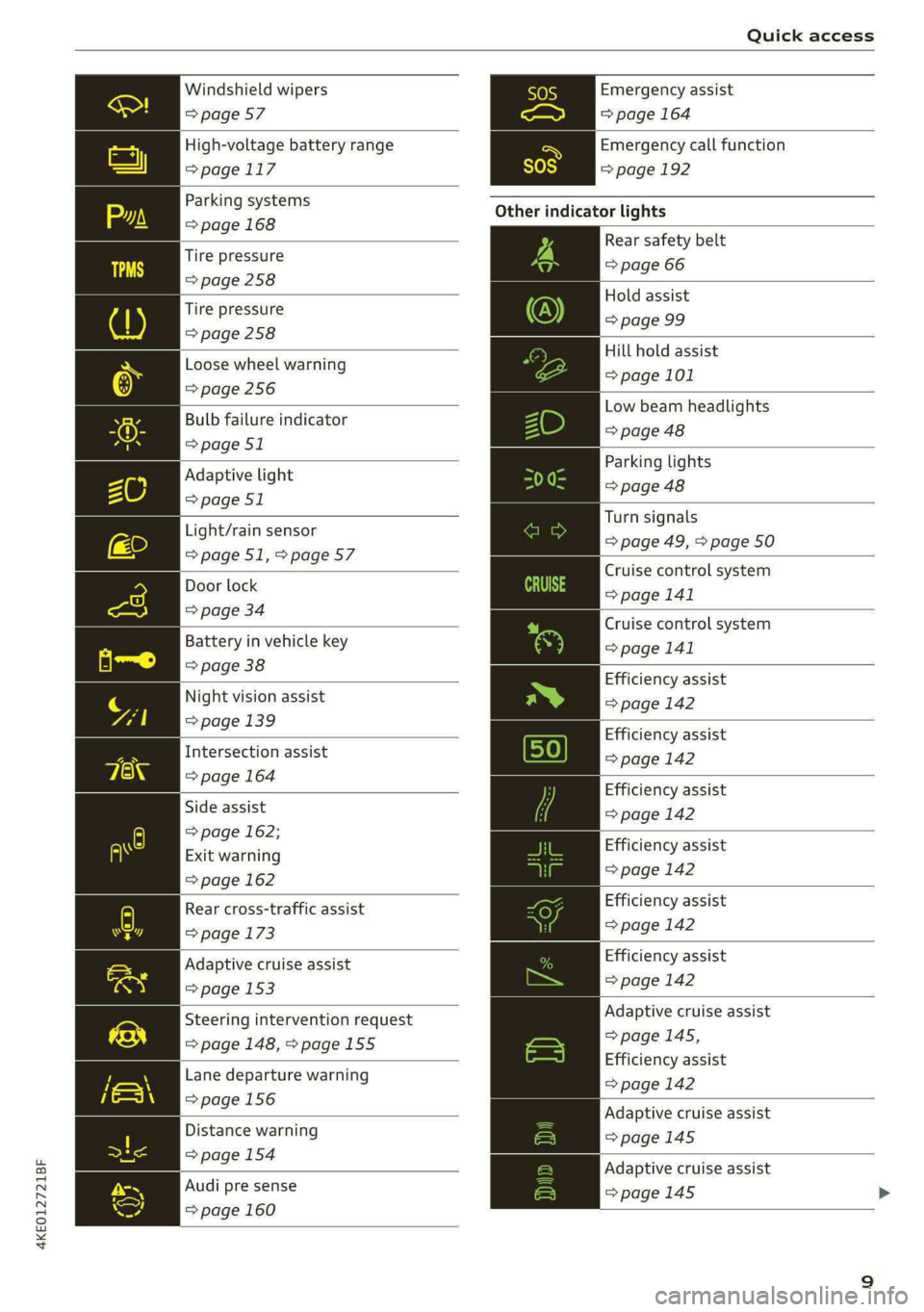
Quick access
Windshield wipers
=> page 57
High-voltage battery range
>page 117
Parking systems
=> page 168
Tire pressure
=>page 258
Tire pressure
=> page 258
Loose wheel warning
=> page 256
Bulb failure indicator
=> page 51
Adaptive light
=> page 51
Light/rain sensor
=>page 51,>page 57
Door lock
=> page 34
Battery in vehicle key
=> page 38
Night vision assist
=> page 139
Intersection assist
=> page 164
Side assist
=> page 162;
Exit warning
=> page 162
Rear cross-traffic assist
=> page 173
Adaptive cruise assist
=> page 153
Steering intervention request
=> page 148, >page 155
Lane departure warning
=>page 156
Distance warning
=> page 154
Audi pre sense
=> page 160
Emergency assist
=> page 164
Emergency call function
=>page 192
Other indicator lights
Rear safety belt
=> page 66
Hold assist
=> page 99
Hill hold assist
=> page 101
Low beam headlights
=> page 48
Parking lights
=> page 48
Turn signals
=> page 49, > page 50
Cruise control system
= page 141
Cruise control system
>page 141
Efficiency assist
=> page 142
Efficiency assist
=> page 142
Efficiency assist
=> page 142
Efficiency assist
=> page 142
Efficiency assist
=> page 142
Efficiency assist
=>page 142
Adaptive cruise assist
=>page 145,
Efficiency assist
=> page 142
Adaptive cruise assist
=>page 145
Adaptive cruise assist
=> page 145 >
Page 34 of 308
Opening and closing
Opening and closing
Central locking
(eT e e eeu)
ZA WARNING
— If you leave the vehicle, switch the ignition
off and take the key with you. This applies
particularly when children remain in the ve-
hicle. Otherwise, children could start the ve-
hicle or operate electrical equipment (such
as power windows), which increases the risk
of an accident.
— Applies to vehicles with anti-theft alarm sys-
tem: When the vehicle is locked from the
outside, no one - especially children - should
remain in the vehicle, because the windows
can no longer open from the inside
= page 35, Anti-theft alarm system.
Locked doors make it more difficult for
emergency workers to enter the vehicle,
which puts lives at risk.
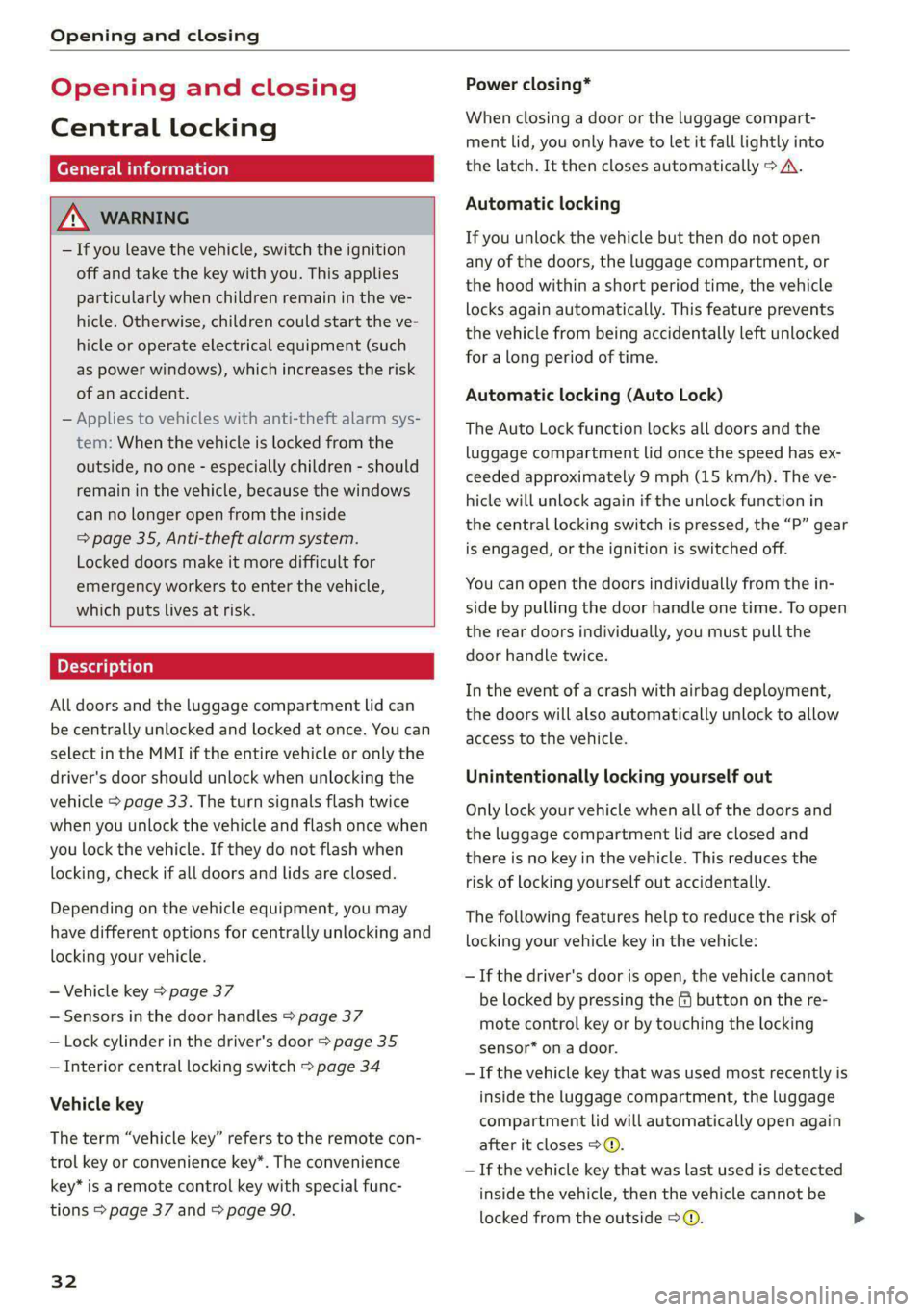
All doors and the luggage compartment lid can
be centrally unlocked and locked at once. You can
select in the MMI if the entire vehicle or only the
driver's door should unlock when unlocking the
vehicle > page 33. The turn signals flash twice
when you unlock the vehicle and flash once when
you lock the vehicle. If they do not flash when
locking, check if all doors and lids are closed.
Depending on the vehicle equipment, you may
have different options for centrally unlocking and
locking your vehicle.
— Vehicle key > page 37
— Sensors in the door handles > page 37
— Lock cylinder in the driver's door > page 35
— Interior central locking switch > page 34
Vehicle key
The term “vehicle key” refers to the remote con-
trol key or convenience key*. The convenience
key* is a remote control key with special func-
tions > page 37 and > page 90.
32
Power closing*
When closing a door or the luggage compart-
ment lid, you only have to let it fall lightly into
the latch. It then closes automatically > A\.
Automatic locking
If you unlock the vehicle but then do not open
any of the doors, the luggage compartment, or
the hood within a short period time, the vehicle
locks again automatically. This feature prevents
the vehicle from being accidentally left unlocked
for a long period of time.
Automatic locking (Auto Lock)
The Auto Lock function locks all doors and the
luggage compartment lid once the speed has ex-
ceeded approximately 9 mph (15 km/h). The ve-
hicle will unlock again if the unlock function in
the central locking switch is pressed, the “P” gear
is engaged, or the ignition is switched off.
You can open the doors individually from the in-
side by pulling the door handle one time. To open
the rear doors individually, you must pull the
door handle twice.
In the event of a crash with airbag deployment,
the doors will also automatically unlock to allow
access to the vehicle.
Unintentionally locking yourself out
Only lock your vehicle when all of the doors and
the luggage compartment lid are closed and
there is no key in the vehicle. This reduces the
risk of locking yourself out accidentally.
The
following features help to reduce the risk of
locking your vehicle key in the vehicle:
— If the driver's door is open, the vehicle cannot
be locked by pressing the & button on the re-
mote control key or by touching the locking
sensor* on a door.
— If the vehicle key that was used most recently is
inside the luggage compartment, the luggage
compartment lid will automatically open again
after it closes > ©.
— If the vehicle key that was last used is detected
inside the vehicle, then the vehicle cannot be
locked from the outside > ©.
Page 35 of 308
4KE012721BF
Opening and closing
ZA WARNING
Observe the safety precautions > page 32.
Z\ WARNING
Applies to: vehicles with power closing
—To reduce the risk of injury, make sure that
the area where the door is closing is clear
during the closing process.
— The closing process can be stopped at any
time by pulling on the outer or inner door
handle.
@) Note
The following applies when locking the vehi-
cle:
— If the vehicle key that was last used is de-
tected inside the passenger compartment,
then the vehicle cannot be locked from the
outside using the sensor. Take the vehicle
key with you and lock the vehicle again. Oth-
erwise, the vehicle will not be protected
against unauthorized access.
— If you try to lock the vehicle using the but-
ton on the vehicle key while the front pas-
senger's or rear door is open, and you acci-
dentally place the vehicle key inside the pas-
senger compartment and close the door,
the vehicle will lock at first. But if the key-
less system detects a vehicle key inside the
vehicle after it locks, then the vehicle will
unlock again. The turn signals will flash sev-
eral times to indicate this. If you do not
open the vehicle to remove the vehicle key
within a brief period, then the vehicle will
lock automatically. This prevents the vehicle
from being left unlocked for long periods of
time. The vehicle key will then be locked in-
side the vehicle.
— If the luggage compartment lid closes and
the system detects that the last vehicle key
that was used is inside the luggage com-
partment, then the luggage compartment
lid will open again. The turn signals will
flash several times to indicate this. The
doors will lock. Always take the vehicle key
with you, or unauthorized persons may be
able to enter the vehicle.
@) Tips
— Do not leave valuables unattended in the ve-
hicle. A locked vehicle is not a safe!
—The LED in the driver's door rail blinks when
you lock the vehicle. If the LED turns on for
approximately 30 seconds after locking,
there is a malfunction in the central locking
system. Have the problem corrected by an
authorized Audi dealer or authorized Audi
Service Facility.
atte Mn meee ol dia 1)
You can adjust the central locking system to your
preferences. The settings depend on the vehicle
equipment.
> Applies to MMI: Select on the home screen: VE-
HICLE > Settings & Service > Central locking.
Door unlocking
—If you select All, all doors and the luggage
compartment lid will be unlocked when unlock-
ing the vehicle.
— If you select Driver's door, only the driver's
door will be unlocked. To unlock all doors and
the luggage compartment lid, press the & but-
ton on the vehicle key twice. In vehicles with a
convenience key”, only the driver's door will un-
lock when you pull the driver's door handle. If
you pull another door handle, the entire vehicle
will be unlocked.
The entire vehicle will always be locked f you
press
the f button.
Long press to open windows
You can select if all windows and the panoramic
glass roof* should open using the vehicle key
= page 44, Convenience opening and closing. If
you press and hold the ff button on the vehicle
key, all of the windows and the panoramic glass
roof* will close.
Disable rear lid handle
You can select if the luggage compartment lid
can open with the handle. If you activate this
function, the luggage compartment lid can only
be opened with the <¥ or 4s button on the >
33
Page 67 of 308
4KE012721BF
Sitting correctly and safely
Correct safety belt positioning
B4H-0751
RAZ-0696
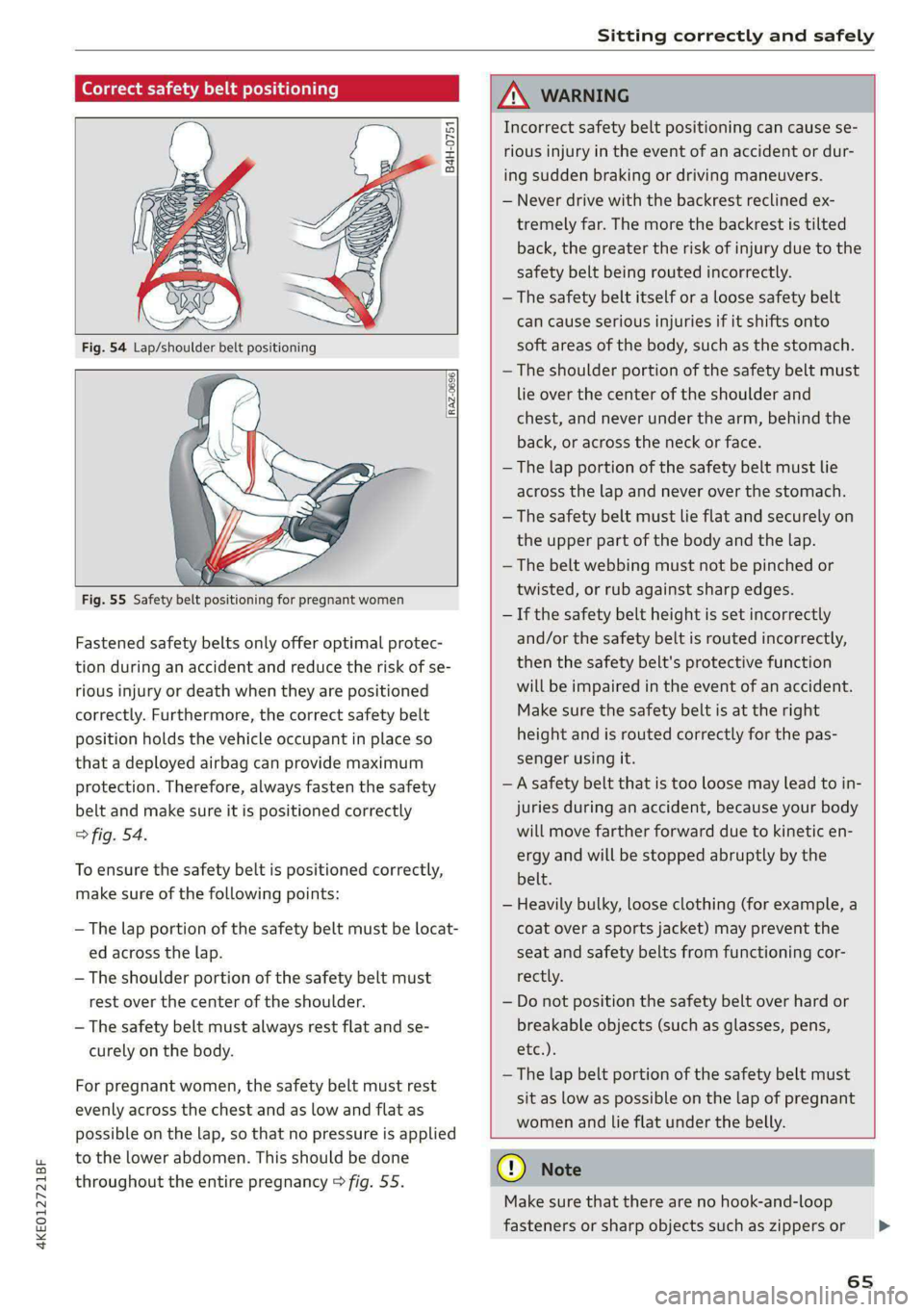
Fastened safety belts only offer optimal protec-
tion during an accident and reduce the risk of se-
rious injury or death when they are positioned
correctly. Furthermore, the correct safety belt
position holds the vehicle occupant in place so
that a deployed airbag can provide maximum
protection. Therefore, always fasten the safety
belt and make sure it is positioned correctly
> fig. 54.
To ensure the safety belt is positioned correctly,
make sure of the following points:
— The lap portion of the safety belt must be locat-
ed across the lap.
—The shoulder portion of the safety belt must
rest over the center of the shoulder.
— The safety belt must always rest flat and se-
curely on the body.
For pregnant women, the safety belt must rest
evenly across the chest and as low and flat as
possible on the lap, so that no pressure is applied
to the lower abdomen. This should be done
throughout the entire pregnancy > fig. 55.
ZA\ WARNING
Incorrect safety belt positioning can cause se-
rious injury in the event of an accident or dur-
ing sudden braking or driving maneuvers.
— Never drive with the backrest reclined ex-
tremely far. The more the backrest is tilted
back, the greater the risk of injury due to the
safety belt being routed incorrectly.
— The safety belt itself or a loose safety belt
can cause serious injuries if it shifts onto
soft areas of the body, such as the stomach.
— The shoulder portion of the safety belt must
lie over the center of the shoulder and
chest, and never under the arm, behind the
back, or across the neck or face.
— The lap portion of the safety belt must lie
across the lap and never over the stomach.
—The safety belt must lie flat and securely on
the upper part of the body and the lap.
— The belt webbing must not be pinched or
twisted, or rub against sharp edges.
— If the safety belt height is set incorrectly
and/or the safety belt is routed incorrectly,
then the safety belt's protective function
will be impaired in the event of an accident.
Make sure the safety belt is at the right
height and is routed correctly for the pas-
senger using it.
— A safety belt that is too loose may lead to in-
juries during an accident, because your body
will move farther forward due to kinetic en-
ergy and will be stopped abruptly by the
belt.
— Heavily bulky, loose clothing (for example, a
coat over a sports jacket) may prevent the
seat and safety belts from functioning cor-
rectly.
— Do not position the safety belt over hard or
breakable objects (such as glasses, pens,
etc.).
—The lap belt portion of the safety belt must
sit as low as possible on the lap of pregnant
women and lie flat under the belly.
@) Note
Make sure that there are no hook-and-loop
fasteners or sharp objects such as zippers or
65
>
Page 76 of 308

Sitting correctly and safely
Correct positioning for children
Always secure children in a child safety seat de-
signed for the body size, weight, and age of the
child.
You can secure child safety seats in your vehicle
using the lower LATCH anchors or the safety
belts. You can also secure child safety seats to
the top tether anchor. Depending on the child
safety seat, it may also be necessary to secure it
to the top tether anchor. In Canada, securing for-
ward-facing child safety seats to the top tether
anchors is required by law.
Always transport children in the rear seats
Accident statistics show that children that are se-
cured correctly in the rear seats are safer than in
front seats. Always transport children in suitable
child safety seats secured on the rear seats.
In exceptional circumstances: transporting
children in the front passenger's seat
If exceptional circumstances require the child
safety seat to be placed on the front passenger's
seat, then the front passenger's airbag must be
deactivated. Please note the important informa-
tion for this > page 70, Advanced airbag system.
If you must secure a forward-facing child safety
seat, move the front passenger's seat as far back
as possible so that it is as far as possible from the
front
passenger's airbag. While doing this, make
sure the seat can be adjusted all the way.
Only switch to a larger child safety seat when
absolutely necessary
Switch to a larger child safety seat only when ab-
solutely necessary. Secure your child using a safe-
ty belt without a child safety seat only if all of the
following statements are true:
—The child is large enough to sit upright in the
seat
— The child is able to sit with his or her back rest-
ing completely on the seat backrest
—The child is able to sit with his or her knees
bent over the edge of the seat surface
—The child is able to sit with both of his or her
feet completely touching the floor in the foot-
well
74
— The lap portion of the safety belt lies flat and
securely over the hip area and never over the
stomach
— The shoulder portion of the safety belt lies flat
and securely over the center of the shoulder
and the chest, and never under the arm, behind
the back, or over the neck or face.
—The child is able to maintain this seating posi-
tion throughout the entire trip
Read and follow the important information and
warnings regarding the correct use of safety belts
=> page 64.
@ Tips
— Child safety seats can also be secured to
seats with side airbags. In the event of an
accident, children can also be protected by
the side airbags if the child is correctly se-
cured in a suitable child safety seat that is
attached correctly.
— The lower LATCH anchors as well as the
safety belt may be required to correctly in-
stall some child safety seats. Using both at
the same time is permitted, provided that
the fastening systems or safety belts do not
impair those in an adjacent seating position.
—All child safety seats are constructed so that
they can be secured using the lap safety belt
in the vehicle.
— Child safety seats with a load leg can only
be secured to the outer rear seats and to the
front passenger's seat.
Fig. 61 Rear bench seat: lower LATCH anchors
Observe the safety precautions > page 72. >
Page 82 of 308

Storage and convenience
cover is not a surface for storing objects. Ob-
jects placed on the cover increase the risk of
injury to all vehicle occupants during sudden
driving or braking maneuvers or in the event
of an accident.
— Applies to: vehicles with luggage compart-
ment cover: The luggage compartment cov-
er must always be securely fastened when in
use to reduce the risk of an accident.
— Loose objects can be thrown around the ve-
hicle interior during sudden driving or brak-
ing maneuvers, which increases the risk of
an accident. Always stow objects securely in
the luggage compartment and secure them
at the tie-downs. Use straps suitable for
heavy objects.
— If pieces of luggage or objects are secured
to the tie-downs with unsuitable or dam-
aged straps, this can increase the risk of in-
jury during braking maneuvers or accidents.
— When transporting heavy objects, the vehi-
cle characteristics will change due to the
shift in the center of gravity, which increases
the risk of an accident. You may need to
adapt your driving style and speed to the
current conditions.
— The cargo net* is only strong enough to se-
cure light objects. Heavy objects are not ade-
quately secured. Attempting to secure heavy
objects increases the risk of injury.
— Never exceed the permitted axle and load
and vehicle weight > page 291.
— Never secure a child safety seat to the tie-
downs.
— Never leave your vehicle unattended, espe-
cially if the luggage compartment lid is
open. Children could enter the luggage com-
partment and close the luggage compart-
ment lid from the inside. This creates the
risk of fatal injury, since the children would
be locked in and may not be able to escape
by themselves.
— Do not allow children to play in or on the ve-
hicle. Close and lock the luggage compart-
ment lid as well as all other doors when you
leave
the vehicle.
— Never transport passengers in the luggage
compartment. Every passenger must be cor-
rectly secured with the safety belts in the
vehicle > page 64.
— Be careful when releasing the backrest and
folding
it forward. To reduce the risk of be-
ing pinched, pay attention and check when
folding backrests forward.
— The backrest must be securely latched so
objects cannot slide forward out of the lug-
gage compartment during sudden braking.
— The backrest must be latched securely to en-
sure that the safety belt is protecting the
center seating position.
— Always pull forward on the backrest to make
sure it is check if it is correctly locked in
place.
80
@) Note
—To reduce the risk of damage, move the rear
head restraints down > page 63 before fold-
ing the rear backrests forward.
— When folding the backrest forward, make
sure the outer safety belts are in the belt
guide recess so that they do not get pinched
in the backrest lock and damaged. Other ob-
jects should be removed from the rear
bench seat to protect the backrest from
damage.
— If you move the front seat back when the
rear seat backrest is folded forward, you
could damage the head restraints on the
rear seat.
— Make sure that the heating grid strips for
the rear window defogger are not damaged
by abrasive objects.
— Applies to: vehicles with manual luggage
compartment cover: Let the luggage com-
partment cover roll up slowly to reduce the
risk of damage.
@ Tips
— The tire pressure must be adapted to the
load > page 251.
— You can purchase straps at specialty stores.
Page 85 of 308

4KE012721BF
Storage and convenience
Tie-downs
There are tie-downs (a) in the luggage compart-
ment to secure pieces of luggage and objects.
>» Use the tie-downs to secure the cargo.
Cargo net
Applies to: vehicles with cargo net
Use the cargo net (2) to secure lighter objects in
the luggage compartment
> Fold the clip for the tie-downs upward.
> Attach the hooks for the cargo net to the tie-
downs.
Cargo floor
Depending on vehicle equipment, there may be a
removable box under the cargo floor.
> To remove the cargo floor, pull the entire cargo
floor toward the back of the vehicle.
> To insert the cargo floor, lay the cargo floor into
the guide and then slide it toward the backrest
all the way until it stops.
Roof rack
General information
Applies to: vehicles with roof rack mount
Fig. 77 Roof rail: mounting points
If luggage or cargo is to be carried on the roof,
you must observe the following:
— These roof racks are the basis for a complete
roof rack system. Only roof racks that are suita-
ble for your vehicle may be used. Audi recom-
mends roof racks and attachments from the
Audi Genuine Accessories program.
— Make sure the roof rack is mounted on the vehi-
cle only at the specified locations @.
— Note the permitted axle load, permitted total
weight, and permitted roof load of your vehicle
= page 291. The roof load is the total of the
weight of the roof rack, the attachments and
the cargo you are carrying. However, you must
also note the permitted load of the carrier sys-
tem being used.
Z\ WARNING
— Follow the installation instructions provided
with the roof rack system. If you do not se-
cure the roof rack system and objects on the
roof correctly, they could come loose from
the vehicle and cause an accident.
—The risk of an accident increases when using
a roof rack system, because it changes the
driving characteristics by shifting the center
of gravity and/or the increasing the surface
area exposed to wind. You may need to
adapt your driving style and speed to the
current conditions.
® Note
Make sure that the luggage compartment lid
and the panoramic glass roof* do not come in-
to contact with objects on the roof when they
are open.
(@) For the sake of the environment
Energy usage will increase because of the in-
creased wind resistance. Remove the roof rack
when you are no longer using it.
83
Page 97 of 308
4KE012721BF
Driving
When you press the brake pedal, recuperation is
used to brake the vehicle. The brakes will only be
activated if necessary. When driving normally,
this makes it possible to brake using only recu-
peration just before coming to stop and to lose
little energy and range from braking.
Setting options
You can set how strongly the vehicle should be
braked by recuperation while coasting.
> Applies to: MMI: Select on the home screen:
VEHICLE > Charging & Efficiency > Efficiency
assist > Recuperation.
Automatic: the recuperation braking effect is ad-
justed proactively* to the route or vehicles driv-
ing ahead, for example. You can temporarily ad-
just the braking effect by selecting a recuperation
level with the shift paddles.
Manual: the recuperation braking effect is con-
trolled manually. You can select a recuperation
level using the shift paddles.
Settings using the shift paddles:
>» Select © for a stronger braking effect.
> Select (+) for a weaker braking effect.
ZA WARNING
In certain situations, the recuperation may
brake proactively. However, the recuperation
braking effect is limited. Always be ready to
brake to reduce the risk of an accident.
G) Tips
If the ESC is limited or switched off, automat-
ic recuperation is not available and will not
brake.
Deuce ee
) 2)
(1)
(3 ae
@- Ceneae
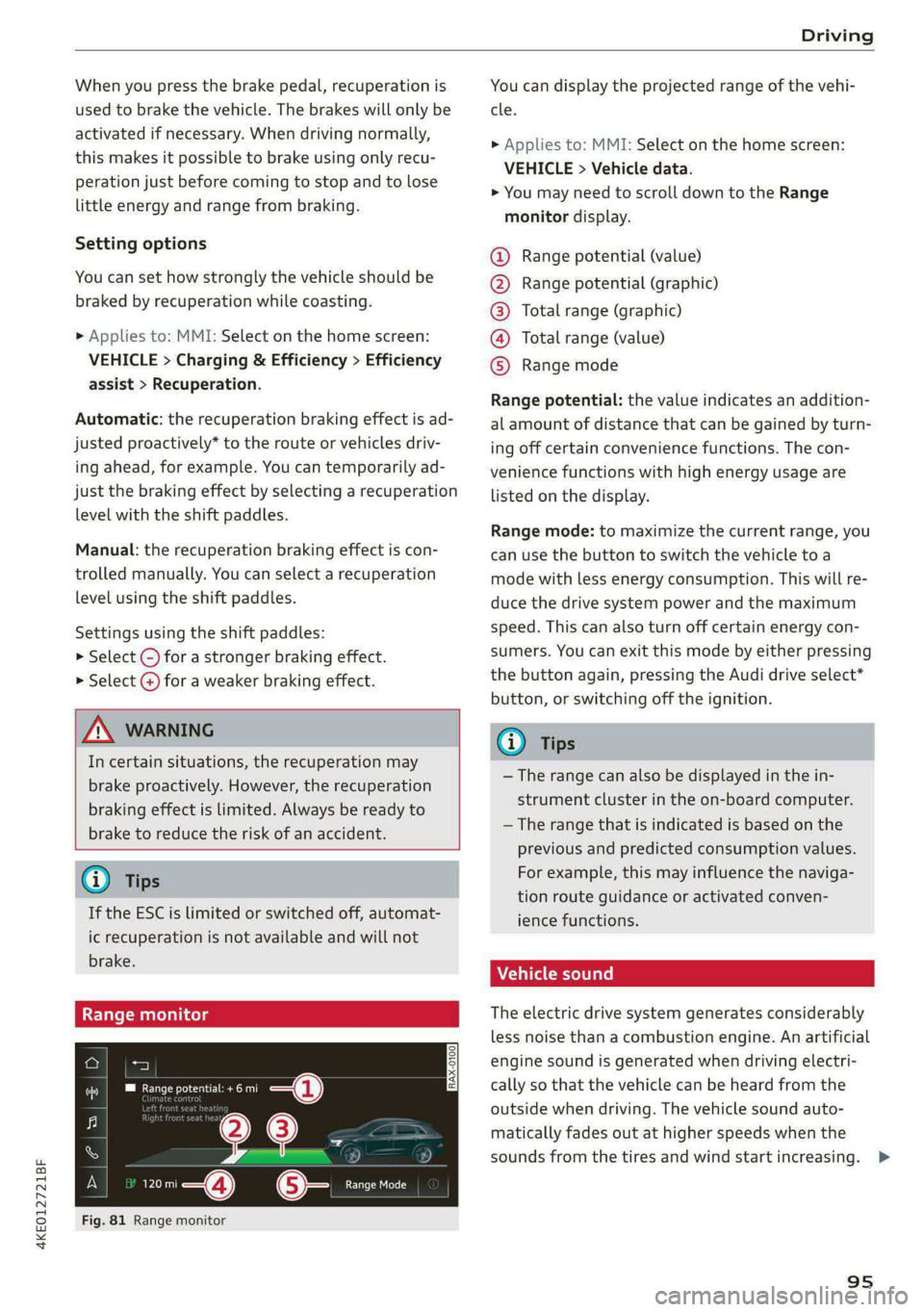
Fig. 81 Range monitor
You can display the projected range of the vehi-
cle.
> Applies to: MMI: Select on the home screen:
VEHICLE > Vehicle data.
> You may need to scroll down to the Range
monitor display.
Range potential (value)
Range potential (graphic)
Total range (graphic)
Total range (value)
Range mode OOOO
Range potential: the value indicates an addition-
al amount of distance that can be gained by turn-
ing off certain convenience functions. The con-
venience functions with high energy usage are
listed on
the display.
Range mode: to maximize the current range, you
can use the button to switch the vehicle to a
mode with less energy consumption. This will re-
duce the drive system power and the maximum
speed. This can also turn off certain energy con-
sumers. You can exit this mode by either pressing
the button again, pressing the Audi drive select*
button, or switching off the ignition.
G) Tips
— The range can also be displayed in the in-
strument cluster in the on-board computer.
— The range that is indicated is based on the
previous and predicted consumption values.
For example, this may influence the naviga-
tion route guidance or activated conven-
ience functions.
Vehicle sound
The electric drive system generates considerably
less noise than a combustion engine. An artificial
engine sound is generated when driving electri-
cally so that the vehicle can be heard from the
outside when driving. The vehicle sound auto-
matically fades out at higher speeds when the
sounds from the tires and wind start increasing. >
95
Page 98 of 308
Driving
ZA\ WARNING
Other road users may not be able to defini-
tively hear electric vehicles when they are
driving. This increases the risk of an accident
particularly when driving in areas with little
traffic, when maneuvering, or when driving in
reverse.
ient and environmentally-friendly
i}
Your driving style greatly influences the amount
of fuel and energy consumed, the environmental
impact, and the wear on the motor, brakes, and
tires. Note the following information for efficient
and environmentally-conscious driving:
— Select the Audi drive select* efficiency mode.
— Turn off electrical equipment that is not need-
ed, for example seat heating*.
— Anticipate upcoming traffic situations while
driving to avoid unnecessary acceleration and
braking.
— Avoid driving at high speeds.
— Avoid adding extra weight to the vehicle if pos-
sible, for example by not leaving roof racks or
bike racks installed when they are not needed.
— Make sure the tire pressure is correct.
— Have maintenance performed regularly on the
vehicle.
— Do not drive with winter tires during the summ-
er.
— Brake early and evenly to use recuperation.
Messages
B Drive system: malfunction! Safely stop vehi-
cle
There is a malfunction in the drive system. The
vehicle can no longer be driven. Park the vehicle
in a safe location as soon as possible. Secure the
vehicle against rolling before exiting the vehicle
= page 91. See an authorized Audi dealer or au-
thorized Audi Service Facility for assistance.
B Drive system: malfunction! Please contact
Service
96
There is a malfunction in the drive system. Drive
slowly to an authorized Audi dealer or authorized
Audi Service Facility to have the malfunction cor-
rected.
oO Drive system: warning! Limited performance
The driving power is limited. The high-voltage
battery may not be sufficiently charged or is at
the operating temperature threshold, for exam-
ple, when the outside temperatures are extreme-
ly cold.
BS Vehicle sound: malfunction! Pedestrians
cannot hear vehicle. Please contact Service
There is a malfunction in the vehicle sound func-
tion. Drive extremely carefully, since other road
users may not be able to hear your electric vehi-
cle. Drive to an authorized Audi dealer or author-
ized Audi Service Facility immediately to have the
malfunction corrected.
Brakes
ere el eiy
You can apply the vehicle's brakes using the brake
pedal.
Operating noise
Noises may occur when braking depending on the
speed, braking force, and outside conditions such
as temperature and humidity.
When the vehicle is stationary, the brake system
performs system tests at regular intervals. This
can cause brief noise and haptic feedback effects
on the brake pedal.
Braking effect
The response time from the brakes depends on
the weather and environmental conditions. To
ensure the optimal braking effect, the brake sys-
tem is cleaned at regular intervals. This is done
by applying the brake pads to the brake rotors for
a short period of time when driving at high
speeds when the windshield wipers are switched
on.
If the brake system becomes damp, for example
after driving in heavy rain, the braking effect may >