service AUDI E-TRON 2021 Owners Manual
[x] Cancel search | Manufacturer: AUDI, Model Year: 2021, Model line: E-TRON, Model: AUDI E-TRON 2021Pages: 308, PDF Size: 83.91 MB
Page 3 of 308
4KE012721BF
Foreword
Thank you for choosing an Audi - we value your trust in us.
Your new Audi will allow you to experience the best in groundbreaking technology and premium quality
equipment that a vehicle has to offer. Audi recommends that you read your Owner's Manual thoroughly
so that you quickly become acquainted with your Audi and make use of all of its features.
In addition to explaining how the different features work, there are many useful tips and information
concerning your safety, how to care for your vehicle, and how to maintain your vehicle's value. Audi also
gives you useful tips and information on how to drive your vehicle more efficiently and in an environ-
mentally-friendly manner.
Audi hopes you enjoy driving your vehicle and wishes you safe and pleasant motoring.
ZA\ warNiNc
Operating, servicing and maintaining a passenger vehicle or
off-highway motor vehicle can expose you to chemicals includ-
ing engine exhaust, carbon monoxide, phthalates, and lead,
which are known to the State of California to cause cancer and
birth defects or other reproductive harm. To minimize expo-
sure, avoid breathing exhaust, do not idle the engine except as
necessary, service your vehicle in a well-ventilated area and
wear gloves or wash your hands frequently when servicing
your vehicle. For more information go to www.P65Warnings.
ca.gov/passenger-vehicle.
Page 5 of 308
4KE012721BF
Table of contents
High-voltage system............. 108
General information................. 108
Charging the high-voltage battery...... 109
Charging equipment................. 117
Trailer ROwilne is «i wows «seas gs eeees 126
Driving witha trailer................. 126
Assist systems................... 129
ASSIST SYSTCINIS§ 65 6 i onws 5 can so oe 129:
General information................. 129
Surrounding area detection............ 130
Switching the systems on and off....... 132
Driving information.............. 134
Speed warning system..............-- 134
Camera-based traffic sign recognition... 134
Traffic light information.............. 136
Nightivision aSSiSti=x = «wm : » ase y s eon 137
Integrated Toll Module............... 139
Driver assistance................. 141
Cruise control system............00-5 141
Efficiency assist.............02.-000. 142
Adaptive cruise assist................ 144
Distance warning ..............00005. 154
Lane departure warning............... 155
Audi presense...........0 cece eee 156
Sid@vassist sews: = s sexs = 2 sews & e Ae & ne 160
EXIE Warning sire x 6 cera oo were @ @ eee os 162
Intersection assistant................ 163
Emergency assist... ....:seeceeeevees 164
Parking and maneuvering....... 166
IMEROUWECION « = ems x y ses 5 o were 2 x ews 166
Parking‘aid plus « sissies avis oe aretes so aoe 166
Rearview camera and peripheral cameras. 168
Rear cross-traffic assist............... 173
Infotainment system............ L75
Telephone....................005- t75
INtROGUCtION « 2 sees » y sees 9 2 gees s 5 aes 175
SOLUP scsvine a 6 sssnase 2 0 soeaam + 6 oewoan © 6 coesern < 175
Using the Audi phone box............. 177
Using the telephone..............0005 179
SOUS cass os awusse oo means o & seanoe @ seeMaRD & 182
Messages .............0 000200 e eee 183
ThOubLESHOOtING ices s weces s eeee ss pee 185
PRCT COMMBCE 's. cosves 5 6 sivas 6 6 snes 8 oo 186
General information................- 186
Audi connect Infotainment............ 186
Using a Wi-Fi hotspot................ 187
Audi connect Infotainment services..... 187
Functions on demand................ 188
Audi connect vehicle control services.... 188
Settings............. 0.0.00 002 eee 189
TRGUBIESHOOLING sass ¢ scm s 3 Hae 5 tee 190
Emergency call................... 191,
Overview... 12.0... eee eee eee 191
Emergenicy'call « css s sees 6 s gems © + eeu 191
Online roadside assistance............ 192
NaViGGationtc: « « meus « & seu sc poms + «oe 194
Opening navigation............0..005 194
myAudi navigation...............000. 194
Entering a destination................ 195
Stopping route guidance.............. 198
Map... .. see cece eee eee 199
Alternative
routes.............2-.00. 201
Additional functions................. 201
Satellite map.......... 2.0... ee eee 202
Electric:ranGe ccs «2 was ss eee ys ees 202
Map update’: « snes os anes 2s oiws oo ews 202
Traffic incidents ........ 0.0... cece eee 204
Settings............0..0 0.0202 205
Radio...... 02... eee eee ee 207
Generalinformation................. 207
Radio functions sas ss sees ss peee ss Hews 208
Online radiObi. «sacs x x sere @ armen 6 one 211
Options and settings................. 212
Troubleshooting zass x s eae s 3 come & a aw 213
Media........... 0. cece eee ee 215
General information................. 215
DVDidrive « sisi 2 5 semen 2 6 were 2 8 women 2 oe 215
Bluetooth audio player............... 216
Amazon Alexa.........0..:ee eee ee eee 216
Multimedia connections.............. 217
Playing media. ....... 0. cece ee eee eee 218
Options and settings................. 222
Supported media and file formats...... 223
Troubleshooting...............-.0005 224
Page 6 of 308
Table of contents
Audi smartphone interface...... 226
Setup... eee eee eee eee 226
Troubleshooting wv s & wees se cows 6 bey 227
Additional settings.............. 228
System Settings: : s eens s i vows ve sews es 228
Software update...............2..-0. 229
Connected devices.............000005 230
Legalinformation................... 231
Additional information.......... 232
Brands and licenses...............--- 232
Maintenance and Care........... 233
Checking and Filling............. 233
Motor'compartment’. sc. ¢ « wcen es oes 233.
CoolingisysteM « x sisws ov sass ov somes & & ane 235
Brake fluid. ........ 0.0.0.0 c eee eee 236
Electrical system <
Battenyis ¢ «sic s 6 wen 2 9 ween oy were 2 ere 238
Windshield washer system...........- 239
Service interval display............... 239
WWINGOIS : ceciices co costes 6 a sncewvs ow oneners 0 at 241
Wheels and Tires . . 241
Tire pressure monitoring system....... 258
Care and cleaning................ 261
Generalinformation................. 261
Car washes « swe: vx awa: oo amin 0 x snanae #2 261
Cleaning and care information......... 262
Taking your vehicle out of service....... 266
Do It Yourself .................... 267
Emergency assistance........... 267
General information................. 267
Equipment............. 0c eee eee 267
Tire mobility kit..................00. 267
Replacing wheels. ........:cceeeeeees 269
Collapsible spare tire..............0.. 273
Jump starting ..............e eee eee 274
IQWING were: worms 5 cee 9 + eee + eee 274
Fuses and bulbs.................. 277
FUSES 3 2 amow 4 meme a 2 mee ay ome 2 277.
Bel DSyonsn = secaais 2s omens a orate vw acct =e aa 280
Customer information........... 281
Data privacy..................008. 281
Privacy MOtiCe « mes x x eee 2 Ree ¢ RES ¥ 281
Image recording): « « sus 2 wanes 2 2 wweem 2 2s 281
Data memories............0..00 eee ee 281
Transmitted information.............. 282
Accessories and technical
changes................ 0.0.02 eee 285
Warranty’: « + esos & + meen & ¢ eee se sees 285
Audi Literature Shop.............000- 285
Driving in other countries............. 285
Maintenance, repairs, and technical
IMOGIFICATIONS « snocue so sume = emmace # m annem 285
Accessories and parts..............-. 287
Reporting Safety Defects.............. 287
Declaration of compliance for
telecommunications equipment and
electronicisysteMms:: s = caws se waa « 2 gems 288
Technical data.................... 290
Identification data................04. 290
Vehicle datas ss nico s ves se oman evs 290
Index ...... 00.0... eee eee 292
Page 13 of 308
4KE012721BF
Instrument cluster
Instrument cluster
Instrument cluster overview
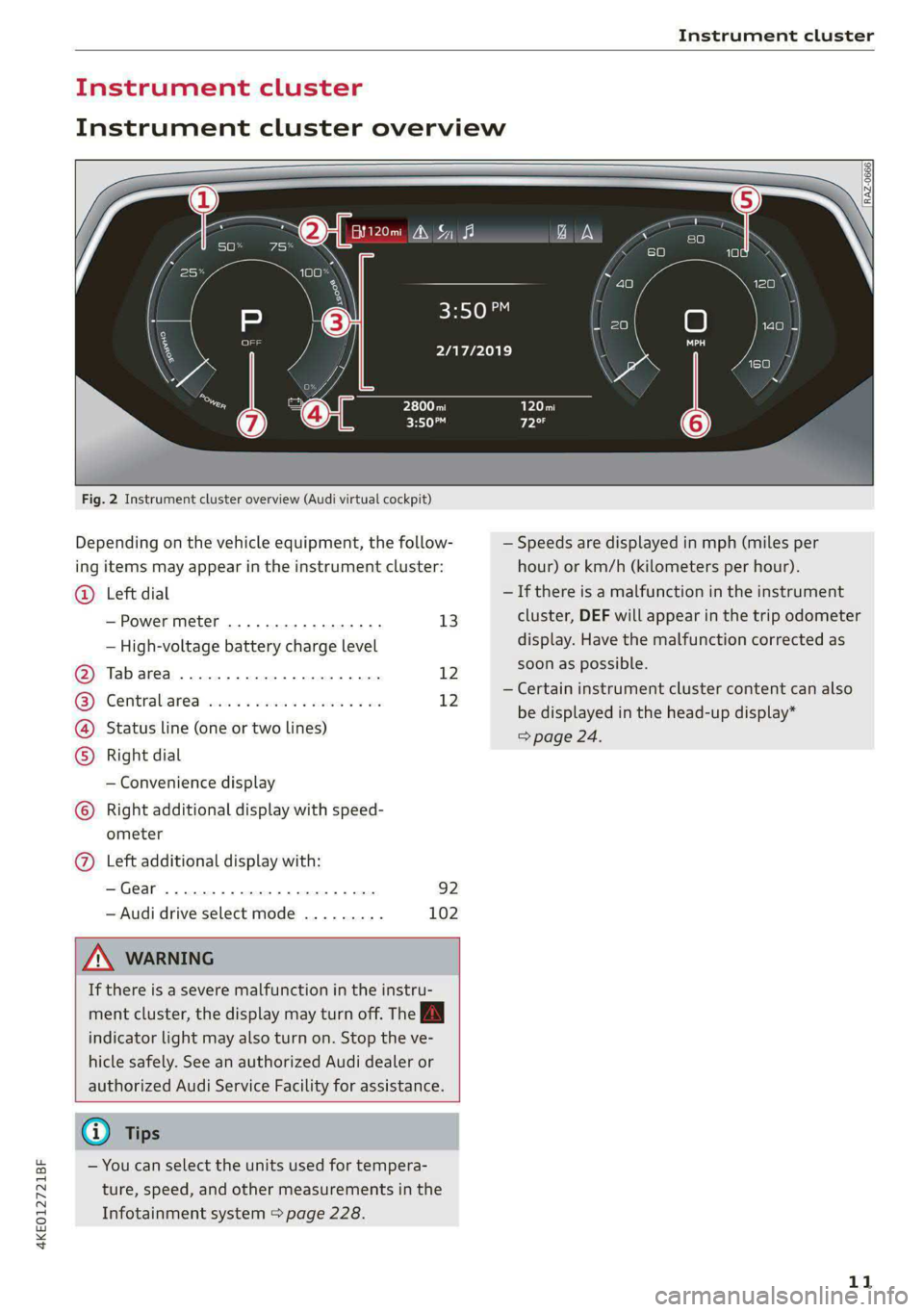
Fig. 2 Instrument cluster overview (Audi virtual cockpit)
Depending on the vehicle equipment, the follow-
ing items may appear in the instrument cluster:
Left dial
— Power meter ..............00. 13
©
— High-voltage battery charge level
Tabarea .... 0... eee eee 12
Centralised via as ieee s maven 6 wa 12
Status line (one or two lines)
Right dial
— Convenience display
Right additional display with speed-
COE
OLORORS)
3:50™
2/17/2019
ometer
Left additional display with:
—Gear ...... 02. eee eee eee 92
— Audi drive select mode ......... 102
ZA WARNING
If there is a severe malfunction in the instru-
ment cluster, the display may turn off. The A
indicator light may also turn on. Stop the ve-
hicle safely. See an authorized Audi dealer or
authorized Audi Service Facility for assistance.
G) Tips
— You can select the units used for tempera-
ture, speed, and other measurements in the
Infotainment system > page 228.
| zl ‘ae.
N a |
a WAi==)/)
A
— Speeds are displayed in mph (miles per
hour) or km/h (kilometers per hour).
— If there is a malfunction in the instrument
cluster, DEF will appear in the trip odometer
display. Have the malfunction corrected as
soon as possible.
— Certain instrument cluster content can also
be displayed in the head-up display*
> page 24.
11
Page 28 of 308

Voice recognition system
> To pause voice recognition, say or press Pause
@. To reactivate voice recognition, press @)
again or briefly press the «€ button on the mul-
tifunction steering wheel.
Additional functions
Applies to: vehicles with voice recognition system
Command during voice output
If the function is switched on, you can simply say
a new command during a prompt.
> Applies to: MMI: Select on the home screen:
SETTINGS > General > Speech dialog system >
Allow commands during voice output.
Online recognizer
Applies to: vehicles with online recognizer
You can activate the online recognizer for addi-
tional functions and to improve the results of
voice recognition. A supported menu language
must be selected. When there is an active Inter-
net connection, the spoken command is evaluat-
ed in the vehicle and online.
> When you switch on the voice recognition sys-
tem for the first time, a menu for the online
recognizer will open, or
> Applies to MMI: Select on the home screen:
SETTINGS > General > Speech dialog system >
Consent to online speech recognizer.
> Read the licensing agreements and accept
them.
Amazon Alexa
Applies to: vehicles with Amazon Alexa Integration
You can activate Amazon Alexa to access certain
functions. A reduced number of commands for
Amazon Alexa are available during this.
Requirement: you must be logged in to your
myAudi account in the vehicle. The online recog-
nizer must be activated. A system language that
is supported by both the voice recognition system
and Amazon Alexa must be selected.
> Applies to: MMI: Select on the home screen:
USER > Connect to Amazon Alexa.
> Follow the instructions in the display.
> Applies to: MMI: To operate Amazon Alexa us-
ing voice commands, select on the home
26
screen: SETTINGS > General > (Speech dialog
system) > Activate the speech dialog system
with "Hey Audi".
>» Say the activation phrase “Alexa” together with
the desired command.
() Note
Read the information about Audi connect, and
be sure to note the connectivity costs section
=@ in General information on page 186.
Gi) Tips
Audi provides access to services from third
party providers. Permanent availability cannot
be guaranteed, because that depends on the
third party provider.
External voice operation
Applies to: vehicles with external speech dialog system
You can access and control the voice operation on
a connected mobile device through your vehicle.
Switching external voice operation on or off
Requirement: the ignition and the MMI must be
switched on. A cell phone must be connected to
the MMI with the Handsfree profile > page 175.
The mobile device being connected must have
voice control that can be controlled externally.
There must be no phone calls in progress and the
parking aid must not be active.
> To switch on the external voice operation, press
and hold the «€ button longer on the multifunc-
tion steering wheel.
> To switch off the external voice operation, press
and hold the «€ button longer on the multifunc-
tion steering wheel or press Cancel.
Using external voice operation
>» Say the desired command after the signal tone.
> To reactivate voice recognition when it is
paused, press the w€ button briefly on the mul-
tifunction steering wheel or press Resume.
G) Tips
Audi simply provides access to control your
cell phone with voice operation and does not >
Page 30 of 308

Global functions
Global functions
Additional function
buttons
Fig. 20 Center console: MMI On/Off knob with joystick
function
Adjusting the volume
You can adjust the volume of an audio source or a
system message (for example, from the voice
recognition system) when the sound is playing.
> To increase or decrease the volume, turn the
right
thumbwheel @) © fig. 19 upward or
downward, or turn the On/Off knob @) 9 fig. 20
to the right or left.
> To mute, push the right thumbwheel or the
On/Off knob.
Selecting the previous/next track or station
> Press the |< / DDI button @ or briefly press
the On/Off knob to the left/right.
Fast forward/rewind
> Press and hold the
the desired playback position is reached.
28
Quick access steering wheel button
Depending on vehicle equipment, the button ©)
may provide quick access to various functions.
You can program the >K button with various func-
tions.
> To bring up the function that is currently set,
press the >K button.
> To perform the function that is currently set,
press and hold the >K button, or:
> Applies to MMI: Select on the home screen: VE-
HICLE > Settings & Service > Steering wheel
button assignment.
> Select and confirm the desired function.
Switching the voice recognition system on or
off
w& button @), see > page 25.
Using the telephone functions
button @), see > page 179.
ZA\ WARNING
Adjust the volume of the audio system so that
signals from outside the vehicle, such as po-
lice and fire sirens, can be heard easily at all
times.
Page 31 of 308

4KE012721BF
Personalization
Personalization
Users
General information
Applies to: vehicles with personalized user settings
Depending on vehicle equipment and your coun-
try, your vehicle may be able to manage various
users in the MMI. Each user will be assigned the
settings that they last used.
Before you begin driving, you can select a user in
the MMI and load personalized Infotainment and
vehicle settings.
Possible users in the MMI:
— myAudi user: as a myAudi user, you can use
Audi connect services that require a myAudi ac-
count. Certain settings are transferred online to
your myAudi account. If you log into your
myAudi account in another vehicle, you can
load your settings in the other vehicle.
— Local user: as a local user, you can only store
settings in the current vehicle. Your settings
cannot be transferred to other vehicles. Audi
connect services that can only be used with a
myAudi account will not be available.
— Guest user: as a guest user, you can store set-
tings in the vehicle without changing the set-
tings for other users. Audi recommends only
using the guest user temporarily, because set-
tings can be overwritten by other users.
Depending on vehicle equipment, the following
options may be used to detect the active user so
that the user settings can be loaded automatical-
ly before you start driving.
— Vehicle key
Requirement: the driver's door has been opened.
The detected user must be shown in the MMI.
Confirm the user shown, select another user
= page 29, or add another user > page 29.
ZA WARNING
It may not be possible to load Infotainment
and vehicle settings, or they may only load
partially. The driver is always responsible for
the Infotainment and vehicle settings in order
to reduce the risk of an accident.
@) Tips
— Certain Infotainment and vehicle settings
(such as mirrors, last radio stations) may be
stored, depending on vehicle equipment.
You can find additional information in the
MMI. Select on the home screen: SETTINGS
> General > Legal notes > About Audi con-
nect.
— Applies to: myAudi users: The stored set-
tings can only be transferred to vehicles
that are capable of receiving the transmit-
ted information. There may be restrictions
that prevent this, particularly in other coun-
tries.
— Applies to: myAudi users: The settings can
only be transferred and loaded when there
is coverage from the applicable mobile
phone service provider.
— Applies to: myAudi users with PIN protec-
tion switched on: If the MMI displays a de-
tected user but you simply start driving or
wait without entering the 4-digit PIN, then
the guest user will be selected. Some set-
tings for the detected myAudi user will be
transferred to the guest user.
OTe e le (ta 4
Applies to: vehicles with user management
Opening user management
Applies to: MMI
> Press USER on the home screen.
Selecting a user
Applies to: MMI
> Press on the desired user.
> Enter the 4-digit myAudi PIN, if necessary.
Adding myAudi users
Applies to MMI and Audi connect
Requirement: you must have successfully regis-
tered at my.audi.com and have created a 4-digit
myAudi PIN.
> Press Add user.
> Press Log in now to log in with your myAudi
credentials.
> Follow the system instructions.
29
Page 32 of 308
Personalization
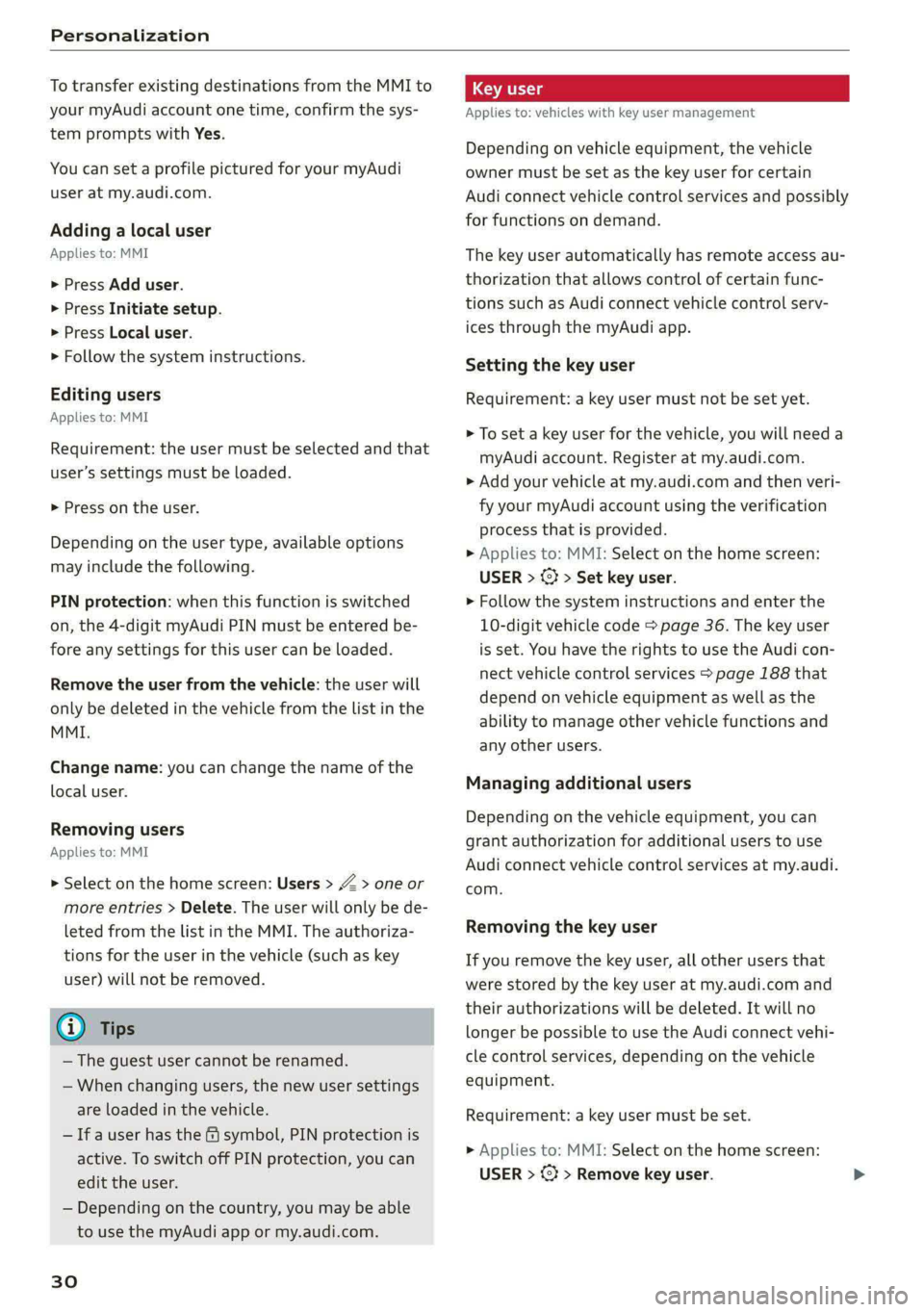
To transfer existing destinations from the MMI to
your myAudi account one time, confirm the sys-
tem prompts with Yes.
You can set a profile pictured for your myAudi
user at my.audi.com.
Adding a local user
Applies to: MMI
> Press Add user.
> Press Initiate setup.
> Press Local user.
> Follow the system instructions.
Editing users
Applies to: MMI
Requirement: the user must be selected and that
user’s settings must be loaded.
> Press on the user.
Depending on the user type, available options
may include the following.
PIN protection: when this function is switched
on, the 4-digit myAudi PIN must be entered be-
fore any settings for this user can be loaded.
Remove the user from the vehicle: the user will
only be deleted in the vehicle from the list in the
MMI.
Change name: you can change the name of the
local user.
Removing users
Applies to: MMI
> Select on the home screen: Users > > one or
more entries > Delete. The user will only be de-
leted from the list in the MMI. The authoriza-
tions for the user in the vehicle (such as key
user) will not be removed.
@ Tips
— The guest user cannot be renamed.
— When changing users, the new user settings
are loaded in the vehicle.
— Ifa user has the & symbol, PIN protection is
active. To switch off PIN protection, you can
edit the user.
— Depending on the country, you may be able
to use the myAudi app or my.audi.com.
30
Applies to: vehicles with key user management
Depending on vehicle equipment, the vehicle
owner must be set as the key user for certain
Audi connect vehicle control services and possibly
for functions on demand.
The key user automatically has remote access au-
thorization that allows control of certain func-
tions such as Audi connect vehicle control serv-
ices through the myAudi app.
Setting the key user
Requirement: a key user must not be set yet.
> To set a key user for the vehicle, you will need a
myAudi account. Register at my.audi.com.
> Add your vehicle at my.audi.com and then veri-
fy your myAudi account using the verification
process that is provided.
> Applies to: MMI: Select on the home screen:
USER > (¥ > Set key user.
> Follow the system instructions and enter the
10-digit vehicle code > page 36. The key user
is set. You have the rights to use the Audi con-
nect
vehicle control services > page 188 that
depend on vehicle equipment as well as the
ability to manage other vehicle functions and
any other users.
Managing additional users
Depending on the vehicle equipment, you can
grant authorization for additional users to use
Audi connect vehicle control services at my.audi.
com.
Removing the key user
If you remove the key user, all other users that
were stored by the key user at my.audi.com and
their authorizations will be deleted. It will no
longer be possible to use the Audi connect vehi-
cle control services, depending on the vehicle
equipment.
Requirement: a key user must be set.
> Applies to: MMI: Select on the home screen:
USER > @} > Remove key user.
Page 33 of 308
4KE012721BF
Personalization
@) Tips
— Depending on the country, you may be able
to use the myAudi app or my.audi.com.
— You do not need to log into the vehicle with
a myAudi user in order to use Audi connect
vehicle control services, which depend on
the vehicle equipment.
— If you sell your vehicle, reset all settings to
the factory default settings.
— Store the vehicle code in a secure place. It
may be necessary to re-enter the vehicle
code.
— When entering the vehicle code, please note
that the code is case-sensitive.
— If you do not have the 10-digit vehicle code,
contact an authorized Audi dealer or author-
ized Audi Service Facility.
31
Page 35 of 308
4KE012721BF
Opening and closing
ZA WARNING
Observe the safety precautions > page 32.
Z\ WARNING
Applies to: vehicles with power closing
—To reduce the risk of injury, make sure that
the area where the door is closing is clear
during the closing process.
— The closing process can be stopped at any
time by pulling on the outer or inner door
handle.
@) Note
The following applies when locking the vehi-
cle:
— If the vehicle key that was last used is de-
tected inside the passenger compartment,
then the vehicle cannot be locked from the
outside using the sensor. Take the vehicle
key with you and lock the vehicle again. Oth-
erwise, the vehicle will not be protected
against unauthorized access.
— If you try to lock the vehicle using the but-
ton on the vehicle key while the front pas-
senger's or rear door is open, and you acci-
dentally place the vehicle key inside the pas-
senger compartment and close the door,
the vehicle will lock at first. But if the key-
less system detects a vehicle key inside the
vehicle after it locks, then the vehicle will
unlock again. The turn signals will flash sev-
eral times to indicate this. If you do not
open the vehicle to remove the vehicle key
within a brief period, then the vehicle will
lock automatically. This prevents the vehicle
from being left unlocked for long periods of
time. The vehicle key will then be locked in-
side the vehicle.
— If the luggage compartment lid closes and
the system detects that the last vehicle key
that was used is inside the luggage com-
partment, then the luggage compartment
lid will open again. The turn signals will
flash several times to indicate this. The
doors will lock. Always take the vehicle key
with you, or unauthorized persons may be
able to enter the vehicle.
@) Tips
— Do not leave valuables unattended in the ve-
hicle. A locked vehicle is not a safe!
—The LED in the driver's door rail blinks when
you lock the vehicle. If the LED turns on for
approximately 30 seconds after locking,
there is a malfunction in the central locking
system. Have the problem corrected by an
authorized Audi dealer or authorized Audi
Service Facility.
atte Mn meee ol dia 1)
You can adjust the central locking system to your
preferences. The settings depend on the vehicle
equipment.
> Applies to MMI: Select on the home screen: VE-
HICLE > Settings & Service > Central locking.
Door unlocking
—If you select All, all doors and the luggage
compartment lid will be unlocked when unlock-
ing the vehicle.
— If you select Driver's door, only the driver's
door will be unlocked. To unlock all doors and
the luggage compartment lid, press the & but-
ton on the vehicle key twice. In vehicles with a
convenience key”, only the driver's door will un-
lock when you pull the driver's door handle. If
you pull another door handle, the entire vehicle
will be unlocked.
The entire vehicle will always be locked f you
press
the f button.
Long press to open windows
You can select if all windows and the panoramic
glass roof* should open using the vehicle key
= page 44, Convenience opening and closing. If
you press and hold the ff button on the vehicle
key, all of the windows and the panoramic glass
roof* will close.
Disable rear lid handle
You can select if the luggage compartment lid
can open with the handle. If you activate this
function, the luggage compartment lid can only
be opened with the <¥ or 4s button on the >
33