windshield wipers AUDI E-TRON 2021 Owners Manual
[x] Cancel search | Manufacturer: AUDI, Model Year: 2021, Model line: E-TRON, Model: AUDI E-TRON 2021Pages: 308, PDF Size: 83.91 MB
Page 4 of 308
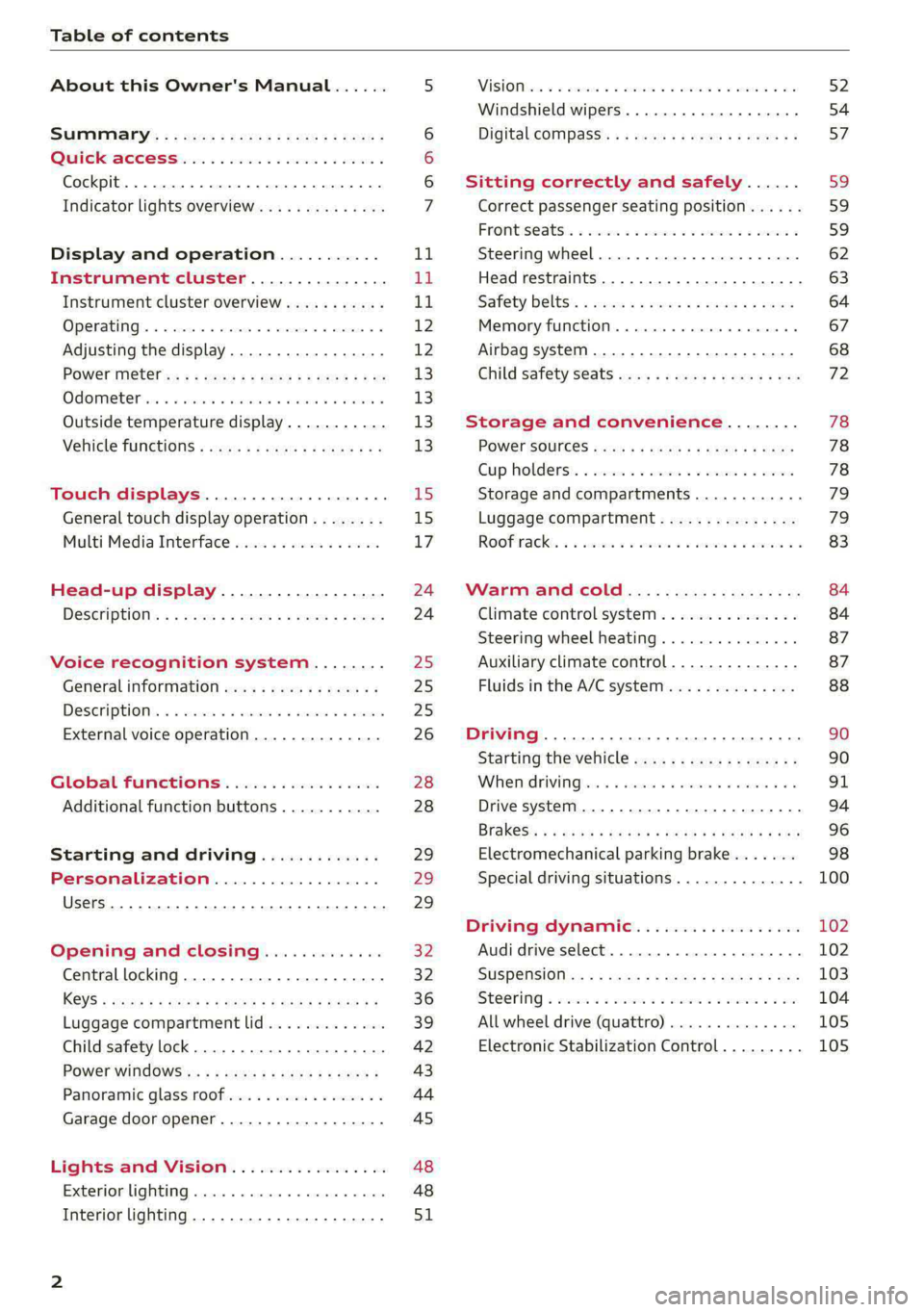
Table of contents
About this Owner's Manual......
SUMIMAry: < = exe : eens: Seen cs sens
QutckeaeCe ssh: «i esis se ois a eaves @
Cockpit. ...... 0... eee eee eee eee
Indicator lights overview...........4..
Display and operation...........
Instrument cluster...............
Instrument cluster overview...........
Operating. ecccuse w+ were oo wens oo ayes 9 ¥
Adjusting the display.................
POWErMe@tel ss « » wees = 5 gees ey ewe xe
OdOMeter sic oo sisiecs a werner » ome ee irae «
Outside temperature display...........
Vehicle functions « sce. ss saes ae sees aes
Touch displays....................
General touch display operation........
Multi Media Interface................
Head-up display..................
DeSGriptlOlls « ¢ sans a ¢ wee a ¢ saws § eae
Voice recognition system........
General information..............4..
DESCRIPTION. 4 & wisevus sa stenius ow aresiue 6 ¥ renin
External voice operation..............
Global Functions’. vc. 6s css se cess
Additional function buttons...........
Starting and driving.............
Personalization..................
Luggage compartment lid.............
Child safety lock........... 00. cece eee
POWEF WINdOWS:: « x sso ¥ 2 eure 9 2 ea
Panoramic glass:n00fiecis < « svsvine so siswes «
Garage door opener...........-.00005
Lights and Vision.................
EXEROPLUGHELAG, soosece « » enscet oo snsuein © 0 asee
Interior lighting..............-...0--
NOD
OO
11
ga:
11 12 12 13 13 13
13
15
15
17
24 24
25
25
25
26
28
28
29
29 29
32 32
36 39
42 43
44
45
48
48
51
ViSIOM i & & soscone wo coasaie 3 w aeeeane © w cease ow 52
Windshield wipers...............000 54
Digital COMPdSS's s s wae se wees se ees ve 57
Sitting correctly and safely...... 59
Correct passenger seating position...... 59
Frontis@ats:. = csv 2» ewes 2 o wom ws eon © 59
SLESKIMG WHEEL eseiince 4 0 eowcene s sontone o 6 axottene 62
Head restraints...................05. 63
Safety belts's « sso: s swans 5 ¢ eeies 5 2 awn 64
Memory function.............. 00s eee 67
Airbag system...............2220005 68
Child
safety seats ..........00 eee eae 72
Storage and convenience........ 78
POWEr SOUFCES seis = = eeu 2 + cee 2 + Hes 78
Cup Rolders': « sis ss ems os ence ee eee 78
Storage and compartments............ 79
Luggage compartment............... 79
Roofirackss + ¢ sseis eevee ev ena oo ween eo 83
Warm and cold.................6. 84
Climate control system............... 84
Steering wheel heating.............-. 87
Auxiliary climate control.............- 87
Fluids in the A/C system.............. 88
Driving ........... 0. cee ee eee 90
Starting the vehicle................-. 90
When:driving jac: 2 + srcwie sv snsine oo earn vos 91
Drive system. ......... 0.0.00 .002000. 94
Brakesi: « « sia < anne 3 gene 3 x nOuR Fs cee 96
Electromechanical parking brake....... 98
Special driving situations.............. 100
Driving dynamic.................. 102
Audi drive select..............000000. 102
SUSPeNSION ss « = seus + < HeeS 4c REER x BRE 103
StOGFING « wicca x cases « 2 oresess a cae © H Lod 104
All wheel drive (quattro).............. 105
Electronic Stabilization Control......... 105
Page 11 of 308
4KE012721BF
Quick access
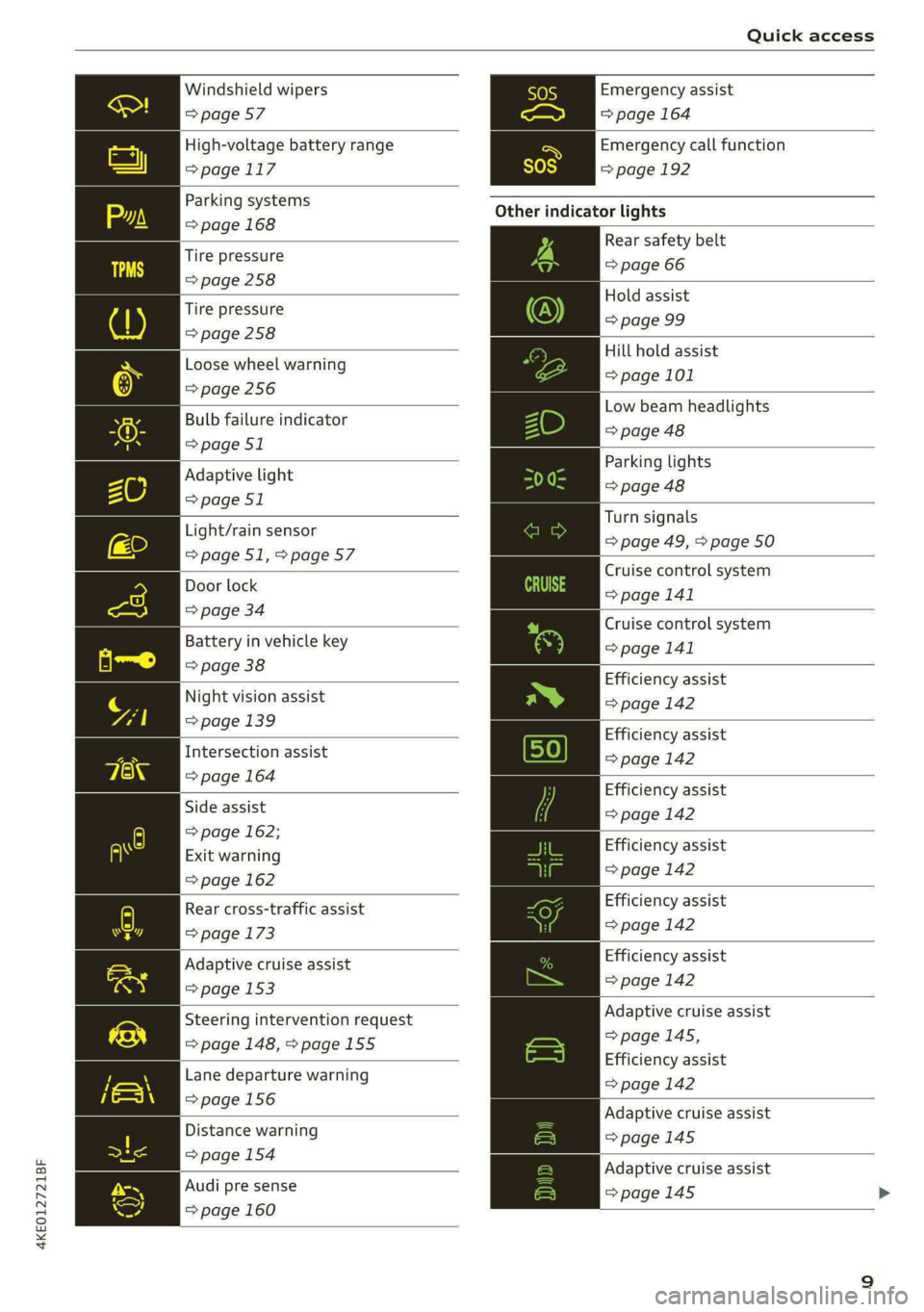
Windshield wipers
=> page 57
High-voltage battery range
>page 117
Parking systems
=> page 168
Tire pressure
=>page 258
Tire pressure
=> page 258
Loose wheel warning
=> page 256
Bulb failure indicator
=> page 51
Adaptive light
=> page 51
Light/rain sensor
=>page 51,>page 57
Door lock
=> page 34
Battery in vehicle key
=> page 38
Night vision assist
=> page 139
Intersection assist
=> page 164
Side assist
=> page 162;
Exit warning
=> page 162
Rear cross-traffic assist
=> page 173
Adaptive cruise assist
=> page 153
Steering intervention request
=> page 148, >page 155
Lane departure warning
=>page 156
Distance warning
=> page 154
Audi pre sense
=> page 160
Emergency assist
=> page 164
Emergency call function
=>page 192
Other indicator lights
Rear safety belt
=> page 66
Hold assist
=> page 99
Hill hold assist
=> page 101
Low beam headlights
=> page 48
Parking lights
=> page 48
Turn signals
=> page 49, > page 50
Cruise control system
= page 141
Cruise control system
>page 141
Efficiency assist
=> page 142
Efficiency assist
=> page 142
Efficiency assist
=> page 142
Efficiency assist
=> page 142
Efficiency assist
=> page 142
Efficiency assist
=>page 142
Adaptive cruise assist
=>page 145,
Efficiency assist
=> page 142
Adaptive cruise assist
=>page 145
Adaptive cruise assist
=> page 145 >
Page 56 of 308
Lights and Vision
If the glass on an automatic dimming mirror
breaks, electrolyte can leak out. This liquid
damages plastic surfaces and paint. Clean
this liquid as quickly as possible, for example
with a wet sponge.
— If the light reaching the rearview mirror is
obstructed, the automatic dimming mirror
will not function correctly,
— The automatic dimming mirrors do not dim
when the interior lighting is turned on or
the reverse gear is selected.
Sun visors
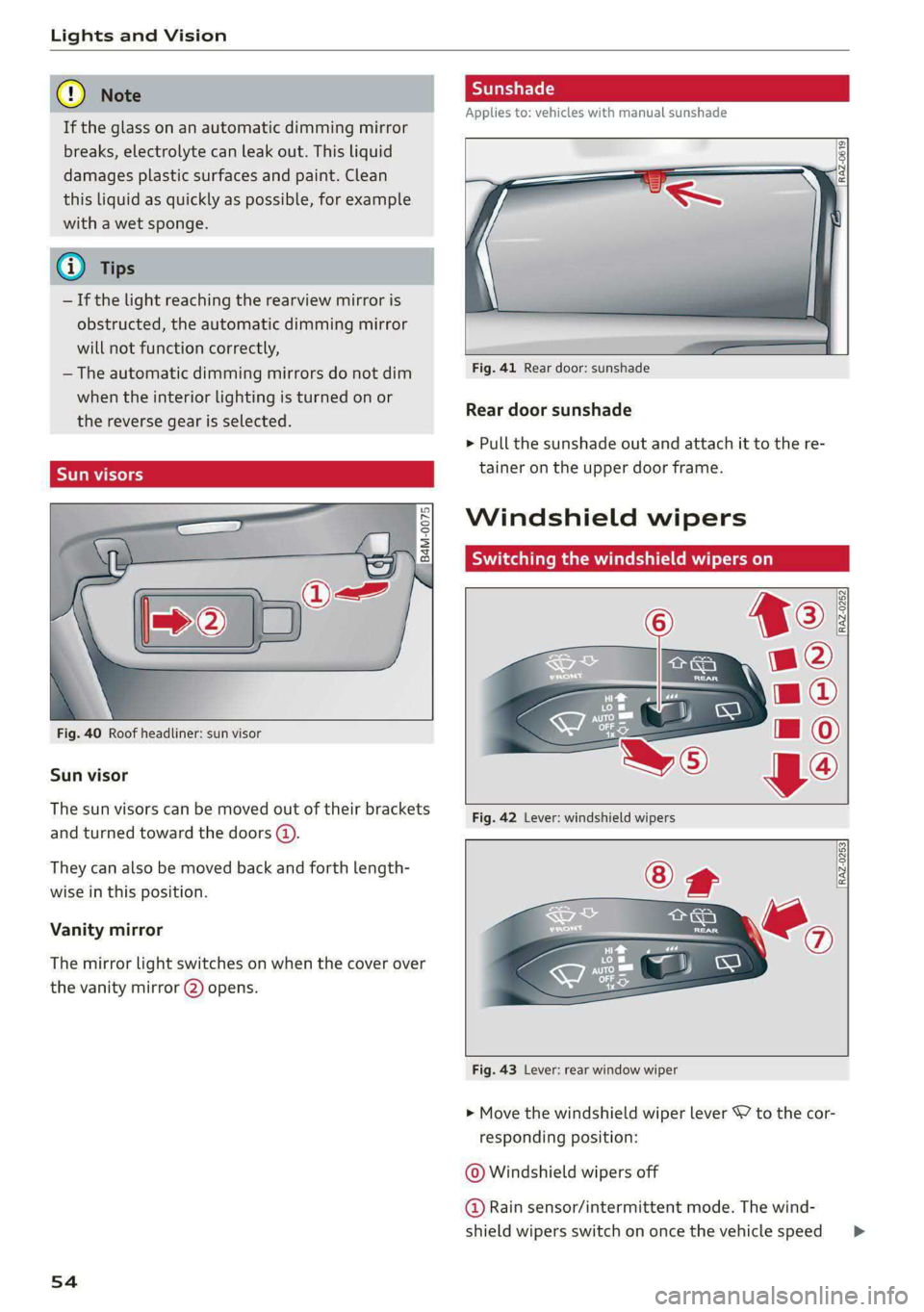
Fig. 40 Roof headliner: sun visor
Sun visor
The sun visors can be moved out of their brackets
and turned toward the doors @).
They can also be moved back and forth length-
wise in this position.
Vanity mirror
The mirror light switches on when the cover over
the vanity mirror @) opens.
54
Applies to: vehicles with manual sunshade
Fig. 41 Rear door: sunshade
Rear door sunshade
> Pull the sunshade out and attach it to the re-
tainer on the upper door frame.
Windshield wipers
Switching the windshield wipers on
RAZ-0253
Fig. 43 Lever: rear window wiper
> Move the windshield wiper lever 7 to the cor-
responding position:
© Windshield wipers off
@ Rain sensor/intermittent mode. The wind-
shield wipers switch on once the vehicle speed >
Page 57 of 308

4KE012721BF
Lights and Vision
exceeds approximately 2 mph (4 km/h) and it is
raining. The higher the sensitivity of the rain sen-
sor that is set (switch ©) to the right), the earlier
the windshield wipers react to moisture on the
windshield. You can deactivate the rain sensor
mode, which switches the interval mode on. In
intermittent mode, you can adjust the interval
time using the switch ©).
> Applies to: MMI: Select on the home screen:
VEHICLE > Light & Visibility > Rain sensor.
@ Slow wiping
@ Fast wiping
@ Single wipe. If you hold the lever in this posi-
tion longer, the wipers switch from slow wiping
to fast wiping.
© Clean the windshield &. The number of wipes
and afterwipes depends on how long the lever is
held in position G).
The wipers wipe one time after several seconds of
driving to remove water droplets. You can switch
this function off by moving the lever to position
© within ten seconds of the afterwipe. The after-
wipe function is reactivated the next time you
switch the ignition on.
If you hold the lever in position ©) for longer
than half a second, the edge wiping feature will
be activated. This moves the windshield wipers
closer to the edge of the windshield and per-
forms an afterwipe to clean the residue that re-
sults from the wiping process from the edge of
the windshield. The function is available when
driving at speeds up to 75 mph (120 km/h).
The headlight washer system* operates only
when the low beam headlights are on. If you
move the lever to position ©), the headlights and
the night vision assist camera* are cleaned at in-
tervals.
@ Wipe the rear window ©. The number of
wipes depends on the windshield wiper move-
ment.
The rear wiper automatically switches on when
the reverse gear is selected and the front wind-
shield wipers are on and running.
Clean the rear window &. The number of
wipes depends on how long the lever is held in
position (8). This may also clean the rearview
camera, depending on the vehicle equipment.
A WARNING
—The rain sensor is only intended to assist the
driver. The driver may still be responsible for
manually switching the wipers on based on
visibility conditions.
— The windshield must not be treated with
water-repelling windshield coating agents.
Under unfavorable conditions, such as wet-
ness, darkness, and when the sun is low,
these coatings can cause increased glare,
which increases the risk of an accident. They
can also cause wiper blade chatter.
— Properly functioning windshield wiper
blades are required for a clear view and safe
driving > page 56, Cleaning/changing wip-
er blades.
@) Note
— If there is frost, make sure the windshield
wiper blades are not frozen to the wind-
shield. Switching on the windshield wipers
when the blades are frozen to the wind-
shield can damage the wiper blades.
— Prior to using a car wash, the windshield
wiper system must be switched off (lever in
position @). This prevents the wipers from
switching on unintentionally and causing
damage to the windshield wiper system.
(i) Tips
— The windshield wipers switch off when the
ignition is switched off. You can activate the
windshield wipers after the ignition is
switched on again by moving the windshield
wiper lever to any position. The single wipe
function (lever in position @)) also functions
when the ignition is switched off.
— Worn or dirty windshield wiper blades result
in streaking. This can affect the rain sensor
function. Check your windshield wiper
blades regularly.
55
Page 58 of 308
Lights and Vision
— The washer fluid nozzles for the windshield
washer system are heated when the ignition
is on if the outside temperature is low.
— When stopping temporarily, such as at a
traffic light, the speed of the windshield
wipers automatically reduces by one level.
[eG a Res ct wiper blades
B8V-0696|
Ae
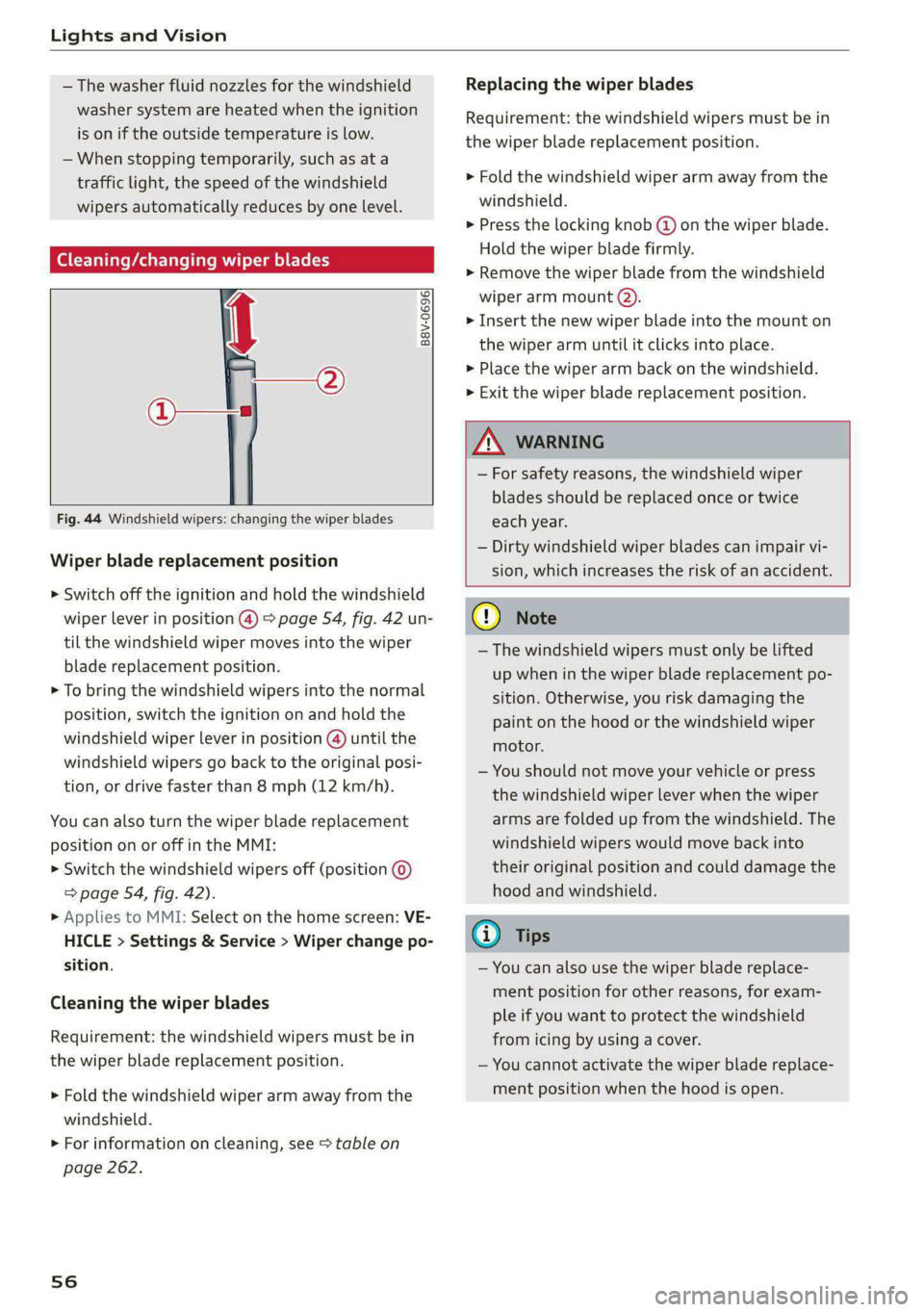
Fig. 44 Windshield wipers: changing the wiper blades
Wiper blade replacement position
> Switch off the ignition and hold the windshield
wiper lever in position @) > page 54, fig. 42 un-
til the windshield wiper moves into the wiper
blade replacement position.
> To bring the windshield wipers into the normal
position, switch the ignition on and hold the
windshield wiper lever in position @) until the
windshield wipers go back to the original posi-
tion, or drive faster than 8 mph (12 km/h).
You can also turn the wiper blade replacement
position on or off in the MMI:
> Switch the windshield wipers off (position ©
=> page 54, fig. 42).
» Applies to MMI: Select on the home screen: VE-
HICLE > Settings & Service > Wiper change po-
sition.
Cleaning the wiper blades
Requirement: the windshield wipers must be in
the wiper blade replacement position.
> Fold the windshield wiper arm away from the
windshield.
> For information on cleaning, see > table on
page 262.
56
Replacing the wiper blades
Requirement: the windshield wipers must be in
the wiper blade replacement position.
> Fold the windshield wiper arm away from the
windshield.
> Press the locking knob (@ on the wiper blade.
Hold the wiper blade firmly.
> Remove the wiper blade from the windshield
wiper arm mount Q).
> Insert the new wiper blade into the mount on
the wiper arm until it clicks into place.
> Place the wiper arm back on the windshield.
> Exit the wiper blade replacement position.
ZA\ WARNING
— For safety reasons, the windshield wiper
blades should be replaced once or twice
each year.
— Dirty windshield wiper blades can impair vi-
sion, which increases the risk of an accident.
C) Note
— The windshield wipers must only be lifted
up when in the wiper blade replacement po-
sition.
Otherwise, you risk damaging the
paint on the hood or the windshield wiper
motor.
— You should not move your vehicle or press
the windshield wiper lever when the wiper
arms are folded up from the windshield. The
windshield wipers would move back into
their original position and could damage the
hood and windshield.
G) Tips
— You can also use the wiper blade replace-
ment position for other reasons, for exam-
ple if you want to protect the windshield
from icing by using a cover.
— You cannot activate the wiper blade replace-
ment position when the hood is open.
Page 59 of 308

4KE012721BF
Lights and Vision
Cleaning/changing the rear wiper blade
RAZ-0637,
Fig. 45 Rear window wiper: installing the wiper blade
Cleaning the wiper blades
> Fold the wiper arm away from the rear window.
> For information on cleaning, see > table on
page 262.
Removing the wiper blade
> Fold the wiper arm away from the rear window.
> Remove the wiper blade from its holder.
Installing the wiper blade
> Press the wiper blade mount into the retainer.
> Fold the window wiper arm back onto the rear
window.
ZA WARNING
For safety reasons, the windshield wiper
blades should be replaced once or twice each
year.
Messages
If the & indicator light turns on, then there is a
windshield wiper malfunction. The message that
is also displayed indicates the cause and possible
solutions. If one of the messages does not turn
off, drive immediately to an authorized Audi deal-
er or authorized Audi Service Facility to have the
malfunction repaired.
a Automatic wipers: malfunction! See owner's
manual
The light/rain sensor is malfunctioning. You can
still control all functions that are not controlled
by the rain sensor using the windshield wiper lev-
er. Drive immediately to an authorized Audi deal-
er or authorized Audi Service Facility to have the
malfunction repaired.
Digital compass
icant meal eeol i Lie mel ad
Applies to: vehicles with digital compass
BFV-0288
Fig. 46 Rearview mirror: digital compass is switched on
> To turn the compass on or off, press the button
@ until the compass display in the mirror turns
on or off.
The digital compass only works when the ignition
is turned on. The directions are indicated with ab-
breviations: N (north), NE (northeast), E (east),
SE (southeast), S (south), SW (southwest), W
(west), NW (northwest).
@) Tips
To prevent inaccurate compass readings, do
not bring any remote controls, electrical devi-
ces or metallic objects near the mirror.
57
Page 98 of 308
Driving
ZA\ WARNING
Other road users may not be able to defini-
tively hear electric vehicles when they are
driving. This increases the risk of an accident
particularly when driving in areas with little
traffic, when maneuvering, or when driving in
reverse.
ient and environmentally-friendly
i}
Your driving style greatly influences the amount
of fuel and energy consumed, the environmental
impact, and the wear on the motor, brakes, and
tires. Note the following information for efficient
and environmentally-conscious driving:
— Select the Audi drive select* efficiency mode.
— Turn off electrical equipment that is not need-
ed, for example seat heating*.
— Anticipate upcoming traffic situations while
driving to avoid unnecessary acceleration and
braking.
— Avoid driving at high speeds.
— Avoid adding extra weight to the vehicle if pos-
sible, for example by not leaving roof racks or
bike racks installed when they are not needed.
— Make sure the tire pressure is correct.
— Have maintenance performed regularly on the
vehicle.
— Do not drive with winter tires during the summ-
er.
— Brake early and evenly to use recuperation.
Messages
B Drive system: malfunction! Safely stop vehi-
cle
There is a malfunction in the drive system. The
vehicle can no longer be driven. Park the vehicle
in a safe location as soon as possible. Secure the
vehicle against rolling before exiting the vehicle
= page 91. See an authorized Audi dealer or au-
thorized Audi Service Facility for assistance.
B Drive system: malfunction! Please contact
Service
96
There is a malfunction in the drive system. Drive
slowly to an authorized Audi dealer or authorized
Audi Service Facility to have the malfunction cor-
rected.
oO Drive system: warning! Limited performance
The driving power is limited. The high-voltage
battery may not be sufficiently charged or is at
the operating temperature threshold, for exam-
ple, when the outside temperatures are extreme-
ly cold.
BS Vehicle sound: malfunction! Pedestrians
cannot hear vehicle. Please contact Service
There is a malfunction in the vehicle sound func-
tion. Drive extremely carefully, since other road
users may not be able to hear your electric vehi-
cle. Drive to an authorized Audi dealer or author-
ized Audi Service Facility immediately to have the
malfunction corrected.
Brakes
ere el eiy
You can apply the vehicle's brakes using the brake
pedal.
Operating noise
Noises may occur when braking depending on the
speed, braking force, and outside conditions such
as temperature and humidity.
When the vehicle is stationary, the brake system
performs system tests at regular intervals. This
can cause brief noise and haptic feedback effects
on the brake pedal.
Braking effect
The response time from the brakes depends on
the weather and environmental conditions. To
ensure the optimal braking effect, the brake sys-
tem is cleaned at regular intervals. This is done
by applying the brake pads to the brake rotors for
a short period of time when driving at high
speeds when the windshield wipers are switched
on.
If the brake system becomes damp, for example
after driving in heavy rain, the braking effect may >
Page 238 of 308
Checking and Filling
for the climate. This is especially important
when driving in colder climates.
Coolant level
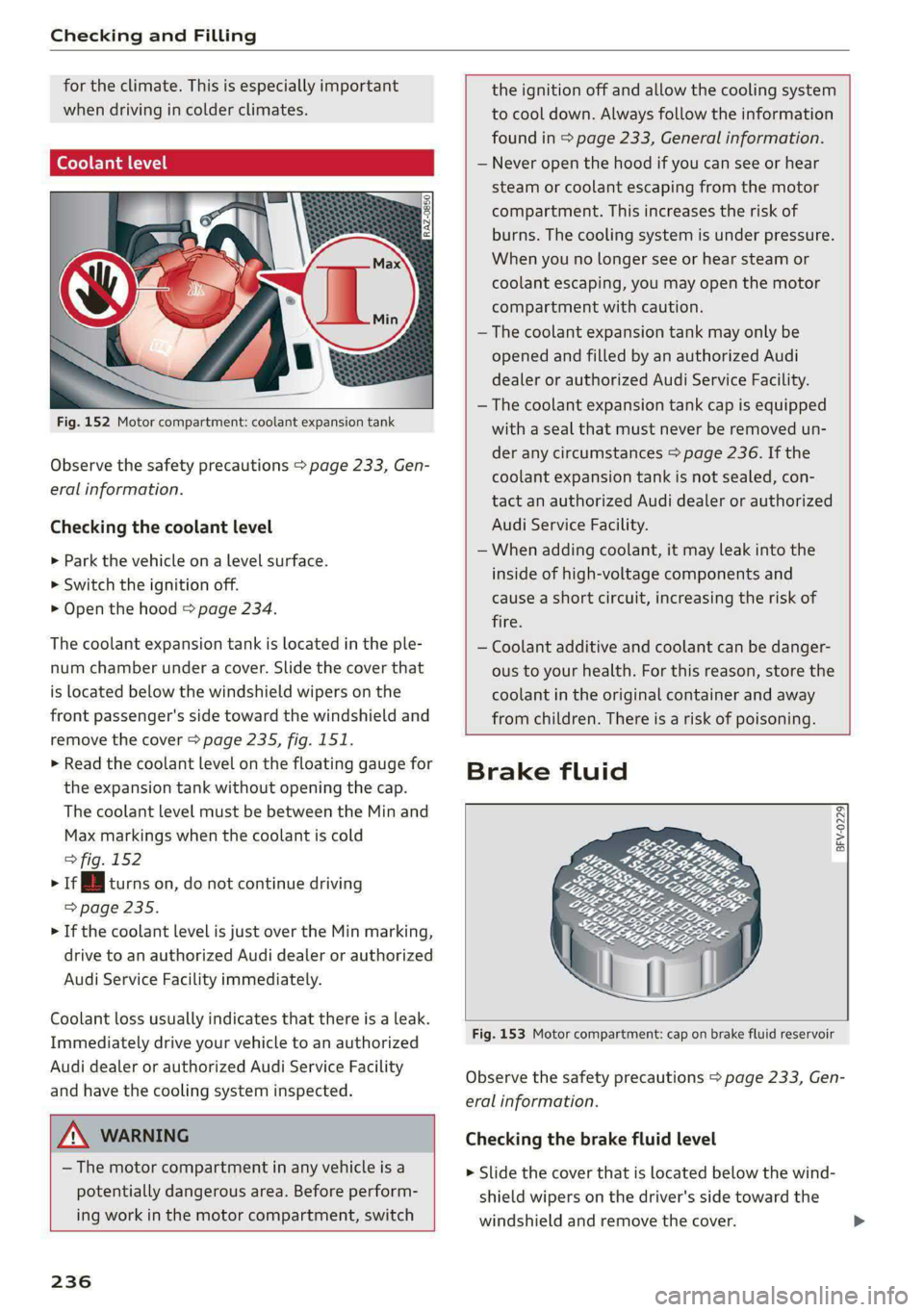
Fig. 152 Motor compartment: coolant expansion tank
Observe the safety precautions > page 233, Gen-
eral information.
Checking the coolant level
>» Park the vehicle on a level surface.
> Switch the ignition off.
> Open the hood = page 234.
The coolant expansion tank is located in the ple-
num chamber under a cover. Slide the cover that
is located below the windshield wipers on the
front passenger's side toward the windshield and
remove the cover > page 235, fig. 151.
> Read the coolant level on the floating gauge for
the expansion tank without opening the cap.
The coolant level must be between the Min and
Max markings when the coolant is cold
> fig. 152
> vi turns on, do not continue driving
=> page 235.
> If the coolant level is just over the Min marking,
drive to an authorized Audi dealer or authorized
Audi Service Facility immediately.
Coolant loss usually indicates that there is a leak.
Immediately drive your vehicle to an authorized
Audi dealer or authorized Audi Service Facility
and have the cooling system inspected.
ZA WARNING
— The motor compartment in any vehicle is a
potentially dangerous area. Before perform-
ing work in the motor compartment, switch
236
the ignition off and allow the cooling system
to cool down. Always follow the information
found in > page 233, General information.
— Never open the hood if you can see or hear
steam or coolant escaping from the motor
compartment. This increases the risk of
burns. The cooling system is under pressure.
When you no longer see or hear steam or
coolant escaping, you may open the motor
compartment with caution.
— The coolant expansion tank may only be
opened and filled by an authorized Audi
dealer or authorized Audi Service Facility.
— The coolant expansion tank cap is equipped
with a seal that must never be removed un-
der any circumstances > page 236. If the
coolant expansion tank is not sealed, con-
tact an authorized Audi dealer or authorized
Audi Service Facility.
—When adding coolant, it may leak into the
inside of high-voltage components and
cause a short circuit, increasing the risk of
fire.
— Coolant additive and coolant can be danger-
ous to your health. For this reason, store the
coolant in the original container and away
from children. There is a risk of poisoning.
Brake fluid
BFV-0229|
Fig. 153 Motor compartment: cap on brake fluid reservoir
Observe the safety precautions > page 233, Gen-
eral information.
Checking the brake fluid level
> Slide the cover that is located below the wind-
shield wipers on the driver's side toward the
windshield and remove the cover.
Page 263 of 308
4KE012721BF
Care and cleaning
Care and cleaning
General information
Regular, proper care helps to maintain your vehi-
cle's value. It can also be a requirement when
submitting warranty claims for corrosion damage
and paint defects on the body.
The required cleaning and care products can be
obtained from an authorized Audi dealer or au-
thorized Service Facility. Read and follow the in-
structions for use on the packaging.
ZA\ WARNING
— Using cleaning and care products incorrectly
can be dangerous to your health.
— Always store cleaning and care products out
of reach of children to reduce the risk of poi-
soning.
@ For the sake of the environment
— Purchase environmentally-friendly cleaning
products if possible.
— Do not dispose of cleaning and care prod-
ucts with household trash.
Car washes
The longer that deposits such as insects, bird
droppings, tree sap or road salt remain on the ve-
hicle, the more the surface can be damaged. High
temperatures such as those caused by sunlight
increase the damaging effect.
Before washing, rinse off heavy deposits with
plenty of water.
Stubborn deposits such as bird droppings or tree
sap are best removed with plenty of water and a
microfiber cloth.
Also, wash the underside of your vehicle once
road salt stops being used for the season.
Pressure washers
When washing your vehicle with a pressure wash-
er, always follow the operating instructions pro-
vided with the pressure washer. This is especially
important in regard to the pressure and spraying
distance. Do not aim the spray directly at the
seals on the side windows, doors, hood, luggage
compartment lid, or sunroof*, or at tires, rubber
hoses, insulating material, sensors*, camera
lenses*, or the laser scanner*. Keep a distance of
at least 16 inches (40 cm).
Do not direct the washer stream toward the wall
mount clip*.
Do not remove snow and ice with a pressure
washer.
Never use cone nozzles or high pressure nozzles.
The water temperature must not be above 140 °F
(60 °C).
Automatic car wash
Spray off the vehicle before washing.
Make sure that the windows and roof* are closed
and the windshield wipers are off. Make sure that
the vehicle is still able to roll during the washing
process in the car wash. Follow instructions from
the car wash operator, especially if there are ac-
cessories attached to your vehicle.
If possible, use car washes that do not have
brushes.
Washing by hand
Clean the vehicle starting from the top and work-
ing downward using a soft sponge or cleaning
brush. Use solvent-free cleaning products.
Washing vehicles with matte finish paint by
hand
To reduce the risk of damaging the paint when
washing, first remove dust and large particles
from your vehicle. Insects, grease spots, and fin-
gerprints are best removed with a special cleaner
for matte finish paint.
Apply the product using a microfiber cloth. To re-
duce the risk of damaging the paint surface, do
not use too much pressure.
Rinse the vehicle thoroughly with water. Then
clean using a neutral shampoo and a soft micro-
fiber cloth.
Rinse the vehicle thoroughly again and let it air
dry. Remove any water residue using a chamois.
261
>
Page 277 of 308
4KE012721BF
Emergency assistance
— When the parking lock is engaged, neither
the front nor rear axle may be lowered or
raised more than 10. The driveshafts or
tires could be seriously damaged.
— Towing must not be used to charge the
high-voltage battery (recuperation), be-
cause this could result in major damages to
the tow vehicle or the vehicle being towed.
— The vehicle must not be tow started for
technical reasons.
G) Tips
— Switch Audi pre sense* off > page 160 when
loading the vehicle onto a vehicle carrier,
train, ship, or other type of transportation,
or when towing the vehicle. This can prevent
an undesired intervention from the pre
sense* system.
— Follow the local legal regulations for tow-
ing.
Read and follow the important information under
=> page 274.
Preparations
> Only secure the towing cable or tow bar at the
designated towing loops > page 275,
=> page 276.
> Make sure the towing cable is not twisted. Oth-
erwise it could disconnect from the towing loop
while towing.
> Switch the emergency flashers on in both
vehicles > page 50. However, do not do this if it
prohibited by law.
Towing vehicle (front)
> Only start to drive when the towing cable is
taut.
> Press the brake pedal very carefully.
> Avoid sudden braking or driving maneuvers.
Vehicle being towed (rear)
> Make sure the ignition is switched on so that
the steering wheel is not locked and so that you
can use the turn signals, the horn, and the
windshield wipers if needed > A\.
> Switching it off before the vehicle has stopped
may impair the function of the brake booster
and power steering. You would then need to
use more force to steer and brake the vehicle.
> Release the parking brake > page 98.
> Select the “N” selector lever position.
>» Switch the ESC off to avoid error messages
=> page 106.
> Make sure the towing cable is always taut.
ZA WARNING
— Never tow a vehicle using a tow bar or tow-
ing cable if the vehicle does not have electri-
cal power.
— If the vehicle runs out of power while it is
being towed, stop towing the vehicle imme-
diately and consult an authorized Audi deal-
er or qualified repair facility.
t towing loop
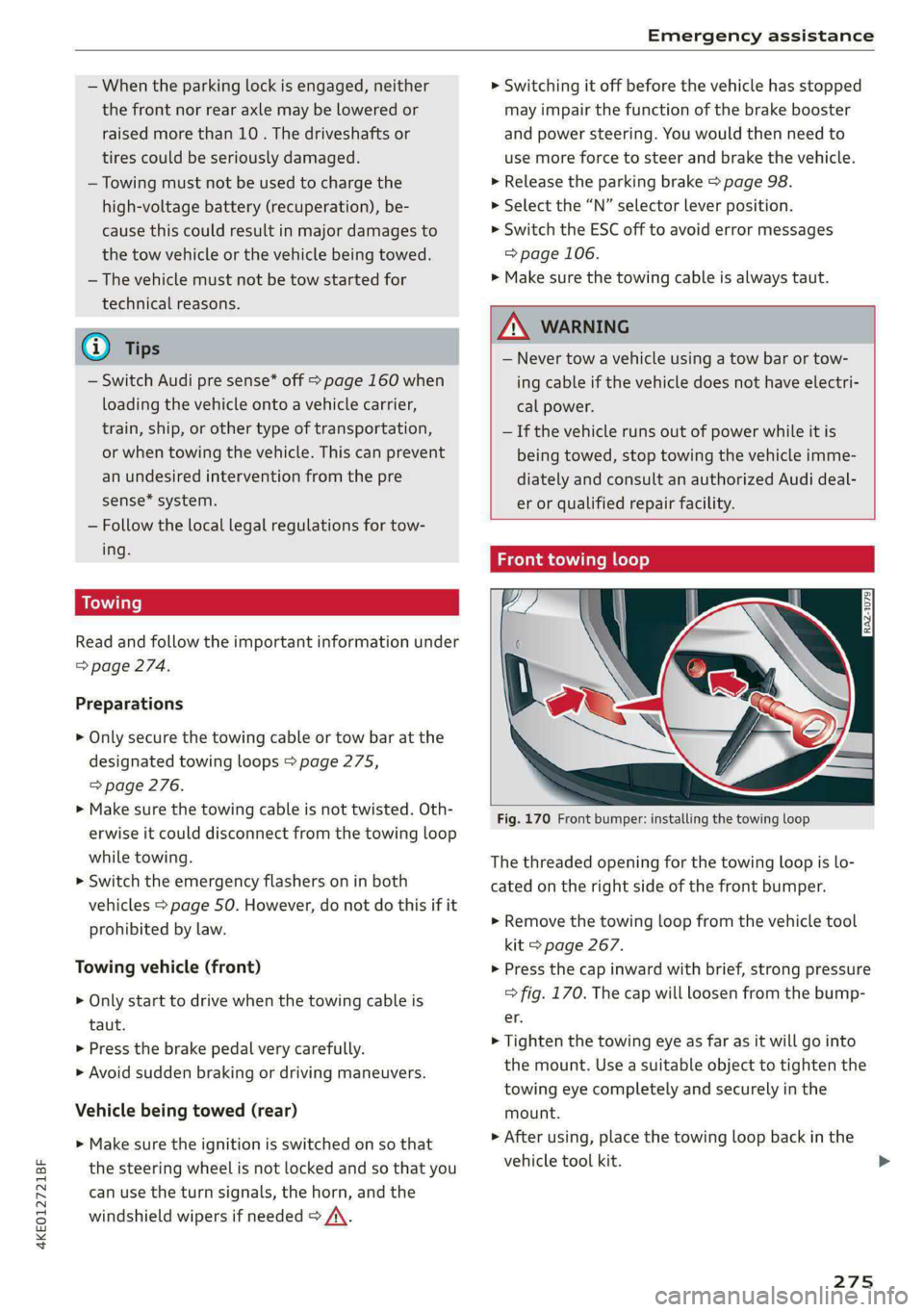
Fig. 170 Front bumper: installing the towing loop
The threaded opening for the towing loop is lo-
cated on the right side of the front bumper.
> Remove the towing loop from the vehicle tool
kit > page 267.
> Press the cap inward with brief, strong pressure
=> fig. 170. The cap will loosen from the bump-
er.
> Tighten the towing eye as far as it will go into
the mount. Use a suitable object to tighten the
towing eye completely and securely in the
mount.
» After using, place the towing loop back in the
vehicle tool kit. >
275