child AUDI Q2 2021 Owner´s Manual
[x] Cancel search | Manufacturer: AUDI, Model Year: 2021, Model line: Q2, Model: AUDI Q2 2021Pages: 364, PDF Size: 87.77 MB
Page 62 of 364
Seats and storage
The ashtray is inserted in the centre console and
can be placed on either the driver's or front pas
senger's side. Lift the lid to open the ashtray. Al
ways put the ashtray safely back into the holder
after removing it (e.g. after emptying it).
A WARNING
Never put waste paper in the ashtray, as this
could cause a fire
Cigarette lighter
Applies to: vehicles with cigarette lighter
-
c
cc
o
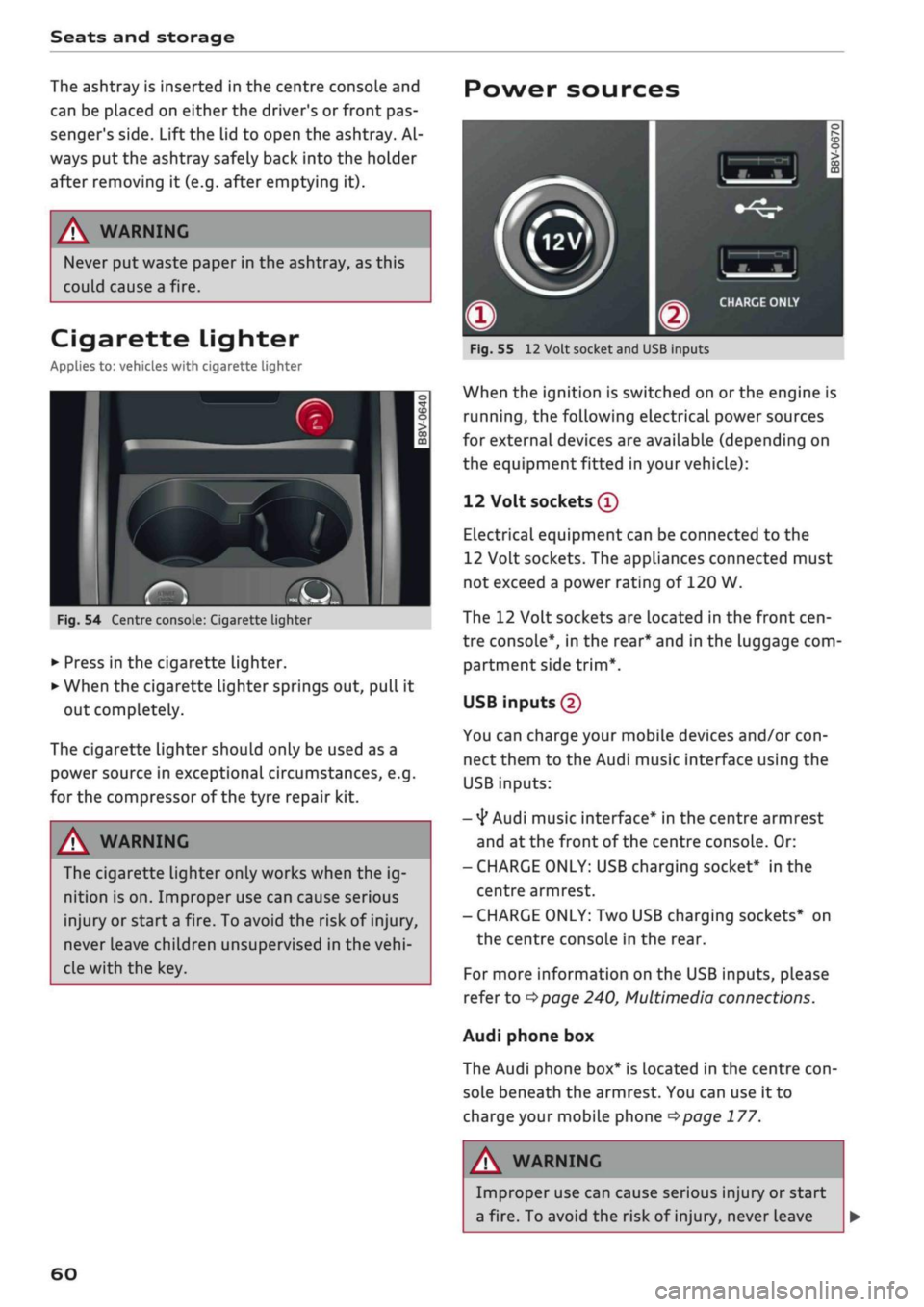
Fig.
54 Centre console: Cigarette lighter
• Press in the cigarette lighter.
• When the cigarette lighter springs out, pull it
out completely.
The cigarette lighter should only be used as a
power source in exceptional circumstances, e.g.
for the compressor of the tyre repair kit.
A WARNING
The cigarette lighter only works when the ig
nition is on. Improper use can cause serious
injury or start a fire. To avoid the risk of injury,
never leave children unsupervised in the
vehi
cle with the key.
60
Power sources
-
CO
-
Fig.
55
12
Volt socket and USB inputs
When the ignition is switched on
or
the engine is
running,
the following electrical power sources
for external devices are available (depending on
the equipment fitted in your vehicle):
12 Volt sockets
®
Electrical equipment can be connected to the
12 Volt sockets. The appliances connected must
not exceed a power rating of 120 W.
The 12 Volt sockets are located in the front
cen
tre console*, in the rear* and in the luggage com
partment side
trim*.
USB inputs (2)
You can charge your mobile devices and/or
con
nect them to the Audi music interface using the
USB inputs:
-
4*
Audi music interface* in the centre armrest
and at the front of the centre console. Or:
- CHARGE ONLY: USB charging socket* in the
centre armrest.
- CHARGE ONLY: Two USB charging sockets* on
the centre console in the rear.
For more information on the USB inputs, please
refer to
^>page
240, Multimedia connections.
Audi phone box
The Audi phone box* is located in the centre
con
sole beneath the armrest. You can use it to
charge your mobile phone
<$page
177.
A
i
WARNING
Improper use can cause serious injury or start
a fire. To avoid the risk of injury, never Leave
Page 63 of 364
Seats and storage
CO
rN
•-i
00
children unsupervised in the vehicle with the
key.
© CAUTION
- To avoid damage, please take care when de
taching connectors from the electrical pow
er sources.
-To avoid damage to the vehicle's electrical
system,
never connect equipment that
gen
erates electrical current, such as a solar
panel or battery charger, to the power sour
ces in order to charge the vehicle's battery.
- Always use the correct type of plugs to
avoid damaging the power sources.
©
USB charging sockets marked "CHARGE ON
LY" cannot transfer data and are intended for
charging only.
Storage
Cup holders
/
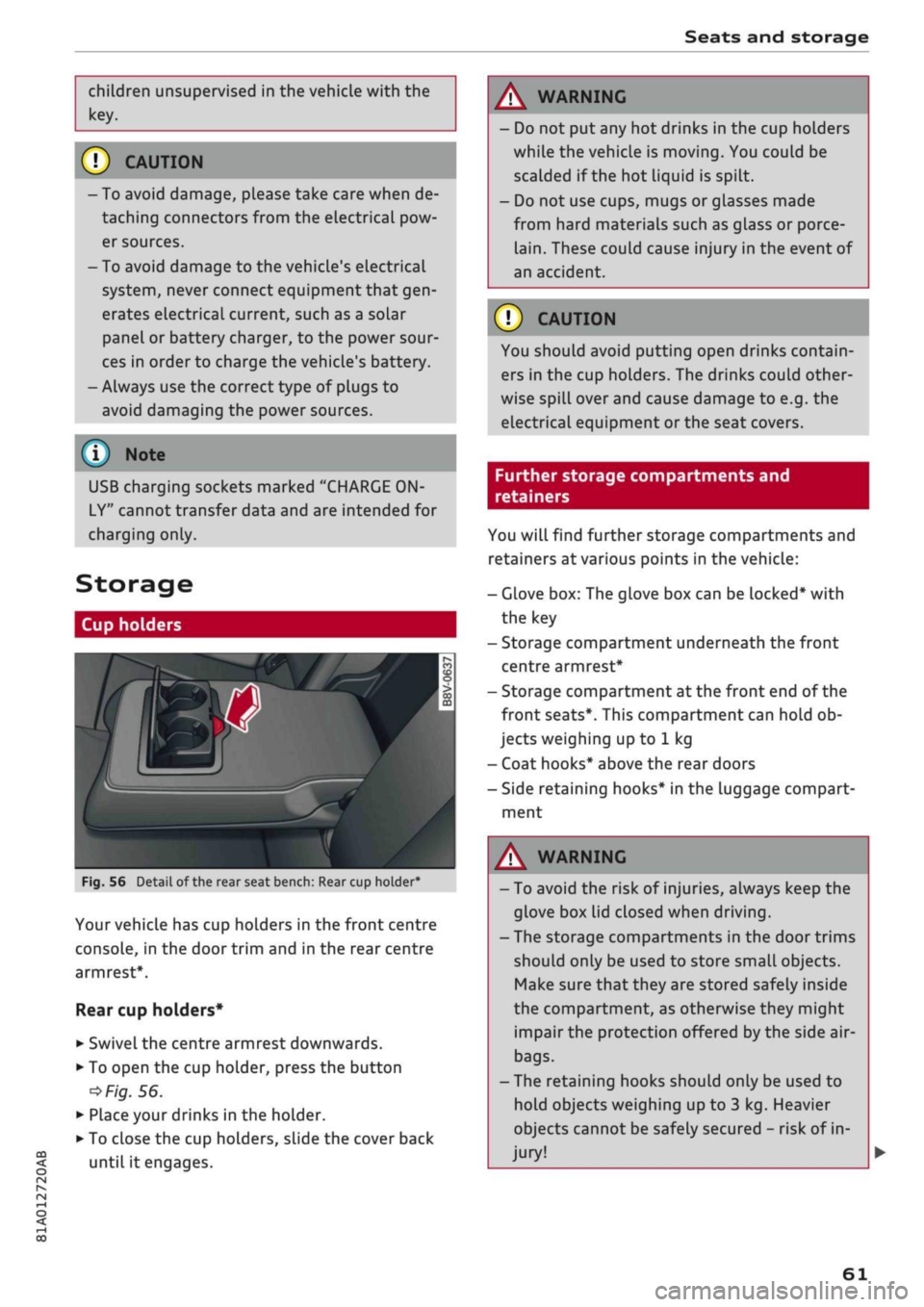
Fig.
56
BfT
^^—- j
^^ m /
Detail of the rear seat bench: Rear cup holder*
r^
n
co
3
>
CO
m
A
Your vehicle has cup holders in the front centre
console, in the door trim and in the rear centre
armrest*.
Rear cup holders*
• Swivel the centre armrest downwards.
• To open the cup holder, press the button
•=>
Fig.
56.
• Place your drinks in the holder.
• To close the cup holders, sLide the cover back
until it engages.
A WARNING
- Do not put any hot drinks in the cup holders
while the vehicle is moving. You could be
scalded if the hot liquid is spilt.
- Do not use cups, mugs or glasses made
from hard materials such as glass or porce
lain.
These could cause injury in the event of
an accident.
© CAUTION
You should avoid putting open drinks contain
ers in the cup holders. The drinks could other
wise spill over and cause damage to e.g. the
electrical equipment or the seat covers.
Further storage compartments and
retainers
You will find further storage compartments and
retainers at various points in the vehicle:
- Glove box: The glove box can be Locked* with
the key
- Storage compartment underneath the front
centre armrest*
- Storage compartment at the front end of the
front seats*. This compartment can hold ob
jects weighing up to 1 kg
- Coat hooks* above the rear doors
- Side retaining hooks* in the luggage compart
ment
A WARNING
- To avoid the risk of injuries, always keep the
glove box Lid closed when driving.
- The storage compartments in the door trims
should only be used to store small objects.
Make sure that they are stored safely inside
the compartment, as otherwise they might
impair the protection offered by the side air-
bags.
- The retaining hooks should only be used to
hold objects weighing up to 3 kg. Heavier
objects cannot be safely secured - risk of in
jury!
61
Page 85 of 364

Driving
start moving immediately and could cause
an accident.
- You should only use the emergency braking
function in a real emergency, for example if
the brake system were to fail or if the brake
pedal were to be obstructed. If
you
use the
emergency braking function by activating
the parking brake switch, this has the same
effect as heavy braking. Please remember
that the ESC (and the integrated ABS, EDL
and traction control functions) is still sub
ject to certain physical limits. In a corner or
in bad road or weather conditions an emer
gency stop can cause the vehicle to skid or
lose steering control.
- It is not possible to apply the parking brake
if the electrical power supply fails. In this
case,
park the vehicle on a
level
surface and
select 1st gear (manual gearbox) or move
the selector lever to position
P
(automatic
gearbox) to prevent
it
from rolling. Obtain
professional assistance.
- Always take the key with you when leaving
your
vehide
- even if
you
only intend to be
gone for
a
short time. This is especially im
portant if children are left in the car. They
might otherwise be able to start the engine,
release the parking brake or use power-op
erated equipment such as the electric
win
dows - this could lead to injuries.
- Do not leave anyone (especially children) in
the vehicle when it is locked. Locked doors
could delay assistance in an emergency, po
tentially putting lives at risk.
© Note
Applies to: vehicles with automatic gearbox
You can apply the parking brake manually or
switch on the hold assist* when stopping at
traffic lights, etc. You do not then have to
hold the car with the brake pedal, as the
brakes will stop it creeping forward while a
gear is engaged in the automatic transmis
sion.
When you drive off in the normal way,
co
the parking brake will be released automati-
<
° cally
and your vehicle will start moving
2 •=>
page 83. o < 00
O
Note
- Any slight noise which may be heard when
the parking brake is applied or released is
quite normal and no cause for concern.
- The parking brake runs an automatic test
cycle at regular intervals when the vehicle is
parked.
This may cause a slight noise, which
is normal.
- If the electrical power supply fails, it is not
possible to release the parking brake (if it
was applied) or to apply the parking brake
(if it was released)
•=> A-
Obtain professional
assistance.
Driving away from a
standstill
Various features and safety functions are availa
ble for driving off, depending on the equipment
in your vehicle.
Hill starting with the parking brake applied
Important: The driver's door must be closed.
•
To drive off more easily on a slope, apply the
parking brake and drive off just as you usually
would.
The parking brake will be released auto
matically, but not until there is enough power
at the wheels to make the vehicle move in the
desired direction.
Hill starting with the hill hold assist
The hill hold assist function makes it easier to
drive away on a slope.
Important: The driver's door must be closed and
the engine must be running.
•
To activate the hill hold assist, press and hold
the brake pedal for several seconds. The vehicle
must be on a slope and facing uphill.
When you release the brake pedal the braking
force will be maintained for
a
moment
^^
in
order to hold the vehicle and make it easier for
you to drive away. •
83
Page 136 of 364
Parking aids
Parking aids
General notes
Applies to: vehicles with rear parking aid/parking system
plus/reversing camera/park assist
Various systems are available to help you when
parking or manoeuvring in tight spaces, depend
ing on the equipment fitted on your vehicLe.
The rear parking aid gives an acoustic warning if
there are any obstacles behind the car
cépage
135.
When you are parking, the parking system plus
warns you acoustically and optically about obsta
cles detected in front of and behind the vehicLe
^page
135.
The reversing camera uses the infotainment sys
tem display to show a picture of the area behind
the vehicle captured by the camera. This picture
helps you to park the vehicle parallel or perpen
dicular to the roadside. In addition, you are assis
ted by the functions of the parking system plus
^>page
137.
The park assist helps you to find suitable parking
spaces, to manoeuvre the vehicLe into spaces par
allel or perpendicular to the roadside and to drive
out of spaces parallel to the kerb
^>page
139. It
also includes the functions of the parking system
plus
^page
135 and additionally monitors the
area at the side of the vehicle
(f) ^page
135,
Fig. 124.
A
WARNING
- Always watch the road and the area sur
rounding the vehicLe. The electronic systems
cannot replace the full concentration of the
driver. The driver is always responsible for
safety during parking and all other manoeu
vres.
- Please note that certain surfaces, such as
clothing fabrics, cannot be detected or dis
played by the system - risk of accident!
- The sensors and cameras have bLind spots in
which neither people nor objects are regis
tered.
It is particularly important to ensure
that there are no small children or animals
near the vehicLe - risk of accident!
- Always keep a close watch on the area
around the vehicLe and make full use of the
rear-view mirrors.
- Impacts or damage to the radiator grille,
bumper, wheel arches or underbody can
cause misalignment of the sensors. This can
impair the effectiveness of the parking aids.
Have the systems checked by a qualified
workshop.
(T)
CAUTION
- The system may not always be able to de
tect objects such as the following:
- Chains, trailer draw bars, posts or fences
- Objects above the sensors, such as wall
protrusions, etc.
- Objects with certain surfaces or struc
tures,
such as wire fences or powder snow
- As your car moves closer to low obstacles,
they may disappear from the sensors' field
of vision. Please note
that
you will no longer
be warned about these obstacles.
- Remember to maintain sufficient clearance
from the kerb to avoid damaging the wheel
rims.
(T)
Note
- In certain situations, a warning may be giv
en by the system even if there is no obstacle
within range of the sensors. This can be
caused by the following, for instance:
- Certain road surfaces or long grass
- External ultrasound sources, e.g. from
street cleaning vehicles
- Heavy rain or snow or dense exhaust
fumes
-To familiarise yourself with the system, we
recommend
that
you practise parking in a
quiet location or a car park. The weather
and light conditions should be good.
- You can change the display and adjust the
volume and pitch of the beeps
^>page
143.
- Please refer to the notes on the use of a
towing bracket
^page
144.
- There is a slight delay in the picture dis
played on the infotainment display. •
134
Page 251 of 364
Media
the total and remaining playing time will be dis
played.
Jukebox memory capacity*
Information on the jukebox memory capacity and
the number tracks stored on the jukebox will be
displayed.
Change play position
Turn the rotary pushbutton to the left or right.
Or: Move your finger from left to right across the
MMI touch
pad*.
Random playback1)
When this function is switched on
Ef,
all the files
in the playlist will be played and shown in
ran
dom order.
Repeat
track15
When the function is switched on
[vj,
the current
track will be repeated.
Back to 'Playback'
The options menu will be closed. The track cur
rently playing will be shown in the playlist.
Play similar music*
The track currently playing is briefly analysed
(e.g.
by artist, genre, mood, time) so that the
system can display an intelligent playlist with
similar tracks.
Play more...
An intelligent playlist is displayed based on the
track currently playing. You can choose between
a playlist with more tracks by this artist, of this
album or of this genre.
Copy to jukebox*
Refer to
^>page
236, Filling the jukebox.
Set as ring
tone*2)
Important: A mobile phone must be connected
to the MMI and the track currently playing must
be on the jukebox*
^page
236.
CO
< o IN
£j
1}
This function is automatically deactivated if you change
o
the
source.
<
„
jj
l)
This function is not available for all mobile
phones.
The selected track will be used as the ring tone
for incoming calls.
Gracenote online database*
Important: The MMI must be connected to the
Internet.
When this function is switched on
[vj,
various in
formation will be downloaded for the track cur
rently playing, if any is available.
Favourites
Refer to
^>page
246.
Further options
Important: The vehicle must be stationary and a
video file* or a DVD* must be playing.
Child lock*
You can use the child lock to restrict video DVD
playback.
Enter the child lock password. The password set
at the factory is 1234. The following options are
available:
- Safety level: Select and confirm a safety level
(e.g.
level 5). Eight safety levels are available
for the child lock function. If
you
select child
lock level 5, all DVDs with safety levels 1-5 can
be played. Playback of DVDs with a higher safe
ty level will be blocked. SeLect No restriction to
remove all restrictions.
- Change password: You can change the current
password.
Switch to full screen
The video picture is displayed. Press the rotary
pushbutton to show the playlist. Or: Press the
I
BACKI
button.
Replay
video1'
When the function is switched on
[vj,
the current
video will be replayed. •
247
Page 252 of 364

Media
Display DVD menu
The DVD main menu will be called up on the info
tainment display.
- To select a menu option: Select and confirm a
menu option. Or: Move your finger on the MMI
touch
pad*
and press the rotary pushbutton.
Audio track1
'
You can adjust the audio track (language and au
dio format) manually. It depends on the video
DVD whether different languages and audio for
mats are available.
Subtitles1'
You can select subtitles manually. It depends on
the video DVD whether different languages are
available.
Picture format
We recommend using the automatic setting for
the picture format. Depending on the active file
or source (e.g. video file*, DVD*), you may be able
to adjust the picture format.
Picture for
mat
automatic
zoom
Description
The MMI detects the picture for
mat of the source and dispLays the
picture using the best possibLe
width-to-height ratio. Depending
on the source format and the info
tainment display installed, black
bars may be displayed on the edges
of the picture.
The picture is enlarged to fill the
infotainment display. Switch this
function off if the picture is distor
ted.
Picture for
mat
cinema
scope
original
4:3
16:9
Description
Use this setting for films in the
cin
ema format 21:9. Black bars will
be shown on the upper and Lower
edges of the infotainment display.
The picture will be displayed using
the picture ratio of the source for
mat. Select this option if the pic
ture shown with auto selected is
distorted or partially cut off.
The picture is set to a width-to-
height ratio of
4:3.
Black bars will
be shown on the edges of the info
tainment display.
The picture is set to a width-to-
height ratio of 16:9. Black bars will
be shown on the upper and lower
edges of the infotainment display.
(T)
Note
- Not all video DVDs have a child lock feature.
- The child lock safety levels comply with the
US standards of the Motion Picture Associa
tion of America (MPAA). Please note that
age ratings for DVDs may vary between
dif
ferent European countries.
- If
you
enter the wrong child lock password
three times in a row, you will not be able to
enter
a
password for approximately one mi
nute.
The password can only be reset by an
Audi workshop.
automatic
zoom
The MMI detects the picture for
mat of the source and dispLays the
picture using the best possibLe
width-to-height ratio. Depending
on the source format and the info
tainment display installed, black
bars may be displayed on the edges
of the picture.
The picture is enlarged to fill the
infotainment display. Switch this
function off if the picture is distor
ted.
May not be possible during playback (depends on the
DVD).
248
Page 267 of 364
Safe driving
Safe driving
General notes
Safety is the first priority
The safety features in your vehicle are harmon
ised to provide you and your passengers with the
best possible protection in accident situations.
However, they can only be effective if you and
your passengers sit in the correct position and
adjust and use the safety equipment properly.
For these reasons, this chapter explains why
these safety features are so important, how they
can protect you, what you need to remember
when using them, and
how
you and your passen
gers can gain the most benefit from them. There
are also a number of important safety warnings
which you and your passengers should always ob
serve in order to minimise the risk of injury.
WARNING
- The information in this chapter is important
for the driver of the vehicle and all passen
gers.
The other chapters in this manual
(and,
where applicable, in the other litera
ture supplied with the vehicle) contain fur
ther important notes which you should read
and observe for your own safety and that of
your passengers.
- Ensure that the complete vehicle wallet is
always in the vehicle. This is especially im
portant when you lend or sell the vehicle to
others.
CO
<
O
rN
iv
rN
i—i
o < 00
Before every trip
The driver is responsible for the safety of the
passengers and the safe operation of the vehicle
at all times.
For
your own safety and the safety of your pas
sengers, always note the following points before
every trip:
•
Make sure that all lights and turn signals are
working properly.
•
Check the tyre pressures.
•
Make sure that all windows are clean and give
good visibility to the outside.
•
Secure all luggage and other items carefully
•=>
page 272.
• Make sure that no objects can interfere with
the pedals.
•
Adjust the front seat, head restraint and mir
rors correctly.
• Applies to: adjustable head restraints: Make
sure that the front passenger's head restraint is
adjusted to the correct position.
• Applies to: adjustable head restraints: Make
sure that the head restraints for the rear pas
sengers are in the fully raised position.
•
Make sure that children are protected with suit
able safety seats and properly worn seat belts
•=>
page 267.
•
Sit in the correct position in your seat. Make
sure
that
your passengers are sitting in the cor
rect positions
^>page
58.
•
Fasten your seat belt correctly. Make sure that
your passengers do the same
^page
275.
What factors can impair your safety?
Safety on the road is directly related to
how
you
drive, and can also be affected by the passengers
in the vehicle.
• The driver is responsible for the safety of the
vehicle and all its occupants. If your ability to
drive is impaired in any way, you endanger
yourself and other road users
,=>^.
Therefore:
• Do not let yourself be distracted by passengers
or by using a mobile phone, etc.
•
Never drive when your driving ability is im
paired (by medication, alcohol, drugs, etc.).
• Obey all traffic regulations and speed limits
and always maintain a safe distance to the
vehi
cle in front.
•
Always adjust your speed to suit the
road,
traf
fic and weather conditions.
•
Take frequent breaks on long trips. Do not drive
for more than two hours without a stop.
•
If possible, avoid driving when you are tired or
stressed.
•
263
Page 270 of 364
Safe driving
head.
If this is not possible, try to adjust the
head restraint as near as possible to this
posi
tion.
•
Keep both feet in the footwell in front of the
seat.
•
Fasten your seat belt correctly
^>page
277.
In exceptional cases you can disable the front
passenger's airbag via the key-operated switch*
^>page
288.
For detailed information on how to adjust the
front passenger's seat, see
^page
58, Front
seats.
A WARNING
A passenger who is not sitting in the correct
position or who is not wearing a seat belt can
be fatally injured if the airbag is triggered.
- Adjust the front passenger's seat so there is
a distance of at least 25 cm between your
breastbone and the dash panel.
- Always keep your feet on the floor when the
vehicle is moving; never rest them on the in
strument panel, out of the window or on the
seat. If
you
sit in an incorrect position, you
increase your risk of injury in the event of
sudden braking or an accident. If the airbag
is triggered, you could sustain potentially
fatal injuries by sitting out of position.
- To reduce the risk of injury to the front pas
senger in the case of sudden braking or an
accident, the passenger should never travel
in a moving vehicle with the backrest re
clined.
The airbag system and seat belt can
only provide proper protection when the
backrest is in an upright position and the
passenger is wearing the seat belt in the
correct position. The further the backrest is
tilted back, the greater the risk of injury due
to incorrect positioning of the belt webbing
or
an incorrect sitting position.
- Always adjust the head restraints properly
for maximum protection.
Correct position for rear passengers
Rear seat passengers should sit upright with
both feet on the floor and wear their seat belts
properly whenever the vehicle is moving.
To reduce any risk of injury in the event of sudden
braking or an accident, passengers in the rear
seats must observe the following:
•
Before carrying passengers on the rear seats,
puLl
the head restraints on the occupied seats
all the way up
^>page
59.
• Keep both feet in the footwell in front of the
rear seat.
•
Fasten your seat belt correctly
^page
278.
•
Use appropriate child restraint systems for
chil
dren travelling in the vehicle
^>page
267.
/K
WARNING
Rear passengers sitting out of position can
suffer severe injuries.
- Always adjust the head restraints to the
fully raised position for maximum protec
tion.
- Seat belts only offer maximum protection
when the backrest is in an upright position
and the passengers are wearing the seat
belts properly. By not sitting upright, rear
passengers increase the risk of injury due to
incorrect positioning of the seat belt web
bing.
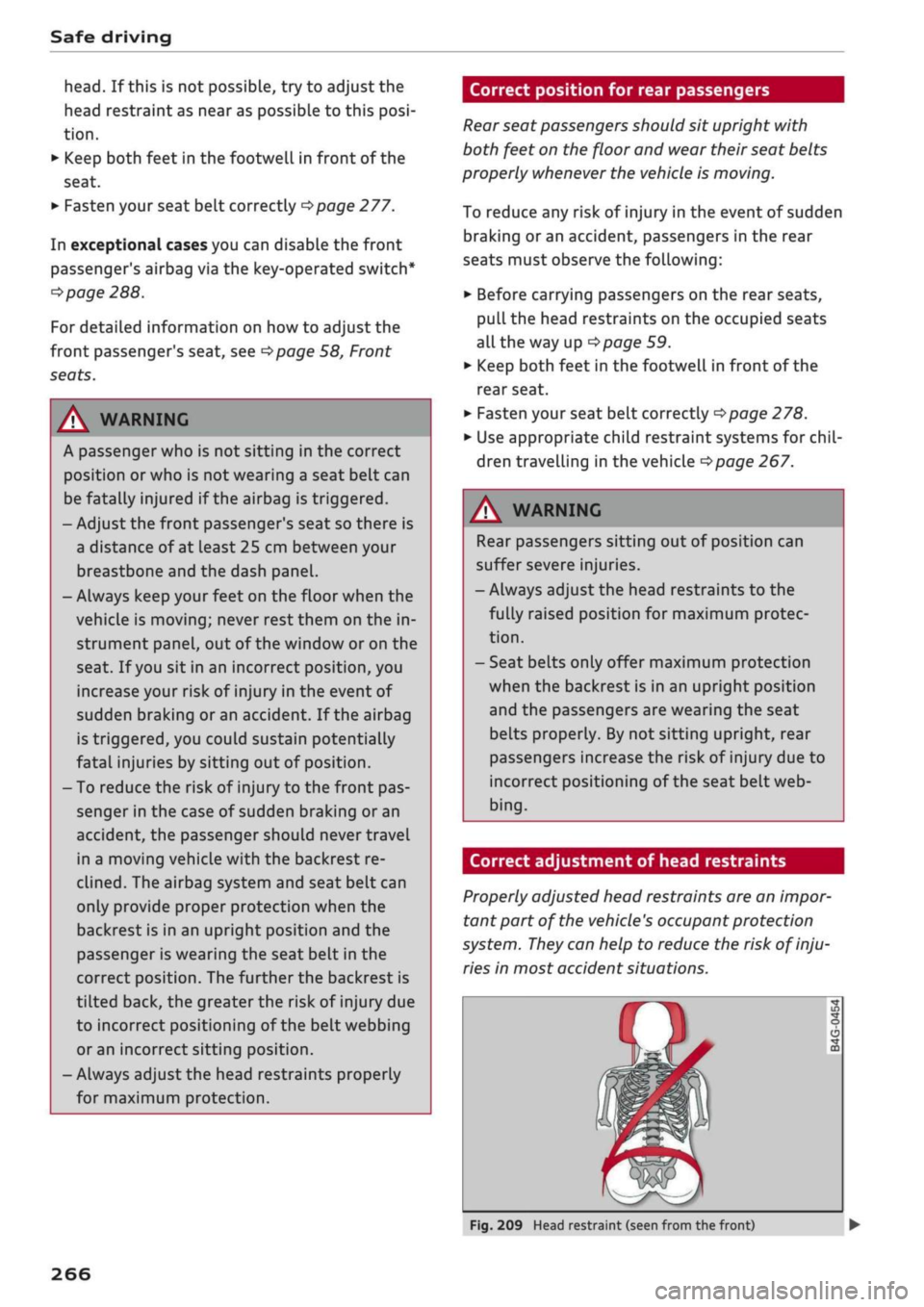
Correct adjustment of head restraints
Properly adjusted head restraints are an
impor
tant part of the vehicle's occupant protection
system.
They
can help to reduce the risk of inju
ries in most accident situations.
Fig.
209 Head restraint (seen from the front)
266
Page 271 of 364
Safe driving
CO
< o rN
iv
rN
t-H
o < 00
The head restraints must be adjusted properly to
provide maximum protection.
•
Adjust the front head restraints so that the top
of the head restraint is level with the top of
your head. If this is not possibLe, try to adjust
the head restraint as near as possibLe to this
position.
•
Before carrying passengers on the rear seats,
pull
the head restraints on the occupied seats
all the way up
^>page
59.
For more information on how to adjust the head
restraints, see
^page
58.
A WARNING
- Travelling with the head restraints removed
or incorrectly adjusted increases the risk of
severe injuries.
- Incorrectly adjusted head restraints can also
increase the risk of injury during sudden or
unexpected braking or other manoeuvres.
Examples of incorrect seating positions
Occupants can suffer
severe
or fatal injuries if
they sit in an incorrect position while the vehicle
is moving.
Seat belts can only provide maximum protection
if the belt webbing is positioned correctly. Sitting
out of position greatly reduces the effectiveness
of the seat belts and increases the risk of injury
since the belt webbing is not worn in the position
for which it is designed. The driver is responsible
for the safety of all vehicle occupants, especially
for children.
•
Never allow anyone to sit out of position while
the vehicle is moving
•=>
A..
The following list shows just some examples of
incorrect sitting positions which can be danger
ous to all occupants. The List is not complete, but
will help to make you aware of possible dangers
which can be avoided.
Therefore, whenever the vehicle is moving:
- Never stand up in the vehicle.
- Never stand on the seats.
- Never kneel on the seats.
- Never travel with the backrest reclined too far.
- Never lean against the dash panel.
- Never lie down on the rear seat.
- Never sit on the front edge of
a
seat.
- Never sit sideways.
- Never lean out of the window.
- Never put your feet out of the window.
- Never put your feet on the dash panel.
- Never put your feet on the seat cushion.
- Never ride in the footwell.
- Never travel on a seat without wearing the seat
belt.
- Never climb into the luggage compartment.
WARNING
Sitting out of position increases the risk of se
vere injuries.
- Sitting out of position exposes the occu
pants to potentially fatal injuries if, for in
stance, the airbags inflate and strike an oc
cupant who is not seated in one of the prop
er positions.
- Before starting a trip, sit in the correct
posi
tion and stay in this position as Long as the
vehicle is moving. Before every trip, make
sure all passengers are sitting in the correct
positions and remain correctly seated at all
times
^page
58, Front seats.
Child seats
Safety notes for using child seats
To
reduce the risk of injury in the event of
an
ac
cident, children must always use child restraint
systems when travelling in the car.
Please note the information in this Owner's
Man
ual when installing and using child seats. Follow
the manufacturer's instructions and observe any
statutory requirements.
For safety reasons, we recommend that child
seats be installed on the rear seats. You should
only use a child seat on the front passenger seat
in exceptional circumstances. •
267
Page 272 of 364
Safe driving
A WARNING
To avoid serious or fatal injury, children trav
elling in the vehicle must always be protected
with child restraint systems appropriate to
their height, weight and age.
- Children under 1.50 m tall or younger than
12 must not travel in the vehicLe if there are
no suitable child seats. Please observe any
other applicable regulations in the country
in which you are travelling.
- Babies and children must never travel on an
other occupant's lap.
- Never allow more than one child to occupy
one child seat.
- Never leave a child without supervision in a
child seat.
- Never allow a child to travel unrestrained or
to stand up or kneel on a seat while the car
is moving. In an accident, the child could be
catapulted through the car, causing possibly
fatal injuries to itself and other occupants.
- To ensure proper protection by the child re
straint, it is important to wear the seat belts
in the correct position
^>page
277. Always
check that the belt is properly positioned ac
cording to the instructions provided by the
manufacturer of the child seat. Incorrectly
worn seat belts can give rise to injuries even
in a minor collision.
- If children are out of position when the car
is moving, they are at greater risk of injury
during a sudden braking manoeuvre or in an
accident. This is particularly the case if the
child is travelling on the front passenger's
seat and the airbag system is triggered in an
accident. This incorrect sitting position can
result in serious or even fatal injury.
- Make sure there is sufficient clearance in
front of the child sitting in the child seat. If
necessary, adjust the seat position and
backrest angle of the seat in front of the
child seat.
- If
you
are using a child seat on the front
passenger seat in which the child faces the
direction of
travel,
you should move the
front passenger seat as far back as possible.
- Child seats in which the child faces the rear
of the car are located directly in the path of
the front passenger's airbag if it inflates. In
this case, the child could sustain serious or
fatal injuries if the airbag were to be de
ployed.
- Applies to vehicles on which the front pas
senger's airbag cannot be deactivated: Do
NOT use a rearward-facing child seat on
the front passenger's seat.
- Applies to vehicles with key-operated
switch for deactivating the front passeng
er's airbag: Do NOT use a rearward-facing
child seat on the front passenger's seat
while the front passenger's airbag is ac
tive.
If
you
have no alternative but to use a
rearward-facing child seat on the front
passenger's seat, the front passenger's
airbag must be deactivated beforehand via
the key-operated switch*
^>page
288.
Make sure that the front passenger's air-
bag is reactivated by means of the key-op
erated switch* as soon as the child seat is
no Longer needed on the front passenger's
seat.
- Always replace the child seat with a new one
after an accident as damage not externally
visible may have occurred.
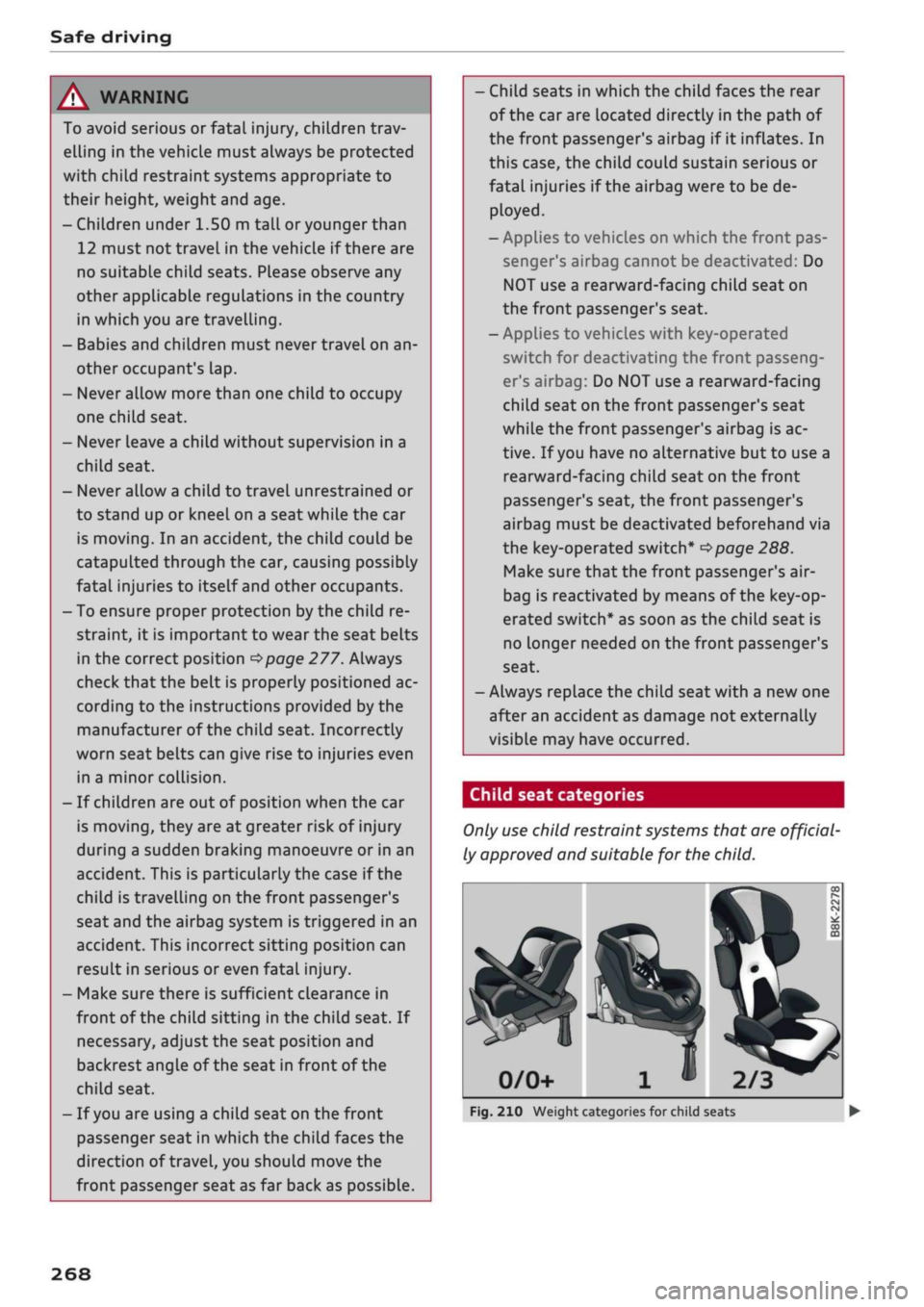
Child seat categories
Only
use
child restraint systems that are official
ly approved and suitable for the child.
2/3
Fig.
210 Weight categories for child seats
268