park assist AUDI Q2 2021 Owner´s Manual
[x] Cancel search | Manufacturer: AUDI, Model Year: 2021, Model line: Q2, Model: AUDI Q2 2021Pages: 364, PDF Size: 87.77 MB
Page 42 of 364
Doors and windows
Unlocking the vehicle
•
Take hold of the driver's/front passenger's door
handle. The
door
will be unlocked automatical-
iy-
•
To open the door, pull the door handle.
Locking the vehicle
• Automatic gearbox: Move the selector lever to
position P; otherwise it will not be possible to
lock the vehicle.
•
To lock the vehicle, close the door and touch
the sensor on the door handle once
^>Fig.
24,
•=>
A.-
Do
not
take hold of the door handle
while doing so.
The vehicle can be locked/unlocked from the
front doors only. The remote control key should
be within a range of about 1.5 metres from the
door handle. It does not matter where you carry
the key, for instance whether it is in your jacket
pocket or in a handbag or briefcase.
The Locking function may be affected if
you
grasp
the door handle while the vehicle is being locked.
Once the doors have been locked, they cannot be
opened again immediately. This will enable you
to check that the driver's door is properly closed.
The system will unlock either all the doors or only
one of the doors, depending on the settings you
have chosen on the infotainment system
•=>
page 41.
A\
WARNING
- Read and follow all the warnings
<=>
A
in
De
scription on page 37.
- Applies to vehicles with anti-theft alarm
system:
Do not leave anyone (especially
chil
dren) in the car if it is locked from the out
side and the safelock mechanism* is activa
ted:
the doors and windows cannot then be
opened from the inside
opage
42. Locked
doors could delay assistance in an emergen
cy, potentially putting lives at risk.
® Note
•
To save electrical power, the proximity
sen
sors are switched off after
a
few days. You
will then need to pull the door handle once
to unlock the vehicle, and a second time to
open it.
•
To prevent the vehicle battery from becom
ing discharged and thus maintain the
vehi
cle's starting ability for as long as possible,
the power management system will gradu
ally switch off convenience functions that
are not required. In this case you may not
be able to unlock the vehicle with this
con
venience function.
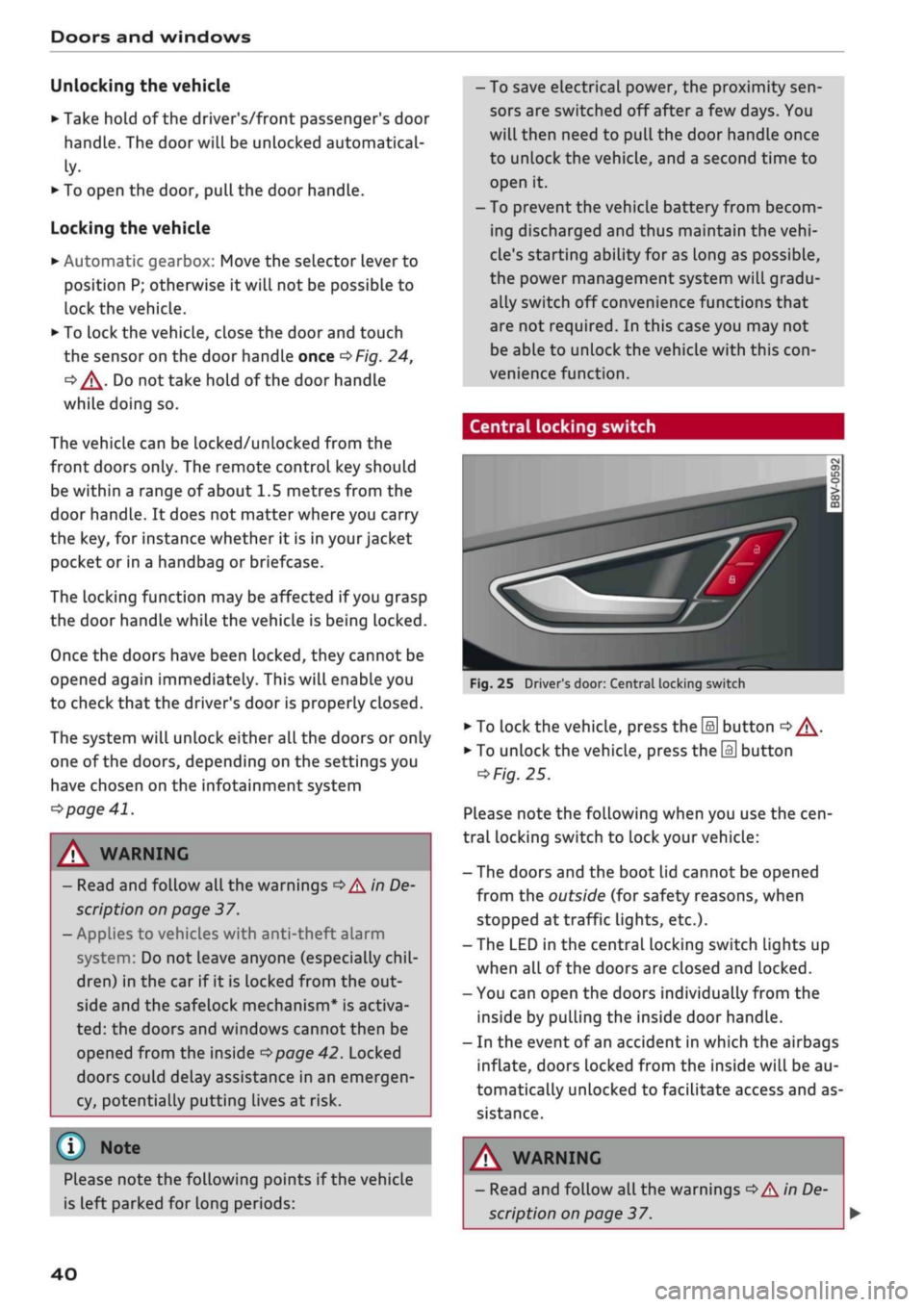
Central locking switch
Fig.
25 Driver's door: Central locking switch
•
To lock the vehicle, press the [a] button
o A-
•
To unlock the vehicle, press the
M
button
=>
Fig.
25.
Please note the following when you use the
cen
tral locking switch to lock your vehicle:
- The doors and the boot lid cannot be opened
from the outside (for safety reasons, when
stopped at traffic lights, etc.).
- The LED in the central locking switch Lights up
when all of the doors are closed and locked.
- You can open the doors individually from the
inside by pulling the inside door handLe.
- In the event of an accident in which the airbags
inflate,
doors Locked from the inside will be au
tomatically unlocked to facilitate access and as
sistance.
Please note the following points if the vehicle
is left parked for long periods:
A WARNING
- Read and follow all the warnings
•=>
A in De
scription on page 37.
40
Page 51 of 364
Lights and vision
Lights and vision
Exterior lights
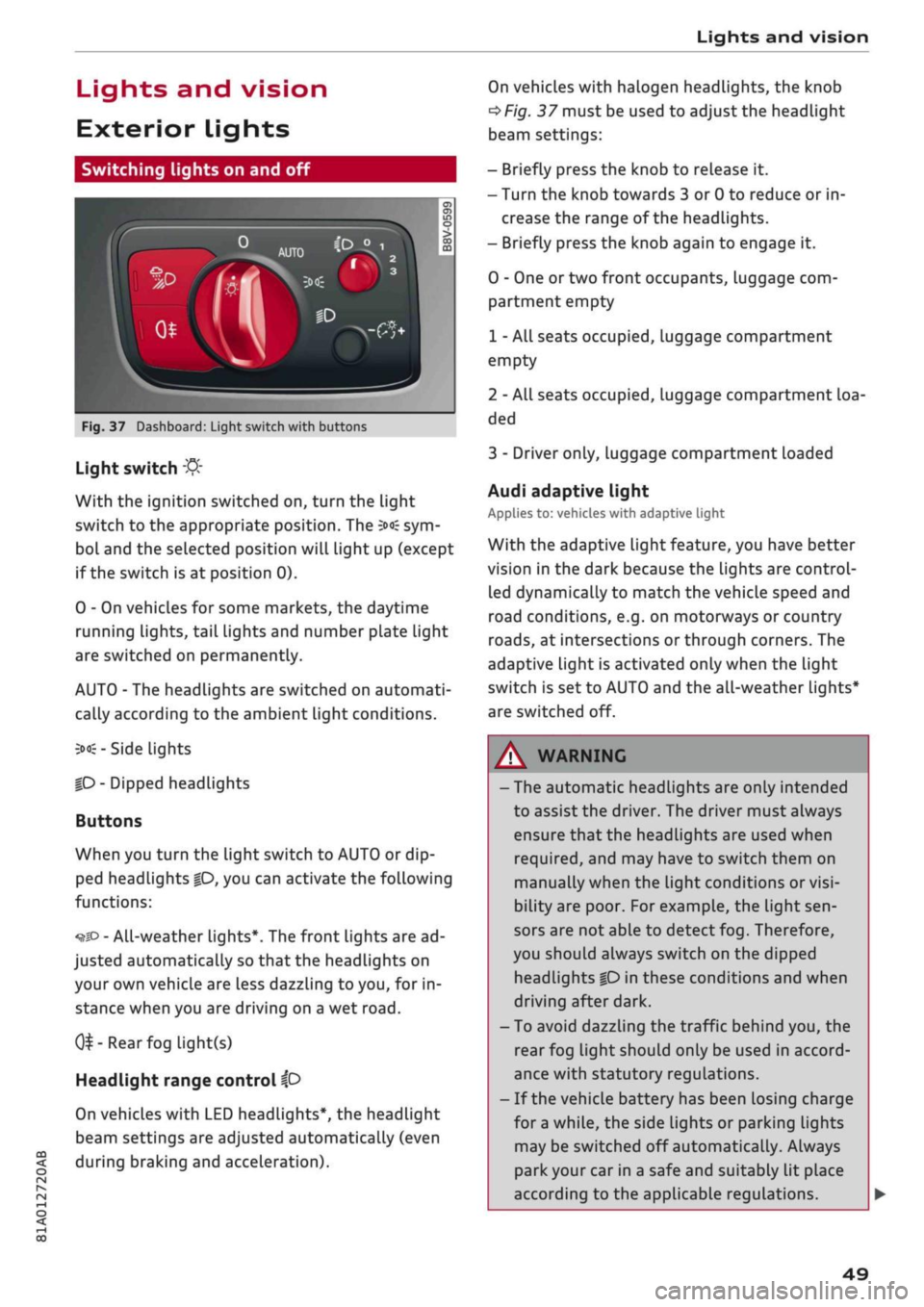
Switching lights on and off
Fig.
37 Dashboard: Light switch with buttons
CO
<
O
rN rN
•-i
00
Light switch
:&
With the ignition switched on, turn the light
switch to the appropriate position. The
3»€
sym
bol and the selected position will light up (except
if the switch is at position 0).
0 - On vehicles for some markets, the daytime
running lights, tail lights and number plate Light
are switched on permanently.
AUTO - The headlights are switched on automati
cally according to the ambient light conditions.
3><£-
Side lights
|D
- Dipped headlights
Buttons
When you turn the light switch to AUTO or dip
ped headlights
|0,
you can activate the following
functions:
•^SD
- All-weather lights*. The front lights are ad
justed automatically so that the headlights on
your own vehicle are less dazzling to
you,
for in
stance when you are driving on a wet
road.
0^-Rear
fog light(s)
Headlight range control
ip
On vehicles with LED headlights*, the headlight
beam settings are adjusted automatically (even
during braking and acceleration).
On vehicles with halogen headlights, the knob
^Fig.
37 must be used to adjust the headlight
beam settings:
- Briefly press the knob to release it.
- Turn the knob towards 3 or 0 to reduce or in
crease the range of the headlights.
- Briefly press the knob again to engage it.
0 - One or two front occupants, luggage com
partment empty
1 - All seats occupied, luggage compartment
empty
2 - All seats occupied, Luggage compartment loa
ded
3 - Driver only, luggage compartment loaded
Audi adaptive light
Applies to: vehicles with adaptive light
With the adaptive light feature, you have better
vision in the dark because the Lights are control
led dynamically to match the vehicle speed and
road conditions, e.g. on motorways or country
roads,
at intersections or through corners. The
adaptive light is activated only when the Light
switch is set to AUTO and the all-weather Lights*
are switched off.
WARNING
- The automatic headlights are only intended
to assist the driver. The driver must always
ensure that the headlights are used when
required,
and may have to switch them on
manually when the light conditions or
visi
bility are poor. For example, the light
sen
sors are not able to detect fog. Therefore,
you should always switch on the dipped
headlights
|0
in these conditions and when
driving after dark.
- To avoid dazzling the traffic behind you, the
rear fog light should only be used in accord
ance with statutory regulations.
- If the vehicle battery has been losing charge
for
a
while, the side lights or parking lights
may be switched off automatically. Always
park your car in a safe and suitably lit place
according to the applicable regulations.
49
Page 52 of 364
Lights and vision
Avoid using the side lights for long periods
(several hours). If possible, switch the left
or right parking Lights on.
Observe all relevant statutory requirements
when using the lighting systems described
here.
- The light sensor for the automatic
head
lights*
is Located in the mounting for the in
terior mirror. Do not affix any stickers on
this section of the windscreen.
- Depending on the export market, the rear
lights on some vehicles may be switched on
together with the headlights when the
day
time running lights* are activated. On other
vehicles, the rear lights remain off.
-In cool
or
damp weather, the inside of the
headlights, turn signals or rear lights can
sometimes mist up, due to the temperature
difference between the interior and exterior
of the car. They should clear again partially
or completely soon after you switch on the
headlights. This phenomenon has no
influ
ence on the life expectancy of the vehicle
lights.
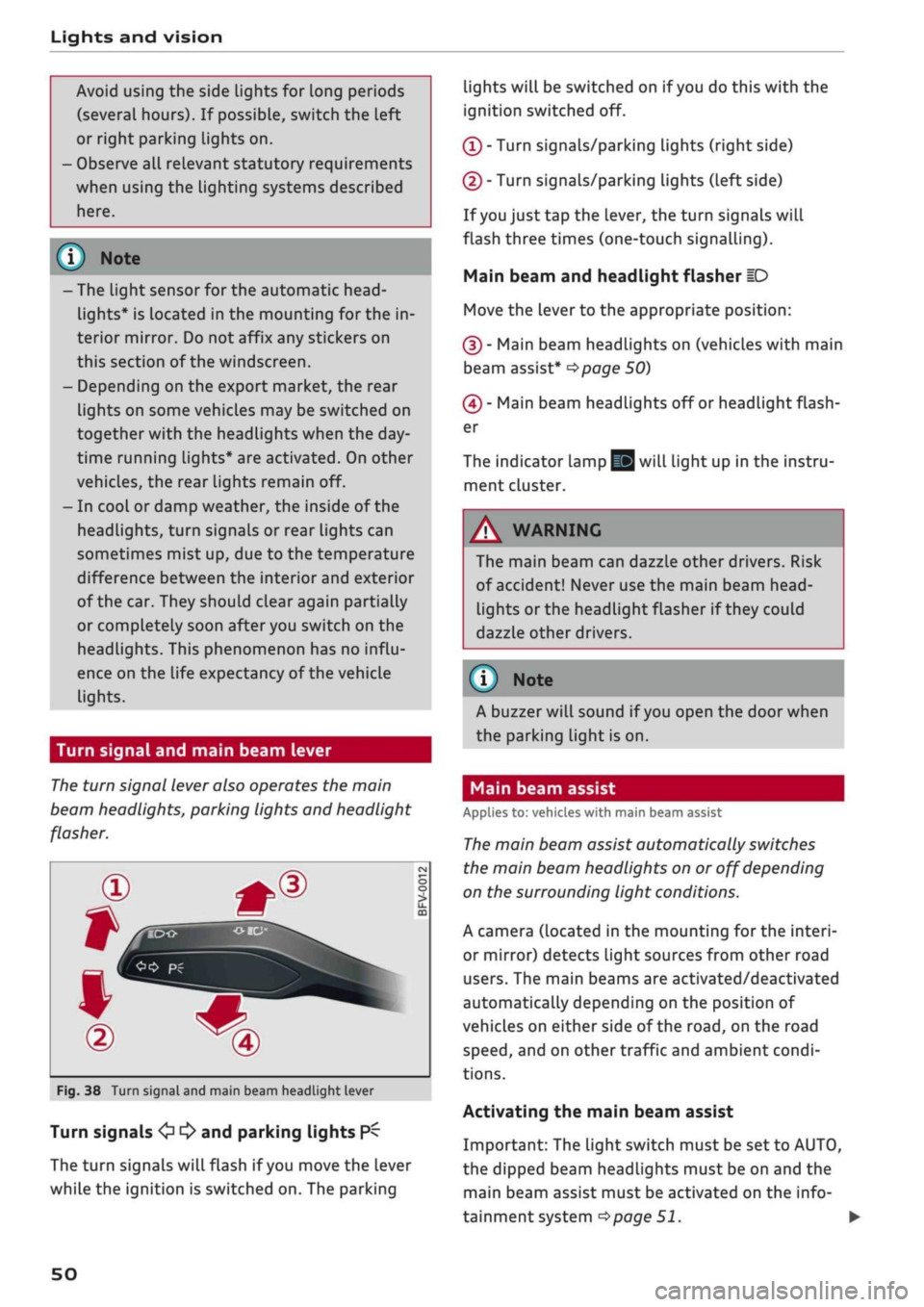
Turn signal and main beam lever
The
turn signal lever also operates the main
beam headlights, parking lights and headlight
flasher.
oo
PÏ
Fig.
38 Turn signal and main beam headlight lever
Turn signals
<£> ^
and parking lights
P^
The turn signals will flash if
you
move the lever
while the ignition is switched on. The parking
lights will be switched on if
you
do this with the
ignition switched off.
(T)
- Turn signals/parking Lights (right side)
(D - Turn signals/parking lights (left side)
If
you
just tap the lever, the turn signals will
flash three times (one-touch signalling).
Main beam and headlight flasher
ID
Move the lever to the appropriate position:
(§)
- Main beam headlights on (vehicles with main
beam assist*
^>page
50)
(4) - Main beam headlights off or headlight flash
er
The indicator lamp
gg
will light up in the instru
ment cluster.
A WARNING
The main beam can dazzle other drivers. Risk
of accident! Never use the main beam
head-
Lights or the headlight flasher if they could
dazzle other drivers.
© Note
A buzzer will sound if
you
open the door when
the parking light is on.
Main beam assist
Applies to: vehicles with main beam assist
The
main beam assist automatically switches
the main beam headlights on or off depending
on the surrounding light conditions.
A camera (located in the mounting for the interi
or mirror) detects light sources from other road
users.
The main beams are activated/deactivated
automatically depending on the position of
vehicles on either side of the
road,
on the road
speed,
and on other traffic and ambient condi
tions.
Activating the main beam assist
Important: The light switch must be set to AUTO,
the dipped beam headlights must be on and the
main beam assist must be activated on the info
tainment system
^>page
51.
•
50
Page 56 of 364
Lights and vision
A WARNING
Convex or wide-angle* exterior mirrors give a
larger field of
vision.
However, they make ob
jects look smaller and further away than they
really are. If
you
use these mirrors to
esti
mate the distance to vehicles behind you
when changing Lane, you could misjudge the
distance. Risk of accident!
CAUTION
- Applies to vehicles with electrically retracta
ble exterior mirrors: If one of the mirror
housings is knocked out of position (e.g.
when parking), the mirrors must be fully re
tracted with the electric control. You will
hear
a
loud noise when the mirrors snap
back into place. Do not readjust the mirror
housing by hand, as this will interfere with
the mirror adjuster function.
- Applies to vehicles without electrically re
tractable exterior mirrors: If one of the mir
ror housings is knocked out of position (e.g.
when parking), it must be returned to its
proper position by hand.
- Before washing the vehicle in an automatic
car wash, please make sure to retract the
exterior mirrors to prevent them from being
damaged.
Electrically retractable exterior
mirrors* must NOT be folded in or out by
hand.
Always use the electrical power
con
trol.
©
If the electrical adjustment should fail to op
erate,
both of the mirrors can be adjusted by
hand by Lightly pressing the edge of the mir
ror glass.
Anti-dazzle setting
Your vehicle is equipped with a manual or auto
matic* anti-dazzle interior
mirror.
Manual anti-dazzle interior mirror
•
Pull
the lever
at
the bottom of the mirror to
wards you.
Automatic anti-dazzle mirrors*
• The interior and exterior mirrors will darken
when bright light (e.g. from the headlights of
a
following vehicle) shines on the surface of the
interior mirror.
A
WARNING
Applies to: vehicles with automatic anti-dazzle mirrors
Electrolyte fluid can leak from a broken mir
ror. This fluid can cause irritation to the
skin,
eyes,
and respiratory organs. Wash thorough
ly with clean water should you come into
con
tact with this
fluid.
Seek medical assistance if
needed.
© CAUTION
Applies to: vehicles with automatic anti-dazzle mirrors
Electrolyte fluid can
leak
from a broken mir
ror. This fluid can damage plastic surfaces.
Use a wet sponge or similar to remove the
flu
id as soon as possible.
(T) Note
Applies to: vehicles with automatic anti-dazzle mirrors
-The automatic anti-dazzle mirrors may not
function as intended if the light falling on
the surface of the interior mirror is obstruc
ted.
-The automatic anti-dazzle mirrors do not
darken if the interior lighting is on
or
the car
is in reverse gear.
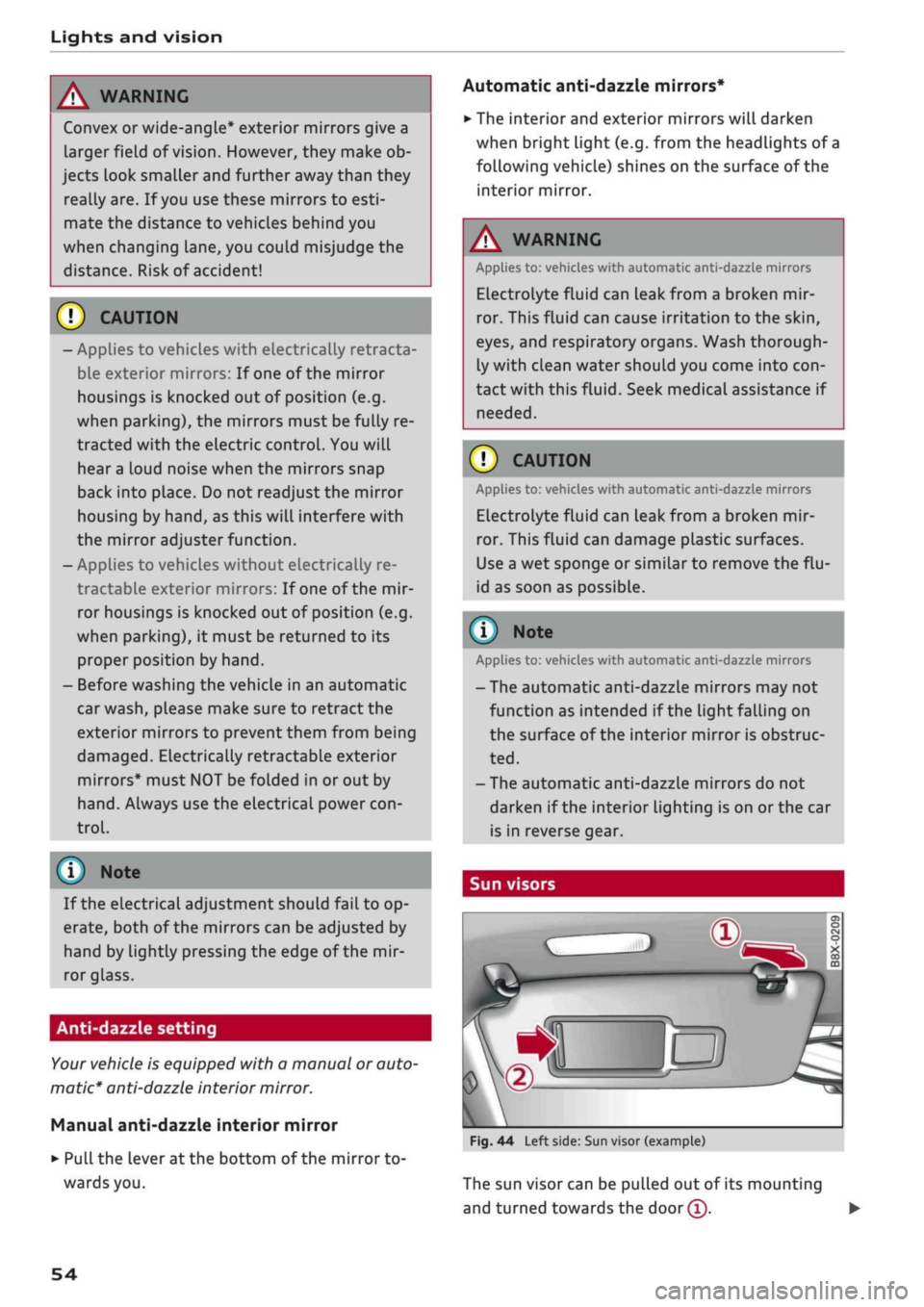
Sun visors
Fig.
44 Left side: Sun visor (example)
The sun visor can be pulled out of its mounting
and turned towards the
door
(T).
•
54
Page 82 of 364

Driving
display.
The rev
counter needle will also move
to
the
READY position.
•
The engine will start again automatically when
you press
the
clutch pedal.
The
indicator lamp
will
go out.
Applies to: vehicles with automatic gearbox
•
Brake
the
vehicle
to a
stop.
The
engine will
be
switched
off
shortly before
the
vehicle comes
to
a
standstill
or
when
the
vehicle
is
station-
aryx).
Keep your foot
on the
brake pedal.
The
indicator
lamp
@/
@
will appear
on the
dis
play.
The rev
counter needle will also move
to
the READY position.
•
The engine will start again automatically when
you take your foot
off
the brake pedal.
If the
parking brake
is
applied
or
hold assist*
is
switched on,
the
engine will only restart when
you press
the
accelerator pedal1).
The
indicator
lamp
will
go out.
Further information
for
automatic gearboxes
The engine will stop
if
the selector lever
is in po
sition
P, N or D.
The engine will start again
if
you move
the
selec
tor lever
to
R during
a
stop phase.
If you
do not
want
the
engine
to
start when mov
ing
the
selector Lever through
R,
move
the
lever
to P quickly.
You
can
control whether
or not the
engine
is
switched
off by
varying
the
amount
of
pressure
on
the
brake pedal.
For
instance,
if
you brake
gently
in
stop-and-go traffic
or
before turning
off
at a junction,
the
engine will remain
on
while
the
vehicle
is at
a standstill.
As
soon as you press
the
brake pedal harder,
the
engine will
be
switched
off.
be switched
off. The rev
counter needle will
move
to the
OFF position.
- Keep your foot
on the
brake pedal during
a
stop phase
to
prevent
the
vehicle from mov
ing.
-
If you press the
ISTART ENGINE STOP|
but
ton*
during
a
stop phase,
the
ignition will
Note
Applies to: vehicles with manual gearbox
If the engine stalls, you
can
start
it
again
di
rectly
by
pressing
the
clutch pedal immedi
ately.
General notes
Applies to: vehicles with start/stop system
Engine does
not
switch
off
The system checks that certain conditions
are
met before
and
during each stop phase.
If
the
in
dicator lamp
Ey
appears
on the
instrument clus
ter display,
the
engine will
not be
switched
off in
the following situations:
- The engine
has
not
yet
reached
the
minimum
temperature required
for
start/stop mode.
- The interior temperature selected
on the air
conditioner*
has
not
yet
been reached.
- The exterior temperature
is
very high/low.
- The windscreen
is
being defrosted
W.
-The parking
aid*
is
switched
on.
- The vehicle battery charge
is too low.
- The steering wheel
is
close
to
full lock
or the
vehicle
is
being steered.
- Reverse gear has just been selected.
- The vehicle
is on a
steep gradient.
-At high altitudes.
Engine cuts
in
again automatically
The stop phase
is
interrupted
in the
following sit
uations,
for
example.
The
engine cuts
in
auto
matically without intervention from
the
driver.
- The vehicle starts
to
roll (e.g.
on a
hiLl).
- The interior temperature deviates from
the air
conditioner setting.
- The windscreen
is
being defrosted
*$?.
- The brake pedal
is
pressed several times
in
suc
cession.
- The vehicle battery charge drops
to an
insuffi
cient level.
1'
May vary in different countries
80
Page 84 of 364
Driving
Electro-mechanical
parking brake
•_ -_-
:c
2C
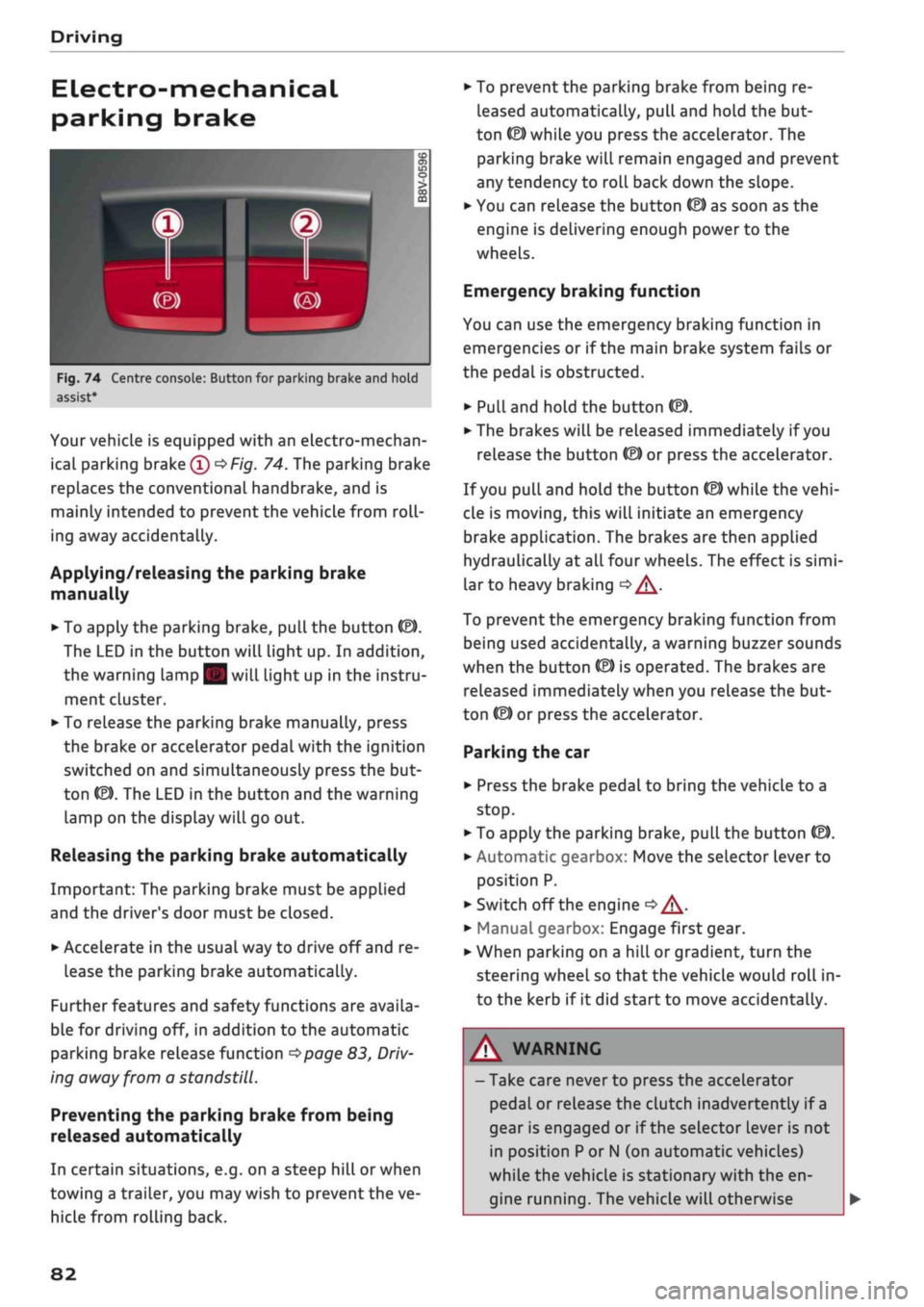
Fig.
74 Centre console: Button for parking brake and hold
assist
Your vehicle is equipped with an electro-mechan
ical parking brake
(l)
^>Fig.
74. The parking brake
replaces the conventional handbrake, and is
mainly intended to prevent the vehicle from
roll
ing away accidentally.
Applying/releasing the parking brake
manually
• To apply the parking brake, pull the button (®).
The LED in the button will light up. In addition,
the warning lamp || will light up in the instru
ment cluster.
•
To release the parking brake manually, press
the brake or accelerator pedal with the ignition
switched on and simultaneously press the but
ton
©).
The LED in the button and the warning
lamp on the display will go out.
Releasing the parking brake automatically
Important: The parking brake must be applied
and the driver's door must be closed.
•
Accelerate in the usual way to drive off and re
lease the parking brake automatically.
Further features and safety functions are availa
ble for driving off, in addition to the automatic
parking brake release function
^>page
83,
Driv
ing away from a standstill.
Preventing the parking brake from being
released automatically
In certain situations, e.g. on a steep hill or when
towing a trailer, you may wish to prevent the ve
hicle from rolling back.
•
To prevent the parking brake from being re
leased automatically, pull and hold the but
ton ©) while you press the accelerator. The
parking brake will remain engaged and prevent
any tendency to roll back down the slope.
•
You can release the button
(®)
as soon as the
engine is delivering enough power to the
wheels.
Emergency braking function
You can use the emergency braking function in
emergencies or if the main brake system fails or
the pedal is obstructed.
•
PuLl
and hold the button
«EJ.
• The brakes will be released immediately if you
release the button
®
or press the accelerator.
If
you
pull and hold the button
(®)
while the
vehi
cle is moving, this will initiate an emergency
brake application. The brakes are then applied
hydraulically at all four wheels. The effect is
simi
lar to heavy braking
<=> /\.
To prevent the emergency braking function from
being used accidentally, a warning buzzer sounds
when the button
(®)
is operated. The brakes are
released immediately when you release the but
ton (®) or press the accelerator.
Parking the car
•
Press the brake pedal to bring the vehicle to a
stop.
•
To apply the parking brake, pull the button
©).
• Automatic gearbox: Move the selector lever to
position P.
• Switch off the engine
•» A-
•
Manual gearbox: Engage first gear.
•
When parking on a hill or gradient, turn the
steering wheel so that the vehicle would roll in
to the kerb if it did start to move accidentally.
A
WARNING
- Take care never to press the accelerator
pedal or release the clutch inadvertently if
a
gear is engaged or if the selector Lever is not
in position
P
or
N
(on automatic vehicles)
while the vehicle is stationary with the en
gine running. The vehicle will otherwise
82
Page 85 of 364

Driving
start moving immediately and could cause
an accident.
- You should only use the emergency braking
function in a real emergency, for example if
the brake system were to fail or if the brake
pedal were to be obstructed. If
you
use the
emergency braking function by activating
the parking brake switch, this has the same
effect as heavy braking. Please remember
that the ESC (and the integrated ABS, EDL
and traction control functions) is still sub
ject to certain physical limits. In a corner or
in bad road or weather conditions an emer
gency stop can cause the vehicle to skid or
lose steering control.
- It is not possible to apply the parking brake
if the electrical power supply fails. In this
case,
park the vehicle on a
level
surface and
select 1st gear (manual gearbox) or move
the selector lever to position
P
(automatic
gearbox) to prevent
it
from rolling. Obtain
professional assistance.
- Always take the key with you when leaving
your
vehide
- even if
you
only intend to be
gone for
a
short time. This is especially im
portant if children are left in the car. They
might otherwise be able to start the engine,
release the parking brake or use power-op
erated equipment such as the electric
win
dows - this could lead to injuries.
- Do not leave anyone (especially children) in
the vehicle when it is locked. Locked doors
could delay assistance in an emergency, po
tentially putting lives at risk.
© Note
Applies to: vehicles with automatic gearbox
You can apply the parking brake manually or
switch on the hold assist* when stopping at
traffic lights, etc. You do not then have to
hold the car with the brake pedal, as the
brakes will stop it creeping forward while a
gear is engaged in the automatic transmis
sion.
When you drive off in the normal way,
co
the parking brake will be released automati-
<
° cally
and your vehicle will start moving
2 •=>
page 83. o < 00
O
Note
- Any slight noise which may be heard when
the parking brake is applied or released is
quite normal and no cause for concern.
- The parking brake runs an automatic test
cycle at regular intervals when the vehicle is
parked.
This may cause a slight noise, which
is normal.
- If the electrical power supply fails, it is not
possible to release the parking brake (if it
was applied) or to apply the parking brake
(if it was released)
•=> A-
Obtain professional
assistance.
Driving away from a
standstill
Various features and safety functions are availa
ble for driving off, depending on the equipment
in your vehicle.
Hill starting with the parking brake applied
Important: The driver's door must be closed.
•
To drive off more easily on a slope, apply the
parking brake and drive off just as you usually
would.
The parking brake will be released auto
matically, but not until there is enough power
at the wheels to make the vehicle move in the
desired direction.
Hill starting with the hill hold assist
The hill hold assist function makes it easier to
drive away on a slope.
Important: The driver's door must be closed and
the engine must be running.
•
To activate the hill hold assist, press and hold
the brake pedal for several seconds. The vehicle
must be on a slope and facing uphill.
When you release the brake pedal the braking
force will be maintained for
a
moment
^^
in
order to hold the vehicle and make it easier for
you to drive away. •
83
Page 86 of 364

Driving
Driving off with the hold assist
Applies to: vehicles with hold assist
The hold assist helps the driver if the vehicle is
stationary for a Long period or very often, for in
stance at traffic lights, on steep gradients or in
stop-and-go traffic.
Important: The driver's door must be closed and
the engine must be running.
• To switch the hold assist on/off, press the but
ton
«59 © ^>page
82, Fig. 74,
•=»^.
The LED in
the button will light up or go out.
•
Once it detects that the vehicle has stopped,
the hold assist keeps the vehicle stationary. In
this case, a green indicator Lamp
^
Lights up in
the instrument cluster. You can now take your
foot
off the brake pedal.
•
Drive off in the normal way: the brake will be
released automatically and the vehicle will
start moving.
In certain situations, the hold assist transfers the
job of holding the vehicle to the parking brake.
As soon as the parking brake is holding the
vehi
cle
still,
the warning lamp || appears in the in
strument cluster. In addition, the LED in the ®)
button will light up.
Driver messages in the instrument cluster
display
P.]
Hold assist: unavailable
If this message appears, the hold assist is un
available or the system requirements have not
been met.
A WARNING
Applies to: vehicles with hill hold assist
If
you
do not drive away immediately after re
leasing the brake pedal, or if the engine
stalls,
the vehicle could start to roll back. You
should therefore immediately press the brake
pedal or apply the parking brake.
A WARNING
The intelligent technology in the hold assist*
and hill hold assist functions cannot defy the
laws of physics. Do not let the extra conven
ience afforded by the hold assist* and hill
hold assist functions tempt you into taking
any risks when driving - this can cause
acci
dents.
- The hold assist* and hill hold assist func
tions cannot keep the vehicle stationary in
all conditions on a gradient (e.g. if the road
is slippery or icy).
- Always ensure that the vehicle is stopped
properly and safely - risk of accident!
(T)
CAUTION
Switch off the hold assist* function before
driving the vehicle into a car wash.
©
r
Note
Applies to: vehicles with automatic gearbox
When the hold assist* function is switched
on,
it stops the vehicle from creeping for
wards when you take
your
foot off the brake
pedal.
Off-road driving
General notes
The functions of the electronic stabilisation
con
trol (ESC) have been augmented to provide extra
assistance when driving off-road. The
ESC
off-
road mode can be activated in situations when it
would be advantageous for the wheels to lock, or
when a differential Lock would normally be re
quired
^>page
146.
This Audi model is not an off-road vehicle, how
ever. When driving off-road you are advised to
avoid tracks or terrain which are not suited to
the design of the car and your own driving skills
and experience. Do not take any risks.
After driving off-road
- After driving, remove any pieces of foliage or
other objects which may be caught in the radia
tor grille, under the car or in the wheels. In par
ticular, inspect the tyre treads for stones.
- Clean the bodywork and underside of the
vehi
cle and check the underside for possible dam
age.
- Remove dirt from the windows, headlight
len
ses and number plates. •
84
Page 90 of 364

Driving
©
y Note
If the selector lever does not lock automati
cally, a malfunction has occurred. In this case,
the power transmission is interrupted to pre
vent the vehicle from moving unintentionally.
Proceed as follows to engage the selector lev
er lock again:
- Applies to vehicles with 6-speed gearbox:
Briefly press the brake pedal.
- Applies to vehicles with 7-speed gearbox:
Press the brake pedal. Move the selector
lever to position
P
or
N
and then select a
gear.
- If the vehicle does not move forwards or
backwards even though a gear is selected,
proceed as follows:
- If the vehicle does not move in the desired
direction,
the system may have failed to en
gage the gear correctly. In this case, press
the brake pedal and select the gear again.
- If the vehicle still does not move in the de
sired direction, a system malfunction has
occurred.
Seek professional assistance and
have the system checked.
General notes on driving an automatic
Applies to: vehicles with automatic gearbox
Fig.
77 Detail of the centre console: Selector lever with in
terlock button
Starting the engine
•
Move the selector Lever to
P
or N. In the case of
Low outside temperatures (below -10 °C), the
engine can only be started when the selector
lever is in position P.
Driving away from a standstill
•
Press and hold the brake pedal.
•
Press and hold the interlock button (the button
in the selector lever handle), set the selector
lever to the desired position (e.g. D)
^>page
86
and release the interlock button.
•
Wait for the gearbox to engage the gear (a
slight movement can be felt).
•
Release the brake and press the accelerator
There are several convenient functions to help
you drive away on gradients
^page
83.
Stopping briefly
•
Press the brake pedal to hold the vehicLe when
stationary (for instance at traffic lights).
•
Do not press the accelerator.
•
To prevent the vehicLe from rolling away, apply
the parking brake before moving off on steep
gradients
•=>^
and
•=>(]).
• As soon as you acceLerate as normal, the park
ing brake will automatically be released and
the vehicLe will start moving. Important: The
driver's door must be closed.
Stopping/parking the car
If
you
open the driver's door while the selector
lever is not in position P, the vehicle can roll
away. The message Shift to P, otherwise vehicle
can roll away. Doors do not lock if lever is not in
P. appears on vehicles with convenience key*. A
buzzer will also sound.
•
Press and hold the brake pedal
<=>
A..
•
Apply the parking brake.
•
Move the selector Lever to P.
In some situations (such as on mountain roads or
when towing a trailer or caravan) it can be advan
tageous to switch temporarily to the manual
shift programme so that the gear ratios can be
selected manually to suit the driving conditions
^>page
90.
On level ground it is sufficient to move the selec
tor lever to P. On a gradient the parking brake
should be applied first and the selector Lever
should be moved to
P ^>page
82. This reduces
the load on the locking mechanism and makes it
easier to move the selector lever out of position
P. •
88
Page 94 of 364
Driving
•
Briefly pull the selector lever back from
posi
tion D/S to select position S, or move the selec
tor lever to the right into the tiptronic gate, or
select dynamic mode in drive select*
^>page
131.
•
Press the brake pedal firmly with your
left
foot
and hold it down for at Least one second.
•
At the same time, press the accelerator all the
way down with your right foot until the engine
revs are high and steady.
• Take your
left
foot
off
the brake.
A WARNING
- Always adapt your driving style to the traffic
conditions.
- Only use the launch control programme
when road and traffic conditions permit,
and make
sure
your manner of driving and
accelerating the vehicle does not inconven
ience or endanger other road users.
- Please note that the driven wheels may
start to spin when the off-road mode is
switched on, causing the vehicle to Lose
grip,
in particular on slippery or wet roads -
danger of skidding!
- When acceleration has been completed, you
should deactivate the off-road mode again
by briefly pressing the
|flQFF|
button.
© Note
- The gearbox may be hot after you have used
the launch control programme. In this case,
the programme may not be available for
several minutes. The programme will be
available again after
a
cool-down period.
-Accelerating with the launch control pro
gramme places a heavy load on all parts of
the vehicLe. This can result in increased wear
and tear.
Gearbox malfunction
Applies to: vehicles with automatic gearbox
| Gearbox malfunction! Please stop the vehi
cle and select P
There is a malfunction in the gearbox. Park the
vehicle safely and do not drive on. Obtain profes
sional assistance.
| Gearbox overheating! Please stop the vehi
cle.
The gearbox is overheating and could be dam
aged.
Stop the vehicle and let the gearbox cool
down with the engine idling and the selector lev
er in position P. If the warning lamp and the
message disappear, drive to a qualified workshop
soon and have the fault rectified. Do not drive on
if the warning lamp stays on and the message
does not disappear. Obtain professional assis
tance.
E3
Gearbox malfunction: you can continue driv
ing
Drive to a qualified workshop soon and have the
fault rectified.
S3
Gearbox malfunction: no reverse gear (you
can continue driving)
A gearbox malfunction has occurred. The gearbox
will switch to the back-up programme. The pro
gramme will only move into certain gears or may
not be able to shift gears at all. The engine may
stall.
You can no longer engage reverse gear.
Drive to a qualified workshop without delay and
have the fault rectified.
jftj
Gearbox malfunction: you can continue driv
ing in D until engine off
Park your vehicle well away from moving traffic.
Obtain professional assistance.
ty
Gearbox overheating: please adapt driving
style
You can continue driving at moderate speed. You
can resume normal driving if the indicator lamp
goes out.
LQ]
Gearbox: please press brake pedal and select
gear again
If
a
gearbox malfunction has occurred due to
overheating, this message will appear once the
gearbox has cooled down again.
92